 MANSOQ
 Inventory
View stock levels at a location
Review stock by storage location and product and distinguish stock viewing from stock-changing transactions.
Current source · source reviewed · 3 min read
Before you begin
- You are a member of the facility.
- The facility has a storage location that holds stock.
- You have the permissions listed below.
1. Open the facility services
Go to the facility. Click Services.
2. Select the storage location
Select the storage location that you want to check.
3. Open the inventory
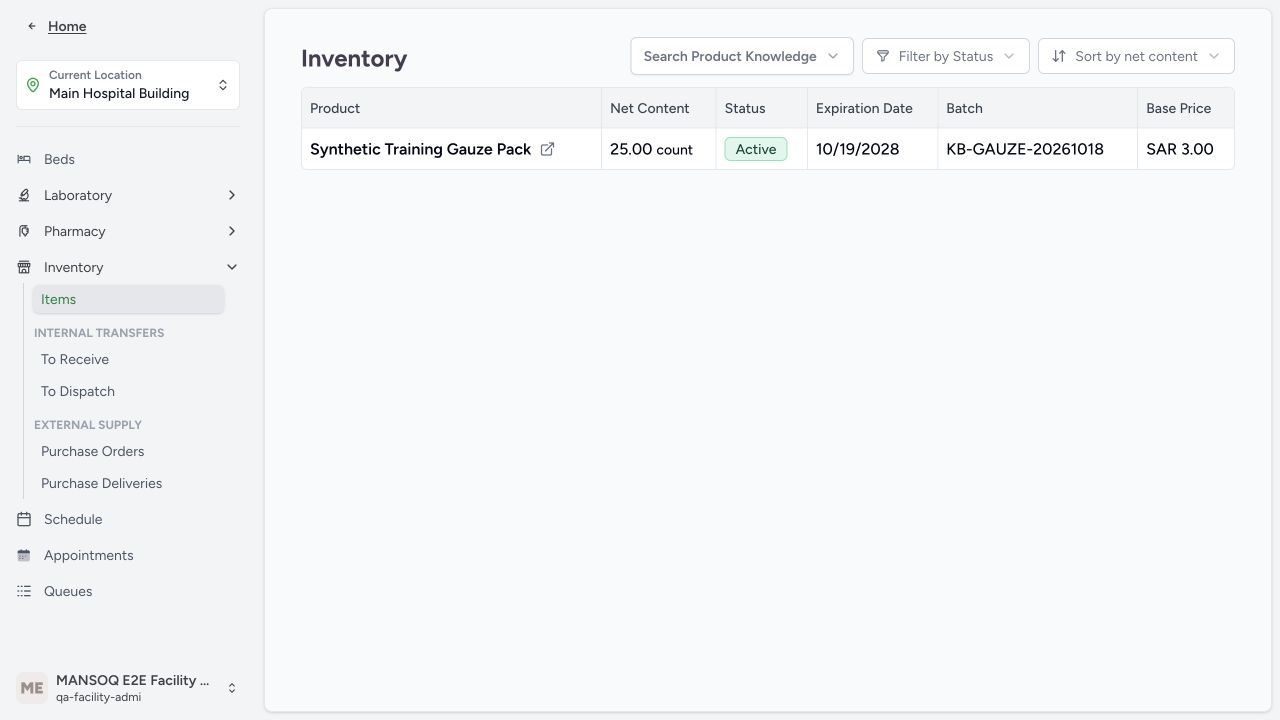
Click View Inventory. MANSOQ shows every product in stock at the location.
The list shows these details for each product:
| Components | What it shows |
|---|---|
| Net Content | The quantity of the product in stock. |
| Status | The status of the inventory item: Active, Inactive, or Entered in Error. |
| Expiration Date | The date when the product expires. |
| Batch / Lot Number | The batch or lot number of the product. |
| Price | The price of the product. |
4. Filter the list
Filter the list by catalog entry to see one product only. Filter the list by status to see Active, Inactive, or Entered in Error items.
5. Sort the list
Sort the list by quantity. Select low to high, or high to low.
6. Open a product
Select a product to see its details.
Note: This page is read-only. You cannot add, remove, or adjust stock here. Stock changes only when you receive a purchase delivery, receive a supply delivery, or dispense medicine to a patient.
Permissions
| Permission | Access |
|---|---|
| Can Read Inventory Item | Lets you view the inventory items and stock levels at a location. |
Facility Admin, Administrator, Admin, Staff, Doctor, Nurse, Volunteer, and Pharmacist have this permission.
Expected Outcome
- You see the current stock level, status, expiration date, batch or lot number, and price of every product at the location.
Version and facility configuration
This procedure is grounded in the repository’s version 3.1 user guide and the audited source revision. Available encounter types, required demographics, terminology, permissions and enabled services depend on your facility configuration. Use the labels and access controls on your own instance; the source references below identify the documented implementation.
Verified received-stock example
The synthetic Facility Admin receipt produced 25 count units of KB-GAUZE-20261018 at Main Hospital Building. Product, quantity, final expiry 19 October 2028 and location inventory were independently read back. Other products, roles and facilities remain separate verification work.
Troubleshooting
There is no action to adjust the stock on this page
The inventory list is read-only. Stock changes through receiving purchase or supply deliveries and dispensing medication.
Source evidence
References are pinned to the private MANSOQ source repository. Repository access is required to open these links.
- repositories/platform/mansoq-documentation/versioned_docs/version-3.1/flows/supply/inventory-item/view-stock-levels.mdx:5 · f6e9f05f
- repositories/platform/mansoq-web/src/pages/Facility/services/inventory/InventoryList.tsx:85 · f6e9f05f
- repositories/platform/mansoq-documentation/versioned_docs/version-3.1/flows/supply/inventory-item/view-stock-levels.mdx:25 · f6e9f05f
- repositories/platform/mansoq-documentation/versioned_docs/version-3.1/flows/supply/inventory-item/view-stock-levels.mdx:17 · f6e9f05f