 MANSOQ
 Billing
Record a payment
Record a payment, advance or credit note with the correct amount, method, account and date.
Current source · source reviewed · 3 min read
Before you begin
- If you record a payment against an invoice, the invoice is issued.
- If you record a general credit, you open the account page for the patient.
- You have the permissions listed below.
1. Start the payment
Start the payment from one of these places:
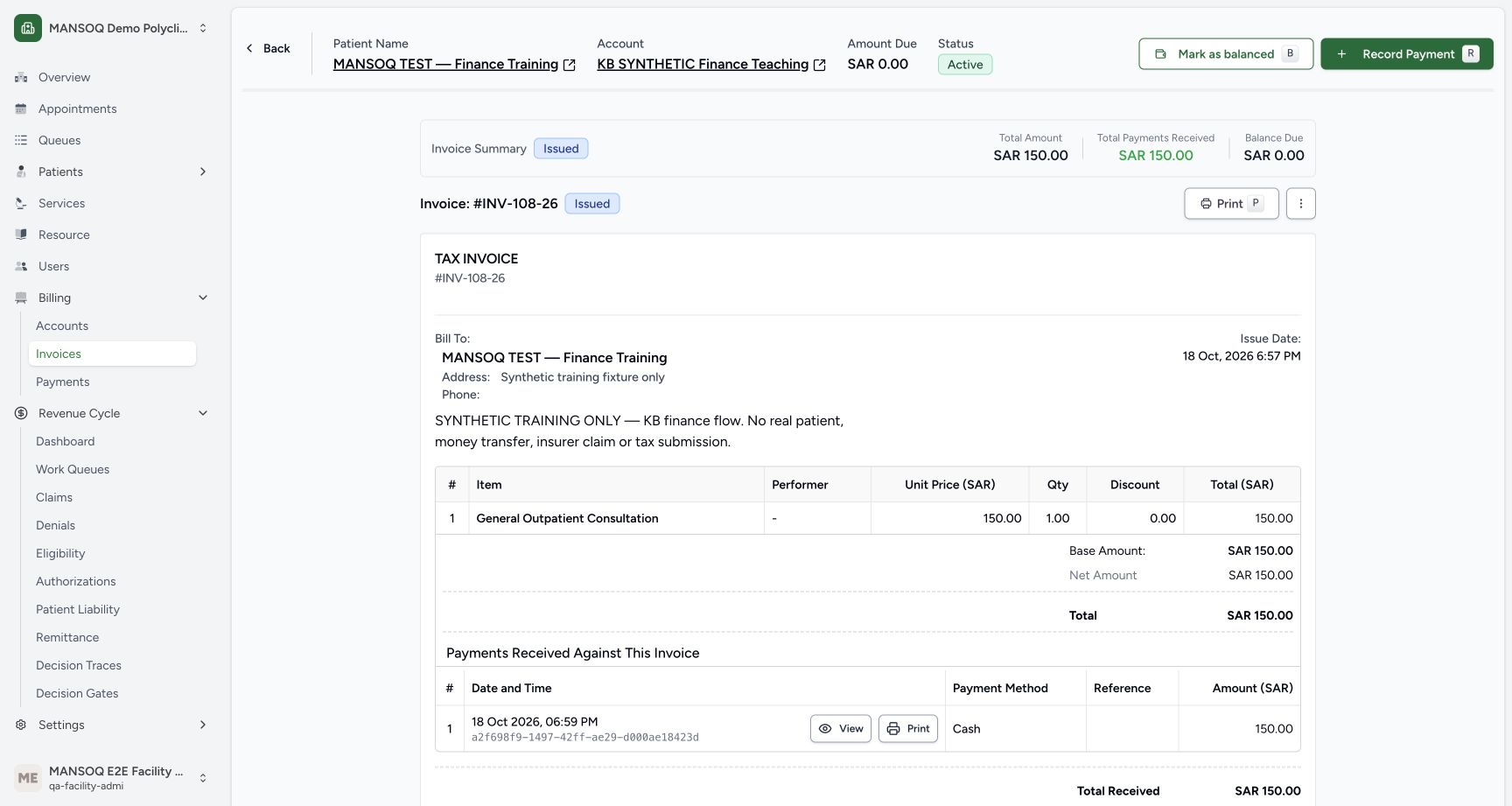
- On an issued invoice, click Record Payment. For a refund invoice, click Record Credit Note.
- After you issue an invoice, MANSOQ offers the same action immediately.
- On an account page, click Advance/Receipt to record a payment on the account. To record a credit note, open the menu and select Record Credit Note.
Note: Press r on an invoice page or an account page to open Record Payment. Press c on an account page to open Advance/Receipt.
2. Enter the payment details
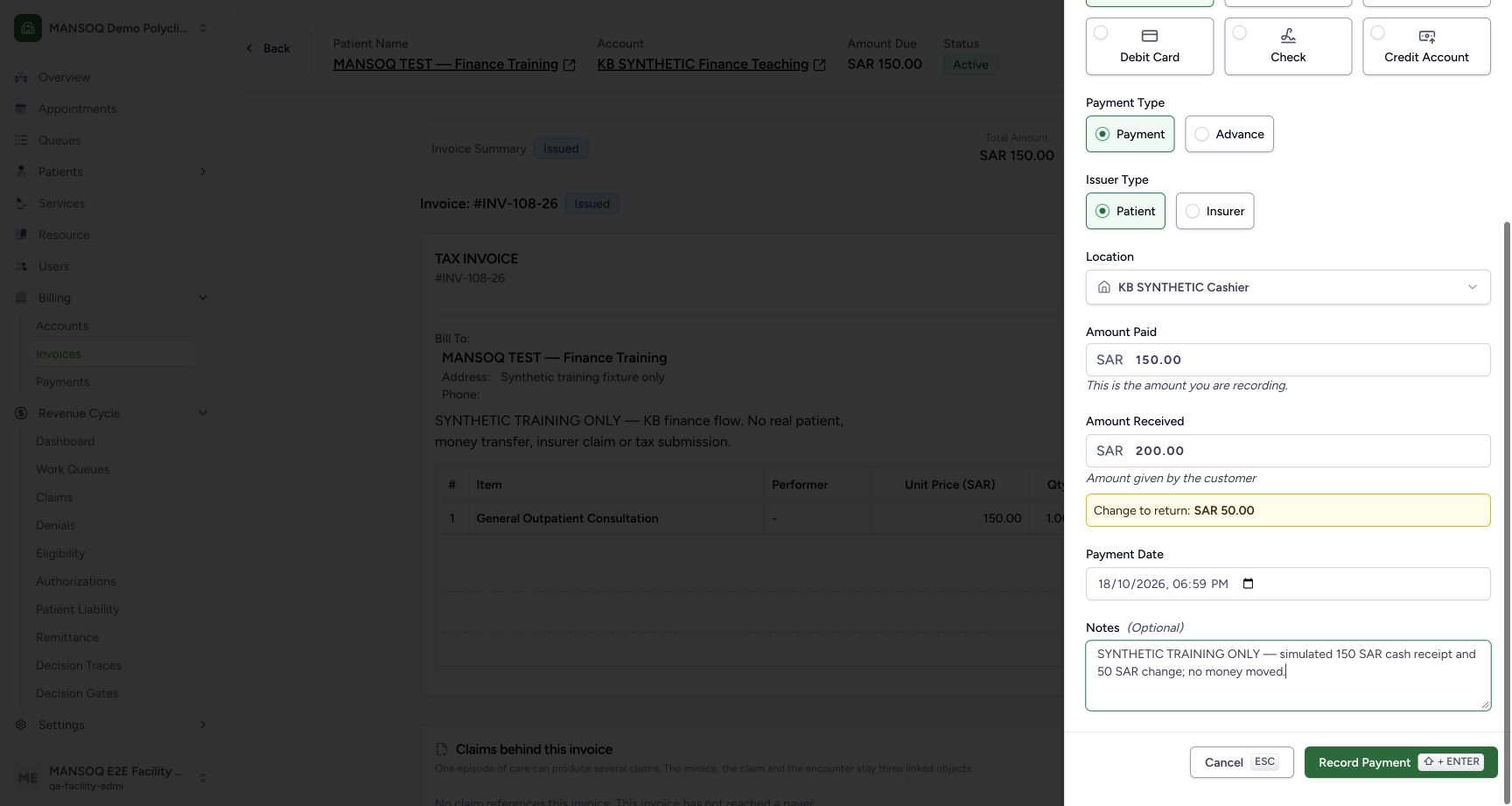
Complete the form fields.
| Components | What it captures |
|---|---|
| Payment Method | How the payer pays. Select Cash, Credit Card, Credit Account, Check, Direct Deposit or Debit Card. |
| Payment Type | The nature of the transaction. Select Payment or Advance. |
| Issuer Type | Who pays. Select Patient or Insurer. |
| Location | The place where you collect the payment. |
| Amount Paid | The amount that the payer pays. |
| Amount Received | The cash amount that you receive from the payer. |
| Reference Number | The transaction reference for the payment. |
| Payment Date | The date of the payment. |
| Note | More information about the payment. |
For a credit note, MANSOQ does not ask for an Issuer Type. Enter the Refund Amount in place of the Amount Paid.
If you select Cash as the Payment Method, enter the Amount Received. MANSOQ calculates the change to return.
For all other payment methods, you can enter a Reference Number.
Note: The Payment Date cannot be in the future.
Note: Whether the Location field is mandatory depends on your facility's configuration.
3. Submit the payment
Click the submit button to save the payment.
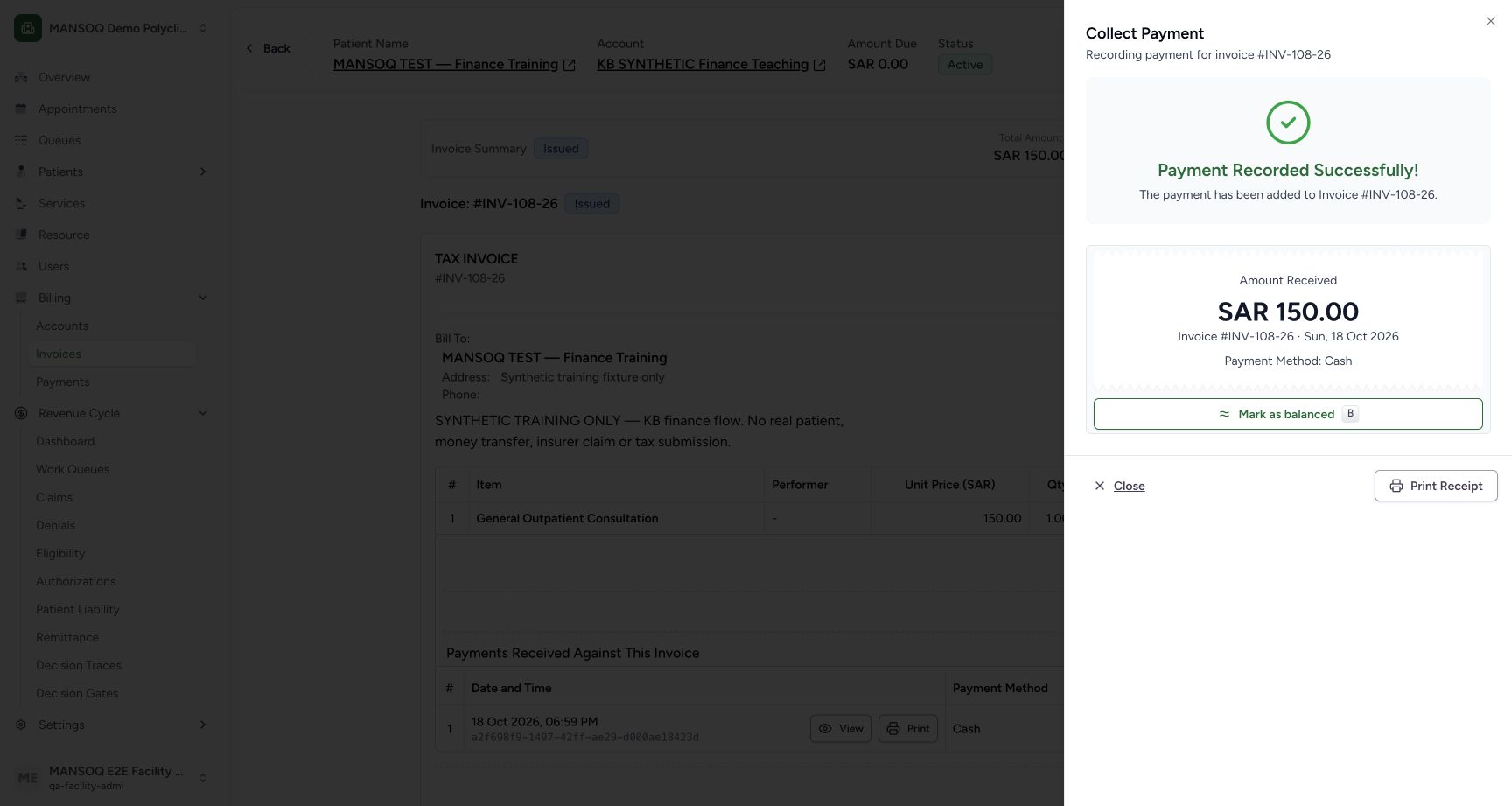
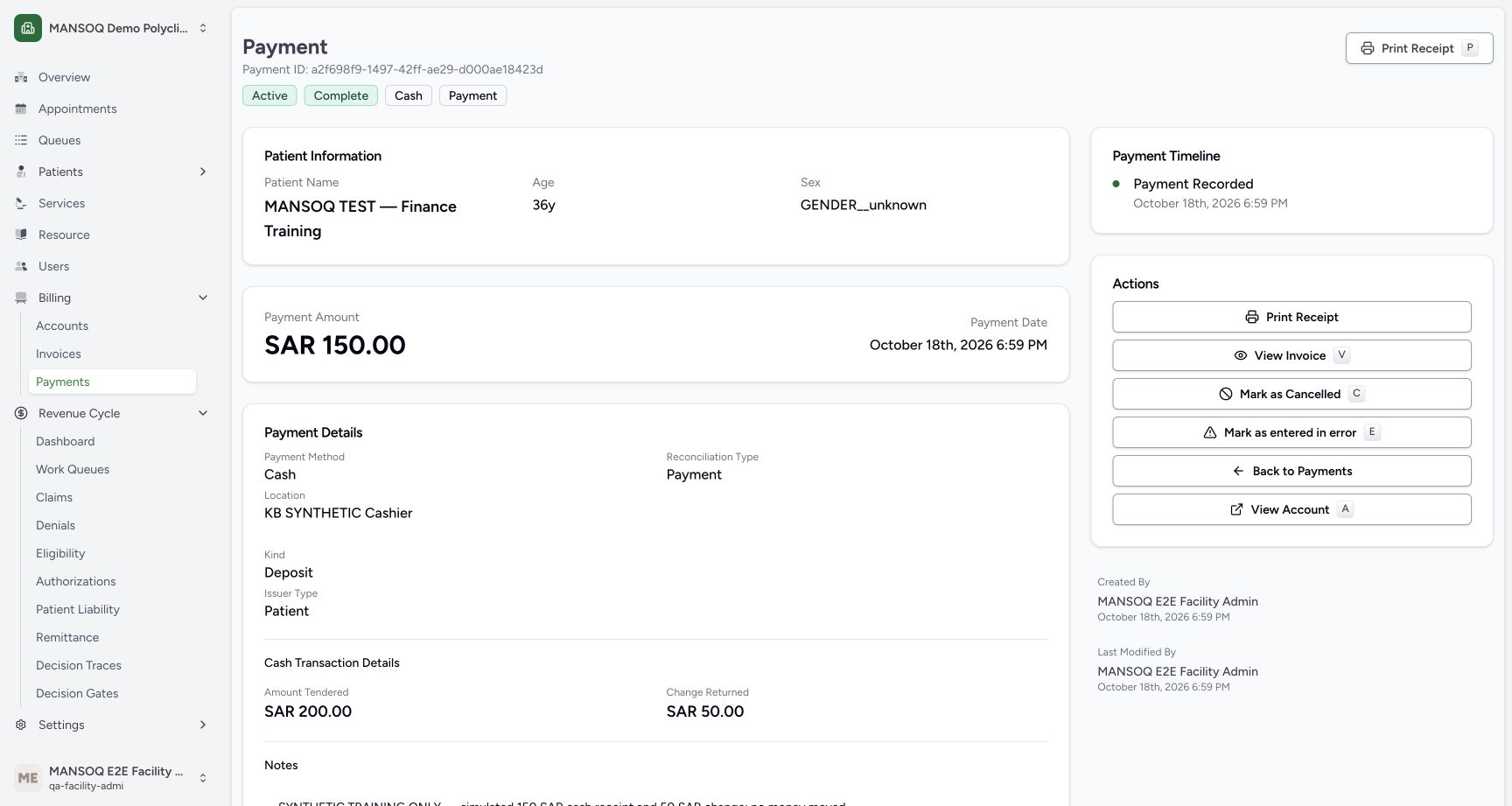
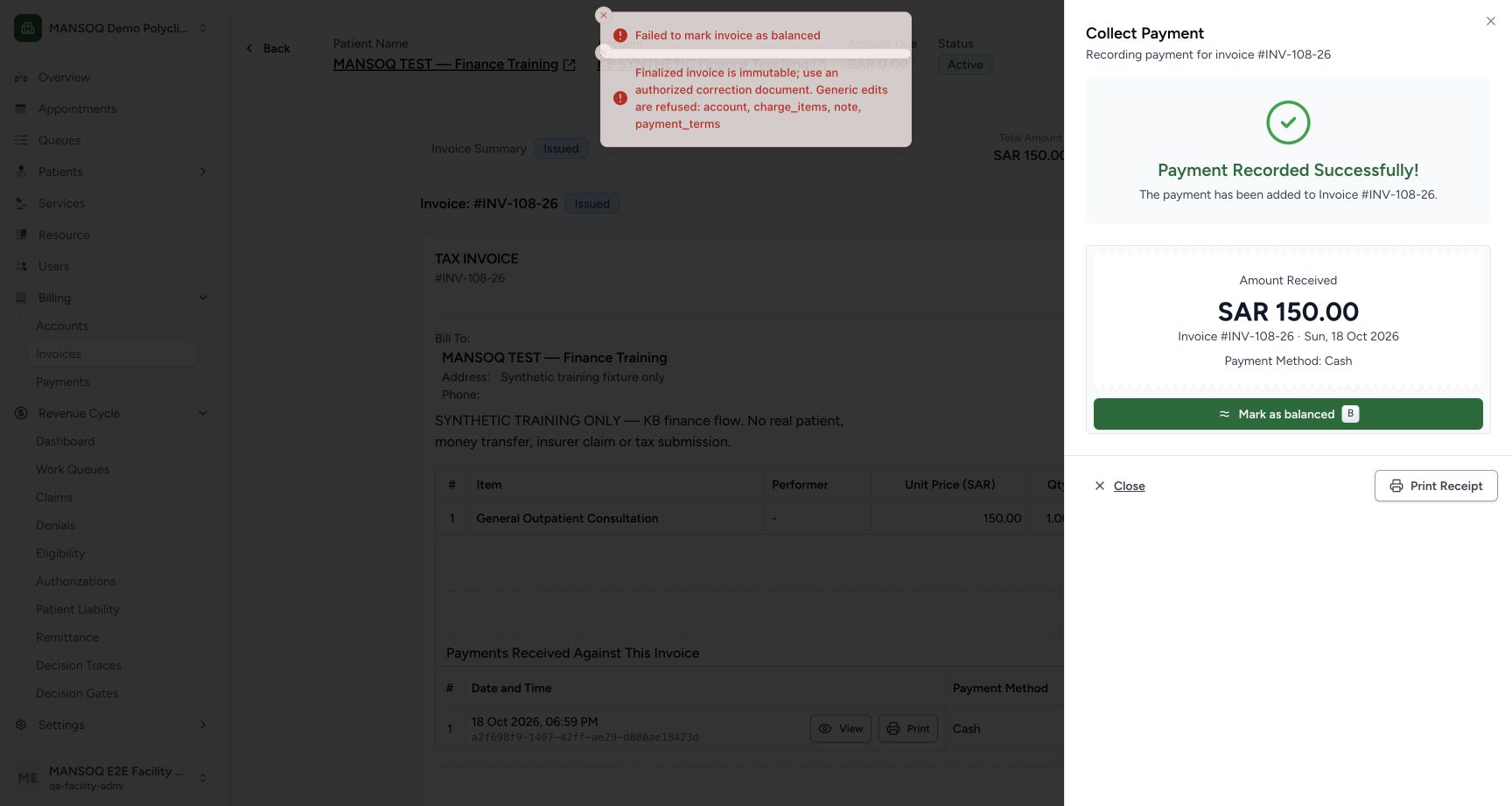
The local UI example records 150 SAR against the invoice, 200 SAR tendered and 50 SAR change. A separate receipt detail and independent database readback confirm exactly one saved payment. If a later balance-status update fails, retain this receipt and investigate the update; do not record the payment twice.
Permissions
| Permission | Access |
|---|---|
| Can Write Payment Reconciliation | Record a payment or a credit note. Facility Admin, Admin, Staff, Doctor, Nurse, and Pharmacist have this permission. |
Expected Outcome
- MANSOQ records the payment against the invoice, or as a credit on the account.
- For a cash payment, MANSOQ shows the change to return to the payer.
Version and facility configuration
This procedure is grounded in the repository’s version 3.1 user guide and the audited source revision. Available encounter types, required demographics, terminology, permissions and enabled services depend on your facility configuration. Use the labels and access controls on your own instance; the source references below identify the documented implementation.
Current invoice balancing limitation
At the audited revision, Mark as balanced sends generic invoice fields that finalized-invoice protection rejects. The tested invoice stayed Issued with 150 SAR received and zero balance. A separate authorized status-only API continuation was verified; it does not establish a successful UI balance action. See the dedicated balancing troubleshooting guide.
Current account advance and partial-return example
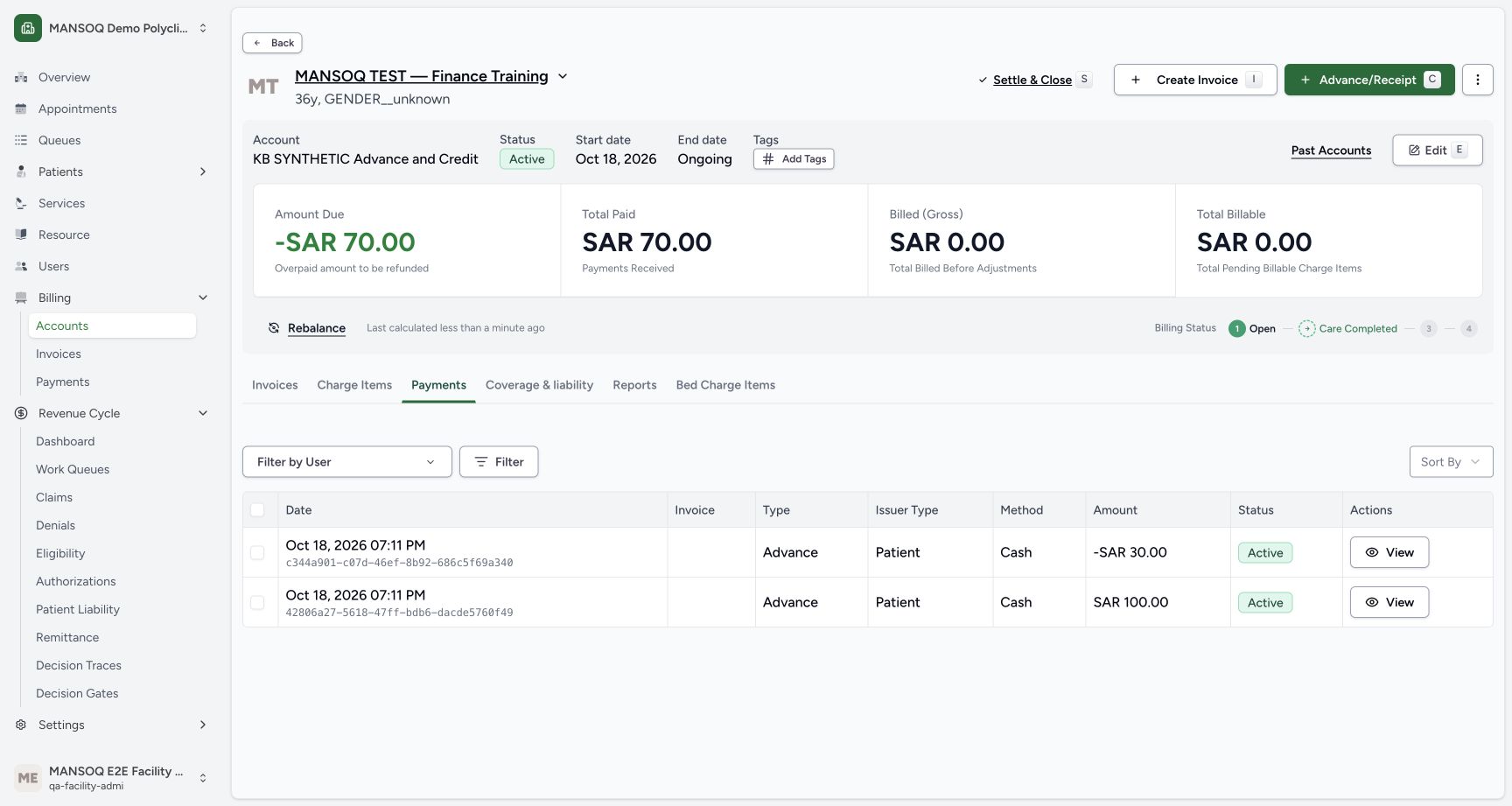
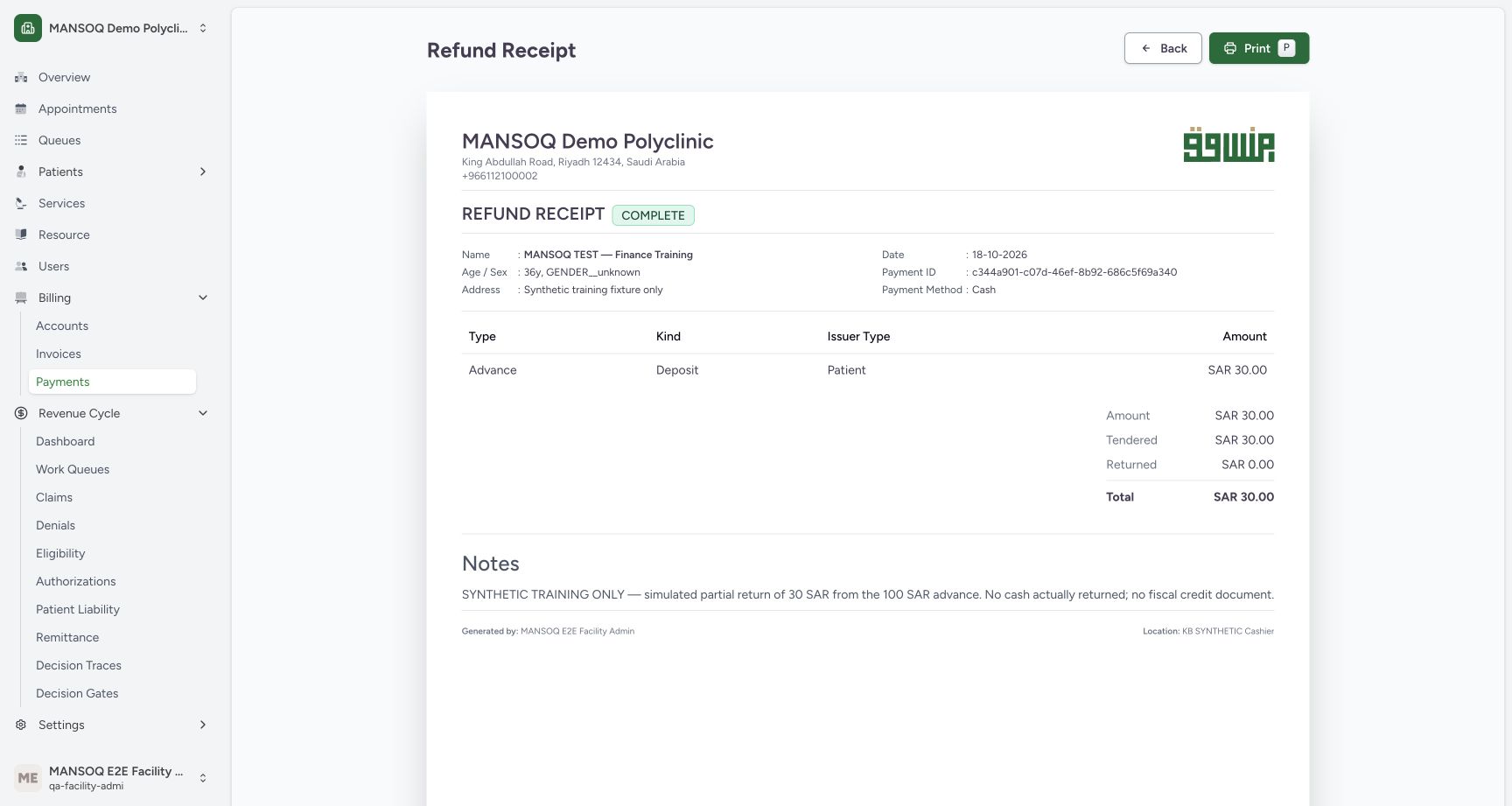
The separate illustrated guide records a 100 SAR account advance without an invoice, then two distinct returns of 30 and 70 SAR. The ledger preserves all three entries. Underlying credit amounts are positive with is_credit_note=true; the UI displays their negative effect. The printable refund receipt is a billing record and does not establish a fiscal correction document.
Troubleshooting
Payment Date is rejected
The payment date cannot be in the future. Check the selected date and your device clock.
Location is required but no collection location is selectable
The picker requests locations directly linked to the user’s existing facility organization. Ask the authorized facility setup owner to verify the configured location, active status and organization/location links; a general facility location alone may not appear. Keep the required location control in place.
Billing Officer sees No payments after a permission error
The audited payment-reconciliation permission catalogue does not include Billing Officer. Check the actual permission refusal rather than interpreting the fallback empty table as proof that no receipts exist. Use an already authorized role or your approved access process.
Source evidence
References are pinned to the private MANSOQ source repository. Repository access is required to open these links.
- repositories/platform/mansoq-documentation/versioned_docs/version-3.1/flows/billing/payment-reconciliation/record-payment.mdx:5 · f6e9f05f
- repositories/platform/mansoq-web/src/pages/Facility/billing/PaymentReconciliationSheet.tsx:786 · f6e9f05f
- repositories/platform/mansoq-documentation/versioned_docs/version-3.1/flows/billing/payment-reconciliation/record-payment.mdx:23 · f6e9f05f
- repositories/platform/mansoq-documentation/versioned_docs/version-3.1/flows/billing/payment-reconciliation/record-payment.mdx:17 · f6e9f05f
- repositories/platform/mansoq-web/src/pages/Facility/billing/PaymentReconciliationSheet.tsx:844 · f6e9f05f
- repositories/platform/mansoq-web/src/components/Location/LocationPicker.tsx:81 · f6e9f05f
- repositories/platform/mansoq-core/mansoq/emr/api/viewsets/location.py:170 · f6e9f05f
- repositories/platform/mansoq-core/mansoq/security/permissions/payment_reconciliation.py:30 · f6e9f05f
- repositories/platform/mansoq-core/mansoq/emr/api/viewsets/payment_reconciliation.py:90 · f6e9f05f
- repositories/platform/mansoq-web/src/pages/Facility/billing/PaymentReconciliationSheet.tsx:146 · f6e9f05f
- repositories/platform/mansoq-core/mansoq/emr/models/payment_reconciliation.py:27 · f6e9f05f
- repositories/platform/mansoq-core/mansoq/emr/resources/account/sync_items.py:92 · f6e9f05f
- repositories/platform/mansoq-web/src/pages/Facility/billing/paymentReconciliation/PaymentsData.tsx:469 · f6e9f05f
- repositories/platform/mansoq-web/src/pages/Facility/billing/paymentReconciliation/PrintPaymentReconciliation.tsx:107 · f6e9f05f
- repositories/platform/mansoq-core/mansoq/emr/api/viewsets/payment_reconciliation.py:97 · f6e9f05f
- repositories/platform/mansoq-web/src/pages/Facility/billing/account/AccountShow.tsx:139 · f6e9f05f
- repositories/platform/mansoq-core/mansoq/security/permissions/payment_reconciliation.py:17 · f6e9f05f