 MANSOQ
 Facility administration
Set the facility business timezone
Configure a valid IANA timezone for financial service dates and distinguish it from the viewing device’s local clinical display.
Current source · source reviewed · 3 min read
Before you begin
- You have permission to update the facility.
- The facility owner has confirmed its business timezone.
1. Open facility editing
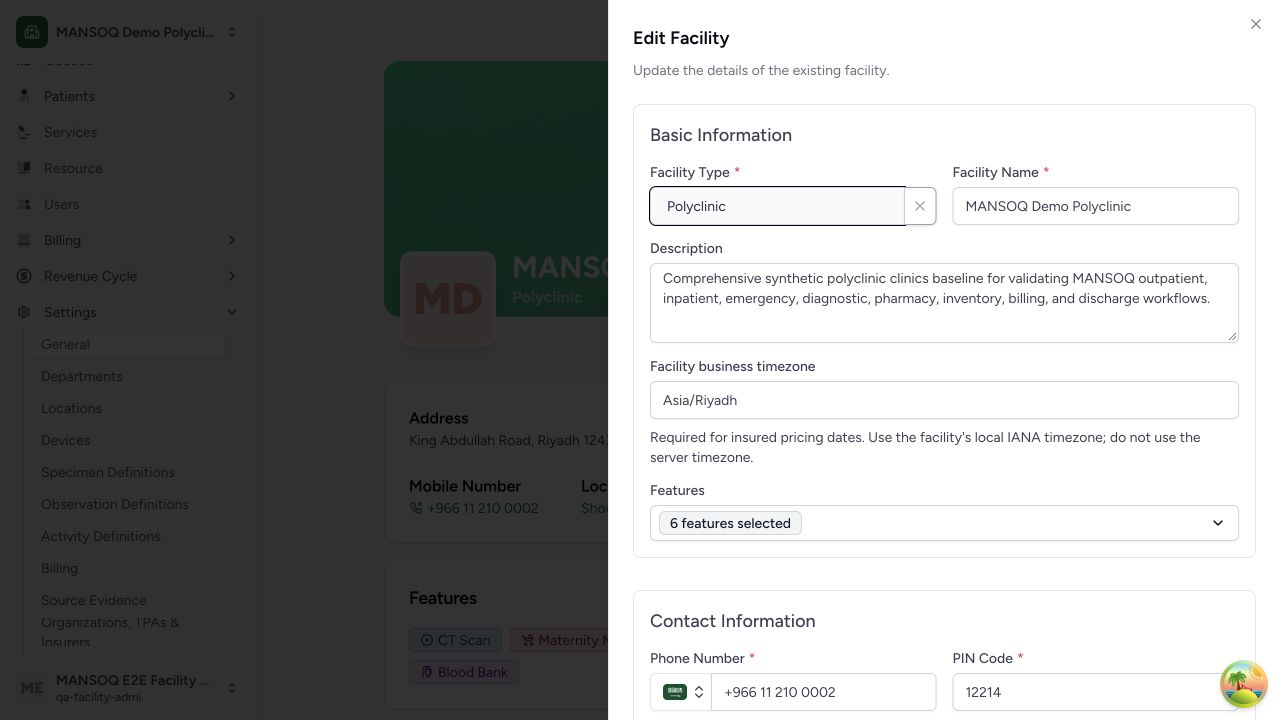
Open the facility, then Settings → General → Edit Facility Details. The edit sheet uses the shared facility form.
2. Enter the business timezone
In Facility business timezone, enter the facility’s IANA timezone, for example Asia/Riyadh for a facility operating in that zone. The form validates the name using the browser Intl timezone implementation; the backend independently validates the IANA zone.
3. Save and check the setting
Select Update Facility after changing the field. The button remains disabled when nothing has changed or an update is in progress. Reopen the edit form to verify the saved value.
4. Use the financial date correctly
For insured service-date decisions, the backend derives the local business date by converting the service performance timestamp to this facility timezone. The timestamp must include timezone information. A missing or invalid timezone causes the service-date decision to fail rather than silently choosing the server timezone.
5. Check clinical display separately
Some clinical observation screens format dates and times in the viewing browser’s local timezone. Saving the business timezone does not prove that every clinical screen will display dates in that zone. Verify the device timezone when investigating a display difference.
Legacy setting fallback
The audited financial helper first uses business_timezone and falls back to the older facility extensions timezone only when the dedicated field is absent. Establish and validate the dedicated business setting for current setup.
Why this matters
A service performed near midnight can fall on different calendar dates in different zones. The facility business date is used for financial decisions; it should not be inferred from the application server’s timezone.
Troubleshooting
Enter a valid IANA timezone appears
Use a timezone identifier recognized by the browser and backend, such as Asia/Riyadh, rather than an abbreviation or numeric UTC offset.
Financial service-date decision reports missing timezone
Ask the authorized administrator to establish the facility business timezone, then repeat the affected decision through its normal workflow. Do not alter a performed-at timestamp solely to bypass the hold.
Source evidence
References are pinned to the private MANSOQ source repository. Repository access is required to open these links.
- repositories/platform/mansoq-documentation/versioned_docs/version-3.1/flows/facility/facility/update-facility-details.mdx:24 · f6e9f05f
- repositories/platform/mansoq-web/src/components/Facility/FacilityForm.tsx:65 · f6e9f05f
- repositories/platform/mansoq-web/src/components/Facility/FacilityForm.tsx:308 · f6e9f05f
- repositories/platform/mansoq-web/src/components/Facility/FacilityForm.tsx:490 · f6e9f05f
- repositories/platform/mansoq-core/mansoq/emr/resources/facility/spec.py:112 · f6e9f05f
- repositories/platform/mansoq-core/mansoq/emr/rcm/services/service_date.py:15 · f6e9f05f
- repositories/platform/mansoq-web/src/pages/Encounters/tabs/observations.tsx:22 · f6e9f05f