 MANSOQ
 RCM & insurance
Build a claim and inspect readiness before submission
Create a separate claim record and review charge, coding, attachment and authorization evidence.
Current source · source reviewed · 8 min read
Before you begin
- Claim-management permission.
- Episode charge capture, coding and supporting documentation reviewed.
1. Open the correct episode
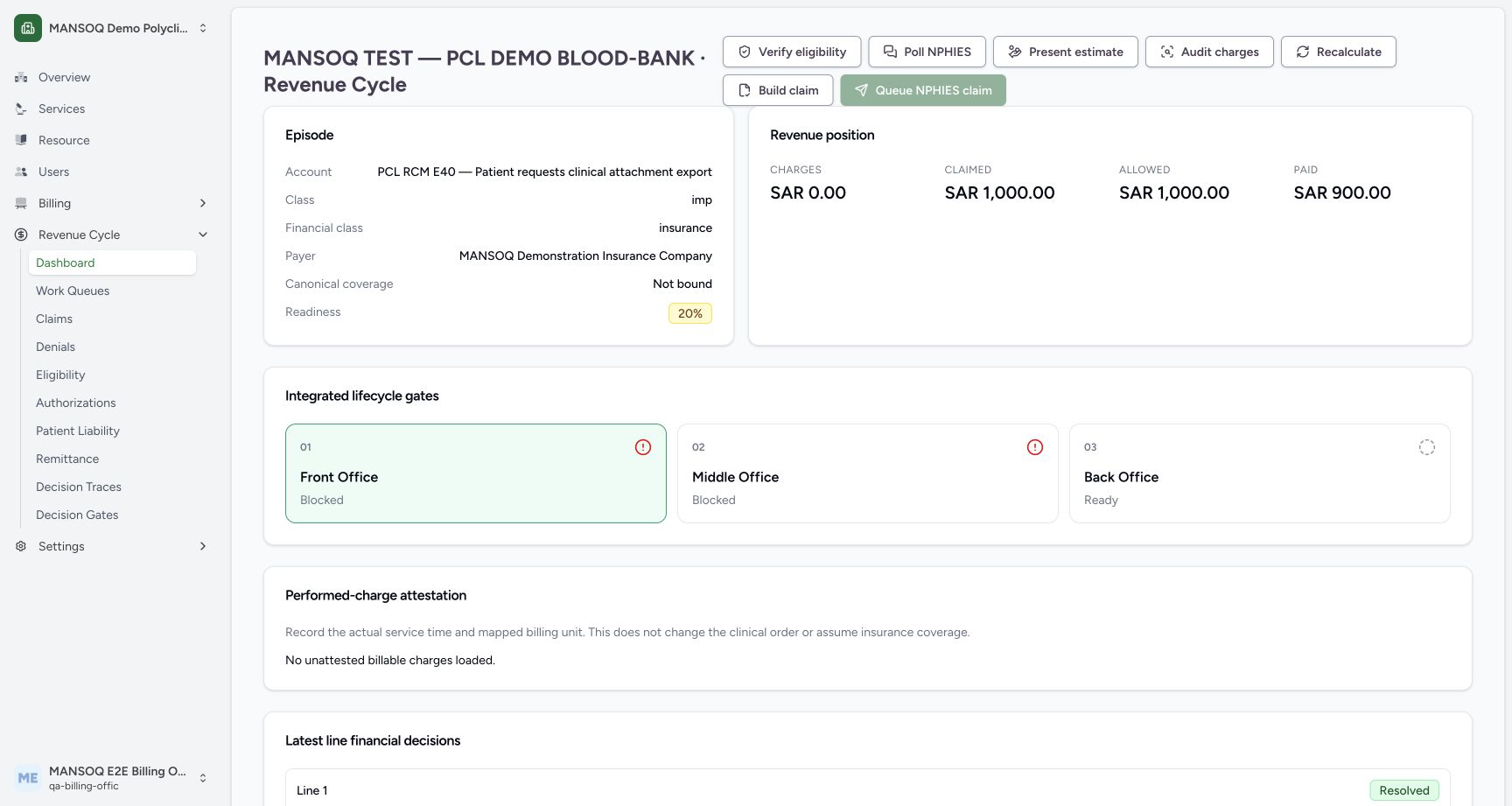
Check patient, encounter, coverage and local invoice relationships. One episode may have sibling claims; identify whether this is a first claim, added services or a correction.
2. Build claim
Use Build claim on the revenue case. The backend may link an invoice and prior claim where supplied and can return a claim with validation exceptions rather than a ready claim.
3. Review every claim fact
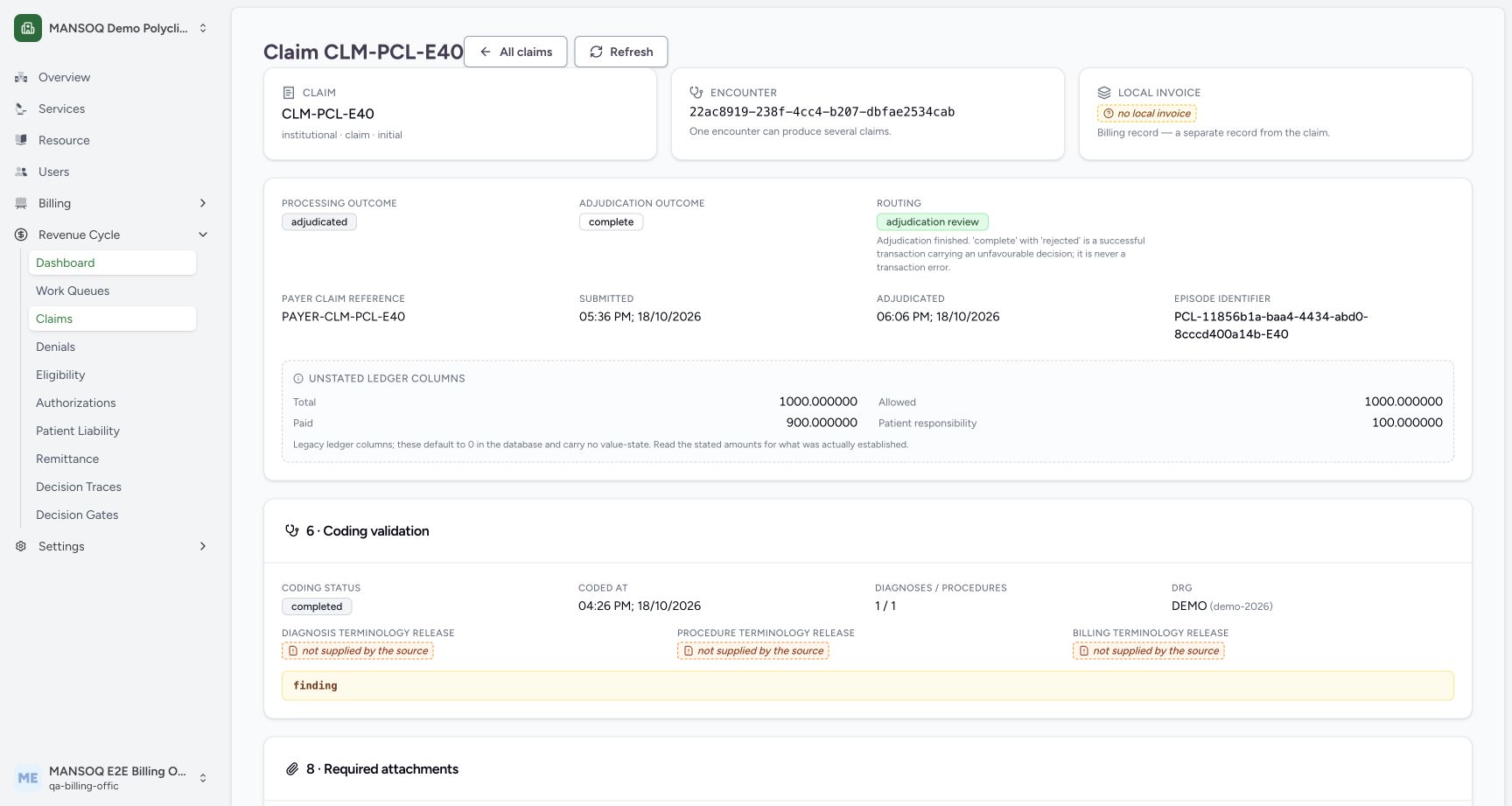
Open claim details and inspect original charge capture, contractual pricing, benefit/share, authorization matching, tax determination, coding, attachment completeness and line adjudication history.
The seeded claim example has no local invoice and missing terminology-release evidence. Its completed coding or adjudication labels do not resolve those gaps. The teaching episode did not complete canonical claim construction; unresolved member-coverage and charging prerequisites remain held.
4. Resolve exceptions
Read specific validation findings and unresolved states. Correct their source facts or master data, then recalculate/rebuild through the supported workflow.
5. Confirm ready status
Only proceed to Queue NPHIES claim when an appropriate ready claim exists and all required financial and external lifecycle gates are satisfied.
Claim versus invoice
A local invoice is a billing record. A claim is the payer transaction with its own number, profile, status and attachments. The claim detail explicitly displays them separately.
Preserve identifiers
Record the episode, claim number and exchange correlation reference for support. Do not put patient identity or clinical attachments into public support posts.
What the current screenshots demonstrate
These are current captures from an isolated Polyclinic training environment, using explicitly fictional insurance, response, authorization, remittance and policy fixtures. They demonstrate the displayed controls and scoped observations only. They do not establish live payer connectivity, a genuine insurer approval, regulatory qualification, production tax filing, a complete role/facility matrix or a cleared financial estimate.
Troubleshooting
Build succeeded but submission is unavailable
The result can legitimately contain validation exceptions. Review claim status, issues, required evidence and the selected source-backed configuration.
Source evidence
References are pinned to the private MANSOQ source repository. Repository access is required to open these links.
- repositories/platform/mansoq-web/src/pages/Facility/revenueCycle/RevenueCycleCasePage.tsx:129 · f6e9f05f
- repositories/platform/mansoq-core/mansoq/emr/api/viewsets/revenue_cycle.py:2808 · f6e9f05f
- repositories/platform/mansoq-web/src/pages/Facility/revenueCycle/ClaimWorkbenchDetailPage.tsx:531 · f6e9f05f