 MANSOQ
 Access & roles
Clone and revise an unassigned custom role without changing the System definition
Inspect the copied role, replace its permissions with one synthetic read permission, save the custom definition and revise only its description.
Current source · Actual isolated synthetic UI operation with successful writes independently read through normal product APIs. No complete role/facility, authorization, report or printer-output qualification. · 6 min read
Before you begin
- This global role-definition API requires an authorized platform superuser for writes. A Facility Admin membership alone does not grant the account is_superuser flag. The screenshots use a local synthetic superuser.
- Approve the role name, context and exact permission set before creating a real role. The demonstration role stays unassigned; no person receives new access.
1. Inspect the unsaved cloned definition
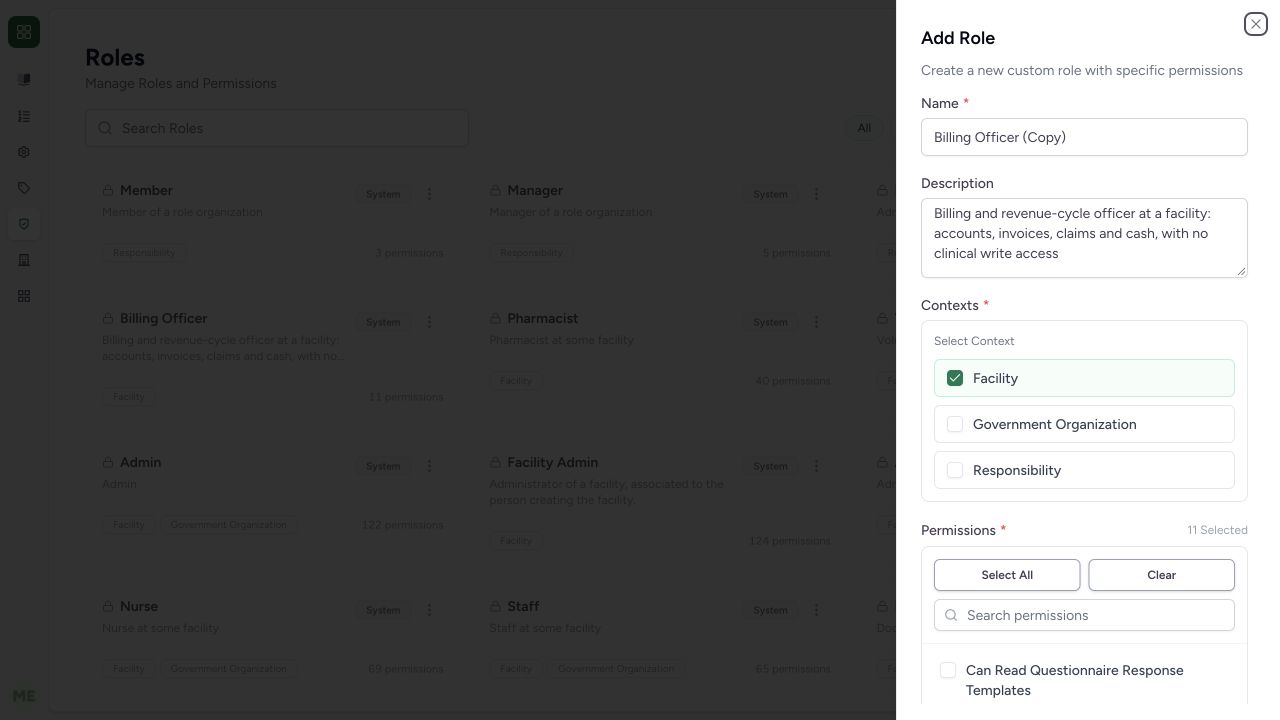
After Clone on the built-in Billing Officer card, the Add Role form contains Billing Officer (Copy), its Facility context and 11 Selected permissions. This is an unsaved copy; the System definition remains unchanged. Review the existing name, description, contexts and permission selection before using any copied grants.
 1234
1234- Unsaved copied name: Clone prepares Billing Officer (Copy), not a saved role.
- Copied context: Facility is selected from the source role.
- Copied permissions: Eleven permissions were copied; review them before saving.
- Clear copied permissions: Clear removes the copied selection in this form.
2. Set the approved custom identity and minimal permission set
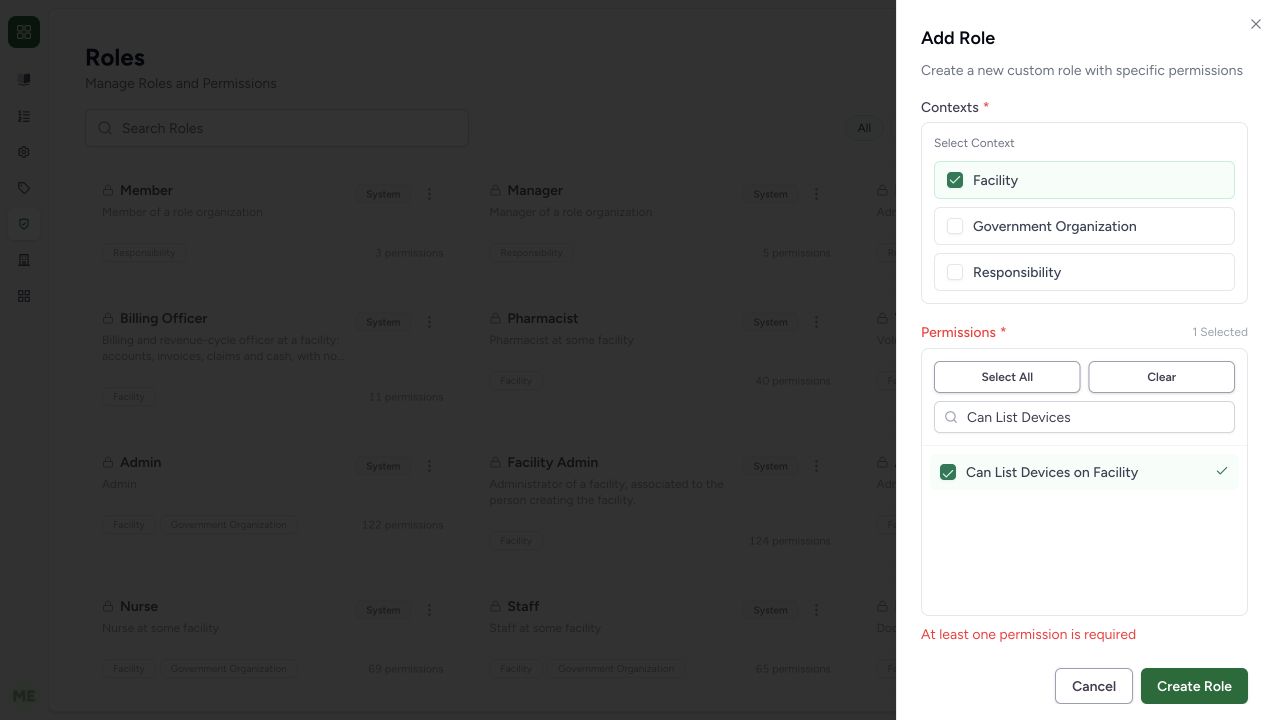
Enter the approved name and description in the copy. This example uses SYNTHETIC Device catalogue reader and an unassigned-training description. Choose Clear, search Can List Devices, and select only Can List Devices on Facility. The lower form shows 1 Selected. In this observed intermediate state the prior required-permission message from Clear remained visible; normal Create Role submission revalidated the selected permission. The name fields are above the lower screenshot viewport and the saved result verifies them next.
1234- Unsaved copied name: Clone prepares Billing Officer (Copy), not a saved role.
- Copied context: Facility is selected from the source role.
- Copied permissions: Eleven permissions were copied; review them before saving.
- Clear copied permissions: Clear removes the copied selection in this form.
 12345
12345- Facility context: Facility is selected; other contexts are not.
- One selected: Only one permission is selected after clearing the copied set.
- Device list read: Can List Devices on Facility is the approved synthetic selection.
- Prior validation message: The earlier Clear message remains until normal Create Role submission revalidates.
- Create Role: This saves the custom definition; it does not assign a user membership.
3. Create and verify the non-System role
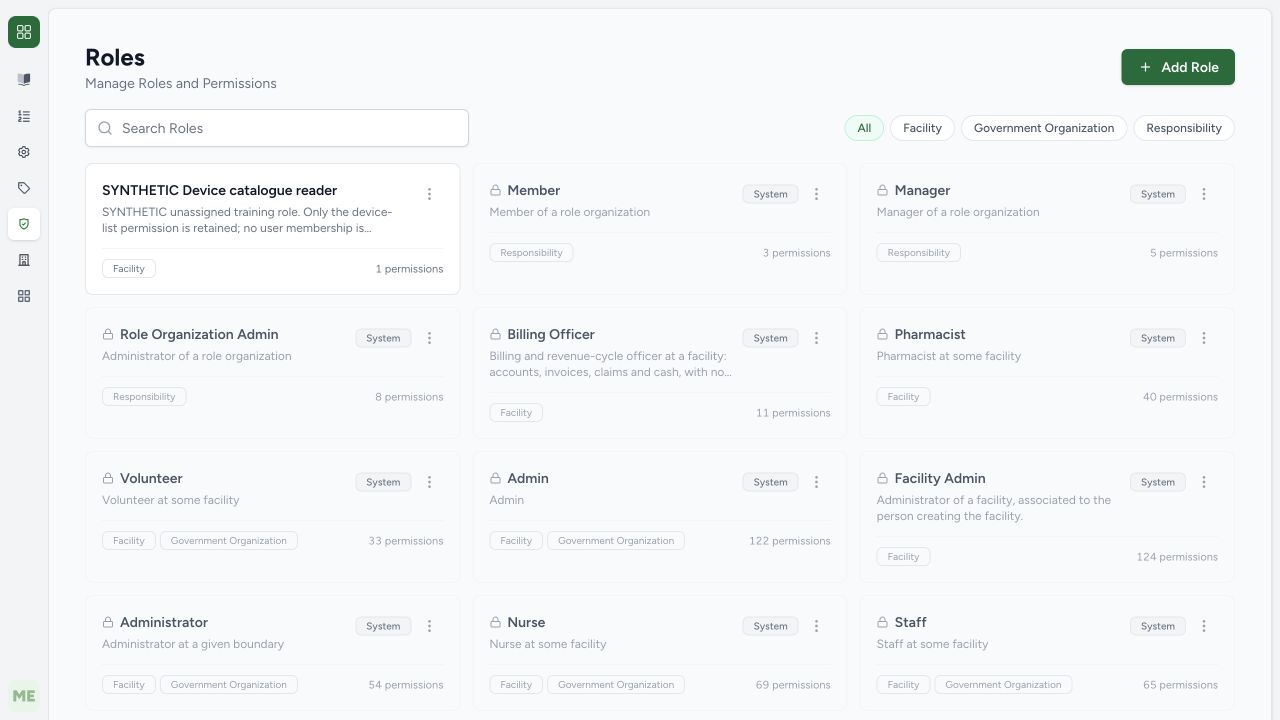
Choose Create Role, then verify the exact synthetic name, Facility context and one permission on its saved catalogue card. An independent normal role detail GET returned 200 and confirmed is_system false, context FACILITY and exactly can_list_devices. Saving a role definition did not assign it to a user or department.
12345- Facility context: Facility is selected; other contexts are not.
- One selected: Only one permission is selected after clearing the copied set.
- Device list read: Can List Devices on Facility is the approved synthetic selection.
- Prior validation message: The earlier Clear message remains until normal Create Role submission revalidates.
- Create Role: This saves the custom definition; it does not assign a user membership.
 1234
1234- Saved custom role: Confirm the exact synthetic role name and description.
- Context: Facility is its only saved context.
- One permission: Independent normal API readback confirms only can_list_devices.
- Custom actions: This non-System role has an Edit action in its menu.
4. Edit only the intended saved custom definition
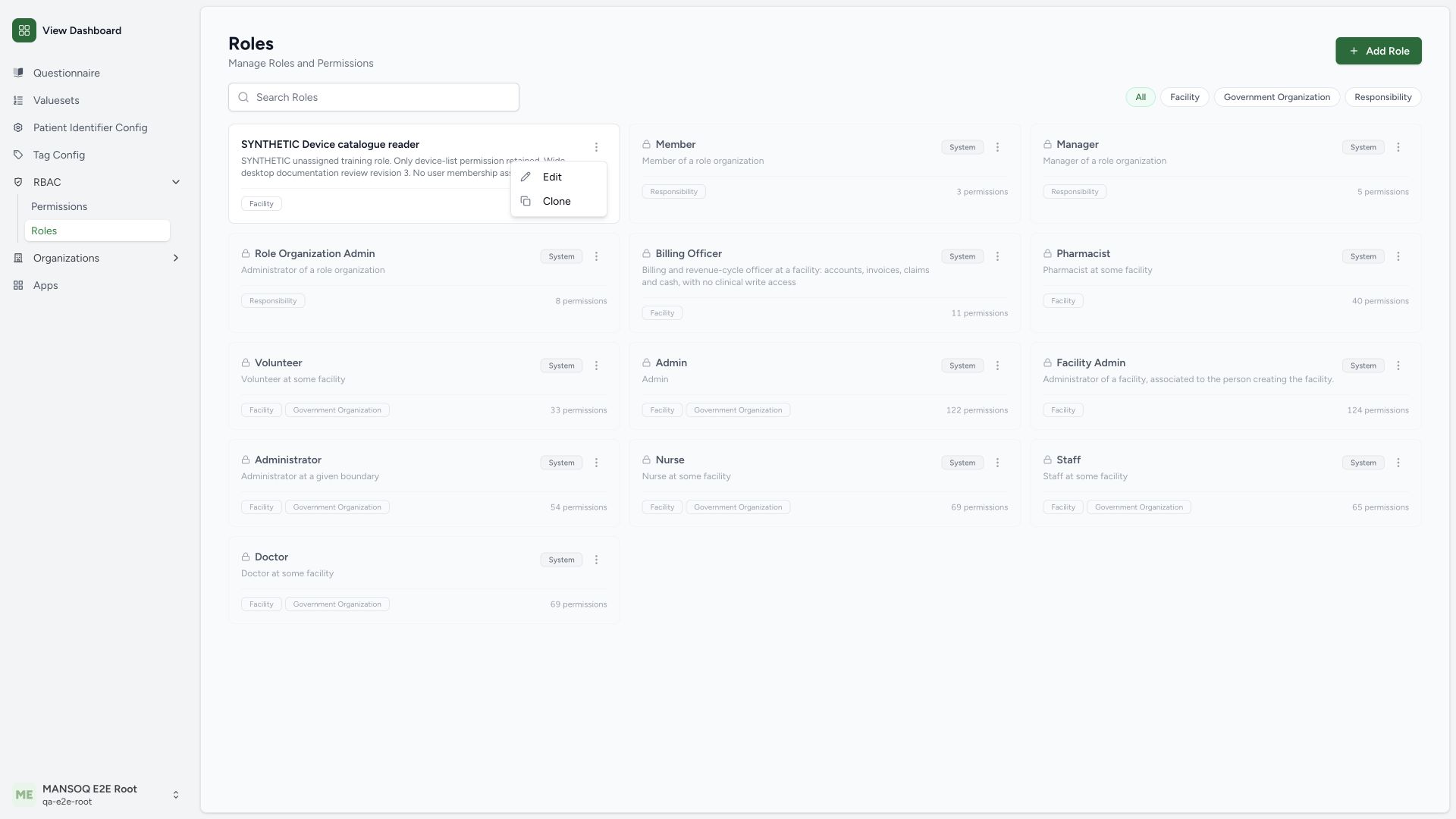
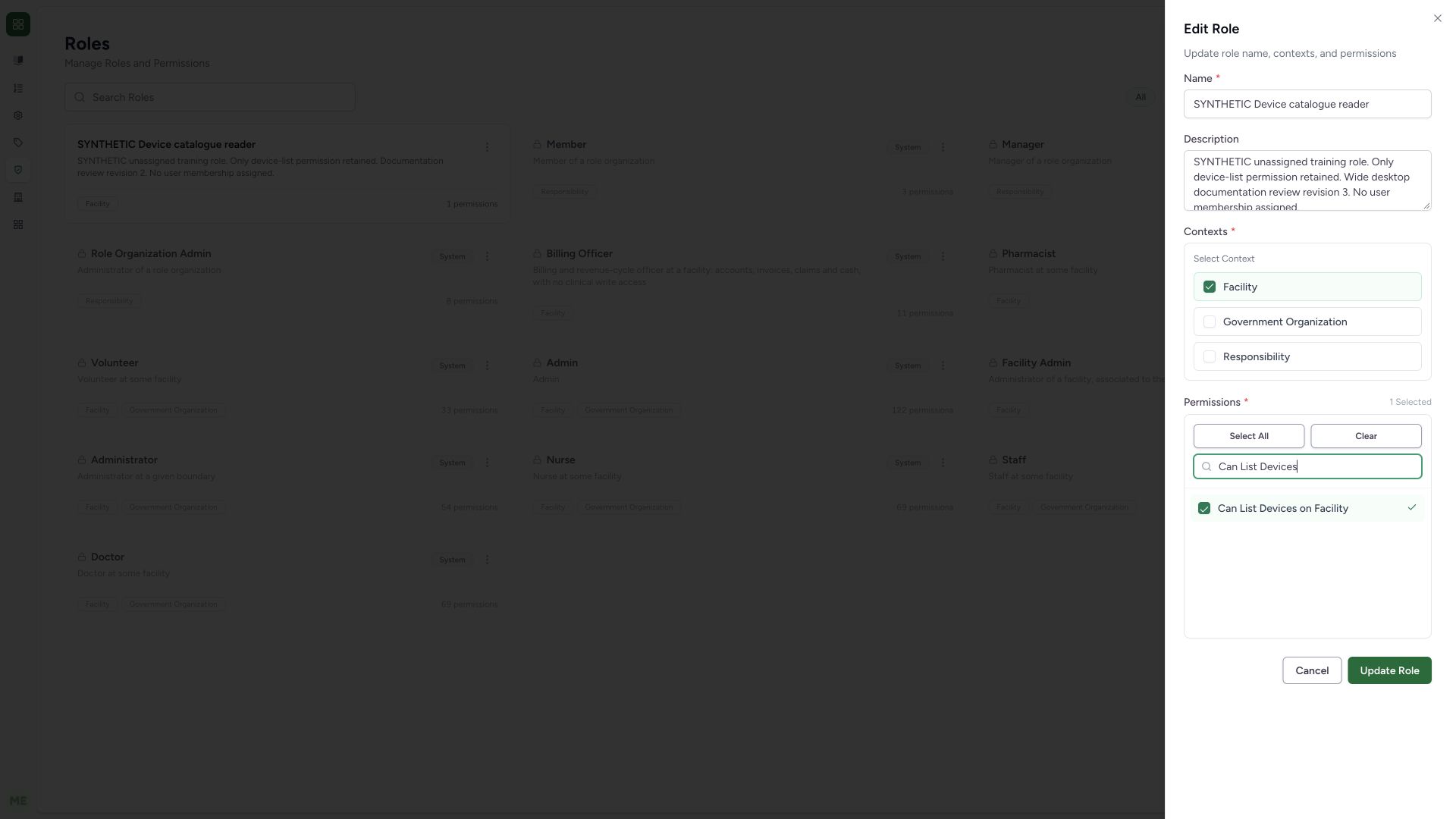
Open the saved synthetic role’s actions menu and choose Edit. Its menu has Edit and Clone, unlike the System menu. The wide desktop Edit Role sheet shows the saved identity, Facility-only context, one selected device-list permission and the complete Update Role control. This example changes only the synthetic training description to a documented revision, then selects Update Role through the normal form. No permission or context is changed.
 12
12- Edit this custom role: Open the saved non-System definition.
- Clone separately: Clone prepares a new unsaved copy.
 12345
12345- Existing role: The saved custom role name remains unchanged.
- Description only: Only the synthetic documentation description is revised.
- Same context: Facility remains the only selected context.
- Same permission: Can List Devices on Facility remains the one permission.
- Update Role: Save the reviewed custom-role update through the normal control.
5. Verify the update and unchanged grant boundary
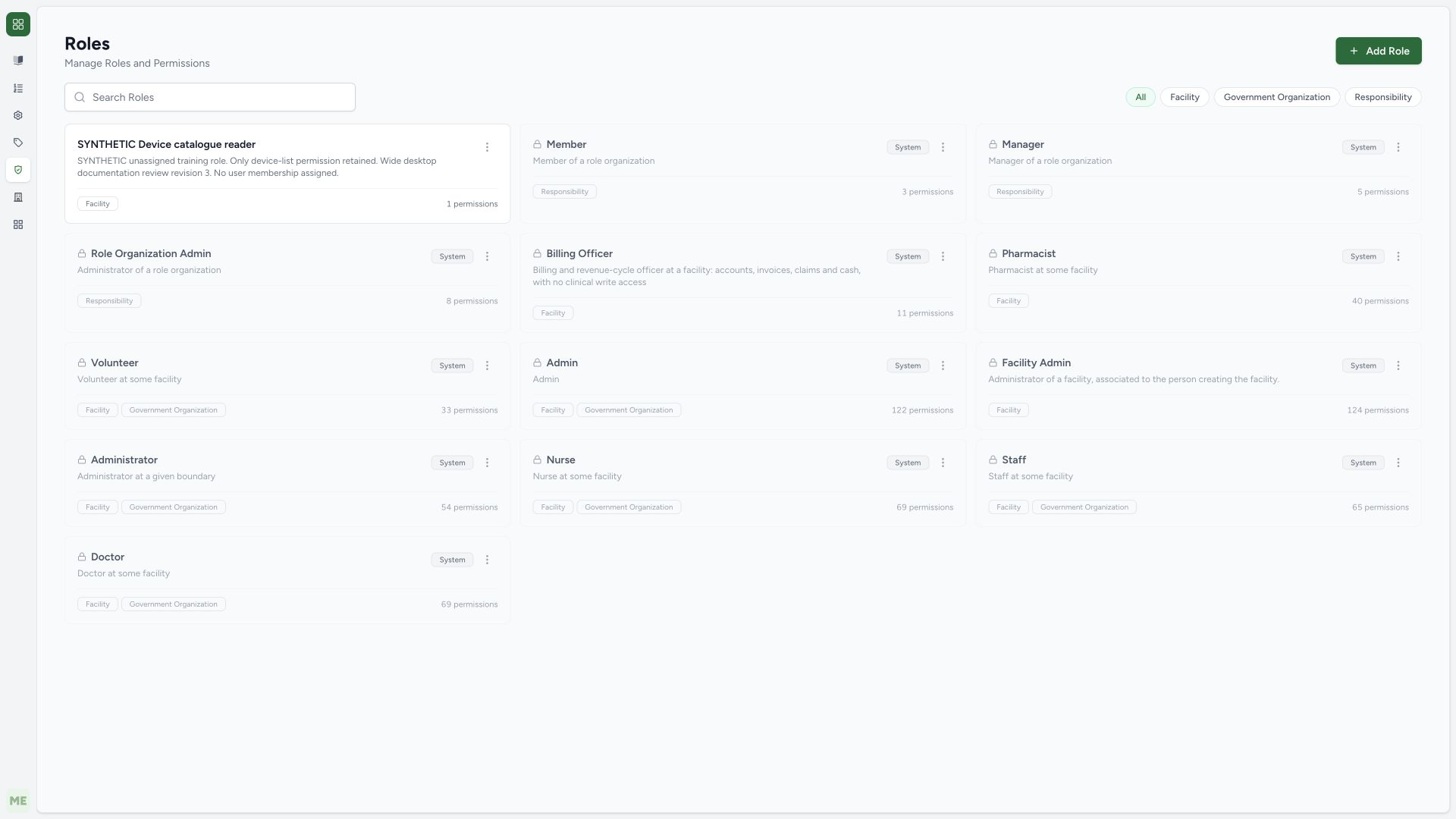
The catalogue now begins the revised synthetic description. Independent normal role detail GET confirmed the full revision while the role name, non-System state, Facility context and single can_list_devices permission remained unchanged. No user membership was assigned. Role-definition persistence does not prove effective device access for a user.
 1234
1234- Saved role identity: The exact synthetic name remains unchanged.
- Revised description: The wide desktop revision3 description is visible on the card.
- Same context: Facility is unchanged.
- Same permission count: One permission remains; normal GET confirms its identifier.
Global role definition and customer product setup differ
The audited global role API allows authenticated list/retrieve but restricts writes to is_superuser. Built-in role updates/deletes are rejected. Separate product-setup custom-role delegation also checks context, the Facility Admin permission envelope and subscription entitlement; object-scoped patient/questionnaire delegation remains pending clinical-governance approval. Do not infer write rights from a visible menu.
Membership is a separate, scoped operation
A custom role needs an approved organizational membership before it affects a person. No membership was added in this demonstration. Reuse the existing-user linking guide for its distinct workflow, then test permitted and denied operations on the intended resources rather than relying on a role name or count.
Troubleshooting
A copied role contains more permissions than the job needs
Review every identifier and context before saving. The synthetic example clears the copied eleven and retains one device-list permission. Do not assign a broad clinical/financial set just because it was copied.
Source evidence
References are pinned to the private MANSOQ source repository. Repository access is required to open these links.
- repositories/platform/mansoq-web/src/pages/Admin/Roles/RolesIndex.tsx:200 · f6e9f05f
- repositories/platform/mansoq-web/src/pages/Admin/Roles/RoleForm.tsx:47 · f6e9f05f
- repositories/platform/mansoq-web/src/pages/Admin/Roles/RoleForm.tsx:88 · f6e9f05f
- repositories/platform/mansoq-core/mansoq/security/api/viewsets/roles.py:29 · f6e9f05f
- repositories/platform/mansoq-core/mansoq/emr/resources/role/spec.py:31 · f6e9f05f
- repositories/platform/mansoq-core/mansoq/security/roles/delegation.py:1 · f6e9f05f