 MANSOQ
 Facility administration
Maintain department metadata and distinguish browsing from administration
Compare actual Doctor browsing with authorized department editing, recognize disabled name/unchanged states, save notes and verify existing Staff/Doctor memberships separately.
Current source · Actual synthetic Doctor read-only directory and separate local-superuser notes-only department update in the same Clinic. Normal department GET200 verifies persistence and normal membership GET200 confirms original Staff/Doctor assignments. No negative department write, role expansion, deletion, reparenting, inactive transition or all-role/facility audit is claimed. · 7 min read
Before you begin
- Confirm the intended facility and operational department. This example uses one synthetic Clinic and separate existing Doctor and local superuser sessions; no role was assigned or expanded to make the comparison.
- Obtain the approved metadata change. The example changes only the operational department description, leaving identity, type, hierarchy and memberships unchanged.
1. Recognize department browsing without maintenance authority
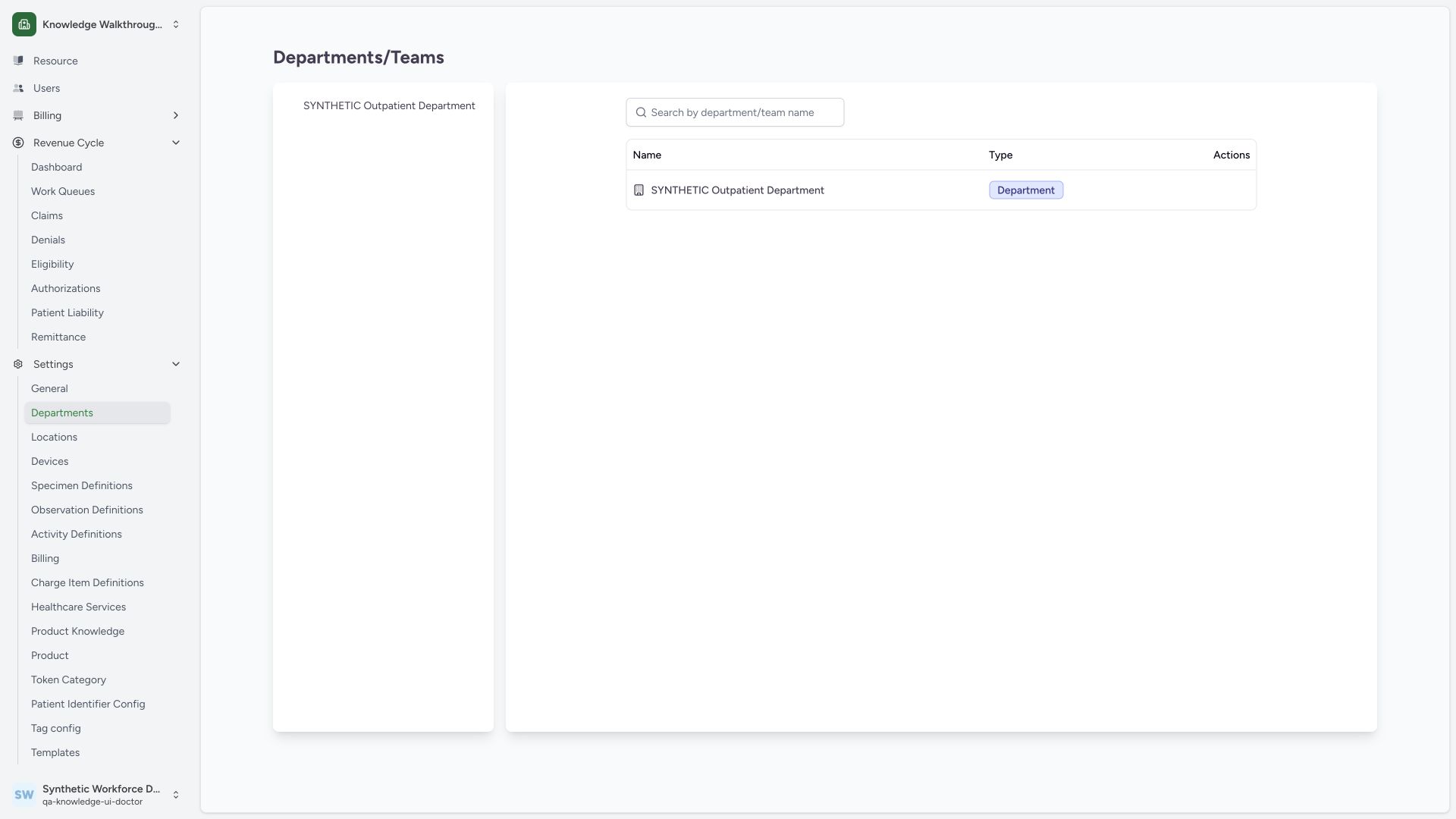
The synthetic Doctor can read its accessible SYNTHETIC Outpatient Department row in this Clinic, but the pictured view has no Add or pencil maintenance controls. A normal same-Doctor department list read returned200. Browsing a department is distinct from permission to create or manage one; no department write was attempted under this Doctor session.
 12
12- Accessible department: Viewing this row does not grant department maintenance.
- Maintenance controls absent: The Doctor view has no Add or edit controls in this captured context.
2. Use the intended operational row in an authorized session
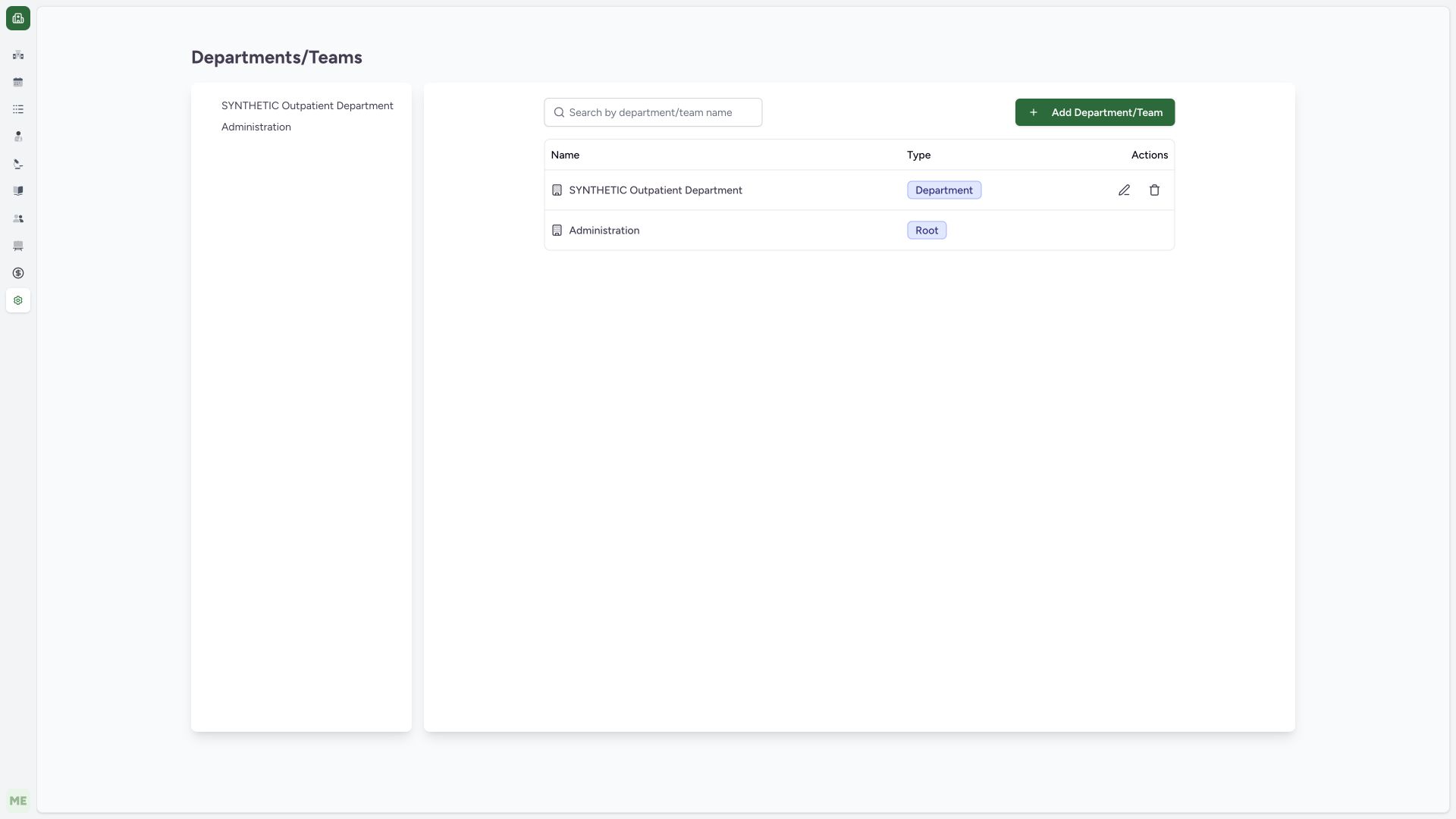
In the separate authorized local training administrator session, the same Clinic directory includes the operational department’s pencil control and the reserved Administration root row. Confirm SYNTHETIC Outpatient Department and use its pencil to open Edit Department/Team. Do not substitute the root row or a user-membership Edit action.
 123
123- Intended operational department: Confirm the exact existing department before editing.
- Edit this department: This row action is separate from membership-role editing.
- Reserved Administration root: This root row is distinct from the operational department.
3. Read editable fields and the unchanged state
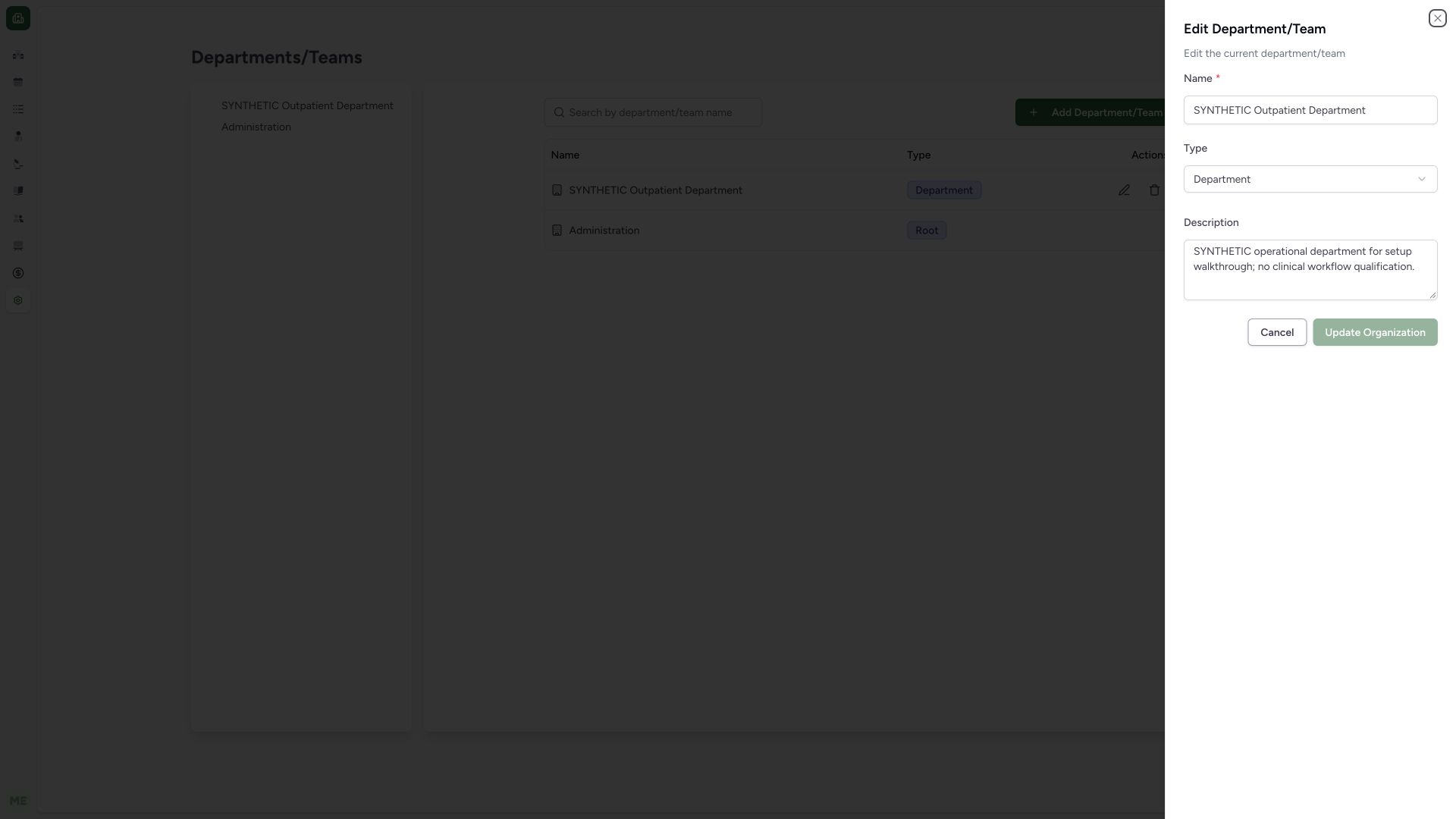
The edit sheet loads Name, Type and Description. Update Organization is disabled before an actual valid change. Department/Team type is a configuration classification, separate from a person’s security role. No active/inactive or parent-choice control is exposed in this actual form.
 123
123- Existing department identity: Preserve the intended identity during a notes-only change.
- Department or Team type: This is separate from a user security role.
- Unchanged update disabled: Change a valid editable field before normal update.
4. Restore a required name before updating
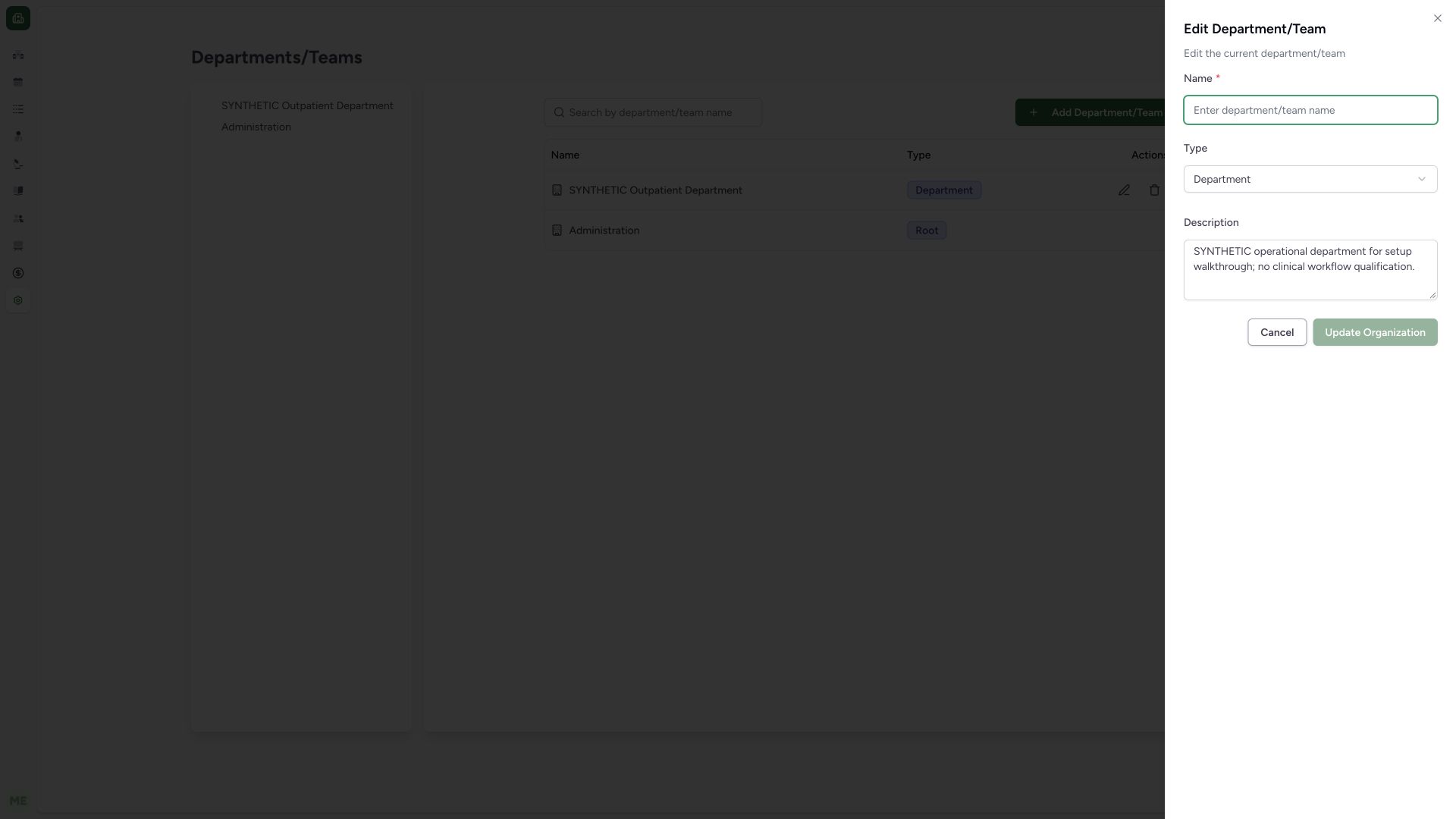
When the required Name is empty, Update Organization remains disabled. Restore the correct department name before proceeding. This image qualifies a disabled invalid-form state; it does not represent a server rejection or an invalid saved record.
 12
12- Required name empty: Restore the approved department name before retrying.
- Invalid update disabled: The button remains disabled while required Name is empty.
5. Review the notes-only change and update
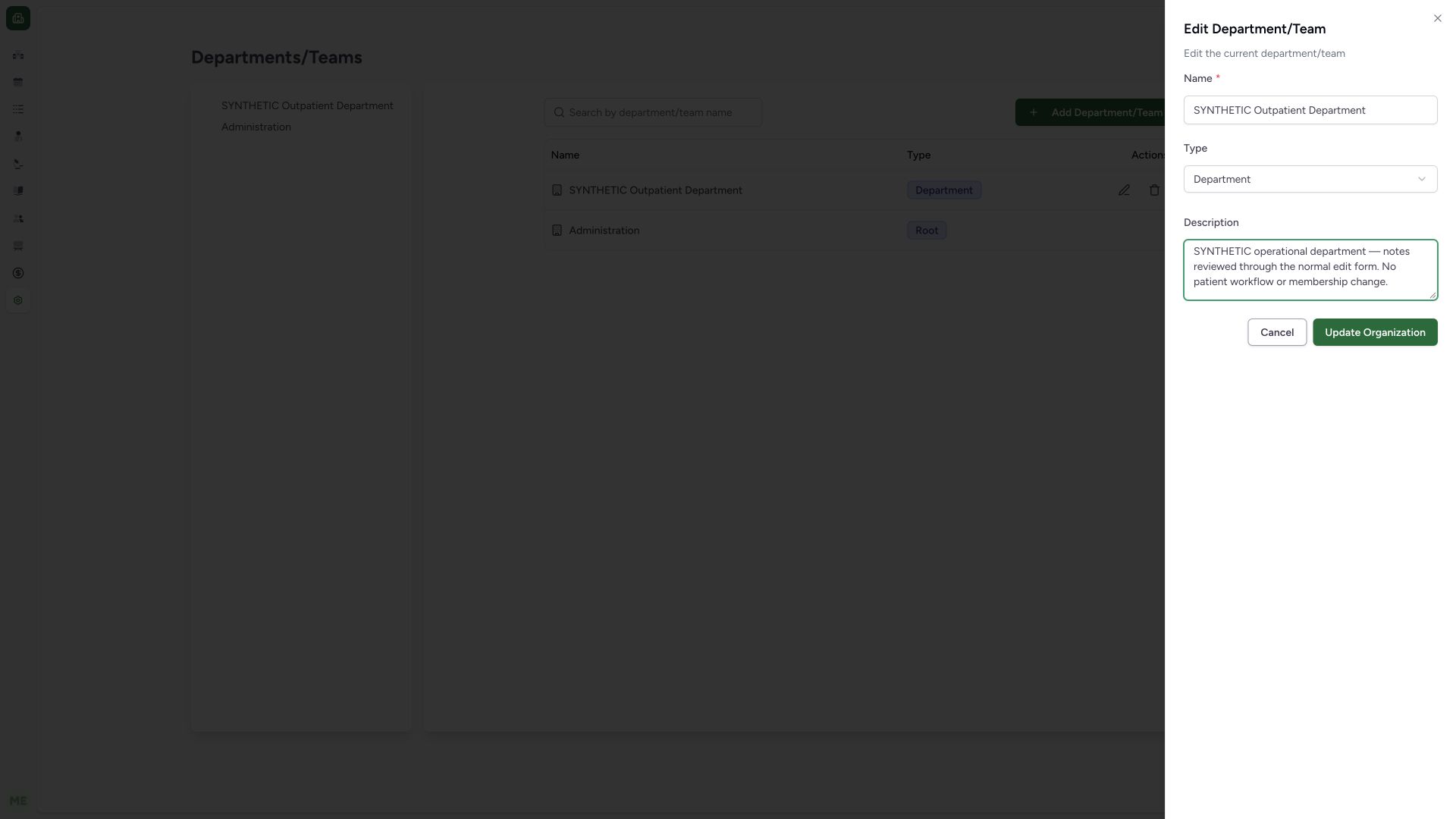
This example restores the original name, retains Department type and changes Description to clearly synthetic review notes. Check the intended record and select the enabled Update Organization button. No user role, membership, hierarchy or active-state change is part of this operation.
 123
123- Original name restored: The same department remains selected.
- Notes-only change: This does not assign users or qualify clinical workflows.
- Update Organization: Save the reviewed valid department metadata.
6. Verify saved department detail
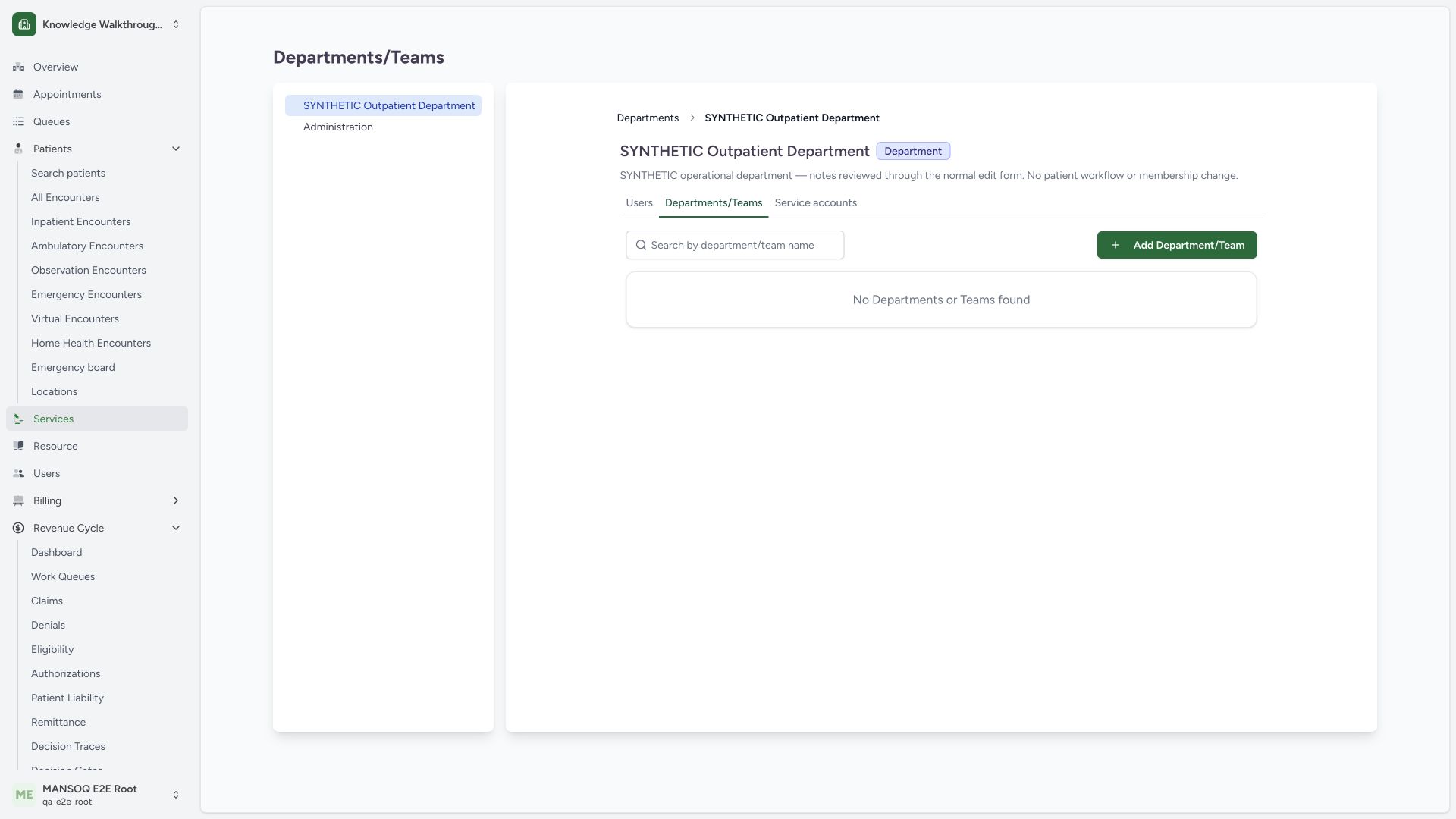
Open the saved department row and read the original heading, Department badge and updated description. A separate normal detail GET returned200 and confirmed the same identity, type, active state and original absent-parent reference. The Users tab is separate from these department metadata fields.
 123
123- Saved existing department: Confirm exact department identity after the sheet closes.
- Saved updated notes: Read persisted detail, not just a success toast.
- Membership remains separate: User-role maintenance is a different task from department notes.
7. Inspect existing members separately
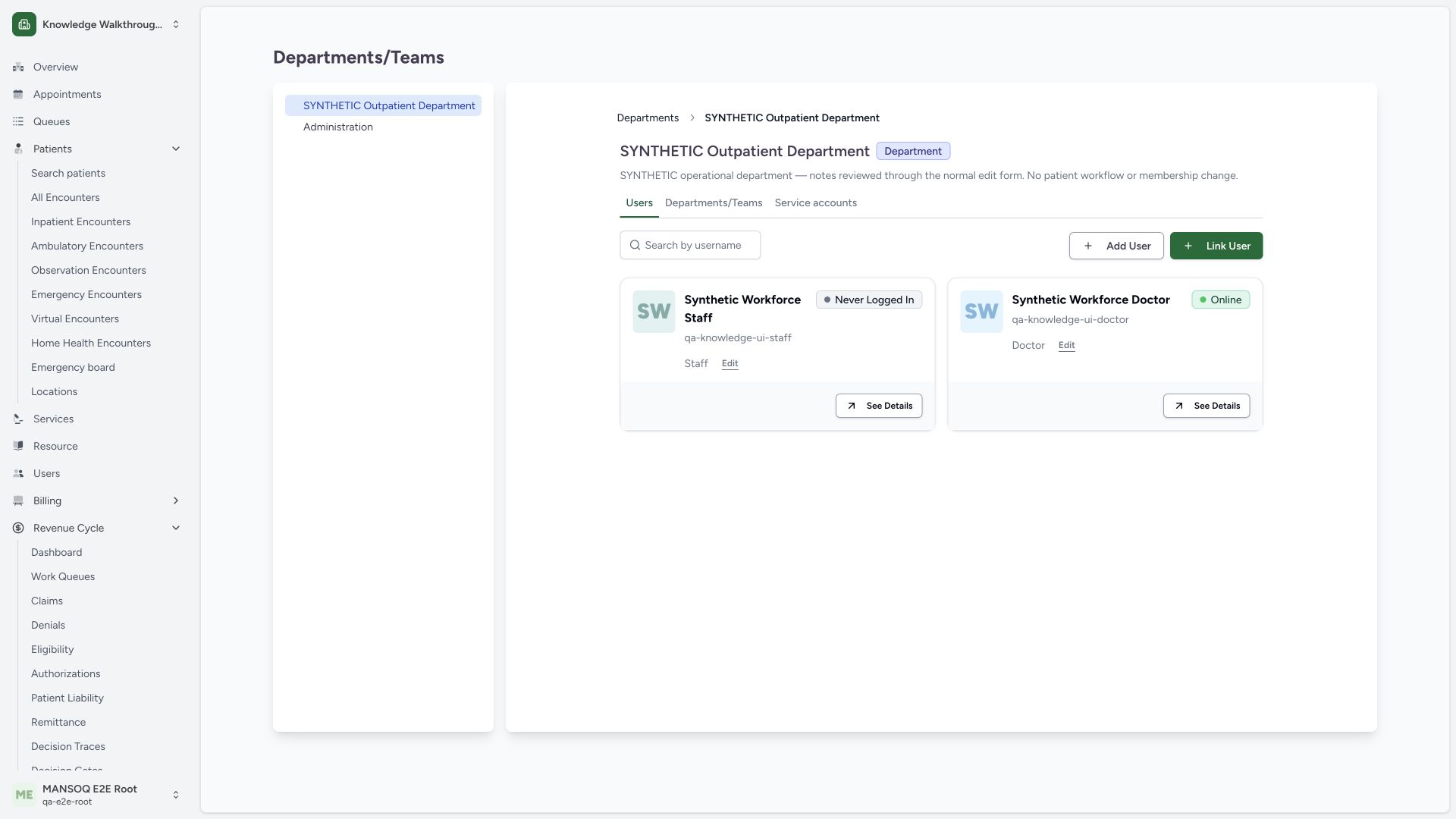
In Users, the original synthetic Staff and Doctor cards retain their roles. A normal membership GET returned200 and matched their original membership IDs and role names. Add User, Link User and the card’s Edit action are separate identity/membership operations; none was submitted during this department metadata update.
 1234
1234- Department Users view: Confirm the department before interpreting membership cards.
- Existing Staff role: This is the saved membership role, not a display suffix.
- Existing Doctor role: The prior practitioner membership remains unchanged.
- Link existing identity separately: Department notes updates do not assign users.
What the current form supports
The pinned schema contains name, description and Department/Team type. Its submission carries parent context supplied by the caller; it does not offer a parent picker or active/inactive toggle. Do not invent reparenting or deactivate/reactivate steps from model fields that the current UI does not expose.
Different controls use different rights
The directory displays Add for create rights and pencil maintenance for manage rights (or geographic administrator context), while the reserved root row excludes the ordinary edit/delete controls. Backend department-object management checks the target department ancestry, facility root and geographic scope. Role names or sidebar visibility alone do not establish an effective authorization result.
Membership maintenance has an additional boundary
Linking or changing an organizational user role is separate from editing department notes. The pinned backend checks both membership-management permission and, outside superuser/geographic-admin handling, that the requested role permissions are within the administrator’s existing role envelope. This guide does not assign a different role or certify every delegation boundary.
Troubleshooting
I can read departments but cannot see maintenance controls
Confirm the intended operation and authorized account with the deployment administrator. The captured Doctor browsing view intentionally has no maintenance controls; do not broaden a role merely because a menu is visible.
Update Organization is disabled
Check that a required valid name is present and an editable value has actually changed. The source also disables Update during a pending request.
Source evidence
References are pinned to the private MANSOQ source repository. Repository access is required to open these links.
- repositories/platform/mansoq-web/src/pages/Facility/settings/organizations/FacilityOrganizationView.tsx:214 · f6e9f05f
- repositories/platform/mansoq-web/src/pages/Facility/settings/organizations/FacilityOrganizationView.tsx:313 · f6e9f05f
- repositories/platform/mansoq-web/src/pages/Facility/settings/organizations/components/FacilityOrganizationFormSheet.tsx:70 · f6e9f05f
- repositories/platform/mansoq-web/src/pages/Facility/settings/organizations/components/FacilityOrganizationFormSheet.tsx:136 · f6e9f05f
- repositories/platform/mansoq-web/src/pages/Facility/settings/organizations/components/FacilityOrganizationFormSheet.tsx:260 · f6e9f05f
- repositories/platform/mansoq-web/src/pages/Facility/settings/organizations/FacilityOrganizationList.tsx:211 · f6e9f05f
- repositories/platform/mansoq-web/src/pages/Facility/settings/organizations/FacilityOrganizationUsers.tsx:118 · f6e9f05f
- repositories/platform/mansoq-core/mansoq/security/authorization/facilityorganization.py:64 · f6e9f05f
- repositories/platform/mansoq-core/mansoq/security/authorization/facilityorganization.py:144 · f6e9f05f