 MANSOQ
 Facility administration
Maintain device dates and contact points, recover validation and verify removal
Use valid date ordering and a unique contact, recover actual date/email/duplicate errors, then recognize the pinned product’s optional-field clearing limitation.
9 min read · Source baseline f6e9f05f
Verification and applicability
Eight actual1920×1080 screenshots of synthetic device metadata maintenance and validation. Normal GET200 proves valid date/contact save and separately proves clear attempt retained them. Active/Available, identity and storage unchanged, no encounter/care_type, no hardware or email send. Optional clearing limitation is explicitly not certified as success.
Check your installed version, permissions and local configuration.
Before you begin
- Use an authorized administrator, correct synthetic device and facility. This generic catalogue example has no hardware connection, care_type or patient encounter.
- The demonstrated dates and reserved example.invalid email are synthetic. Contact metadata Save does not send email. The walkthrough ends with Active/Available and the saved synthetic dates/contact retained because this source pin does not persist their clearing.
1. Correct a future manufacture date
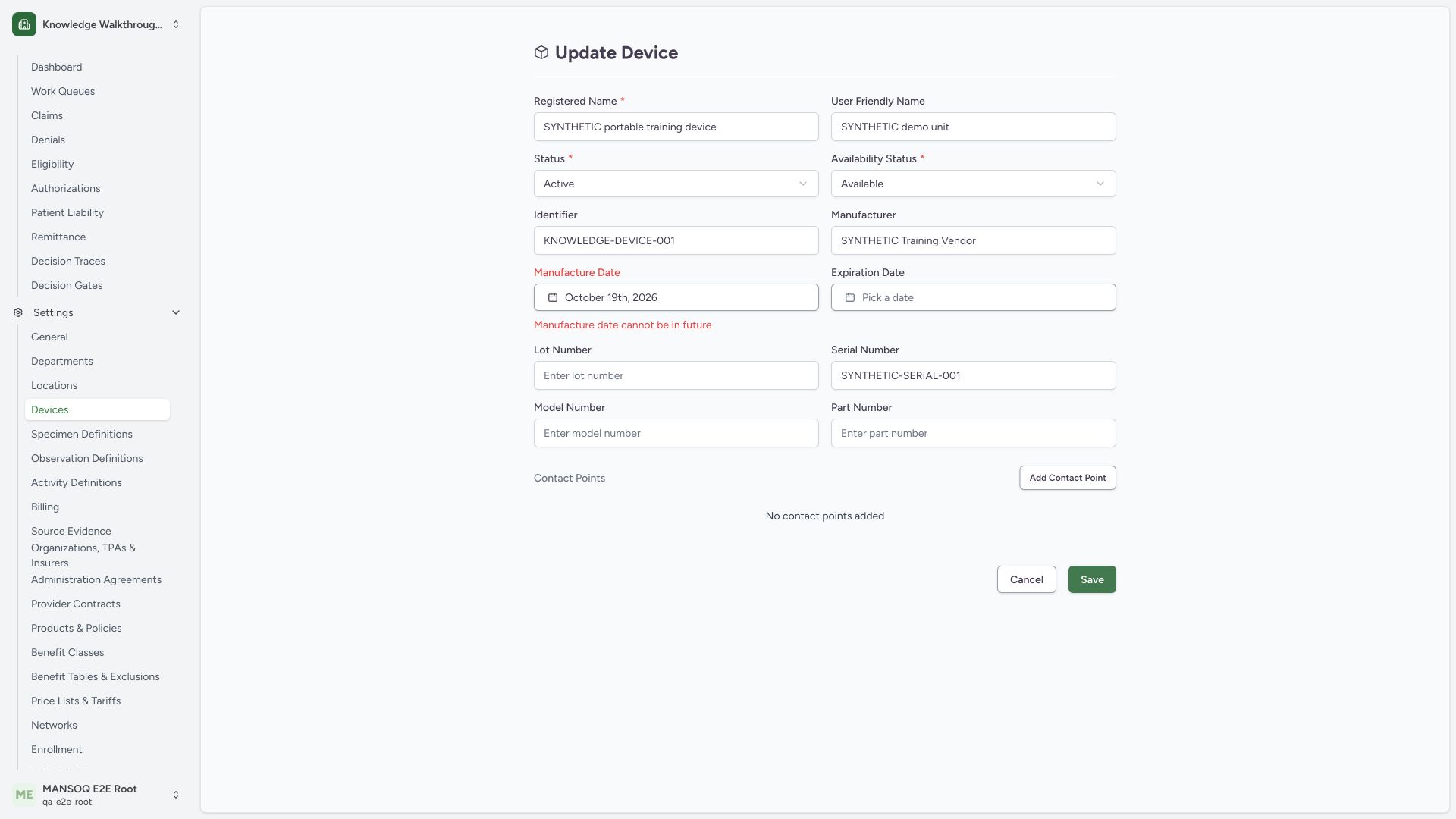
The Manufacture Date picker can select a future day, but normal Save rejects it with Manufacture date cannot be in future. This captured example was made on18October2026 with19October selected. Choose the approved nonfuture manufacture date; no invalid saved update occurred.
 12
12Capture details
Actual1920×1080 Chrome pixels; source f6e9f05f. Local synthetic generic catalogue device, no hardware or patient. Date/contact validation and valid Save; clear attempt retains stored optional values.
- Future manufacture date draft: Choose a permitted actual date instead.
- Future-date validation: Normal Save leaves the invalid draft editable.
2. Keep expiration after manufacture
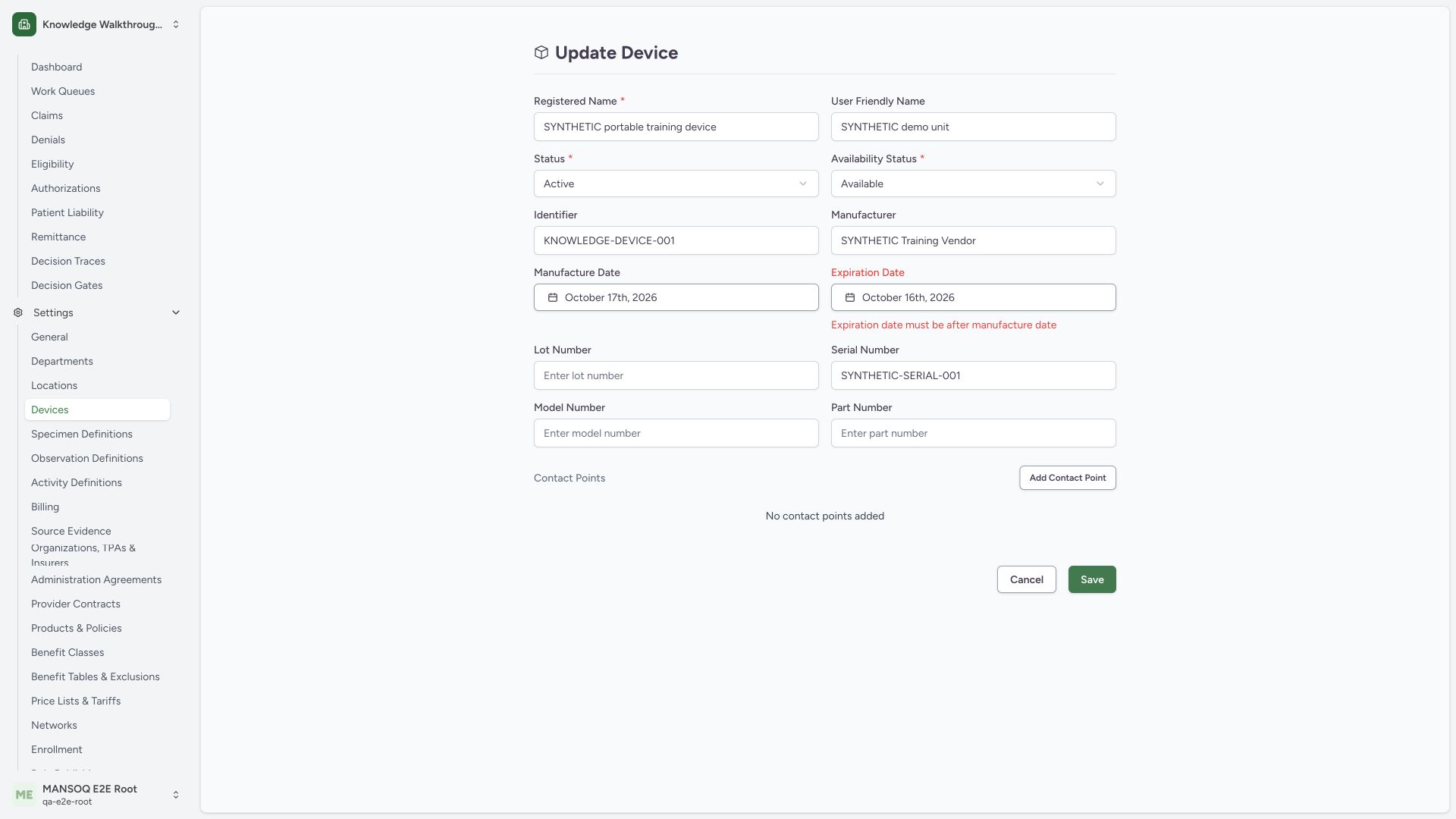
When both dates are present, expiration must be later than manufacture. The example 17October manufacture and 16October expiration produces Expiration date must be after manufacture date on normal Save. Correct expiration before proceeding; this invalid draft did not persist.
 123
123Capture details
Actual1920×1080 Chrome pixels; source f6e9f05f. Local synthetic generic catalogue device, no hardware or patient. Date/contact validation and valid Save; clear attempt retains stored optional values.
- Manufacture date reference: Existing draft manufacture date October17.
- Earlier expiration draft: Expiration must be later than manufacture when both are present.
- Actual date-order error: Correct the draft before saving.
3. Use the contact type and a valid value
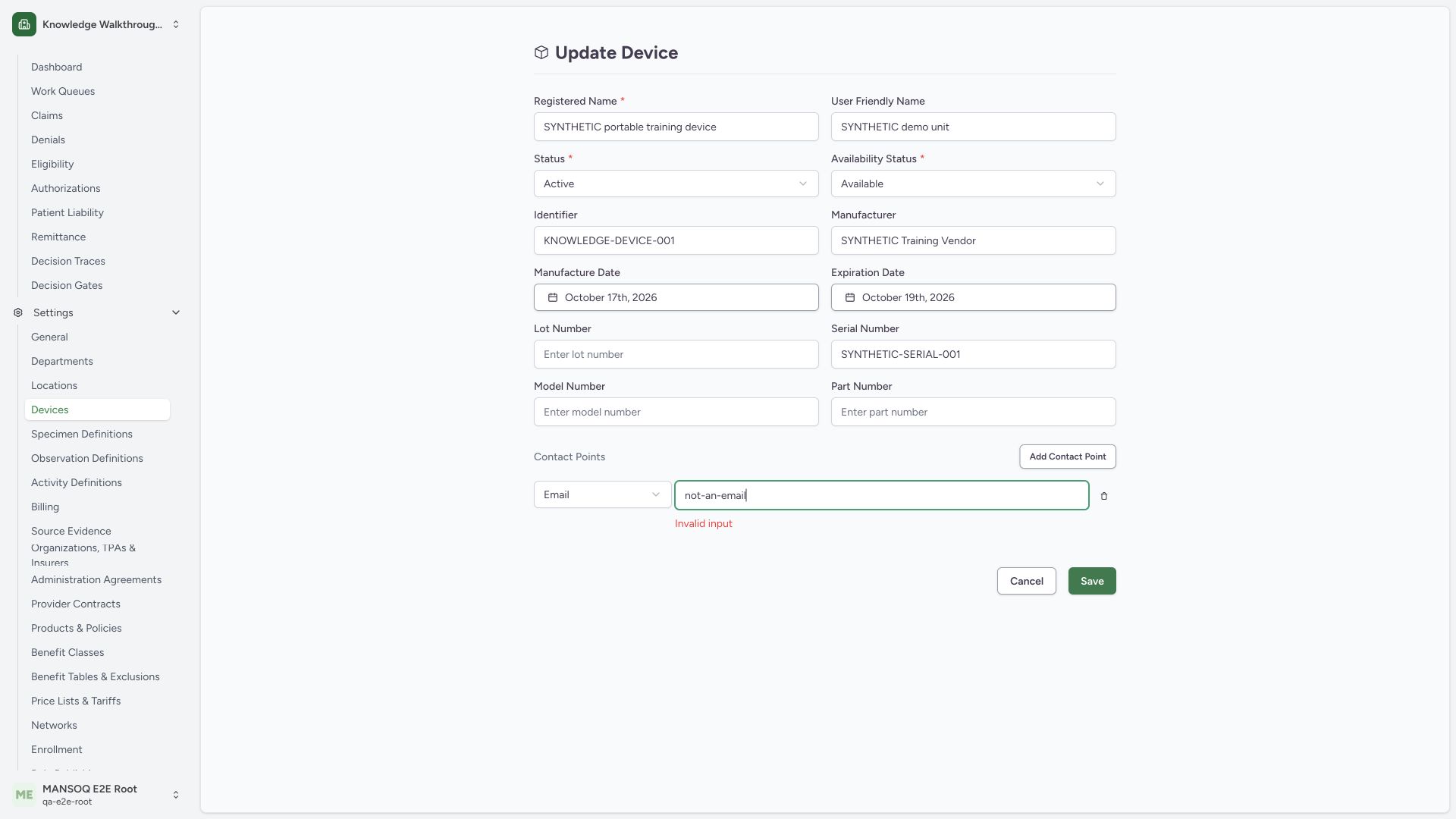
In Contact Points, use Add Contact Point and select the intended system. The Email row shown here contains not-an-email, which normal Save rejects with Invalid input. Replace it with a valid approved address. This example uses a reserved synthetic address and sends no message.
 123
123Capture details
Actual1920×1080 Chrome pixels; source f6e9f05f. Local synthetic generic catalogue device, no hardware or patient. Date/contact validation and valid Save; clear attempt retains stored optional values.
- Email system: Contact type determines value validation.
- Invalid email draft: Use a valid approved contact value.
- Actual input error: The invalid contact remains a draft.
4. Remove unintended duplicate contact rows
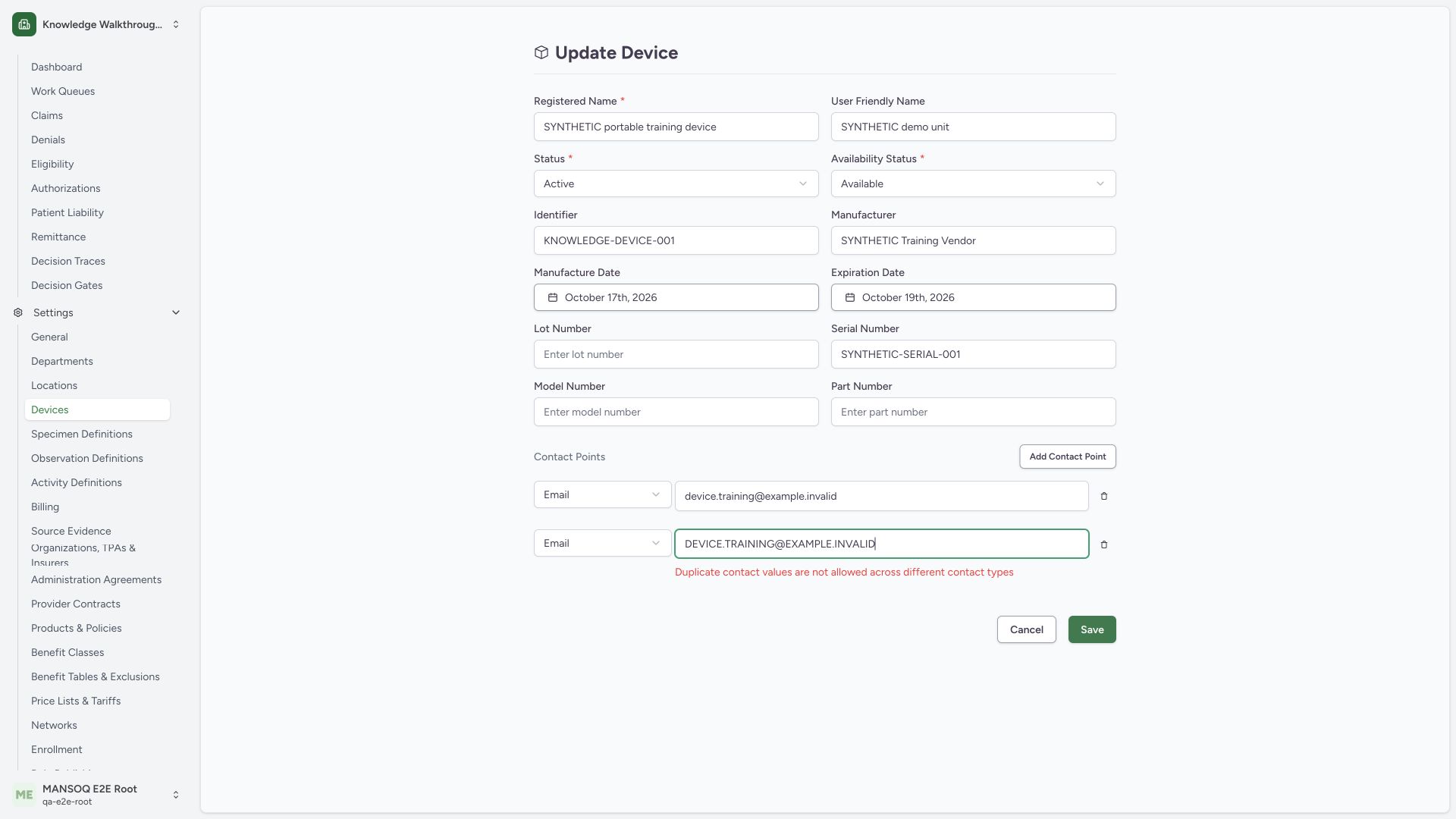
The two Email values shown differ only by case. Normal Save rejects them with Duplicate contact values are not allowed across different contact types. The source compares all values after trimming and lowercasing, including same-type rows. Use the second row’s trash icon to remove this unintended draft duplicate, leaving the first approved row.
 1234
1234Capture details
Actual1920×1080 Chrome pixels; source f6e9f05f. Local synthetic generic catalogue device, no hardware or patient. Date/contact validation and valid Save; clear attempt retains stored optional values.
- First synthetic email: Reserved example.invalid address; no message sent.
- Same address with different case: Case changes do not make a unique contact value.
- Actual duplicate error: Remove the unintended duplicate before saving.
- Remove duplicate row: Trash icon removes this draft contact point.
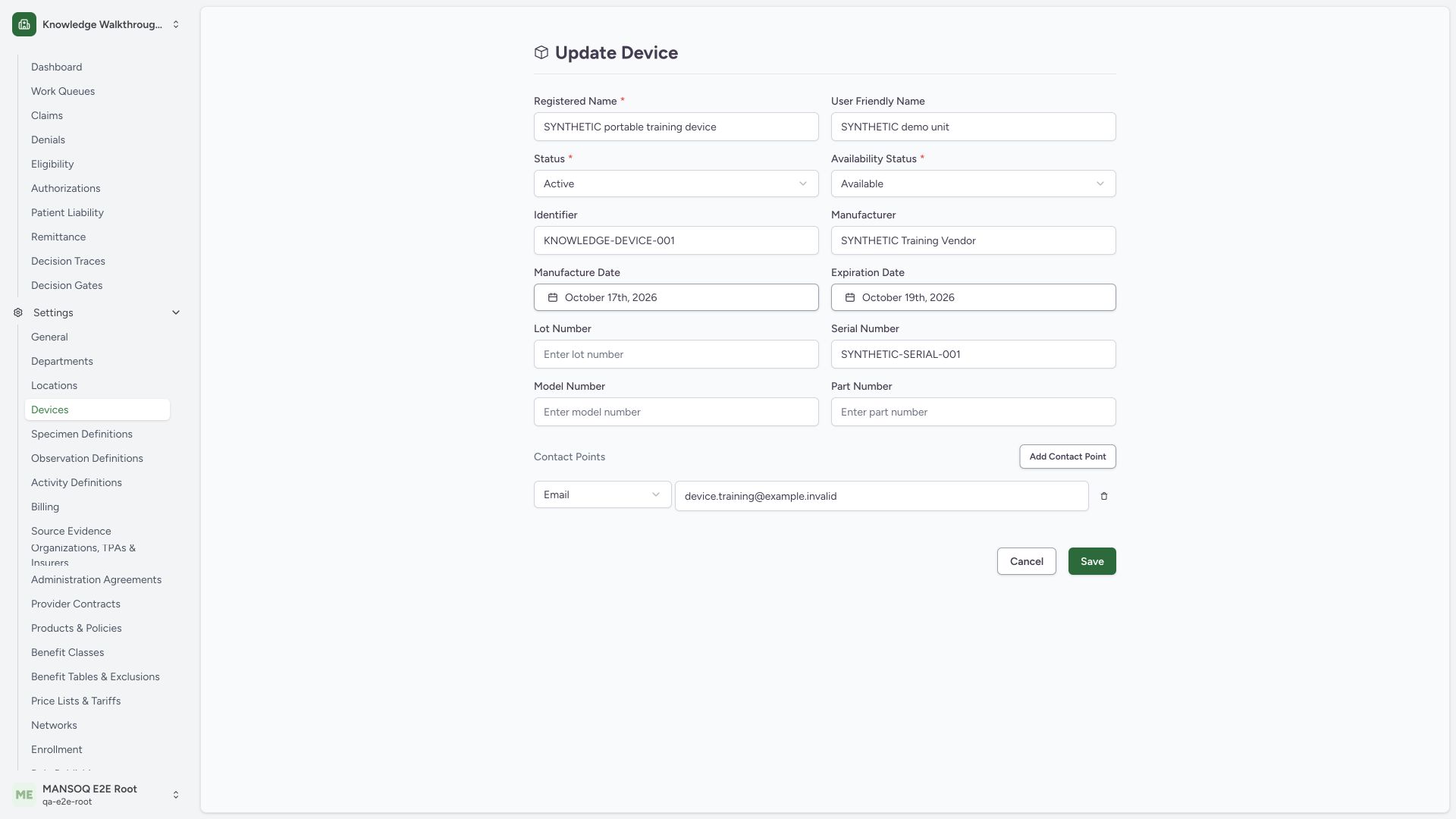
5. Save the corrected date and contact metadata
Review the valid 17October2026 manufacture, later 19October2026 expiration and the single device.training@example.invalid Email row, then use Save. Registered name, identifier, serial, Active lifecycle and Available availability are retained. These dates are demonstration metadata, not maintenance or safety certification.
 1234
1234Capture details
Actual1920×1080 Chrome pixels; source f6e9f05f. Local synthetic generic catalogue device, no hardware or patient. Date/contact validation and valid Save; clear attempt retains stored optional values.
- Valid manufacture date: Not in the future relative to capture dateOctober18.
- Later expiration date: After manufacture date.
- One valid contact: Only the single approved synthetic Email remains.
- Save valid draft: Persist through the normal form.
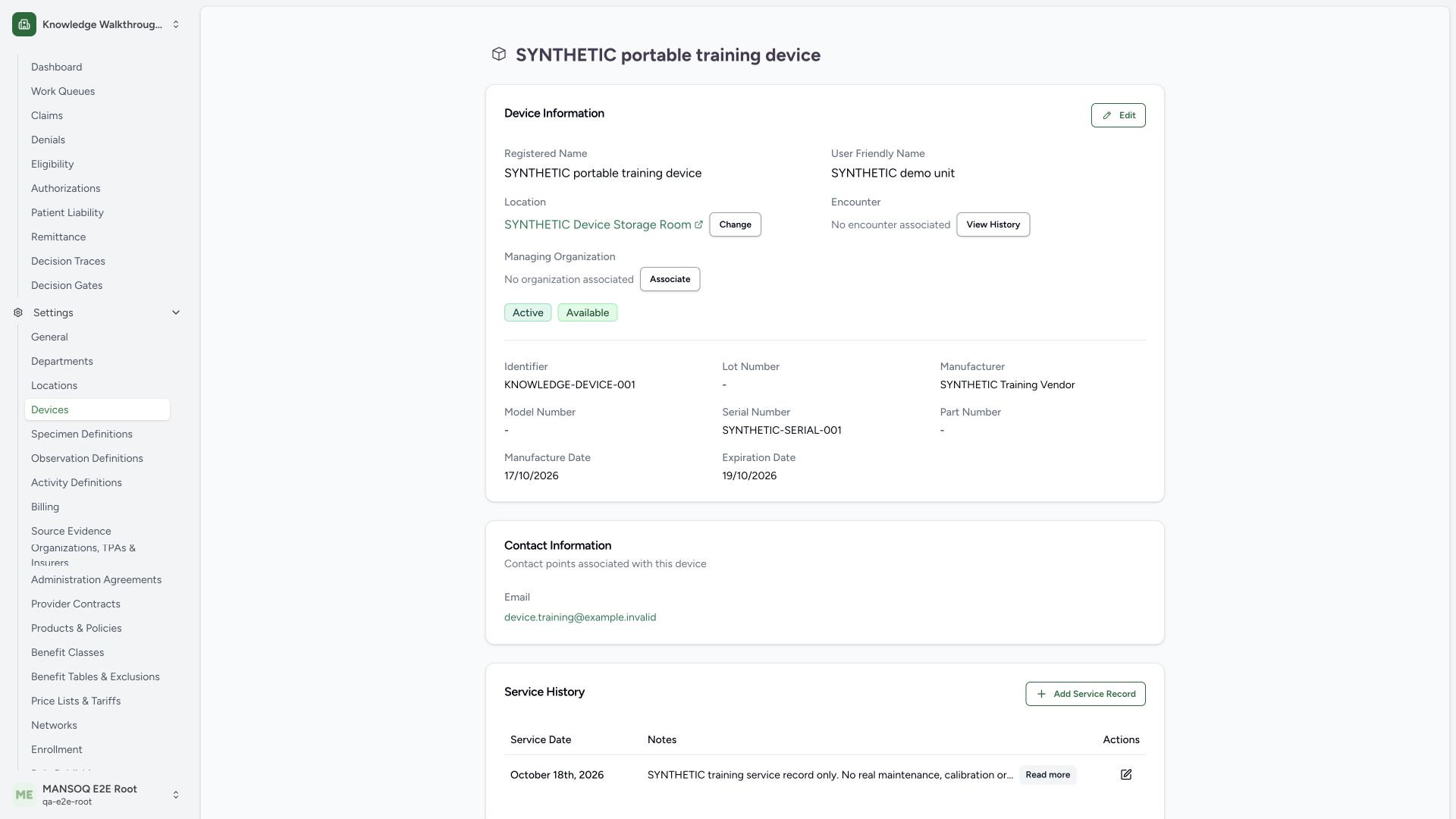
6. Verify the saved optional fields
The saved detail shows 17/10/2026, 19/10/2026 and one Email. A normal independent GET200 confirms one contact and the corresponding UTC instants 2026-10-16T21:00:00Z and 2026-10-18T21:00:00Z for these local dates. The original synthetic identity/location and Active/Available remain.
 123
123Capture details
Actual1920×1080 Chrome pixels; source f6e9f05f. Local synthetic generic catalogue device, no hardware or patient. Date/contact validation and valid Save; clear attempt retains stored optional values.
- Saved local manufacture date: Picker local date17October2026; underlying instant preceding21:00Z.
- Saved later expiration date: Local date19October2026 persisted.
- One saved Email contact: Reserved synthetic example.invalid value; no outgoing message operation.
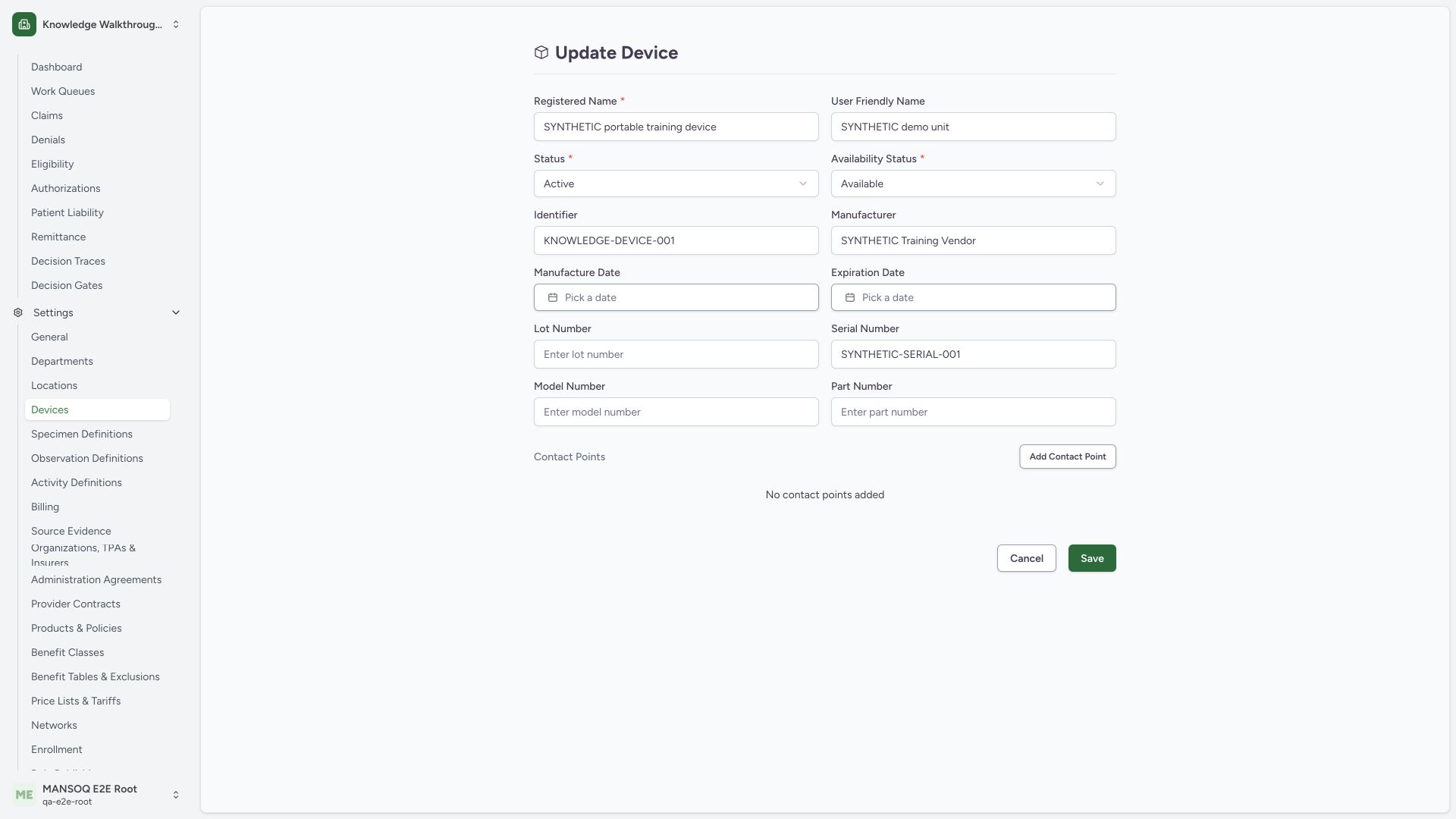
7. Treat a cleared draft separately from removal of saved values
Reopening Edit and selecting the already selected calendar day clears each draft picker to Pick a date. Removing the contact row leaves No contact points added. This pictured blank draft and enabled Save do not prove stored values were removed. In this source pin, the following normal Save does not persist that intended removal.
 1234
1234Capture details
Actual1920×1080 Chrome pixels; source f6e9f05f. Local synthetic generic catalogue device, no hardware or patient. Date/contact validation and valid Save; clear attempt retains stored optional values.
- Blank manufacture draft: Pick a date in draft does not prove the stored value was removed.
- Blank expiration draft: Verify the resulting saved detail independently.
- Contact row removed from draft: No contact points added is visible before Save.
- Save and verify actual result: Contact and date persistence are separate outcomes.
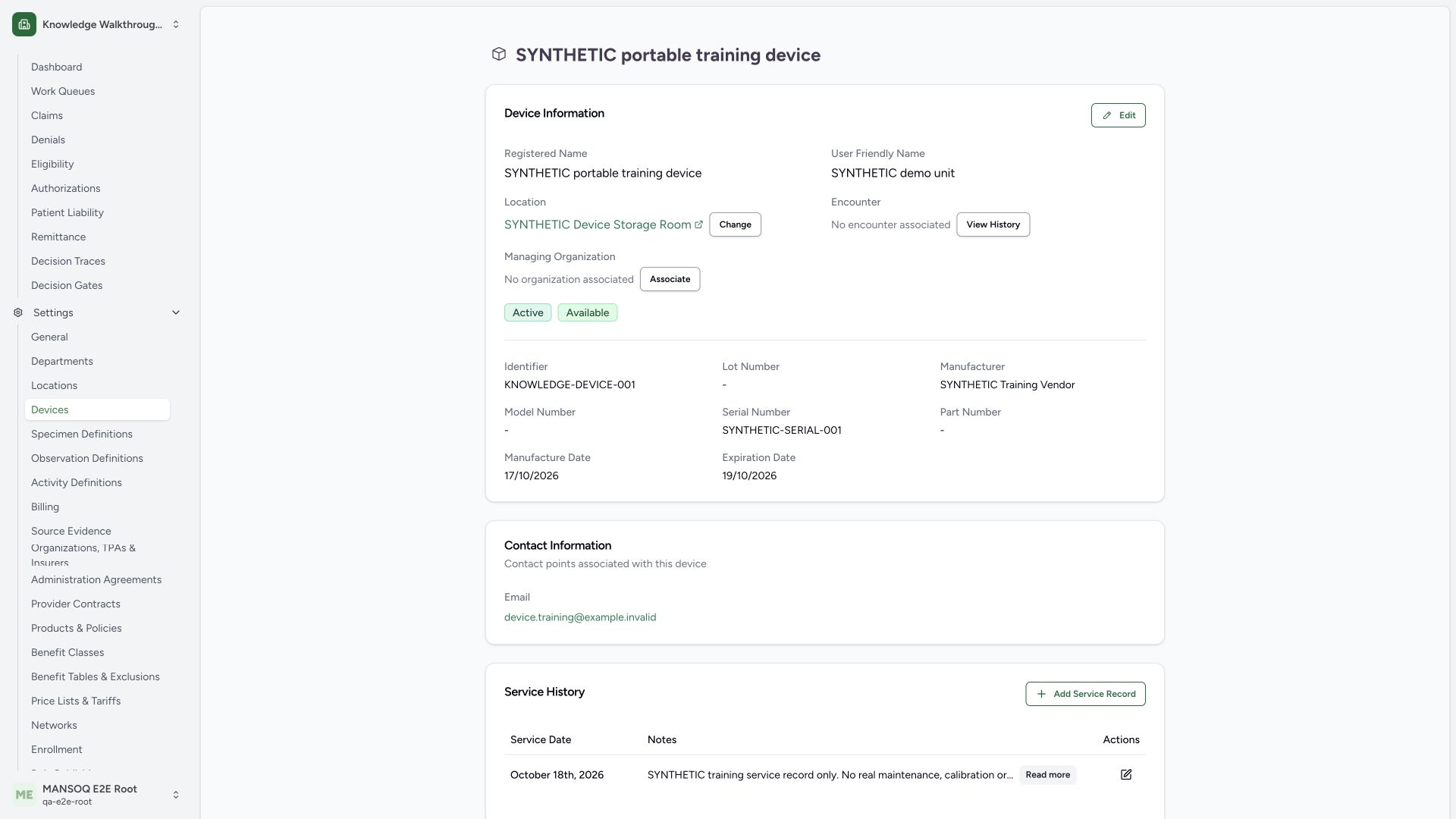
8. Recognize the actual saved-result limitation
After that normal Save, the detail still shows the original dates and Email. A normal independent GET200 confirms both dates and the contact remain, despite the product’s success toast. Do not report these fields as cleared. This reproducible behavior is recorded for a separate product correction; no direct data change is substituted for the user workflow.
 123
123Capture details
Actual1920×1080 Chrome pixels; source f6e9f05f. Local synthetic generic catalogue device, no hardware or patient. Date/contact validation and valid Save; clear attempt retains stored optional values.
- Manufacture date retained: Clearing the draft did not remove the stored value on this source pin.
- Expiration date retained: Check actual saved detail and independent readback.
- Email retained: The empty contact array was not persisted as removal.
Pinned-source clearing behavior
The frontend serializes cleared optional dates with optional chaining, producing undefined rather than an explicit removal value. The backend resource deserializer uses model_dump(exclude_defaults=True), while the device schema defaults dates to null and contacts to an empty list. In the observed clear attempt the stored dates and sole contact remained. This guide reports current behavior; a future corrected-source guide must be qualified separately.
Scope of the contact example
The selector also exposes Phone, Fax, Pager, URL, SMS and Other. Their values have separate source validation. This guide exercises Email, malformed Email and a same-value case duplicate only; it does not claim all other contact systems or outbound delivery were qualified.
Troubleshooting
The field looks blank in Edit but reappears after Save
Verify the saved detail and current deployed version. On the audited pin, clearing dates and the sole contact row does not persist removal. Report the behavior with the exact record and version through the normal support process.
I see an input or duplicate error
Correct the value for the selected contact system and remove unintended duplicate rows before retrying Save.
Source evidence
References are pinned to the private MANSOQ source repository. Repository access is required to open these links.
- repositories/platform/mansoq-web/src/pages/Facility/settings/devices/components/DeviceForm.tsx:64 · f6e9f05f
- repositories/platform/mansoq-web/src/pages/Facility/settings/devices/components/DeviceForm.tsx:87 · f6e9f05f
- repositories/platform/mansoq-web/src/pages/Facility/settings/devices/components/DeviceForm.tsx:107 · f6e9f05f
- repositories/platform/mansoq-web/src/pages/Facility/settings/devices/components/DeviceForm.tsx:188 · f6e9f05f
- repositories/platform/mansoq-web/src/pages/Facility/settings/devices/components/DeviceForm.tsx:431 · f6e9f05f
- repositories/platform/mansoq-web/src/types/common/contactPoint.ts:28 · f6e9f05f
- repositories/platform/mansoq-web/src/components/ui/date-picker.tsx:69 · f6e9f05f
- repositories/platform/mansoq-core/mansoq/emr/resources/device/spec.py:44 · f6e9f05f
- repositories/platform/mansoq-core/mansoq/emr/resources/base.py:82 · f6e9f05f