 MANSOQ
 Facility administration
Maintain device lifecycle separately from availability and recover required-name errors
Read the two independent status fields, recover a required-name validation, save a synthetic Inactive lifecycle and restore Active with independent record verification.
8 min read · Source baseline f6e9f05f
Verification and applicability
Nine actual1920×1080 screenshots. Synthetic local-superuser generic device lifecycleActive→Inactive→Active and required-name validation through normal UI; both saved states independently verified with normal GET200. Available retained, no patient/hardware/plugin operation, no deleted records or all-role/facility claim.
Check your installed version, permissions and local configuration.
Before you begin
- Use an authorized administrator and the correct facility/device. This walkthrough uses a generic synthetic Clinic catalogue record with no encounter, plugin care_type or hardware connection.
- Confirm the approved lifecycle state. This example restores its original Active state after demonstrating Inactive; availability stays Available throughout.
1. Identify the correct generic catalogue record
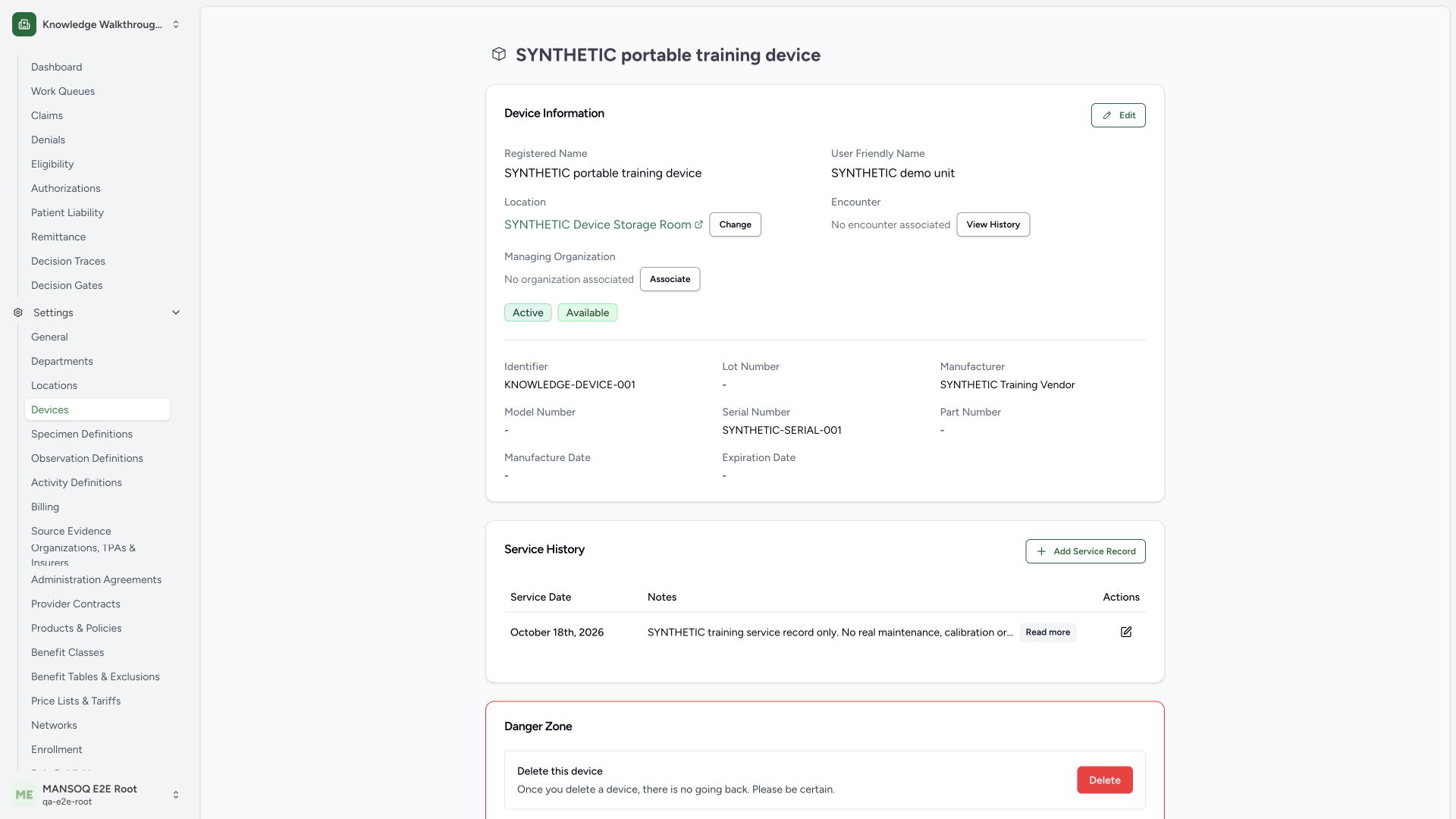
Confirm the registered name, synthetic identifier and storage Room. The detail shows Active and Available as separate badges, with No encounter associated. Use Edit on this device’s information card to maintain its metadata. This example does not connect to hardware or establish fitness for clinical use.
 1234
1234Capture details
Actual1920×1080 Chrome pixels; source f6e9f05f. Local synthetic generic catalogue device, no hardware or patient. Active→Inactive→Active lifecycle; availability retainedAvailable.
- Confirm generic device: This synthetic catalogue record is not connected to hardware.
- Lifecycle status: Active is separate from operational availability.
- Availability status: Available is a separate configured dimension.
- No patient association: No patient or encounter is attached during this training flow.
2. Read the independent status fields and unchanged form
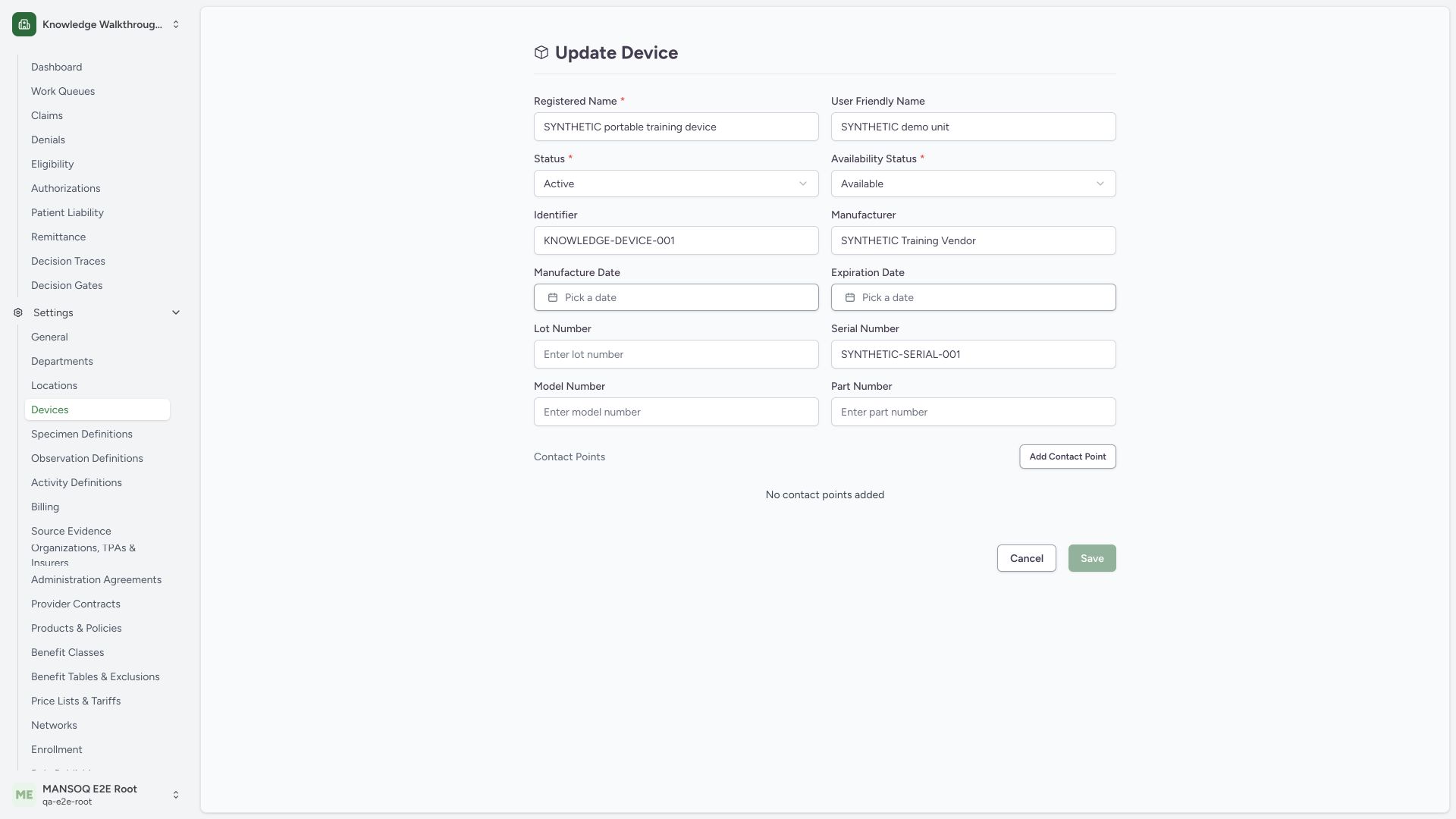
The edit form loads Status: Active and Availability Status: Available independently. Save is disabled before an actual edit. Keep the intended identity, serial/vendor details and location context; no patient or plugin configuration is part of this guide.
 123
123Capture details
Actual1920×1080 Chrome pixels; source f6e9f05f. Local synthetic generic catalogue device, no hardware or patient. Active→Inactive→Active lifecycle; availability retainedAvailable.
- Lifecycle Status: Active/Inactive/Entered in Error are separate from availability.
- Availability Status: Lost/Damaged/Destroyed/Available are a different dimension.
- Unchanged Save disabled: The loaded form needs a changed value before saving.
3. Recover a missing Registered Name
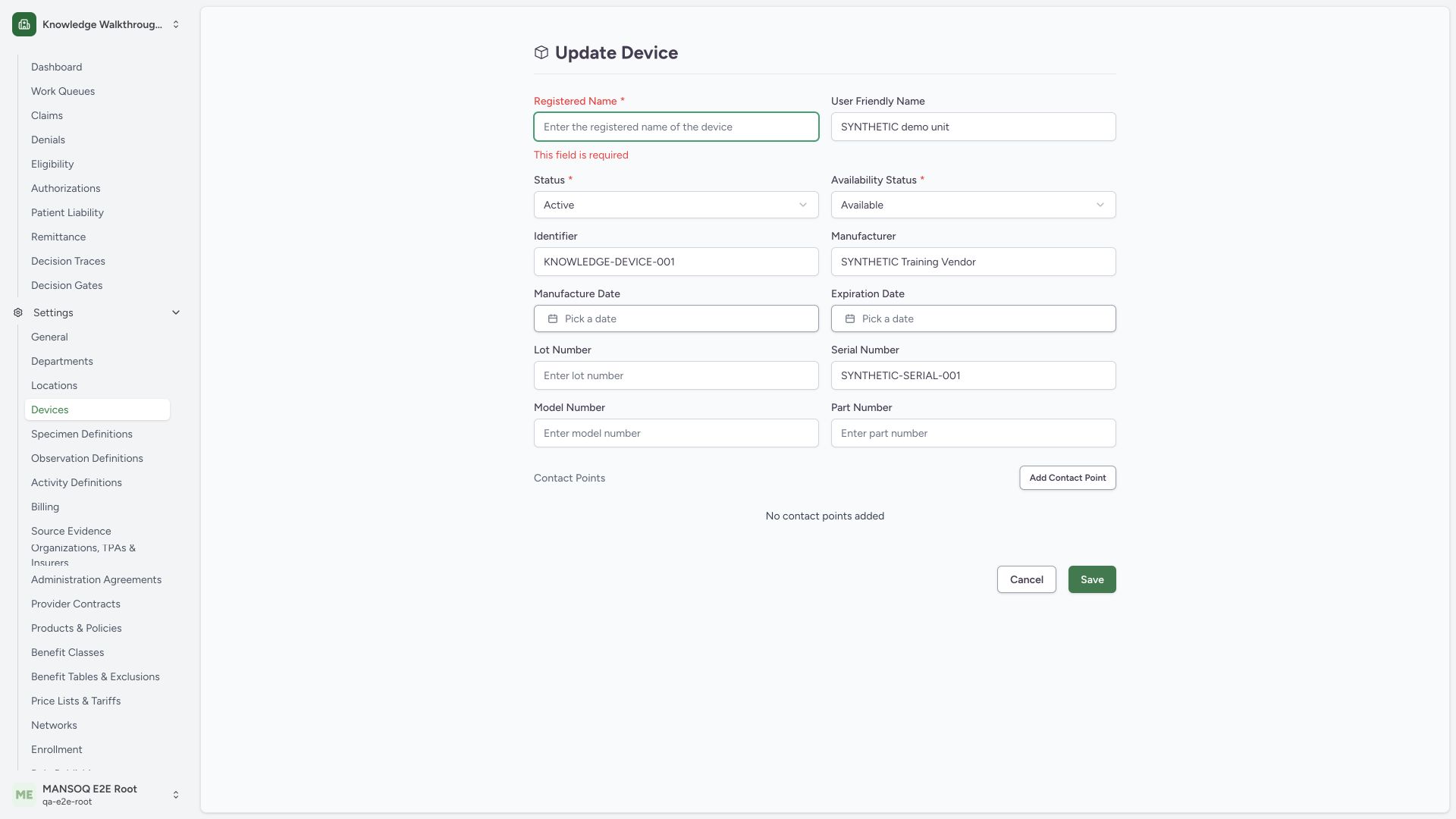
An actual normal Save with blank Registered Name leaves This field is required in the draft. Restore the approved exact registered name before proceeding. This validation did not create an invalid saved device.
 12
12Capture details
Actual1920×1080 Chrome pixels; source f6e9f05f. Local synthetic generic catalogue device, no hardware or patient. Active→Inactive→Active lifecycle; availability retainedAvailable.
- Registered Name required: Restore the approved exact device name before retrying.
- Actual validation: The invalid draft remains editable.
4. Choose the intended lifecycle status
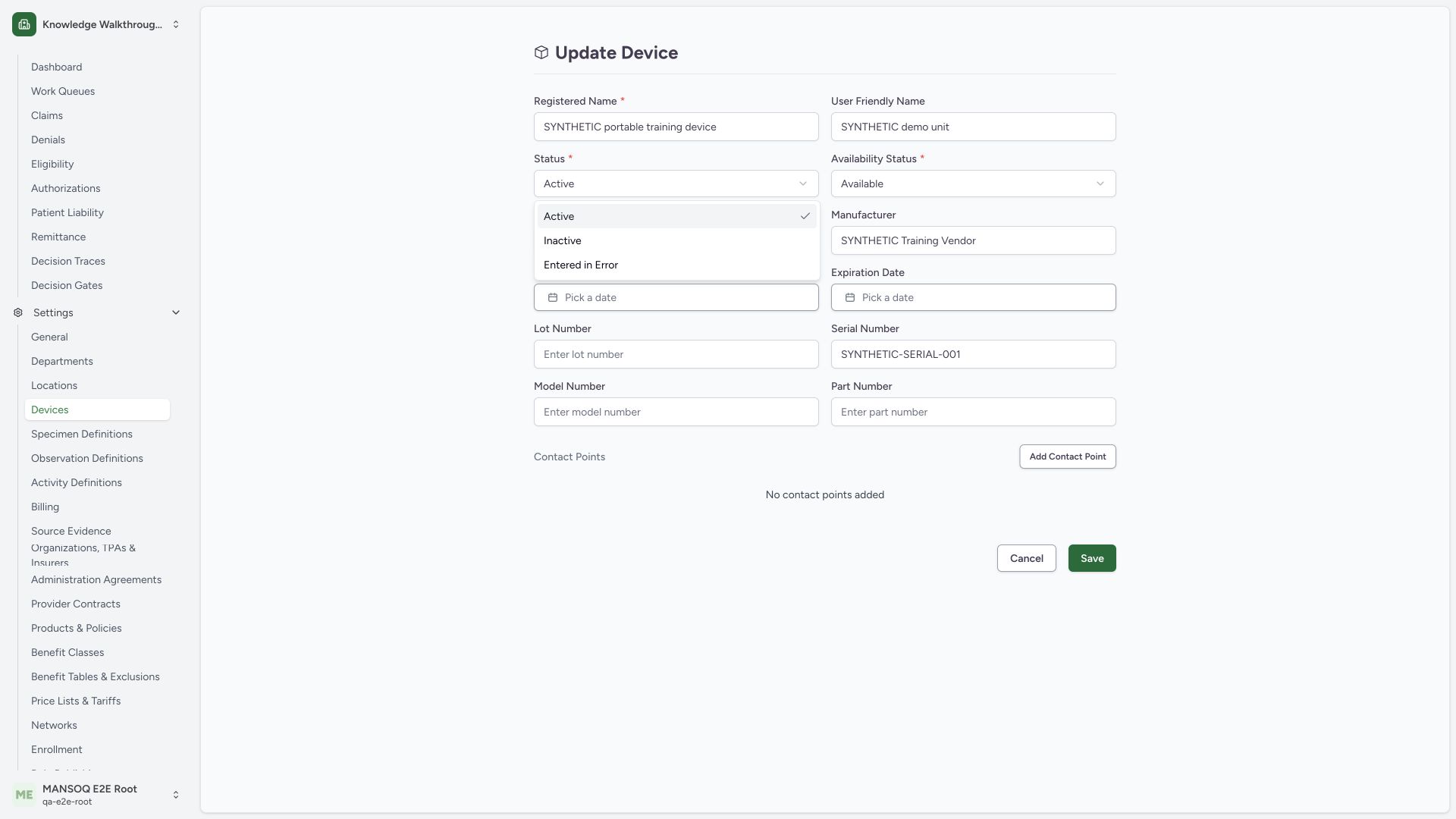
The Status dropdown offers Active, Inactive and Entered in Error. This synthetic demonstration chooses Inactive. Entered in Error is shown as an option but was not selected or saved. These lifecycle options are separate from physical availability.
 12
12Capture details
Actual1920×1080 Chrome pixels; source f6e9f05f. Local synthetic generic catalogue device, no hardware or patient. Active→Inactive→Active lifecycle; availability retainedAvailable.
- Inactive lifecycle choice: Use the approved lifecycle state, separate from availability.
- Separate erroneous-record state: This choice was not exercised or saved in this walkthrough.
5. Keep availability separate from lifecycle
The Availability Status dropdown offers Lost, Damaged, Destroyed and Available. Retain Available in this example while changing lifecycle to Inactive. The other availability conditions were only inspected; this guide does not claim they were saved or that any physical condition was assessed.
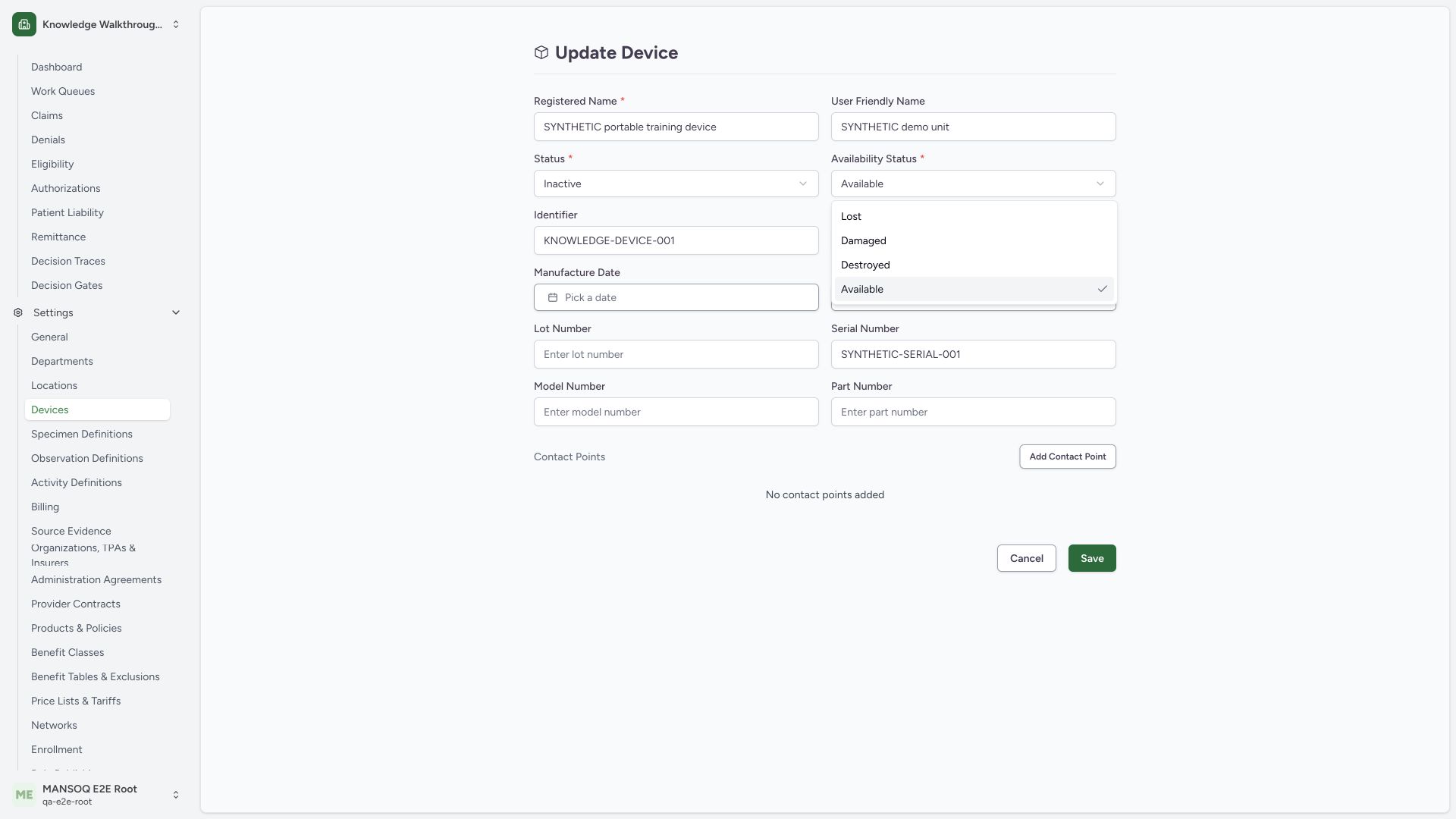 12
12Capture details
Actual1920×1080 Chrome pixels; source f6e9f05f. Local synthetic generic catalogue device, no hardware or patient. Active→Inactive→Active lifecycle; availability retainedAvailable.
- Retain Available: Availability remains separate from the Inactive lifecycle selection.
- Different availability categories: These choices require the approved real condition; none exercised in this example.
6. Save the reviewed Inactive lifecycle
Review the restored registered name, unchanged identity fields, Status: Inactive and Availability Status: Available, then use Save. No dates, contact points, patient association or hardware configuration were intentionally changed.
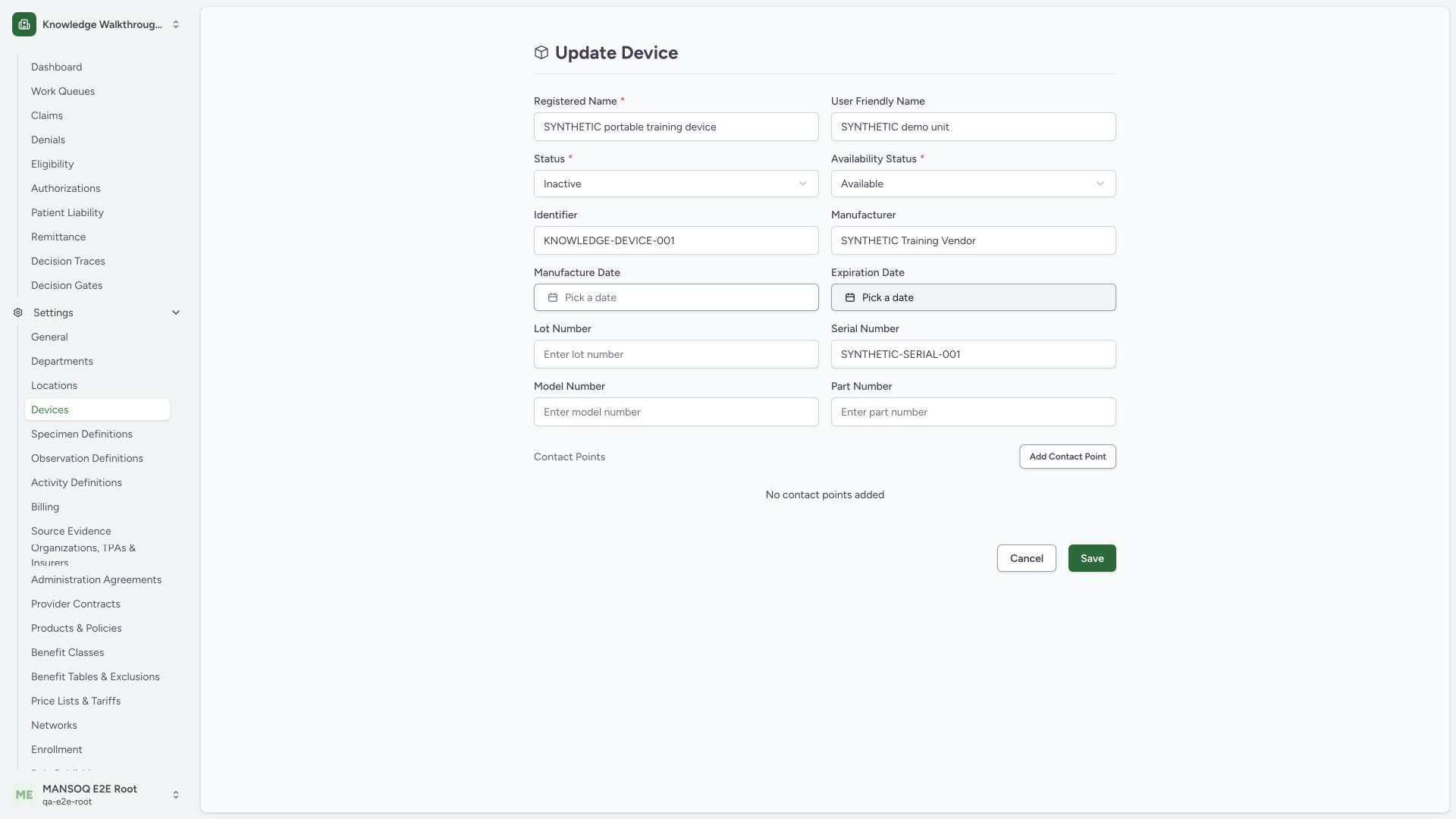 123
123Capture details
Actual1920×1080 Chrome pixels; source f6e9f05f. Local synthetic generic catalogue device, no hardware or patient. Active→Inactive→Active lifecycle; availability retainedAvailable.
- Inactive lifecycle prepared: Only the lifecycle status changes in this branch.
- Available retained: A separate availability label does not prove safe clinical use.
- Save reviewed state: Persist the reviewed generic configuration through the normal form.
7. Verify the saved Inactive state
The saved detail shows Inactive beside Available. A separate normal product detail GET returned200 and confirmed the Inactive lifecycle with Available retained, the same name/identifier/storage Room, no current encounter and no care_type. This result qualifies this synthetic configuration update only.
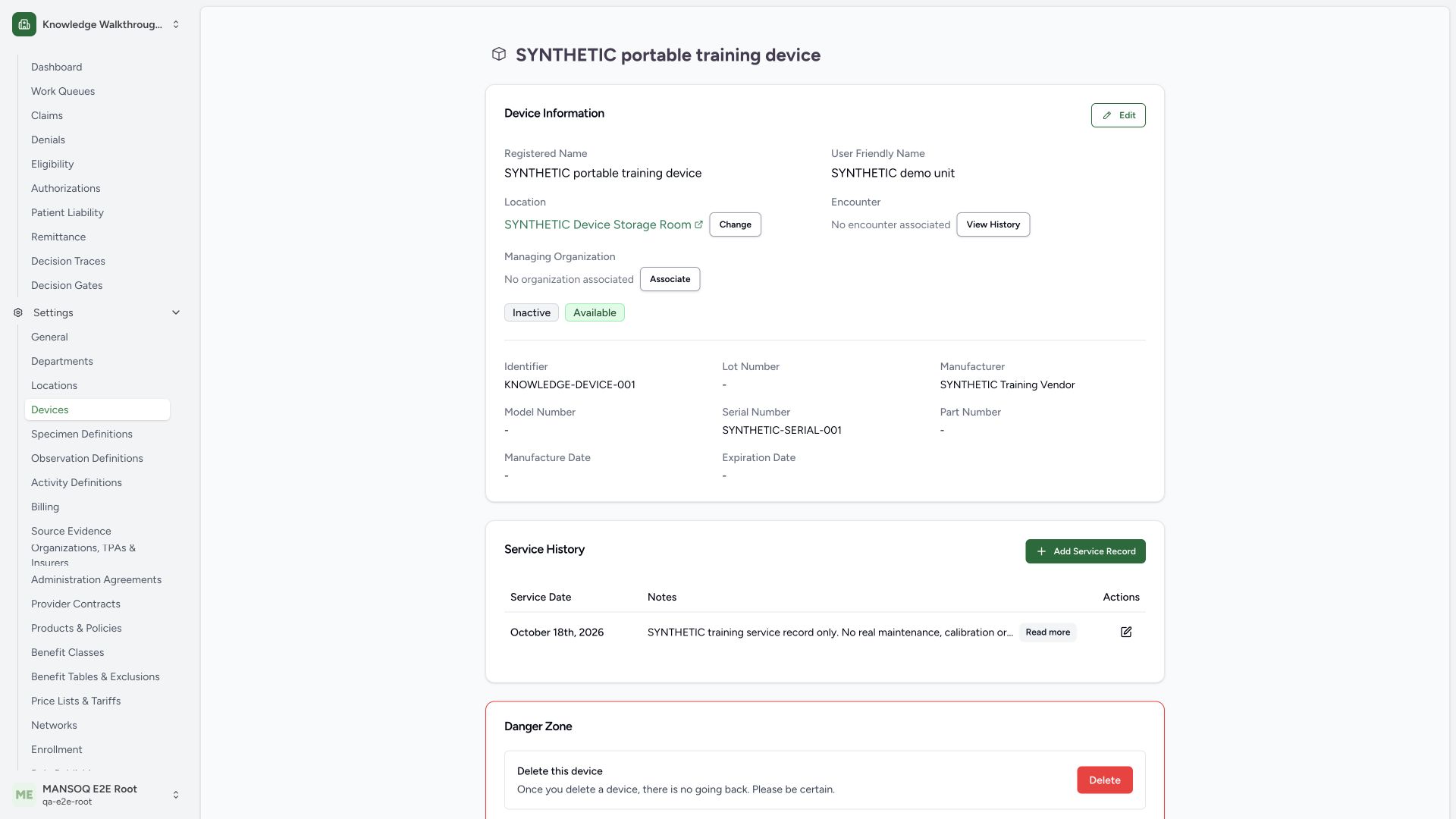 123
123Capture details
Actual1920×1080 Chrome pixels; source f6e9f05f. Local synthetic generic catalogue device, no hardware or patient. Active→Inactive→Active lifecycle; availability retainedAvailable.
- Saved Inactive lifecycle: The lifecycle status persisted after normal Save.
- Available retained: Separate availability label; it is not a clinical safety clearance.
- No encounter associated: This lifecycle tutorial has no patient assignment.
8. Restore the original lifecycle through the same normal form
Open Edit again, select Active in Status, retain Available, and use Save. This restores the approved original lifecycle after the demonstration without changing the separate availability value.
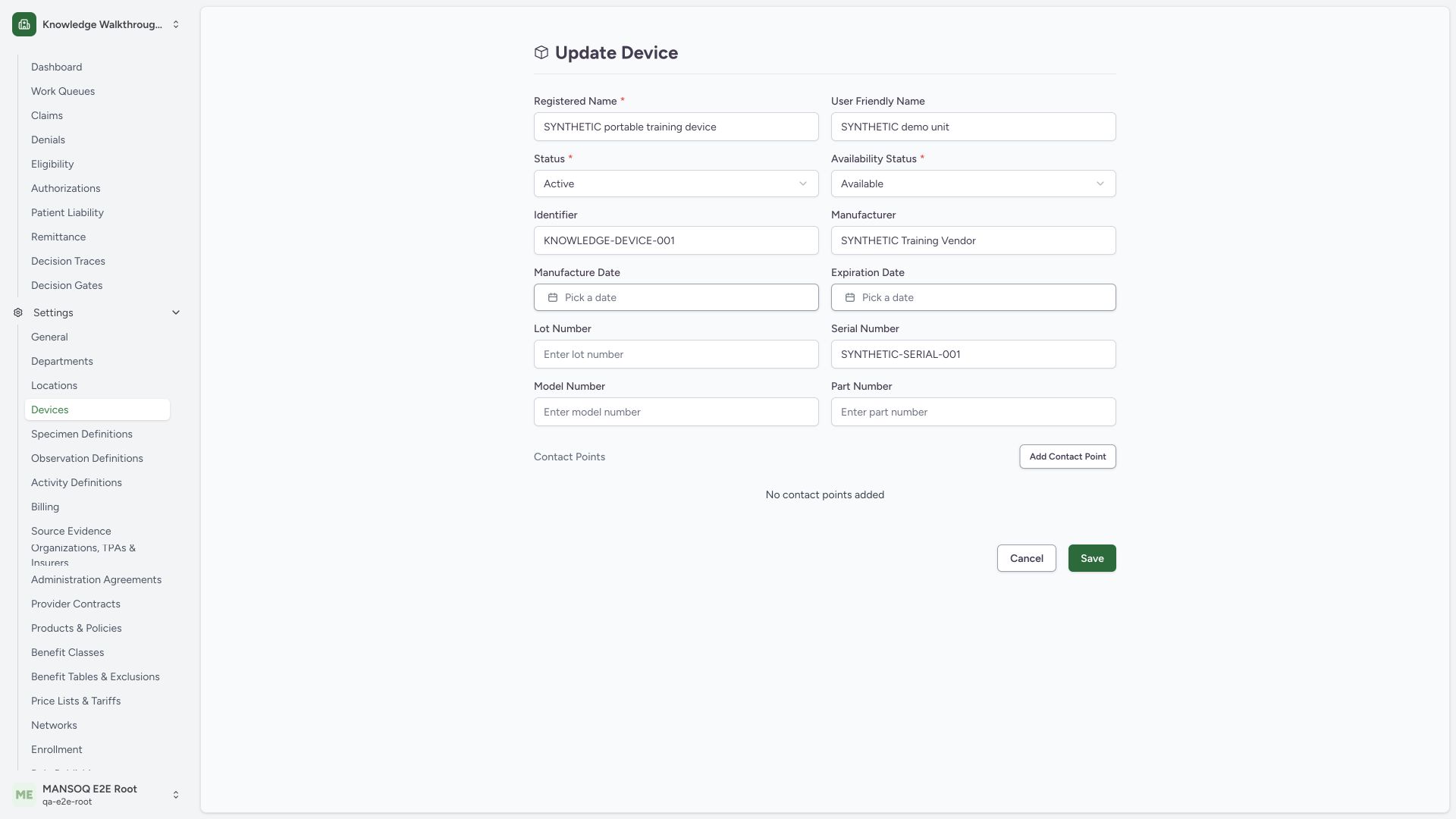 123
123Capture details
Actual1920×1080 Chrome pixels; source f6e9f05f. Local synthetic generic catalogue device, no hardware or patient. Active→Inactive→Active lifecycle; availability retainedAvailable.
- Restore Active lifecycle: Original lifecycle state selected in the same existing record.
- Available retained: No change to the separate availability field.
- Save restoration: Use normal Save and verify the saved detail.
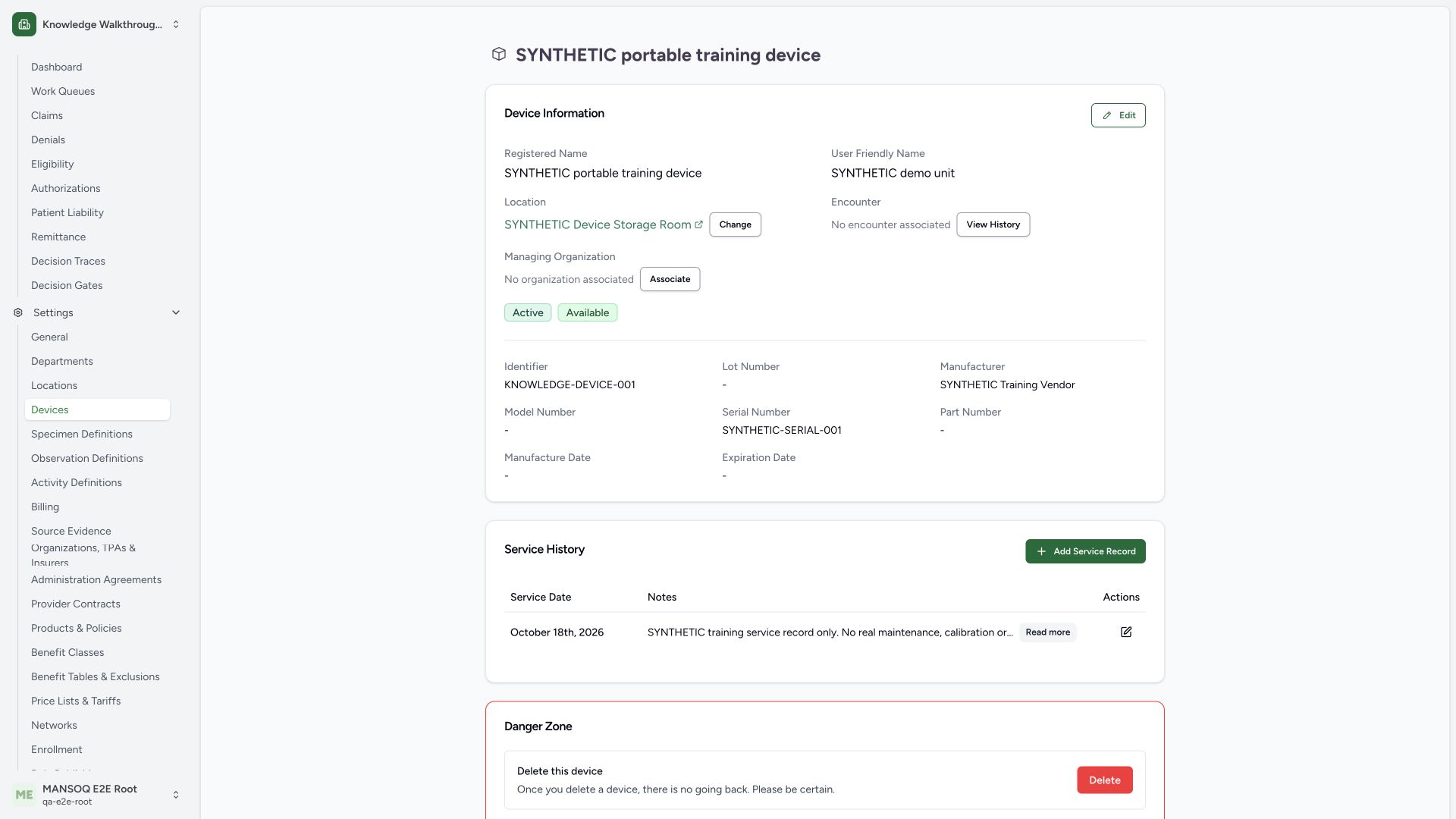
9. Verify the restored saved record
The saved detail again shows Active and Available with its original synthetic storage Room. An independent normal detail GET returned200 and confirmed the restored lifecycle, retained identifier/name/location and absence of encounter/care_type. The example ends in its original lifecycle state.
 123
123Capture details
Actual1920×1080 Chrome pixels; source f6e9f05f. Local synthetic generic catalogue device, no hardware or patient. Active→Inactive→Active lifecycle; availability retainedAvailable.
- Active restored: Original lifecycle state persisted after the demonstration.
- Available unchanged: Separate availability value retained across both lifecycle saves.
- Storage Room retained: No location or patient association changed.
Dates, contact points and specialized devices need their own qualification
The pinned form also contains optional manufacture/expiration dates and contact points. Source validation rejects a future manufacture date, requires expiration after manufacture when both exist, and rejects duplicate contact values after trimming and lowercasing. Those branches are not exercised by this lifecycle guide. A configured care_type may load a plugin-specific form; this generic record has none.
A status label does not establish operational readiness
Lifecycle and availability are separate configured fields in this interface. Neither an Available badge nor a successful catalogue Save is evidence of clinical safety, calibration, network connectivity or a qualified hardware integration. Use the deployment’s approved procedures and dedicated integration validation.
Troubleshooting
Save is disabled before editing
The source disables an unchanged form and pending submissions. Make only the approved actual change and ensure required fields are valid.
The required-name error remains
Restore a nonblank registered name, review the intended record and retry normal Save.
Source evidence
References are pinned to the private MANSOQ source repository. Repository access is required to open these links.
- repositories/platform/mansoq-web/src/pages/Facility/settings/devices/components/DeviceForm.tsx:64 · f6e9f05f
- repositories/platform/mansoq-web/src/pages/Facility/settings/devices/components/DeviceForm.tsx:80 · f6e9f05f
- repositories/platform/mansoq-web/src/pages/Facility/settings/devices/components/DeviceForm.tsx:87 · f6e9f05f
- repositories/platform/mansoq-web/src/pages/Facility/settings/devices/components/DeviceForm.tsx:107 · f6e9f05f
- repositories/platform/mansoq-web/src/pages/Facility/settings/devices/components/DeviceForm.tsx:188 · f6e9f05f
- repositories/platform/mansoq-web/src/pages/Facility/settings/devices/components/DeviceForm.tsx:235 · f6e9f05f
- repositories/platform/mansoq-web/src/pages/Facility/settings/devices/components/DeviceForm.tsx:260 · f6e9f05f
- repositories/platform/mansoq-web/src/types/device/device.ts:7 · f6e9f05f
- repositories/platform/mansoq-web/src/pages/Facility/settings/devices/DeviceShow.tsx:133 · f6e9f05f
- repositories/platform/mansoq-web/src/pages/Facility/settings/devices/DeviceShow.tsx:277 · f6e9f05f