 MANSOQ
 Access & administration
Disassociate and reassociate a device location while preserving its history
Review current storage, close its open interval, select the authorized location and verify the new interval without losing prior history.
7 min read · Source baseline f6e9f05f
Verification and applicability
Four actual 1920 × 1080 Chrome screenshots; existing synthetic generic device original-room disassociation and restoration through normal UI. Independent device/location/encounter-history GET200 reads verify closed original interval, new current interval and zero patient encounter history. Original location restored; no physical hardware, other-room/cross-facility transfer, deletion, new privilege or all-role/facility claim.
Check your installed version, permissions and local configuration.
Before you begin
- Use an authorized operator for the device and intended same-facility location. The backend requires device update authorization and location-object update authorization; a visible Change button alone does not establish access. This example uses an existing isolated synthetic superuser.
- The generic training device is Active and Available with no patient encounter and no real hardware attached. The example ends at its original synthetic storage room; it does not qualify a physical move, clinical assignment or safety inspection.
1. Review the device current location and open interval
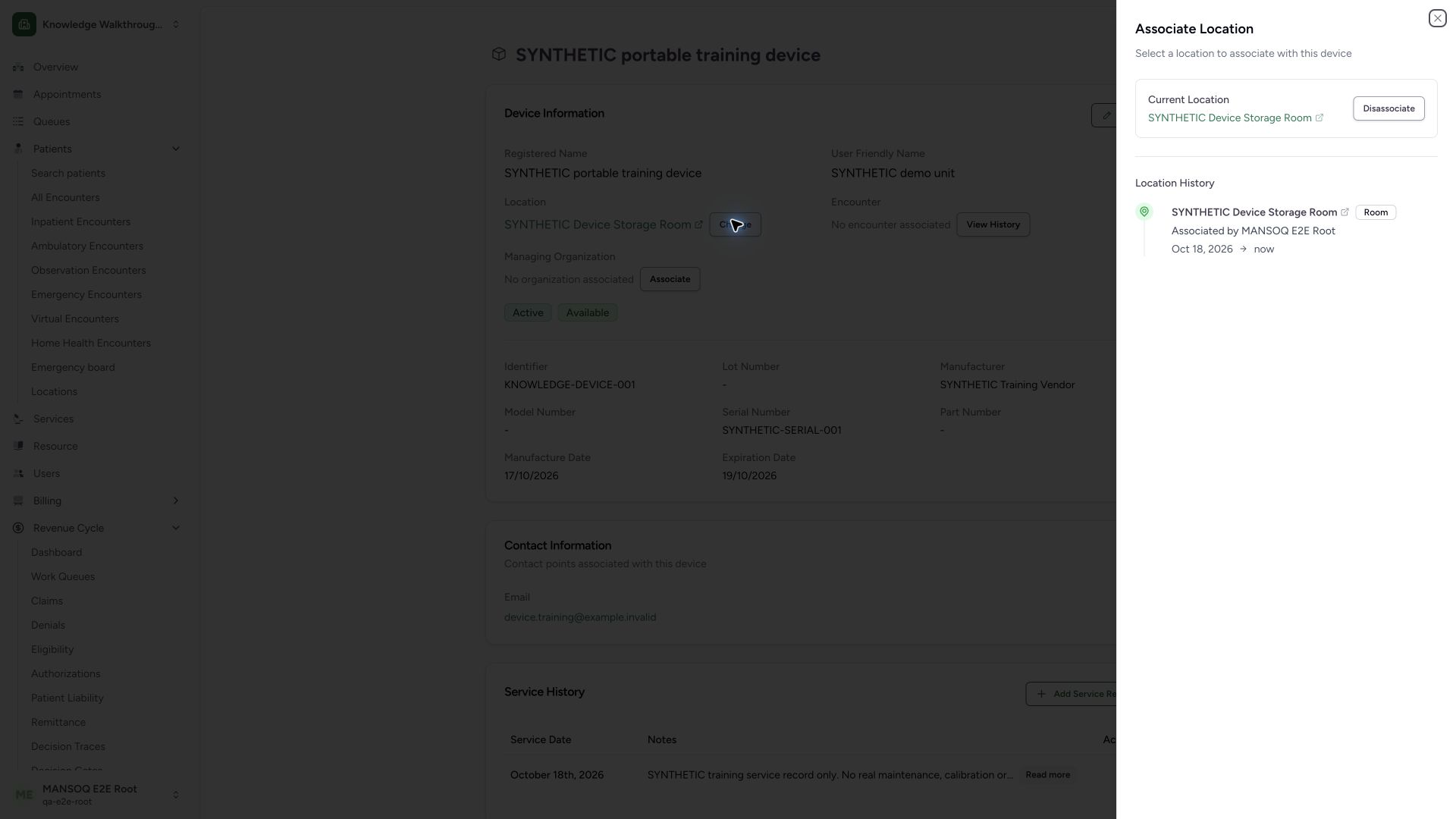
On the intended device, use the location Change action. The sheet shows Current Location, Disassociate, and Location History. Confirm SYNTHETIC Device Storage Room, its Room form and the open interval displayed through now. Independent starting GET200 reads confirmed the current room, one open history entry and no encounter association.
 1234
1234Capture details
Actual 1920 × 1080 Chrome pixels; pinned source f6e9f05f. Generic device location assignment and interval history
- Original current location: Confirm the selected device and current room.
- Disassociate before moving: The current-location UI offers disassociation before a new selection.
- Current timeline entry: The entry shows location, form and actor.
- Open interval ends now: A missing stored end is displayed as now.
2. Disassociate and confirm the old interval is closed
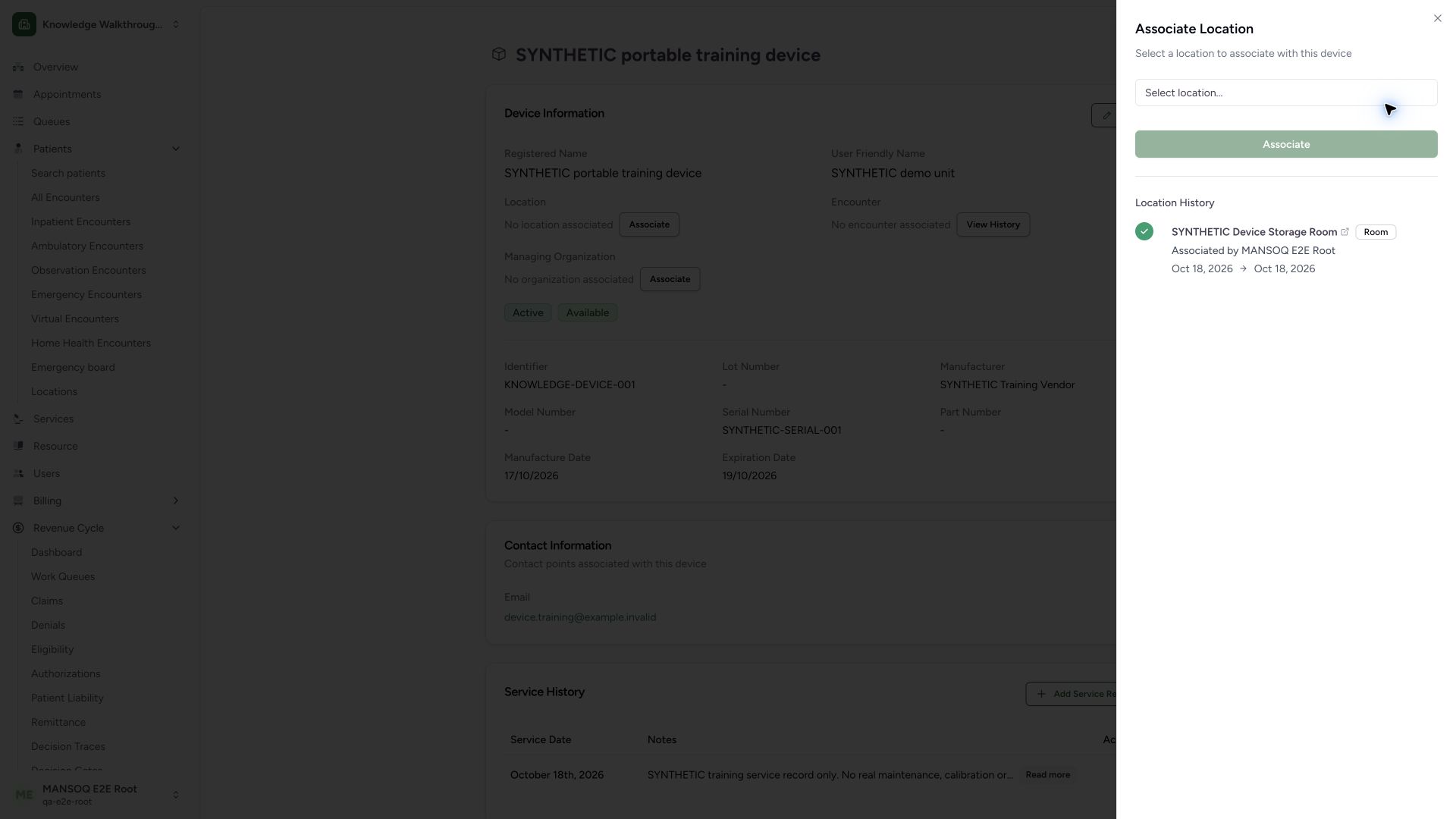
Use Disassociate once for the intended training device. The current-location card is replaced by the selector, Associate remains disabled without a selection, and the prior history entry now has an end date. Independent normal device/history GET200 reads verify current_location null, the same original history ID with its end timestamp set and no open intervals.
 1234
1234Capture details
Actual 1920 × 1080 Chrome pixels; pinned source f6e9f05f. Generic device location assignment and interval history
- No current location selected: A new same-facility location can now be chosen.
- Associate stays disabled: Select a location before committing a new association.
- Original history retained: Disassociation closes the interval rather than removing its history.
- Closed interval end: The former now value is replaced by an end date.
3. Select the intended same-facility room before reassociating
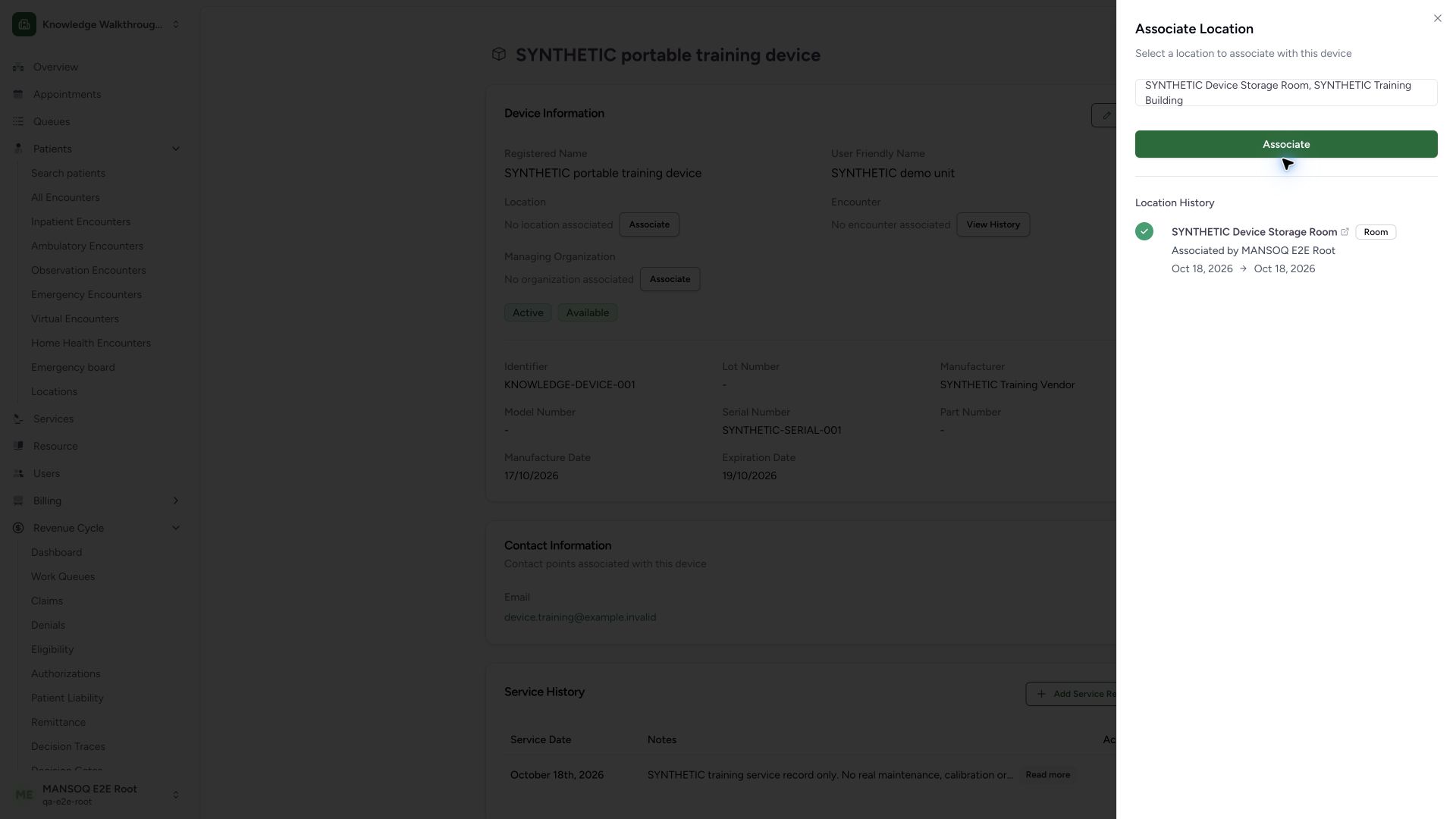
Choose the intended location in the selector and review its full room-plus-building label. This restoration chooses SYNTHETIC Device Storage Room, SYNTHETIC Training Building, then uses the enabled Associate action. The previously closed interval is retained below. This screen demonstrates selecting and committing an association; another room or cross-facility transfer was not committed.
 123
123Capture details
Actual 1920 × 1080 Chrome pixels; pinned source f6e9f05f. Generic device location assignment and interval history
- Selected room and parent: Confirm room plus building to avoid matching the wrong location.
- Associate selected room: This normal action creates a new stored location interval.
- Closed history remains: Reassociation retains the prior interval.
4. Verify the restored current room and separate intervals
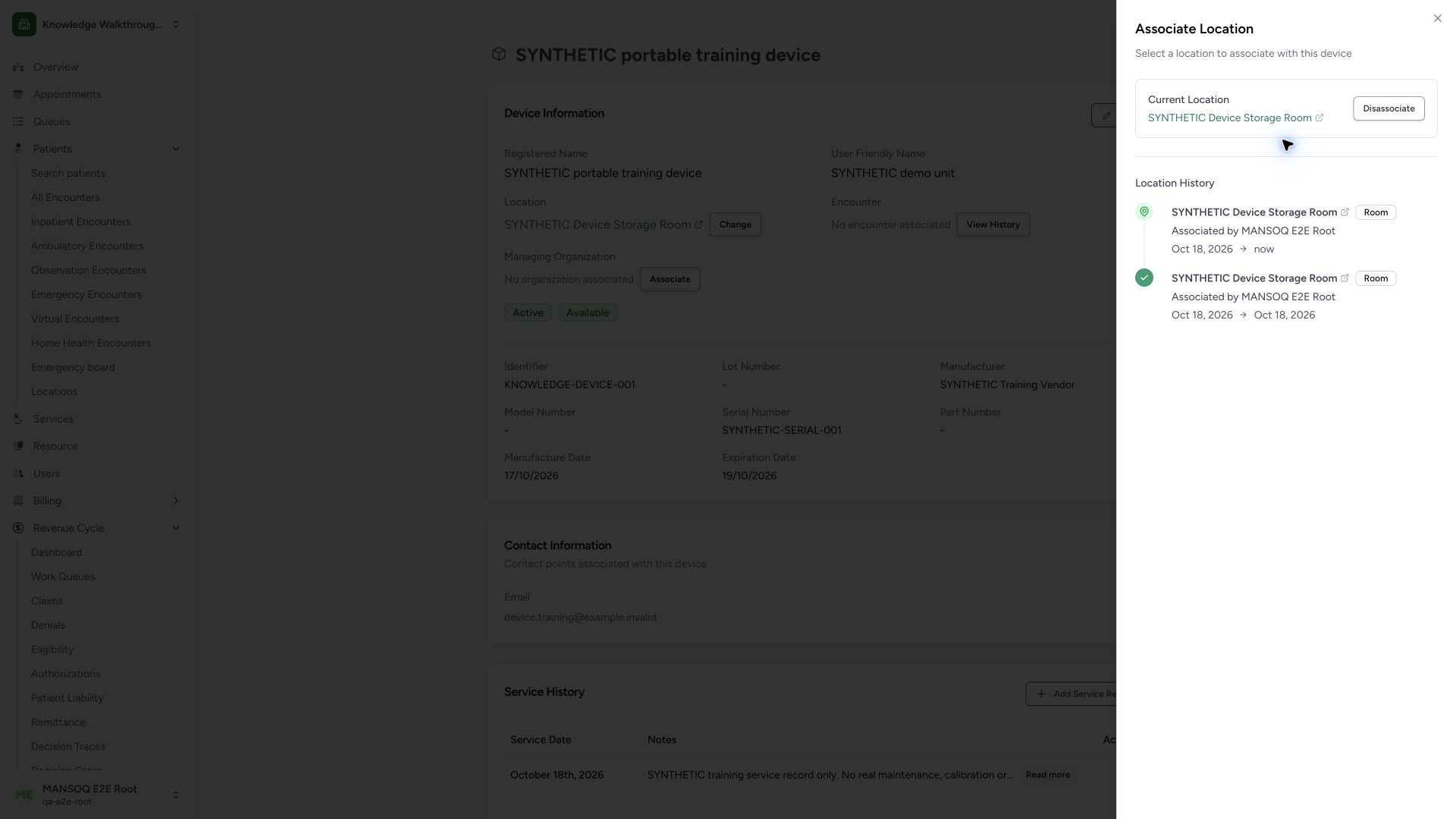
The sheet again shows the original Current Location. Location History contains a new open entry ending now plus the retained closed original entry. Independent normal GET200 reads confirm two distinct history records for the same room, exactly one open interval, original current-location ID restored, Active/Available device status and zero encounter history.
 1234
1234Capture details
Actual 1920 × 1080 Chrome pixels; pinned source f6e9f05f. Generic device location assignment and interval history
- Original room restored: The current-location ID matches the starting checkpoint.
- New current interval: The latest entry remains open through now.
- Original closed interval: The previous association is retained as a separate history entry.
- Closed start and end dates: Displayed dates are local calendar dates; precise timestamps remain in the stored history.
Current assignment and history are separate records
The normal association action closes the previous matching open interval, updates current_location and creates a new history interval when a new location is supplied. Null disassociates without removing prior history. Reassociating the original room therefore creates a second interval for the same room. The UI prints calendar dates and now; precise start/end timestamps and actor identity remain in the normal history readback.
Authorization and unqualified branches
The source rejects the already-associated location and a location outside the selected facility, then checks device update and location-object update authorization. This four-screen example verifies the allowed disassociation/reassociation cycle only. Cross-facility rejection, duplicate submission, other role denials, choosing another room, managing-organization association, clinical encounter assignment and pagination require separate supported observations.
Troubleshooting
There is no new-location selector while the device has a current location
The pinned sheet shows Disassociate while a current location exists. Review the current assignment before closing it; select the replacement after the current assignment is removed.
The same room appears twice in history
Separate closed and open intervals can legitimately refer to the same room after reassociation. Compare interval identities and timestamps rather than treating repeated names as duplicates.
Source evidence
References are pinned to the private MANSOQ source repository. Repository access is required to open these links.
- repositories/platform/mansoq-web/src/pages/Facility/settings/devices/DeviceShow.tsx:166 · f6e9f05f
- repositories/platform/mansoq-web/src/pages/Facility/settings/devices/components/ManageLocationSheet.tsx:62 · f6e9f05f
- repositories/platform/mansoq-web/src/pages/Facility/settings/devices/components/ManageLocationSheet.tsx:96 · f6e9f05f
- repositories/platform/mansoq-web/src/pages/Facility/settings/devices/components/ManageLocationSheet.tsx:151 · f6e9f05f
- repositories/platform/mansoq-web/src/pages/Facility/settings/devices/components/DeviceLocationTimelineCard.tsx:27 · f6e9f05f
- repositories/platform/mansoq-web/src/components/Location/LocationSearch.tsx:60 · f6e9f05f
- repositories/platform/mansoq-web/src/types/device/deviceApi.ts:49 · f6e9f05f
- repositories/platform/mansoq-core/mansoq/emr/api/viewsets/device.py:227 · f6e9f05f
- repositories/platform/mansoq-core/mansoq/emr/api/viewsets/device.py:346 · f6e9f05f
- repositories/platform/mansoq-core/mansoq/emr/models/device.py:67 · f6e9f05f