 MANSOQ
 Facility administration
Create a healthcare service with the correct location and managing department
Follow the actual creation form, required-location validation, internal service type, hierarchical location selection, optional department and saved record verification.
Current source · Actual isolated synthetic Clinic UI creation with required-location rejection, successful normal submission and independent normal list/detail GET 200 readback. Only local superuser configuration was exercised. Edit, Delete, all service types, all roles and downstream clinical/stock workflows remain separate. · 8 min read
Before you begin
- Use an authorized configuration account in the intended facility and confirm its deployed capability and resource scope. The pictured walkthrough used only an isolated synthetic Clinic and a local superuser; it does not establish every role or facility combination.
- Create or identify the intended location hierarchy and optional managing department first. The example uses one saved Room under a Building and a separately saved Outpatient Department.
1. Inspect the creation form
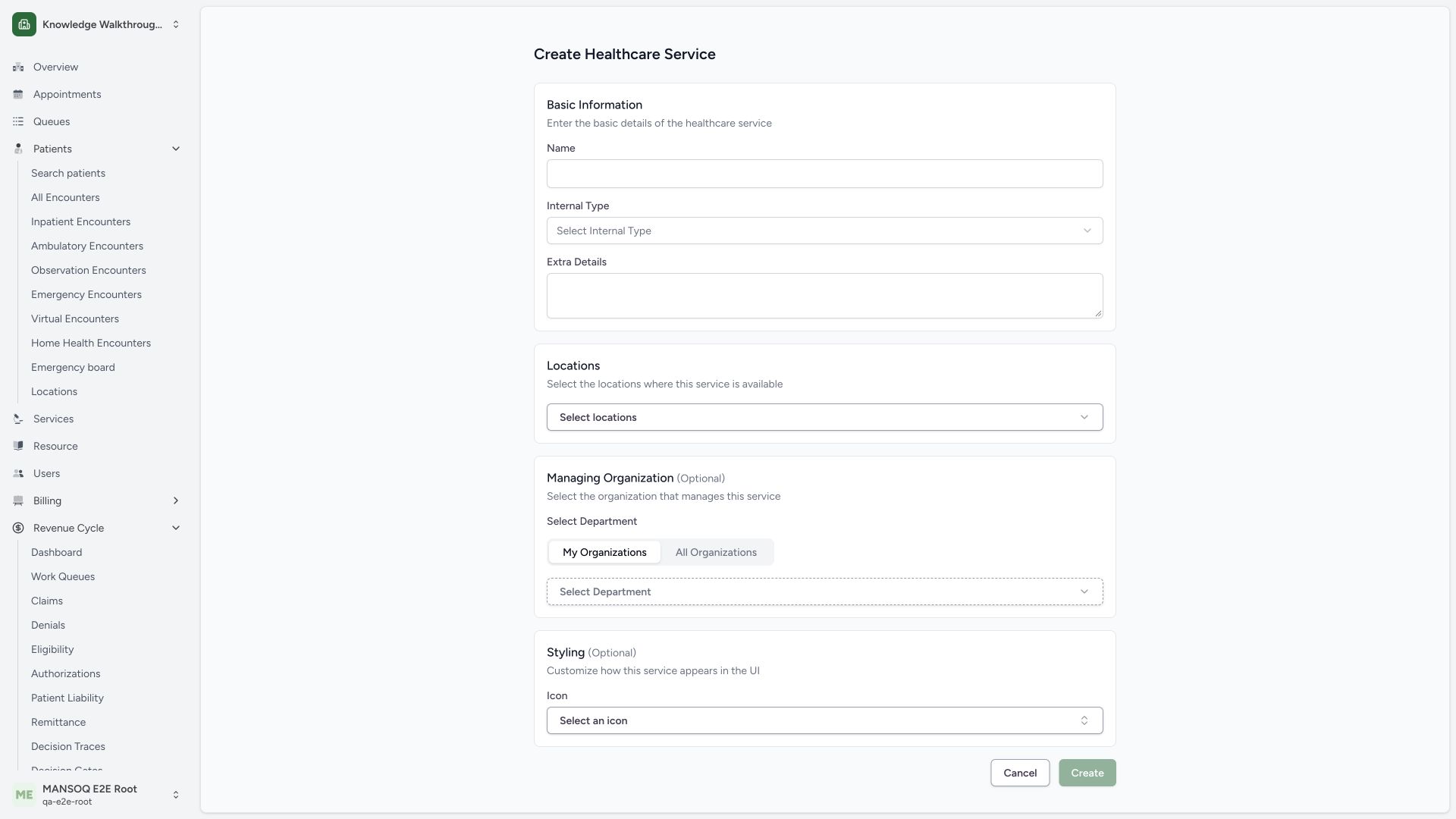
Open facility Settings → Healthcare Services, then the create action. The actual Create Healthcare Service form separates the required name, locations, optional managing organization and optional styling. The untouched form has no selected locations.
 12
12- Service name: Name is a required identity field.
- Service locations: At least one location is required.
2. Correct a missing location before creation
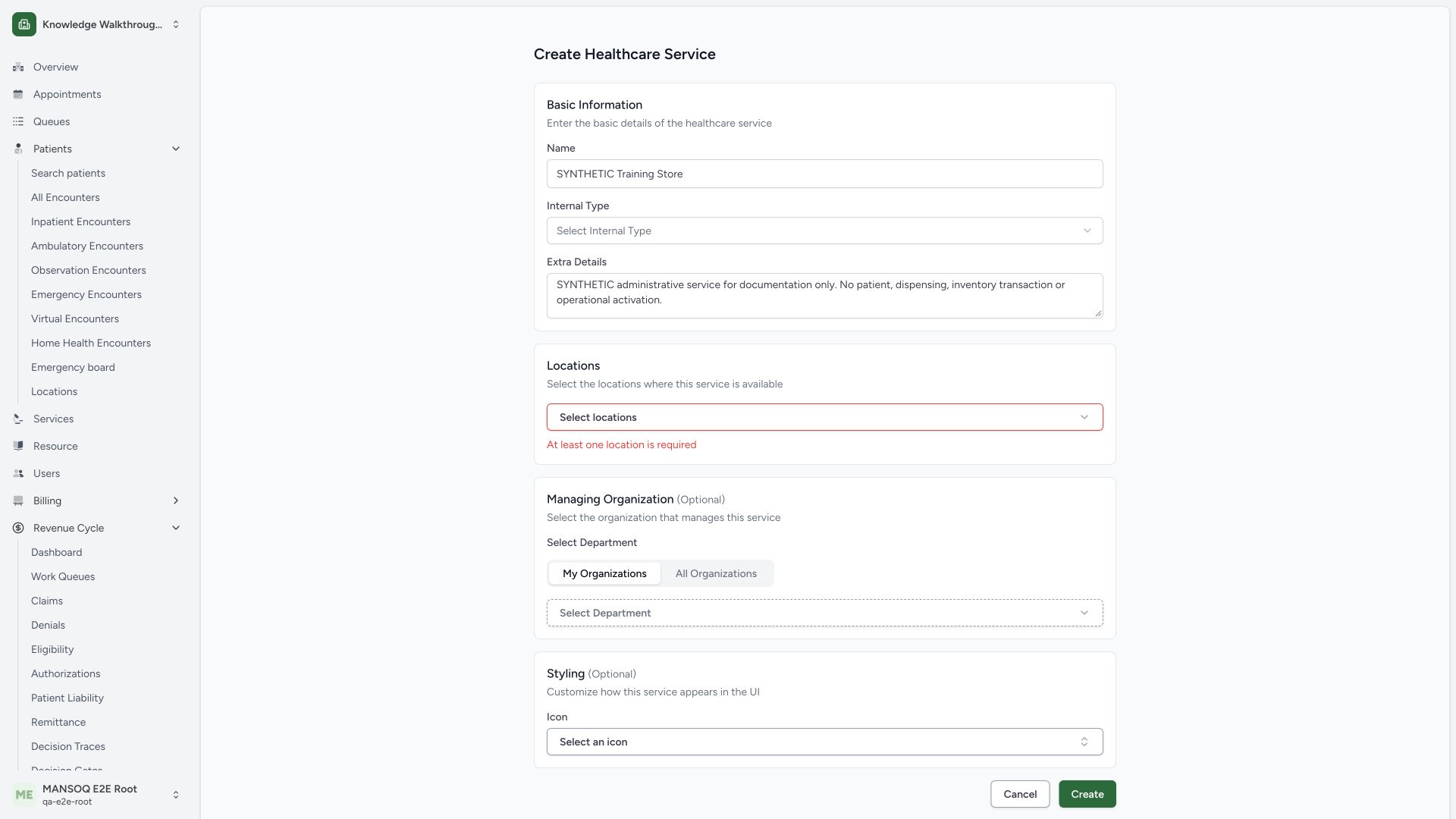
The pictured normal submission with a synthetic name but no location returns At least one location is required. Choose an appropriate location before retrying. This validation branch did not save a service.
 12
12- Required location: Correct the actual missing location before creating.
- Choose locations: The empty selector is separate from service identity and managing department.
3. Choose the intended internal service type
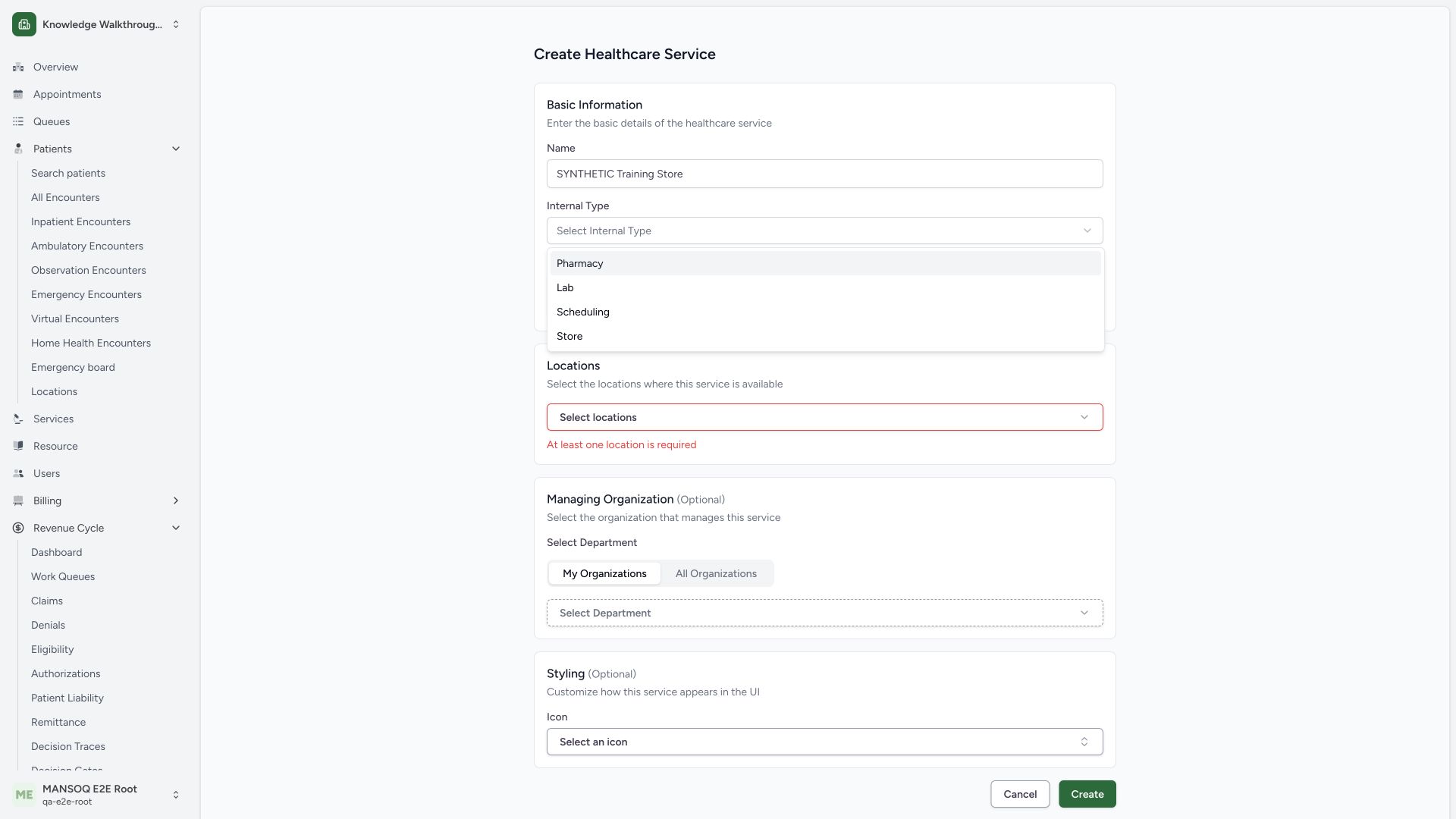
Open Internal Type. The actual selector lists Pharmacy, Lab, Scheduling and Store. This example chooses Store, as confirmed in the prepared form. A service category is separate from the facility classification or a staff security role.
 12
12- Store type: Use the intended source-defined service category.
- Other internal types: Lab is a service category, not a newly granted user role.
 1234
1234- Service identity: Confirm the exact synthetic name.
- One selected location: Location selection is distinct from managing department.
- Managing department: Review the selected optional organization.
- Create service: Save the reviewed configuration through the normal form.
4. Select the intended child Room
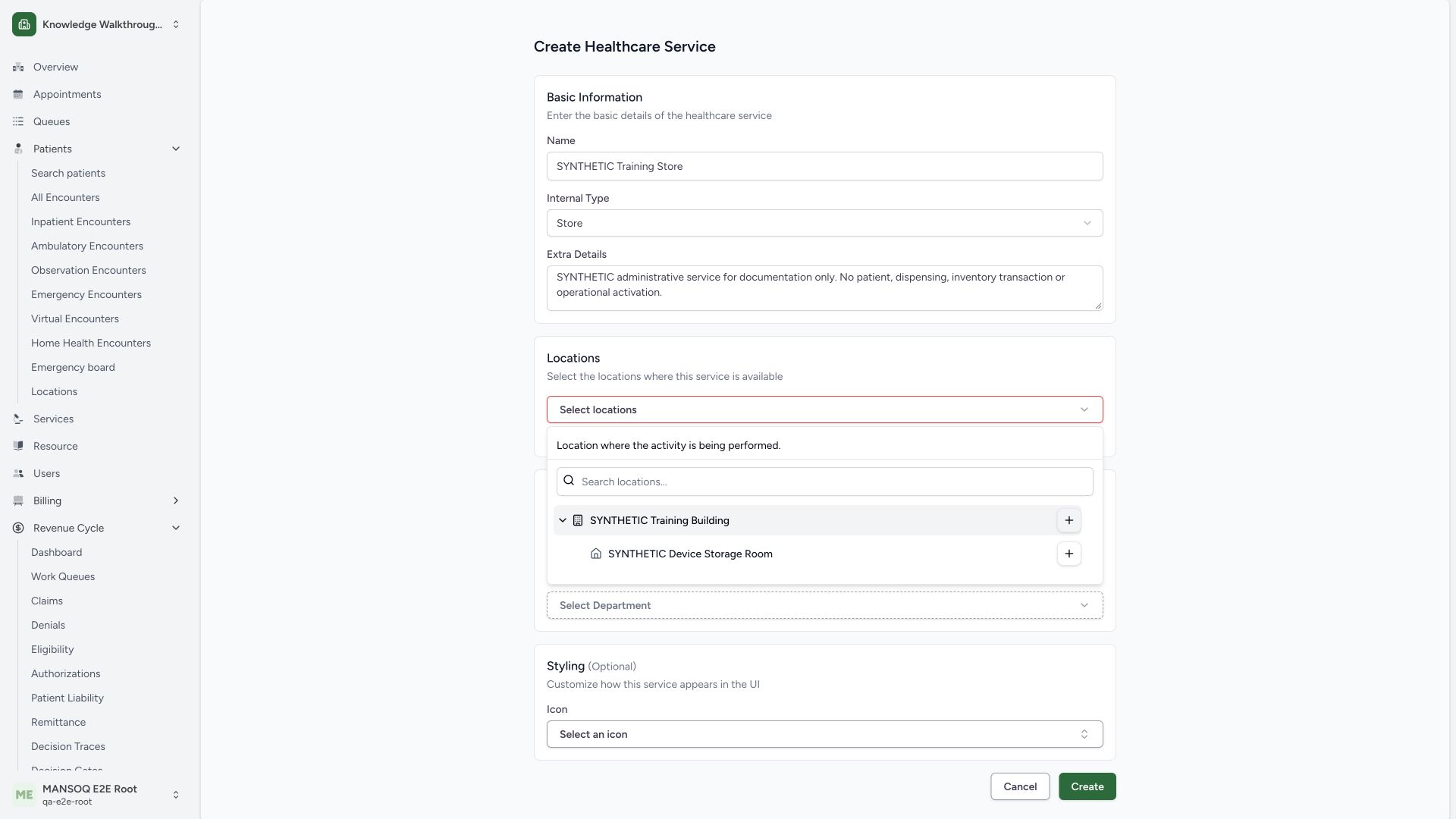
Open the location selector and expand SYNTHETIC Training Building to find SYNTHETIC Device Storage Room. Use the plus control on the Room row to select that Room. Expanding a parent is a different action. The prepared form shows the one selected Room.
 123
123- Parent Building: Confirm the correct hierarchy before choosing a child.
- Intended Room: Check the exact Room identity.
- Add this Room: Use this row plus to select the Room, not the parent Building.
1234- Service identity: Confirm the exact synthetic name.
- One selected location: Location selection is distinct from managing department.
- Managing department: Review the selected optional organization.
- Create service: Save the reviewed configuration through the normal form.
5. Choose the optional managing department
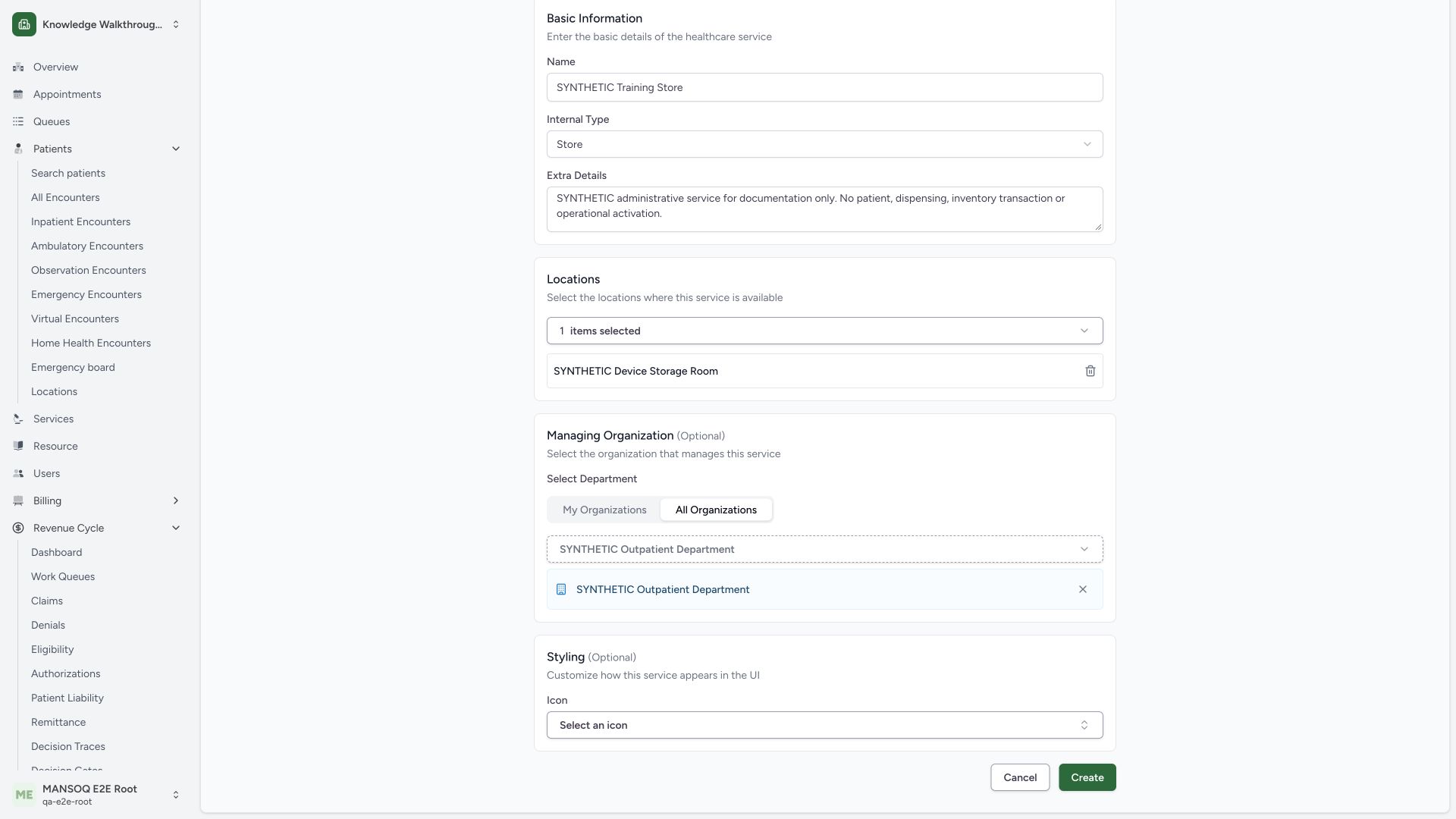
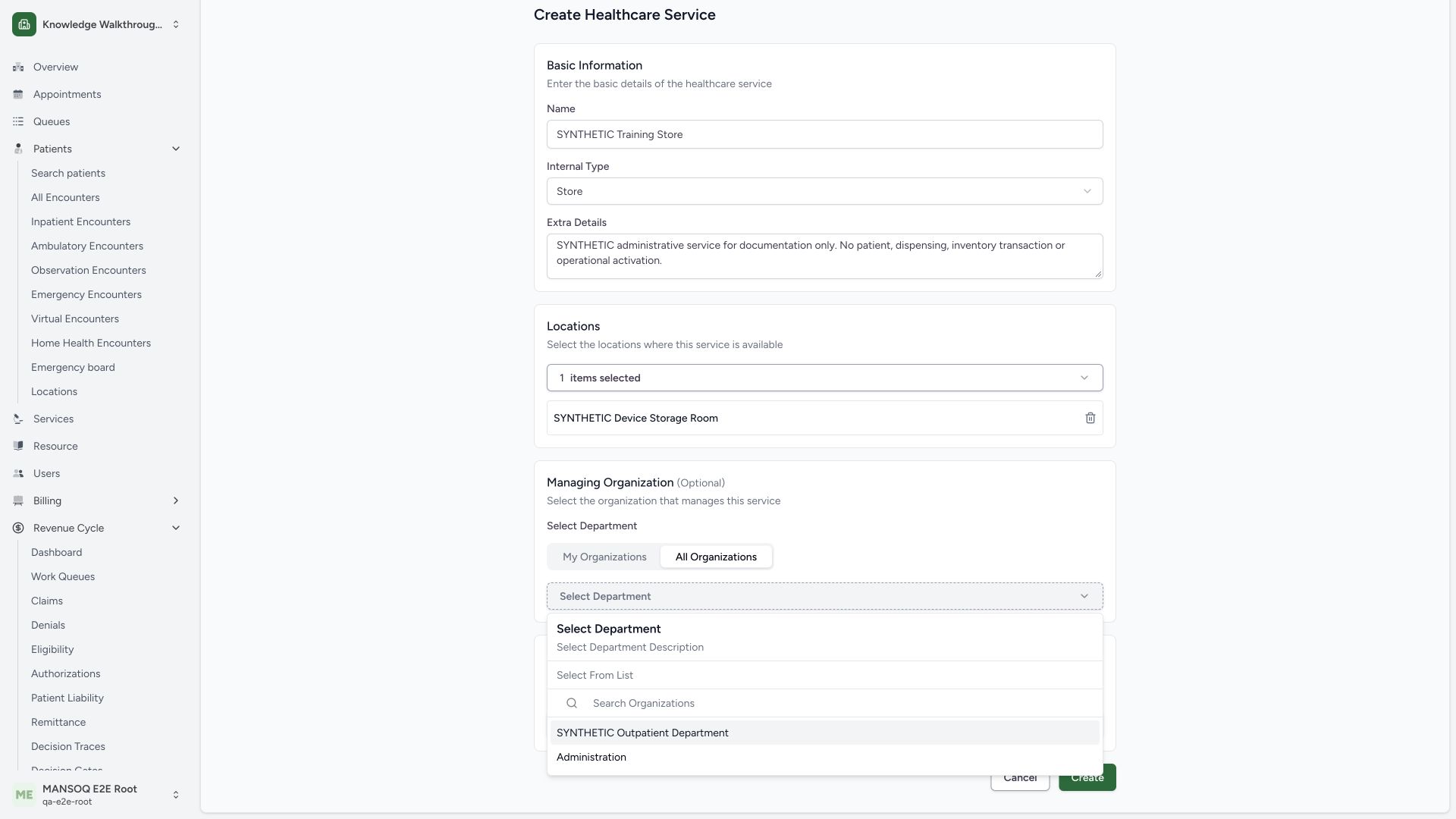
In the managing organization selector, this authorized example uses All Organizations to find SYNTHETIC Outpatient Department. Select the intended department and review it in the prepared form. The managing department is distinct from the location. This selector choice does not assign a user membership. Optional icon styling remains unset in this example.
 12
12- Authorized department list: This tab changes the visible selector list only.
- Managing department: Select the intended saved synthetic operational department.
1234- Service identity: Confirm the exact synthetic name.
- One selected location: Location selection is distinct from managing department.
- Managing department: Review the selected optional organization.
- Create service: Save the reviewed configuration through the normal form.
6. Review the draft and create the configuration
Check the synthetic service name, Store type, training-only notes, the one selected Room and the managing department. The full prepared form shows the Create button at the bottom. Select Create only for the reviewed valid configuration.
1234- Service identity: Confirm the exact synthetic name.
- One selected location: Location selection is distinct from managing department.
- Managing department: Review the selected optional organization.
- Create service: Save the reviewed configuration through the normal form.
7. Verify the saved service and its references
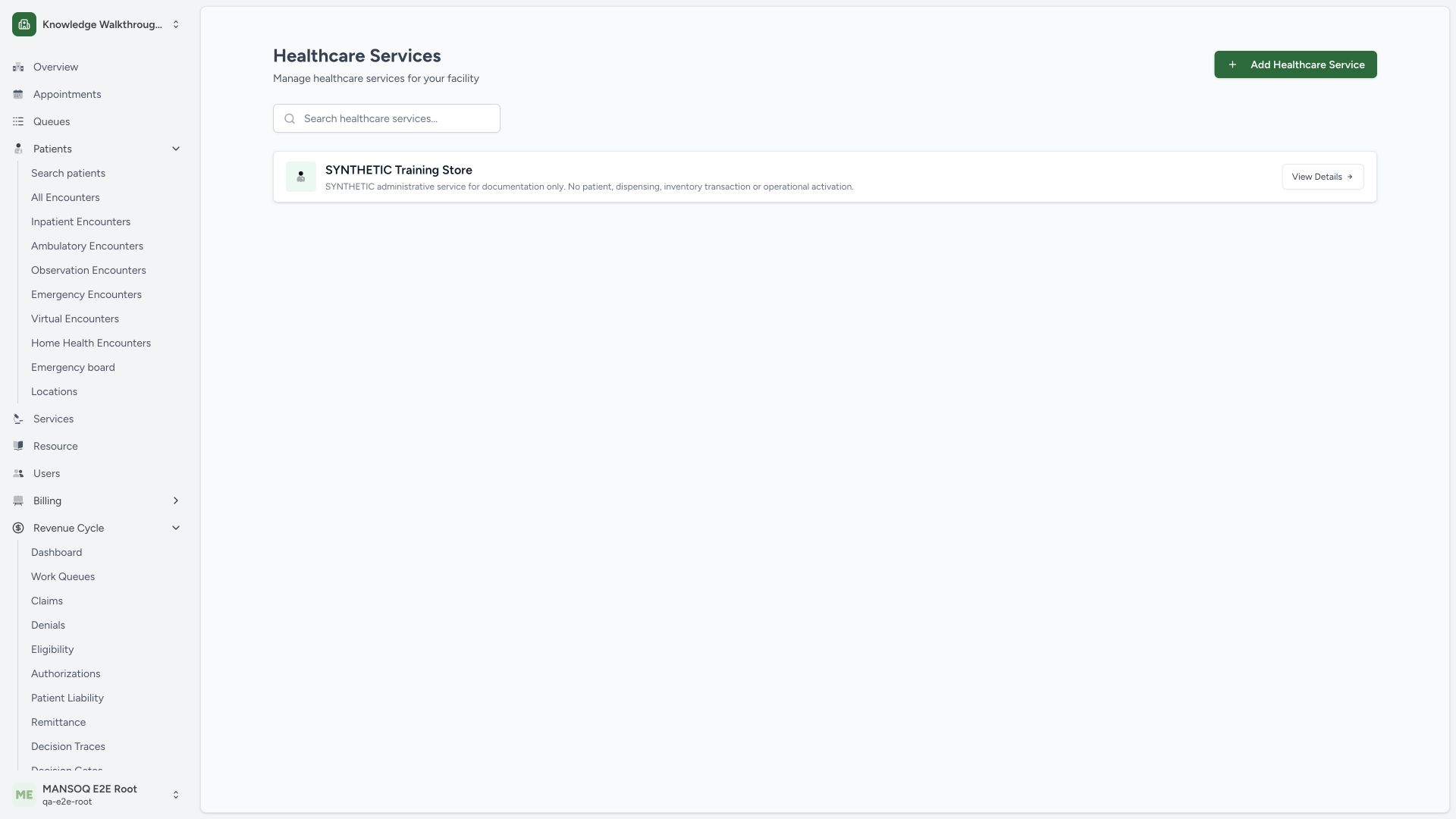
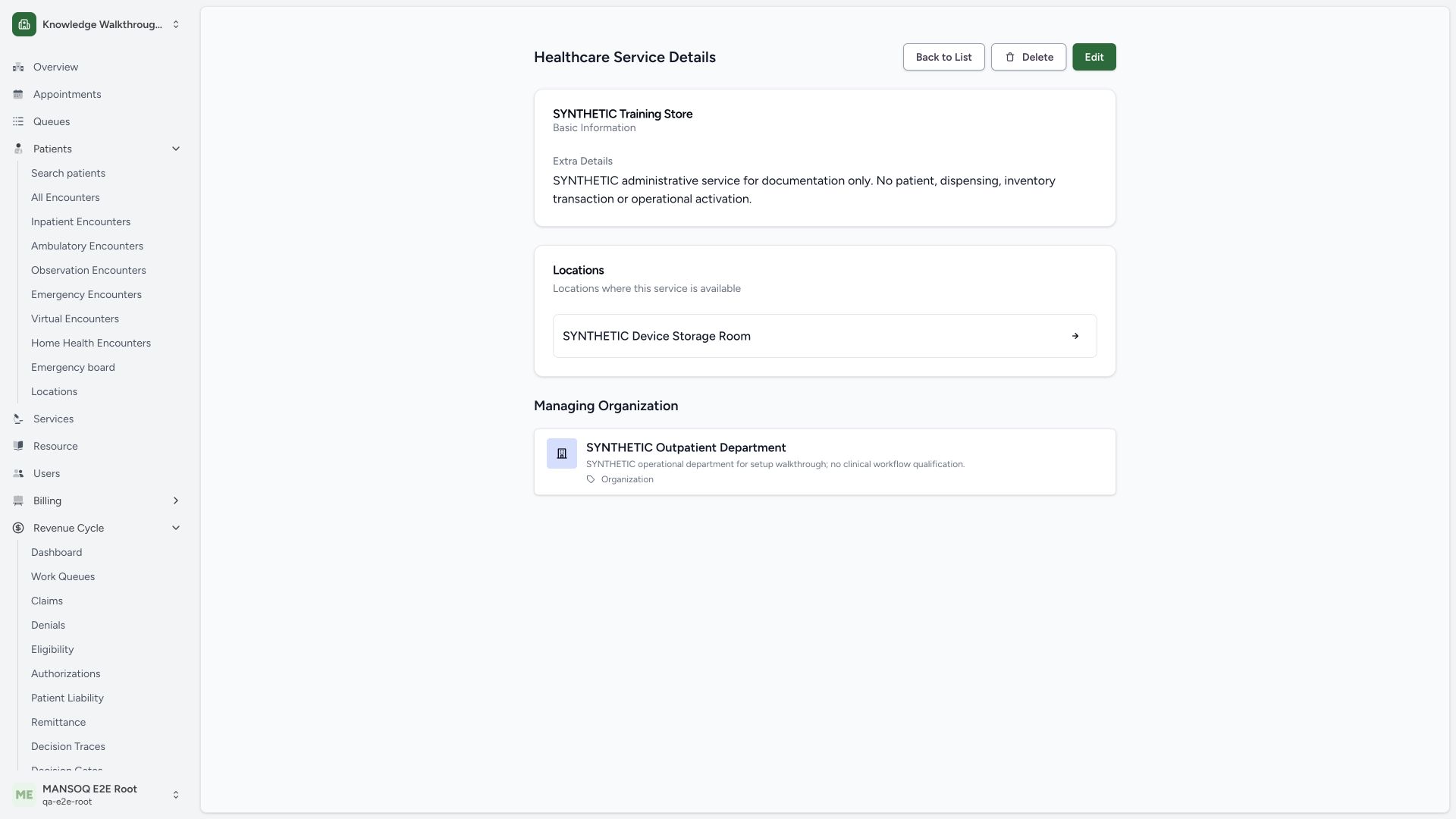
The directory displays SYNTHETIC Training Store after creation. Open that card and verify its details show the intended SYNTHETIC Device Storage Room link and SYNTHETIC Outpatient Department. Independent normal product list/detail reads returned 200 and matched the saved type and references. The Edit action is separate; Delete was not used.
 1
1- Saved service: Confirm the exact configured service name.
 1234
1234- Saved identity: Confirm the exact service name.
- Saved location: The linked Room is the intended selected service location.
- Saved managing department: The managing department is distinct from the Room.
- Edit separately: Editing the saved definition is a separate action.
Configuration is one prerequisite for an operational workflow
This walkthrough creates an administrative healthcare-service definition. It does not create inventory, dispense medication, collect a specimen, book a visit or activate a clinical workflow. Validate the relevant stock, scheduling, laboratory, professional, entitlement and authorization prerequisites in their dedicated workflows.
What the form sends
The pinned form requires a non-empty name and at least one location. Its submission sends the chosen location identifiers and the optional managing organization identifier separately; the optional internal type and styling remain distinct. A saved definition should be checked through the normal product read path before downstream configuration.
Troubleshooting
At least one location is required
Open the location selector, expand the correct hierarchy and select the intended location with its row plus control. Confirm the location appears in the prepared form before retrying.
The department is missing from My Organizations
If authorized, inspect the available All Organizations selector as shown. Confirm the correct saved department and facility scope. Do not create a duplicate or grant a membership merely to populate a selector.
Source evidence
References are pinned to the private MANSOQ source repository. Repository access is required to open these links.
- repositories/platform/mansoq-web/src/pages/Facility/settings/healthcareService/HealthcareServiceForm.tsx:47 · f6e9f05f
- repositories/platform/mansoq-web/src/pages/Facility/settings/healthcareService/HealthcareServiceForm.tsx:163 · f6e9f05f
- repositories/platform/mansoq-web/src/pages/Facility/settings/healthcareService/HealthcareServiceForm.tsx:204 · f6e9f05f
- repositories/platform/mansoq-web/src/pages/Facility/settings/healthcareService/HealthcareServiceForm.tsx:287 · f6e9f05f
- repositories/platform/mansoq-web/src/pages/Facility/settings/healthcareService/HealthcareServiceForm.tsx:345 · f6e9f05f
- repositories/platform/mansoq-web/src/pages/Facility/settings/healthcareService/HealthcareServiceForm.tsx:389 · f6e9f05f
- repositories/platform/mansoq-web/src/types/healthcareService/healthcareService.ts:1 · f6e9f05f
- repositories/platform/mansoq-web/src/types/healthcareService/healthcareServiceApi.ts:1 · f6e9f05f
- repositories/platform/mansoq-web/src/components/Location/LocationMultiSelect.tsx:1 · f6e9f05f
- repositories/platform/mansoq-web/src/pages/Facility/settings/organizations/components/FacilityOrganizationSelector.tsx:1 · f6e9f05f
- repositories/platform/mansoq-web/src/pages/Facility/settings/layout.tsx:195 · f6e9f05f