 MANSOQ
 Facility administration
Edit a healthcare service, recover validation and recognize denied facility access
Use the actual disabled/dirty form state, required-name rejection, notes-only update and saved detail, then distinguish an access denial from an empty service catalogue.
Current source · Actual scoped Other Facility Admin UI update and required-name rejection, independently read through the same-role normal detail API. One protected synthetic Polyclinic list read returned 403 and its actual denial UI was pictured. No all-role/facility, Delete or downstream appointment execution is claimed. · 6 min read
Before you begin
- Use an authorized configuration account in its intended facility. This walkthrough used the synthetic Other estate’s own Facility Admin, separate from a global superuser.
- Identify the existing service, location and managing department before making a change. The example updates only training notes; it preserves the Scheduling type and existing references.
1. Inspect the saved service and open Edit
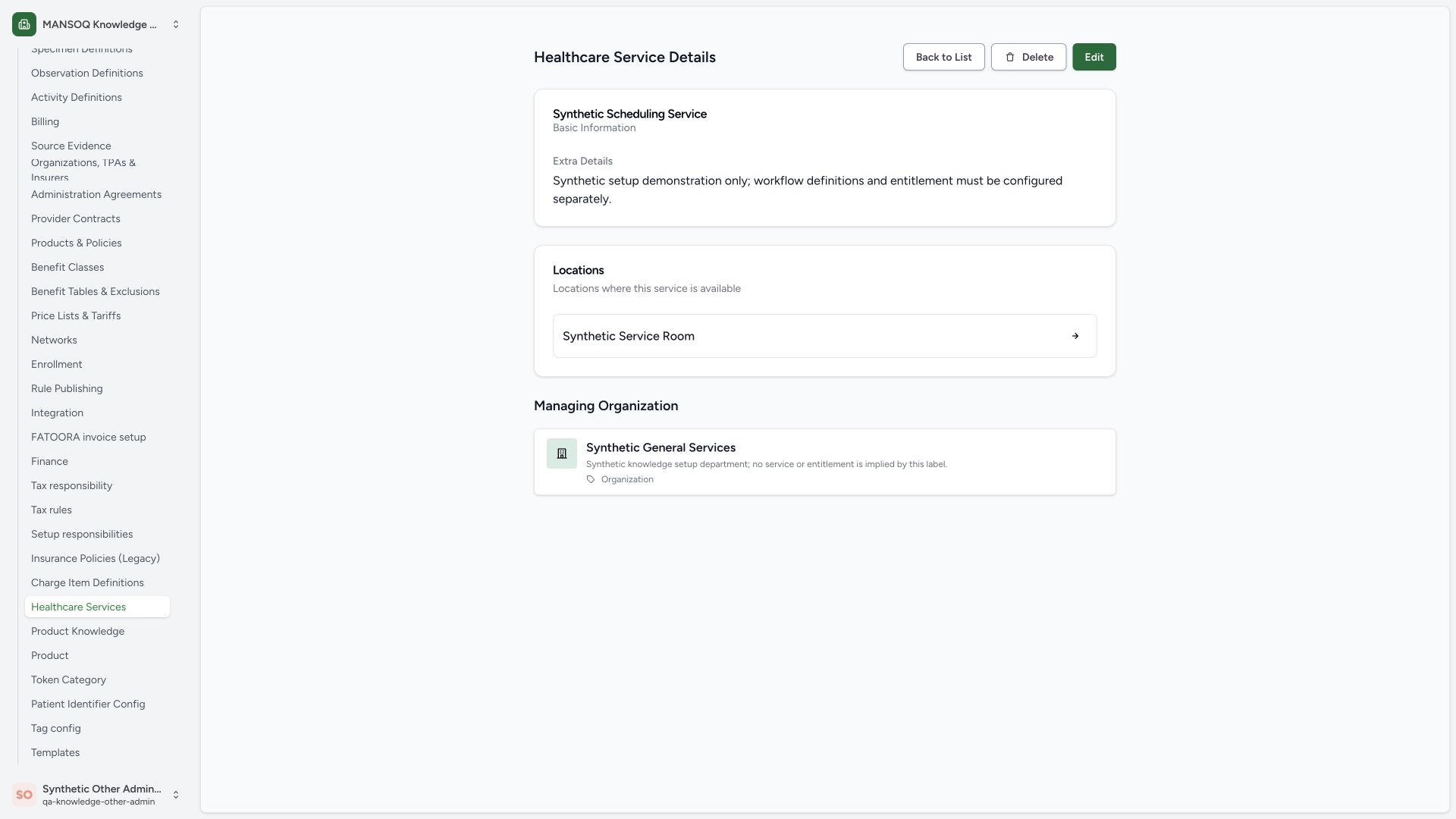
In the service detail, read the existing identity, Synthetic Service Room link and Synthetic General Services managing department. Choose Edit to change the saved definition. Delete is a separate action and was not used.
 123
123- Edit saved service: Open the existing definition, distinct from Delete.
- Existing location: Preserve the intended Room reference.
- Existing department: Preserve managing organization separately.
2. Recognize the unchanged disabled Save state
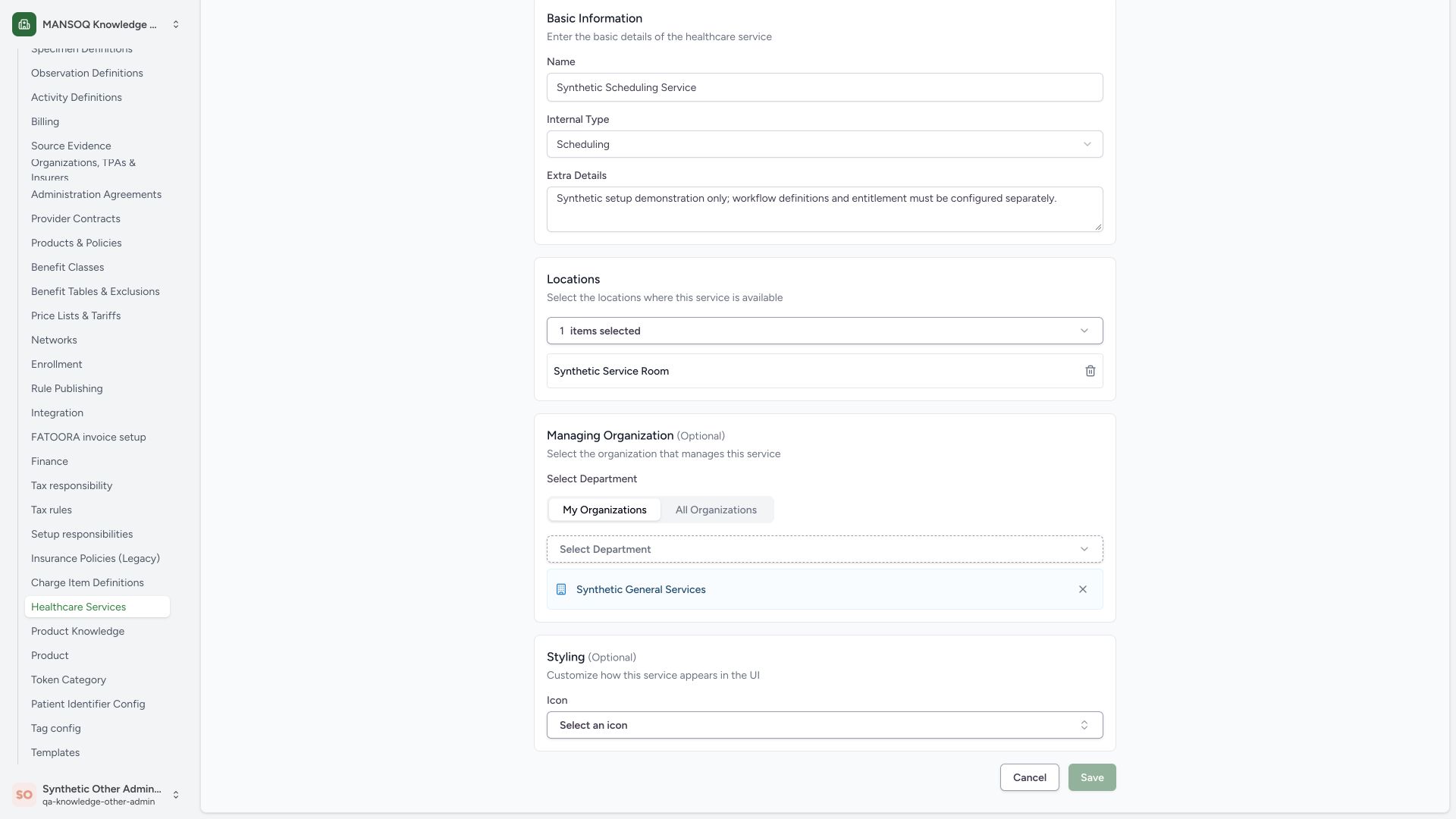
The edit form loads the existing name, Scheduling type, one selected Room and managing department. Save is disabled before a value changes. This is the unchanged-form state; it is not an access-denied message.
 12
12- Saved service identity: The existing name is loaded, not a new creation.
- Save disabled before edits: The normal form requires a changed value before save.
3. Recover from required-name validation
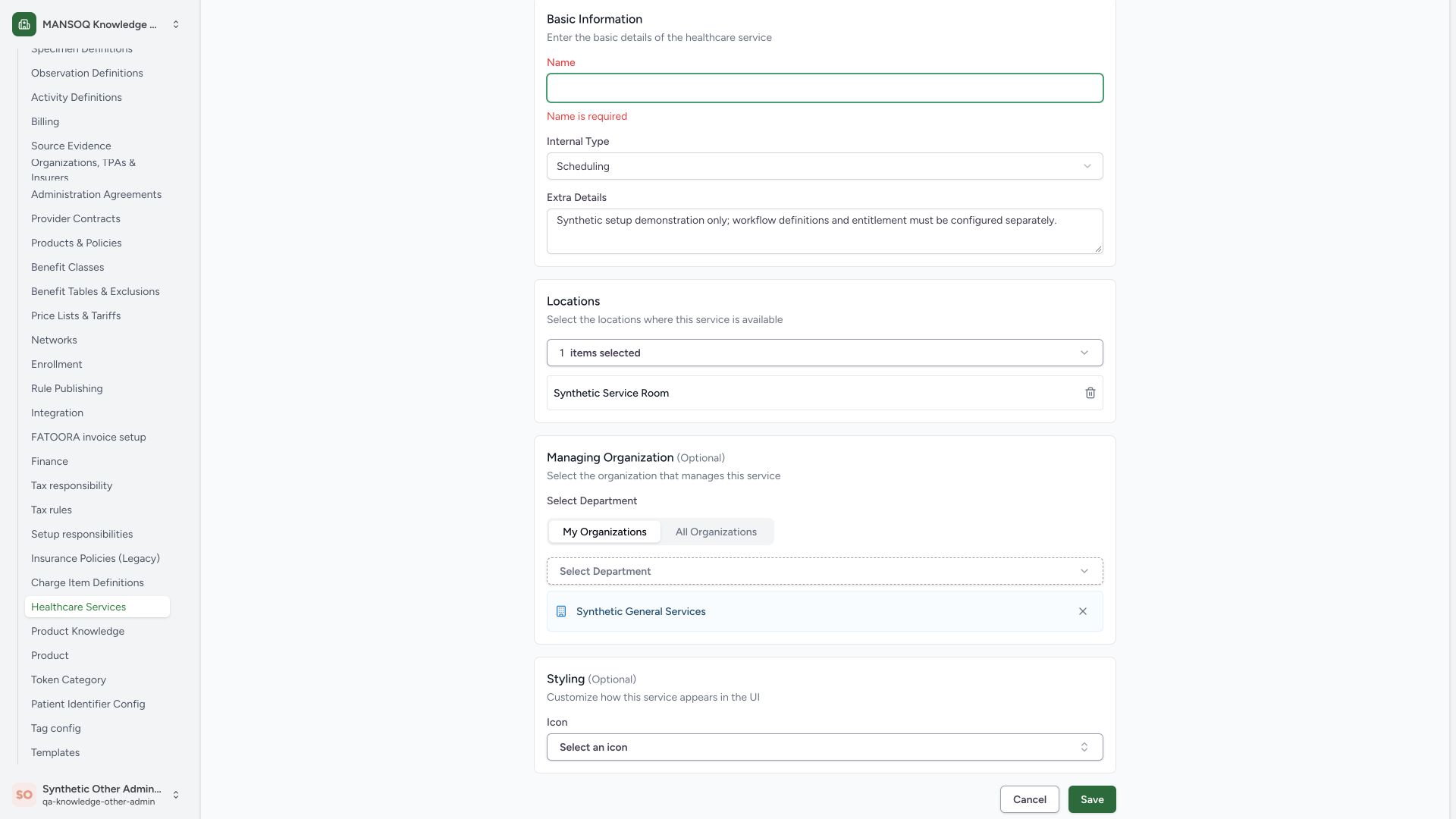
A normal submission with an empty Name produces Name is required. Restore the correct existing service name before retrying. This pictured rejected branch did not save an invalid name.
 12
12- Name is required: Restore the valid service name before retrying.
- Required identity: An empty name cannot be submitted successfully.
4. Review a notes-only update before Save
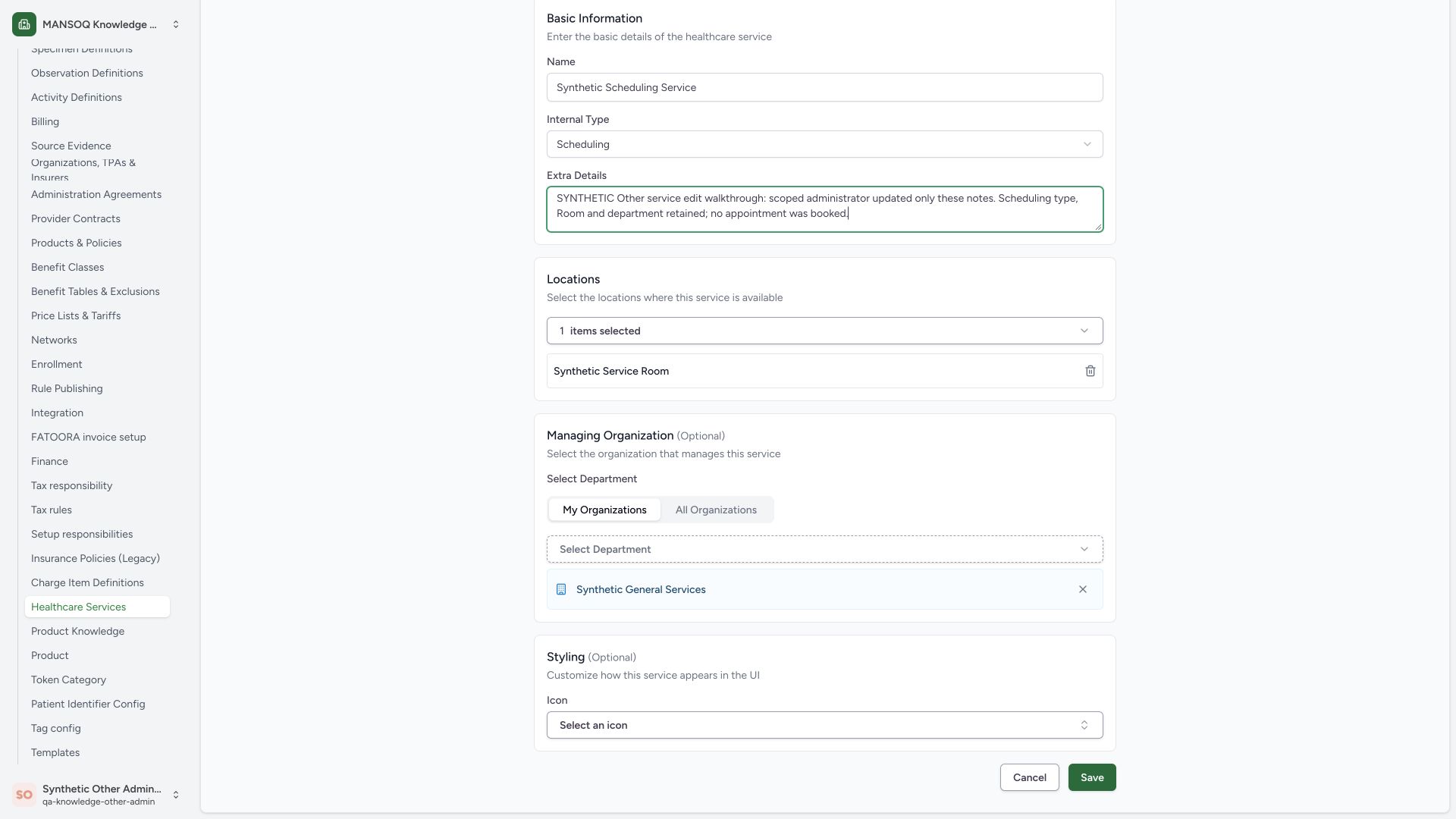
This example changes Extra Details to clearly synthetic training notes. Review the original service name, Scheduling type, Synthetic Service Room and Synthetic General Services department. Those references remain unchanged. Select the enabled Save button for the reviewed valid update.
 1234
1234- Notes-only change: Only training notes are changed in this branch.
- Existing Room retained: Do not remove or substitute the location while editing notes.
- Department retained: The managing department remains separate from the Room.
- Save reviewed update: Submit the valid changed record using the normal form.
5. Verify the saved detail rather than relying on a toast
After Save, the detail displays the updated notes and the retained Room and managing department. A same-role normal product detail read returned 200 and confirmed the exact notes, name, Scheduling type, location, department and unchanged styling. No appointment was booked.
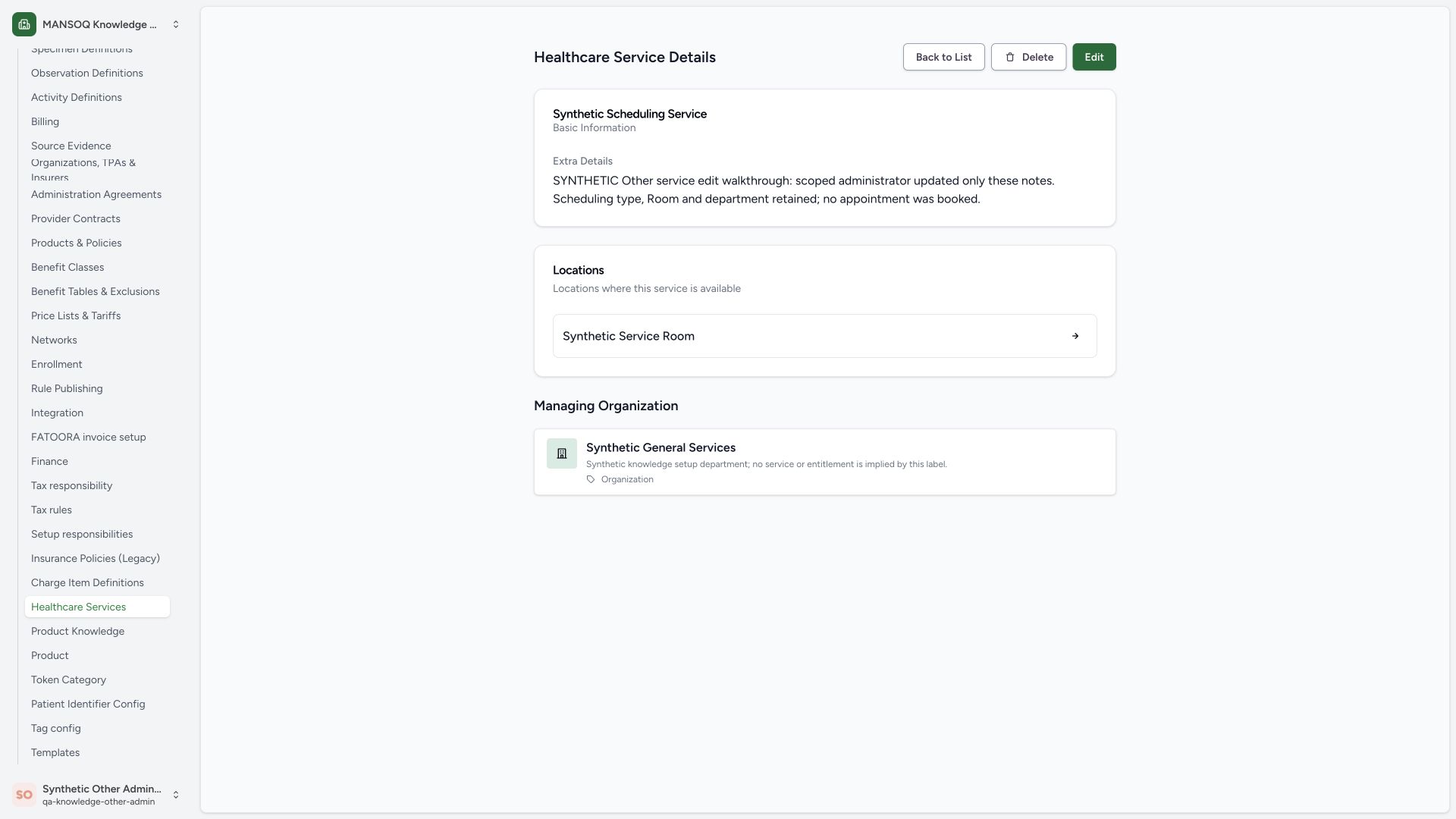 123
123- Updated notes persisted: Read the saved detail after normal Save, not just the success toast.
- Room retained: Matches the same-role normal detail readback.
- Department retained: No managing organization replacement was made.
6. Distinguish an access denial from an empty catalogue
In the separate read-only boundary example, the Other Facility Admin attempts to read a protected synthetic Polyclinic and receives Access Denied to Healthcare Service and Not Found. The native page also displays No healthcare services found and an Add Healthcare Service button. The normal same-role list request returned 403. An empty page after a denial is not proof that there are no configured services, and a visible Add button is not an authorization grant. No create action was attempted in the protected facility.
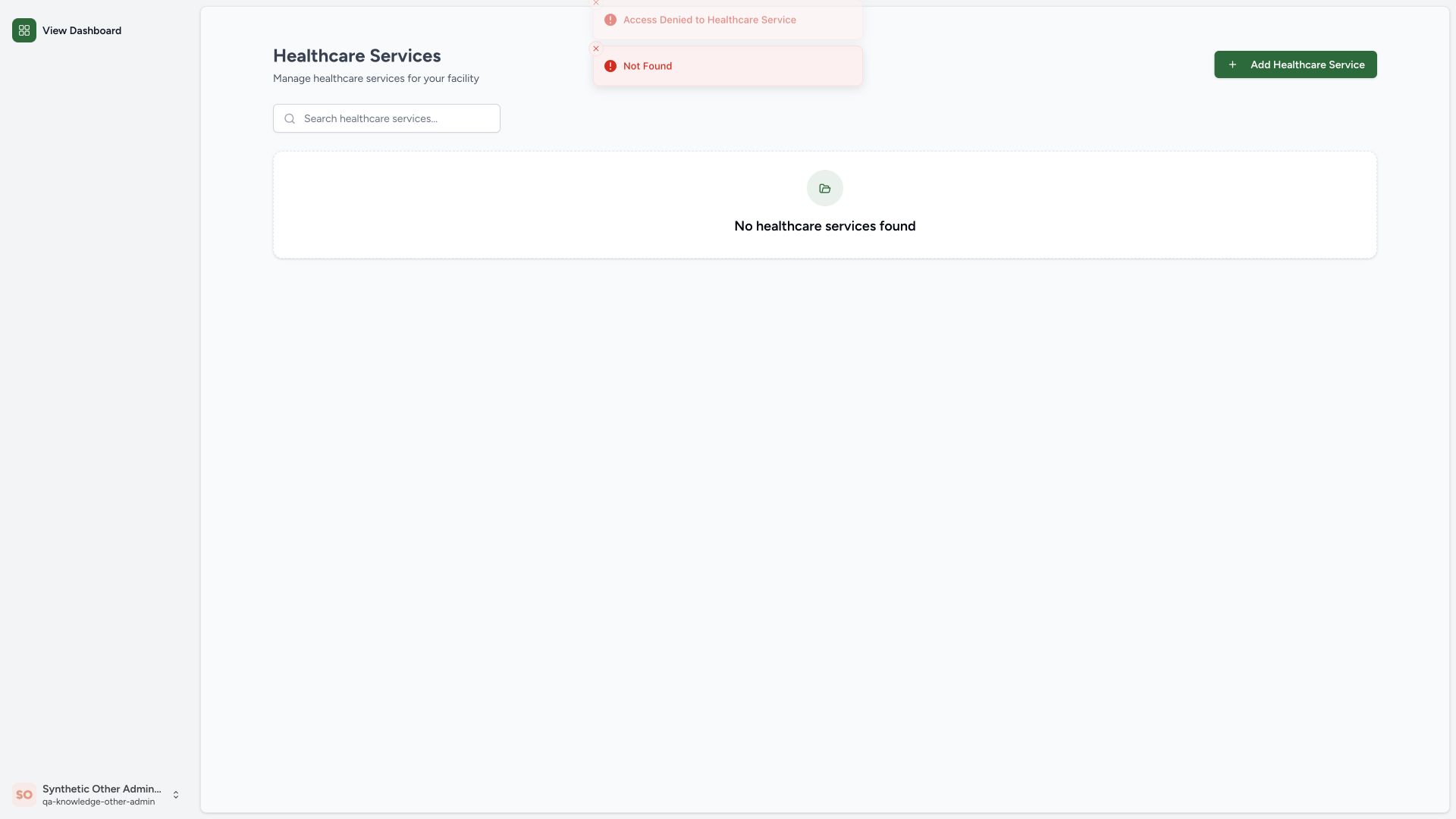 123
123- Access denied: The list read is forbidden for this facility context.
- Empty view after denial: An empty view after an error does not prove the facility has no services.
- Visible control is not authorization: Do not treat this visible Add button as a permission grant.
Read, write and facility scope are separate checks
The pinned backend checks can_read_healthcare_service in the target facility organization for listing. Writes check can_write_healthcare_service with the facility root scope. These are separate from the displayed native Add/Edit controls. This example supplies one successful own-facility update and one protected-facility negative list read, not a complete authorization matrix.
An administrative definition does not execute its service
Editing notes does not provision appointment slots, create stock, dispense a medication or qualify clinical use. Validate downstream service configuration and workflow permissions separately.
Troubleshooting
Save is disabled
First distinguish an unchanged form from pending work or a denial. The pictured unchanged form enables Save only after an actual value change; the source also disables it while a request is pending.
The page is empty after Access Denied
Check the intended facility context and authorized membership with the administrator. Do not infer missing configuration from an empty-result fallback, create duplicate services or broaden permissions merely because a button is visible.
Source evidence
References are pinned to the private MANSOQ source repository. Repository access is required to open these links.
- repositories/platform/mansoq-web/src/pages/Facility/settings/healthcareService/HealthcareServiceForm.tsx:47 · f6e9f05f
- repositories/platform/mansoq-web/src/pages/Facility/settings/healthcareService/HealthcareServiceForm.tsx:182 · f6e9f05f
- repositories/platform/mansoq-web/src/pages/Facility/settings/healthcareService/HealthcareServiceForm.tsx:204 · f6e9f05f
- repositories/platform/mansoq-web/src/pages/Facility/settings/healthcareService/HealthcareServiceForm.tsx:482 · f6e9f05f
- repositories/platform/mansoq-web/src/pages/Facility/settings/healthcareService/HealthcareServiceList.tsx:32 · f6e9f05f
- repositories/platform/mansoq-web/src/pages/Facility/settings/healthcareService/HealthcareServiceList.tsx:45 · f6e9f05f
- repositories/platform/mansoq-web/src/pages/Facility/settings/healthcareService/HealthcareServiceList.tsx:58 · f6e9f05f
- repositories/platform/mansoq-core/mansoq/security/authorization/healthcare_service.py:9 · f6e9f05f
- repositories/platform/mansoq-core/mansoq/security/authorization/healthcare_service.py:19 · f6e9f05f