 MANSOQ
 Access & roles
Read the role-permission matrix without assuming effective user access
Compare exact permission rows and role columns, including Billing Officer payment limits and the broad Staff fallback used for Reception.
Current source · Read-only actual isolated synthetic global matrix. All twelve installed native system-role definitions independently compared with source via normal role API; no complete user/resource authorization or financial/clinical workflow test is claimed. · 5 min read
Before you begin
- Open the global permissions matrix with an authorized account. This read-only capture used a local synthetic superuser; no role definition or membership was changed in this reference.
- Review the deployed native role definitions and actual membership/resource scope before making an authorization decision. The isolated API comparison matched all twelve built-in definitions to the pinned source.
1. Match one exact permission row to one exact role column
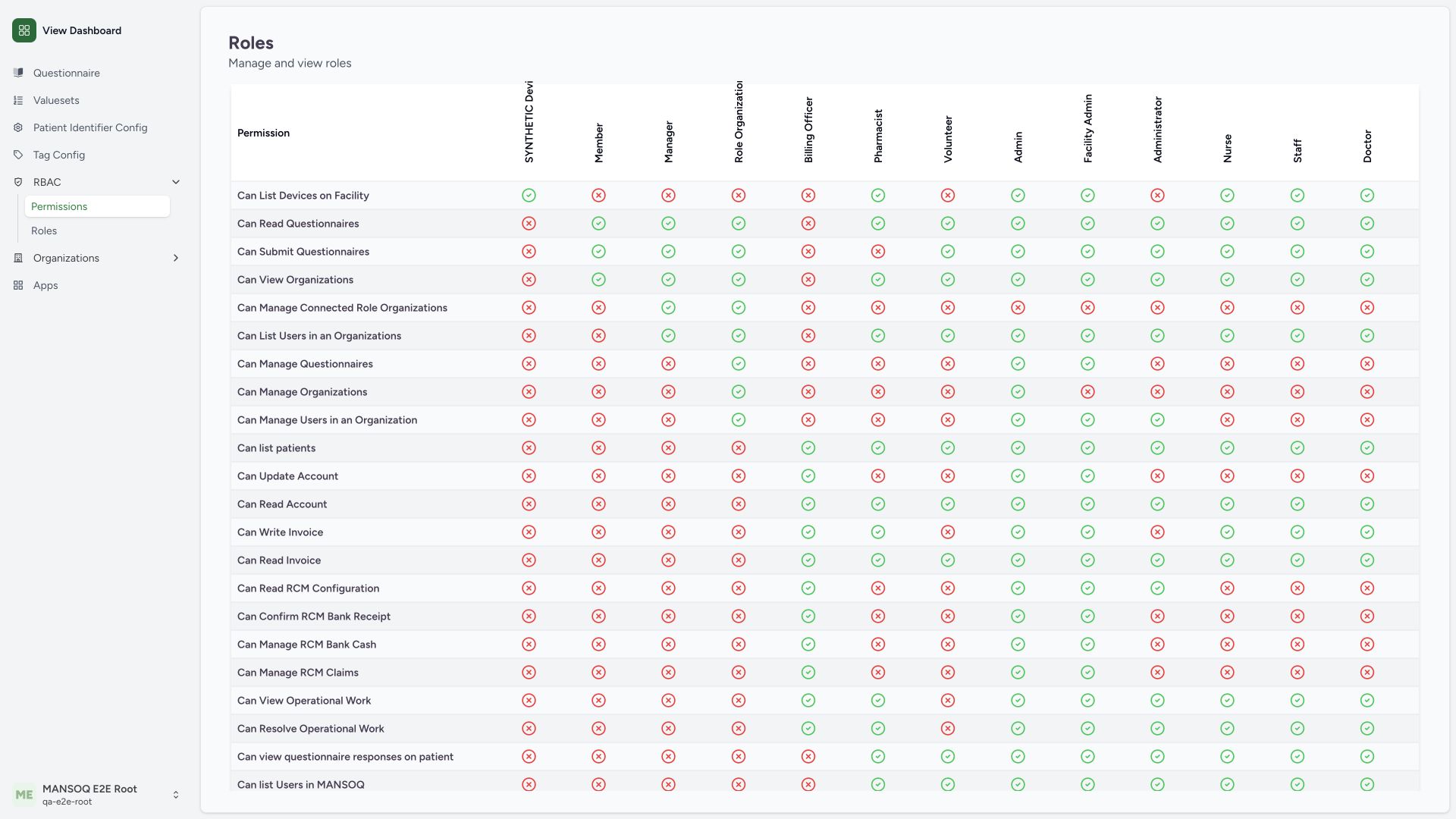
In the role-permission table, read the permission label at the left and the role heading above the cell. The device-list row shows a green check for the synthetic custom device reader and a red cross for Billing Officer. These icons compare membership in role definitions. They do not prove that a person can access a device, facility or patient. The synthetic role heading is clipped in the native table, so verify its full identity in the role catalogue.
 123
123- Exact permission row: Can List Devices on Facility is the row being compared.
- Declared inclusion: The synthetic custom definition contains this one permission.
- Declared absence: Billing Officer does not contain the default device-list permission.
2. Keep payment reconciliation separate from Billing Officer invoice and RCM work
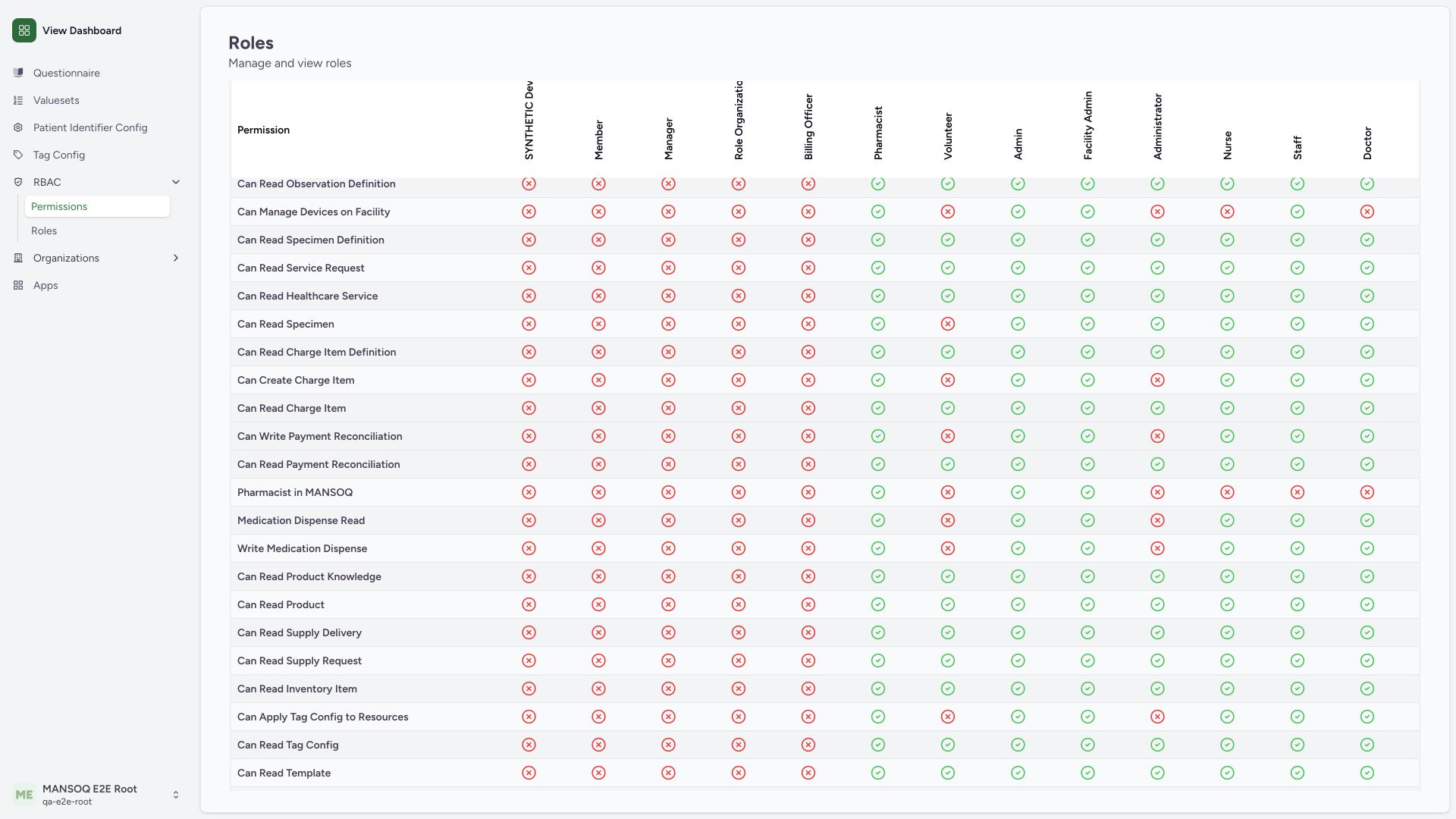
Find Can Write Payment Reconciliation and Can Read Payment Reconciliation, then read the Billing Officer column. Both cells are red crosses in this pinned native definition. Invoice and RCM responsibilities use separate permissions; a visible financial menu or a Billing Officer label does not add the missing payment-reconciliation grants. No payment was created or read through a Billing Officer session in this matrix reference.
 123
123- Payment write row: Payment reconciliation has its own permission.
- Billing Officer write absent: The native role lacks can_write_payment_reconciliation.
- Billing Officer read absent: The native role also lacks can_read_payment_reconciliation.
3. Review the broad Staff patient-data declarations
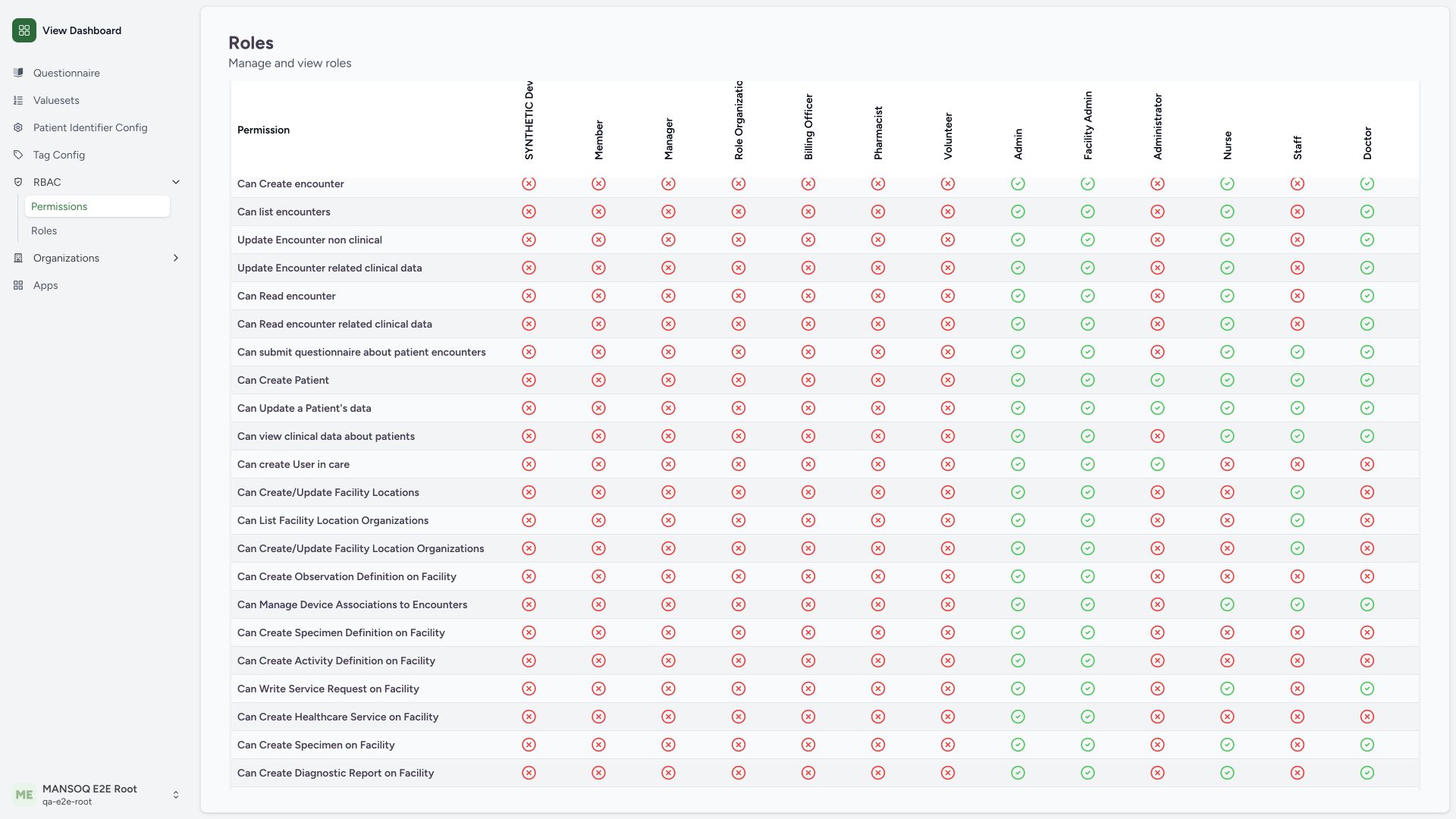
Read the Staff column for patient-create/update, patient clinical-data view and encounter-questionnaire submission. The pictured checks match native declarations. Staff is the current Reception launch fallback pending separate Reception approval, but these grants still pass through patient association and backend authorization. A front-desk job title is not a complete least-privilege policy.
 123
123- Patient data row: Read the exact patient clinical-data permission.
- Staff declaration present: The native default set includes this identifier; object scope remains separate.
- Questionnaire declaration present: Encounter questionnaire submission is a separate native declaration.
4. Check encounter permissions independently of questionnaires
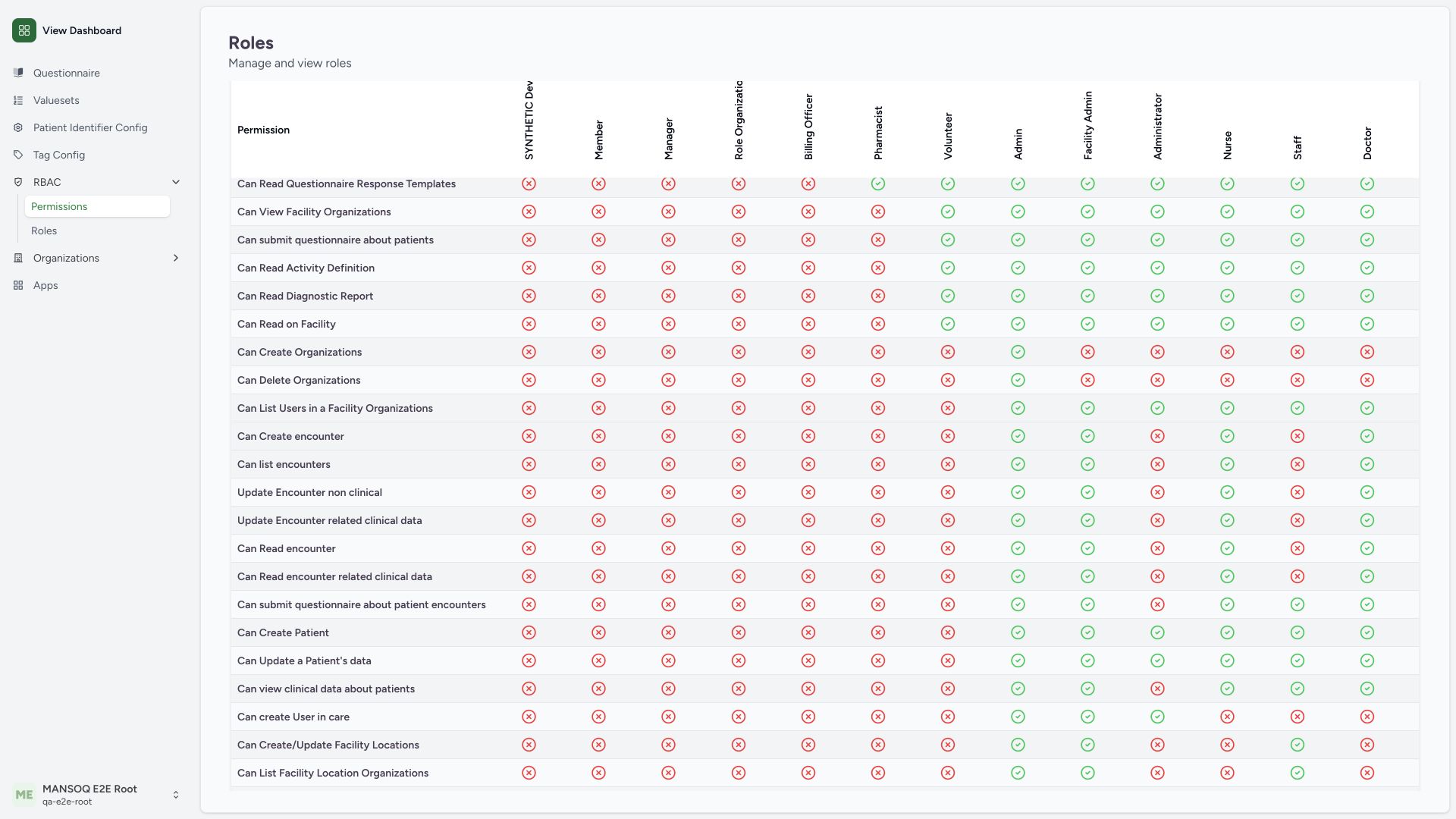
In the encounter rows, Staff has red crosses for encounter creation/list/update/read and encounter clinical-data read/write, while its encounter-questionnaire row is checked. Doctor and Nurse show the clinical encounter defaults. Treat each permission separately, then test the intended operation and resource scope; the questionnaire grant does not establish encounter creation access.
 12345
12345- Encounter create row: This permission is distinct from patient and questionnaire declarations.
- Staff absent: Staff lacks default can_create_encounter.
- Nurse default present: Still subject to resource/state/professional checks.
- Doctor default present: Still subject to resource/state/professional checks.
- Staff questionnaire differs: A separate questionnaire grant does not establish encounter-create access.
The native matrix is a page-based role-definition view
The audited UI requests fifteen roles per page and constructs permission rows from the union of roles returned on that page. Its displayed set is not an unlimited global export when more roles exist. This isolated estate has twelve built-in roles plus one unused synthetic custom role, within that page. Reconcile additional pages and role catalogue records when reviewing a larger deployment.
What an effective access check still needs
Native authorization resolves role memberships within organizations/facility departments and the target patient or encounter context; current location, record associations, encounter status, entitlements and additional backend rules can change the result. The knowledge role catalogue exposes the default identifiers and source citations. Neither this table nor source-task inclusion substitutes for positive and negative runtime tests.
Accessibility of icon-only native cells
The audited native table renders CheckCircle2/XCircle icons for inclusion without adding a text status to the individual cell. If that native view cannot be read with assistive technology, use the knowledge role catalogue’s explicit permission identifiers and descriptions while the deployment addresses accessible cell labels. This observation is a source/UI limitation, not evidence of absent backend authorization.
Troubleshooting
A role has a check but a person receives a denial
Verify the person’s current role membership, intended facility/department, patient/encounter association, workflow state, capability and the backend response. Do not broaden a role merely to make a visible menu action succeed.
Source evidence
References are pinned to the private MANSOQ source repository. Repository access is required to open these links.
- repositories/platform/mansoq-web/src/pages/Admin/Permissions/PermissionsIndex.tsx:24 · f6e9f05f
- repositories/platform/mansoq-web/src/pages/Admin/Permissions/PermissionsIndex.tsx:40 · f6e9f05f
- repositories/platform/mansoq-web/src/pages/Admin/Permissions/PermissionsIndex.tsx:105 · f6e9f05f
- repositories/platform/mansoq-core/mansoq/security/permissions/payment_reconciliation.py:1 · f6e9f05f
- repositories/platform/mansoq-core/mansoq/security/permissions/encounter.py:26 · f6e9f05f
- repositories/platform/mansoq-core/mansoq/security/permissions/patient.py:17 · f6e9f05f
- repositories/platform/mansoq-core/mansoq/security/roles/approved_role_mappings.py:51 · f6e9f05f
- repositories/platform/mansoq-core/mansoq/security/authorization/patient.py:16 · f6e9f05f
- repositories/platform/mansoq-core/mansoq/security/authorization/encounter.py:16 · f6e9f05f