 MANSOQ
 Access & roles
Inspect built-in roles and the System role actions boundary
Read role contexts and permission counts, and understand why a built-in System role offers Clone rather than Edit.
Current source · Read-only local System role catalogue and menu observed. Role clone creation, role edits, membership changes and effective permissions were not performed in this reference. · 3 min read
Before you begin
- Use an authorized global security administrator. The screenshot is a local synthetic superuser catalogue view; it does not establish the role permissions of a customer account.
1. Inspect the Facility context catalogue
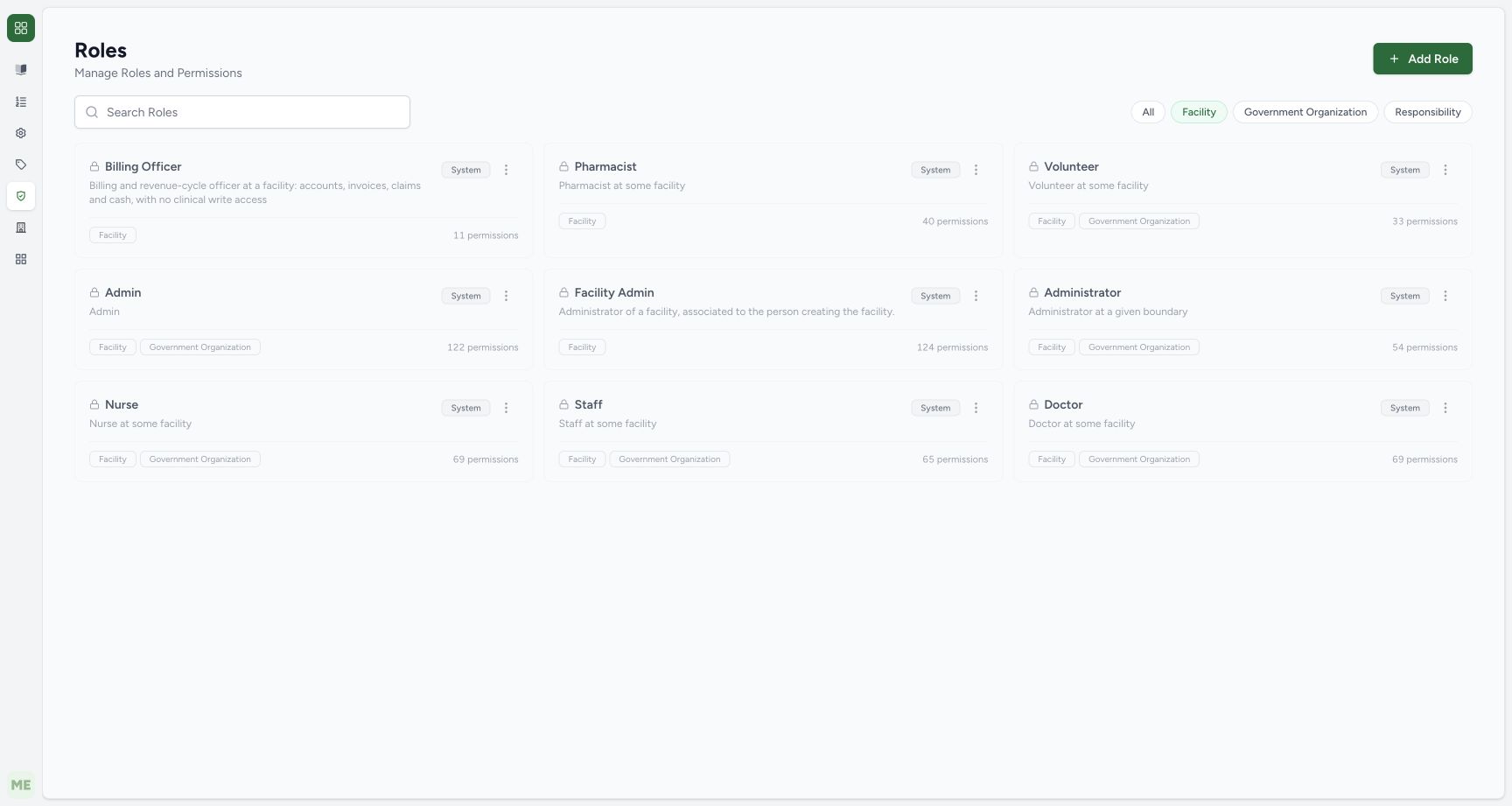
The Roles catalogue shows Facility selected among the context filters. Each pictured built-in role has a lock and System badge. Read its context badges and permission count separately. Search Roles, the context filters and Add Role are distinct controls; a catalogue filter does not assign a role to a person.
 1234
1234- Context filter: Facility is the selected catalogue context; a context filter is not a user assignment.
- System role: The built-in Billing Officer card carries a lock and System badge.
- Permission count: This count describes the role definition, not a completed effective-access audit.
- Add Role: Creating a role is a separate operation and was not completed in this catalogue observation.
2. Inspect the built-in role actions menu
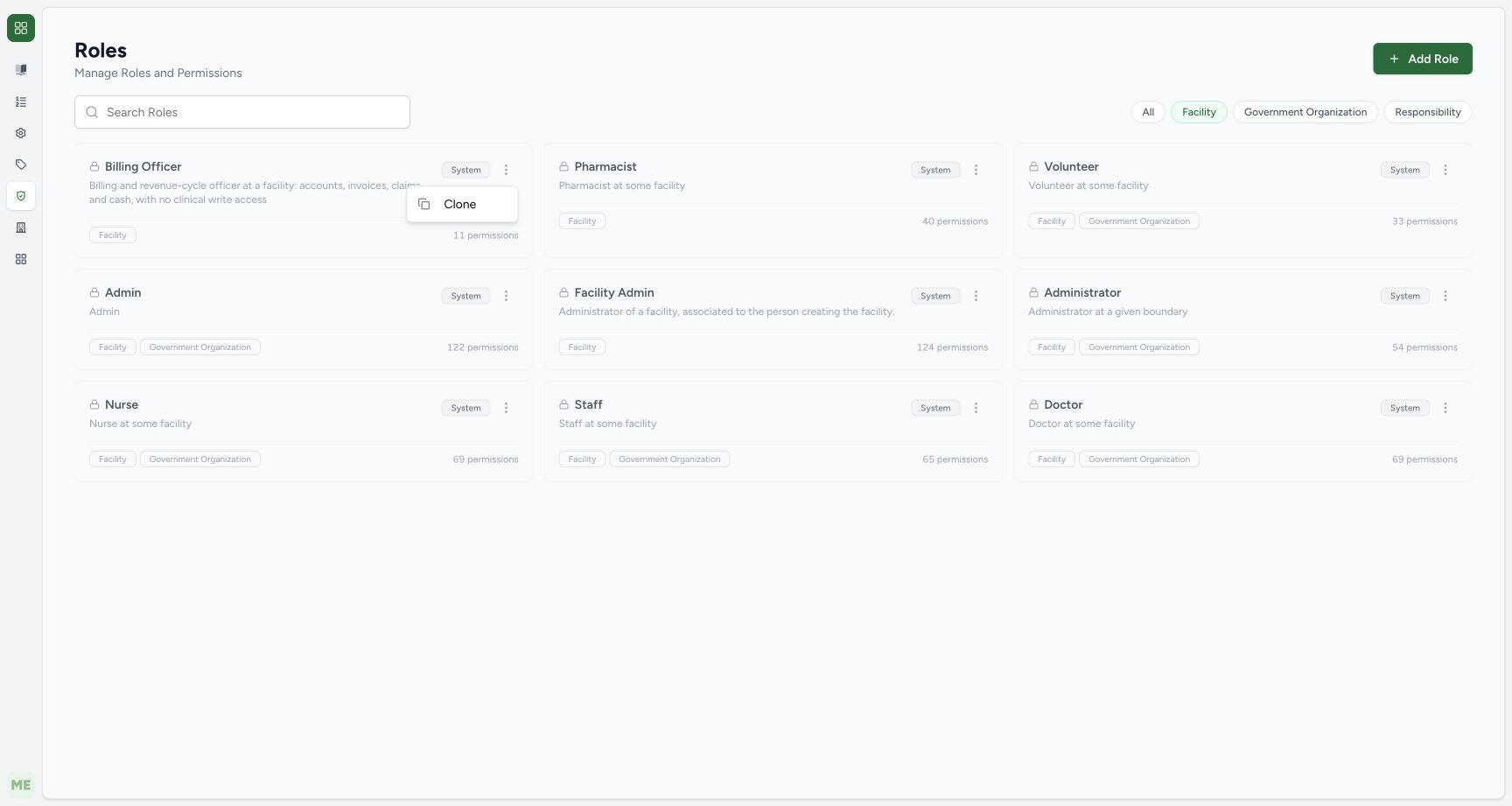
Open the actions menu on the built-in Billing Officer card. The pictured menu offers Clone. The audited UI omits Edit for System roles. Opening this menu did not create or save a clone and did not change any user membership or permission.
 123
123- Role actions: This menu belongs to the built-in Billing Officer card.
- Clone only: Clone is visible. The source omits Edit for System roles; opening this menu does not create a clone.
- System boundary: The existing built-in role remains unchanged.
Cloning requires a separate review and save
The audited Clone handler prepares a new form using the existing role definition, clears its identifier, appends (Copy) to its name and marks it non-system. The form requires a name, at least one context and at least one permission. No clone form save was captured here. A saved custom role still needs an approved scoped membership assignment and effective-access verification.
A count is not an authorization test
The pictured counts describe this pinned local catalogue. Built-in definitions and scoped behavior must be checked against the deployed version and backend. A menu entry, card label or role description does not establish that a specific user can perform every associated clinical, financial or administrative operation.
Troubleshooting
Edit is absent from a built-in role menu
System roles deliberately omit the UI Edit action. Use the approved custom-role process after reviewing scope and permissions; do not modify a built-in definition through an unsupported path.
Source evidence
References are pinned to the private MANSOQ source repository. Repository access is required to open these links.
- repositories/platform/mansoq-web/src/Routers/routes/adminRoutes.tsx:41 · f6e9f05f
- repositories/platform/mansoq-web/src/pages/Admin/Roles/RolesIndex.tsx:118 · f6e9f05f
- repositories/platform/mansoq-web/src/pages/Admin/Roles/RolesIndex.tsx:145 · f6e9f05f
- repositories/platform/mansoq-web/src/pages/Admin/Roles/RolesIndex.tsx:200 · f6e9f05f
- repositories/platform/mansoq-web/src/pages/Admin/Roles/RoleForm.tsx:47 · f6e9f05f