 MANSOQ
 Access & administration
Maintain custom value-set metadata and distinguish lookup success from a valid concept
Recover real name/slug/concept validation, recognize the current lookup-display contract issue, save an unlinked Draft skeleton and verify its retirement.
10 min read · Source baseline f6e9f05f
Verification and applicability
Nine actual1920×1080 Chrome screenshots; global existing synthetic superuser normal UI only. Real name/slug/concept required-field errors and lookup-display contract limitation. Draft metadata skeleton create and Retired update independently GET200 verified with identical identity/empty composition. No activation, clinical binding, fabricated display, System edit, extra privilege or all-role/facility claim.
Check your installed version, permissions and local configuration.
Before you begin
- Use the authorized global terminology administrator. The pinned backend permits value-set writes only for superusers; an Admin role label alone is not the same authorization. This walkthrough uses an existing isolated local synthetic superuser.
- The example is an unlinked synthetic metadata skeleton with no final include/exclude rules. It is never activated or connected to a questionnaire/clinical workflow, and it does not qualify a clinical terminology subset.
1. Recover required Name and slug validation
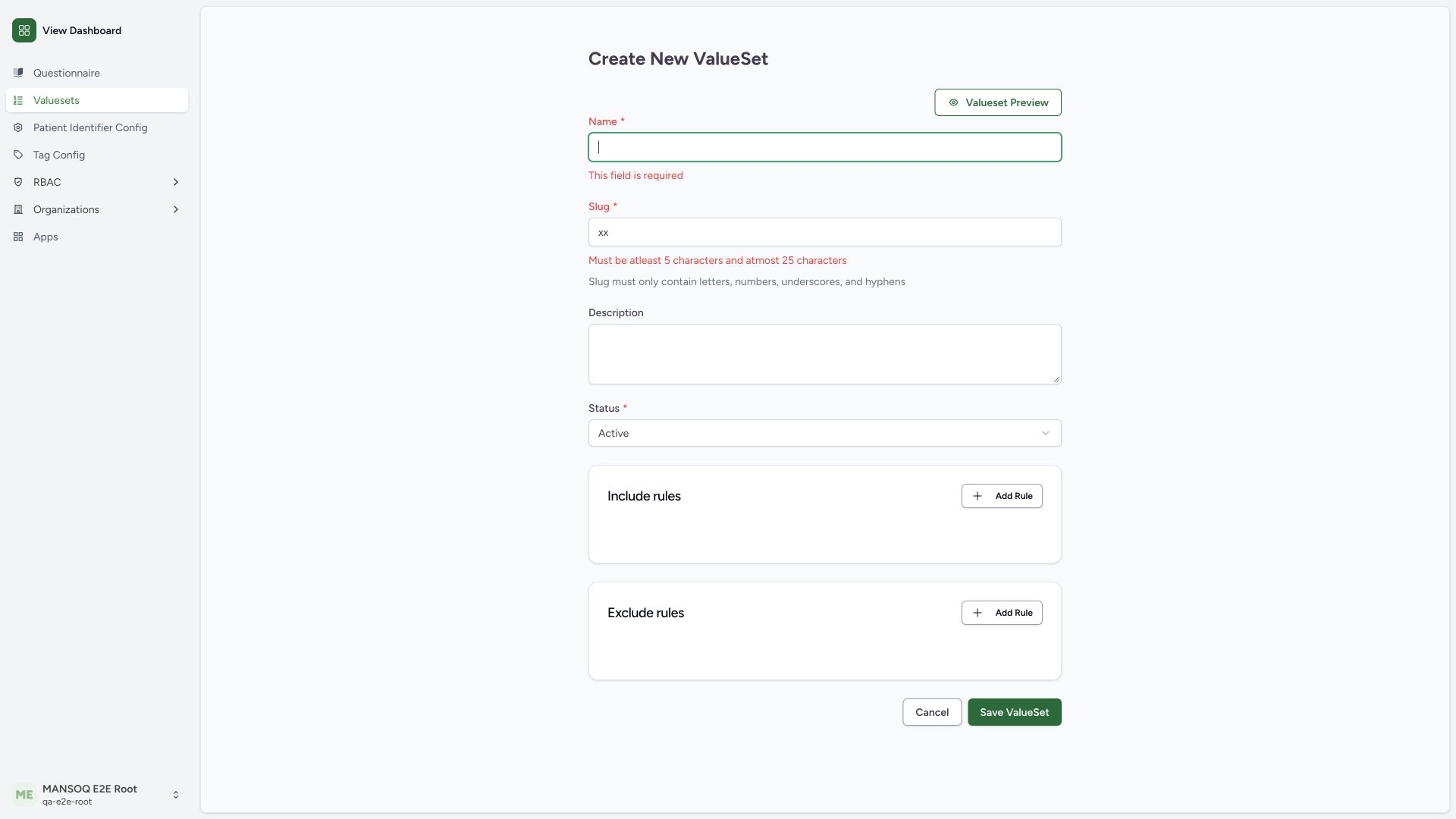
Normal Save ValueSet rejects a blank Name and slug xx with required and 5–25 character errors. Provide an approved nonblank name and permitted unique slug. The source sanitizes manually entered slugs to lowercase letters, numbers, underscores and hyphens. No invalid record was saved.
 123
123Capture details
Actual1920×1080 Chrome pixels; source f6e9f05f. Existing isolated local superuser, custom unlinked value-set metadata Draft→Retired; no clinical binding.
- Required Name: Provide a nonblank approved name.
- Slug minimum and format: Slug must contain5–25 permitted characters.
- Save after correction: Validation did not persist an invalid record.
2. Understand required concepts before composing a subset
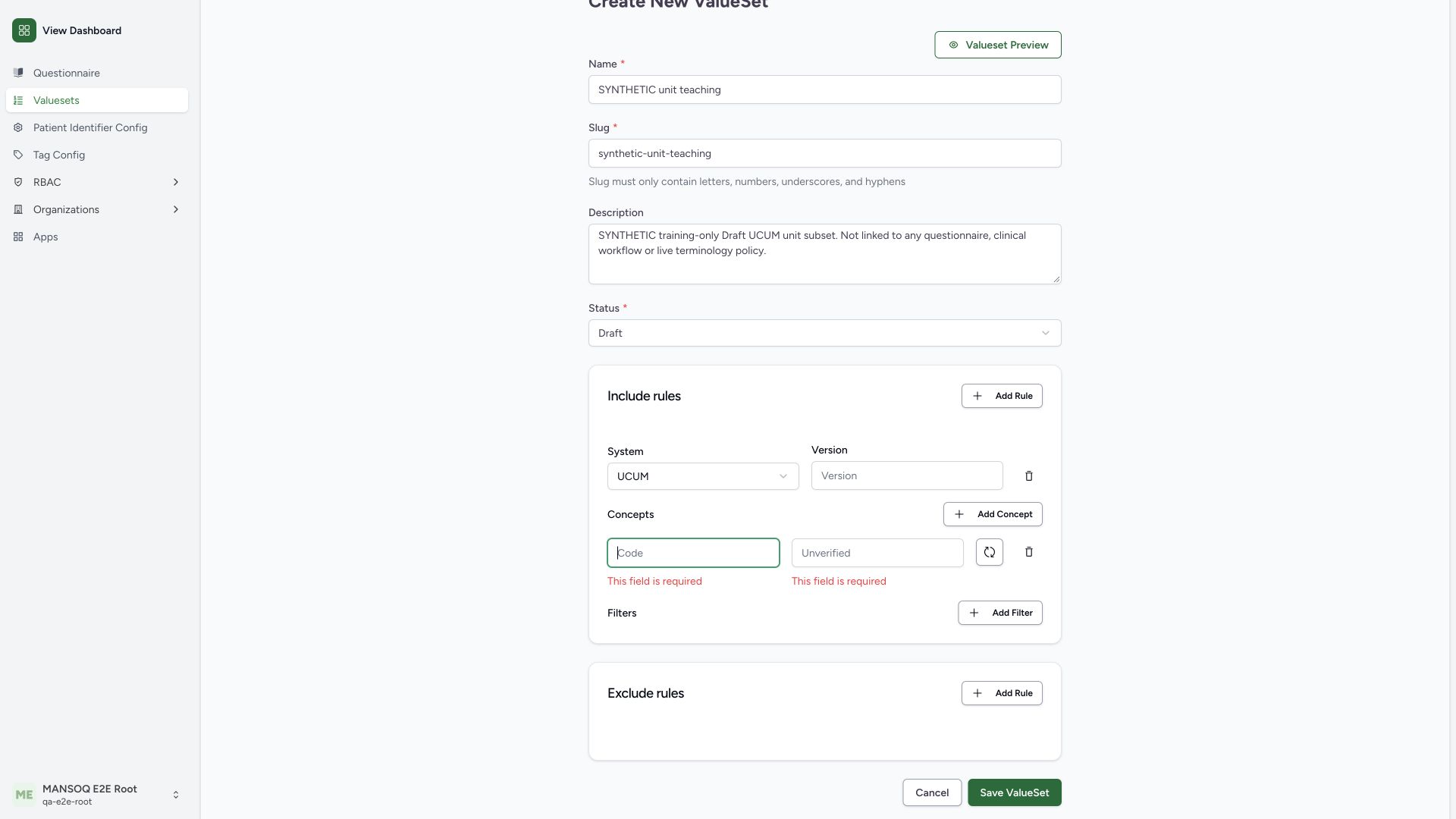
In a Draft custom definition, Include rules → Add Rule adds a system/version rule and Add Concept adds Code and read-only Display. The pictured UCUM rule with blank concept produces required-field errors on normal Save. The displayed label must come from actual verification; do not fabricate it to satisfy validation.
 1234
1234Capture details
Actual1920×1080 Chrome pixels; source f6e9f05f. Existing isolated local superuser, custom unlinked value-set metadata Draft→Retired; no clinical binding.
- UCUM include system: Rule controls the terminology system for its concepts.
- Required concept code: Code must be provided before verification.
- Verified display required: Display is read-only and populated by successful lookup.
- Verify code control: Use actual terminology lookup; do not fabricate display text.
3. Recognize the current lookup-display contract limitation
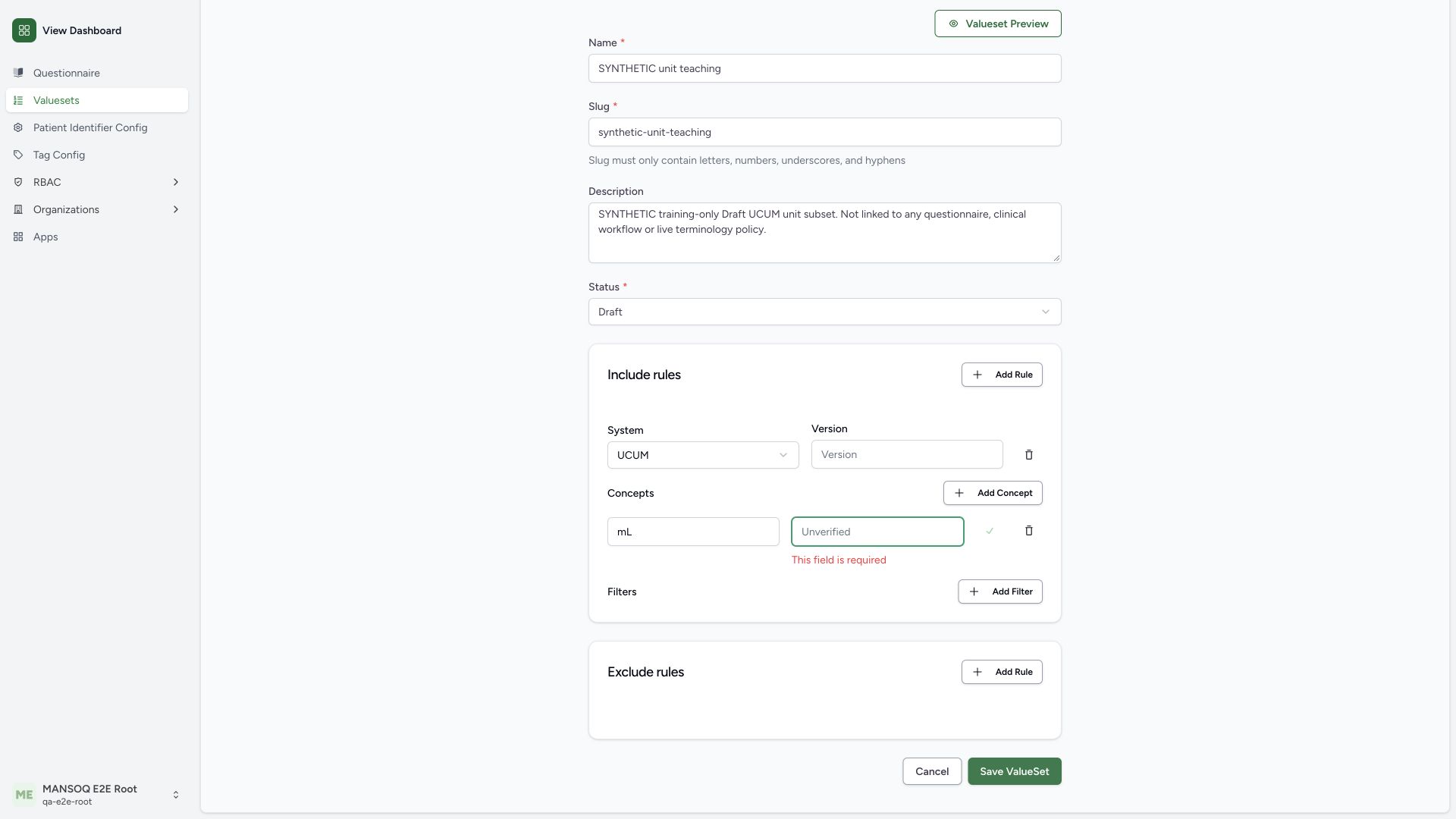
For the configured UCUM mL concept, normal lookup returns200 with display milliliter in a flat response. The screen shows a green check, yet the read-only Display remains Unverified and required, so normal Save still rejects this concept-bearing rule. The pinned frontend expects response.metadata while this local terminology result is flat. A green request-success check is not proof of a completed valid concept. No concept-bearing definition was saved.
 123
123Capture details
Actual1920×1080 Chrome pixels; source f6e9f05f. Existing isolated local superuser, custom unlinked value-set metadata Draft→Retired; no clinical binding.
- Actual UCUM mL code: Lookup200 returns milliliter in the configured local terminology.
- Unresolved display required: Read-only display remains blank; do not claim the code-bearing rule saved.
- Checkmark is insufficient: Request success does not establish the expected frontend metadata contract.
4. Save only the honestly scoped Draft skeleton
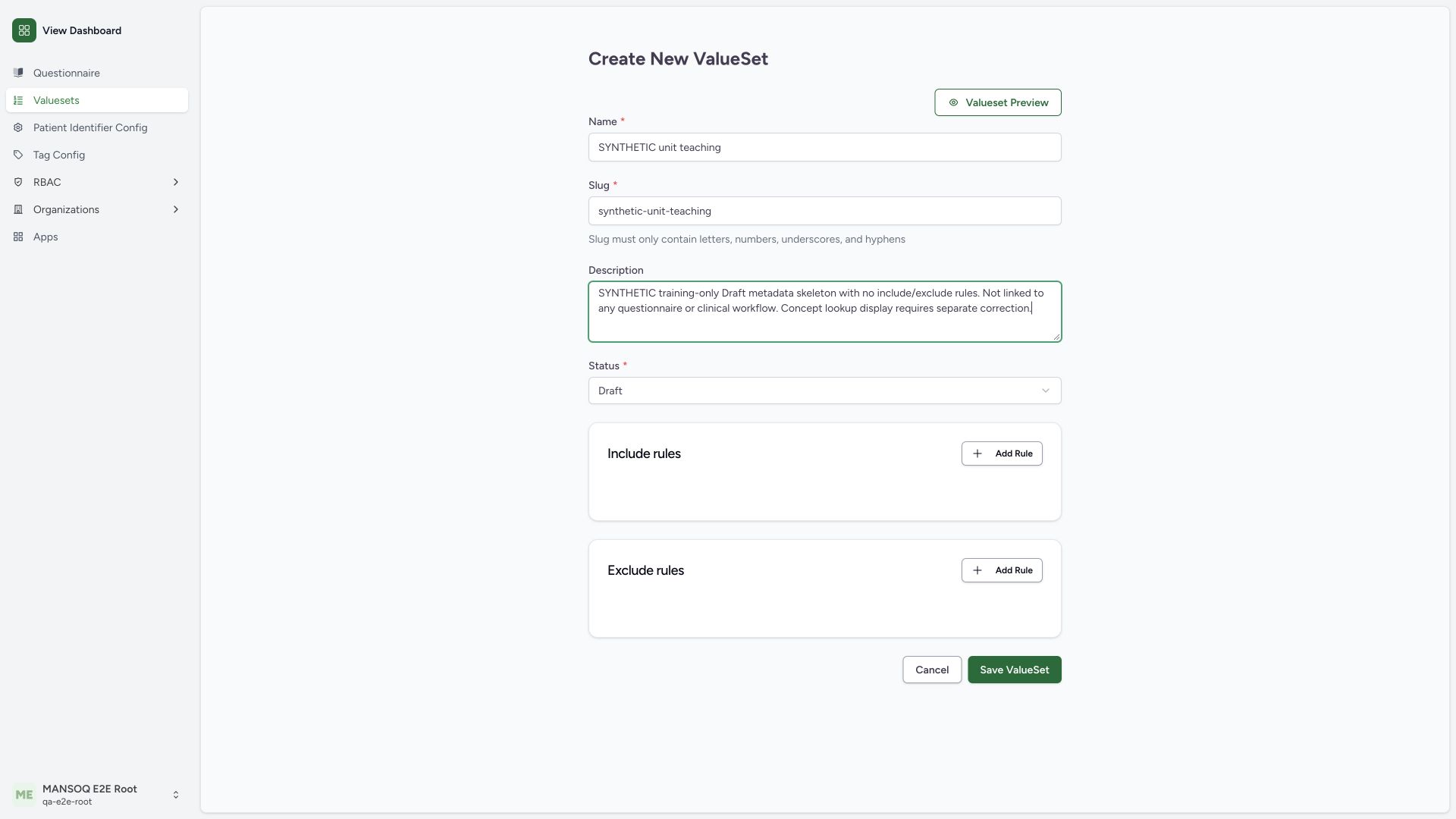
After removing the incomplete concept and its rule, the example keeps an honest description saying Draft metadata skeleton with no include/exclude rules. Review its synthetic name/slug, choose Draft explicitly because the new form defaults to Active, and use Save ValueSet. This saves only metadata, with no clinical consumer or qualified subset.
 12345
12345Capture details
Actual1920×1080 Chrome pixels; source f6e9f05f. Existing isolated local superuser, custom unlinked value-set metadata Draft→Retired; no clinical binding.
- Synthetic draft identity: Name/slug identify this isolated metadata teaching record.
- Honest skeleton scope: Description states no rules and no clinical/questionnaire link.
- Draft retained: The form defaultActive was explicitly changed to Draft.
- No include rules: No validated clinical subset is claimed.
- Save ValueSet: Persist the reviewed metadata skeleton only.
5. Verify the saved custom Draft record
Select the Draft catalogue tab. The synthetic name/slug and Draft badge appear with Edit. An independent normal detail GET200 confirms the saved identity, is_system_defined false and empty include/exclude arrays. That readback establishes the metadata record, not a validated clinical terminology set.
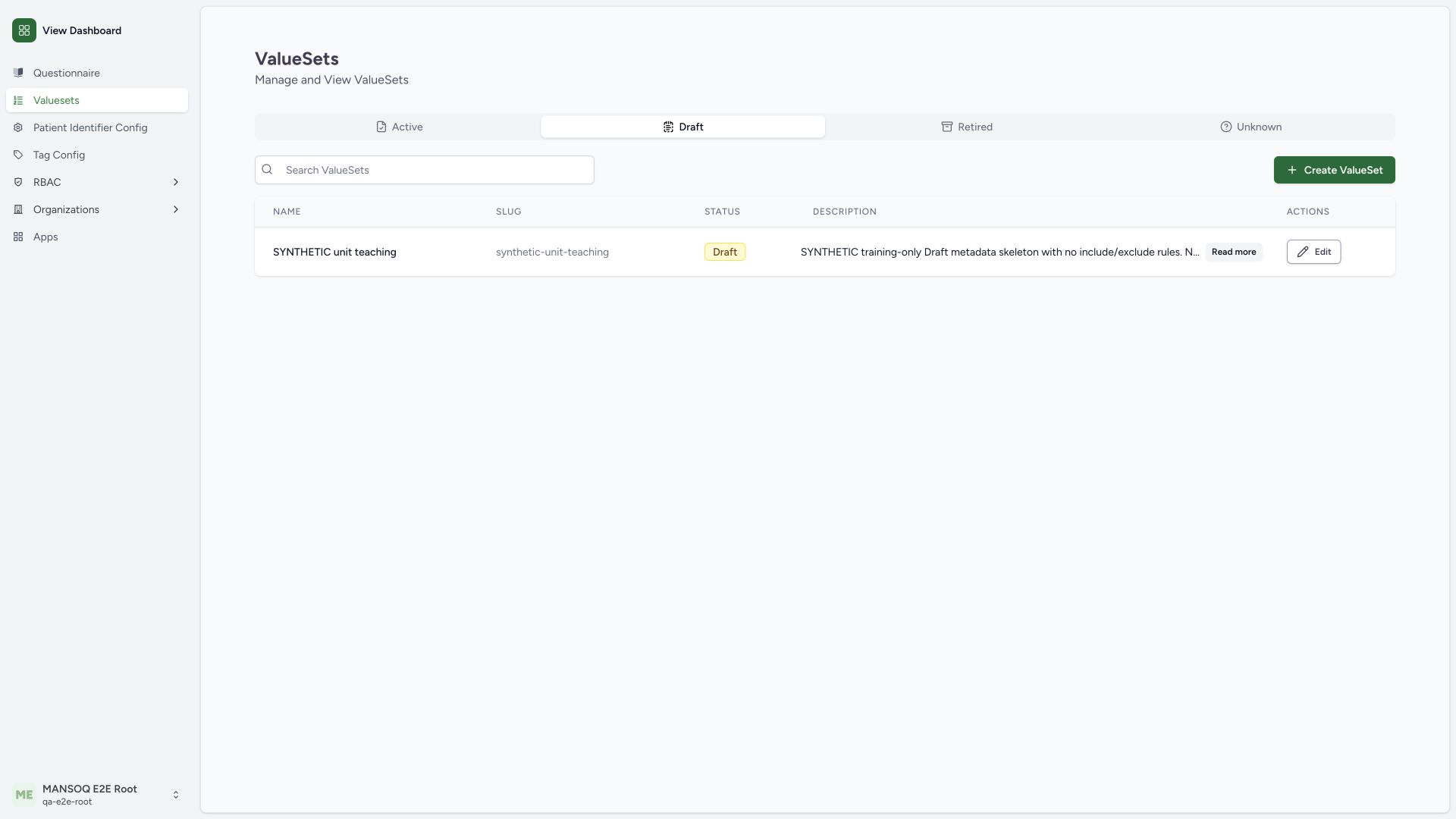 123
123Capture details
Actual1920×1080 Chrome pixels; source f6e9f05f. Existing isolated local superuser, custom unlinked value-set metadata Draft→Retired; no clinical binding.
- Draft filter selected: New Draft is not in the Active tab.
- Saved synthetic custom record: Normal detail GET independently confirms identity and empty composition.
- Edit custom definition: Custom definitions differ from System records shown with View.
6. Reopen the custom definition and inspect the unchanged state
Use this custom row’s Edit action and confirm its name, stable slug, description, Draft and empty composition. Save ValueSet is disabled until an actual change. The existing-definition editor does not show the new-definition preview trigger in this captured state.
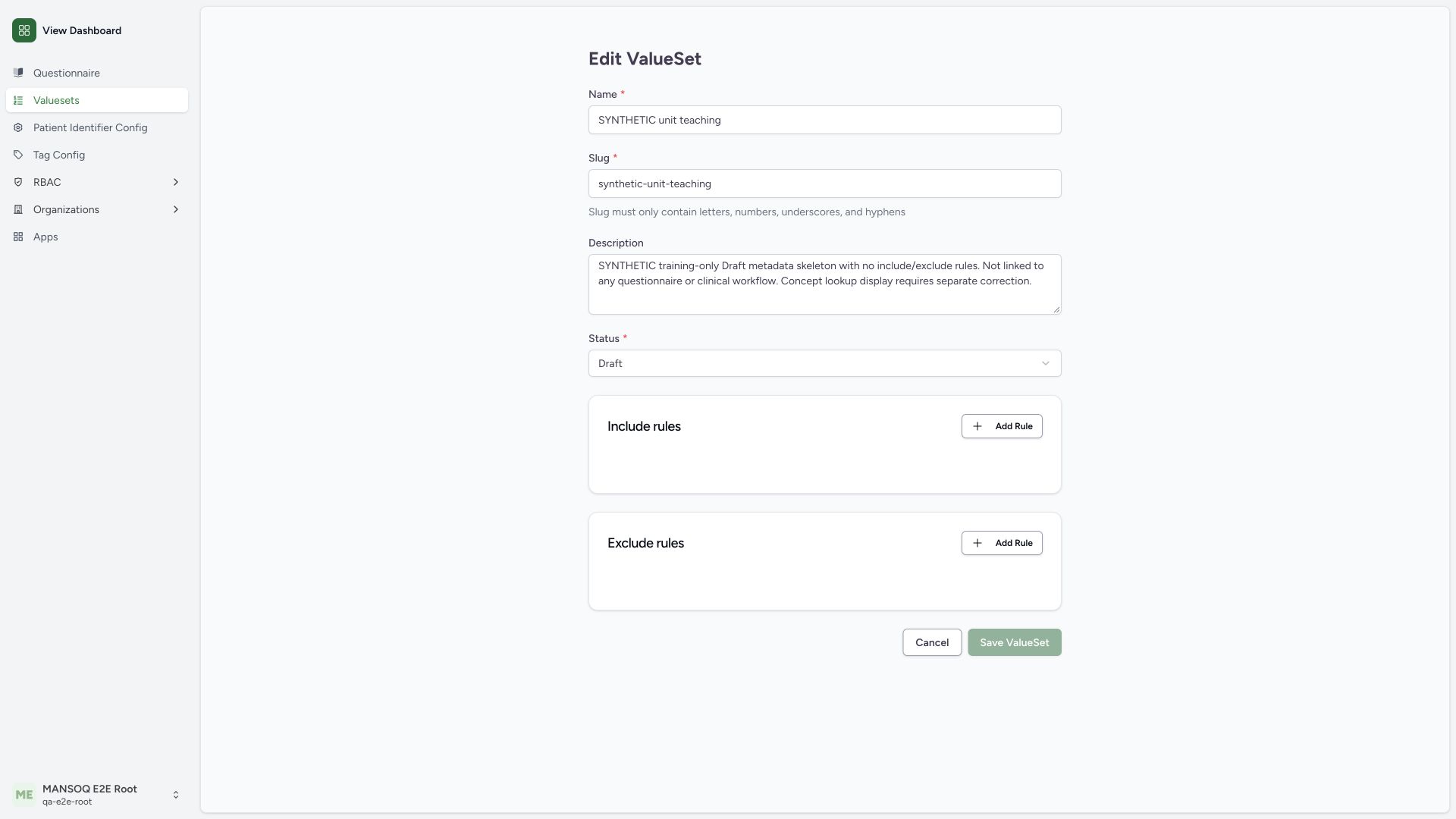 123
123Capture details
Actual1920×1080 Chrome pixels; source f6e9f05f. Existing isolated local superuser, custom unlinked value-set metadata Draft→Retired; no clinical binding.
- Stable custom slug: Confirm intended record before changing metadata.
- Draft status: Record remains unlinked metadata skeleton.
- Unchanged Save disabled: Source disables unchanged and pending form submissions.
7. Distinguish the source-defined lifecycle choices
The actual Status menu offers Active, Draft, Retired and Unknown. This example moves only its isolated unlinked skeleton from Draft to Retired. Active and Unknown are shown options but were not saved in this walkthrough; do not activate an unqualified empty definition.
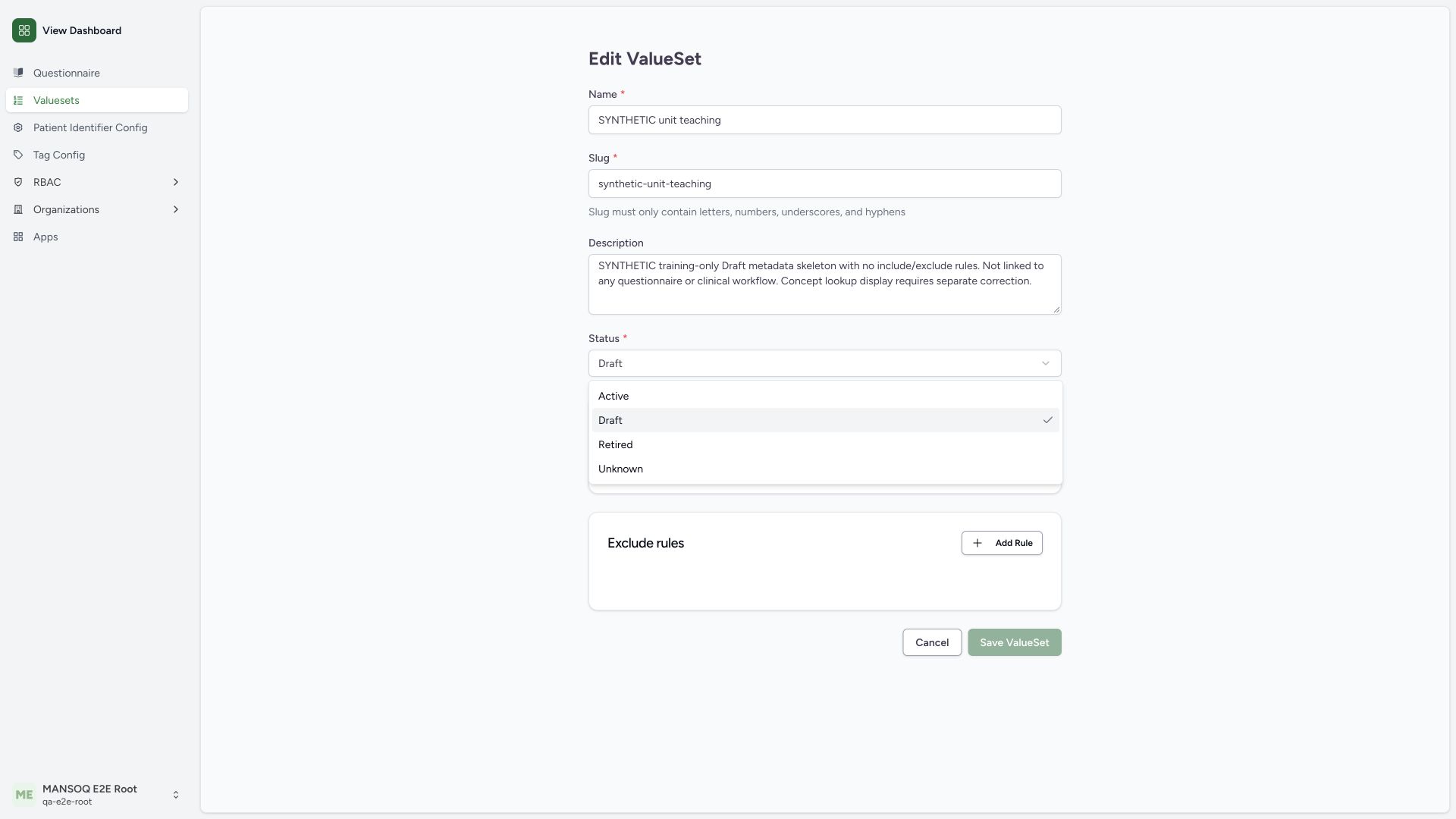 123
123Capture details
Actual1920×1080 Chrome pixels; source f6e9f05f. Existing isolated local superuser, custom unlinked value-set metadata Draft→Retired; no clinical binding.
- Draft selected: Current unlinked metadata state.
- Retired choice: This example retires only its isolated custom skeleton.
- Active not exercised: Do not activate an unqualified empty clinical definition.
8. Review and save retirement of the isolated custom skeleton
Keep the original name/slug and empty composition. Change status to Retired and update the description to state that this remains an empty unlinked training skeleton, then use Save ValueSet. No active System definition or clinical linkage is modified.
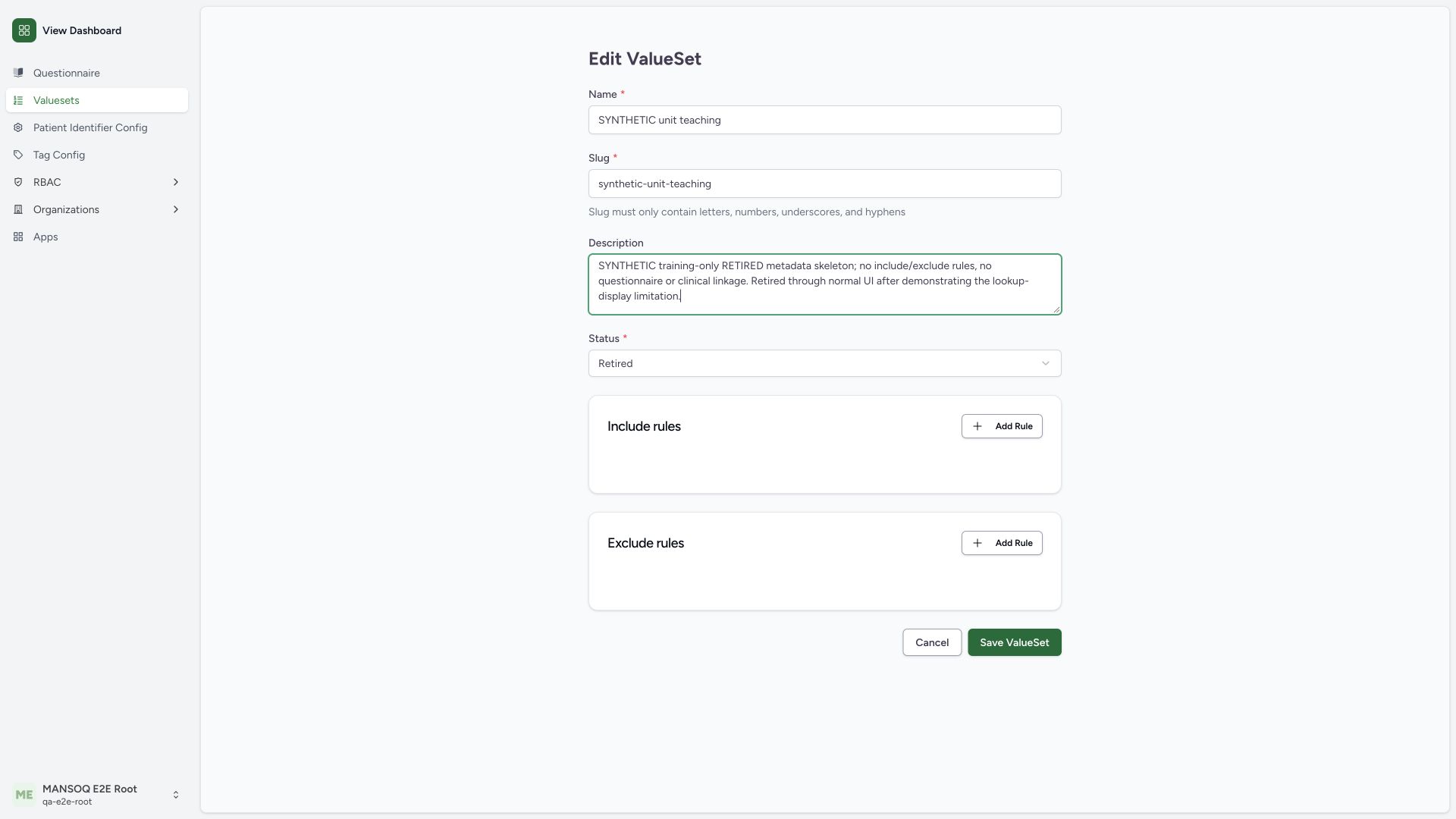 123
123Capture details
Actual1920×1080 Chrome pixels; source f6e9f05f. Existing isolated local superuser, custom unlinked value-set metadata Draft→Retired; no clinical binding.
- Reviewed retirement notes: Explicitly documents empty unlinked teaching scope.
- Retired prepared: Only this isolated custom skeleton changes status.
- Save metadata lifecycle change: Verify saved state and identity independently.
9. Verify retirement persisted in the correct catalogue tab
Select Retired and confirm the same name/slug, Retired badge and revised scope notes. A separate normal detail GET200 confirms the same external ID, custom flag, Retired status and empty composition. The example ends Retired with no clinical consumer.
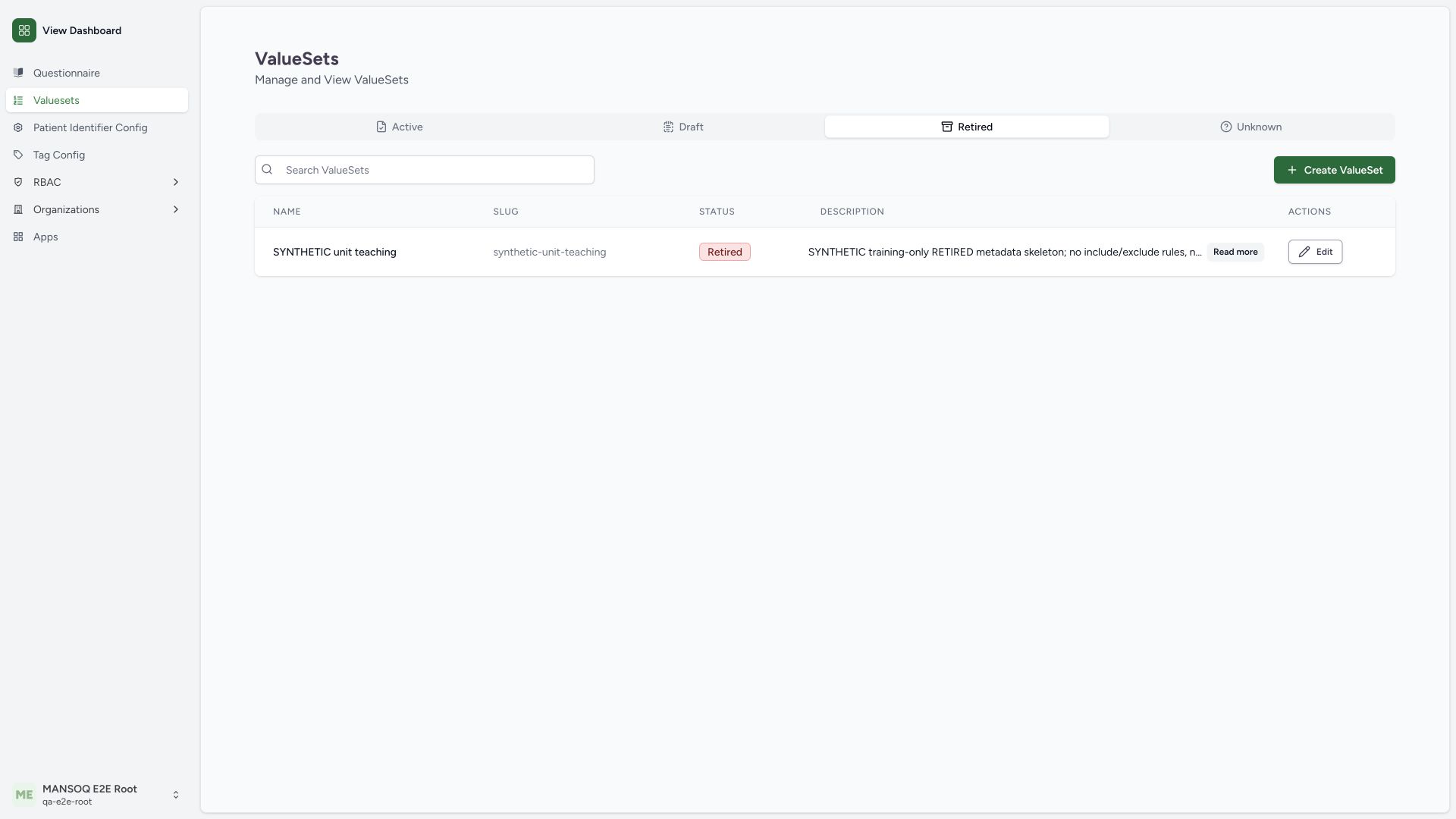 123
123Capture details
Actual1920×1080 Chrome pixels; source f6e9f05f. Existing isolated local superuser, custom unlinked value-set metadata Draft→Retired; no clinical binding.
- Retired filter: Status-based catalogue view matches saved lifecycle.
- Saved Retired badge: Independent normal GET confirms persistence.
- Updated scope notes: Still an empty, unlinked synthetic metadata skeleton.
The lookup issue remains a product correction
The observed code verification success lacks the metadata object expected by CodingField. The normal API response and screenshot are preserved as baseline evidence for a separate correction. This guide does not work around the read-only display, claim a valid populated subset, or present future fixed-source behavior as current evidence.
Remaining terminology qualification
Populated include/exclude concepts, filters and their semantics, terminology versions, preview/expansion, duplicate slug server validation, downstream questionnaire binding, System-definition safeguards and all delegated role boundaries need their own supported runtime qualification. Only the narrow metadata and validation branches pictured here are certified.
Troubleshooting
A green code check appears but Display stays Unverified
Confirm the actual response contract and deployed version. On this pin, the flat local lookup result does not fill the required display. Do not fabricate display text or report the concept-bearing definition as saved.
The record is missing from Active
Check the intended status tab and search; this example was explicitly created Draft and later Retired.
Source evidence
References are pinned to the private MANSOQ source repository. Repository access is required to open these links.
- repositories/platform/mansoq-web/src/components/ValueSet/ValueSetForm.tsx:325 · f6e9f05f
- repositories/platform/mansoq-web/src/components/ValueSet/ValueSetForm.tsx:388 · f6e9f05f
- repositories/platform/mansoq-web/src/components/ValueSet/ValueSetForm.tsx:430 · f6e9f05f
- repositories/platform/mansoq-web/src/components/ValueSet/ValueSetForm.tsx:550 · f6e9f05f
- repositories/platform/mansoq-web/src/components/ValueSet/CodingField.tsx:40 · f6e9f05f
- repositories/platform/mansoq-web/src/components/ValueSet/CodingField.tsx:60 · f6e9f05f
- repositories/platform/mansoq-web/src/components/ValueSet/ValueSetEditor.tsx:25 · f6e9f05f
- repositories/platform/mansoq-web/src/components/ValueSet/ValueSetEditor.tsx:52 · f6e9f05f
- repositories/platform/mansoq-web/src/components/ValueSet/ValueSetList.tsx:225 · f6e9f05f
- repositories/platform/mansoq-core/mansoq/emr/api/viewsets/valueset.py:44 · f6e9f05f
- repositories/platform/mansoq-core/mansoq/emr/api/viewsets/valueset.py:104 · f6e9f05f
- repositories/platform/mansoq-core/mansoq/emr/resources/valueset/spec.py:30 · f6e9f05f