Distinguish clinical status from verification, update an existing allergy and verify the saved patient record.
Current source · source reviewed · 5 min read
Before you begin
Open the correct patient’s active encounter with permission to update its clinical data.
An allergy already exists; use verified clinical information and the organization’s correction process.
1. Open the existing allergy
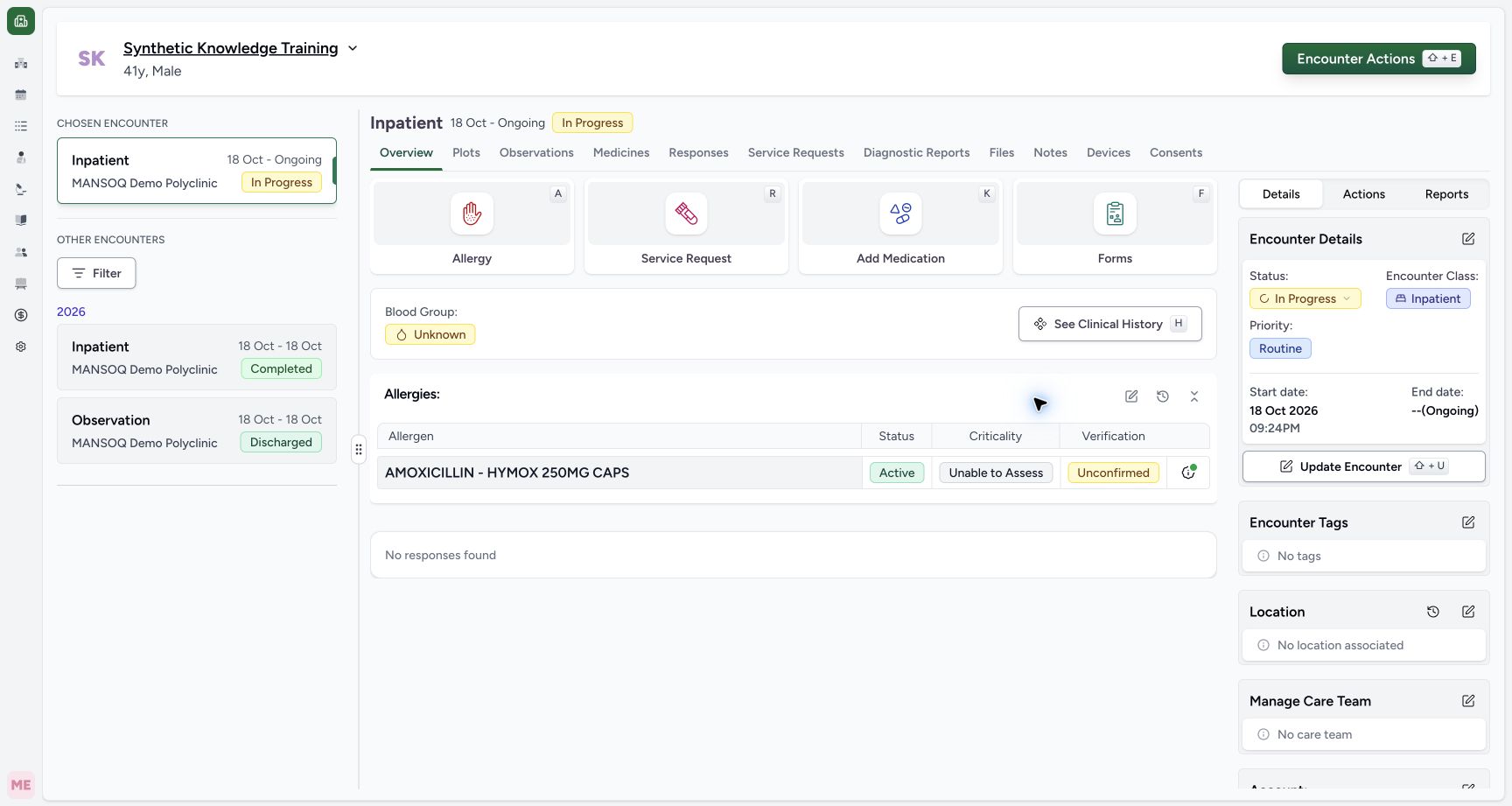
From Overview, select Allergy or the section’s edit control. Existing patient allergies load into the form. Check substance, occurrence and note before changing anything. The existing category is disabled in this observed row; its coded substance is not reselected here.
12
Saved overview · 2026-10-18Actual unchanged production UI, authenticated Nurse, one active fictional Inpatient encounter in isolated Polyclinic. Allergy catalogue explicitly configured for this training to one genuine locally imported NPHIES/SFDA medication concept; full SNOMED terminology was unavailable. No real reaction, clinical decision or other role/facility variant is established. Success: after normal Nurse submission, Overview shows the configured medication allergy Active, Unable to Assess and Unconfirmed, with Has Note. Independent record readback is required before packaging.
Saved allergen: review status, criticality and verification together: Saved allergen: review status, criticality and verification together
Allergy history: inspect the longitudinal patient record: Allergy history: inspect the longitudinal patient record
12
Existing edit controls · 2026-10-18Actual unchanged production UI, authenticated Nurse, one active fictional Inpatient encounter in isolated Polyclinic. Allergy catalogue explicitly configured for this training to one genuine locally imported NPHIES/SFDA medication concept; full SNOMED terminology was unavailable. No real reaction, clinical decision or other role/facility variant is established. Action: reopening the saved allergy preserves its substance, date and note. Category is disabled for existing records; criticality, verification and occurrence remain editable on the active encounter.
Existing category is locked; the substance is not reselected here: Existing category is locked; the substance is not reselected here
Verification status remains an editable documentation field: Verification status remains an editable documentation field
2. Review verification separately
The Status selector is verification. Existing records offer Unconfirmed, Confirmed, Refuted, Presumed and Entered in Error; the new-record selector omitted Entered in Error. This screenshot inspects that additional option only. Applying an error correction, deleting a persisted record or restoring an error state was not exercised.
1
Verification options · 2026-10-18Actual unchanged production UI, authenticated Nurse, one active fictional Inpatient encounter in isolated Polyclinic. Allergy catalogue explicitly configured for this training to one genuine locally imported NPHIES/SFDA medication concept; full SNOMED terminology was unavailable. No real reaction, clinical decision or other role/facility variant is established. Action: new-allergy verification offers Unconfirmed, Confirmed, Refuted and Presumed. The synthetic exercise will use Unconfirmed; no real allergy is asserted.
Unconfirmed: review evidence rather than accepting the Confirmed default: Unconfirmed: review evidence rather than accepting the Confirmed default
1
Existing verification options · 2026-10-18Actual unchanged production UI, authenticated Nurse, one active fictional Inpatient encounter in isolated Polyclinic. Allergy catalogue explicitly configured for this training to one genuine locally imported NPHIES/SFDA medication concept; full SNOMED terminology was unavailable. No real reaction, clinical decision or other role/facility variant is established. Action: existing saved allergy verification additionally offers Entered in Error; the new-row selector did not. This capture inspects the option only without applying an error correction.
Entered in Error: a persisted-record correction option, separate from a new-row removal: Entered in Error: a persisted-record correction option, separate from a new-row removal
3. Review clinical-status actions
Open the row menu. For the active entry, Mark Inactive and Mark Resolved are available. Choose a state only when supported by the verified clinical record. Selecting a menu item changes the draft; it has not yet saved the patient record. The synthetic exercise selected Mark Resolved to teach the controls.
1
Mark resolved action · 2026-10-18Actual unchanged production UI, authenticated Nurse, one active fictional Inpatient encounter in isolated Polyclinic. Allergy catalogue explicitly configured for this training to one genuine locally imported NPHIES/SFDA medication concept; full SNOMED terminology was unavailable. No real reaction, clinical decision or other role/facility variant is established. Action: existing active allergy row offers Mark Inactive and Mark Resolved. The fictional exercise selects Mark Resolved; verification remains a separate field and no real clinical resolution is asserted.
Mark Resolved: changes the clinical-status draft; Submit is still required: Mark Resolved: changes the clinical-status draft; Submit is still required
4. Document and save the change
Review the visibly struck-through resolved draft, occurrence, verification and criticality. Update the note to explain the documentation change and select Submit. The illustrated note explicitly identifies a fictional software exercise; it is not guidance to resolve an actual allergy.
1
Resolved submit · 2026-10-18Actual unchanged production UI, authenticated Nurse, one active fictional Inpatient encounter in isolated Polyclinic. Allergy catalogue explicitly configured for this training to one genuine locally imported NPHIES/SFDA medication concept; full SNOMED terminology was unavailable. No real reaction, clinical decision or other role/facility variant is established. Action: existing row is visually struck through after Mark Resolved, while verification stays Unconfirmed and criticality Unable to Assess. Revised note explicitly marks a fictional status exercise; Submit persists the change.
Submit: save the reviewed clinical-status change and note: Submit: save the reviewed clinical-status change and note
5. Verify the persisted status
After submission, check Overview. The same allergen now shows Resolved, while criticality remains Unable to Assess and verification remains Unconfirmed. The independent read-only checkpoint confirms the same allergy identifier and Nurse creator/updater; a status change did not create a second allergy record in this same-encounter path.
1
Resolved saved · 2026-10-18Actual unchanged production UI, authenticated Nurse, one active fictional Inpatient encounter in isolated Polyclinic. Allergy catalogue explicitly configured for this training to one genuine locally imported NPHIES/SFDA medication concept; full SNOMED terminology was unavailable. No real reaction, clinical decision or other role/facility variant is established. Success: Overview shows same coded medication as Resolved, while criticality remains Unable to Assess and verification Unconfirmed. Independent READ ONLY readback confirms same saved allergy ID with Nurse creator/updater.
Resolved clinical status is distinct from Unconfirmed verification: Resolved clinical status is distinct from Unconfirmed verification
6. Read the longitudinal context
Use the allergy history control and read date, clinical status, criticality and verification together. Open Has Note → See Note to inspect the saved context; its menu also identifies the reporting user and offers Go to Encounter. The illustrated history image shows the initial active checkpoint before the later resolved update.
12
Patient history note · 2026-10-18Actual unchanged production UI, authenticated Nurse, one active fictional Inpatient encounter in isolated Polyclinic. Allergy catalogue explicitly configured for this training to one genuine locally imported NPHIES/SFDA medication concept; full SNOMED terminology was unavailable. No real reaction, clinical decision or other role/facility variant is established. Success: longitudinal Allergies history retains the same Active/Unable to Assess/Unconfirmed entry under18October2026 and reveals the explicit fictional training note. This is the patient record rather than only an encounter draft.
Allergies history: verify the patient-wide record and occurrence date: Allergies history: verify the patient-wide record and occurrence date
Saved note: read the context and uncertainty before clinical use: Saved note: read the context and uncertainty before clinical use
Scope of the illustrated update
Actual unchanged production UI, authenticated Nurse, one active fictional Inpatient encounter in isolated Polyclinic. Allergy catalogue explicitly configured for this training to one genuine locally imported NPHIES/SFDA medication concept; full SNOMED terminology was unavailable. No real reaction, clinical decision or other role/facility variant is established. The observed same-encounter update is not proof of cross-encounter copying, inactive-state saving, error correction, multi-allergy batches or read-only closed-encounter behavior. Those branches remain open.
12
Existing edit controls · 2026-10-18Actual unchanged production UI, authenticated Nurse, one active fictional Inpatient encounter in isolated Polyclinic. Allergy catalogue explicitly configured for this training to one genuine locally imported NPHIES/SFDA medication concept; full SNOMED terminology was unavailable. No real reaction, clinical decision or other role/facility variant is established. Action: reopening the saved allergy preserves its substance, date and note. Category is disabled for existing records; criticality, verification and occurrence remain editable on the active encounter.
Existing category is locked; the substance is not reselected here: Existing category is locked; the substance is not reselected here
Verification status remains an editable documentation field: Verification status remains an editable documentation field
1
Resolved saved · 2026-10-18Actual unchanged production UI, authenticated Nurse, one active fictional Inpatient encounter in isolated Polyclinic. Allergy catalogue explicitly configured for this training to one genuine locally imported NPHIES/SFDA medication concept; full SNOMED terminology was unavailable. No real reaction, clinical decision or other role/facility variant is established. Success: Overview shows same coded medication as Resolved, while criticality remains Unable to Assess and verification Unconfirmed. Independent READ ONLY readback confirms same saved allergy ID with Nurse creator/updater.
Resolved clinical status is distinct from Unconfirmed verification: Resolved clinical status is distinct from Unconfirmed verification
Troubleshooting
The category selector is disabled
Existing records lock the category in this component. Verify the patient and existing coded substance, then follow the organization’s supported correction process rather than assuming all fields can be replaced.
12
Existing edit controls · 2026-10-18Actual unchanged production UI, authenticated Nurse, one active fictional Inpatient encounter in isolated Polyclinic. Allergy catalogue explicitly configured for this training to one genuine locally imported NPHIES/SFDA medication concept; full SNOMED terminology was unavailable. No real reaction, clinical decision or other role/facility variant is established. Action: reopening the saved allergy preserves its substance, date and note. Category is disabled for existing records; criticality, verification and occurrence remain editable on the active encounter.
Existing category is locked; the substance is not reselected here: Existing category is locked; the substance is not reselected here
Verification status remains an editable documentation field: Verification status remains an editable documentation field
Resolved and Unconfirmed appear together
These refer to different fields: Resolved is clinical status, while Unconfirmed is verification. Review both fields and the saved note; do not infer verification from the clinical status badge.
1
Resolved saved · 2026-10-18Actual unchanged production UI, authenticated Nurse, one active fictional Inpatient encounter in isolated Polyclinic. Allergy catalogue explicitly configured for this training to one genuine locally imported NPHIES/SFDA medication concept; full SNOMED terminology was unavailable. No real reaction, clinical decision or other role/facility variant is established. Success: Overview shows same coded medication as Resolved, while criticality remains Unable to Assess and verification Unconfirmed. Independent READ ONLY readback confirms same saved allergy ID with Nurse creator/updater.
Resolved clinical status is distinct from Unconfirmed verification: Resolved clinical status is distinct from Unconfirmed verification
Source evidence
References are pinned to the private MANSOQ source repository. Repository access is required to open these links.
 MANSOQ
  12
12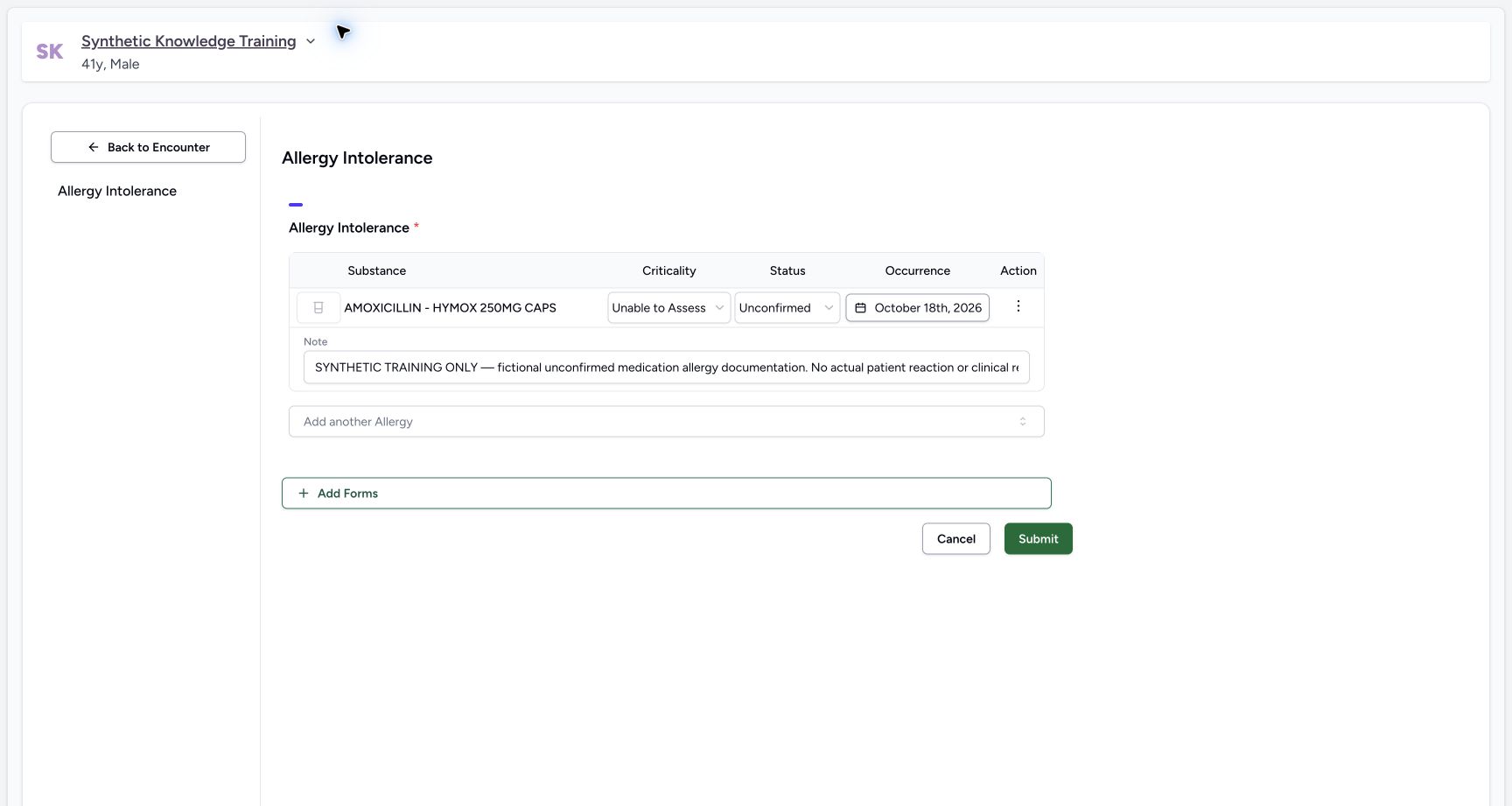 12
12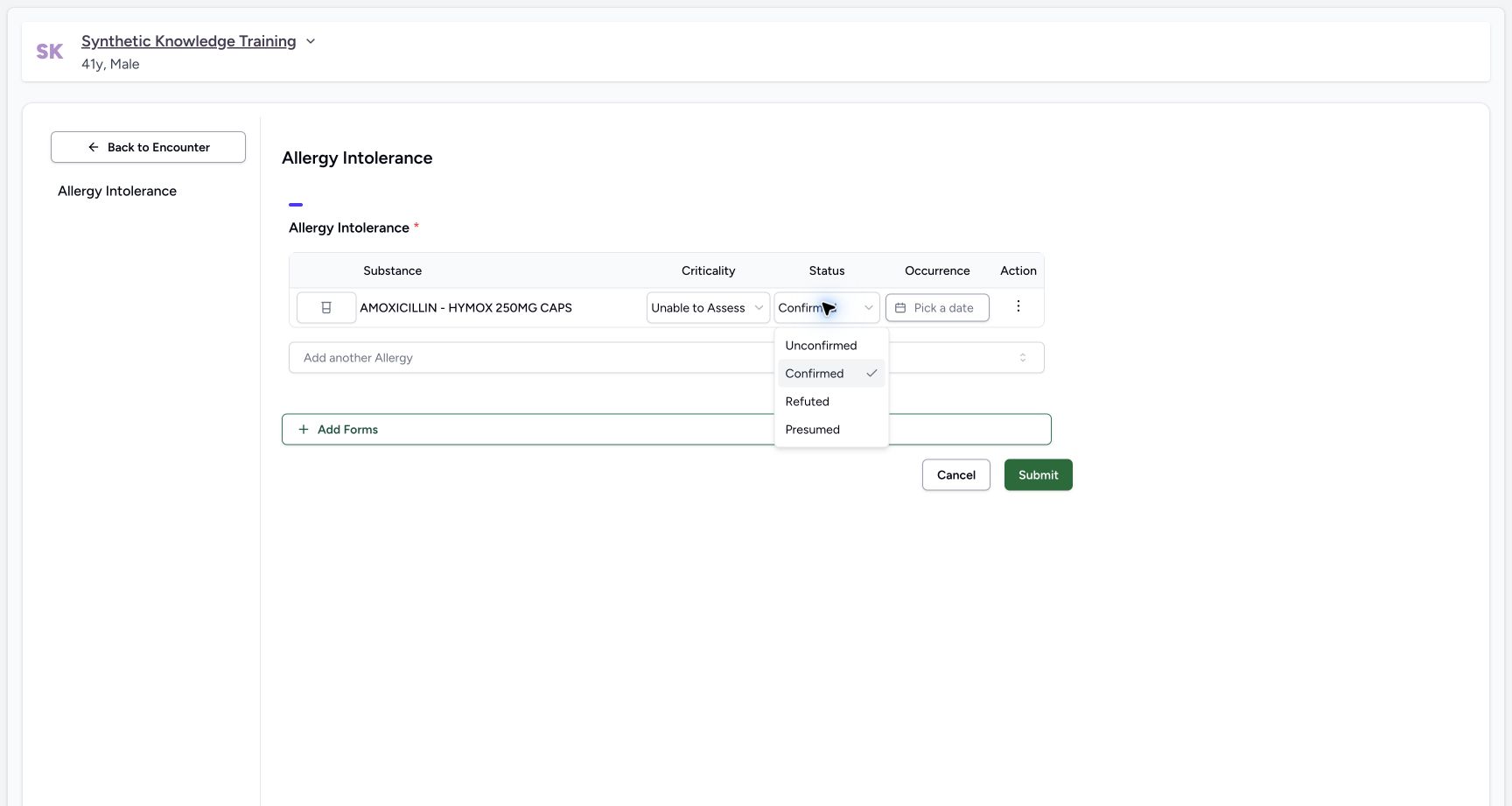 1
1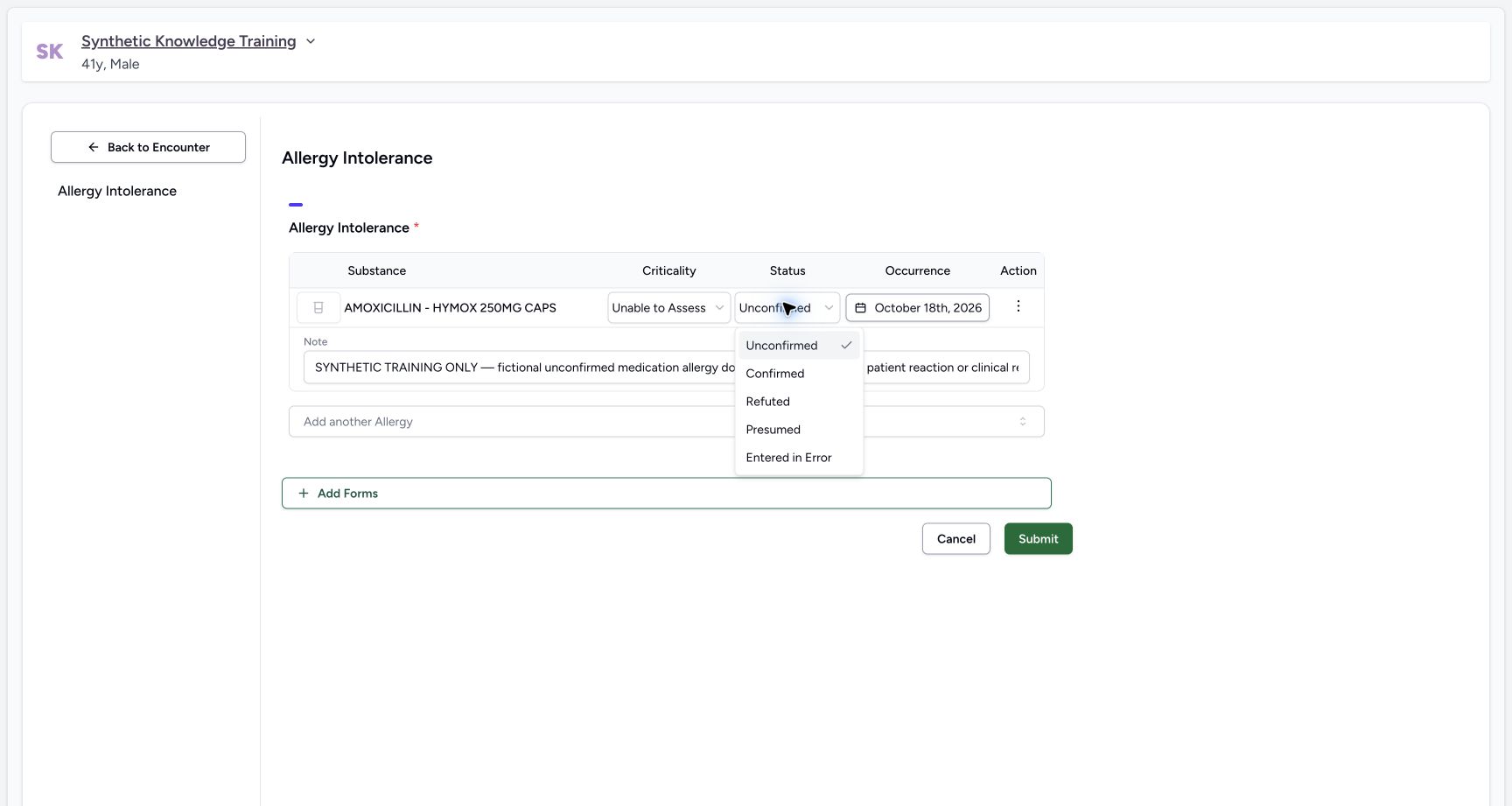 1
1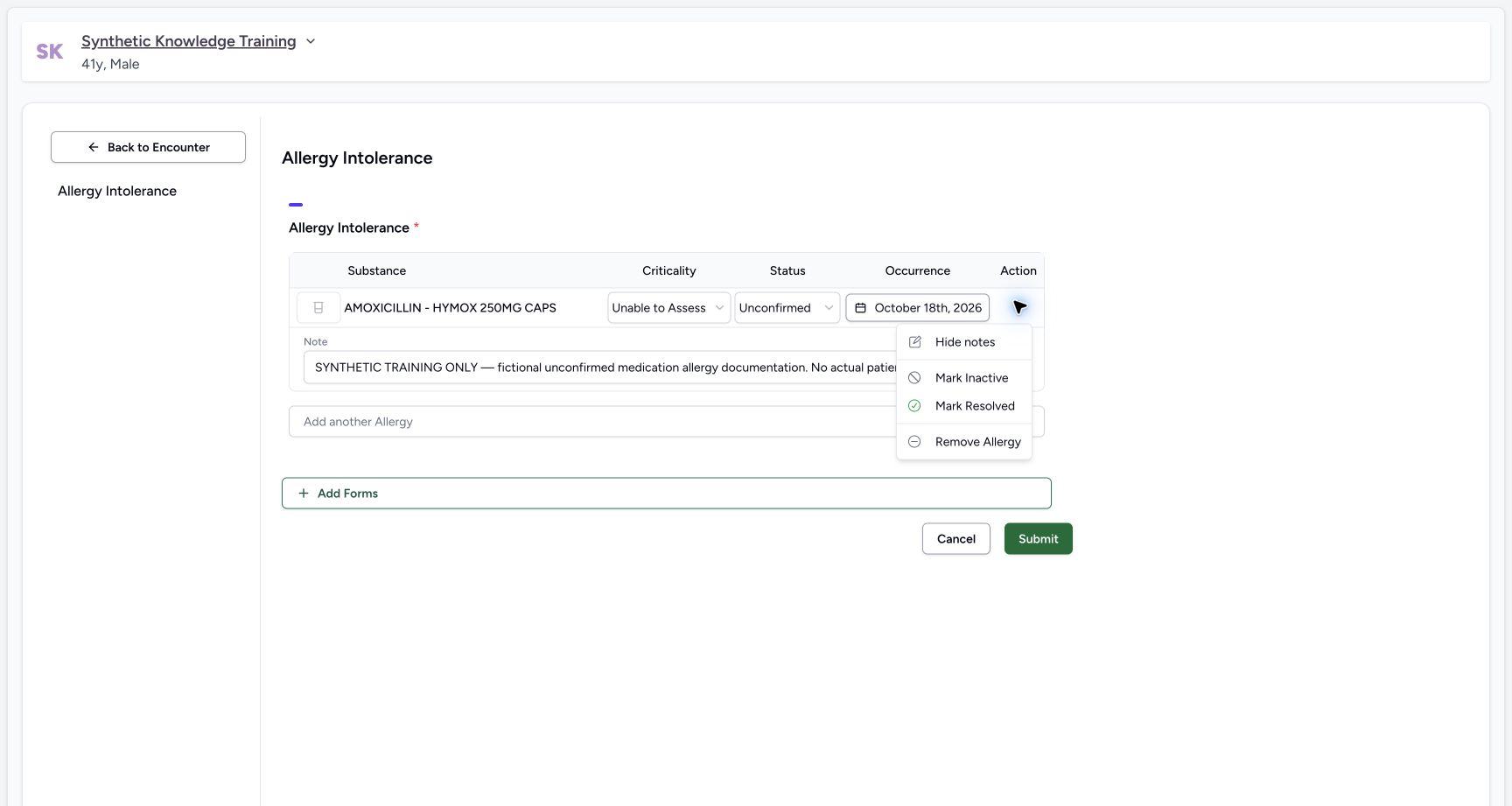 1
1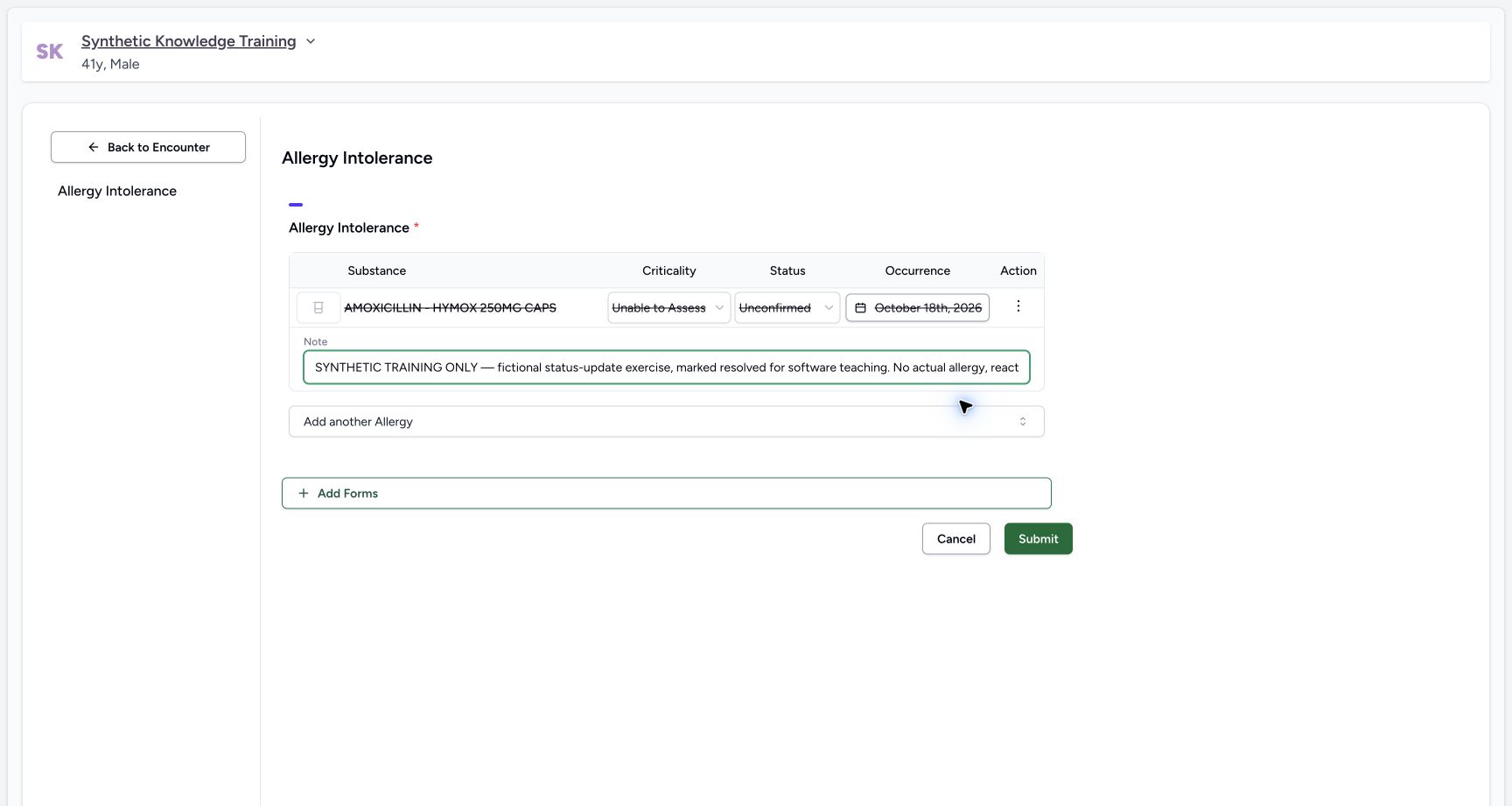 1
1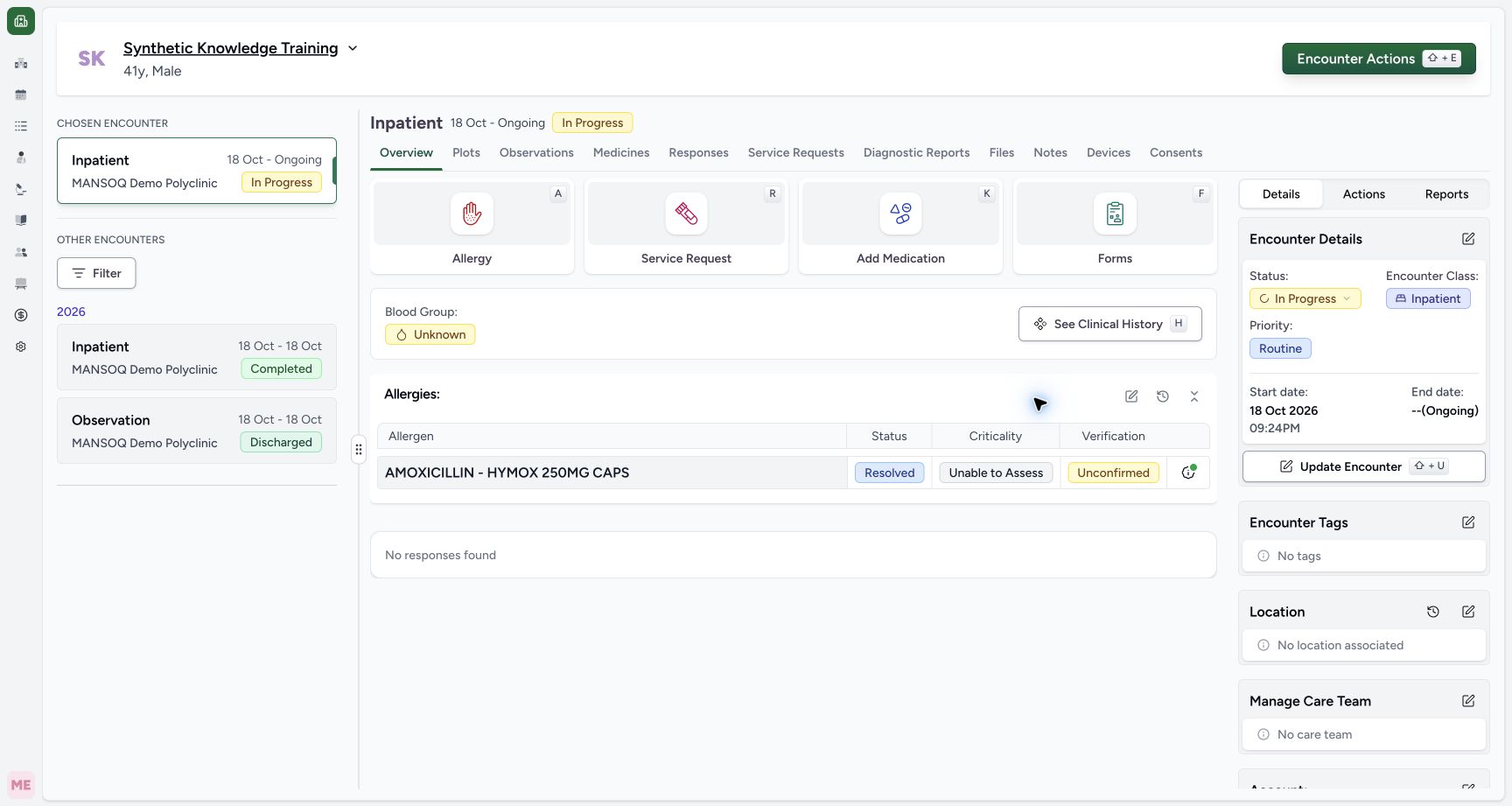 1
1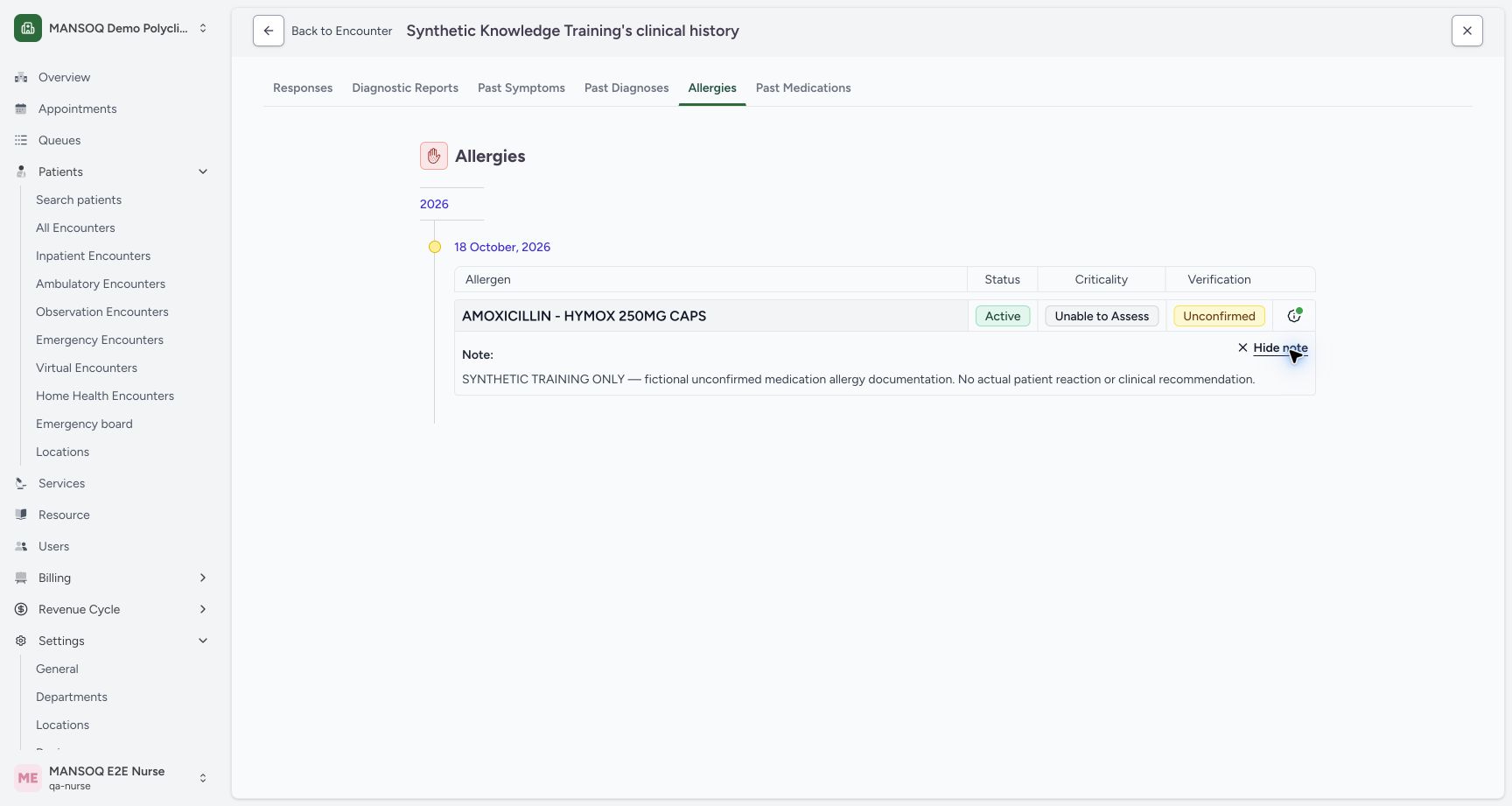 12
12