Complete bedside questionnaire fields and verify the saved response
Use configured form groups, text, templates, Boolean conditions, numbers, choices, repeated answers, units, dates and notes in an active encounter.
Current source · source reviewed · 10 min read
Before you begin
Open the correct patient and active encounter with permission to submit its questionnaires.
Your organization has published the relevant form and assigned it to an organization you can access.
Use the facility’s approved clinical form and verified information; this illustrated form is expressly a software training example.
1. Open the configured form
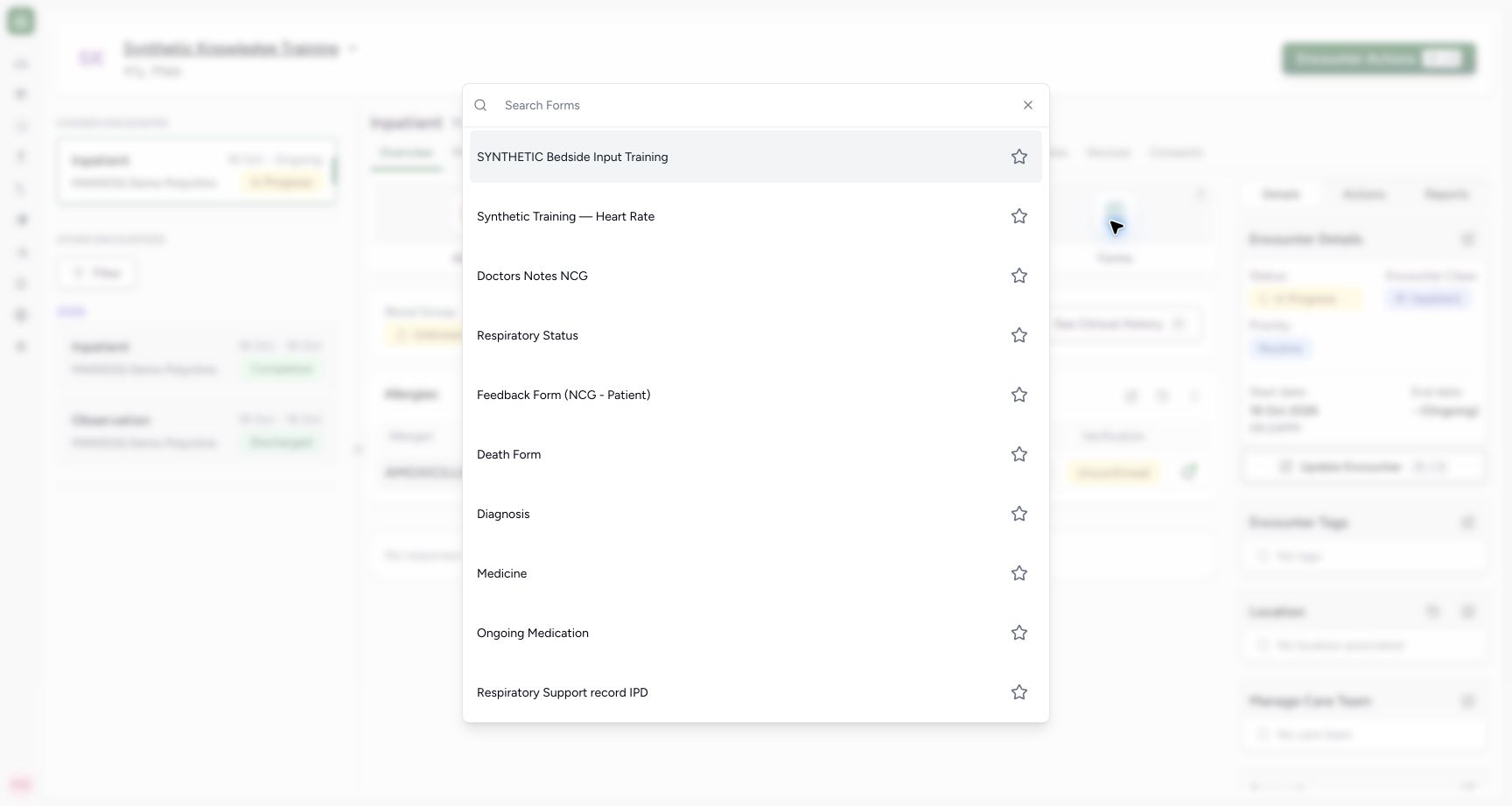
On the correct active encounter, select Forms, find the intended questionnaire and select it. This example opens SYNTHETIC Bedside Input Training, created through the ordinary questionnaire API and organization assignment. Other facilities expose their configured forms and memberships.
1
Form selector · 2026-10-18Actual unchanged production UI, authenticated Nurse, one active fictional Inpatient encounter in isolated Polyclinic. The explicitly configured SYNTHETIC Bedside Input Training form exercises questionnaire controls and saves answers only. It is not a nursing protocol, a clinical finding, an observation, an order or real care. Other clinical roles/facility variants and structured operations are not established. Start: authenticated Nurse Forms selector lists the newly configured synthetic teaching form alongside actual available bedside forms. Availability depends on questionnaire organization assignments and membership.
Choose the configured teaching form for this active encounter: Choose the configured teaching form for this active encounter
2. Read the groups and complete text fields
Read the form title, description, display instructions and group headings. Fill required short text and narrative fields; an asterisk marks a required answer. Optional URL fields are separate text answers. Where Insert Template is available, choose a configured snippet, then review and edit its content. Template text does not verify findings. Empty required answers show This field is required after Submit.
123
Empty text group · 2026-10-18Actual unchanged production UI, authenticated Nurse, one active fictional Inpatient encounter in isolated Polyclinic. The explicitly configured SYNTHETIC Bedside Input Training form exercises questionnaire controls and saves answers only. It is not a nursing protocol, a clinical finding, an observation, an order or real care. Other clinical roles/facility variants and structured operations are not established. Start: configured teaching form displays a warning, grouped required short text/narrative, optional reference URL and Boolean follow-up control. It saves questionnaire answers, not observations or orders.
Required short text: enter the teaching record label: Required short text: enter the teaching record label
Insert Template: select a configured narrative snippet and review it: Insert Template: select a configured narrative snippet and review it
Boolean Yes: conditional follow-up depends on this answer: Boolean Yes: conditional follow-up depends on this answer
12
Required fields · 2026-10-18Actual unchanged production UI, authenticated Nurse, one active fictional Inpatient encounter in isolated Polyclinic. The explicitly configured SYNTHETIC Bedside Input Training form exercises questionnaire controls and saves answers only. It is not a nursing protocol, a clinical finding, an observation, an order or real care. Other clinical roles/facility variants and structured operations are not established. Error: submitting the empty configured form marks required identity, narrative and Boolean fields. No questionnaire response has been saved.
Required field validation: complete the marked question before submitting: Required field validation: complete the marked question before submitting
Required Boolean needs an explicit Yes or No answer: Required Boolean needs an explicit Yes or No answer
1
Template selector · 2026-10-18Actual unchanged production UI, authenticated Nurse, one active fictional Inpatient encounter in isolated Polyclinic. The explicitly configured SYNTHETIC Bedside Input Training form exercises questionnaire controls and saves answers only. It is not a nursing protocol, a clinical finding, an observation, an order or real care. Other clinical roles/facility variants and structured operations are not established. Action: Insert Template offers the configured Synthetic assessment note. Template content must be reviewed after insertion; it does not verify findings.
Insert the selected configured template, then review and edit its text: Insert the selected configured template, then review and edit its text
12
Conditional hidden · 2026-10-18Actual unchanged production UI, authenticated Nurse, one active fictional Inpatient encounter in isolated Polyclinic. The explicitly configured SYNTHETIC Bedside Input Training form exercises questionnaire controls and saves answers only. It is not a nursing protocol, a clinical finding, an observation, an order or real care. Other clinical roles/facility variants and structured operations are not established. Action: short text, template narrative and reference URL are filled. Boolean No leaves the optional follow-up field hidden in this configured teaching form.
Review inserted narrative text; templates do not verify findings: Review inserted narrative text; templates do not verify findings
No: optional follow-up remains hidden under this form’s condition: No: optional follow-up remains hidden under this form’s condition
3. Answer Boolean and conditional fields
Choose Yes or No explicitly. In this configured example, No keeps the optional follow-up hidden and Yes reveals it. Complete the enabled follow-up when relevant. Visibility rules are configured per form; do not infer that an absent question was answered.
12
Conditional hidden · 2026-10-18Actual unchanged production UI, authenticated Nurse, one active fictional Inpatient encounter in isolated Polyclinic. The explicitly configured SYNTHETIC Bedside Input Training form exercises questionnaire controls and saves answers only. It is not a nursing protocol, a clinical finding, an observation, an order or real care. Other clinical roles/facility variants and structured operations are not established. Action: short text, template narrative and reference URL are filled. Boolean No leaves the optional follow-up field hidden in this configured teaching form.
Review inserted narrative text; templates do not verify findings: Review inserted narrative text; templates do not verify findings
No: optional follow-up remains hidden under this form’s condition: No: optional follow-up remains hidden under this form’s condition
12
Conditional visible · 2026-10-18Actual unchanged production UI, authenticated Nurse, one active fictional Inpatient encounter in isolated Polyclinic. The explicitly configured SYNTHETIC Bedside Input Training form exercises questionnaire controls and saves answers only. It is not a nursing protocol, a clinical finding, an observation, an order or real care. Other clinical roles/facility variants and structured operations are not established. Action: configured Boolean Yes reveals Optional follow-up context; entered text remains an unsaved questionnaire answer. This form compares the normalized Yes value in its condition.
Yes: this configured condition reveals follow-up context: Yes: this configured condition reveals follow-up context
Conditional follow-up: complete only the field enabled by the form: Conditional follow-up: complete only the field enabled by the form
4. Enter decimal and integer values
Use the decimal control for an allowed decimal value and the integer control for a whole number. Check the label and precision. The pictured 12.5 and 3 are fictional input exercises rather than patient measurements.
123
Numeric and choice draft · 2026-10-18Actual unchanged production UI, authenticated Nurse, one active fictional Inpatient encounter in isolated Polyclinic. The explicitly configured SYNTHETIC Bedside Input Training form exercises questionnaire controls and saves answers only. It is not a nursing protocol, a clinical finding, an observation, an order or real care. Other clinical roles/facility variants and structured operations are not established. Action: decimal 12.5, integer 3, single Option A, searchable Option 3 and two multiple choices are entered in the draft. These values are fictional control exercises, not patient measurements.
Decimal control: enter and verify the required precision: Decimal control: enter and verify the required precision
Integer control: enter a whole-number value: Integer control: enter a whole-number value
Multiple choices: review the selected count, then inspect actual values: Multiple choices: review the selected count, then inspect actual values
5. Choose a single offered answer
A small custom choice uses radio options; this example selects Option A. A custom choice with more than five options uses the searchable dropdown; open it and select the intended offered answer, such as the fictional Option 3. Check the selected value after the menu closes.
1
Searchable choice · 2026-10-18Actual unchanged production UI, authenticated Nurse, one active fictional Inpatient encounter in isolated Polyclinic. The explicitly configured SYNTHETIC Bedside Input Training form exercises questionnaire controls and saves answers only. It is not a nursing protocol, a clinical finding, an observation, an order or real care. Other clinical roles/facility variants and structured operations are not established. Action: a configured choice with more than five options uses a searchable dropdown; numeric values and single-choice answer remain in the draft.
Select the intended offered answer from the searchable choice list: Select the intended offered answer from the searchable choice list
123
Numeric and choice draft · 2026-10-18Actual unchanged production UI, authenticated Nurse, one active fictional Inpatient encounter in isolated Polyclinic. The explicitly configured SYNTHETIC Bedside Input Training form exercises questionnaire controls and saves answers only. It is not a nursing protocol, a clinical finding, an observation, an order or real care. Other clinical roles/facility variants and structured operations are not established. Action: decimal 12.5, integer 3, single Option A, searchable Option 3 and two multiple choices are entered in the draft. These values are fictional control exercises, not patient measurements.
Decimal control: enter and verify the required precision: Decimal control: enter and verify the required precision
Integer control: enter a whole-number value: Integer control: enter a whole-number value
Multiple choices: review the selected count, then inspect actual values: Multiple choices: review the selected count, then inspect actual values
6. Select multiple answers deliberately
For a repeating custom choice, open the selector, check each intended answer and choose Done. Read the selected count and reopen the selector if needed to inspect the actual values. The example retains Choice A and Choice C; a count alone does not identify which answers were chosen.
1
Multiple choices · 2026-10-18Actual unchanged production UI, authenticated Nurse, one active fictional Inpatient encounter in isolated Polyclinic. The explicitly configured SYNTHETIC Bedside Input Training form exercises questionnaire controls and saves answers only. It is not a nursing protocol, a clinical finding, an observation, an order or real care. Other clinical roles/facility variants and structured operations are not established. Action: repeating custom choice selector marks Choice A and Choice C independently; Done commits the selection to the questionnaire draft, while Cancel backs out of this selector.
Done: keep the selected multiple answers in the draft: Done: keep the selected multiple answers in the draft
123
Numeric and choice draft · 2026-10-18Actual unchanged production UI, authenticated Nurse, one active fictional Inpatient encounter in isolated Polyclinic. The explicitly configured SYNTHETIC Bedside Input Training form exercises questionnaire controls and saves answers only. It is not a nursing protocol, a clinical finding, an observation, an order or real care. Other clinical roles/facility variants and structured operations are not established. Action: decimal 12.5, integer 3, single Option A, searchable Option 3 and two multiple choices are entered in the draft. These values are fictional control exercises, not patient measurements.
Decimal control: enter and verify the required precision: Decimal control: enter and verify the required precision
Integer control: enter a whole-number value: Integer control: enter a whole-number value
Multiple choices: review the selected count, then inspect actual values: Multiple choices: review the selected count, then inspect actual values
7. Add separate repeated answers
For a repeating text question, enter the first answer, choose Add Another and enter the next answer separately. Review each row. The two fictional notes shown here are retained as two answers to one question; the repeated-answer save is verified independently.
123
Repeated and quantity · 2026-10-18Actual unchanged production UI, authenticated Nurse, one active fictional Inpatient encounter in isolated Polyclinic. The explicitly configured SYNTHETIC Bedside Input Training form exercises questionnaire controls and saves answers only. It is not a nursing protocol, a clinical finding, an observation, an order or real care. Other clinical roles/facility variants and structured operations are not established. Action: two repeated text entries are retained as separate draft answers, with Add Another available. Quantity shows Value 4.5 and coded milligram; this generic answer is not a medication order or administration.
Add Another: append a separate answer to the repeating question: Add Another: append a separate answer to the repeating question
Quantity value: review together with its coded unit: Quantity value: review together with its coded unit
Coded unit: milligram is retained separately from the number: Coded unit: milligram is retained separately from the number
8. Review quantity and coded unit together
For a quantity field, enter Value, open Unit, search the configured UCUM catalogue and select the intended coded unit. The example selects milligram, distinct from mg/dL. Verify both the number and unit before continuing. This generic 4.5 mg response is not a medication request or administration.
1
Quantity unit search · 2026-10-18Actual unchanged production UI, authenticated Nurse, one active fictional Inpatient encounter in isolated Polyclinic. The explicitly configured SYNTHETIC Bedside Input Training form exercises questionnaire controls and saves answers only. It is not a nursing protocol, a clinical finding, an observation, an order or real care. Other clinical roles/facility variants and structured operations are not established. Action: quantity Value 4.5 requires a separately selected coded unit. The installed UCUM search distinguishes milligram from mg/dL; these are different units.
Choose the correct coded UCUM unit; milligram and mg/dL are different: Choose the correct coded UCUM unit; milligram and mg/dL are different
123
Repeated and quantity · 2026-10-18Actual unchanged production UI, authenticated Nurse, one active fictional Inpatient encounter in isolated Polyclinic. The explicitly configured SYNTHETIC Bedside Input Training form exercises questionnaire controls and saves answers only. It is not a nursing protocol, a clinical finding, an observation, an order or real care. Other clinical roles/facility variants and structured operations are not established. Action: two repeated text entries are retained as separate draft answers, with Add Another available. Quantity shows Value 4.5 and coded milligram; this generic answer is not a medication order or administration.
Add Another: append a separate answer to the repeating question: Add Another: append a separate answer to the repeating question
Quantity value: review together with its coded unit: Quantity value: review together with its coded unit
Coded unit: milligram is retained separately from the number: Coded unit: milligram is retained separately from the number
9. Distinguish date, date-time and time-only
Choose the calendar date for a date-only answer. For date-time, choose its date before completing the clock field. Time-only is a separate answer. Review the workstation timezone and the display format: this example’s clock controls show 01:30 PM and 01:45 PM; the saved time-only value is 13:45. The generic date picker pictured permits future dates, whereas allergy occurrence disables them; restrictions depend on the field.
1
Date picker · 2026-10-18Actual unchanged production UI, authenticated Nurse, one active fictional Inpatient encounter in isolated Polyclinic. The explicitly configured SYNTHETIC Bedside Input Training form exercises questionnaire controls and saves answers only. It is not a nursing protocol, a clinical finding, an observation, an order or real care. Other clinical roles/facility variants and structured operations are not established. Action: primitive Date control opens Absolute Date/Quick Finder. Unlike allergy occurrence, this generic configured date picker does not disable future dates; restrictions depend on field context.
Choose the intended date; use the restrictions of this specific form: Choose the intended date; use the restrictions of this specific form
123
Date time review · 2026-10-18Actual unchanged production UI, authenticated Nurse, one active fictional Inpatient encounter in isolated Polyclinic. The explicitly configured SYNTHETIC Bedside Input Training form exercises questionnaire controls and saves answers only. It is not a nursing protocol, a clinical finding, an observation, an order or real care. Other clinical roles/facility variants and structured operations are not established. Action: committed date-only 18 October 2026, date-time 18 October 13:30 and time-only 13:45 are separate answers. Review the workstation timezone and each field’s meaning before submission.
Date-only answer: calendar date without the separate clock field: Date-only answer: calendar date without the separate clock field
Date-time answer: selected calendar date and local 13:30 time: Date-time answer: selected calendar date and local 13:30 time
Time-only answer:13:45 is distinct from the date-time field: Time-only answer:13:45 is distinct from the date-time field
10. Add context in an answer note
Select the note icon beside the relevant answer and enter its context in the separate note area. This does not replace the answer’s value. After saving, See Note displays the retained note. The example note expressly says it is a synthetic control exercise.
1
Answer note · 2026-10-18Actual unchanged production UI, authenticated Nurse, one active fictional Inpatient encounter in isolated Polyclinic. The explicitly configured SYNTHETIC Bedside Input Training form exercises questionnaire controls and saves answers only. It is not a nursing protocol, a clinical finding, an observation, an order or real care. Other clinical roles/facility variants and structured operations are not established. Action: the note icon opens a separate note text area for the selected numeric answer. Notes explain an answer and are retained separately from its value.
Answer note: enter relevant context without replacing the numeric value: Answer note: enter relevant context without replacing the numeric value
1
Saved answer note · 2026-10-18Actual unchanged production UI, authenticated Nurse, one active fictional Inpatient encounter in isolated Polyclinic. The explicitly configured SYNTHETIC Bedside Input Training form exercises questionnaire controls and saves answers only. It is not a nursing protocol, a clinical finding, an observation, an order or real care. Other clinical roles/facility variants and structured operations are not established. Success: See Note reveals the separately retained synthetic numeric-answer note, alongside the saved response. The note does not change the numeric value.
Saved note: read answer context separately from its numeric value: Saved note: read answer context separately from its numeric value
11. Review all groups and submit
Check the patient, encounter, every required answer, unit, date, time and note, then select Submit. Wait for completion. A selected field or enabled Submit button alone is not proof that the response was saved. The illustrated generic form is configured without observation or structured-operation flags.
1
Submit completed · 2026-10-18Actual unchanged production UI, authenticated Nurse, one active fictional Inpatient encounter in isolated Polyclinic. The explicitly configured SYNTHETIC Bedside Input Training form exercises questionnaire controls and saves answers only. It is not a nursing protocol, a clinical finding, an observation, an order or real care. Other clinical roles/facility variants and structured operations are not established. Action: all required configured input values are complete. Submit will save a questionnaire response; this teaching form has no observation or structured-operation flags.
Submit: save the reviewed response after checking the correct patient and all groups: Submit: save the reviewed response after checking the correct patient and all groups
12. Verify the saved response and author
On Overview, expand the response card to inspect its retained answers. Open the encounter Responses tab to find the form, filing time and author; Select Forms filters the list when needed. Verify repeated values, actual choices, coded quantity and distinct timing fields. The independent checkpoint confirms one completed response authored by the Nurse, with the expected answers and separate note; it created no linked Observation or structured clinical operation.
1
Saved response card · 2026-10-18Actual unchanged production UI, authenticated Nurse, one active fictional Inpatient encounter in isolated Polyclinic. The explicitly configured SYNTHETIC Bedside Input Training form exercises questionnaire controls and saves answers only. It is not a nursing protocol, a clinical finding, an observation, an order or real care. Other clinical roles/facility variants and structured operations are not established. Success: Overview contains the submitted SYNTHETIC Bedside Input Training response card. Its header expands or collapses retained answers; additional saved fields are reviewed below.
Saved response header: expand to review the submitted answers: Saved response header: expand to review the submitted answers
12
Saved values · 2026-10-18Actual unchanged production UI, authenticated Nurse, one active fictional Inpatient encounter in isolated Polyclinic. The explicitly configured SYNTHETIC Bedside Input Training form exercises questionnaire controls and saves answers only. It is not a nursing protocol, a clinical finding, an observation, an order or real care. Other clinical roles/facility variants and structured operations are not established. Success: saved response displays numeric and choice answers, two repeated text values,4.5 mg quantity, date 18 October, date-time 01:30 PM and time-only 13:45, with filed-by Nurse and submission time. Independent readback is still required for packaging.
Saved quantity retains both number and UCUM unit: Saved quantity retains both number and UCUM unit
Saved time-only answer is shown independently from the date-time answer: Saved time-only answer is shown independently from the date-time answer
12
Encounter responses · 2026-10-18Actual unchanged production UI, authenticated Nurse, one active fictional Inpatient encounter in isolated Polyclinic. The explicitly configured SYNTHETIC Bedside Input Training form exercises questionnaire controls and saves answers only. It is not a nursing protocol, a clinical finding, an observation, an order or real care. Other clinical roles/facility variants and structured operations are not established. Success: encounter Responses tab lists the submitted teaching form with Nurse authorship and filing time, and exposes Select Forms plus More Actions. Editing, printing and deletion have not been performed here.
Responses: review the selected encounter’s submitted forms: Responses: review the selected encounter’s submitted forms
Select Forms: filter the response list when multiple forms exist: Select Forms: filter the response list when multiple forms exist
Which controls this example establishes
The source schema defines fourteen base question types. This configured form illustrates the thirteen non-structured types: group, display, string, text, URL, Boolean, decimal, integer, choice, quantity, date, date-time and time. Choice and repeated-answer variants appear in their appropriate controls. Structured medication, diagnosis, allergy, service request, encounter, appointment, file, charge and death operations have separate workflows and requirements. Source-file counts include helper components and are not a count of independent input types.
123
Empty text group · 2026-10-18Actual unchanged production UI, authenticated Nurse, one active fictional Inpatient encounter in isolated Polyclinic. The explicitly configured SYNTHETIC Bedside Input Training form exercises questionnaire controls and saves answers only. It is not a nursing protocol, a clinical finding, an observation, an order or real care. Other clinical roles/facility variants and structured operations are not established. Start: configured teaching form displays a warning, grouped required short text/narrative, optional reference URL and Boolean follow-up control. It saves questionnaire answers, not observations or orders.
Required short text: enter the teaching record label: Required short text: enter the teaching record label
Insert Template: select a configured narrative snippet and review it: Insert Template: select a configured narrative snippet and review it
Boolean Yes: conditional follow-up depends on this answer: Boolean Yes: conditional follow-up depends on this answer
1
Searchable choice · 2026-10-18Actual unchanged production UI, authenticated Nurse, one active fictional Inpatient encounter in isolated Polyclinic. The explicitly configured SYNTHETIC Bedside Input Training form exercises questionnaire controls and saves answers only. It is not a nursing protocol, a clinical finding, an observation, an order or real care. Other clinical roles/facility variants and structured operations are not established. Action: a configured choice with more than five options uses a searchable dropdown; numeric values and single-choice answer remain in the draft.
Select the intended offered answer from the searchable choice list: Select the intended offered answer from the searchable choice list
123
Repeated and quantity · 2026-10-18Actual unchanged production UI, authenticated Nurse, one active fictional Inpatient encounter in isolated Polyclinic. The explicitly configured SYNTHETIC Bedside Input Training form exercises questionnaire controls and saves answers only. It is not a nursing protocol, a clinical finding, an observation, an order or real care. Other clinical roles/facility variants and structured operations are not established. Action: two repeated text entries are retained as separate draft answers, with Add Another available. Quantity shows Value 4.5 and coded milligram; this generic answer is not a medication order or administration.
Add Another: append a separate answer to the repeating question: Add Another: append a separate answer to the repeating question
Quantity value: review together with its coded unit: Quantity value: review together with its coded unit
Coded unit: milligram is retained separately from the number: Coded unit: milligram is retained separately from the number
123
Date time review · 2026-10-18Actual unchanged production UI, authenticated Nurse, one active fictional Inpatient encounter in isolated Polyclinic. The explicitly configured SYNTHETIC Bedside Input Training form exercises questionnaire controls and saves answers only. It is not a nursing protocol, a clinical finding, an observation, an order or real care. Other clinical roles/facility variants and structured operations are not established. Action: committed date-only 18 October 2026, date-time 18 October 13:30 and time-only 13:45 are separate answers. Review the workstation timezone and each field’s meaning before submission.
Date-only answer: calendar date without the separate clock field: Date-only answer: calendar date without the separate clock field
Date-time answer: selected calendar date and local 13:30 time: Date-time answer: selected calendar date and local 13:30 time
Time-only answer:13:45 is distinct from the date-time field: Time-only answer:13:45 is distinct from the date-time field
Role and clinical scope
Actual unchanged production UI, authenticated Nurse, one active fictional Inpatient encounter in isolated Polyclinic. The explicitly configured SYNTHETIC Bedside Input Training form exercises questionnaire controls and saves answers only. It is not a nursing protocol, a clinical finding, an observation, an order or real care. Other clinical roles/facility variants and structured operations are not established. The Nurse path and saved response are observed. The Doctor learner audience identifies relevant training material; this package does not prove Doctor execution, all medical specialties, all institutional assessments or every configured validation rule.
1
Form selector · 2026-10-18Actual unchanged production UI, authenticated Nurse, one active fictional Inpatient encounter in isolated Polyclinic. The explicitly configured SYNTHETIC Bedside Input Training form exercises questionnaire controls and saves answers only. It is not a nursing protocol, a clinical finding, an observation, an order or real care. Other clinical roles/facility variants and structured operations are not established. Start: authenticated Nurse Forms selector lists the newly configured synthetic teaching form alongside actual available bedside forms. Availability depends on questionnaire organization assignments and membership.
Choose the configured teaching form for this active encounter: Choose the configured teaching form for this active encounter
12
Encounter responses · 2026-10-18Actual unchanged production UI, authenticated Nurse, one active fictional Inpatient encounter in isolated Polyclinic. The explicitly configured SYNTHETIC Bedside Input Training form exercises questionnaire controls and saves answers only. It is not a nursing protocol, a clinical finding, an observation, an order or real care. Other clinical roles/facility variants and structured operations are not established. Success: encounter Responses tab lists the submitted teaching form with Nurse authorship and filing time, and exposes Select Forms plus More Actions. Editing, printing and deletion have not been performed here.
Responses: review the selected encounter’s submitted forms: Responses: review the selected encounter’s submitted forms
Select Forms: filter the response list when multiple forms exist: Select Forms: filter the response list when multiple forms exist
Administrator condition configuration
This source evaluates Boolean dependency answers as the normalized labels Yes/No. The illustrated condition was configured through the ordinary questionnaire API to compare Yes. Its normal UI then revealed the follow-up after Yes and retained the answered field on save. Clinical users should follow enabled questions; configuration errors need an authorized form administrator.
12
Conditional hidden · 2026-10-18Actual unchanged production UI, authenticated Nurse, one active fictional Inpatient encounter in isolated Polyclinic. The explicitly configured SYNTHETIC Bedside Input Training form exercises questionnaire controls and saves answers only. It is not a nursing protocol, a clinical finding, an observation, an order or real care. Other clinical roles/facility variants and structured operations are not established. Action: short text, template narrative and reference URL are filled. Boolean No leaves the optional follow-up field hidden in this configured teaching form.
Review inserted narrative text; templates do not verify findings: Review inserted narrative text; templates do not verify findings
No: optional follow-up remains hidden under this form’s condition: No: optional follow-up remains hidden under this form’s condition
12
Conditional visible · 2026-10-18Actual unchanged production UI, authenticated Nurse, one active fictional Inpatient encounter in isolated Polyclinic. The explicitly configured SYNTHETIC Bedside Input Training form exercises questionnaire controls and saves answers only. It is not a nursing protocol, a clinical finding, an observation, an order or real care. Other clinical roles/facility variants and structured operations are not established. Action: configured Boolean Yes reveals Optional follow-up context; entered text remains an unsaved questionnaire answer. This form compares the normalized Yes value in its condition.
Yes: this configured condition reveals follow-up context: Yes: this configured condition reveals follow-up context
Conditional follow-up: complete only the field enabled by the form: Conditional follow-up: complete only the field enabled by the form
Troubleshooting
This field is required after Submit
Use the marked field or validation navigation to complete the required question. Recheck every group before submitting; an incomplete draft is not a saved response.
12
Required fields · 2026-10-18Actual unchanged production UI, authenticated Nurse, one active fictional Inpatient encounter in isolated Polyclinic. The explicitly configured SYNTHETIC Bedside Input Training form exercises questionnaire controls and saves answers only. It is not a nursing protocol, a clinical finding, an observation, an order or real care. Other clinical roles/facility variants and structured operations are not established. Error: submitting the empty configured form marks required identity, narrative and Boolean fields. No questionnaire response has been saved.
Required field validation: complete the marked question before submitting: Required field validation: complete the marked question before submitting
Required Boolean needs an explicit Yes or No answer: Required Boolean needs an explicit Yes or No answer
A follow-up field is absent
Check the controlling answer and the form’s configured rules. In this example the field is hidden for No and visible for Yes. Ask the form administrator when the expected rule does not match; do not invent an answer for a hidden question.
12
Conditional hidden · 2026-10-18Actual unchanged production UI, authenticated Nurse, one active fictional Inpatient encounter in isolated Polyclinic. The explicitly configured SYNTHETIC Bedside Input Training form exercises questionnaire controls and saves answers only. It is not a nursing protocol, a clinical finding, an observation, an order or real care. Other clinical roles/facility variants and structured operations are not established. Action: short text, template narrative and reference URL are filled. Boolean No leaves the optional follow-up field hidden in this configured teaching form.
Review inserted narrative text; templates do not verify findings: Review inserted narrative text; templates do not verify findings
No: optional follow-up remains hidden under this form’s condition: No: optional follow-up remains hidden under this form’s condition
12
Conditional visible · 2026-10-18Actual unchanged production UI, authenticated Nurse, one active fictional Inpatient encounter in isolated Polyclinic. The explicitly configured SYNTHETIC Bedside Input Training form exercises questionnaire controls and saves answers only. It is not a nursing protocol, a clinical finding, an observation, an order or real care. Other clinical roles/facility variants and structured operations are not established. Action: configured Boolean Yes reveals Optional follow-up context; entered text remains an unsaved questionnaire answer. This form compares the normalized Yes value in its condition.
Yes: this configured condition reveals follow-up context: Yes: this configured condition reveals follow-up context
Conditional follow-up: complete only the field enabled by the form: Conditional follow-up: complete only the field enabled by the form
A number is shown without the intended unit
Open the Unit selector, choose the exact coded UCUM unit and verify the saved quantity. Similar search results can refer to different dimensions.
1
Quantity unit search · 2026-10-18Actual unchanged production UI, authenticated Nurse, one active fictional Inpatient encounter in isolated Polyclinic. The explicitly configured SYNTHETIC Bedside Input Training form exercises questionnaire controls and saves answers only. It is not a nursing protocol, a clinical finding, an observation, an order or real care. Other clinical roles/facility variants and structured operations are not established. Action: quantity Value 4.5 requires a separately selected coded unit. The installed UCUM search distinguishes milligram from mg/dL; these are different units.
Choose the correct coded UCUM unit; milligram and mg/dL are different: Choose the correct coded UCUM unit; milligram and mg/dL are different
123
Repeated and quantity · 2026-10-18Actual unchanged production UI, authenticated Nurse, one active fictional Inpatient encounter in isolated Polyclinic. The explicitly configured SYNTHETIC Bedside Input Training form exercises questionnaire controls and saves answers only. It is not a nursing protocol, a clinical finding, an observation, an order or real care. Other clinical roles/facility variants and structured operations are not established. Action: two repeated text entries are retained as separate draft answers, with Add Another available. Quantity shows Value 4.5 and coded milligram; this generic answer is not a medication order or administration.
Add Another: append a separate answer to the repeating question: Add Another: append a separate answer to the repeating question
Quantity value: review together with its coded unit: Quantity value: review together with its coded unit
Coded unit: milligram is retained separately from the number: Coded unit: milligram is retained separately from the number
12
Saved values · 2026-10-18Actual unchanged production UI, authenticated Nurse, one active fictional Inpatient encounter in isolated Polyclinic. The explicitly configured SYNTHETIC Bedside Input Training form exercises questionnaire controls and saves answers only. It is not a nursing protocol, a clinical finding, an observation, an order or real care. Other clinical roles/facility variants and structured operations are not established. Success: saved response displays numeric and choice answers, two repeated text values,4.5 mg quantity, date 18 October, date-time 01:30 PM and time-only 13:45, with filed-by Nurse and submission time. Independent readback is still required for packaging.
Saved quantity retains both number and UCUM unit: Saved quantity retains both number and UCUM unit
Saved time-only answer is shown independently from the date-time answer: Saved time-only answer is shown independently from the date-time answer
Source evidence
References are pinned to the private MANSOQ source repository. Repository access is required to open these links.
 MANSOQ
  1
1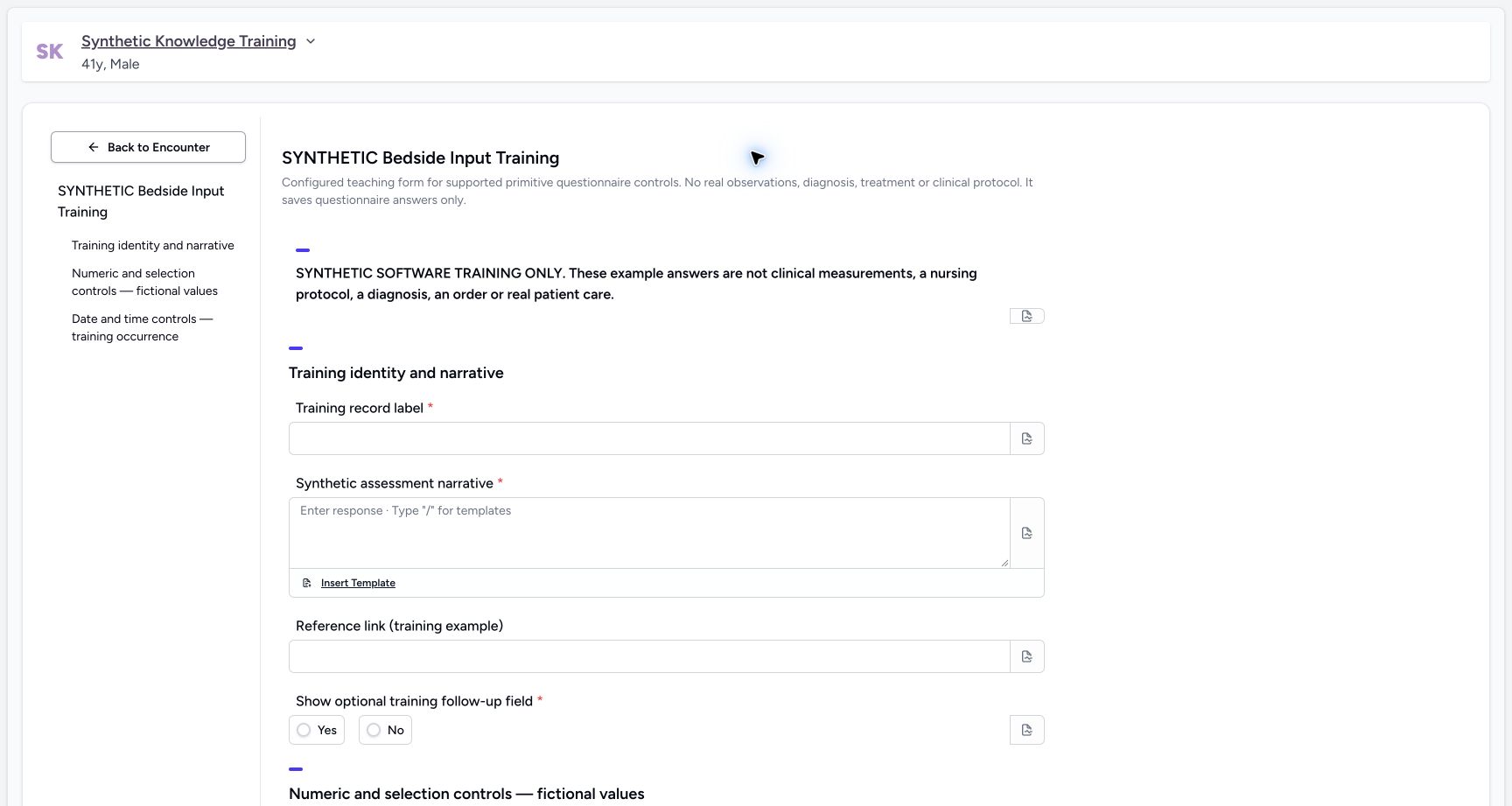 123
123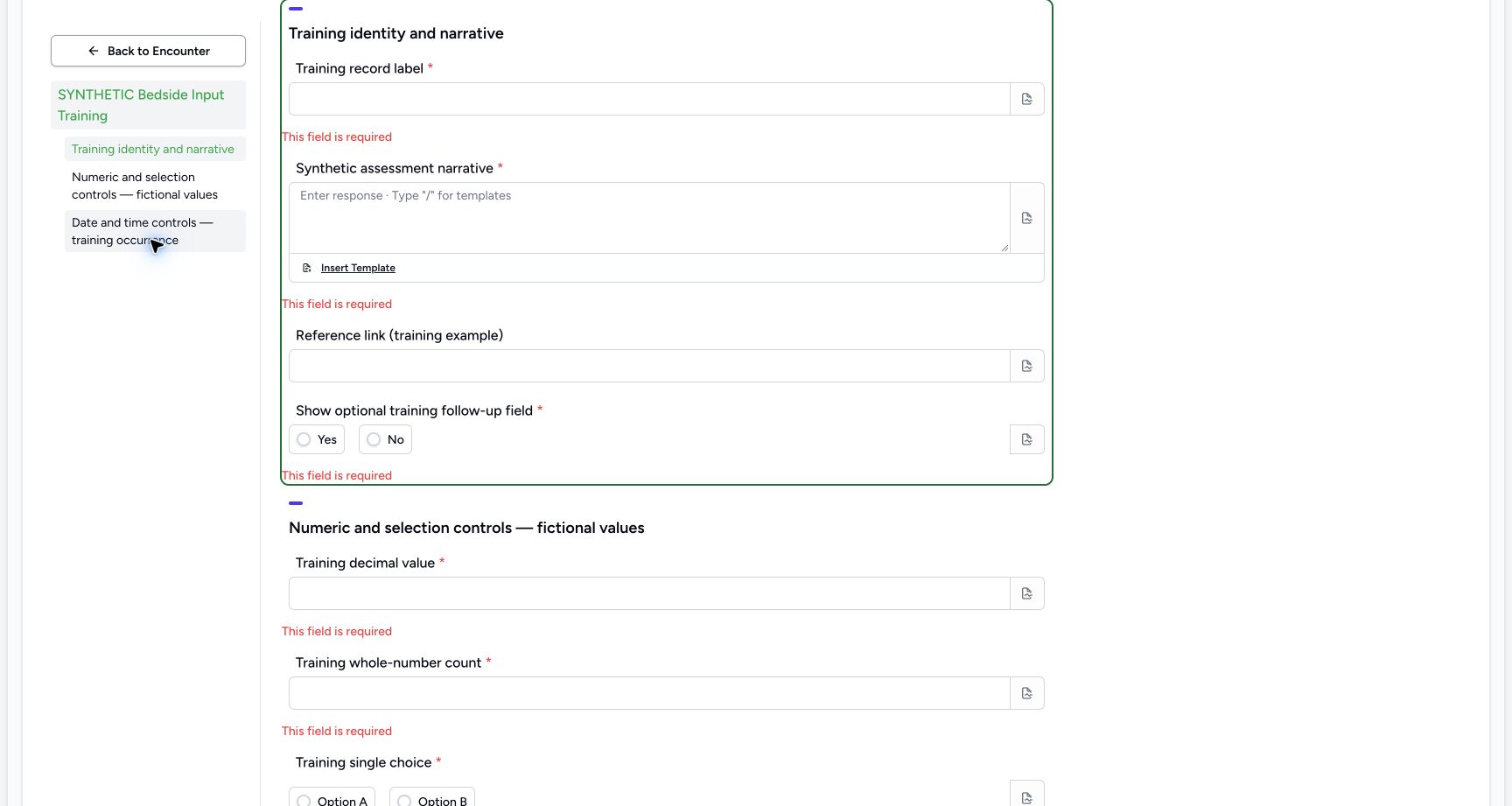 12
12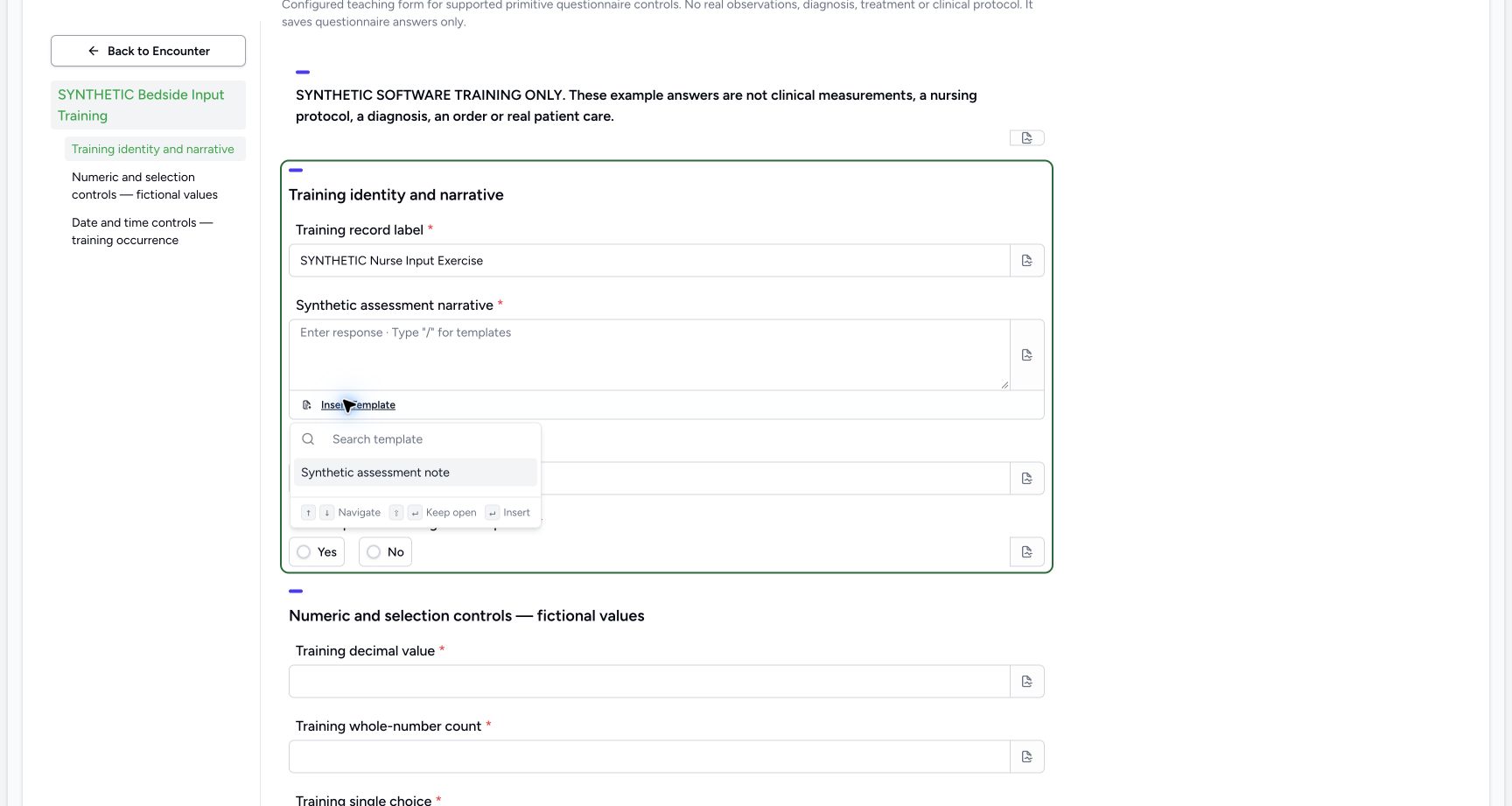 1
1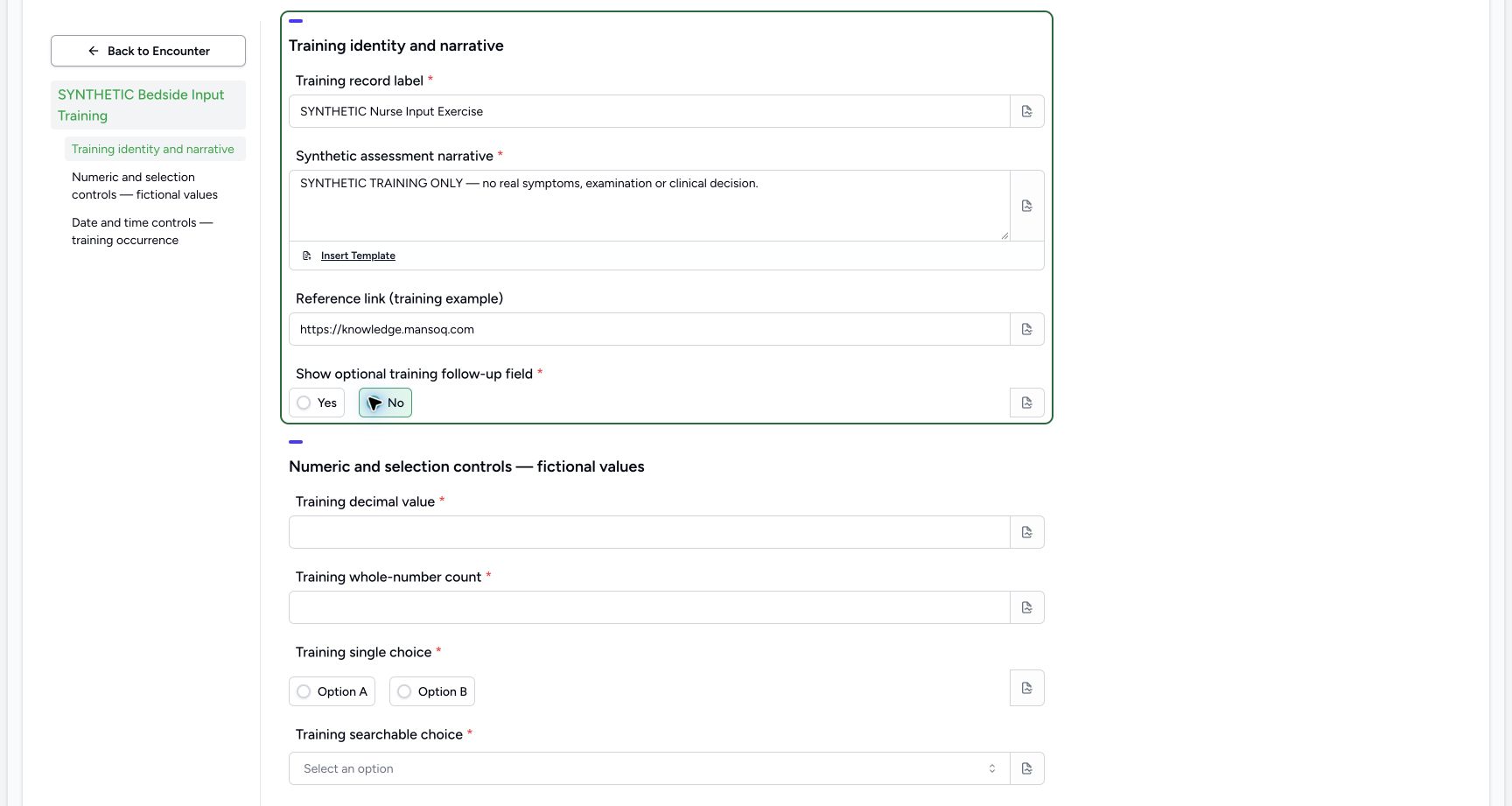 12
12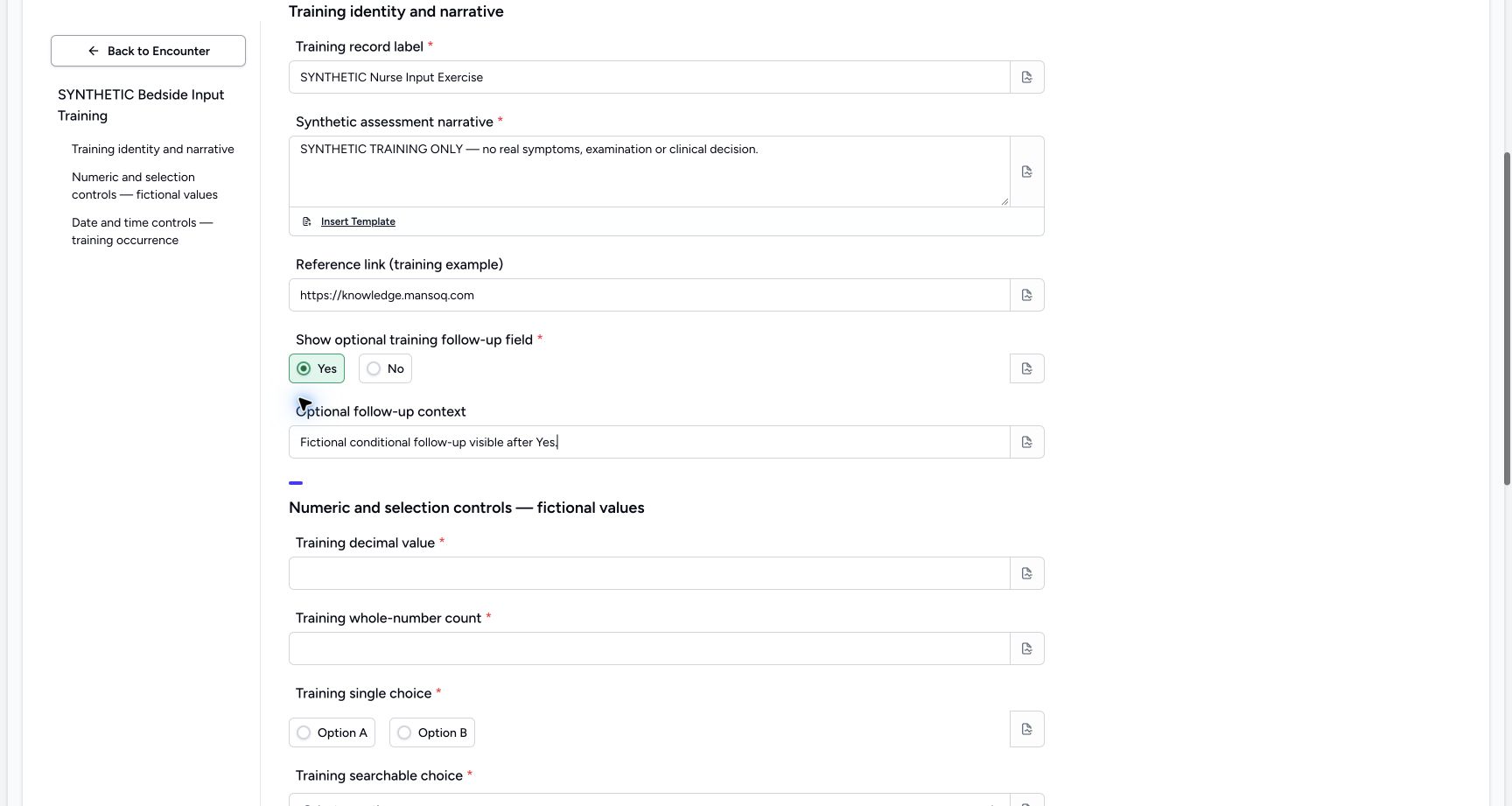 12
12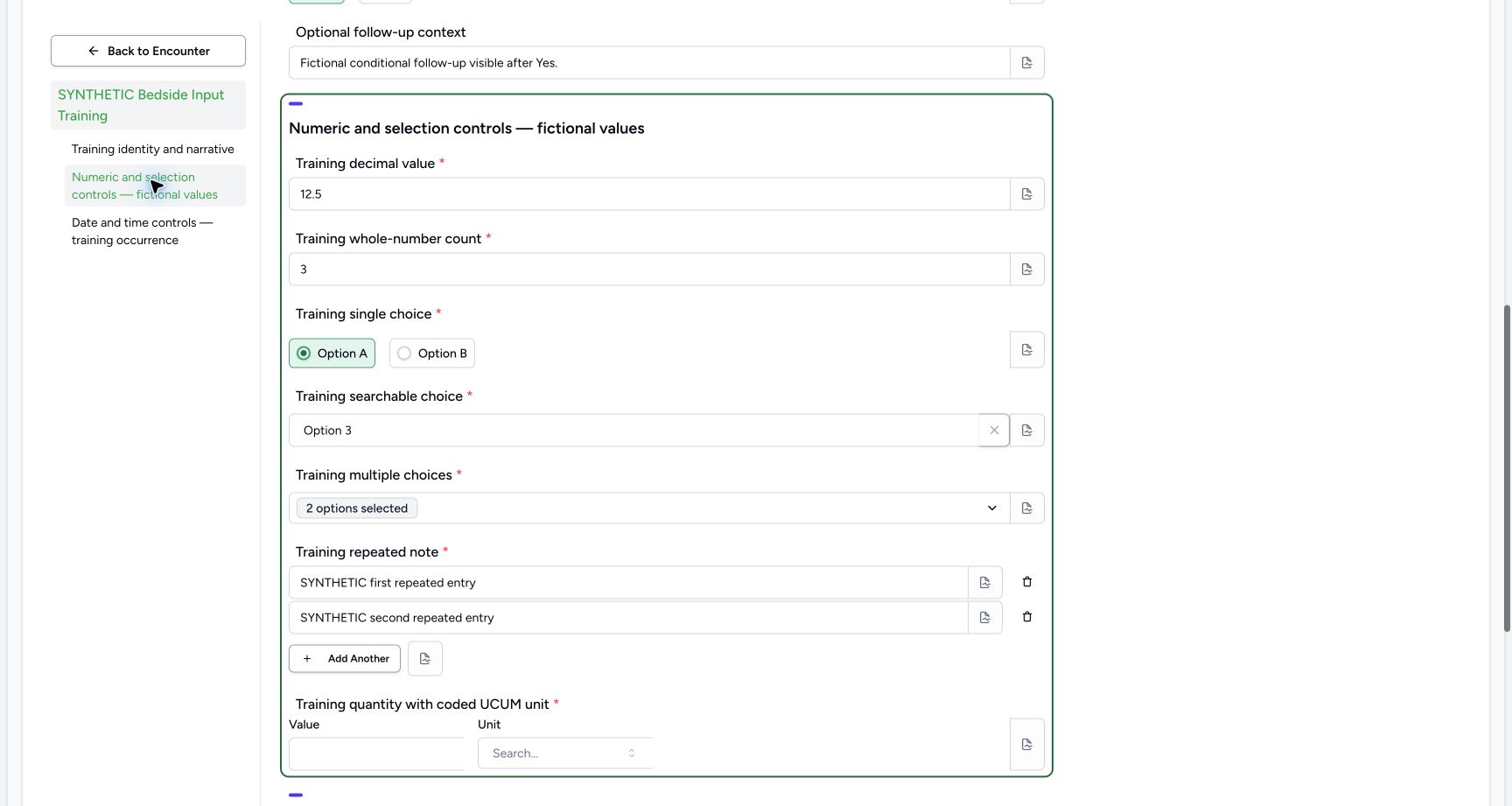 123
123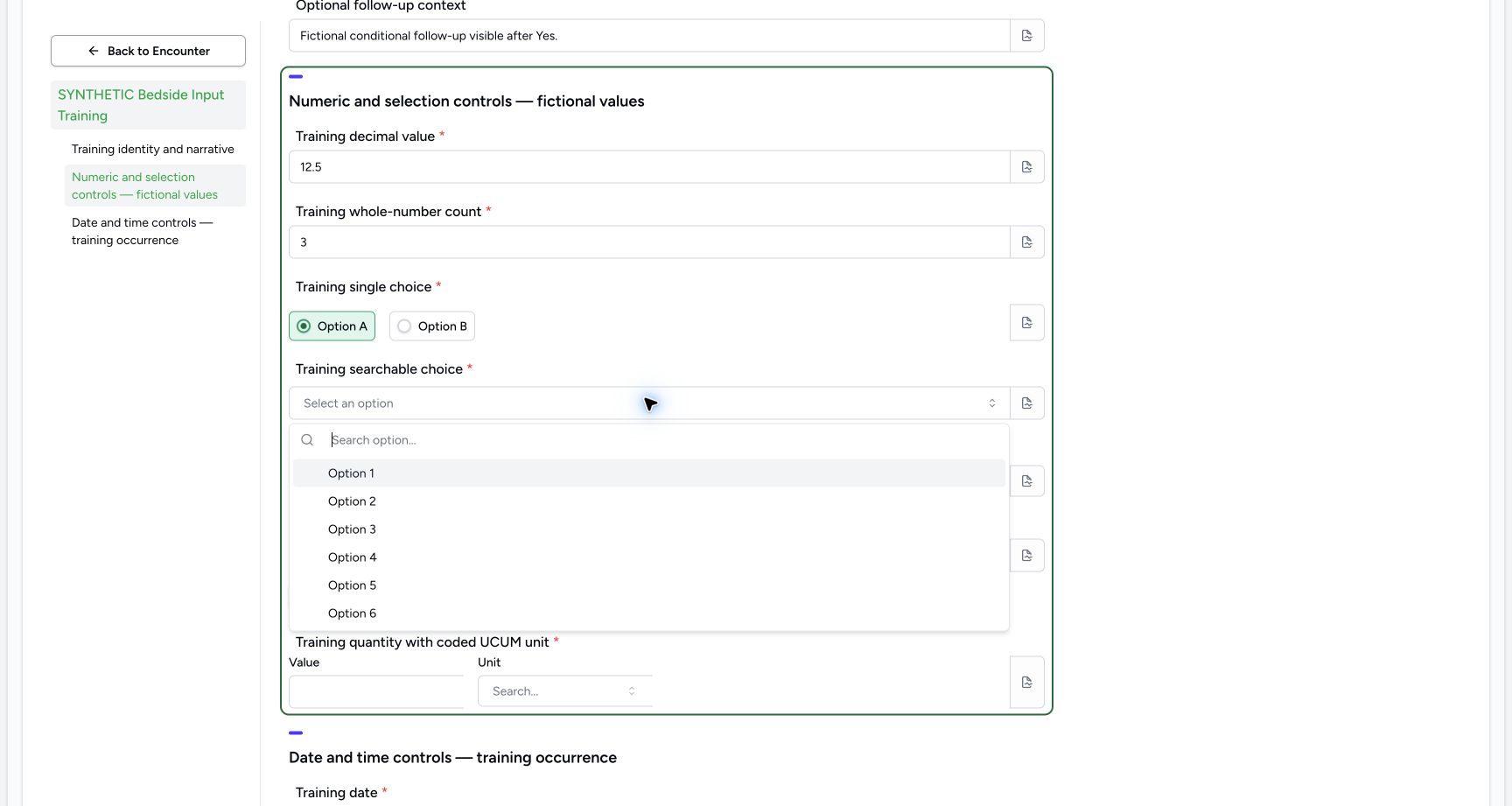 1
1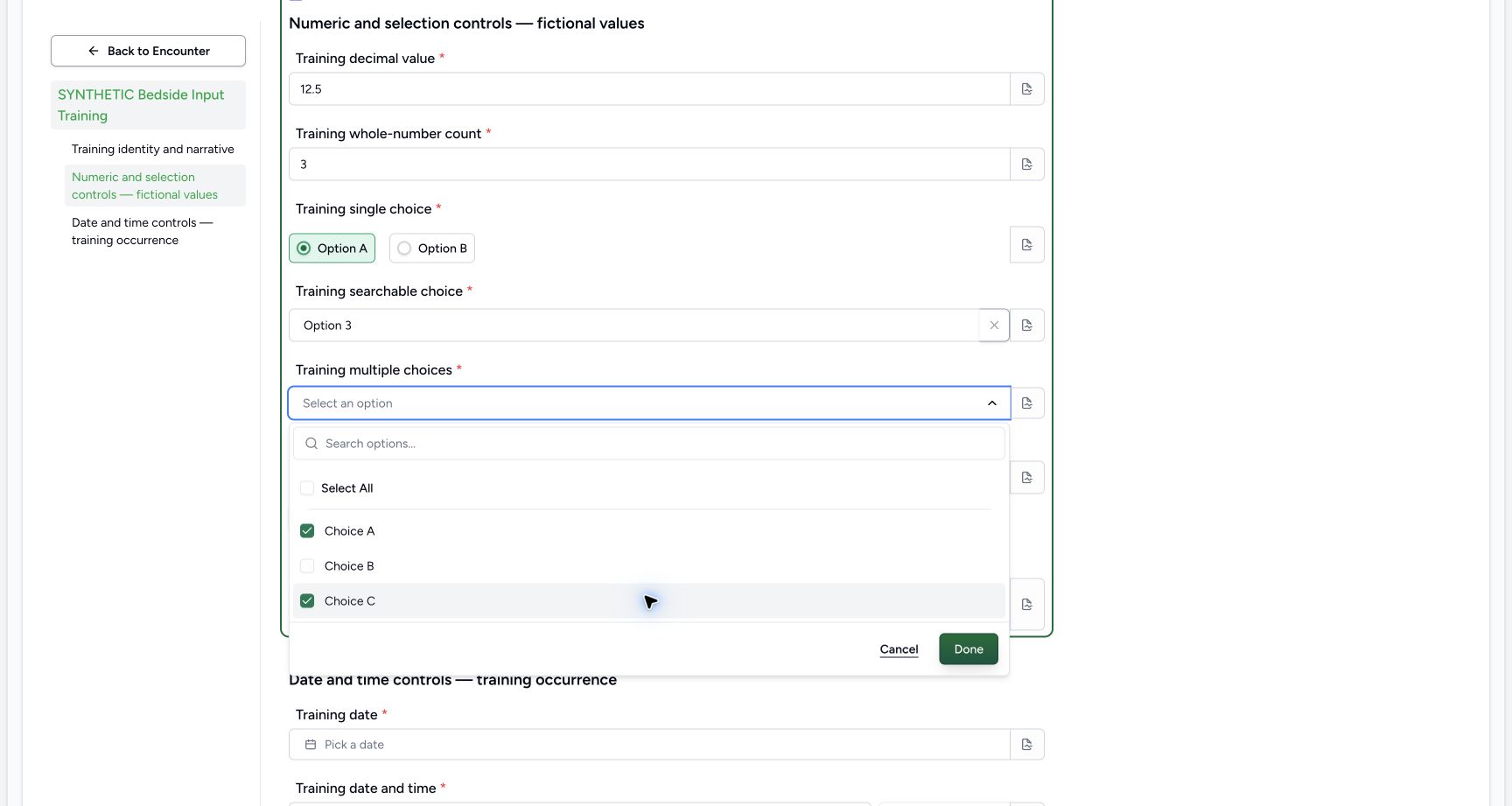 1
1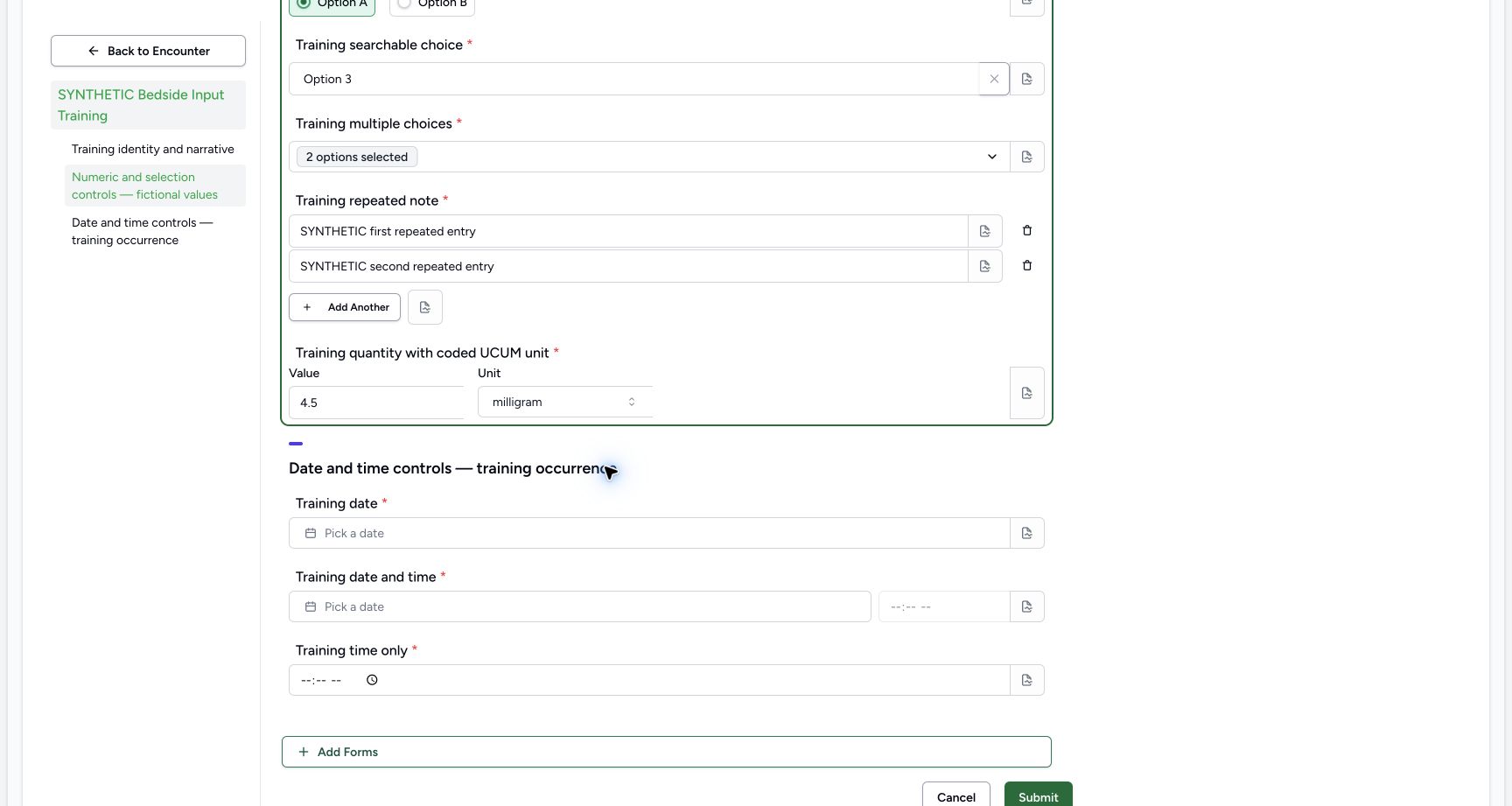 123
123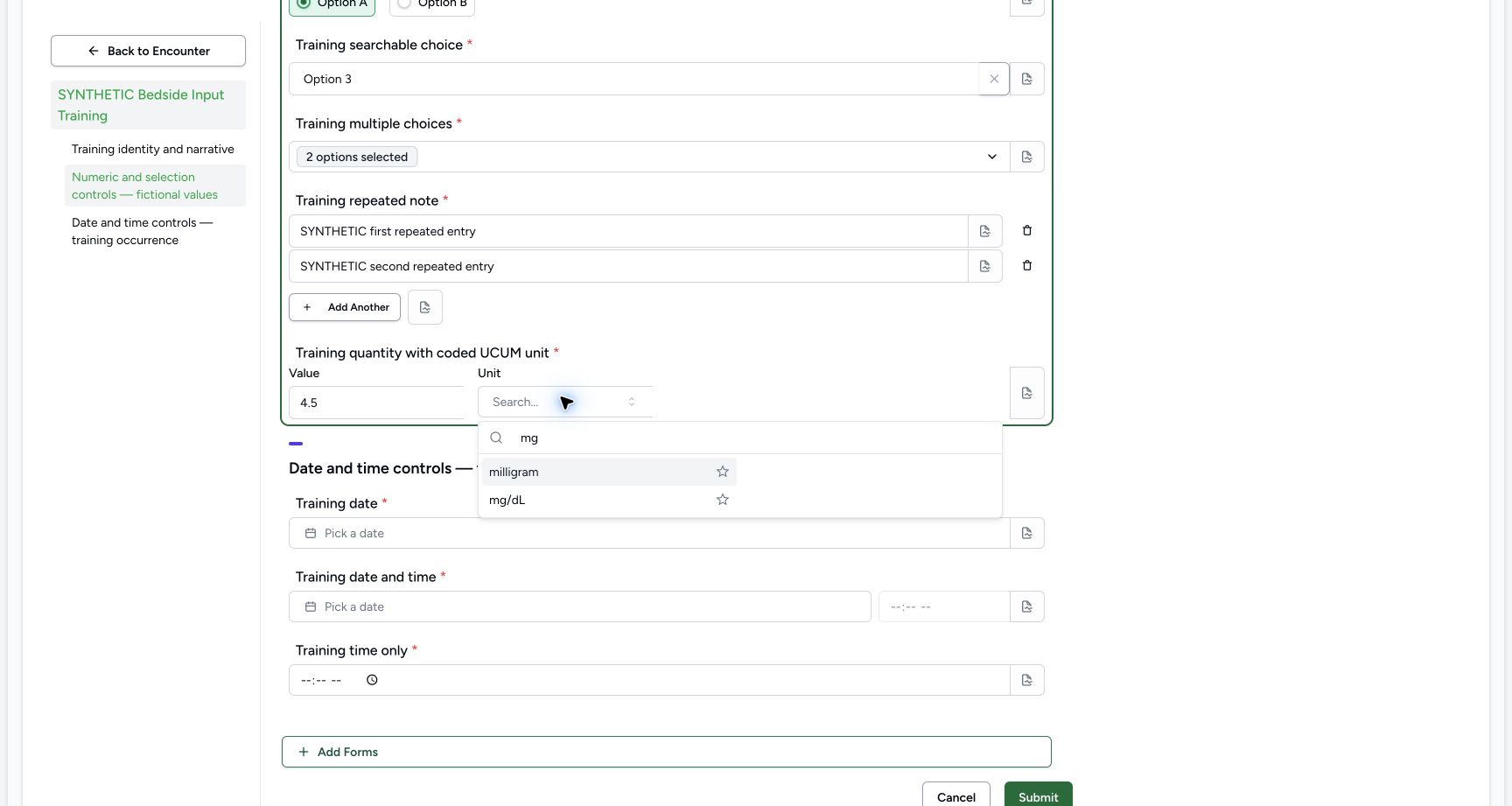 1
1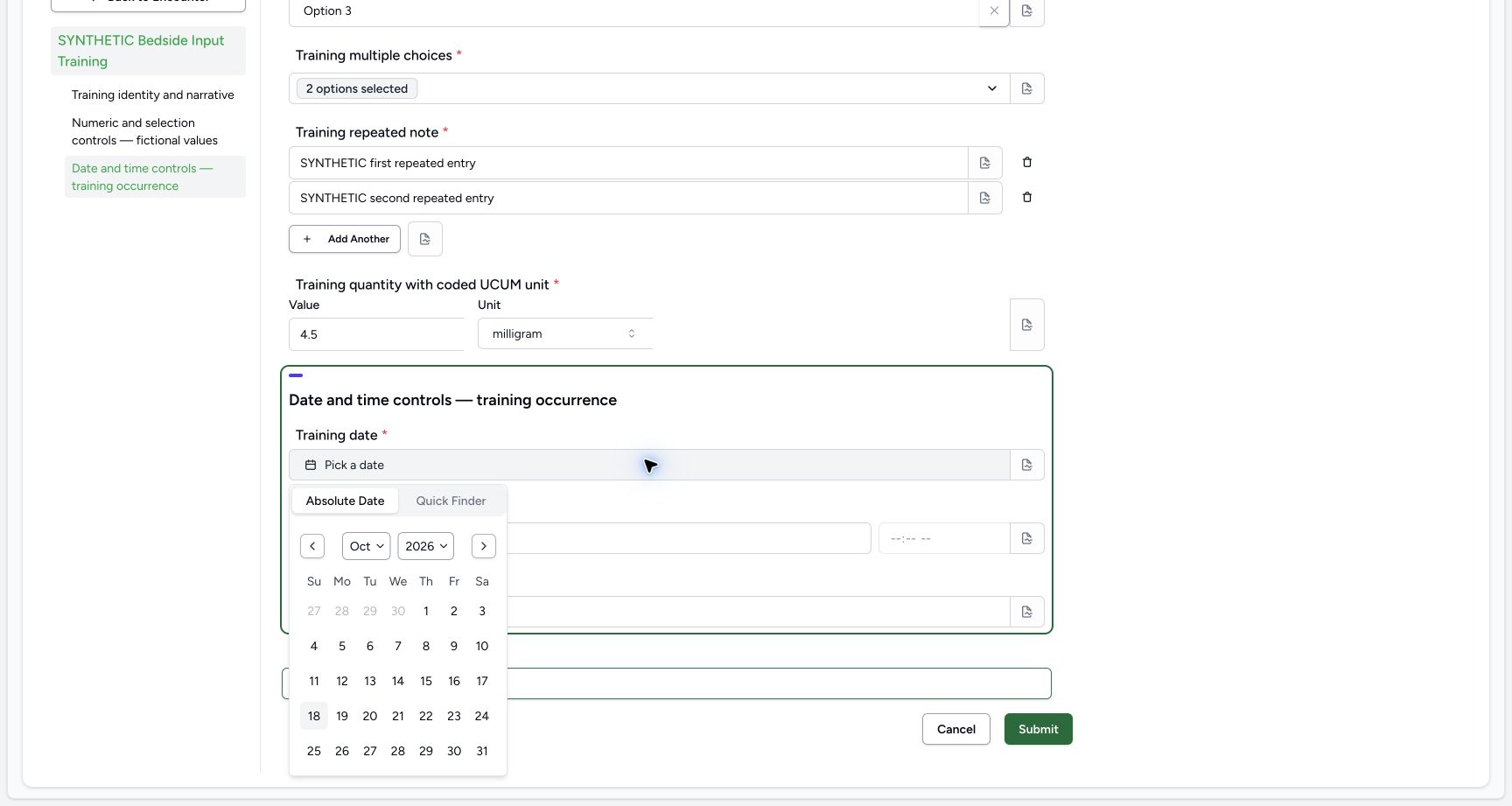 1
1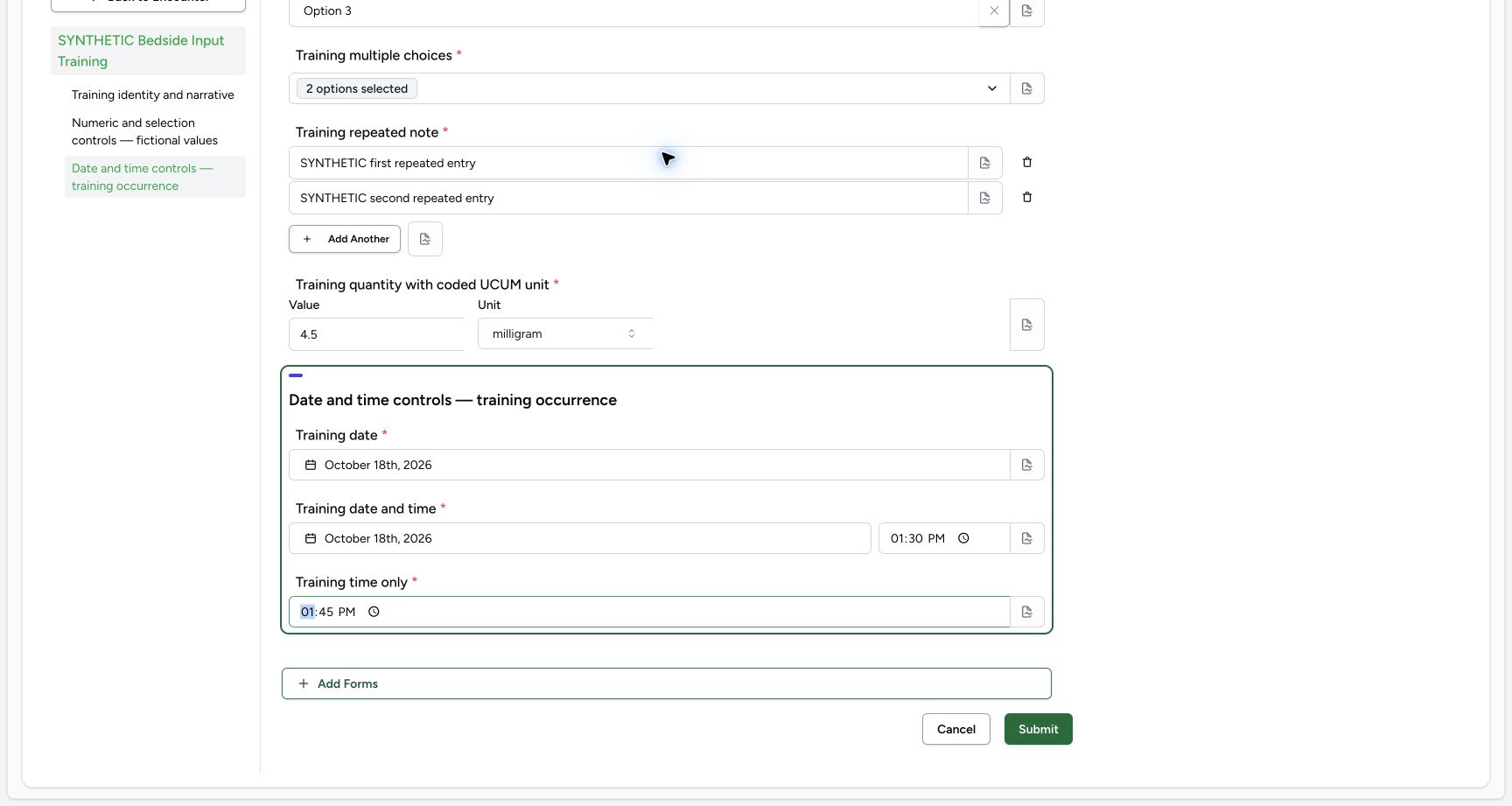 123
123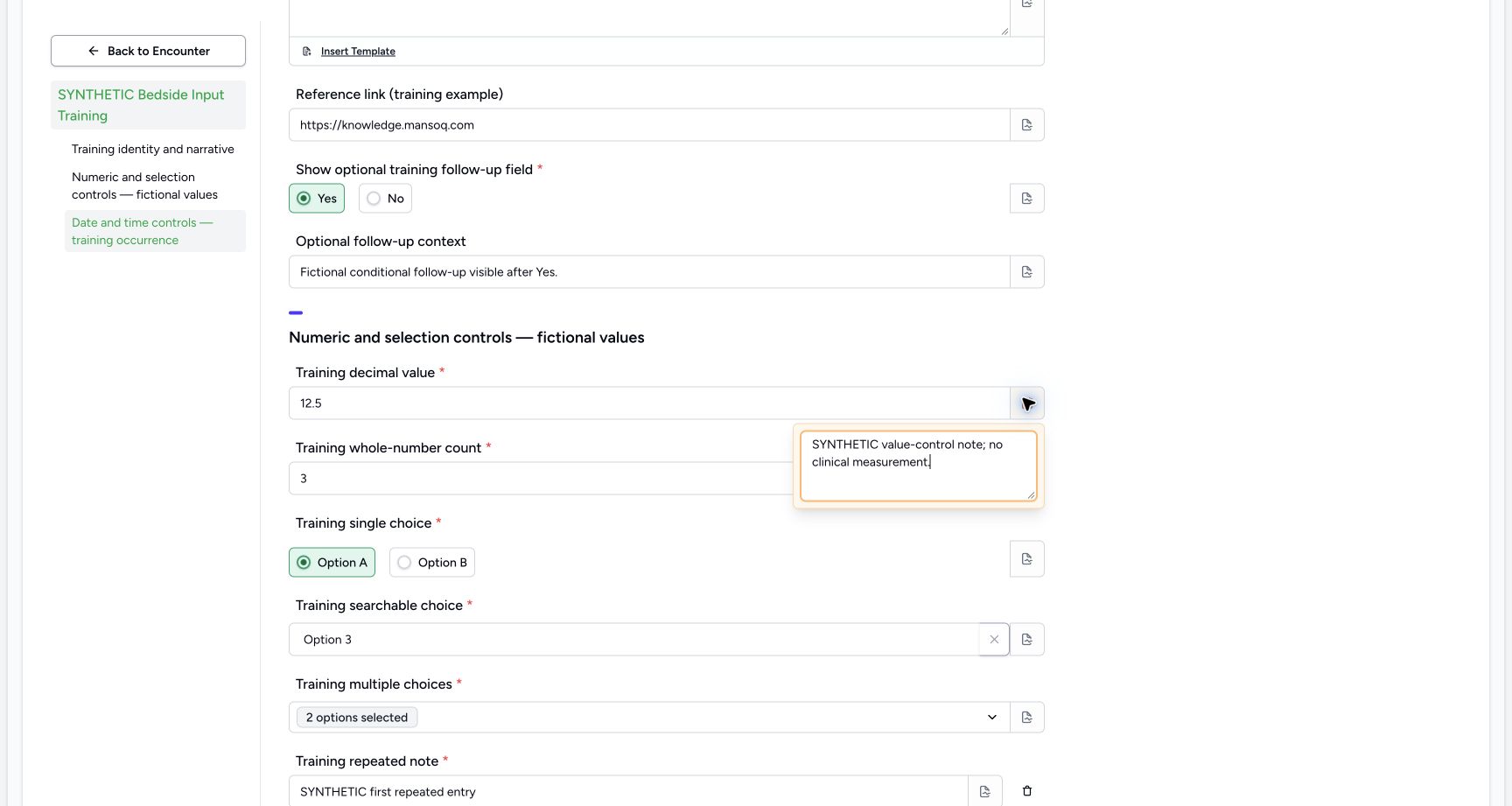 1
1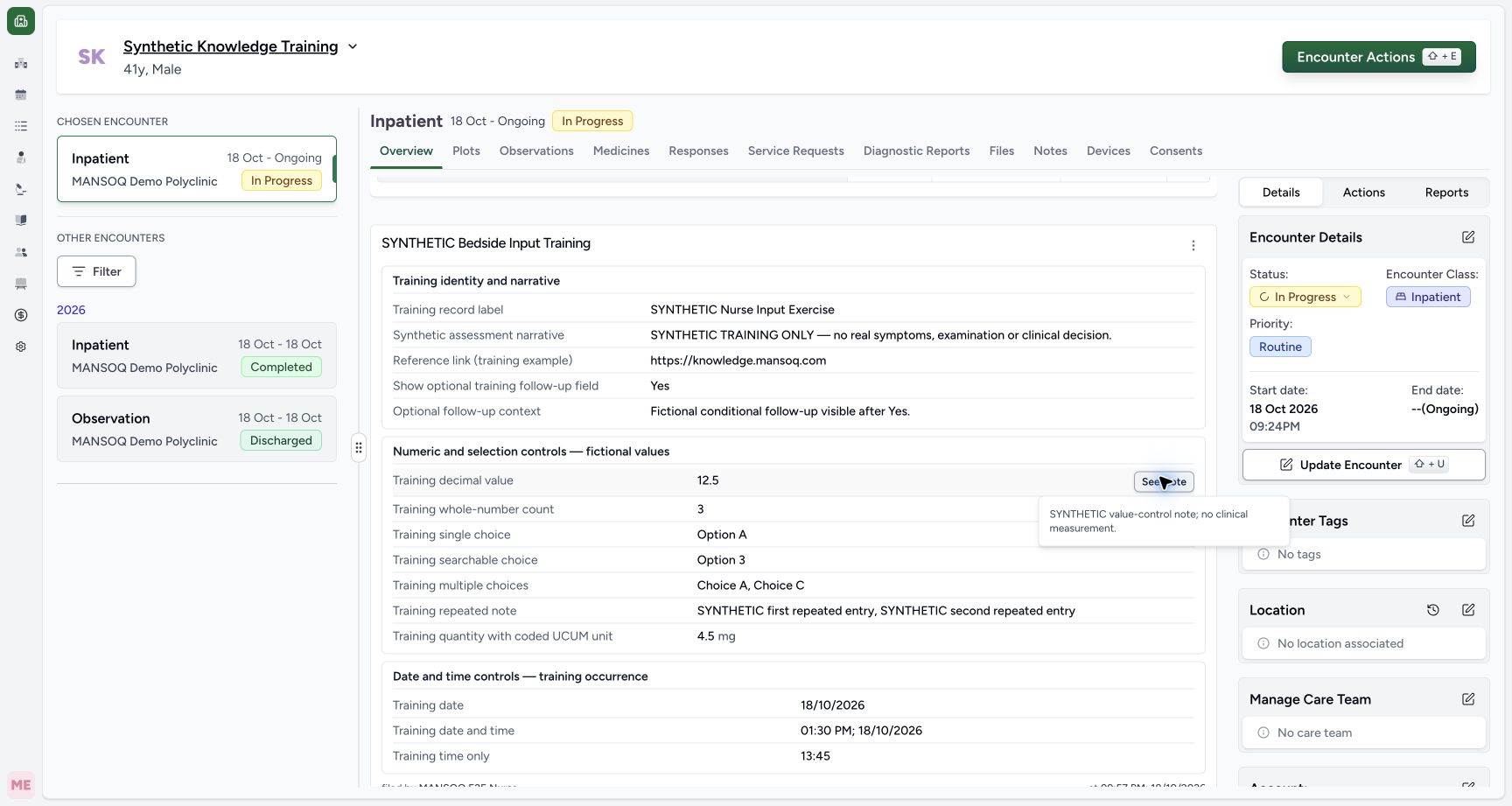 1
1 1
1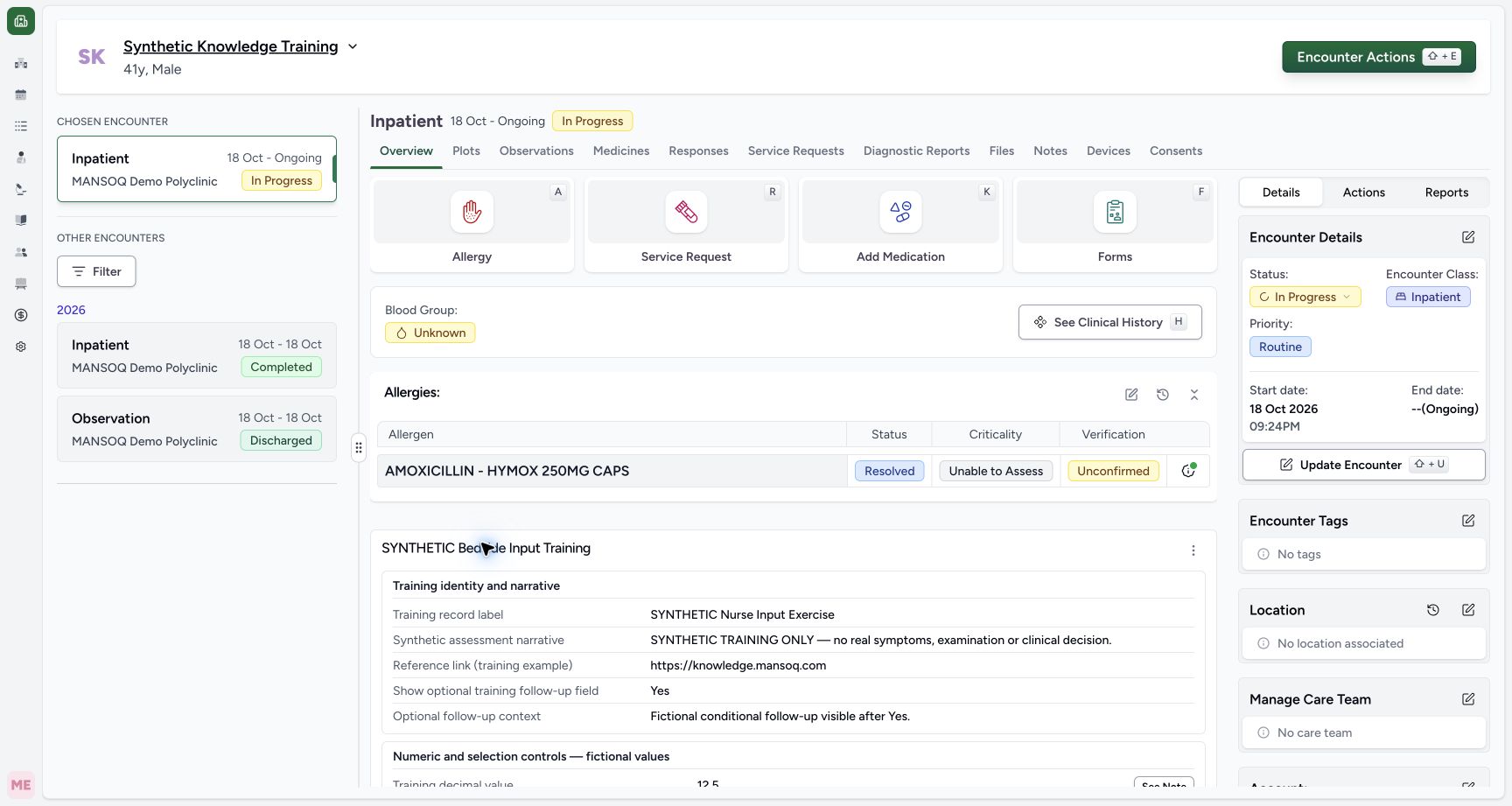 1
1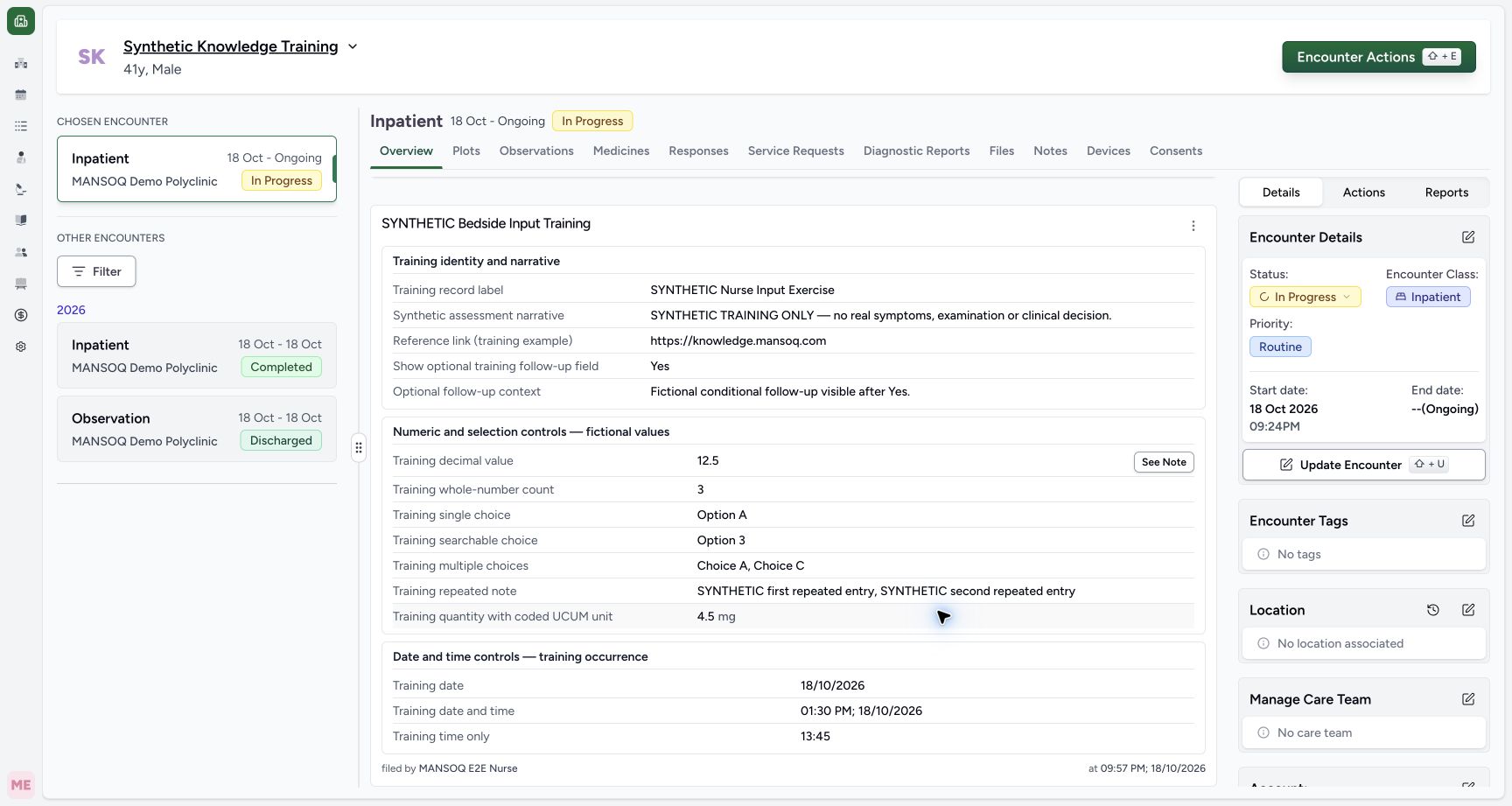 12
12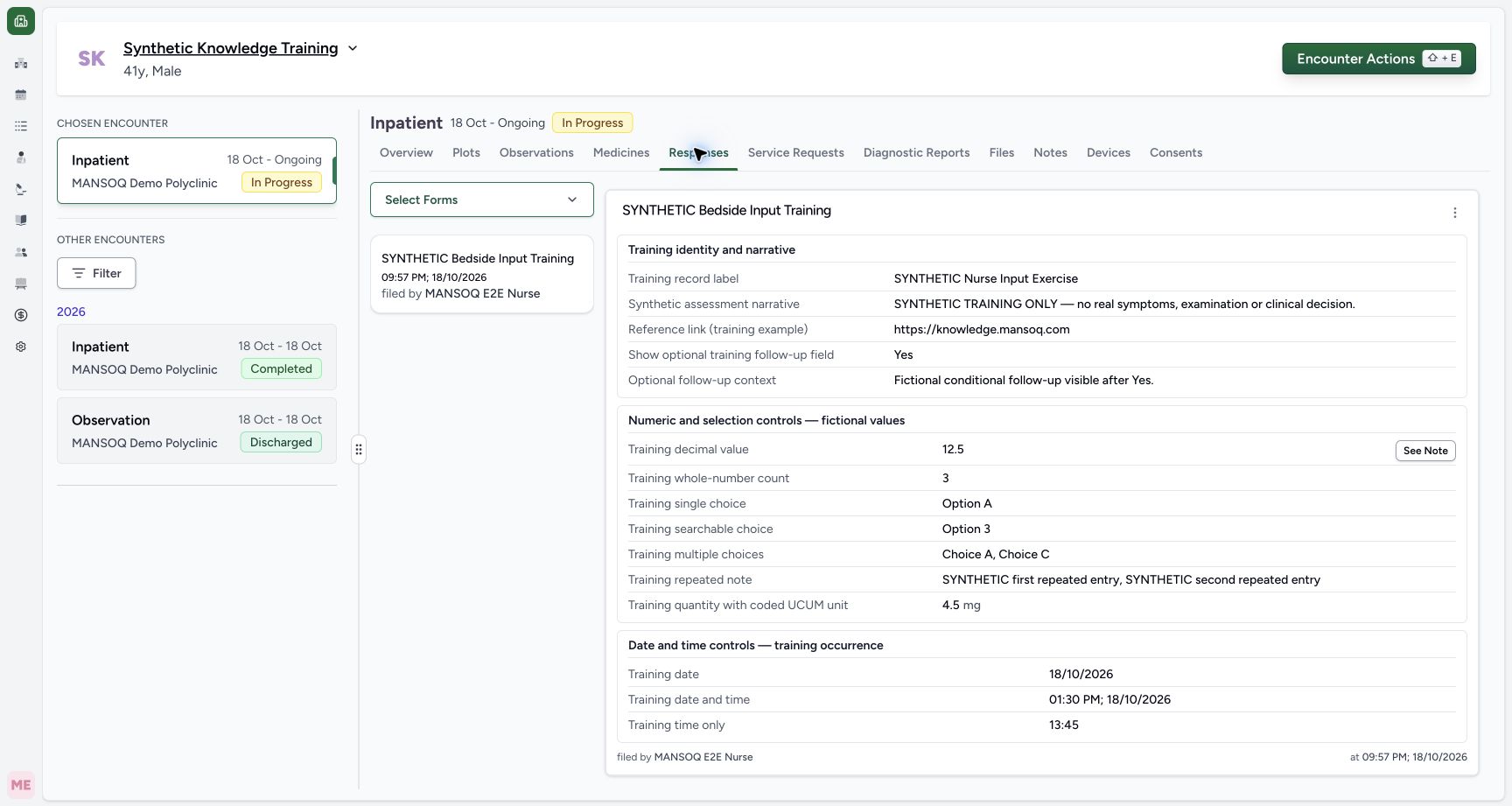 12
12