 MANSOQ
 Clinical care
Record and verify No, zero and date/time answers
Use configured form controls, verify conditional behavior and confirm saved values before interpreting an answer or printing.
 123
123Capture details
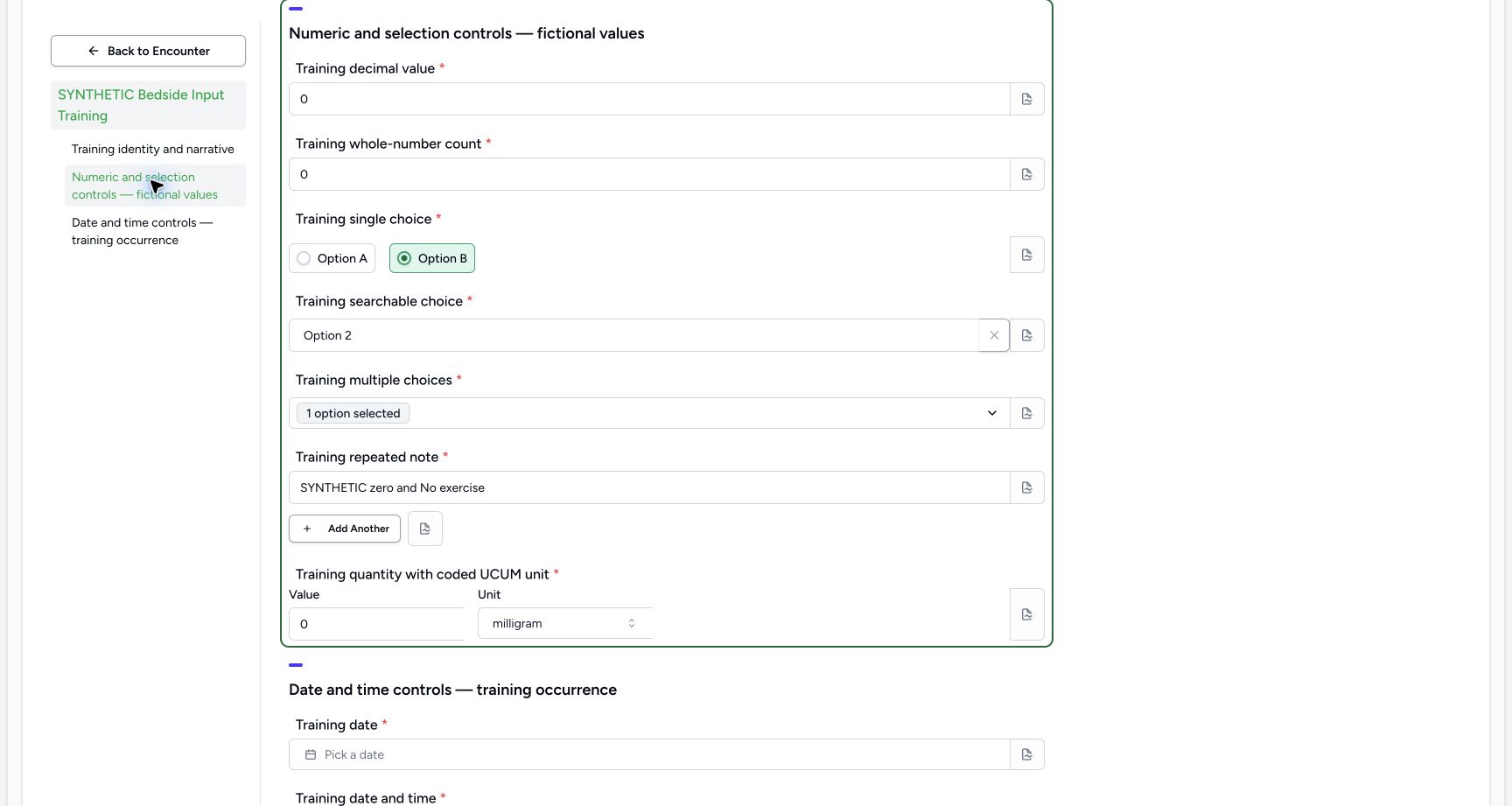
Actual Nurse in the original pinned production UI, isolated synthetic Polyclinic estate. Form/response examples use one active Inpatient encounter. Diagnostic printing uses the same synthetic patient and an earlier encounter, not the active bedside encounter. These fictional values are software exercises, not patient assessment, specimen testing or clinical decisions. Doctor permissions are source-backed but this execution does not qualify every role or facility. Action: decimal zero, integer zero and a zero quantity with configured milligram unit are pending form answers, not clinical observations or treatment.
- Decimal zero is an explicit value: Decimal zero is an explicit value
- Integer zero is separate from an empty answer: Integer zero is separate from an empty answer
- Review zero quantity and coded unit together: Review zero quantity and coded unit together
 1234
1234Capture details
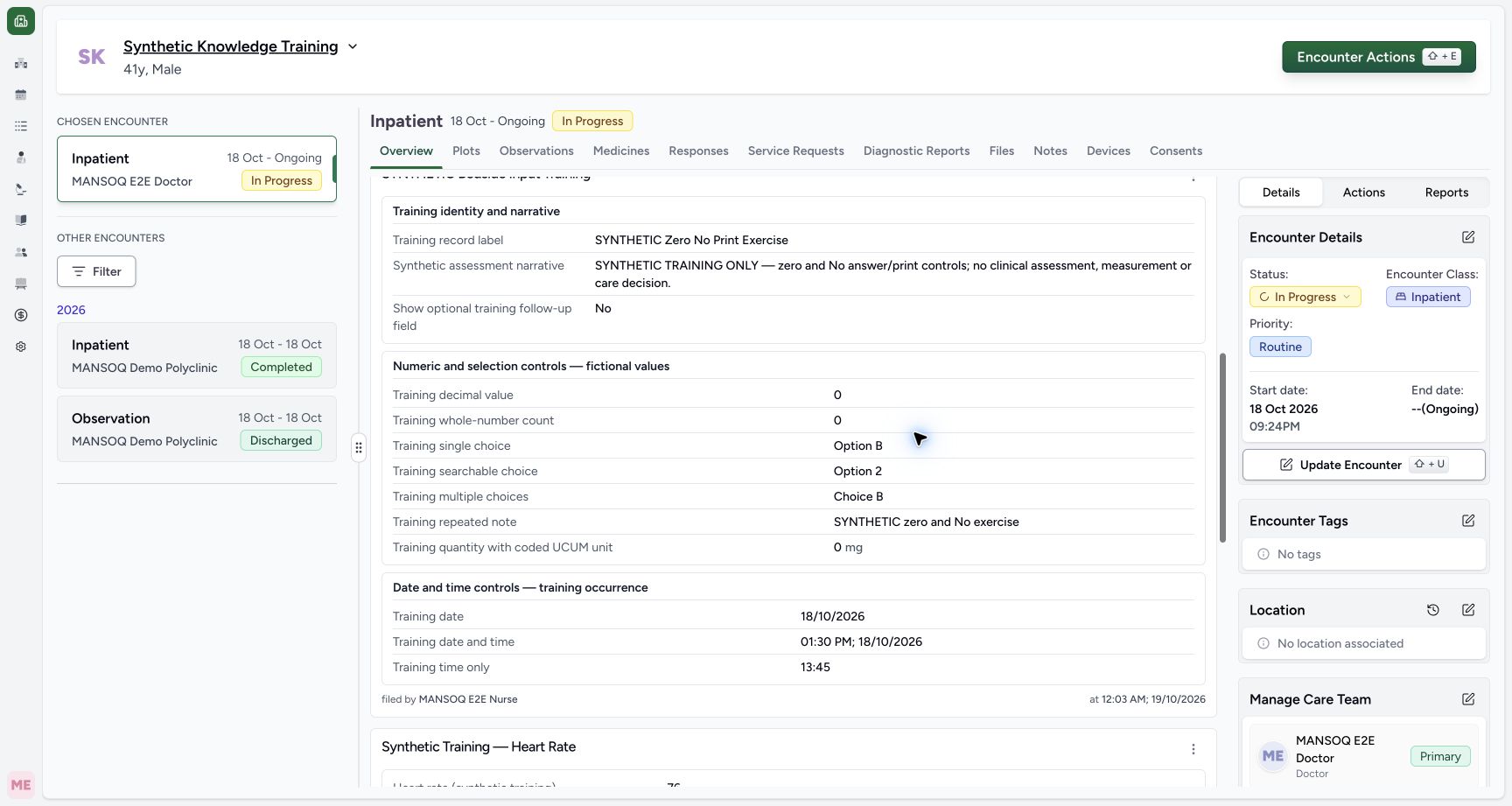
Actual Nurse in the original pinned production UI, isolated synthetic Polyclinic estate. Form/response examples use one active Inpatient encounter. Diagnostic printing uses the same synthetic patient and an earlier encounter, not the active bedside encounter. These fictional values are software exercises, not patient assessment, specimen testing or clinical decisions. Doctor permissions are source-backed but this execution does not qualify every role or facility. Success: independent read-only database verification confirms the normally submitted Nurse response retains canonical false and zero strings; the actual Overview card displays No, decimal0, integer0 and quantity0mg. This exercise created no clinical entity.
- Saved answer is No: Saved answer is No
- Saved decimal is zero: Saved decimal is zero
- Saved whole-number count is zero: Saved whole-number count is zero
- Saved quantity is zero mg: Saved quantity is zero mg
6 min read · Source baseline f6e9f05f
Verification and applicability
source reviewed
Check your installed version, permissions and local configuration.
Before you begin
- Authorized clinical-data access and the correct patient/encounter; printing read access differs from permission to submit or correct a response.
- The demonstrated bedside questionnaire is a finite synthetic training configuration; available forms and conditional fields depend on facility configuration.
1. Choose the intended answer and inspect conditional fields
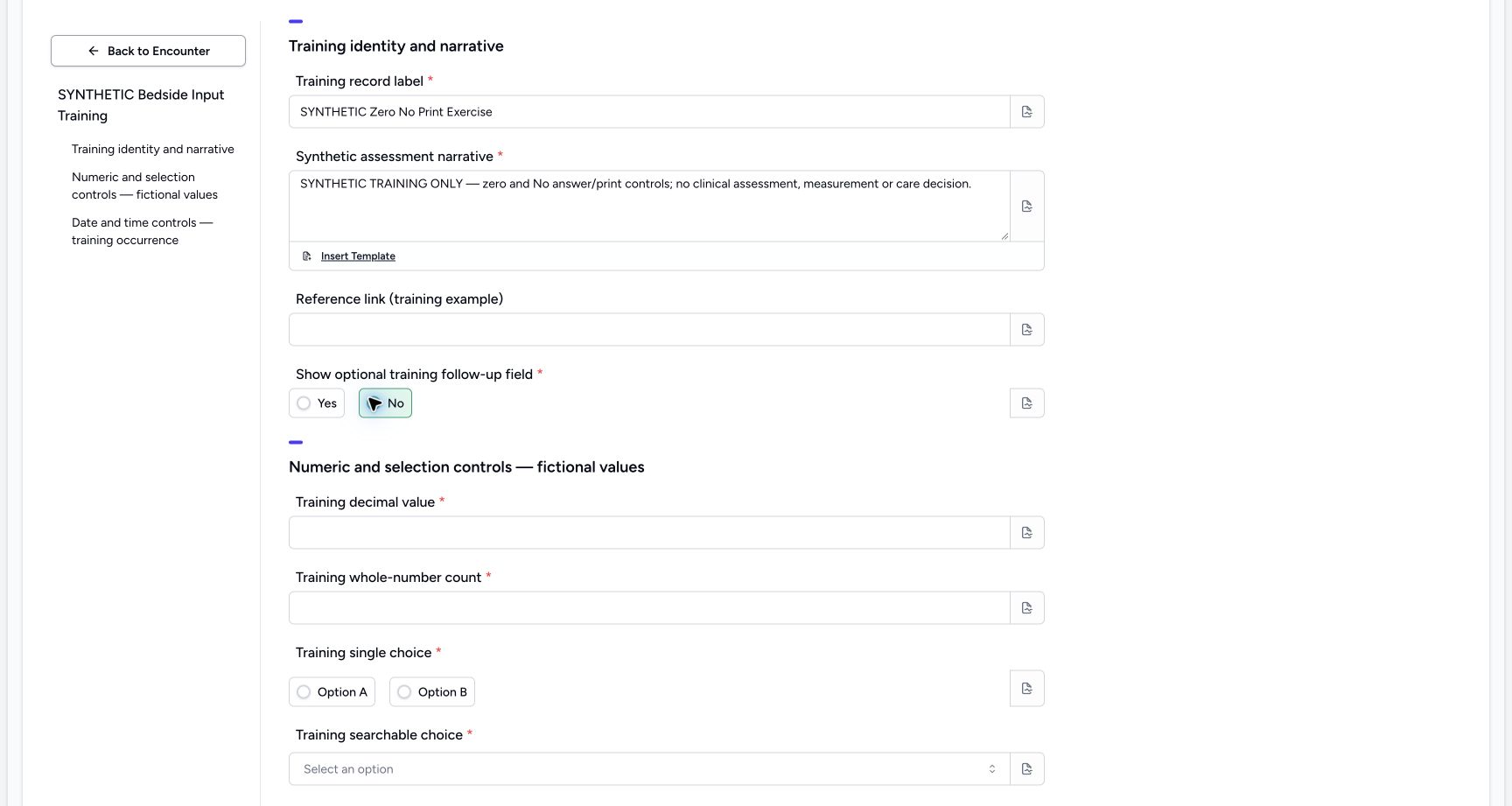
Open the configured SYNTHETIC Bedside Input Training form in the correct active encounter. Enter an explicitly fictional record label and narrative. Select No for the optional follow-up question. The dependent follow-up input is hidden for No. Hidden questions are omitted from submission; do not treat an invisible input as a saved negative assessment. These controls demonstrate configuration behavior only.
 12
12Capture details
Actual Nurse in the original pinned production UI, isolated synthetic Polyclinic estate. Form/response examples use one active Inpatient encounter. Diagnostic printing uses the same synthetic patient and an earlier encounter, not the active bedside encounter. These fictional values are software exercises, not patient assessment, specimen testing or clinical decisions. Doctor permissions are source-backed but this execution does not qualify every role or facility. Action: a separate synthetic primitive questionnaire draft selects No; the optional follow-up question stays hidden. No response or clinical entity is saved yet.
- No is the selected answer: No is the selected answer
- The optional follow-up is hidden for No: The optional follow-up is hidden for No
2. Review zero as an actual value
Enter 0 for the decimal, whole-number and quantity controls. Choose the configured milligram (mg) unit deliberately. The example also selects Option B, Option 2 and Choice B and a repeated training note. Review the visible values rather than treating zero as an empty answer or substituting a clinical meaning.
123Capture details
Actual Nurse in the original pinned production UI, isolated synthetic Polyclinic estate. Form/response examples use one active Inpatient encounter. Diagnostic printing uses the same synthetic patient and an earlier encounter, not the active bedside encounter. These fictional values are software exercises, not patient assessment, specimen testing or clinical decisions. Doctor permissions are source-backed but this execution does not qualify every role or facility. Action: decimal zero, integer zero and a zero quantity with configured milligram unit are pending form answers, not clinical observations or treatment.
- Decimal zero is an explicit value: Decimal zero is an explicit value
- Integer zero is separate from an empty answer: Integer zero is separate from an empty answer
- Review zero quantity and coded unit together: Review zero quantity and coded unit together
3. Commit and verify the displayed date and time
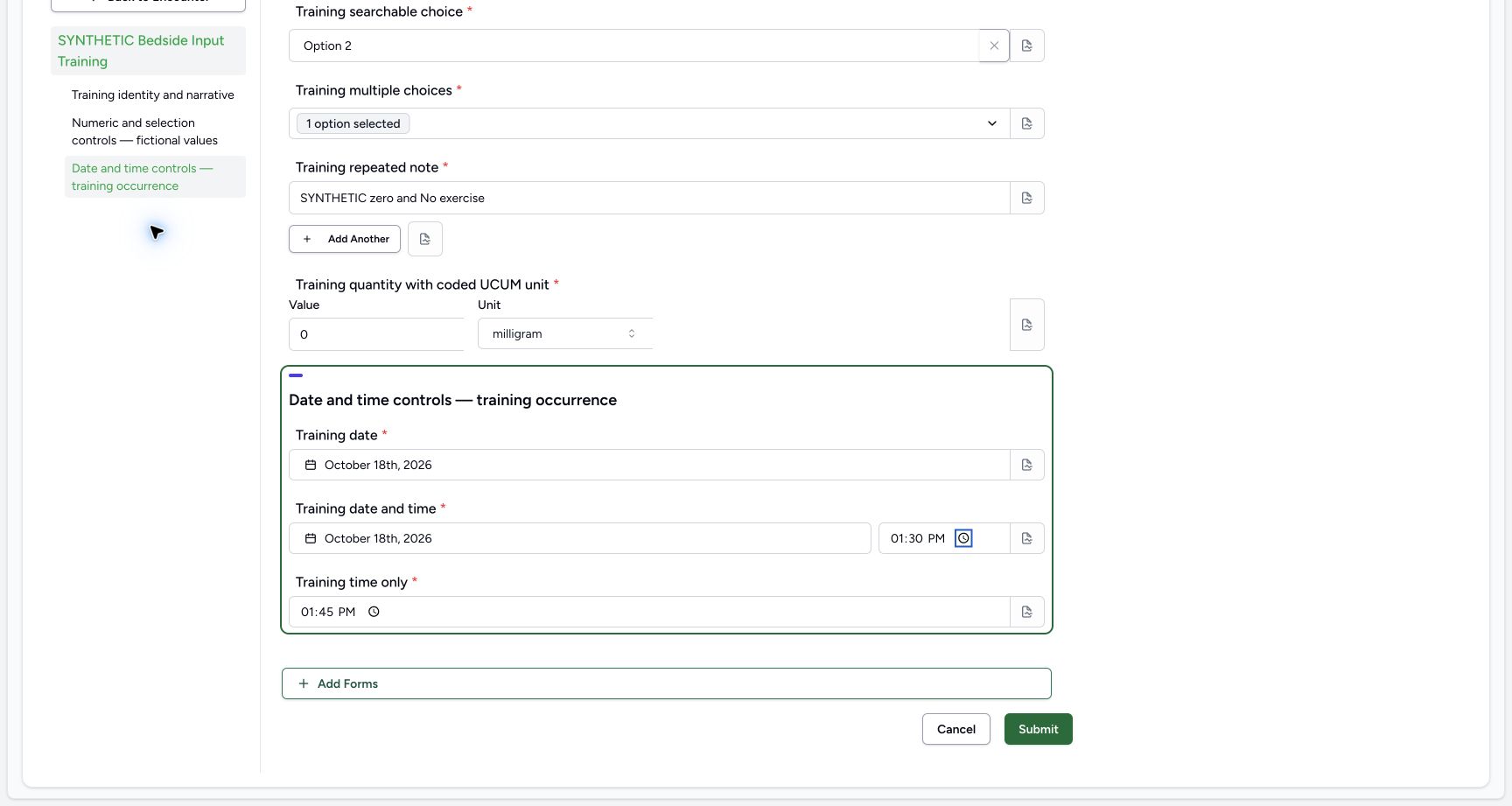
Use the actual date/time controls, then leave each field and inspect its rendered value. The example uses 18 October 2026, 1:30 PM for the date-and-time question and 1:45 PM for time only, in the Riyadh training timezone. A partially edited field may not commit to the form until the ordinary input interaction finishes. Review the full form, then select Submit once and wait.
 123
123Capture details
Actual Nurse in the original pinned production UI, isolated synthetic Polyclinic estate. Form/response examples use one active Inpatient encounter. Diagnostic printing uses the same synthetic patient and an earlier encounter, not the active bedside encounter. These fictional values are software exercises, not patient assessment, specimen testing or clinical decisions. Doctor permissions are source-backed but this execution does not qualify every role or facility. Action: review the separate synthetic response before Submit, including fictional 18 October occurrence date/time and required choices. Date/time values are form answers, not an observation timestamp or clinical event.
- Review the committed 13:30 local date-time answer: Review the committed 13:30 local date-time answer
- Review the separate 13:45 time-only answer: Review the separate 13:45 time-only answer
- Submit the reviewed questionnaire answers once: Submit the reviewed questionnaire answers once
4. Verify the completed saved response
The encounter Overview shows the saved label, No, decimal 0, whole-number 0 and quantity 0 mg, with the recorded author/time and dates. Independent database readback confirms a completed Nurse response with 13answers, canonical stringfalse/string0 values, the exact date/time values and no structured clinical entity creation. The hidden optional follow-up and blank optional URL are absent. This is a recorded software exercise, not a clinical assessment.
1234Capture details
Actual Nurse in the original pinned production UI, isolated synthetic Polyclinic estate. Form/response examples use one active Inpatient encounter. Diagnostic printing uses the same synthetic patient and an earlier encounter, not the active bedside encounter. These fictional values are software exercises, not patient assessment, specimen testing or clinical decisions. Doctor permissions are source-backed but this execution does not qualify every role or facility. Success: independent read-only database verification confirms the normally submitted Nurse response retains canonical false and zero strings; the actual Overview card displays No, decimal0, integer0 and quantity0mg. This exercise created no clinical entity.
- Saved answer is No: Saved answer is No
- Saved decimal is zero: Saved decimal is zero
- Saved whole-number count is zero: Saved whole-number count is zero
- Saved quantity is zero mg: Saved quantity is zero mg
Understand the supported value contract
Normal form submission serializes primitive answers as strings. The supported normal flow preserves No and zero in both saved display and print; no raw boolean/numeric API payload or speculative falsy-value repair is implied by this exercise. The configured example includes no clinical diagnosis, observation or medication operation.
123Capture details
Actual Nurse in the original pinned production UI, isolated synthetic Polyclinic estate. Form/response examples use one active Inpatient encounter. Diagnostic printing uses the same synthetic patient and an earlier encounter, not the active bedside encounter. These fictional values are software exercises, not patient assessment, specimen testing or clinical decisions. Doctor permissions are source-backed but this execution does not qualify every role or facility. Action: decimal zero, integer zero and a zero quantity with configured milligram unit are pending form answers, not clinical observations or treatment.
- Decimal zero is an explicit value: Decimal zero is an explicit value
- Integer zero is separate from an empty answer: Integer zero is separate from an empty answer
- Review zero quantity and coded unit together: Review zero quantity and coded unit together
1234Capture details
Actual Nurse in the original pinned production UI, isolated synthetic Polyclinic estate. Form/response examples use one active Inpatient encounter. Diagnostic printing uses the same synthetic patient and an earlier encounter, not the active bedside encounter. These fictional values are software exercises, not patient assessment, specimen testing or clinical decisions. Doctor permissions are source-backed but this execution does not qualify every role or facility. Success: independent read-only database verification confirms the normally submitted Nurse response retains canonical false and zero strings; the actual Overview card displays No, decimal0, integer0 and quantity0mg. This exercise created no clinical entity.
- Saved answer is No: Saved answer is No
- Saved decimal is zero: Saved decimal is zero
- Saved whole-number count is zero: Saved whole-number count is zero
- Saved quantity is zero mg: Saved quantity is zero mg
Source evidence
References are pinned to the private MANSOQ source repository. Repository access is required to open these links.
- repositories/platform/mansoq-web/src/components/Questionnaire/QuestionnaireForm.tsx:912 · f6e9f05f
- repositories/platform/mansoq-core/mansoq/emr/resources/questionnaire_response/spec.py:19 · f6e9f05f
- repositories/platform/mansoq-web/src/components/Facility/ConsultationDetails/QuestionnaireResponsesList.tsx:85 · f6e9f05f