 MANSOQ
 Clinical care
Record consent documentation with dates and supporting files
Review decision and status separately, correct date-period ordering and missing attachment names, then verify the saved record and exact supporting document.
10 min read · Source baseline f6e9f05f
Verification and applicability
source reviewed
Check your installed version, permissions and local configuration.
Before you begin
- Verify the patient, selected encounter, clinical documentation purpose and applicable write/read permission. This guide was executed as Nurse in an active Inpatient encounter at a synthetic Polyclinic; other roles and facilities require their own qualification.
- Use authorized documents and follow the facility’s approved process. All pictured records and file contents are explicitly synthetic, nonbinding software exercises.
1. Open Consents for the intended encounter
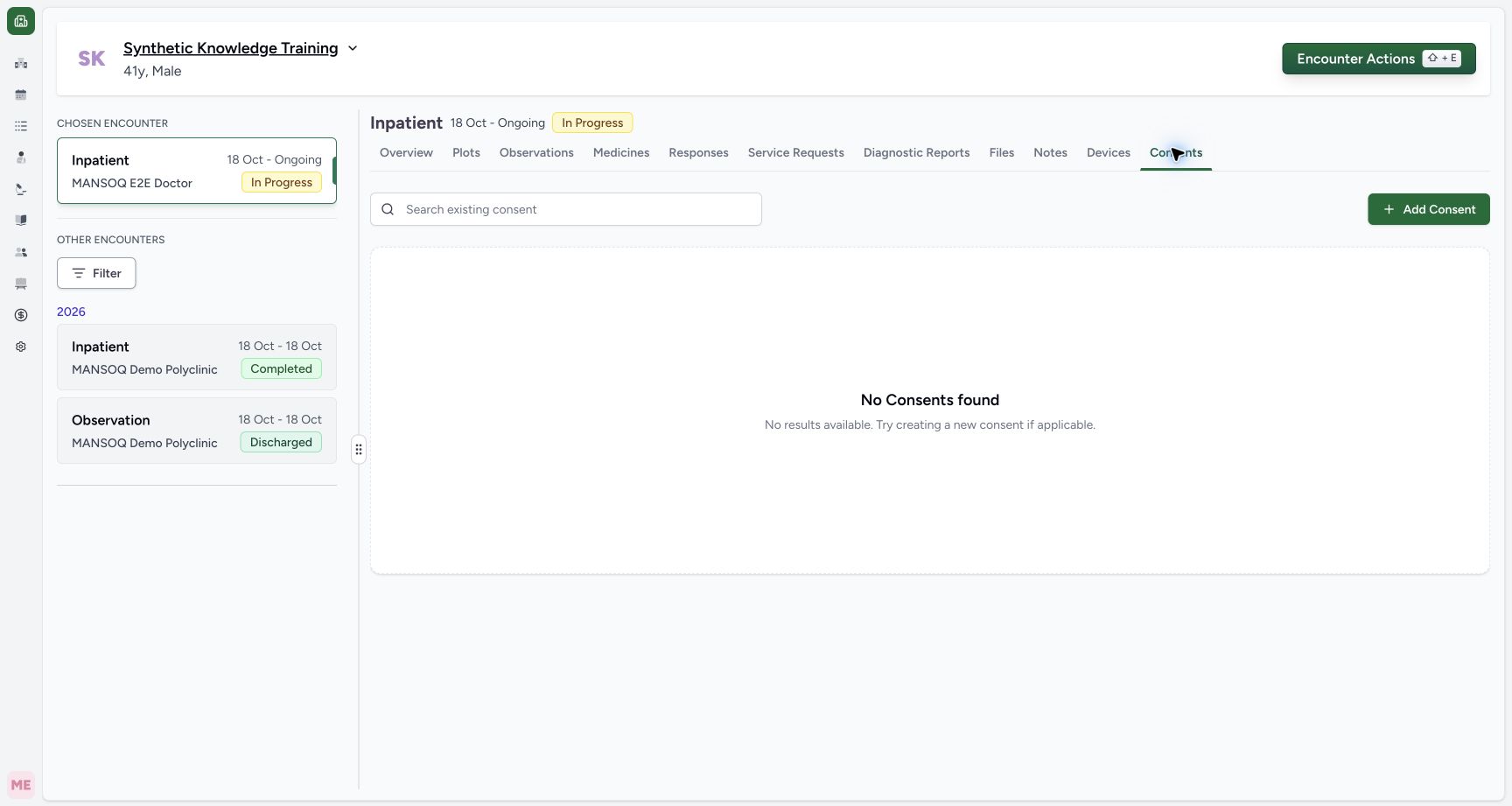
Verify the patient and selected encounter, then open Consents → Add Consent. The empty list is scoped to this encounter. This guide demonstrates software documentation using fictional nonbinding examples; it does not obtain a real person’s consent or establish clinical authority.
 12
12Capture details
Actual Nurse in the original pinned production UI, isolated synthetic active Inpatient encounter at a Polyclinic. These are harmless software training files and nonbinding Research/Deny examples, not real clinical documents, patient decisions, signatures or treatment authorization. Other role, facility, hardware and failure branches remain unqualified. Start: Active encounter Consents shows No Consents found and Add Consent. Independent pre-upload checkpoint confirms zero consent records. This exercise will document only a nonbinding synthetic Draft/Deny record.
- Start consent documentation for this encounter: Start consent documentation for this encounter
- Verify encounter consent scope: Verify encounter consent scope
2. Review every new-record default
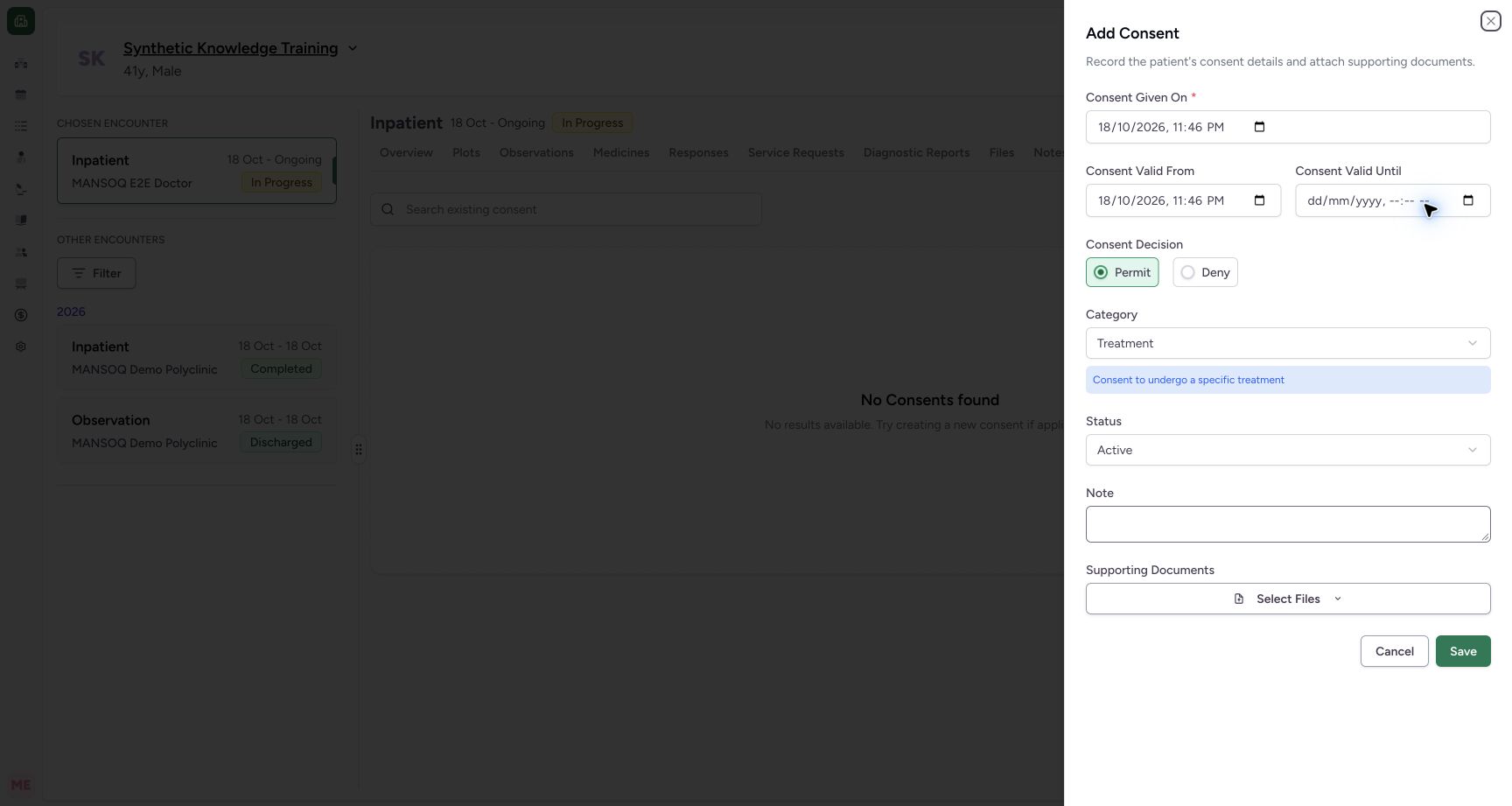
A new sheet starts with current Consent Given On, current Consent Valid From, no end, Permit, Treatment and Active. Review those defaults deliberately against the authorized documentation. Permit, category and Active status do not by themselves prove a patient decision, valid authorization or a signature.
 123
123Capture details
Actual Nurse in the original pinned production UI, isolated synthetic active Inpatient encounter at a Polyclinic. These are harmless software training files and nonbinding Research/Deny examples, not real clinical documents, patient decisions, signatures or treatment authorization. Other role, facility, hardware and failure branches remain unqualified. Action: New Consent form defaults Permit/Treatment/Active and current local given/start times. Review defaults; they do not establish actual consent, authorization or legal validity.
- Review given-on date and local time: Review given-on date and local time
- Review the documented decision deliberately: Review the documented decision deliberately
- Review category and status defaults: Review category and status defaults
3. Choose category, decision and status deliberately
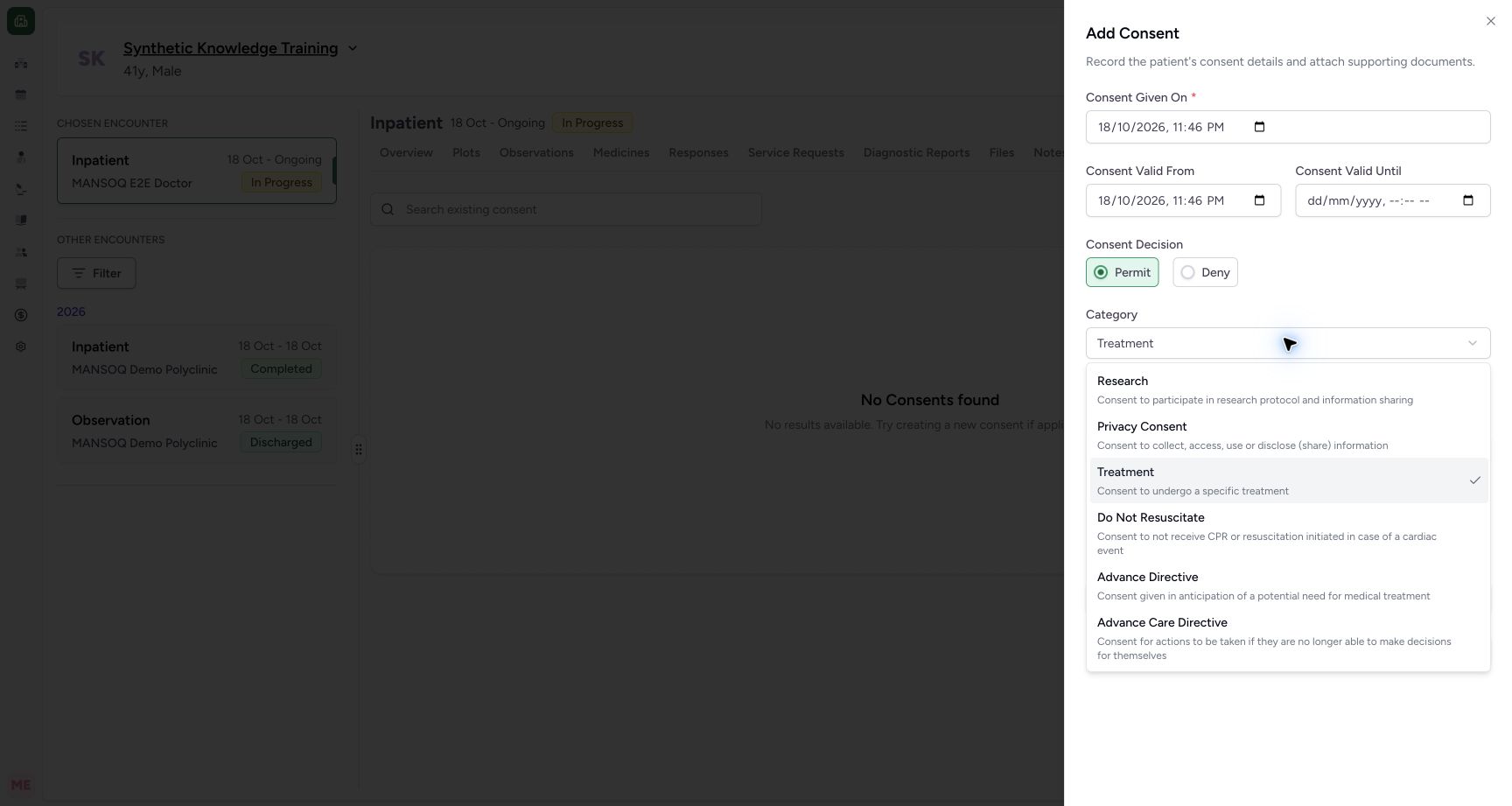
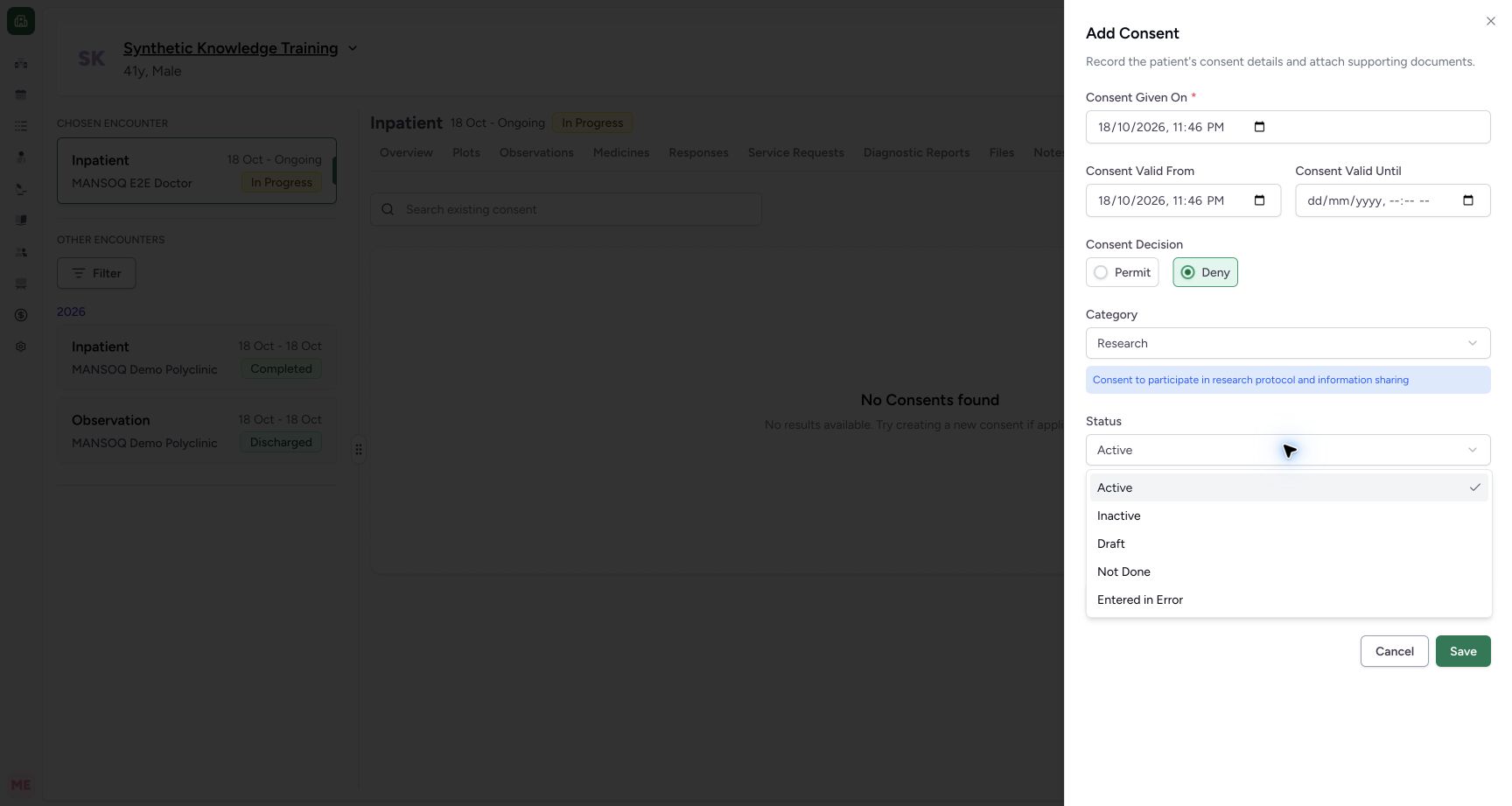
The UI offers Research, Privacy Consent, Treatment, Do Not Resuscitate, Advance Directive and Advance Care Directive, each with a description. Permit/Deny is a decision; Active, Inactive, Draft, Not Done and Entered in Error are separate software status options. The example selects Research / Deny / Draft and an explicit nonbinding note. The menus show controls only and do not teach legal or clinical criteria for these categories.
 12
12Capture details
Actual Nurse in the original pinned production UI, isolated synthetic active Inpatient encounter at a Polyclinic. These are harmless software training files and nonbinding Research/Deny examples, not real clinical documents, patient decisions, signatures or treatment authorization. Other role, facility, hardware and failure branches remain unqualified. Action: Category menu exposes Research, Privacy Consent, Treatment, Do Not Resuscitate, Advance Directive and Advance Care Directive with descriptions. Only nonbinding synthetic Research documentation is selected in this exercise; no clinical/legal authority is exercised.
- Synthetic example uses Research category: Synthetic example uses Research category
- Read category descriptions before documenting: Read category descriptions before documenting
 12
12Capture details
Actual Nurse in the original pinned production UI, isolated synthetic active Inpatient encounter at a Polyclinic. These are harmless software training files and nonbinding Research/Deny examples, not real clinical documents, patient decisions, signatures or treatment authorization. Other role, facility, hardware and failure branches remain unqualified. Action: Consent status menu offers Active, Inactive, Draft, Not Done and Entered in Error independently of Permit/Deny and category. Synthetic exercise uses Draft with Deny.
- Draft is a status option: Draft is a status option
- Deny is a separate decision: Deny is a separate decision
4. Verify actual saved date values
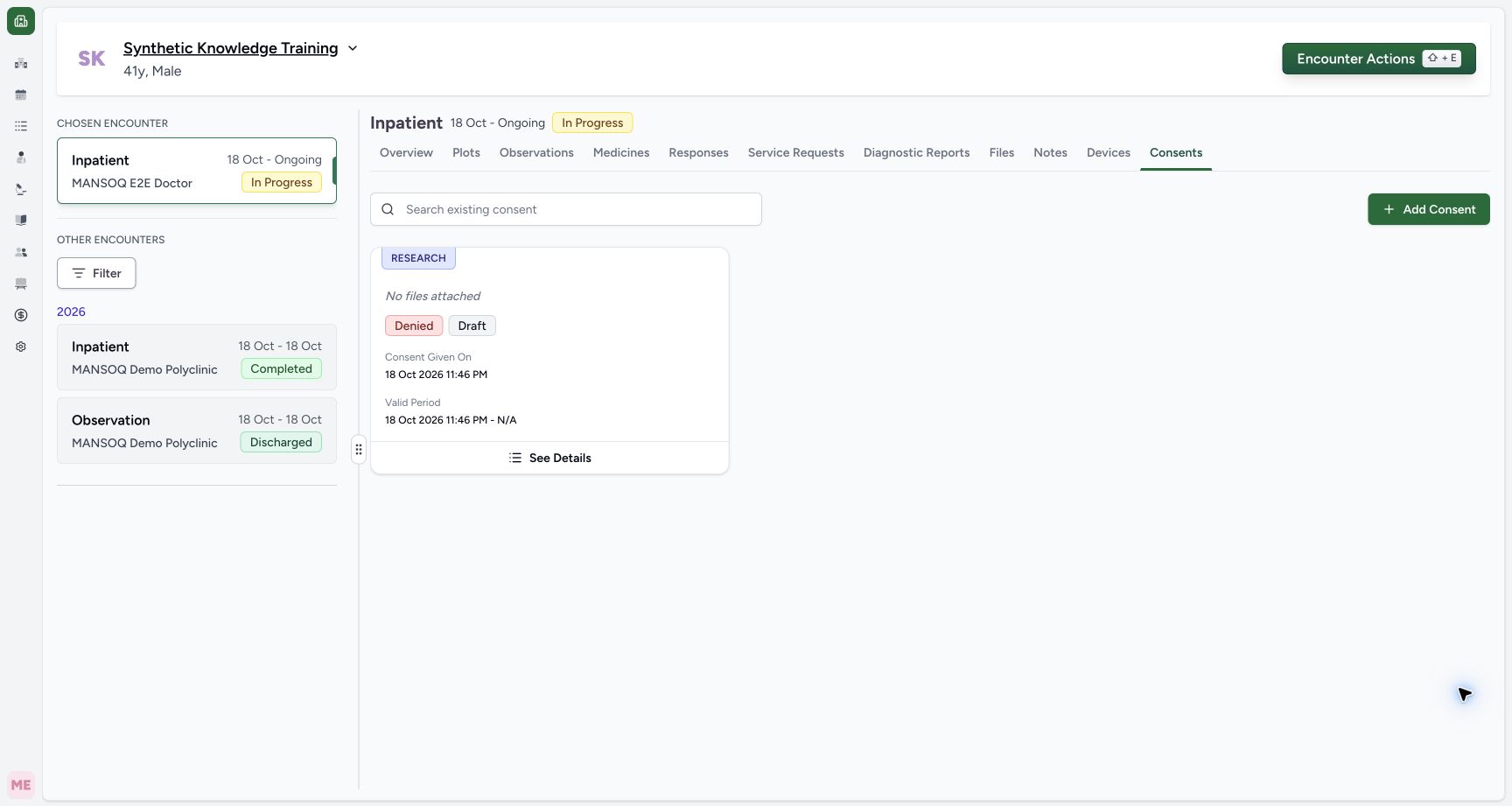
The first saved example has Denied / Draft, no attachment, Given On 18 October 2026, 11:46 PM and the same start with no end. Those are its actual saved defaults. Read the saved values after submission rather than assuming an attempted date edit committed. The subsequent dated example below is a separate record, leaving this first draft unchanged.
 1234
1234Capture details
Actual Nurse in the original pinned production UI, isolated synthetic active Inpatient encounter at a Polyclinic. These are harmless software training files and nonbinding Research/Deny examples, not real clinical documents, patient decisions, signatures or treatment authorization. Other role, facility, hardware and failure branches remain unqualified. Success: Actual first synthetic Research/Deny/Draft record is saved with default given/start18Oct23:46 and no end or attachments. Intended date edits did not commit; this image does not qualify period validation or an uploaded supporting document.
- See Details opens this saved draft: See Details opens this saved draft
- Actual saved Given On is 11:46 PM: Actual saved Given On is 11:46 PM
- Actual saved period has no end: Actual saved period has no end
- Draft is separate from Denied: Draft is separate from Denied
5. Enter and validate a coherent period
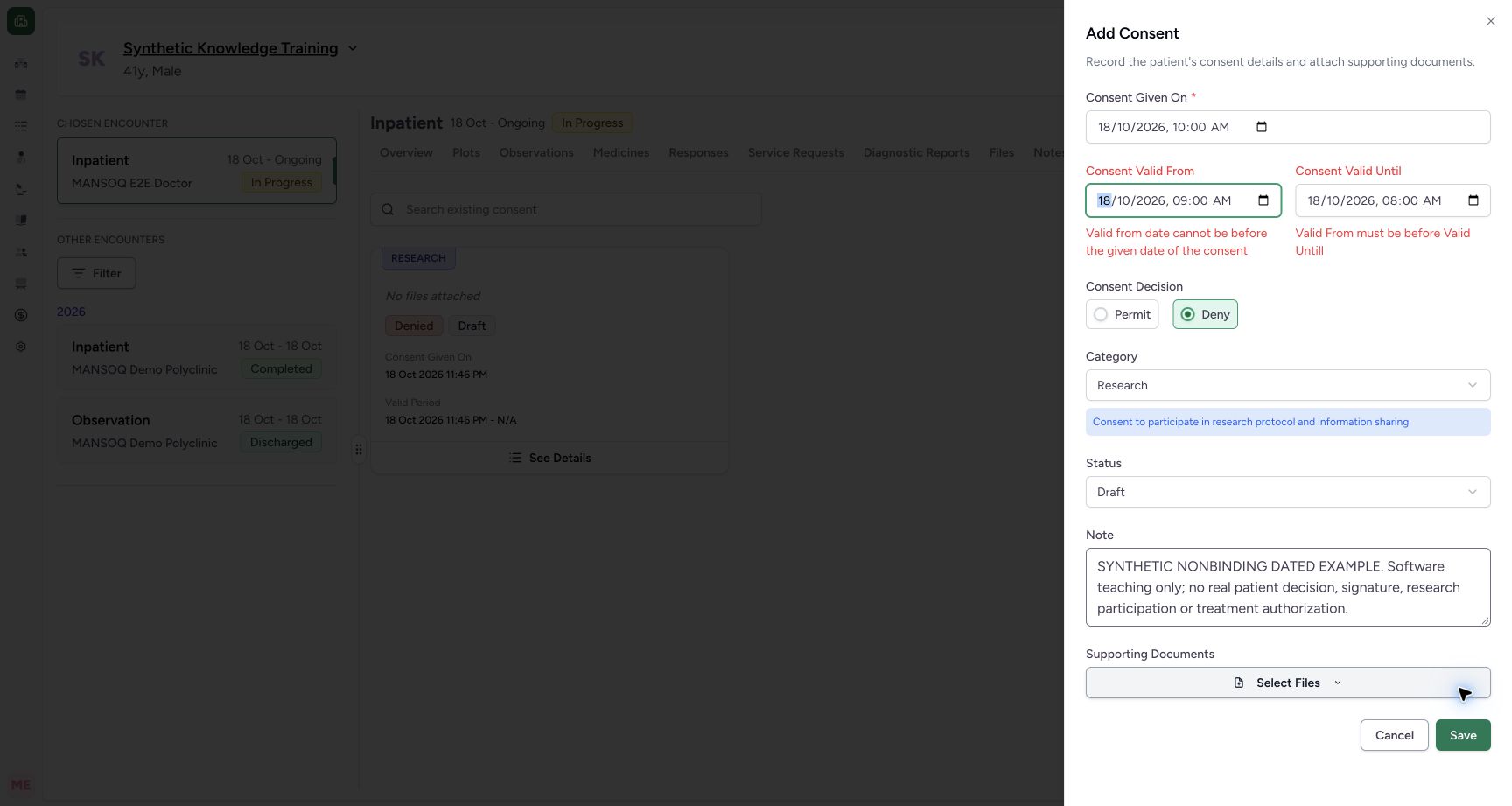
For the dated example, Given On is 18 October 2026, 10:00 AM. A 9:00 AM start before the given time and 8:00 AM end before that start produce separate validation messages. Correct the start to 11:00 AM and end to 12:00 PM. Confirm all three displayed values and their local timezone before saving; the screenshots use Riyadh time. The date-order guard does not establish legal validity.
 123
123Capture details
Actual Nurse in the original pinned production UI, isolated synthetic active Inpatient encounter at a Polyclinic. These are harmless software training files and nonbinding Research/Deny examples, not real clinical documents, patient decisions, signatures or treatment authorization. Other role, facility, hardware and failure branches remain unqualified. Error: Committed local times given10:00/start09:00/end08:00 produce both real validation errors: start before given and end before start. The second consent remains an unsaved draft; no duplicate saved record is sent.
- Valid From must not precede Given On: Valid From must not precede Given On
- Valid Until must follow Valid From: Valid Until must follow Valid From
- Read and correct the validation messages: Read and correct the validation messages
 123
123Capture details
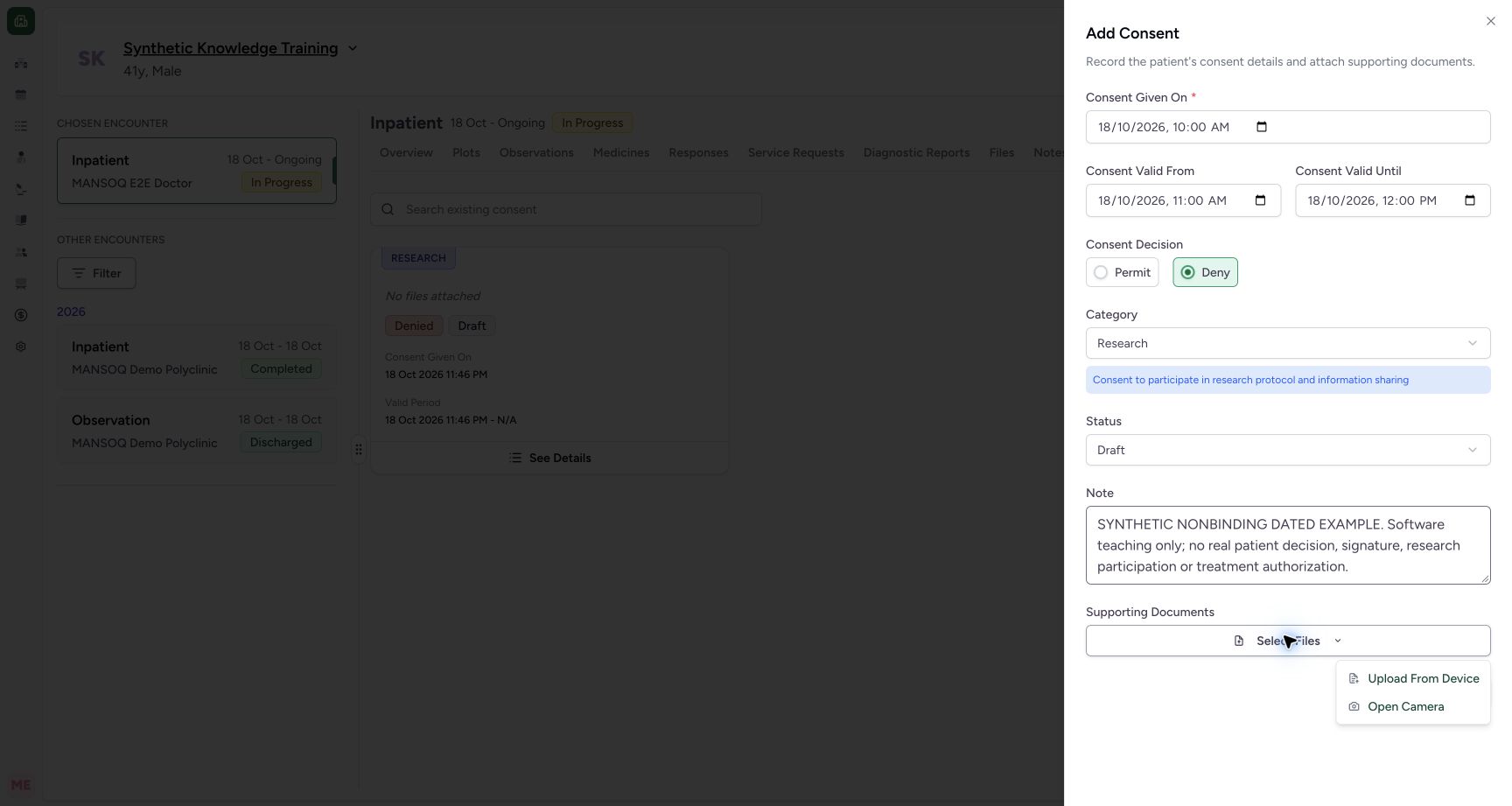
Actual Nurse in the original pinned production UI, isolated synthetic active Inpatient encounter at a Polyclinic. These are harmless software training files and nonbinding Research/Deny examples, not real clinical documents, patient decisions, signatures or treatment authorization. Other role, facility, hardware and failure branches remain unqualified. Action: Corrected given10:00/start11:00/end12:00 draft uses Research/Deny/Draft and Select Files → Upload From Device. Supporting document branch permits image/PDF; camera is not activated.
- Review corrected valid period start: Review corrected valid period start
- Review corrected valid period end: Review corrected valid period end
- Attach the nonbinding synthetic document: Attach the nonbinding synthetic document
6. Select and name the supporting document
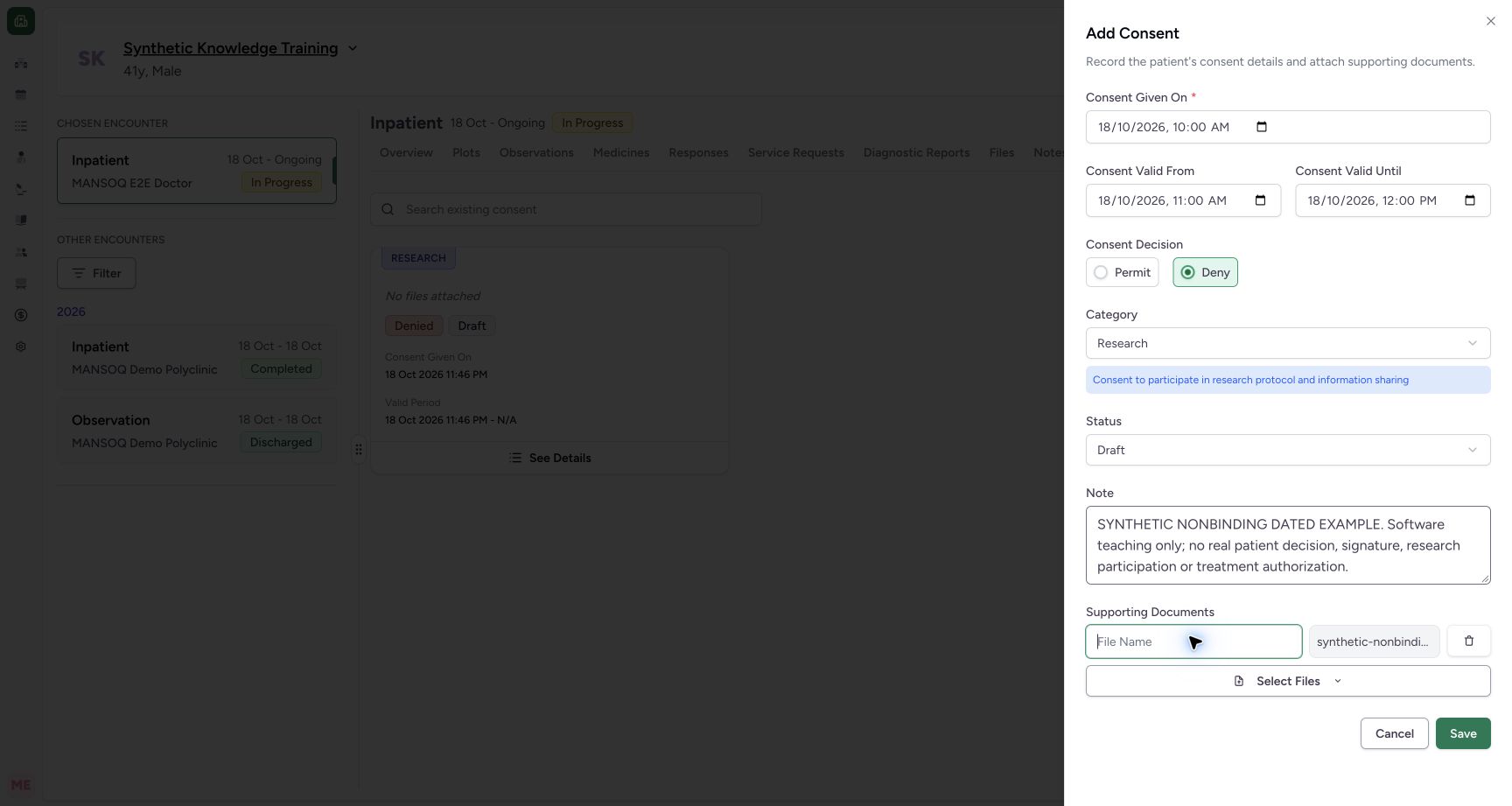
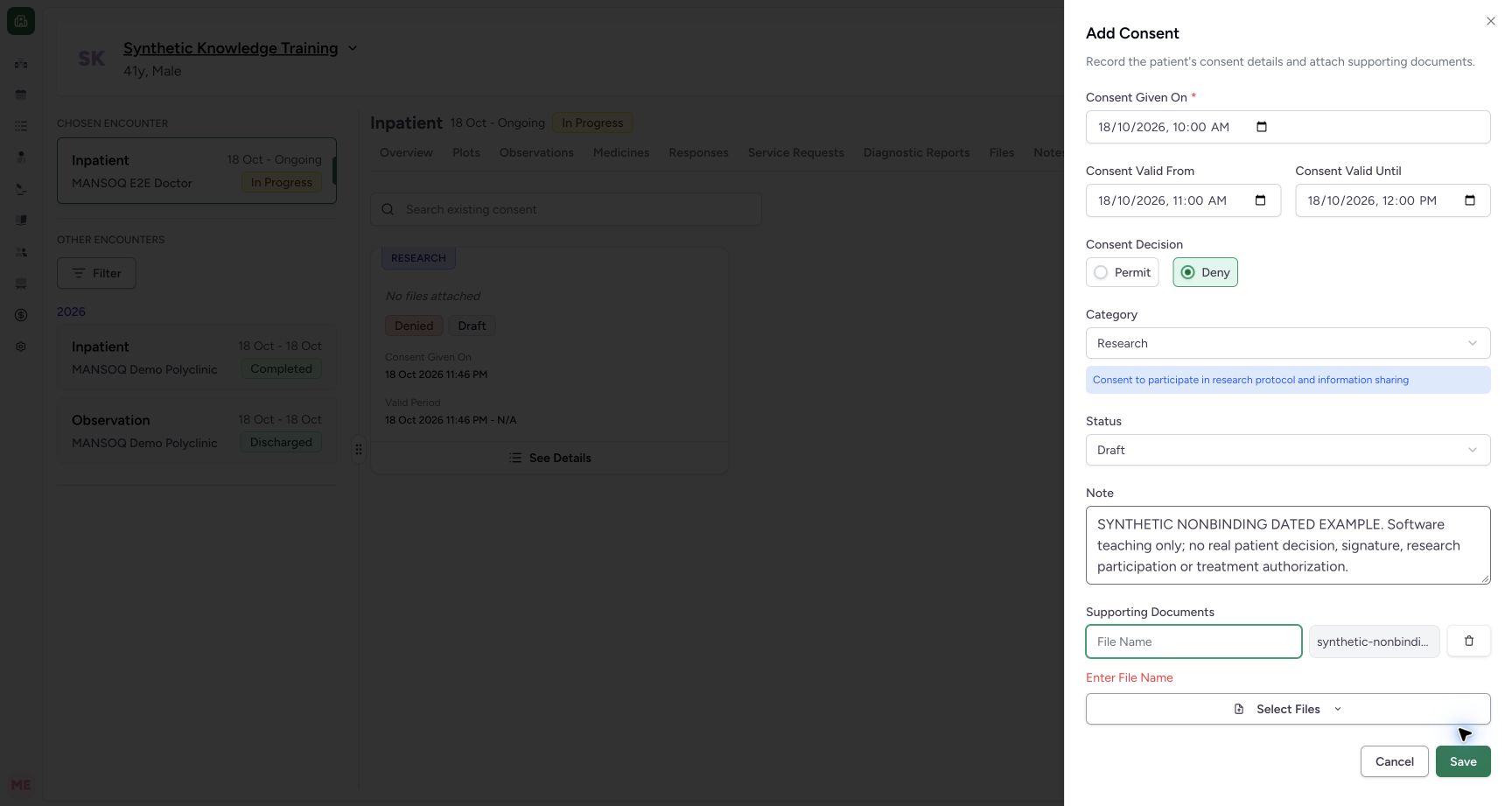
Use Supporting Documents → Select Files → Upload From Device. The create form accepts configured JPG/JPEG/PNG/PDF supporting files. After selection, provide the required display name. Trying Save with the selected image unnamed shows Enter File Name. A pending selection is not a completed attachment. The pictured document is expressly nonbinding synthetic content.
123Capture details
Actual Nurse in the original pinned production UI, isolated synthetic active Inpatient encounter at a Polyclinic. These are harmless software training files and nonbinding Research/Deny examples, not real clinical documents, patient decisions, signatures or treatment authorization. Other role, facility, hardware and failure branches remain unqualified. Action: Corrected given10:00/start11:00/end12:00 draft uses Research/Deny/Draft and Select Files → Upload From Device. Supporting document branch permits image/PDF; camera is not activated.
- Review corrected valid period start: Review corrected valid period start
- Review corrected valid period end: Review corrected valid period end
- Attach the nonbinding synthetic document: Attach the nonbinding synthetic document
 12
12Capture details
Actual Nurse in the original pinned production UI, isolated synthetic active Inpatient encounter at a Polyclinic. These are harmless software training files and nonbinding Research/Deny examples, not real clinical documents, patient decisions, signatures or treatment authorization. Other role, facility, hardware and failure branches remain unqualified. Action: Selected PNG is pending as a supporting document and needs its own display name; it is not yet uploaded or a verification/signature.
- Name the supporting document: Name the supporting document
- Save requires valid document details: Save requires valid document details
 12
12Capture details
Actual Nurse in the original pinned production UI, isolated synthetic active Inpatient encounter at a Polyclinic. These are harmless software training files and nonbinding Research/Deny examples, not real clinical documents, patient decisions, signatures or treatment authorization. Other role, facility, hardware and failure branches remain unqualified. Error: Consent supporting document with blank display name shows Enter File Name and is not saved/uploaded; correct its name before saving.
- Provide a supporting document display name: Provide a supporting document display name
- Read attachment validation feedback: Read attachment validation feedback
7. Review the complete dated draft and save once
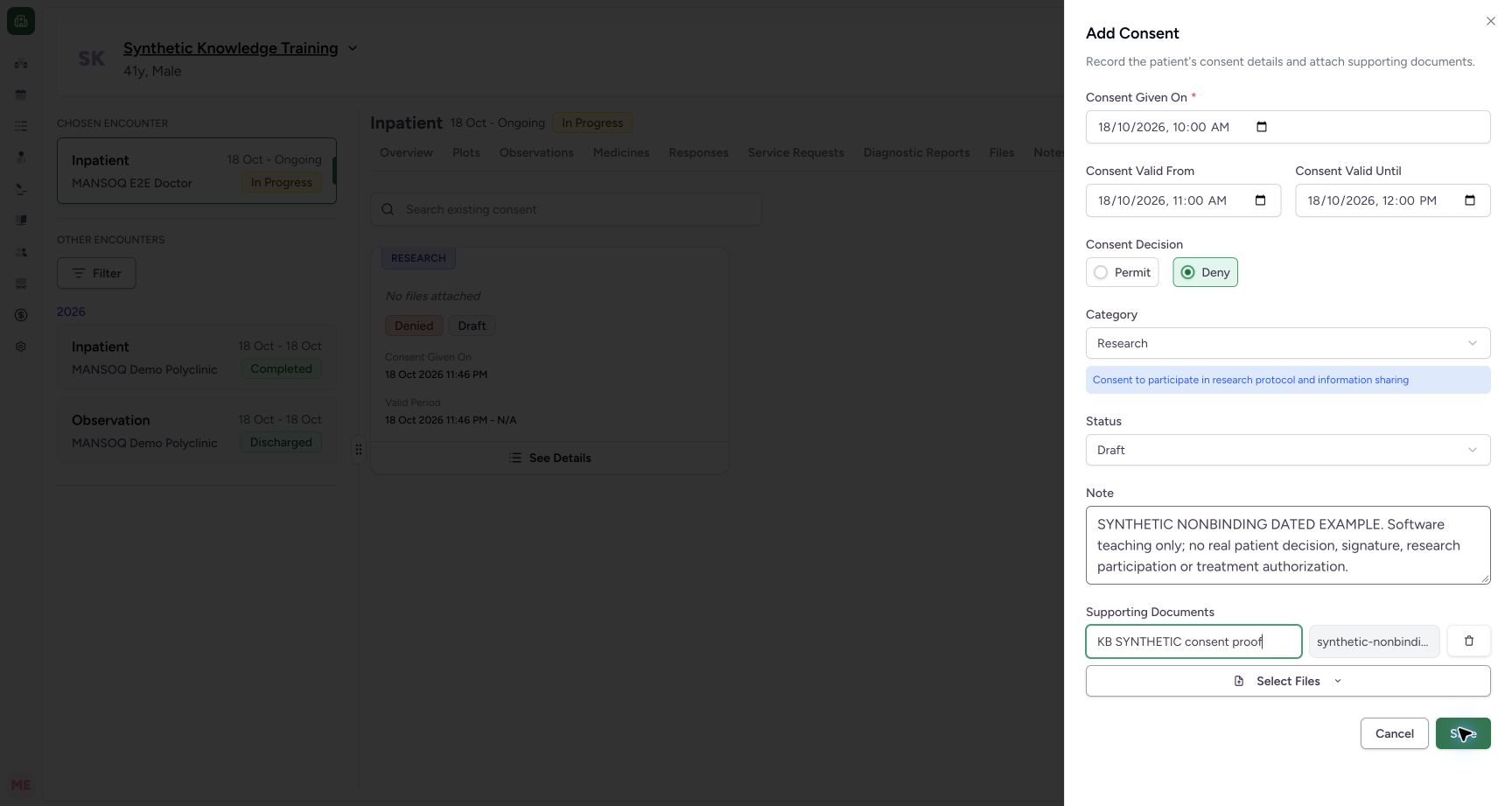
Review Given On 10:00 AM, valid period 11:00 AM–12:00 PM, Deny, Research, Draft, the full nonbinding note and named supporting image KB SYNTHETIC consent proof. Select Save and wait. The create operation also uploads the supporting document, so inspect the saved attachment rather than relying on a toast alone.
 1234
1234Capture details
Actual Nurse in the original pinned production UI, isolated synthetic active Inpatient encounter at a Polyclinic. These are harmless software training files and nonbinding Research/Deny examples, not real clinical documents, patient decisions, signatures or treatment authorization. Other role, facility, hardware and failure branches remain unqualified. Action: Reviewed second nonbinding synthetic consent has Given18Oct10:00, Valid11:00–12:00, Research/Deny/Draft, explicit synthetic note and named PNG support. Save persists consent then uploads its support; verify both independently.
- Review given date and local time: Review given date and local time
- Review the valid period: Review the valid period
- Review the named nonbinding supporting image: Review the named nonbinding supporting image
- Save the reviewed consent documentation: Save the reviewed consent documentation
8. Read the saved card and detail independently
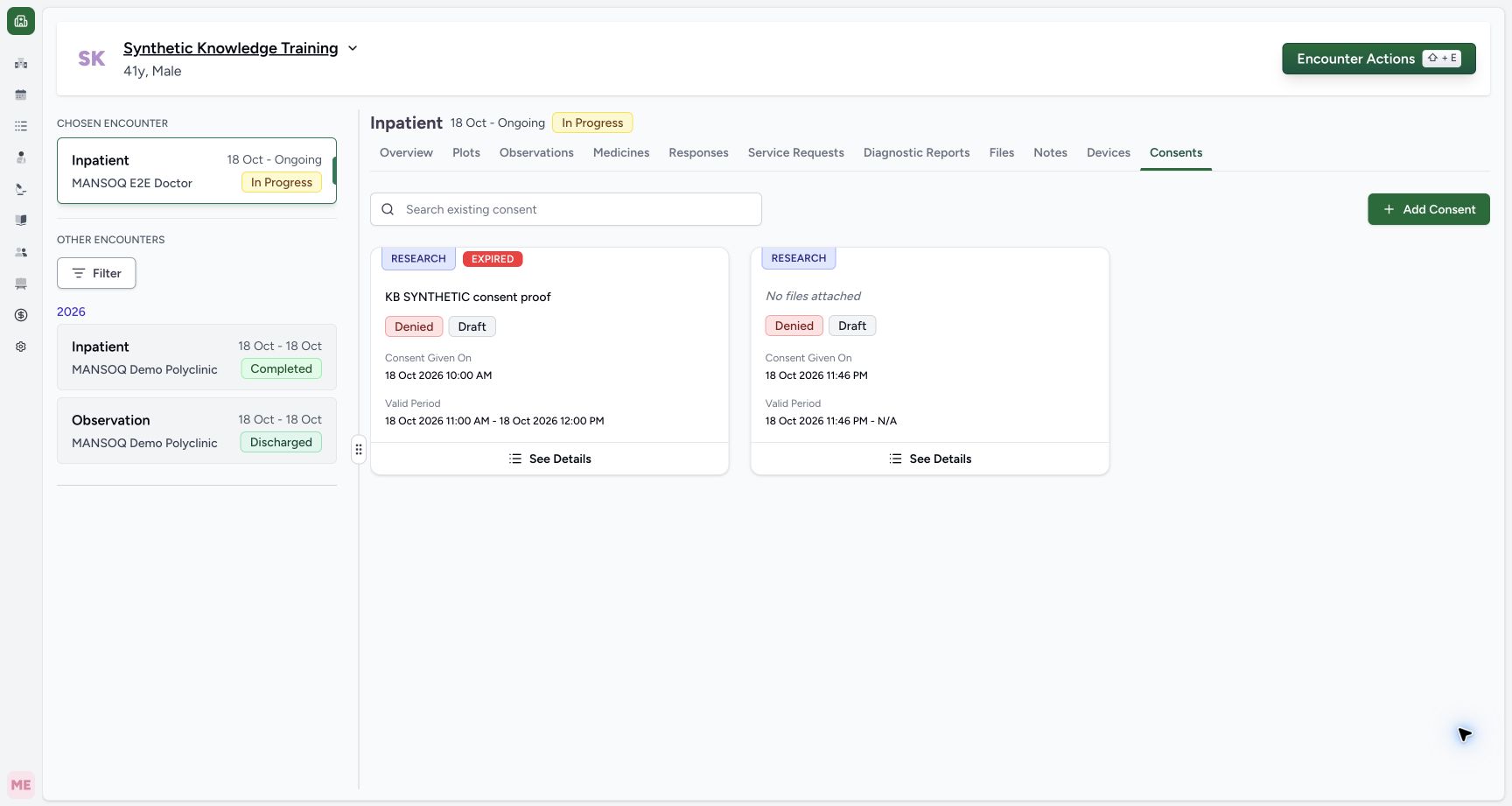
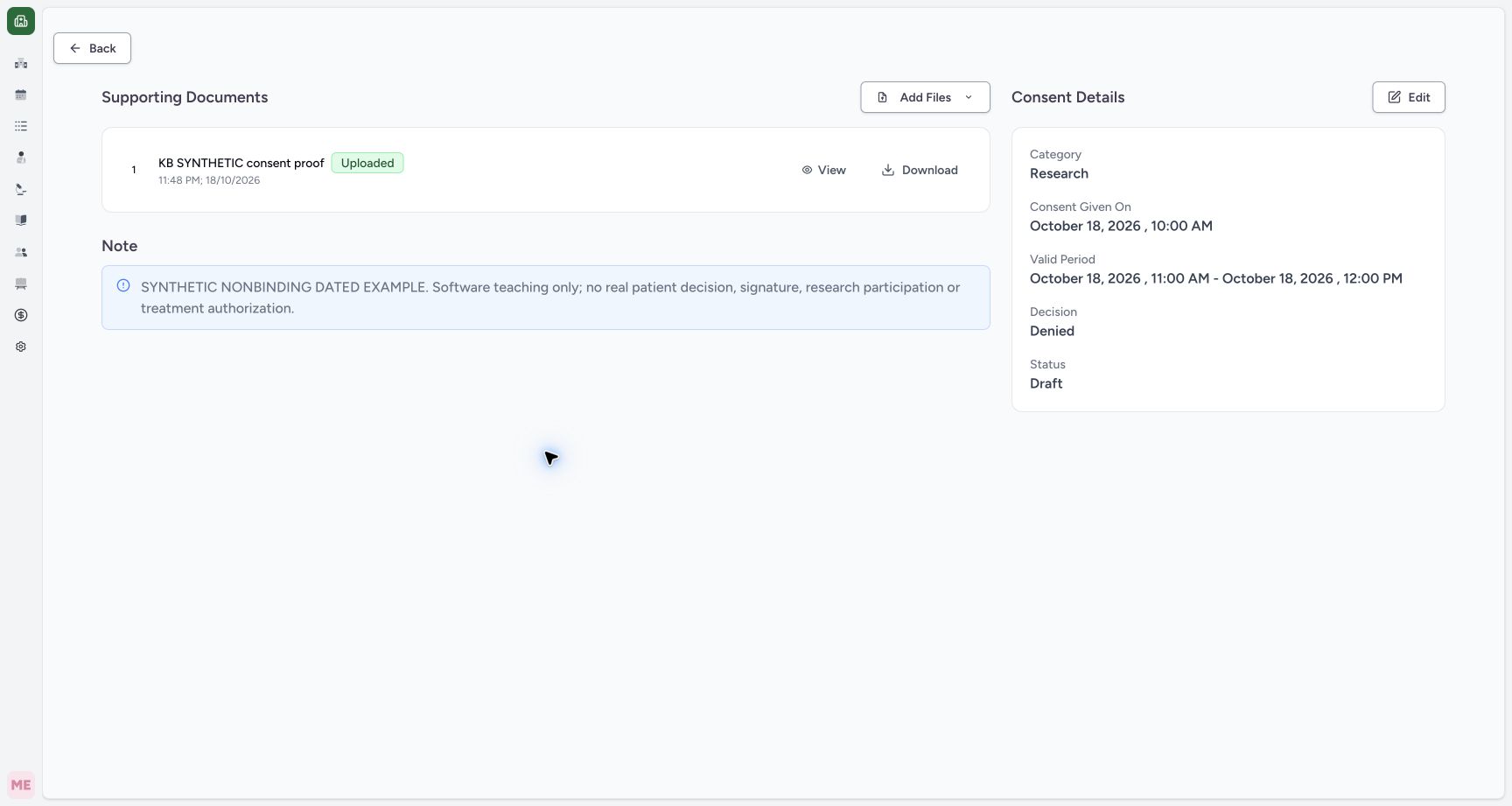
The saved card shows the named attachment, Denied, Draft, exact dates and a separate EXPIRED badge because this fictional period already ended. Expired is computed from the end date; it is separate from Draft status. Open this card’s See Details and check the full note, dates, decision, status and Uploaded supporting file. Independent readback confirms exact saved values, consent association and original PNG bytes; the first draft remains unchanged.
 12
12Capture details
Actual Nurse in the original pinned production UI, isolated synthetic active Inpatient encounter at a Polyclinic. These are harmless software training files and nonbinding Research/Deny examples, not real clinical documents, patient decisions, signatures or treatment authorization. Other role, facility, hardware and failure branches remain unqualified. Success: Saved dated consent shows named support, Research/Denied/Draft, Given18Oct10:00 and Valid11:00–12:00. EXPIRED is a separate date-derived label because the fictional valid period has ended. First default-date draft remains separate.
- Identify the dated record by its supporting document: Identify the dated record by its supporting document
- Open this record’s saved details: Open this record’s saved details
 123
123Capture details
Actual Nurse in the original pinned production UI, isolated synthetic active Inpatient encounter at a Polyclinic. These are harmless software training files and nonbinding Research/Deny examples, not real clinical documents, patient decisions, signatures or treatment authorization. Other role, facility, hardware and failure branches remain unqualified. Success: Saved consent detail shows Research, Denied, Draft, exact local given/valid period, full synthetic note and one Uploaded supporting image with View/Download. Independent READ ONLY/S3 verifies correct consent association, exact PNG bytes and empty verification list.
- Maintain the supported editable fields: Maintain the supported editable fields
- Confirm the consent’s own supporting attachment: Confirm the consent’s own supporting attachment
- Read the complete nonbinding documentation note: Read the complete nonbinding documentation note
Observed documentation scope
Actual Nurse in the original pinned production UI, isolated synthetic active Inpatient encounter at a Polyclinic. These are harmless software training files and nonbinding Research/Deny examples, not real clinical documents, patient decisions, signatures or treatment authorization. Other role, facility, hardware and failure branches remain unqualified. The examples deliberately use Deny and Draft/Inactive. No real signature, identity verification, treatment authorization or actual research participation was created. API verification endpoints and alternate category/status lifecycles remain separate unobserved branches.
1234Capture details
Actual Nurse in the original pinned production UI, isolated synthetic active Inpatient encounter at a Polyclinic. These are harmless software training files and nonbinding Research/Deny examples, not real clinical documents, patient decisions, signatures or treatment authorization. Other role, facility, hardware and failure branches remain unqualified. Action: Reviewed second nonbinding synthetic consent has Given18Oct10:00, Valid11:00–12:00, Research/Deny/Draft, explicit synthetic note and named PNG support. Save persists consent then uploads its support; verify both independently.
- Review given date and local time: Review given date and local time
- Review the valid period: Review the valid period
- Review the named nonbinding supporting image: Review the named nonbinding supporting image
- Save the reviewed consent documentation: Save the reviewed consent documentation
123Capture details
Actual Nurse in the original pinned production UI, isolated synthetic active Inpatient encounter at a Polyclinic. These are harmless software training files and nonbinding Research/Deny examples, not real clinical documents, patient decisions, signatures or treatment authorization. Other role, facility, hardware and failure branches remain unqualified. Success: Saved consent detail shows Research, Denied, Draft, exact local given/valid period, full synthetic note and one Uploaded supporting image with View/Download. Independent READ ONLY/S3 verifies correct consent association, exact PNG bytes and empty verification list.
- Maintain the supported editable fields: Maintain the supported editable fields
- Confirm the consent’s own supporting attachment: Confirm the consent’s own supporting attachment
- Read the complete nonbinding documentation note: Read the complete nonbinding documentation note
Troubleshooting
The period fields show validation errors
Review the given time and start/end in the same local timezone. Correct the start-before-given and end-before-start problems, then verify actual saved values after submission.
123Capture details
Actual Nurse in the original pinned production UI, isolated synthetic active Inpatient encounter at a Polyclinic. These are harmless software training files and nonbinding Research/Deny examples, not real clinical documents, patient decisions, signatures or treatment authorization. Other role, facility, hardware and failure branches remain unqualified. Error: Committed local times given10:00/start09:00/end08:00 produce both real validation errors: start before given and end before start. The second consent remains an unsaved draft; no duplicate saved record is sent.
- Valid From must not precede Given On: Valid From must not precede Given On
- Valid Until must follow Valid From: Valid Until must follow Valid From
- Read and correct the validation messages: Read and correct the validation messages
1234Capture details
Actual Nurse in the original pinned production UI, isolated synthetic active Inpatient encounter at a Polyclinic. These are harmless software training files and nonbinding Research/Deny examples, not real clinical documents, patient decisions, signatures or treatment authorization. Other role, facility, hardware and failure branches remain unqualified. Action: Reviewed second nonbinding synthetic consent has Given18Oct10:00, Valid11:00–12:00, Research/Deny/Draft, explicit synthetic note and named PNG support. Save persists consent then uploads its support; verify both independently.
- Review given date and local time: Review given date and local time
- Review the valid period: Review the valid period
- Review the named nonbinding supporting image: Review the named nonbinding supporting image
- Save the reviewed consent documentation: Save the reviewed consent documentation
123Capture details
Actual Nurse in the original pinned production UI, isolated synthetic active Inpatient encounter at a Polyclinic. These are harmless software training files and nonbinding Research/Deny examples, not real clinical documents, patient decisions, signatures or treatment authorization. Other role, facility, hardware and failure branches remain unqualified. Success: Saved consent detail shows Research, Denied, Draft, exact local given/valid period, full synthetic note and one Uploaded supporting image with View/Download. Independent READ ONLY/S3 verifies correct consent association, exact PNG bytes and empty verification list.
- Maintain the supported editable fields: Maintain the supported editable fields
- Confirm the consent’s own supporting attachment: Confirm the consent’s own supporting attachment
- Read the complete nonbinding documentation note: Read the complete nonbinding documentation note
Save rejects a selected supporting file
Provide a display name for every selected attachment and review the filename and content. A selected original filename does not fill the required display-name field.
12Capture details
Actual Nurse in the original pinned production UI, isolated synthetic active Inpatient encounter at a Polyclinic. These are harmless software training files and nonbinding Research/Deny examples, not real clinical documents, patient decisions, signatures or treatment authorization. Other role, facility, hardware and failure branches remain unqualified. Action: Selected PNG is pending as a supporting document and needs its own display name; it is not yet uploaded or a verification/signature.
- Name the supporting document: Name the supporting document
- Save requires valid document details: Save requires valid document details
12Capture details
Actual Nurse in the original pinned production UI, isolated synthetic active Inpatient encounter at a Polyclinic. These are harmless software training files and nonbinding Research/Deny examples, not real clinical documents, patient decisions, signatures or treatment authorization. Other role, facility, hardware and failure branches remain unqualified. Error: Consent supporting document with blank display name shows Enter File Name and is not saved/uploaded; correct its name before saving.
- Provide a supporting document display name: Provide a supporting document display name
- Read attachment validation feedback: Read attachment validation feedback
1234Capture details
Actual Nurse in the original pinned production UI, isolated synthetic active Inpatient encounter at a Polyclinic. These are harmless software training files and nonbinding Research/Deny examples, not real clinical documents, patient decisions, signatures or treatment authorization. Other role, facility, hardware and failure branches remain unqualified. Action: Reviewed second nonbinding synthetic consent has Given18Oct10:00, Valid11:00–12:00, Research/Deny/Draft, explicit synthetic note and named PNG support. Save persists consent then uploads its support; verify both independently.
- Review given date and local time: Review given date and local time
- Review the valid period: Review the valid period
- Review the named nonbinding supporting image: Review the named nonbinding supporting image
- Save the reviewed consent documentation: Save the reviewed consent documentation
Source evidence
References are pinned to the private MANSOQ source repository. Repository access is required to open these links.
- repositories/platform/mansoq-web/src/components/Consent/ConsentFormSheet.tsx:68 · f6e9f05f
- repositories/platform/mansoq-web/src/components/Consent/ConsentFormSheet.tsx:150 · f6e9f05f
- repositories/platform/mansoq-web/src/components/Consent/ConsentFormSheet.tsx:175 · f6e9f05f
- repositories/platform/mansoq-web/src/components/Common/DateTimeInput.tsx:39 · f6e9f05f
- repositories/platform/mansoq-web/src/pages/Encounters/tabs/consents.tsx:58 · f6e9f05f
- repositories/platform/mansoq-core/mansoq/emr/resources/consent/spec.py:21 · f6e9f05f