 MANSOQ
 Clinical care
Review consent documents and update status or note
Inspect exact saved documentation, preview/download the supporting file and use the limited Status/Note edit without changing the original decision or period.
6 min read · Source baseline f6e9f05f
Verification and applicability
source reviewed
Check your installed version, permissions and local configuration.
Before you begin
- Verify the patient, selected encounter, clinical documentation purpose and applicable write/read permission. This guide was executed as Nurse in an active Inpatient encounter at a synthetic Polyclinic; other roles and facilities require their own qualification.
- Use authorized documents and follow the facility’s approved process. All pictured records and file contents are explicitly synthetic, nonbinding software exercises.
1. Identify the saved record and supporting file
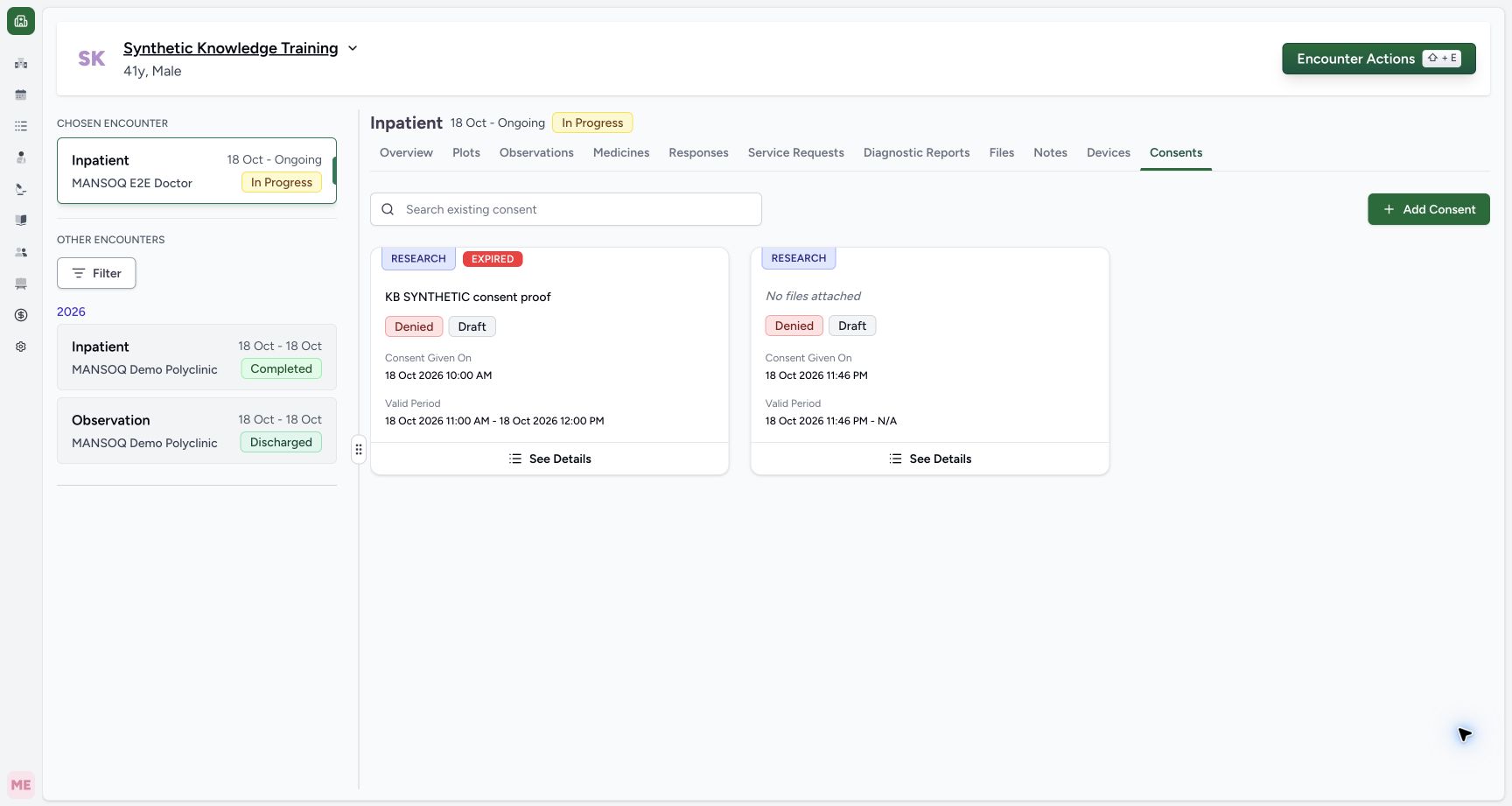
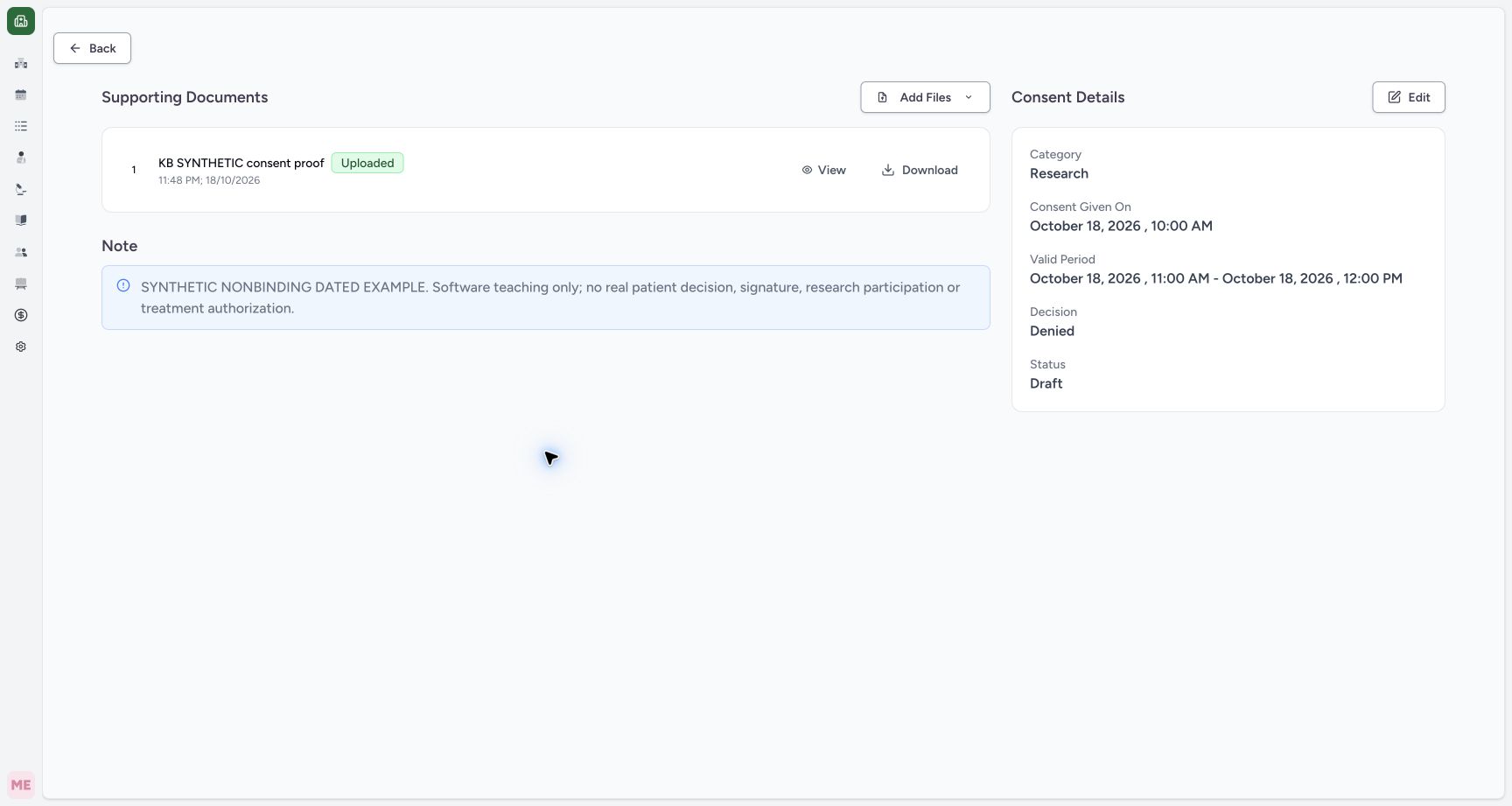
Open See Details on the intended consent card. Read Category, Given On, Valid Period, Decision, Status and the complete note together. The example has one named Uploaded supporting image. This detail view documents what was saved; it does not verify a signature or establish authority to provide treatment.
 12
12Capture details
Actual Nurse in the original pinned production UI, isolated synthetic active Inpatient encounter at a Polyclinic. These are harmless software training files and nonbinding Research/Deny examples, not real clinical documents, patient decisions, signatures or treatment authorization. Other role, facility, hardware and failure branches remain unqualified. Success: Saved dated consent shows named support, Research/Denied/Draft, Given18Oct10:00 and Valid11:00–12:00. EXPIRED is a separate date-derived label because the fictional valid period has ended. First default-date draft remains separate.
- Identify the dated record by its supporting document: Identify the dated record by its supporting document
- Open this record’s saved details: Open this record’s saved details
 123
123Capture details
Actual Nurse in the original pinned production UI, isolated synthetic active Inpatient encounter at a Polyclinic. These are harmless software training files and nonbinding Research/Deny examples, not real clinical documents, patient decisions, signatures or treatment authorization. Other role, facility, hardware and failure branches remain unqualified. Success: Saved consent detail shows Research, Denied, Draft, exact local given/valid period, full synthetic note and one Uploaded supporting image with View/Download. Independent READ ONLY/S3 verifies correct consent association, exact PNG bytes and empty verification list.
- Maintain the supported editable fields: Maintain the supported editable fields
- Confirm the consent’s own supporting attachment: Confirm the consent’s own supporting attachment
- Read the complete nonbinding documentation note: Read the complete nonbinding documentation note
2. Preview and download the actual supporting document
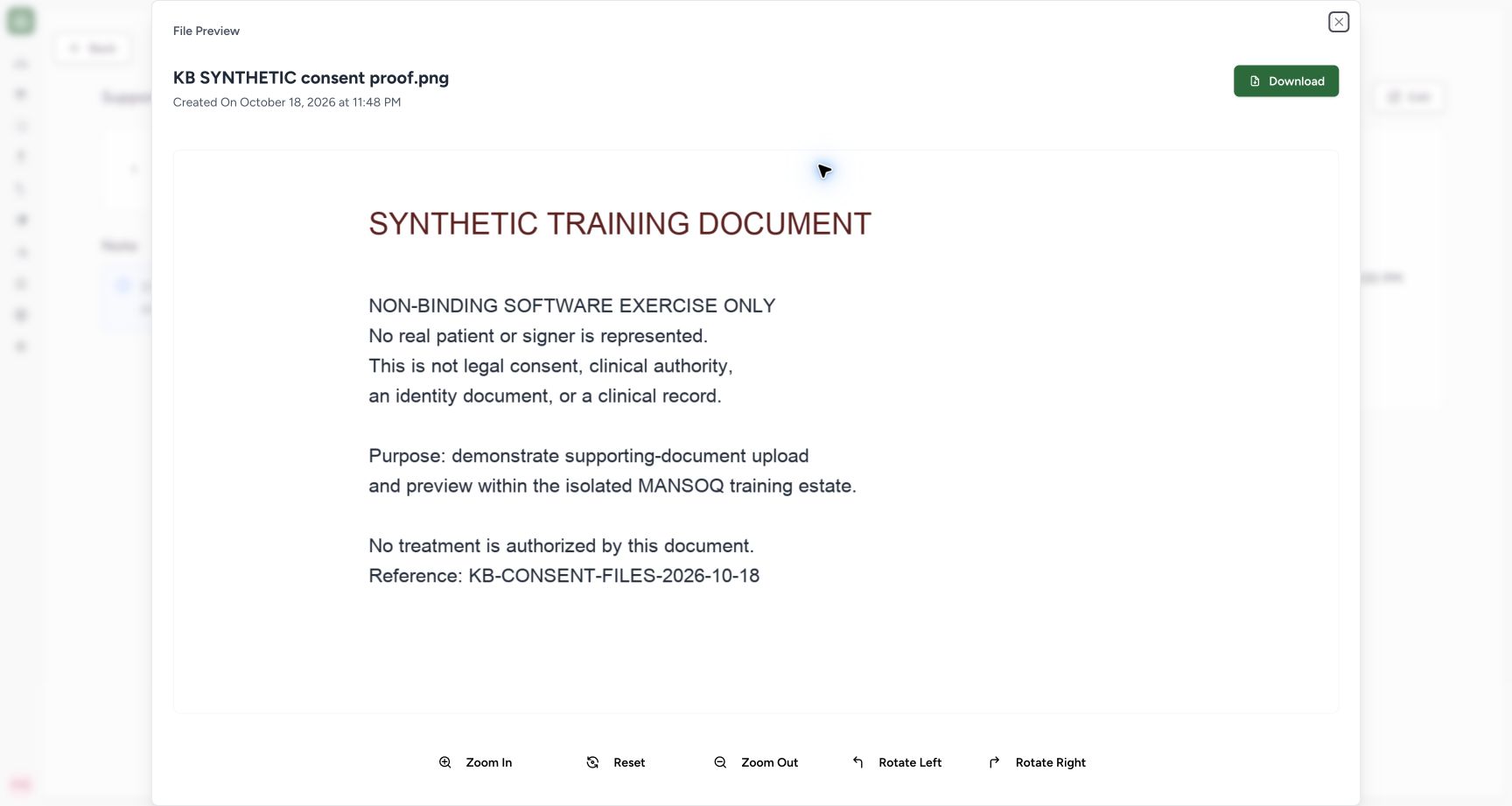
Select View to read the actual supporting PNG, then close the viewer. The image explicitly states that it represents no real patient or signer and authorizes no treatment. Download on the detail row retrieves the stored file. The demonstrated normal browser download produced the exact original 71,255-byte PNG with matching SHA-256. Preview/download proves file availability, not a signed or verified consent.
123Capture details
Actual Nurse in the original pinned production UI, isolated synthetic active Inpatient encounter at a Polyclinic. These are harmless software training files and nonbinding Research/Deny examples, not real clinical documents, patient decisions, signatures or treatment authorization. Other role, facility, hardware and failure branches remain unqualified. Success: Saved consent detail shows Research, Denied, Draft, exact local given/valid period, full synthetic note and one Uploaded supporting image with View/Download. Independent READ ONLY/S3 verifies correct consent association, exact PNG bytes and empty verification list.
- Maintain the supported editable fields: Maintain the supported editable fields
- Confirm the consent’s own supporting attachment: Confirm the consent’s own supporting attachment
- Read the complete nonbinding documentation note: Read the complete nonbinding documentation note
 123
123Capture details
Actual Nurse in the original pinned production UI, isolated synthetic active Inpatient encounter at a Polyclinic. These are harmless software training files and nonbinding Research/Deny examples, not real clinical documents, patient decisions, signatures or treatment authorization. Other role, facility, hardware and failure branches remain unqualified. Action: fully loaded actual consent supporting PNG preview displays nonbinding synthetic content. This preview does not establish identity verification, a signature or treatment authority.
- Read the actual nonbinding supporting document: Read the actual nonbinding supporting document
- Download the stored supporting image: Download the stored supporting image
- Close the preview: Close the preview
3. Inspect the limited Edit scope
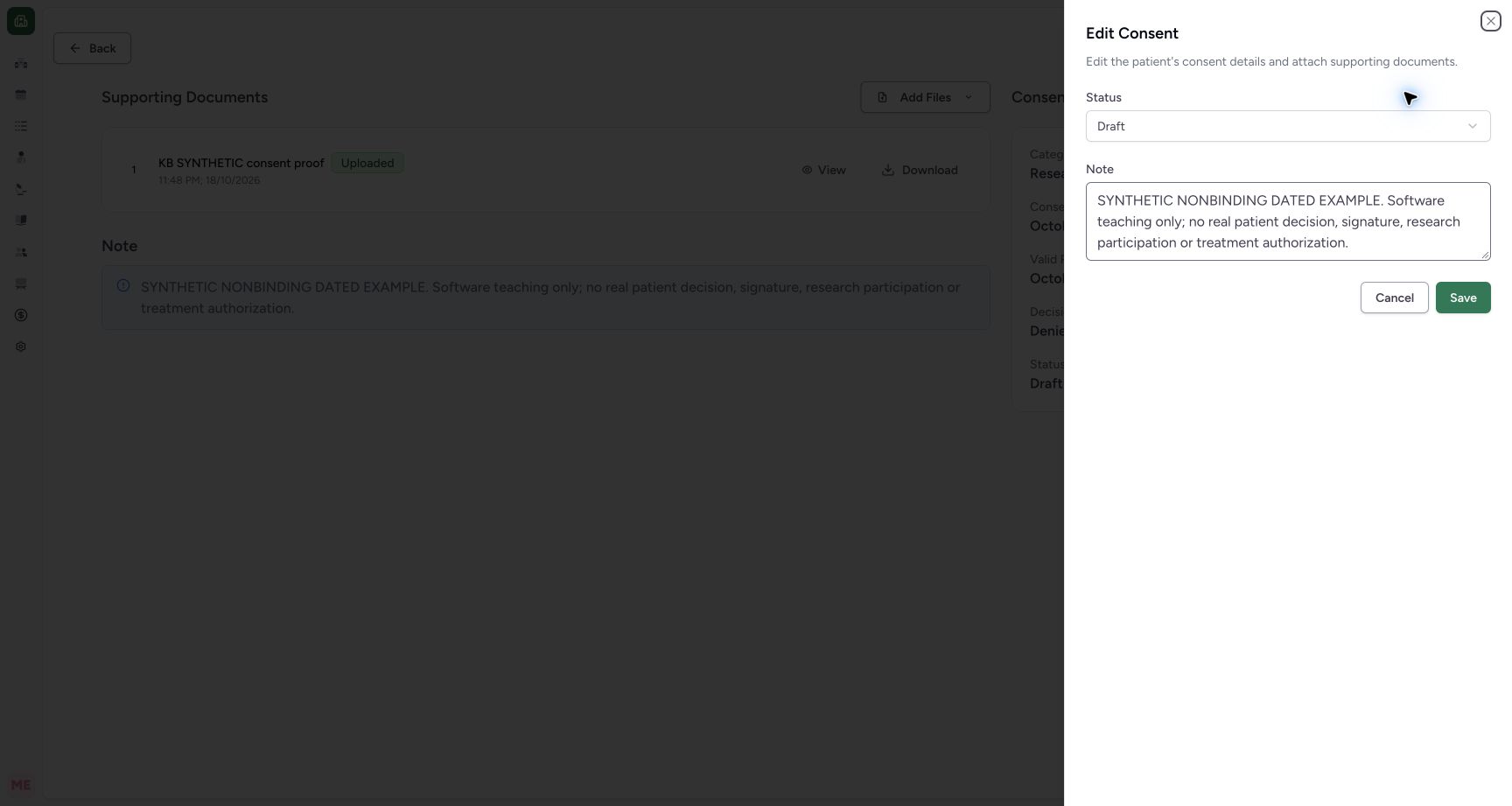
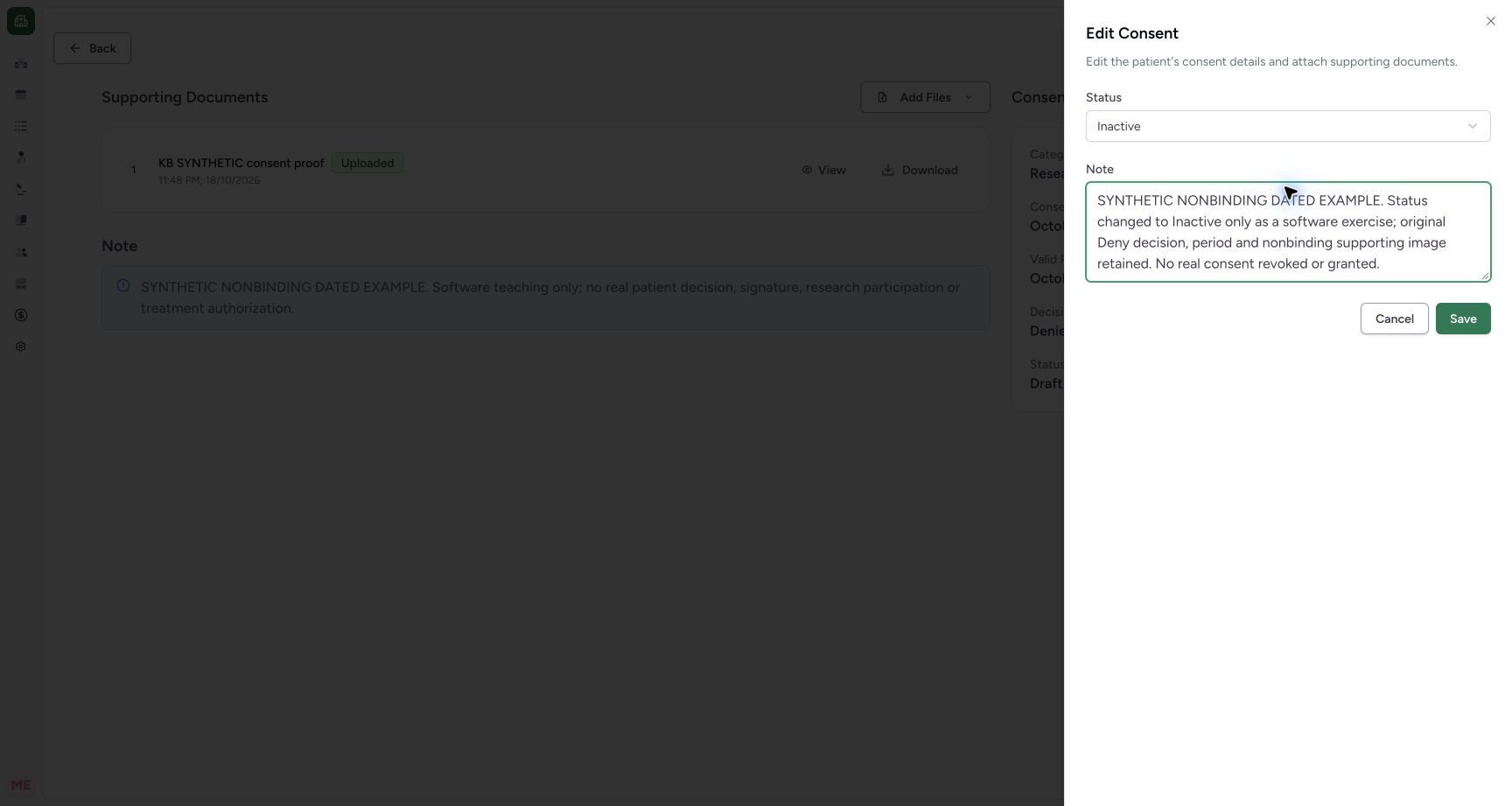
Select Edit. This UI exposes Status and Note only. Category, decision, Given On and Valid Period remain the values of the existing record. Select Cancel if no change is required. Do not expect this sheet to revise the original decision or dates.
 123
123Capture details
Actual Nurse in the original pinned production UI, isolated synthetic active Inpatient encounter at a Polyclinic. These are harmless software training files and nonbinding Research/Deny examples, not real clinical documents, patient decisions, signatures or treatment authorization. Other role, facility, hardware and failure branches remain unqualified. Action: the saved consent Edit sheet exposes only Status and Note; original category, decision, dates and supporting image are retained.
- Status is editable: Status is editable
- Update the documentation note: Update the documentation note
- Cancel leaves the saved record unchanged: Cancel leaves the saved record unchanged
4. Review an authorized status and note update
Select the appropriate documented software status and update its context note. The synthetic example changes Draft → Inactive and keeps its explicit nonbinding note, explaining that Deny, the period and supporting image remain retained. Review both editable fields before Save; this exercise grants or revokes no real consent.
 123
123Capture details
Actual Nurse in the original pinned production UI, isolated synthetic active Inpatient encounter at a Polyclinic. These are harmless software training files and nonbinding Research/Deny examples, not real clinical documents, patient decisions, signatures or treatment authorization. Other role, facility, hardware and failure branches remain unqualified. Action: review the synthetic Inactive status and nonbinding note before saving; original Deny decision and period are retained.
- Review Inactive status: Review Inactive status
- Keep the nonbinding training explanation: Keep the nonbinding training explanation
- Save the reviewed software status change: Save the reviewed software status change
5. Save and verify retained original fields
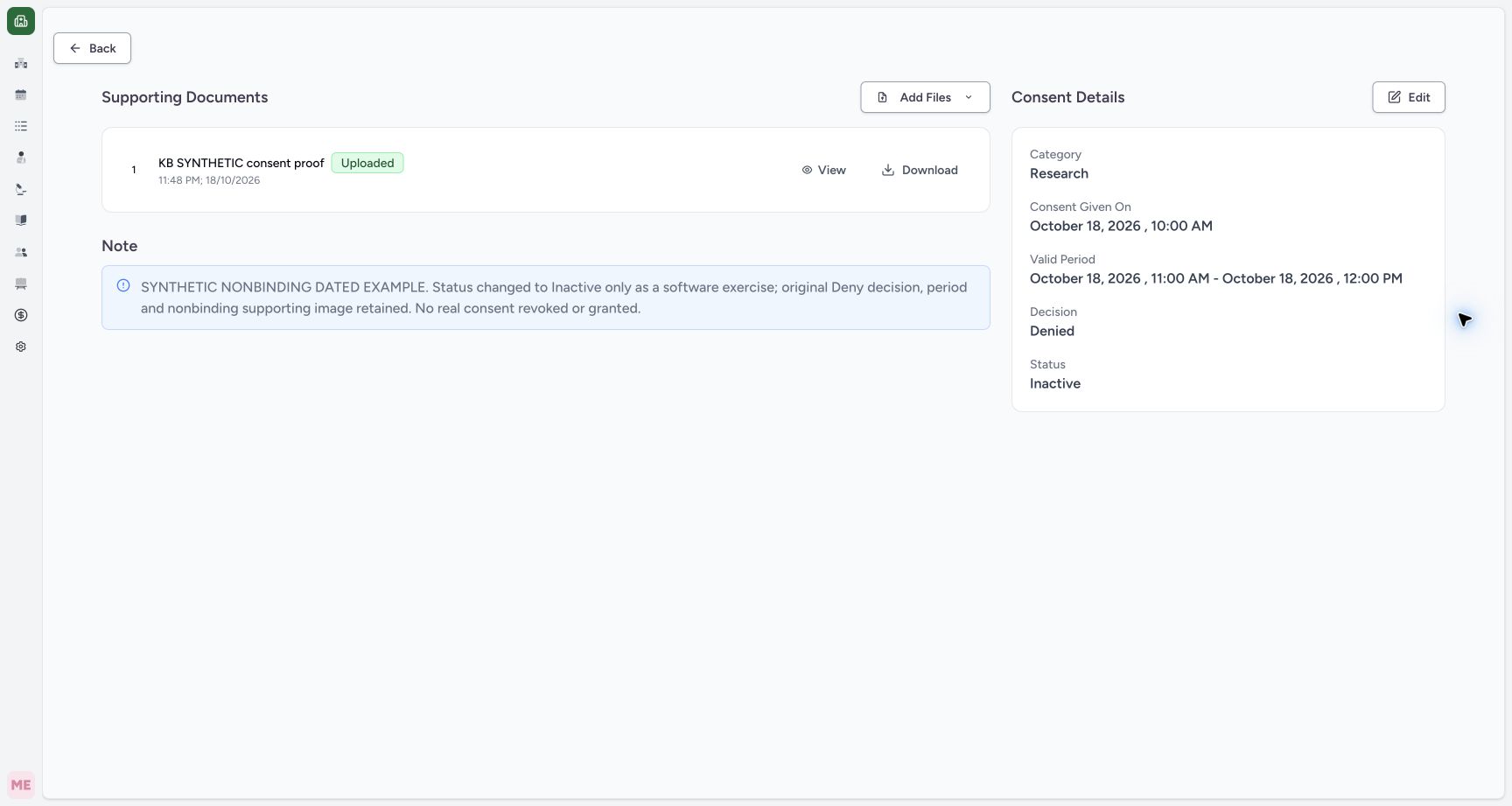
Select Save, wait for the sheet to close and inspect the detail. The example now shows Inactive, while Denied, Research, exact given/valid dates and its uploaded file remain unchanged. Independent readback confirms the status/note update, retained original association/bytes and empty verification list. The other default-date Draft is unchanged. No verification or electronic-signature action was performed.
 1234
1234Capture details
Actual Nurse in the original pinned production UI, isolated synthetic active Inpatient encounter at a Polyclinic. These are harmless software training files and nonbinding Research/Deny examples, not real clinical documents, patient decisions, signatures or treatment authorization. Other role, facility, hardware and failure branches remain unqualified. Success: independent read-only database and retained-object verification confirms the dated synthetic consent is Inactive with the Deny decision, exact given/valid dates, supporting PNG and creator retained; the other draft is unchanged.
- Saved status is Inactive: Saved status is Inactive
- Denied decision retained: Denied decision retained
- Original exact valid period retained: Original exact valid period retained
- Named supporting image remains uploaded: Named supporting image remains uploaded
Controls not qualified by this exercise
The detail can offer Add Files when the selected encounter is writable, but adding another document after creation is a separate unobserved branch. No visible signature or verification action was used. Backend add/remove-verification endpoints exist separately and are not established as a patient signing journey by these screenshots.
123Capture details
Actual Nurse in the original pinned production UI, isolated synthetic active Inpatient encounter at a Polyclinic. These are harmless software training files and nonbinding Research/Deny examples, not real clinical documents, patient decisions, signatures or treatment authorization. Other role, facility, hardware and failure branches remain unqualified. Success: Saved consent detail shows Research, Denied, Draft, exact local given/valid period, full synthetic note and one Uploaded supporting image with View/Download. Independent READ ONLY/S3 verifies correct consent association, exact PNG bytes and empty verification list.
- Maintain the supported editable fields: Maintain the supported editable fields
- Confirm the consent’s own supporting attachment: Confirm the consent’s own supporting attachment
- Read the complete nonbinding documentation note: Read the complete nonbinding documentation note
123Capture details
Actual Nurse in the original pinned production UI, isolated synthetic active Inpatient encounter at a Polyclinic. These are harmless software training files and nonbinding Research/Deny examples, not real clinical documents, patient decisions, signatures or treatment authorization. Other role, facility, hardware and failure branches remain unqualified. Action: the saved consent Edit sheet exposes only Status and Note; original category, decision, dates and supporting image are retained.
- Status is editable: Status is editable
- Update the documentation note: Update the documentation note
- Cancel leaves the saved record unchanged: Cancel leaves the saved record unchanged
1234Capture details
Actual Nurse in the original pinned production UI, isolated synthetic active Inpatient encounter at a Polyclinic. These are harmless software training files and nonbinding Research/Deny examples, not real clinical documents, patient decisions, signatures or treatment authorization. Other role, facility, hardware and failure branches remain unqualified. Success: independent read-only database and retained-object verification confirms the dated synthetic consent is Inactive with the Deny decision, exact given/valid dates, supporting PNG and creator retained; the other draft is unchanged.
- Saved status is Inactive: Saved status is Inactive
- Denied decision retained: Denied decision retained
- Original exact valid period retained: Original exact valid period retained
- Named supporting image remains uploaded: Named supporting image remains uploaded
Source evidence
References are pinned to the private MANSOQ source repository. Repository access is required to open these links.
- repositories/platform/mansoq-web/src/components/Consent/ConsentFormSheet.tsx:261 · f6e9f05f
- repositories/platform/mansoq-web/src/components/Consent/ConsentFormSheet.tsx:290 · f6e9f05f
- repositories/platform/mansoq-web/src/pages/Encounters/ConsentDetail.tsx:79 · f6e9f05f
- repositories/platform/mansoq-core/mansoq/emr/api/viewsets/consent.py:50 · f6e9f05f