 MANSOQ
 Clinical care
Review and print a diagnostic report
Check the selected Final report, result/unit and requester, then verify the actual browser PDF and separate print attribution.
 1234
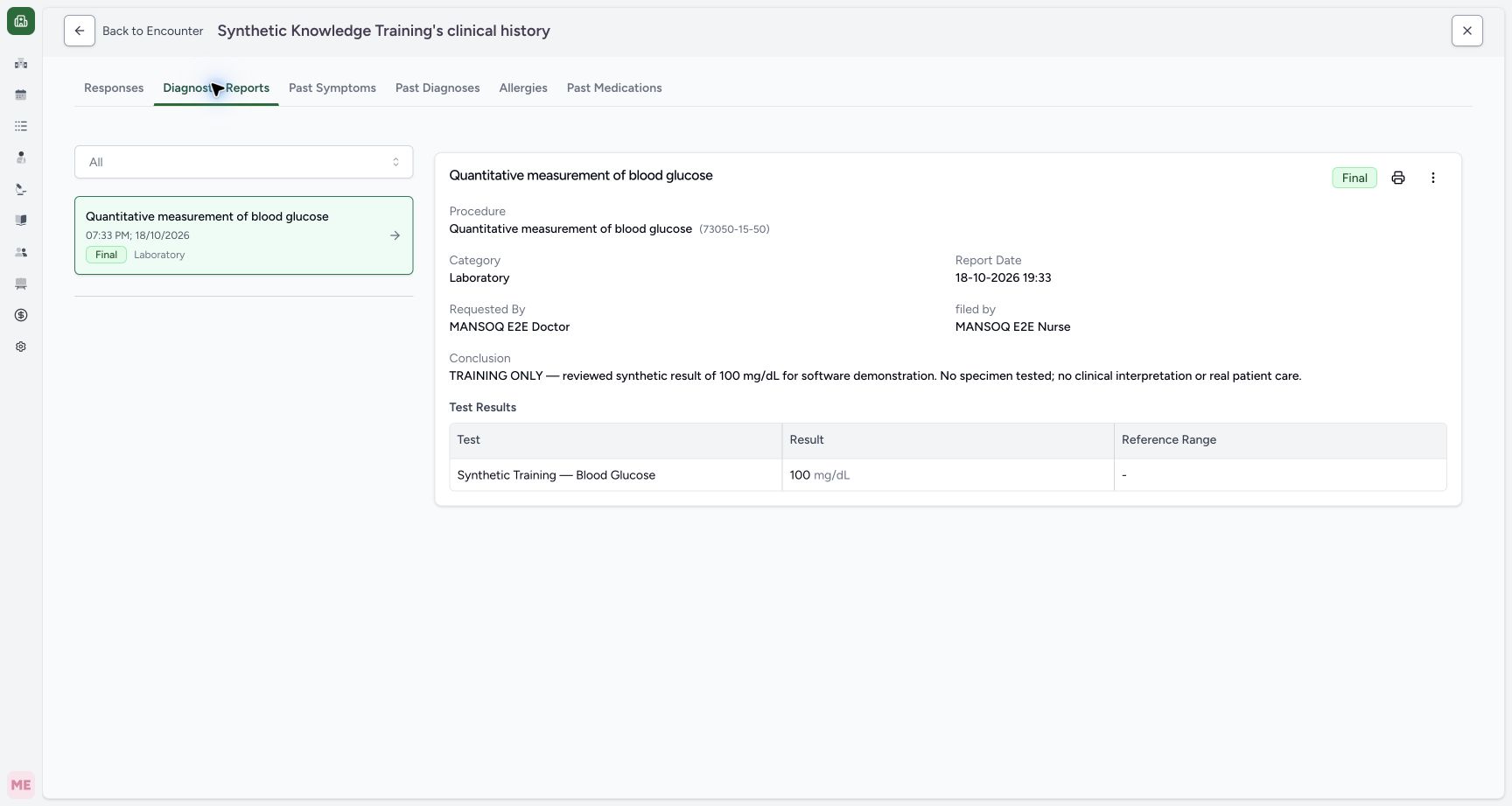
1234Capture details
Actual Nurse in the original pinned production UI, isolated synthetic Polyclinic estate. Form/response examples use one active Inpatient encounter. Diagnostic printing uses the same synthetic patient and an earlier encounter, not the active bedside encounter. These fictional values are software exercises, not patient assessment, specimen testing or clinical decisions. Doctor permissions are source-backed but this execution does not qualify every role or facility. Start: patient-wide Diagnostic Reports history shows the existing synthetic Final laboratory report and100mg/dL software example. Its source encounter differs from the currently active encounter; this is not evidence of a real specimen or test.
- Diagnostic Reports is patient history: Diagnostic Reports is patient history
- The selected report is Final: The selected report is Final
- Use the separate printer icon: Use the separate printer icon
- Check the actual result and unit: Check the actual result and unit
 123
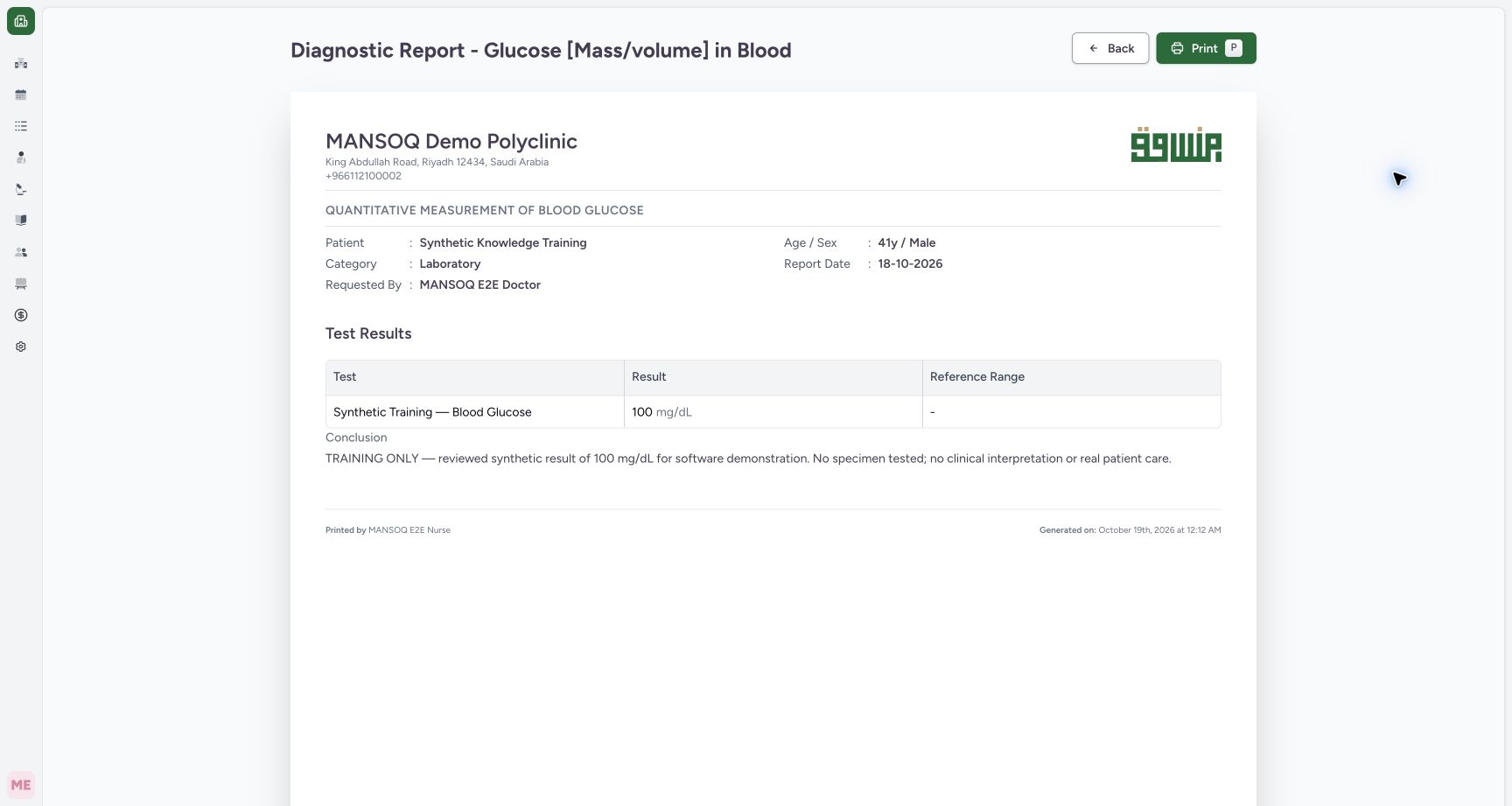
123Capture details
Actual Nurse in the original pinned production UI, isolated synthetic Polyclinic estate. Form/response examples use one active Inpatient encounter. Diagnostic printing uses the same synthetic patient and an earlier encounter, not the active bedside encounter. These fictional values are software exercises, not patient assessment, specimen testing or clinical decisions. Doctor permissions are source-backed but this execution does not qualify every role or facility. Success: actual normal diagnostic Print and Chrome Save as PDF produced a57963-byte1-page output; its exact text/hash and rendered page retain patient/requester/result/unit/conclusion/print actor. Independent normal API verifies original Final report and100mg/dL observation unchanged; no report attachment existed in this fixture.
- Exact result and unit retained: Exact result and unit retained
- Printed By identifies the print actor: Printed By identifies the print actor
- Complete nonclinical conclusion retained: Complete nonclinical conclusion retained
5 min read · Source baseline f6e9f05f
Verification and applicability
source reviewed
Check your installed version, permissions and local configuration.
Before you begin
- Authorized clinical-data access and the correct patient/encounter; printing read access differs from permission to submit or correct a response.
- The demonstrated bedside questionnaire is a finite synthetic training configuration; available forms and conditional fields depend on facility configuration.
1. Open the intended report in patient history
From the encounter actions, open See Clinical History → Diagnostic Reports and select the intended report card. Check its status, category, report date, requested/ filed-by names, conclusion and result. This example is an existing Final synthetic laboratory report from an earlier encounter for the same patient; entering patient history does not make it part of the currently selected bedside encounter. Use the separate printer icon next to Final. The adjacent three-dot Test Results menu opens observation history, not this print route.
1234Capture details
Actual Nurse in the original pinned production UI, isolated synthetic Polyclinic estate. Form/response examples use one active Inpatient encounter. Diagnostic printing uses the same synthetic patient and an earlier encounter, not the active bedside encounter. These fictional values are software exercises, not patient assessment, specimen testing or clinical decisions. Doctor permissions are source-backed but this execution does not qualify every role or facility. Start: patient-wide Diagnostic Reports history shows the existing synthetic Final laboratory report and100mg/dL software example. Its source encounter differs from the currently active encounter; this is not evidence of a real specimen or test.
- Diagnostic Reports is patient history: Diagnostic Reports is patient history
- The selected report is Final: The selected report is Final
- Use the separate printer icon: Use the separate printer icon
- Check the actual result and unit: Check the actual result and unit
2. Inspect the complete diagnostic preview
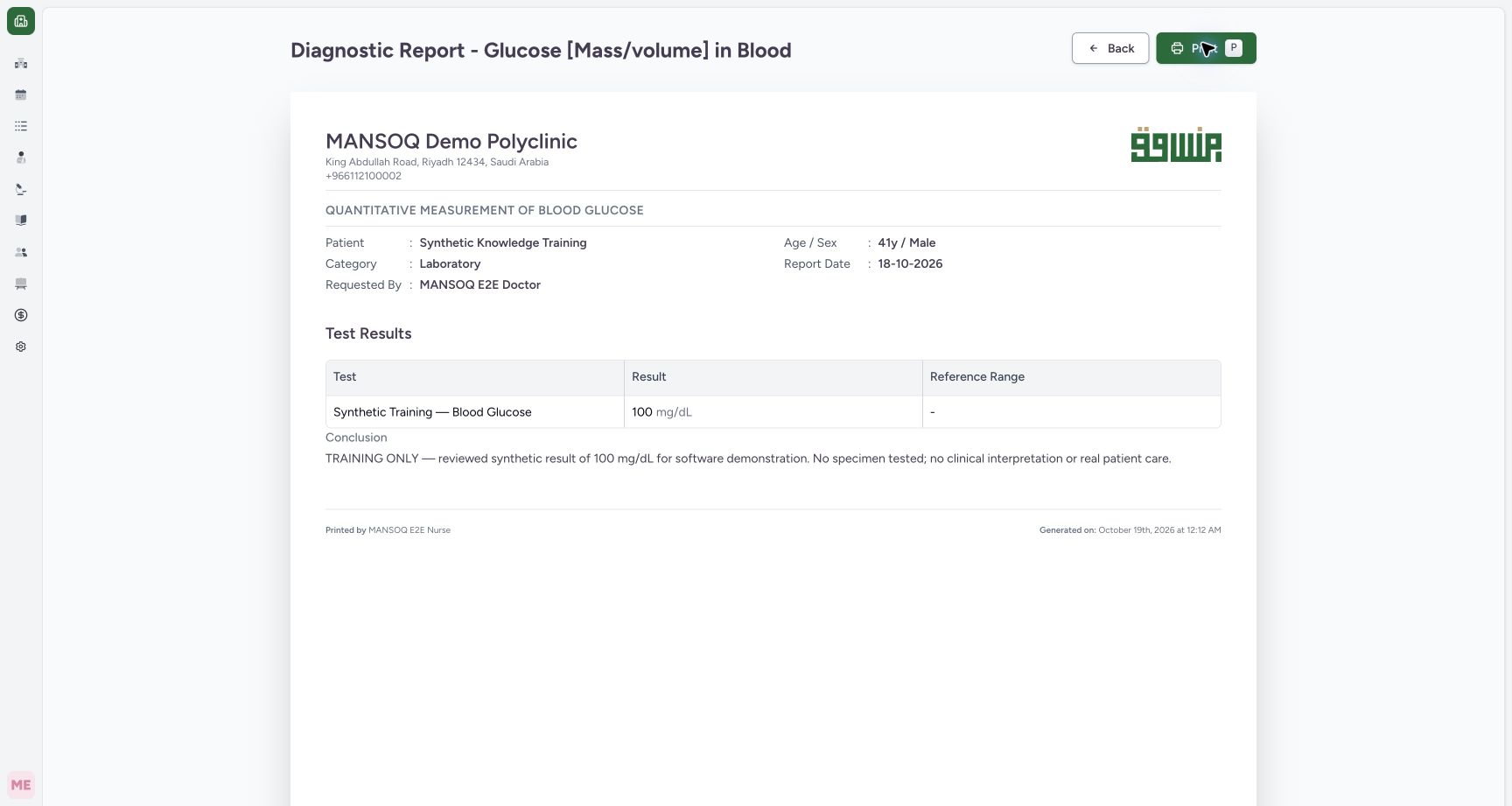
Confirm the facility, correct synthetic patient, category, report date and Requested By Doctor. Review 100 mg/dL, the displayed blank reference range and complete nonbinding conclusion: no specimen was tested and no clinical interpretation or real care occurred. Select Print only after confirming the correct report. Printing does not finalize, amend or clinically approve the report.
 1234
1234Capture details
Actual Nurse in the original pinned production UI, isolated synthetic Polyclinic estate. Form/response examples use one active Inpatient encounter. Diagnostic printing uses the same synthetic patient and an earlier encounter, not the active bedside encounter. These fictional values are software exercises, not patient assessment, specimen testing or clinical decisions. Doctor permissions are source-backed but this execution does not qualify every role or facility. Action: the existing report print view shows the patient, Laboratory category, report date, requester,100mg/dL result/unit and the explicit synthetic/no-specimen conclusion. Printed by Nurse is separate from requester and original report author.
- Print opens the native browser print dialog: Print opens the native browser print dialog
- Verify the correct synthetic patient: Verify the correct synthetic patient
- Verify 100 mg/dL and the blank reference range: Verify 100 mg/dL and the blank reference range
- Read the complete synthetic conclusion: Read the complete synthetic conclusion
3. Save and verify the actual diagnostic output
Use the normal browser print/save controls. The observed local Save as PDF produced one page with patient, requester, result and unit, complete conclusion and Printed by MANSOQ E2E Nurse. Printed By identifies the printing actor; it is distinct from the requester and report author. Exact saved bytes/text and rendered page were checked, and a separate normal API readback confirms Final status and the original100mg/dL observation unchanged. No report attachment existed in this fixture, so PDF/image attachment rendering remains unqualified.
123Capture details
Actual Nurse in the original pinned production UI, isolated synthetic Polyclinic estate. Form/response examples use one active Inpatient encounter. Diagnostic printing uses the same synthetic patient and an earlier encounter, not the active bedside encounter. These fictional values are software exercises, not patient assessment, specimen testing or clinical decisions. Doctor permissions are source-backed but this execution does not qualify every role or facility. Success: actual normal diagnostic Print and Chrome Save as PDF produced a57963-byte1-page output; its exact text/hash and rendered page retain patient/requester/result/unit/conclusion/print actor. Independent normal API verifies original Final report and100mg/dL observation unchanged; no report attachment existed in this fixture.
- Exact result and unit retained: Exact result and unit retained
- Printed By identifies the print actor: Printed By identifies the print actor
- Complete nonclinical conclusion retained: Complete nonclinical conclusion retained
Keep report access and attachment scope explicit
Diagnostic report retrieval uses the normal can_read_diagnostic_report authorization. Related file access is separately controlled. The source print page requests nonarchived supported PDF/image attachments with a100-record limit, but this synthetic report has none. The successful one-page example does not qualify attached PDFs/images, large attachment sets, every report status or every role/facility.
1234Capture details
Actual Nurse in the original pinned production UI, isolated synthetic Polyclinic estate. Form/response examples use one active Inpatient encounter. Diagnostic printing uses the same synthetic patient and an earlier encounter, not the active bedside encounter. These fictional values are software exercises, not patient assessment, specimen testing or clinical decisions. Doctor permissions are source-backed but this execution does not qualify every role or facility. Start: patient-wide Diagnostic Reports history shows the existing synthetic Final laboratory report and100mg/dL software example. Its source encounter differs from the currently active encounter; this is not evidence of a real specimen or test.
- Diagnostic Reports is patient history: Diagnostic Reports is patient history
- The selected report is Final: The selected report is Final
- Use the separate printer icon: Use the separate printer icon
- Check the actual result and unit: Check the actual result and unit
123Capture details
Actual Nurse in the original pinned production UI, isolated synthetic Polyclinic estate. Form/response examples use one active Inpatient encounter. Diagnostic printing uses the same synthetic patient and an earlier encounter, not the active bedside encounter. These fictional values are software exercises, not patient assessment, specimen testing or clinical decisions. Doctor permissions are source-backed but this execution does not qualify every role or facility. Success: actual normal diagnostic Print and Chrome Save as PDF produced a57963-byte1-page output; its exact text/hash and rendered page retain patient/requester/result/unit/conclusion/print actor. Independent normal API verifies original Final report and100mg/dL observation unchanged; no report attachment existed in this fixture.
- Exact result and unit retained: Exact result and unit retained
- Printed By identifies the print actor: Printed By identifies the print actor
- Complete nonclinical conclusion retained: Complete nonclinical conclusion retained
Source evidence
References are pinned to the private MANSOQ source repository. Repository access is required to open these links.
- repositories/platform/mansoq-web/src/pages/Encounters/tabs/diagnostic-reports.tsx:178 · f6e9f05f
- repositories/platform/mansoq-web/src/pages/Facility/services/diagnosticReports/DiagnosticReportPrint.tsx:119 · f6e9f05f
- repositories/platform/mansoq-core/mansoq/emr/api/viewsets/diagnostic_report.py:107 · f6e9f05f
- repositories/platform/mansoq-web/src/components/Common/PrintFooter.tsx:41 · f6e9f05f