 MANSOQ
 Scheduling
Maintain a private practitioner template and add a separately reviewed session
Edit template metadata, recover reversed validity dates, preserve the existing session and use the slot-duration calculator when adding another availability.
Current source · Actual existing synthetic Doctor own-Clinic metadata update, reversed-date rejection, additional-session validation and normal creation. Two independent same-role normal detail GET200 receipts qualify exact persisted configuration. No patient booking, charge assignment, deletion, exception, public exposure or all-role/facility schedule access test is claimed. · 10 min read
Before you begin
- Use an authorized practitioner/scheduling account and confirm the selected facility and resource. This walkthrough used an existing synthetic Doctor in its assigned Clinic, with a separately configured private template. It does not establish every practitioner, role or facility boundary.
- Review approved validity dates, session times, recurrence, per-slot capacity and visibility before saving. There are no patient bookings or charge assignments in this fixture.
1. Open the existing template for the correct practitioner
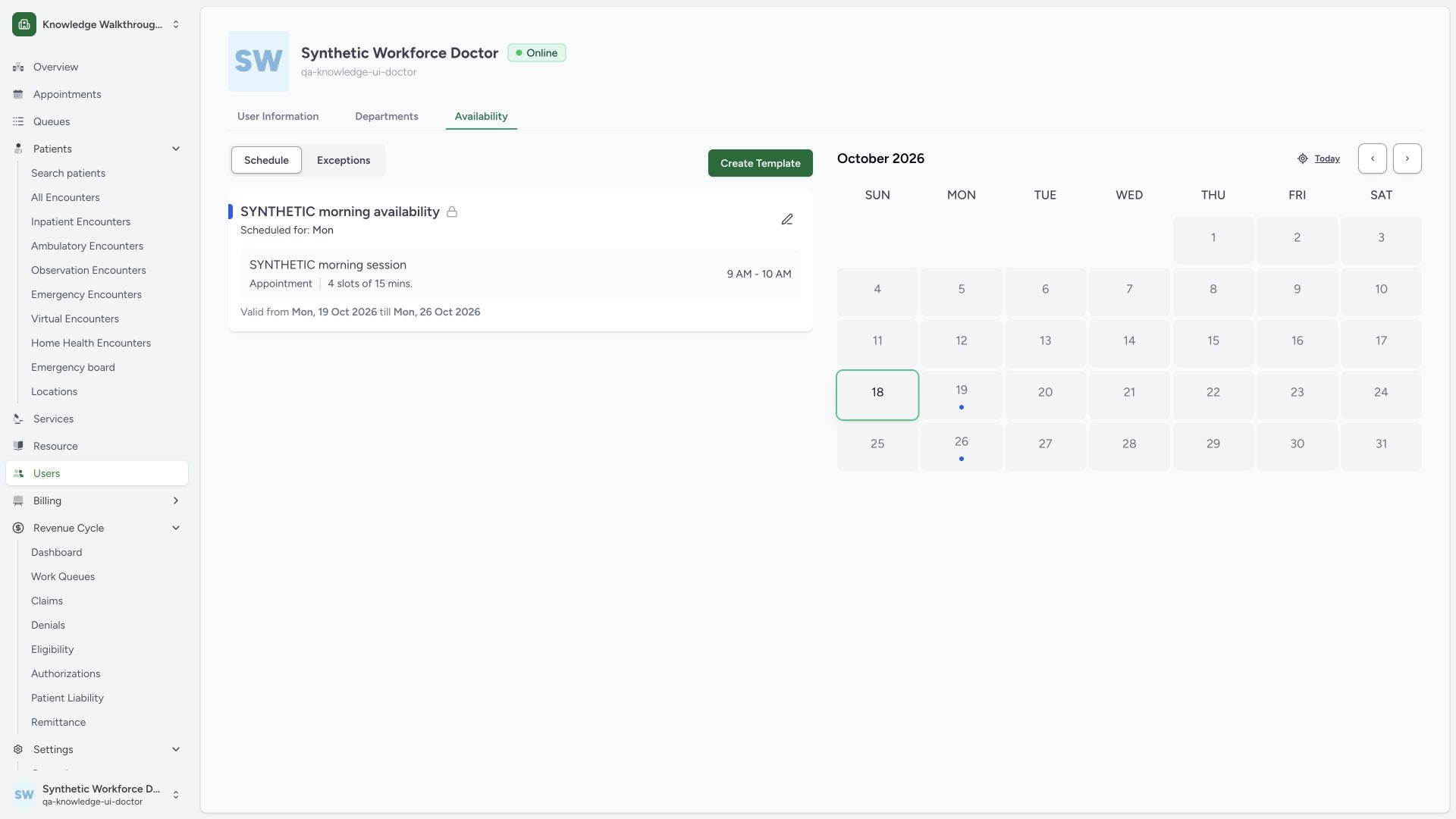
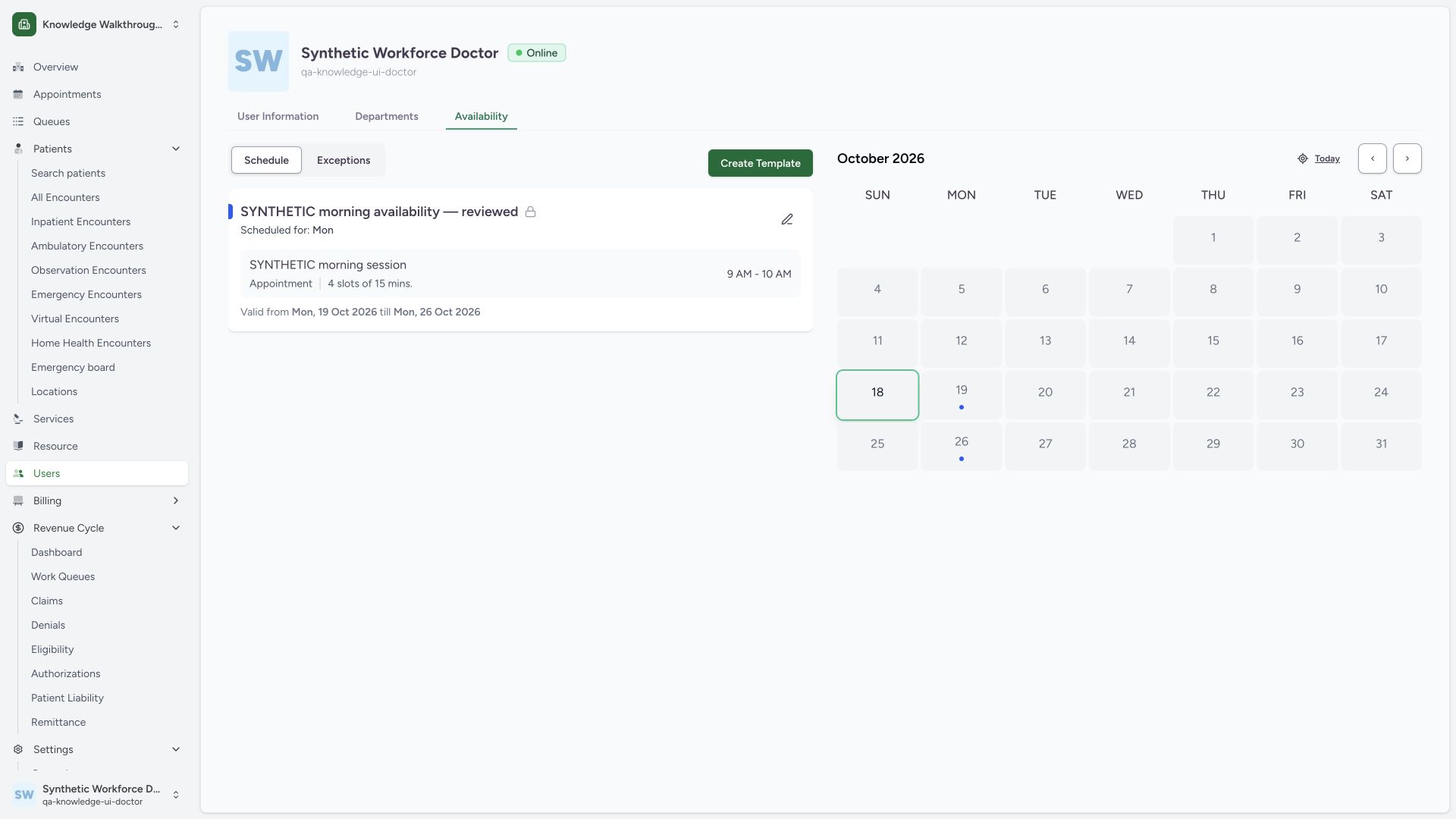
In Availability, confirm the practitioner identity and facility, then read the existing private template card. The example begins with one Monday09:00–10:00 session, four15minute slots and validity19–26October2026. Use the card’s pencil control to edit this existing template.
 123
123- Own practitioner identity: Confirm the selected practitioner and facility.
- Existing private template: Read the card identity and adjacent lock before editing.
- Edit existing template: Template metadata maintenance is separate from creating another template.
2. Keep template metadata separate from existing sessions
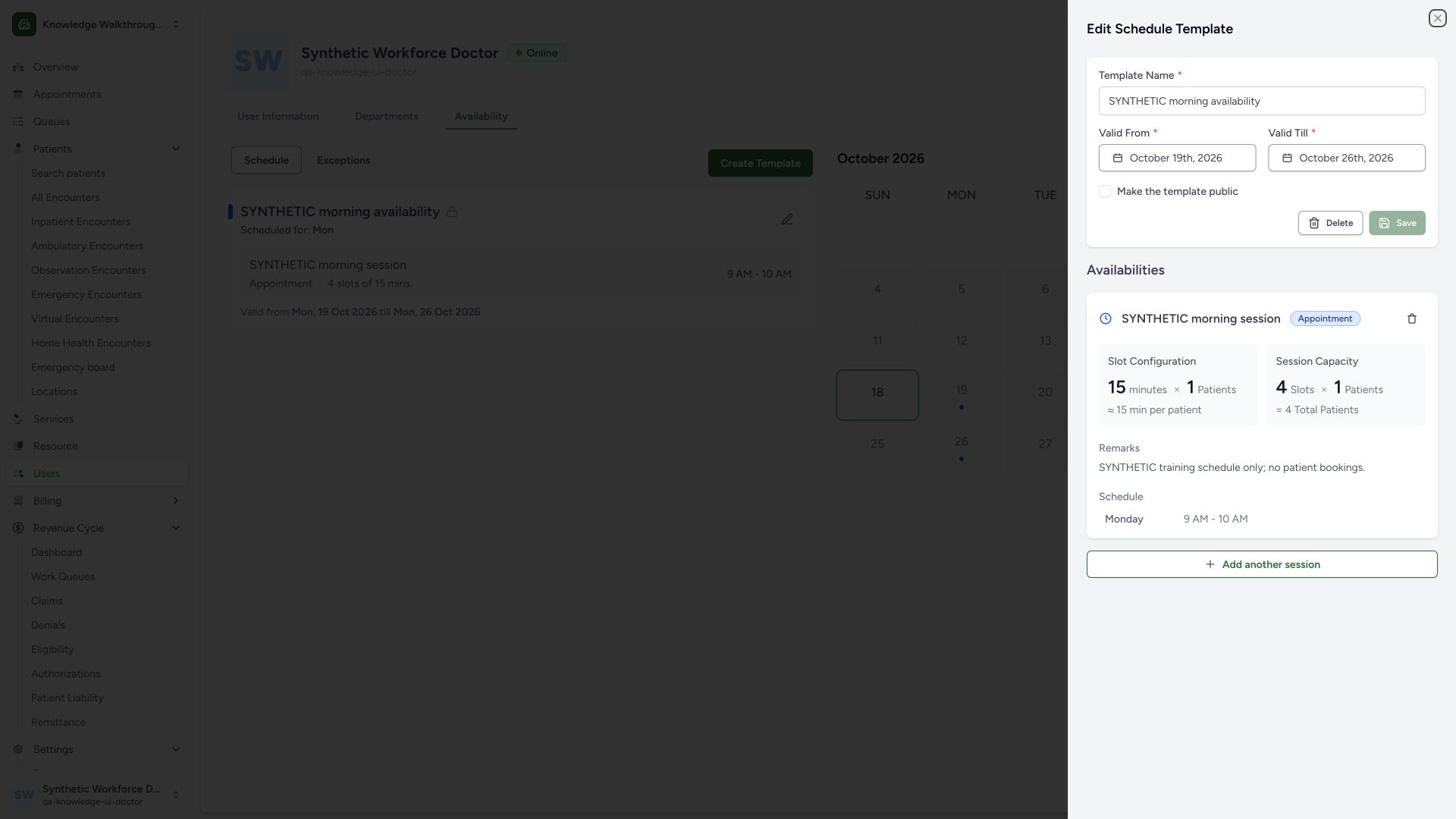
The top form edits Template Name, Valid From, Valid Till and public visibility. Its Save button is disabled before metadata changes. The Availabilities section separately displays the existing session’s duration, patients per slot, total configured capacity, remarks and recurrence. The pictured existing-session panel has no editable time/capacity fields.
 1234
1234- Template metadata: This title is separate from the session title below.
- Private visibility retained: Do not enable public self-booking as part of ordinary title maintenance.
- Unchanged Save disabled: Template metadata must change before saving.
- Existing sessions: Existing session details are displayed separately; no session-edit fields are shown.
3. Correct reversed validity dates
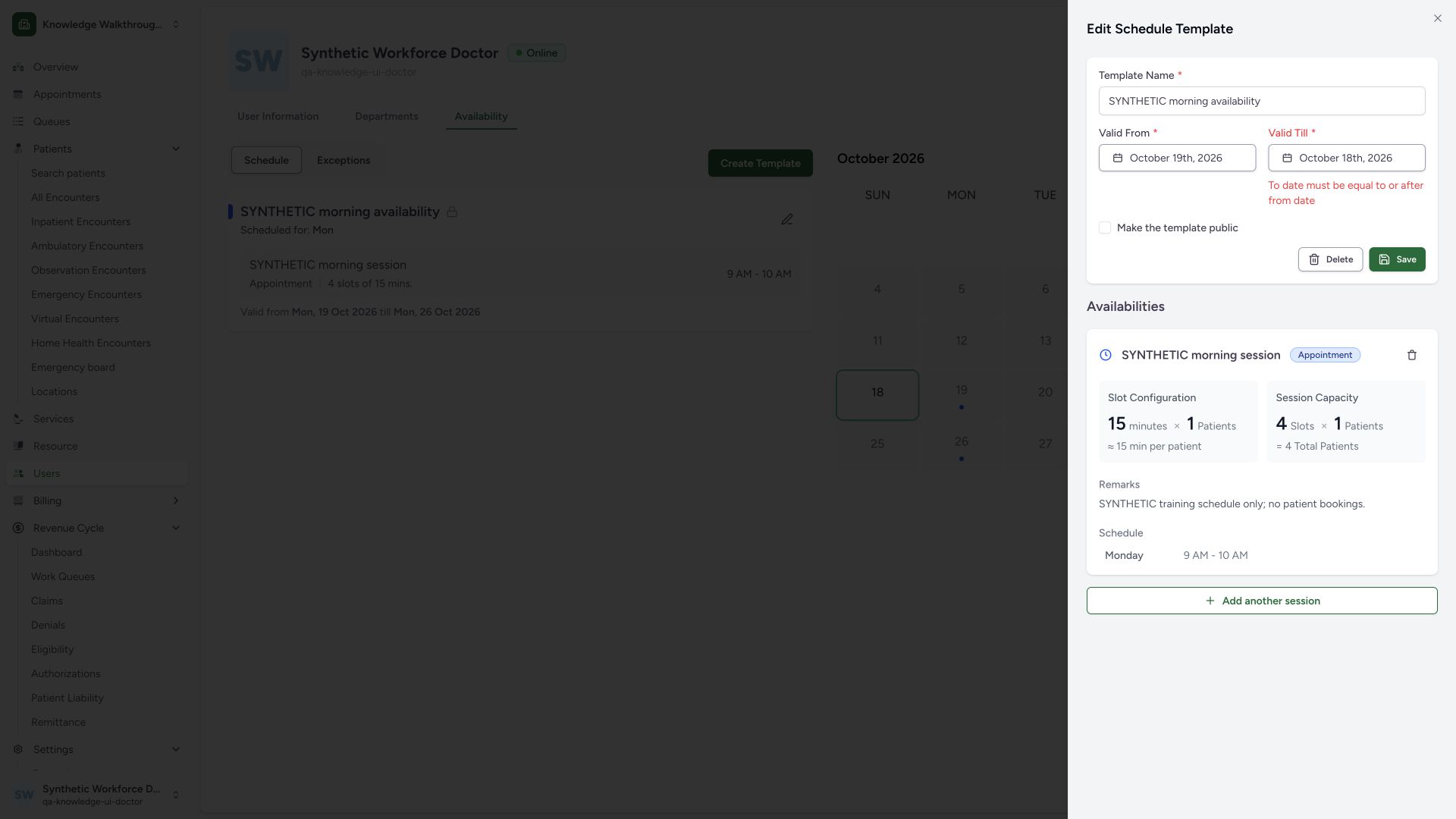
The normal submission with Valid From19October and Valid Till18October returns To date must be equal to or after from date. Restore the approved end date on or after the start. This rejected draft did not persist invalid validity dates.
 123
123- Validity start: This template starts19October.
- Invalid earlier end: Correct ValidTill to an approved date on or after ValidFrom.
- Date order validation: The normal form rejects reversed validity dates.
4. Save and verify a metadata-only update
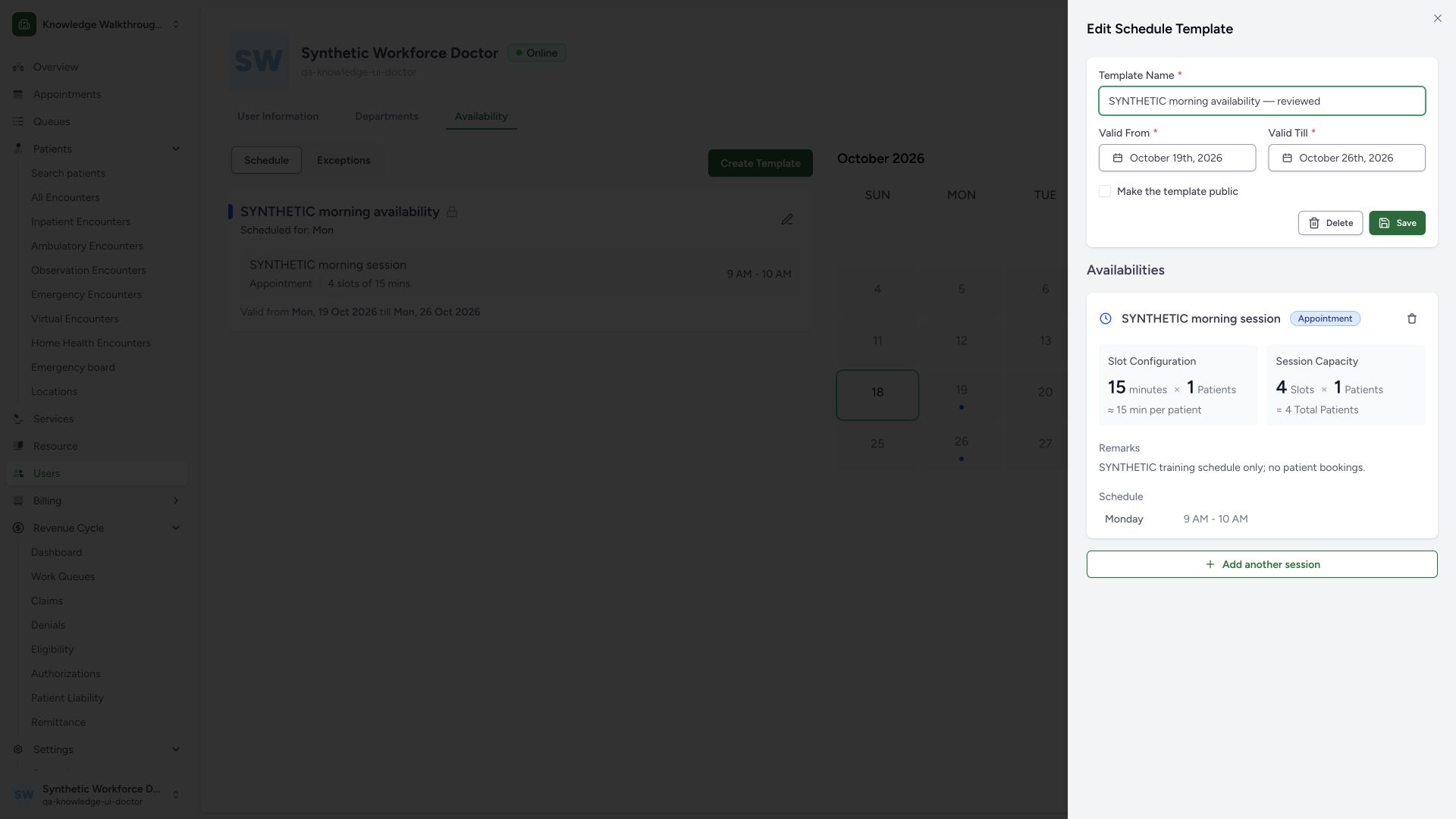
This example restores the original19–26October validity and changes only the template title to SYNTHETIC morning availability — reviewed. Make the template public remains unchecked. Select the top Save for template metadata, then close the editor and verify the renamed private card. A same-Doctor normal detail GET returned200 and confirmed original validity instants and the complete original session unchanged.
 1234
1234- Reviewed template name: This update changes template title only.
- Original validity restored: The invalid earlier end date was corrected before saving.
- Private remains unchecked: No public self-booking exposure is enabled.
- Save metadata: This form saves template metadata, not the session details below.
 12
12- Saved reviewed title: Read the saved card after closing the editor.
- Original session retained: Template title update does not edit session timing or capacity.
5. Open the separate new-session form and resolve its required fields
Reopen the saved template and choose Add another session, as shown in the existing-session view. A blank Create submission produces name/time/weekday messages in the separate New Session form. Complete the session title, native start/end time controls and intended weekday before retrying. That rejected branch did not append an availability.
1234- Template metadata: This title is separate from the session title below.
- Private visibility retained: Do not enable public self-booking as part of ordinary title maintenance.
- Unchanged Save disabled: Template metadata must change before saving.
- Existing sessions: Existing session details are displayed separately; no session-edit fields are shown.
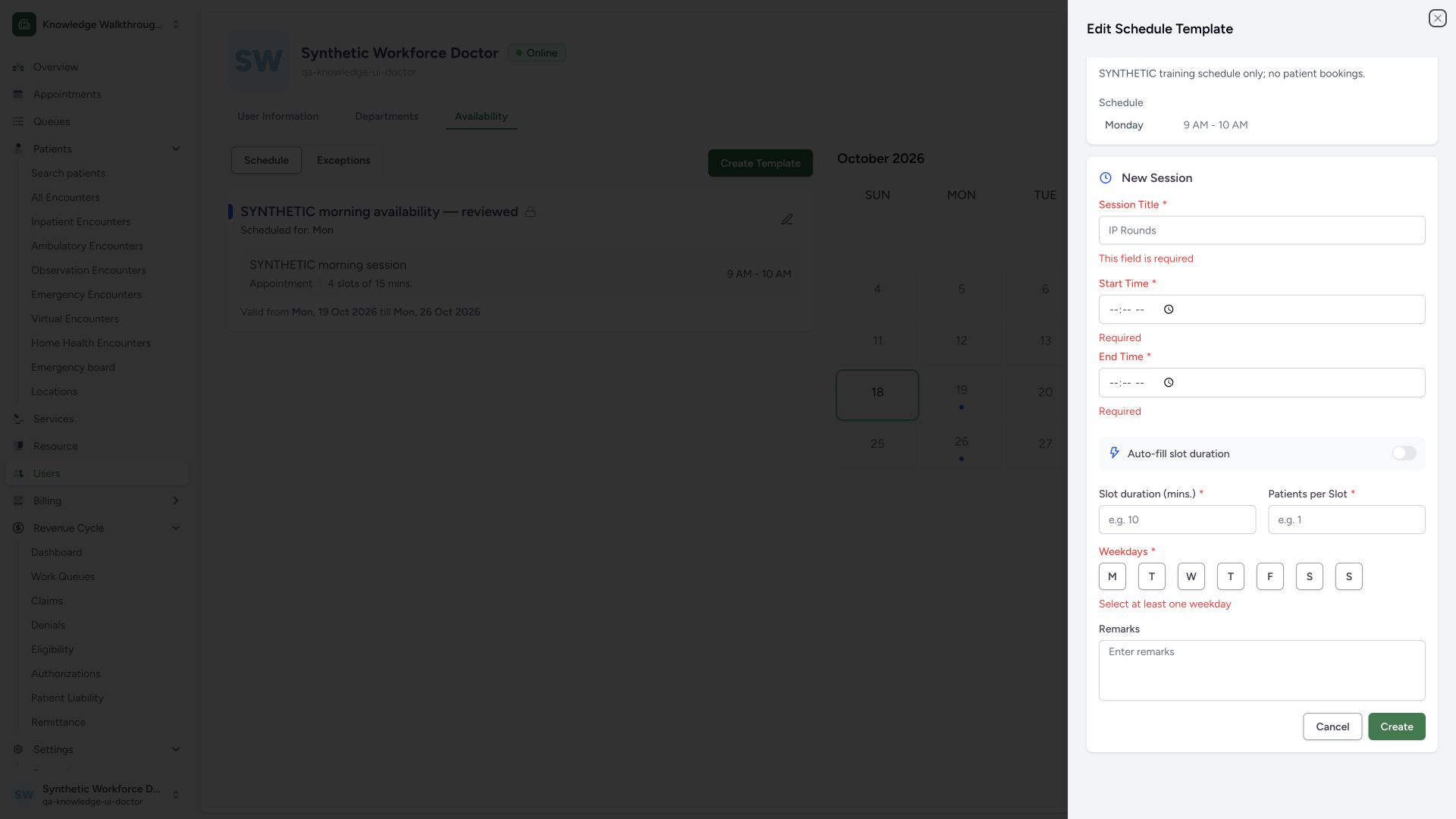 123
123- Session title required: This names a new availability, separate from template title.
- Start time required: Complete native time input before retrying.
- Weekday required: Choose the intended recurrence day.
6. Calculate duration and create the reviewed additional session
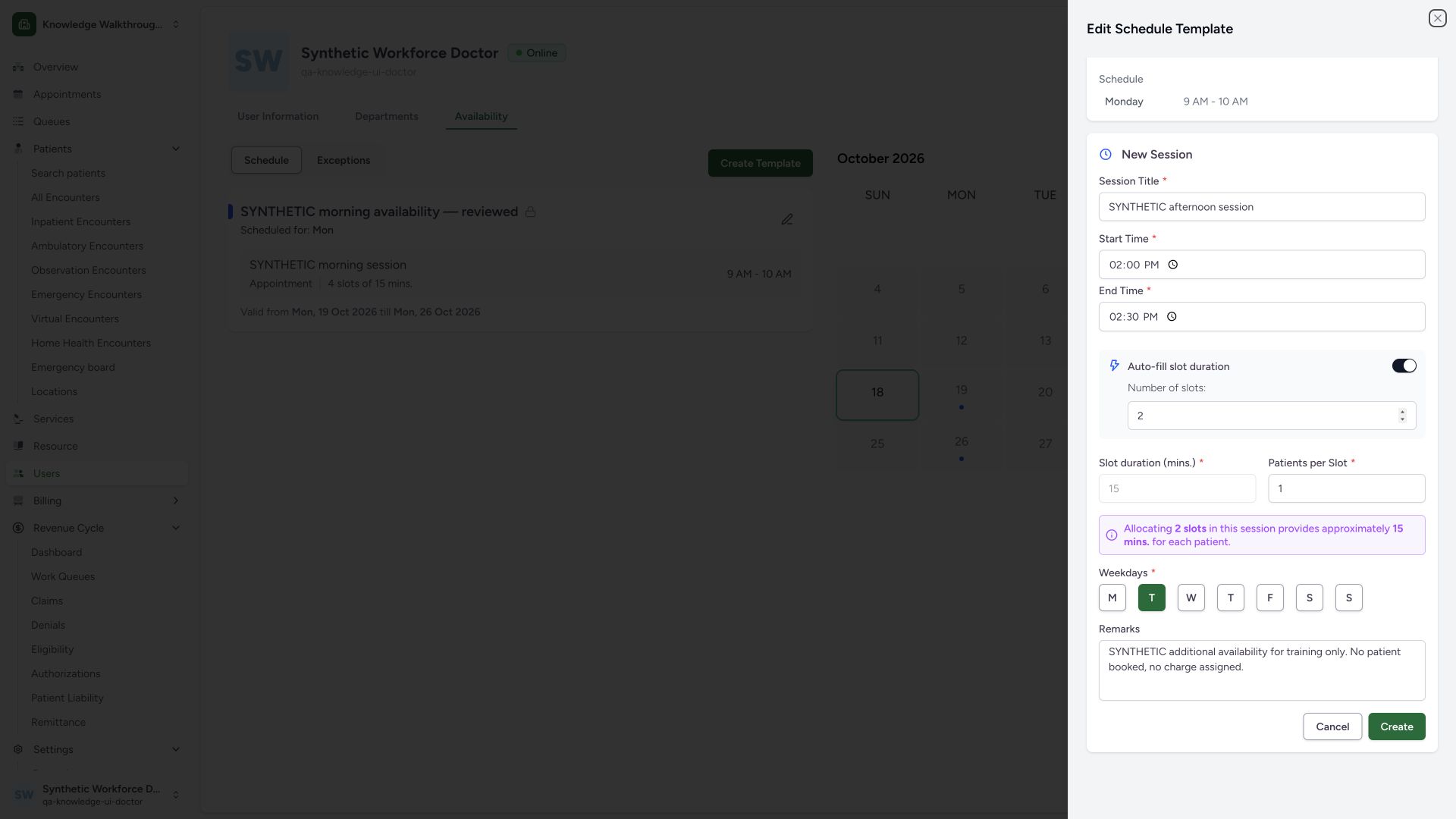
The prepared example is SYNTHETIC afternoon session, Tuesday14:00–14:30. Enable Auto-fill slot duration and set Number of slots to2. The calculated Slot duration is15minutes and becomes disabled for direct editing; Patients per Slot remains1. Review the first T for Tuesday, the time range, capacity and training notes, then choose the new-session Create button. This appends a session separately from the top metadata Save.
 123456
- Session time range: Start14:00 and end14:30 are separate from template validity dates.
- Auto-fill enabled: Use the calculator for duration rather than editing the disabled calculated field.
- Two slots: Thirty minutes divided into2slots gives15minutes each.
- One patient per slot: Review actual intended capacity independently of duration.
- Tuesday recurrence: The second T is Thursday; verify the intended day rather than its initial alone.
- Create new session: This appends one availability; it does not edit the existing Monday session.
7. Verify the appended session and retained original
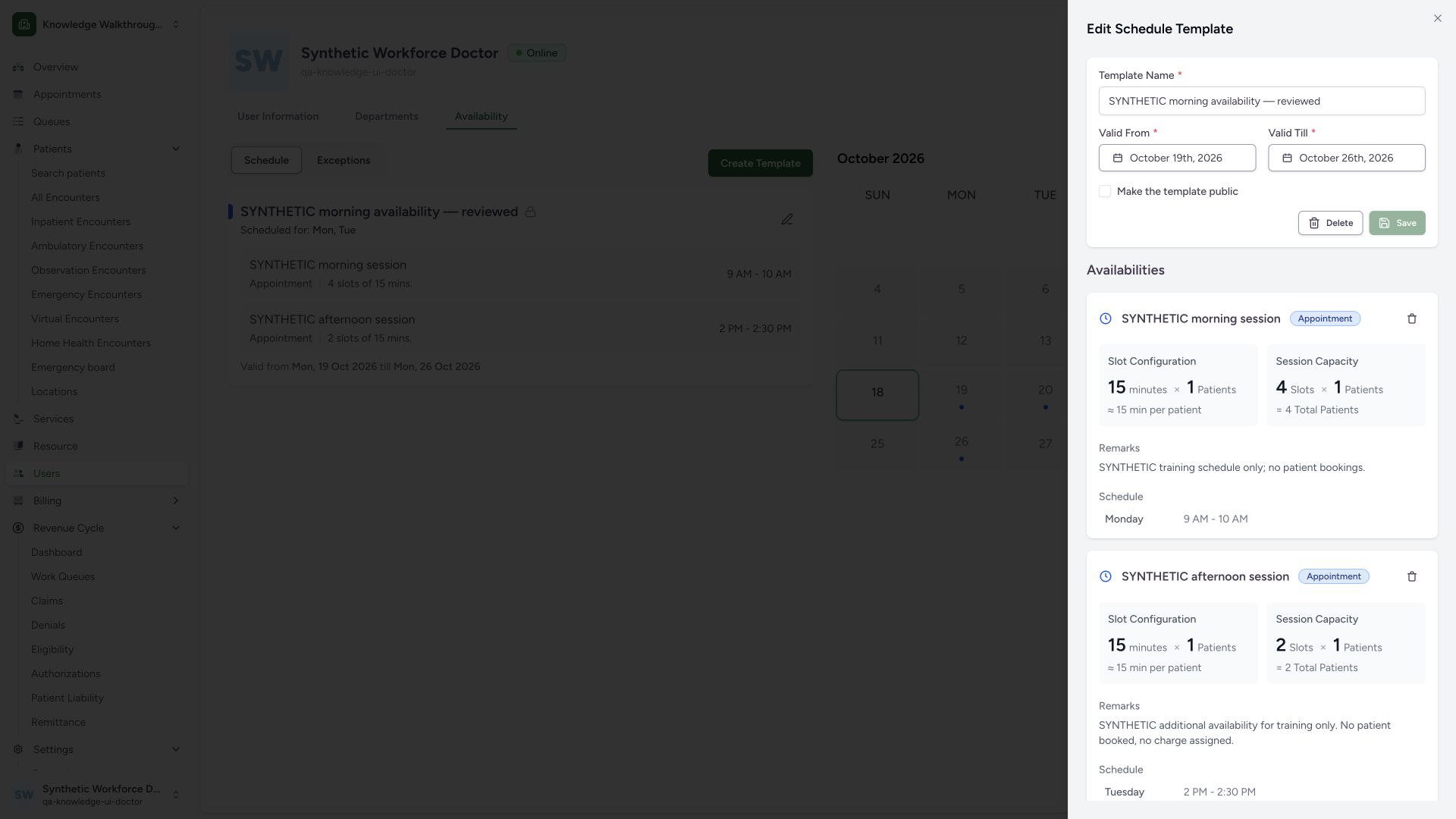
The saved editor displays both sessions. The new Tuesday session has15minutes×1patient per slot and2total configured capacity, alongside the original Monday session. The template remains private. Same-Doctor normal detail GET returned200 and matched the exact new availability, unchanged original session and unchanged validity. Capacity describes configuration, not actual patients.
 1234
1234- Private template retained: The additional availability does not expose the template publicly.
- Saved duration and per-slot capacity: 15minutes ×1patient per slot persisted.
- Two-slot session capacity: This capacity is configuration, not two actual patients.
- Saved Tuesday recurrence: Check14:00–14:30 beside the weekday.
8. Review the final card and dates in the calendar
Close the editor. The saved card lists both Monday and Tuesday sessions; the calendar now includes20October for the Tuesday session within19–26October validity, alongside the original Monday dates. Review the month and validity rather than assuming all future Tuesdays apply. Calendar markers do not represent booked appointments, and this walkthrough created none.
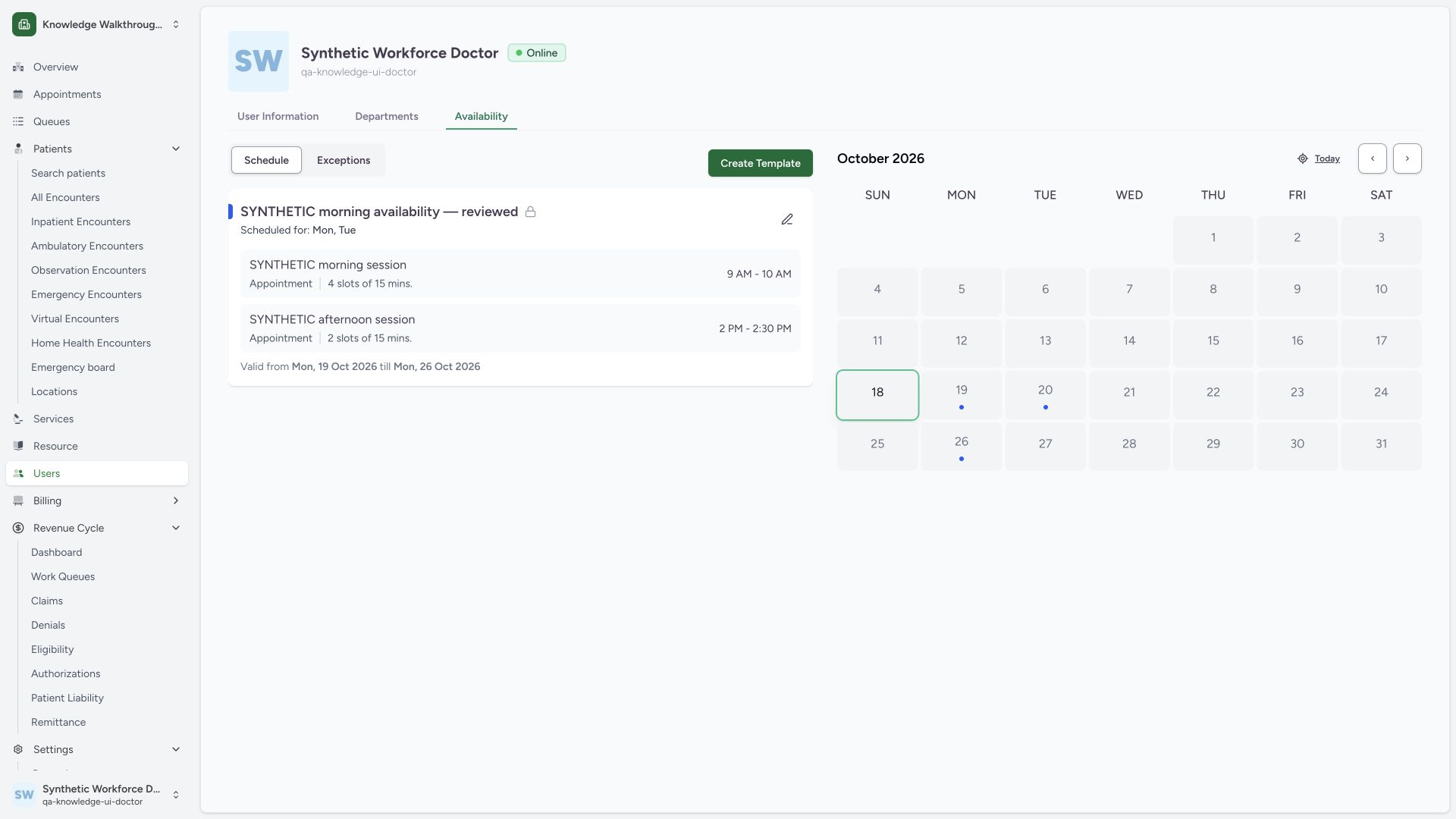 123
123- Saved template: Private lock and reviewed title remain on the saved card.
- Additional session saved: Review2slots of15minutes and14:00–14:30 separately from the original session.
- Tuesday within validity: Calendar marker falls on20October; the template ends26October.
Current existing-session controls
The pinned existing AvailabilityEditor renders the session details and a Delete control, but no update form for existing session times, capacity or remarks. NewAvailabilityCard appends another session. Do not describe a nonexistent existing-session Save workflow. This guide did not use Delete or any permanent-removal confirmation.
Current session-type selector limitation
Although the new-session schema names appointment/open/closed types, the visible selector block is commented out in this audited editor and the new form defaults to appointment. The pictured workflow therefore creates only an Appointment availability. A Closed or Open selection cannot be taught through a control that is absent from this current form.
Authorization follows the selected resource
The backend resolves practitioner schedule permissions using the practitioner’s facility department memberships and the target facility root. It separately checks schedule read and write permissions. This observed own-Doctor branch does not grant arbitrary access to other practitioners or facilities.
Native time inputs and capacity
Complete the full native time entry and confirm validation messages clear before submission. In this session, completing the native controls cleared their earlier Required feedback. The slot calculator divides the selected time interval by the number of slots; review patients per slot separately. Public template visibility, pricing, exceptions and actual booking each need their own workflow.
Troubleshooting
The end date is rejected
Read both validity fields, correct the approved end date so it is on or after the start and retry the metadata Save.
The new-session time still says Required
Complete the native time control, including its displayed AM/PM segment where present, and confirm the final time and message before retrying. A visually partial time is not a completed valid field.
I cannot edit an existing session’s time here
The current editor displays existing session details without an update form. Follow the deployment’s approved correction process; do not invent an edit button or delete an existing session merely to follow this guide.
Source evidence
References are pinned to the private MANSOQ source repository. Repository access is required to open these links.
- repositories/platform/mansoq-web/src/pages/Scheduling/ScheduleTemplates.tsx:175 · f6e9f05f
- repositories/platform/mansoq-web/src/pages/Scheduling/components/EditScheduleTemplateSheet.tsx:157 · f6e9f05f
- repositories/platform/mansoq-web/src/pages/Scheduling/components/EditScheduleTemplateSheet.tsx:173 · f6e9f05f
- repositories/platform/mansoq-web/src/pages/Scheduling/components/EditScheduleTemplateSheet.tsx:189 · f6e9f05f
- repositories/platform/mansoq-web/src/pages/Scheduling/components/EditScheduleTemplateSheet.tsx:216 · f6e9f05f
- repositories/platform/mansoq-web/src/pages/Scheduling/components/EditScheduleTemplateSheet.tsx:359 · f6e9f05f
- repositories/platform/mansoq-web/src/pages/Scheduling/components/EditScheduleTemplateSheet.tsx:601 · f6e9f05f
- repositories/platform/mansoq-web/src/pages/Scheduling/components/EditScheduleTemplateSheet.tsx:665 · f6e9f05f
- repositories/platform/mansoq-web/src/pages/Scheduling/components/EditScheduleTemplateSheet.tsx:708 · f6e9f05f
- repositories/platform/mansoq-web/src/pages/Scheduling/components/EditScheduleTemplateSheet.tsx:746 · f6e9f05f
- repositories/platform/mansoq-web/src/pages/Scheduling/components/EditScheduleTemplateSheet.tsx:845 · f6e9f05f
- repositories/platform/mansoq-web/src/MansoqUI/interactive/WeekdayCheckbox.tsx:7 · f6e9f05f
- repositories/platform/mansoq-web/src/types/scheduling/scheduleApi.ts:57 · f6e9f05f
- repositories/platform/mansoq-core/mansoq/security/authorization/scheduling.py:51 · f6e9f05f