 MANSOQ
 Clinical care
Rename, archive and find encounter files
Review name changes, cancel an archive, correct its reason, read the retained audit metadata and distinguish active, archived and filtered empty results.
9 min read · Source baseline f6e9f05f
Verification and applicability
source reviewed
Check your installed version, permissions and local configuration.
Before you begin
- Verify the patient, selected encounter, clinical documentation purpose and applicable write/read permission. This guide was executed as Nurse in an active Inpatient encounter at a synthetic Polyclinic; other roles and facilities require their own qualification.
- Use authorized documents and follow the facility’s approved process. All pictured records and file contents are explicitly synthetic, nonbinding software exercises.
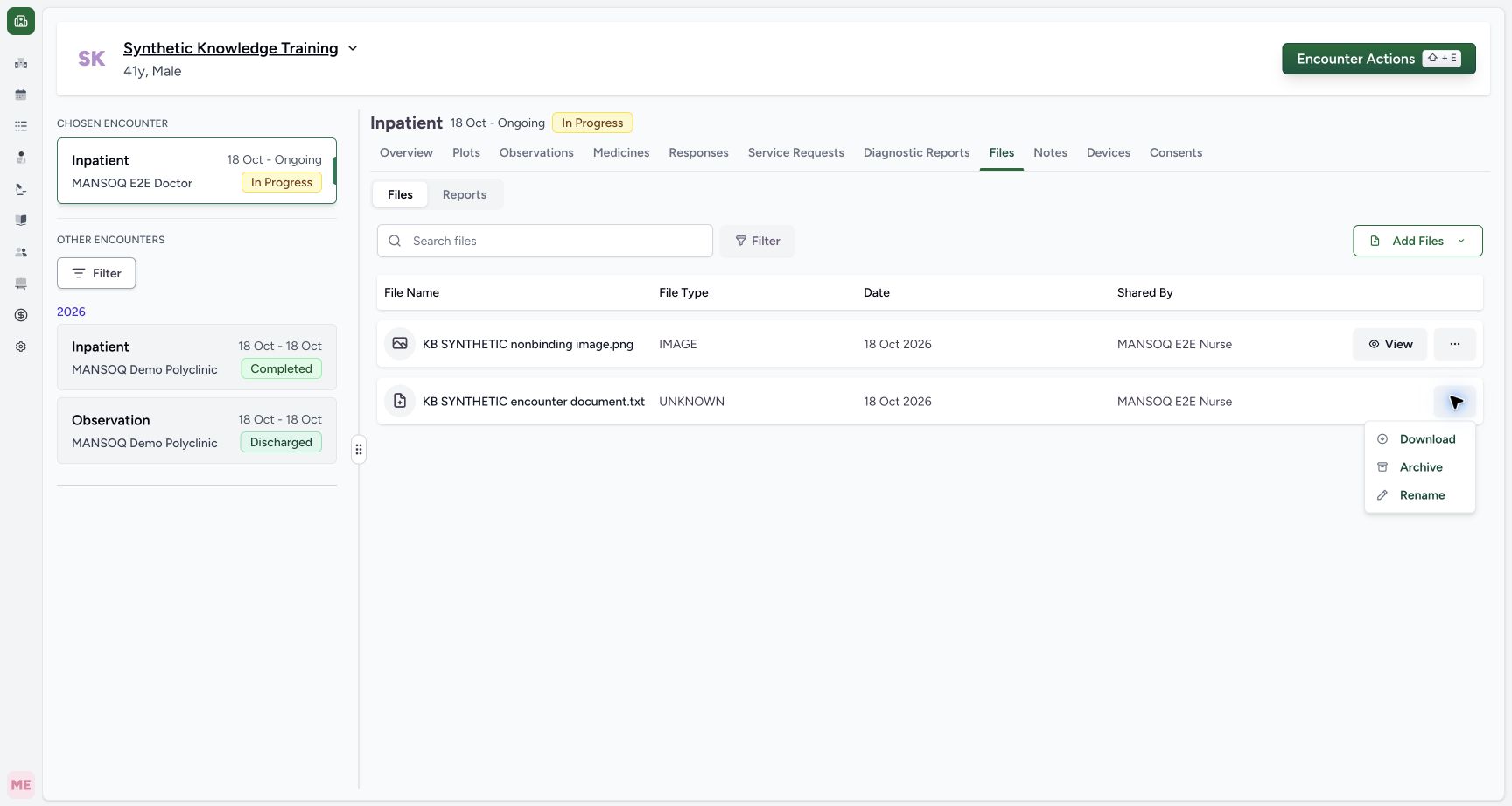
1. Open Rename for the intended active file
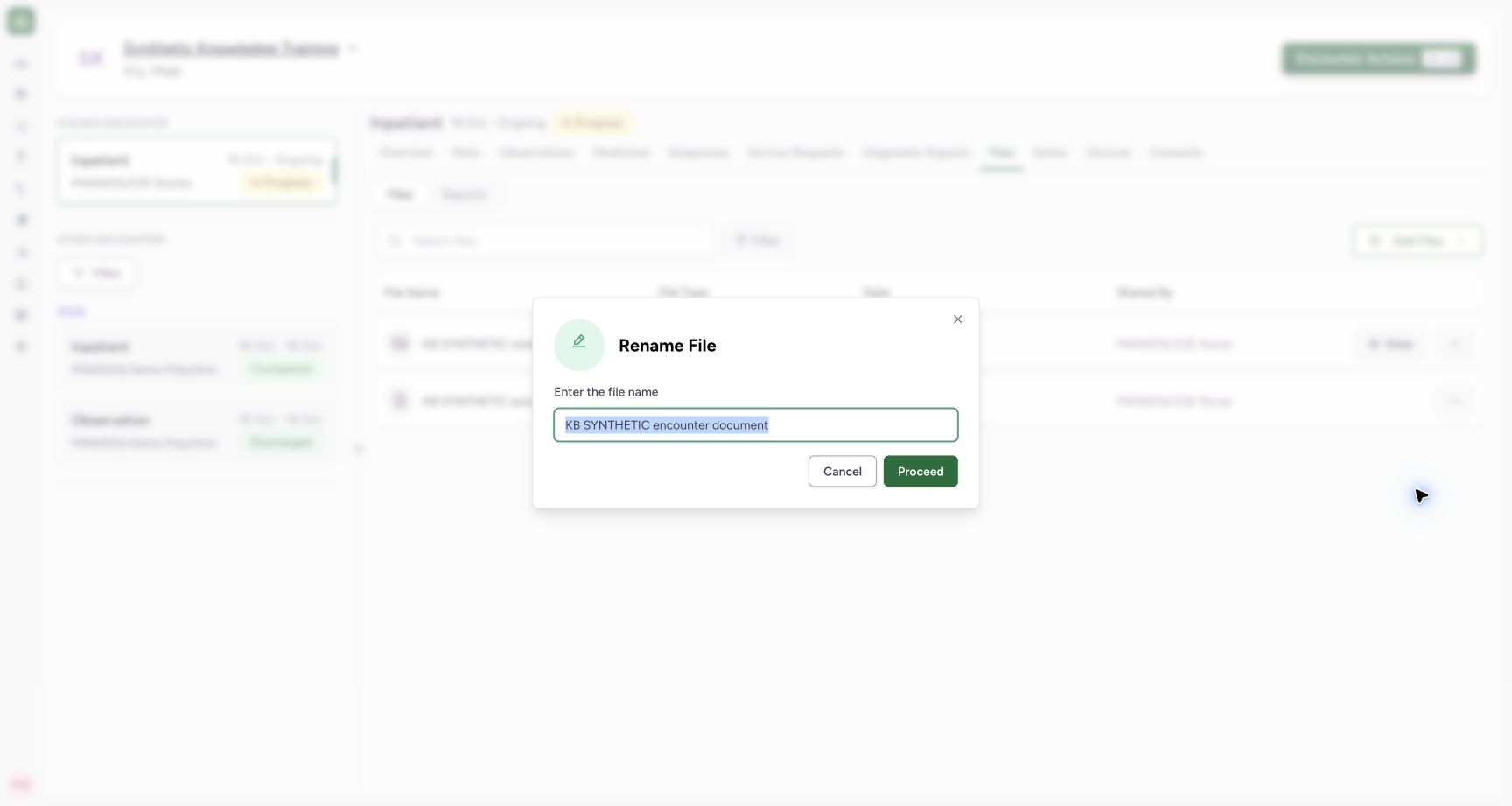
Open the intended file’s three-dot actions and choose Rename. Check the current display name in Rename File. This changes the saved display name; it does not replace the underlying document.
 123
123Capture details
Actual Nurse in the original pinned production UI, isolated synthetic active Inpatient encounter at a Polyclinic. These are harmless software training files and nonbinding Research/Deny examples, not real clinical documents, patient decisions, signatures or treatment authorization. Other role, facility, hardware and failure branches remain unqualified. Action: Text file actions offer Download, Archive and Rename; this accepted TXT has no inline View button in the original release.
- Download the actual stored file: Download the actual stored file
- Change display name without replacing bytes: Change display name without replacing bytes
- Archive with an audit reason: Archive with an audit reason
 12
12Capture details
Actual Nurse in the original pinned production UI, isolated synthetic active Inpatient encounter at a Polyclinic. These are harmless software training files and nonbinding Research/Deny examples, not real clinical documents, patient decisions, signatures or treatment authorization. Other role, facility, hardware and failure branches remain unqualified. Action: Rename File loads the current display name for the selected TXT file; changing it does not replace the stored bytes or original extension.
- Review the current display name: Review the current display name
- Save only the reviewed name change: Save only the reviewed name change
2. Enter and verify the new display name
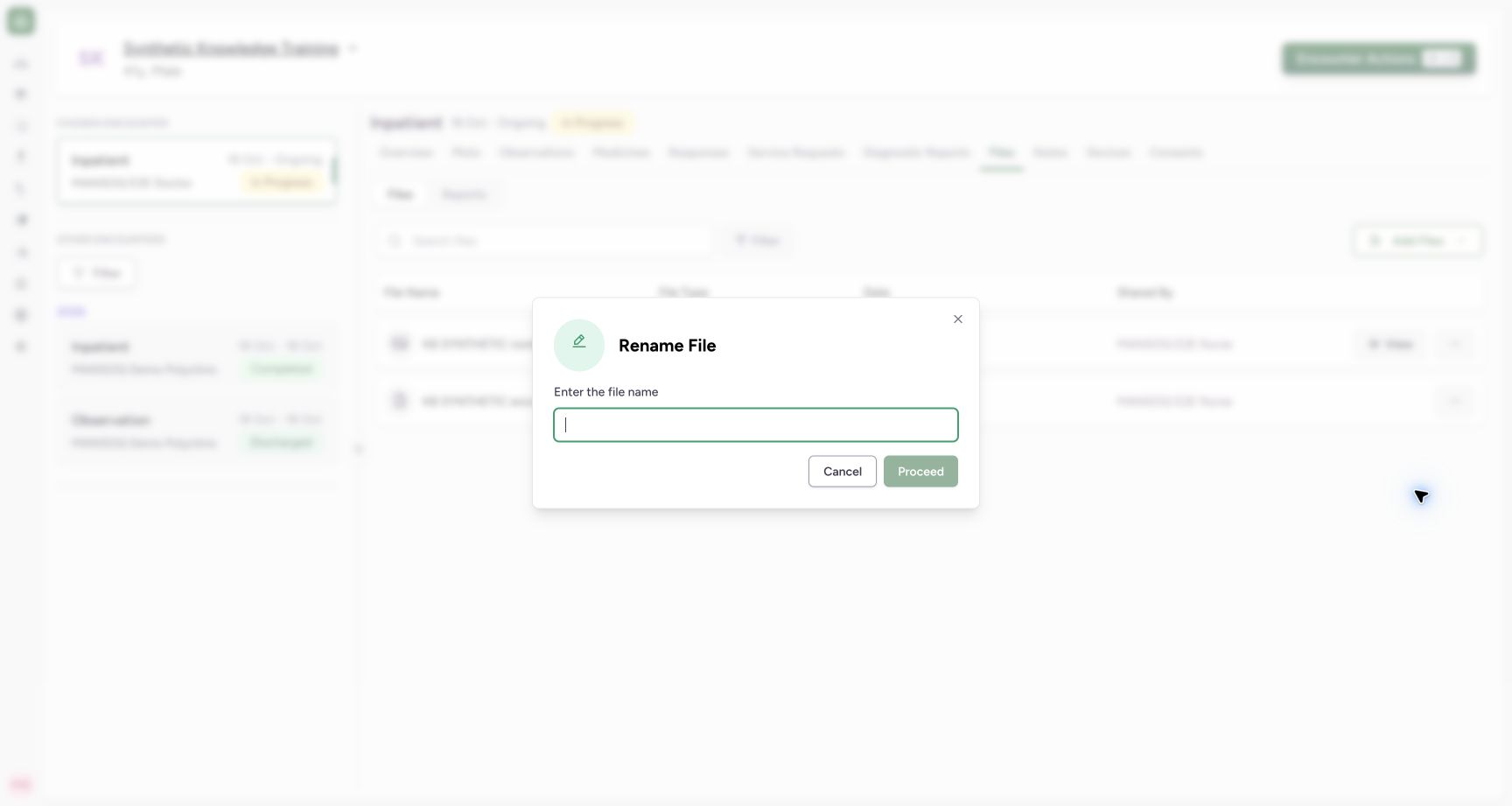
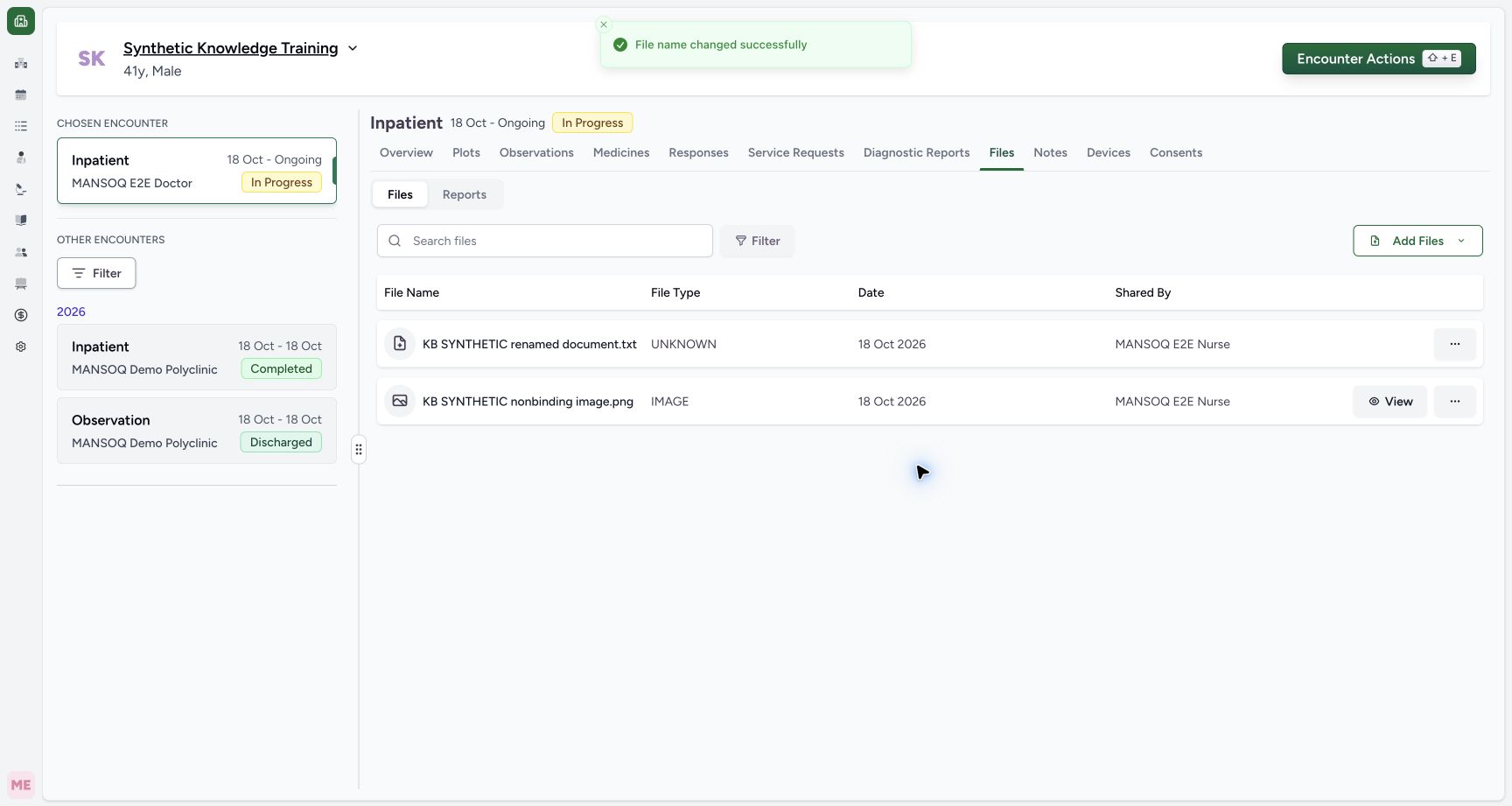
A completely blank name disables Proceed. Enter the reviewed new name and select Proceed, then verify the changed row. The example becomes KB SYNTHETIC renamed document.txt. Independent readback confirms the same file ID and exact unchanged original bytes.
 12
12Capture details
Actual Nurse in the original pinned production UI, isolated synthetic active Inpatient encounter at a Polyclinic. These are harmless software training files and nonbinding Research/Deny examples, not real clinical documents, patient decisions, signatures or treatment authorization. Other role, facility, hardware and failure branches remain unqualified. Error: Blank display name disables Proceed in Rename File; no rename is sent. Original file identity/bytes remain unchanged.
- A display name is required: A display name is required
- Blank-name save is disabled: Blank-name save is disabled
 1
1Capture details
Actual Nurse in the original pinned production UI, isolated synthetic active Inpatient encounter at a Polyclinic. These are harmless software training files and nonbinding Research/Deny examples, not real clinical documents, patient decisions, signatures or treatment authorization. Other role, facility, hardware and failure branches remain unqualified. Success: Same TXT encounter file now displays KB SYNTHETIC renamed document.txt; independent readback verifies same metadata identity and exact retained bytes/hash, Nurse update and original extension.
- Saved new display name with retained .txt extension: Saved new display name with retained .txt extension
3. Review Archive and use Cancel when needed
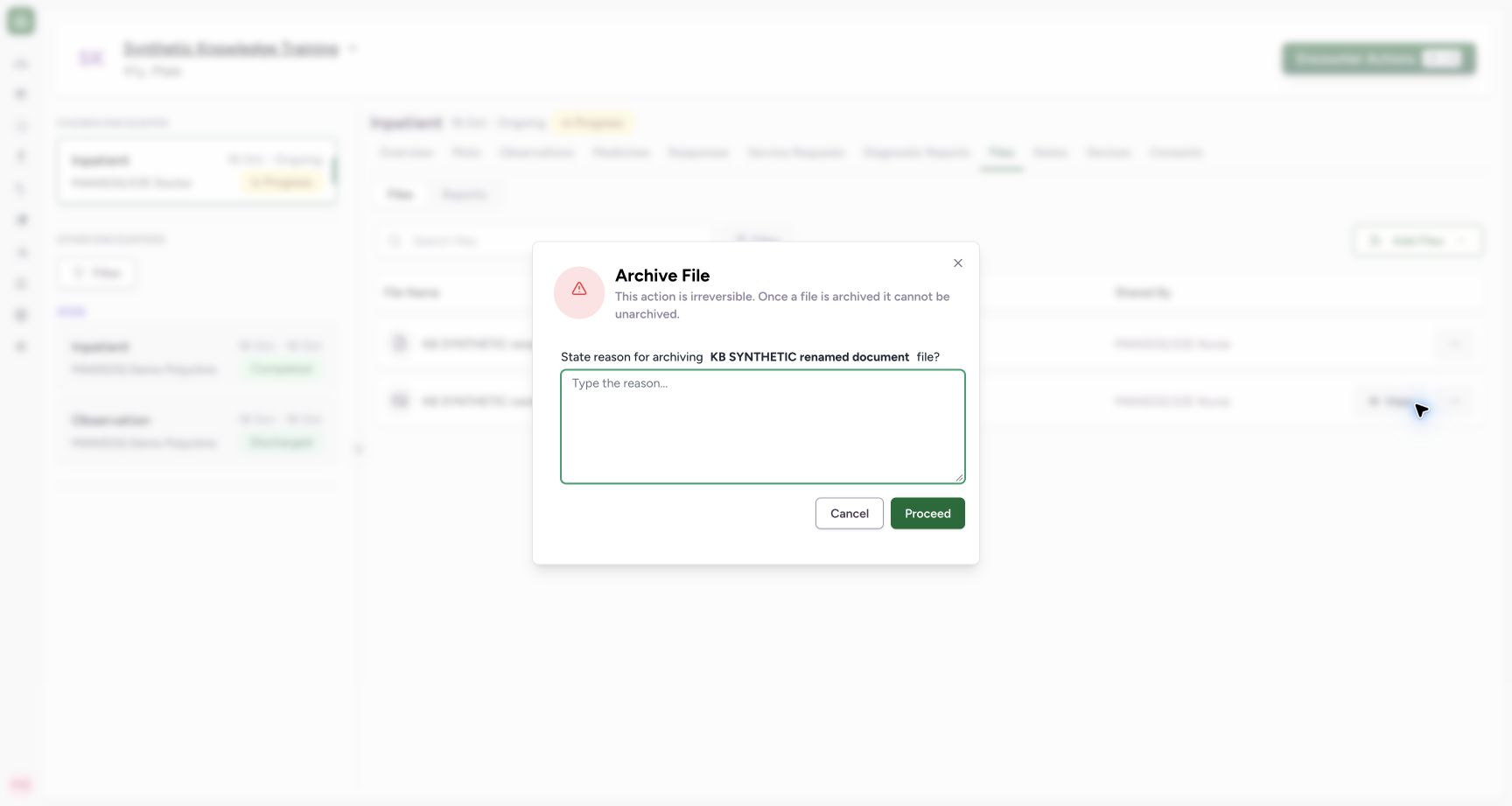
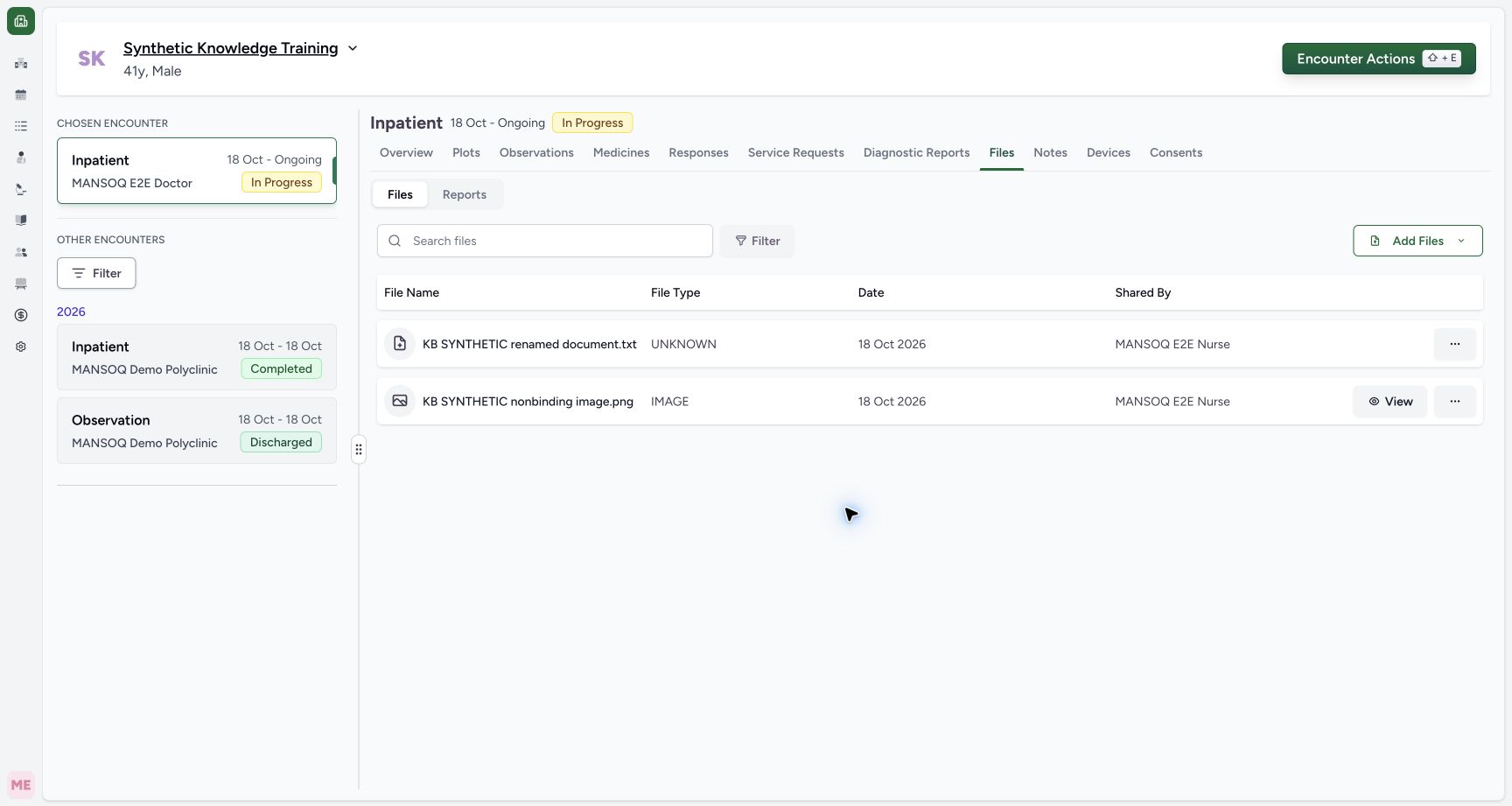
Open this file’s actions and choose Archive. Verify the named document and read the warning that the ordinary interface cannot unarchive it. Cancel closes this operation without archiving. The next screenshot shows the same active file and its actions still available.
 12
12Capture details
Actual Nurse in the original pinned production UI, isolated synthetic active Inpatient encounter at a Polyclinic. These are harmless software training files and nonbinding Research/Deny examples, not real clinical documents, patient decisions, signatures or treatment authorization. Other role, facility, hardware and failure branches remain unqualified. Action: Archive File names the selected renamed TXT, requires a reason and warns that ordinary unarchive is unavailable. Review or Cancel before proceeding; archive is not physical object deletion.
- Document a valid archive reason: Document a valid archive reason
- Cancel without archiving this file: Cancel without archiving this file
 12
12Capture details
Actual Nurse in the original pinned production UI, isolated synthetic active Inpatient encounter at a Polyclinic. These are harmless software training files and nonbinding Research/Deny examples, not real clinical documents, patient decisions, signatures or treatment authorization. Other role, facility, hardware and failure branches remain unqualified. Action: Cancel closes Archive File and leaves renamed TXT active with normal actions; no archive request was sent. Current readback verifies unarchived original object and exact bytes.
- Cancelled archive keeps the text-file actions available: Cancelled archive keeps the text-file actions available
- The text file remains active: The text file remains active
4. Provide a meaningful archive reason
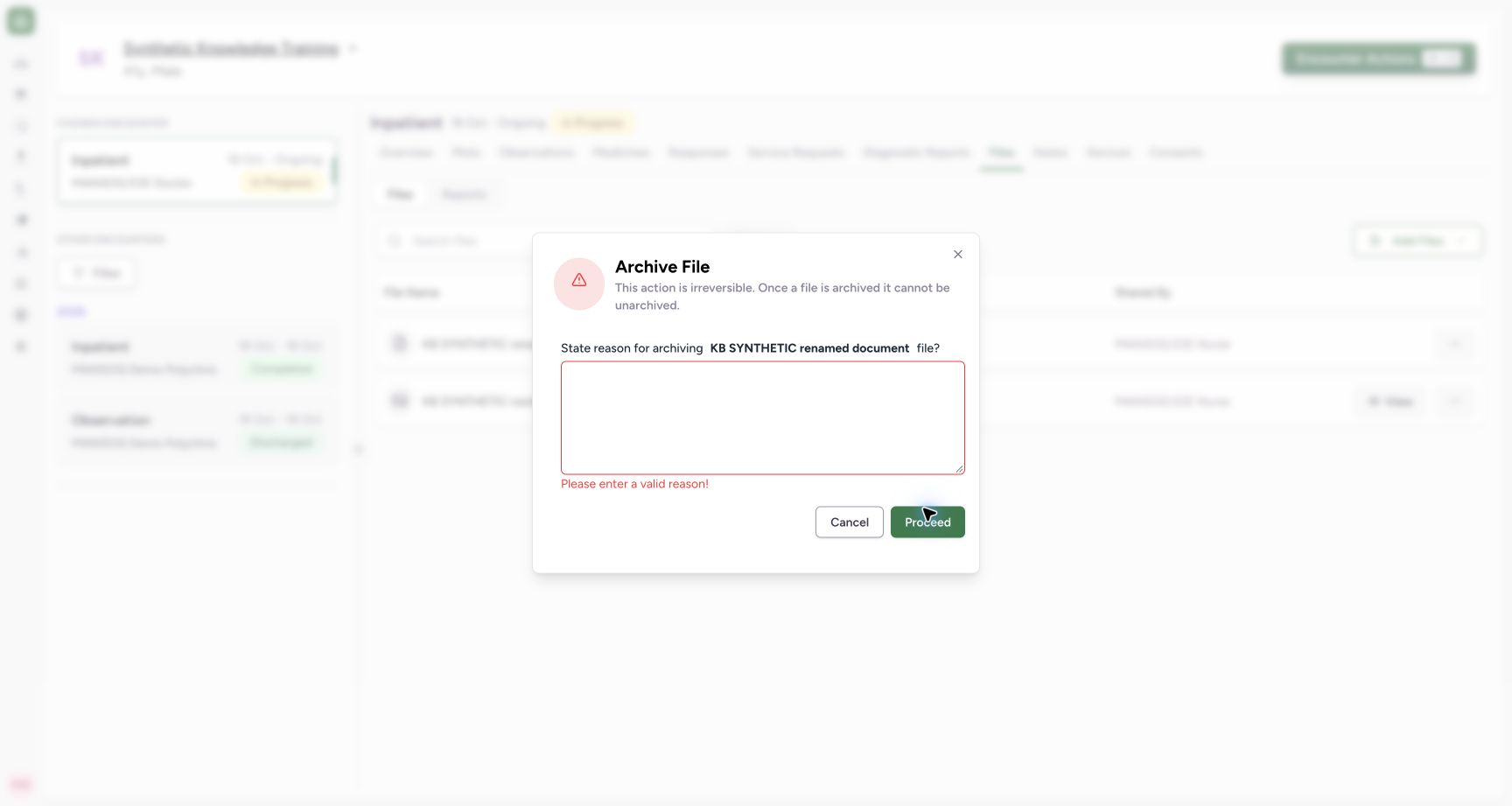
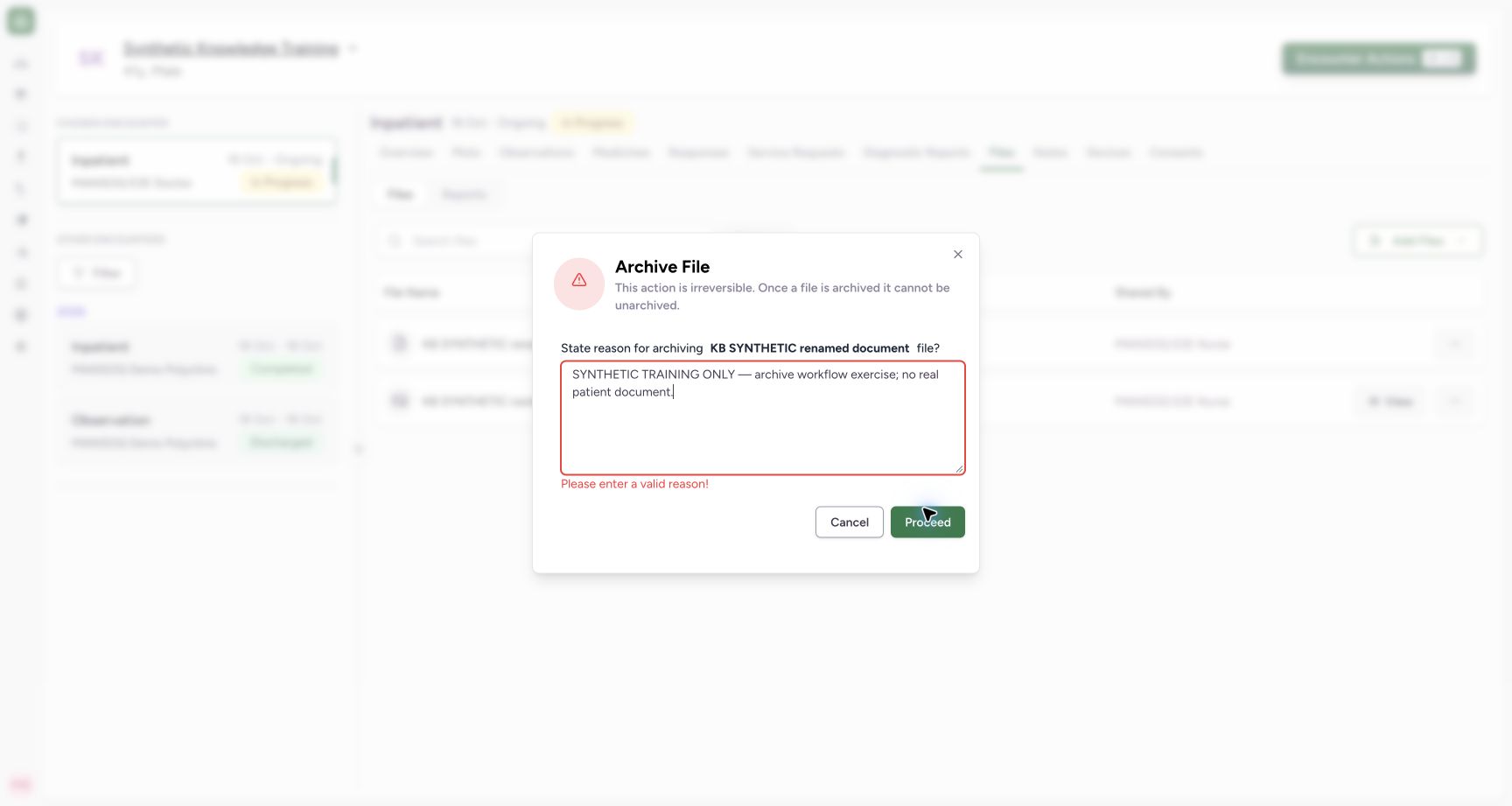
For an authorized archive, reopen Archive and document the reason. A whitespace-only reason produces Please enter a valid reason!. The example replaces it with an explicit synthetic training reason. The previous error is still visible in the reviewed draft until Proceed revalidates the filled field; it is not a saved result.
 12
12Capture details
Actual Nurse in the original pinned production UI, isolated synthetic active Inpatient encounter at a Polyclinic. These are harmless software training files and nonbinding Research/Deny examples, not real clinical documents, patient decisions, signatures or treatment authorization. Other role, facility, hardware and failure branches remain unqualified. Error: Whitespace-only archive reason is rejected with Please enter a valid reason; no archive save is sent.
- Enter a meaningful archive reason: Enter a meaningful archive reason
- Correct the displayed validation error: Correct the displayed validation error
 12
12Capture details
Actual Nurse in the original pinned production UI, isolated synthetic active Inpatient encounter at a Polyclinic. These are harmless software training files and nonbinding Research/Deny examples, not real clinical documents, patient decisions, signatures or treatment authorization. Other role, facility, hardware and failure branches remain unqualified. Action: Archive draft identifies the intended renamed TXT and explicit synthetic-only reason. Proceed saves archive metadata; the UI warns no ordinary unarchive. The prior blank-reason message remains visible until Proceed revalidates the now-filled reason; this is still a pending review, not an archived result.
- Review the reason and intended document: Review the reason and intended document
- Archive this reviewed synthetic file: Archive this reviewed synthetic file
5. Proceed and verify the archived row
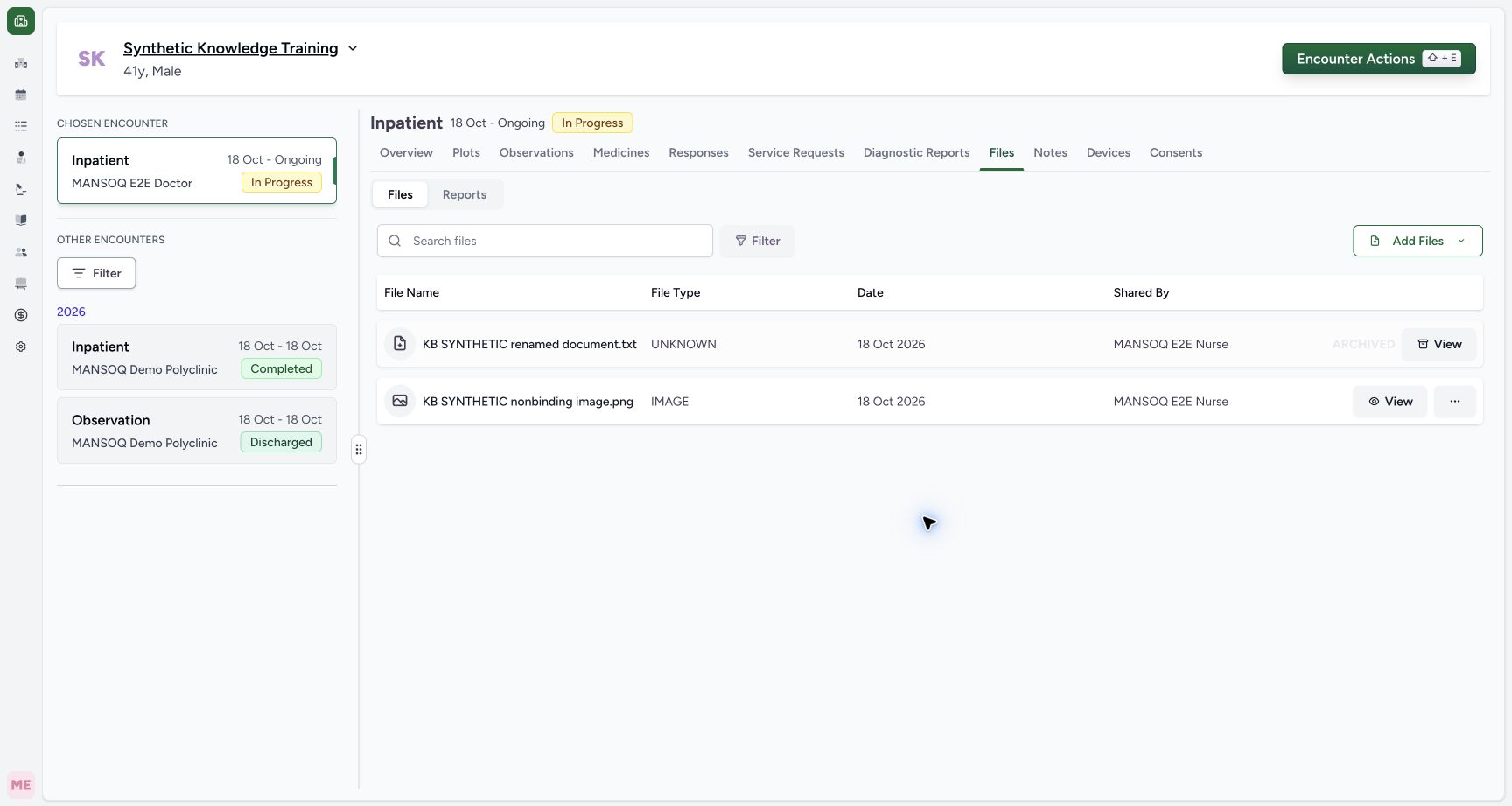
After reviewing the file and reason, select Proceed once and wait for the list to refresh. The file becomes ARCHIVED, with metadata-only View replacing its normal actions. The unrelated PNG stays active. Independent readback confirms the exact archive reason, Nurse actor and archive time, while the stored TXT object and its original bytes remain retained.
12Capture details
Actual Nurse in the original pinned production UI, isolated synthetic active Inpatient encounter at a Polyclinic. These are harmless software training files and nonbinding Research/Deny examples, not real clinical documents, patient decisions, signatures or treatment authorization. Other role, facility, hardware and failure branches remain unqualified. Action: Archive draft identifies the intended renamed TXT and explicit synthetic-only reason. Proceed saves archive metadata; the UI warns no ordinary unarchive. The prior blank-reason message remains visible until Proceed revalidates the now-filled reason; this is still a pending review, not an archived result.
- Review the reason and intended document: Review the reason and intended document
- Archive this reviewed synthetic file: Archive this reviewed synthetic file
 123
123Capture details
Actual Nurse in the original pinned production UI, isolated synthetic active Inpatient encounter at a Polyclinic. These are harmless software training files and nonbinding Research/Deny examples, not real clinical documents, patient decisions, signatures or treatment authorization. Other role, facility, hardware and failure branches remain unqualified. Success: Renamed TXT is now marked ARCHIVED and offers metadata View rather than normal download/rename/archive actions. PNG remains active. Independent readback confirms archive actor/reason/time and retained exact object bytes.
- Archived View opens archive metadata: Archived View opens archive metadata
- This row is archived: This row is archived
- The image remains active: The image remains active
6. Read the retained archive audit
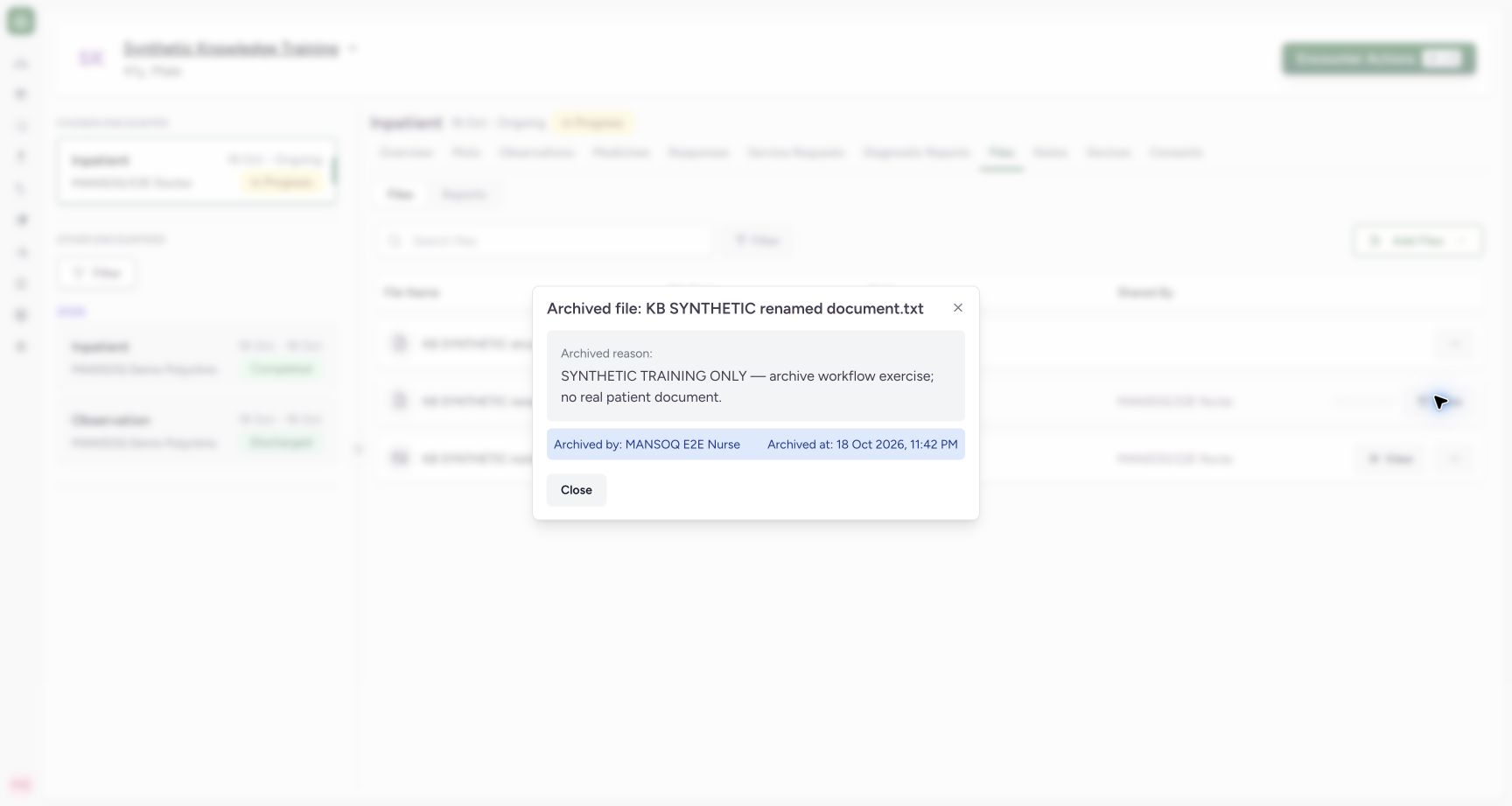
Select View on the archived row. Read the file name, archive reason, Archived by and Archived at, then select Close. This view displays archive metadata; it does not restore the file or preview its original content. Retention of the stored bytes is separately verified.
 1234
1234Capture details
Actual Nurse in the original pinned production UI, isolated synthetic active Inpatient encounter at a Polyclinic. These are harmless software training files and nonbinding Research/Deny examples, not real clinical documents, patient decisions, signatures or treatment authorization. Other role, facility, hardware and failure branches remain unqualified. Action: fully settled archive metadata dialog displays the retained synthetic reason, Nurse actor and exact archive timestamp. Its Close action does not restore the archived file.
- Read the exact retained archive reason: Read the exact retained archive reason
- Review the recorded archive actor: Review the recorded archive actor
- Review the recorded archive timestamp: Review the recorded archive timestamp
- Close without restoring the file: Close without restoring the file
7. Switch between active and archived files
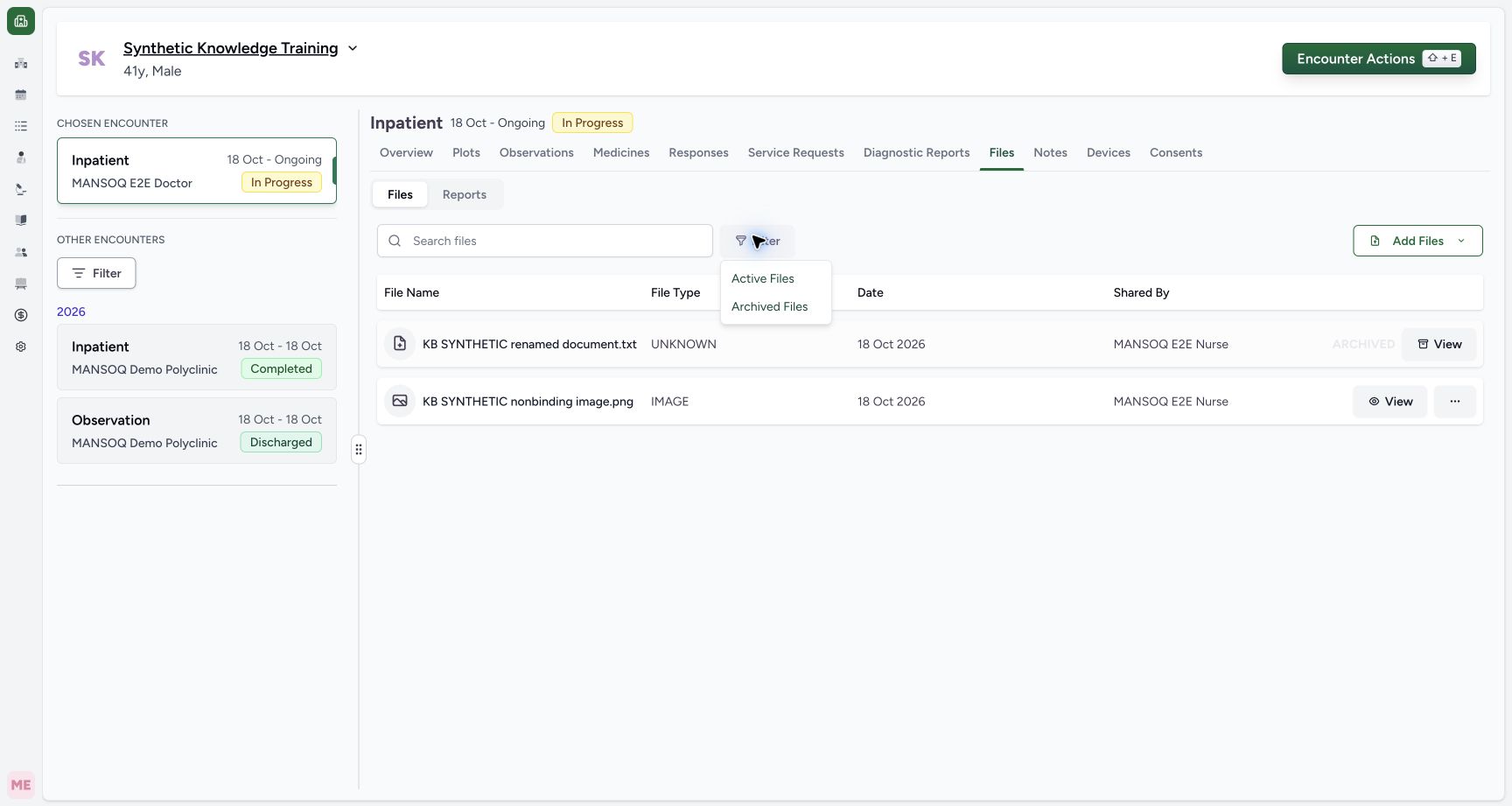
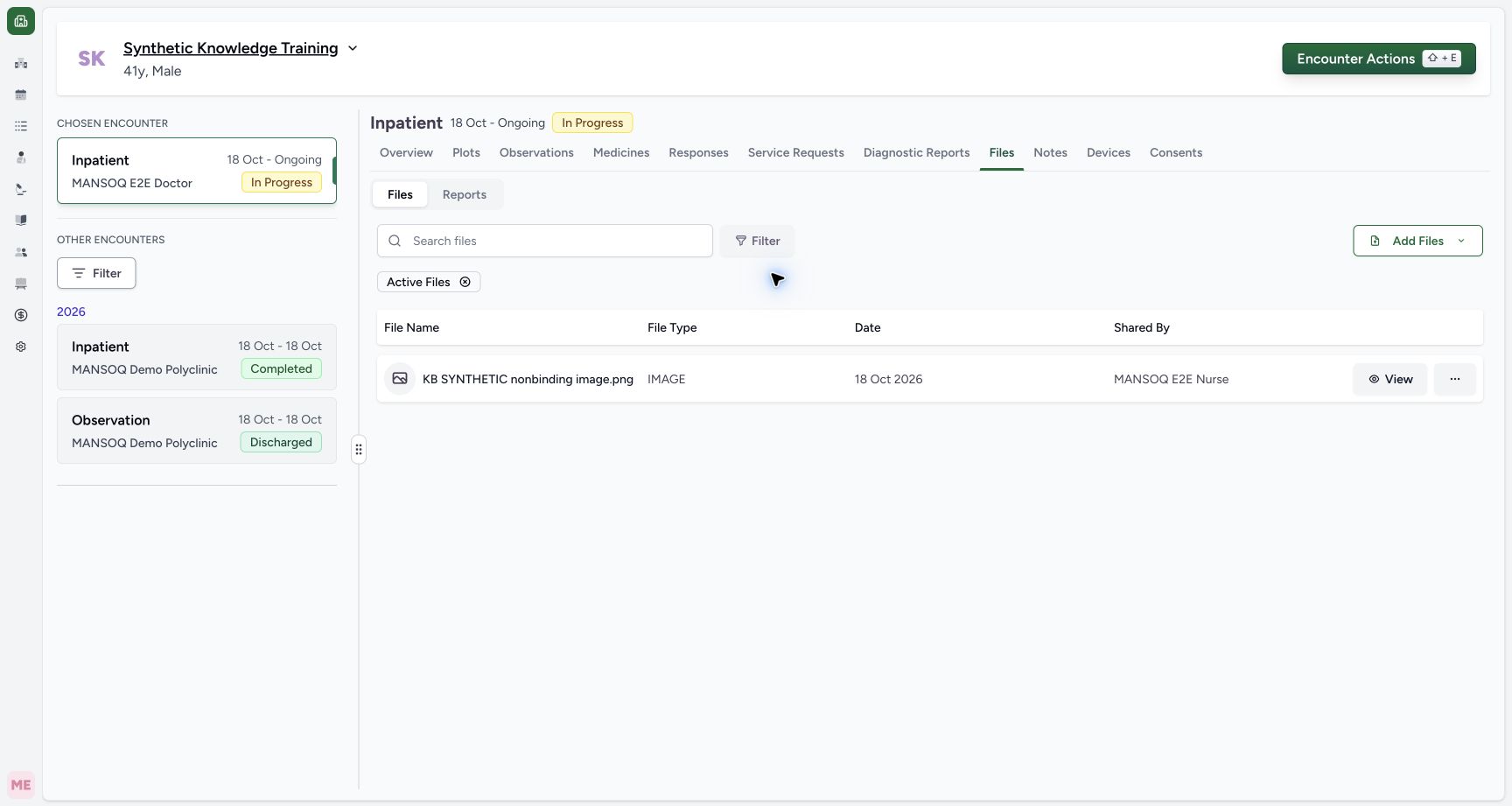
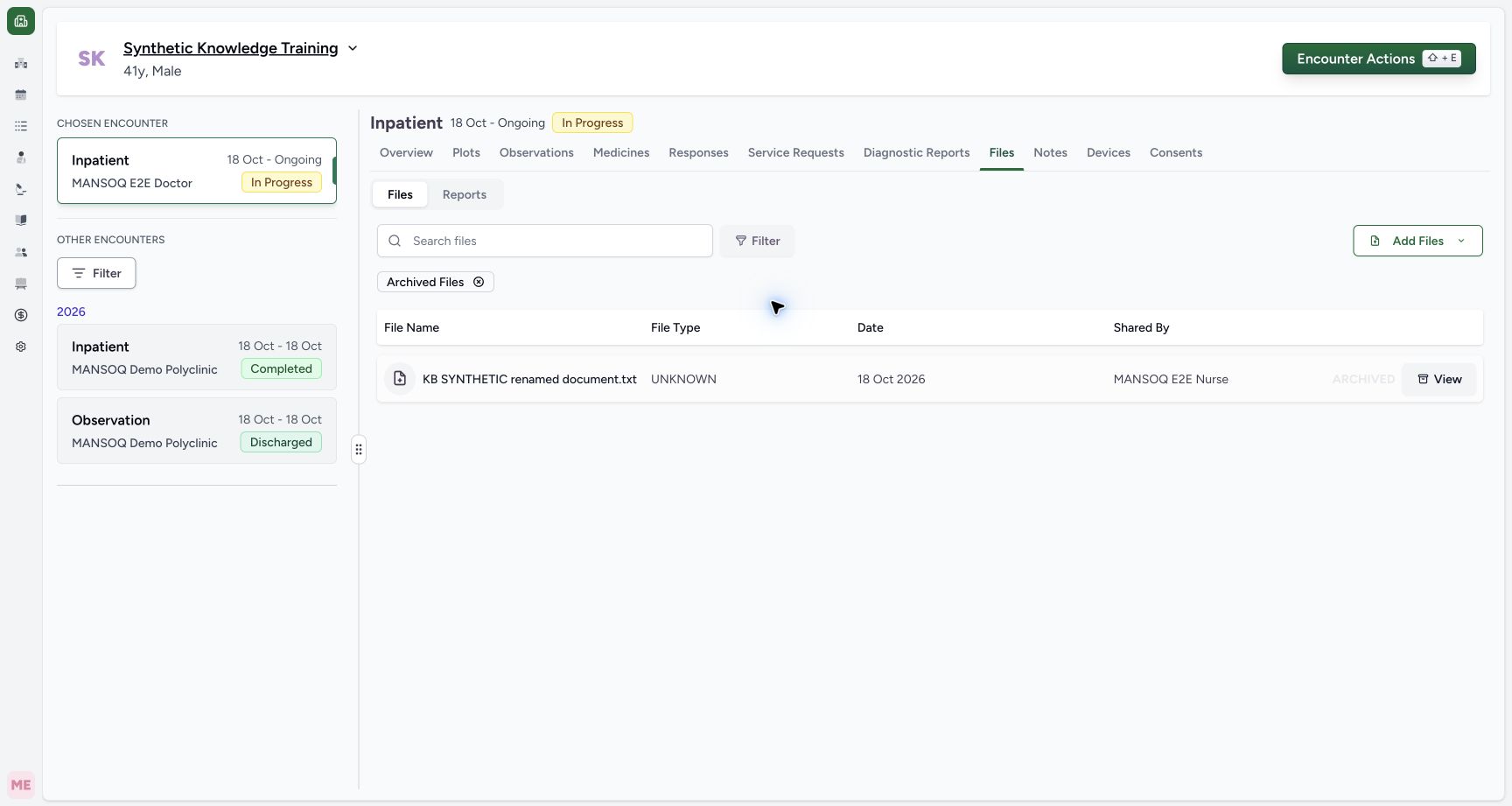
Use Filter → Active Files to show active rows, or Archived Files for archive metadata rows. Inspect the badge and results together. The example active filter shows the PNG; the archived filter shows the renamed TXT. Clear the badge to return to both states. No archive filter does not mean active-only.
 12
12Capture details
Actual Nurse in the original pinned production UI, isolated synthetic active Inpatient encounter at a Polyclinic. These are harmless software training files and nonbinding Research/Deny examples, not real clinical documents, patient decisions, signatures or treatment authorization. Other role, facility, hardware and failure branches remain unqualified. Action: File Filter offers Active Files and Archived Files; without an archive filter both active and archived rows were shown.
- Show active files only: Show active files only
- Show archived metadata rows: Show archived metadata rows
 12
12Capture details
Actual Nurse in the original pinned production UI, isolated synthetic active Inpatient encounter at a Polyclinic. These are harmless software training files and nonbinding Research/Deny examples, not real clinical documents, patient decisions, signatures or treatment authorization. Other role, facility, hardware and failure branches remain unqualified. Action: Active Files filter now shows only active PNG; archived TXT is excluded by filter, not physically deleted.
- Only the matching archive state is shown: Only the matching archive state is shown
- Review or clear the file-state filter: Review or clear the file-state filter
 12
12Capture details
Actual Nurse in the original pinned production UI, isolated synthetic active Inpatient encounter at a Polyclinic. These are harmless software training files and nonbinding Research/Deny examples, not real clinical documents, patient decisions, signatures or treatment authorization. Other role, facility, hardware and failure branches remain unqualified. Action: Archived Files filter now shows only archived TXT and its metadata View, with active PNG excluded by filter.
- Only the matching archive state is shown: Only the matching archive state is shown
- Review or clear the file-state filter: Review or clear the file-state filter
8. Search by the saved display name
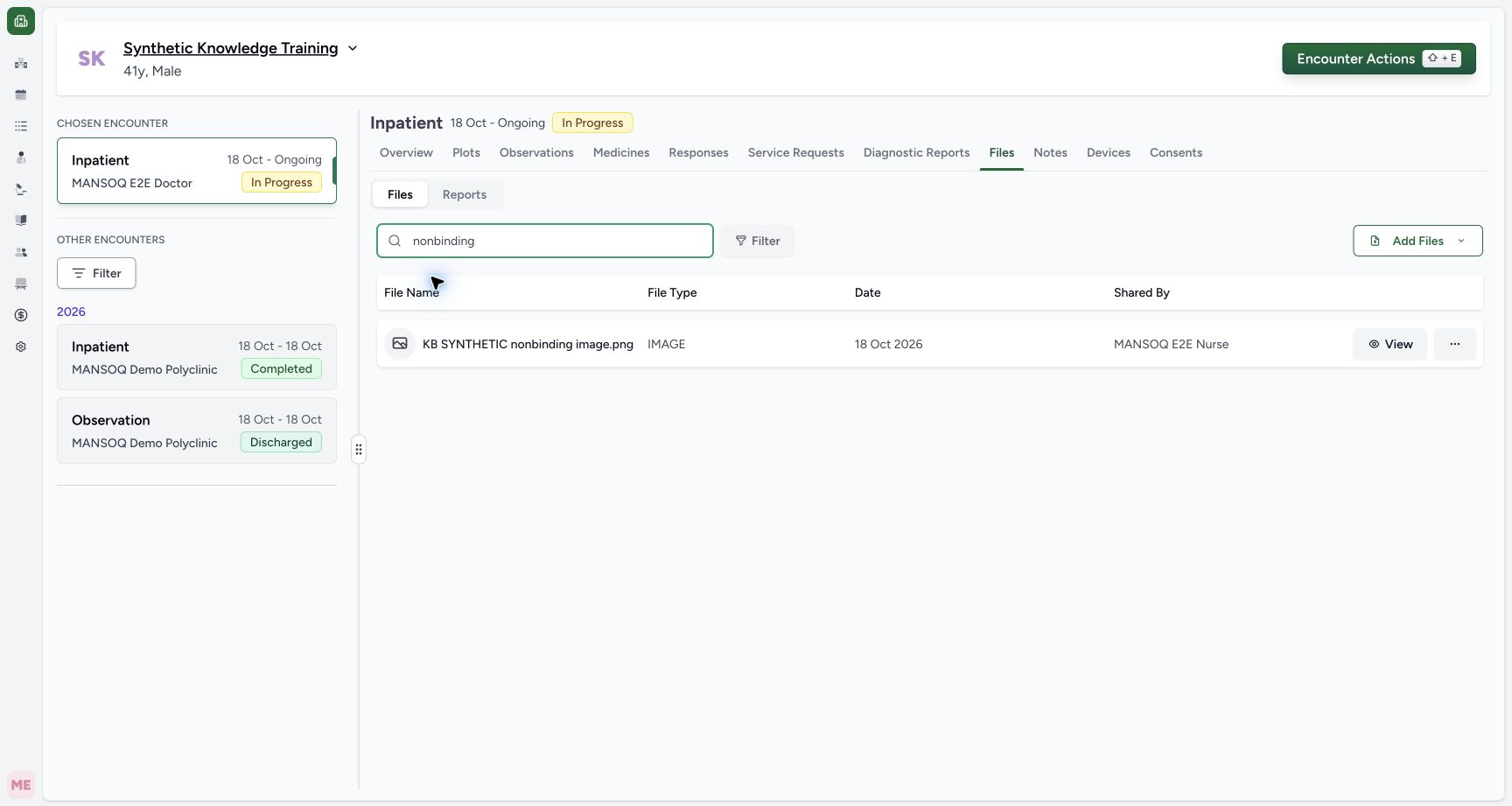
Clear the archive filter when appropriate, then enter part of the saved name in Search files. The example search nonbinding returns the PNG. Search is scoped to the current patient/encounter association and current filters; it does not search every document in the system.
 12
12Capture details
Actual Nurse in the original pinned production UI, isolated synthetic active Inpatient encounter at a Polyclinic. These are harmless software training files and nonbinding Research/Deny examples, not real clinical documents, patient decisions, signatures or treatment authorization. Other role, facility, hardware and failure branches remain unqualified. Action: After clearing archive filter, Search files nonbinding returns matching PNG only. Search and archive filters are independent list controls.
- Search by the saved display name: Search by the saved display name
- Review the matching file record: Review the matching file record
9. Treat No files found as a filtered result
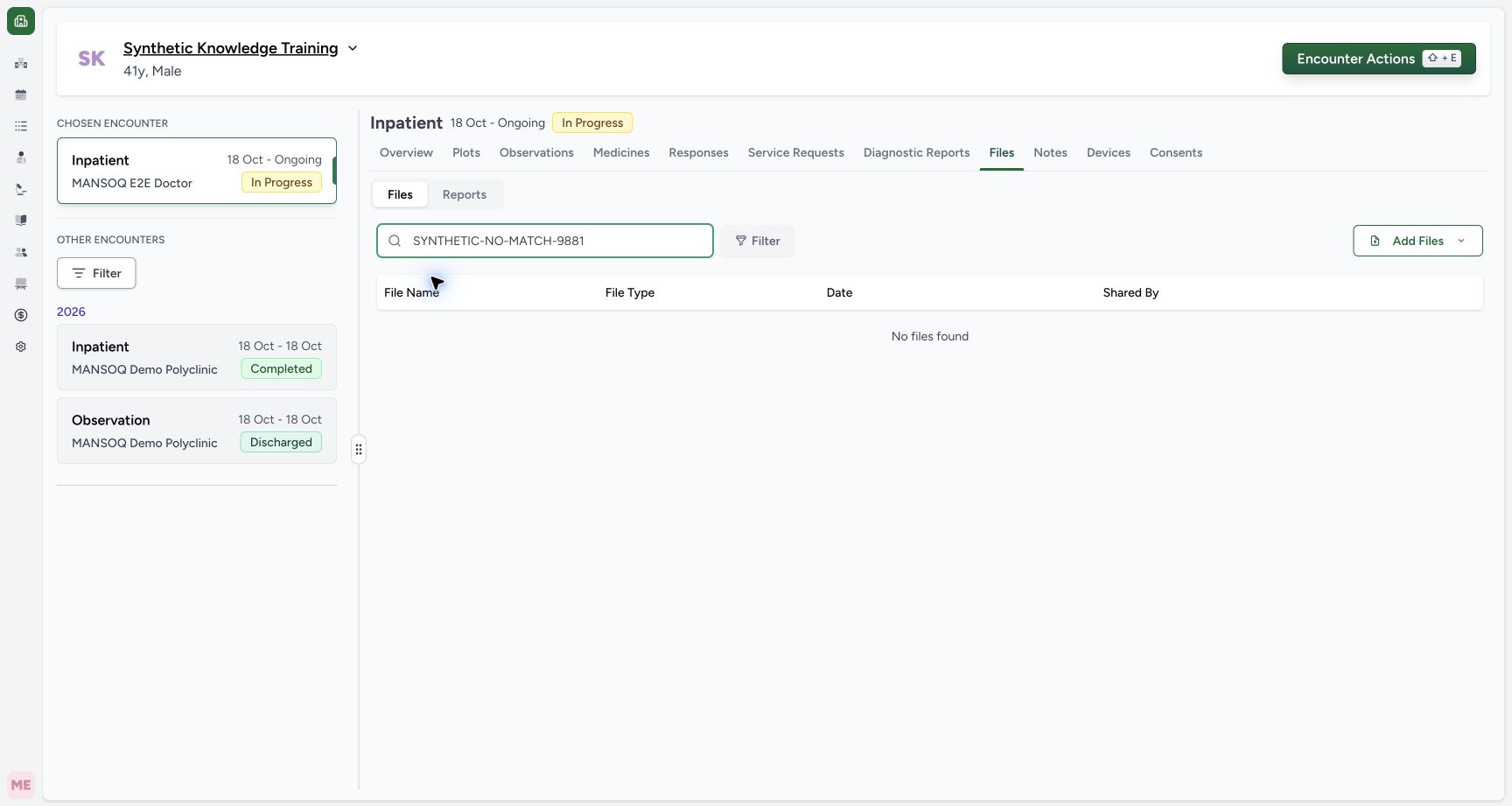
A nonmatching query shows No files found even though the stored records remain present. Clear or correct the query and archive filter before deciding that a file is missing. Do not upload a duplicate merely because a filtered display is empty.
 12
12Capture details
Actual Nurse in the original pinned production UI, isolated synthetic active Inpatient encounter at a Polyclinic. These are harmless software training files and nonbinding Research/Deny examples, not real clinical documents, patient decisions, signatures or treatment authorization. Other role, facility, hardware and failure branches remain unqualified. Action: Nonmatching file search shows No files found; previously verified files still exist. Clear search/filter and verify association before interpreting empty list.
- Clear the query to show files again: Clear the query to show files again
- Empty search result is not absence of stored files: Empty search result is not absence of stored files
Archive retention and authority
The observed archive updates its state and audit metadata and retains the stored object. The standard UI warns that it cannot be unarchived. Follow the approved records policy and authorize the intended file before proceeding. This synthetic exercise does not establish a real records retention or deletion policy.
12Capture details
Actual Nurse in the original pinned production UI, isolated synthetic active Inpatient encounter at a Polyclinic. These are harmless software training files and nonbinding Research/Deny examples, not real clinical documents, patient decisions, signatures or treatment authorization. Other role, facility, hardware and failure branches remain unqualified. Action: Archive File names the selected renamed TXT, requires a reason and warns that ordinary unarchive is unavailable. Review or Cancel before proceeding; archive is not physical object deletion.
- Document a valid archive reason: Document a valid archive reason
- Cancel without archiving this file: Cancel without archiving this file
123Capture details
Actual Nurse in the original pinned production UI, isolated synthetic active Inpatient encounter at a Polyclinic. These are harmless software training files and nonbinding Research/Deny examples, not real clinical documents, patient decisions, signatures or treatment authorization. Other role, facility, hardware and failure branches remain unqualified. Success: Renamed TXT is now marked ARCHIVED and offers metadata View rather than normal download/rename/archive actions. PNG remains active. Independent readback confirms archive actor/reason/time and retained exact object bytes.
- Archived View opens archive metadata: Archived View opens archive metadata
- This row is archived: This row is archived
- The image remains active: The image remains active
1234Capture details
Actual Nurse in the original pinned production UI, isolated synthetic active Inpatient encounter at a Polyclinic. These are harmless software training files and nonbinding Research/Deny examples, not real clinical documents, patient decisions, signatures or treatment authorization. Other role, facility, hardware and failure branches remain unqualified. Action: fully settled archive metadata dialog displays the retained synthetic reason, Nurse actor and exact archive timestamp. Its Close action does not restore the archived file.
- Read the exact retained archive reason: Read the exact retained archive reason
- Review the recorded archive actor: Review the recorded archive actor
- Review the recorded archive timestamp: Review the recorded archive timestamp
- Close without restoring the file: Close without restoring the file
Source evidence
References are pinned to the private MANSOQ source repository. Repository access is required to open these links.
- repositories/platform/mansoq-web/src/hooks/useFileManager.tsx:205 · f6e9f05f
- repositories/platform/mansoq-web/src/hooks/useFileManager.tsx:138 · f6e9f05f
- repositories/platform/mansoq-web/src/components/Files/ArchivedFileDialog.tsx:58 · f6e9f05f
- repositories/platform/mansoq-web/src/components/Files/FileSubTab.tsx:104 · f6e9f05f
- repositories/platform/mansoq-core/mansoq/emr/api/viewsets/file_upload.py:194 · f6e9f05f