 MANSOQ
 Clinical care
Upload, preview and download encounter files
Select and name separate files, correct validation, verify completed uploads, inspect image controls and download the actual stored document.
8 min read · Source baseline f6e9f05f
Verification and applicability
source reviewed
Check your installed version, permissions and local configuration.
Before you begin
- Verify the patient, selected encounter, clinical documentation purpose and applicable write/read permission. This guide was executed as Nurse in an active Inpatient encounter at a synthetic Polyclinic; other roles and facilities require their own qualification.
- Use authorized documents and follow the facility’s approved process. All pictured records and file contents are explicitly synthetic, nonbinding software exercises.
1. Confirm the encounter and open Files
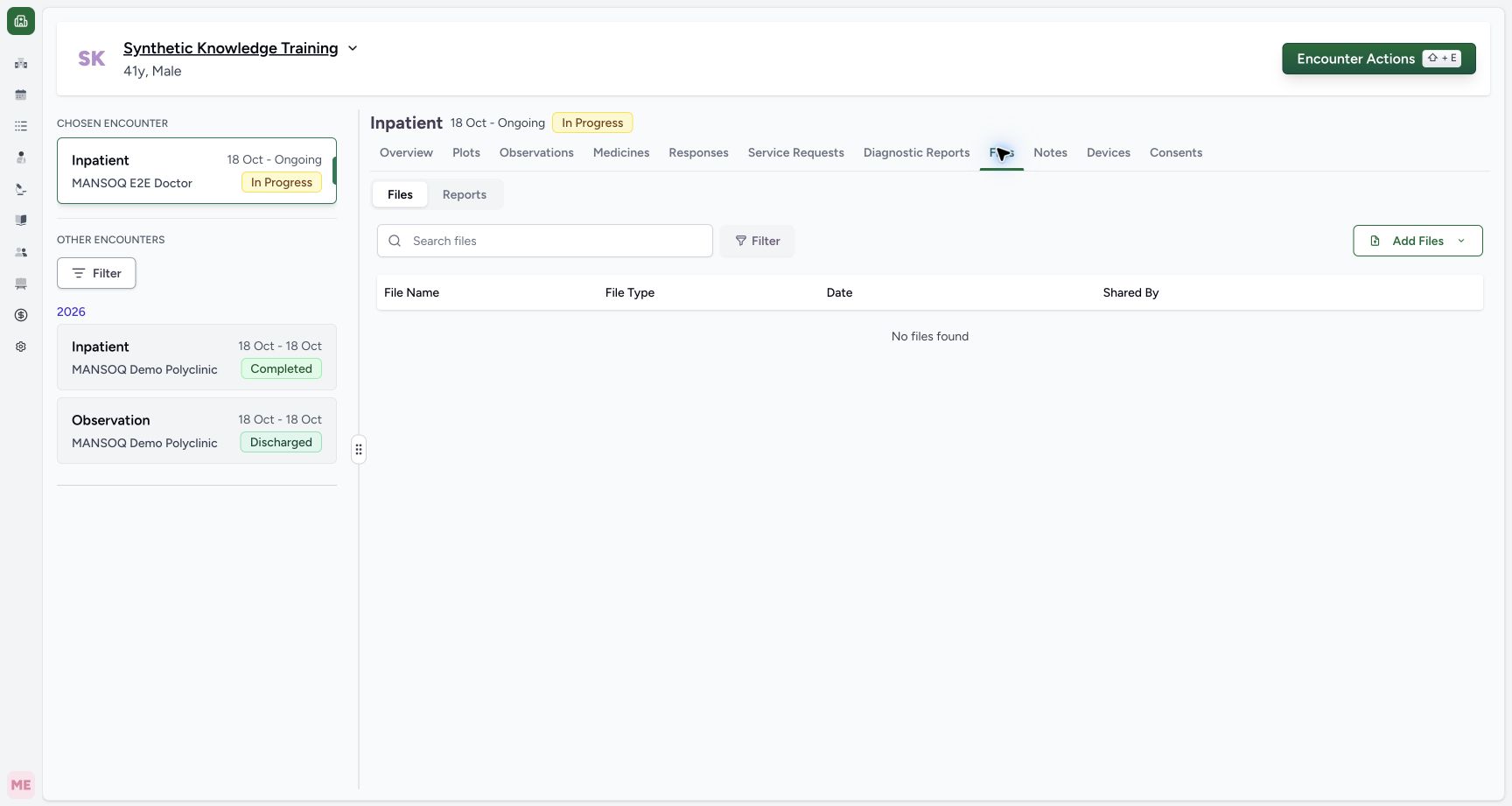
Verify the patient banner and the selected encounter, then open Files → Files. Reports is a separate subtab for generated reports. The empty example belongs only to this active encounter; it does not mean that the patient has no files elsewhere.
 123
123Capture details
Actual Nurse in the original pinned production UI, isolated synthetic active Inpatient encounter at a Polyclinic. These are harmless software training files and nonbinding Research/Deny examples, not real clinical documents, patient decisions, signatures or treatment authorization. Other role, facility, hardware and failure branches remain unqualified. Start: Actual Nurse opens active Inpatient encounter Files → Files. No encounter files exist; Reports is separate. Independent before-upload readback confirms0 files0consents.
- Search files in this encounter scope: Search files in this encounter scope
- Start encounter file upload: Start encounter file upload
- Encounter Files and its Files subtab: Encounter Files and its Files subtab
2. Choose the demonstrated device-upload path
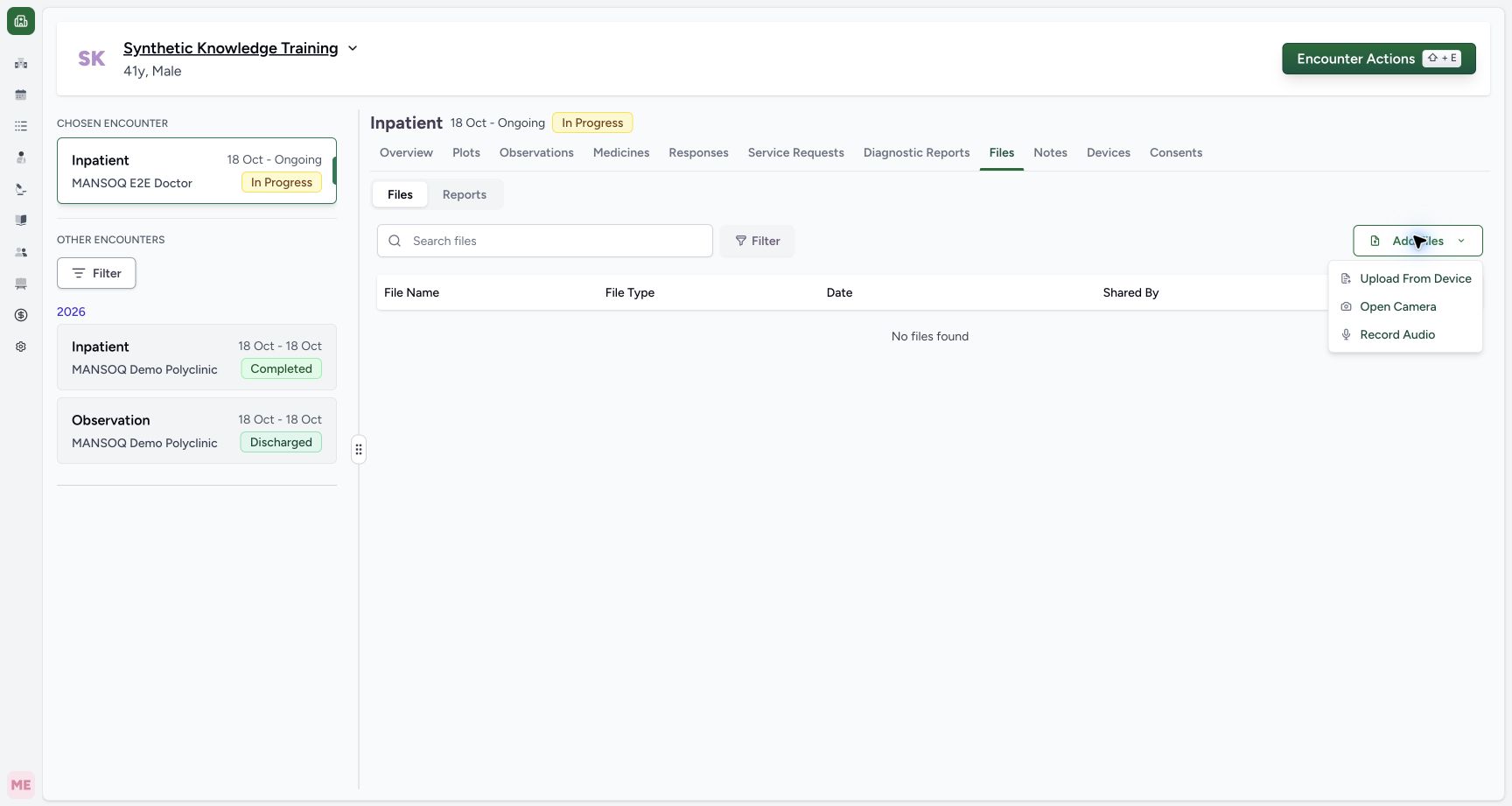
Select Add Files → Upload From Device, then choose the intended files in the normal device picker. The menu also shows Open Camera and Record Audio; their capture, permission and upload branches are not demonstrated here. Use them only through your facility’s authorized process.
 12
12Capture details
Actual Nurse in the original pinned production UI, isolated synthetic active Inpatient encounter at a Polyclinic. These are harmless software training files and nonbinding Research/Deny examples, not real clinical documents, patient decisions, signatures or treatment authorization. Other role, facility, hardware and failure branches remain unqualified. Action: Add Files offers Upload From Device, Open Camera and Record Audio. This demonstrated branch uses only harmless synthetic local files; camera/microphone capture is not activated.
- Choose an existing document from the device: Choose an existing document from the device
- Device upload is separate from camera and audio capture: Device upload is separate from camera and audio capture
3. Review selected files and enter every display name
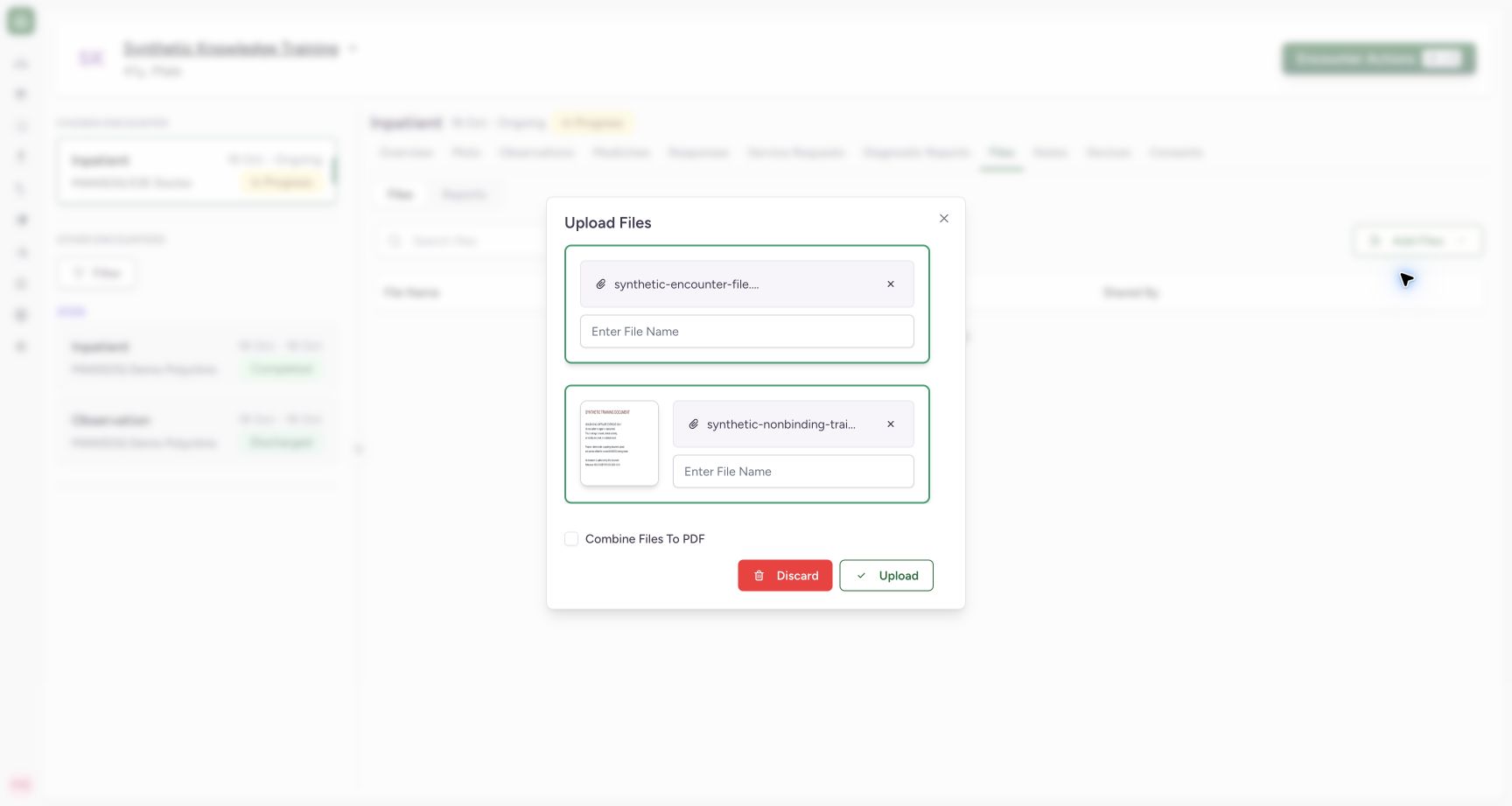
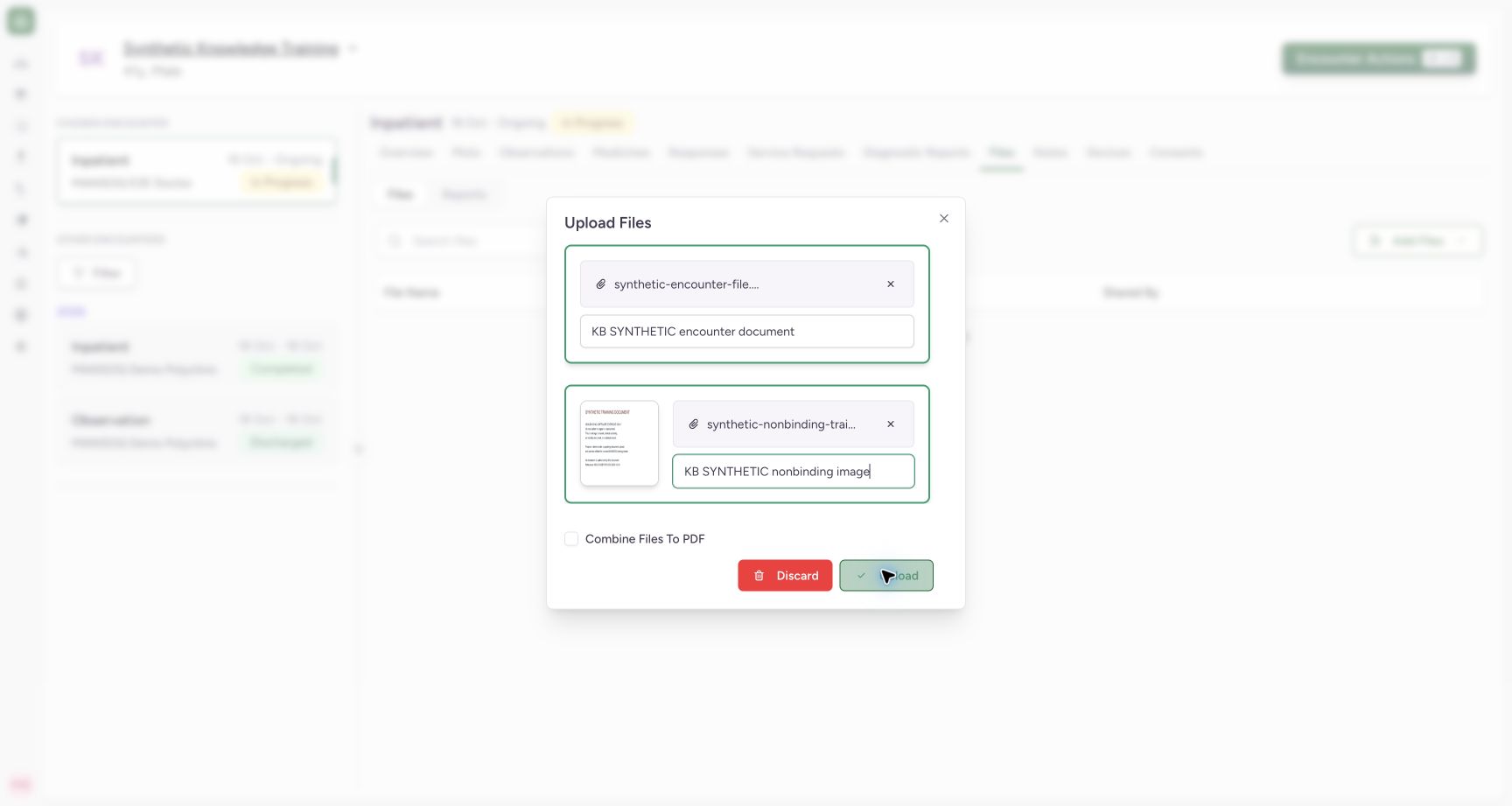
The upload dialog lists each selected original filename separately. Enter a meaningful display name for each file. The pictured TXT and PNG remain separate uploads with Combine Files To PDF unchecked. Selection is still a draft; it has not uploaded the files.
 123
123Capture details
Actual Nurse in the original pinned production UI, isolated synthetic active Inpatient encounter at a Polyclinic. These are harmless software training files and nonbinding Research/Deny examples, not real clinical documents, patient decisions, signatures or treatment authorization. Other role, facility, hardware and failure branches remain unqualified. Action: Two selected synthetic files are pending in Upload Files; each requires a display name. Combine Files to PDF is unchecked, so the intended branch is separate TXT and PNG records.
- Name the text document: Name the text document
- Name the image document: Name the image document
- Separate files are the demonstrated branch: Separate files are the demonstrated branch
4. Correct missing names before uploading
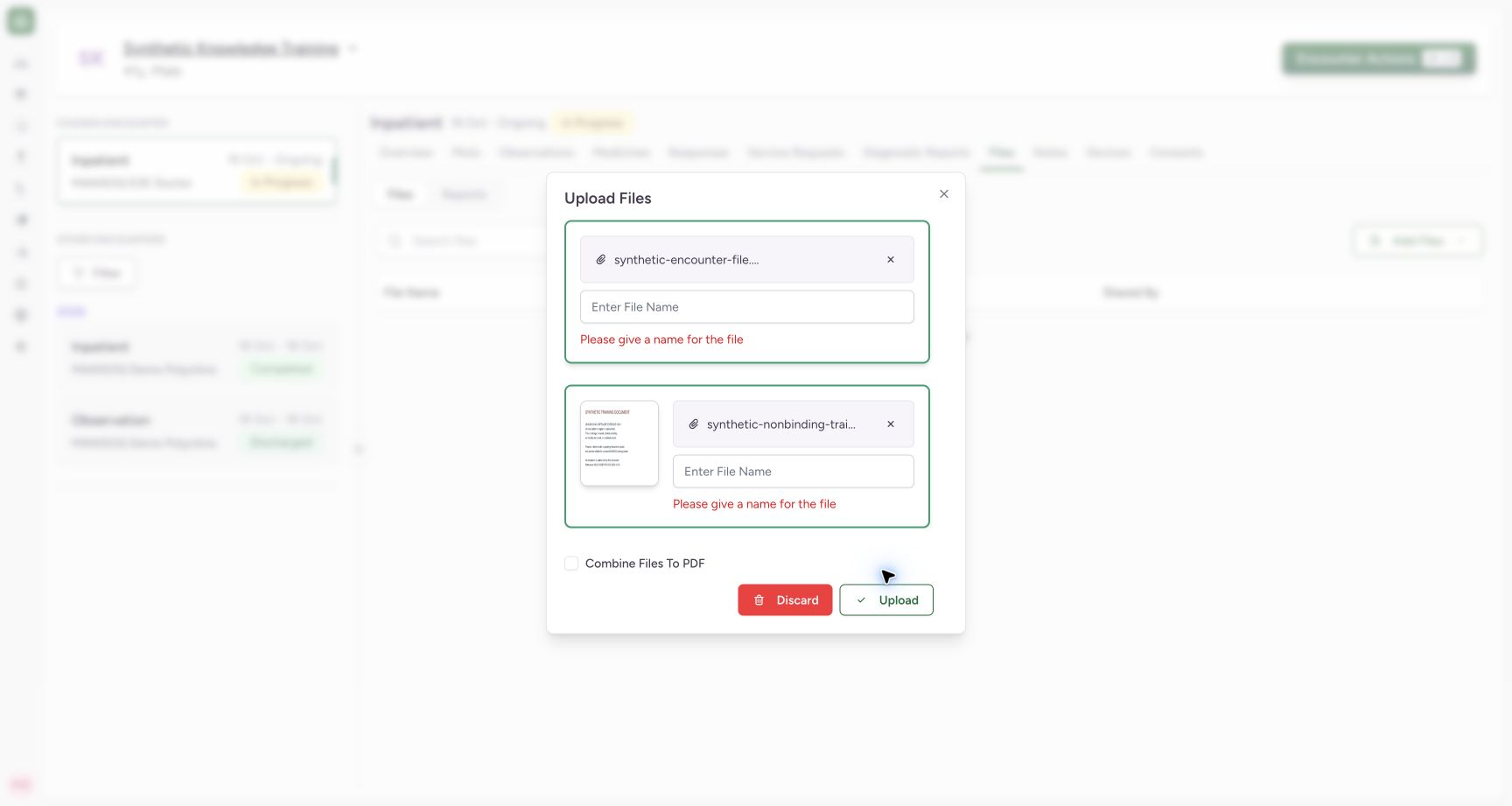
Attempting Upload with blank names shows Please give a name for the file. Complete each name and review it against the original file. The example uses KB SYNTHETIC encounter document and KB SYNTHETIC nonbinding image. The display name is separate from the retained extension and original file.
 12
12Capture details
Actual Nurse in the original pinned production UI, isolated synthetic active Inpatient encounter at a Polyclinic. These are harmless software training files and nonbinding Research/Deny examples, not real clinical documents, patient decisions, signatures or treatment authorization. Other role, facility, hardware and failure branches remain unqualified. Error: Upload with blank display names is refused by normal client validation; selected file bytes remain only in the pending dialog and no upload is sent.
- Provide a display name before upload: Provide a display name before upload
- Correct the missing name: Correct the missing name
 123
123Capture details
Actual Nurse in the original pinned production UI, isolated synthetic active Inpatient encounter at a Polyclinic. These are harmless software training files and nonbinding Research/Deny examples, not real clinical documents, patient decisions, signatures or treatment authorization. Other role, facility, hardware and failure branches remain unqualified. Action: Two reviewed synthetic files have separate display names; source filenames/extensions remain visible and Combine Files to PDF remains unchecked. Upload sends this reviewed batch.
- Review display name separately from original filename: Review display name separately from original filename
- Review the image display name: Review the image display name
- Upload both reviewed files: Upload both reviewed files
5. Upload and inspect both completed rows
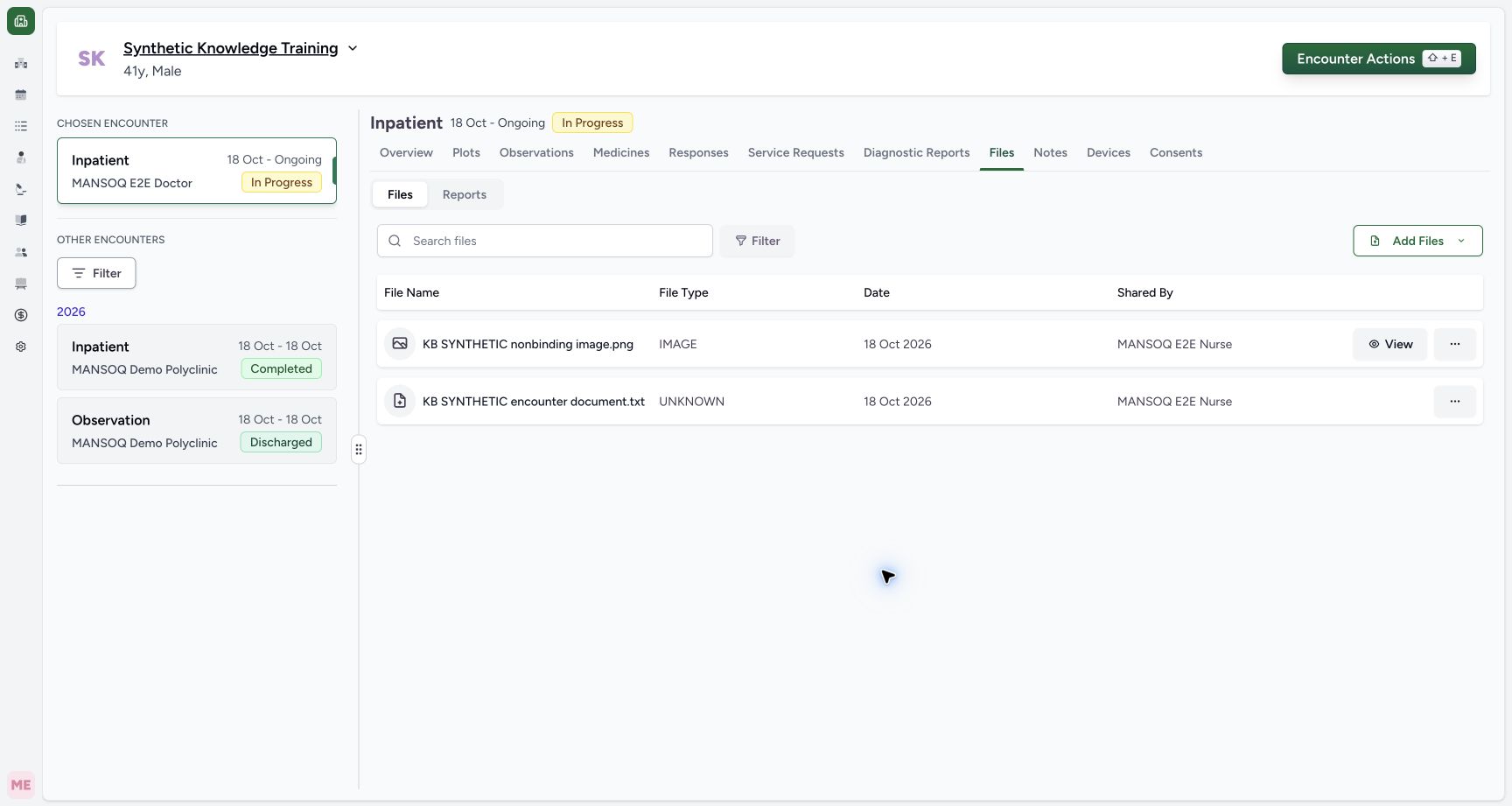
Select Upload and allow the operation to finish. Confirm both rows, names, extensions, date and Shared By. The image shows IMAGE and a View button. This release accepts the example TXT but labels it UNKNOWN and gives no inline View button. Independent checks confirm two completed records on the intended encounter and exact original PNG/TXT bytes; a file-type display label alone does not establish content or completion.
123Capture details
Actual Nurse in the original pinned production UI, isolated synthetic active Inpatient encounter at a Polyclinic. These are harmless software training files and nonbinding Research/Deny examples, not real clinical documents, patient decisions, signatures or treatment authorization. Other role, facility, hardware and failure branches remain unqualified. Action: Two reviewed synthetic files have separate display names; source filenames/extensions remain visible and Combine Files to PDF remains unchecked. Upload sends this reviewed batch.
- Review display name separately from original filename: Review display name separately from original filename
- Review the image display name: Review the image display name
- Upload both reviewed files: Upload both reviewed files
 1234
1234Capture details
Actual Nurse in the original pinned production UI, isolated synthetic active Inpatient encounter at a Polyclinic. These are harmless software training files and nonbinding Research/Deny examples, not real clinical documents, patient decisions, signatures or treatment authorization. Other role, facility, hardware and failure branches remain unqualified. Success: Two uploaded encounter files appear with extensions and Nurse attribution. PNG is IMAGE with View; accepted TXT is displayed UNKNOWN and offers actions only in this original release. Independent stored-byte readback verifies exact synthetic fixtures.
- The image is a separate saved record: The image is a separate saved record
- Accepted TXT displays UNKNOWN: Accepted TXT displays UNKNOWN
- View opens supported image preview: View opens supported image preview
- Standalone upload has Nurse attribution: Standalone upload has Nurse attribution
6. Read the actual image preview
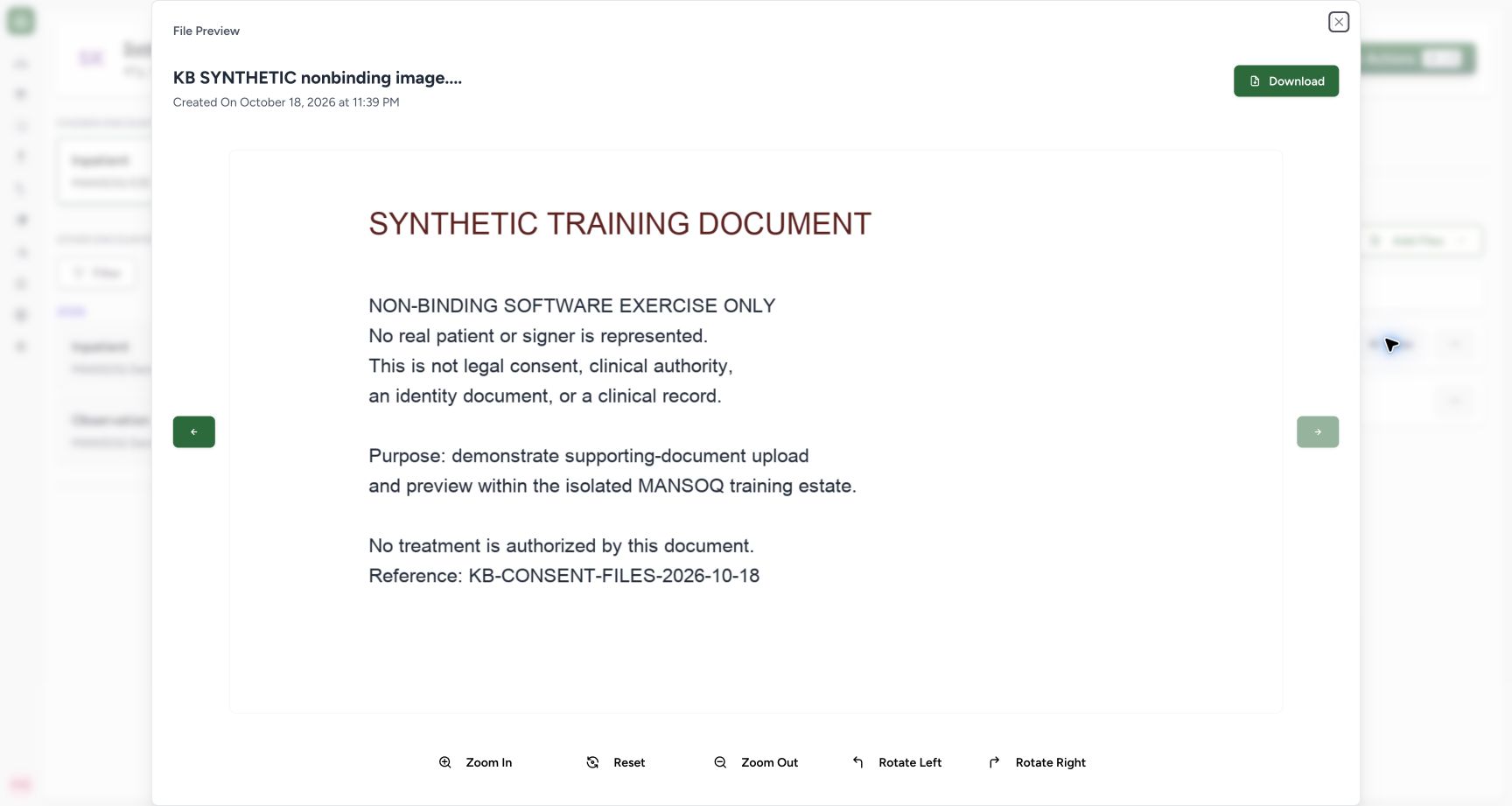
Select View on the image row. Check its filename, creation date and actual displayed content. The supplied image visibly states that it is a nonbinding software exercise. Download is available in the preview; the close control returns to the file list.
 123
123Capture details
Actual Nurse in the original pinned production UI, isolated synthetic active Inpatient encounter at a Polyclinic. These are harmless software training files and nonbinding Research/Deny examples, not real clinical documents, patient decisions, signatures or treatment authorization. Other role, facility, hardware and failure branches remain unqualified. Success: Actual image preview loads the nonbinding synthetic document at natural1400×900 content with filename/date, Download and zoom/reset/rotate controls. Independent stored SHA256 matches the reviewed fixture; no real consent is represented.
- Read the actual uploaded image: Read the actual uploaded image
- Download the stored image: Download the stored image
- Enlarge this preview if needed: Enlarge this preview if needed
7. Use preview magnification and orientation controls
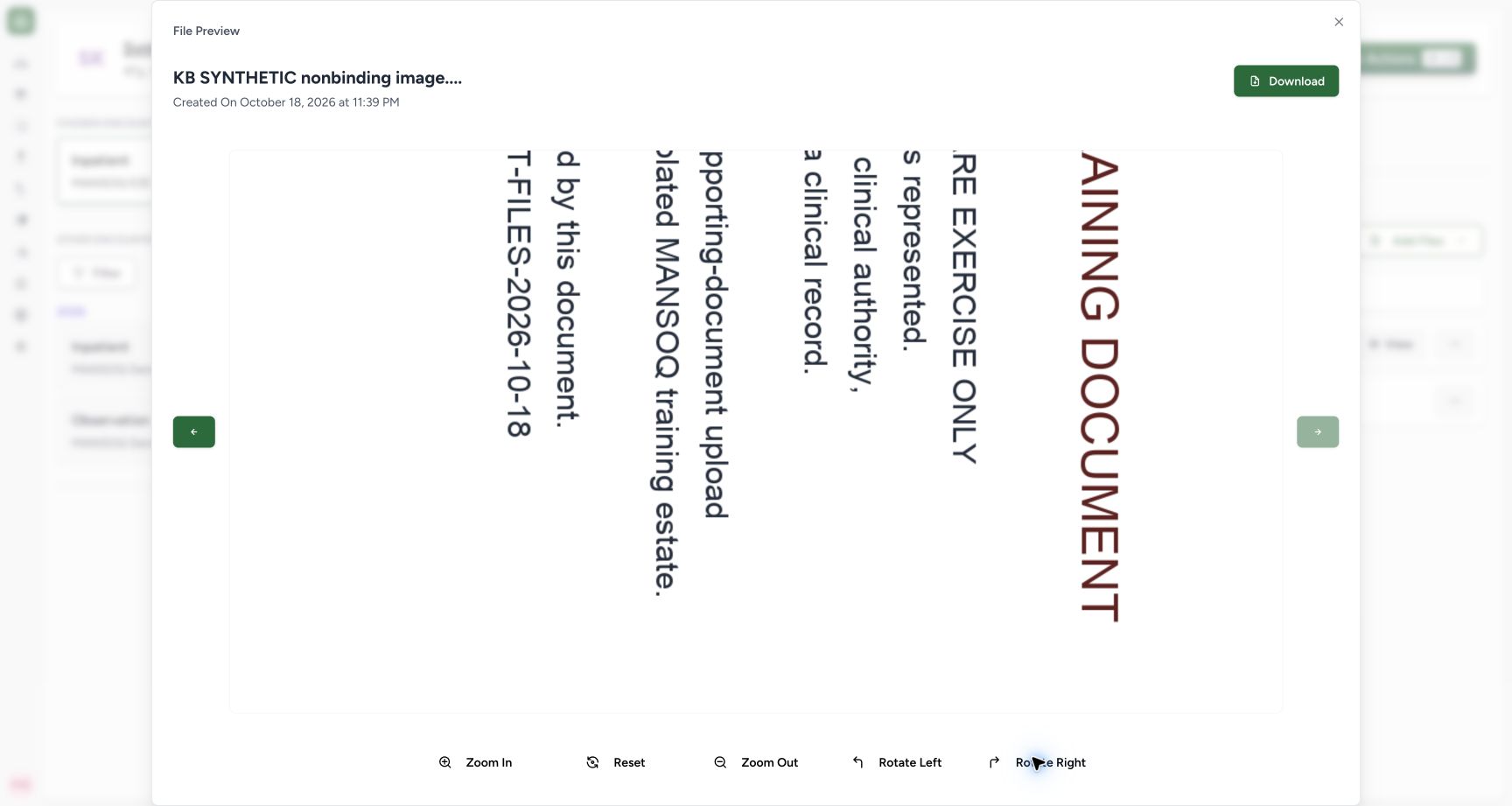
Use Zoom In, Zoom Out, Rotate Left, Rotate Right and Reset to inspect the displayed image. The second picture is the actual enlarged, rotated preview. Reset restores the presentation. These controls adjust the viewer; independent stored-byte hashes remained unchanged.
123Capture details
Actual Nurse in the original pinned production UI, isolated synthetic active Inpatient encounter at a Polyclinic. These are harmless software training files and nonbinding Research/Deny examples, not real clinical documents, patient decisions, signatures or treatment authorization. Other role, facility, hardware and failure branches remain unqualified. Success: Actual image preview loads the nonbinding synthetic document at natural1400×900 content with filename/date, Download and zoom/reset/rotate controls. Independent stored SHA256 matches the reviewed fixture; no real consent is represented.
- Read the actual uploaded image: Read the actual uploaded image
- Download the stored image: Download the stored image
- Enlarge this preview if needed: Enlarge this preview if needed
 123
123Capture details
Actual Nurse in the original pinned production UI, isolated synthetic active Inpatient encounter at a Polyclinic. These are harmless software training files and nonbinding Research/Deny examples, not real clinical documents, patient decisions, signatures or treatment authorization. Other role, facility, hardware and failure branches remain unqualified. Action: Preview Zoom In then Rotate Right changes only display transform; original stored image bytes remain unchanged. Zoom Out, Reset and opposite rotation are view controls.
- Restore the default preview view: Restore the default preview view
- Rotate the displayed image in the opposite direction: Rotate the displayed image in the opposite direction
- Reduce preview magnification: Reduce preview magnification
8. Download a document through its row actions
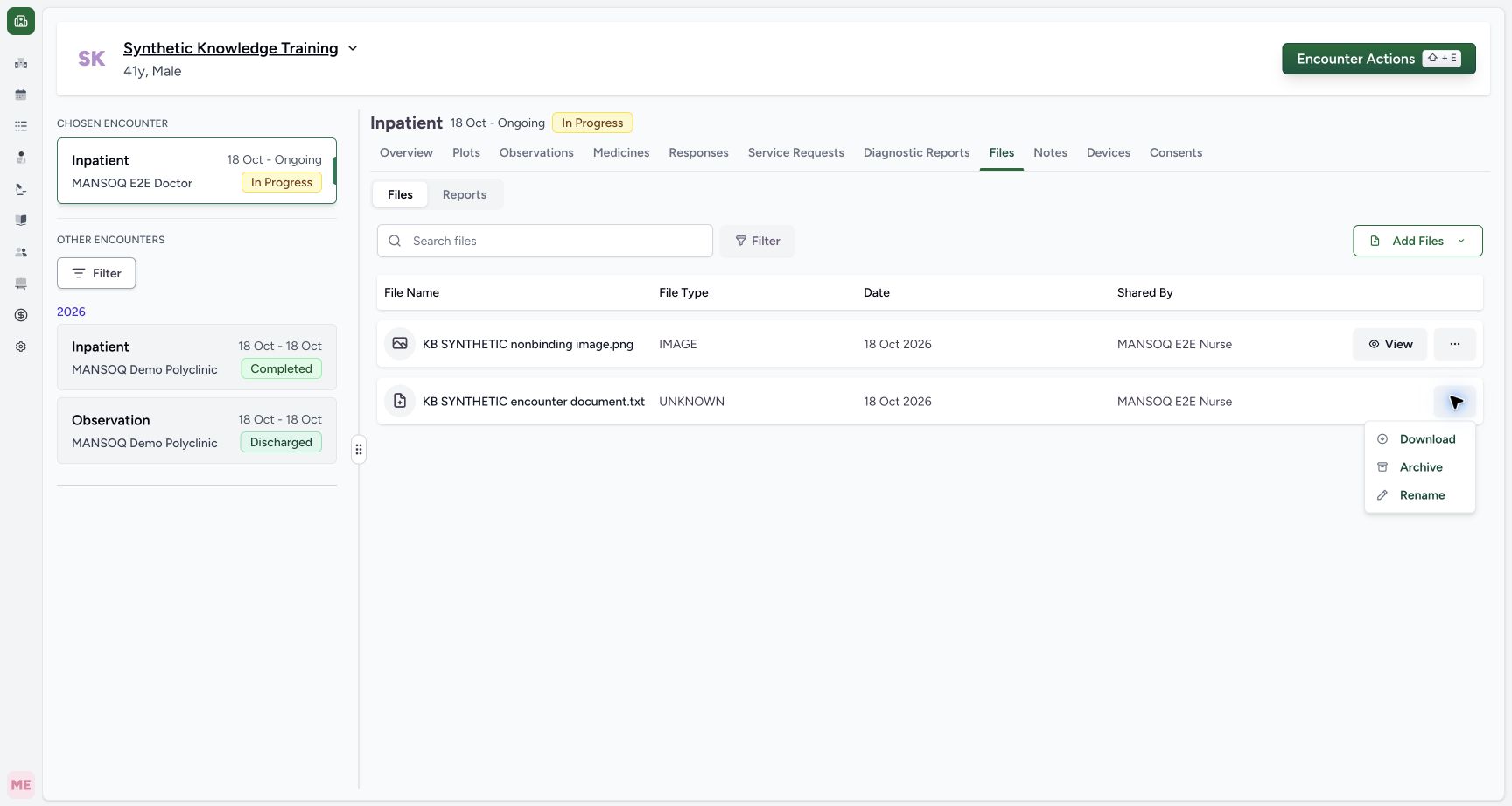
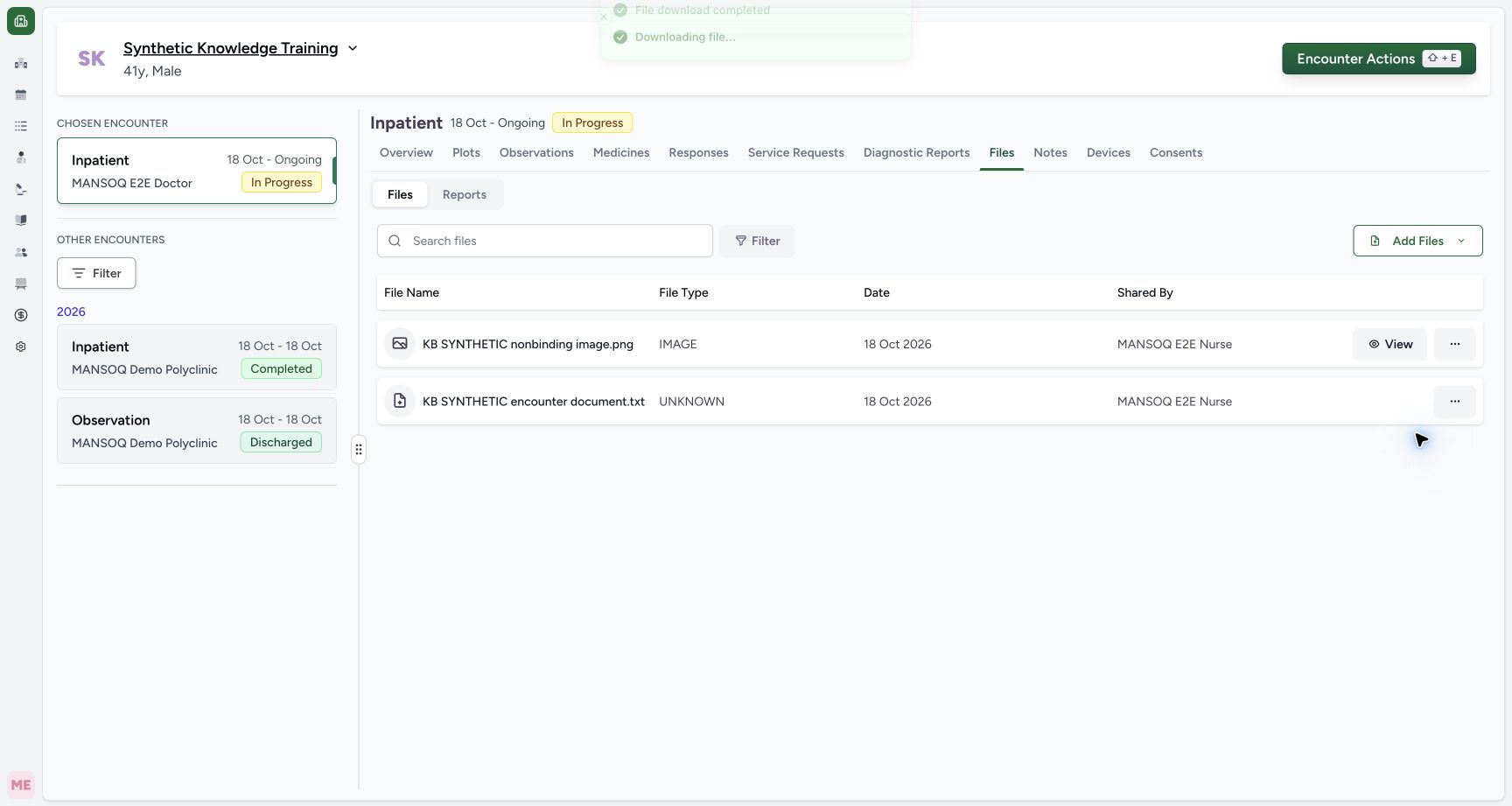
Close the preview. Open the intended TXT row’s three-dot actions and select Download. The same menu includes Archive and Rename, so verify the selected row and action. A TXT without inline View can still be downloaded. The demonstrated normal download completed in Chrome, and the saved 294-byte document matched the original synthetic fixture exactly.
 123
123Capture details
Actual Nurse in the original pinned production UI, isolated synthetic active Inpatient encounter at a Polyclinic. These are harmless software training files and nonbinding Research/Deny examples, not real clinical documents, patient decisions, signatures or treatment authorization. Other role, facility, hardware and failure branches remain unqualified. Action: Text file actions offer Download, Archive and Rename; this accepted TXT has no inline View button in the original release.
- Download the actual stored file: Download the actual stored file
- Change display name without replacing bytes: Change display name without replacing bytes
- Archive with an audit reason: Archive with an audit reason
 12
12Capture details
Actual Nurse in the original pinned production UI, isolated synthetic active Inpatient encounter at a Polyclinic. These are harmless software training files and nonbinding Research/Deny examples, not real clinical documents, patient decisions, signatures or treatment authorization. Other role, facility, hardware and failure branches remain unqualified. Success: File download completed toast is visible after normal TXT Download. Native browser history confirms294B Done, and independently read saved Downloads file bytes exactly match the synthetic fixture.
- Download completion message: Download completion message
- The downloaded text file: The downloaded text file
Observed scope and remaining upload branches
Actual Nurse in the original pinned production UI, isolated synthetic active Inpatient encounter at a Polyclinic. These are harmless software training files and nonbinding Research/Deny examples, not real clinical documents, patient decisions, signatures or treatment authorization. Other role, facility, hardware and failure branches remain unqualified. Successful PDF merging, camera/audio capture, other file formats, size/type rejection, upload interruption/retry, patient-level file scope and read-only/negative permission cases remain separate unqualified branches.
12Capture details
Actual Nurse in the original pinned production UI, isolated synthetic active Inpatient encounter at a Polyclinic. These are harmless software training files and nonbinding Research/Deny examples, not real clinical documents, patient decisions, signatures or treatment authorization. Other role, facility, hardware and failure branches remain unqualified. Action: Add Files offers Upload From Device, Open Camera and Record Audio. This demonstrated branch uses only harmless synthetic local files; camera/microphone capture is not activated.
- Choose an existing document from the device: Choose an existing document from the device
- Device upload is separate from camera and audio capture: Device upload is separate from camera and audio capture
123Capture details
Actual Nurse in the original pinned production UI, isolated synthetic active Inpatient encounter at a Polyclinic. These are harmless software training files and nonbinding Research/Deny examples, not real clinical documents, patient decisions, signatures or treatment authorization. Other role, facility, hardware and failure branches remain unqualified. Action: Two selected synthetic files are pending in Upload Files; each requires a display name. Combine Files to PDF is unchecked, so the intended branch is separate TXT and PNG records.
- Name the text document: Name the text document
- Name the image document: Name the image document
- Separate files are the demonstrated branch: Separate files are the demonstrated branch
1234Capture details
Actual Nurse in the original pinned production UI, isolated synthetic active Inpatient encounter at a Polyclinic. These are harmless software training files and nonbinding Research/Deny examples, not real clinical documents, patient decisions, signatures or treatment authorization. Other role, facility, hardware and failure branches remain unqualified. Success: Two uploaded encounter files appear with extensions and Nurse attribution. PNG is IMAGE with View; accepted TXT is displayed UNKNOWN and offers actions only in this original release. Independent stored-byte readback verifies exact synthetic fixtures.
- The image is a separate saved record: The image is a separate saved record
- Accepted TXT displays UNKNOWN: Accepted TXT displays UNKNOWN
- View opens supported image preview: View opens supported image preview
- Standalone upload has Nurse attribution: Standalone upload has Nurse attribution
Troubleshooting
A TXT is labelled UNKNOWN and has no View button
The pictured release accepts the file but its display type list does not classify TXT. Use the row’s Download action and verify the intended file. UNKNOWN does not mean that its content was assessed or that it is safe to interpret.
1234Capture details
Actual Nurse in the original pinned production UI, isolated synthetic active Inpatient encounter at a Polyclinic. These are harmless software training files and nonbinding Research/Deny examples, not real clinical documents, patient decisions, signatures or treatment authorization. Other role, facility, hardware and failure branches remain unqualified. Success: Two uploaded encounter files appear with extensions and Nurse attribution. PNG is IMAGE with View; accepted TXT is displayed UNKNOWN and offers actions only in this original release. Independent stored-byte readback verifies exact synthetic fixtures.
- The image is a separate saved record: The image is a separate saved record
- Accepted TXT displays UNKNOWN: Accepted TXT displays UNKNOWN
- View opens supported image preview: View opens supported image preview
- Standalone upload has Nurse attribution: Standalone upload has Nurse attribution
123Capture details
Actual Nurse in the original pinned production UI, isolated synthetic active Inpatient encounter at a Polyclinic. These are harmless software training files and nonbinding Research/Deny examples, not real clinical documents, patient decisions, signatures or treatment authorization. Other role, facility, hardware and failure branches remain unqualified. Action: Text file actions offer Download, Archive and Rename; this accepted TXT has no inline View button in the original release.
- Download the actual stored file: Download the actual stored file
- Change display name without replacing bytes: Change display name without replacing bytes
- Archive with an audit reason: Archive with an audit reason
The file is not visible after selection
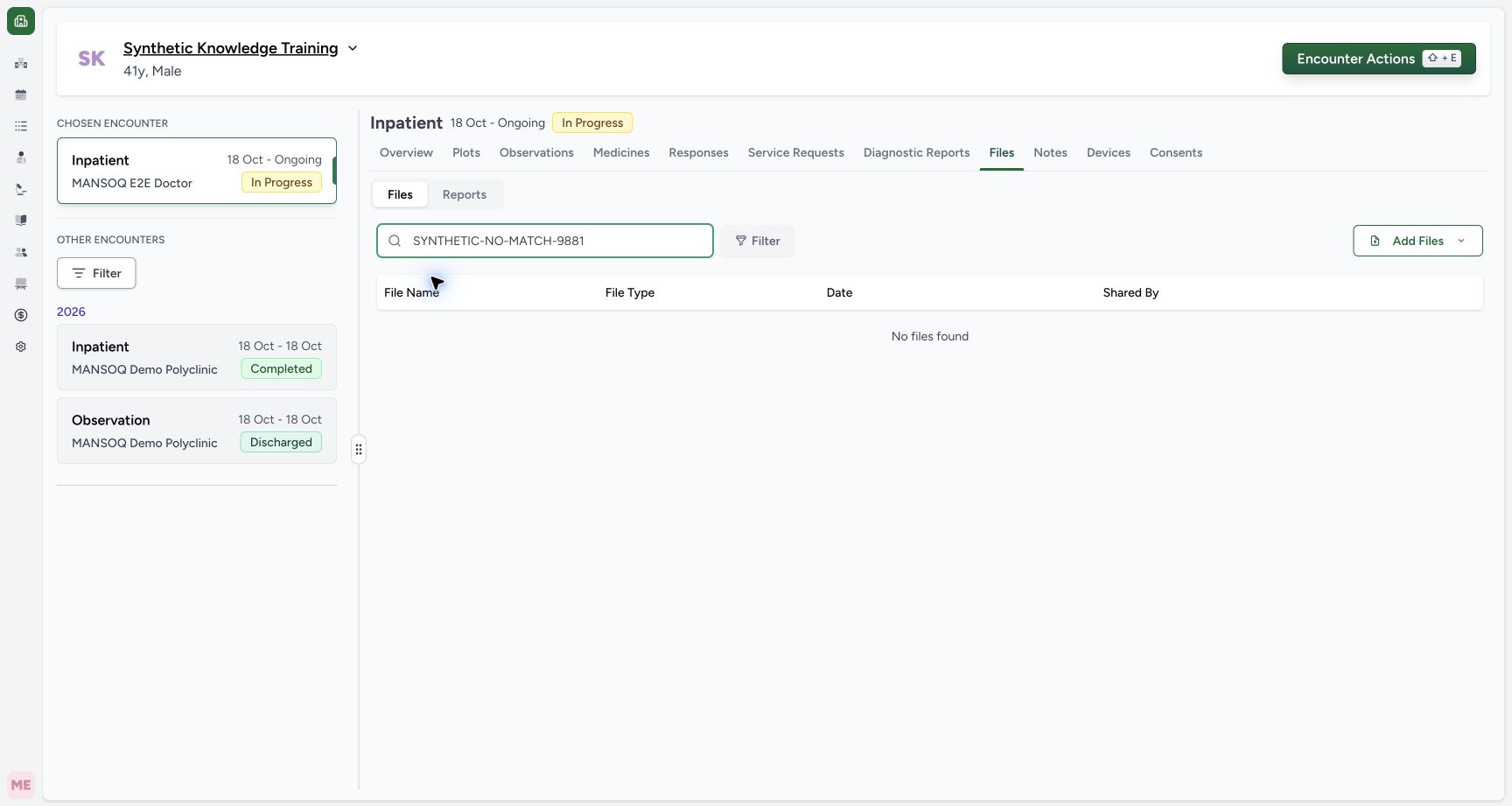
Selection is a draft. Review every required name, select Upload and confirm the completed row. If a search/filter is active, clear it before concluding that the file is absent.
123Capture details
Actual Nurse in the original pinned production UI, isolated synthetic active Inpatient encounter at a Polyclinic. These are harmless software training files and nonbinding Research/Deny examples, not real clinical documents, patient decisions, signatures or treatment authorization. Other role, facility, hardware and failure branches remain unqualified. Action: Two selected synthetic files are pending in Upload Files; each requires a display name. Combine Files to PDF is unchecked, so the intended branch is separate TXT and PNG records.
- Name the text document: Name the text document
- Name the image document: Name the image document
- Separate files are the demonstrated branch: Separate files are the demonstrated branch
12Capture details
Actual Nurse in the original pinned production UI, isolated synthetic active Inpatient encounter at a Polyclinic. These are harmless software training files and nonbinding Research/Deny examples, not real clinical documents, patient decisions, signatures or treatment authorization. Other role, facility, hardware and failure branches remain unqualified. Error: Upload with blank display names is refused by normal client validation; selected file bytes remain only in the pending dialog and no upload is sent.
- Provide a display name before upload: Provide a display name before upload
- Correct the missing name: Correct the missing name
1234Capture details
Actual Nurse in the original pinned production UI, isolated synthetic active Inpatient encounter at a Polyclinic. These are harmless software training files and nonbinding Research/Deny examples, not real clinical documents, patient decisions, signatures or treatment authorization. Other role, facility, hardware and failure branches remain unqualified. Success: Two uploaded encounter files appear with extensions and Nurse attribution. PNG is IMAGE with View; accepted TXT is displayed UNKNOWN and offers actions only in this original release. Independent stored-byte readback verifies exact synthetic fixtures.
- The image is a separate saved record: The image is a separate saved record
- Accepted TXT displays UNKNOWN: Accepted TXT displays UNKNOWN
- View opens supported image preview: View opens supported image preview
- Standalone upload has Nurse attribution: Standalone upload has Nurse attribution
 12
12Capture details
Actual Nurse in the original pinned production UI, isolated synthetic active Inpatient encounter at a Polyclinic. These are harmless software training files and nonbinding Research/Deny examples, not real clinical documents, patient decisions, signatures or treatment authorization. Other role, facility, hardware and failure branches remain unqualified. Action: Nonmatching file search shows No files found; previously verified files still exist. Clear search/filter and verify association before interpreting empty list.
- Clear the query to show files again: Clear the query to show files again
- Empty search result is not absence of stored files: Empty search result is not absence of stored files
Source evidence
References are pinned to the private MANSOQ source repository. Repository access is required to open these links.
- repositories/platform/mansoq-web/src/components/Files/FilesTab.tsx:55 · f6e9f05f
- repositories/platform/mansoq-web/src/components/Files/FileSubTab.tsx:98 · f6e9f05f
- repositories/platform/mansoq-web/src/components/Files/FileUploadDialog.tsx:72 · f6e9f05f
- repositories/platform/mansoq-web/src/hooks/useFileUpload.tsx:248 · f6e9f05f
- repositories/platform/mansoq-web/src/hooks/useFileManager.tsx:112 · f6e9f05f