 MANSOQ
 Clinical care
Restart a completed encounter within its configured window
Identify the intended completed encounter, read a configured refusal, and distinguish a separate authorized training success from restored locations or full audit history.
7 min read · Source baseline f6e9f05f
Verification and applicability
source reviewed
Check your installed version, permissions and local configuration.
Before you begin
- Use an existing role authorized to write this encounter and confirm the facility policy and restart window before acting. Menu visibility alone is not authorization.
- The example uses a separately fictional patient and prepopulated completed Ambulatory encounter. Its 24-hour profile is a nonproduction teaching setting, not a recommendation or approved clinical policy.
1. Identify the completed encounter before opening actions
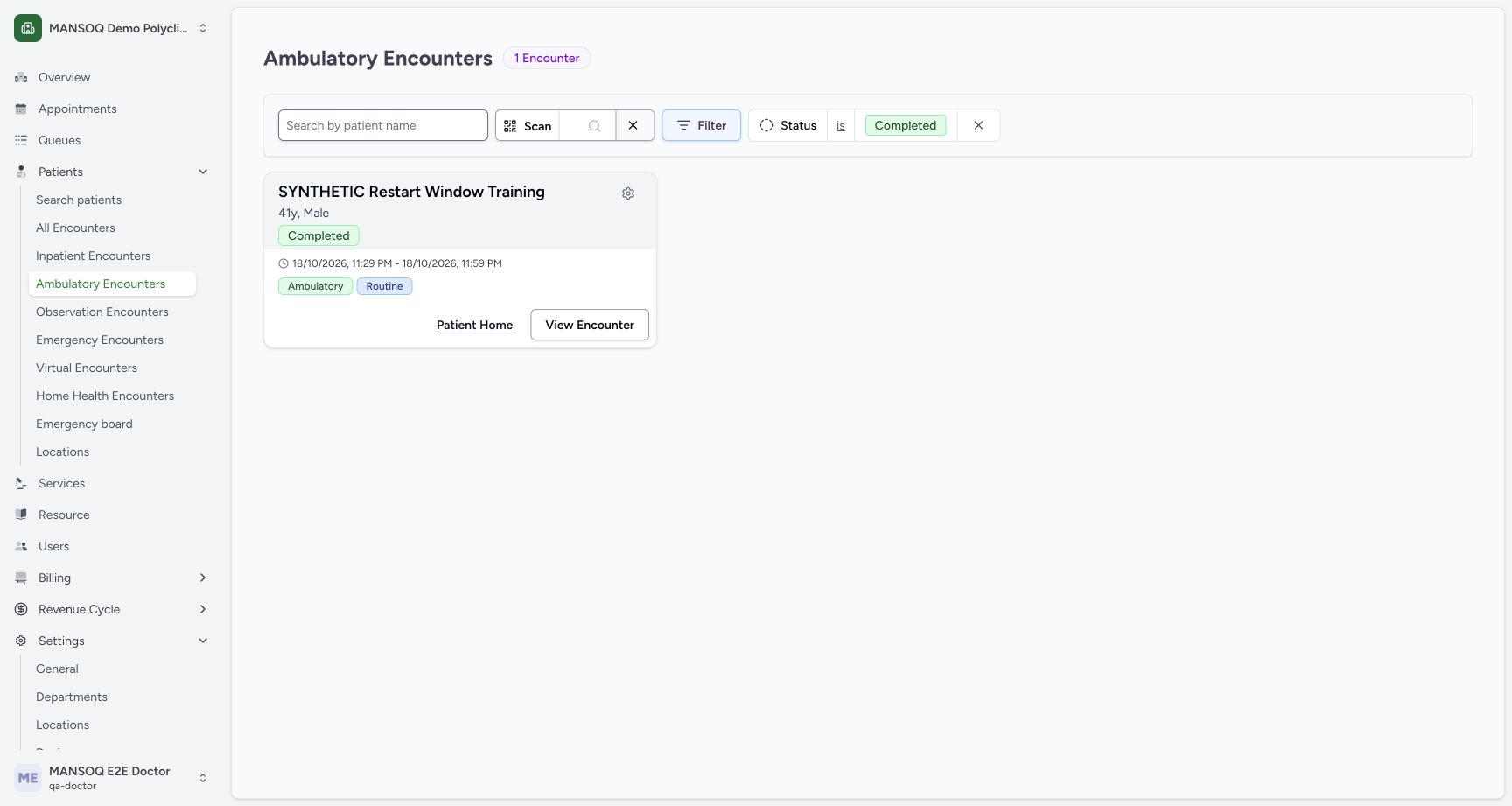
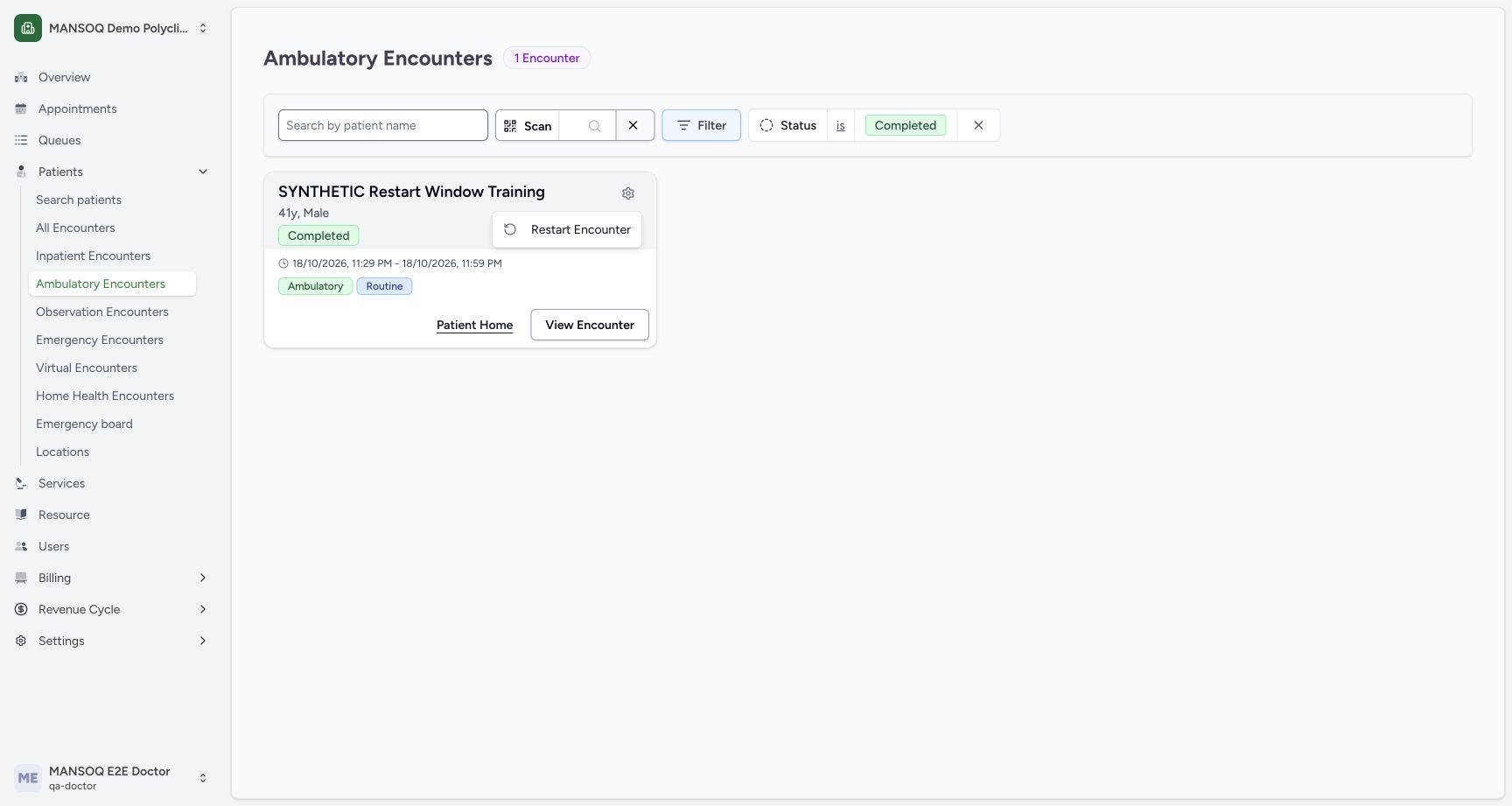
Open Patients → Ambulatory Encounters (or the relevant encounter class), locate the intended patient and use the Completed filter. Check the patient name, encounter class and displayed start/end dates. This example has one separately fictional completed encounter. Select its small gear action button. The original component exposes this menu for literal Completed status; other closed statuses supported by backend rules are not established as UI entry points by this example.
 12
12Capture details
Existing Doctor in an isolated fictional Polyclinic Ambulatory encounter. Original runtime keeps its 0-hour setting; successful branch is a separately named nonproduction 24-hour configuration example using unchanged immutable f6 product source and no new permissions. This is not approved clinical policy, a recommended window, or a production configuration change. Start: separate fictional completed Ambulatory encounter in original 0-hour restart-window runtime. Existing authorized Doctor, no grants, no appointment or location.
- Verify the intended fictional patient: Verify the intended fictional patient
- Completed encounter actions: Completed encounter actions
2. Recognize that Restart submits immediately
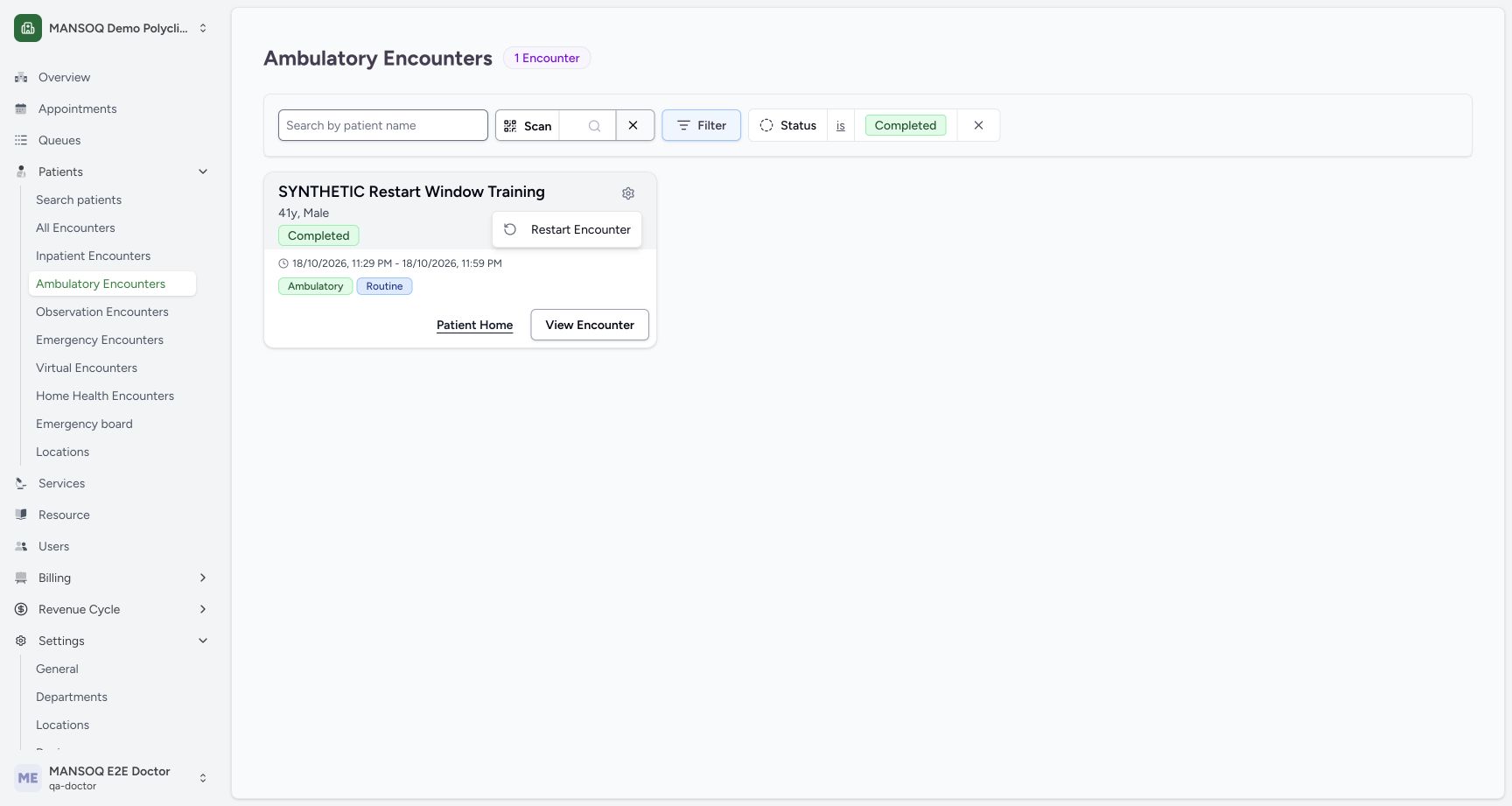
Read Restart Encounter in the menu. Selecting it invokes the restart request immediately; this component shows no confirmation dialog. Verify the target and authorization before selecting it. A visible action does not guarantee that the status, permission and configured time-window checks will pass.
 1
1Capture details
Existing Doctor in an isolated fictional Polyclinic Ambulatory encounter. Original runtime keeps its 0-hour setting; successful branch is a separately named nonproduction 24-hour configuration example using unchanged immutable f6 product source and no new permissions. This is not approved clinical policy, a recommended window, or a production configuration change. Action: Restart Encounter menu item is visible on completed encounter; selecting it invokes the request immediately, no confirmation dialog in this component. Original profile window 0 hours.
- Restart submits immediately; verify target first: Restart submits immediately; verify target first
3. Read a refused restart and verify no state change
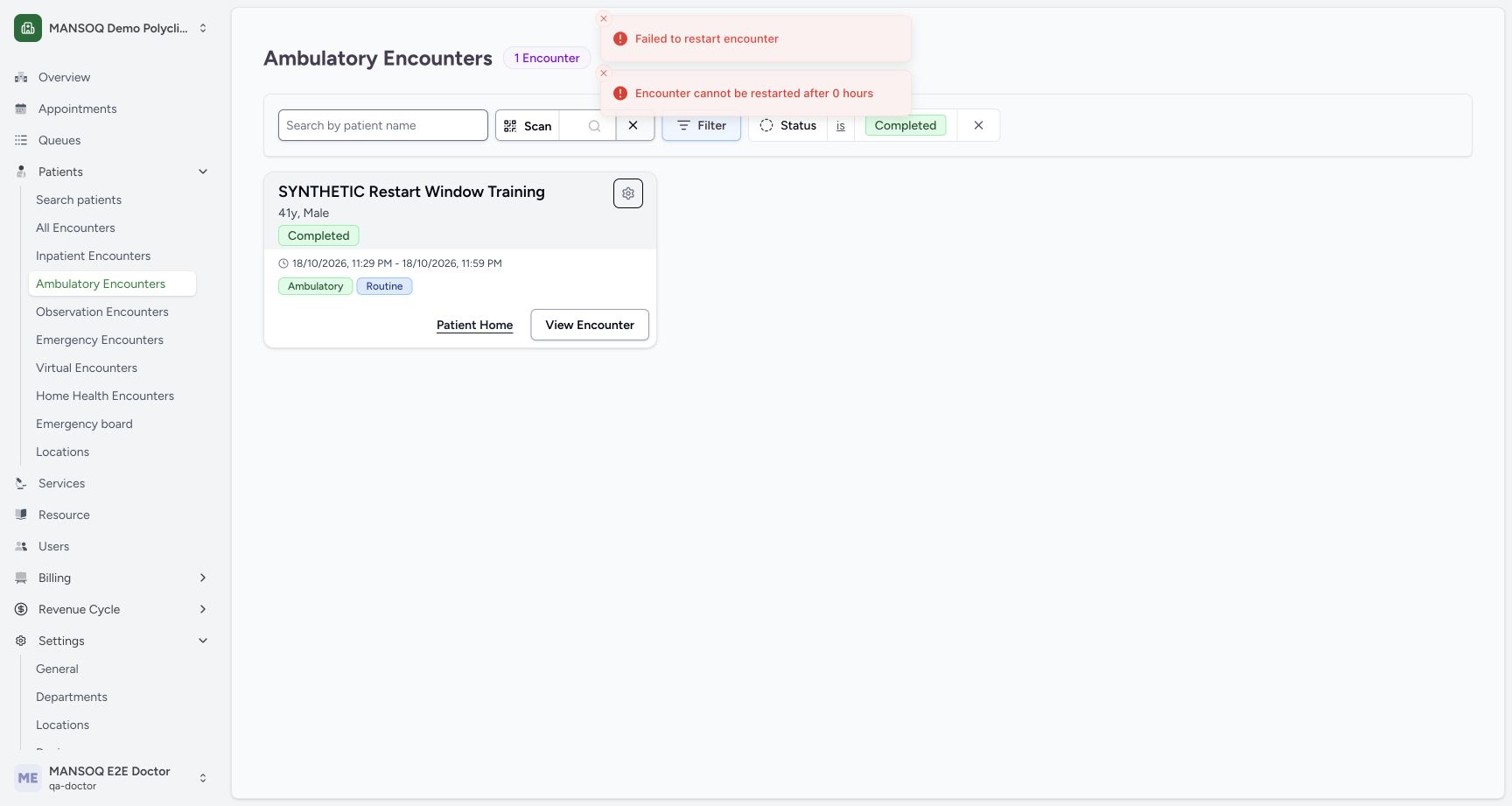
The original training profile has a 0-hour window. Its actual UI displays Failed to restart encounter and Encounter cannot be restarted after 0 hours, while the card remains Completed. Independent normal Doctor readback confirms the completed state and original period/location. Stop and check the applicable configuration and facility policy; do not repeatedly select the action to force a result. A second intentional observation was used only to capture the short-lived error after the first refusal was independently verified.
 12
12Capture details
Existing Doctor in an isolated fictional Polyclinic Ambulatory encounter. Original runtime keeps its 0-hour setting; successful branch is a separately named nonproduction 24-hour configuration example using unchanged immutable f6 product source and no new permissions. This is not approved clinical policy, a recommended window, or a production configuration change. Error: second intentional observation after independent unchanged readback; normal UI displays restart refusal for original 0-hour window, Completed record remains unchanged. No successful restart or configuration change.
- Actual error identifies the 0-hour restart window: Actual error identifies the 0-hour restart window
- The intended card remains Completed: The intended card remains Completed
4. Separate a permitted example from the original configuration
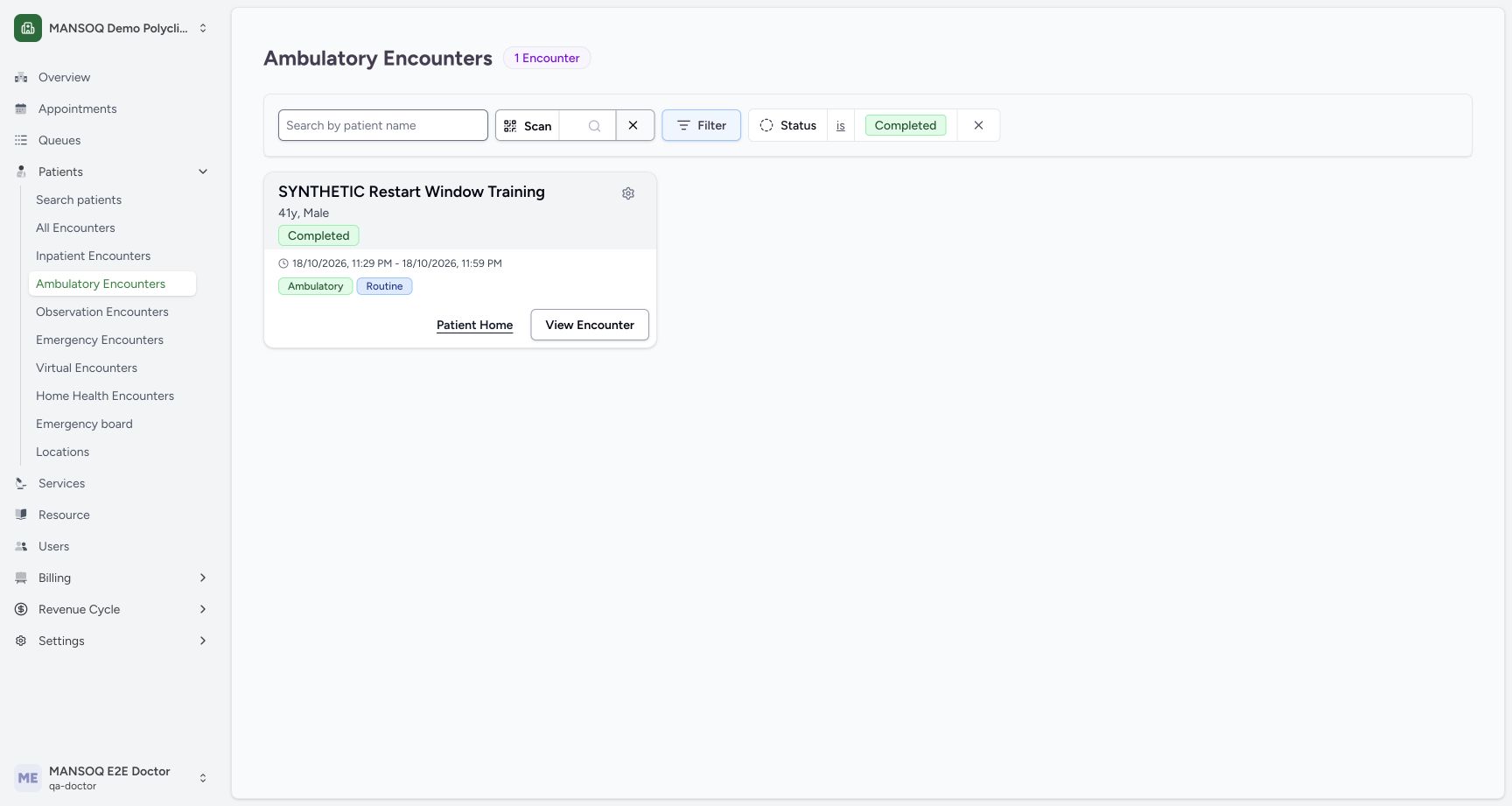
For the successful software branch, a separate nonproduction profile uses an explicit 24-hour example window and the same fictional completed encounter, with the same existing Doctor. The original 0-hour setting is unchanged and no permission was added. Verify the intended record, then select Restart Encounter once in that separate example. This guide does not direct users to change a production window or establish a clinical policy.
 12
12Capture details
Existing Doctor in an isolated fictional Polyclinic Ambulatory encounter. Original runtime keeps its 0-hour setting; successful branch is a separately named nonproduction 24-hour configuration example using unchanged immutable f6 product source and no new permissions. This is not approved clinical policy, a recommended window, or a production configuration change. Start: same fictional completed record in separately named 24-hour example profile at 45224, exact immutable f6 product source. This is an explicit nonproduction configuration example, not approved clinical policy or default.
- Confirm the same intended fictional encounter: Confirm the same intended fictional encounter
- Completed encounter actions in the example profile: Completed encounter actions in the example profile
 1
1Capture details
Existing Doctor in an isolated fictional Polyclinic Ambulatory encounter. Original runtime keeps its 0-hour setting; successful branch is a separately named nonproduction 24-hour configuration example using unchanged immutable f6 product source and no new permissions. This is not approved clinical policy, a recommended window, or a production configuration change. Action: existing Doctor verifies the fictional Completed card and selects immediate Restart Encounter in separately named 24-hour example profile. No new permission and no real clinical policy change.
- Submit once only after verifying intended record and policy: Submit once only after verifying intended record and policy
5. Verify the reopened workspace and retained dates
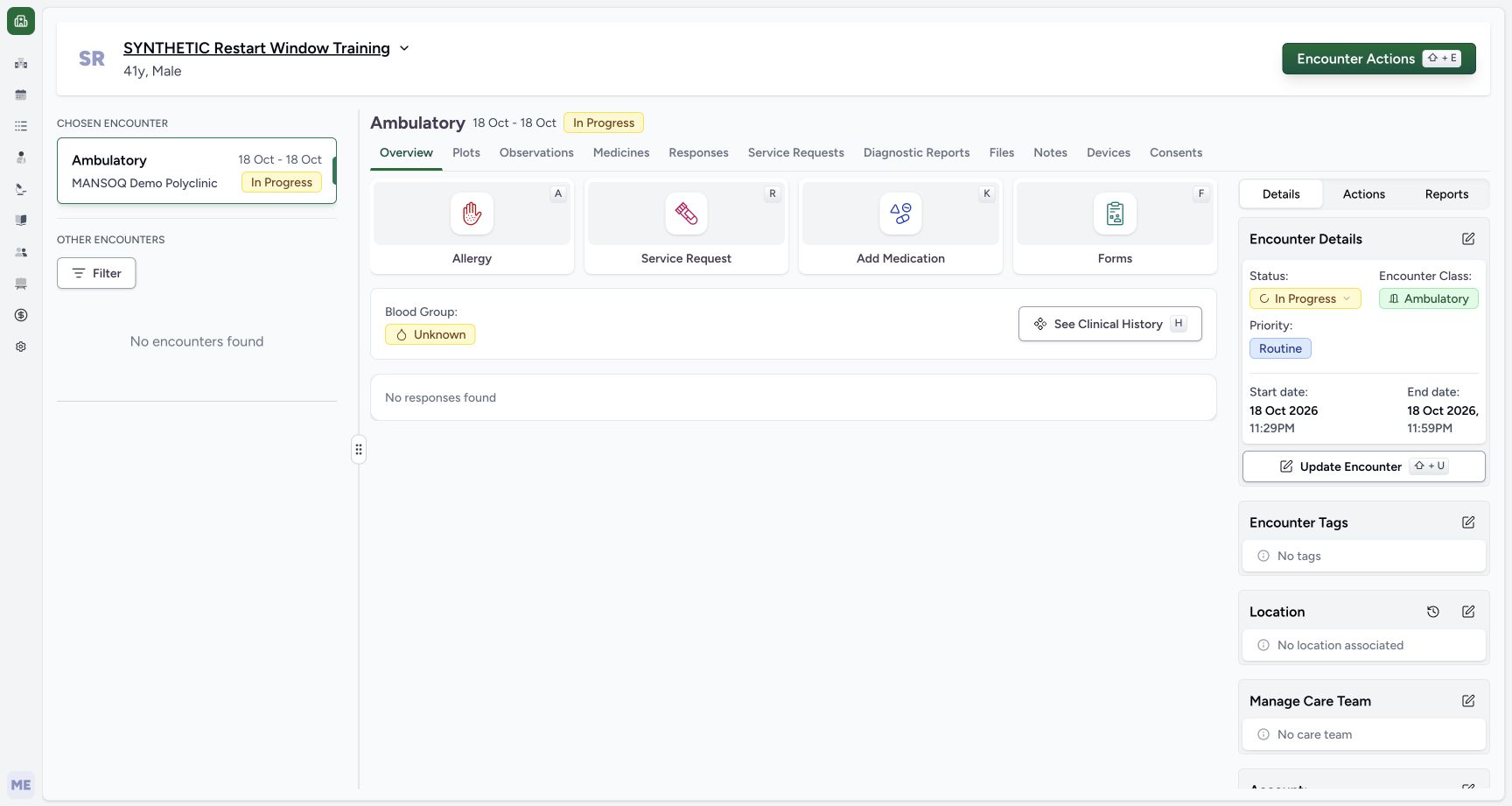
After a successful restart, the application opens the encounter Overview and displays In Progress. Verify the intended patient and encounter again. The original endpoint changes status, updater and modification time only: the example still shows its original end date. Do not infer that restart cleared the end date, repeated admission, restored a bed or resumed an appointment. Review those fields through their separately authorized workflows if the facility process requires action.
 123
123Capture details
Existing Doctor in an isolated fictional Polyclinic Ambulatory encounter. Original runtime keeps its 0-hour setting; successful branch is a separately named nonproduction 24-hour configuration example using unchanged immutable f6 product source and no new permissions. This is not approved clinical policy, a recommended window, or a production configuration change. Success: separately configured 24-hour training profile normally restarts only the fictional encounter; saved workspace displays InProgress and the retained original end date. Original 0-hour configuration unchanged; exact associations and Doctor actor verified independently.
- Verify the intended fictional patient: Verify the intended fictional patient
- Saved status is In Progress: Saved status is In Progress
- Original end date is retained after restart: Original end date is retained after restart
6. Read the actual actor and association state
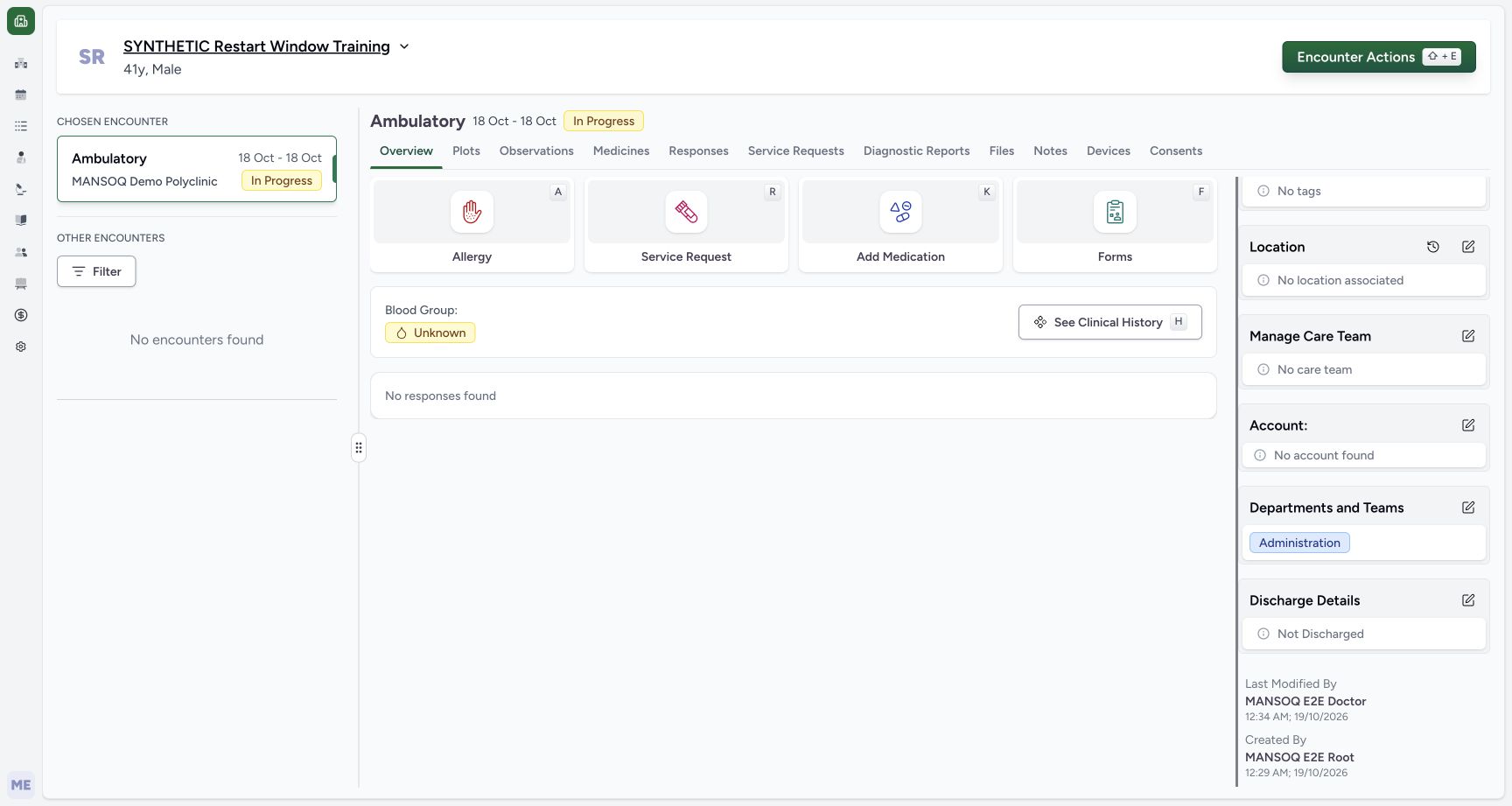
Scroll the saved Details pane. The example shows Last Modified By: MANSOQ E2E Doctor, with the synthetic root setup creator retained, and no location, care team, account or appointment. Independent normal API GETs on both runtimes confirm the saved In Progress state and unchanged original period. The two runtimes share this synthetic database; a change made in the separate example is therefore visible when the same record is read through the original runtime, without changing that runtime’s 0-hour configuration.
 123
123Capture details
Existing Doctor in an isolated fictional Polyclinic Ambulatory encounter. Original runtime keeps its 0-hour setting; successful branch is a separately named nonproduction 24-hour configuration example using unchanged immutable f6 product source and no new permissions. This is not approved clinical policy, a recommended window, or a production configuration change. Success: lower saved Details pane shows existing Doctor as LastModifiedBy, root setup as CreatedBy, no location/care team/account and retained Administration association after example restart. No clinical record or real care action was added.
- Last modifying actor is the existing Doctor: Last modifying actor is the existing Doctor
- No location was restored by restart: No location was restored by restart
- Original synthetic setup creator is retained: Original synthetic setup creator is retained
Understand the original traceability boundary
The original restart endpoint does not append a new entry to the encounter status_history array. Independent readback still contains only the fixture’s completed event, even though current status is In Progress and the updater is Doctor. Use the actual current state, actor and modification metadata; do not treat this original history array as a complete restart audit trail. A later repair needs its own committed source and saved evidence.
123Capture details
Existing Doctor in an isolated fictional Polyclinic Ambulatory encounter. Original runtime keeps its 0-hour setting; successful branch is a separately named nonproduction 24-hour configuration example using unchanged immutable f6 product source and no new permissions. This is not approved clinical policy, a recommended window, or a production configuration change. Success: separately configured 24-hour training profile normally restarts only the fictional encounter; saved workspace displays InProgress and the retained original end date. Original 0-hour configuration unchanged; exact associations and Doctor actor verified independently.
- Verify the intended fictional patient: Verify the intended fictional patient
- Saved status is In Progress: Saved status is In Progress
- Original end date is retained after restart: Original end date is retained after restart
123Capture details
Existing Doctor in an isolated fictional Polyclinic Ambulatory encounter. Original runtime keeps its 0-hour setting; successful branch is a separately named nonproduction 24-hour configuration example using unchanged immutable f6 product source and no new permissions. This is not approved clinical policy, a recommended window, or a production configuration change. Success: lower saved Details pane shows existing Doctor as LastModifiedBy, root setup as CreatedBy, no location/care team/account and retained Administration association after example restart. No clinical record or real care action was added.
- Last modifying actor is the existing Doctor: Last modifying actor is the existing Doctor
- No location was restored by restart: No location was restored by restart
- Original synthetic setup creator is retained: Original synthetic setup creator is retained
Troubleshooting
The restart action fails or is unavailable
Check the exact encounter status, role authorization and configured restart time limit. The backend measures the window from modified_date and checks can_restart_encounter_obj. The original default configuration shown here is 0 hours. Ask the facility administrator to review policy/configuration; do not assume a visible menu grants access or that the 24-hour training example applies to your facility.
1Capture details
Existing Doctor in an isolated fictional Polyclinic Ambulatory encounter. Original runtime keeps its 0-hour setting; successful branch is a separately named nonproduction 24-hour configuration example using unchanged immutable f6 product source and no new permissions. This is not approved clinical policy, a recommended window, or a production configuration change. Action: Restart Encounter menu item is visible on completed encounter; selecting it invokes the request immediately, no confirmation dialog in this component. Original profile window 0 hours.
- Restart submits immediately; verify target first: Restart submits immediately; verify target first
12Capture details
Existing Doctor in an isolated fictional Polyclinic Ambulatory encounter. Original runtime keeps its 0-hour setting; successful branch is a separately named nonproduction 24-hour configuration example using unchanged immutable f6 product source and no new permissions. This is not approved clinical policy, a recommended window, or a production configuration change. Error: second intentional observation after independent unchanged readback; normal UI displays restart refusal for original 0-hour window, Completed record remains unchanged. No successful restart or configuration change.
- Actual error identifies the 0-hour restart window: Actual error identifies the 0-hour restart window
- The intended card remains Completed: The intended card remains Completed
Source evidence
References are pinned to the private MANSOQ source repository. Repository access is required to open these links.
- repositories/platform/mansoq-web/src/components/Encounter/EncounterActions.tsx:31 · f6e9f05f
- repositories/platform/mansoq-core/mansoq/emr/api/viewsets/encounter.py:322 · f6e9f05f
- repositories/platform/mansoq-core/mansoq/security/authorization/encounter.py:121 · f6e9f05f
- repositories/platform/mansoq-core/config/settings/config.py:254 · f6e9f05f
- repositories/platform/mansoq-web/src/components/Encounter/EncounterInfoCard.tsx:81 · f6e9f05f