 MANSOQ
 Executive analytics
Read bed availability and understand its current calculation limits
Interpret an actual synthetic Hospital bed dashboard, filter ward cards and avoid treating unqualified counters as reservation or clinical readiness evidence.
Current source · Read-only current synthetic Hospital dashboard and Occupied filter observed under a local synthetic superuser. Independent normal location GET returned 200 and confirmed one unassigned bed. No patient occupancy or full reporting qualification. · 4 min read
Before you begin
- Use an authorized account for the intended facility and confirm the location response is healthy. The captured account was a local synthetic superuser.
- The example Hospital has one synthetic Ward and one unassigned synthetic Bed; no patient record, admission, transfer, discharge or reservation was created.
1. Open the implemented bed dashboard and check its context
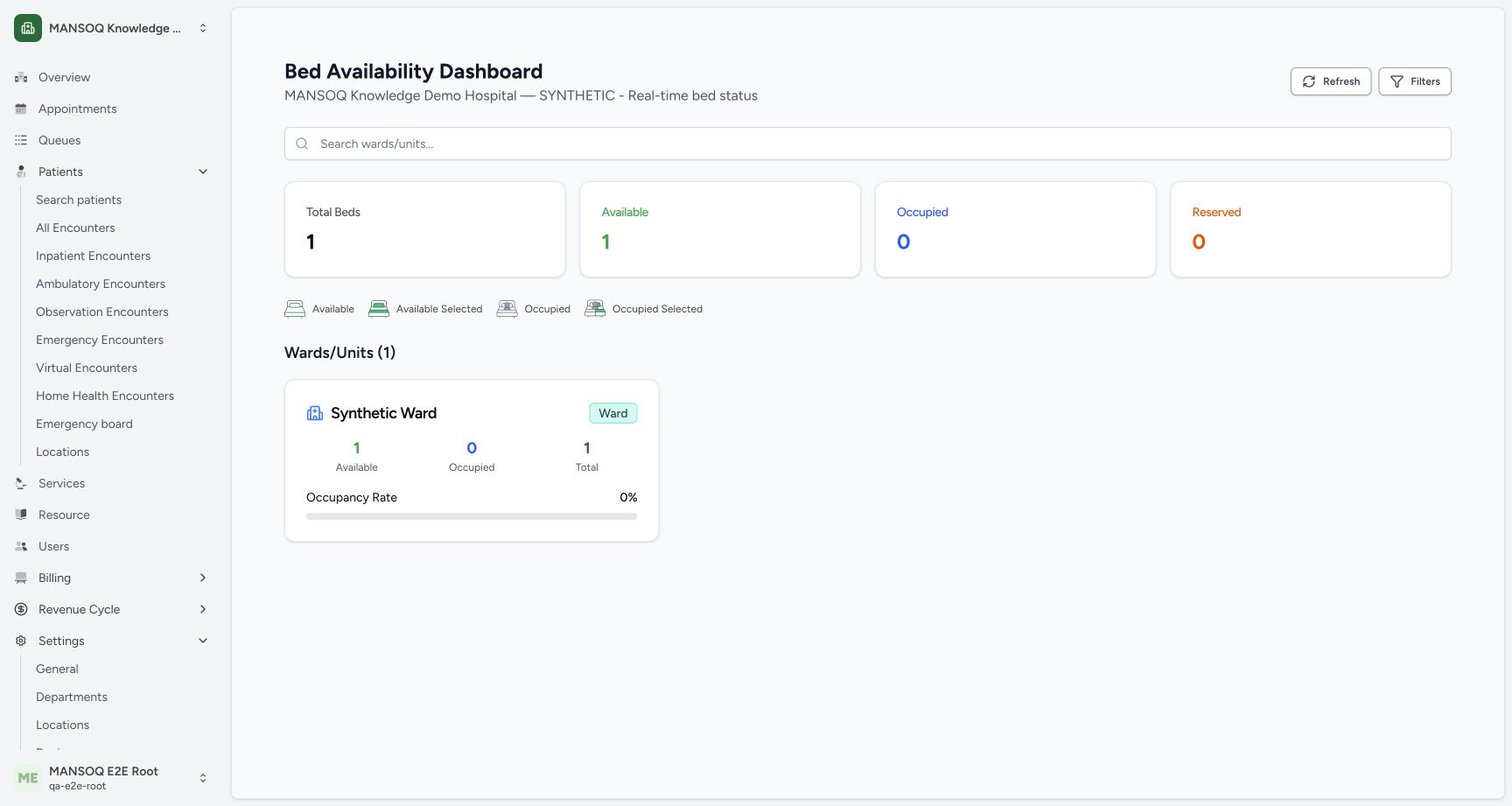
Open the facility’s implemented /bed-availability view using the deployment’s approved navigation or direct facility URL. Confirm the facility heading. This source route exists, but the sidebar location entry opens a separate encounter-location view; do not invent a sidebar button that was not observed. The actual data API returned 200 and contained one Bed without a current encounter, matching 1 Total, 1 Available and 0 Occupied.
 1234
1234- Facility context: Confirm the facility before interpreting operational numbers.
- Available counter: One synthetic bed has no current encounter in the independently read location record.
- Reserved limitation: The audited calculation initializes Reserved to zero; do not treat it as a verified reservation ledger.
- Ward summary: This card groups the single synthetic bed under its parent Ward.
2. Use filters and distinguish the ward list from overall totals
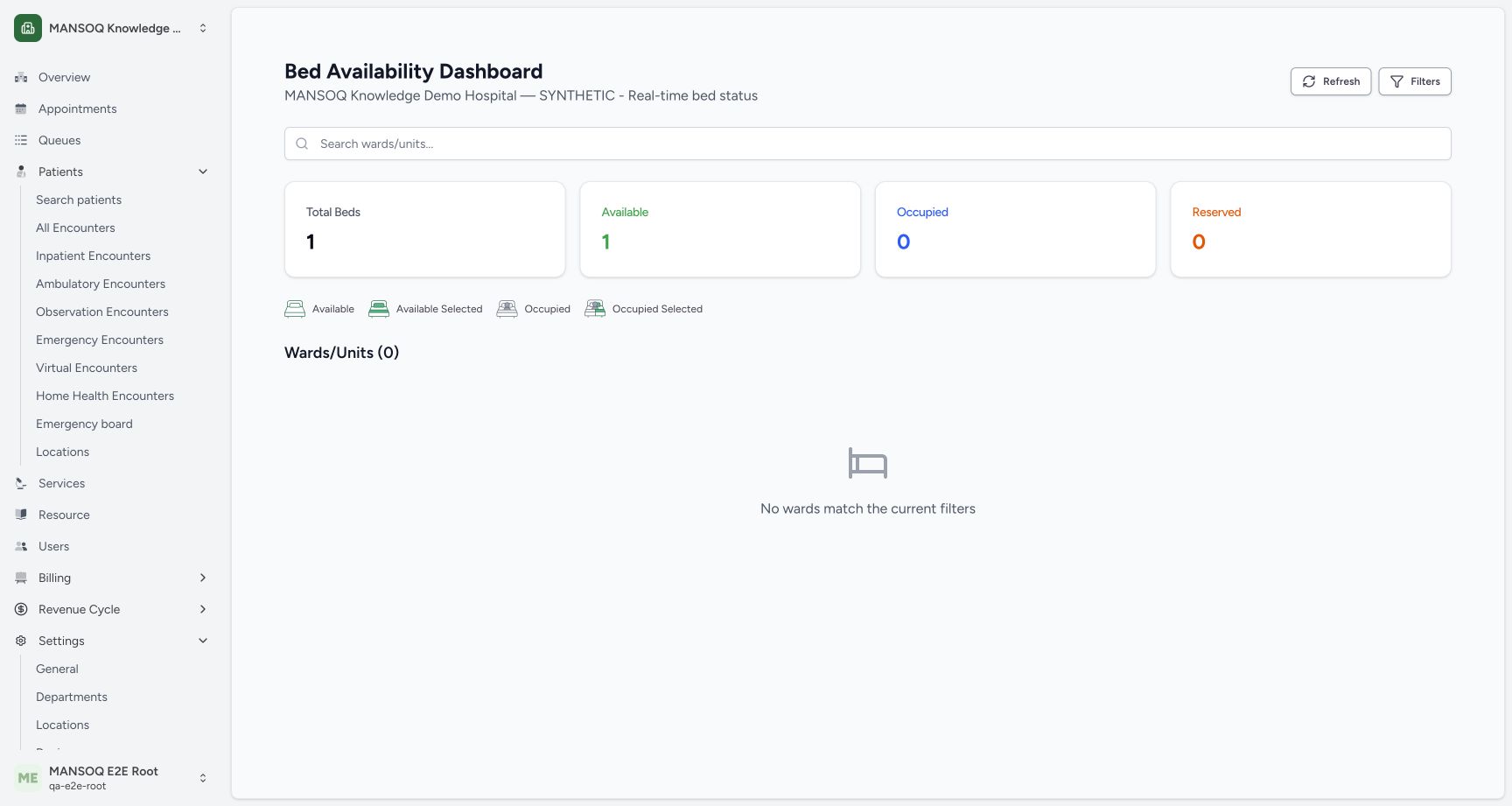
Choose Filters, select a Ward/Unit or Availability Status, and close the sheet. Selecting Occupied in this estate produced Wards/Units (0) and No wards match the current filters. Overall summary counters stayed at one total/one available; the filter changes ward cards, not those whole-estate counters.
 1234
1234- Filtered ward count: The ward list has zero matches for the selected Occupied filter.
- Empty filter result: No wards match the current filters is a filtered view result.
- Overall counter: The summary still shows the estate’s one available bed; it is not recalculated as zero by this filter.
- Change filters: Reopen Filters to change Ward/Unit or Availability Status.
3. Refresh and reconcile before operational decisions
Use Refresh and confirm the displayed data against the authorized location records. The audited screen also requests locations every 30 seconds with limit 1000. This synthetic read was within that limit. Larger estates and unavailable/partial responses need explicit reconciliation before interpreting totals.
1234- Facility context: Confirm the facility before interpreting operational numbers.
- Available counter: One synthetic bed has no current encounter in the independently read location record.
- Reserved limitation: The audited calculation initializes Reserved to zero; do not treat it as a verified reservation ledger.
- Ward summary: This card groups the single synthetic bed under its parent Ward.
Source-defined availability rule
The audited calculation counts form bd locations as beds. A bed with no current encounter, or with a current encounter whose status is discharged, is counted Available; another current encounter counts Occupied. That calculation does not inspect all system-availability or reservation state. Reconcile the actual stay, location and discharge process rather than assuming the card is a complete clinical bed ledger.
Reserved is not a verified reservation ledger
The audited code initializes overall and per-ward reserved counters to zero and does not increment them in this calculation. A zero Reserved card or empty Reserved filter therefore does not establish the absence of real reservation obligations. Reservation management and current clinical occupancy must be qualified separately.
Troubleshooting
No wards match the current filters
Check selected status, selected ward and search text. In the observed Occupied filter, no ward had an occupied bed while overall estate totals remained unchanged.
Dashboard totals disagree with operations
Check response health, pagination limits, source-defined encounter status rules and current facility context. Escalate discrepancies; do not clear encounters or alter operational data to force the counters to match.
Source evidence
References are pinned to the private MANSOQ source repository. Repository access is required to open these links.
- repositories/platform/mansoq-web/src/Routers/routes/FacilityRoutes.tsx:51 · f6e9f05f
- repositories/platform/mansoq-web/src/pages/Facility/BedAvailabilityDashboard.tsx:89 · f6e9f05f
- repositories/platform/mansoq-web/src/pages/Facility/BedAvailabilityDashboard.tsx:112 · f6e9f05f
- repositories/platform/mansoq-web/src/pages/Facility/BedAvailabilityDashboard.tsx:175 · f6e9f05f