 MANSOQ
 Executive analytics
Read the revenue command dashboard without mistaking empty data for readiness
Locate financial summaries, stage counters and the episode worklist in a verified empty synthetic Hospital; distinguish data health from zero values.
Current source · Current synthetic Hospital empty-state dashboard observed and Refresh exercised read-only. Independent dashboard and case-list GETs both returned 200, with zero cases. No populated finance or external exchange qualification. · 3 min read
Before you begin
- Use an authorized account in the intended facility and check both dashboard and latest-case-list response health. The capture uses a synthetic local superuser.
1. Open the facility revenue dashboard
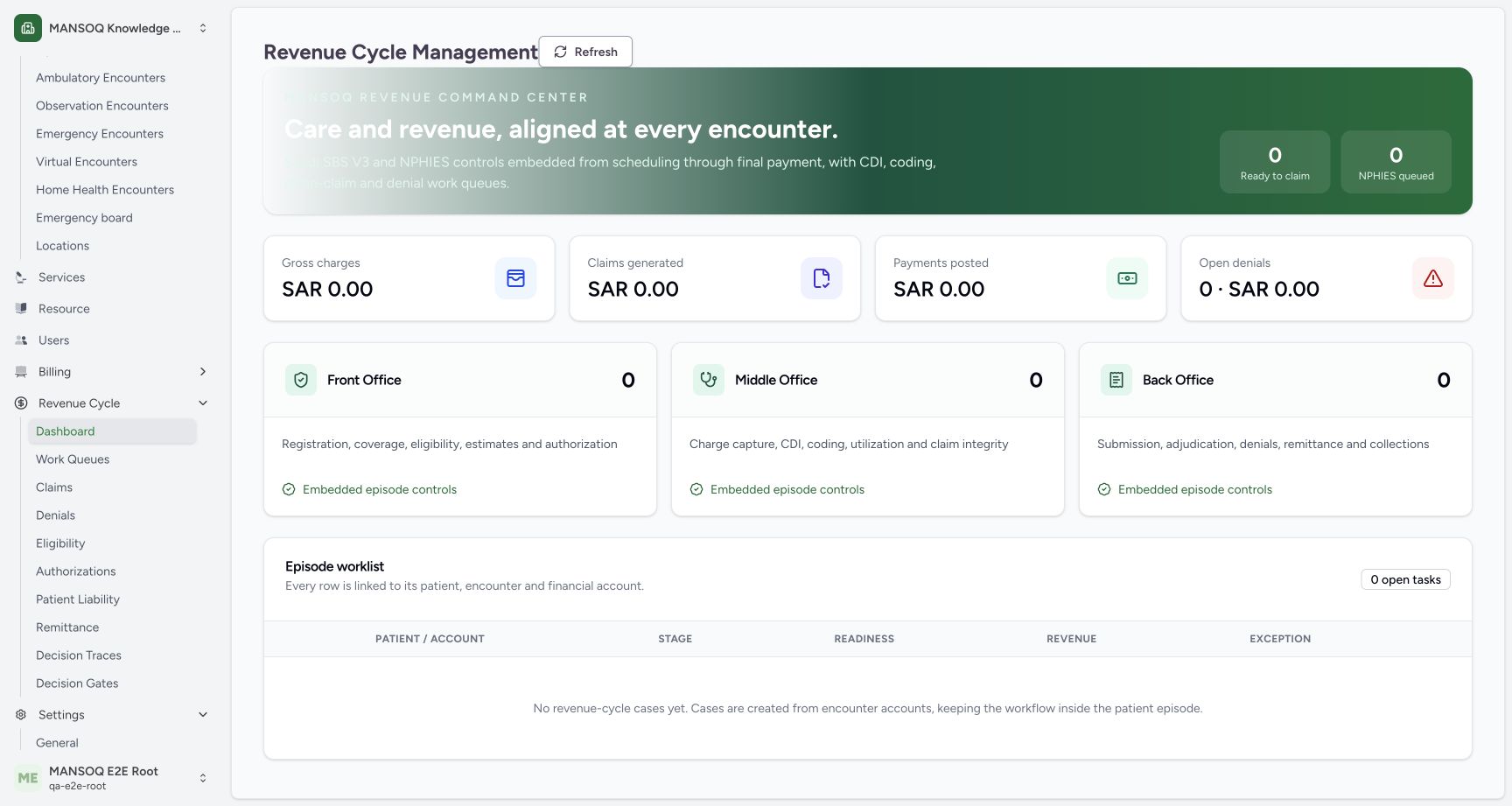
Expand Revenue Cycle → Dashboard and confirm the facility. The command view shows ready-to-claim and queued counters, SAR financial summaries, Front/Middle/Back Office stages and an episode worklist. The screenshot is an intentionally empty synthetic Hospital, not a populated executive report.
 1234
1234- Financial summaries: SAR amounts summarize the data returned for this facility; verify response health before interpreting zero.
- Queued counter: This zero counter does not prove that a live NPHIES integration is configured.
- Office stages: Front, Middle and Back Office counters describe configured revenue case stages.
- Episode worklist: This estate has no cases; the independently read latest-case list is empty.
2. Interpret the summaries with healthy source data
Gross charges, claims generated, payments posted and open denials summarize returned aggregates. In this isolated estate the normal dashboard GET returned 200 and the latest-case-list GET returned 200 with zero cases, supporting the pictured empty values. The UI source supplies zero when data is absent too; a visible zero alone does not prove a healthy response.
1234- Financial summaries: SAR amounts summarize the data returned for this facility; verify response health before interpreting zero.
- Queued counter: This zero counter does not prove that a live NPHIES integration is configured.
- Office stages: Front, Middle and Back Office counters describe configured revenue case stages.
- Episode worklist: This estate has no cases; the independently read latest-case list is empty.
3. Refresh both summaries and worklist
Choose Refresh. The audited control refetches both dashboard aggregates and the latest-case list. The list requests the 50 most recently modified cases and is not an unlimited export. Investigate cases through the appropriate worklist and reporting controls; no case was created or changed here.
1234- Financial summaries: SAR amounts summarize the data returned for this facility; verify response health before interpreting zero.
- Queued counter: This zero counter does not prove that a live NPHIES integration is configured.
- Office stages: Front, Middle and Back Office counters describe configured revenue case stages.
- Episode worklist: This estate has no cases; the independently read latest-case list is empty.
Integration text is not exchange proof
The command banner mentions Saudi SBS and NPHIES controls. This static wording and the queued counter do not establish configured credentials, payer connectivity, sent messages, adjudication or successful remittance. The insurance and integration guides contain separate scoped evidence for those workflows.
What this reference establishes
Only a healthy empty-state read was observed for this synthetic Hospital. No real financial transaction, populated revenue reconciliation, payer exchange or independent executive-specific role boundary was tested. A zero-case estate cannot demonstrate production performance or claim readiness.
Troubleshooting
All counters show zero unexpectedly
Verify facility context and both request responses. Inspect actual cases and reporting scope before concluding no activity exists; the audited UI uses zero fallbacks when data is missing.
Source evidence
References are pinned to the private MANSOQ source repository. Repository access is required to open these links.
- repositories/platform/mansoq-web/src/pages/Facility/revenueCycle/RevenueCycleDashboard.tsx:56 · f6e9f05f
- repositories/platform/mansoq-web/src/pages/Facility/revenueCycle/RevenueCycleDashboard.tsx:79 · f6e9f05f
- repositories/platform/mansoq-web/src/pages/Facility/revenueCycle/RevenueCycleDashboard.tsx:112 · f6e9f05f
- repositories/platform/mansoq-web/src/types/revenueCycle/revenueCycleApi.ts:11 · f6e9f05f