 MANSOQ
 Facility administration
Maintain specimen tested options and container text
Edit an existing synthetic definition, save tested switches and preference with container notes, then reopen the form to verify persistence.
8 min read · Source baseline f6e9f05f
Verification and applicability
Seven actual 1920 × 1080 original f6e9 Chrome screenshots and seven narrow hash-bound steps. One normal UI metadata update of existing own-Laboratory synthetic UUIDc2ac7947… saved Active and unchanged BLDV identity, revised main Description, Is Derived=true, Single Use=true, preference=alternate, synthetic requirement/container/preparation/minimum_volume.string. Independent normal detail/list GET200 confirms exact values. Reopened form visibly retains Alternate and is exited through Cancel without another mutation. Numeric quantities, collection/preparation/cap codes, status lifecycle, patient work and Delete remain unqualified.
Check your installed version, permissions and local configuration.
Before you begin
- Sign in with your existing authorized Facility Admin account and select the intended Laboratory. This observed account already has specimen-definition read/write permissions; no membership or role is changed.
- These screenshots use a clearly synthetic reusable definition. No patient specimen, specimen collection, patient order, real collection protocol, billing item or external transaction is created.
- Create or choose the intended existing definition first. This guide continues with the same synthetic definition from the base creation guide and preserves its title, slug, collected type and Active status.
1. Open Edit on the intended saved definition
Confirm the synthetic record, Active, Blood venous and the starting No values for Is Derived and Single Use. Use Edit on that saved definition. The normal link opens the full facility settings edit route.
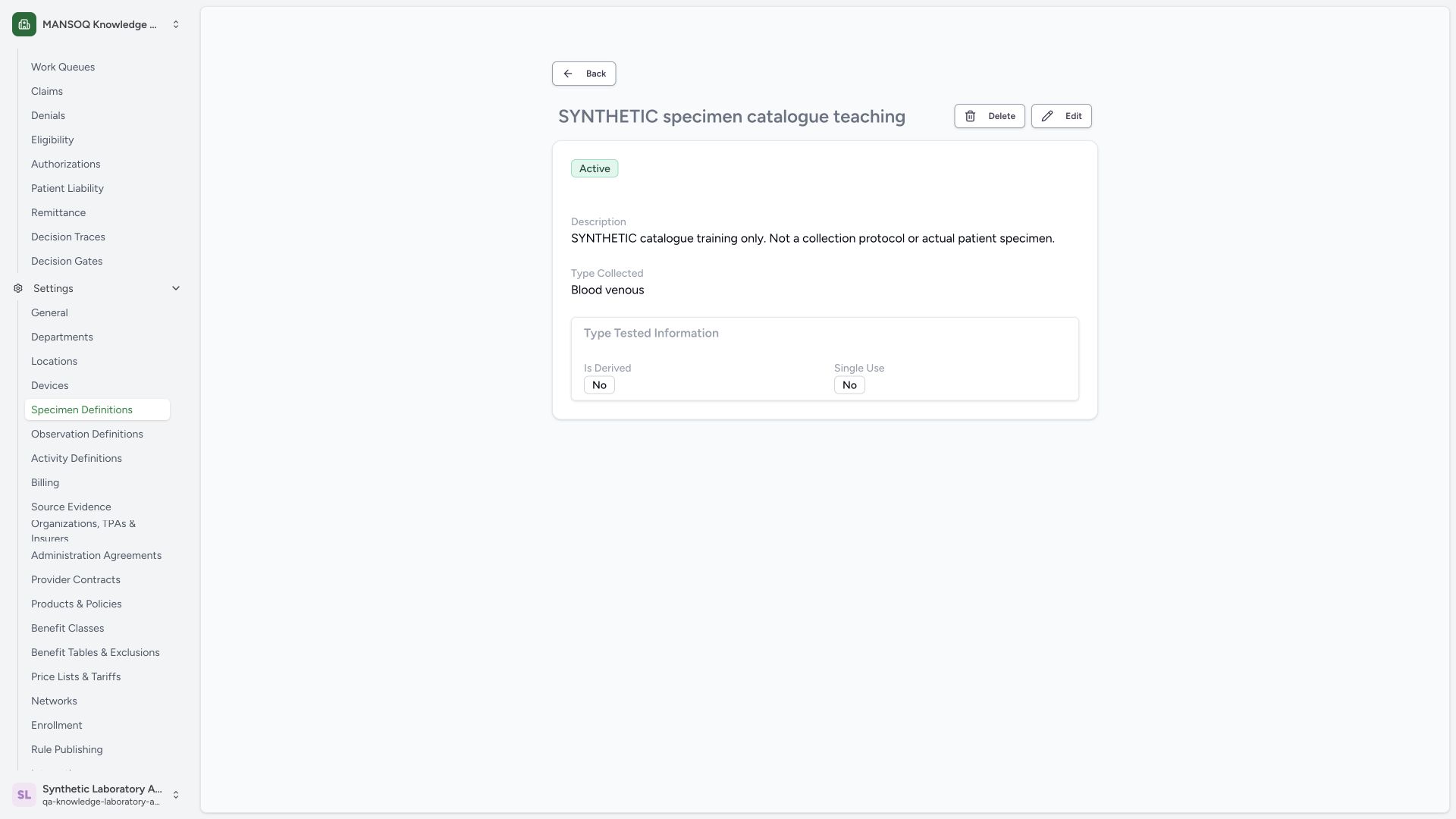 1234
1234Capture details
Actual 1920 × 1080 Chrome pixels; pinned source f6e9f05f. Laboratory Facility Admin synthetic specimen tested options and container text maintenance
- Existing definition: Confirm the intended synthetic record.
- Active: Keep the status Active in this metadata example.
- Starting switches No: The base definition starts with Is Derived and Single Use set to No.
- Edit: Open the existing record through normal Edit.
2. Review tested switches and choose Alternate
Update the main Description with the illustrated synthetic metadata note. For this training example, enable Is Derived and Single Use, then open Preference. The choices are Preferred and Alternate; choose Alternate. These are catalogue metadata changes, not real patient collection instructions.
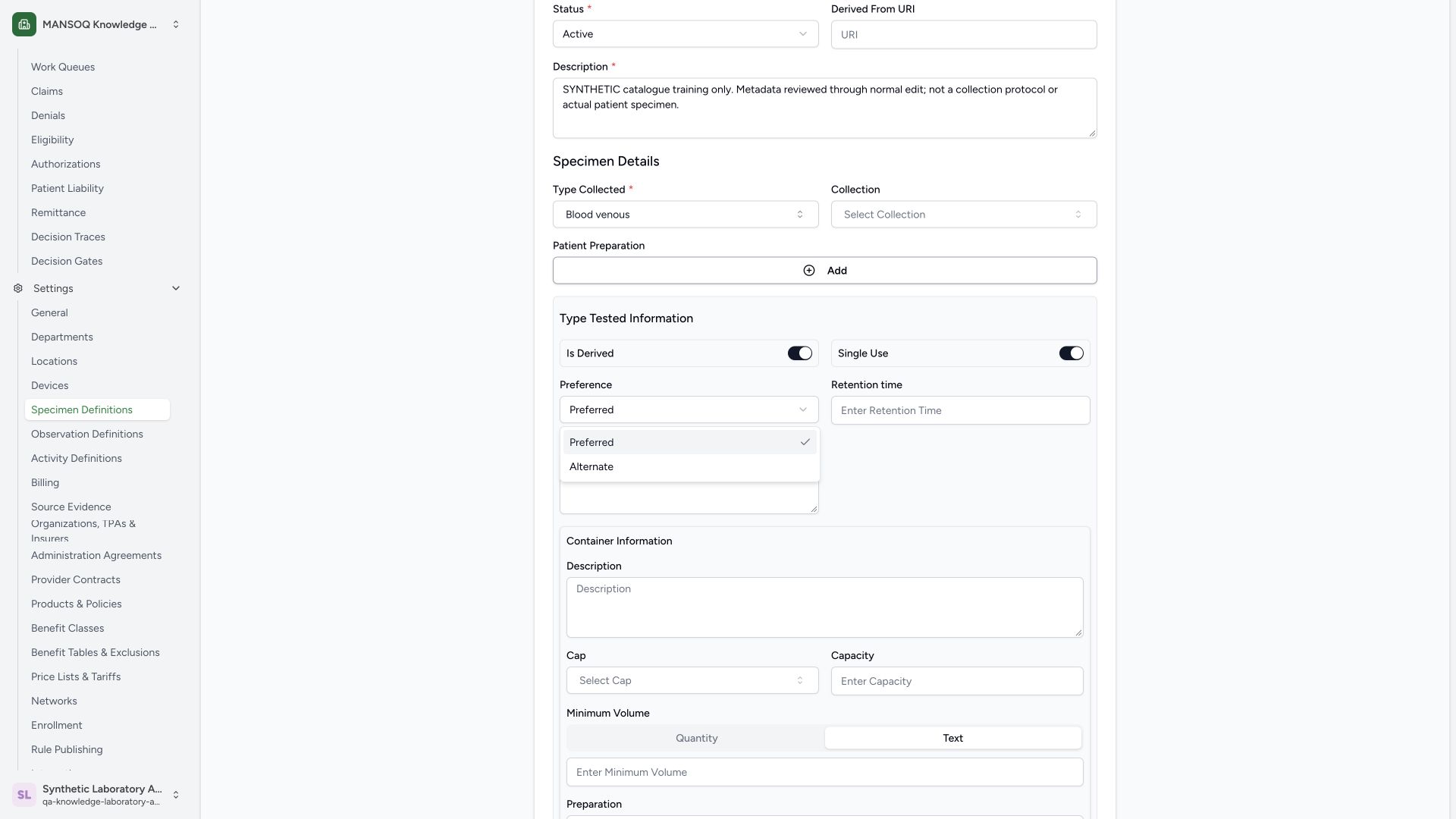 12345
12345Capture details
Actual 1920 × 1080 Chrome pixels; pinned source f6e9f05f. Laboratory Facility Admin synthetic specimen tested options and container text maintenance
- Is Derived on: The synthetic demonstration enables this switch.
- Single Use on: The synthetic demonstration enables this switch.
- Preferred: Preferred is the current selection.
- Alternate: Select Alternate for this synthetic metadata example.
- Revised description: The synthetic warning remains explicit.
3. Review the synthetic requirement and container notes
Enter the illustrated SYNTHETIC requirement teaching only note and synthetic container Description. Keep Minimum Volume → Text and enter the illustrated synthetic note marked not for patient use. Confirm the enabled switches and Alternate preference. No collection method, cap or numeric quantity is configured in this text example.
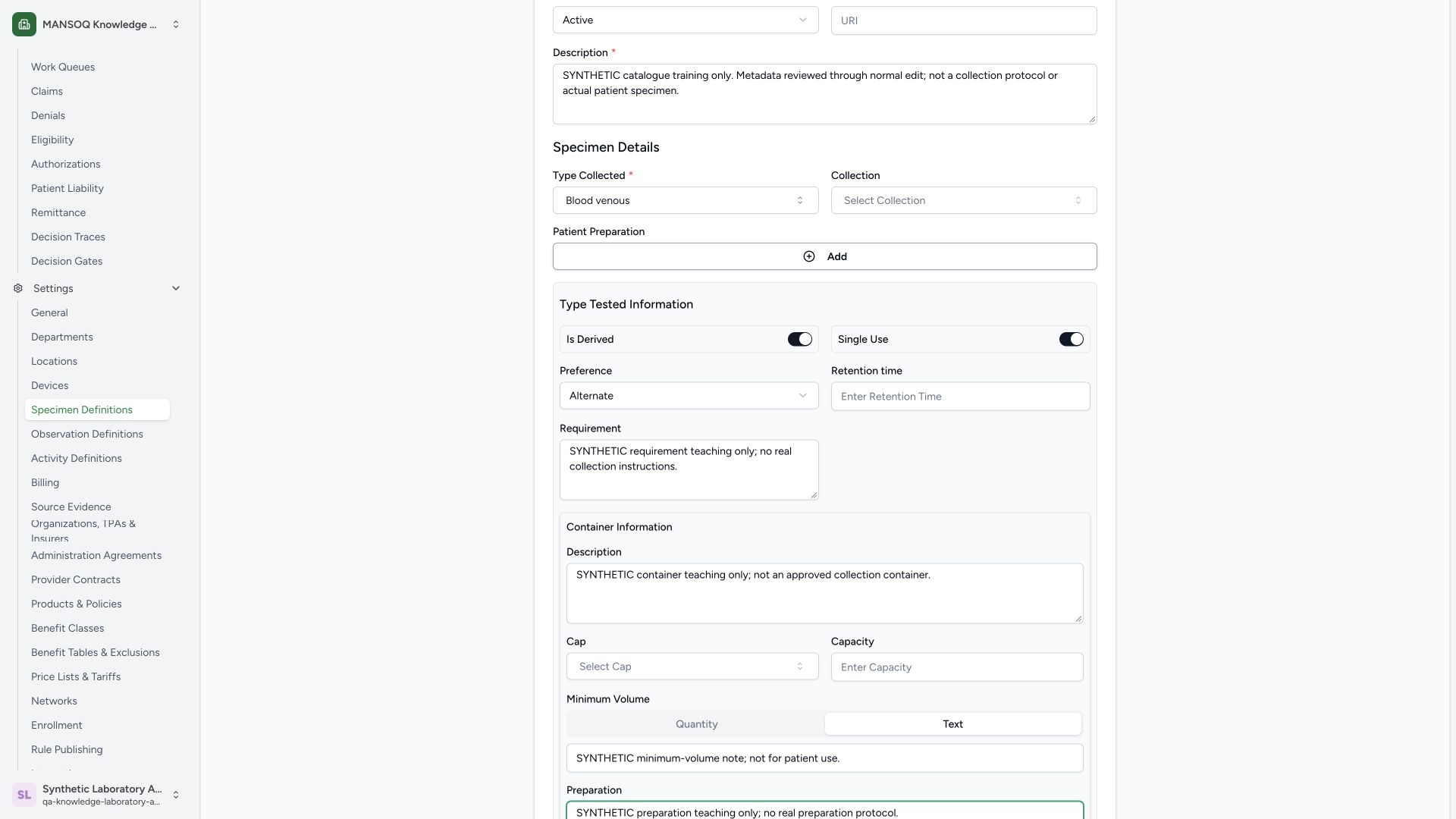 123456
Capture details
Actual 1920 × 1080 Chrome pixels; pinned source f6e9f05f. Laboratory Facility Admin synthetic specimen tested options and container text maintenance
- Is Derived on: Review the enabled synthetic example switch.
- Single Use on: Review the enabled synthetic example switch.
- Alternate selected: The tested preference is now Alternate.
- Requirement: The note is explicitly synthetic and provides no real collection instructions.
- Container Description: The container note is explicitly not an approved collection container.
- Text minimum volume: This example stores a synthetic Text note, not a numeric volume.
4. Review Preparation and save the update
Enter the illustrated SYNTHETIC preparation teaching only note. Review the Text minimum-volume note and blank numeric fields, then use Save once. Cancel remains available before saving.
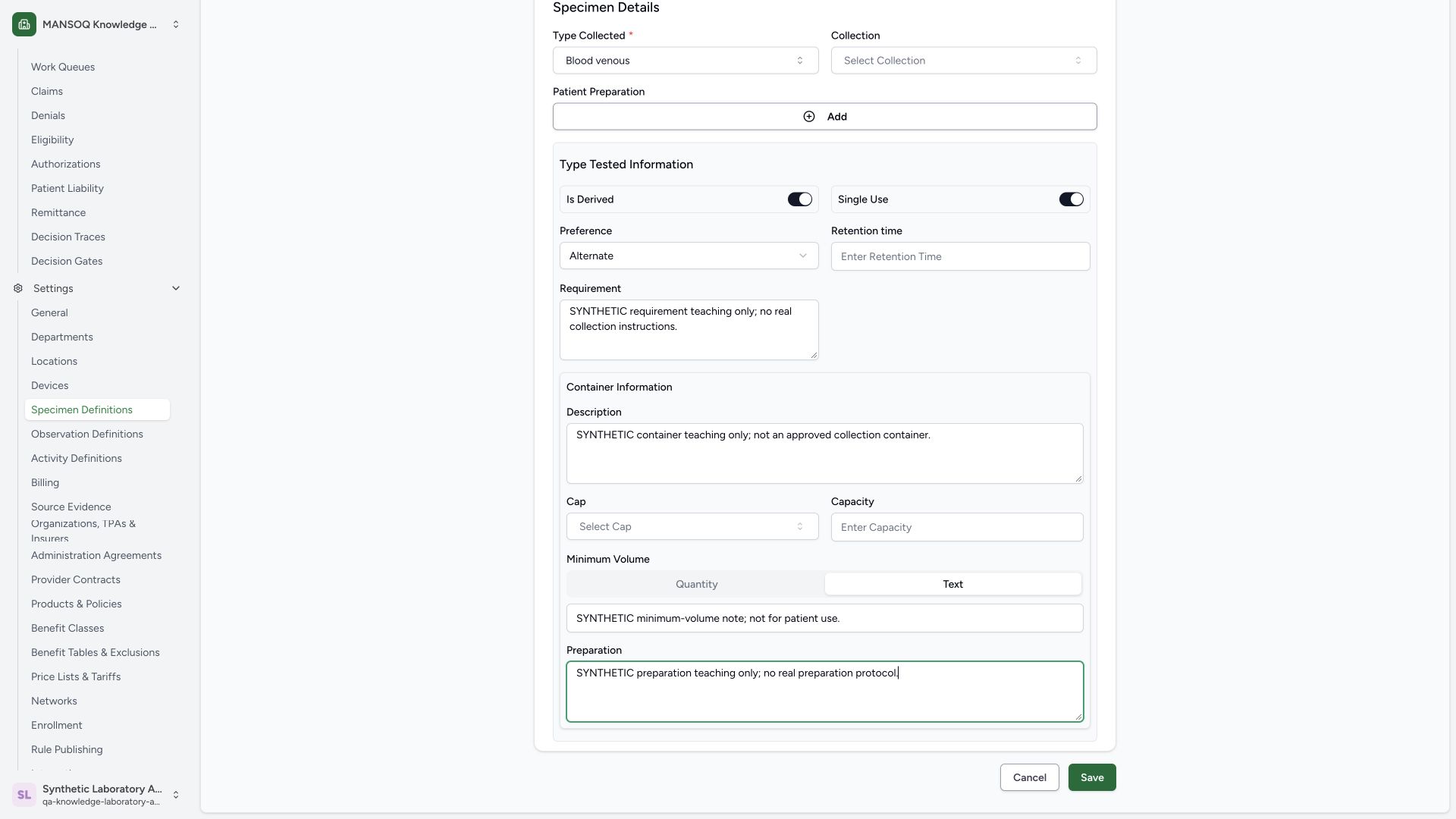 12345
12345Capture details
Actual 1920 × 1080 Chrome pixels; pinned source f6e9f05f. Laboratory Facility Admin synthetic specimen tested options and container text maintenance
- Text mode: This example uses Text for Minimum Volume.
- Synthetic minimum-volume note: Review the text note; this is not a numeric volume.
- Preparation: Review the explicitly synthetic preparation note.
- Save: Save the reviewed optional metadata once.
- Cancel: Cancel remains available before saving.
5. Verify saved switches and container text
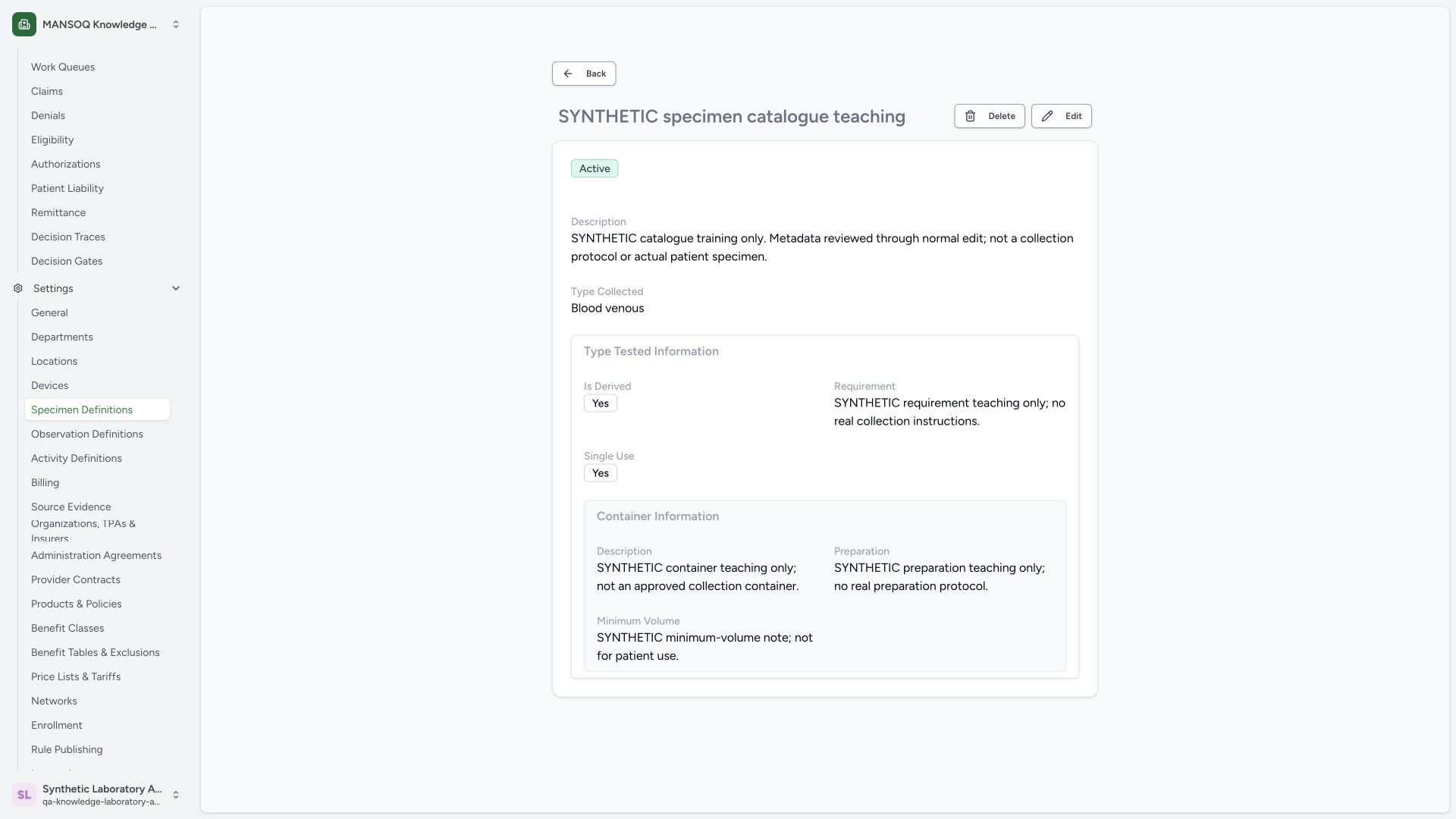
On saved detail, confirm Active, Blood venous, the revised main Description, Is Derived: Yes, Single Use: Yes, Requirement, container Description, Preparation and the Text minimum-volume note. Independent normal GET200 verifies the same UUID and all saved fields, including Alternate preference.
 12345678
Capture details
Actual 1920 × 1080 Chrome pixels; pinned source f6e9f05f. Laboratory Facility Admin synthetic specimen tested options and container text maintenance
- Active retained: The metadata edit retains Active.
- Blood venous retained: The collected coding identity is unchanged.
- Is Derived Yes: The enabled switch value persisted.
- Single Use Yes: The enabled switch value persisted.
- Saved Requirement: The synthetic requirement note persisted.
- Saved container Description: The synthetic container note persisted.
- Saved Preparation: The synthetic preparation note persisted.
- Saved minimum-volume Text: The synthetic Text minimum-volume note persisted.
6. Reopen Edit to verify the saved preference
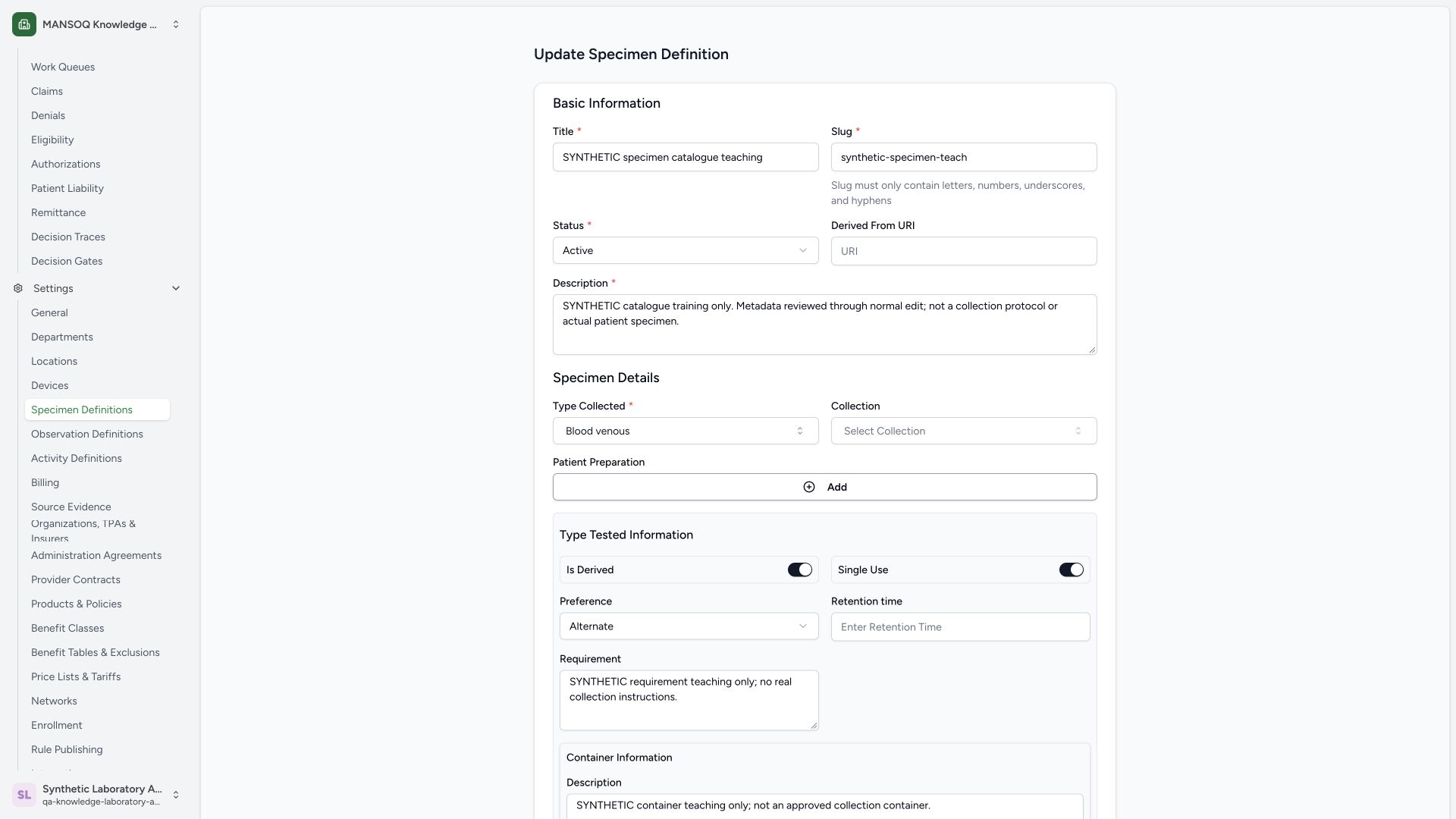
Open Edit again and confirm the unchanged title, slug, Active and Blood venous. The form reloads both enabled switches and Alternate. This observed detail page does not display Preference, so the reopened form supplies its visible persistence check.
 123456
Capture details
Actual 1920 × 1080 Chrome pixels; pinned source f6e9f05f. Laboratory Facility Admin synthetic specimen tested options and container text maintenance
- Stable title and slug: The existing identity remains unchanged.
- Active retained: The status remains Active.
- Collected type retained: Blood venous remains selected.
- Is Derived saved on: The saved enabled switch reloads.
- Single Use saved on: The saved enabled switch reloads.
- Alternate persisted: The saved preference reloads as Alternate.
7. Exit the unchanged reopened form
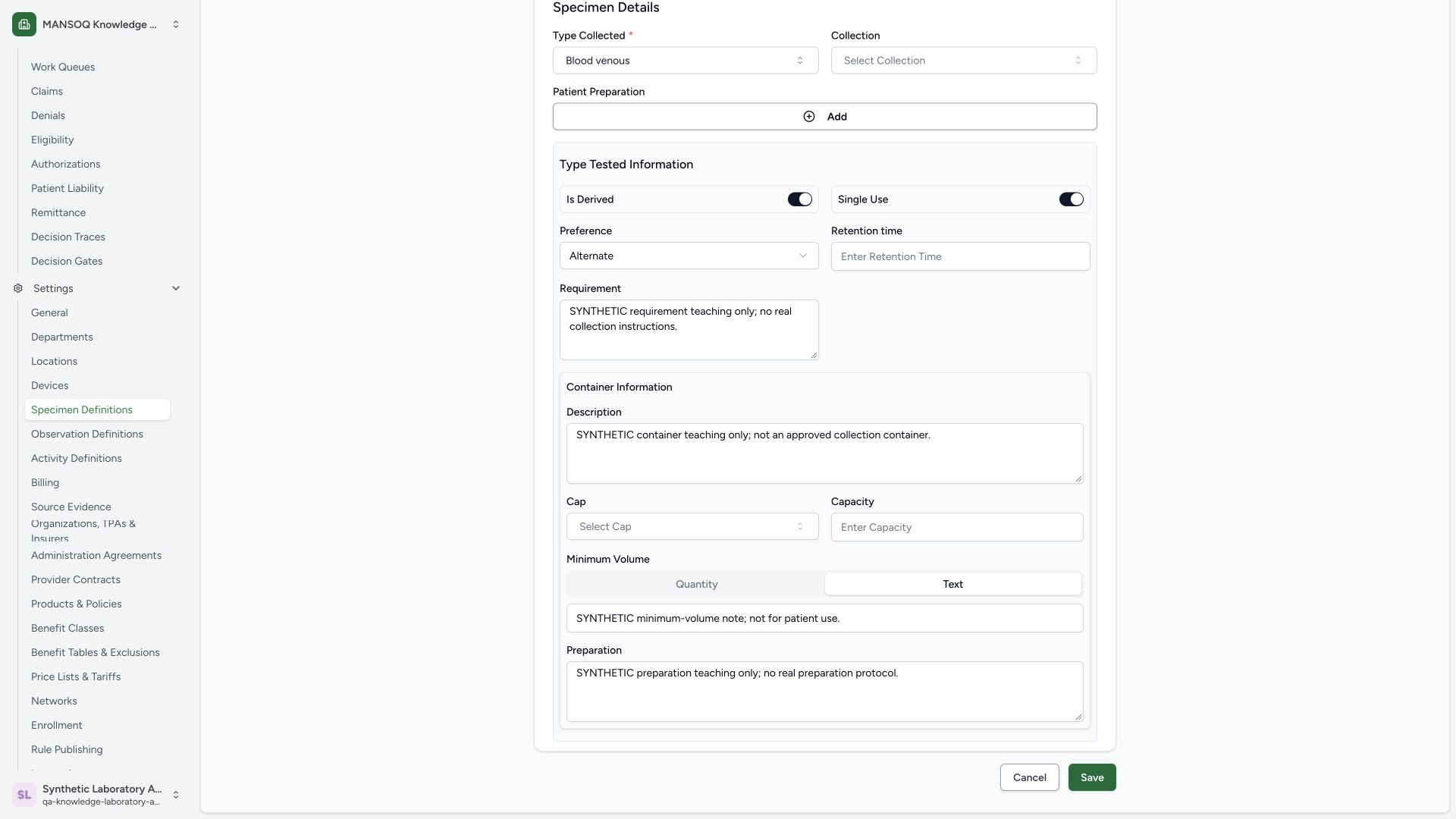
Scroll to the footer and confirm the saved Text minimum-volume note and Preparation. No further edit has been made. Use Cancel to return to the saved detail without submitting a second Save.
 1234
1234Capture details
Actual 1920 × 1080 Chrome pixels; pinned source f6e9f05f. Laboratory Facility Admin synthetic specimen tested options and container text maintenance
- Persisted Text mode: The saved minimum-volume representation is Text.
- Persisted Text note: The saved synthetic note reloads.
- Persisted Preparation: The saved synthetic preparation note reloads.
- Cancel: Exit the unchanged reopened form using Cancel.
Catalogue setup and actual specimen work
A Specimen Definition stores reusable catalogue metadata. Creating or editing this definition does not collect a specimen or document a patient result. The illustrated descriptions, requirement, container and preparation notes explicitly identify training content.
Role and source version
This guide is observed with one existing Laboratory Facility Admin on original f6e9 screens. The source grants specimen-definition writes to Facility Admin/Admin and read rights to additional roles. The presence of a generic control is not proof of another role’s authorization or every facility variant.
Additional branches
Collection coding, patient-preparation coding and its add/remove/duplicate behavior, Derived From URI, cap coding, retention/capacity quantities, numerical minimum volume, status lifecycle and activity requirement linking require their own pictured sequences. They are not qualified by the base definition or text-only update. The backend also has a Handling structure that the pinned specimen form does not expose as a field.
Troubleshooting
Required remains visible after choosing Type Collected
In this observed sequence the prior Required hint stayed visible immediately after selecting Blood venous. The next normal Save revalidated the selected value and successfully created the definition. Confirm the selected result and review actual Save feedback; do not create an arbitrary code.
The newly saved row does not immediately appear
Wait for the list to finish loading or use an explicit search with the intended Status filter. The illustrated search SYNTHETIC specimen refreshed the Active list and returned the saved definition.
Source evidence
References are pinned to the private MANSOQ source repository. Repository access is required to open these links.
- repositories/platform/mansoq-web/src/pages/Facility/settings/specimen-definitions/SpecimenDefinitionForm.tsx:181 · f6e9f05f
- repositories/platform/mansoq-web/src/pages/Facility/settings/specimen-definitions/SpecimenDefinitionForm.tsx:309 · f6e9f05f
- repositories/platform/mansoq-web/src/pages/Facility/settings/specimen-definitions/SpecimenDefinitionForm.tsx:466 · f6e9f05f
- repositories/platform/mansoq-web/src/pages/Facility/settings/specimen-definitions/SpecimenDefinitionForm.tsx:579 · f6e9f05f
- repositories/platform/mansoq-web/src/pages/Facility/settings/specimen-definitions/SpecimenDefinitionForm.tsx:702 · f6e9f05f
- repositories/platform/mansoq-web/src/pages/Facility/settings/specimen-definitions/SpecimenDefinitionsList.tsx:91 · f6e9f05f
- repositories/platform/mansoq-web/src/pages/Facility/settings/specimen-definitions/SpecimenDefinitionDetail.tsx:130 · f6e9f05f
- repositories/platform/mansoq-web/src/pages/Facility/settings/layout.tsx:113 · f6e9f05f
- repositories/platform/mansoq-web/src/types/emr/specimenDefinition/specimenDefinitionApi.ts:8 · f6e9f05f
- repositories/platform/mansoq-core/mansoq/security/permissions/specimen_definition.py:16 · f6e9f05f
- repositories/platform/mansoq-core/mansoq/emr/api/viewsets/specimen_definition.py:82 · f6e9f05f
- repositories/platform/mansoq-core/mansoq/emr/resources/specimen_definition/spec.py:108 · f6e9f05f
- repositories/platform/mansoq-core/mansoq/emr/resources/specimen_definition/valueset.py:5 · f6e9f05f