 MANSOQ
 Facility administration
Retire and find a retained activity definition
Save Retired through the normal edit form and use Active versus Retired filters to find the retained catalogue item.
8 min read · Source baseline f6e9f05f
Verification and applicability
Eleven actual 1920 × 1080 original f6e9 Chrome screenshots, exact control pointers and narrow hash-bound step reviews. Normal existing Laboratory Facility Admin saved one Usage edit and a separate Status edit through UI. Independent normal authenticated detail/search GET200 checkpoints verify the same UUID, unchanged code73050-15-50 and synthetic category, revised Usage, Active then Retired, Active filtered count0 and Retired count1. No Delete execution, patient/order, price, grant or external effects.
Check your installed version, permissions and local configuration.
Before you begin
- Sign in with your existing authorized Facility Admin account and open the intended Laboratory. This observed account already has activity-definition read/write rights; no role or membership is changed.
- This guide continues with the existing SYNTHETIC glucose order teaching item in the SYNTHETIC laboratory training category. The example is a reusable catalogue definition with no patient order, real clinical work or pricing.
1. Open Edit on the saved activity
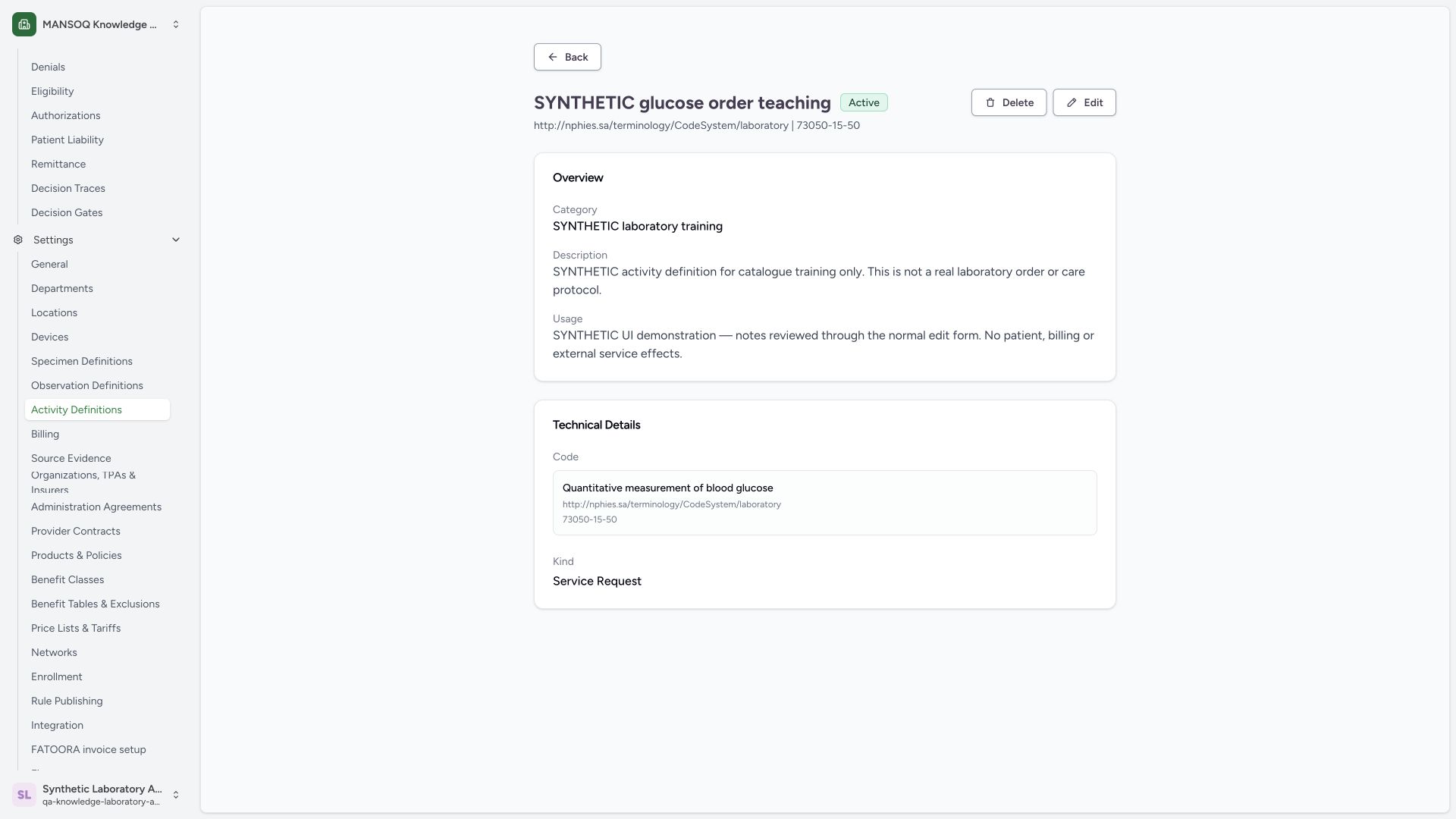
Confirm the intended title, Active badge, laboratory code and already saved Usage. Use Edit for the separate status change.
 1234
1234Capture details
Actual 1920 × 1080 Chrome pixels; pinned source f6e9f05f. Laboratory Facility Admin activity metadata and retained status maintenance
- Saved Usage: The revised text is now shown on saved detail.
- Active: The metadata edit did not change the catalogue status.
- Stable code: The selected laboratory code remains 73050-15-50.
- Edit: Open the existing record for a separate status change.
2. Choose Retired from Status
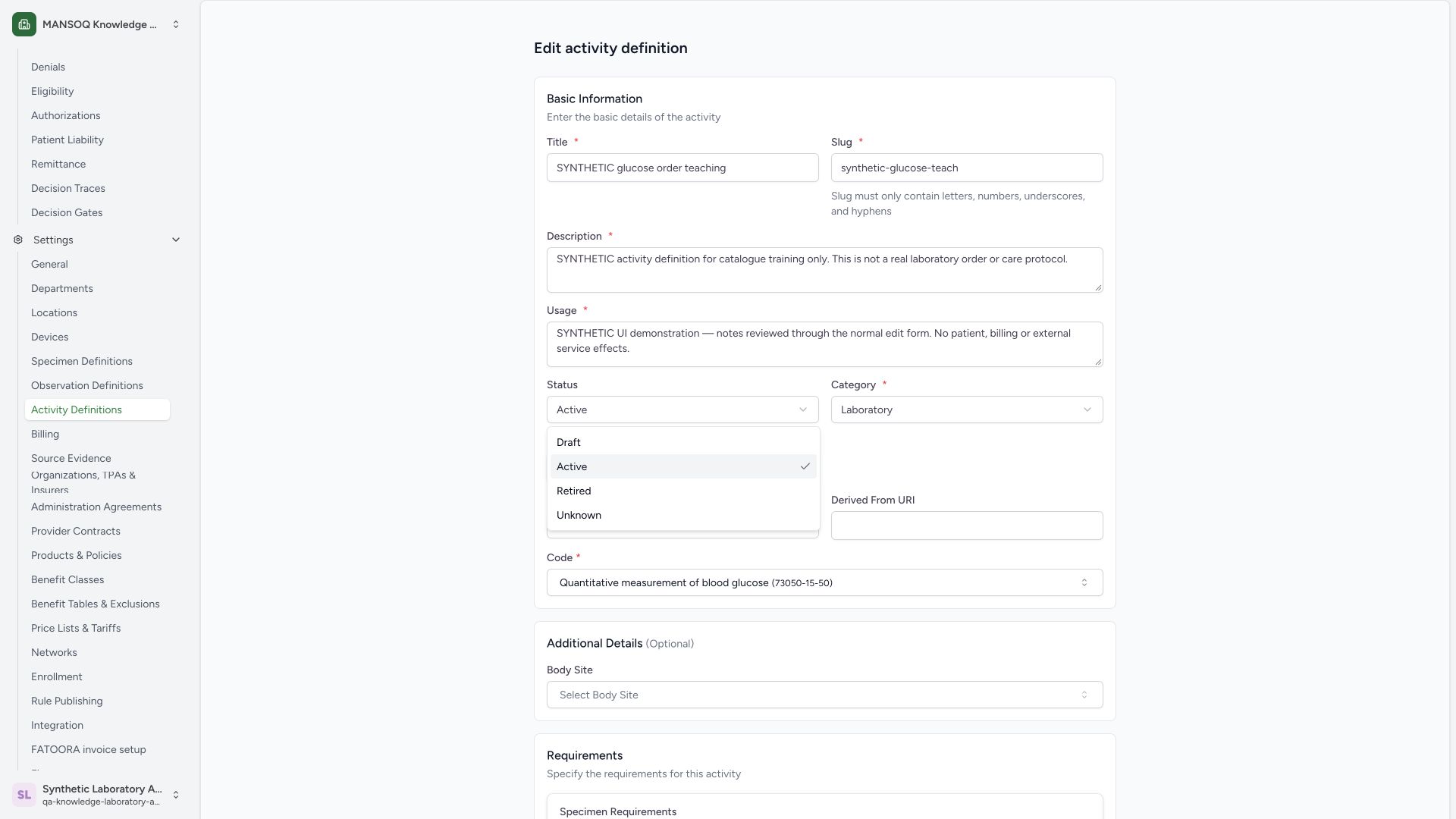
Open Status. The actual choices are Draft, Active, Retired and Unknown. Select Retired for this synthetic catalogue item. Only the Active-to-Retired change is executed in this lesson.
 123
123Capture details
Actual 1920 × 1080 Chrome pixels; pinned source f6e9f05f. Laboratory Facility Admin activity metadata and retained status maintenance
- Status: Open Status in the existing activity edit form.
- Retired: Choose Retired for this synthetic catalogue item.
- Active: The check mark indicates the saved starting status.
3. Review the unsaved status change
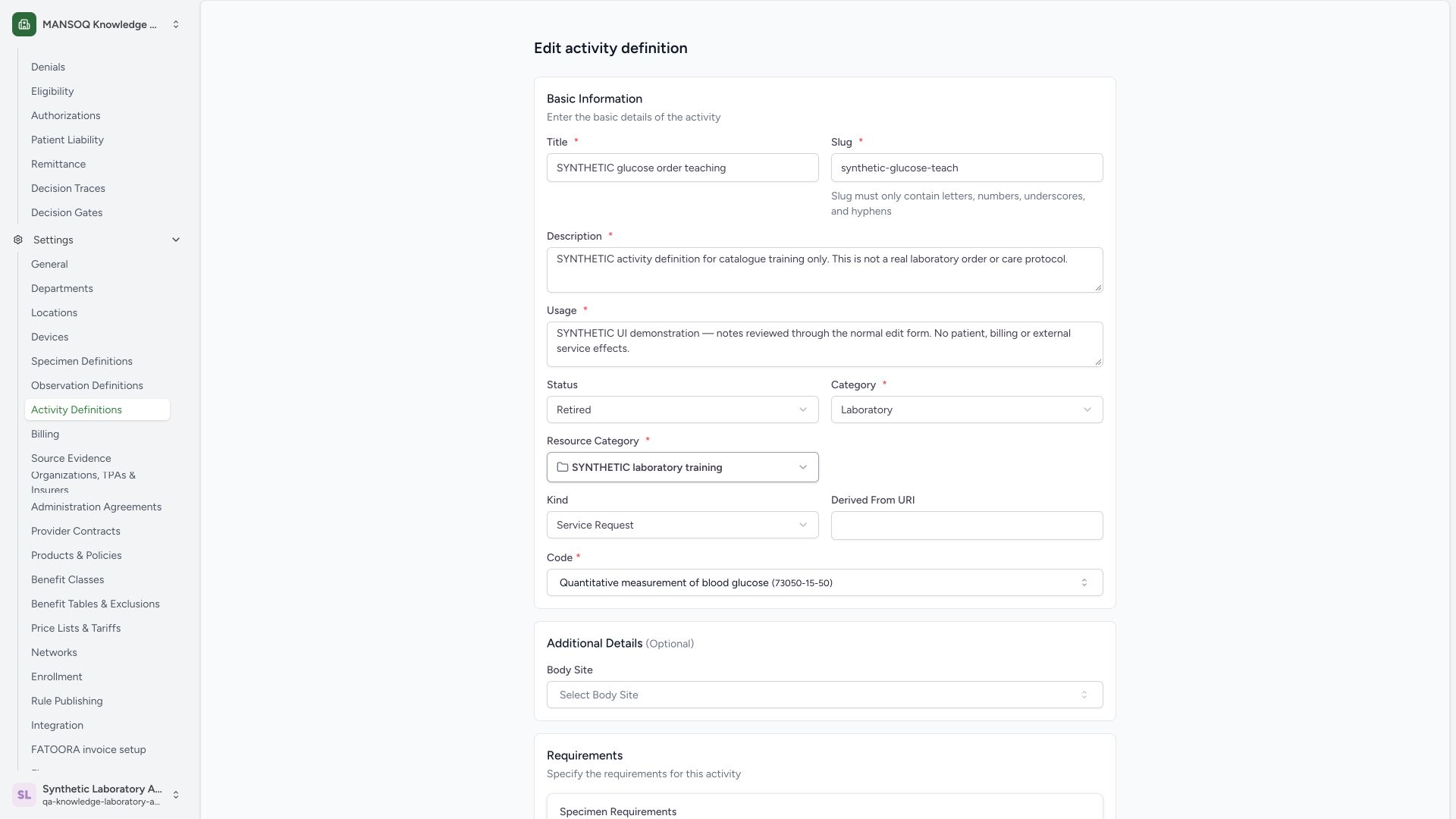
Confirm Retired is selected while the existing synthetic identity, Resource Category and laboratory code remain intact. Selection alone has not yet saved the change.
 123
123Capture details
Actual 1920 × 1080 Chrome pixels; pinned source f6e9f05f. Laboratory Facility Admin activity metadata and retained status maintenance
- Retired selection: Review Retired before saving the status change.
- Resource Category: The item stays in its existing synthetic category.
- Code: Retirement preserves the existing coding identity.
4. Save the status edit
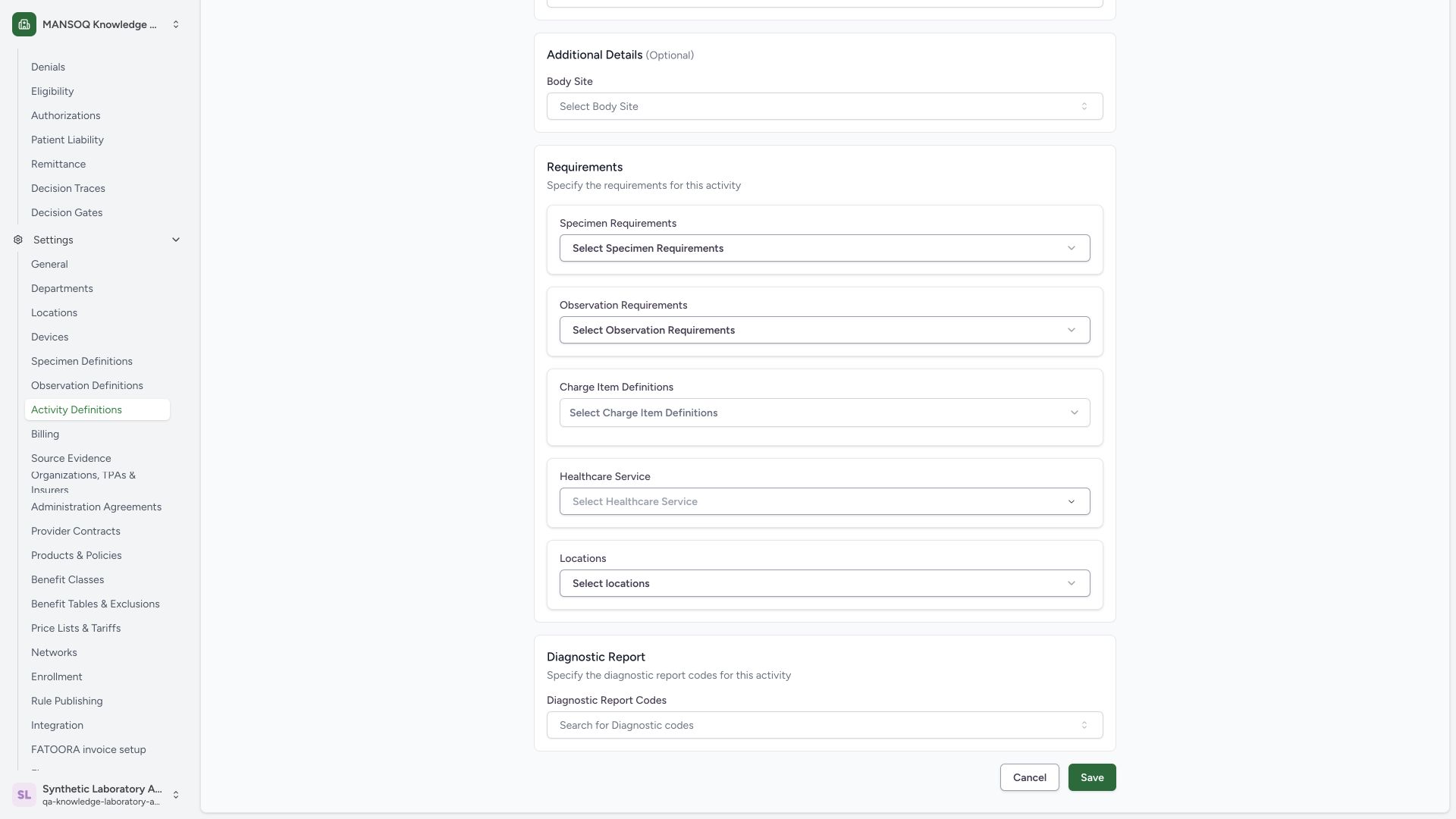
Scroll to the footer and use Save once. The optional associations remain empty. This sequence uses the Status edit and does not use the Delete control.
 12
12Capture details
Actual 1920 × 1080 Chrome pixels; pinned source f6e9f05f. Laboratory Facility Admin activity metadata and retained status maintenance
- Save status: Save the reviewed Retired status.
- Cancel: Cancel remains available before saving.
5. Verify the retained Retired detail
Confirm the Retired badge and preserved title, category, Usage and technical code. Independent authenticated GET200 verifies the same UUID and status. Edit remains visible on this retained record. Open Activity Definitions from Settings to inspect the category filters.
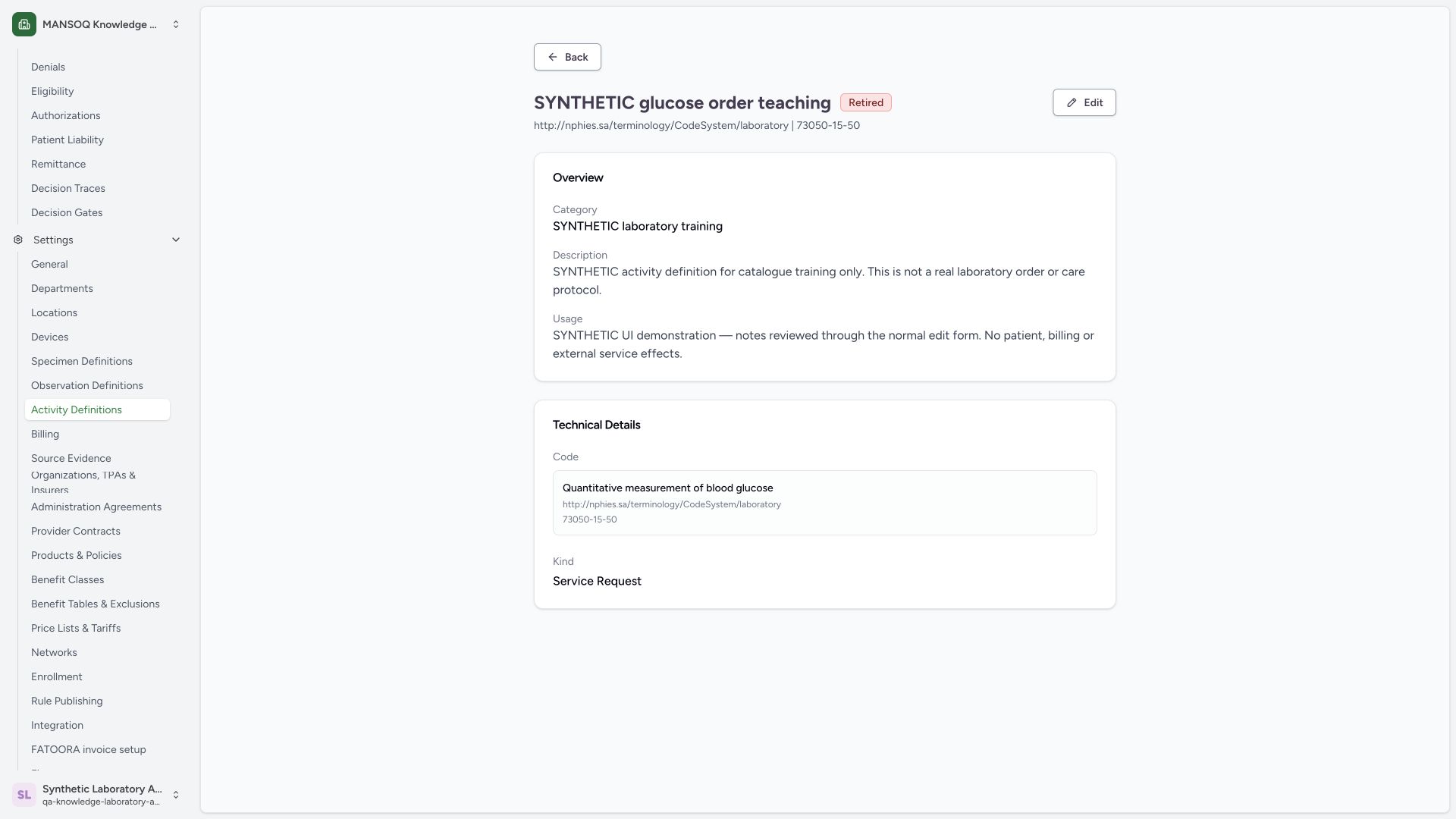 12345
12345Capture details
Actual 1920 × 1080 Chrome pixels; pinned source f6e9f05f. Laboratory Facility Admin activity metadata and retained status maintenance
- Saved Retired: The existing activity is now Retired.
- Retained usage: The saved metadata remains visible.
- Retained code: The original code and display remain on the saved item.
- Edit: Edit remains visible on this retired catalogue item.
- Activity Definitions: Return to the catalogue and inspect status filters.
6. Recognize the Active filtered result
Open SYNTHETIC laboratory training, retain Status is Active and search glucose to refresh the list. The resulting No activity definition found state is corroborated by an Active search count0. The item still exists as Retired.
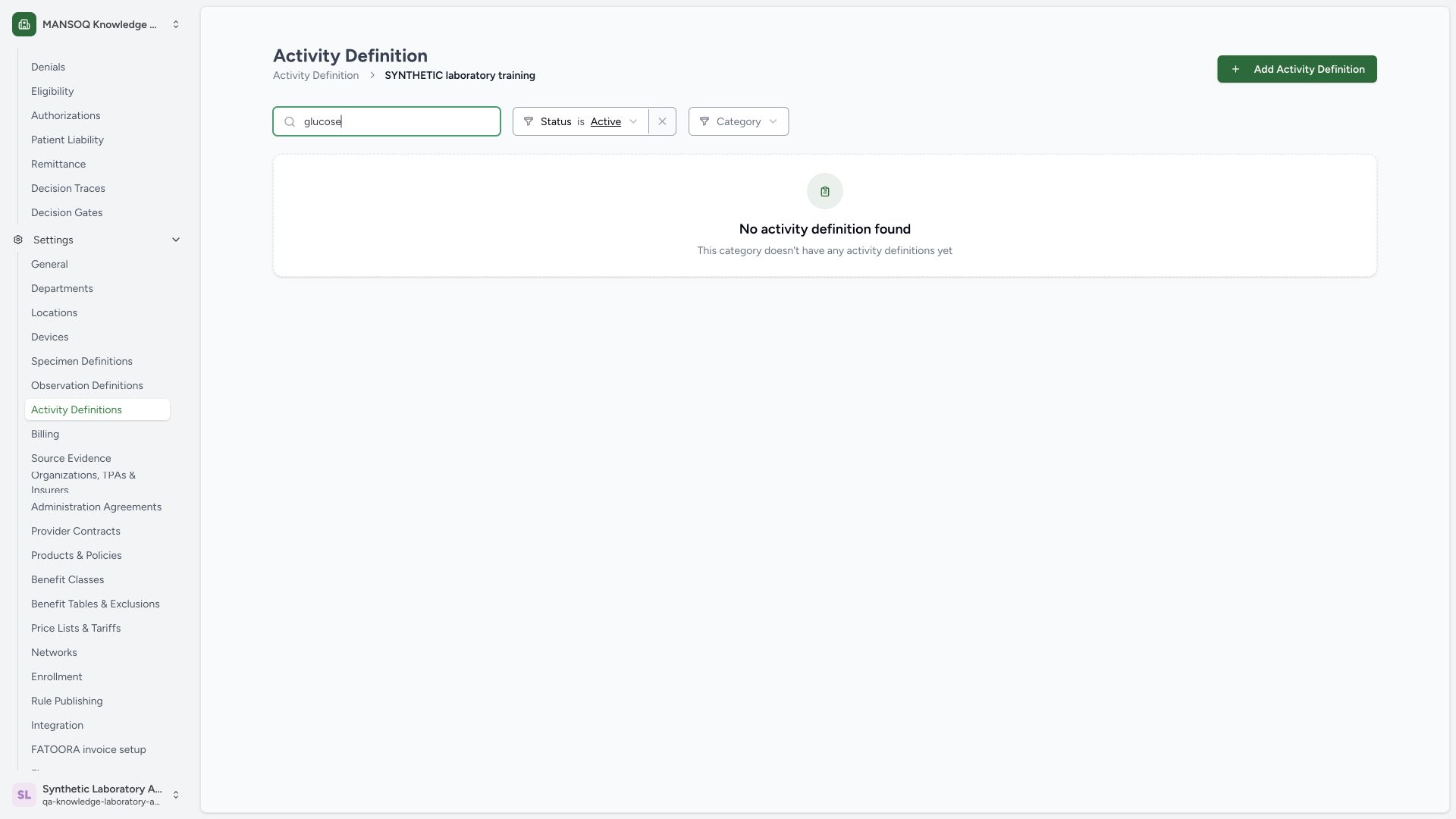 123
123Capture details
Actual 1920 × 1080 Chrome pixels; pinned source f6e9f05f. Laboratory Facility Admin activity metadata and retained status maintenance
- Search: The search term is glucose in the existing category.
- Active filter: Active excludes the retired synthetic activity.
- Empty filtered result: This is a filtered empty result, not evidence that the item was deleted.
7. Change the list filter to Retired
Open the Status filter and choose Retired, keeping the same category and glucose search.
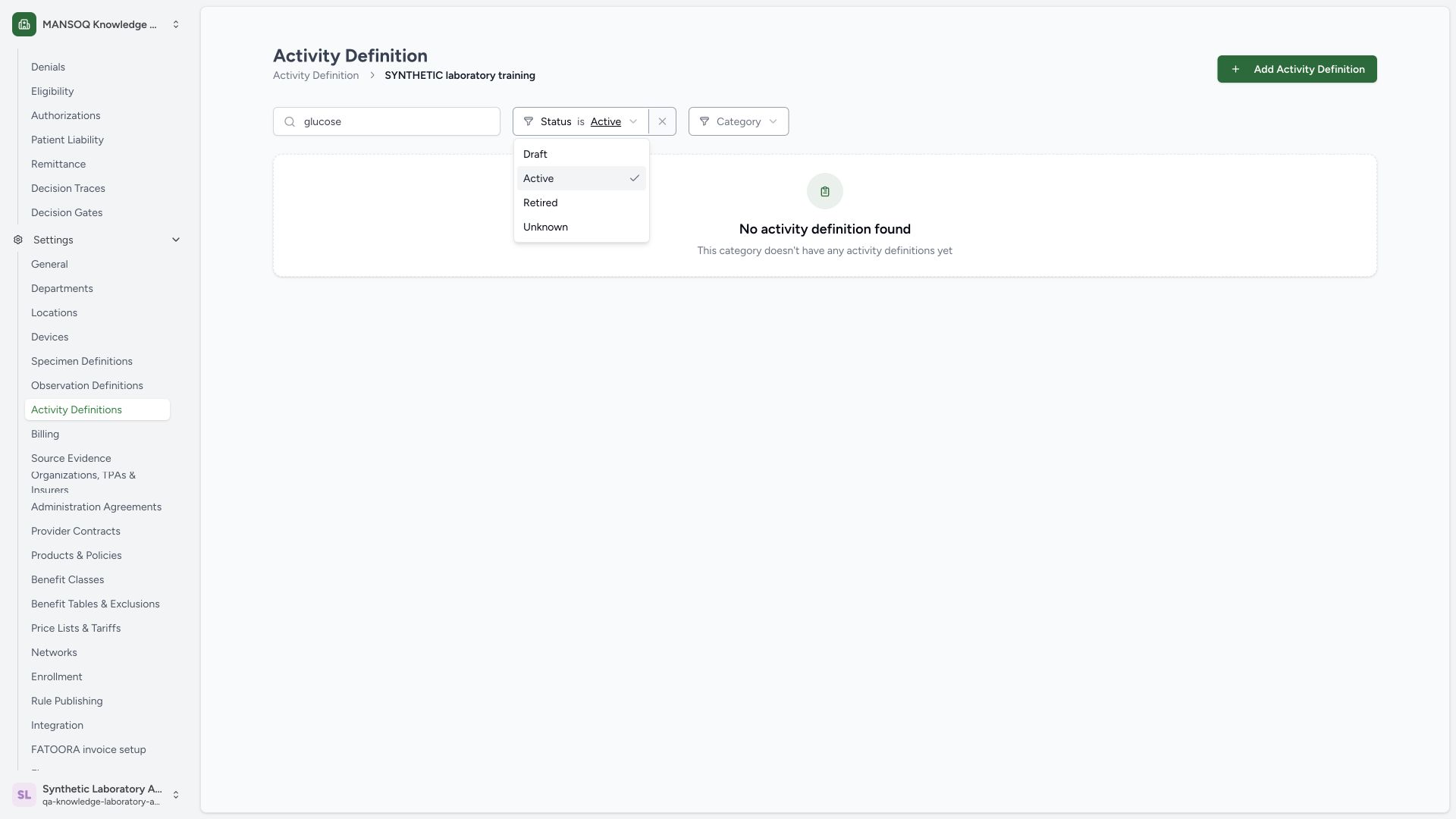 12
12Capture details
Actual 1920 × 1080 Chrome pixels; pinned source f6e9f05f. Laboratory Facility Admin activity metadata and retained status maintenance
- Retired filter: Select Retired to find retained retired catalogue items.
- Search retained: Keep the same glucose search and category while changing status.
8. Find the same retained item
Verify Showing 1 of 1, the synthetic activity title, Retired row badge, Laboratory classification and Service Request kind. The normal scoped Retired search returns the same UUID. View opens its retained details; Edit remains a separate action.
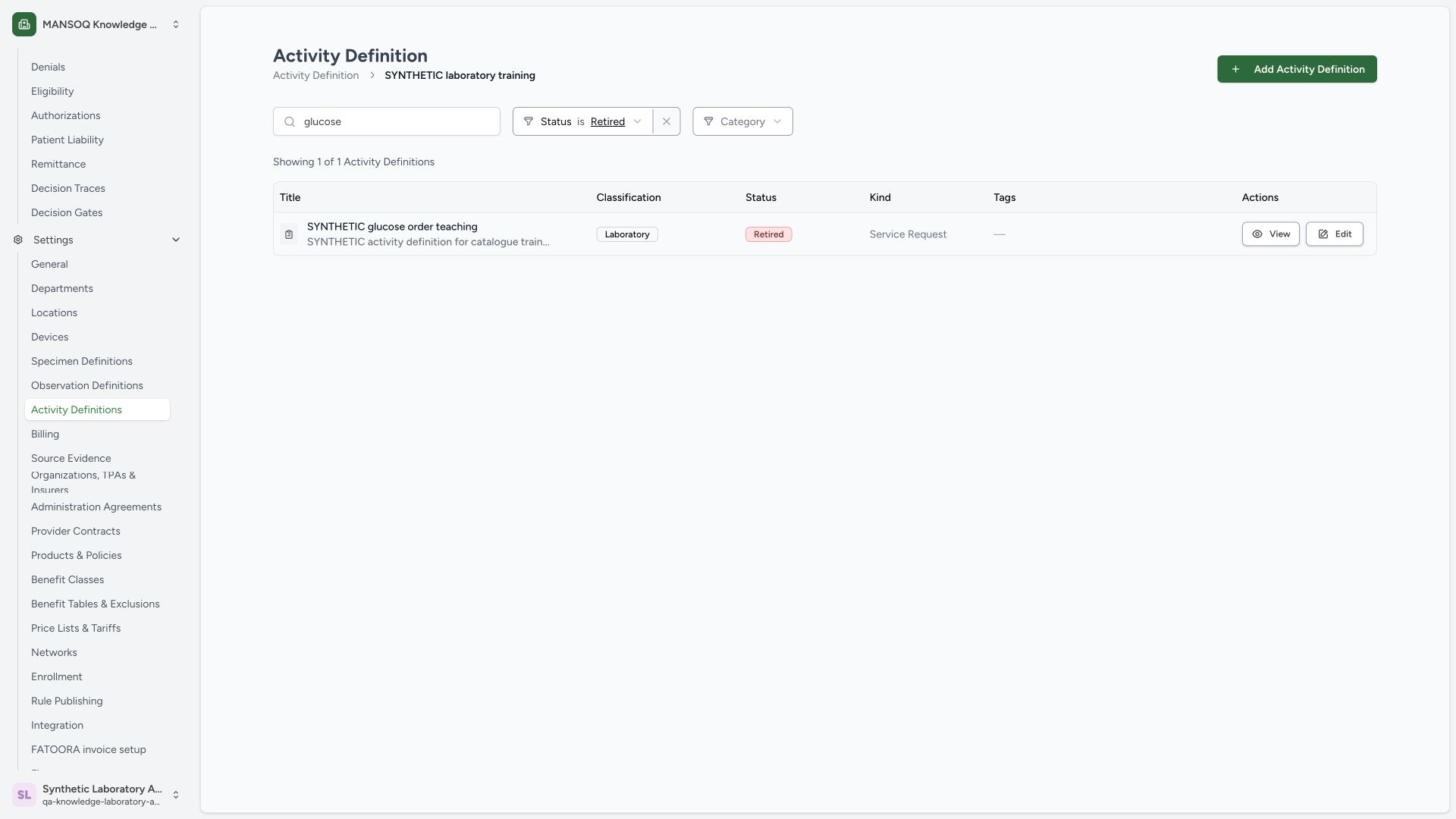 12345
12345Capture details
Actual 1920 × 1080 Chrome pixels; pinned source f6e9f05f. Laboratory Facility Admin activity metadata and retained status maintenance
- Retired filter: The status filter is now Retired.
- Retained activity: The same synthetic title is still present.
- Retired row: The row status agrees with saved detail.
- View: Open the retained detail from this result.
- Edit: The existing retired record still exposes Edit.
Role and version scope
The screenshots show one existing Laboratory Facility Admin on the original f6e9 software. A visible Edit control does not establish another role’s authorization. The source grants catalogue writes to Facility Admin/Admin; this guide does not qualify other role or facility variants.
Retained item and separate associations
Changing Status to Retired keeps the same catalogue record and coding identity. This example leaves specimen, observation, charge, healthcare-service, location, body-site and diagnostic-report associations empty. Those links require separate setup and evidence. The Delete control is not used.
Troubleshooting
The old Active row remains visible just after a status edit
Use an explicit search or reload to request the current list, then confirm the Status filter. In this observed sequence a cached Active row briefly appeared until the glucose search refreshed; independent saved detail and list reads confirmed the Retired state.
The category says no activity definition found
Check the category, search text and Status together. The illustrated Active search excludes the retained retired item. Select Retired to locate it; the empty filtered result does not prove deletion.
Source evidence
References are pinned to the private MANSOQ source repository. Repository access is required to open these links.
- repositories/platform/mansoq-web/src/pages/Facility/settings/activityDefinition/ActivityDefinitionList.tsx:17 · f6e9f05f
- repositories/platform/mansoq-web/src/components/Common/ResourceCategoryList.tsx:387 · f6e9f05f
- repositories/platform/mansoq-web/src/components/Common/ResourceCategoryForm.tsx:70 · f6e9f05f
- repositories/platform/mansoq-web/src/components/Common/ResourceCategoryForm.tsx:170 · f6e9f05f
- repositories/platform/mansoq-web/src/pages/Facility/settings/activityDefinition/ActivityDefinitionForm.tsx:131 · f6e9f05f
- repositories/platform/mansoq-web/src/pages/Facility/settings/activityDefinition/ActivityDefinitionForm.tsx:393 · f6e9f05f
- repositories/platform/mansoq-web/src/pages/Facility/settings/activityDefinition/ActivityDefinitionForm.tsx:685 · f6e9f05f
- repositories/platform/mansoq-web/src/pages/Facility/settings/activityDefinition/ActivityDefinitionListComponent.tsx:184 · f6e9f05f
- repositories/platform/mansoq-web/src/pages/Facility/settings/activityDefinition/ActivityDefinitionListComponent.tsx:244 · f6e9f05f
- repositories/platform/mansoq-web/src/pages/Facility/settings/activityDefinition/ActivityDefinitionView.tsx:97 · f6e9f05f
- repositories/platform/mansoq-web/src/types/emr/activityDefinition/activityDefinitionApi.ts:19 · f6e9f05f
- repositories/platform/mansoq-core/mansoq/security/permissions/activity_definition.py:16 · f6e9f05f
- repositories/platform/mansoq-core/mansoq/emr/api/viewsets/activity_definition.py:202 · f6e9f05f
- repositories/platform/mansoq-core/mansoq/emr/api/viewsets/activity_definition.py:162 · f6e9f05f
- repositories/platform/mansoq-core/mansoq/emr/api/viewsets/activity_definition.py:95 · f6e9f05f
- repositories/platform/mansoq-core/mansoq/emr/resources/activity_definition/spec.py:71 · f6e9f05f