 MANSOQ
 Pharmacy
Review prescriptions, statements and administration history
Keep medication orders, reported histories and administered events separate while reviewing a patient’s medication history.
5 min read · Source baseline f6e9f05f
Verification and applicability
source reviewed
Check your installed version, permissions and local configuration.
Before you begin
- Open the correct patient clinical history with permission for the medication record category.
- This sequence reviews existing synthetic records and closes dialogs without saving changes.
1. Read the prescription history
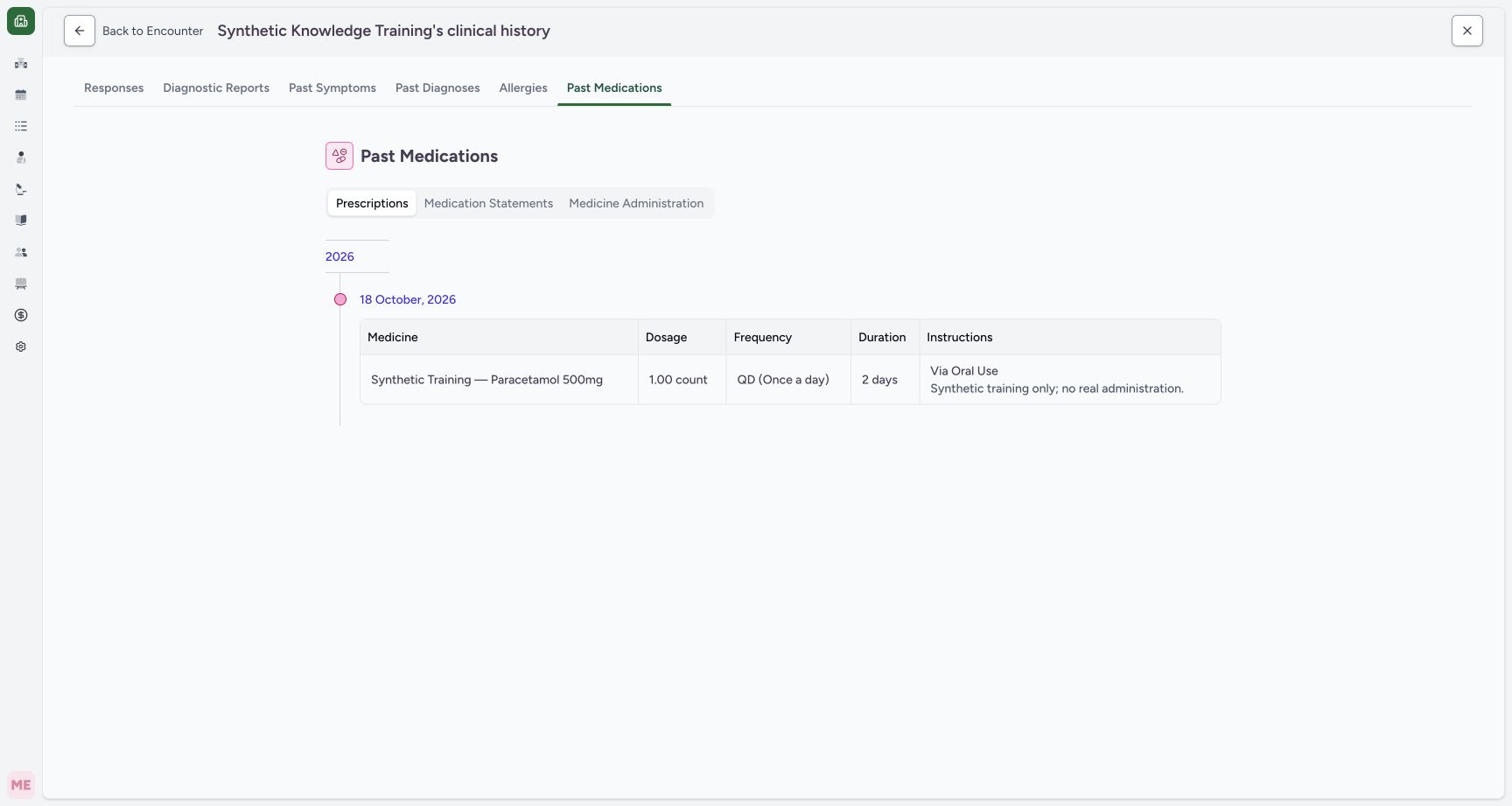
Open Past Medications → Prescriptions. Inspect product, dose/unit, frequency, duration and instructions. This source queries Active medication requests with medications_only enabled, so the label Past Medications does not mean this list includes every discontinued or completed order. The pictured synthetic order shows1count, QD,2days and Oral Use. An order does not prove dispensing or administration.
 12
12Capture details
Actual unchanged production UI, authenticated Nurse, explicitly fictional patient in isolated Polyclinic. This package reviews existing synthetic records across encounters; it creates or changes no clinical record. Other workforce roles, formal caregiver proxy and other facility variants are not qualified. Success: Past Medications Prescriptions shows the existing synthetic product, dosage, QD frequency, duration and Oral Use instruction. Prescription history is distinct from dispensing and administration.
- Past Medications: choose the appropriate medication record category: Past Medications: choose the appropriate medication record category
- Prescriptions: saved medication requests are separate from administration events: Prescriptions: saved medication requests are separate from administration events
2. Check medication statements separately
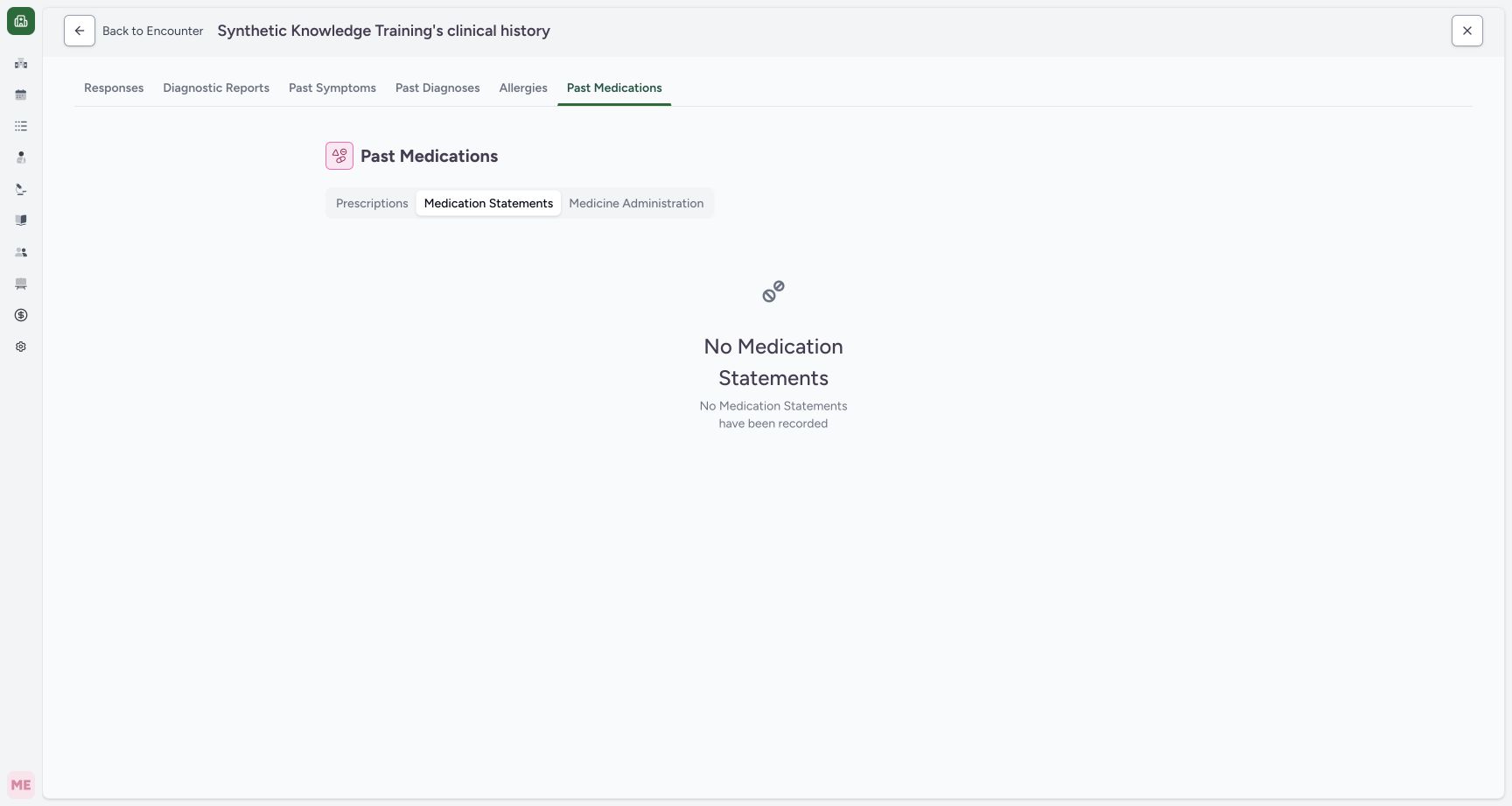
Select Medication Statements. This fictional patient shows No Medication Statements even though a prescription and administration events exist. A statement records historical or reported medication information through its separate supported entry workflow. An empty statement list is not a complete medication reconciliation or a statement that no medicine is being used.
 12
12Capture details
Actual unchanged production UI, authenticated Nurse, explicitly fictional patient in isolated Polyclinic. This package reviews existing synthetic records across encounters; it creates or changes no clinical record. Other workforce roles, formal caregiver proxy and other facility variants are not qualified. Start: Medication Statements explicitly shows no recorded statements although the patient has prescriptions and MAR events. These record types are independent.
- Medication Statements are a separate historical/reported-medication record: Medication Statements are a separate historical/reported-medication record
- No statement records does not mean the patient has no prescriptions or administrations: No statement records does not mean the patient has no prescriptions or administrations
3. Review administration events and times
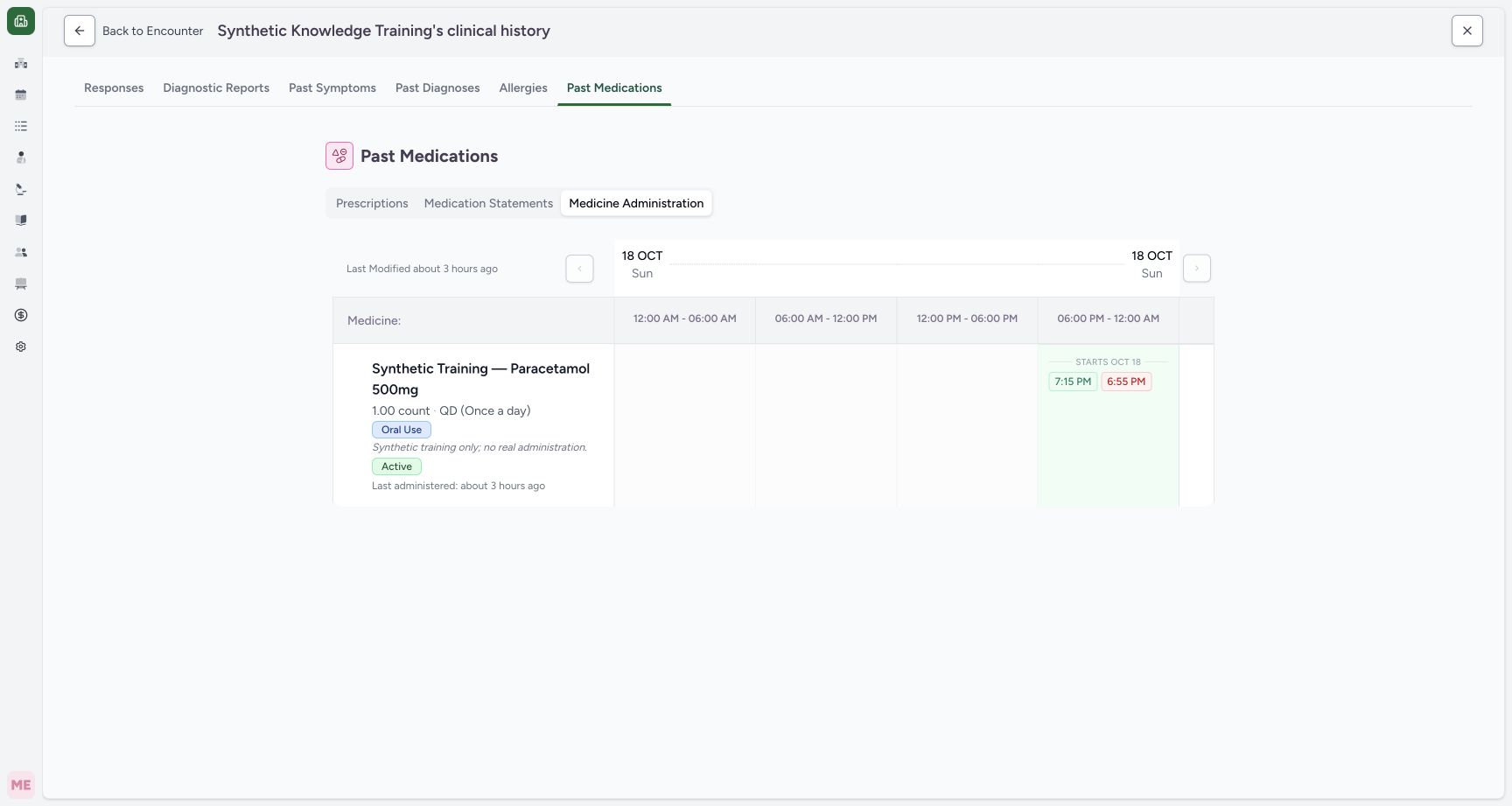
Select Medicine Administration. Read the product and prescription context, then locate the event in the displayed time slot. The example retains a green7:15PM event and a red6:55PM event. Open an event to read its status and note; color or time alone should not substitute for the recorded status. Independent verification identifies a Completed replacement and an Entered in Error original.
 12
12Capture details
Actual unchanged production UI, authenticated Nurse, explicitly fictional patient in isolated Polyclinic. This package reviews existing synthetic records across encounters; it creates or changes no clinical record. Other workforce roles, formal caregiver proxy and other facility variants are not qualified. Success: patient-wide Medicine Administration shows prescription context and retained 7:15 PM/6:55 PM events. Each event must be opened to inspect its status; a time button alone is not proof of a completed administration.
- Medicine Administration: review events separately from prescription orders: Medicine Administration: review events separately from prescription orders
- Open the event to inspect its recorded status and details: Open the event to inspect its recorded status and details
4. Inspect event detail and close without updating
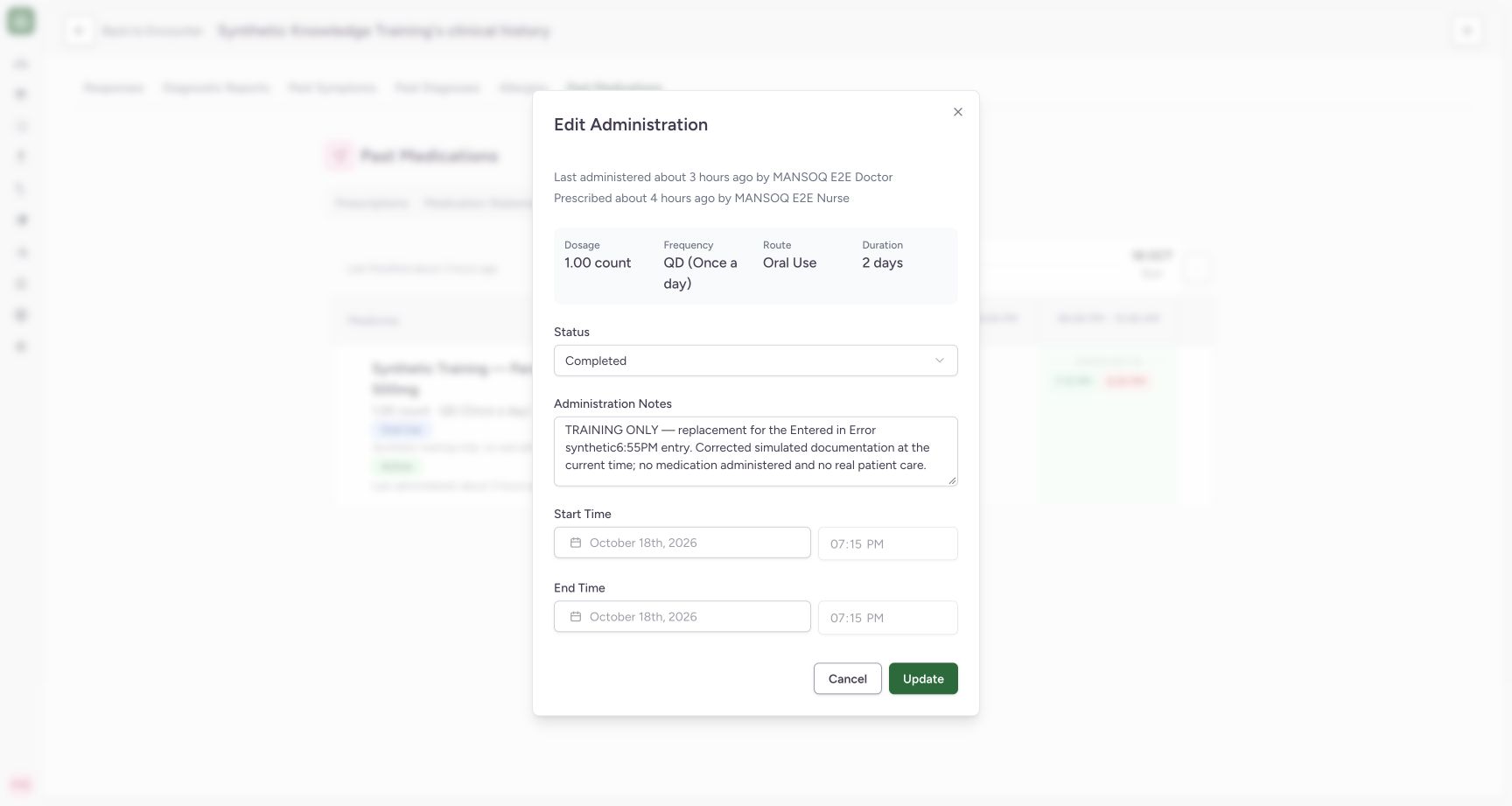
Open the relevant event. The pictured7:15PM event opens Edit Administration, showing Completed, its retained synthetic correction note and disabled occurrence-time controls. This review does not submit Update; choose Cancel to close. The pinned dialog swaps the human-readable administered/prescribed author captions: saved audit records confirm Nurse administration and Doctor prescription. Use the authoritative record history rather than those swapped captions.
 123
123Capture details
Actual unchanged production UI, authenticated Nurse, explicitly fictional patient in isolated Polyclinic. This package reviews existing synthetic records across encounters; it creates or changes no clinical record. Other workforce roles, formal caregiver proxy and other facility variants are not qualified. Start: existing 7:15 PM event opens Edit Administration with Completed status, retained training correction note and disabled recorded times. No Update is submitted. Known author-caption swap must be checked against independent audit records.
- Read the saved event status; review-only walkthrough does not submit changes: Read the saved event status; review-only walkthrough does not submit changes
- Retained note explains this synthetic replacement event: Retained note explains this synthetic replacement event
- Cancel closes this review without updating the event: Cancel closes this review without updating the event
Scope of this history surface
Actual unchanged production UI, authenticated Nurse, explicitly fictional patient in isolated Polyclinic. This package reviews existing synthetic records across encounters; it creates or changes no clinical record. Other workforce roles, formal caregiver proxy and other facility variants are not qualified. Patient-wide medication history is distinct from the pharmacy dispensing queue and does not prove stock movement or payment. The source passes canWrite=false to its administration history view, but an existing event still opens an Edit Administration dialog in this release. This guide uses it only for review and cancels; it does not claim a successful edit from history.
12Capture details
Actual unchanged production UI, authenticated Nurse, explicitly fictional patient in isolated Polyclinic. This package reviews existing synthetic records across encounters; it creates or changes no clinical record. Other workforce roles, formal caregiver proxy and other facility variants are not qualified. Success: patient-wide Medicine Administration shows prescription context and retained 7:15 PM/6:55 PM events. Each event must be opened to inspect its status; a time button alone is not proof of a completed administration.
- Medicine Administration: review events separately from prescription orders: Medicine Administration: review events separately from prescription orders
- Open the event to inspect its recorded status and details: Open the event to inspect its recorded status and details
123Capture details
Actual unchanged production UI, authenticated Nurse, explicitly fictional patient in isolated Polyclinic. This package reviews existing synthetic records across encounters; it creates or changes no clinical record. Other workforce roles, formal caregiver proxy and other facility variants are not qualified. Start: existing 7:15 PM event opens Edit Administration with Completed status, retained training correction note and disabled recorded times. No Update is submitted. Known author-caption swap must be checked against independent audit records.
- Read the saved event status; review-only walkthrough does not submit changes: Read the saved event status; review-only walkthrough does not submit changes
- Retained note explains this synthetic replacement event: Retained note explains this synthetic replacement event
- Cancel closes this review without updating the event: Cancel closes this review without updating the event
Troubleshooting
The medicine is not in the prescription history list
The audited Prescriptions history queries Active medication requests. Confirm the patient, the source encounter and request status using the authorized medication workflow. Do not conclude that no prior order exists from this filtered list alone.
12Capture details
Actual unchanged production UI, authenticated Nurse, explicitly fictional patient in isolated Polyclinic. This package reviews existing synthetic records across encounters; it creates or changes no clinical record. Other workforce roles, formal caregiver proxy and other facility variants are not qualified. Success: Past Medications Prescriptions shows the existing synthetic product, dosage, QD frequency, duration and Oral Use instruction. Prescription history is distinct from dispensing and administration.
- Past Medications: choose the appropriate medication record category: Past Medications: choose the appropriate medication record category
- Prescriptions: saved medication requests are separate from administration events: Prescriptions: saved medication requests are separate from administration events
Administered and prescribed names look reversed
The audited dialog has a known author-caption swap. Preserve the record and verify its saved author/requester or audit trail; the synthetic checkpoint confirms Nurse administration and Doctor prescription. Do not re-enter a dose to correct a caption.
123Capture details
Actual unchanged production UI, authenticated Nurse, explicitly fictional patient in isolated Polyclinic. This package reviews existing synthetic records across encounters; it creates or changes no clinical record. Other workforce roles, formal caregiver proxy and other facility variants are not qualified. Start: existing 7:15 PM event opens Edit Administration with Completed status, retained training correction note and disabled recorded times. No Update is submitted. Known author-caption swap must be checked against independent audit records.
- Read the saved event status; review-only walkthrough does not submit changes: Read the saved event status; review-only walkthrough does not submit changes
- Retained note explains this synthetic replacement event: Retained note explains this synthetic replacement event
- Cancel closes this review without updating the event: Cancel closes this review without updating the event
Source evidence
References are pinned to the private MANSOQ source repository. Repository access is required to open these links.
- repositories/platform/mansoq-web/src/pages/Patient/History/MedicationHistory.tsx:21 · f6e9f05f
- repositories/platform/mansoq-web/src/pages/Patient/History/MedicationHistory.tsx:84 · f6e9f05f
- repositories/platform/mansoq-web/src/components/Medicine/MedicationAdministration/AdministrationTab.tsx:804 · f6e9f05f
- repositories/platform/mansoq-web/src/components/Medicine/MedicationAdministration/MedicineAdminDialog.tsx:39 · f6e9f05f
- repositories/platform/mansoq-web/src/components/Medicine/MedicationAdministration/MedicineAdminForm.tsx:206 · f6e9f05f