 MANSOQ
 Clinical care
Review historical medication sources before copying a statement
Understand historical prescription selection, required reported-use fields and the inventory-prescription import limitation before saving.
6 min read · Source baseline f6e9f05f
Verification and applicability
source reviewed
Check your installed version, permissions and local configuration.
Before you begin
- Open a configured structured Medication Statement form on the correct active patient encounter with clinical-write permission.
- Historical entries are source information to review. A copied prescription is not proof the patient took it. All pictured records are synthetic; the observed actor is Nurse.
1. Open Medication History and inspect the source type
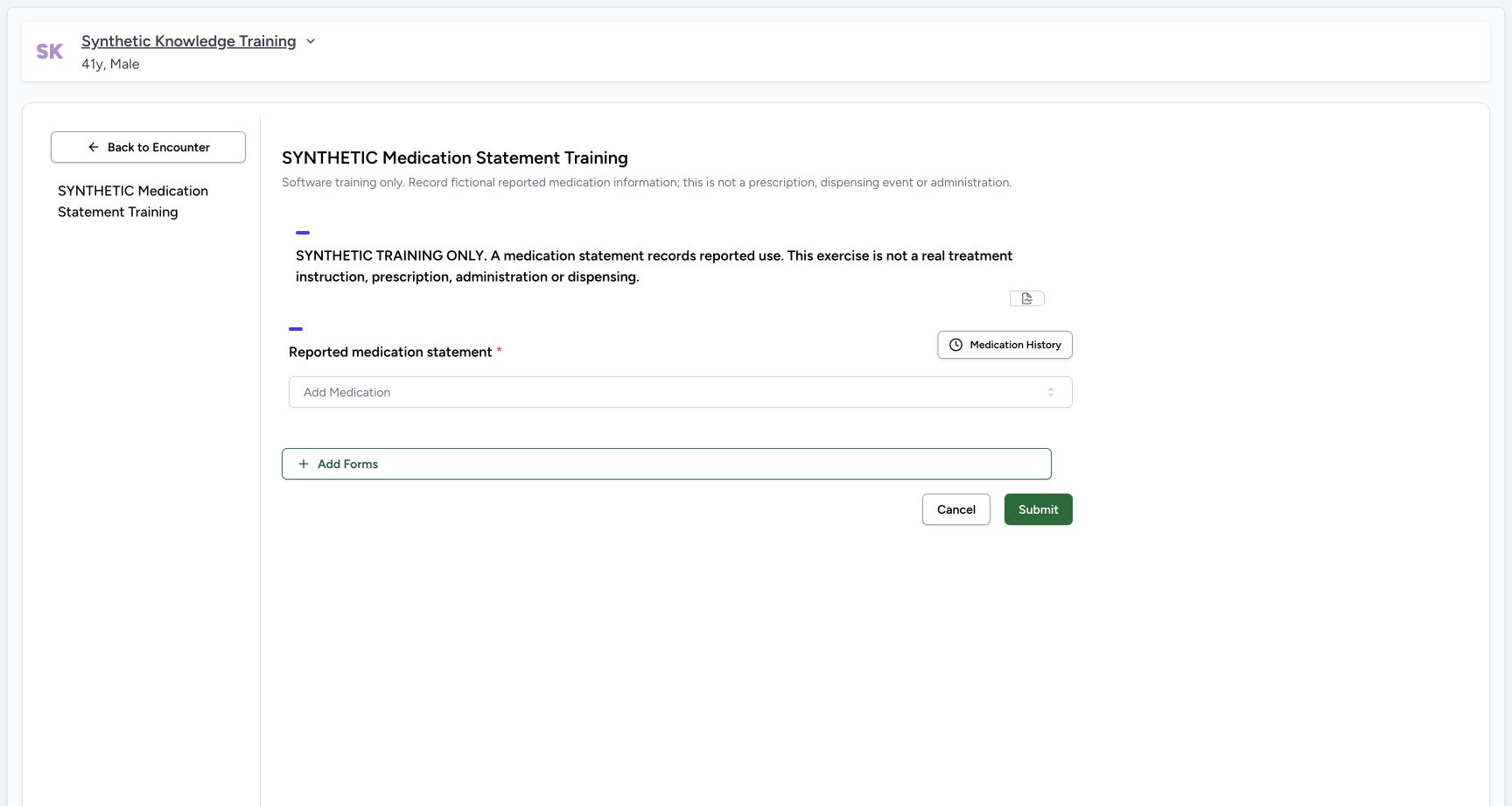
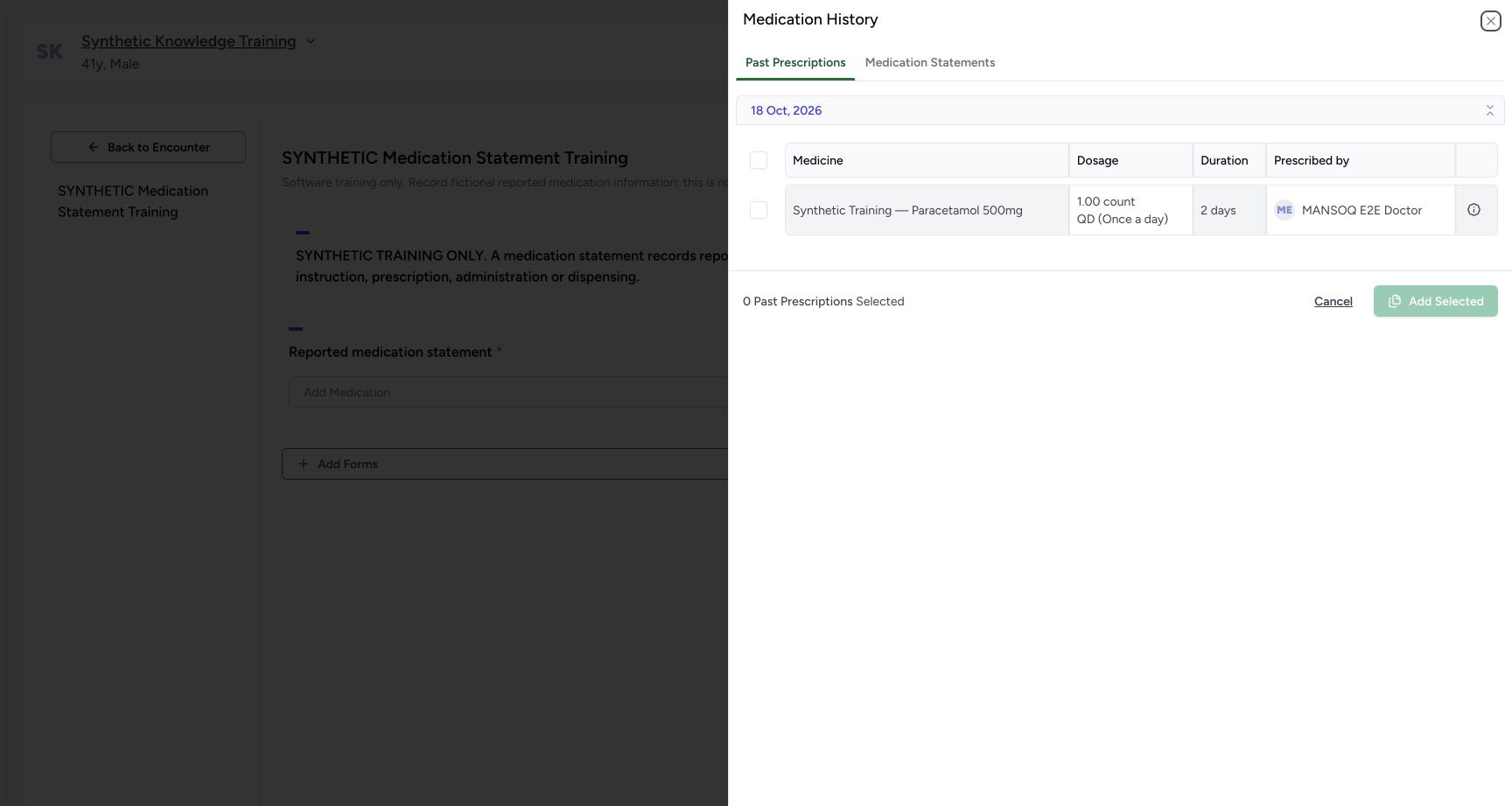
Select Medication History. The side sheet separates Past Prescriptions from Medication Statements. Review the medicine, prescribed dosage, duration and original author before selecting anything. The example shows an existing synthetic inventory prescription authored by the Doctor; the reporter and current author must still be established separately.
 123
123Capture details
Genuine pinned production UI, authenticated Nurse, isolated synthetic Polyclinic active Inpatient encounter. Configured synthetic structured form and genuine installed NPHIES code saved as a normal personal Starred preference; no product change, terminology validation bypass, staff permission grant or real patient care. Start — Structured statement form has no existing statements. Medication History and Add Medication are available; no prescription or administration is created here.
- Review past records before adding a statement: Review past records before adding a statement
- Search the configured medication terminology: Search the configured medication terminology
- Submission saves the structured statement: Submission saves the structured statement
 123
123Capture details
Genuine pinned production UI, authenticated Nurse, isolated synthetic Polyclinic active Inpatient encounter. Configured synthetic structured form and genuine installed NPHIES code saved as a normal personal Starred preference; no product change, terminology validation bypass, staff permission grant or real patient care. Action — Medication History lists the existing synthetic Doctor prescription; selectable source record remains a prescription until copied into a statement draft.
- Past Prescriptions source tab: Past Prescriptions source tab
- Existing synthetic prescription and original author: Existing synthetic prescription and original author
- Select a source row before adding: Select a source row before adding
2. Select only the intended source and add a draft
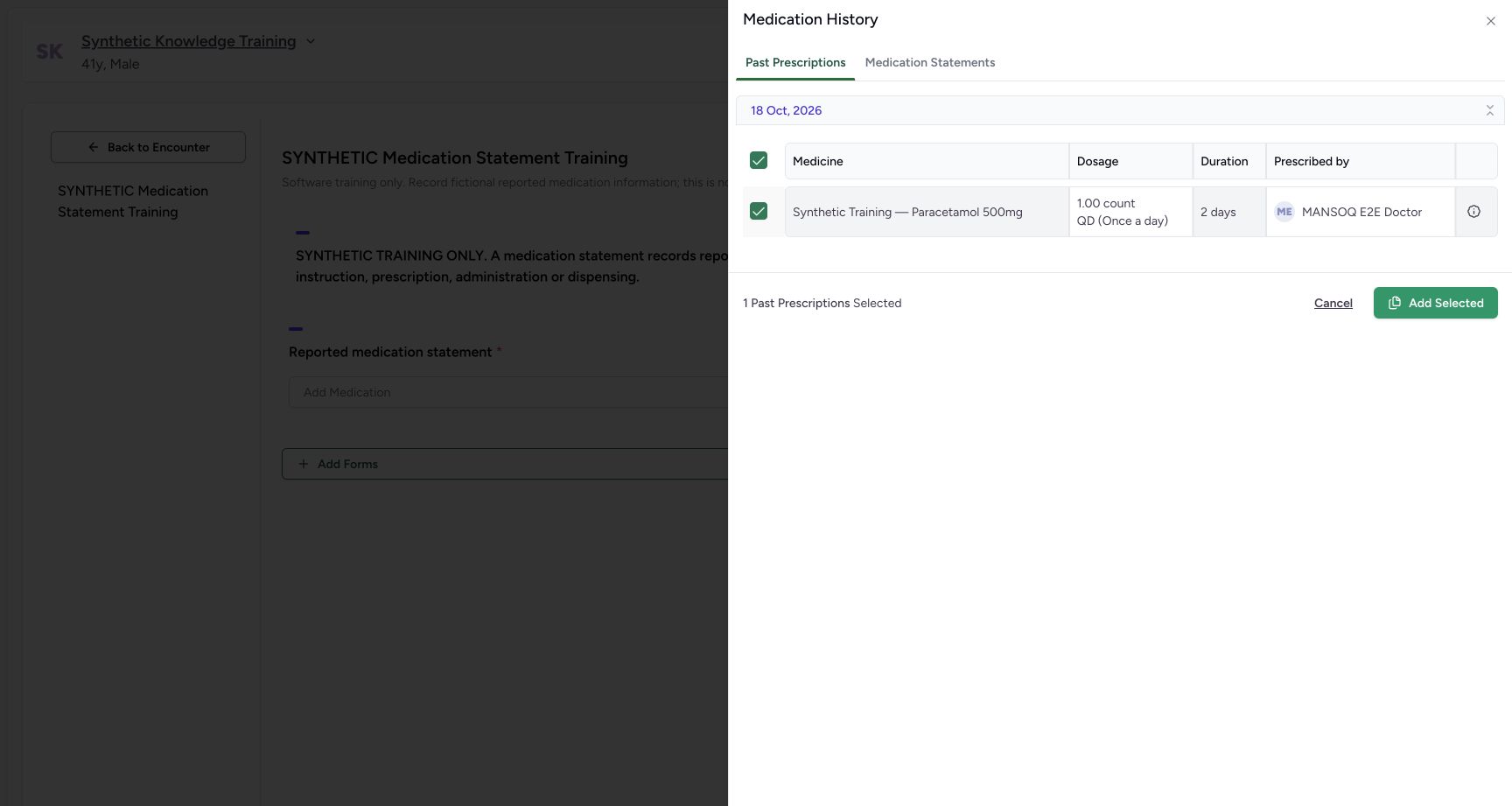
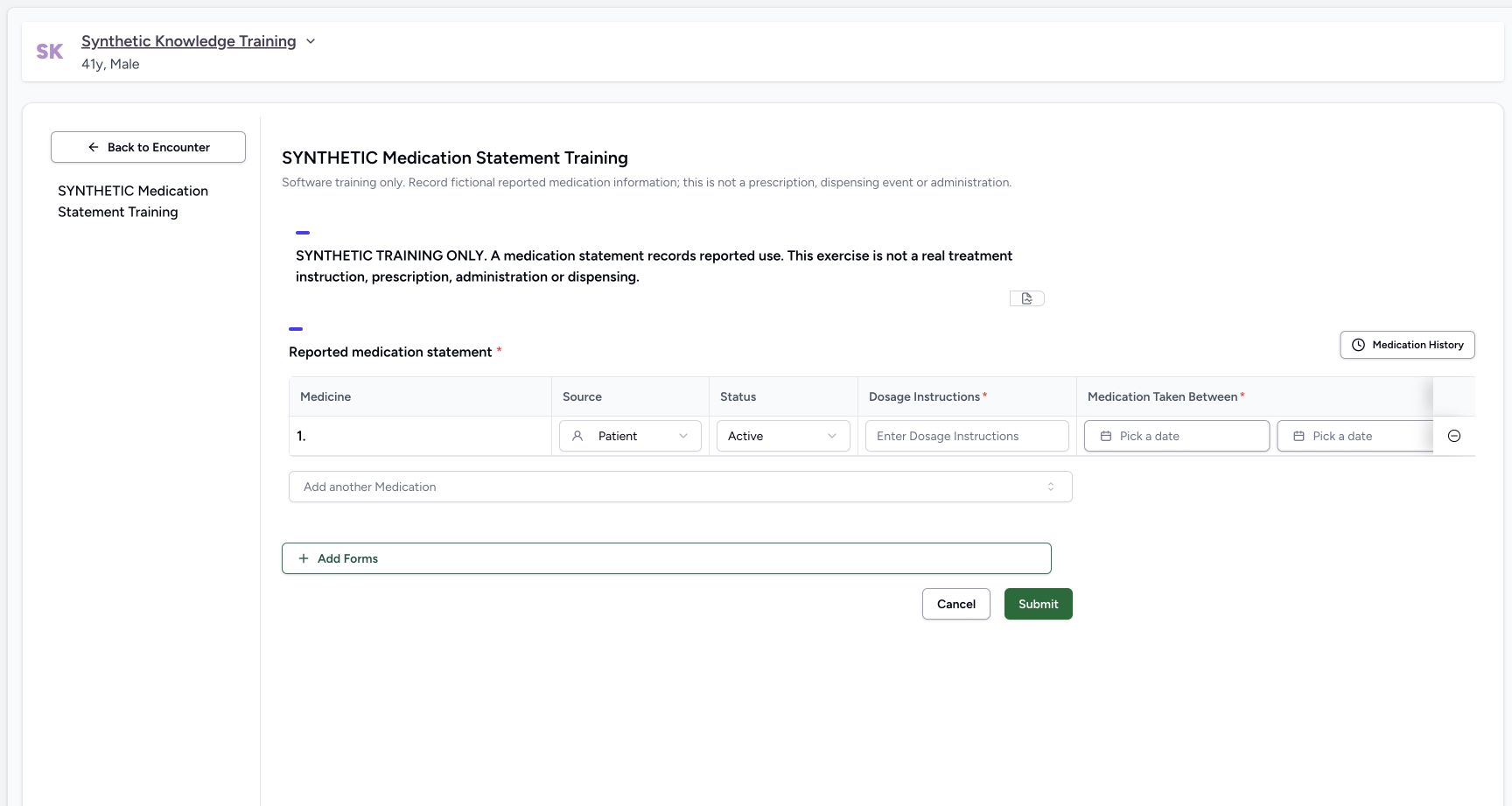
Tick the intended row and verify the selected count, then choose Add Selected. This copies information into the unsaved statement draft. It does not rewrite the source prescription and does not establish reported use. In the pinned implementation, a prescription import copies its medication coding and note; it leaves reported dosage and the reported-use period for explicit completion.
 12
12Capture details
Genuine pinned production UI, authenticated Nurse, isolated synthetic Polyclinic active Inpatient encounter. Configured synthetic structured form and genuine installed NPHIES code saved as a normal personal Starred preference; no product change, terminology validation bypass, staff permission grant or real patient care. Action — One synthetic past prescription selected for Add Selected; importing does not save a statement or copy prescribed dosage into reported-use fields.
- Only the selected source row is copied: Only the selected source row is copied
- Add the selected medicine to the draft: Add the selected medicine to the draft
 12
12Capture details
Genuine pinned production UI, authenticated Nurse, isolated synthetic Polyclinic active Inpatient encounter. Configured synthetic structured form and genuine installed NPHIES code saved as a normal personal Starred preference; no product change, terminology validation bypass, staff permission grant or real patient care. Action — Imported prescription creates an unsaved statement row with Patient source and Active default; dosage and period remain empty. The original inventory-backed prescription has no medication coding, so this baseline row shows no medicine display.
- Reported dosage text is required and starts empty: Reported dosage text is required and starts empty
- Choose the actual reported-use start date: Choose the actual reported-use start date
3. Reject an imported row with unidentified medication
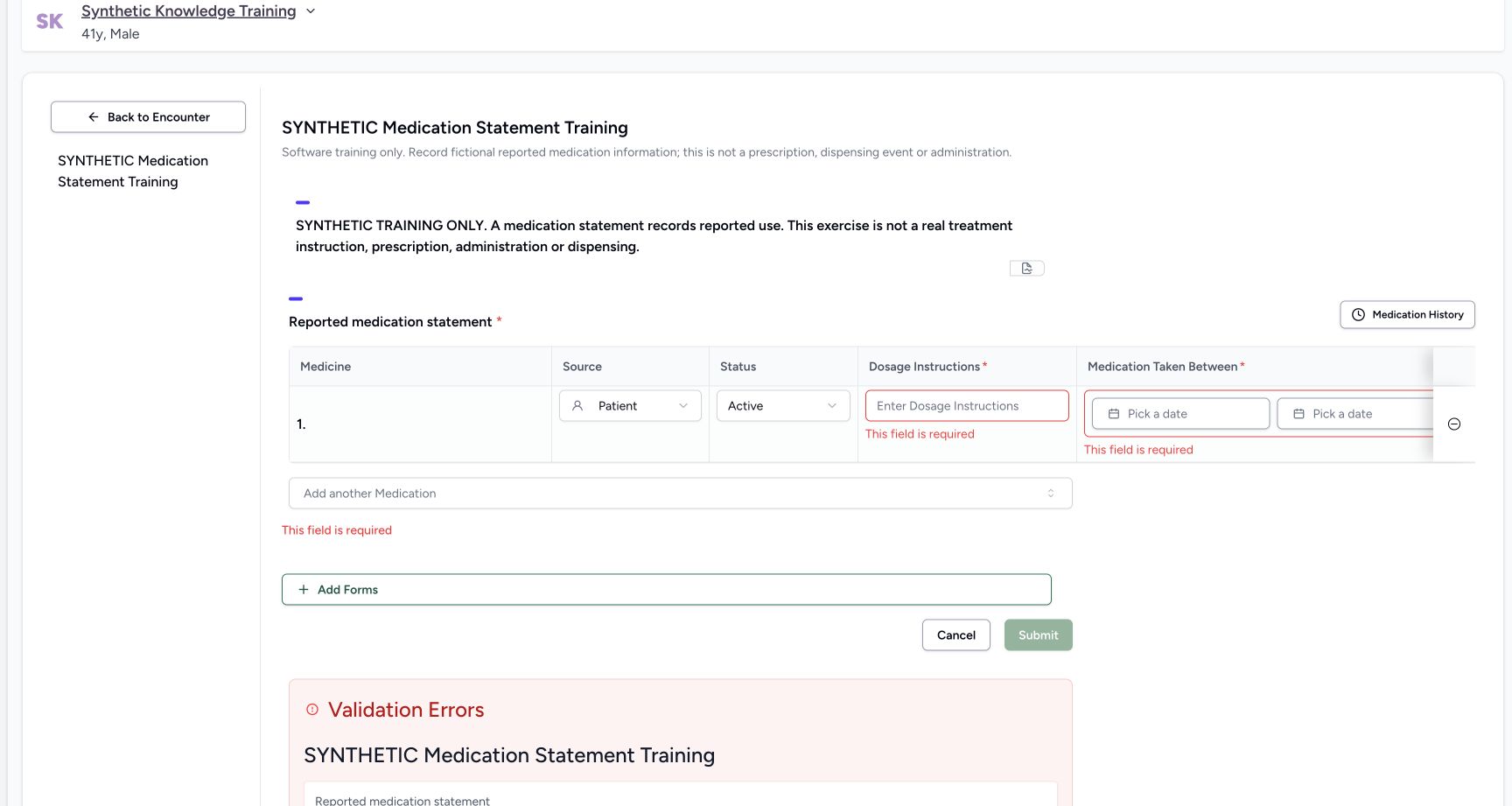
The illustrated inventory-backed source prescription has an inventory product but an empty medication coding object. This pinned importer copies only that coding object, so the draft’s Medicine cell is blank. Do not submit an unidentified medicine statement. The example also shows required dosage and date errors after validation; filling those fields would not repair the missing medicine identity.
12Capture details
Genuine pinned production UI, authenticated Nurse, isolated synthetic Polyclinic active Inpatient encounter. Configured synthetic structured form and genuine installed NPHIES code saved as a normal personal Starred preference; no product change, terminology validation bypass, staff permission grant or real patient care. Action — Imported prescription creates an unsaved statement row with Patient source and Active default; dosage and period remain empty. The original inventory-backed prescription has no medication coding, so this baseline row shows no medicine display.
- Reported dosage text is required and starts empty: Reported dosage text is required and starts empty
- Choose the actual reported-use start date: Choose the actual reported-use start date
 123
123Capture details
Genuine pinned production UI, authenticated Nurse, isolated synthetic Polyclinic active Inpatient encounter. Configured synthetic structured form and genuine installed NPHIES code saved as a normal personal Starred preference; no product change, terminology validation bypass, staff permission grant or real patient care. Error — Imported inventory-backed prescription has no medication code/display. Required reported dosage and use period fail validation; do not submit an unidentified medication statement.
- Required reported dosage text: Required reported dosage text
- Required start of reported use: Required start of reported use
- Review validation and discard the unidentified draft: Review validation and discard the unidentified draft
4. Discard the unsafe draft and use a qualified entry path
Use Cancel and confirm discarding the unsaved draft when prompted. Independent readback confirmed that this failed import created no statement and left the existing prescription and administration records unchanged. Reopen the structured form and use a genuine normally validated code through a working qualified selection path. The separate recording walkthrough demonstrates the configured Starred path and a verified saved result.
123Capture details
Genuine pinned production UI, authenticated Nurse, isolated synthetic Polyclinic active Inpatient encounter. Configured synthetic structured form and genuine installed NPHIES code saved as a normal personal Starred preference; no product change, terminology validation bypass, staff permission grant or real patient care. Error — Imported inventory-backed prescription has no medication code/display. Required reported dosage and use period fail validation; do not submit an unidentified medication statement.
- Required reported dosage text: Required reported dosage text
- Required start of reported use: Required start of reported use
- Review validation and discard the unidentified draft: Review validation and discard the unidentified draft
 12
12Capture details
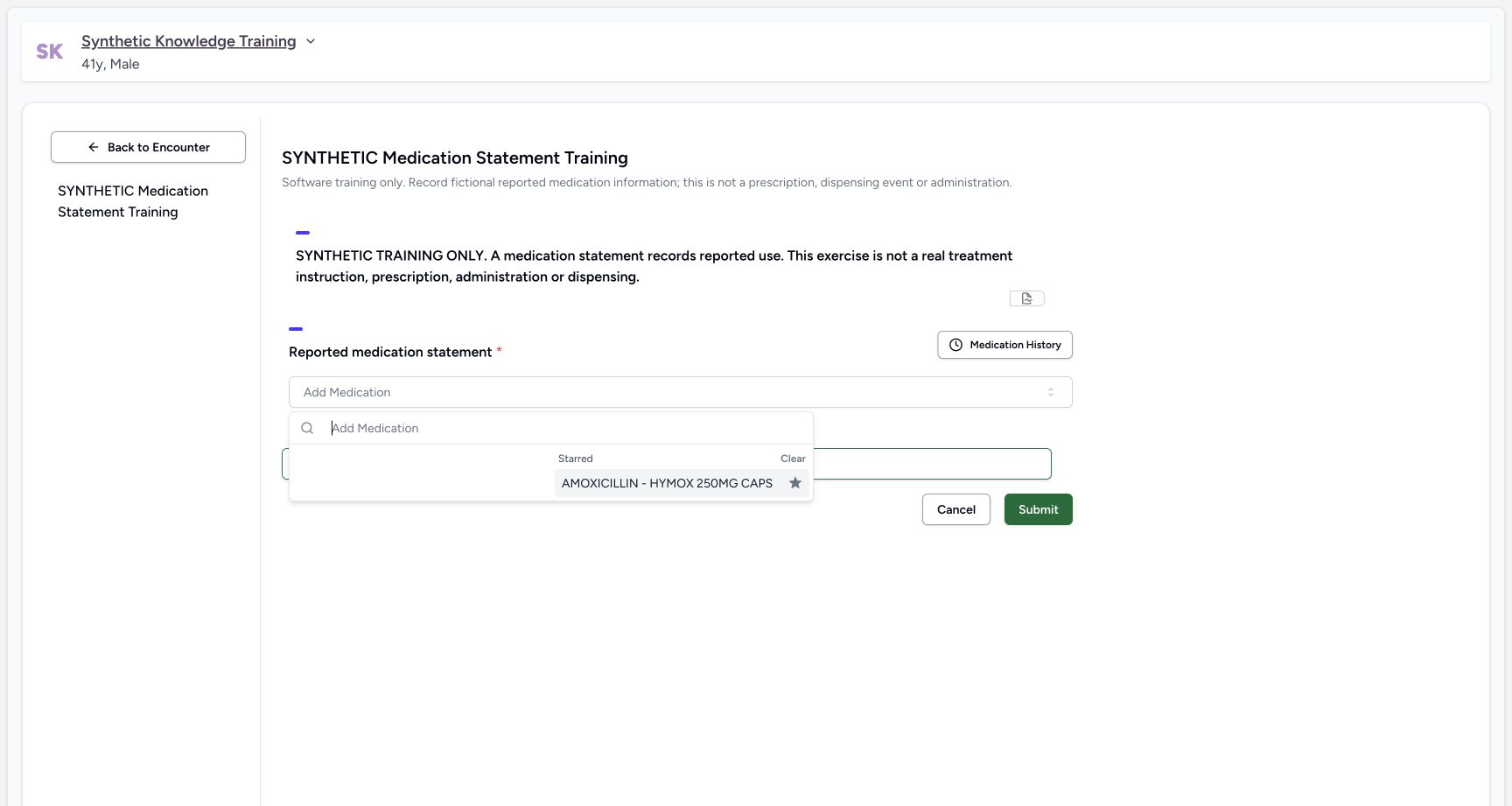
Genuine pinned production UI, authenticated Nurse, isolated synthetic Polyclinic active Inpatient encounter. Configured synthetic structured form and genuine installed NPHIES code saved as a normal personal Starred preference; no product change, terminology validation bypass, staff permission grant or real patient care. Action — Existing Nurse personal Starred preference contains genuine installed and normal-API-validated NPHIES06281086000786. This is a configured preference prerequisite; normal name search remains defective in the original statement widget.
- Select the verified configured starred medication: Select the verified configured starred medication
- Starred selection is separate from the failing name-search results: Starred selection is separate from the failing name-search results
 123
123Capture details
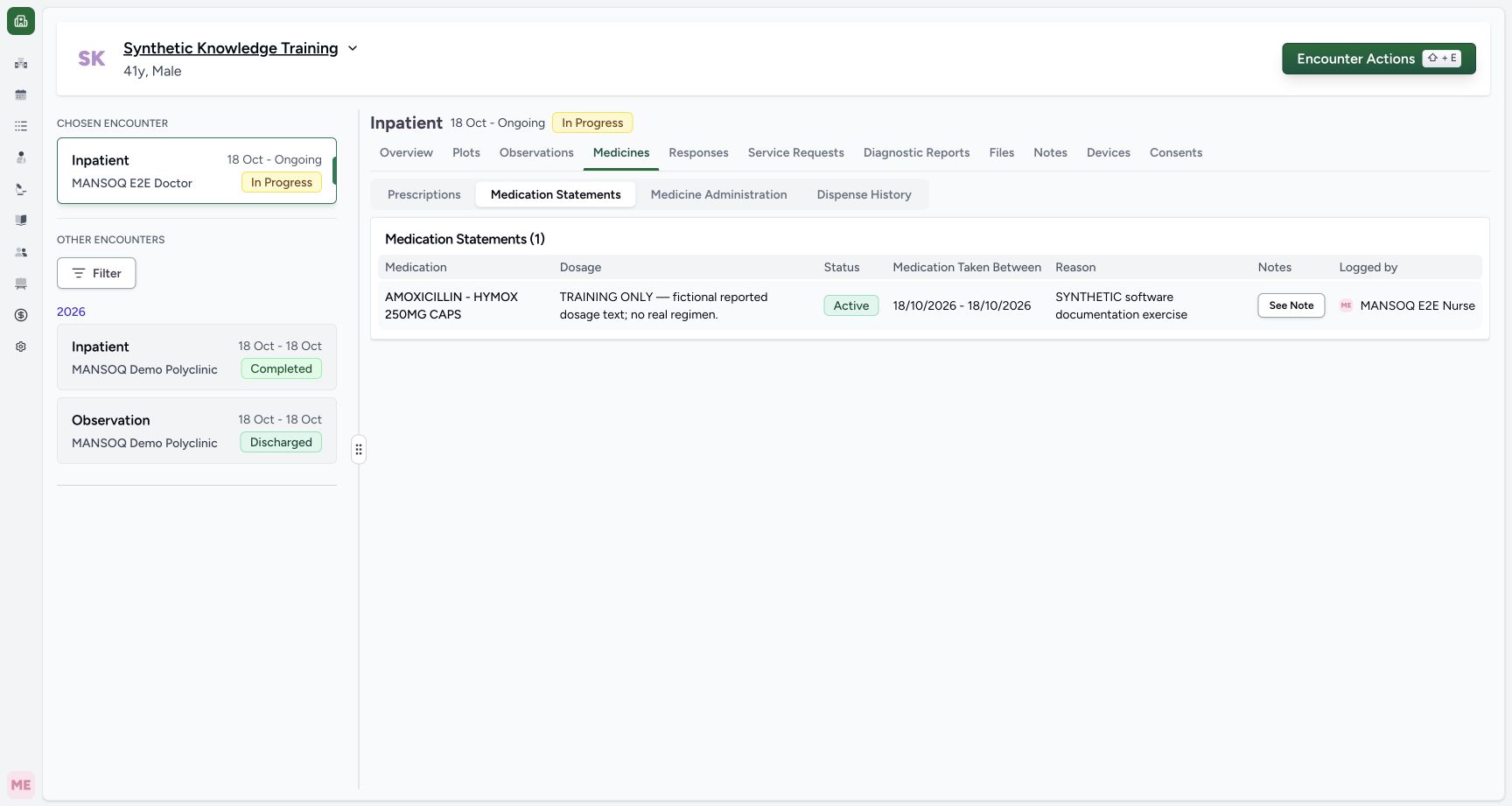
Genuine pinned production UI, authenticated Nurse, isolated synthetic Polyclinic active Inpatient encounter. Configured synthetic structured form and genuine installed NPHIES code saved as a normal personal Starred preference; no product change, terminology validation bypass, staff permission grant or real patient care. Success — Medicines → Medication Statements shows one coded AMOXICILLIN statement with fictional dosage, Active status,18October dates and Logged by MANSOQ E2E Nurse. Independent READ ONLY confirms one new statement; existing one prescription and two administration records unchanged.
- Statements have their own tab separate from prescriptions and administration: Statements have their own tab separate from prescriptions and administration
- Verify the saved statement, dates and Nurse author: Verify the saved statement, dates and Nurse author
- Read the saved explanatory note: Read the saved explanatory note
Historical copying is not a medicine reconciliation decision
Review the source, reporter, actual use and dates before creating a statement. The displayed prescription dosage is historical source context, not a new treatment instruction. This package demonstrates an observed failed import and its safe discard; successful import of an already coded prescription or a historical statement remains to be separately qualified.
123Capture details
Genuine pinned production UI, authenticated Nurse, isolated synthetic Polyclinic active Inpatient encounter. Configured synthetic structured form and genuine installed NPHIES code saved as a normal personal Starred preference; no product change, terminology validation bypass, staff permission grant or real patient care. Action — Medication History lists the existing synthetic Doctor prescription; selectable source record remains a prescription until copied into a statement draft.
- Past Prescriptions source tab: Past Prescriptions source tab
- Existing synthetic prescription and original author: Existing synthetic prescription and original author
- Select a source row before adding: Select a source row before adding
12Capture details
Genuine pinned production UI, authenticated Nurse, isolated synthetic Polyclinic active Inpatient encounter. Configured synthetic structured form and genuine installed NPHIES code saved as a normal personal Starred preference; no product change, terminology validation bypass, staff permission grant or real patient care. Action — One synthetic past prescription selected for Add Selected; importing does not save a statement or copy prescribed dosage into reported-use fields.
- Only the selected source row is copied: Only the selected source row is copied
- Add the selected medicine to the draft: Add the selected medicine to the draft
12Capture details
Genuine pinned production UI, authenticated Nurse, isolated synthetic Polyclinic active Inpatient encounter. Configured synthetic structured form and genuine installed NPHIES code saved as a normal personal Starred preference; no product change, terminology validation bypass, staff permission grant or real patient care. Action — Imported prescription creates an unsaved statement row with Patient source and Active default; dosage and period remain empty. The original inventory-backed prescription has no medication coding, so this baseline row shows no medicine display.
- Reported dosage text is required and starts empty: Reported dosage text is required and starts empty
- Choose the actual reported-use start date: Choose the actual reported-use start date
Troubleshooting
The imported Medicine cell is blank
An inventory-backed source may have no medication coding for this pinned importer to copy. Cancel the unidentified draft. Use a genuinely coded selection and the approved product correction when available; do not enter an unrelated medicine merely to make validation pass.
12Capture details
Genuine pinned production UI, authenticated Nurse, isolated synthetic Polyclinic active Inpatient encounter. Configured synthetic structured form and genuine installed NPHIES code saved as a normal personal Starred preference; no product change, terminology validation bypass, staff permission grant or real patient care. Action — Imported prescription creates an unsaved statement row with Patient source and Active default; dosage and period remain empty. The original inventory-backed prescription has no medication coding, so this baseline row shows no medicine display.
- Reported dosage text is required and starts empty: Reported dosage text is required and starts empty
- Choose the actual reported-use start date: Choose the actual reported-use start date
123Capture details
Genuine pinned production UI, authenticated Nurse, isolated synthetic Polyclinic active Inpatient encounter. Configured synthetic structured form and genuine installed NPHIES code saved as a normal personal Starred preference; no product change, terminology validation bypass, staff permission grant or real patient care. Error — Imported inventory-backed prescription has no medication code/display. Required reported dosage and use period fail validation; do not submit an unidentified medication statement.
- Required reported dosage text: Required reported dosage text
- Required start of reported use: Required start of reported use
- Review validation and discard the unidentified draft: Review validation and discard the unidentified draft
Historical dosage did not populate reported dosage
The pinned prescription-to-statement converter does not copy the prescription dosage instructions or period. Complete only verified reported-use information after resolving medicine identity; do not assume copied source context is a saved statement.
12Capture details
Genuine pinned production UI, authenticated Nurse, isolated synthetic Polyclinic active Inpatient encounter. Configured synthetic structured form and genuine installed NPHIES code saved as a normal personal Starred preference; no product change, terminology validation bypass, staff permission grant or real patient care. Action — One synthetic past prescription selected for Add Selected; importing does not save a statement or copy prescribed dosage into reported-use fields.
- Only the selected source row is copied: Only the selected source row is copied
- Add the selected medicine to the draft: Add the selected medicine to the draft
12Capture details
Genuine pinned production UI, authenticated Nurse, isolated synthetic Polyclinic active Inpatient encounter. Configured synthetic structured form and genuine installed NPHIES code saved as a normal personal Starred preference; no product change, terminology validation bypass, staff permission grant or real patient care. Action — Imported prescription creates an unsaved statement row with Patient source and Active default; dosage and period remain empty. The original inventory-backed prescription has no medication coding, so this baseline row shows no medicine display.
- Reported dosage text is required and starts empty: Reported dosage text is required and starts empty
- Choose the actual reported-use start date: Choose the actual reported-use start date
Source evidence
References are pinned to the private MANSOQ source repository. Repository access is required to open these links.
- repositories/platform/mansoq-web/src/components/Questionnaire/QuestionTypes/MedicationStatementQuestion.tsx:90 · f6e9f05f
- repositories/platform/mansoq-web/src/components/Questionnaire/QuestionTypes/MedicationStatementQuestion.tsx:225 · f6e9f05f
- repositories/platform/mansoq-web/src/components/Questionnaire/QuestionTypes/MedicationStatementQuestion.tsx:703 · f6e9f05f
- repositories/platform/mansoq-web/src/components/Questionnaire/QuestionTypes/MedicationStatementQuestion.tsx:769 · f6e9f05f
- repositories/platform/mansoq-web/src/components/Questionnaire/ValueSetSearchContent.tsx:180 · f6e9f05f
- repositories/platform/mansoq-web/src/components/Patient/MedicationStatementList.tsx:59 · f6e9f05f
- repositories/platform/mansoq-core/mansoq/emr/resources/medication/statement/spec.py:53 · f6e9f05f
- repositories/platform/mansoq-core/mansoq/emr/api/viewsets/medication_statement.py:19 · f6e9f05f