 MANSOQ
 Clinical care
Record and verify reported medication information
Use the structured medication statement form, identify the reporter, validate the dates and verify a saved record separately from prescriptions and administrations.
10 min read · Source baseline f6e9f05f
Verification and applicability
source reviewed
Check your installed version, permissions and local configuration.
Before you begin
- Confirm the correct patient, active primary encounter and permission to write its clinical data. Actual execution shown is Nurse; Doctor and every facility combination are not established by these pictures.
- Your facility must configure a form with the structured Medication Statement question. The example SYNTHETIC Medication Statement Training was added through the normal questionnaire API for existing form visibility. The shipped Ongoing Medication form in this estate contains generic name/date questions and does not create this structured record.
- Use verified reported information. All pictured values are deliberately fictional software exercises. The example has a genuine installed NPHIES medication code in the Nurse’s personal Starred list, configured through the normal preference API and accepted by normal code validation.
1. Open the configured structured statement form
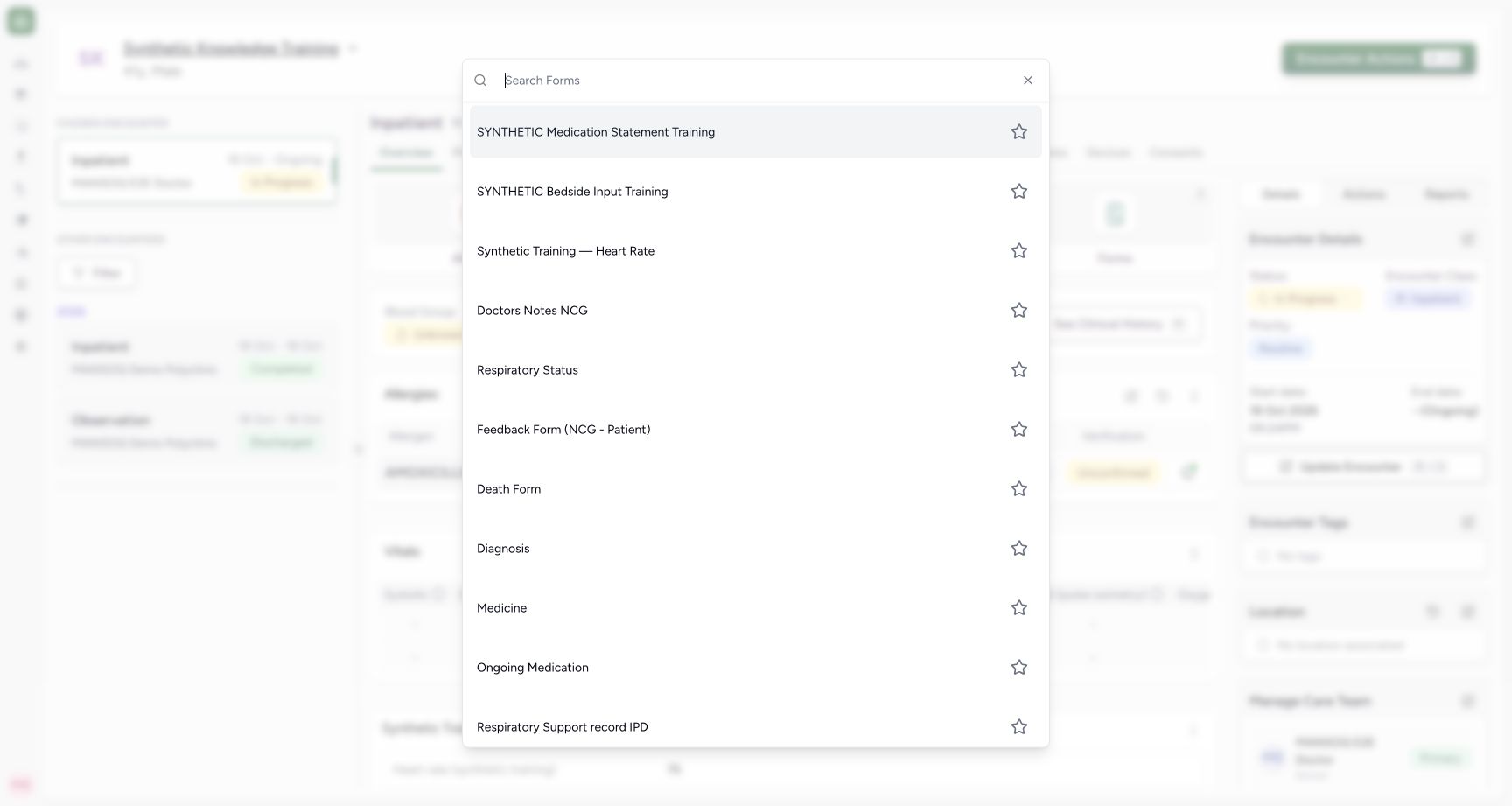
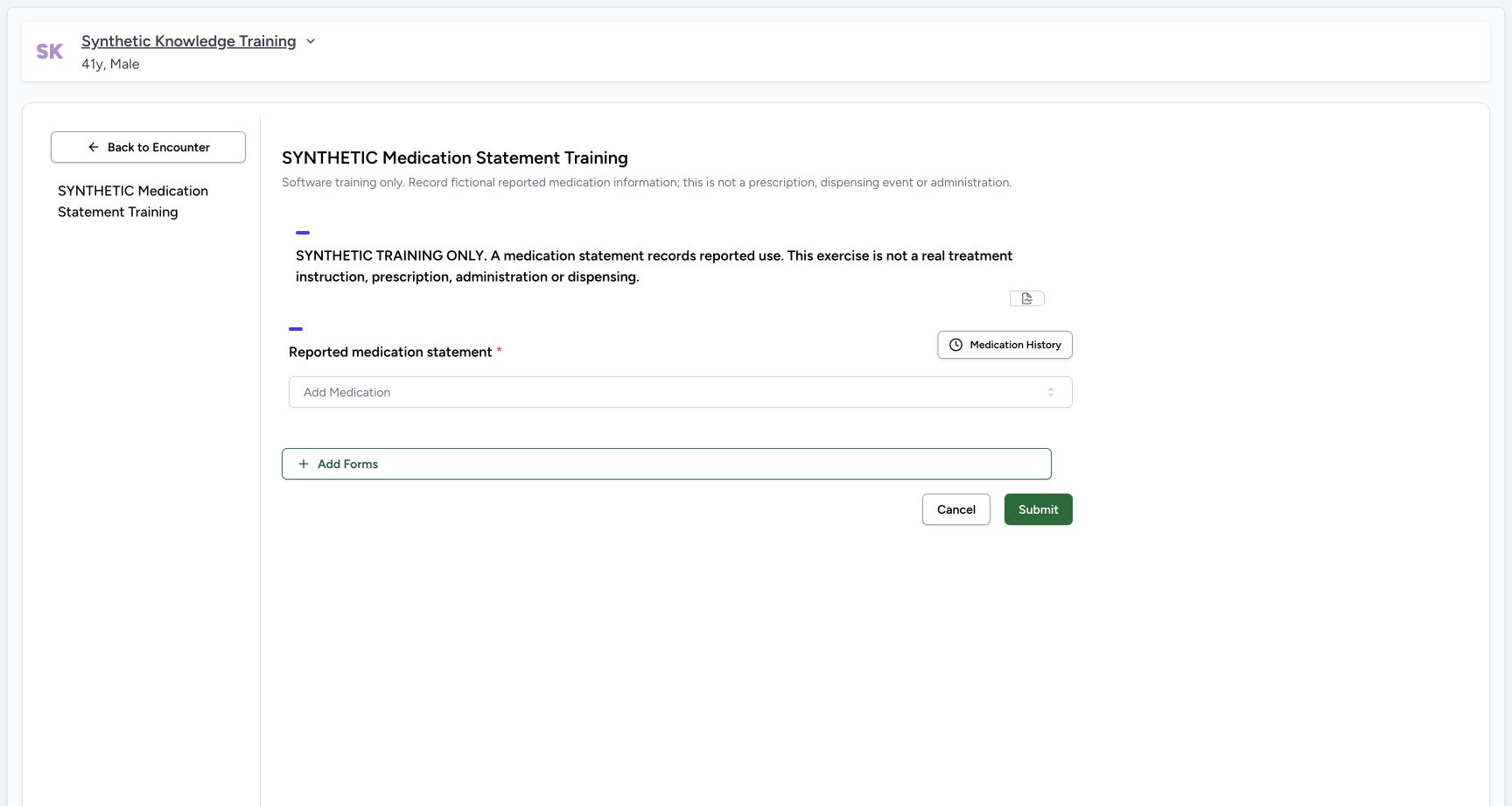
From Overview → Forms, open the facility’s approved structured medication statement form. The example is explicitly named SYNTHETIC Medication Statement Training. Check the patient banner and the form description. Medication History reviews past sources; Add Medication selects a coded medicine. A medication statement documents reported information and does not issue a prescription, dispense stock or record an administration.
 12
12Capture details
Genuine pinned production UI, authenticated Nurse, isolated synthetic Polyclinic active Inpatient encounter. Configured synthetic structured form and genuine installed NPHIES code saved as a normal personal Starred preference; no product change, terminology validation bypass, staff permission grant or real patient care. Start — Nurse chooses explicitly configured synthetic structured Medication Statement form; shipped Ongoing Medication is generic and differs.
- Open the configured structured statement form: Open the configured structured statement form
- Generic Ongoing Medication is a different configured form: Generic Ongoing Medication is a different configured form
 123
123Capture details
Genuine pinned production UI, authenticated Nurse, isolated synthetic Polyclinic active Inpatient encounter. Configured synthetic structured form and genuine installed NPHIES code saved as a normal personal Starred preference; no product change, terminology validation bypass, staff permission grant or real patient care. Start — Structured statement form has no existing statements. Medication History and Add Medication are available; no prescription or administration is created here.
- Review past records before adding a statement: Review past records before adding a statement
- Search the configured medication terminology: Search the configured medication terminology
- Submission saves the structured statement: Submission saves the structured statement
2. Select a verified medicine and handle the current search limitation
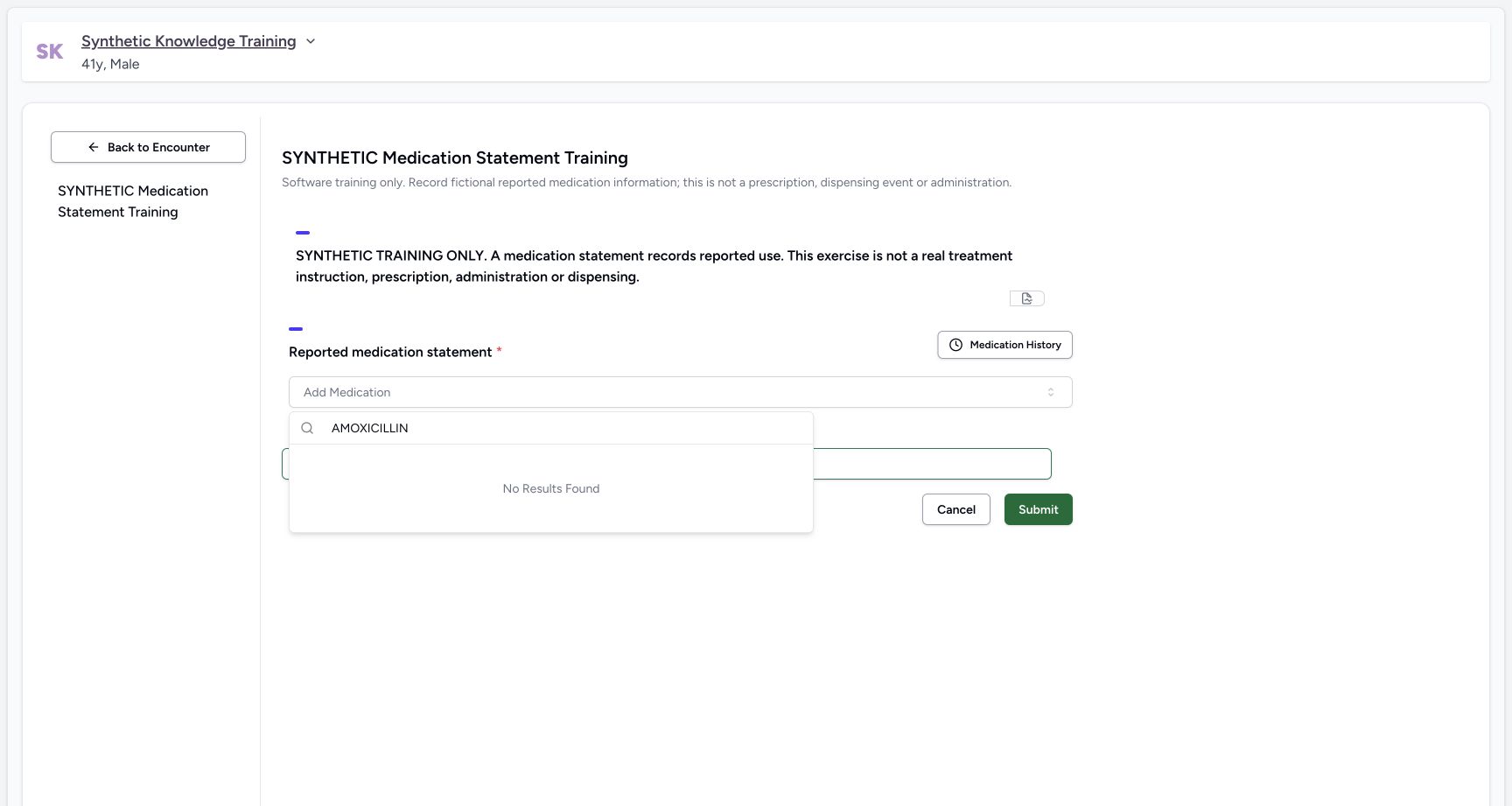
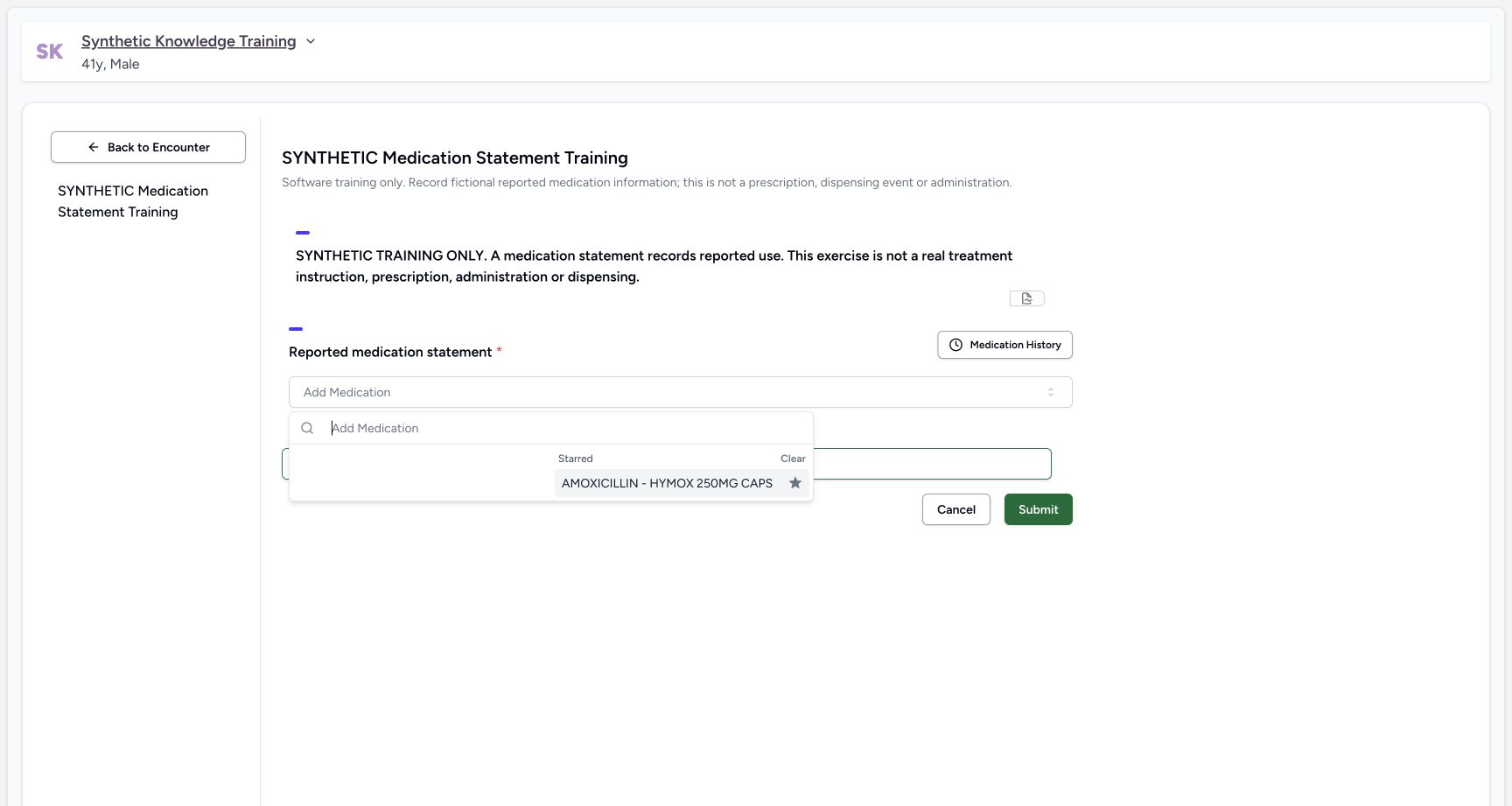
Open Add Medication and select the intended coded medicine. In this pinned release, normal AMOXICILLIN search incorrectly returns No Results Found because the statement picker adds an incompatible search phrase. The pictured recovery uses an already configured, normally validated Starred medication; it does not manufacture a code. If the intended medicine is unavailable, stop and ask the authorized terminology maintainer to resolve it before saving.
 12
12Capture details
Genuine pinned production UI, authenticated Nurse, isolated synthetic Polyclinic active Inpatient encounter. Configured synthetic structured form and genuine installed NPHIES code saved as a normal personal Starred preference; no product change, terminology validation bypass, staff permission grant or real patient care. Error — AMOXICILLIN search returns no results in the original statement picker. Source appends “ clinical drug” to system-medication search, which conflicts with installed NPHIES displays; no code selected or saved.
- Medication name search: Medication name search
- No results does not mean the medicine is absent from the terminology: No results does not mean the medicine is absent from the terminology
 12
12Capture details
Genuine pinned production UI, authenticated Nurse, isolated synthetic Polyclinic active Inpatient encounter. Configured synthetic structured form and genuine installed NPHIES code saved as a normal personal Starred preference; no product change, terminology validation bypass, staff permission grant or real patient care. Action — Existing Nurse personal Starred preference contains genuine installed and normal-API-validated NPHIES06281086000786. This is a configured preference prerequisite; normal name search remains defective in the original statement widget.
- Select the verified configured starred medication: Select the verified configured starred medication
- Starred selection is separate from the failing name-search results: Starred selection is separate from the failing name-search results
3. Identify who supplied the information
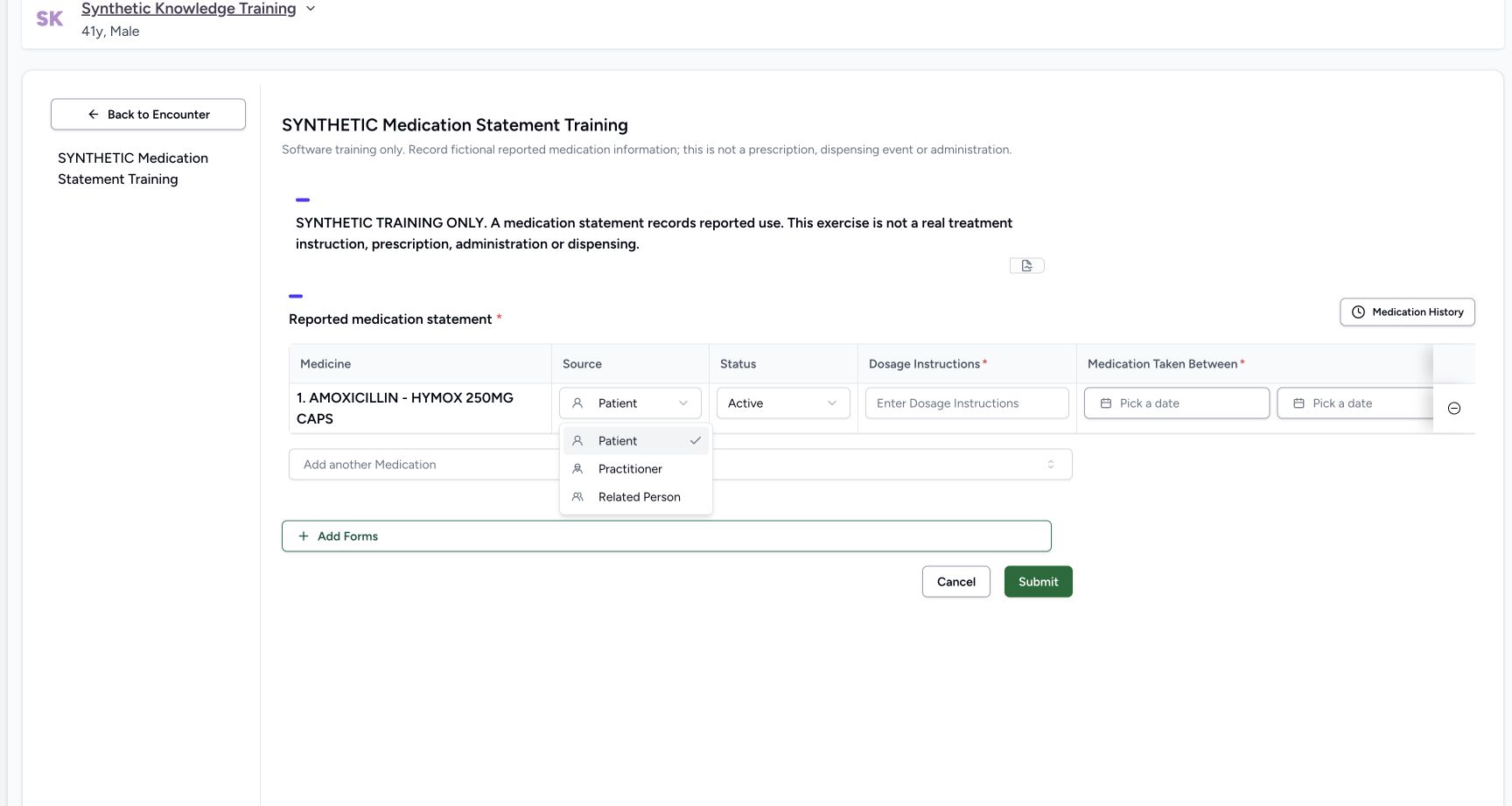
Review Source and choose Patient, Practitioner or Related Person according to who reported the information. These choices describe the information source; they do not change the logged-in author or grant a caregiver access. The fictional example retains Patient. Review the coded medicine name before entering the remaining fields.
 12
12Capture details
Genuine pinned production UI, authenticated Nurse, isolated synthetic Polyclinic active Inpatient encounter. Configured synthetic structured form and genuine installed NPHIES code saved as a normal personal Starred preference; no product change, terminology validation bypass, staff permission grant or real patient care. Action — Information Source offers Patient, Practitioner and Related Person. These describe who reported use, not the logged-in author or a proxy access grant; Patient retained in the fictional exercise.
- Information reporter source: Information reporter source
- Related Person is a source label, not caregiver portal authorization: Related Person is a source label, not caregiver portal authorization
4. Set the reported status and dosage narrative
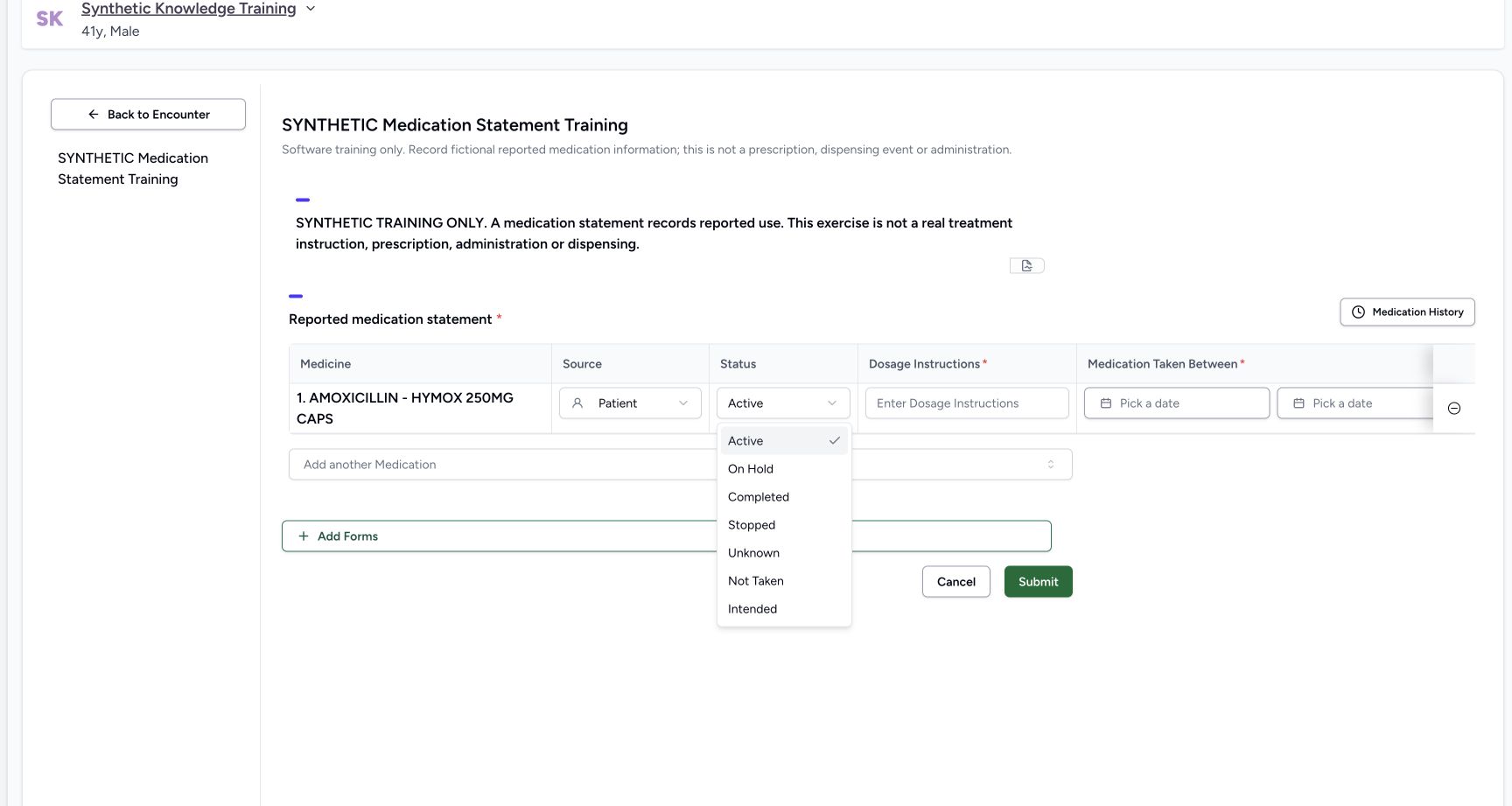
Choose the statement Status that matches the reported information. The new-row menu offers Active, On Hold, Completed, Stopped, Unknown, Not Taken and Intended. Enter the required Dosage Instructions as reported documentation. The pictured text is deliberately marked TRAINING ONLY and supplies no real regimen. Statement status is separate from the status of a prescription or a medicine-administration event.
 1
1Capture details
Genuine pinned production UI, authenticated Nurse, isolated synthetic Polyclinic active Inpatient encounter. Configured synthetic structured form and genuine installed NPHIES code saved as a normal personal Starred preference; no product change, terminology validation bypass, staff permission grant or real patient care. Action — Statement lifecycle offers Active, On Hold, Completed, Stopped, Unknown, Not Taken and Intended for this new row. Status describes reported medication information, not a prescription/MAR event.
- Choose a statement status that matches the reported information: Choose a statement status that matches the reported information
 12
12Capture details
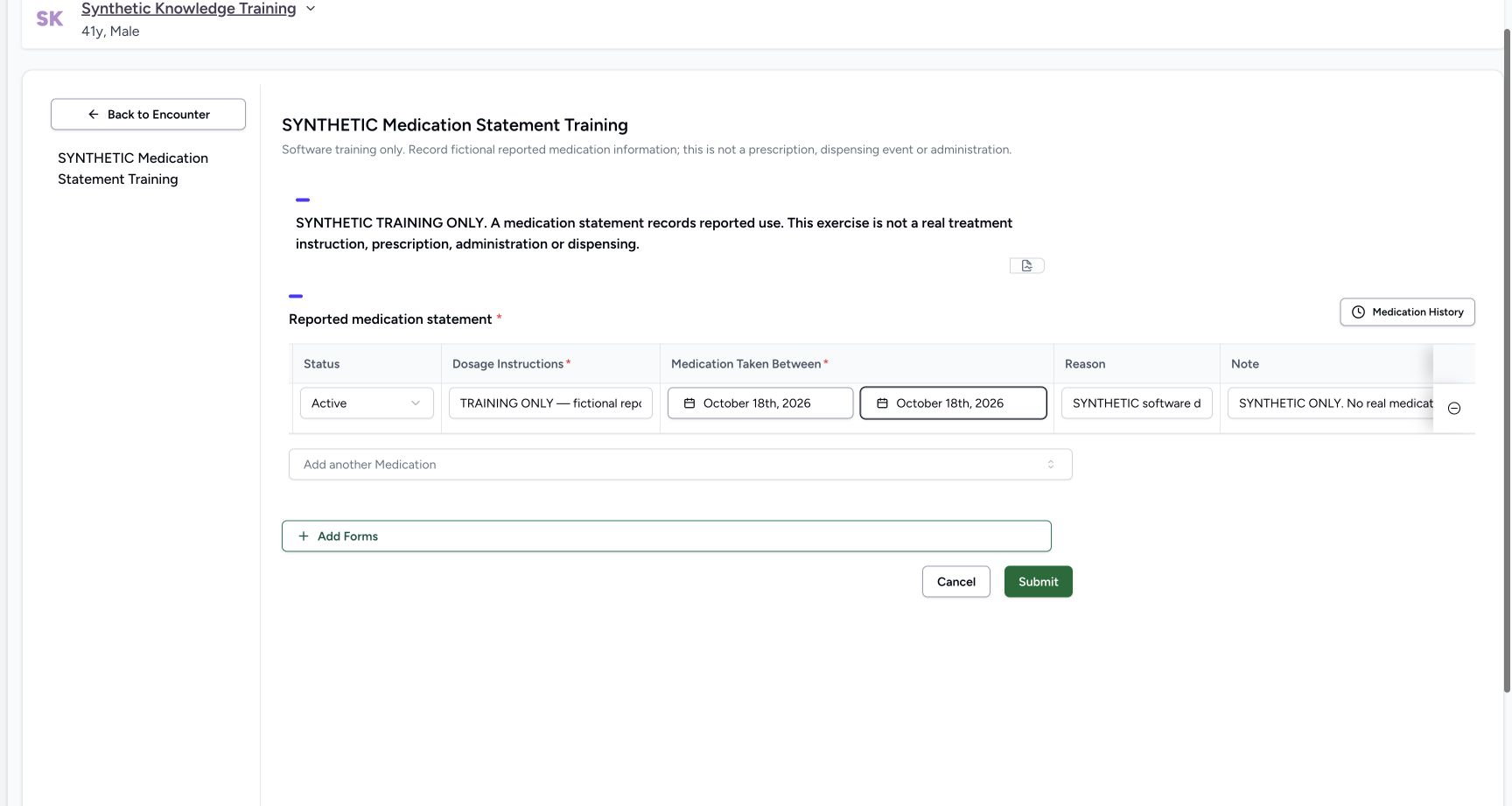
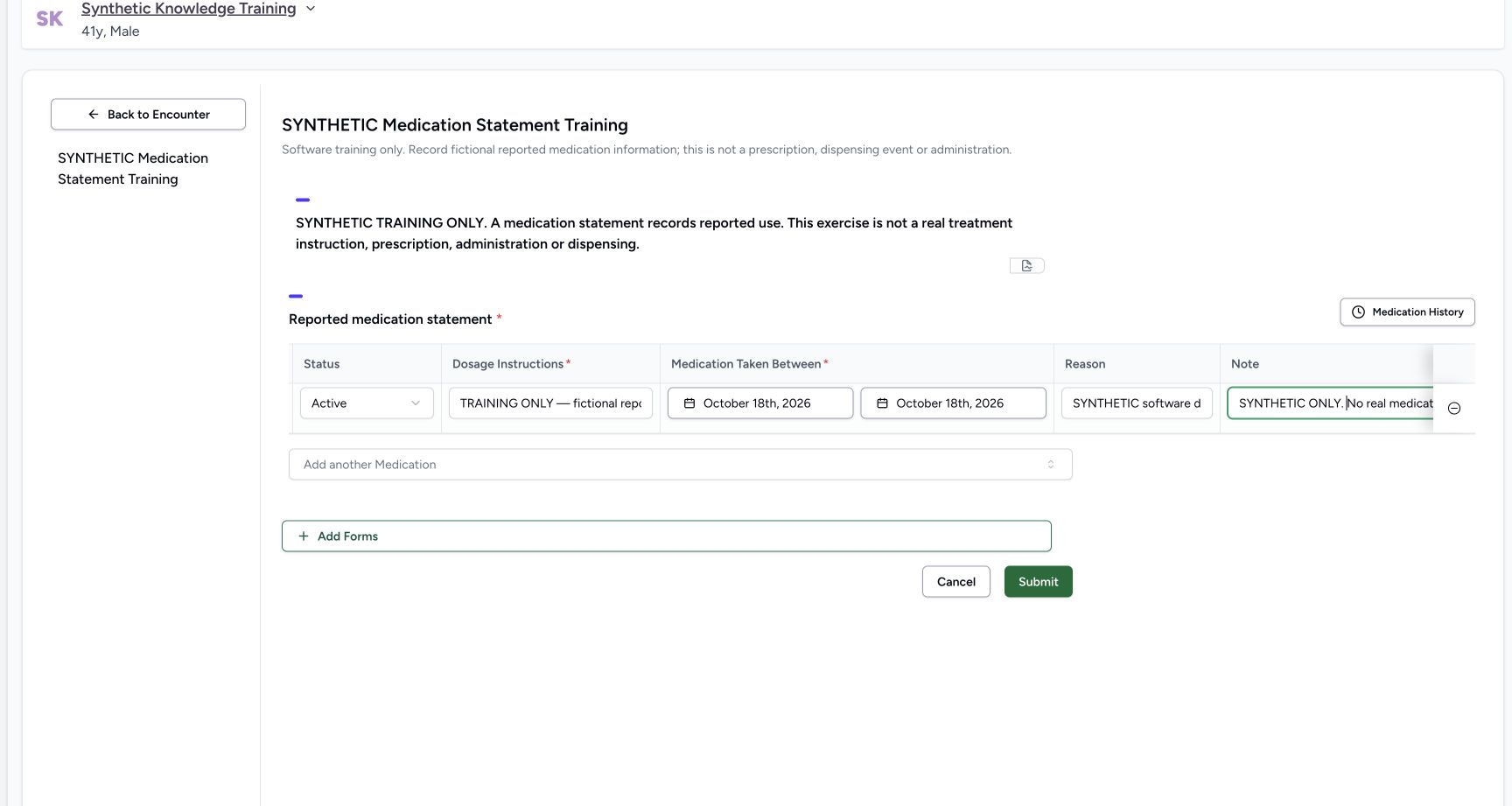
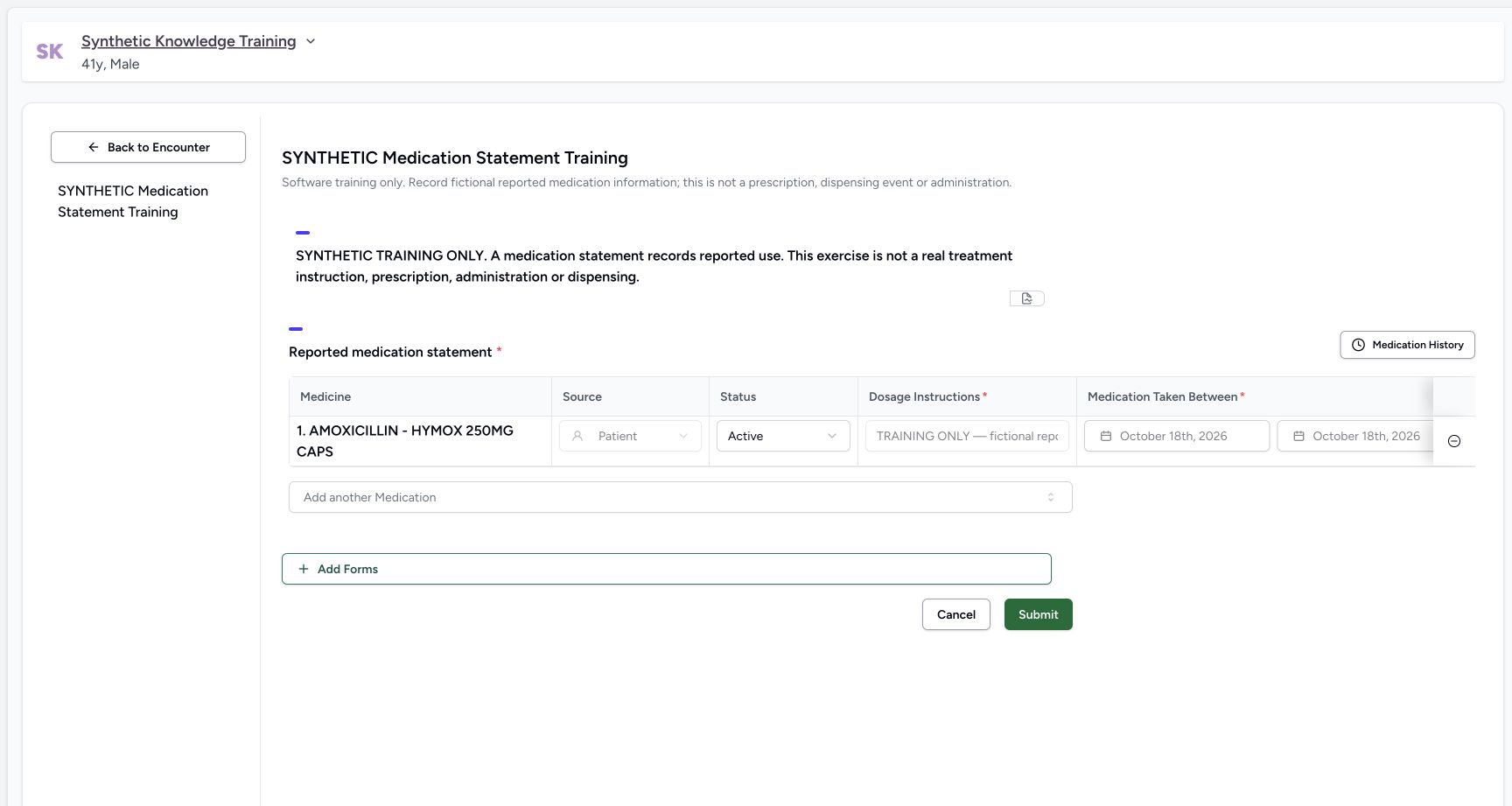
Genuine pinned production UI, authenticated Nurse, isolated synthetic Polyclinic active Inpatient encounter. Configured synthetic structured form and genuine installed NPHIES code saved as a normal personal Starred preference; no product change, terminology validation bypass, staff permission grant or real patient care. Action — Coded synthetic medicine, Patient source, Active status, fictional dosage narrative and18October start/end reviewed before Submit. Rightmost reason/note require horizontal review on this desktop grid.
- Reported information is not a prescribed regimen: Reported information is not a prescribed regimen
- Save only after reviewing all row fields: Save only after reviewing all row fields
5. Enter and validate the reported-use dates
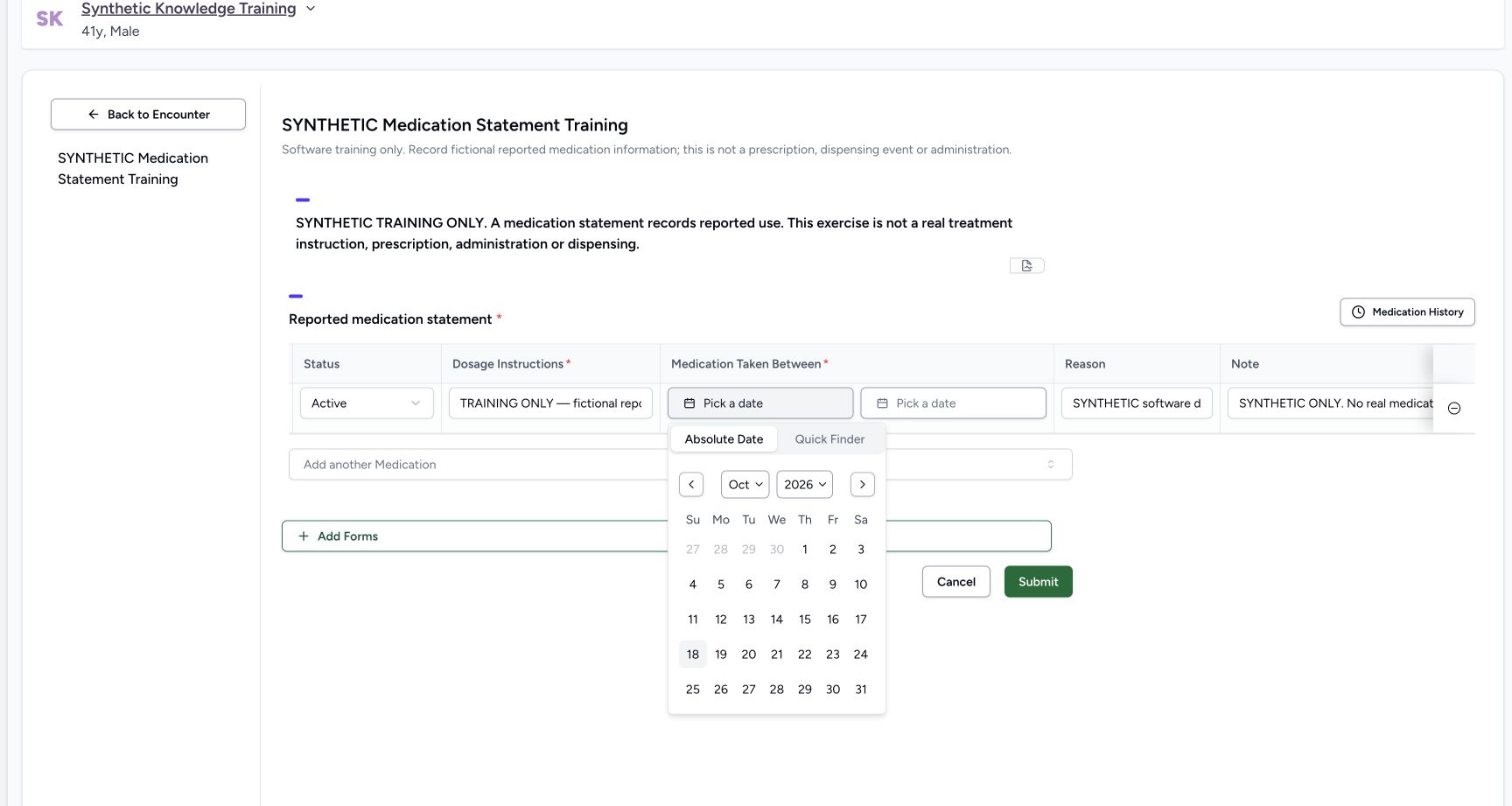
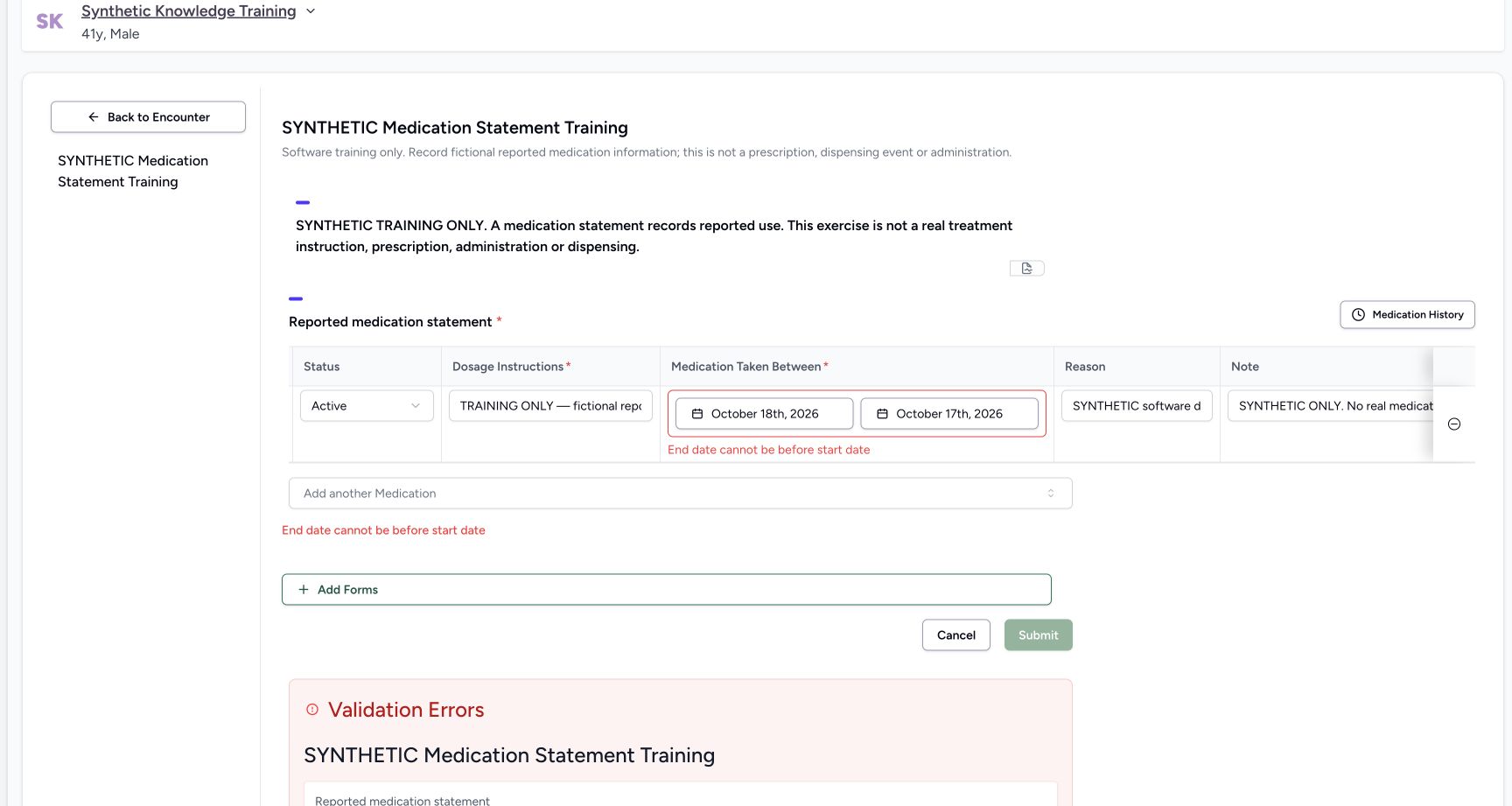
Choose the required start under Medication Taken Between. Absolute Date lets you select an exact date; the picker also offers Quick Finder. An end date is optional, but if supplied it cannot precede the start. The deliberate 18 October start / 17 October end is refused with End date cannot be before start date. Correct the date order; the example uses 18 October for both fictional dates.
 12
12Capture details
Genuine pinned production UI, authenticated Nurse, isolated synthetic Polyclinic active Inpatient encounter. Configured synthetic structured form and genuine installed NPHIES code saved as a normal personal Starred preference; no product change, terminology validation bypass, staff permission grant or real patient care. Action — Choose the reported-use start date in Absolute Date or Quick Finder; screenshot demonstrates today18October2026 in the synthetic exercise, not a clinical duration recommendation.
- Choose the exact date: Choose the exact date
- 18 October2026 fictional reported start date: 18 October2026 fictional reported start date
 123
123Capture details
Genuine pinned production UI, authenticated Nurse, isolated synthetic Polyclinic active Inpatient encounter. Configured synthetic structured form and genuine installed NPHIES code saved as a normal personal Starred preference; no product change, terminology validation bypass, staff permission grant or real patient care. Error — Start18October and end17October are refused with End date cannot be before start date. Statement remains unsaved; correct date order rather than retry.
- Reported start date: Reported start date
- Invalid earlier end date: Invalid earlier end date
- Read the error before correcting: Read the error before correcting
12Capture details
Genuine pinned production UI, authenticated Nurse, isolated synthetic Polyclinic active Inpatient encounter. Configured synthetic structured form and genuine installed NPHIES code saved as a normal personal Starred preference; no product change, terminology validation bypass, staff permission grant or real patient care. Action — Coded synthetic medicine, Patient source, Active status, fictional dosage narrative and18October start/end reviewed before Submit. Rightmost reason/note require horizontal review on this desktop grid.
- Reported information is not a prescribed regimen: Reported information is not a prescribed regimen
- Save only after reviewing all row fields: Save only after reviewing all row fields
6. Review every column before submitting
Use the desktop row’s horizontal scrolling to inspect the columns to the right, including Reason and Note. Text can be clipped inside a narrow field, so read the complete content while editing. Confirm medicine, source, status, reported dosage, dates and context, then select Submit. The example’s Reason and Note clearly identify a software exercise. Merely adding a row or correcting a field has not saved it yet.
12Capture details
Genuine pinned production UI, authenticated Nurse, isolated synthetic Polyclinic active Inpatient encounter. Configured synthetic structured form and genuine installed NPHIES code saved as a normal personal Starred preference; no product change, terminology validation bypass, staff permission grant or real patient care. Action — Coded synthetic medicine, Patient source, Active status, fictional dosage narrative and18October start/end reviewed before Submit. Rightmost reason/note require horizontal review on this desktop grid.
- Reported information is not a prescribed regimen: Reported information is not a prescribed regimen
- Save only after reviewing all row fields: Save only after reviewing all row fields
 12
12Capture details
Genuine pinned production UI, authenticated Nurse, isolated synthetic Polyclinic active Inpatient encounter. Configured synthetic structured form and genuine installed NPHIES code saved as a normal personal Starred preference; no product change, terminology validation bypass, staff permission grant or real patient care. Action — Horizontally scroll the wide desktop row to review Reason and Note; explicitly fictional text reviewed. Moving across the grid changes the visible columns, not saved data.
- Reason for reported information: Reason for reported information
- Note explicitly identifies synthetic exercise: Note explicitly identifies synthetic exercise
7. Verify the persisted statement and its author
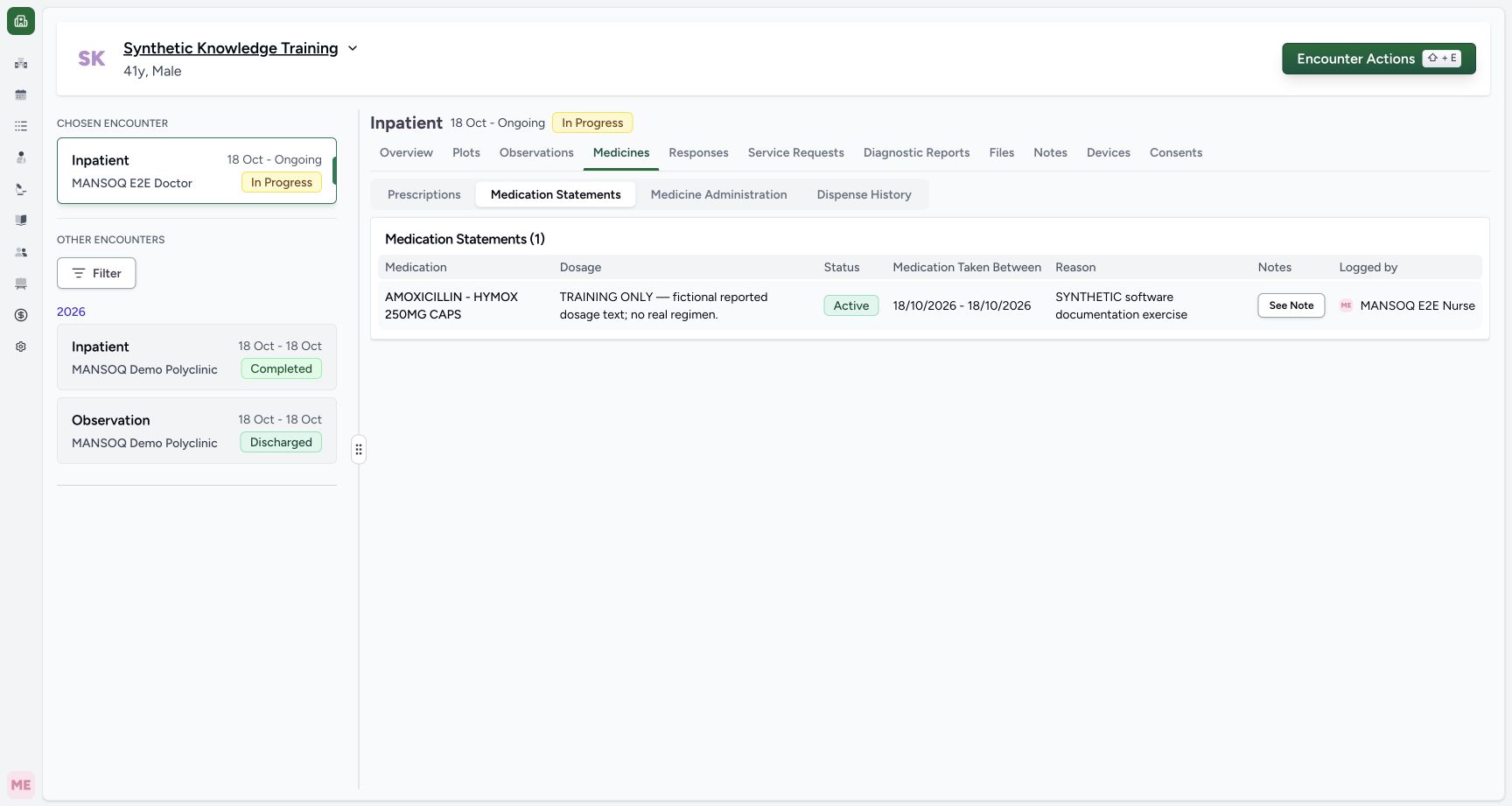
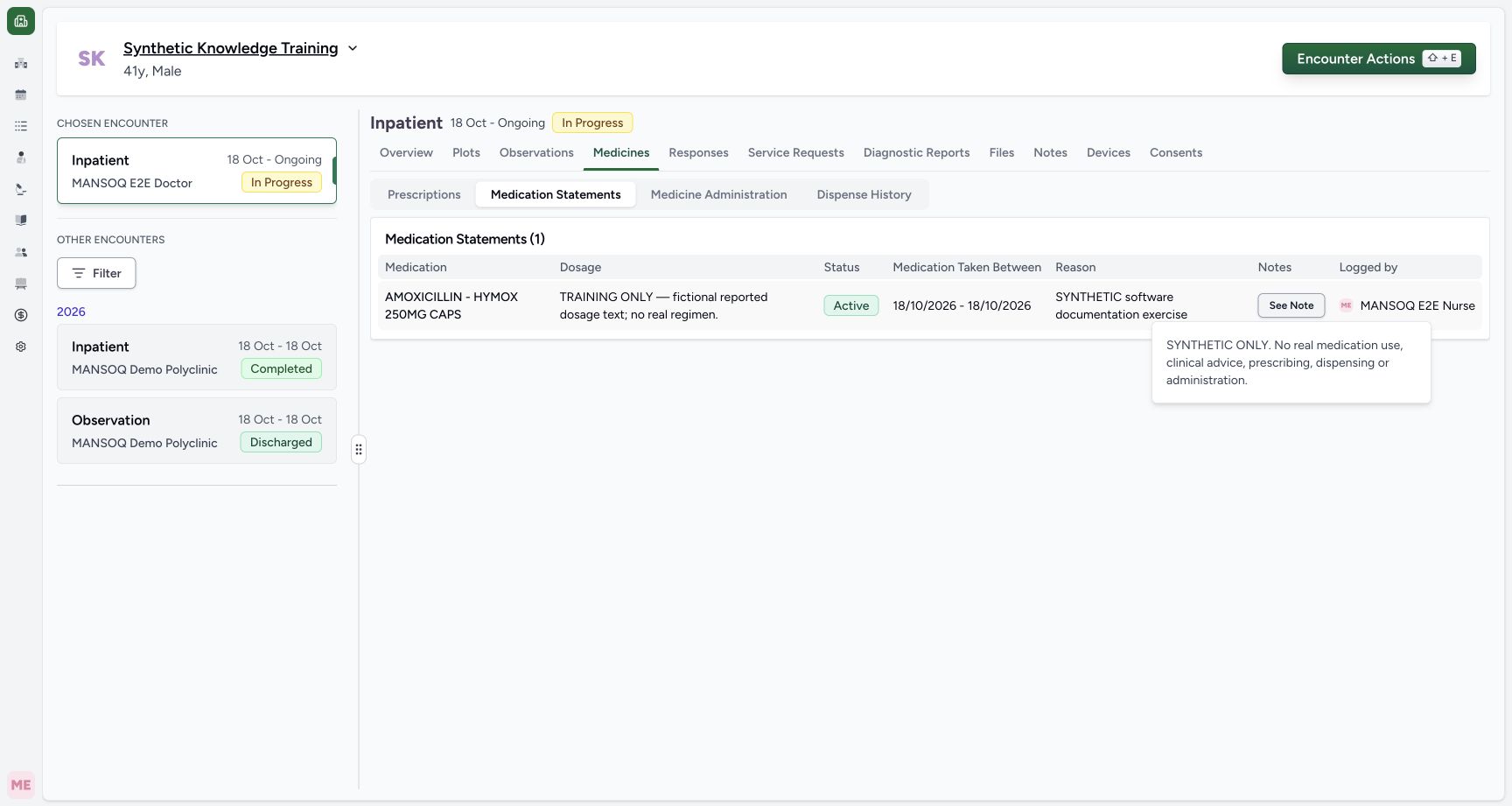
After submission returns to the encounter, open Medicines → Medication Statements. Verify the saved medicine, dosage, status, dates, reason and Logged by author; use See Note for its full note. The pictured result is one Active statement logged by MANSOQ E2E Nurse. Independent readback confirmed the statement and that the existing prescription and administration records were unchanged.
 123
123Capture details
Genuine pinned production UI, authenticated Nurse, isolated synthetic Polyclinic active Inpatient encounter. Configured synthetic structured form and genuine installed NPHIES code saved as a normal personal Starred preference; no product change, terminology validation bypass, staff permission grant or real patient care. Success — Medicines → Medication Statements shows one coded AMOXICILLIN statement with fictional dosage, Active status,18October dates and Logged by MANSOQ E2E Nurse. Independent READ ONLY confirms one new statement; existing one prescription and two administration records unchanged.
- Statements have their own tab separate from prescriptions and administration: Statements have their own tab separate from prescriptions and administration
- Verify the saved statement, dates and Nurse author: Verify the saved statement, dates and Nurse author
- Read the saved explanatory note: Read the saved explanatory note
 1
1Capture details
Genuine pinned production UI, authenticated Nurse, isolated synthetic Polyclinic active Inpatient encounter. Configured synthetic structured form and genuine installed NPHIES code saved as a normal personal Starred preference; no product change, terminology validation bypass, staff permission grant or real patient care. Success — Saved statement See Note popover displays explicit synthetic-only narrative. Persisted note and Nurse author independently verified; reported use is not a new prescription or MAR entry.
- Saved statement note: Saved statement note
8. Recognize the saved-record editing boundary
Reopen the same structured form to load the existing statement. In this audited UI, its Source, dosage, dates and reason are disabled; Status and Note remain editable. Do not try to overwrite a prior statement as if it were a new row. This package verifies creation and reopening only; saved status changes and entered-in-error correction require their separate observed teaching.
 123
123Capture details
Genuine pinned production UI, authenticated Nurse, isolated synthetic Polyclinic active Inpatient encounter. Configured synthetic structured form and genuine installed NPHIES code saved as a normal personal Starred preference; no product change, terminology validation bypass, staff permission grant or real patient care. Action — Reopened existing coded statement loads same saved record: Source, dosage, dates and reason are disabled; Status and Note remain editable, and remove control is available. No change or request in flight while runtime maintenance begins.
- Saved information source is read only: Saved information source is read only
- Existing reported dosage cannot be rewritten here: Existing reported dosage cannot be rewritten here
- Existing status can be updated after authorized review: Existing status can be updated after authorized review
Statement-list scope limitation in the audited release
The pinned MedicationStatementList component accepts an encounter id but omits it from the normal list request. The Medicines statement list therefore requests patient-wide statements rather than establishing that every row belongs to the selected episode. The saved record pictured here was independently confirmed to belong to the active training encounter. Verify the source episode through the approved record context and use a separately validated corrected release for encounter-specific filtering.
123Capture details
Genuine pinned production UI, authenticated Nurse, isolated synthetic Polyclinic active Inpatient encounter. Configured synthetic structured form and genuine installed NPHIES code saved as a normal personal Starred preference; no product change, terminology validation bypass, staff permission grant or real patient care. Success — Medicines → Medication Statements shows one coded AMOXICILLIN statement with fictional dosage, Active status,18October dates and Logged by MANSOQ E2E Nurse. Independent READ ONLY confirms one new statement; existing one prescription and two administration records unchanged.
- Statements have their own tab separate from prescriptions and administration: Statements have their own tab separate from prescriptions and administration
- Verify the saved statement, dates and Nurse author: Verify the saved statement, dates and Nurse author
- Read the saved explanatory note: Read the saved explanatory note
Dates and time zone
The UI displays 18/10/2026. Independent storage verification found both date selections as 2026-10-17T21:00:00Z, which represents midnight on 18 October in the training facility’s Asia/Riyadh time zone. Interpret a displayed date in its facility context; the example does not establish duration or treatment advice.
12Capture details
Genuine pinned production UI, authenticated Nurse, isolated synthetic Polyclinic active Inpatient encounter. Configured synthetic structured form and genuine installed NPHIES code saved as a normal personal Starred preference; no product change, terminology validation bypass, staff permission grant or real patient care. Action — Coded synthetic medicine, Patient source, Active status, fictional dosage narrative and18October start/end reviewed before Submit. Rightmost reason/note require horizontal review on this desktop grid.
- Reported information is not a prescribed regimen: Reported information is not a prescribed regimen
- Save only after reviewing all row fields: Save only after reviewing all row fields
123Capture details
Genuine pinned production UI, authenticated Nurse, isolated synthetic Polyclinic active Inpatient encounter. Configured synthetic structured form and genuine installed NPHIES code saved as a normal personal Starred preference; no product change, terminology validation bypass, staff permission grant or real patient care. Success — Medicines → Medication Statements shows one coded AMOXICILLIN statement with fictional dosage, Active status,18October dates and Logged by MANSOQ E2E Nurse. Independent READ ONLY confirms one new statement; existing one prescription and two administration records unchanged.
- Statements have their own tab separate from prescriptions and administration: Statements have their own tab separate from prescriptions and administration
- Verify the saved statement, dates and Nurse author: Verify the saved statement, dates and Nurse author
- Read the saved explanatory note: Read the saved explanatory note
Scope of this walkthrough
Genuine pinned production UI, authenticated Nurse, isolated synthetic Polyclinic active Inpatient encounter. Configured synthetic structured form and genuine installed NPHIES code saved as a normal personal Starred preference; no product change, terminology validation bypass, staff permission grant or real patient care. This does not qualify all role/facility combinations, multiple concurrent statement rows, every status transition, mobile behavior, correction, historical-statement copying or a corrected search release.
12Capture details
Genuine pinned production UI, authenticated Nurse, isolated synthetic Polyclinic active Inpatient encounter. Configured synthetic structured form and genuine installed NPHIES code saved as a normal personal Starred preference; no product change, terminology validation bypass, staff permission grant or real patient care. Start — Nurse chooses explicitly configured synthetic structured Medication Statement form; shipped Ongoing Medication is generic and differs.
- Open the configured structured statement form: Open the configured structured statement form
- Generic Ongoing Medication is a different configured form: Generic Ongoing Medication is a different configured form
123Capture details
Genuine pinned production UI, authenticated Nurse, isolated synthetic Polyclinic active Inpatient encounter. Configured synthetic structured form and genuine installed NPHIES code saved as a normal personal Starred preference; no product change, terminology validation bypass, staff permission grant or real patient care. Action — Reopened existing coded statement loads same saved record: Source, dosage, dates and reason are disabled; Status and Note remain editable, and remove control is available. No change or request in flight while runtime maintenance begins.
- Saved information source is read only: Saved information source is read only
- Existing reported dosage cannot be rewritten here: Existing reported dosage cannot be rewritten here
- Existing status can be updated after authorized review: Existing status can be updated after authorized review
Troubleshooting
No Results Found for a known medicine
This pinned statement picker appends a search phrase intended for a different terminology and can hide valid installed NPHIES medicines. Do not conclude the medicine is absent and do not choose an unrelated code. The illustrated Starred recovery requires a genuine already validated configured preference; otherwise resolve the terminology/search issue with the authorized maintainer.
12Capture details
Genuine pinned production UI, authenticated Nurse, isolated synthetic Polyclinic active Inpatient encounter. Configured synthetic structured form and genuine installed NPHIES code saved as a normal personal Starred preference; no product change, terminology validation bypass, staff permission grant or real patient care. Error — AMOXICILLIN search returns no results in the original statement picker. Source appends “ clinical drug” to system-medication search, which conflicts with installed NPHIES displays; no code selected or saved.
- Medication name search: Medication name search
- No results does not mean the medicine is absent from the terminology: No results does not mean the medicine is absent from the terminology
12Capture details
Genuine pinned production UI, authenticated Nurse, isolated synthetic Polyclinic active Inpatient encounter. Configured synthetic structured form and genuine installed NPHIES code saved as a normal personal Starred preference; no product change, terminology validation bypass, staff permission grant or real patient care. Action — Existing Nurse personal Starred preference contains genuine installed and normal-API-validated NPHIES06281086000786. This is a configured preference prerequisite; normal name search remains defective in the original statement widget.
- Select the verified configured starred medication: Select the verified configured starred medication
- Starred selection is separate from the failing name-search results: Starred selection is separate from the failing name-search results
Submit is disabled after date validation
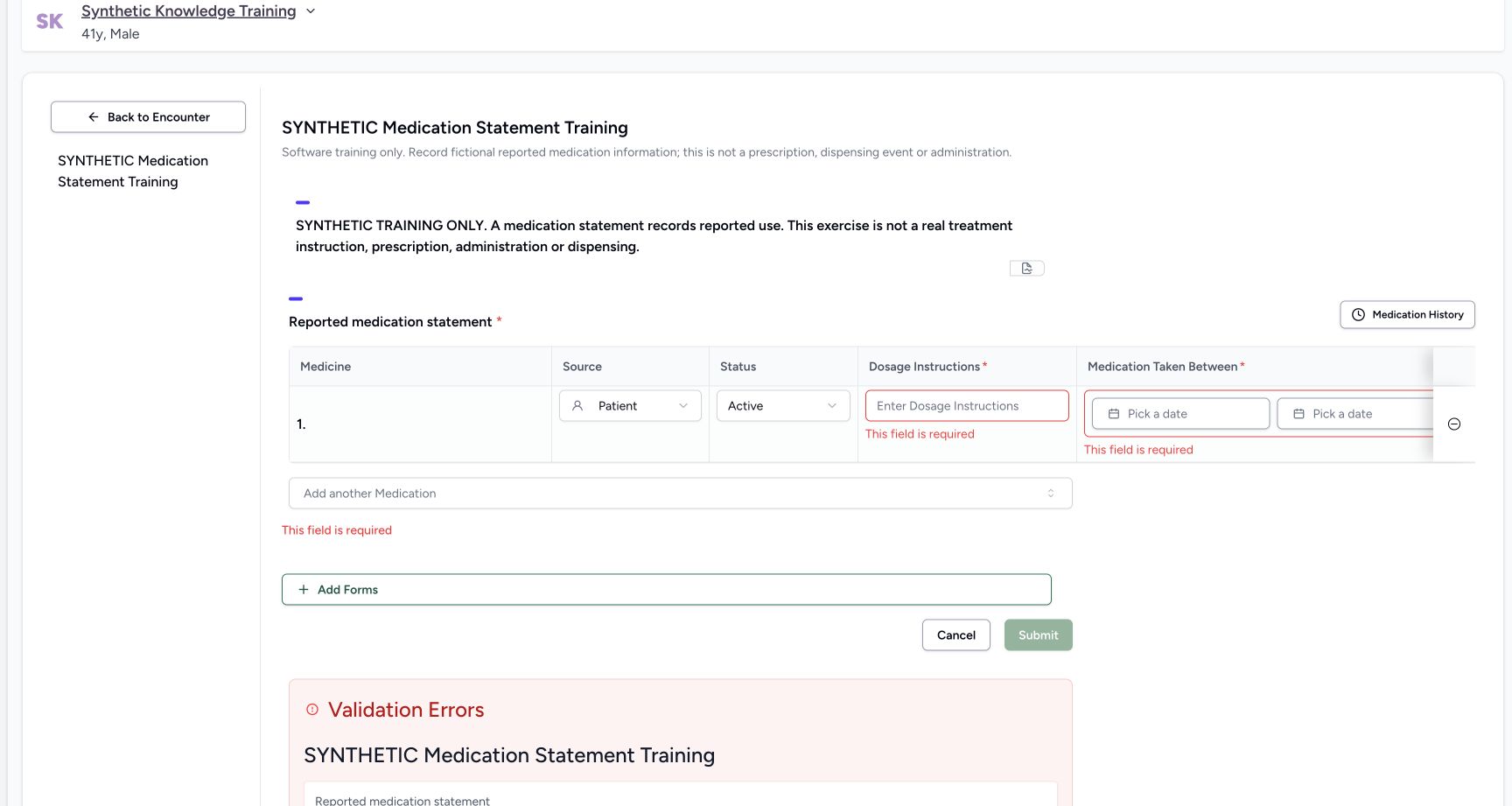
Read Validation Errors, correct an end before its start, and verify the required reported dosage and start date. Fix the draft before retrying.
 123
123Capture details
Genuine pinned production UI, authenticated Nurse, isolated synthetic Polyclinic active Inpatient encounter. Configured synthetic structured form and genuine installed NPHIES code saved as a normal personal Starred preference; no product change, terminology validation bypass, staff permission grant or real patient care. Error — Imported inventory-backed prescription has no medication code/display. Required reported dosage and use period fail validation; do not submit an unidentified medication statement.
- Required reported dosage text: Required reported dosage text
- Required start of reported use: Required start of reported use
- Review validation and discard the unidentified draft: Review validation and discard the unidentified draft
123Capture details
Genuine pinned production UI, authenticated Nurse, isolated synthetic Polyclinic active Inpatient encounter. Configured synthetic structured form and genuine installed NPHIES code saved as a normal personal Starred preference; no product change, terminology validation bypass, staff permission grant or real patient care. Error — Start18October and end17October are refused with End date cannot be before start date. Statement remains unsaved; correct date order rather than retry.
- Reported start date: Reported start date
- Invalid earlier end date: Invalid earlier end date
- Read the error before correcting: Read the error before correcting
A field is disabled when reopening
Existing statement source, dosage, dates and reason are read only in this UI. The pictured status and note controls have different edit boundaries. Follow the facility’s approved correction process rather than altering medicine identity.
123Capture details
Genuine pinned production UI, authenticated Nurse, isolated synthetic Polyclinic active Inpatient encounter. Configured synthetic structured form and genuine installed NPHIES code saved as a normal personal Starred preference; no product change, terminology validation bypass, staff permission grant or real patient care. Action — Reopened existing coded statement loads same saved record: Source, dosage, dates and reason are disabled; Status and Note remain editable, and remove control is available. No change or request in flight while runtime maintenance begins.
- Saved information source is read only: Saved information source is read only
- Existing reported dosage cannot be rewritten here: Existing reported dosage cannot be rewritten here
- Existing status can be updated after authorized review: Existing status can be updated after authorized review
Source evidence
References are pinned to the private MANSOQ source repository. Repository access is required to open these links.
- repositories/platform/mansoq-web/src/components/Questionnaire/QuestionTypes/MedicationStatementQuestion.tsx:90 · f6e9f05f
- repositories/platform/mansoq-web/src/components/Questionnaire/QuestionTypes/MedicationStatementQuestion.tsx:225 · f6e9f05f
- repositories/platform/mansoq-web/src/components/Questionnaire/QuestionTypes/MedicationStatementQuestion.tsx:703 · f6e9f05f
- repositories/platform/mansoq-web/src/components/Questionnaire/QuestionTypes/MedicationStatementQuestion.tsx:769 · f6e9f05f
- repositories/platform/mansoq-web/src/components/Questionnaire/ValueSetSearchContent.tsx:180 · f6e9f05f
- repositories/platform/mansoq-web/src/components/Patient/MedicationStatementList.tsx:59 · f6e9f05f
- repositories/platform/mansoq-core/mansoq/emr/resources/medication/statement/spec.py:53 · f6e9f05f
- repositories/platform/mansoq-core/mansoq/emr/api/viewsets/medication_statement.py:19 · f6e9f05f