 MANSOQ
 Clinical care
Update a reported medication statement and correct an erroneous record
Save a status and note update, cancel a removal prompt, then retain an entered-in-error record while understanding normal list filtering.
9 min read · Source baseline f6e9f05f
Verification and applicability
source reviewed
Check your installed version, permissions and local configuration.
Before you begin
- Confirm the correct patient and active primary encounter, an existing coded statement and clinical-write permission. Actual execution is Nurse on a synthetic Inpatient encounter in a Polyclinic.
- Use the facility’s approved documentation and correction process. Every pictured status and note is a fictional software exercise; no real medication use or treatment decision is represented.
1. Reopen and identify the saved statement
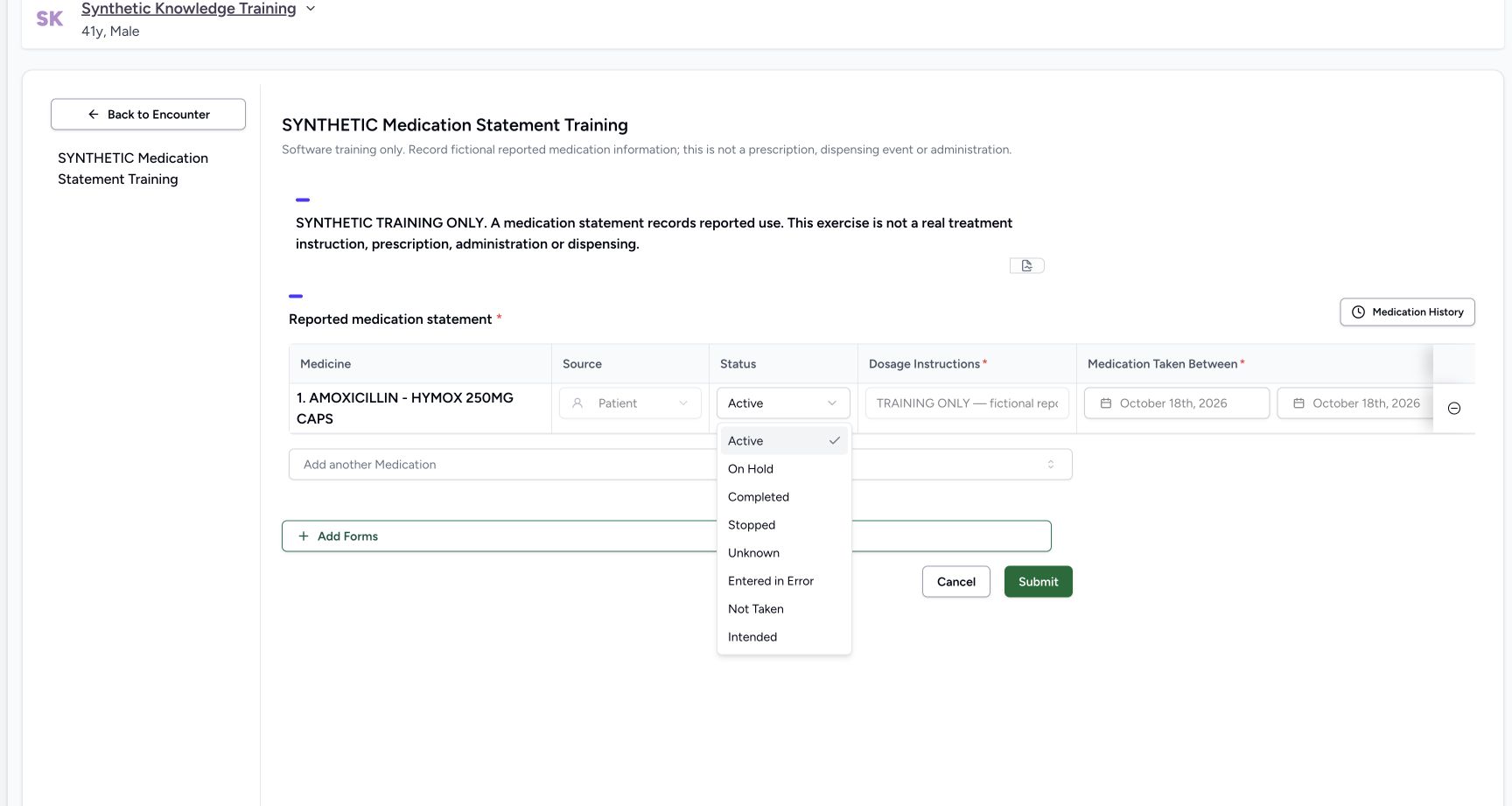
From the active encounter’s Overview → Forms, reopen the approved structured Medication Statement form. Identify the saved medicine before changing it. An existing row has read-only source, dosage, dates and reason; its status and note can be updated. The existing status menu additionally includes Entered in Error, which is a correction state and differs from Stopped reported use.
 12
12Capture details
Actual Nurse in original pinned production UI, synthetic active Inpatient encounter in isolated Polyclinic. One genuine coded statement updated Active → Stopped → Entered in Error; original prescription and two MAR records unchanged. Observed subset does not qualify other roles/facilities or every status transition. Action: Existing statement status menu includes Entered in Error in addition to routine reported-use states. This exercise first updates Active to Stopped, without changing the existing medicine identity, dosage, dates, reason or reporter source.
- Stopped describes reported use, not a cancelled prescription: Stopped describes reported use, not a cancelled prescription
- Correction state for an erroneous record: Correction state for an erroneous record
 12
12Capture details
Actual Nurse in original pinned production UI, synthetic active Inpatient encounter in isolated Polyclinic. One genuine coded statement updated Active → Stopped → Entered in Error; original prescription and two MAR records unchanged. Observed subset does not qualify other roles/facilities or every status transition. Action: Reopened saved Stopped statement; minus control starts Remove Medication confirmation. For an existing record it prepares entered_in_error rather than physical deletion; no status change is persisted until Submit.
- Review the existing record before starting correction: Review the existing record before starting correction
- Verify the exact medicine record: Verify the exact medicine record
2. Review the pending status and explanatory note
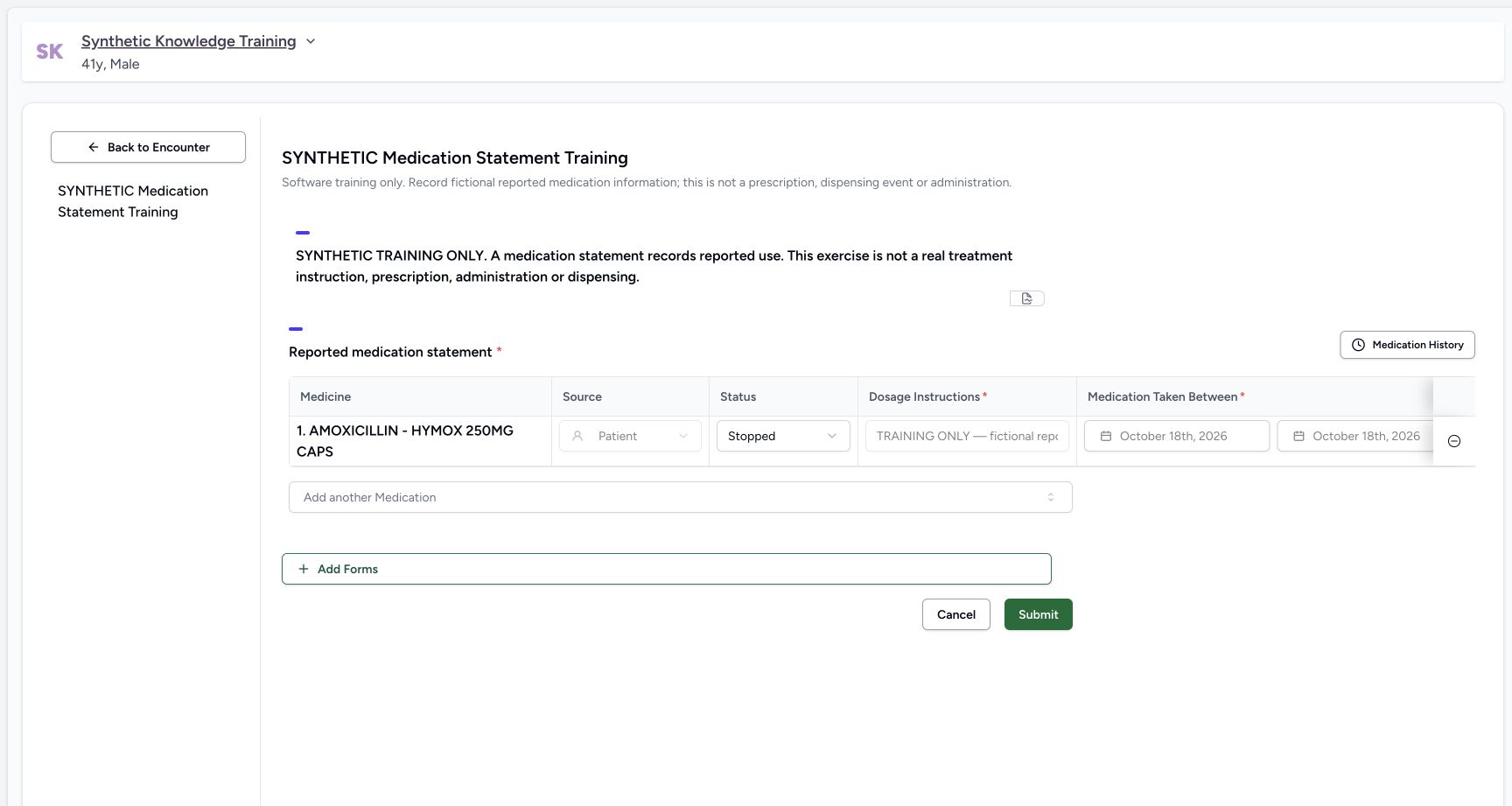
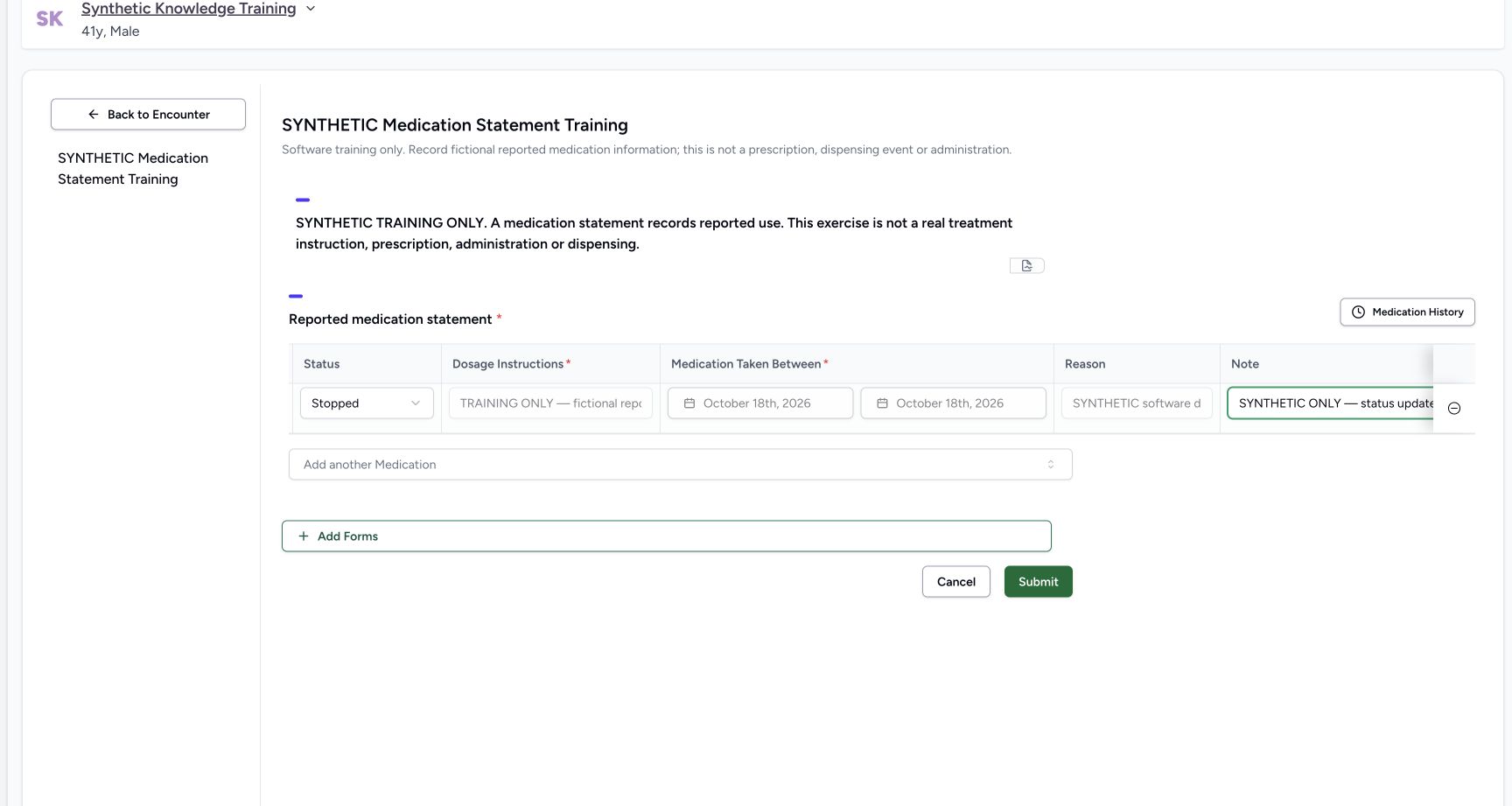
Choose the appropriate reported-use status, then review the note by scrolling to the rightmost columns. The fictional example changes Active to Stopped and adds an explicitly synthetic status-update note. Selecting a status or editing a note changes the draft only. The medicine, source, dosage, dates and reason remain the original saved values.
 123
123Capture details
Actual Nurse in original pinned production UI, synthetic active Inpatient encounter in isolated Polyclinic. One genuine coded statement updated Active → Stopped → Entered in Error; original prescription and two MAR records unchanged. Observed subset does not qualify other roles/facilities or every status transition. Action: Existing statement draft changed only Status to Stopped and Note; medicine/source/dosage/dates/reason remain disabled. Status is unsaved until Submit.
- Review the pending reported-use status: Review the pending reported-use status
- Explain the status update in the note: Explain the status update in the note
- Save the change to the existing statement: Save the change to the existing statement
3. Submit and verify the saved update
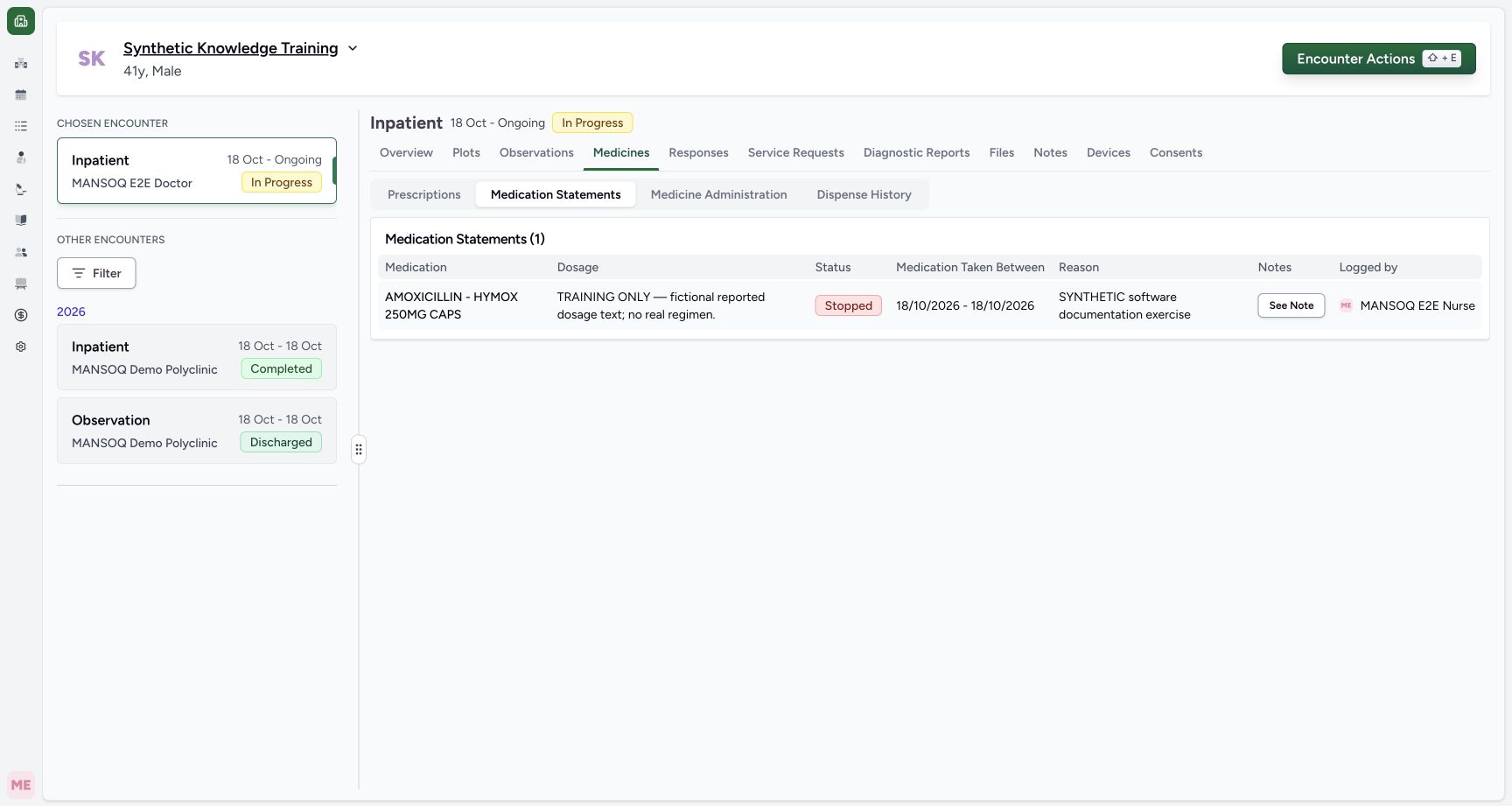
Select Submit, then open Medicines → Medication Statements after returning to the encounter. Verify that the intended row now reads Stopped and still has the original medicine, dosage, dates and author. The independent checkpoint confirms the same statement UUID with its updated note and status; it did not create another prescription or administration.
 12
12Capture details
Actual Nurse in original pinned production UI, synthetic active Inpatient encounter in isolated Polyclinic. One genuine coded statement updated Active → Stopped → Entered in Error; original prescription and two MAR records unchanged. Observed subset does not qualify other roles/facilities or every status transition. Success: Medication Statements list now shows same coded statement Stopped with original dosage,18October dates and Nurse author. Independent READ ONLY verifies same UUID, updated note/status byqa-nurse, with original prescription/MAR records unchanged.
- The same saved statement is now Stopped: The same saved statement is now Stopped
- Review the saved status-update note: Review the saved status-update note
4. Inspect and cancel a correction prompt
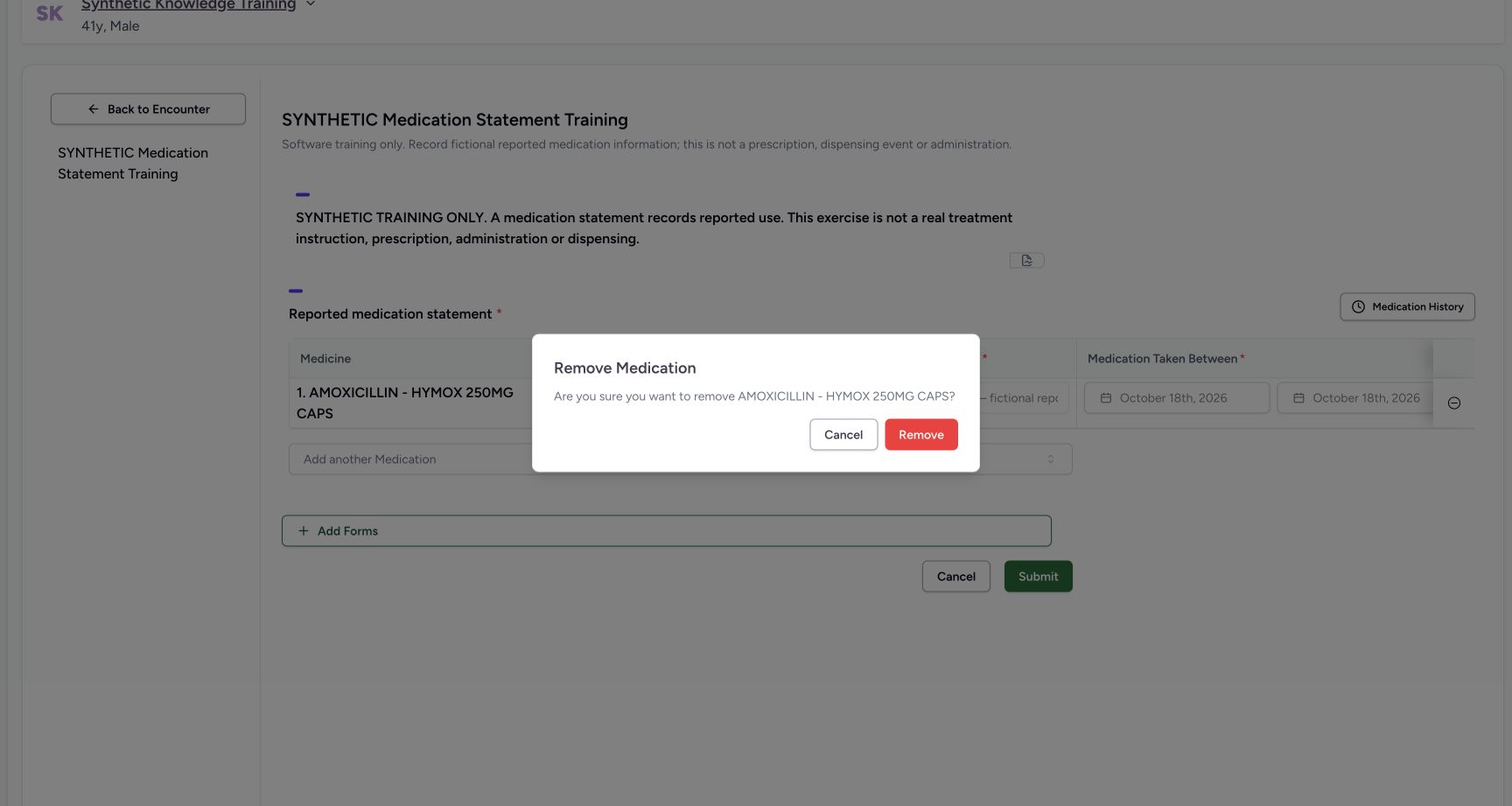
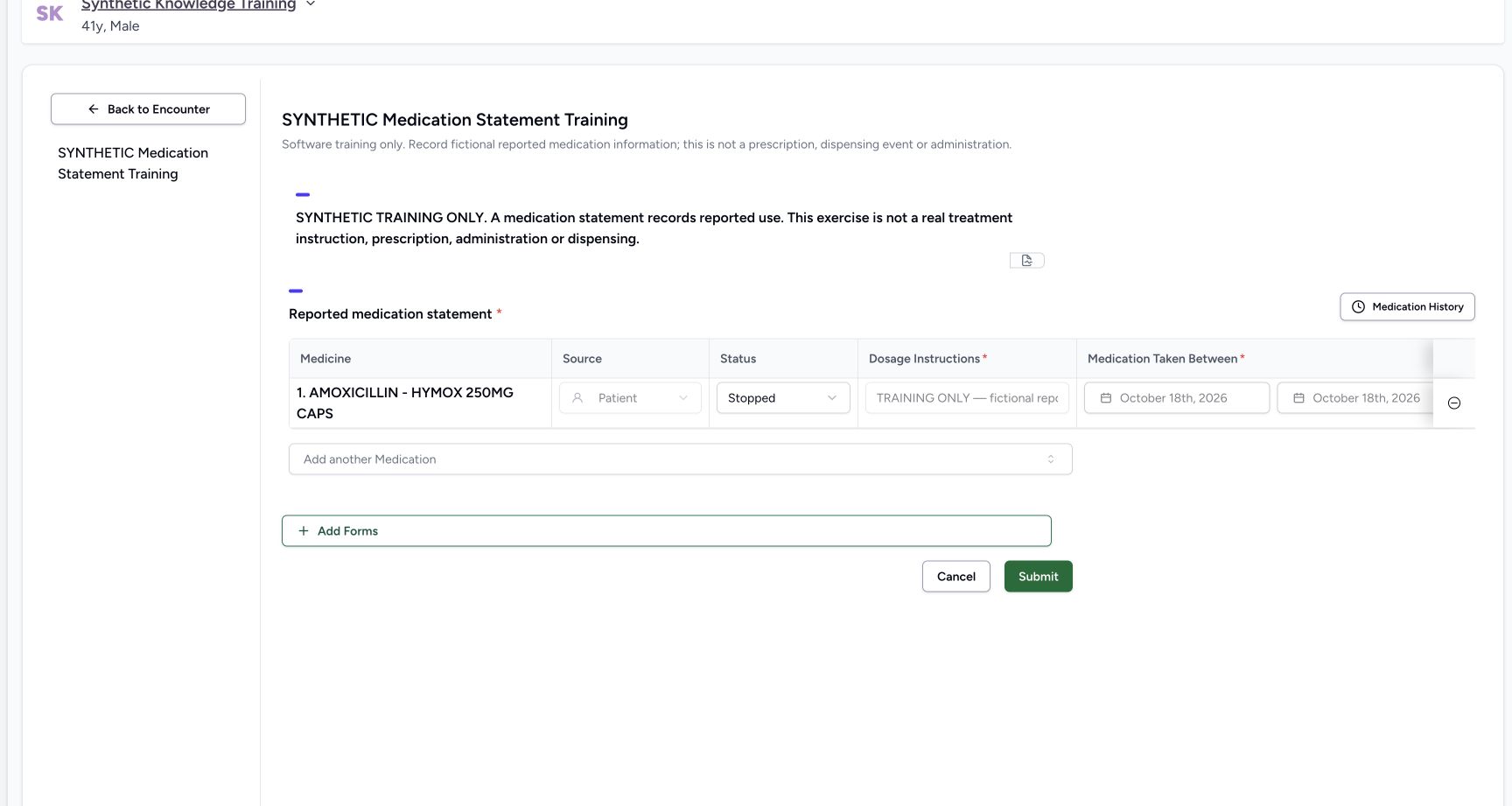
Reopen the form and use the minus control at the far right of the intended saved row. Remove Medication names the medicine to review. Select Cancel if correction is not intended. The example’s row remains Stopped after cancellation. Cancelling this prompt does not remove or correct the saved record.
12Capture details
Actual Nurse in original pinned production UI, synthetic active Inpatient encounter in isolated Polyclinic. One genuine coded statement updated Active → Stopped → Entered in Error; original prescription and two MAR records unchanged. Observed subset does not qualify other roles/facilities or every status transition. Action: Reopened saved Stopped statement; minus control starts Remove Medication confirmation. For an existing record it prepares entered_in_error rather than physical deletion; no status change is persisted until Submit.
- Review the existing record before starting correction: Review the existing record before starting correction
- Verify the exact medicine record: Verify the exact medicine record
 123
123Capture details
Actual Nurse in original pinned production UI, synthetic active Inpatient encounter in isolated Polyclinic. One genuine coded statement updated Active → Stopped → Entered in Error; original prescription and two MAR records unchanged. Observed subset does not qualify other roles/facilities or every status transition. Action: Remove Medication confirmation names AMOXICILLIN. Cancel preserves the saved statement; Remove prepares correction of this existing record and still requires form submission.
- Verify the medicine named by the prompt: Verify the medicine named by the prompt
- Cancel the correction: Cancel the correction
- Prepare entered-in-error for this existing record: Prepare entered-in-error for this existing record
 12
12Capture details
Actual Nurse in original pinned production UI, synthetic active Inpatient encounter in isolated Polyclinic. One genuine coded statement updated Active → Stopped → Entered in Error; original prescription and two MAR records unchanged. Observed subset does not qualify other roles/facilities or every status transition. Action: Cancelling Remove Medication leaves same saved statement Stopped and unchanged in editor. No deletion or entered-in-error status saved.
- The cancelled correction leaves Stopped unchanged: The cancelled correction leaves Stopped unchanged
- Correction control remains available: Correction control remains available
5. Prepare and save an entered-in-error correction
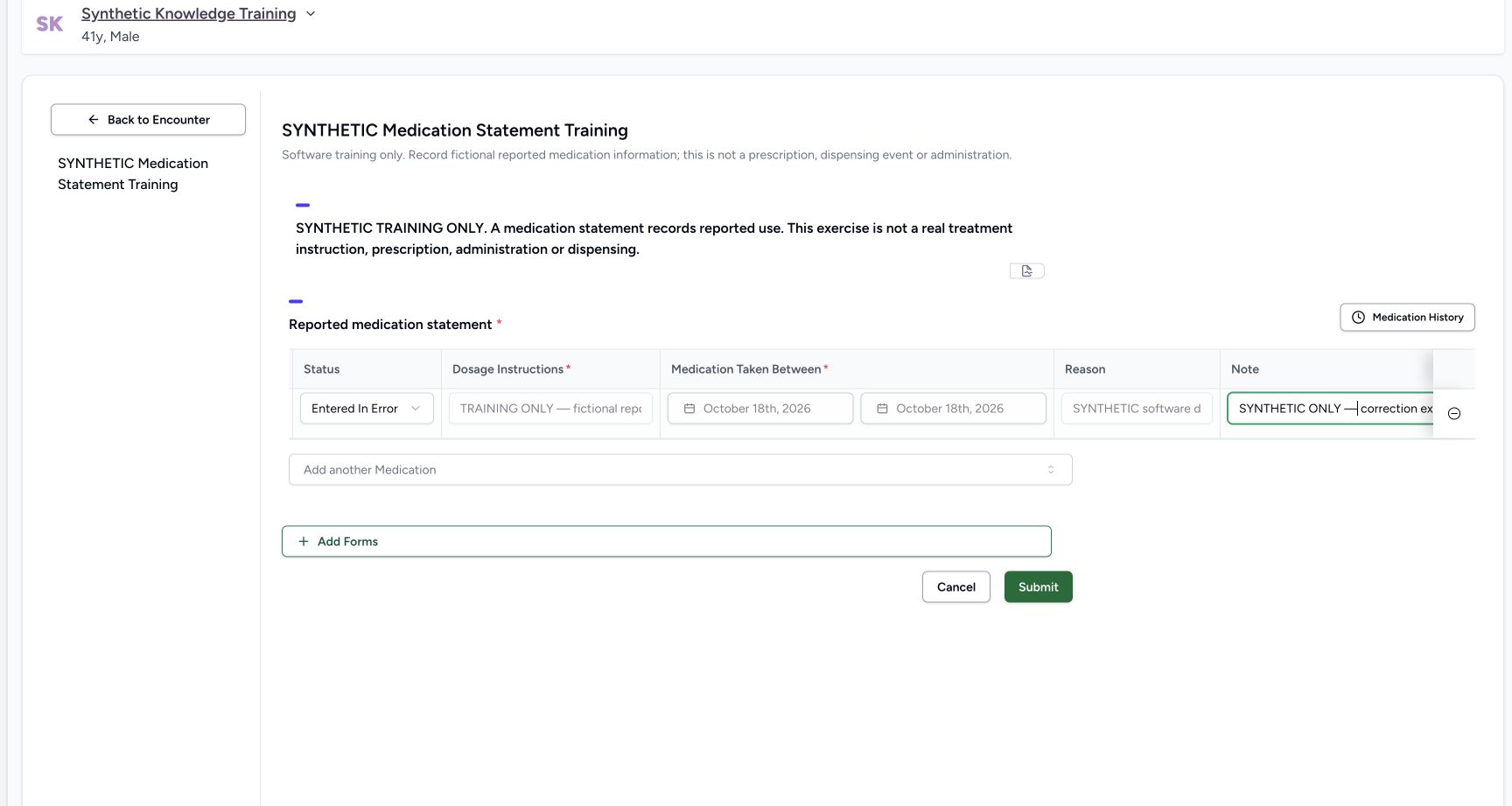
For a record that must be corrected under the facility’s approved process, reopen the minus control, verify the named medicine and select Remove. For an existing record, this prepares Entered in Error on that row rather than deleting it. Document the correction context in Note, review the pending status and select Submit to persist it. The screenshot uses only a synthetic correction exercise.
123Capture details
Actual Nurse in original pinned production UI, synthetic active Inpatient encounter in isolated Polyclinic. One genuine coded statement updated Active → Stopped → Entered in Error; original prescription and two MAR records unchanged. Observed subset does not qualify other roles/facilities or every status transition. Action: Remove Medication confirmation names AMOXICILLIN. Cancel preserves the saved statement; Remove prepares correction of this existing record and still requires form submission.
- Verify the medicine named by the prompt: Verify the medicine named by the prompt
- Cancel the correction: Cancel the correction
- Prepare entered-in-error for this existing record: Prepare entered-in-error for this existing record
 123
123Capture details
Actual Nurse in original pinned production UI, synthetic active Inpatient encounter in isolated Polyclinic. One genuine coded statement updated Active → Stopped → Entered in Error; original prescription and two MAR records unchanged. Observed subset does not qualify other roles/facilities or every status transition. Action: Remove confirmation prepared Entered in Error on same existing statement; explicit synthetic correction note entered. Draft remains unsaved until Submit; medicine identity/dosage/dates/reason preserved.
- Review the pending correction status: Review the pending correction status
- Document the correction context: Document the correction context
- Persist the correction without deleting its record: Persist the correction without deleting its record
6. Understand the filtered normal list
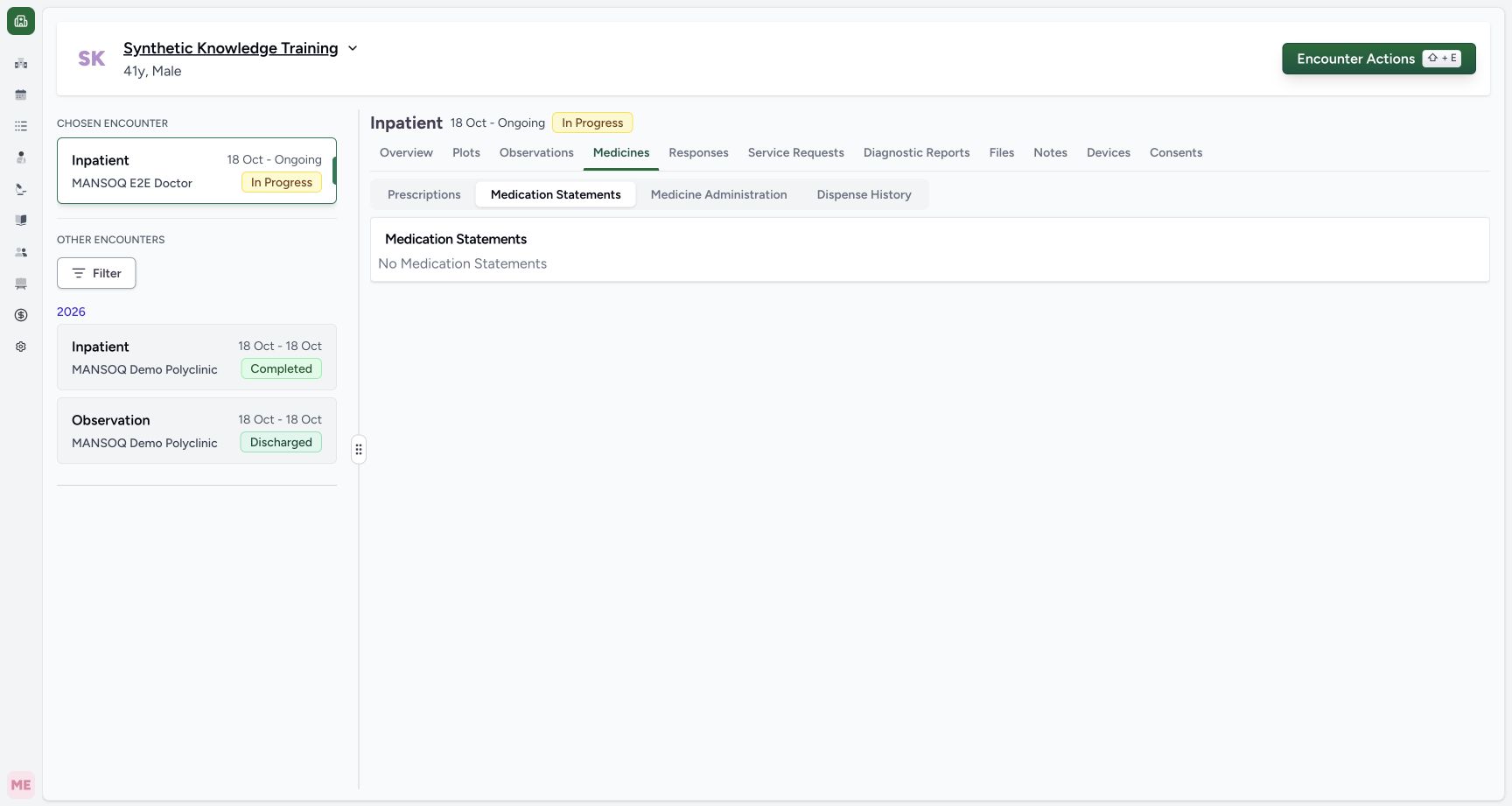
Return to Medicines → Medication Statements. The default list excludes entered-in-error records, so the example now displays No Medication Statements. That message is a filtered result, not proof that a database record was deleted or that the patient has no medication history. Independent readback confirms that the same statement remains stored with its error status and correction note.
 12
12Capture details
Actual Nurse in original pinned production UI, synthetic active Inpatient encounter in isolated Polyclinic. One genuine coded statement updated Active → Stopped → Entered in Error; original prescription and two MAR records unchanged. Observed subset does not qualify other roles/facilities or every status transition. Success: After entered-in-error correction, normal Medication Statements list displays No Medication Statements because its default filter excludes entered_in_error. Independent READ ONLY confirms same statement still exists with corrected status/note; empty list is not deletion or a clinical absence assertion.
- Default statement list filters error records: Default statement list filters error records
- Filtered absence does not mean the source record was deleted: Filtered absence does not mean the source record was deleted
7. Verify the retained error record without rewriting it
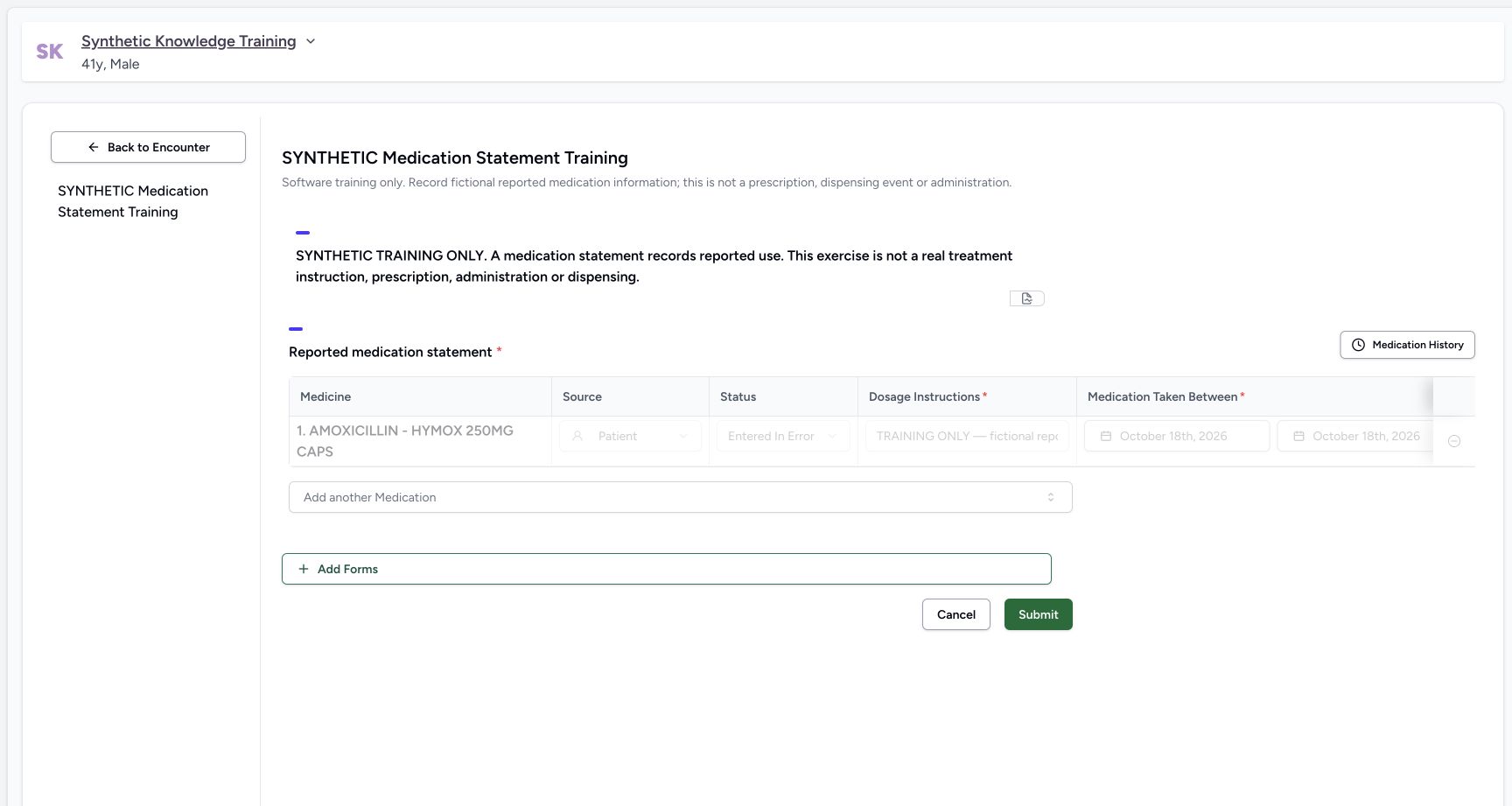
Reopen the structured form and let its current records finish refreshing. The original statement remains as a faded Entered in Error row with its controls disabled. The observed UI provides no ordinary edit or reversal of that row. Leave it unchanged. The saved audit checkpoint retains the same identity, medicine and original dosage/dates/source/reason, with the Nurse’s correction update.
 123
123Capture details
Actual Nurse in original pinned production UI, synthetic active Inpatient encounter in isolated Polyclinic. One genuine coded statement updated Active → Stopped → Entered in Error; original prescription and two MAR records unchanged. Observed subset does not qualify other roles/facilities or every status transition. Success: Reopened structured form refreshes to retained same coded statement Entered in Error; its existing row controls are disabled. Independent READ ONLY confirms same UUID and correction note, not physical deletion. New medication entry remains separate.
- The corrected record remains present: The corrected record remains present
- Persisted error status is now read only: Persisted error status is now read only
- Correction control disabled for this error record: Correction control disabled for this error record
Selected encounter scope in the audited original release
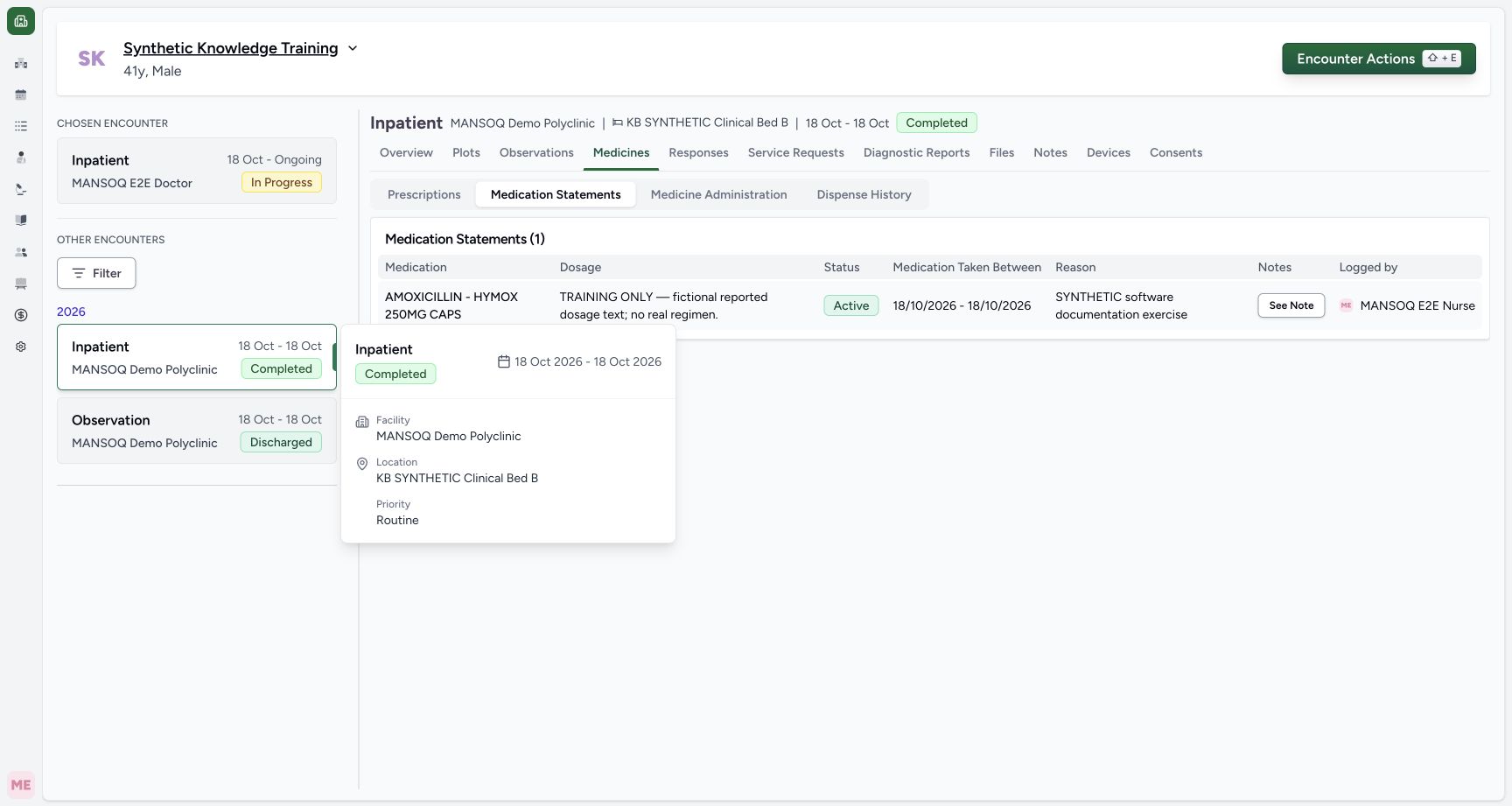
Selecting an older Completed encounter changes the details header while the left Chosen Encounter still identifies the active primary episode. In this original release, Medication Statements nevertheless requests patient-wide rows because its list request omits the encounter filter. The pictured older Completed selection still shows the newer encounter’s statement. Separate normal API reads confirmed patient-wide count 1, selected older encounter count 0 and active encounter count 1. Verify the source episode and use a separately validated corrected release for encounter-specific filtering.
 123
123Capture details
Actual Nurse in original pinned production UI, synthetic active Inpatient encounter in isolated Polyclinic. One genuine coded statement updated Active → Stopped → Entered in Error; original prescription and two MAR records unchanged. Observed subset does not qualify other roles/facilities or every status transition. Error: Selected older Completed encounter94117417-4aff-45b2-ae90-ced33333e3e9 via?selectedEncounter while primarypath remainsd488. Original Medication Statements list still shows one statement independently attached only tod488; list omits encounter filter.
- Selected older encounter details are Completed: Selected older encounter details are Completed
- Original statement list requests patientwide rows: Original statement list requests patientwide rows
- This statement belongs to the newer active encounter, verified separately: This statement belongs to the newer active encounter, verified separately
Scope of the demonstrated correction
Actual Nurse in original pinned production UI, synthetic active Inpatient encounter in isolated Polyclinic. One genuine coded statement updated Active → Stopped → Entered in Error; original prescription and two MAR records unchanged. Observed subset does not qualify other roles/facilities or every status transition. Shown saved transitions are Active to Stopped and Stopped to Entered in Error only. Other lifecycle transitions, multiple rows, successful history-copy imports, all role/facility combinations, pagination and a corrected product release remain separate qualification work.
12Capture details
Actual Nurse in original pinned production UI, synthetic active Inpatient encounter in isolated Polyclinic. One genuine coded statement updated Active → Stopped → Entered in Error; original prescription and two MAR records unchanged. Observed subset does not qualify other roles/facilities or every status transition. Action: Existing statement status menu includes Entered in Error in addition to routine reported-use states. This exercise first updates Active to Stopped, without changing the existing medicine identity, dosage, dates, reason or reporter source.
- Stopped describes reported use, not a cancelled prescription: Stopped describes reported use, not a cancelled prescription
- Correction state for an erroneous record: Correction state for an erroneous record
123Capture details
Actual Nurse in original pinned production UI, synthetic active Inpatient encounter in isolated Polyclinic. One genuine coded statement updated Active → Stopped → Entered in Error; original prescription and two MAR records unchanged. Observed subset does not qualify other roles/facilities or every status transition. Success: Reopened structured form refreshes to retained same coded statement Entered in Error; its existing row controls are disabled. Independent READ ONLY confirms same UUID and correction note, not physical deletion. New medication entry remains separate.
- The corrected record remains present: The corrected record remains present
- Persisted error status is now read only: Persisted error status is now read only
- Correction control disabled for this error record: Correction control disabled for this error record
Troubleshooting
A correction prompt was cancelled
The saved row should remain in its prior state. Recheck the intended medicine and status; the demonstration remains Stopped after cancellation.
123Capture details
Actual Nurse in original pinned production UI, synthetic active Inpatient encounter in isolated Polyclinic. One genuine coded statement updated Active → Stopped → Entered in Error; original prescription and two MAR records unchanged. Observed subset does not qualify other roles/facilities or every status transition. Action: Remove Medication confirmation names AMOXICILLIN. Cancel preserves the saved statement; Remove prepares correction of this existing record and still requires form submission.
- Verify the medicine named by the prompt: Verify the medicine named by the prompt
- Cancel the correction: Cancel the correction
- Prepare entered-in-error for this existing record: Prepare entered-in-error for this existing record
12Capture details
Actual Nurse in original pinned production UI, synthetic active Inpatient encounter in isolated Polyclinic. One genuine coded statement updated Active → Stopped → Entered in Error; original prescription and two MAR records unchanged. Observed subset does not qualify other roles/facilities or every status transition. Action: Cancelling Remove Medication leaves same saved statement Stopped and unchanged in editor. No deletion or entered-in-error status saved.
- The cancelled correction leaves Stopped unchanged: The cancelled correction leaves Stopped unchanged
- Correction control remains available: Correction control remains available
The normal list is empty after entered-in-error correction
The default list filters out entered-in-error records. Do not treat that empty list as deletion or a clinical absence statement. The structured form can retain the faded read-only error row; use approved record/audit access to verify it.
12Capture details
Actual Nurse in original pinned production UI, synthetic active Inpatient encounter in isolated Polyclinic. One genuine coded statement updated Active → Stopped → Entered in Error; original prescription and two MAR records unchanged. Observed subset does not qualify other roles/facilities or every status transition. Success: After entered-in-error correction, normal Medication Statements list displays No Medication Statements because its default filter excludes entered_in_error. Independent READ ONLY confirms same statement still exists with corrected status/note; empty list is not deletion or a clinical absence assertion.
- Default statement list filters error records: Default statement list filters error records
- Filtered absence does not mean the source record was deleted: Filtered absence does not mean the source record was deleted
123Capture details
Actual Nurse in original pinned production UI, synthetic active Inpatient encounter in isolated Polyclinic. One genuine coded statement updated Active → Stopped → Entered in Error; original prescription and two MAR records unchanged. Observed subset does not qualify other roles/facilities or every status transition. Success: Reopened structured form refreshes to retained same coded statement Entered in Error; its existing row controls are disabled. Independent READ ONLY confirms same UUID and correction note, not physical deletion. New medication entry remains separate.
- The corrected record remains present: The corrected record remains present
- Persisted error status is now read only: Persisted error status is now read only
- Correction control disabled for this error record: Correction control disabled for this error record
An old value briefly appears when reopening
Let the form’s current record request finish before editing or submitting. The observed form briefly displayed cached Stopped data before refreshing to its persisted disabled Entered in Error row.
123Capture details
Actual Nurse in original pinned production UI, synthetic active Inpatient encounter in isolated Polyclinic. One genuine coded statement updated Active → Stopped → Entered in Error; original prescription and two MAR records unchanged. Observed subset does not qualify other roles/facilities or every status transition. Success: Reopened structured form refreshes to retained same coded statement Entered in Error; its existing row controls are disabled. Independent READ ONLY confirms same UUID and correction note, not physical deletion. New medication entry remains separate.
- The corrected record remains present: The corrected record remains present
- Persisted error status is now read only: Persisted error status is now read only
- Correction control disabled for this error record: Correction control disabled for this error record
Source evidence
References are pinned to the private MANSOQ source repository. Repository access is required to open these links.
- repositories/platform/mansoq-web/src/components/Questionnaire/QuestionTypes/MedicationStatementQuestion.tsx:260 · f6e9f05f
- repositories/platform/mansoq-web/src/components/Questionnaire/QuestionTypes/MedicationStatementQuestion.tsx:769 · f6e9f05f
- repositories/platform/mansoq-web/src/components/Patient/MedicationStatementList.tsx:45 · f6e9f05f
- repositories/platform/mansoq-web/src/components/Patient/MedicationStatementList.tsx:59 · f6e9f05f
- repositories/platform/mansoq-web/src/pages/Encounters/utils/EncounterProvider.tsx:50 · f6e9f05f
- repositories/platform/mansoq-core/mansoq/emr/resources/medication/statement/spec.py:53 · f6e9f05f