 MANSOQ
 Nursing
Review observation graphs, recent values and encounter history
Navigate configured plot groups and verify the different scope of Graph, Recent Data and Full History in the audited release.
5 min read · Source baseline f6e9f05f
Verification and applicability
source reviewed
Check your installed version, permissions and local configuration.
Before you begin
- Confirm the selected patient and encounter with permission to read clinical data.
- Use configured parameter groups and saved observations. A tab or empty graph alone is not proof of a clinical result.
1. Open Plots and choose the parameter group
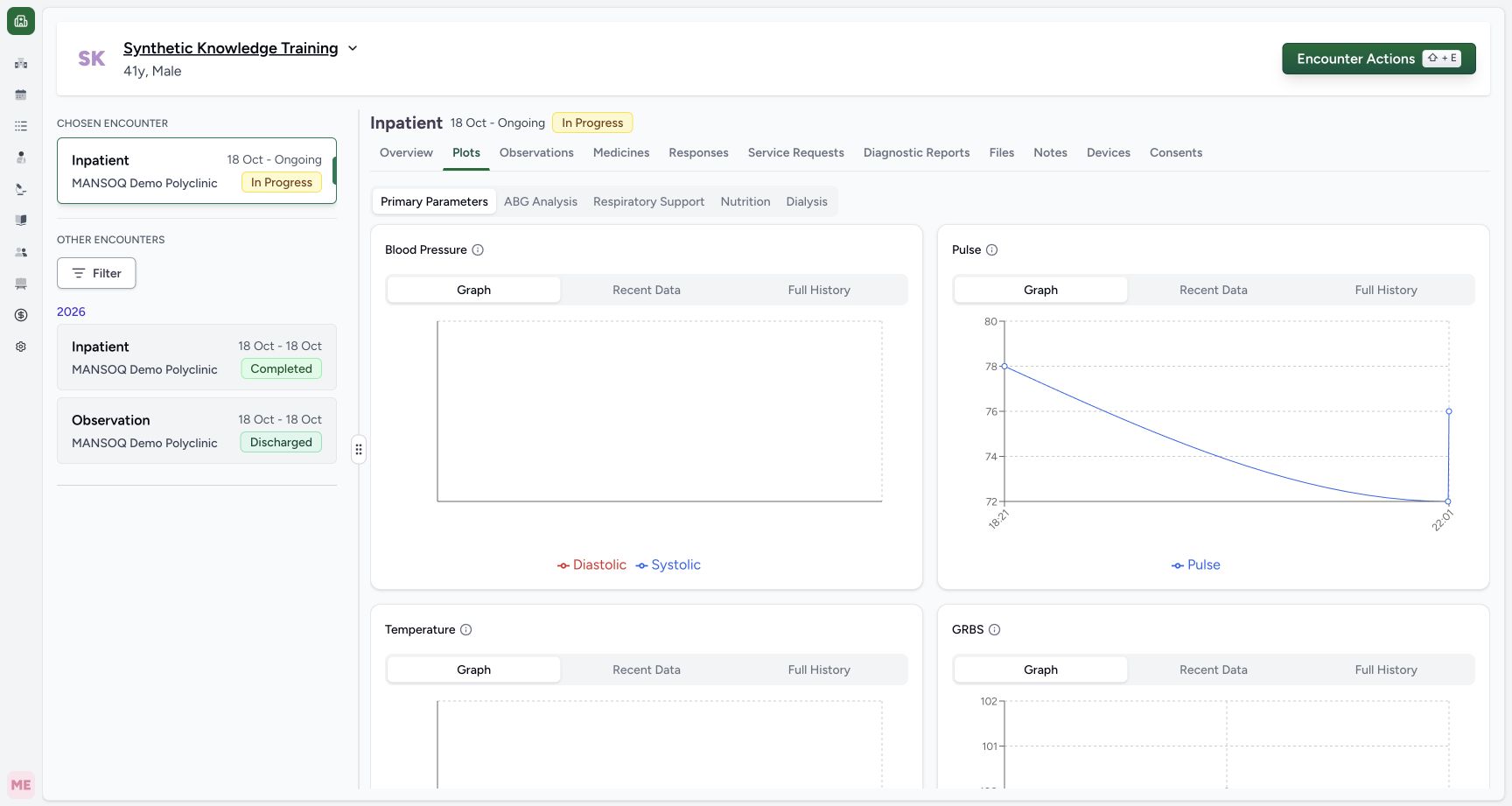
From the selected encounter, choose Plots. The observed deployment offers Primary Parameters, ABG Analysis, Respiratory Support, Nutrition and Dialysis. Select the relevant configured group. The screenshot shows Primary Parameters with a separate Pulse card.
 12
12Capture details
Actual unchanged production UI on the pinned source, authenticated Nurse, fictional active Inpatient encounter in isolated Polyclinic. Heart-rate values are explicitly simulated software training measurements, not actual clinical care. Other roles, measurements, protocols and facility variants are not qualified. Success: Plots Primary Parameters shows Pulse graph. Older patient reading 78 is included alongside current encounter 72 and 76; this pinned graph is not encounter-only.
- Plots: open configured parameter groups: Plots: open configured parameter groups
- Graph: the current pinned analysis can include readings from other encounters: Graph: the current pinned analysis can include readings from other encounters
2. Check which observation code the card matches
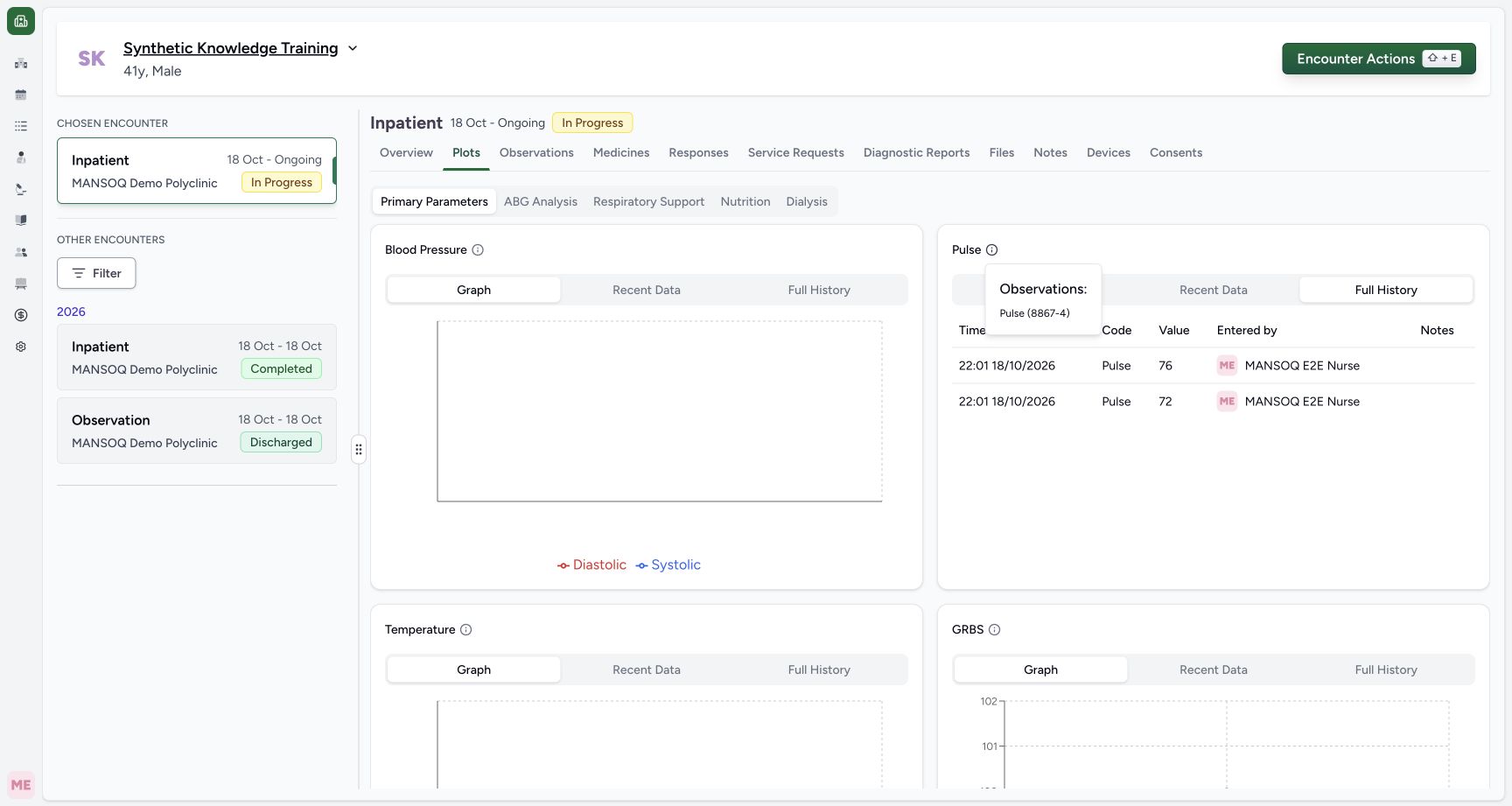
Select the information icon beside the card title. The Pulse popover lists Pulse(8867-4). Confirm that the intended saved measurement belongs to this configured code group; the display name alone does not establish a different clinical measurement.
 1
1Capture details
Actual unchanged production UI on the pinned source, authenticated Nurse, fictional active Inpatient encounter in isolated Polyclinic. Heart-rate values are explicitly simulated software training measurements, not actual clinical care. Other roles, measurements, protocols and facility variants are not qualified. Start: Pulse information popover shows configured observation code 8867-4. A plot group label depends on code configuration rather than a universal form name.
- Observation code: Pulse 8867-4 is the code matched by this configured group: Observation code: Pulse 8867-4 is the code matched by this configured group
3. Inspect Graph with its release-specific scope
Select Graph within the relevant card to see its plotted numeric values over time. In this audited source revision, Graph uses a patient-wide analysis even when an encounter is selected. The pictured Pulse graph includes an older Doctor78 and the newer Nurse72/76. Treat it as patient trend context; do not attribute every plotted point to the chosen encounter.
12Capture details
Actual unchanged production UI on the pinned source, authenticated Nurse, fictional active Inpatient encounter in isolated Polyclinic. Heart-rate values are explicitly simulated software training measurements, not actual clinical care. Other roles, measurements, protocols and facility variants are not qualified. Success: Plots Primary Parameters shows Pulse graph. Older patient reading 78 is included alongside current encounter 72 and 76; this pinned graph is not encounter-only.
- Plots: open configured parameter groups: Plots: open configured parameter groups
- Graph: the current pinned analysis can include readings from other encounters: Graph: the current pinned analysis can include readings from other encounters
4. Read Recent Data times and authors
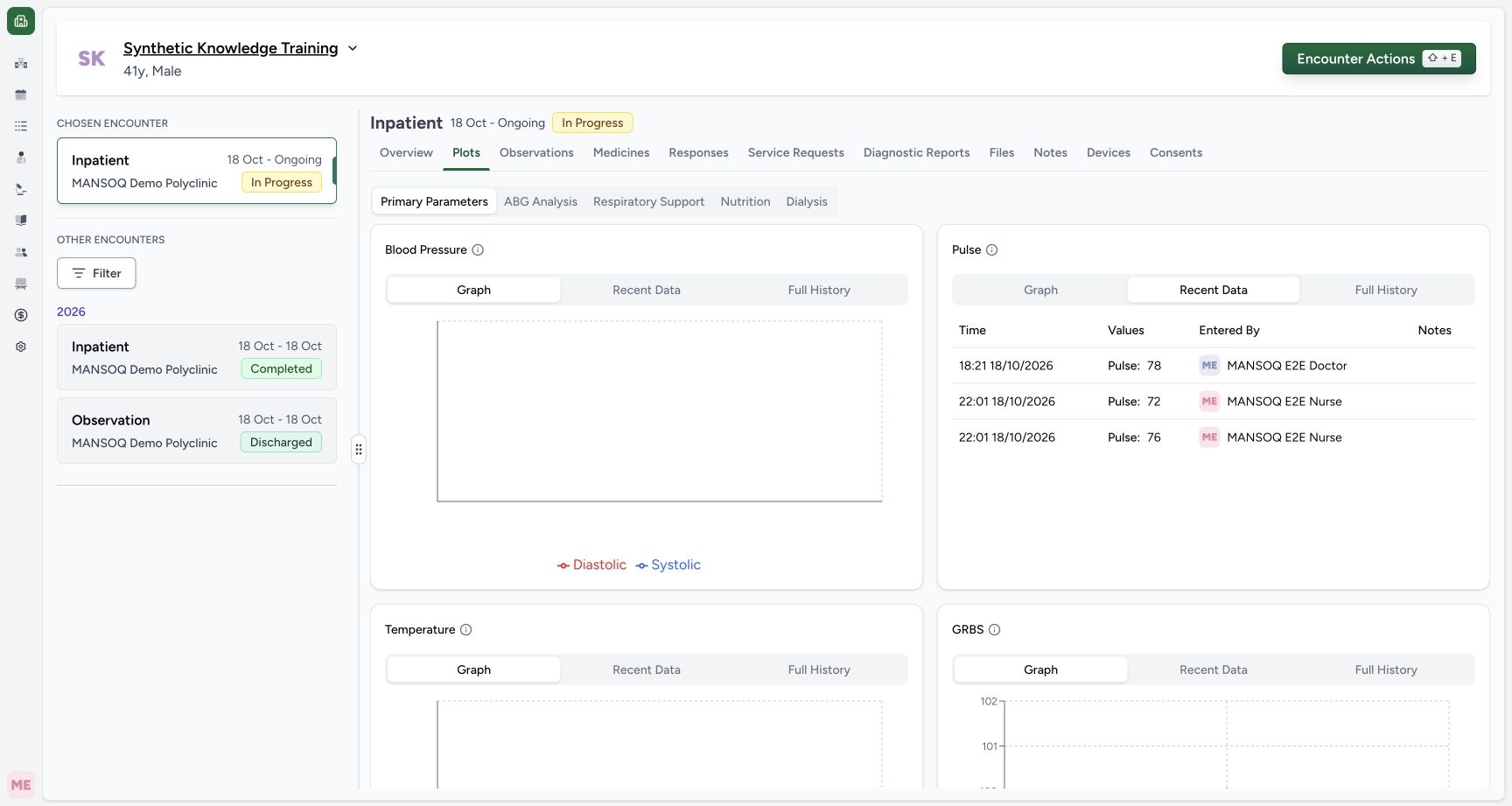
Choose Recent Data in the same card. Inspect each date/time, value, entered-by name and note. This view uses the same analysis as Graph: the screenshot includes the older 18:21 Doctor78, followed by 22:01 Nurse72 and Nurse76. Independent normal API comparison confirmed the extra older-encounter row. This view does not identify an encounter for each row.
 12
12Capture details
Actual unchanged production UI on the pinned source, authenticated Nurse, fictional active Inpatient encounter in isolated Polyclinic. Heart-rate values are explicitly simulated software training measurements, not actual clinical care. Other roles, measurements, protocols and facility variants are not qualified. Success: Pulse Recent Data shows older Doctor 78 and current Nurse 72 and 76 with dates and authors. Graph/Recent Data analysis includes another encounter in this pinned release.
- Recent Data: inspect each time and author; this list includes an older encounter reading: Recent Data: inspect each time and author; this list includes an older encounter reading
- Older Doctor reading 78 is patient history, not this new encounter: Older Doctor reading 78 is patient history, not this new encounter
5. Use Full History to check the selected encounter
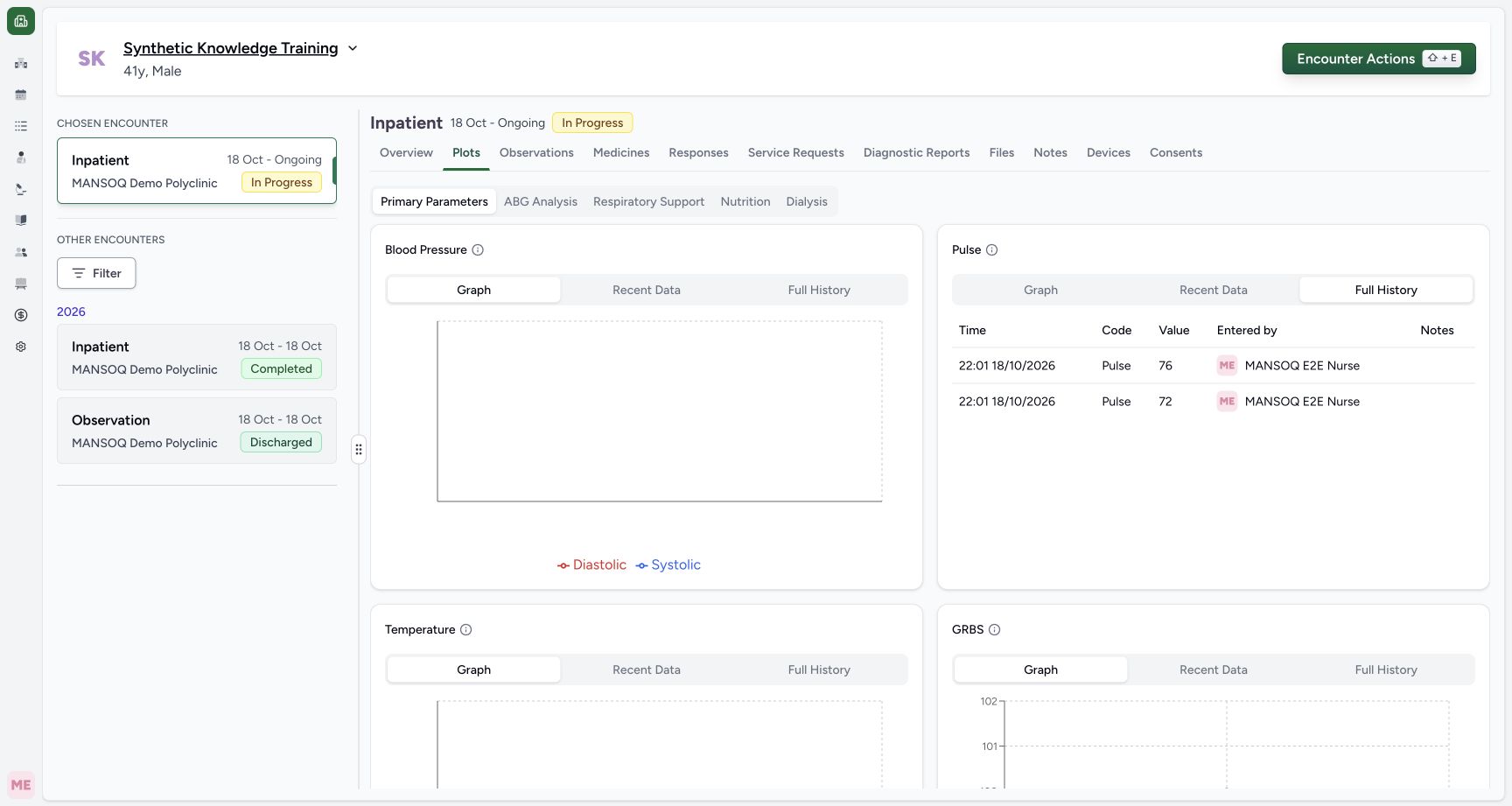
Select Full History inside that card. In the audited release this uses the normal list with the selected encounter filter. The screenshot shows only the two current-encounter Nurse readings, 76 and 72, newest first; the older Doctor78 is absent. Verify the time, code, value, author and notes. This tab’s scope differs from Graph and Recent Data in this pinned release.
 12
12Capture details
Actual unchanged production UI on the pinned source, authenticated Nurse, fictional active Inpatient encounter in isolated Polyclinic. Heart-rate values are explicitly simulated software training measurements, not actual clinical care. Other roles, measurements, protocols and facility variants are not qualified. Success: Pulse Full History uses the encounter-filtered list and shows only Nurse 76 and 72, newest first, with time and author. Older Doctor 78 is absent here.
- Full History: this tab uses the selected encounter filter: Full History: this tab uses the selected encounter filter
- Confirm both current-encounter values, dates and Nurse authorship: Confirm both current-encounter values, dates and Nurse authorship
6. Recognize configured groups without results
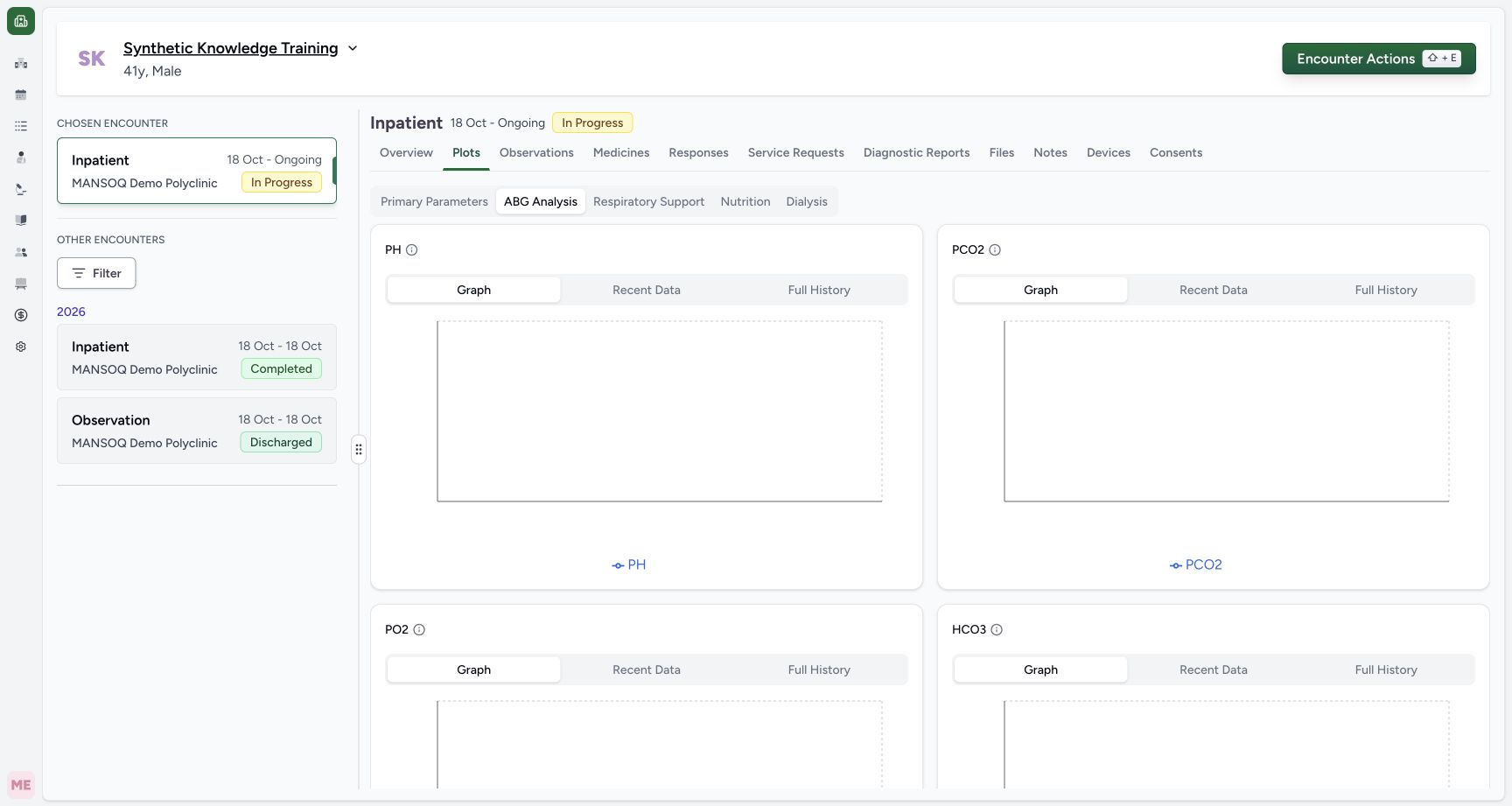
Change groups only when needed. ABG Analysis here shows PH and PCO2 graph shells and legends without recorded points. An empty plot is not a zero result, a normal finding or evidence that an ABG was performed. Entering or approving results requires the appropriate separate clinical workflow.
 12
12Capture details
Actual unchanged production UI on the pinned source, authenticated Nurse, fictional active Inpatient encounter in isolated Polyclinic. Heart-rate values are explicitly simulated software training measurements, not actual clinical care. Other roles, measurements, protocols and facility variants are not qualified. Start: ABG Analysis displays configured PH/PCO 2 graph shells without recorded points in this synthetic patient. A configured tab or legend is not an actual result or a zero value.
- Configured parameter group: this does not prove results have been entered: Configured parameter group: this does not prove results have been entered
- Empty plot: no recorded result is shown, not a zero or normal value: Empty plot: no recorded result is shown, not a zero or normal value
Known analysis scope limitation
The pinned frontend sends an encounter query for analysis, but the backend analyse action does not apply its declared encounter filter. Normal read-only API verification with the same patient/code/encounter returned three analysis rows(76,72,78) and two normal-list rows(76,72). The current screenshots deliberately show this limitation. Verify the record scope before using trend information; an application release that changes this behavior requires new screenshots and validation.
12Capture details
Actual unchanged production UI on the pinned source, authenticated Nurse, fictional active Inpatient encounter in isolated Polyclinic. Heart-rate values are explicitly simulated software training measurements, not actual clinical care. Other roles, measurements, protocols and facility variants are not qualified. Success: Pulse Recent Data shows older Doctor 78 and current Nurse 72 and 76 with dates and authors. Graph/Recent Data analysis includes another encounter in this pinned release.
- Recent Data: inspect each time and author; this list includes an older encounter reading: Recent Data: inspect each time and author; this list includes an older encounter reading
- Older Doctor reading 78 is patient history, not this new encounter: Older Doctor reading 78 is patient history, not this new encounter
12Capture details
Actual unchanged production UI on the pinned source, authenticated Nurse, fictional active Inpatient encounter in isolated Polyclinic. Heart-rate values are explicitly simulated software training measurements, not actual clinical care. Other roles, measurements, protocols and facility variants are not qualified. Success: Pulse Full History uses the encounter-filtered list and shows only Nurse 76 and 72, newest first, with time and author. Older Doctor 78 is absent here.
- Full History: this tab uses the selected encounter filter: Full History: this tab uses the selected encounter filter
- Confirm both current-encounter values, dates and Nurse authorship: Confirm both current-encounter values, dates and Nurse authorship
Reviewing is not editing
Plots and its tables are review surfaces. This walkthrough did not edit, correct or delete a measurement through a plot. Use the supported clinical correction workflow and preserved record history when a saved observation requires correction.
12Capture details
Actual unchanged production UI on the pinned source, authenticated Nurse, fictional active Inpatient encounter in isolated Polyclinic. Heart-rate values are explicitly simulated software training measurements, not actual clinical care. Other roles, measurements, protocols and facility variants are not qualified. Success: Plots Primary Parameters shows Pulse graph. Older patient reading 78 is included alongside current encounter 72 and 76; this pinned graph is not encounter-only.
- Plots: open configured parameter groups: Plots: open configured parameter groups
- Graph: the current pinned analysis can include readings from other encounters: Graph: the current pinned analysis can include readings from other encounters
12Capture details
Actual unchanged production UI on the pinned source, authenticated Nurse, fictional active Inpatient encounter in isolated Polyclinic. Heart-rate values are explicitly simulated software training measurements, not actual clinical care. Other roles, measurements, protocols and facility variants are not qualified. Success: Pulse Full History uses the encounter-filtered list and shows only Nurse 76 and 72, newest first, with time and author. Older Doctor 78 is absent here.
- Full History: this tab uses the selected encounter filter: Full History: this tab uses the selected encounter filter
- Confirm both current-encounter values, dates and Nurse authorship: Confirm both current-encounter values, dates and Nurse authorship
Troubleshooting
An older encounter value appears in the graph
In the audited release Graph and Recent Data include patient-wide analysis. Check its date and author, then use Full History or the selected encounter Observations list to confirm current-encounter entries. Report unexpected scope and confirm behavior in your installed release.
12Capture details
Actual unchanged production UI on the pinned source, authenticated Nurse, fictional active Inpatient encounter in isolated Polyclinic. Heart-rate values are explicitly simulated software training measurements, not actual clinical care. Other roles, measurements, protocols and facility variants are not qualified. Success: Pulse Recent Data shows older Doctor 78 and current Nurse 72 and 76 with dates and authors. Graph/Recent Data analysis includes another encounter in this pinned release.
- Recent Data: inspect each time and author; this list includes an older encounter reading: Recent Data: inspect each time and author; this list includes an older encounter reading
- Older Doctor reading 78 is patient history, not this new encounter: Older Doctor reading 78 is patient history, not this new encounter
12Capture details
Actual unchanged production UI on the pinned source, authenticated Nurse, fictional active Inpatient encounter in isolated Polyclinic. Heart-rate values are explicitly simulated software training measurements, not actual clinical care. Other roles, measurements, protocols and facility variants are not qualified. Success: Pulse Full History uses the encounter-filtered list and shows only Nurse 76 and 72, newest first, with time and author. Older Doctor 78 is absent here.
- Full History: this tab uses the selected encounter filter: Full History: this tab uses the selected encounter filter
- Confirm both current-encounter values, dates and Nurse authorship: Confirm both current-encounter values, dates and Nurse authorship
A plot contains a legend but no points
Confirm matching coded observations exist and that you are viewing the intended configured group. A legend names a configured series, not a recorded result.
12Capture details
Actual unchanged production UI on the pinned source, authenticated Nurse, fictional active Inpatient encounter in isolated Polyclinic. Heart-rate values are explicitly simulated software training measurements, not actual clinical care. Other roles, measurements, protocols and facility variants are not qualified. Start: ABG Analysis displays configured PH/PCO 2 graph shells without recorded points in this synthetic patient. A configured tab or legend is not an actual result or a zero value.
- Configured parameter group: this does not prove results have been entered: Configured parameter group: this does not prove results have been entered
- Empty plot: no recorded result is shown, not a zero or normal value: Empty plot: no recorded result is shown, not a zero or normal value
Source evidence
References are pinned to the private MANSOQ source repository. Repository access is required to open these links.
- repositories/platform/mansoq-web/src/pages/Encounters/tabs/plots.tsx:22 · f6e9f05f
- repositories/platform/mansoq-web/src/components/Common/Charts/ObservationChart.tsx:118 · f6e9f05f
- repositories/platform/mansoq-web/src/components/Common/Charts/ObservationHistoryTable.tsx:64 · f6e9f05f
- repositories/platform/mansoq-core/mansoq/emr/api/viewsets/observation.py:66 · f6e9f05f