Book a patient appointment through the public portal
Find a configured facility and practitioner, choose an offered time and confirm the correct patient.
Current source · source reviewed · 7 min read
Before you begin
The patient portal is enabled; the facility and practitioner have a public schedule.
You can verify the intended patient’s phone and have checked for an existing patient record.
1. Find the facility
From patient appointment navigation, select Book Appointment, then Select Location. Choose the relevant administrative location and inspect the returned facilities. Select View Facility for the intended organization.
1
Verified home · 2026-10-18Actual unchanged MANSOQ production build in an isolated fictional Clinic with patient login explicitly enabled for this local configuration. No real patient, SMS, payment or attendance. Other facility types, deployed portal availability and formal caregiver delegation are not established. Success: normal OTP verification opens phone-bound Patient Home showing the selected fictional patient and appointment-only navigation.
Book Appointment: browse a facility and available practitioner before selecting a slot: Book Appointment: browse a facility and available practitioner before selecting a slot
1
Facility discovery · 2026-10-18Actual unchanged MANSOQ production build in an isolated fictional Clinic with patient login explicitly enabled for this local configuration. No real patient, SMS, payment or attendance. Other facility types, deployed portal availability and formal caregiver delegation are not established. Start: public booking discovery requires selecting an administrative location before a facility search.
Select Location: choose the administrative location used to find facilities: Select Location: choose the administrative location used to find facilities
1
Regional facility result · 2026-10-18Actual unchanged MANSOQ production build in an isolated fictional Clinic with patient login explicitly enabled for this local configuration. No real patient, SMS, payment or attendance. Other facility types, deployed portal availability and formal caregiver delegation are not established. Success: choosing Riyadh Region returns the dedicated fictional public Clinic; facility type and explicit no-real-premises address are visible.
View Facility: inspect the selected facility and its publicly schedulable practitioners: View Facility: inspect the selected facility and its publicly schedulable practitioners
2. Choose the practitioner
Check the facility name and the listed practitioner, then select Book Appointment on that practitioner’s card. Only the published schedule is being offered here.
1
Public practitioner · 2026-10-18Actual unchanged MANSOQ production build in an isolated fictional Clinic with patient login explicitly enabled for this local configuration. No real patient, SMS, payment or attendance. Other facility types, deployed portal availability and formal caregiver delegation are not established. Action: the public clinic displays a practitioner with a configured public schedule and Book Appointment.
Book Appointment: continue with this practitioner’s available public slots: Book Appointment: continue with this practitioner’s available public slots
3. Choose a date with availability
The calendar opens with the selected date. No slots available means no offered slots for that date; choose another offered date. Read the facility, practitioner and calendar date rather than assuming the first date is bookable.
1
No slots today · 2026-10-18Actual unchanged MANSOQ production build in an isolated fictional Clinic with patient login explicitly enabled for this local configuration. No real patient, SMS, payment or attendance. Other facility types, deployed portal availability and formal caregiver delegation are not established. Start: the selected date has No slots available; the dedicated fixture schedule starts tomorrow rather than fabricating availability.
Choose an offered date within the configured public schedule to load its slots: Choose an offered date within the configured public schedule to load its slots
1
Public date slots · 2026-10-18Actual unchanged MANSOQ production build in an isolated fictional Clinic with patient login explicitly enabled for this local configuration. No real patient, SMS, payment or attendance. Other facility types, deployed portal availability and formal caregiver delegation are not established. Action: selected 19 October 2026 shows real configured public slots with remaining capacity; optional Note is explicitly training-only.
09:00 slot: select an available offered time and review the booking summary: 09:00 slot: select an available offered time and review the booking summary
4. Select a slot and continue
Read the offered time and remaining capacity. Enter an appropriate optional Note, choose an available slot and select Continue. Selecting a time alone has not saved a booking.
1
Public date slots · 2026-10-18Actual unchanged MANSOQ production build in an isolated fictional Clinic with patient login explicitly enabled for this local configuration. No real patient, SMS, payment or attendance. Other facility types, deployed portal availability and formal caregiver delegation are not established. Action: selected 19 October 2026 shows real configured public slots with remaining capacity; optional Note is explicitly training-only.
09:00 slot: select an available offered time and review the booking summary: 09:00 slot: select an available offered time and review the booking summary
1
Slot continue · 2026-10-18Actual unchanged MANSOQ production build in an isolated fictional Clinic with patient login explicitly enabled for this local configuration. No real patient, SMS, payment or attendance. Other facility types, deployed portal availability and formal caregiver delegation are not established. Action: selecting the 09:00 slot enables Continue; no booking is saved until patient selection and confirmation.
Continue: choose the correct phone-linked patient for the selected slot: Continue: choose the correct phone-linked patient for the selected slot
5. Choose the correct patient
On Select/Register Patient, compare name, birth information and sex, then select the intended phone-linked record. Use Add New Patient only for a distinct person who is not already listed. Complete phone verification if requested.
1
Linked patient selection · 2026-10-18Actual unchanged MANSOQ production build in an isolated fictional Clinic with patient login explicitly enabled for this local configuration. No real patient, SMS, payment or attendance. Other facility types, deployed portal availability and formal caregiver delegation are not established. Action: Select/Register Patient lists only records linked to the verified phone; choose the intended patient, or Add New Patient for a distinct person.
Select the correct phone-linked patient after checking name, date of birth and sex: Select the correct phone-linked patient after checking name, date of birth and sex
6. Confirm the booking
After selecting the correct person, select Confirm. Wait for the appointment success screen and check patient, practitioner, date and time.
1
Booking confirmation · 2026-10-18Actual unchanged MANSOQ production build in an isolated fictional Clinic with patient login explicitly enabled for this local configuration. No real patient, SMS, payment or attendance. Other facility types, deployed portal availability and formal caregiver delegation are not established. Action: choosing the intended phone-linked patient enables Confirm. The time and practitioner were selected on the prior screen.
Confirm: create the selected patient’s appointment for the chosen practitioner and slot: Confirm: create the selected patient’s appointment for the chosen practitioner and slot
1
Booking success · 2026-10-18Actual unchanged MANSOQ production build in an isolated fictional Clinic with patient login explicitly enabled for this local configuration. No real patient, SMS, payment or attendance. Other facility types, deployed portal availability and formal caregiver delegation are not established. Success: normal patient OTP flow booked a distinct fictional appointment for 19 October at 09:00. The generic success-template visit sentence is not a promise of real care or home attendance.
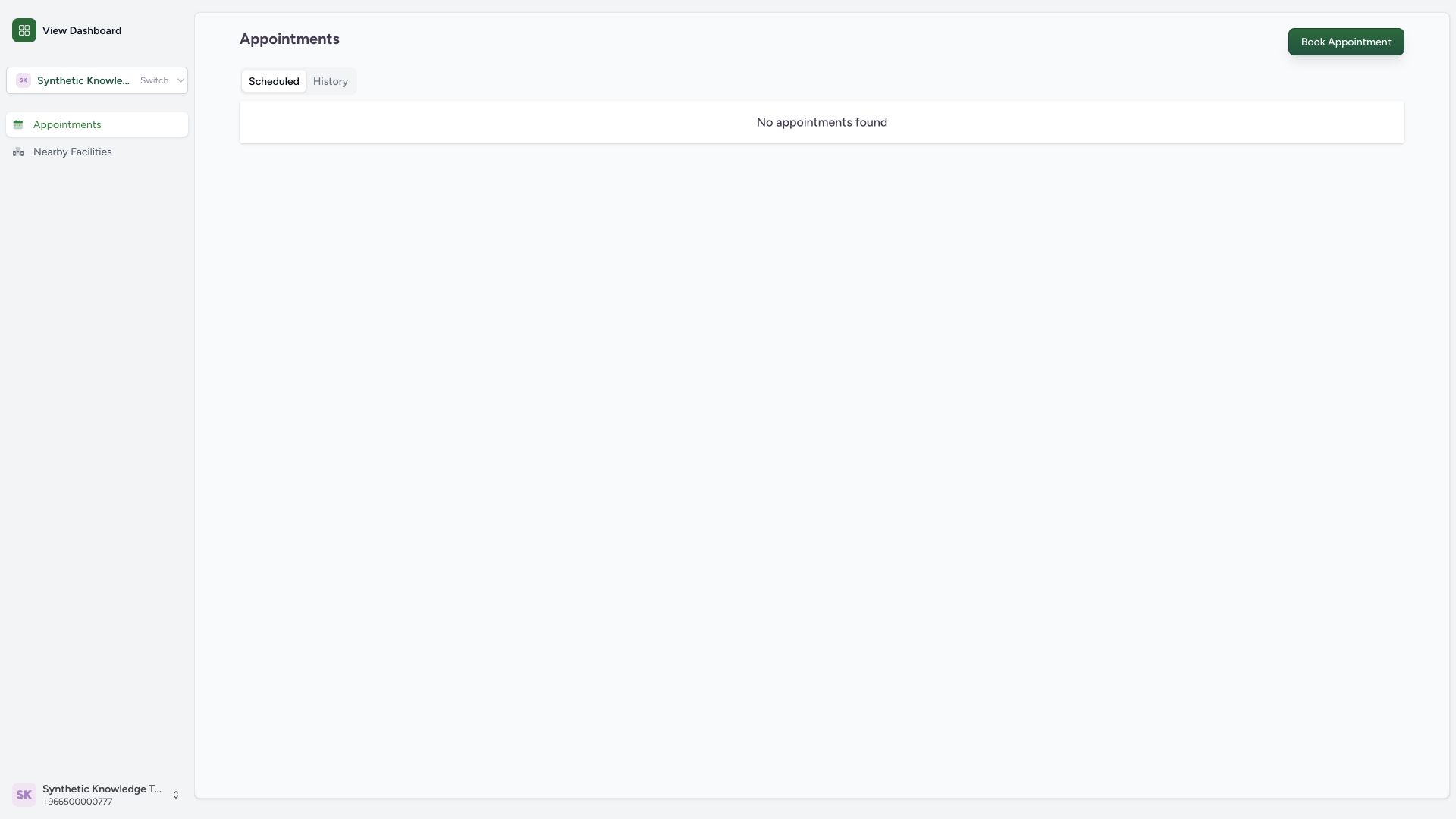
Appointments: return to the patient list and verify the saved booking under Scheduled: Appointments: return to the patient list and verify the saved booking under Scheduled
7. Verify the saved appointment
Open Appointments and inspect the correct person’s Scheduled card. Verify the facility, date, time and actual Booked status. The illustrated original 09:00 booking was independently read back before its later reschedule.
1
Scheduled booking · 2026-10-18Actual unchanged MANSOQ production build in an isolated fictional Clinic with patient login explicitly enabled for this local configuration. No real patient, SMS, payment or attendance. Other facility types, deployed portal availability and formal caregiver delegation are not established. Success: Scheduled shows the fictional clinic, practitioner, Booked status and 19 October 09:00 time for the newly created appointment.
View Details: inspect the saved scheduled appointment before changing or cancelling it: View Details: inspect the saved scheduled appointment before changing or cancelling it
Availability and training scope
These wide screenshots show a source-clean production build with patient login enabled only in isolated training. The original staff preview disables patient login. Your own deployment must enable this service and publish the relevant facility, practitioner and schedule. All names, phone numbers, addresses and appointments pictured are fictional. No SMS or external care occurred.
1
Regional facility result · 2026-10-18Actual unchanged MANSOQ production build in an isolated fictional Clinic with patient login explicitly enabled for this local configuration. No real patient, SMS, payment or attendance. Other facility types, deployed portal availability and formal caregiver delegation are not established. Success: choosing Riyadh Region returns the dedicated fictional public Clinic; facility type and explicit no-real-premises address are visible.
View Facility: inspect the selected facility and its publicly schedulable practitioners: View Facility: inspect the selected facility and its publicly schedulable practitioners
1
Public date slots · 2026-10-18Actual unchanged MANSOQ production build in an isolated fictional Clinic with patient login explicitly enabled for this local configuration. No real patient, SMS, payment or attendance. Other facility types, deployed portal availability and formal caregiver delegation are not established. Action: selected 19 October 2026 shows real configured public slots with remaining capacity; optional Note is explicitly training-only.
09:00 slot: select an available offered time and review the booking summary: 09:00 slot: select an available offered time and review the booking summary
What booking confirms
Booking creates an appointment record for the selected offered slot. The generic success template says the doctor will visit the patient, but this text alone does not establish home care, a clinical encounter, attendance, payment or insurance approval. Confirm service arrangements with the facility.
1
Booking success · 2026-10-18Actual unchanged MANSOQ production build in an isolated fictional Clinic with patient login explicitly enabled for this local configuration. No real patient, SMS, payment or attendance. Other facility types, deployed portal availability and formal caregiver delegation are not established. Success: normal patient OTP flow booked a distinct fictional appointment for 19 October at 09:00. The generic success-template visit sentence is not a promise of real care or home attendance.
Appointments: return to the patient list and verify the saved booking under Scheduled: Appointments: return to the patient list and verify the saved booking under Scheduled
Troubleshooting
No facility is listed
Select the correct administrative location and check whether the organization publishes that facility in the patient directory.
1
Facility discovery · 2026-10-18Actual unchanged MANSOQ production build in an isolated fictional Clinic with patient login explicitly enabled for this local configuration. No real patient, SMS, payment or attendance. Other facility types, deployed portal availability and formal caregiver delegation are not established. Start: public booking discovery requires selecting an administrative location before a facility search.
Select Location: choose the administrative location used to find facilities: Select Location: choose the administrative location used to find facilities
1
Regional facility result · 2026-10-18Actual unchanged MANSOQ production build in an isolated fictional Clinic with patient login explicitly enabled for this local configuration. No real patient, SMS, payment or attendance. Other facility types, deployed portal availability and formal caregiver delegation are not established. Success: choosing Riyadh Region returns the dedicated fictional public Clinic; facility type and explicit no-real-premises address are visible.
View Facility: inspect the selected facility and its publicly schedulable practitioners: View Facility: inspect the selected facility and its publicly schedulable practitioners
No slots are available on the selected day
Choose another date offered by the configured public schedule. Availability is not created by clicking Continue.
1
No slots today · 2026-10-18Actual unchanged MANSOQ production build in an isolated fictional Clinic with patient login explicitly enabled for this local configuration. No real patient, SMS, payment or attendance. Other facility types, deployed portal availability and formal caregiver delegation are not established. Start: the selected date has No slots available; the dedicated fixture schedule starts tomorrow rather than fabricating availability.
Choose an offered date within the configured public schedule to load its slots: Choose an offered date within the configured public schedule to load its slots
1
Public date slots · 2026-10-18Actual unchanged MANSOQ production build in an isolated fictional Clinic with patient login explicitly enabled for this local configuration. No real patient, SMS, payment or attendance. Other facility types, deployed portal availability and formal caregiver delegation are not established. Action: selected 19 October 2026 shows real configured public slots with remaining capacity; optional Note is explicitly training-only.
09:00 slot: select an available offered time and review the booking summary: 09:00 slot: select an available offered time and review the booking summary
The expected patient is missing
Check the verified phone and contact the facility about an existing record before creating a duplicate. Register a distinct new person only when appropriate.
1
Linked patient selection · 2026-10-18Actual unchanged MANSOQ production build in an isolated fictional Clinic with patient login explicitly enabled for this local configuration. No real patient, SMS, payment or attendance. Other facility types, deployed portal availability and formal caregiver delegation are not established. Action: Select/Register Patient lists only records linked to the verified phone; choose the intended patient, or Add New Patient for a distinct person.
Select the correct phone-linked patient after checking name, date of birth and sex: Select the correct phone-linked patient after checking name, date of birth and sex
Source evidence
References are pinned to the private MANSOQ source repository. Repository access is required to open these links.
 MANSOQ
  1
1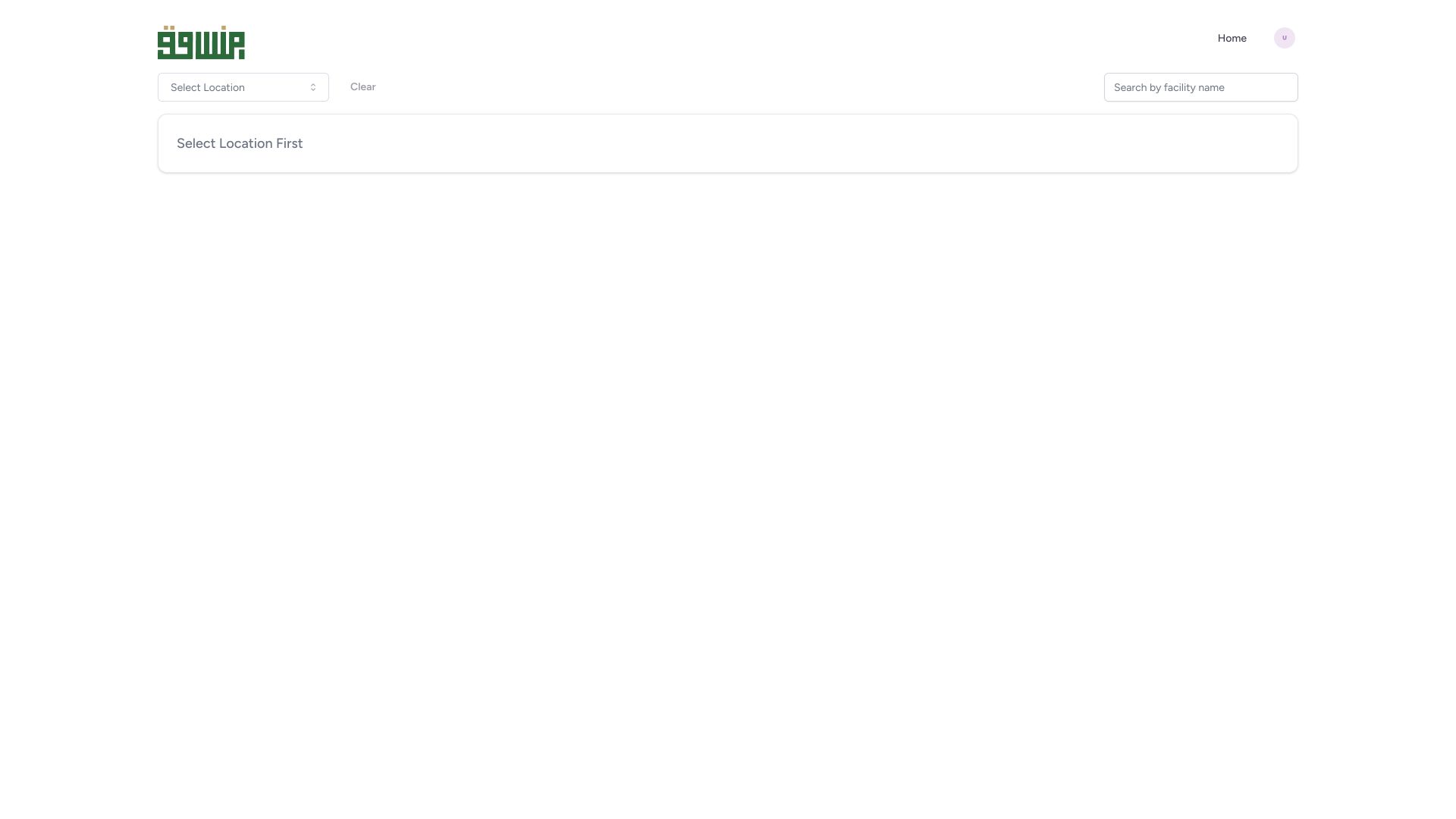 1
1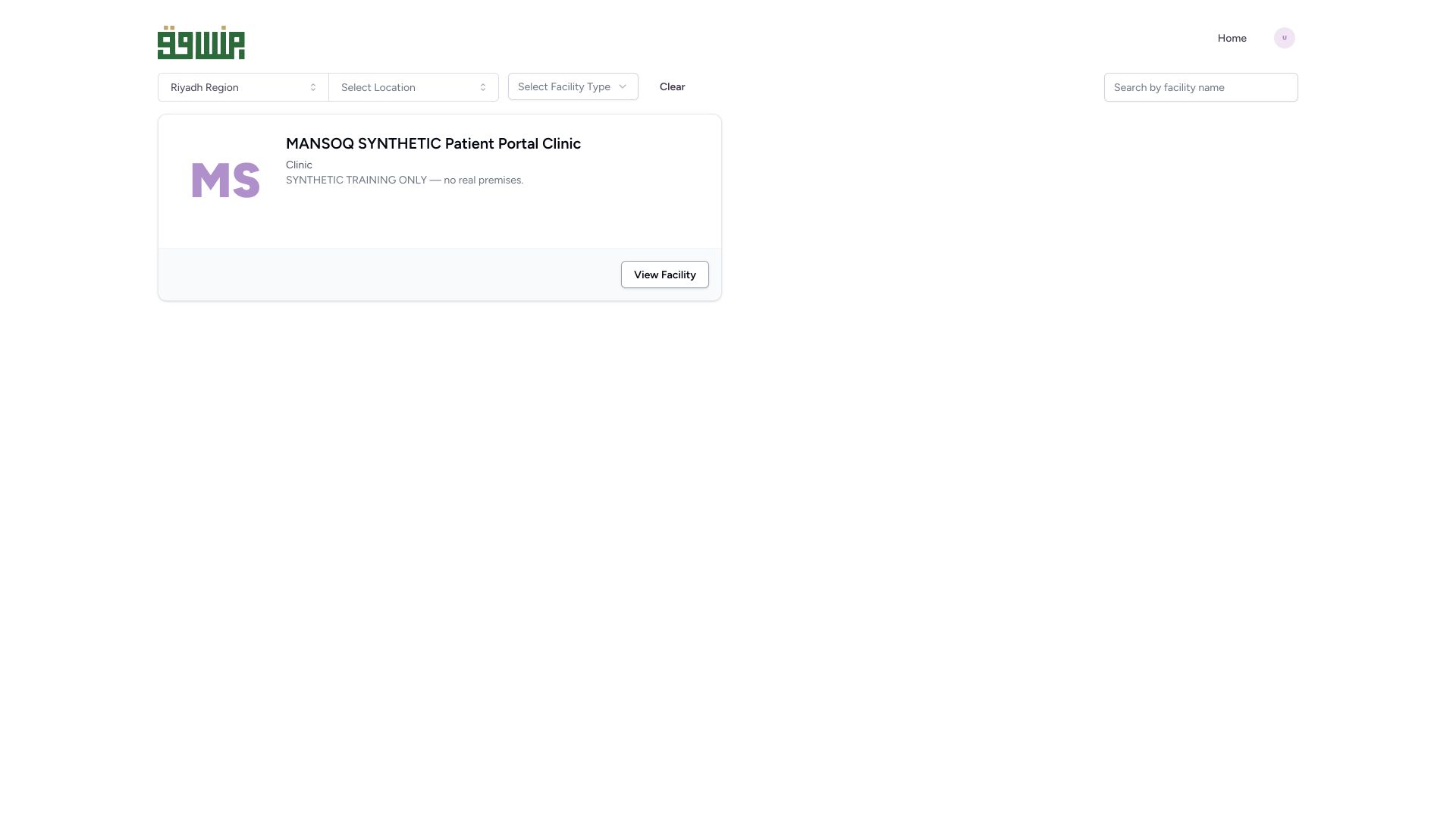 1
1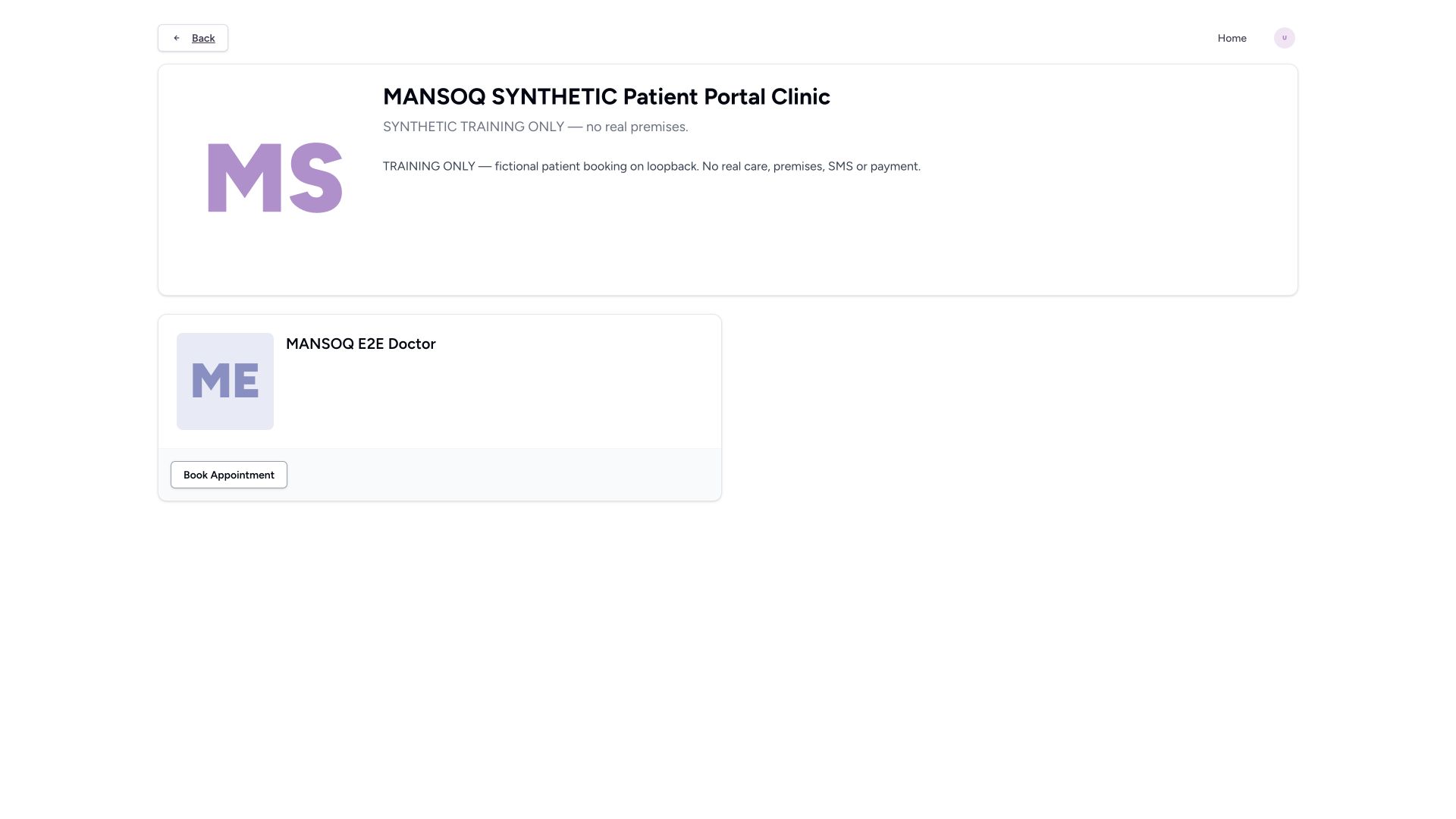 1
1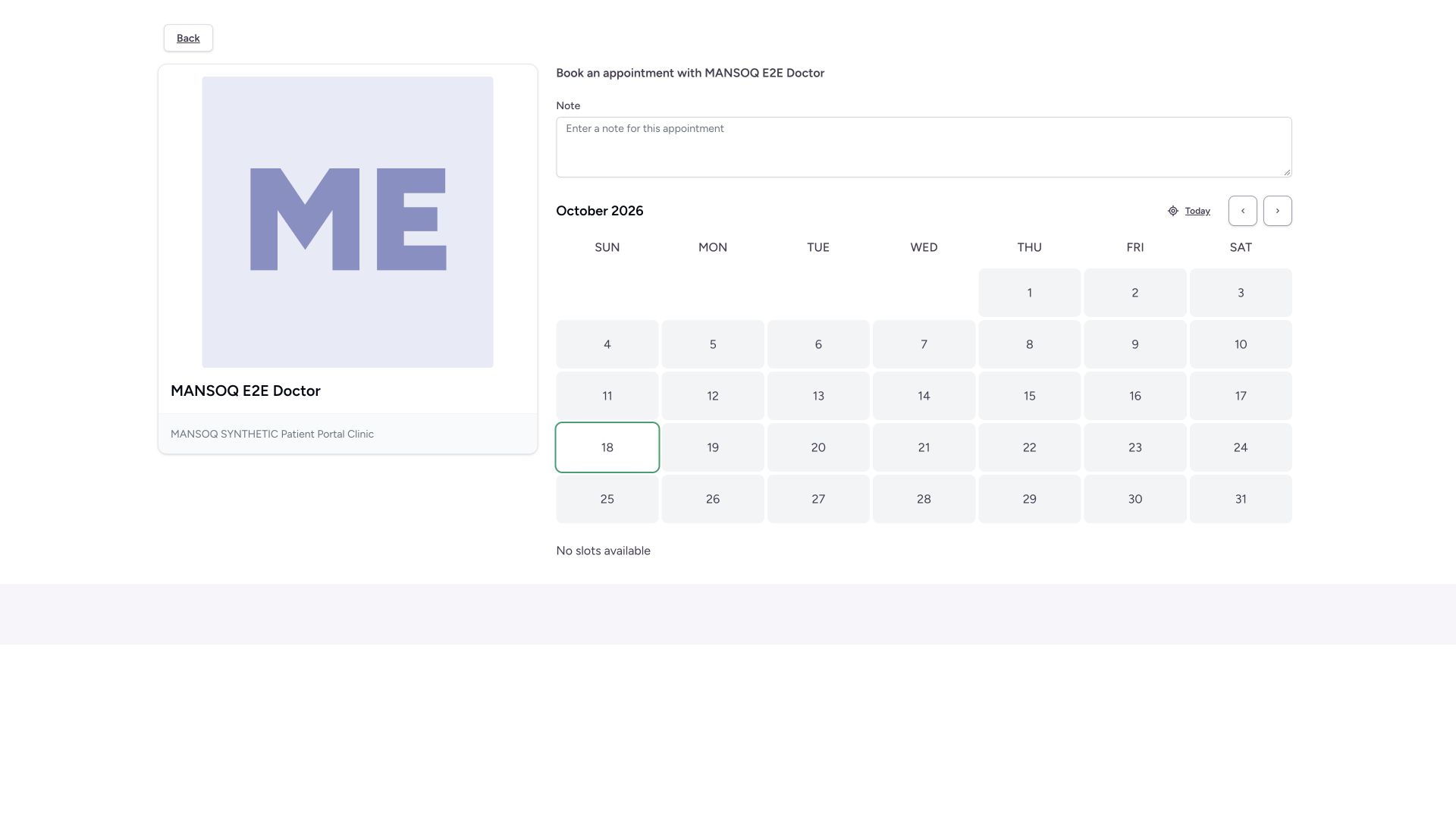 1
1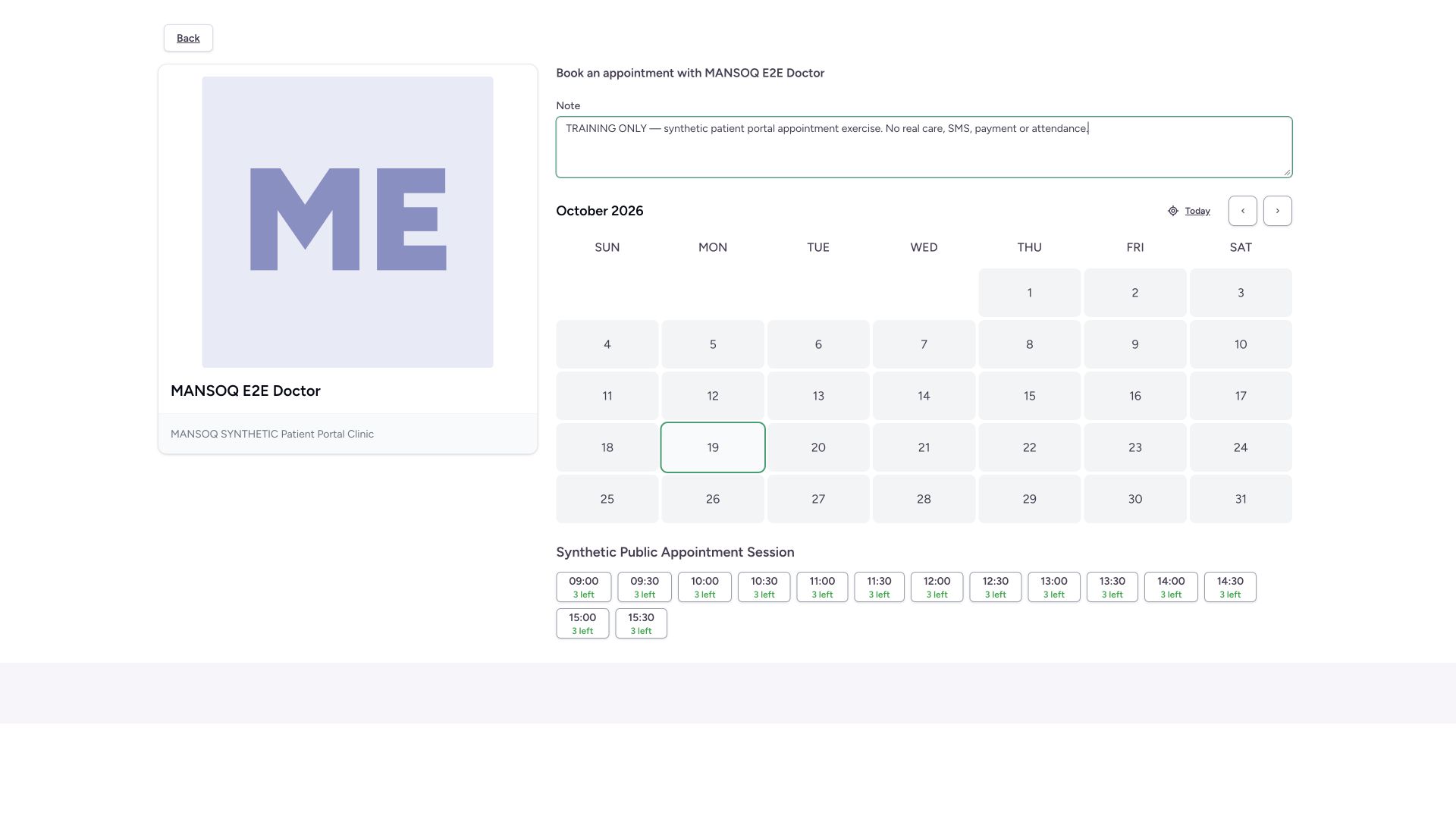 1
1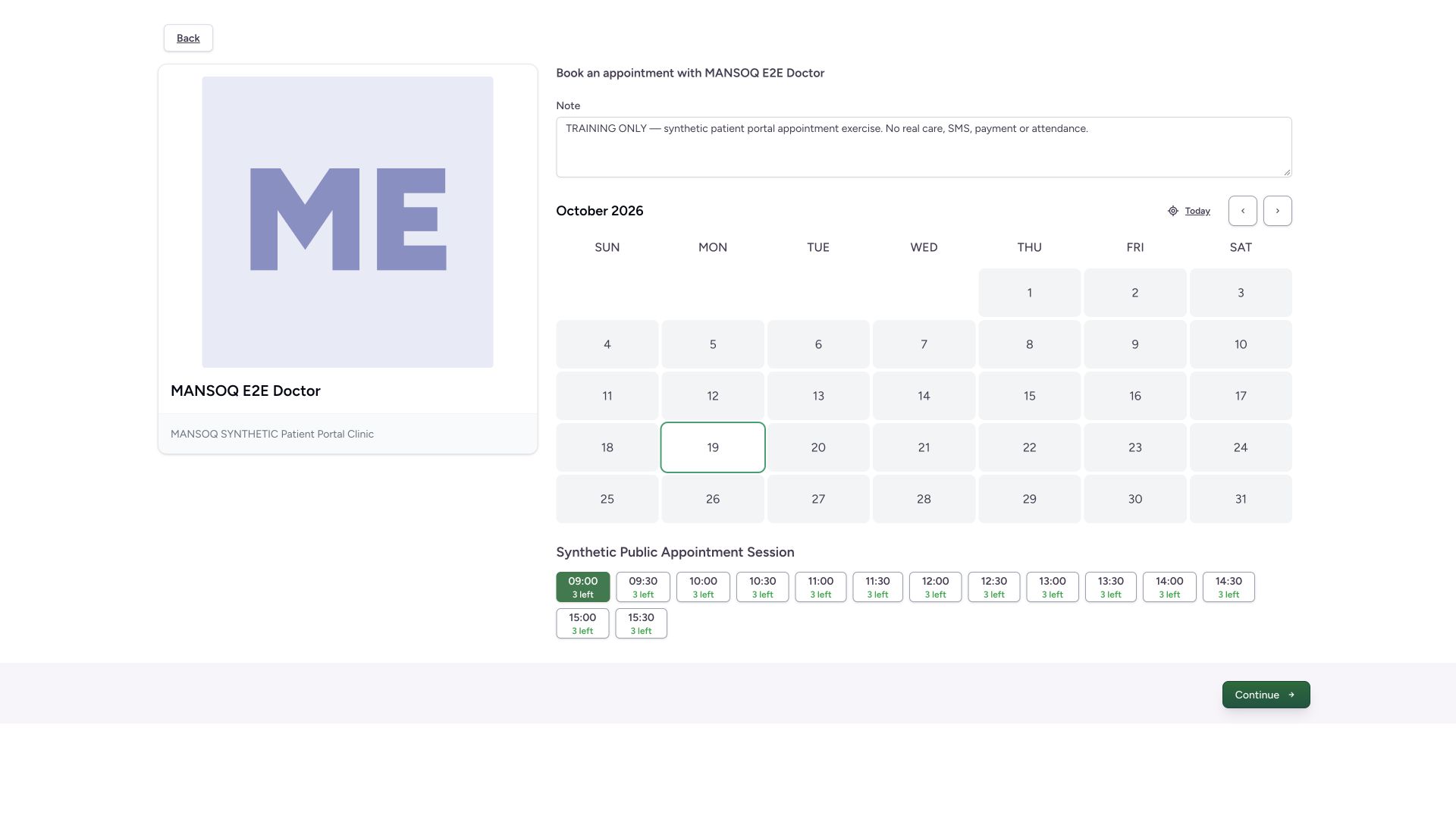 1
1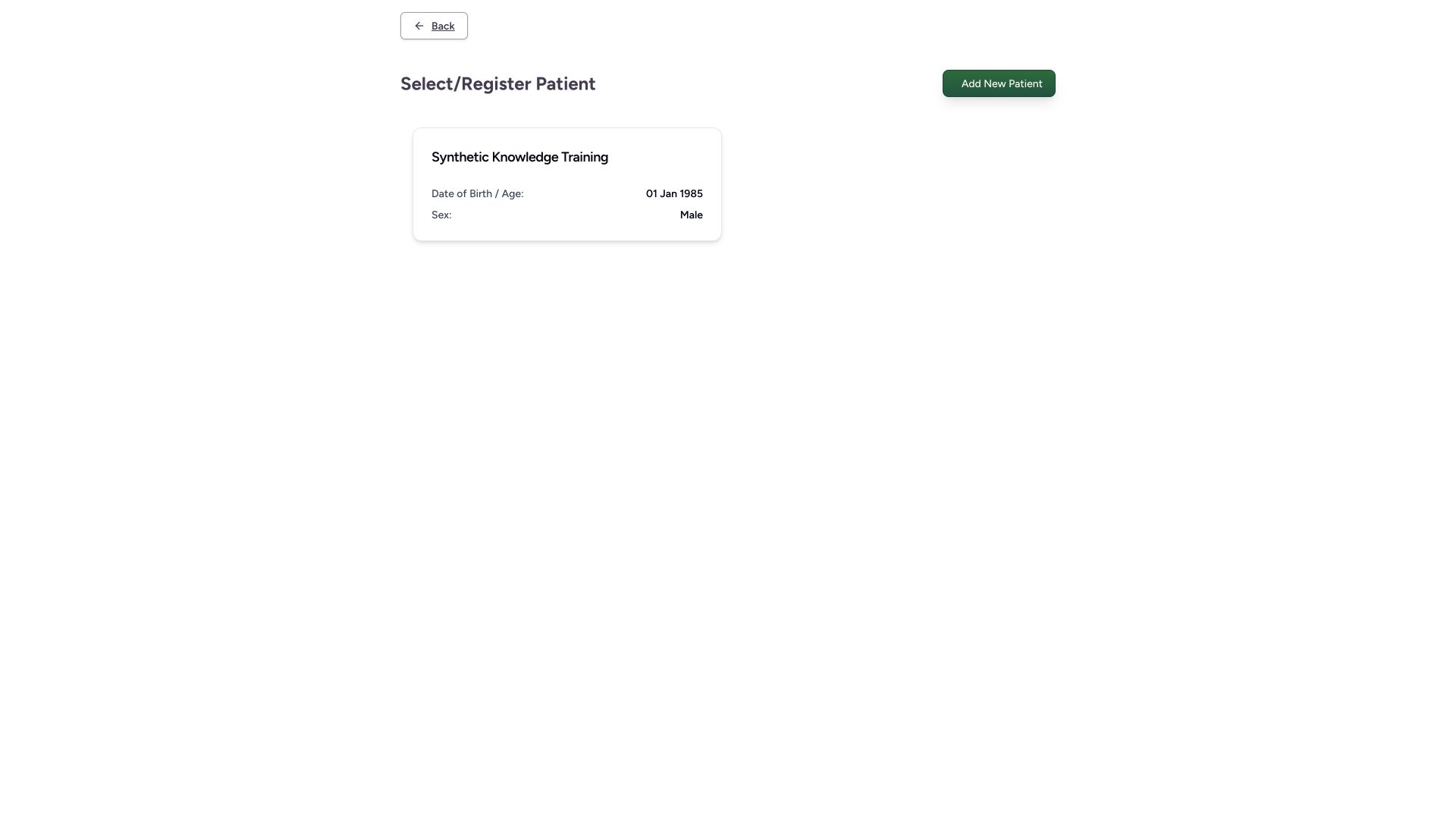 1
1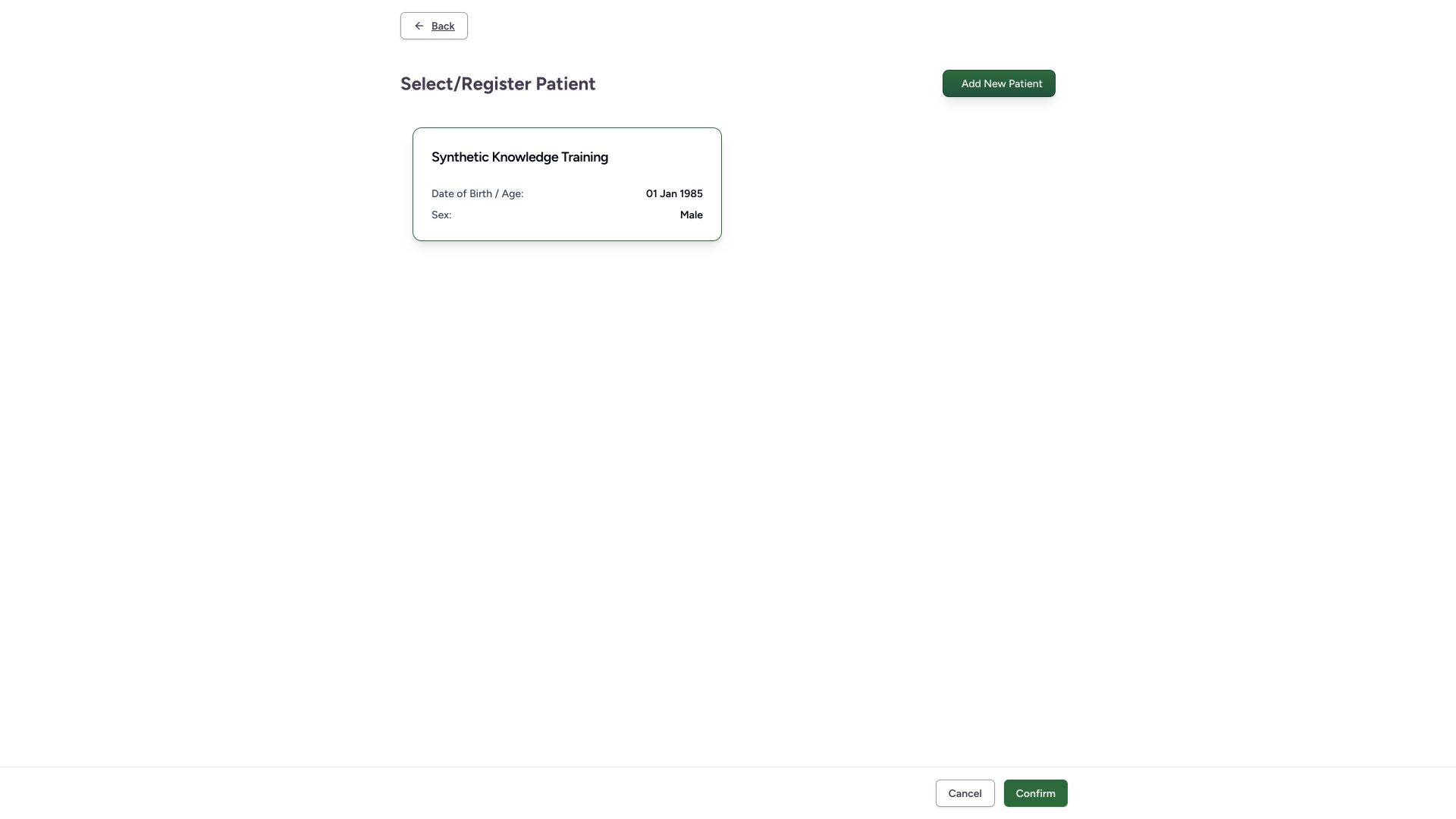 1
1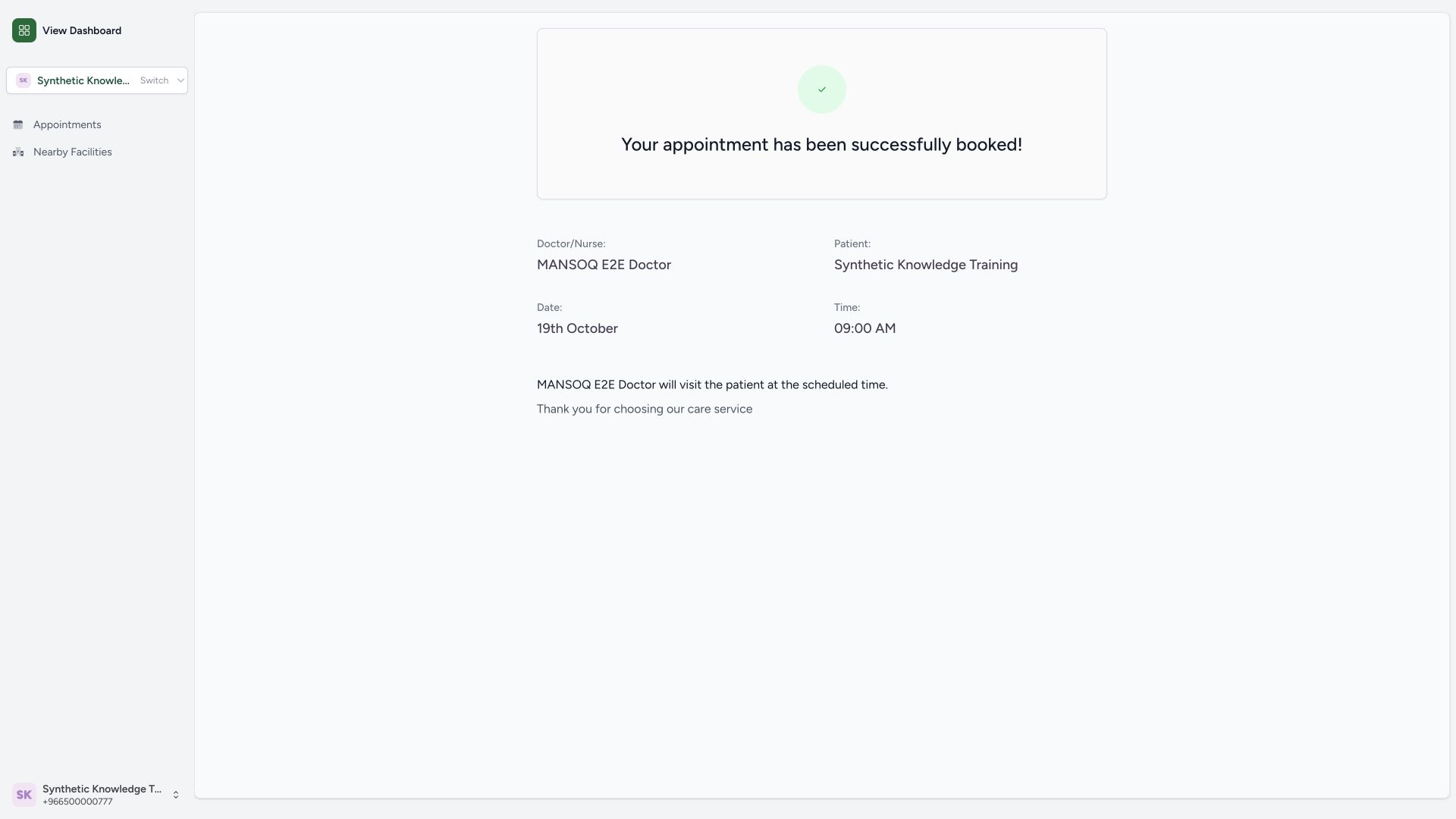 1
1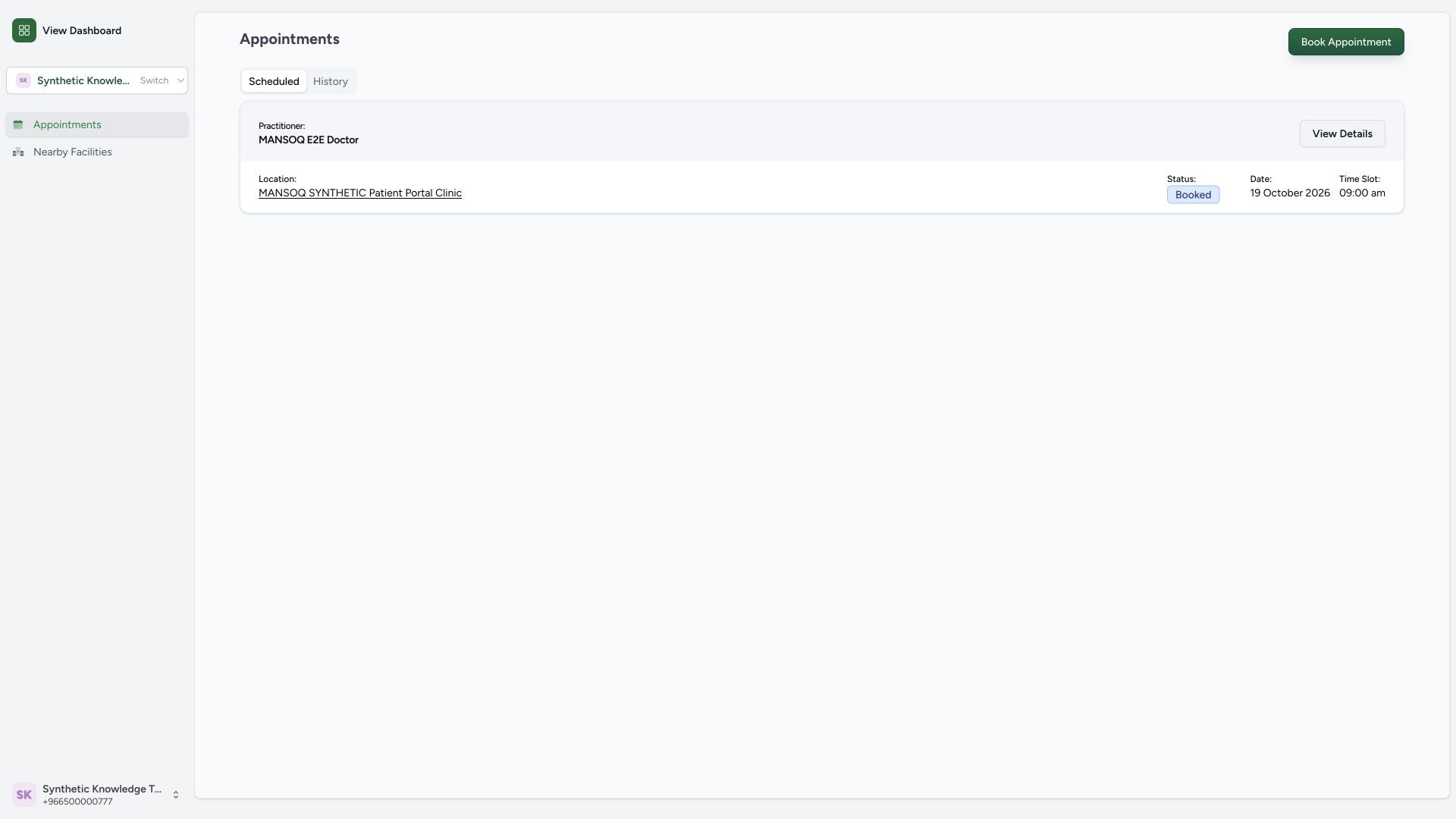 1
1