Distinguish time-based appointment tabs from status and verify the final result after each change.
Current source · source reviewed · 8 min read
Before you begin
You have signed in through authorized phone verification and selected the correct person.
The appointment exposes the relevant action in your deployment; final statuses and in-consultation appointments restrict available controls.
1. Read Scheduled and History correctly
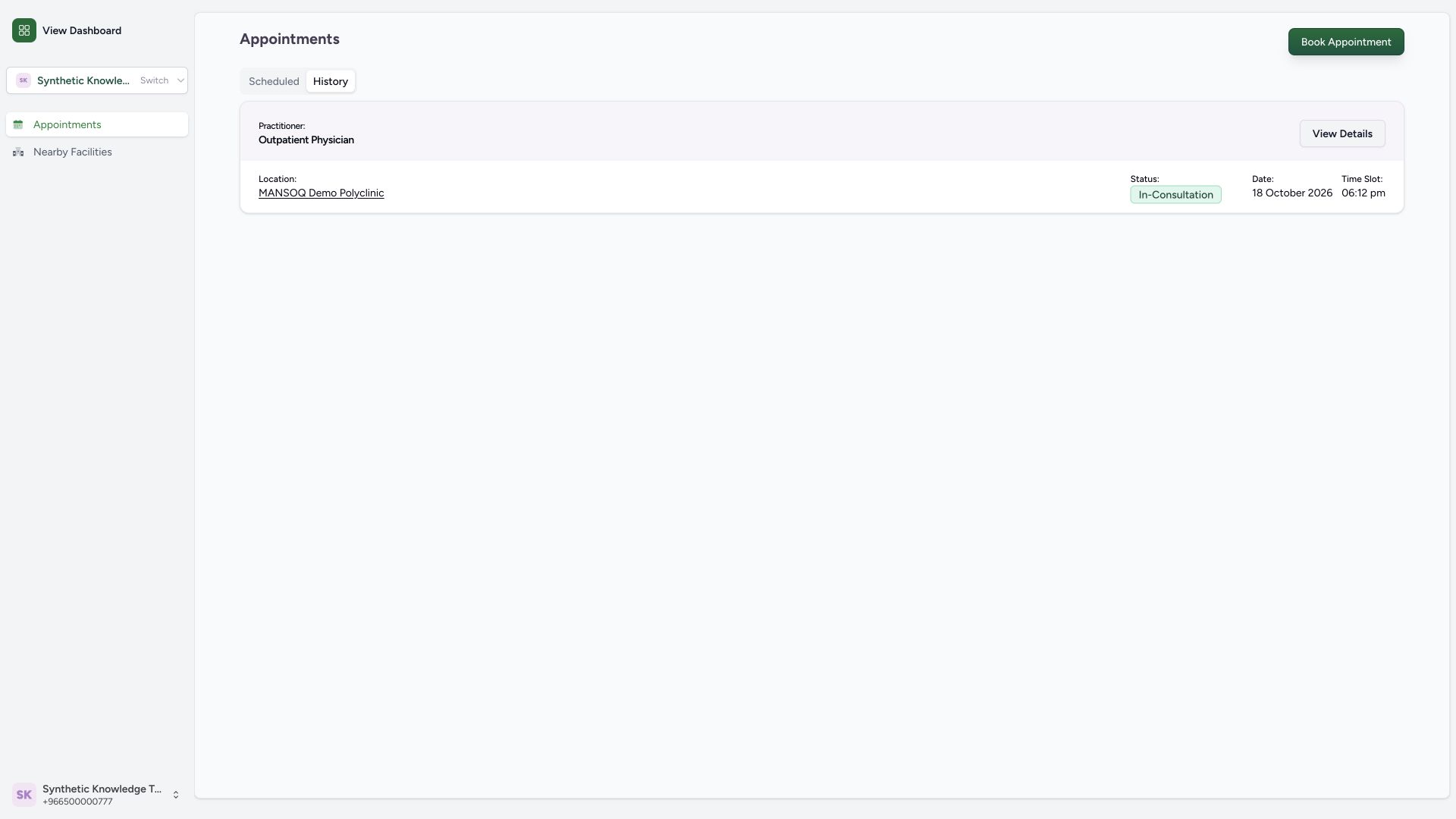
Open Appointments. Scheduled groups slots in the future and History groups slots in the past; neither tab proves an appointment is active or completed. Read each card’s actual status. The example past appointment remains In Consultation.
1
Appointment history · 2026-10-18Actual unchanged MANSOQ production build in an isolated fictional Clinic with patient login explicitly enabled for this local configuration. No real patient, SMS, payment or attendance. Other facility types, deployed portal availability and formal caregiver delegation are not established. Success: History groups an existing past-slot synthetic appointment while preserving its actual In-Consultation status; history is time grouping, not proof of completion.
View Details: inspect the selected past appointment and its actual status: View Details: inspect the selected past appointment and its actual status
1
Scheduled booking · 2026-10-18Actual unchanged MANSOQ production build in an isolated fictional Clinic with patient login explicitly enabled for this local configuration. No real patient, SMS, payment or attendance. Other facility types, deployed portal availability and formal caregiver delegation are not established. Success: Scheduled shows the fictional clinic, practitioner, Booked status and 19 October 09:00 time for the newly created appointment.
View Details: inspect the saved scheduled appointment before changing or cancelling it: View Details: inspect the saved scheduled appointment before changing or cancelling it
2. Inspect appointment details
Select View Details on the intended card. Compare patient, practitioner and slot time before any action. Close the detail dialog to return without changing the appointment.
1
Appointment details · 2026-10-18Actual unchanged MANSOQ production build in an isolated fictional Clinic with patient login explicitly enabled for this local configuration. No real patient, SMS, payment or attendance. Other facility types, deployed portal availability and formal caregiver delegation are not established. Action: Appointment Details shows selected practitioner, slot, patient and persisted status. The existing staff teaching appointment is viewed only, without cancellation.
Close: return to the appointment list after checking patient, practitioner, time and status: Close: return to the appointment list after checking patient, practitioner, time and status
1
Reschedule action · 2026-10-18Actual unchanged MANSOQ production build in an isolated fictional Clinic with patient login explicitly enabled for this local configuration. No real patient, SMS, payment or attendance. Other facility types, deployed portal availability and formal caregiver delegation are not established. Action: a future Booked appointment exposes Reschedule separately from Cancel. Existing staff teaching records are not changed.
Reschedule: review a new offered time for this booked appointment: Reschedule: review a new offered time for this booked appointment
3. Start rescheduling
On a future Booked appointment’s details, select Reschedule. Review the calendar and alternative offered times; the currently booked slot is excluded from the reschedule choices.
1
Reschedule action · 2026-10-18Actual unchanged MANSOQ production build in an isolated fictional Clinic with patient login explicitly enabled for this local configuration. No real patient, SMS, payment or attendance. Other facility types, deployed portal availability and formal caregiver delegation are not established. Action: a future Booked appointment exposes Reschedule separately from Cancel. Existing staff teaching records are not changed.
Reschedule: review a new offered time for this booked appointment: Reschedule: review a new offered time for this booked appointment
1
Reschedule slots · 2026-10-18Actual unchanged MANSOQ production build in an isolated fictional Clinic with patient login explicitly enabled for this local configuration. No real patient, SMS, payment or attendance. Other facility types, deployed portal availability and formal caregiver delegation are not established. Action: reschedule lists alternative offered times and excludes the current 09:00 appointment slot.
Choose an alternative slot; the current booked slot is excluded from this reschedule list: Choose an alternative slot; the current booked slot is excluded from this reschedule list
4. Save the replacement time
Select the intended alternative, check the note and select Reschedule Appointment. In this implementation the old booking is cancelled first and a replacement is then created. Wait for the final success screen; a cancellation toast alone does not prove a replacement exists.
1
Reschedule confirm · 2026-10-18Actual unchanged MANSOQ production build in an isolated fictional Clinic with patient login explicitly enabled for this local configuration. No real patient, SMS, payment or attendance. Other facility types, deployed portal availability and formal caregiver delegation are not established. Action: selected 09:30 alternative enables Reschedule Appointment. The audited path cancels the old booking then creates a replacement, so verify the final new booking.
Reschedule Appointment: save the chosen replacement time and verify the new booking result: Reschedule Appointment: save the chosen replacement time and verify the new booking result
1
Reschedule success · 2026-10-18Actual unchanged MANSOQ production build in an isolated fictional Clinic with patient login explicitly enabled for this local configuration. No real patient, SMS, payment or attendance. Other facility types, deployed portal availability and formal caregiver delegation are not established. Success: replacement booking has a distinct ID and 09:30 time; original 09:00 booking was cancelled as part of this specific implementation.
Appointments: confirm the new time and distinguish replacement Booked from original Cancelled: Appointments: confirm the new time and distinguish replacement Booked from original Cancelled
5. Verify original and replacement
Return to Appointments. Confirm that the old time is Cancelled and the new time is Booked for the same person. The illustrated 09:00 and 09:30 records have different booking identifiers, independently checked after rescheduling.
1
Original and replacement · 2026-10-18Actual unchanged MANSOQ production build in an isolated fictional Clinic with patient login explicitly enabled for this local configuration. No real patient, SMS, payment or attendance. Other facility types, deployed portal availability and formal caregiver delegation are not established. Success: Scheduled retains future-dated Cancelled 09:00 and Booked 09:30 cards. This tab groups by slot time, so always read each status.
Booked 09:30 is the active replacement; the earlier 09:00 card is Cancelled: Booked 09:30 is the active replacement; the earlier 09:00 card is Cancelled
6. Open cancellation for the correct booking
Open details for the intended active booking and select Cancel. Read the warning’s exact date, time, practitioner and facility. Cancel inside the warning backs out; Confirm performs the cancellation.
1
Cancel action · 2026-10-18Actual unchanged MANSOQ production build in an isolated fictional Clinic with patient login explicitly enabled for this local configuration. No real patient, SMS, payment or attendance. Other facility types, deployed portal availability and formal caregiver delegation are not established. Action: Appointment Details identifies the future 09:30 Booked replacement before cancellation; no real appointment is affected.
Cancel: open the appointment cancellation warning for this exact patient and time: Cancel: open the appointment cancellation warning for this exact patient and time
1
Cancellation confirmation · 2026-10-18Actual unchanged MANSOQ production build in an isolated fictional Clinic with patient login explicitly enabled for this local configuration. No real patient, SMS, payment or attendance. Other facility types, deployed portal availability and formal caregiver delegation are not established. Action: warning identifies the exact 19 October 09:30 appointment and says cancellation cannot be undone. This is the dedicated fictional training booking.
Confirm only after checking the exact appointment; Cancel keeps the booking unchanged: Confirm only after checking the exact appointment; Cancel keeps the booking unchanged
7. Verify the cancelled status
After confirming, return to the list and read Cancelled on that exact time. Future-dated cancelled cards can remain under Scheduled. Cancellation does not mean deletion or a completed consultation.
1
Replacement cancelled · 2026-10-18Actual unchanged MANSOQ production build in an isolated fictional Clinic with patient login explicitly enabled for this local configuration. No real patient, SMS, payment or attendance. Other facility types, deployed portal availability and formal caregiver delegation are not established. Success: replacement 09:30 appointment now shows Cancelled; original 09:00 remains Cancelled. Future-dated cancelled records remain visible under Scheduled.
The 09:30 replacement is now Cancelled; read its status even while it remains under Scheduled: The 09:30 replacement is now Cancelled; read its status even while it remains under Scheduled
Availability and training scope
These wide screenshots show a source-clean production build with patient login enabled only in isolated training. The original staff preview disables patient login. Your own deployment must enable this service and publish the relevant facility, practitioner and schedule. All names, phone numbers, addresses and appointments pictured are fictional. No SMS or external care occurred.
1
Original and replacement · 2026-10-18Actual unchanged MANSOQ production build in an isolated fictional Clinic with patient login explicitly enabled for this local configuration. No real patient, SMS, payment or attendance. Other facility types, deployed portal availability and formal caregiver delegation are not established. Success: Scheduled retains future-dated Cancelled 09:00 and Booked 09:30 cards. This tab groups by slot time, so always read each status.
Booked 09:30 is the active replacement; the earlier 09:00 card is Cancelled: Booked 09:30 is the active replacement; the earlier 09:00 card is Cancelled
1
Replacement cancelled · 2026-10-18Actual unchanged MANSOQ production build in an isolated fictional Clinic with patient login explicitly enabled for this local configuration. No real patient, SMS, payment or attendance. Other facility types, deployed portal availability and formal caregiver delegation are not established. Success: replacement 09:30 appointment now shows Cancelled; original 09:00 remains Cancelled. Future-dated cancelled records remain visible under Scheduled.
The 09:30 replacement is now Cancelled; read its status even while it remains under Scheduled: The 09:30 replacement is now Cancelled; read its status even while it remains under Scheduled
If rescheduling stops after cancellation
The source executes two separate requests: cancel the old booking, then create the replacement. If you see only cancellation or no new Booked card, contact the facility and check actual appointments before retrying. Do not treat the old booking as active or create repeated replacements.
1
Reschedule confirm · 2026-10-18Actual unchanged MANSOQ production build in an isolated fictional Clinic with patient login explicitly enabled for this local configuration. No real patient, SMS, payment or attendance. Other facility types, deployed portal availability and formal caregiver delegation are not established. Action: selected 09:30 alternative enables Reschedule Appointment. The audited path cancels the old booking then creates a replacement, so verify the final new booking.
Reschedule Appointment: save the chosen replacement time and verify the new booking result: Reschedule Appointment: save the chosen replacement time and verify the new booking result
1
Original and replacement · 2026-10-18Actual unchanged MANSOQ production build in an isolated fictional Clinic with patient login explicitly enabled for this local configuration. No real patient, SMS, payment or attendance. Other facility types, deployed portal availability and formal caregiver delegation are not established. Success: Scheduled retains future-dated Cancelled 09:00 and Booked 09:30 cards. This tab groups by slot time, so always read each status.
Booked 09:30 is the active replacement; the earlier 09:00 card is Cancelled: Booked 09:30 is the active replacement; the earlier 09:00 card is Cancelled
Troubleshooting
A cancelled appointment still appears under Scheduled
The tabs group by slot time. Read the Cancelled badge; this retained record is not an active booking.
1
Replacement cancelled · 2026-10-18Actual unchanged MANSOQ production build in an isolated fictional Clinic with patient login explicitly enabled for this local configuration. No real patient, SMS, payment or attendance. Other facility types, deployed portal availability and formal caregiver delegation are not established. Success: replacement 09:30 appointment now shows Cancelled; original 09:00 remains Cancelled. Future-dated cancelled records remain visible under Scheduled.
The 09:30 replacement is now Cancelled; read its status even while it remains under Scheduled: The 09:30 replacement is now Cancelled; read its status even while it remains under Scheduled
Reschedule or Cancel is unavailable
Read the current status and controls. Final statuses hide these actions; the source also hides Reschedule while in consultation. Contact the facility for the supported next step.
1
Appointment details · 2026-10-18Actual unchanged MANSOQ production build in an isolated fictional Clinic with patient login explicitly enabled for this local configuration. No real patient, SMS, payment or attendance. Other facility types, deployed portal availability and formal caregiver delegation are not established. Action: Appointment Details shows selected practitioner, slot, patient and persisted status. The existing staff teaching appointment is viewed only, without cancellation.
Close: return to the appointment list after checking patient, practitioner, time and status: Close: return to the appointment list after checking patient, practitioner, time and status
Source evidence
References are pinned to the private MANSOQ source repository. Repository access is required to open these links.
 MANSOQ
  1
1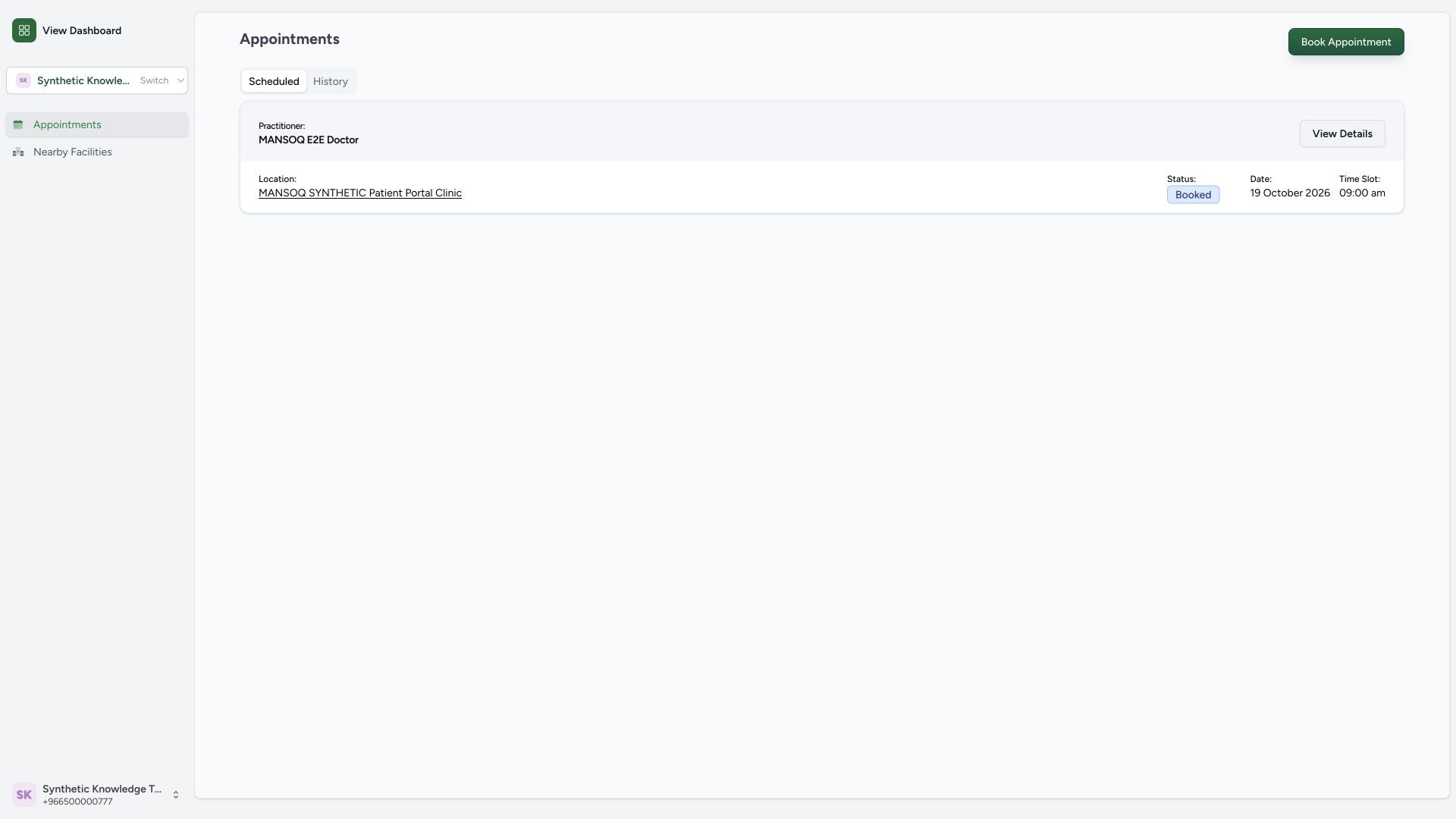 1
1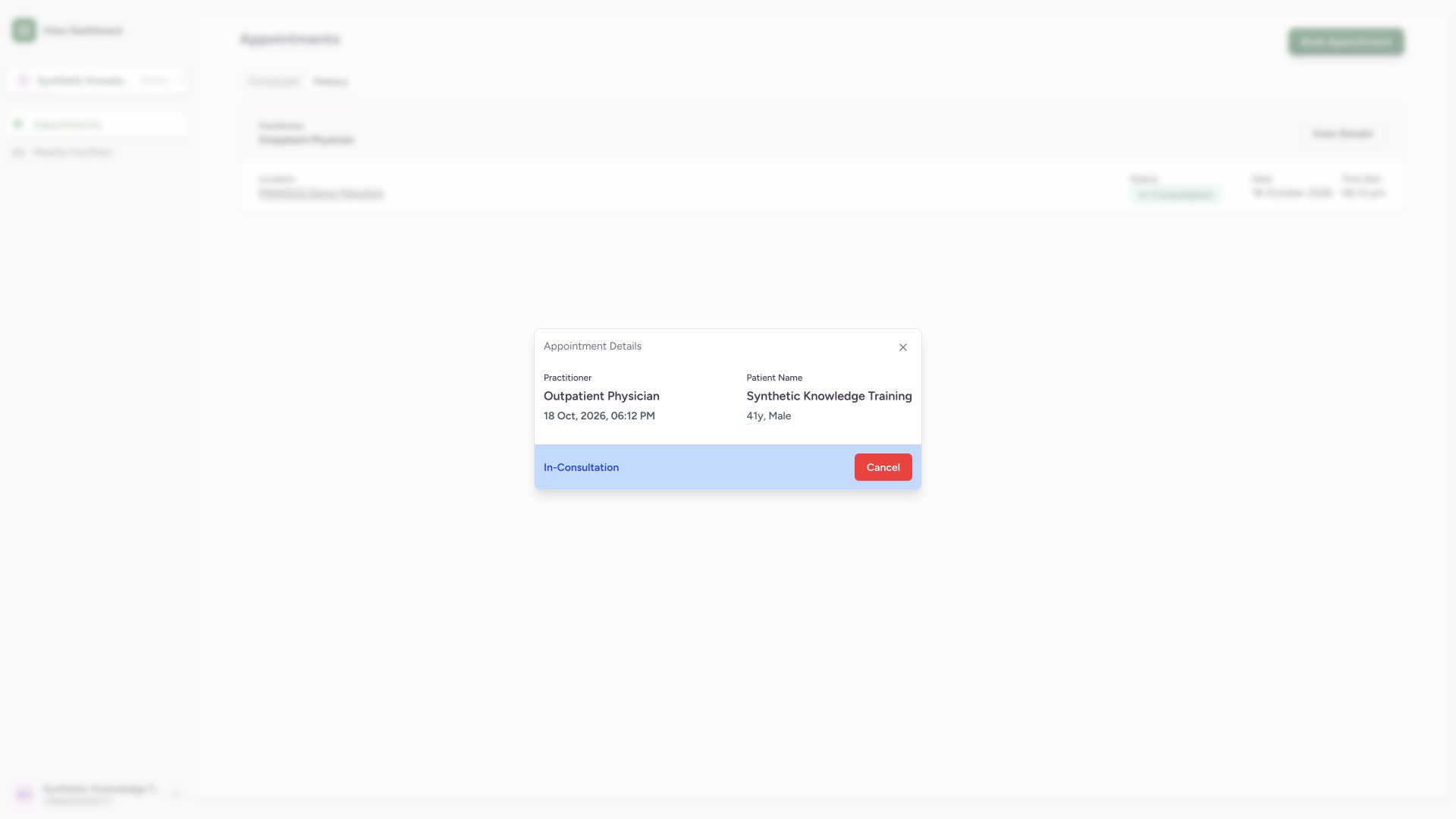 1
1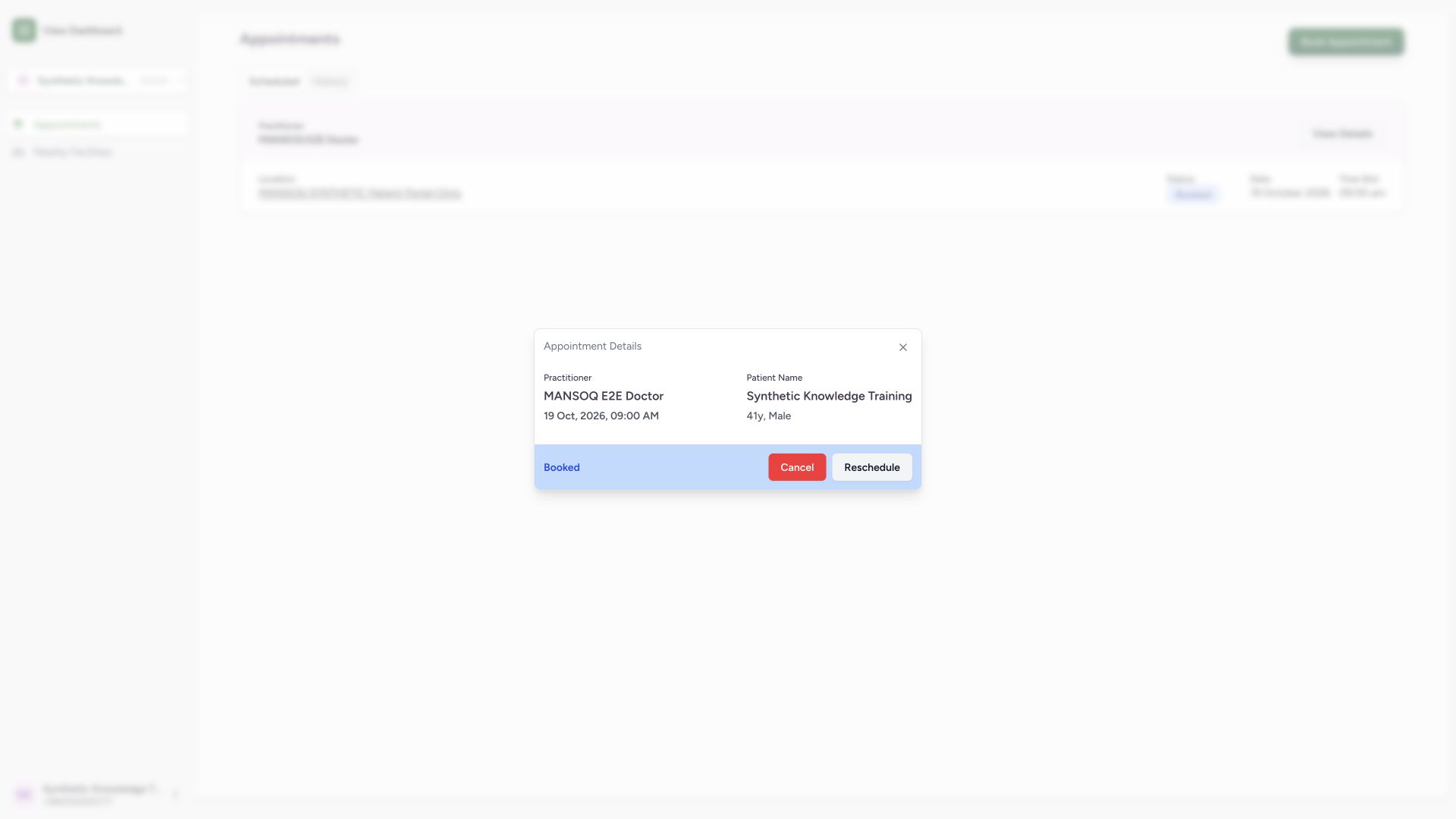 1
1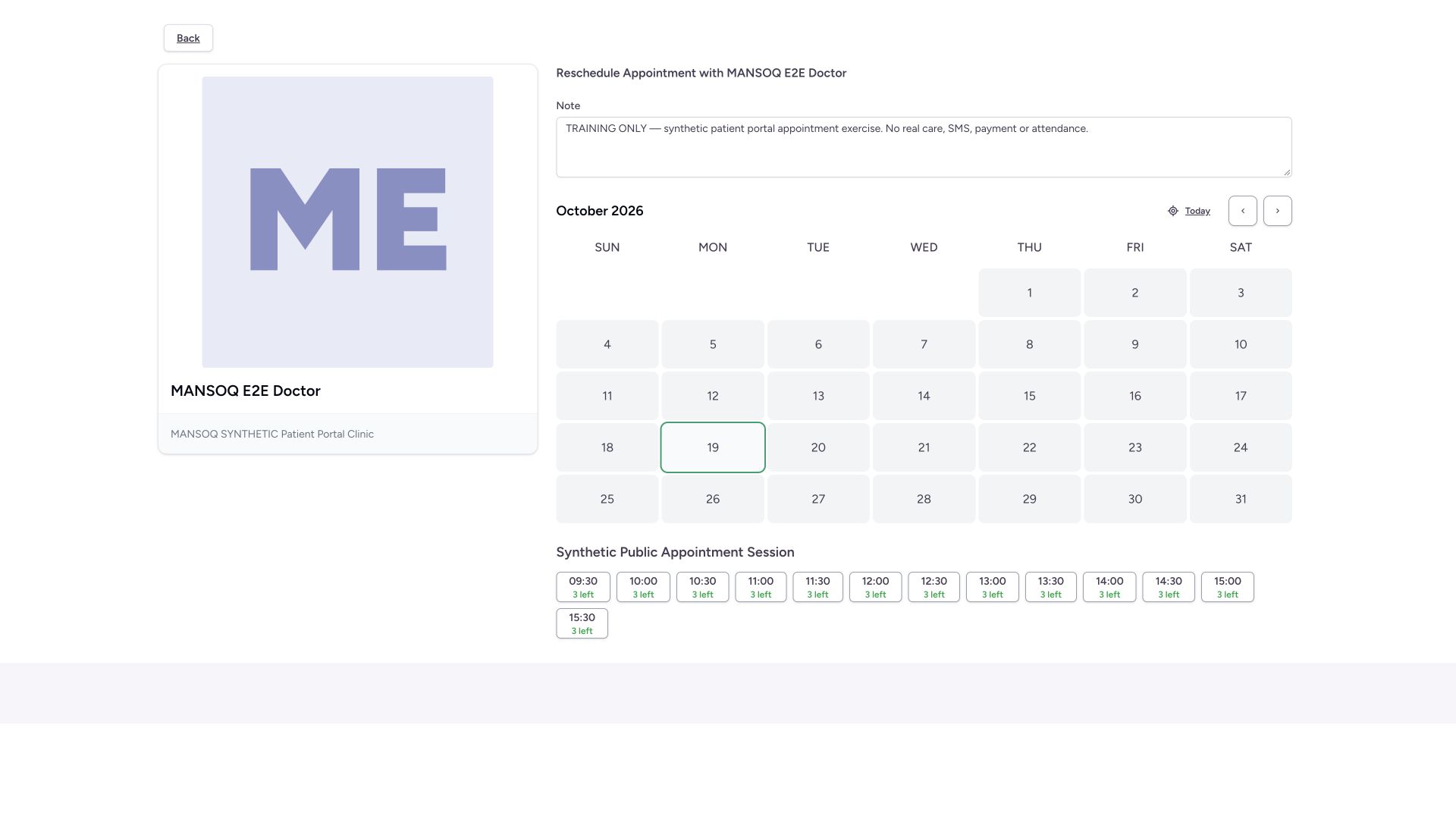 1
1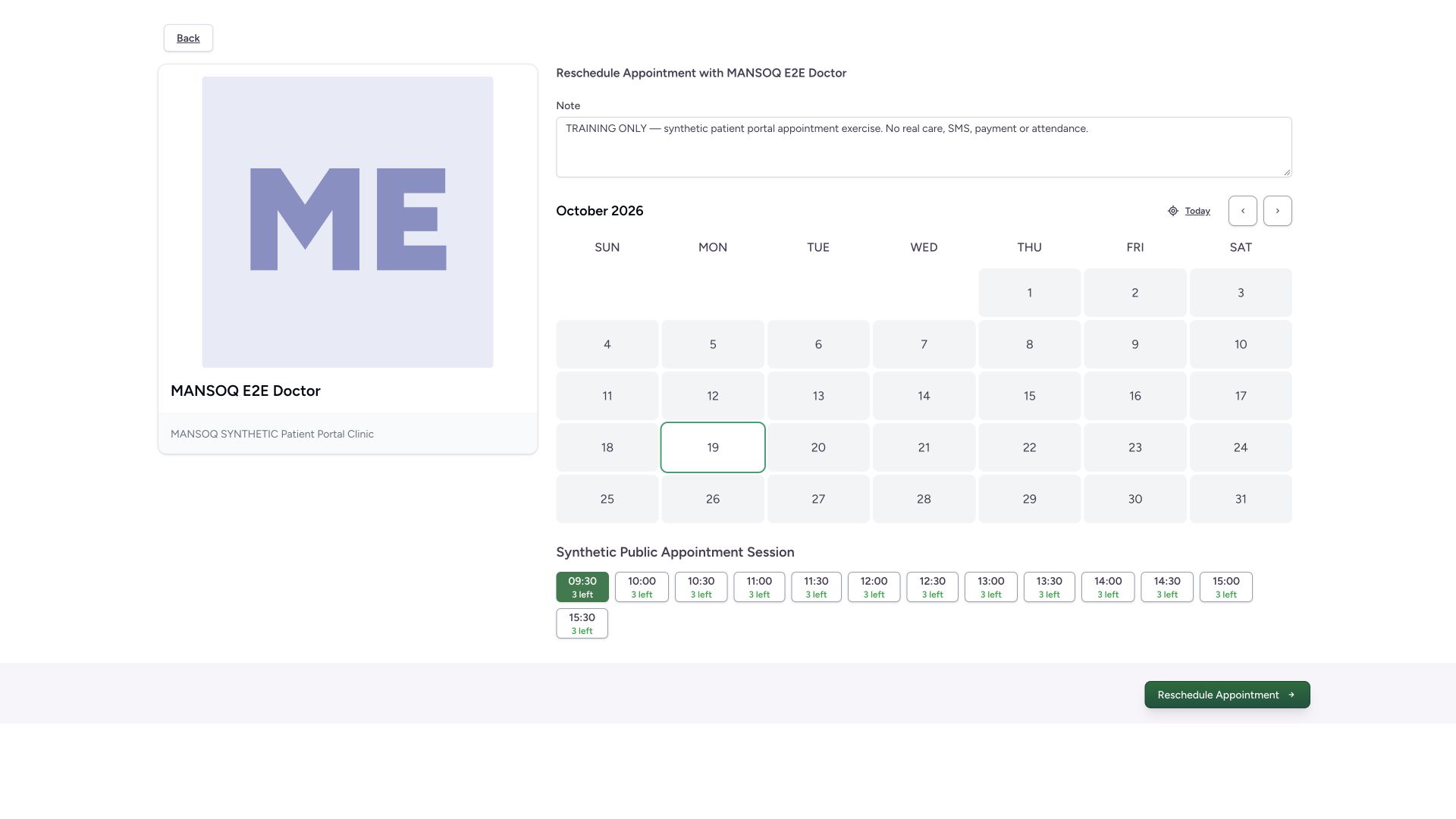 1
1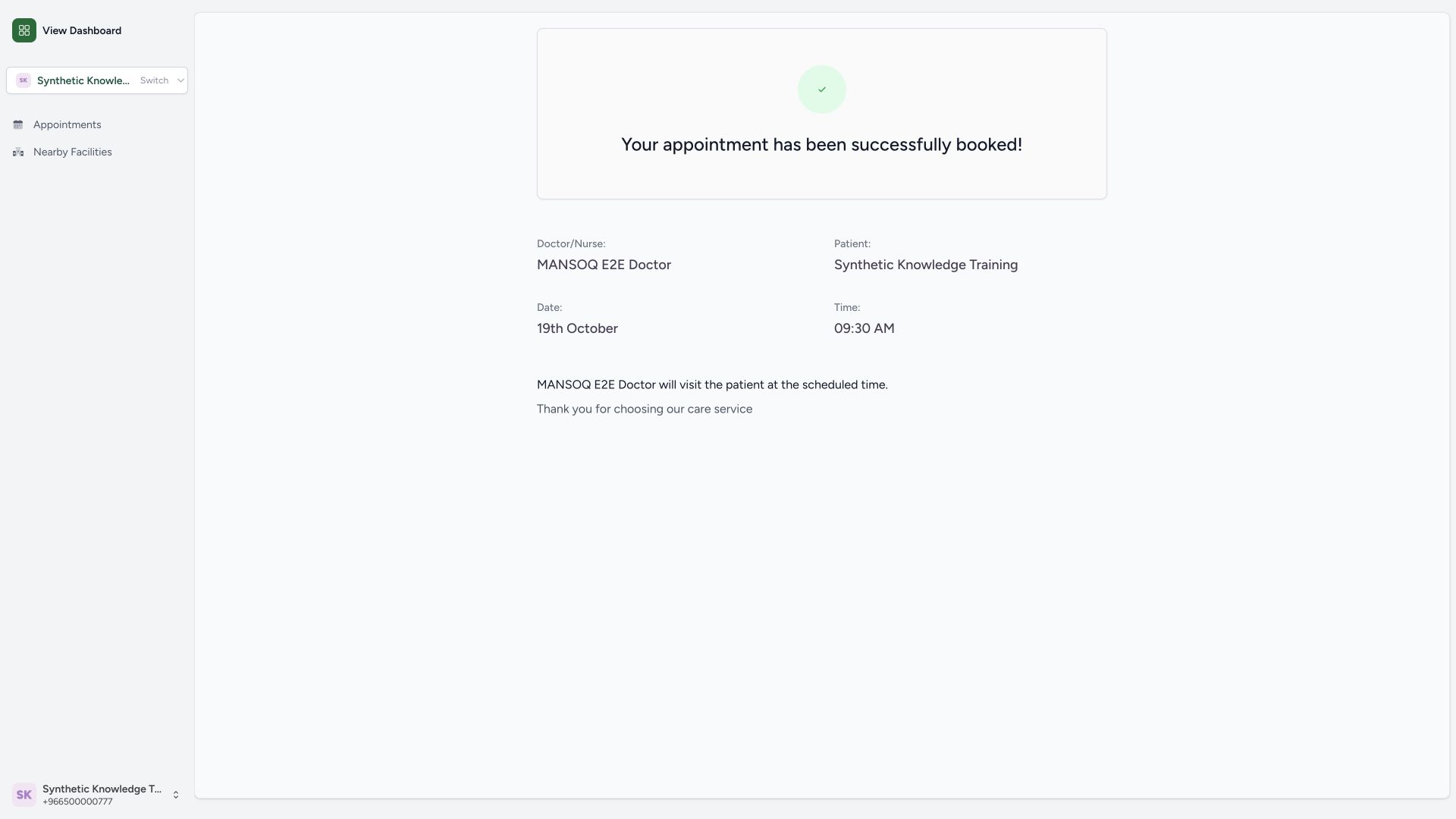 1
1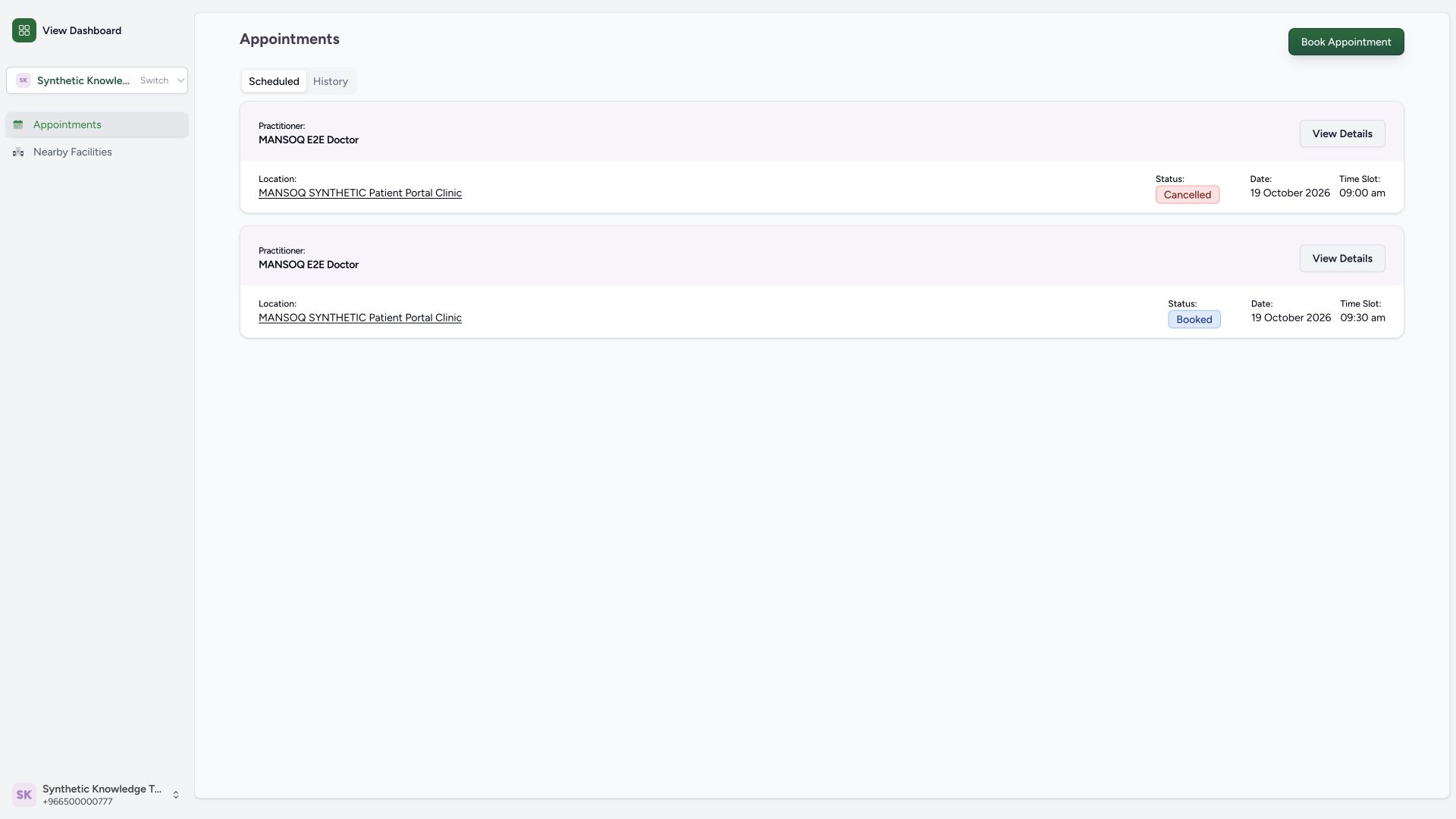 1
1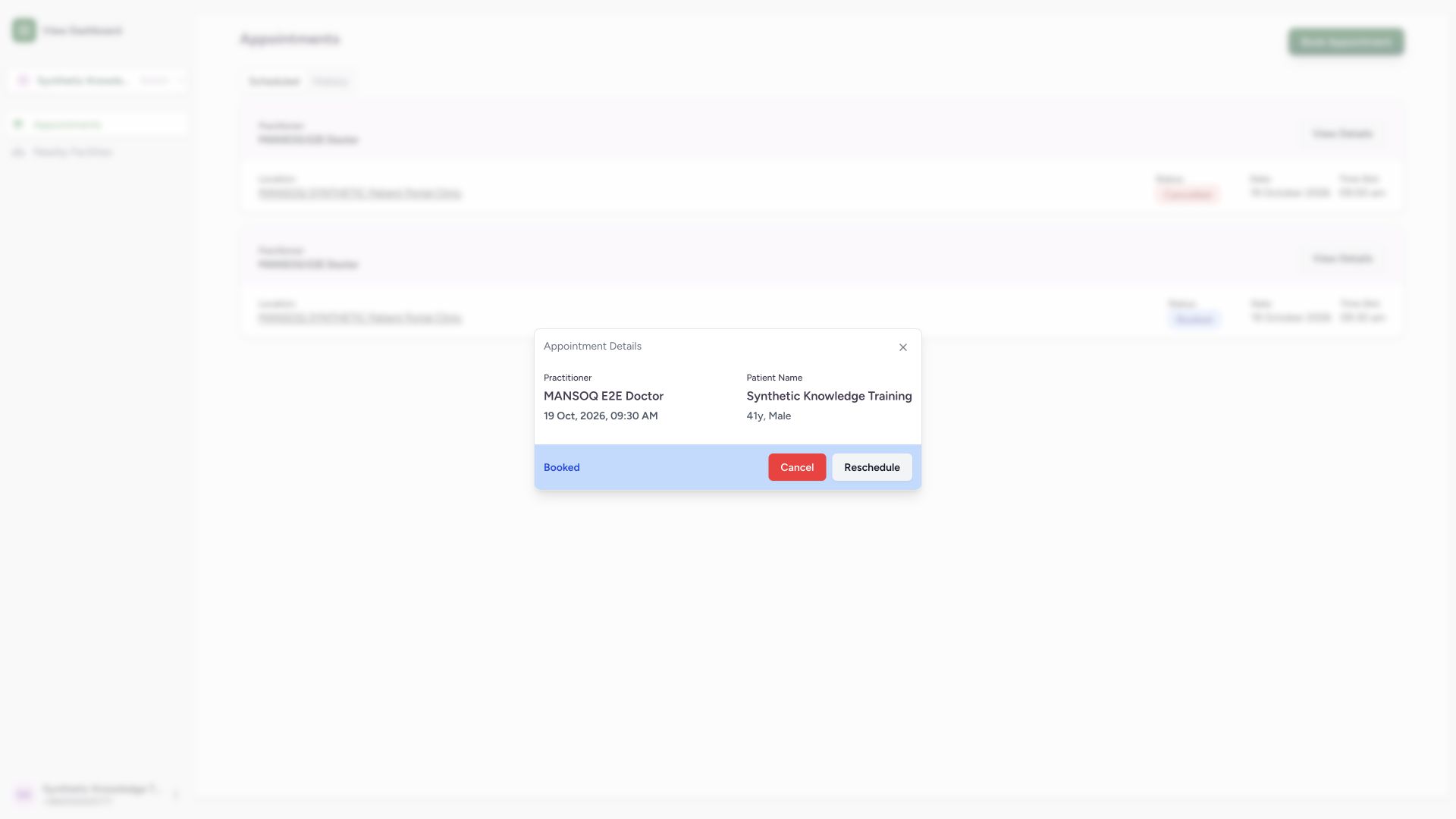 1
1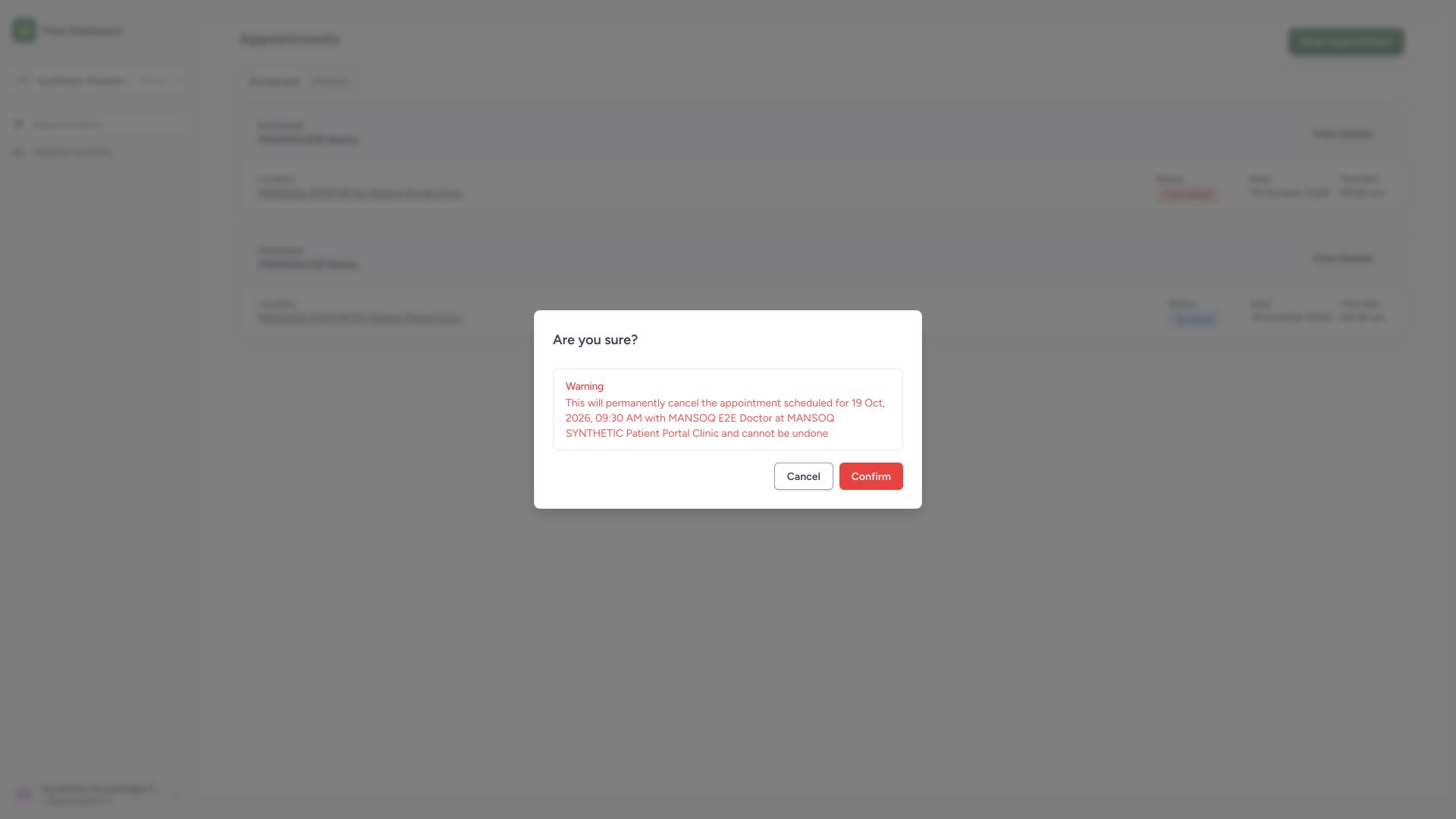 1
1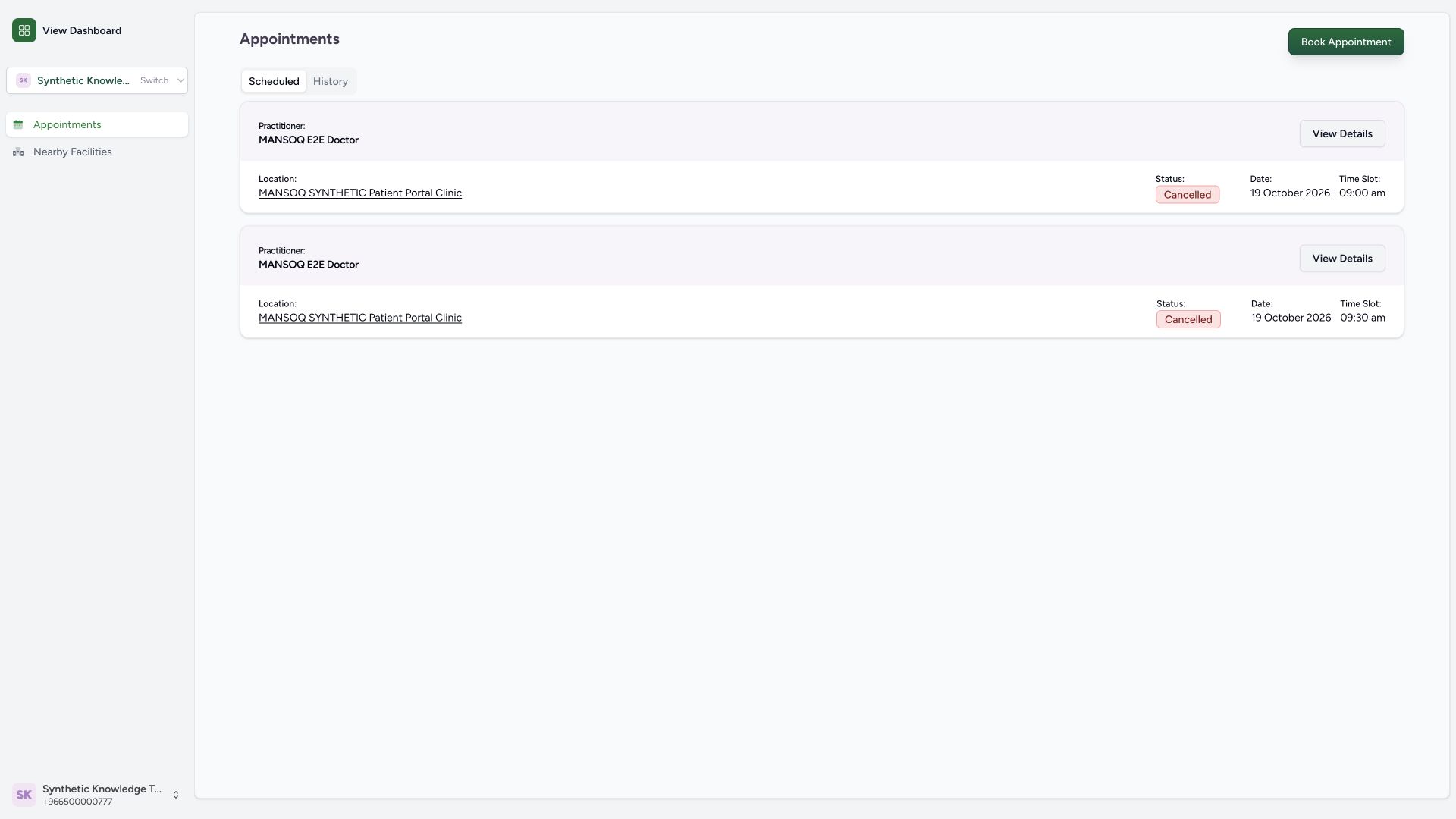 1
1