 MANSOQ
 Clinical care
Print one response or the questionnaire responses for this encounter
Choose the correct scope, inspect authors and values, and verify the actual saved browser PDF without treating it as a full clinical export.
 123
123Capture details
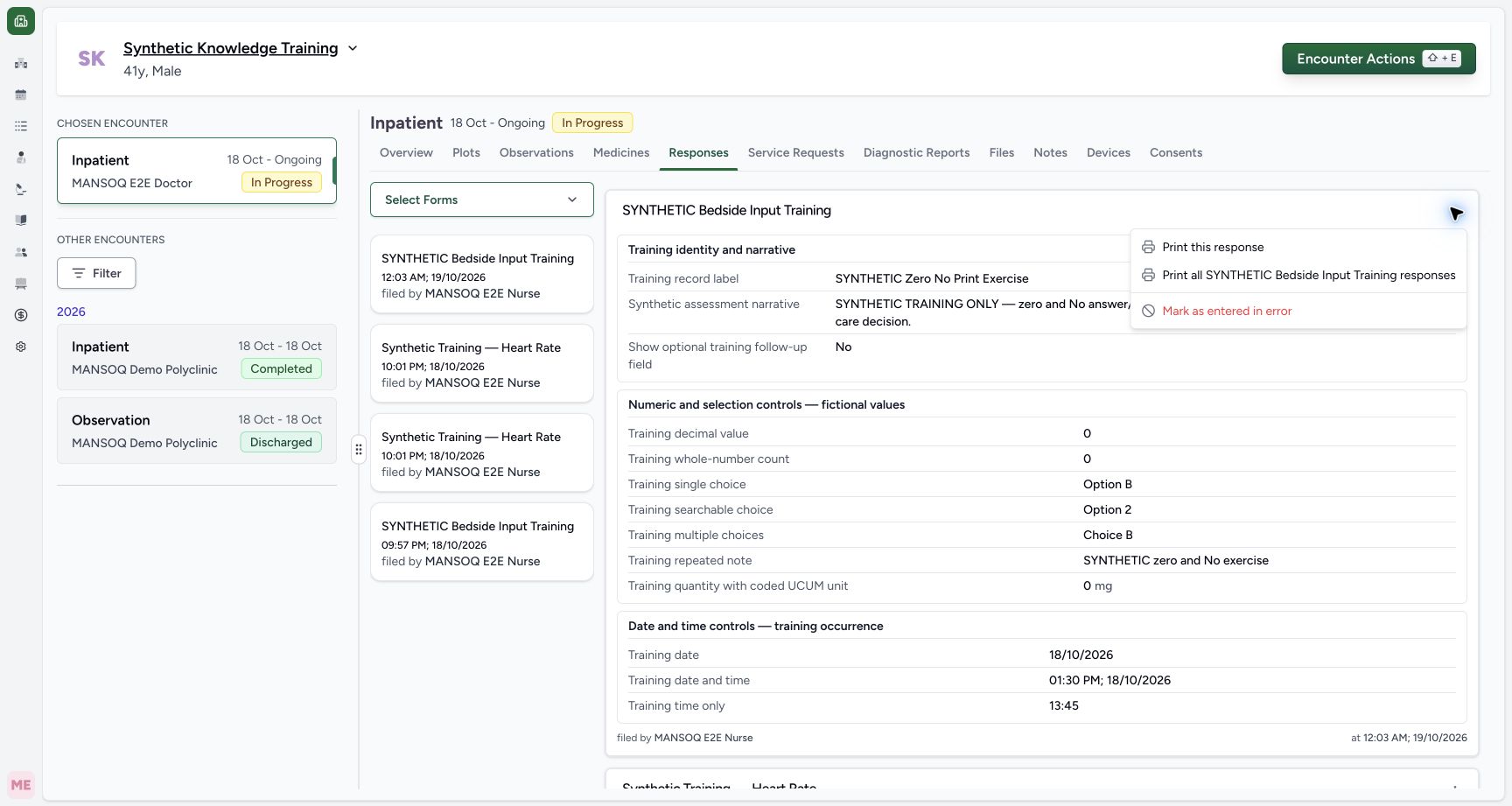
Actual Nurse in the original pinned production UI, isolated synthetic Polyclinic estate. Form/response examples use one active Inpatient encounter. Diagnostic printing uses the same synthetic patient and an earlier encounter, not the active bedside encounter. These fictional values are software exercises, not patient assessment, specimen testing or clinical decisions. Doctor permissions are source-backed but this execution does not qualify every role or facility. Action: the intended saved response menu offers Print this response and Print all SYNTHETIC Bedside Input Training responses as separate scopes; correction is a separate action.
- Print only this response: Print only this response
- Print returned responses for this questionnaire and encounter: Print returned responses for this questionnaire and encounter
- Correction is a separate workflow: Correction is a separate workflow
 123
123Capture details
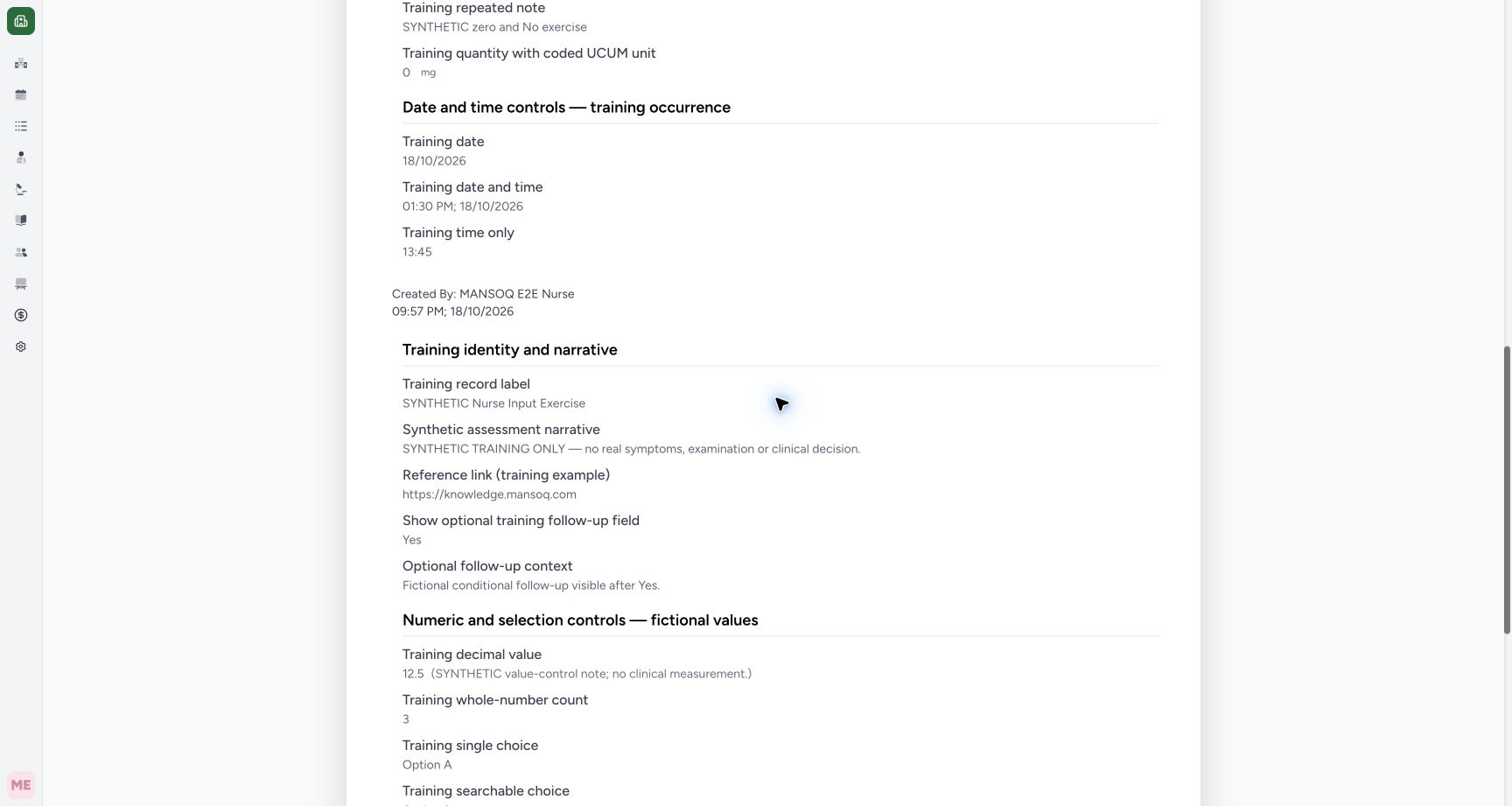
Actual Nurse in the original pinned production UI, isolated synthetic Polyclinic estate. Form/response examples use one active Inpatient encounter. Diagnostic printing uses the same synthetic patient and an earlier encounter, not the active bedside encounter. These fictional values are software exercises, not patient assessment, specimen testing or clinical decisions. Doctor permissions are source-backed but this execution does not qualify every role or facility. Success: normal all-response Print and Chrome Save as PDF created an actual56103-byte3-page document containing both exact API-returned unstructured responses. Content and all rendered pages reviewed; an orphaned date/time heading on page2 remains a disclosed pagination polish limitation.
- Both-response PDF includes this earlier label: Both-response PDF includes this earlier label
- Earlier Yes and its follow-up remain retained: Earlier Yes and its follow-up remain retained
- Earlier decimal and its note remain retained: Earlier decimal and its note remain retained
8 min read · Source baseline f6e9f05f
Verification and applicability
source reviewed
Check your installed version, permissions and local configuration.
Before you begin
- Authorized clinical-data access and the correct patient/encounter; printing read access differs from permission to submit or correct a response.
- The demonstrated bedside questionnaire is a finite synthetic training configuration; available forms and conditional fields depend on facility configuration.
1. Choose the correct print action
In Responses, identify the intended response card by label and recorded time. Open its More Actions menu. Print this response opens the selected response; Print all responses for questionnaire requests the matching unstructured responses for this questionnaire and encounter. Mark as Entered in Error is a separate correction action, not a printing control. It has its own authorization, status and time-window rules.
123Capture details
Actual Nurse in the original pinned production UI, isolated synthetic Polyclinic estate. Form/response examples use one active Inpatient encounter. Diagnostic printing uses the same synthetic patient and an earlier encounter, not the active bedside encounter. These fictional values are software exercises, not patient assessment, specimen testing or clinical decisions. Doctor permissions are source-backed but this execution does not qualify every role or facility. Action: the intended saved response menu offers Print this response and Print all SYNTHETIC Bedside Input Training responses as separate scopes; correction is a separate action.
- Print only this response: Print only this response
- Print returned responses for this questionnaire and encounter: Print returned responses for this questionnaire and encounter
- Correction is a separate workflow: Correction is a separate workflow
2. Verify the single-response context
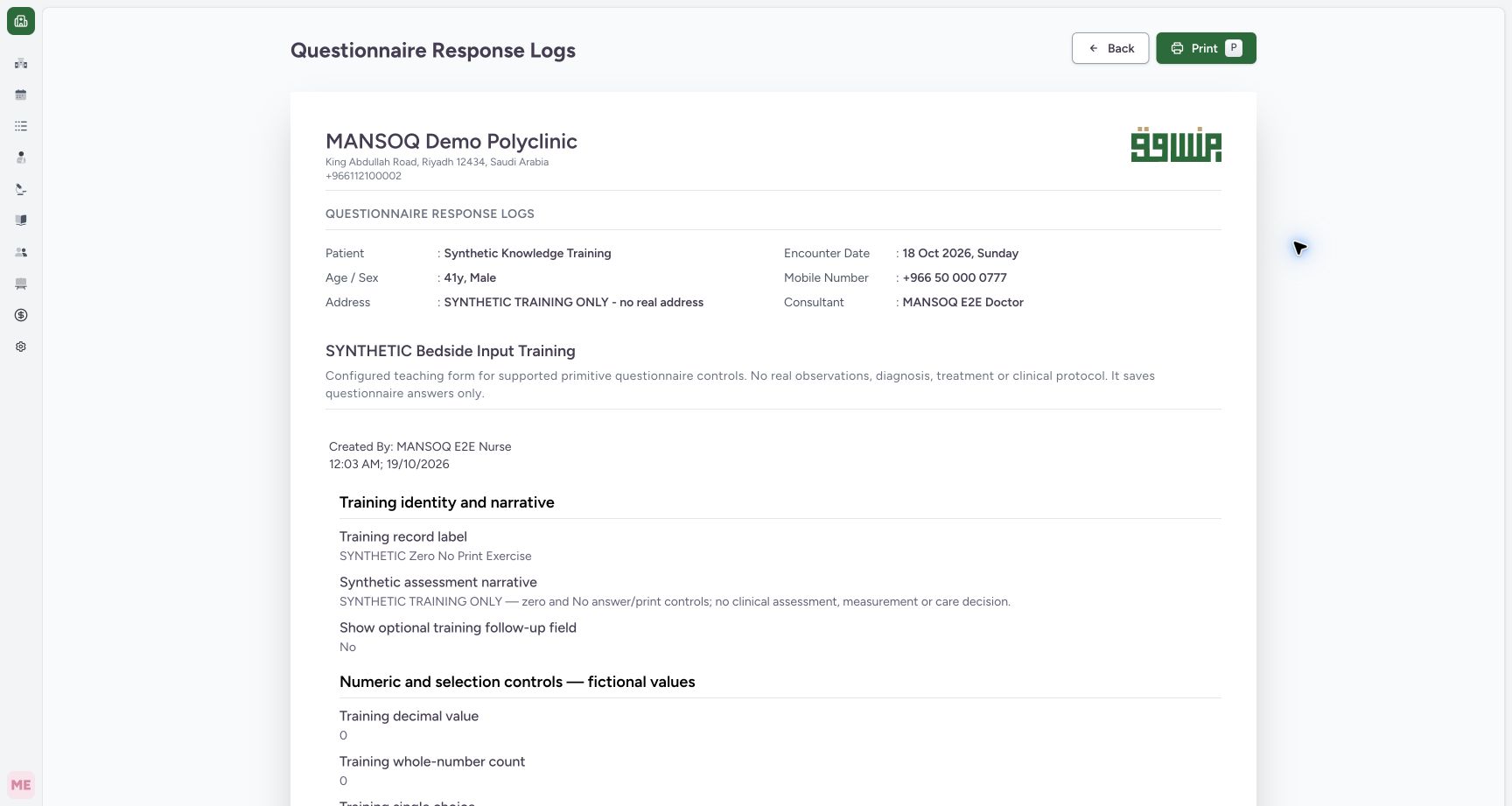
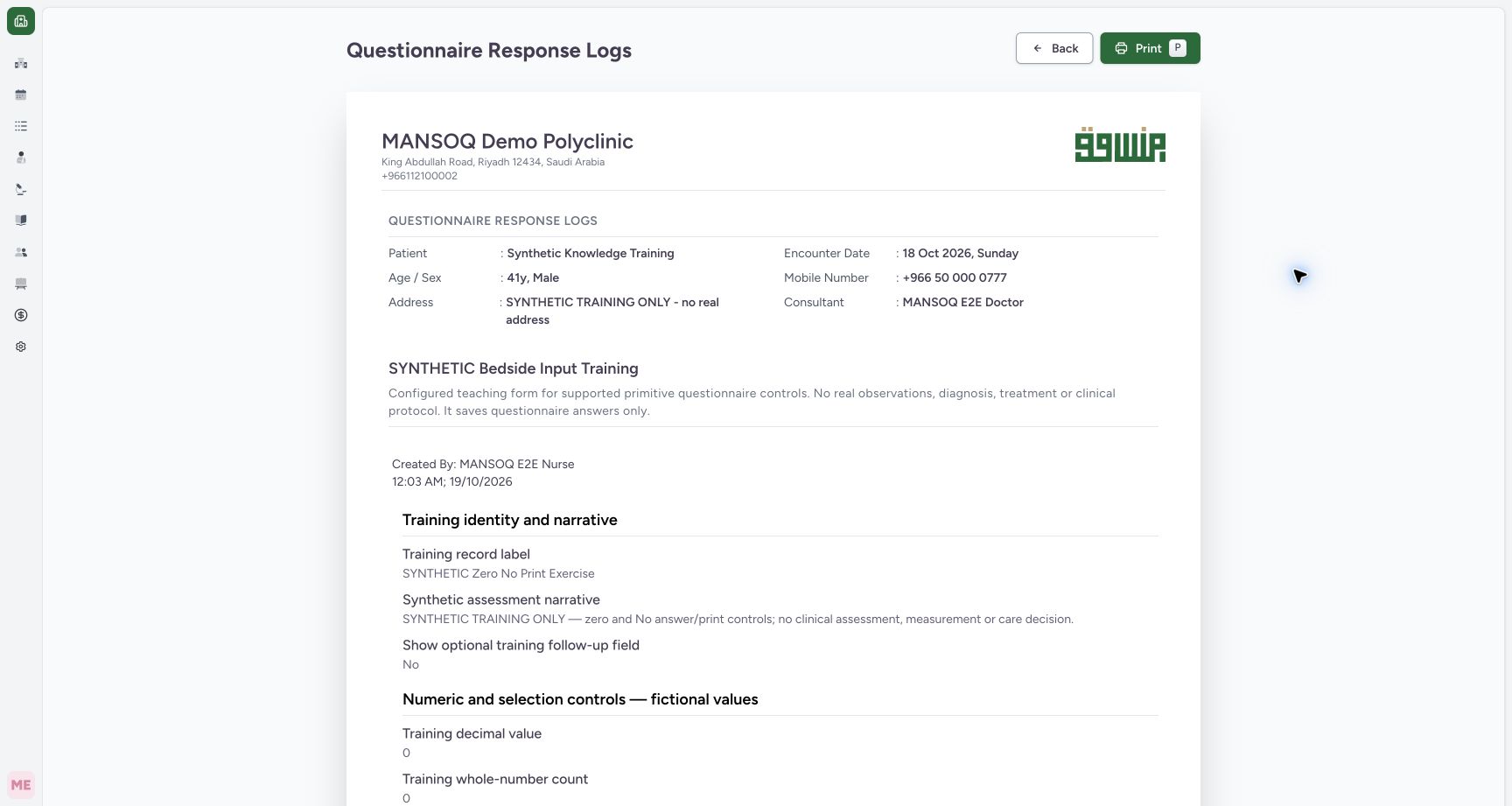
Select Print this response and check the facility, patient, questionnaire title and Created By name/time before printing. The single preview is for the selected saved response. The page Print button opens the browser print dialog; opening a preview alone does not generate or save a file.
 123
123Capture details
Actual Nurse in the original pinned production UI, isolated synthetic Polyclinic estate. Form/response examples use one active Inpatient encounter. Diagnostic printing uses the same synthetic patient and an earlier encounter, not the active bedside encounter. These fictional values are software exercises, not patient assessment, specimen testing or clinical decisions. Doctor permissions are source-backed but this execution does not qualify every role or facility. Action: the single saved response print page is loaded with patient/encounter identity, questionnaire title, Nurse attribution and Print control. Printing is separate from changing response status.
- Confirm the synthetic patient: Confirm the synthetic patient
- Read the response author and recorded time: Read the response author and recorded time
- Print opens the browser print dialog: Print opens the browser print dialog
3. Read the answers and units before export
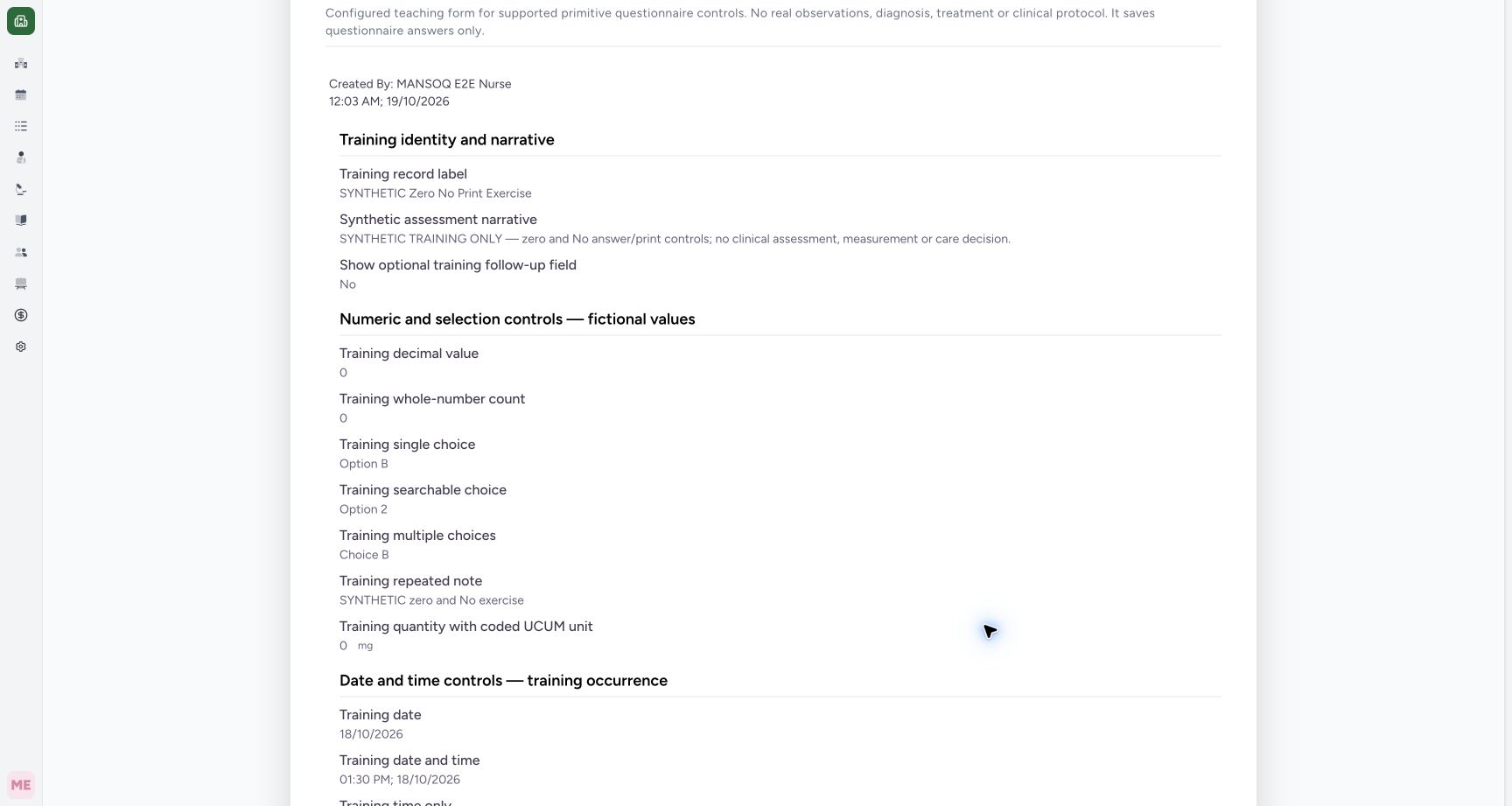
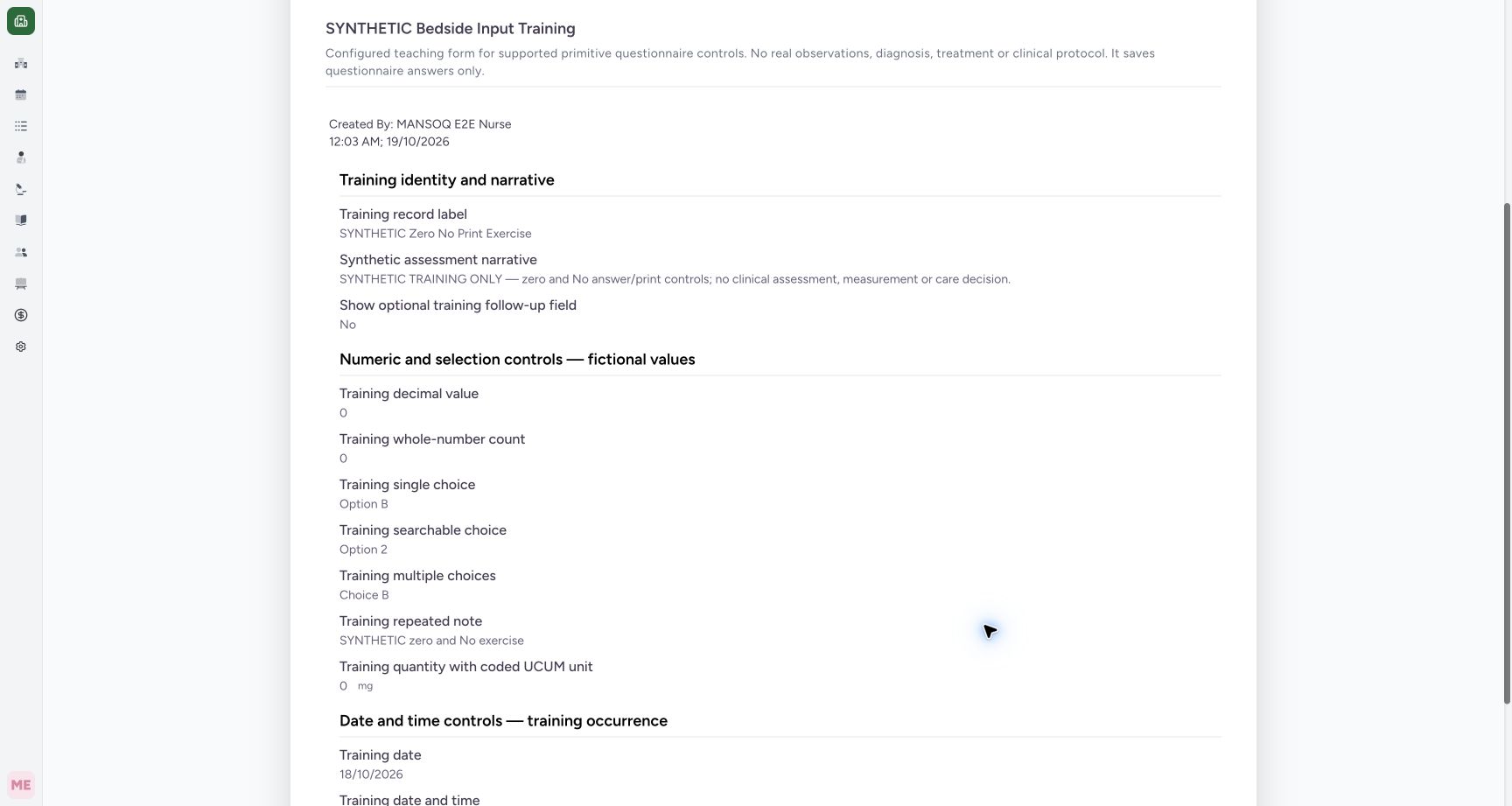
Scroll the actual printable content. The newer exercise retains No, decimal 0, whole-number 0, 0 mg and the committed dates. A quantity must be read together with its unit. Compare the label and author/time with the intended source response. The structured-question payloads are excluded by this renderer; this is not an export of diagnoses, medications, care teams or all encounter data.
 1234
1234Capture details
Actual Nurse in the original pinned production UI, isolated synthetic Polyclinic estate. Form/response examples use one active Inpatient encounter. Diagnostic printing uses the same synthetic patient and an earlier encounter, not the active bedside encounter. These fictional values are software exercises, not patient assessment, specimen testing or clinical decisions. Doctor permissions are source-backed but this execution does not qualify every role or facility. Action: the actual single-response print page visibly includes No, decimal0, integer0 and quantity0mg from the canonical saved strings. There is no supported-path zero/No omission in this observed branch.
- No remains visible in the printable answer: No remains visible in the printable answer
- Decimal zero is retained: Decimal zero is retained
- Whole-number zero is retained: Whole-number zero is retained
- Zero retains its mg unit: Zero retains its mg unit
4. Print and verify the actual single-response file
Select Print, then use the normal browser destination and save controls. The observed local exercise used Save as PDF and produced an actual two-page file. Its saved bytes/hash, extracted content and both rendered pages were checked independently: the newer label, No, zero values, unit and dates are retained, while the earlier response label is absent. Review all output pages before sharing; a successful save alone does not qualify every print setting or device.
 1234
1234Capture details
Actual Nurse in the original pinned production UI, isolated synthetic Polyclinic estate. Form/response examples use one active Inpatient encounter. Diagnostic printing uses the same synthetic patient and an earlier encounter, not the active bedside encounter. These fictional values are software exercises, not patient assessment, specimen testing or clinical decisions. Doctor permissions are source-backed but this execution does not qualify every role or facility. Success: normal Chrome Save as PDF produced an actual45406-byte2-page single-response PDF; independent saved-file hash/text and both rendered pages confirm the intended label, Nurse attribution, No/zero/unit/time answers and absence of the earlier separate response. No clinical status or record changed.
- No survived the actual browser PDF export: No survived the actual browser PDF export
- Decimal zero is retained: Decimal zero is retained
- Whole-number zero is retained: Whole-number zero is retained
- Quantity zero and mg are retained: Quantity zero and mg are retained
5. Check the combined scope and earlier response
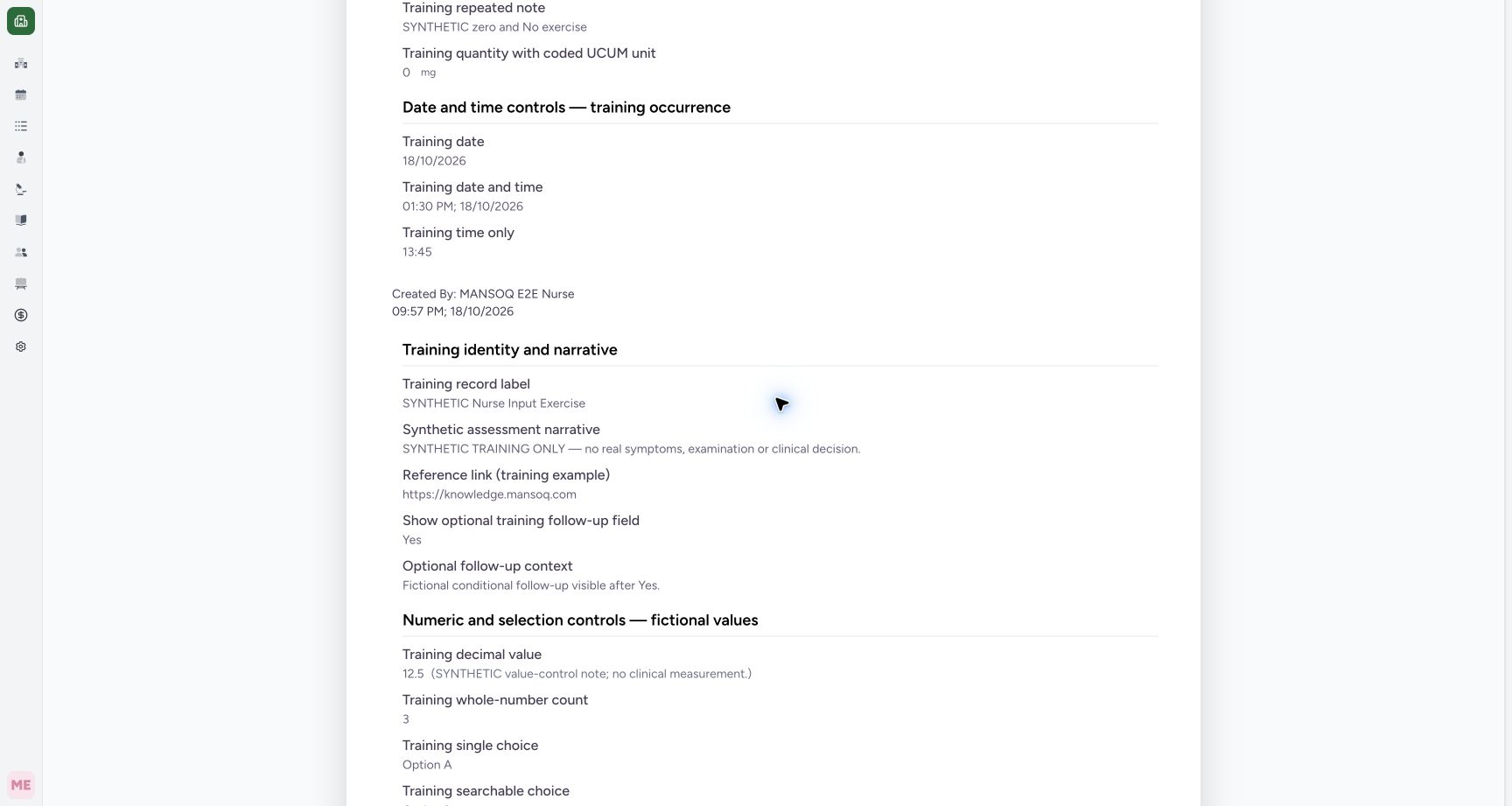
Return to the response card menu and choose Print all responses for questionnaire. The observed query returned exactly two matching unstructured responses for this questionnaire and encounter. Scroll past the newer exercise and confirm the earlier SYNTHETIC Nurse Input Exercise, its separate recorded time, Yes, follow-up and earlier numeric values. Do not confuse two response records with one amended answer.
 12
12Capture details
Actual Nurse in the original pinned production UI, isolated synthetic Polyclinic estate. Form/response examples use one active Inpatient encounter. Diagnostic printing uses the same synthetic patient and an earlier encounter, not the active bedside encounter. These fictional values are software exercises, not patient assessment, specimen testing or clinical decisions. Doctor permissions are source-backed but this execution does not qualify every role or facility. Action: the all-responses print page is scoped to the same configured questionnaire and encounter, with two returned saved responses. This is not an export of every clinical entity or every questionnaire.
- Confirm this questionnaire scope: Confirm this questionnaire scope
- Print the returned response set: Print the returned response set
 123
123Capture details
Actual Nurse in the original pinned production UI, isolated synthetic Polyclinic estate. Form/response examples use one active Inpatient encounter. Diagnostic printing uses the same synthetic patient and an earlier encounter, not the active bedside encounter. These fictional values are software exercises, not patient assessment, specimen testing or clinical decisions. Doctor permissions are source-backed but this execution does not qualify every role or facility. Action: the all-response page includes the earlier separate Nurse input exercise with Yes, follow-up context and its prior created time; it is absent from the single-response export.
- Earlier response has a different label: Earlier response has a different label
- Earlier Yes answer is distinct from the newer No: Earlier Yes answer is distinct from the newer No
- Read the earlier response recorded time: Read the earlier response recorded time
6. Verify the combined file and original pagination limitation
Use the normal Print → Save as PDF flow. The observed original release produced three pages containing both labels, No/Yes, zero/unit values and the earlier 12.5 note and 4.5 mg. All pages were inspected. This original print layout leaves the earlier Date and time controls heading at the foot of page2 while its answers continue on page3. Content is retained, but pagination is not fully polished in this baseline. A separate corrected-build qualification is required before calling that layout repaired.
123Capture details
Actual Nurse in the original pinned production UI, isolated synthetic Polyclinic estate. Form/response examples use one active Inpatient encounter. Diagnostic printing uses the same synthetic patient and an earlier encounter, not the active bedside encounter. These fictional values are software exercises, not patient assessment, specimen testing or clinical decisions. Doctor permissions are source-backed but this execution does not qualify every role or facility. Success: normal all-response Print and Chrome Save as PDF created an actual56103-byte3-page document containing both exact API-returned unstructured responses. Content and all rendered pages reviewed; an orphaned date/time heading on page2 remains a disclosed pagination polish limitation.
- Both-response PDF includes this earlier label: Both-response PDF includes this earlier label
- Earlier Yes and its follow-up remain retained: Earlier Yes and its follow-up remain retained
- Earlier decimal and its note remain retained: Earlier decimal and its note remain retained
Know the scope boundary
The combined renderer skips structured questions and structured payloads. Its matching-list request has no user pagination controls in this view; the observed count2/returned2 result qualifies this finite set only. It does not prove completeness for arbitrary larger sets, patient-wide history or all facility records. The PDF is a browser output, separate from stored generated reports.
12Capture details
Actual Nurse in the original pinned production UI, isolated synthetic Polyclinic estate. Form/response examples use one active Inpatient encounter. Diagnostic printing uses the same synthetic patient and an earlier encounter, not the active bedside encounter. These fictional values are software exercises, not patient assessment, specimen testing or clinical decisions. Doctor permissions are source-backed but this execution does not qualify every role or facility. Action: the all-responses print page is scoped to the same configured questionnaire and encounter, with two returned saved responses. This is not an export of every clinical entity or every questionnaire.
- Confirm this questionnaire scope: Confirm this questionnaire scope
- Print the returned response set: Print the returned response set
123Capture details
Actual Nurse in the original pinned production UI, isolated synthetic Polyclinic estate. Form/response examples use one active Inpatient encounter. Diagnostic printing uses the same synthetic patient and an earlier encounter, not the active bedside encounter. These fictional values are software exercises, not patient assessment, specimen testing or clinical decisions. Doctor permissions are source-backed but this execution does not qualify every role or facility. Action: the all-response page includes the earlier separate Nurse input exercise with Yes, follow-up context and its prior created time; it is absent from the single-response export.
- Earlier response has a different label: Earlier response has a different label
- Earlier Yes answer is distinct from the newer No: Earlier Yes answer is distinct from the newer No
- Read the earlier response recorded time: Read the earlier response recorded time
Troubleshooting
The preview contains a different response or scope
Check patient, questionnaire, response label and Created By time. Return to the intended card and choose single versus all deliberately. Review every output page, especially when older and newer records have different answers.
123Capture details
Actual Nurse in the original pinned production UI, isolated synthetic Polyclinic estate. Form/response examples use one active Inpatient encounter. Diagnostic printing uses the same synthetic patient and an earlier encounter, not the active bedside encounter. These fictional values are software exercises, not patient assessment, specimen testing or clinical decisions. Doctor permissions are source-backed but this execution does not qualify every role or facility. Action: the intended saved response menu offers Print this response and Print all SYNTHETIC Bedside Input Training responses as separate scopes; correction is a separate action.
- Print only this response: Print only this response
- Print returned responses for this questionnaire and encounter: Print returned responses for this questionnaire and encounter
- Correction is a separate workflow: Correction is a separate workflow
123Capture details
Actual Nurse in the original pinned production UI, isolated synthetic Polyclinic estate. Form/response examples use one active Inpatient encounter. Diagnostic printing uses the same synthetic patient and an earlier encounter, not the active bedside encounter. These fictional values are software exercises, not patient assessment, specimen testing or clinical decisions. Doctor permissions are source-backed but this execution does not qualify every role or facility. Action: the single saved response print page is loaded with patient/encounter identity, questionnaire title, Nurse attribution and Print control. Printing is separate from changing response status.
- Confirm the synthetic patient: Confirm the synthetic patient
- Read the response author and recorded time: Read the response author and recorded time
- Print opens the browser print dialog: Print opens the browser print dialog
123Capture details
Actual Nurse in the original pinned production UI, isolated synthetic Polyclinic estate. Form/response examples use one active Inpatient encounter. Diagnostic printing uses the same synthetic patient and an earlier encounter, not the active bedside encounter. These fictional values are software exercises, not patient assessment, specimen testing or clinical decisions. Doctor permissions are source-backed but this execution does not qualify every role or facility. Action: the all-response page includes the earlier separate Nurse input exercise with Yes, follow-up context and its prior created time; it is absent from the single-response export.
- Earlier response has a different label: Earlier response has a different label
- Earlier Yes answer is distinct from the newer No: Earlier Yes answer is distinct from the newer No
- Read the earlier response recorded time: Read the earlier response recorded time
A heading appears on a different printed page from its answers
Inspect all pages. The original observed combined output has this pagination limitation even though the answers remain present. Keep the original output distinct from a separately qualified repaired build; do not report a clean layout from preview alone.
123Capture details
Actual Nurse in the original pinned production UI, isolated synthetic Polyclinic estate. Form/response examples use one active Inpatient encounter. Diagnostic printing uses the same synthetic patient and an earlier encounter, not the active bedside encounter. These fictional values are software exercises, not patient assessment, specimen testing or clinical decisions. Doctor permissions are source-backed but this execution does not qualify every role or facility. Success: normal all-response Print and Chrome Save as PDF created an actual56103-byte3-page document containing both exact API-returned unstructured responses. Content and all rendered pages reviewed; an orphaned date/time heading on page2 remains a disclosed pagination polish limitation.
- Both-response PDF includes this earlier label: Both-response PDF includes this earlier label
- Earlier Yes and its follow-up remain retained: Earlier Yes and its follow-up remain retained
- Earlier decimal and its note remain retained: Earlier decimal and its note remain retained
Source evidence
References are pinned to the private MANSOQ source repository. Repository access is required to open these links.
- repositories/platform/mansoq-web/src/components/Facility/ConsultationDetails/QuestionnaireResponsesList.tsx:321 · f6e9f05f
- repositories/platform/mansoq-web/src/components/Facility/ConsultationDetails/PrintAllQuestionnaireResponses.tsx:77 · f6e9f05f
- repositories/platform/mansoq-web/src/components/Facility/ConsultationDetails/PrintQuestionnaireResponse.tsx:4 · f6e9f05f
- repositories/platform/mansoq-web/src/MansoqUI/misc/PrintPreview.tsx:127 · f6e9f05f
- repositories/platform/mansoq-core/mansoq/emr/api/viewsets/questionnaire_response.py:97 · f6e9f05f