 MANSOQ
 Nursing
Record a coded observation and verify repeated readings
Enter a configured coded measurement, inspect its saved time and author, review the vital summary and retain separate repeat readings.
5 min read · Source baseline f6e9f05f
Verification and applicability
source reviewed
Check your installed version, permissions and local configuration.
Before you begin
- Select the correct patient and active encounter, with permission to submit its clinical questionnaire.
- Open the facility-approved measurement form through Forms. Organization sharing, terminology code and unit must be configured.
- The pictured Synthetic Training — Heart Rate form is a specially configured example, not a promised universal default assessment.
1. Confirm the form, code context and displayed unit
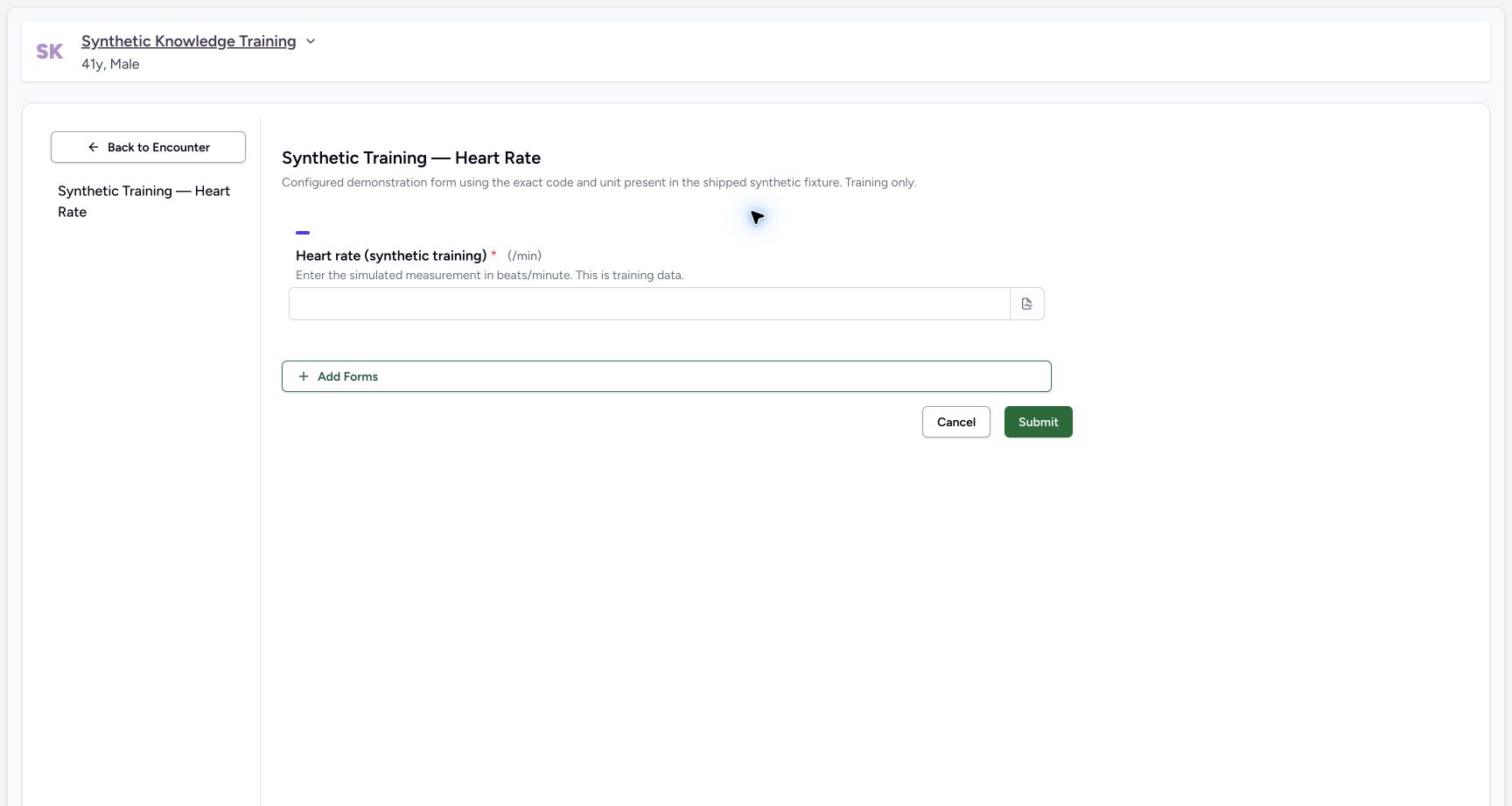
Read the patient banner, form title and question label. The illustrated form is Synthetic Training — Heart Rate, with a required integer answer and displayed /min unit. Use the actual facility-approved measurement and its intended unit. This rendered form exposes no separate occurrence-time input; do not assume an arbitrary earlier measurement time was selected.
 1
1Capture details
Actual unchanged production UI on the pinned source, authenticated Nurse, fictional active Inpatient encounter in isolated Polyclinic. Heart-rate values are explicitly simulated software training measurements, not actual clinical care. Other roles, measurements, protocols and facility variants are not qualified. Start: Nurse opens the configured synthetic Heart Rate form on the active encounter. The required integer field displays /min. No separate occurrence-time picker is exposed by this rendered form.
- Enter the simulated heart-rate value in the displayed /min unit: Enter the simulated heart-rate value in the displayed /min unit
2. Review the measurement and submit
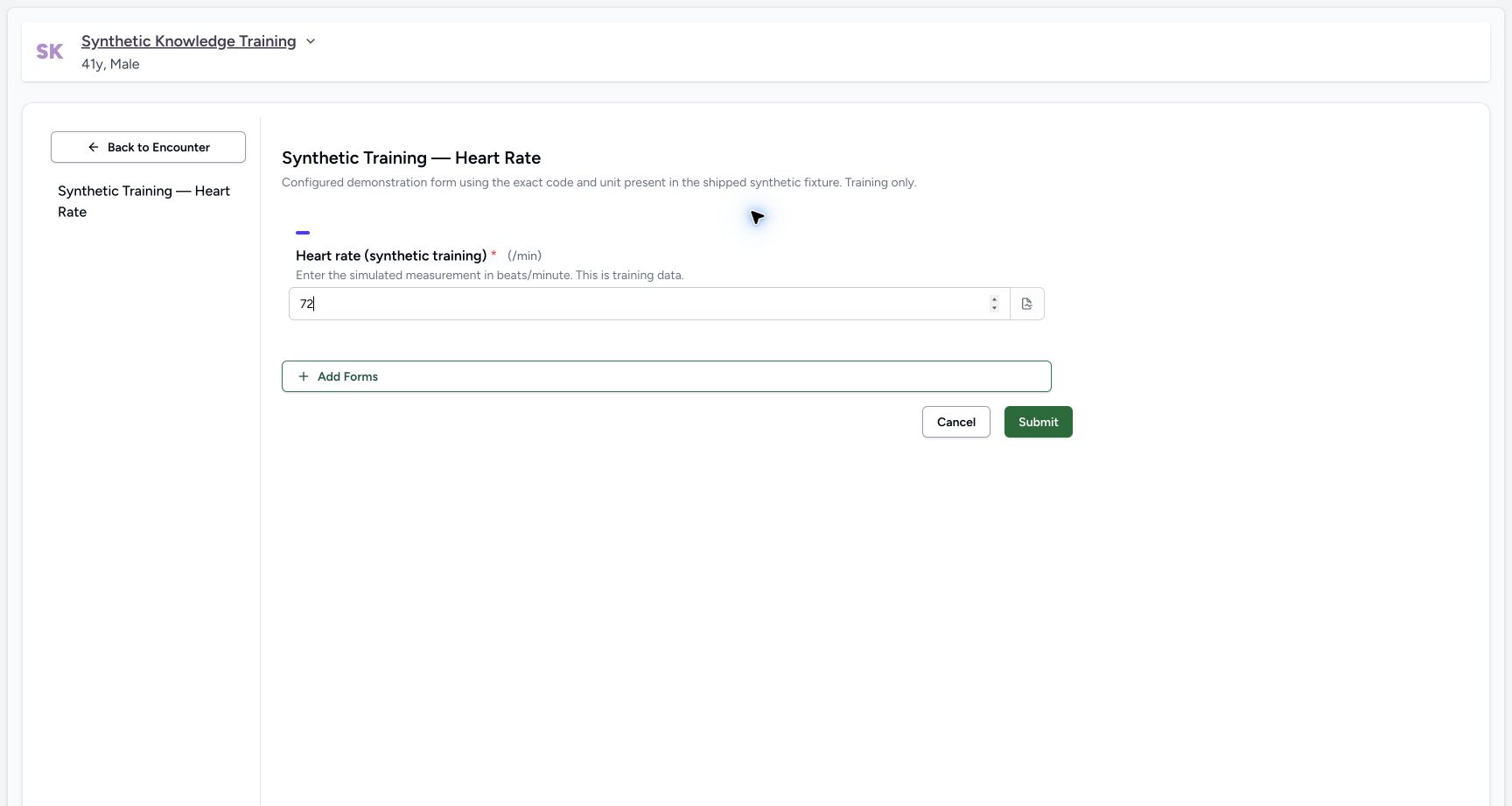
Enter the intended measurement, review its value and unit, then select Submit. The example enters a fictional 72/min. Wait for navigation and verify the saved result; a filled field is only a draft until submission succeeds.
 1
1Capture details
Actual unchanged production UI on the pinned source, authenticated Nurse, fictional active Inpatient encounter in isolated Polyclinic. Heart-rate values are explicitly simulated software training measurements, not actual clinical care. Other roles, measurements, protocols and facility variants are not qualified. Action: synthetic heart-rate 72/min is reviewed before Submit. This is a software training measurement, not real bedside care.
- Submit the reviewed coded observation form: Submit the reviewed coded observation form
3. Verify the individual observation
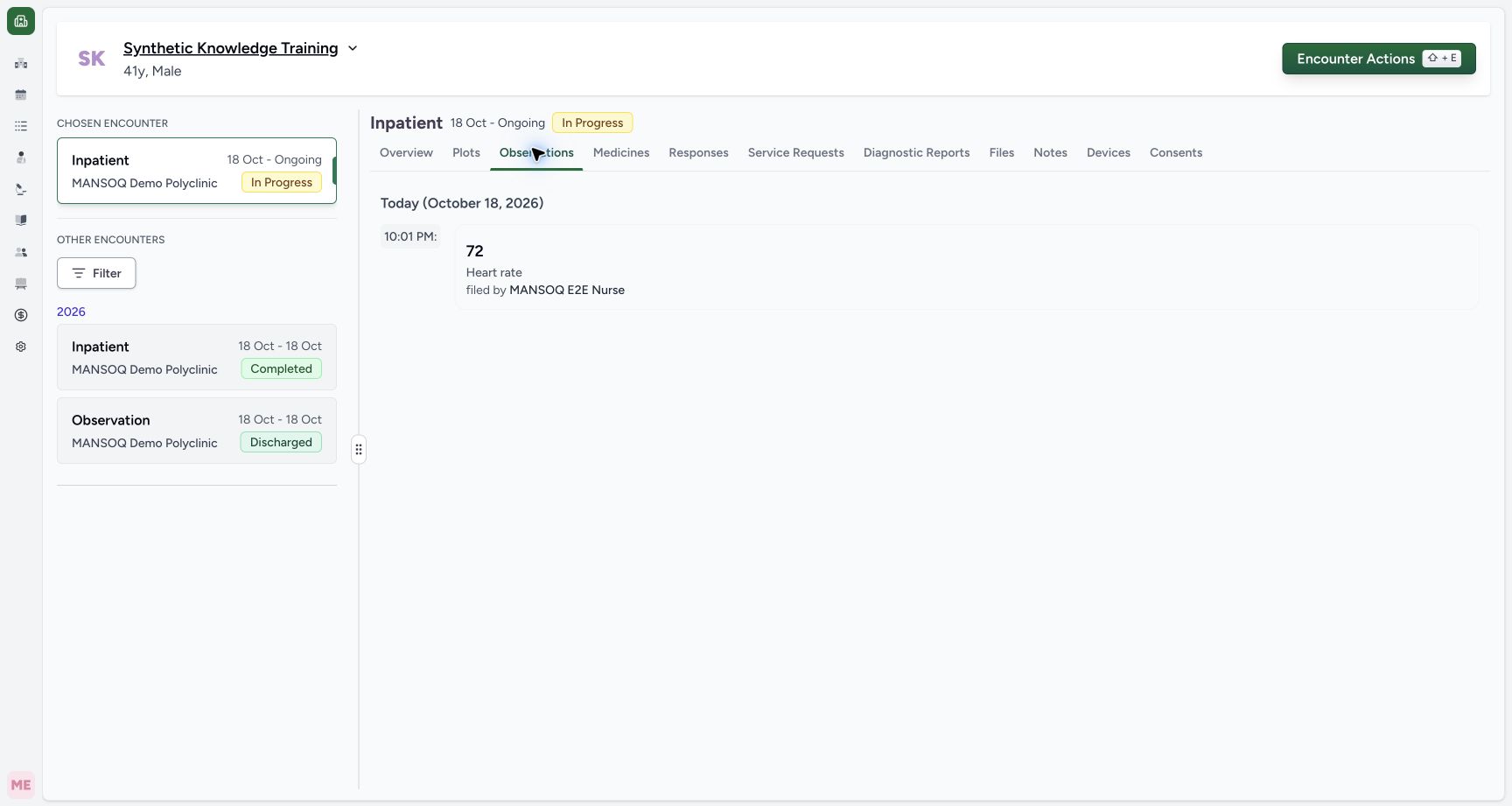
Open Observations on the selected encounter. Check the date group, displayed effective time, value, observation name and filing author. The example shows Heart rate72, 10:01PM and MANSOQ E2E Nurse. Independent readback confirms a Final observation with LOINC8867-4 and UCUM/min.
 1
1Capture details
Actual unchanged production UI on the pinned source, authenticated Nurse, fictional active Inpatient encounter in isolated Polyclinic. Heart-rate values are explicitly simulated software training measurements, not actual clinical care. Other roles, measurements, protocols and facility variants are not qualified. Success: Observations shows Heart rate 72 under Today with effective display 10:01 PM and filed by MANSOQ E 2 E Nurse. This differs from a generic questionnaire-only answer.
- Observations: verify the saved value, effective display time and author: Observations: verify the saved value, effective display time and author
4. Read the configured vital summary
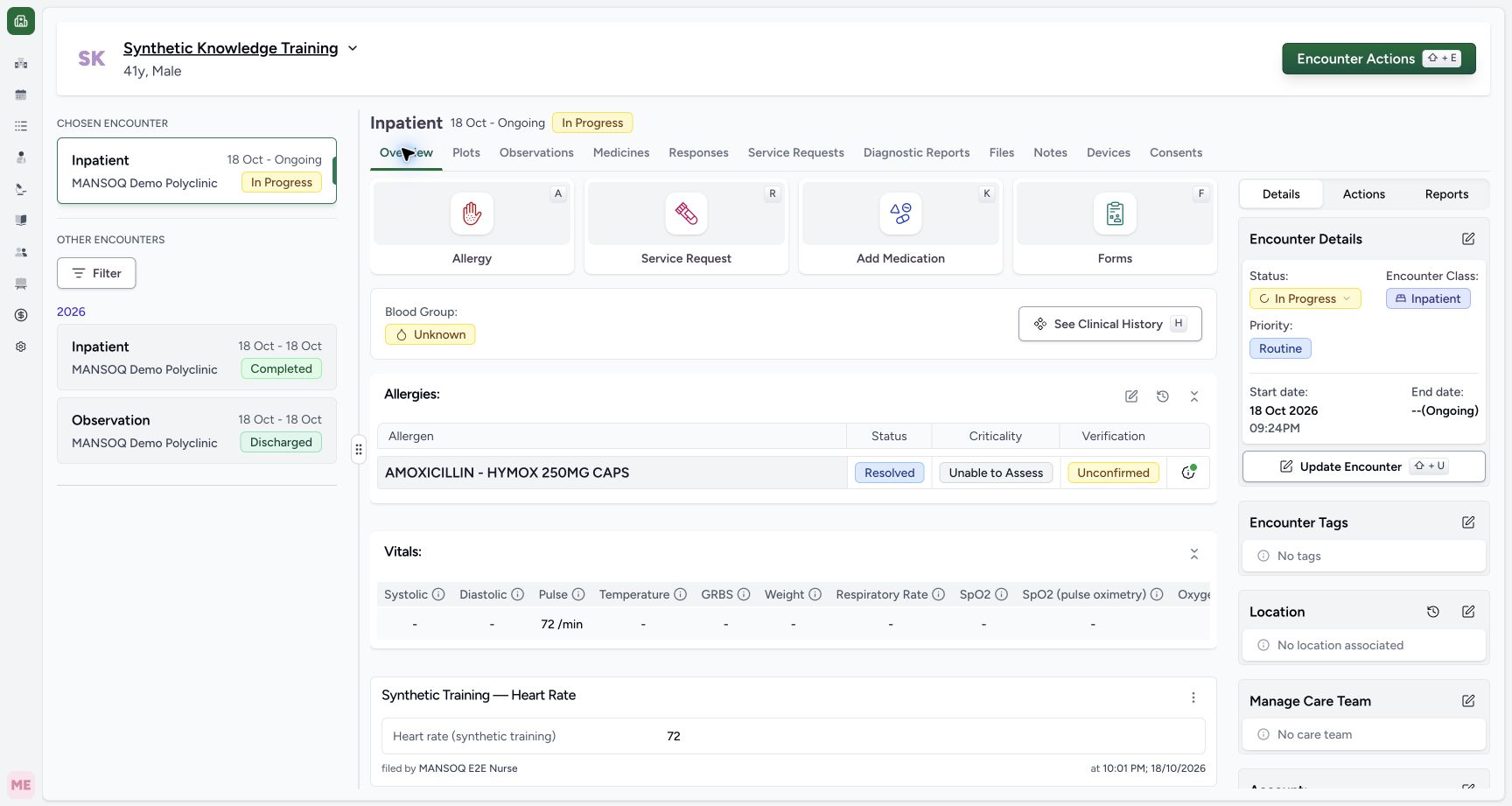
Return to Overview and locate Vitals. In this screenshot, taken before the second entry, Pulse72/min appears. Other parameters show a dash because they have no matching recorded value; a dash is not zero or a normal measurement. The questionnaire response remains a separate retained card beneath the summary.
 1
1Capture details
Actual unchanged production UI on the pinned source, authenticated Nurse, fictional active Inpatient encounter in isolated Polyclinic. Heart-rate values are explicitly simulated software training measurements, not actual clinical care. Other roles, measurements, protocols and facility variants are not qualified. Success: Overview’s configured Vitals table displays Pulse 72/min while unrelated parameters remain blank. The clinical form response is retained separately below.
- Pulse summary: latest matching coded observation; blank other parameters are not zero measurements: Pulse summary: latest matching coded observation; blank other parameters are not zero measurements
5. Record a later reading as a separate entry
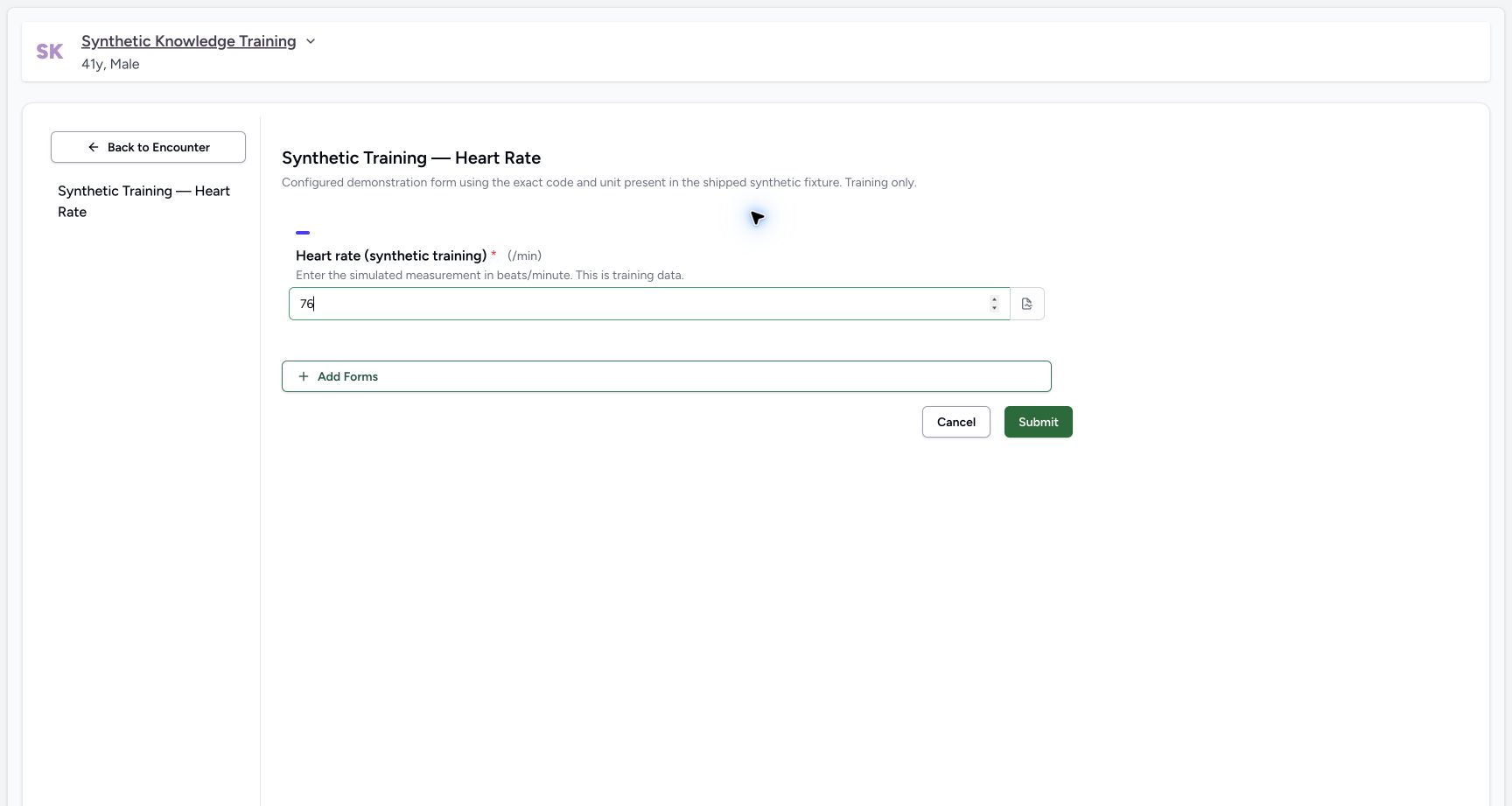
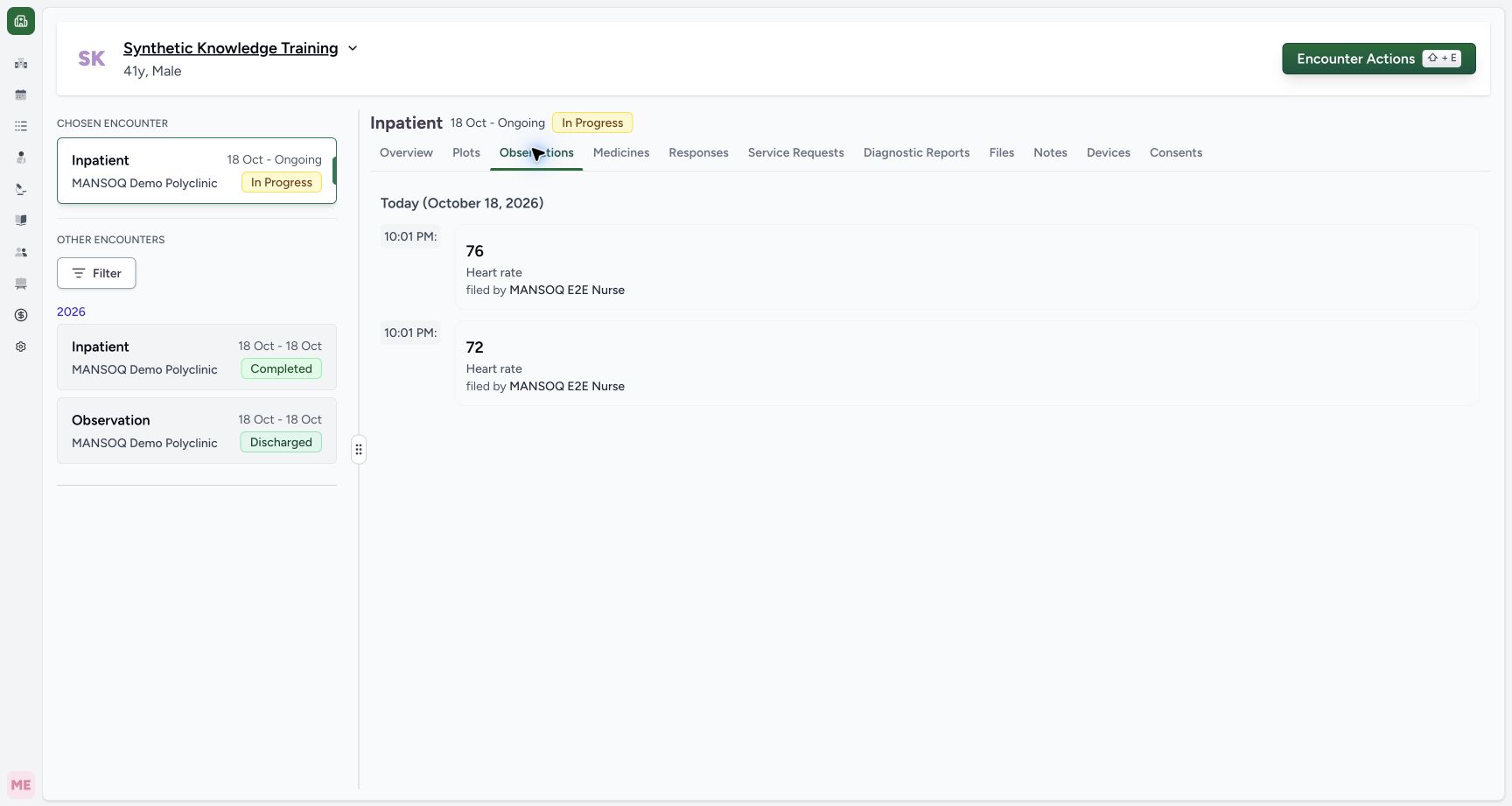
For another real measurement, open the approved form again, enter the new value and submit it. This demonstration submits fictional 76/min after72. Observations retains both entries, newest first. Both display the same minute, but independent readback confirms different effective timestamps and response IDs. A new form submission does not overwrite the earlier reading.
 1
1Capture details
Actual unchanged production UI on the pinned source, authenticated Nurse, fictional active Inpatient encounter in isolated Polyclinic. Heart-rate values are explicitly simulated software training measurements, not actual clinical care. Other roles, measurements, protocols and facility variants are not qualified. Action: a new form entry records a second fictional heart rate 76/min. This creates a separate time-stamped observation rather than editing the earlier 72/min value.
- Submit this new simulated measurement; the earlier saved reading remains separate: Submit this new simulated measurement; the earlier saved reading remains separate
 1
1Capture details
Actual unchanged production UI on the pinned source, authenticated Nurse, fictional active Inpatient encounter in isolated Polyclinic. Heart-rate values are explicitly simulated software training measurements, not actual clinical care. Other roles, measurements, protocols and facility variants are not qualified. Success: Observations retains separate 76 and 72 heart-rate entries, newest first, each filed by Nurse. Both display the same minute; that display precision does not mean their persisted timestamps are identical.
- Verify both retained readings rather than treating a new entry as an edit: Verify both retained readings rather than treating a new entry as an edit
Coded observation versus plain response
This configured integer question carries LOINC8867-4 and UCUM/min and creates an Observation. A generic uncoded number or text answer can remain only a Questionnaire Response. Use the configured clinical form; do not rename a generic answer and expect it to populate the vital summary.
1Capture details
Actual unchanged production UI on the pinned source, authenticated Nurse, fictional active Inpatient encounter in isolated Polyclinic. Heart-rate values are explicitly simulated software training measurements, not actual clinical care. Other roles, measurements, protocols and facility variants are not qualified. Start: Nurse opens the configured synthetic Heart Rate form on the active encounter. The required integer field displays /min. No separate occurrence-time picker is exposed by this rendered form.
- Enter the simulated heart-rate value in the displayed /min unit: Enter the simulated heart-rate value in the displayed /min unit
1Capture details
Actual unchanged production UI on the pinned source, authenticated Nurse, fictional active Inpatient encounter in isolated Polyclinic. Heart-rate values are explicitly simulated software training measurements, not actual clinical care. Other roles, measurements, protocols and facility variants are not qualified. Success: Overview’s configured Vitals table displays Pulse 72/min while unrelated parameters remain blank. The clinical form response is retained separately below.
- Pulse summary: latest matching coded observation; blank other parameters are not zero measurements: Pulse summary: latest matching coded observation; blank other parameters are not zero measurements
Verified scope
Actual unchanged production UI on the pinned source, authenticated Nurse, fictional active Inpatient encounter in isolated Polyclinic. Heart-rate values are explicitly simulated software training measurements, not actual clinical care. Other roles, measurements, protocols and facility variants are not qualified. The saved timestamps are19:01:28.312595Z and19:01:57.480685Z, displayed in the workstation’s Asia/Riyadh time as the same22:01 minute. This package does not establish correction, entered-in-error, blood-pressure components, abnormal ranges or all nursing assessment types.
1Capture details
Actual unchanged production UI on the pinned source, authenticated Nurse, fictional active Inpatient encounter in isolated Polyclinic. Heart-rate values are explicitly simulated software training measurements, not actual clinical care. Other roles, measurements, protocols and facility variants are not qualified. Success: Observations retains separate 76 and 72 heart-rate entries, newest first, each filed by Nurse. Both display the same minute; that display precision does not mean their persisted timestamps are identical.
- Verify both retained readings rather than treating a new entry as an edit: Verify both retained readings rather than treating a new entry as an edit
Troubleshooting
The value is in the response but absent from Vitals
Confirm the question is coded as an observation and its code/unit match the deployment’s configured parameter group. The exact clinical form and terminology need configuration; plain questionnaire answers do not automatically become vital measurements.
1Capture details
Actual unchanged production UI on the pinned source, authenticated Nurse, fictional active Inpatient encounter in isolated Polyclinic. Heart-rate values are explicitly simulated software training measurements, not actual clinical care. Other roles, measurements, protocols and facility variants are not qualified. Start: Nurse opens the configured synthetic Heart Rate form on the active encounter. The required integer field displays /min. No separate occurrence-time picker is exposed by this rendered form.
- Enter the simulated heart-rate value in the displayed /min unit: Enter the simulated heart-rate value in the displayed /min unit
1Capture details
Actual unchanged production UI on the pinned source, authenticated Nurse, fictional active Inpatient encounter in isolated Polyclinic. Heart-rate values are explicitly simulated software training measurements, not actual clinical care. Other roles, measurements, protocols and facility variants are not qualified. Success: Overview’s configured Vitals table displays Pulse 72/min while unrelated parameters remain blank. The clinical form response is retained separately below.
- Pulse summary: latest matching coded observation; blank other parameters are not zero measurements: Pulse summary: latest matching coded observation; blank other parameters are not zero measurements
Two readings display the same time
The pictured list displays minute precision. Read every retained value and author; use the authorized audit record when precise timestamps are required. Do not delete or re-enter a correct saved value merely because its displayed minute matches another.
1Capture details
Actual unchanged production UI on the pinned source, authenticated Nurse, fictional active Inpatient encounter in isolated Polyclinic. Heart-rate values are explicitly simulated software training measurements, not actual clinical care. Other roles, measurements, protocols and facility variants are not qualified. Success: Observations retains separate 76 and 72 heart-rate entries, newest first, each filed by Nurse. Both display the same minute; that display precision does not mean their persisted timestamps are identical.
- Verify both retained readings rather than treating a new entry as an edit: Verify both retained readings rather than treating a new entry as an edit
Source evidence
References are pinned to the private MANSOQ source repository. Repository access is required to open these links.
- repositories/platform/mansoq-web/src/pages/Encounters/tabs/observations.tsx:71 · f6e9f05f
- repositories/platform/mansoq-web/src/components/Patient/vitals/list.tsx:84 · f6e9f05f
- repositories/platform/mansoq-core/mansoq/emr/models/observation.py:6 · f6e9f05f
- repositories/platform/mansoq-core/mansoq/emr/resources/questionnaire/utils.py:12 · f6e9f05f