 MANSOQ
 Clinical care
Update a resource request status and review its request letter
Review the available statuses, verify a saved Approved record and inspect the actual populated request-letter preview.
6 min read · Source baseline f6e9f05f
Verification and applicability
Actual 1920 × 1080 Chrome screenshots from isolated synthetic MANSOQ source f6e9f05f. Existing Staff creates one own-origin request to an existing synthetic public destination, saves one note and changes Pending to Approved through normal UI. Independent normal Staff resource/comment GET200 reads verify the same UUID, exact origin/destination, no patient, no assigned person and retained note. No new grants, directory visibility changes, external contact, real care/financial/transport action or all-role/facility qualification.
Check your installed version, permissions and local configuration.
Before you begin
- Use an operator authorized for the origin facility and the intended saved request. This example uses the existing synthetic Staff role in its own Clinic; another role or a visible sidebar alone does not establish access.
- The destination is an existing clearly synthetic public Clinic. No patient, real goods, treatment, transport, payment or external message is requested. Software status labels in this exercise do not represent care approval, delivery or acceptance by the destination.
1. Use Update Status and review the full status menu
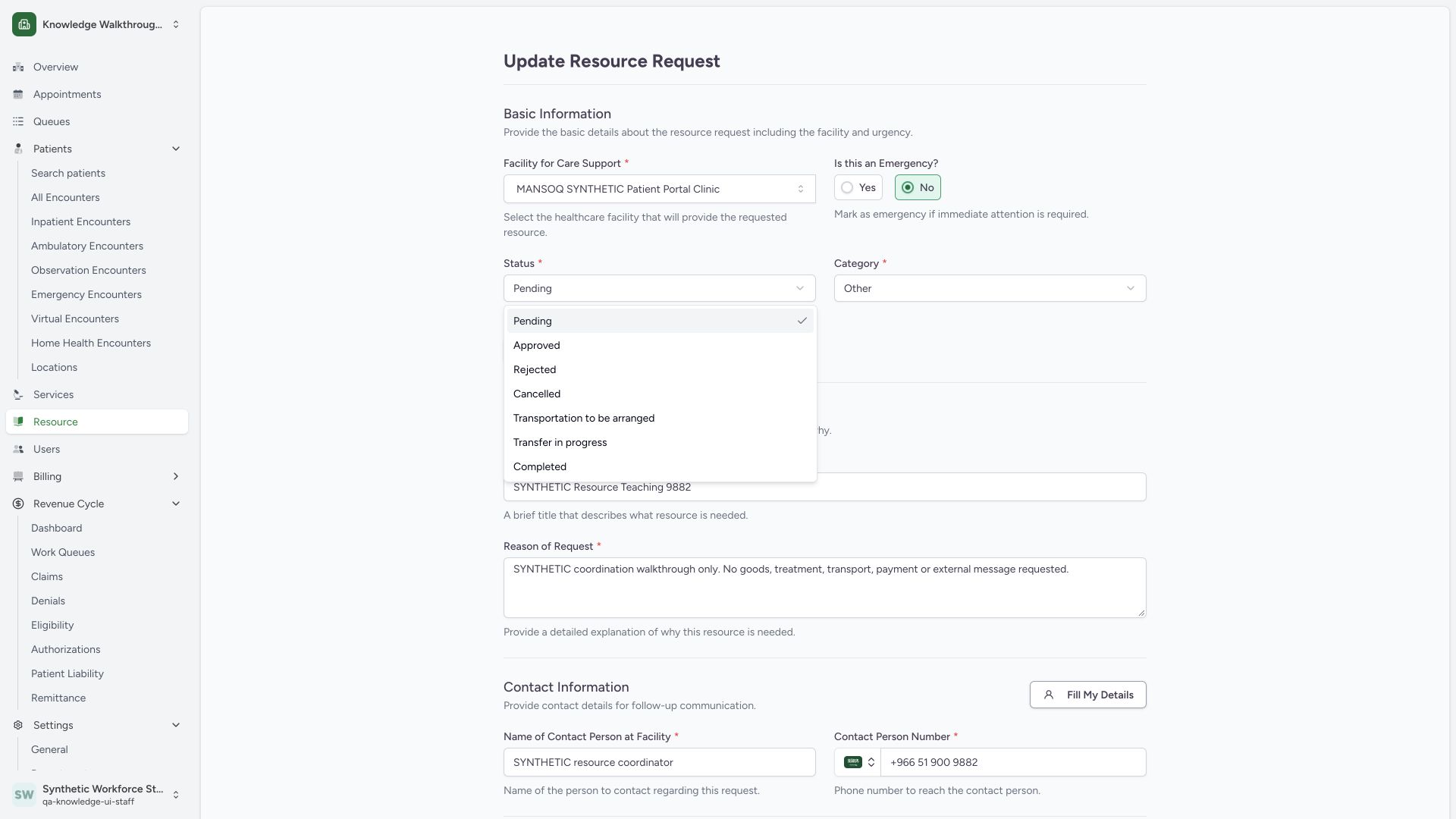
From saved request detail, Update Status opens the full update form. The pictured Status menu lists Pending, Approved, Rejected, Cancelled, Transportation to be arranged, Transfer in progress and Completed. Approved is the only subsequent status submitted in this package; the other choices are visible options and require separate workflow teaching.
 1234
1234Capture details
Actual 1920 × 1080 Chrome pixels; pinned source f6e9f05f. Staff own-origin synthetic resource coordination, comments and request letter
- Status field: The current persisted state is Pending before this change.
- Approved option: This is a software state in the synthetic example.
- Transport-related choices: Visible options alone do not prove transport workflows.
- Completed option: This visible option has not been selected or saved in this package.
2. Verify the saved Approved state and modification actor
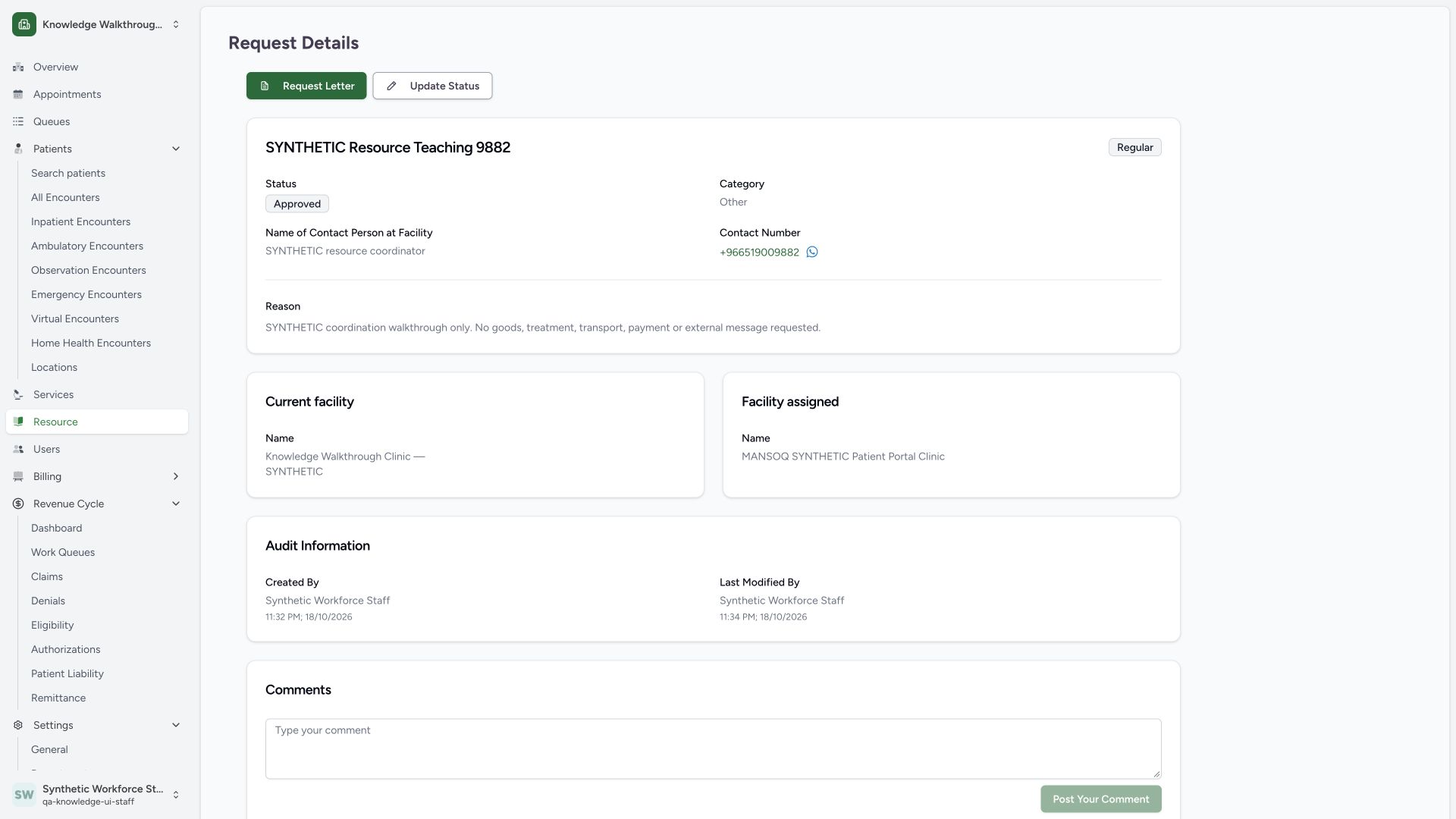
After the local synthetic status update is submitted, saved detail shows Approved and the updated Staff audit timestamp. The origin, destination, synthetic reason/contact and note are retained. Independent Staff GET200 verifies the same request UUID and approved state. Request Letter and Update Status remain available. This is a software record state, not clinical approval or evidence of delivery.
 1234
1234Capture details
Actual 1920 × 1080 Chrome pixels; pinned source f6e9f05f. Staff own-origin synthetic resource coordination, comments and request letter
- Approved record state: Confirm the saved local software state.
- Update Status: Open the full form for an authorized subsequent status update.
- Request Letter: Preview a letter populated from this saved resource record.
- Last modification: The audit identifies the Staff actor and updated time.
3. Review the actual populated request-letter preview
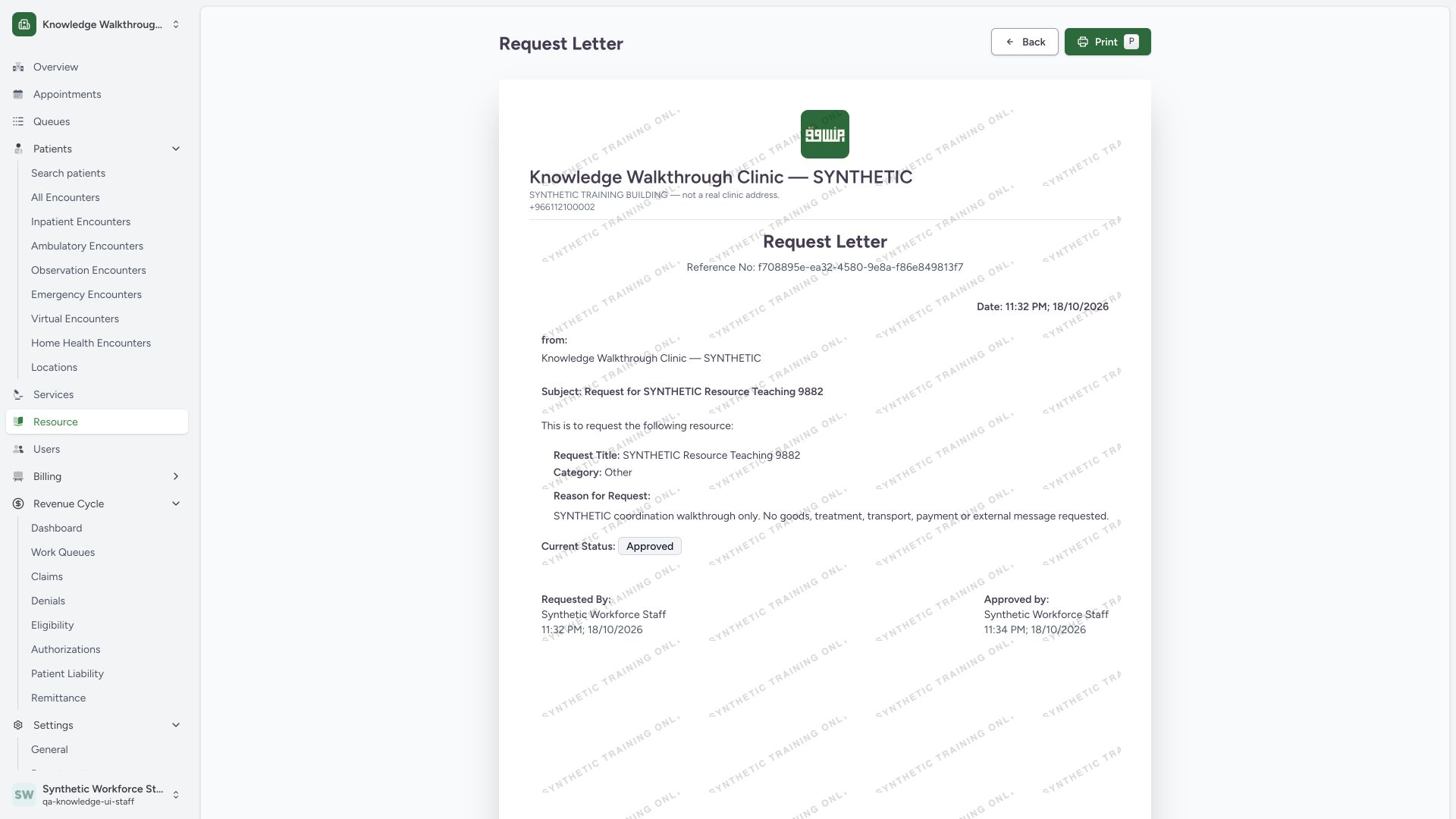
Open Request Letter. Compare the reference UUID, origin Clinic, synthetic title/reason, category and Approved status with the saved detail. This configured training letter shows the creator and the last modifying user/times in its Requested By and Approved by blocks, plus a synthetic watermark. The pictured Print control and Back control are available. This package does not certify a print dialog, downloaded PDF or dispatched letter.
 123456
Capture details
Actual 1920 × 1080 Chrome pixels; pinned source f6e9f05f. Staff own-origin synthetic resource coordination, comments and request letter
- Reference number: Compare the letter reference to the saved request UUID.
- Synthetic reason: Review the saved reason before any printing.
- Current status: This preview reflects the saved Approved state.
- Updated actor: The Approved by block uses the saved modifying user in this template.
- Print: Use the normal browser print workflow when needed.
- Back: Return to the saved request detail.
Status groups and unobserved branches
The source groups Pending, Approved, Transportation to be arranged and Transfer in progress under Active; Completed, Rejected and Cancelled are in the Completed group. This package does not include saved Completed/rejected/cancelled/transport states, incoming destination processing, assigned-user selection, multiple comments, pagination or patient-linked requests. Those branches remain separate capture tasks.
Version and access scope
These screenshots retain the original f6e9 training source provenance. The existing Staff account was observed only in its own origin Clinic. Separately tested access repairs do not make these baseline screenshots evidence that a later release or another role/facility has been verified.
Troubleshooting
A request seems absent from the default list after changing status
Check Incoming versus Outgoing, Active versus Completed group and the exact status tab. The default Pending filter does not display an Approved request.
The letter has an Approved by name
In this template that block uses the saved modifying user for approved/rejected status. Verify the audit and your organization’s approval process; the printed name alone does not establish a real clinical or external approval.
Source evidence
References are pinned to the private MANSOQ source repository. Repository access is required to open these links.
- repositories/platform/mansoq-web/src/Routers/routes/ResourceRoutes.tsx:9 · f6e9f05f
- repositories/platform/mansoq-web/src/components/Resource/ResourceList.tsx:32 · f6e9f05f
- repositories/platform/mansoq-web/src/components/Resource/ResourceForm.tsx:65 · f6e9f05f
- repositories/platform/mansoq-web/src/components/Resource/ResourceForm.tsx:172 · f6e9f05f
- repositories/platform/mansoq-web/src/components/Resource/ResourceForm.tsx:197 · f6e9f05f
- repositories/platform/mansoq-web/src/components/Resource/ResourceForm.tsx:277 · f6e9f05f
- repositories/platform/mansoq-web/src/types/facility/publicFacilityApi.ts:8 · f6e9f05f
- repositories/platform/mansoq-core/mansoq/emr/api/viewsets/facility.py:221 · f6e9f05f
- repositories/platform/mansoq-core/mansoq/emr/api/viewsets/resource_request.py:47 · f6e9f05f
- repositories/platform/mansoq-core/mansoq/emr/resources/resource_request/spec.py:64 · f6e9f05f
- repositories/platform/mansoq-web/src/components/Resource/ResourceDetails.tsx:132 · f6e9f05f
- repositories/platform/mansoq-web/src/components/Resource/ResourceCommentSection.tsx:50 · f6e9f05f
- repositories/platform/mansoq-web/src/components/Resource/PrintResourceLetter.tsx:29 · f6e9f05f
- repositories/platform/mansoq-web/src/components/Resource/PrintResourceLetter.tsx:112 · f6e9f05f
- repositories/platform/mansoq-web/src/types/resourceRequest/resourceRequest.ts:16 · f6e9f05f