 MANSOQ
 Clinical care
Attach a file through a configured clinical form
Complete a required structured Files question, correct missing names, remove an unsaved selection and inspect the saved file with the original attribution limitation.
7 min read · Source baseline f6e9f05f
Verification and applicability
source reviewed
Check your installed version, permissions and local configuration.
Before you begin
- Verify the patient, selected encounter, clinical documentation purpose and applicable write/read permission. This guide was executed as Nurse in an active Inpatient encounter at a synthetic Polyclinic; other roles and facilities require their own qualification.
- Use authorized documents and follow the facility’s approved process. All pictured records and file contents are explicitly synthetic, nonbinding software exercises.
1. Open a configured form with a Files question
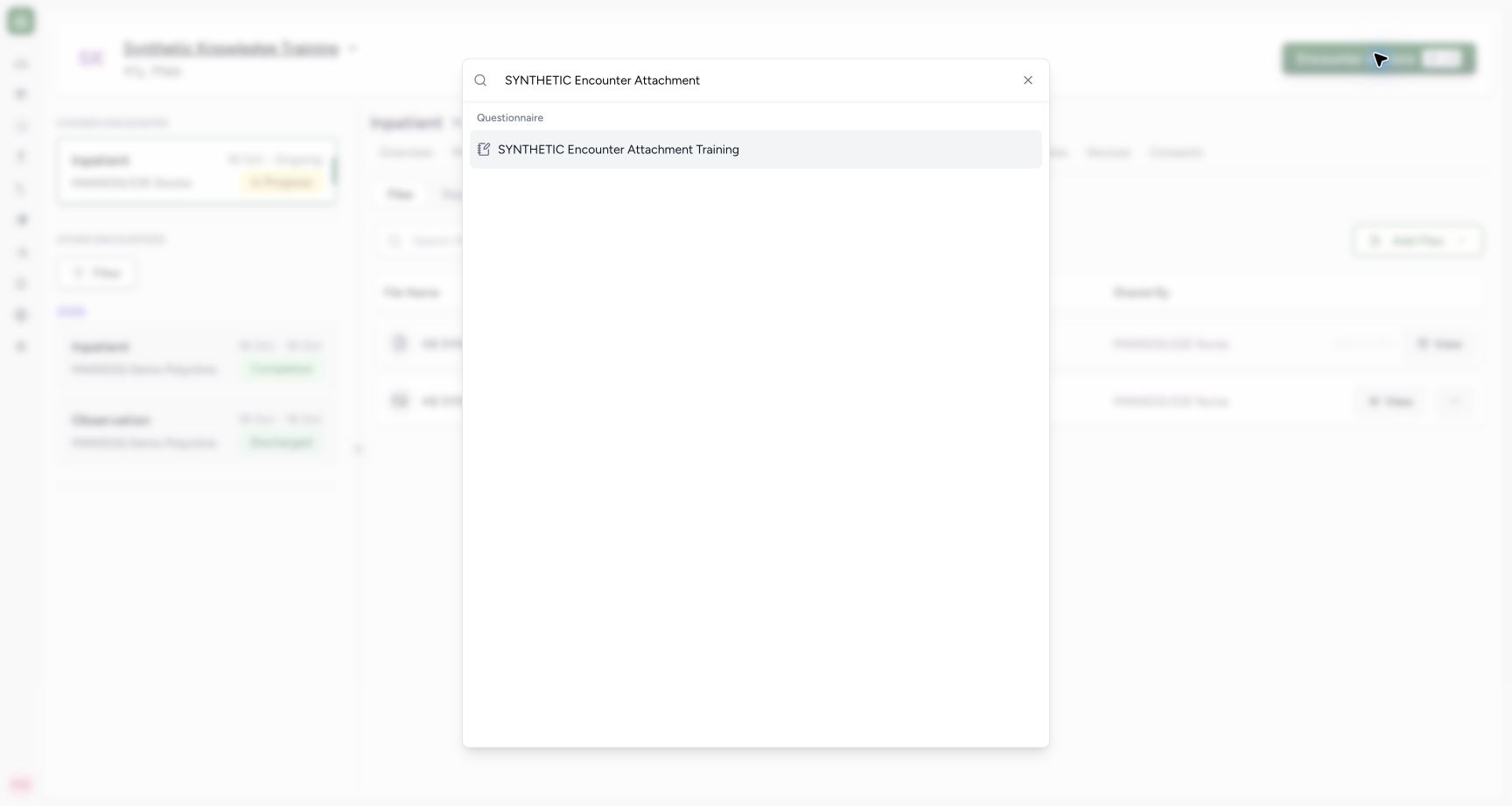
Open Encounter Actions and search for the relevant configured form. This example uses SYNTHETIC Encounter Attachment Training, a normal locally configured form in the existing organization scope. That title is a teaching fixture, not a universal shipped form name. Your facility must configure an appropriate form before this entry appears.
 12
12Capture details
Actual Nurse in the original pinned production UI, isolated synthetic active Inpatient encounter at a Polyclinic. These are harmless software training files and nonbinding Research/Deny examples, not real clinical documents, patient decisions, signatures or treatment authorization. Other role, facility, hardware and failure branches remain unqualified. Start: In Encounter Actions search, configured SYNTHETIC Encounter Attachment Training is available through existing normal form scope; no role or permission grant was added.
- Search for the configured attachment form: Search for the configured attachment form
- Open the supported bedside Files question: Open the supported bedside Files question
 12
12Capture details
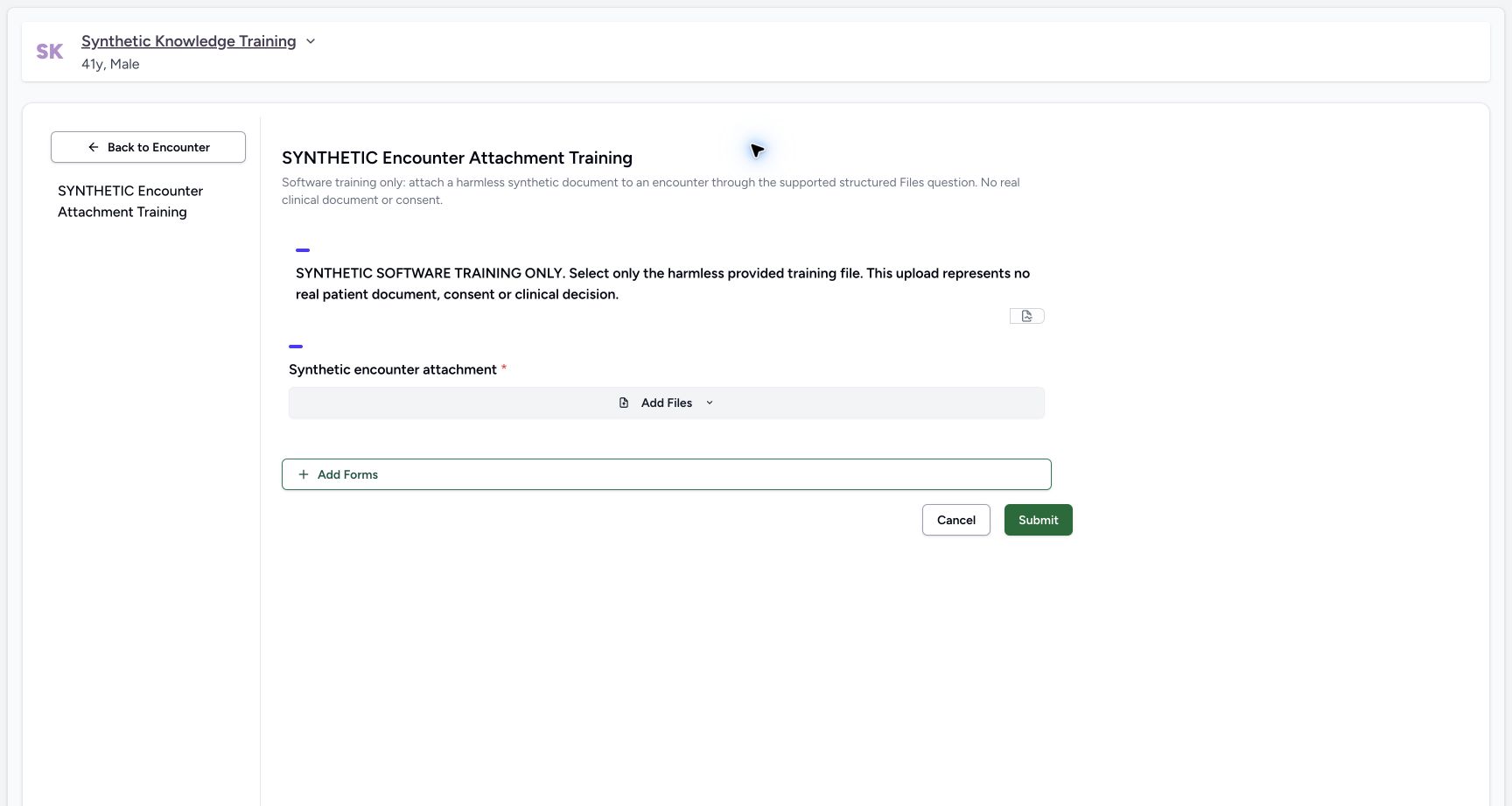
Actual Nurse in the original pinned production UI, isolated synthetic active Inpatient encounter at a Polyclinic. These are harmless software training files and nonbinding Research/Deny examples, not real clinical documents, patient decisions, signatures or treatment authorization. Other role, facility, hardware and failure branches remain unqualified. Start: Configured bedside form contains explicit synthetic notice and required structured Files question with Add Files; this is not a generic text answer or a consent signature.
- Choose a file for this structured question: Choose a file for this structured question
- Submission persists the structured upload only after validation: Submission persists the structured upload only after validation
2. Identify the required attachment question
Read the form notice and required Synthetic encounter attachment question. Add Files chooses a pending file for this question. The required marker means an empty answer cannot be submitted successfully.
12Capture details
Actual Nurse in the original pinned production UI, isolated synthetic active Inpatient encounter at a Polyclinic. These are harmless software training files and nonbinding Research/Deny examples, not real clinical documents, patient decisions, signatures or treatment authorization. Other role, facility, hardware and failure branches remain unqualified. Start: Configured bedside form contains explicit synthetic notice and required structured Files question with Add Files; this is not a generic text answer or a consent signature.
- Choose a file for this structured question: Choose a file for this structured question
- Submission persists the structured upload only after validation: Submission persists the structured upload only after validation
3. Correct a missing required attachment
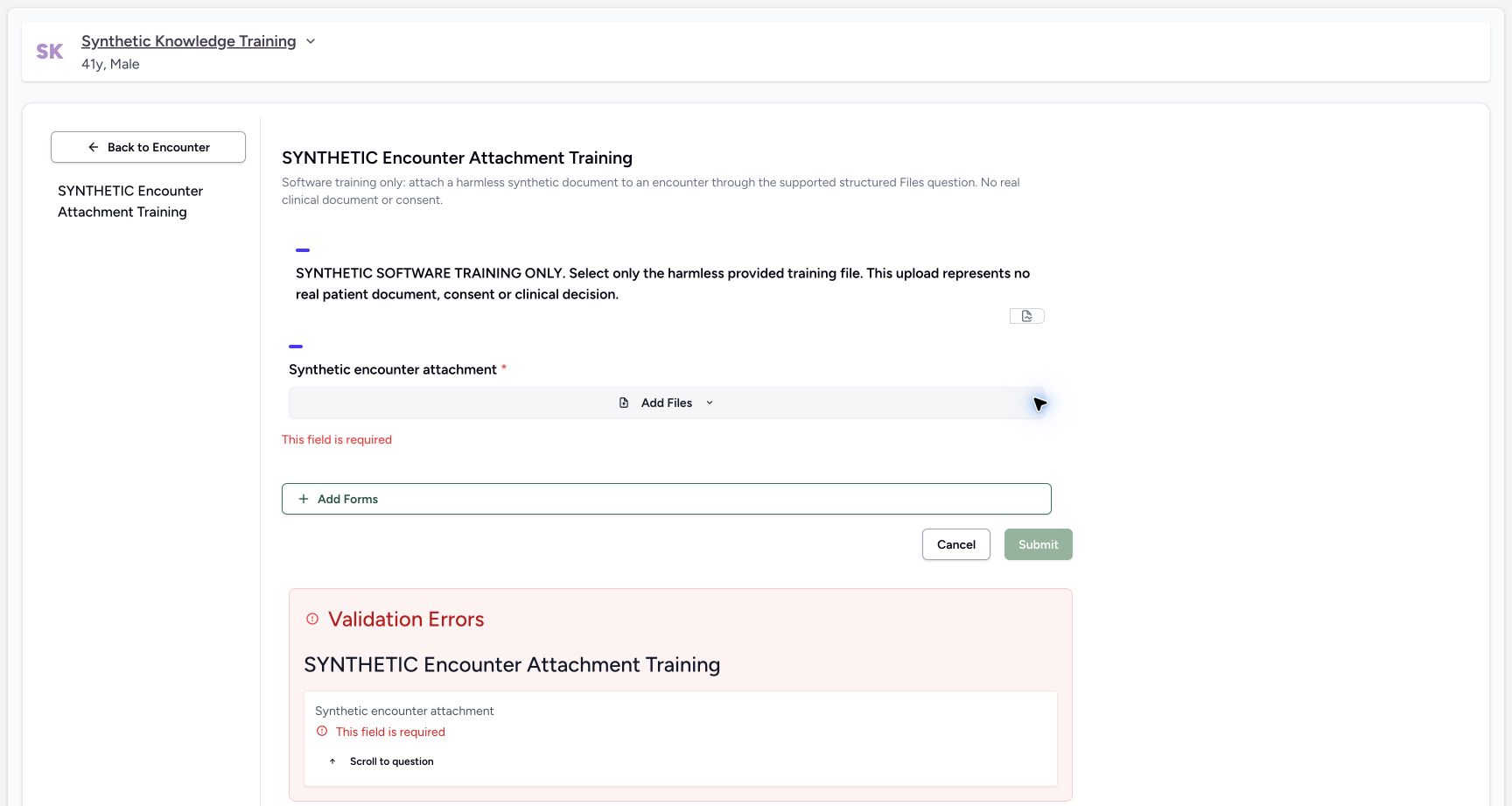
Submitting with no attachment shows This field is required beside the question and in Validation Errors. Return to the indicated question and add the intended file; the validation screen is not a saved file.
 12
12Capture details
Actual Nurse in the original pinned production UI, isolated synthetic active Inpatient encounter at a Polyclinic. These are harmless software training files and nonbinding Research/Deny examples, not real clinical documents, patient decisions, signatures or treatment authorization. Other role, facility, hardware and failure branches remain unqualified. Error: Submitting required Files question without a file shows This field is required and Validation Errors; no structured upload was sent.
- Required attachment validation is visible: Required attachment validation is visible
- Correct this required question: Correct this required question
4. Name the selected file before submitting
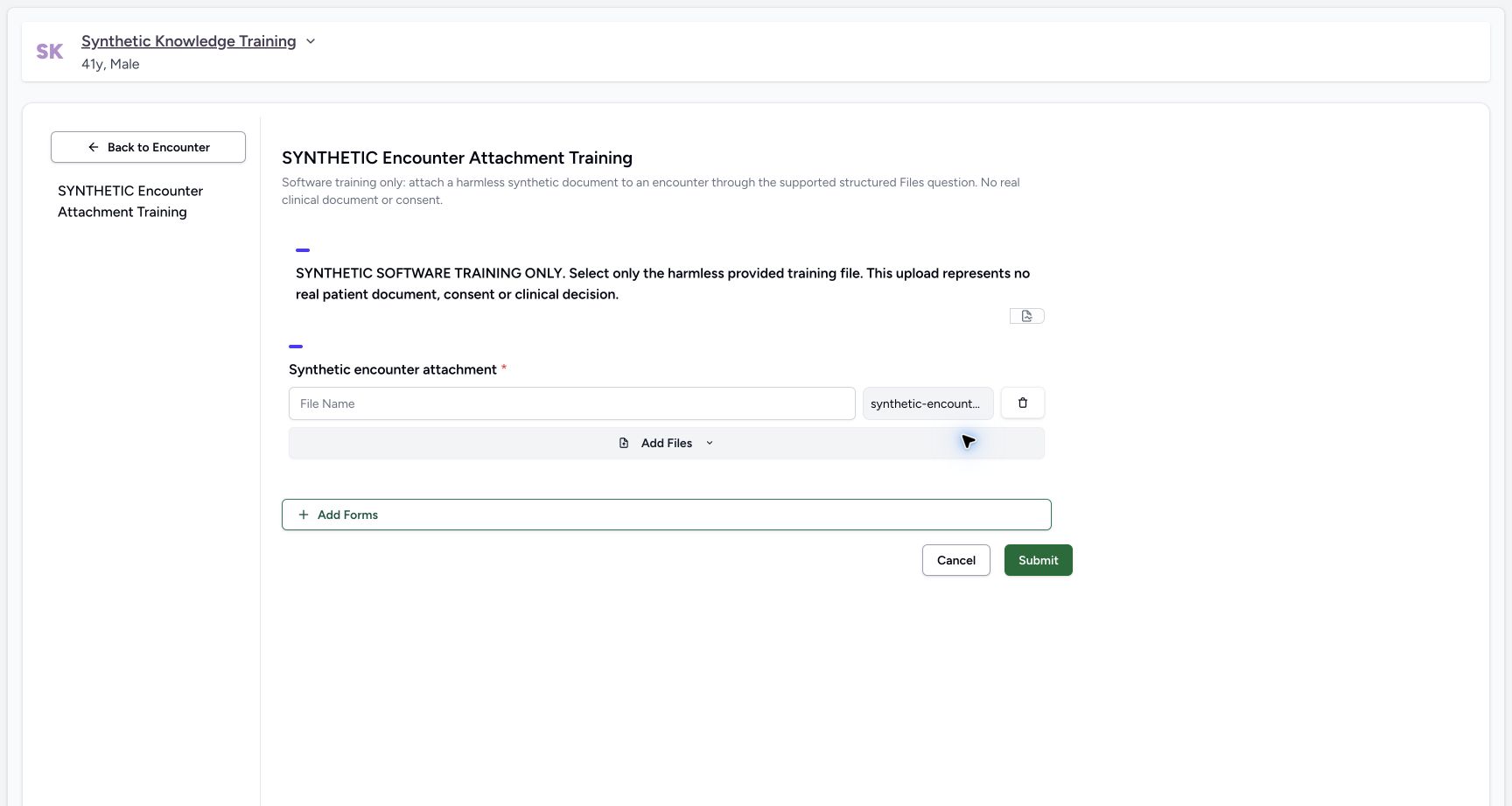
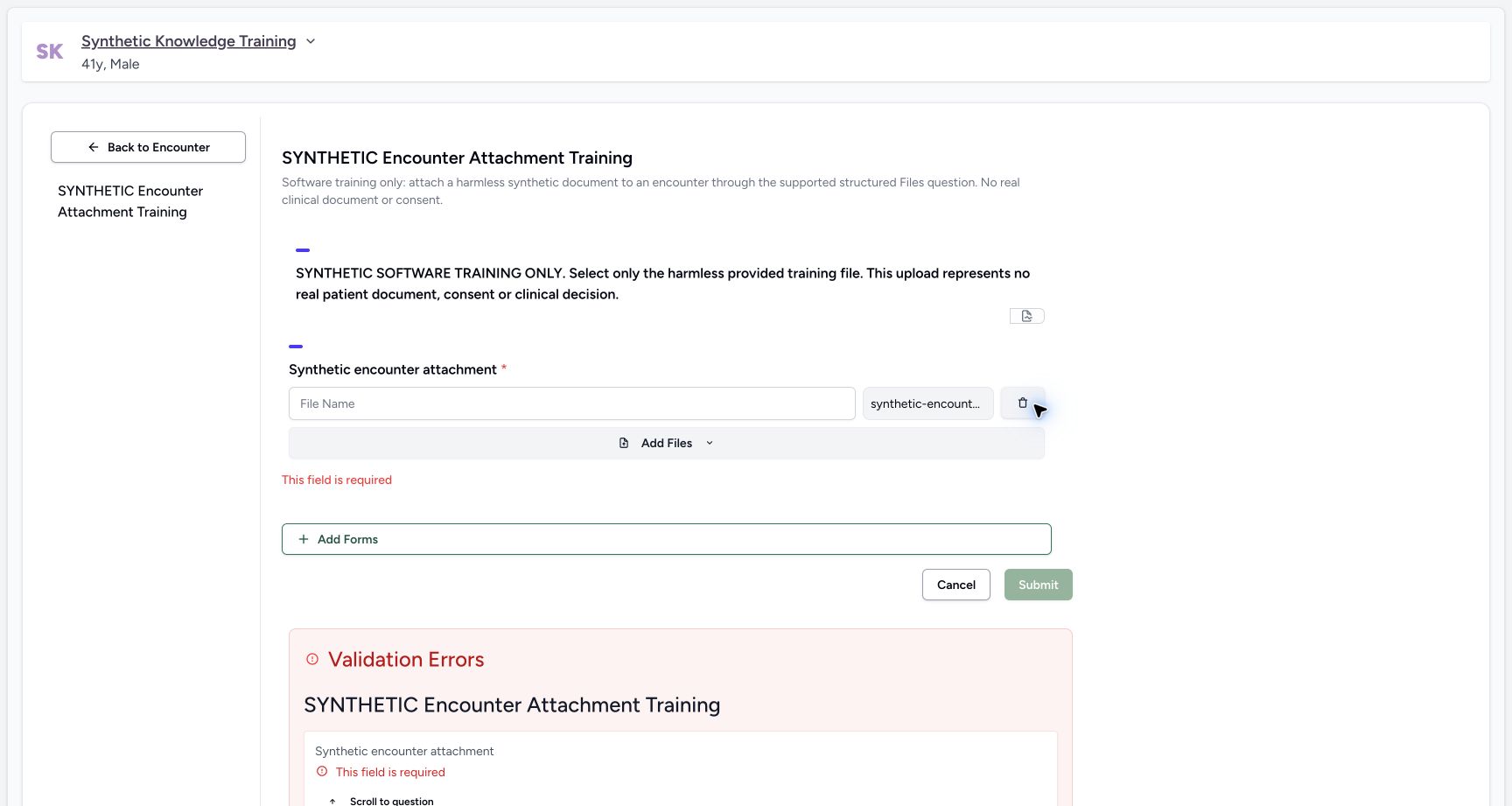
After device selection, the structured question shows an editable File Name, the original filename and a trash control. Enter the intended display name. Selecting a file with a blank display name still fails the required-field validation; an original filename is not a substitute for that field.
 12
12Capture details
Actual Nurse in the original pinned production UI, isolated synthetic active Inpatient encounter at a Polyclinic. These are harmless software training files and nonbinding Research/Deny examples, not real clinical documents, patient decisions, signatures or treatment authorization. Other role, facility, hardware and failure branches remain unqualified. Action: Bedside Files question holds selected original TXT with a blank required display name and per-row remove control; no upload has been sent yet.
- Provide the display name for this question: Provide the display name for this question
- Discard this unsaved selected file: Discard this unsaved selected file
 12
12Capture details
Actual Nurse in the original pinned production UI, isolated synthetic active Inpatient encounter at a Polyclinic. These are harmless software training files and nonbinding Research/Deny examples, not real clinical documents, patient decisions, signatures or treatment authorization. Other role, facility, hardware and failure branches remain unqualified. Error: A selected file without display name still fails structured Files validation and shows This field is required; no file is uploaded.
- Correct the unnamed selected file: Correct the unnamed selected file
- Review the required-field validation: Review the required-field validation
5. Remove an unsaved selected file when needed
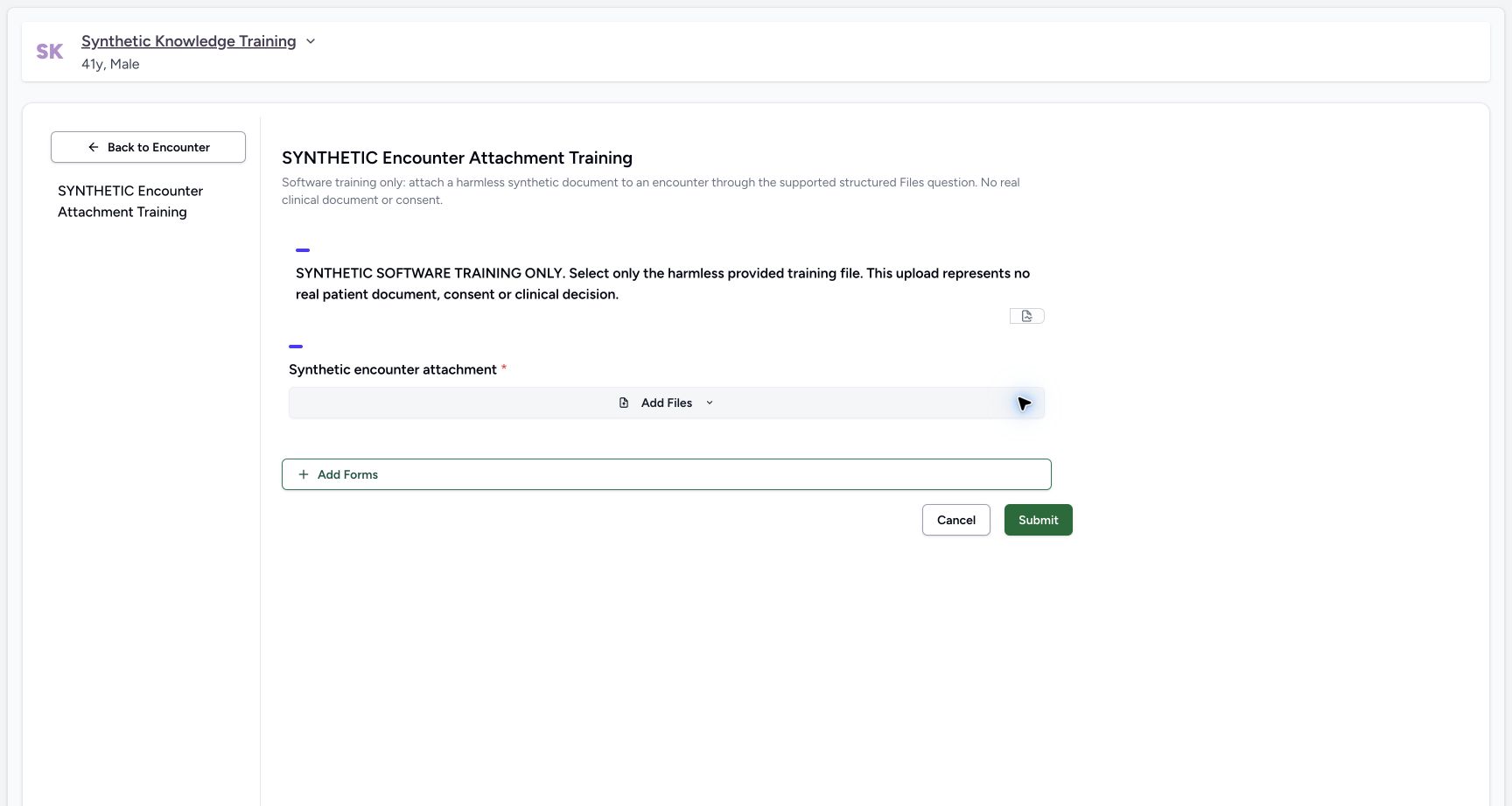
Use the pending row’s trash control to remove that selection from the form. The demonstrated result returns to the empty Add Files question. This is removal of an unsaved selection; it is different from archiving a previously uploaded record.
12Capture details
Actual Nurse in the original pinned production UI, isolated synthetic active Inpatient encounter at a Polyclinic. These are harmless software training files and nonbinding Research/Deny examples, not real clinical documents, patient decisions, signatures or treatment authorization. Other role, facility, hardware and failure branches remain unqualified. Action: Bedside Files question holds selected original TXT with a blank required display name and per-row remove control; no upload has been sent yet.
- Provide the display name for this question: Provide the display name for this question
- Discard this unsaved selected file: Discard this unsaved selected file
 1
1Capture details
Actual Nurse in the original pinned production UI, isolated synthetic active Inpatient encounter at a Polyclinic. These are harmless software training files and nonbinding Research/Deny examples, not real clinical documents, patient decisions, signatures or treatment authorization. Other role, facility, hardware and failure branches remain unqualified. Action: Per-row trash removes the unsaved selected file and its pending filename row. This is draft removal, separate from archiving an already stored encounter file.
- Choose a replacement file if needed: Choose a replacement file if needed
6. Review and submit a named replacement
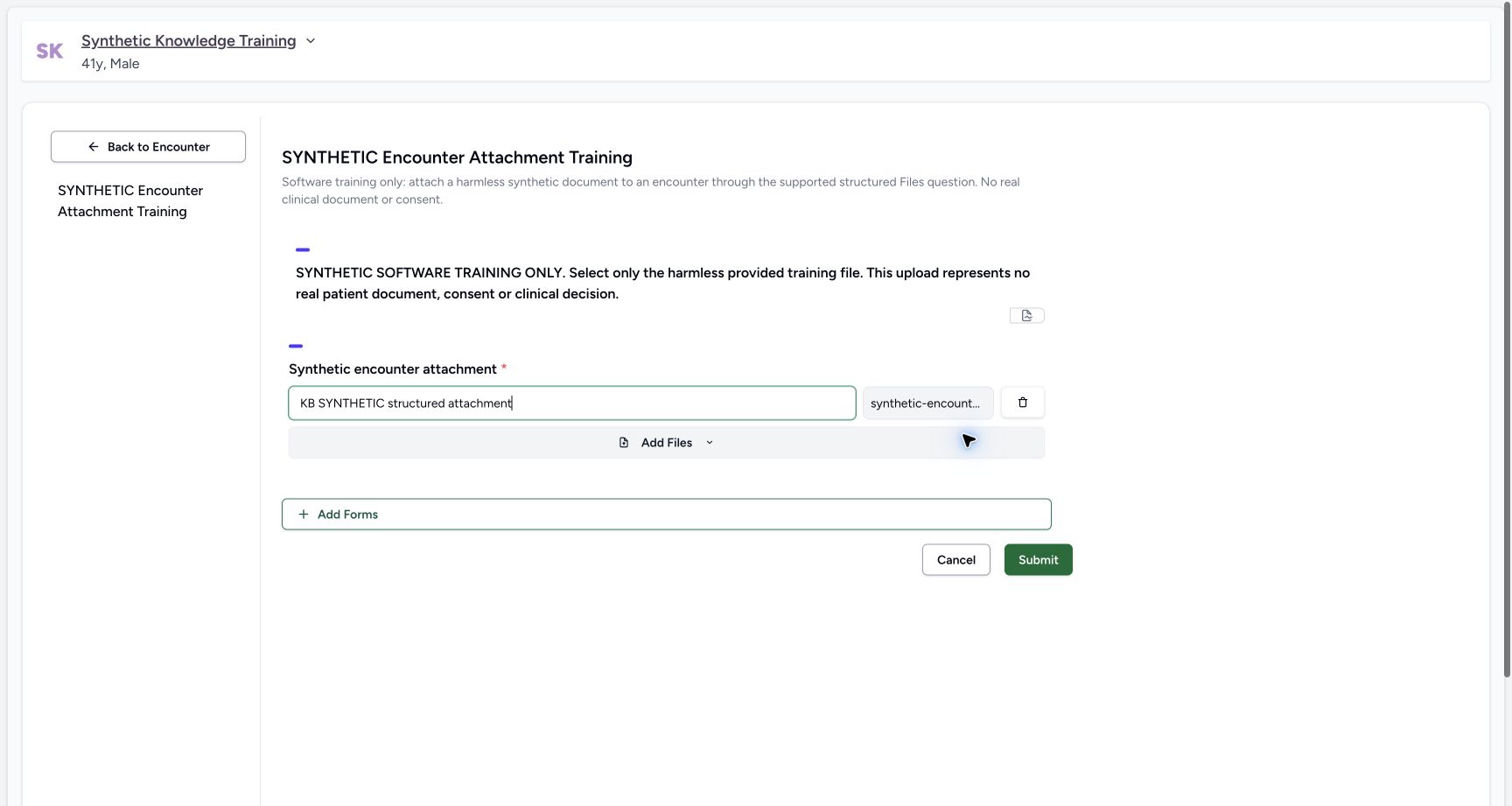
Choose the intended replacement file, enter a display name and review the patient and form before Submit. The example uses KB SYNTHETIC structured attachment. Wait for completion; do not replay Submit merely because navigation is delayed.
 12
12Capture details
Actual Nurse in the original pinned production UI, isolated synthetic active Inpatient encounter at a Polyclinic. These are harmless software training files and nonbinding Research/Deny examples, not real clinical documents, patient decisions, signatures or treatment authorization. Other role, facility, hardware and failure branches remain unqualified. Action: Structured Files draft now has the intended original TXT and explicit display name. Submit persists this as a new encounter attachment; it does not rename or restore the existing archived TXT.
- Review the named replacement attachment: Review the named replacement attachment
- Save the structured file upload: Save the structured file upload
7. Verify the saved file and the original attribution gap
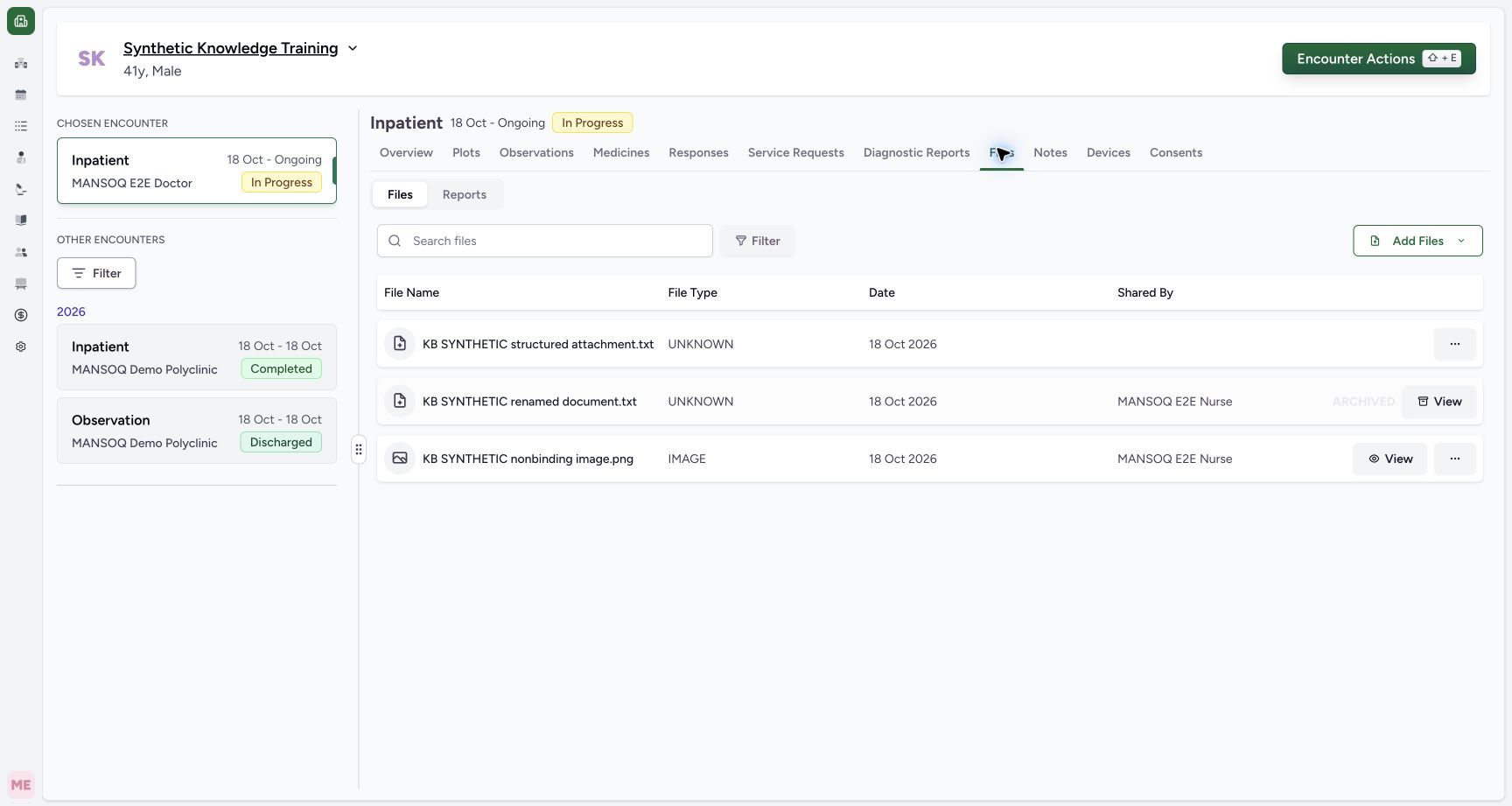
Return to Files → Files and verify the new separate attachment. Independent metadata and retained-object checks confirm a completed file on the intended encounter with exact 294-byte fixture content. In this original release, its Shared By cell is blank: the custom structured upload path stored no creator, although its updater is Nurse. This is an audit defect, not anonymous clinical authorship or a fully passed attribution check. Report it through the approved support process. The two earlier file records remain retained.
 123
123Capture details
Actual Nurse in the original pinned production UI, isolated synthetic active Inpatient encounter at a Polyclinic. These are harmless software training files and nonbinding Research/Deny examples, not real clinical documents, patient decisions, signatures or treatment authorization. Other role, facility, hardware and failure branches remain unqualified. Success: After structured submission, encounter Files contains a new active KB SYNTHETIC structured attachment.txt alongside original active PNG and original archived TXT. Independent readback verifies3 encounter records and exact new stored TXT bytes.
- New structured file is saved: New structured file is saved
- Shared By is blank in this original release: Independent readback confirms creator is null for this custom upload path; updater is Nurse. Report the audit gap rather than infer an author.
- The earlier archived file remains retained: The earlier archived file remains retained
Audit limitation and unqualified branches
The structured record is saved and its bytes are verified, but creator attribution fails in the pictured original source pin. The separate product repair must be qualified independently; it does not change this historical evidence. Multiple structured files, failure/retry behavior and read-only/negative authorization cases have not been demonstrated here.
123Capture details
Actual Nurse in the original pinned production UI, isolated synthetic active Inpatient encounter at a Polyclinic. These are harmless software training files and nonbinding Research/Deny examples, not real clinical documents, patient decisions, signatures or treatment authorization. Other role, facility, hardware and failure branches remain unqualified. Success: After structured submission, encounter Files contains a new active KB SYNTHETIC structured attachment.txt alongside original active PNG and original archived TXT. Independent readback verifies3 encounter records and exact new stored TXT bytes.
- New structured file is saved: New structured file is saved
- Shared By is blank in this original release: Independent readback confirms creator is null for this custom upload path; updater is Nurse. Report the audit gap rather than infer an author.
- The earlier archived file remains retained: The earlier archived file remains retained
Source evidence
References are pinned to the private MANSOQ source repository. Repository access is required to open these links.
- repositories/platform/mansoq-web/src/components/Questionnaire/QuestionTypes/FileQuestion.tsx:42 · f6e9f05f
- repositories/platform/mansoq-web/src/components/Questionnaire/QuestionTypes/FileQuestion.tsx:142 · f6e9f05f
- repositories/platform/mansoq-web/src/components/Questionnaire/structured/handlers.ts:213 · f6e9f05f
- repositories/platform/mansoq-core/mansoq/emr/api/viewsets/file_upload.py:259 · f6e9f05f