 MANSOQ
 Clinical care
Read symptom history, exact onset, author and source encounter
Distinguish a history creation-date group from symptom onset, inspect the saved note and author, and return to its source encounter.
5 min read · Source baseline f6e9f05f
Verification and applicability
source reviewed
Check your installed version, permissions and local configuration.
Before you begin
- Verify the patient and permission to read clinical history. Patient-wide history can contain records from multiple encounters.
- The pictured record was saved by Nurse in a synthetic active Inpatient encounter at a Polyclinic; the note expressly describes a fictional software exercise.
1. Open patient-wide Past Symptoms
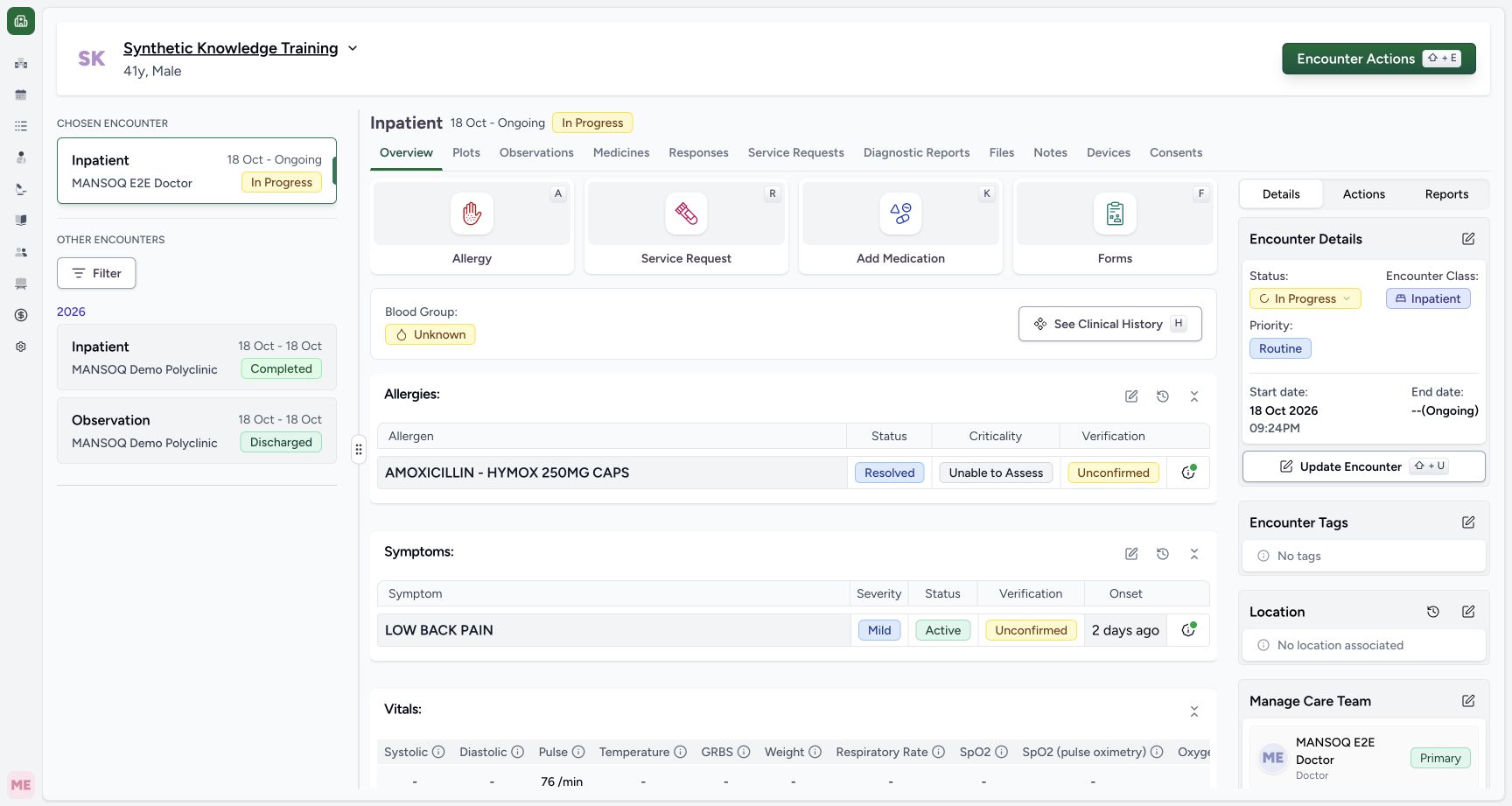
On encounter Overview, use the history icon beside Symptoms, or open See Clinical History → Past Symptoms. The history table is patient-wide. Read its term, severity, clinical status, verification and onset as separate fields; do not infer that a past record is a current assessment.
 123
123Capture details
Actual Nurse in original pinned production UI, isolated synthetic active Inpatient encounter in a Polyclinic. One ICD-10-AM M54.5 problem-list symptom saved Active/Mild/Unconfirmed with fictional onset and note. No real patient assessment or treatment decision; two existing encounter diagnoses unchanged. This does not qualify every role, facility or symptom branch. Success: Active encounter summary shows one LOW BACK PAIN symptom with Mild/Active/Unconfirmed and relative onset. Independent READ ONLY confirms sameNurse-created M54.5 problem_list_item, exact17October onset and synthetic note; two prior encounter diagnoses unchanged.
- Saved symptom is separate from encounter diagnoses: Saved symptom is separate from encounter diagnoses
- Open patient-wide symptom history for source context: Open patient-wide symptom history for source context
- Relative time is a display; verify the exact onset date: Relative time is a display; verify the exact onset date
 123
123Capture details
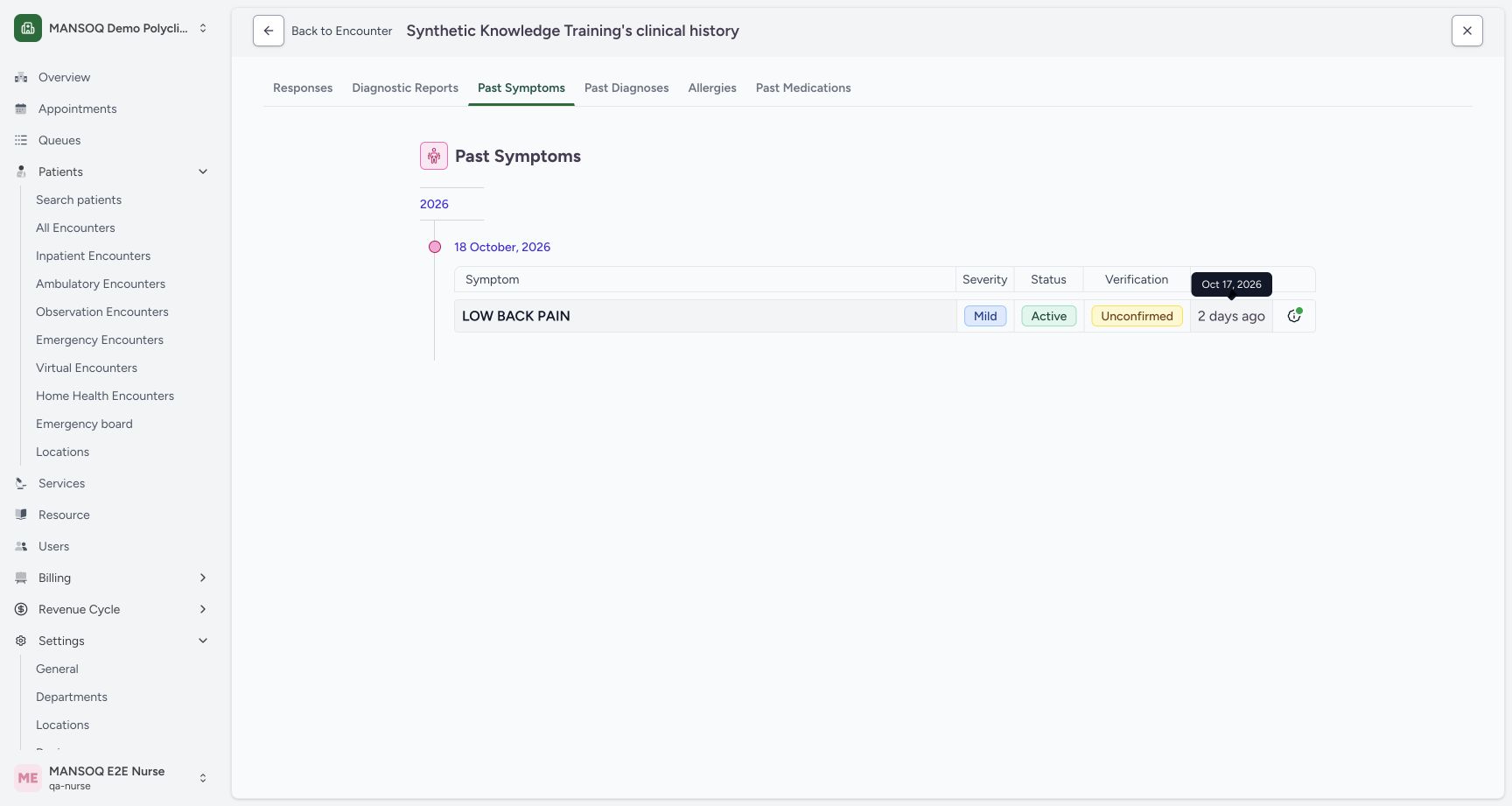
Actual Nurse in original pinned production UI, isolated synthetic active Inpatient encounter in a Polyclinic. One ICD-10-AM M54.5 problem-list symptom saved Active/Mild/Unconfirmed with fictional onset and note. No real patient assessment or treatment decision; two existing encounter diagnoses unchanged. This does not qualify every role, facility or symptom branch. Success: Patient-wide Past Symptoms groups record under18October creation date but onset relative text expands to17October2026. Independent READ ONLY confirms exact onset. Group date and onset are different facts.
- History group reflects record creation date: 18 October is the record creation group; it is separate from symptom onset.
- Open the exact onset behind the relative display: The relative time can be expanded to an absolute onset date.
- Exact onset is 17 October 2026: The tooltip shows the documented onset date.
2. Distinguish the creation group from absolute onset
The example appears under the 18 October, 2026 history group because that is when its record was created. Click the relative onset text to show the absolute date: Oct 17, 2026. That tooltip is the documented symptom onset. The group date and onset describe different events.
123Capture details
Actual Nurse in original pinned production UI, isolated synthetic active Inpatient encounter in a Polyclinic. One ICD-10-AM M54.5 problem-list symptom saved Active/Mild/Unconfirmed with fictional onset and note. No real patient assessment or treatment decision; two existing encounter diagnoses unchanged. This does not qualify every role, facility or symptom branch. Success: Patient-wide Past Symptoms groups record under18October creation date but onset relative text expands to17October2026. Independent READ ONLY confirms exact onset. Group date and onset are different facts.
- History group reflects record creation date: 18 October is the record creation group; it is separate from symptom onset.
- Open the exact onset behind the relative display: The relative time can be expanded to an absolute onset date.
- Exact onset is 17 October 2026: The tooltip shows the documented onset date.
3. Inspect attribution and the full saved context
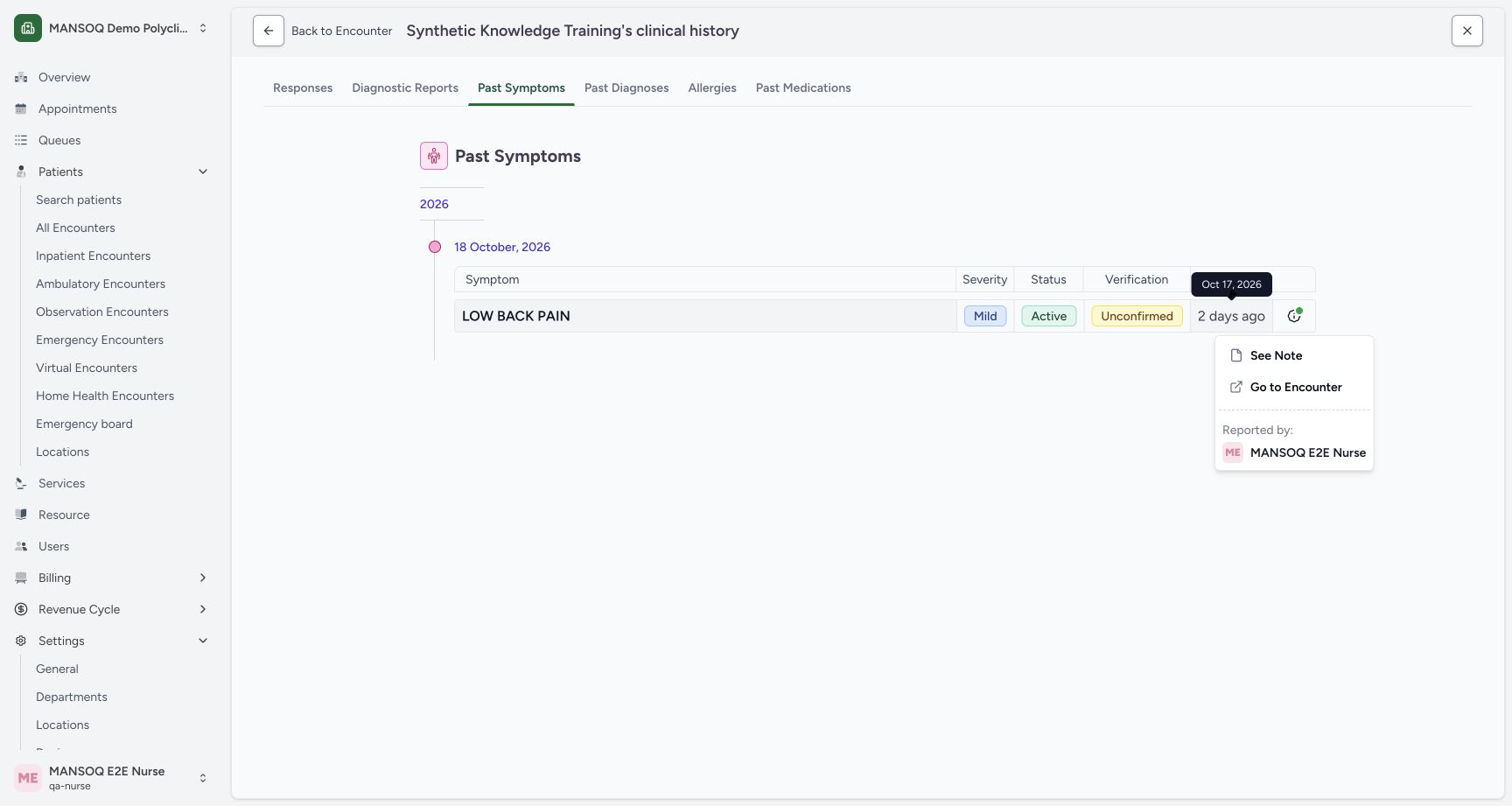
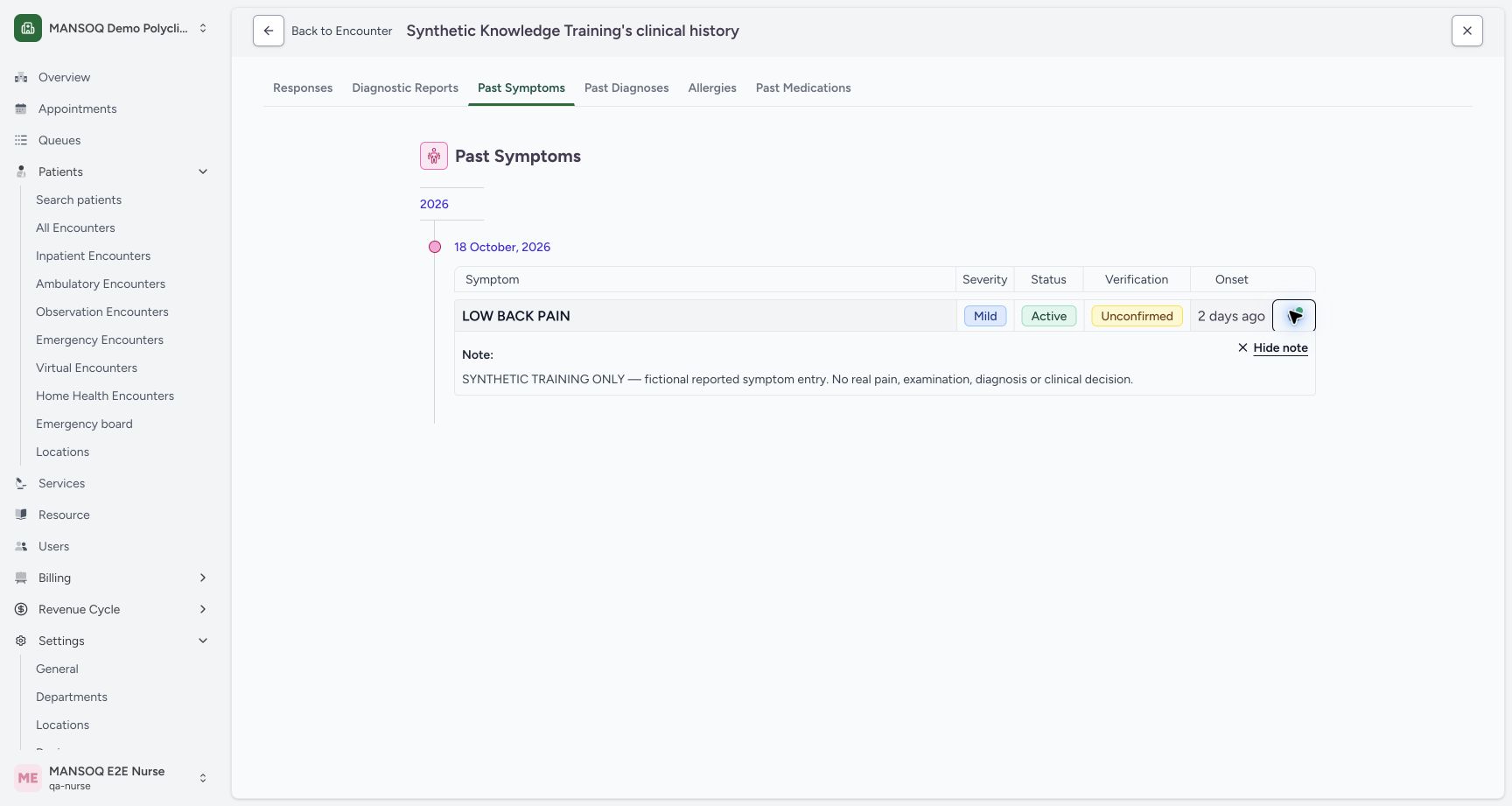
Open the row’s note icon. The menu provides See Note, Go to Encounter and Reported by. Confirm the author, then choose See Note to read the entire saved text. Hide note only closes this display; it does not change the record. The example’s complete note explicitly states that it is synthetic and represents no real pain, examination, diagnosis or clinical decision.
 123
123Capture details
Actual Nurse in original pinned production UI, isolated synthetic active Inpatient encounter in a Polyclinic. One ICD-10-AM M54.5 problem-list symptom saved Active/Mild/Unconfirmed with fictional onset and note. No real patient assessment or treatment decision; two existing encounter diagnoses unchanged. This does not qualify every role, facility or symptom branch. Action: Symptom history Has Note menu exposes See Note, Go to Encounter and Reported by MANSOQ E2E Nurse. The source encounter action differs from the patient-wide history grouping.
- Read the saved note: See Note opens the recorded symptom context.
- Open the source encounter: Go to Encounter uses this record’s actual encounter.
- Review the recorded author: Reported by identifies MANSOQ E2E Nurse.
 12
12Capture details
Actual Nurse in original pinned production UI, isolated synthetic active Inpatient encounter in a Polyclinic. One ICD-10-AM M54.5 problem-list symptom saved Active/Mild/Unconfirmed with fictional onset and note. No real patient assessment or treatment decision; two existing encounter diagnoses unchanged. This does not qualify every role, facility or symptom branch. Success: Full saved symptom note appears in Past Symptoms with explicit synthetic-only context; severity/status/verification remain separate. Independent READ ONLY confirms exact stored note and Nurse attribution.
- Read the saved symptom context: Read the saved symptom context
- Close this display without modifying its record: Close this display without modifying its record
4. Return to the actual source encounter
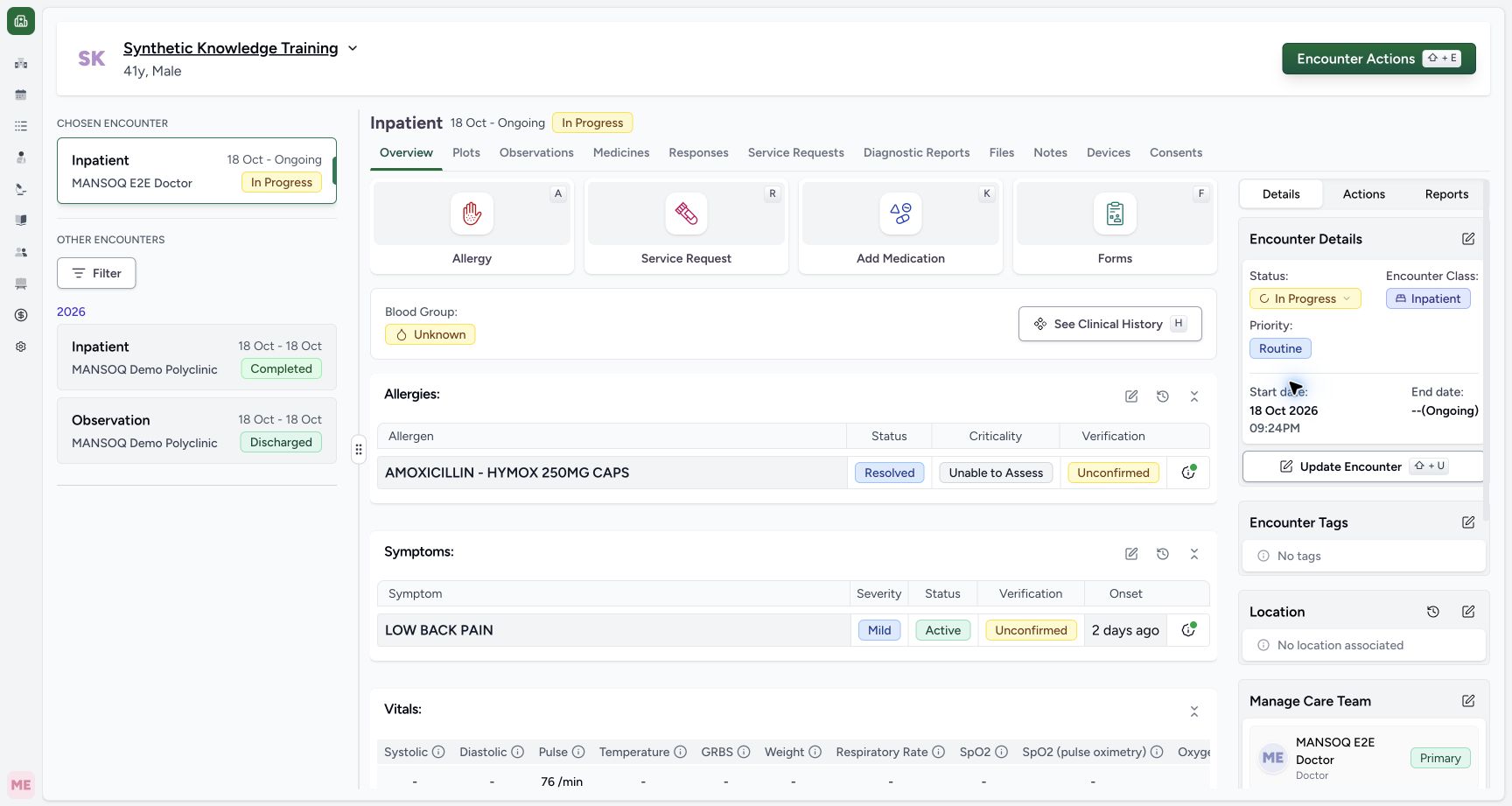
From the row’s menu choose Go to Encounter. Verify the patient and encounter header after navigation. The example returns to its active Inpatient Overview, where the same Mild/Active/Unconfirmed symptom is visible. Use this source context before making any authorized change; a patient-wide history group alone does not identify the current encounter.
123Capture details
Actual Nurse in original pinned production UI, isolated synthetic active Inpatient encounter in a Polyclinic. One ICD-10-AM M54.5 problem-list symptom saved Active/Mild/Unconfirmed with fictional onset and note. No real patient assessment or treatment decision; two existing encounter diagnoses unchanged. This does not qualify every role, facility or symptom branch. Action: Symptom history Has Note menu exposes See Note, Go to Encounter and Reported by MANSOQ E2E Nurse. The source encounter action differs from the patient-wide history grouping.
- Read the saved note: See Note opens the recorded symptom context.
- Open the source encounter: Go to Encounter uses this record’s actual encounter.
- Review the recorded author: Reported by identifies MANSOQ E2E Nurse.
 12
12Capture details
Actual Nurse in original pinned production UI, isolated synthetic active Inpatient encounter in a Polyclinic. One ICD-10-AM M54.5 problem-list symptom saved Active/Mild/Unconfirmed with fictional onset and note. No real patient assessment or treatment decision; two existing encounter diagnoses unchanged. This does not qualify every role, facility or symptom branch. Success: Go to Encounter returns to the active Inpatient encounter that contains the independently verified Active, Mild, Unconfirmed synthetic symptom.
- Source encounter Overview: The history action returns to the encounter in which this symptom was recorded.
- Edit recorded symptoms: Reopen the structured symptom form from this encounter.
What this history display proves
Actual Nurse in original pinned production UI, isolated synthetic active Inpatient encounter in a Polyclinic. One ICD-10-AM M54.5 problem-list symptom saved Active/Mild/Unconfirmed with fictional onset and note. No real patient assessment or treatment decision; two existing encounter diagnoses unchanged. This does not qualify every role, facility or symptom branch. The default history request excludes entered-in-error records; an absent row is not proof of physical deletion or a negative clinical finding. Correction and historical copy/import remain separate workflows.
123Capture details
Actual Nurse in original pinned production UI, isolated synthetic active Inpatient encounter in a Polyclinic. One ICD-10-AM M54.5 problem-list symptom saved Active/Mild/Unconfirmed with fictional onset and note. No real patient assessment or treatment decision; two existing encounter diagnoses unchanged. This does not qualify every role, facility or symptom branch. Success: Patient-wide Past Symptoms groups record under18October creation date but onset relative text expands to17October2026. Independent READ ONLY confirms exact onset. Group date and onset are different facts.
- History group reflects record creation date: 18 October is the record creation group; it is separate from symptom onset.
- Open the exact onset behind the relative display: The relative time can be expanded to an absolute onset date.
- Exact onset is 17 October 2026: The tooltip shows the documented onset date.
12Capture details
Actual Nurse in original pinned production UI, isolated synthetic active Inpatient encounter in a Polyclinic. One ICD-10-AM M54.5 problem-list symptom saved Active/Mild/Unconfirmed with fictional onset and note. No real patient assessment or treatment decision; two existing encounter diagnoses unchanged. This does not qualify every role, facility or symptom branch. Success: Full saved symptom note appears in Past Symptoms with explicit synthetic-only context; severity/status/verification remain separate. Independent READ ONLY confirms exact stored note and Nurse attribution.
- Read the saved symptom context: Read the saved symptom context
- Close this display without modifying its record: Close this display without modifying its record
Troubleshooting
The history group and onset tooltip show different dates
The group uses record creation date. The onset column uses the recorded onset. Read the absolute tooltip and source encounter rather than substituting one date for the other.
123Capture details
Actual Nurse in original pinned production UI, isolated synthetic active Inpatient encounter in a Polyclinic. One ICD-10-AM M54.5 problem-list symptom saved Active/Mild/Unconfirmed with fictional onset and note. No real patient assessment or treatment decision; two existing encounter diagnoses unchanged. This does not qualify every role, facility or symptom branch. Success: Patient-wide Past Symptoms groups record under18October creation date but onset relative text expands to17October2026. Independent READ ONLY confirms exact onset. Group date and onset are different facts.
- History group reflects record creation date: 18 October is the record creation group; it is separate from symptom onset.
- Open the exact onset behind the relative display: The relative time can be expanded to an absolute onset date.
- Exact onset is 17 October 2026: The tooltip shows the documented onset date.
The note is hidden
Use the note icon and See Note; Hide note only collapses its presentation. Review Reported by and Go to Encounter from the same menu.
123Capture details
Actual Nurse in original pinned production UI, isolated synthetic active Inpatient encounter in a Polyclinic. One ICD-10-AM M54.5 problem-list symptom saved Active/Mild/Unconfirmed with fictional onset and note. No real patient assessment or treatment decision; two existing encounter diagnoses unchanged. This does not qualify every role, facility or symptom branch. Action: Symptom history Has Note menu exposes See Note, Go to Encounter and Reported by MANSOQ E2E Nurse. The source encounter action differs from the patient-wide history grouping.
- Read the saved note: See Note opens the recorded symptom context.
- Open the source encounter: Go to Encounter uses this record’s actual encounter.
- Review the recorded author: Reported by identifies MANSOQ E2E Nurse.
12Capture details
Actual Nurse in original pinned production UI, isolated synthetic active Inpatient encounter in a Polyclinic. One ICD-10-AM M54.5 problem-list symptom saved Active/Mild/Unconfirmed with fictional onset and note. No real patient assessment or treatment decision; two existing encounter diagnoses unchanged. This does not qualify every role, facility or symptom branch. Success: Full saved symptom note appears in Past Symptoms with explicit synthetic-only context; severity/status/verification remain separate. Independent READ ONLY confirms exact stored note and Nurse attribution.
- Read the saved symptom context: Read the saved symptom context
- Close this display without modifying its record: Close this display without modifying its record
Source evidence
References are pinned to the private MANSOQ source repository. Repository access is required to open these links.
- repositories/platform/mansoq-web/src/components/Patient/symptoms/list.tsx:91 · f6e9f05f
- repositories/platform/mansoq-web/src/components/Patient/symptoms/list.tsx:59 · f6e9f05f
- repositories/platform/mansoq-web/src/components/Patient/symptoms/SymptomTable.tsx:215 · f6e9f05f
- repositories/platform/mansoq-web/src/components/Patient/symptoms/SymptomTable.tsx:117 · f6e9f05f
- repositories/platform/mansoq-web/src/components/ui/tooltip.tsx:69 · f6e9f05f