 MANSOQ
 Workforce and access
Maintain your workforce profile and distinguish identity from department access
Identify your own account, understand an unchanged edit form, recover required-name validation, save ordinary display information and keep department roles separate.
Current source · Actual synthetic own-Other FacilityAdmin self-profile validation and ordinary suffix update, independently confirmed by same-role normal GET 200. Department membership was read only. Different-user Edit control absence was observed and matched pinned source; no negative profile write, credential change, all-role/facility qualification or patient-portal edit is claimed. · 7 min read
Before you begin
- Use your authorized workforce account and verify the selected username. The pictured operation used only the synthetic Other estate’s own Facility Admin. Patient/caregiver accounts use their separate portal and are not qualified by this workforce guide.
- Review approved personal/contact information before saving. All pictured identities, contacts and geography are synthetic. This walkthrough updates ordinary display text and does not change authentication credentials or access.
1. Confirm the selected identity and open Edit User
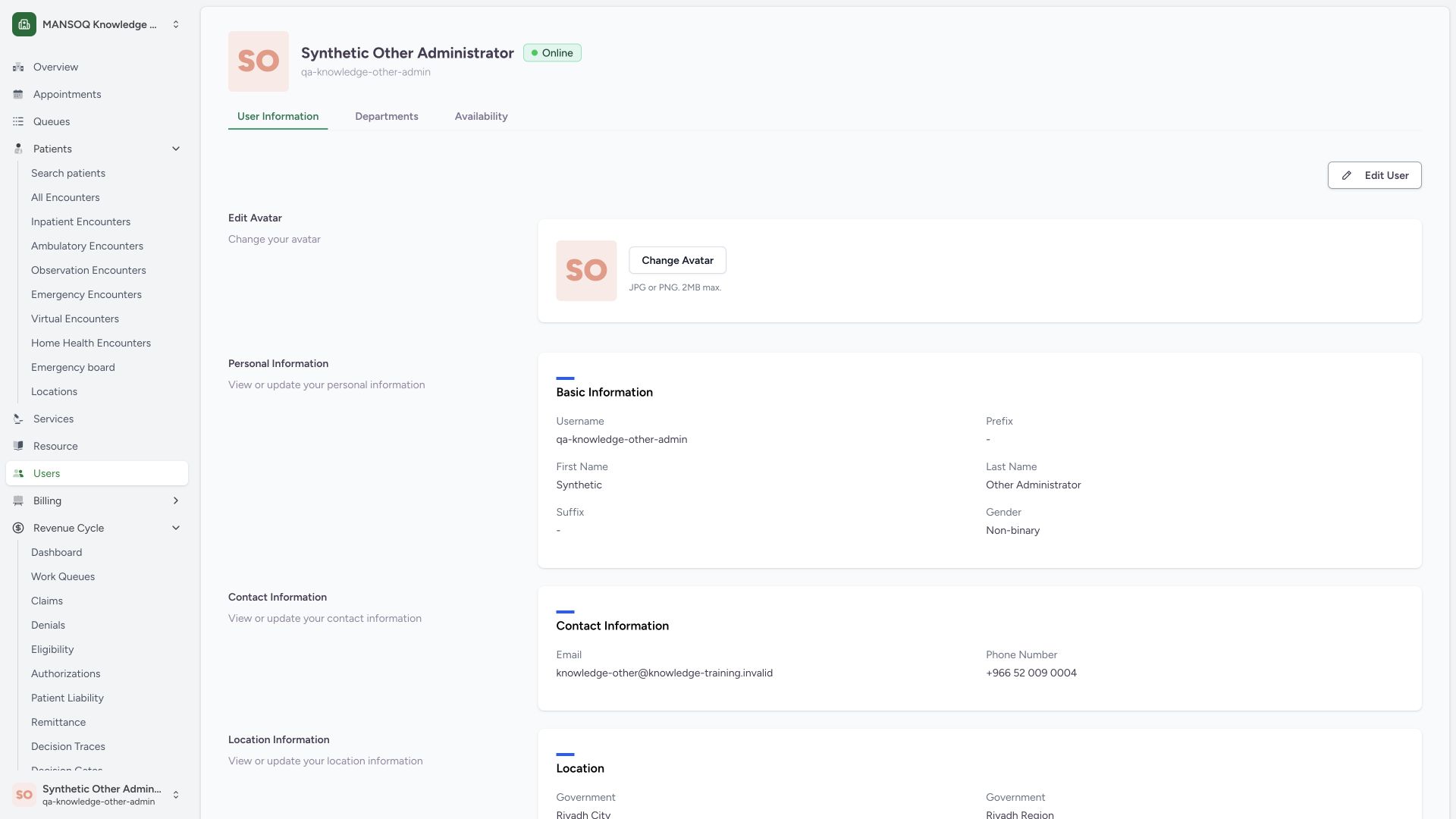
In the facility workforce profile, compare the displayed identity and username with your signed-in account. The User Information, Departments and Availability tabs have different purposes. Choose Edit User on your own profile to open ordinary personal-information maintenance.
 123
123- Confirm own identity: The selected username matches the signed-in synthetic account.
- Edit profile: This is a personal identity form, distinct from department role maintenance.
- Department memberships: Facility membership is separate from profile identity fields.
2. Read loaded values and the unchanged form state
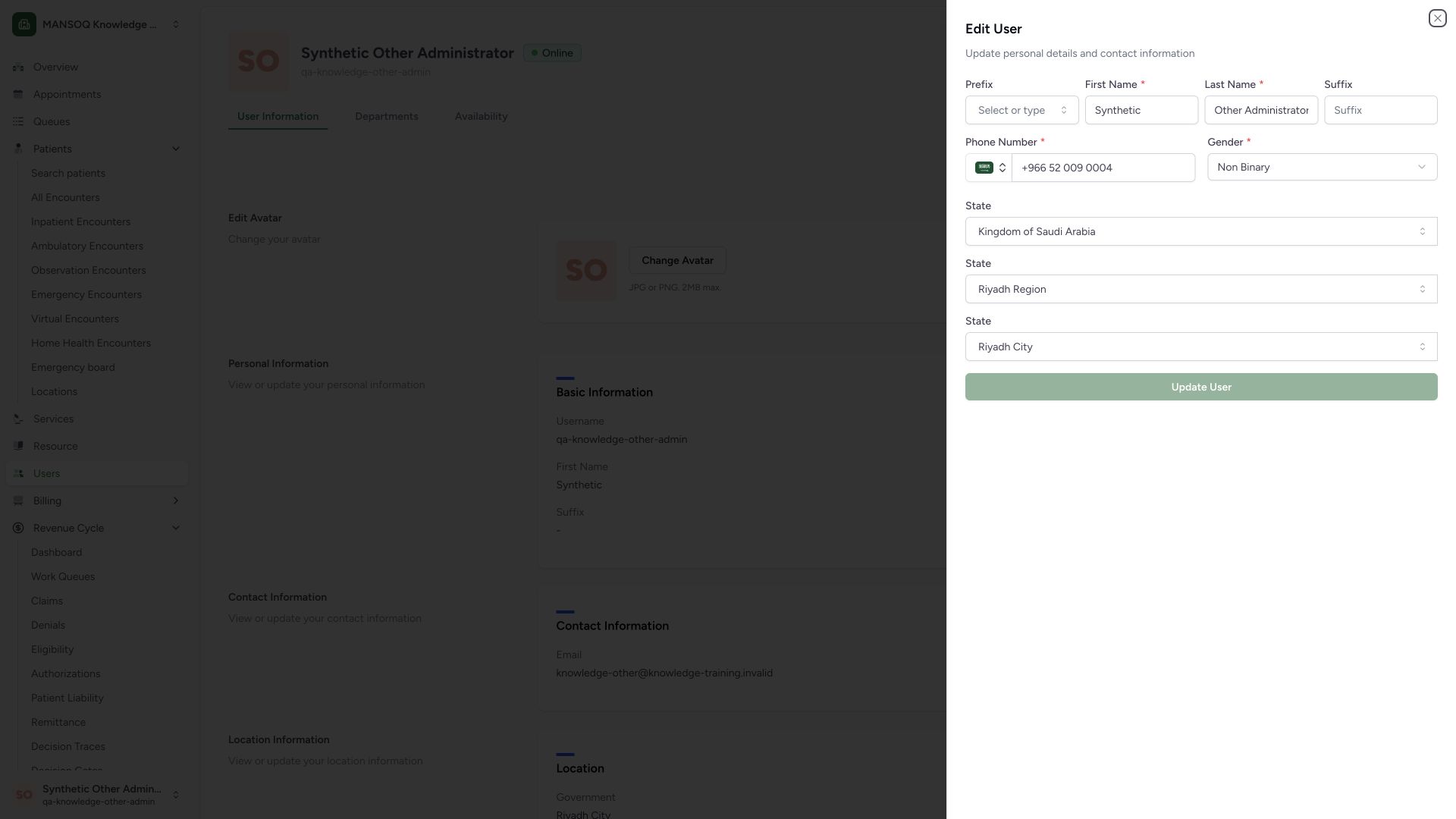
The existing profile loads into Edit User. Update User is disabled before an actual value changes. The pictured edit form has name, suffix, phone, gender and geography fields; username, password and invitation controls are absent from this edit mode.
 12
12- Existing first name: Identity field, not a department role.
- Update disabled until changed: An unchanged form is distinct from a permissions denial.
3. Resolve a required first-name error
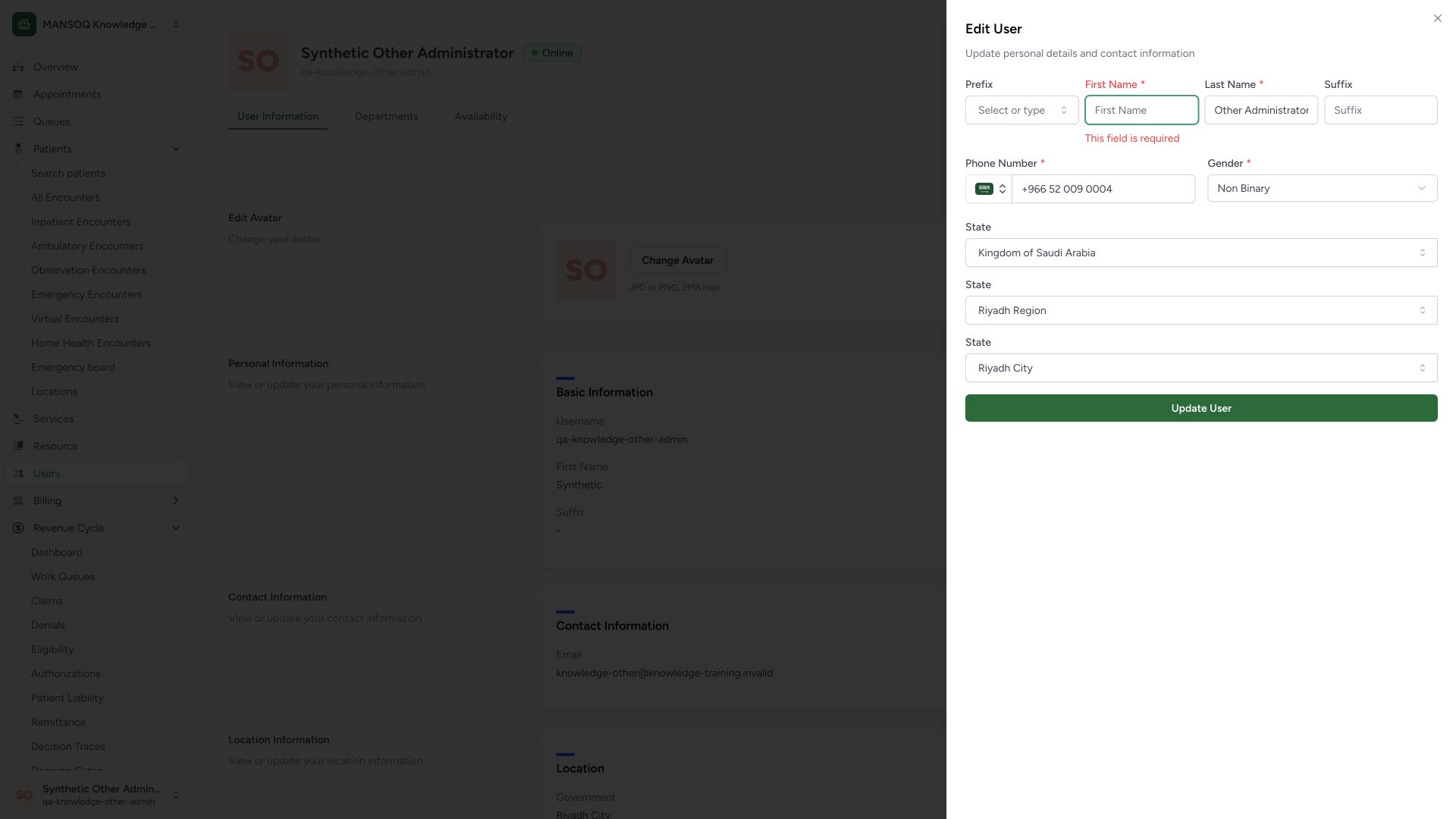
The normal submission with empty First Name returns This field is required. Restore the correct existing name before retrying. The rejected draft did not persist an empty name.
 12
12- Required first name: Restore the existing approved name before retrying.
- Validation message: The rejected form remains editable.
4. Review and save ordinary profile details
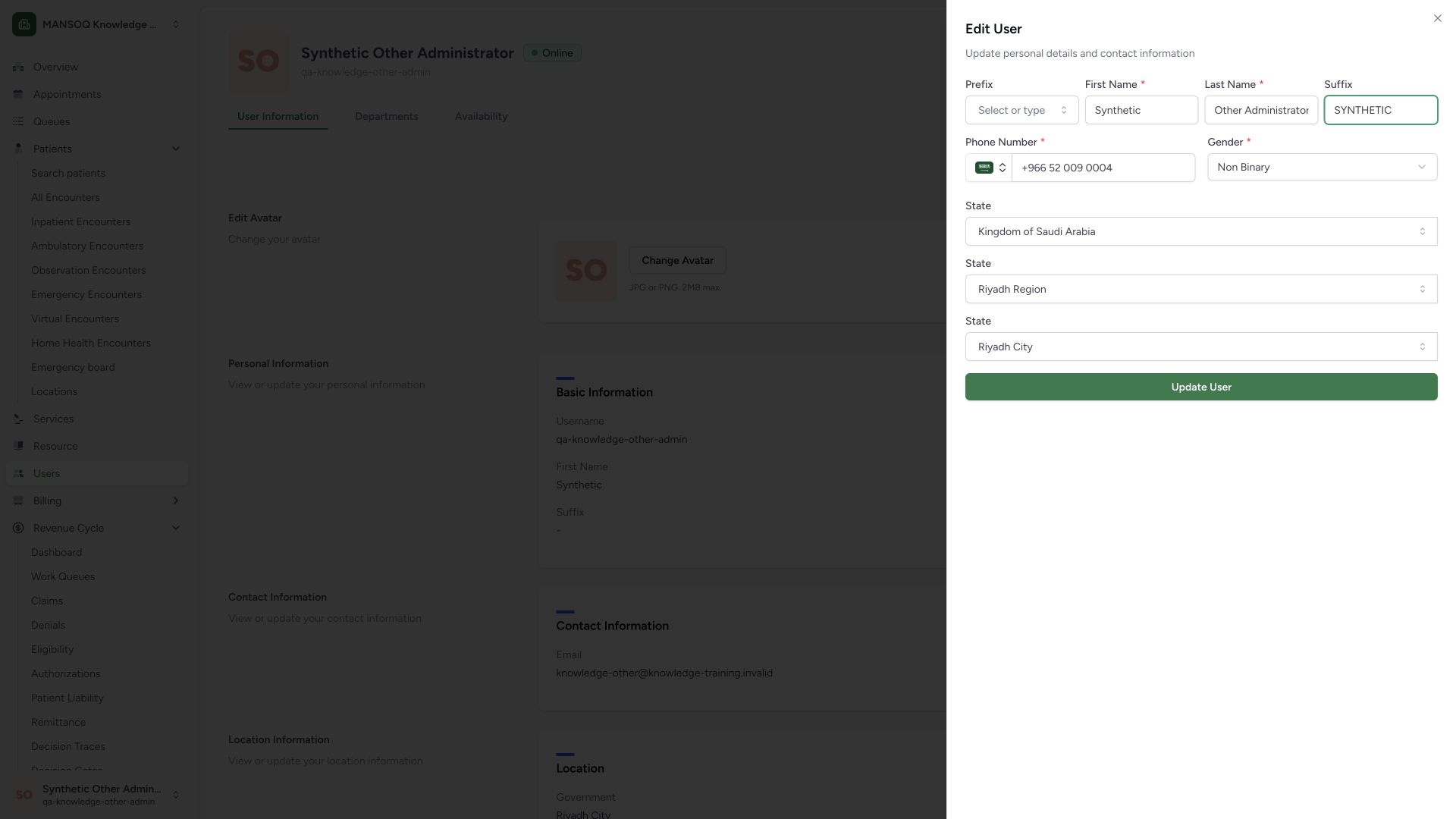
This synthetic example restores the existing first name and adds SYNTHETIC in Suffix. It is a display label, not a professional credential or security role. Review the retained name, phone, gender and selected geography, then choose Update User. No username, password, MFA, invitation or membership change is part of this operation.
 12
12- Display suffix: Synthetic training label only; this is not a role or professional credential.
- Update User: Save only the reviewed ordinary profile fields.
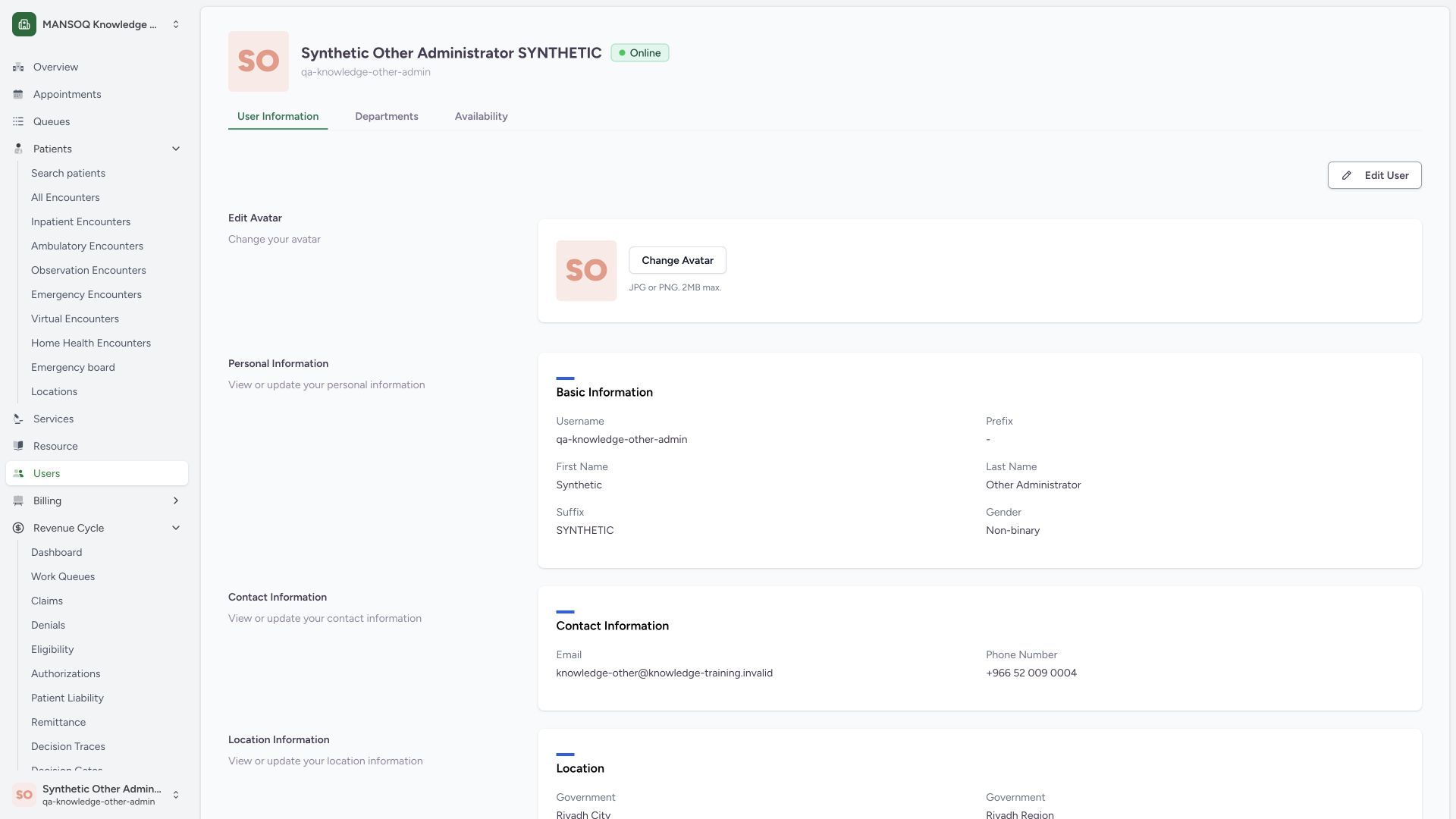
5. Verify the saved display value and stable login identity
The banner and Suffix value now show SYNTHETIC while the username remains unchanged. An independent same-role normal user read returned 200 and confirmed the suffix, unchanged first/last name, contact, gender and responsibility assignments. Read the saved profile rather than relying solely on a success toast.
 123
123- Saved display identity: Suffix is shown in the profile banner.
- Saved suffix: SYNTHETIC is ordinary display text, not a native role grant.
- Username unchanged: The ordinary edit form did not change the login identifier.
6. Read department access separately
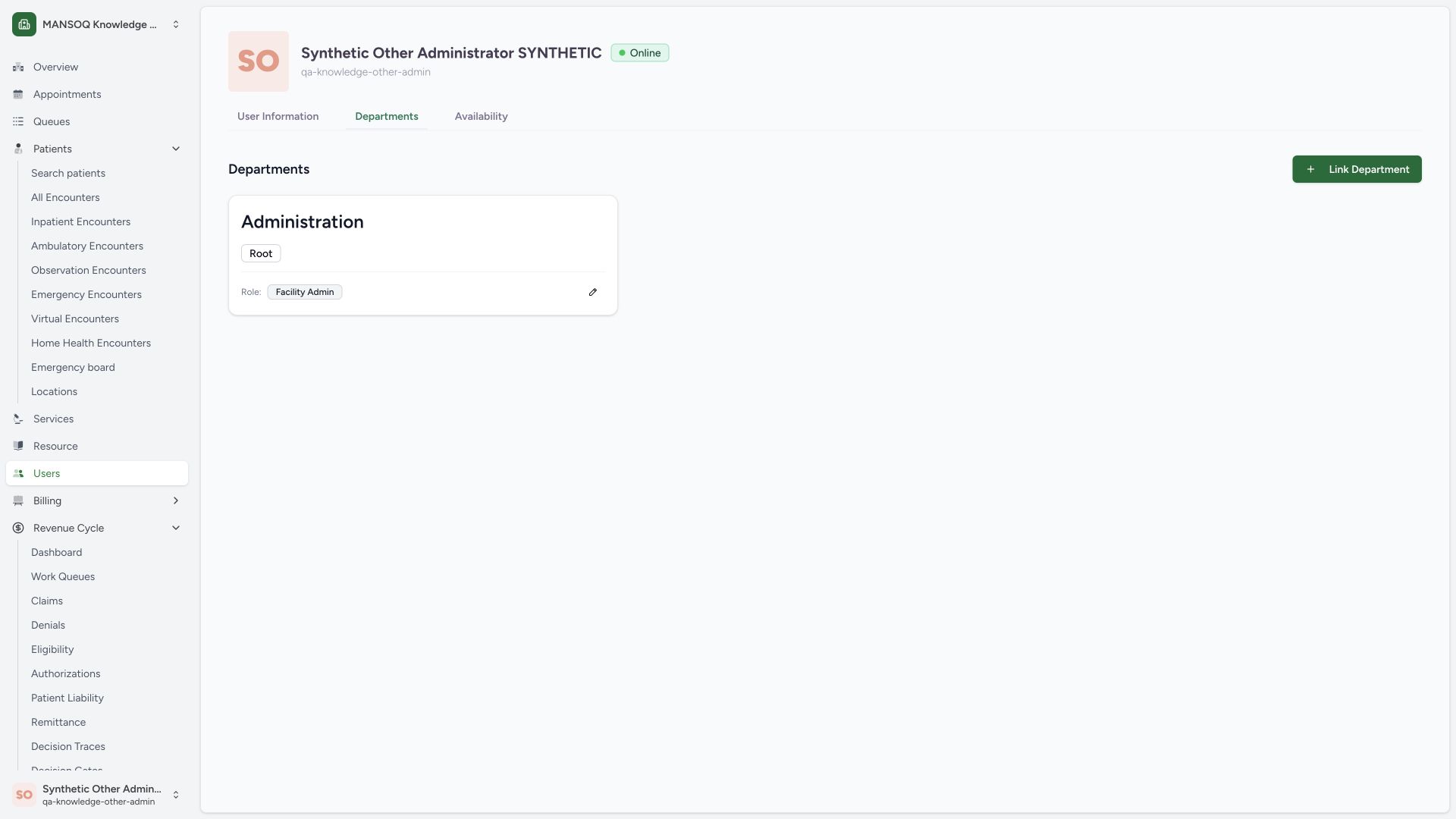
Open Departments in the selected user’s facility profile. The pictured account already belongs to the Administration root with the Facility Admin role. The display suffix update did not create or modify that membership. Link Department and the role edit icon are separate administrative operations and were not submitted here.
 123
123- Department context: This is a facility-specific membership view.
- Existing root department: Administration is distinct from the separate operational department.
- Actual membership role: A display suffix does not grant this security role.
7. Distinguish viewing another identity from editing it
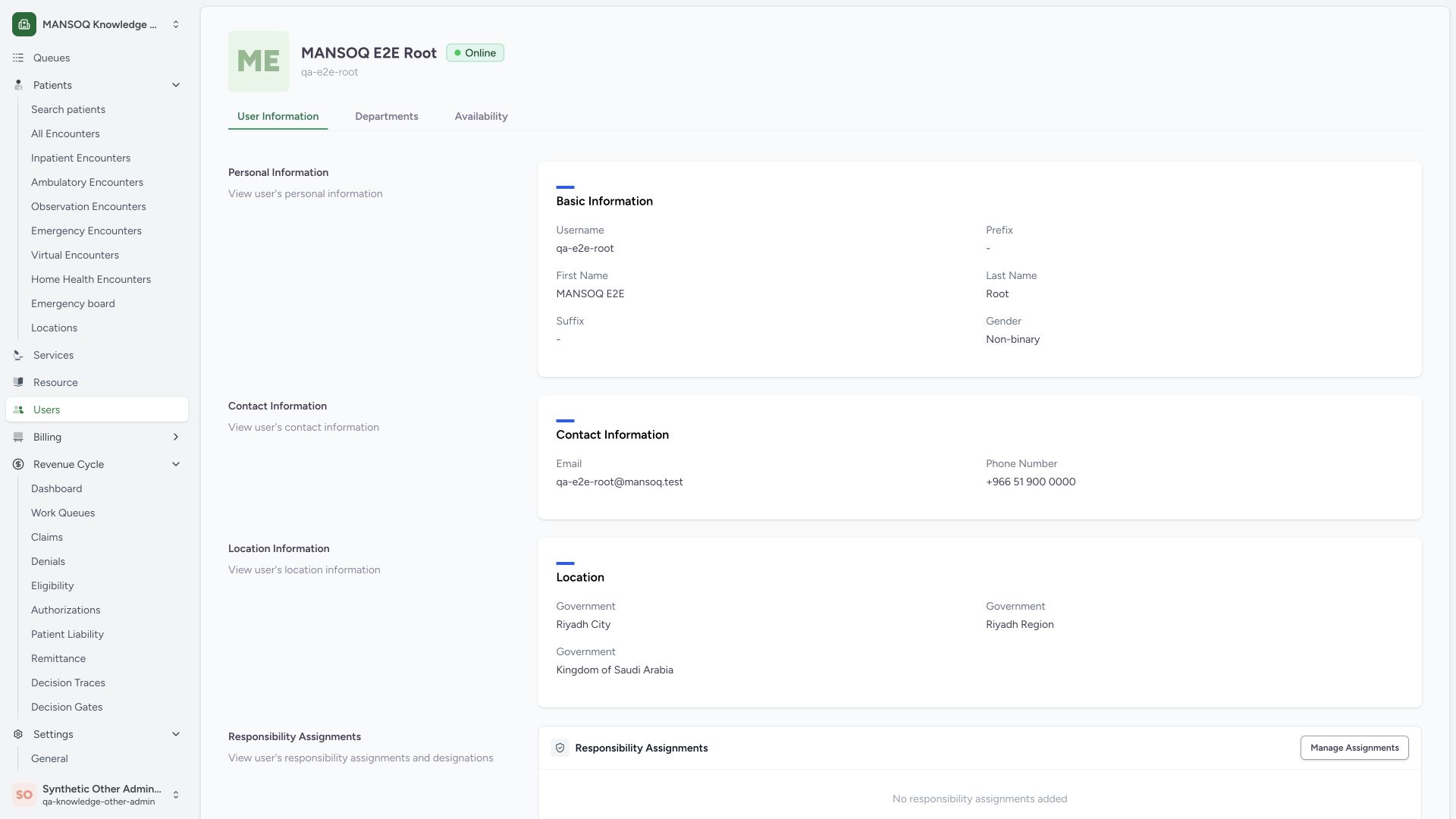
The comparison selects a different synthetic user while the Other administrator remains signed in. The native profile says View user’s personal information, and Edit User is absent. The pinned identity-update rules allow self or the account’s is_superuser flag; being a Facility Admin does not by itself authorize editing another user’s identity. No write against this other identity was attempted.
 12
12- Different selected identity: Selected person is distinct from the signed-in Other administrator.
- View-only profile context: This page offers profile reading rather than the self Edit User control.
What this edit form actually updates
The pinned update payload includes first name, last name, phone, prefix, suffix, gender and optional geographic organization. It does not include username, email, password or role-organization assignments. The profile may display those other facts, but their presence does not make them editable through this ordinary update form.
Identity, facility membership and responsibilities are distinct
A profile describes the person. The Departments tab queries facility organizations containing that person and then reads the membership role. Responsibility assignments use role organizations. Native role definitions and account is_superuser are separate concepts. Do not use a display title, suffix or visible tab to infer effective resource access.
Profile and availability context
The global workforce profile shows User Information; facility context adds Departments. The Availability tab additionally depends on the deployed schedule-view permission. A visible scheduling route still needs its own resource and backend authorization checks. This guide does not certify scheduling execution or patient-portal profile behavior.
Troubleshooting
Update User is disabled
Check whether an actual editable value changed. The source also disables the form during loading or submission. An unchanged form is not the same as an access-denied response.
I can view a colleague but cannot see Edit User
Confirm the intended task: personal identity edits are limited to self or is_superuser in the audited source, while department-role maintenance has separate authorization. Use the approved administrator process instead of trying to change a display label to obtain access.
Source evidence
References are pinned to the private MANSOQ source repository. Repository access is required to open these links.
- repositories/platform/mansoq-web/src/components/Users/UserSummary.tsx:40 · f6e9f05f
- repositories/platform/mansoq-web/src/components/Users/UserForm.tsx:99 · f6e9f05f
- repositories/platform/mansoq-web/src/components/Users/UserForm.tsx:210 · f6e9f05f
- repositories/platform/mansoq-web/src/components/Users/UserForm.tsx:311 · f6e9f05f
- repositories/platform/mansoq-web/src/components/Users/UserForm.tsx:823 · f6e9f05f
- repositories/platform/mansoq-web/src/components/Users/UserDepartmentsTab.tsx:141 · f6e9f05f
- repositories/platform/mansoq-web/src/components/Users/UserHome.tsx:74 · f6e9f05f
- repositories/platform/mansoq-core/mansoq/emr/api/viewsets/user.py:150 · f6e9f05f