 MANSOQ
 Medication administration · VERSION 39b72767
Correct an existing medication event as Entered in Error
Open the intended saved event, update its status and correction note, and verify the same record remains. The observed Nurse correction retained the existing event ID and occurrence, with no extra event and no changes to the other two records.
Nurse
 12
12Confirm the existing record before correcting it
Capture details
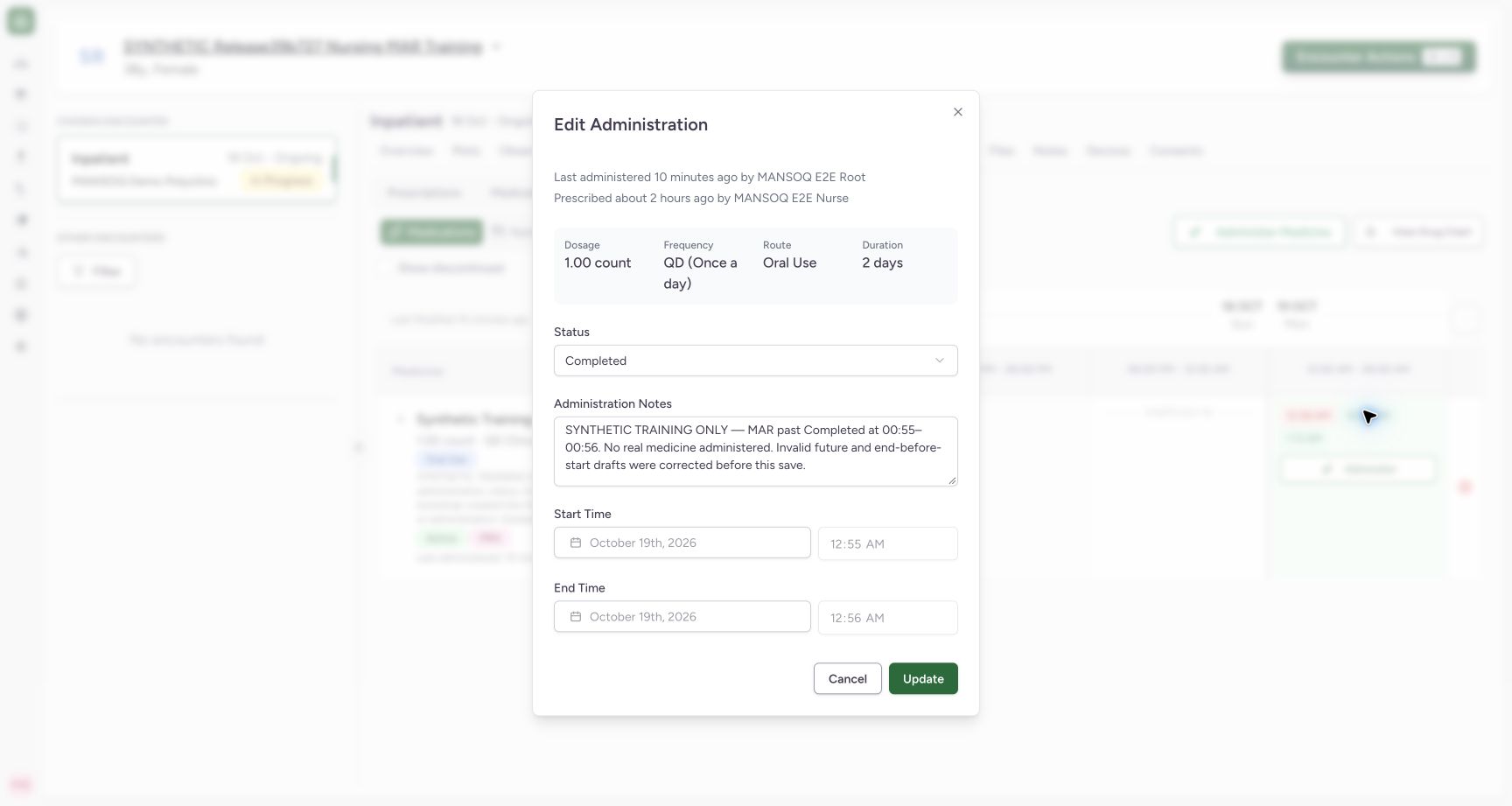
Exact committed release 39b72767 on an isolated nonproduction clone. Existing Nurse; fictional Polyclinic Inpatient software exercise only. The 12:55 AM chip opens existing event 6d440c2a… in Edit Administration. Original Completed status, note and 00:55–00:56 occurrence identify this event; a new Administer action would create another record instead.
Image SHA-256 333ff32db5b8e1bded9aacd806ad71eea01d7b65bc5d254857e363fd7c6a5a73
- Existing Completed event: Verify that this is the record requiring correction.
- Check the original note: Confirm the intended prior record before changing its status.
 12
12Verify the saved Entered in Error correction
Capture details
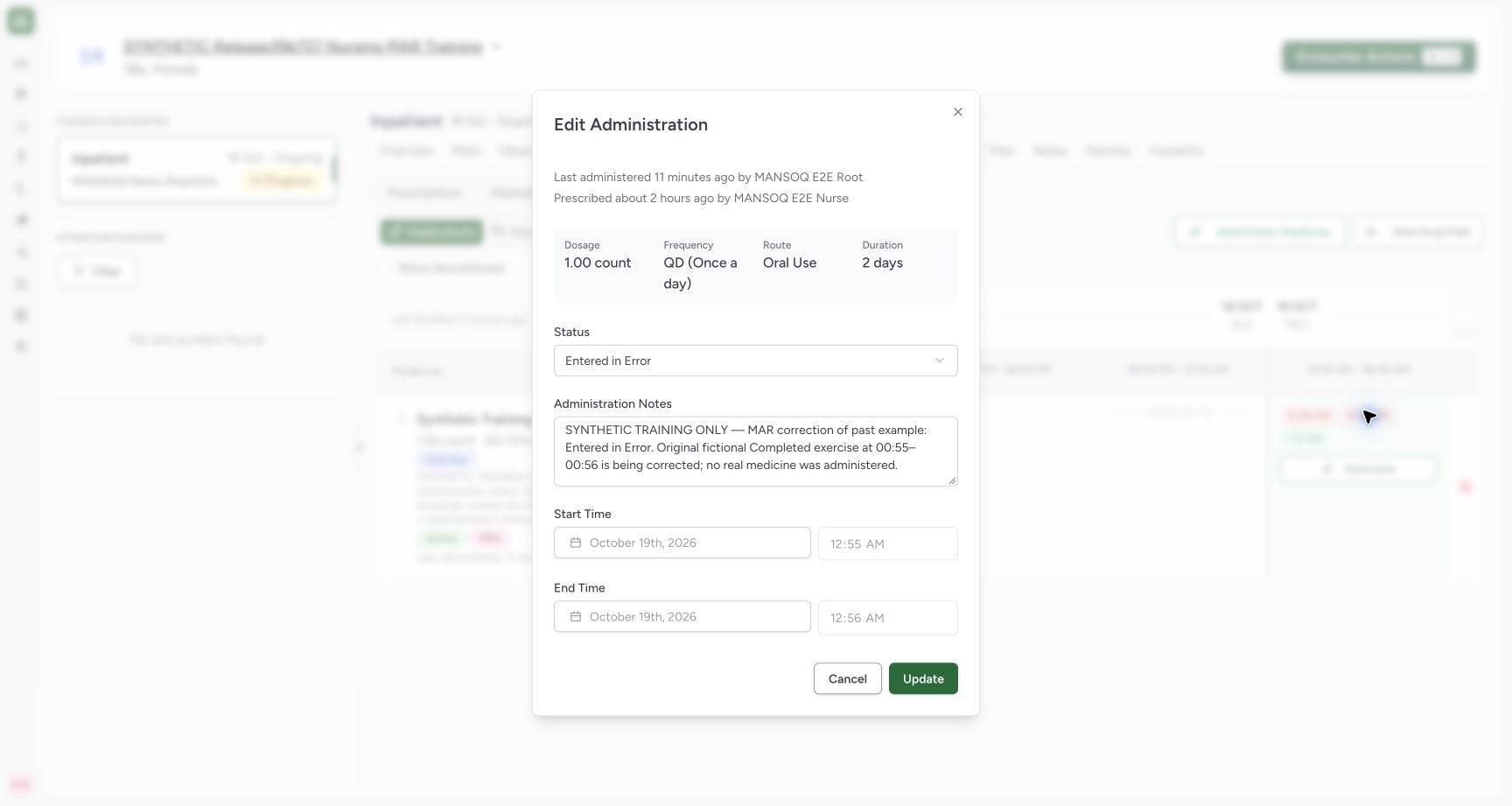
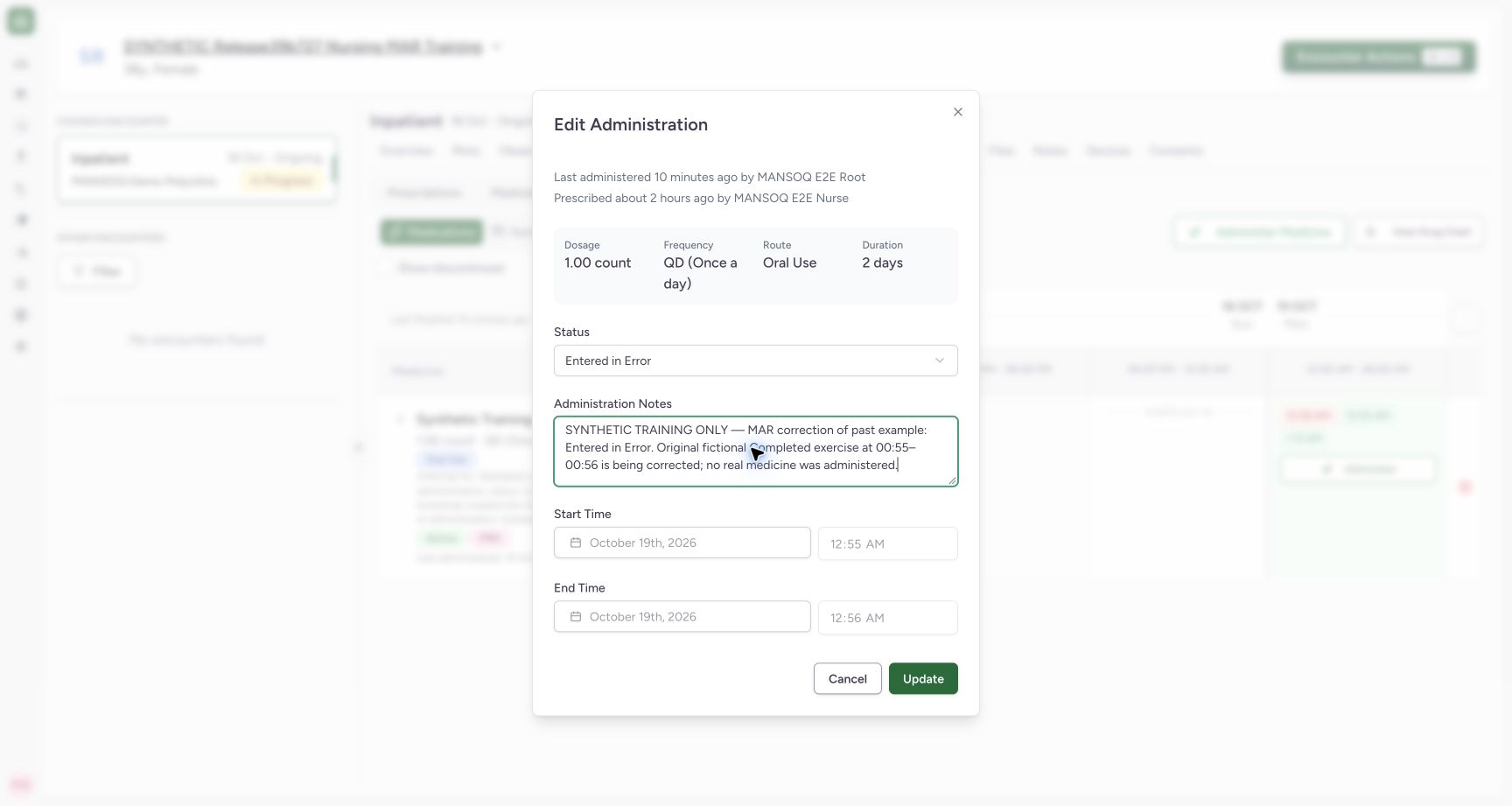
Exact committed release 39b72767 on an isolated nonproduction clone. Existing Nurse; fictional Polyclinic Inpatient software exercise only. Reopened corrected existing event shows Entered in Error, the saved correction note and original locked 00:55–00:56. Independent identity proof retains same event ID and total count 3, with other two events unchanged; this does not establish a separate immutable revision-history viewer.
Image SHA-256 68ba284ee376d65b8580cd9e4fbf2248c0e803fcf51ed758bd5d39060056c6c9
- Saved Entered in Error: The saved existing event now has the correction status.
- Saved correction note: Confirm the correction context persisted on this same event.
8 of 8 content blocks have reviewed image alignment. Missing overview or prerequisite images remain open.
Before you begin
- Identify the saved event that needs correction by the patient, encounter, order, occurrence and existing note. A new Administer action creates documentation rather than opening that saved event.12
Recorded release 39b72767 · 2026-10-18T22:23:04.122Z · 1728 × 921 Confirm the existing record before correcting it
Capture details
Exact committed release 39b72767 on an isolated nonproduction clone. Existing Nurse; fictional Polyclinic Inpatient software exercise only. The 12:55 AM chip opens existing event 6d440c2a… in Edit Administration. Original Completed status, note and 00:55–00:56 occurrence identify this event; a new Administer action would create another record instead.
Image SHA-256
333ff32db5b8e1bded9aacd806ad71eea01d7b65bc5d254857e363fd7c6a5a73- Existing Completed event: Verify that this is the record requiring correction.
- Check the original note: Confirm the intended prior record before changing its status.
- Use an existing account with clinical update permission and follow your facility’s correction policy. This exercise changes one fictional prior Completed record; it is not a clinical recommendation to alter another person’s records.
 12
12Recorded release 39b72767 · 2026-10-18T22:23:12.023Z · 1728 × 921 Review the correction and update the existing event
Capture details
Exact committed release 39b72767 on an isolated nonproduction clone. Existing Nurse; fictional Polyclinic Inpatient software exercise only. Existing 00:55–00:56 event now has Entered in Error selected and an explicit fictional correction note. Occurrence fields remain locked. Update changes this selected saved record; this is not a new administration.
Image SHA-256
48a3d1bcc2f27f89c50f69128e9bf8f9bc14d2ff9f70f6ec5bde77a292f1102d- Correction status: Verify Entered in Error on the intended existing event.
- Update this record: Save the correction once after reviewing its note and identity.
1. Open and identify the existing event
Select the intended chart time chip. In the example, 12:55 AM opens Edit Administration with Completed, the original note and 00:55–00:56 occurrence. Verify these details before making a change. The edit form has an Update button; confirm that you are editing the existing event rather than adding another one.
12Confirm the existing record before correcting it
Capture details
Exact committed release 39b72767 on an isolated nonproduction clone. Existing Nurse; fictional Polyclinic Inpatient software exercise only. The 12:55 AM chip opens existing event 6d440c2a… in Edit Administration. Original Completed status, note and 00:55–00:56 occurrence identify this event; a new Administer action would create another record instead.
Image SHA-256 333ff32db5b8e1bded9aacd806ad71eea01d7b65bc5d254857e363fd7c6a5a73
- Existing Completed event: Verify that this is the record requiring correction.
- Check the original note: Confirm the intended prior record before changing its status.
2. Select the correction status and record context
Choose Entered in Error in Status. Administration Notes is an optional software field; record the appropriate correction context under your facility’s policy. Review the intended existing occurrence, which is locked in this form. The example note explains that the prior fictional Completed exercise is being corrected. This observed change is to the event status and note, not the medication order.
12Review the correction and update the existing event
Capture details
Exact committed release 39b72767 on an isolated nonproduction clone. Existing Nurse; fictional Polyclinic Inpatient software exercise only. Existing 00:55–00:56 event now has Entered in Error selected and an explicit fictional correction note. Occurrence fields remain locked. Update changes this selected saved record; this is not a new administration.
Image SHA-256 48a3d1bcc2f27f89c50f69128e9bf8f9bc14d2ff9f70f6ec5bde77a292f1102d
- Correction status: Verify Entered in Error on the intended existing event.
- Update this record: Save the correction once after reviewing its note and identity.
3. Update once and wait for the saved result
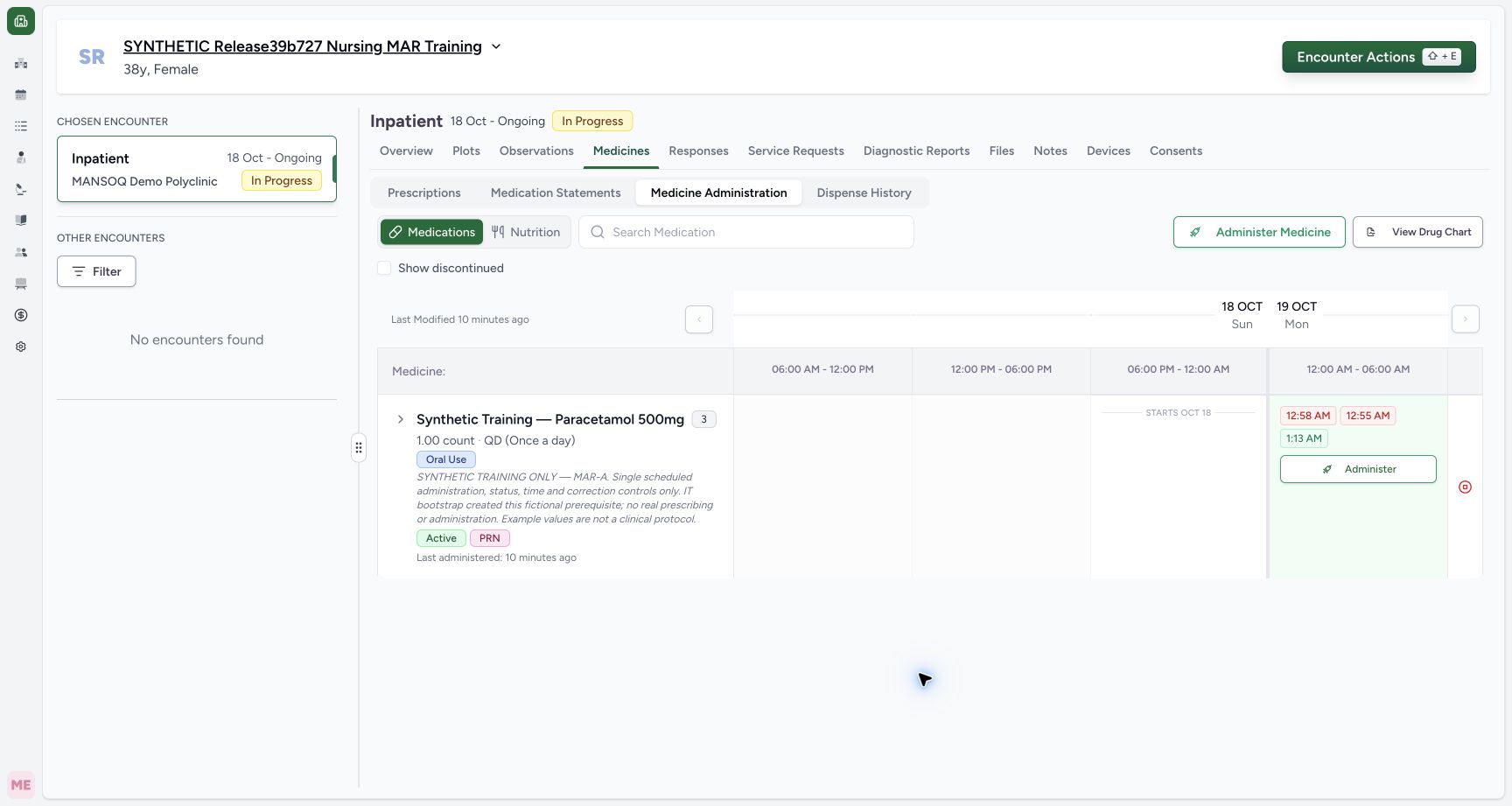
Select Update once. Wait for saving to finish and the edit dialog to close. The corrected event remains as a time chip in the chart. A button click or chip color by itself is insufficient to establish that the intended correction persisted.
12Review the correction and update the existing event
Capture details
Exact committed release 39b72767 on an isolated nonproduction clone. Existing Nurse; fictional Polyclinic Inpatient software exercise only. Existing 00:55–00:56 event now has Entered in Error selected and an explicit fictional correction note. Occurrence fields remain locked. Update changes this selected saved record; this is not a new administration.
Image SHA-256 48a3d1bcc2f27f89c50f69128e9bf8f9bc14d2ff9f70f6ec5bde77a292f1102d
- Correction status: Verify Entered in Error on the intended existing event.
- Update this record: Save the correction once after reviewing its note and identity.
 1
1Locate the corrected existing event
Capture details
Exact committed release 39b72767 on an isolated nonproduction clone. Existing Nurse; fictional Polyclinic Inpatient software exercise only. The same 12:55 AM event remains after Update. Independent Nurse/Doctor GET200 confirms same ID 6d440c2a…, status entered_in_error, retained 00:55–00:56, total count 3 and other two records unchanged. Chip appearance alone is not treated as complete correction proof.
Image SHA-256 9814f944e63571dbc368a93ef409489eb7657aad906a515122ecb462f398b4c5
- Reopen the corrected event: Inspect its saved status and correction note.
4. Reopen and verify the correction
Select the same 12:55 AM chip again. Confirm Entered in Error, the saved correction note and original locked 00:55–00:56 occurrence. Independent normal Nurse and Doctor reads confirmed the same existing event ID, unchanged total of three events, retained creator and unchanged other two records. Use Cancel after a read-only inspection.
12Verify the saved Entered in Error correction
Capture details
Exact committed release 39b72767 on an isolated nonproduction clone. Existing Nurse; fictional Polyclinic Inpatient software exercise only. Reopened corrected existing event shows Entered in Error, the saved correction note and original locked 00:55–00:56. Independent identity proof retains same event ID and total count 3, with other two events unchanged; this does not establish a separate immutable revision-history viewer.
Image SHA-256 68ba284ee376d65b8580cd9e4fbf2248c0e803fcf51ed758bd5d39060056c6c9
- Saved Entered in Error: The saved existing event now has the correction status.
- Saved correction note: Confirm the correction context persisted on this same event.
Understand the observed correction boundary
This workflow updates the existing event; it does not delete the record or document a replacement dose. The observed form does not provide a separate immutable revision-history viewer, and this lesson does not establish one. If the occurrence or clinical details require a different correction process, use your facility’s approved workflow rather than adding another administration merely to hide an error. The known reversed author captions are not reliable actor evidence on this release.
12Confirm the existing record before correcting it
Capture details
Exact committed release 39b72767 on an isolated nonproduction clone. Existing Nurse; fictional Polyclinic Inpatient software exercise only. The 12:55 AM chip opens existing event 6d440c2a… in Edit Administration. Original Completed status, note and 00:55–00:56 occurrence identify this event; a new Administer action would create another record instead.
Image SHA-256 333ff32db5b8e1bded9aacd806ad71eea01d7b65bc5d254857e363fd7c6a5a73
- Existing Completed event: Verify that this is the record requiring correction.
- Check the original note: Confirm the intended prior record before changing its status.
12Verify the saved Entered in Error correction
Capture details
Exact committed release 39b72767 on an isolated nonproduction clone. Existing Nurse; fictional Polyclinic Inpatient software exercise only. Reopened corrected existing event shows Entered in Error, the saved correction note and original locked 00:55–00:56. Independent identity proof retains same event ID and total count 3, with other two events unchanged; this does not establish a separate immutable revision-history viewer.
Image SHA-256 68ba284ee376d65b8580cd9e4fbf2248c0e803fcf51ed758bd5d39060056c6c9
- Saved Entered in Error: The saved existing event now has the correction status.
- Saved correction note: Confirm the correction context persisted on this same event.
Source evidence
Every citation uses this exact committed version. The private source repository requires access.
- repositories/platform/mansoq-web/src/components/Medicine/MedicationAdministration/MedicineAdminForm.tsx:686 ·
39b7276732f88bc07ad0abb61619f7aafe3c9e14Source file checksum
b6002675d4d8d1612494006f390203dd134699ab5b3d44876ed169db3e681e3a - repositories/platform/mansoq-web/src/components/Medicine/MedicationAdministration/MedicineAdminDialog.tsx:84 ·
39b7276732f88bc07ad0abb61619f7aafe3c9e14Source file checksum
c6ccd39c46d4093d346e97987eebd9dd1b51ffae1c8688f5305a7eed5336d6f2 - repositories/platform/mansoq-core/mansoq/emr/api/viewsets/medication_administration.py:28 ·
39b7276732f88bc07ad0abb61619f7aafe3c9e14Source file checksum
2a9126a3aae000cf2bce7710a1ad025aa451f9a4febb189a7dff0620842e7b76 - repositories/platform/mansoq-core/mansoq/emr/resources/medication/administration/spec.py:178 ·
39b7276732f88bc07ad0abb61619f7aafe3c9e14Source file checksum
b9549599f7137f28773491f3d79ced93730be81df46083248a9049e1ba3dd626