 MANSOQ
 IT and integrations · VERSION 39b72767
Create a service identity and distinguish it from a department assignment
Create one fictional service account, recognize the separate linking prompt, and inspect the saved identity without adding a role. This observed workflow uses an existing Clinic Facility Admin on release 39b72767; it does not provision production integration access.
Facility Admin
 12345
12345Identity created; role linking remains separate
Capture details
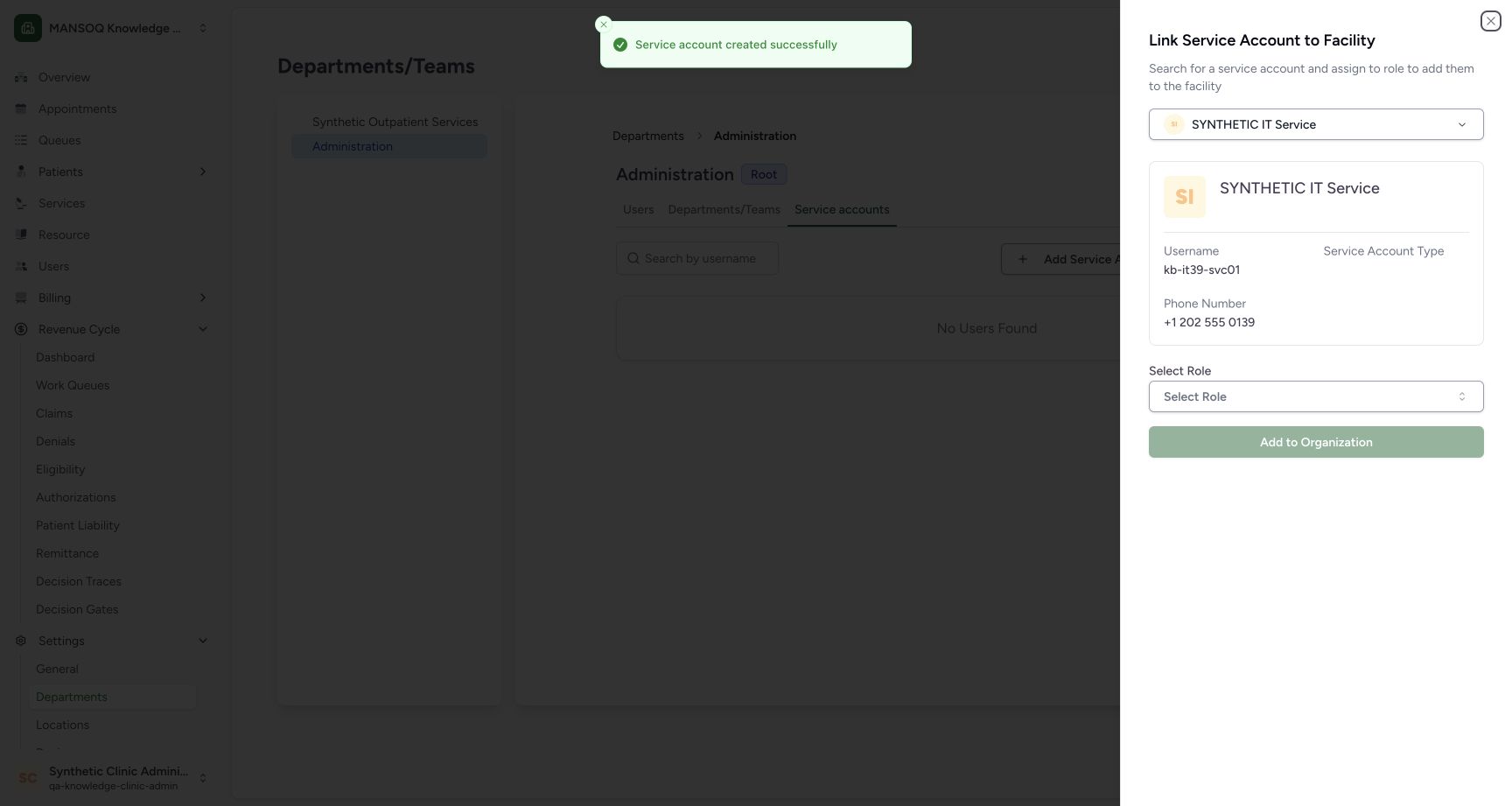
Exact committed release 39b72767; isolated nonproduction Clinic clone. Normal UI creation succeeded. The next Link Service Account to Facility panel has no selected role and was closed without submitting Add to Organization. Independent saved-record readback confirmed one new service account, creator Facility Admin, unusable password and zero memberships.
Image SHA-256 b71ae51d92f433b56583300cbd290f3bc1f786cd9969f8ff252fa3a6e3a977dc
- Creation succeeded: This toast reports creation of the service identity.
- Saved username: Check the identity that the linking panel has selected.
- Select Role: Department linking requires a separate role selection; none was made here.
- Add to Organization: This action is still disabled and was not submitted.
- Close linking: Close this panel when no assignment should be made.
 1234
1234Inspect creator-controlled service token management
Capture details
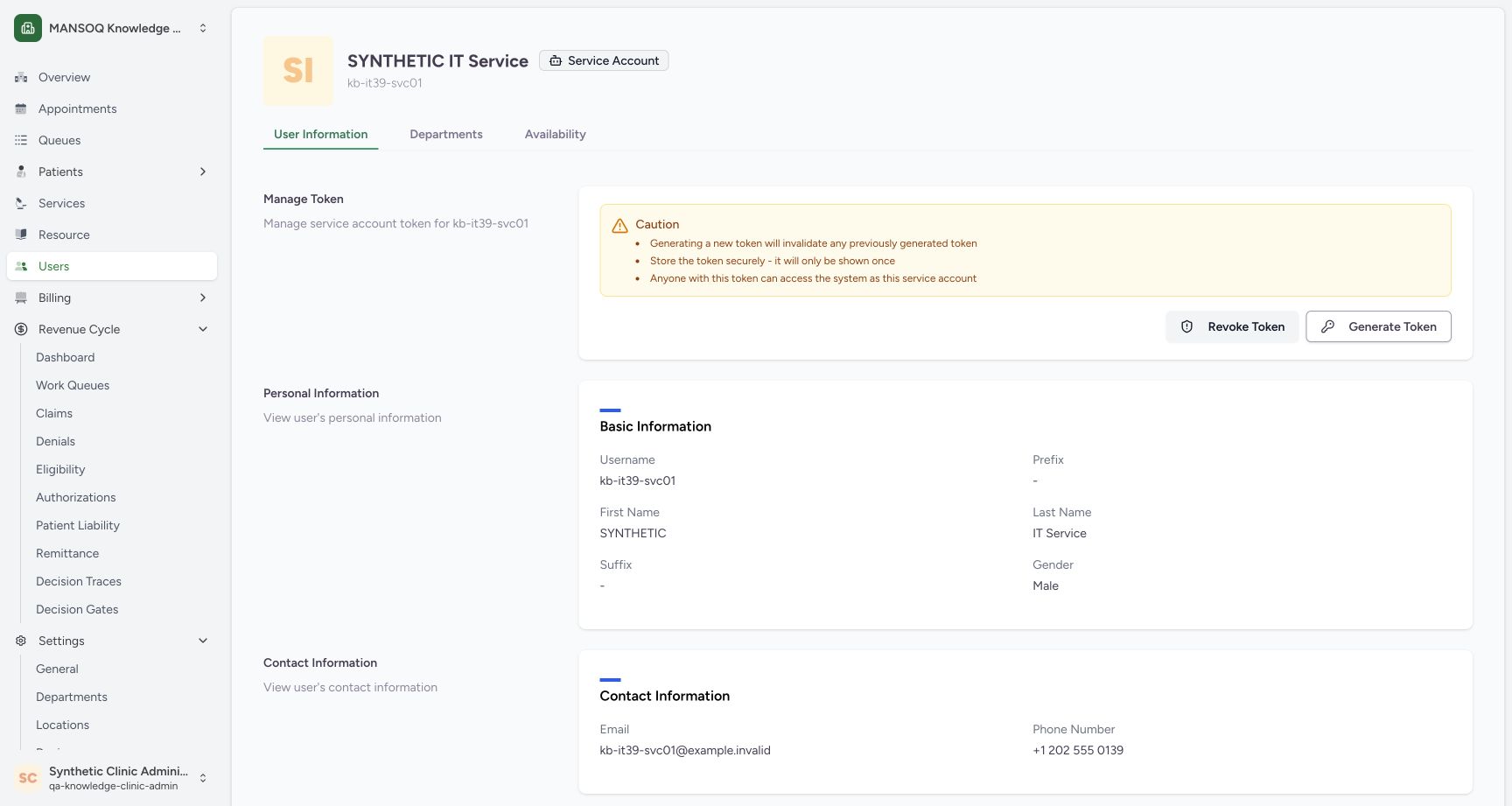
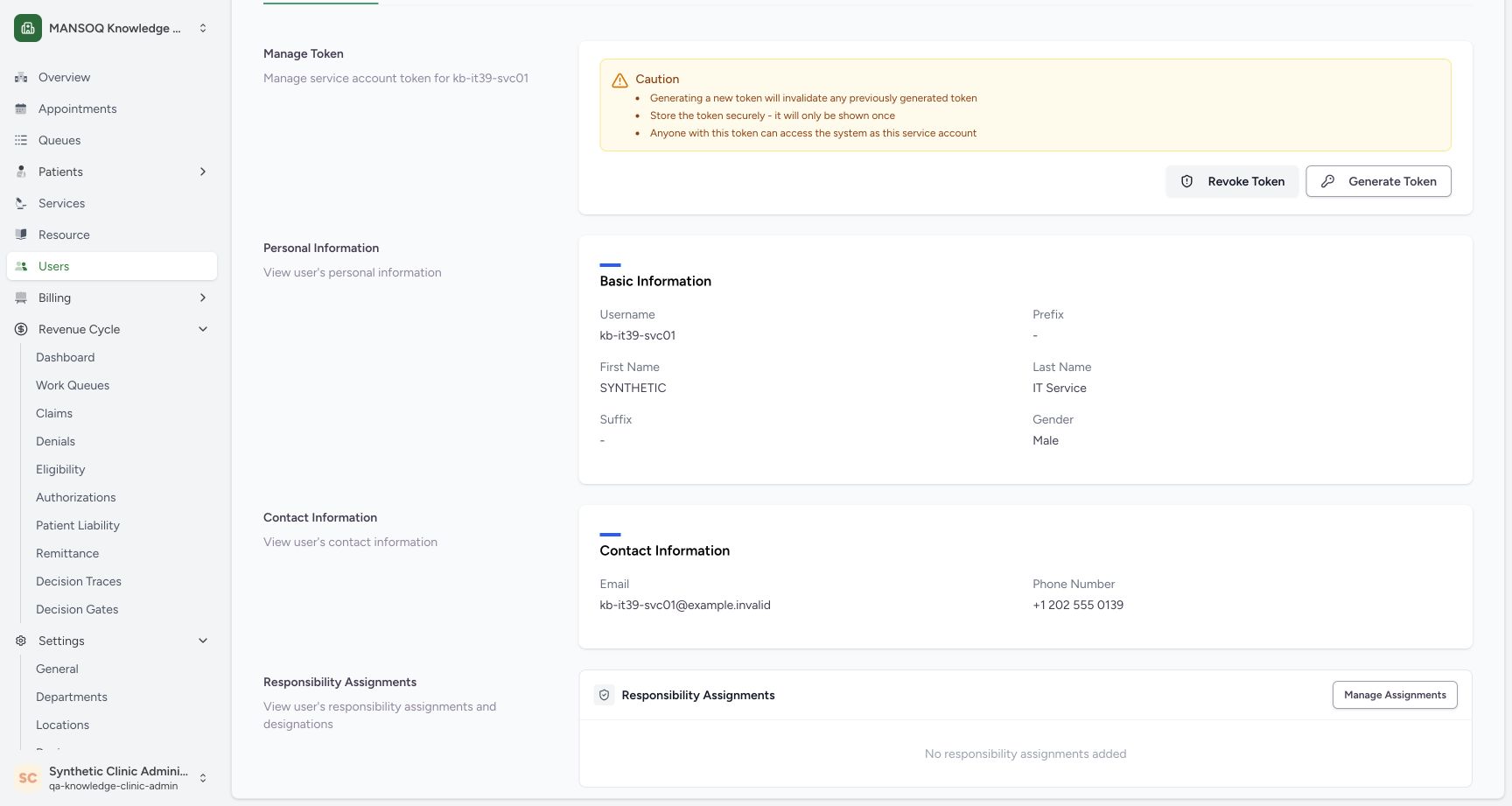
Exact committed release 39b72767; isolated nonproduction Clinic clone. The existing creator opened the normal service-account profile. The page displays cautions and Revoke/Generate controls, but no token value, presence indicator or expiry. The secret display/copy workflow is not pictured.
Image SHA-256 d5316225d6890c81d22ee71a63bab74fe4f1ef9c2e2bcf86d3842a424bdd7119
- Service-account identity: Confirm the intended account and its Service Account badge.
- Username: Match this username to the intended integration principal.
- Read token cautions: The page states that generation invalidates a prior token and a token acts as this account.
- Revoke Token: Open the revoke confirmation for this account.
11 of 11 content blocks have reviewed image alignment. Missing overview or prerequisite images remain open.
Before you begin
- Use an existing authorized account in the intended facility and department. The illustrated Facility Admin has service-account creation permission; a visible control does not establish permission for every role.
 12345
12345Recorded release 39b72767 · 2026-10-18T22:35:54.778Z · 1728 × 921 Inspect department service accounts
Capture details
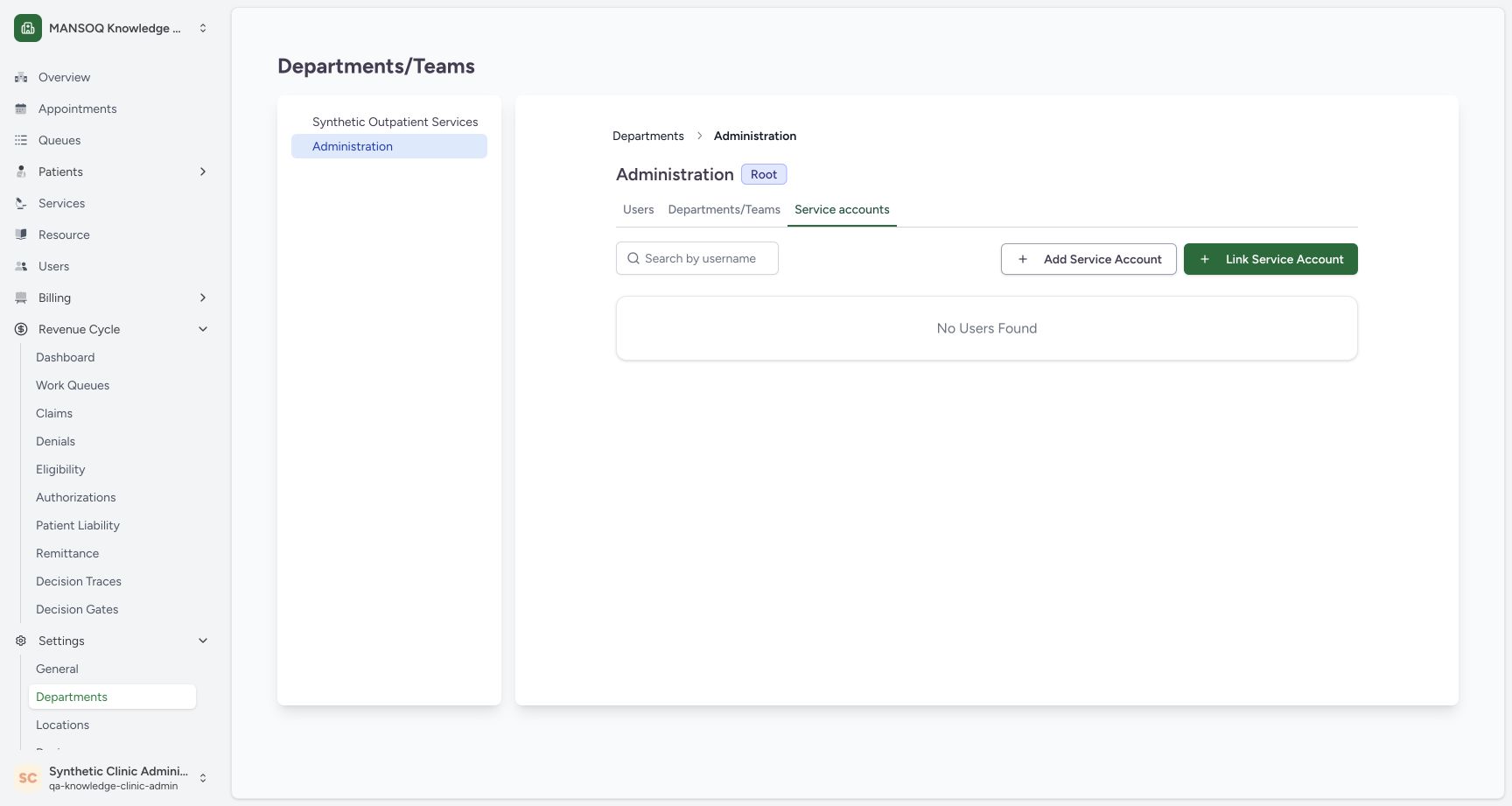
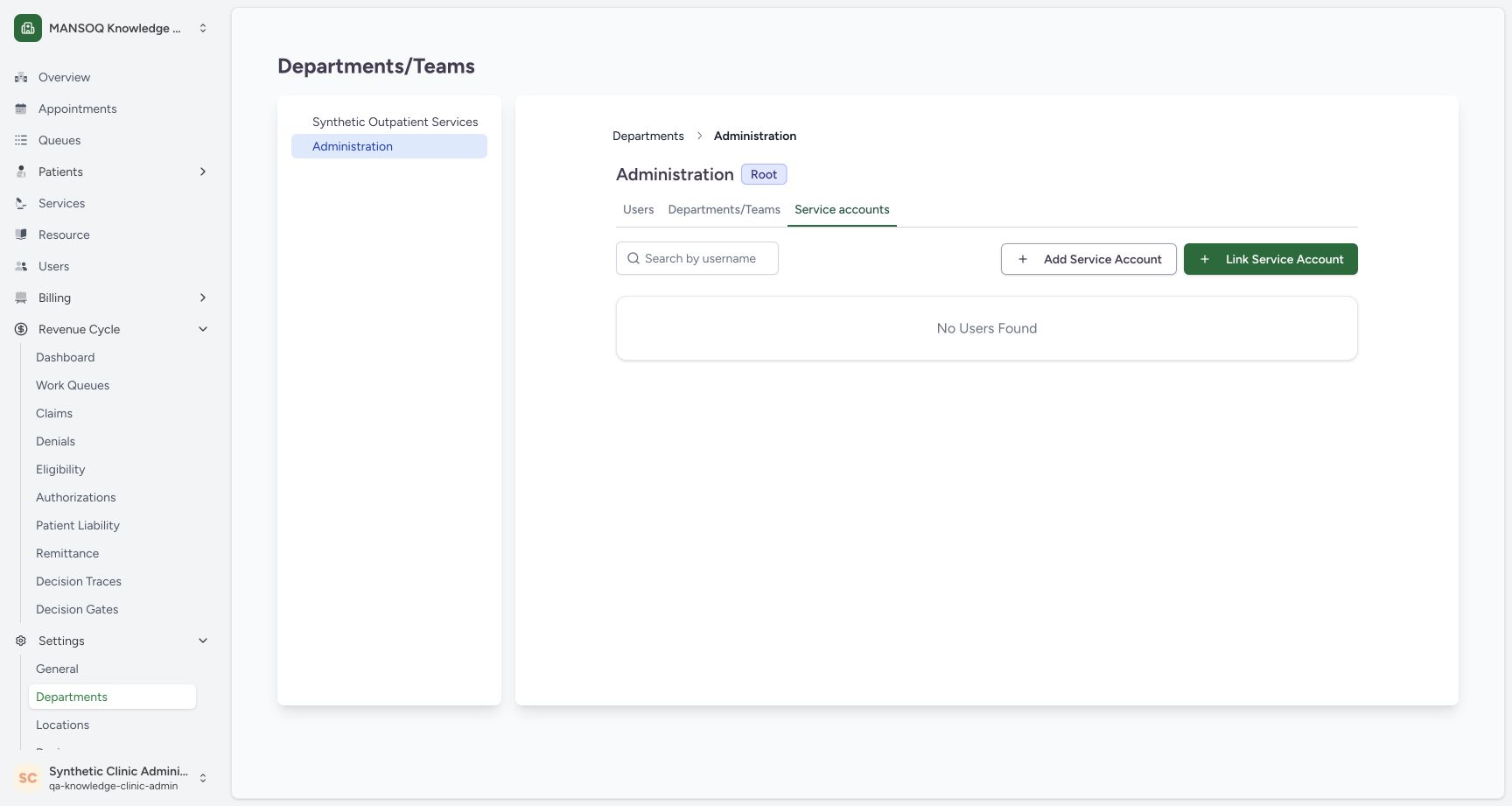
Exact committed release 39b72767; isolated nonproduction Clinic clone. Existing Clinic Facility Admin in Administration / Service accounts. This department has no linked service accounts before the exercise.
Image SHA-256
034044b0104832de6329a6fab7ff2572eebc1efe848c54892913361f48d673c7- Departments: Open the intended facility department.
- Administration: Confirm the selected department.
- Service accounts: This tab lists service-account memberships in this department.
- Add Service Account: Start creation of a service identity.
- Link Service Account: Linking an existing identity is a separate action.
- Have the approved identity and contact details for the service principal. This isolated example uses reserved fictional contacts and deliberately leaves all responsibility and department assignments empty.
 1234567
Recorded release 39b72767 · 2026-10-18T22:36:33.652Z · 1728 × 921 Review the fictional service-account identity draft
Capture details
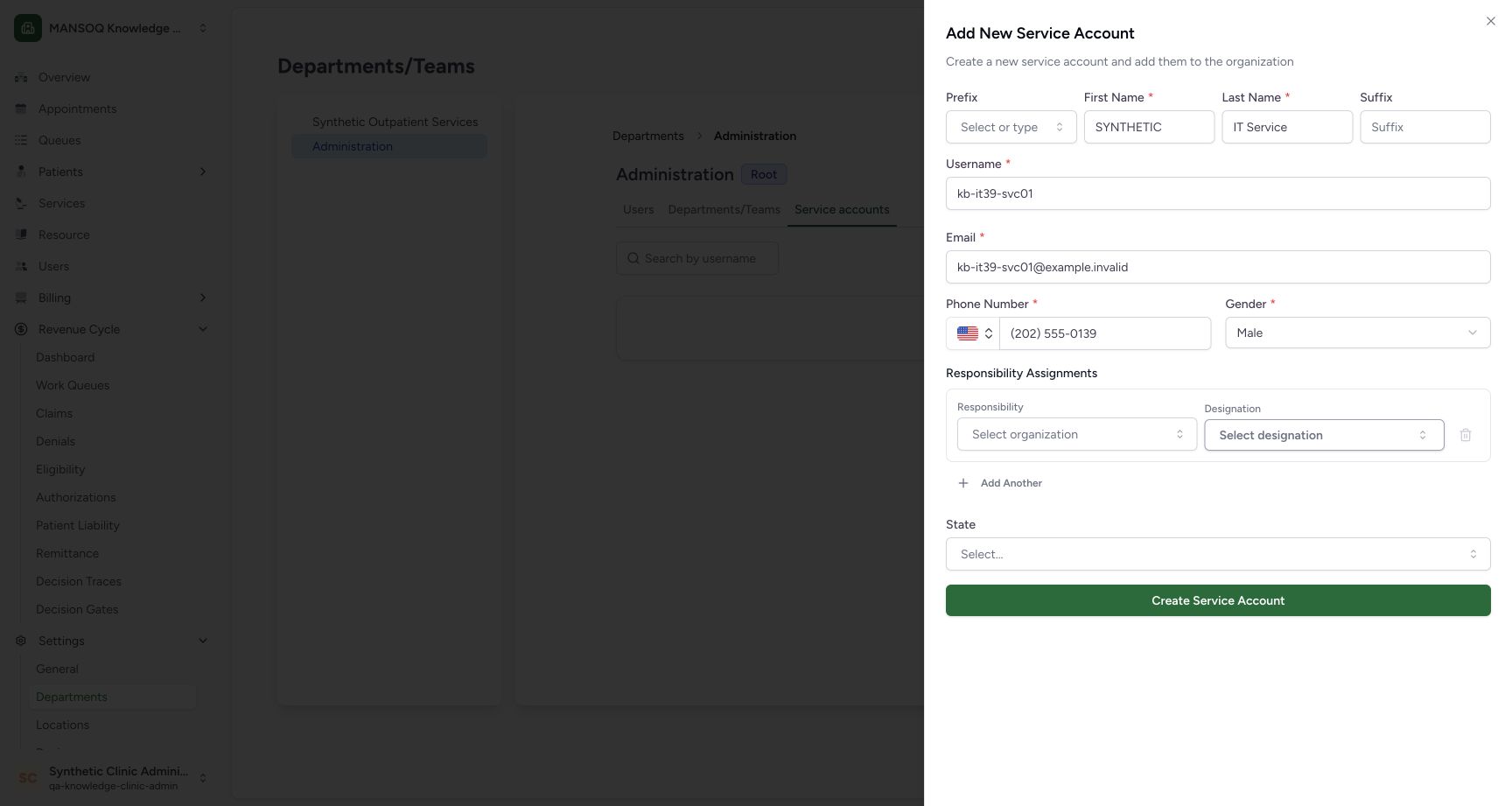
Exact committed release 39b72767; isolated nonproduction Clinic clone. Completed normal UI draft with reserved fictional contact data. Responsibility Assignments and State are left empty; no password or credential is displayed.
Image SHA-256
013ac2e65818b83dd05c6ae3710df1bb03c08c47d575262b293d8bacdaf858c4- Required names: Enter the account identity required by this form.
- Username: Use the intended unique service-account username.
- Email: The example uses an invalid reserved example domain.
- Phone number: The example uses a reserved fictional 202-555-0139 number.
- Gender field: This release requires the displayed gender selection even for a service account.
- Responsibility assignments: No responsibility or designation is assigned in this exercise.
- Create Service Account: Save the reviewed identity once.
1. Open the intended department’s Service accounts tab
In the selected facility, open Settings, then Departments, choose the intended department and select Service accounts. Confirm the facility selector and department heading together. The example uses Administration. This list shows linked service accounts for that department.
12345Inspect department service accounts
Capture details
Exact committed release 39b72767; isolated nonproduction Clinic clone. Existing Clinic Facility Admin in Administration / Service accounts. This department has no linked service accounts before the exercise.
Image SHA-256 034044b0104832de6329a6fab7ff2572eebc1efe848c54892913361f48d673c7
- Departments: Open the intended facility department.
- Administration: Confirm the selected department.
- Service accounts: This tab lists service-account memberships in this department.
- Add Service Account: Start creation of a service identity.
- Link Service Account: Linking an existing identity is a separate action.
2. Review the service identity fields
Select Add Service Account. Fill the required names, username, email, phone and gender fields. The example uses SYNTHETIC IT Service, a unique training username, an example.invalid email and a reserved fictional phone number. Prefix, suffix and State are left empty. The Responsibility Assignments controls are also left empty in this exercise; creating this identity does not itself establish its intended clinical permissions.
1234567Review the fictional service-account identity draft
Capture details
Exact committed release 39b72767; isolated nonproduction Clinic clone. Completed normal UI draft with reserved fictional contact data. Responsibility Assignments and State are left empty; no password or credential is displayed.
Image SHA-256 013ac2e65818b83dd05c6ae3710df1bb03c08c47d575262b293d8bacdaf858c4
- Required names: Enter the account identity required by this form.
- Username: Use the intended unique service-account username.
- Email: The example uses an invalid reserved example domain.
- Phone number: The example uses a reserved fictional 202-555-0139 number.
- Gender field: This release requires the displayed gender selection even for a service account.
- Responsibility assignments: No responsibility or designation is assigned in this exercise.
- Create Service Account: Save the reviewed identity once.
3. Create the identity once
Select Create Service Account once after reviewing the draft. Wait for Service account created successfully. The next panel, Link Service Account to Facility, is a separate operation. The selected account and a creation toast establish the saved identity; Add to Organization has not yet run.
1234567Review the fictional service-account identity draft
Capture details
Exact committed release 39b72767; isolated nonproduction Clinic clone. Completed normal UI draft with reserved fictional contact data. Responsibility Assignments and State are left empty; no password or credential is displayed.
Image SHA-256 013ac2e65818b83dd05c6ae3710df1bb03c08c47d575262b293d8bacdaf858c4
- Required names: Enter the account identity required by this form.
- Username: Use the intended unique service-account username.
- Email: The example uses an invalid reserved example domain.
- Phone number: The example uses a reserved fictional 202-555-0139 number.
- Gender field: This release requires the displayed gender selection even for a service account.
- Responsibility assignments: No responsibility or designation is assigned in this exercise.
- Create Service Account: Save the reviewed identity once.
12345Identity created; role linking remains separate
Capture details
Exact committed release 39b72767; isolated nonproduction Clinic clone. Normal UI creation succeeded. The next Link Service Account to Facility panel has no selected role and was closed without submitting Add to Organization. Independent saved-record readback confirmed one new service account, creator Facility Admin, unusable password and zero memberships.
Image SHA-256 b71ae51d92f433b56583300cbd290f3bc1f786cd9969f8ff252fa3a6e3a977dc
- Creation succeeded: This toast reports creation of the service identity.
- Saved username: Check the identity that the linking panel has selected.
- Select Role: Department linking requires a separate role selection; none was made here.
- Add to Organization: This action is still disabled and was not submitted.
- Close linking: Close this panel when no assignment should be made.
4. Keep role linking separate from creation
The link panel requires a role before Add to Organization can be submitted. In this isolated example, close the panel without choosing a role. The department then still says No Users Found because no membership was added. Do not interpret that empty membership list as a failed identity creation or create the same account again.
12345Identity created; role linking remains separate
Capture details
Exact committed release 39b72767; isolated nonproduction Clinic clone. Normal UI creation succeeded. The next Link Service Account to Facility panel has no selected role and was closed without submitting Add to Organization. Independent saved-record readback confirmed one new service account, creator Facility Admin, unusable password and zero memberships.
Image SHA-256 b71ae51d92f433b56583300cbd290f3bc1f786cd9969f8ff252fa3a6e3a977dc
- Creation succeeded: This toast reports creation of the service identity.
- Saved username: Check the identity that the linking panel has selected.
- Select Role: Department linking requires a separate role selection; none was made here.
- Add to Organization: This action is still disabled and was not submitted.
- Close linking: Close this panel when no assignment should be made.
 12
12Created identity is not a department membership
Capture details
Exact committed release 39b72767; isolated nonproduction Clinic clone. After closing the unsubmitted linking panel, the department list remains empty. Independent readback confirms the created identity still exists with zero memberships; this empty list does not report a failed account creation.
Image SHA-256 034044b0104832de6329a6fab7ff2572eebc1efe848c54892913361f48d673c7
- No linked accounts: This is the department membership list, not the global existence of the created user.
- Separate linking action: Link Service Account starts the separate membership workflow, which remains unsubmitted in this example.
5. Inspect the saved account and its assignments
Open the normal account profile identified by the created username. The IT route is /facility/{facilityId}/users/{username}; the example opened that supported profile directly. In User Information, confirm the Service Account badge and username, then inspect Responsibility Assignments. The example shows No responsibility assignments added. Independent record reads confirmed one identity, the Facility Admin creator, no usable password, no superuser status and zero organization or facility memberships.
1234Inspect creator-controlled service token management
Capture details
Exact committed release 39b72767; isolated nonproduction Clinic clone. The existing creator opened the normal service-account profile. The page displays cautions and Revoke/Generate controls, but no token value, presence indicator or expiry. The secret display/copy workflow is not pictured.
Image SHA-256 d5316225d6890c81d22ee71a63bab74fe4f1ef9c2e2bcf86d3842a424bdd7119
- Service-account identity: Confirm the intended account and its Service Account badge.
- Username: Match this username to the intended integration principal.
- Read token cautions: The page states that generation invalidates a prior token and a token acts as this account.
- Revoke Token: Open the revoke confirmation for this account.
 123
123Confirm no responsibility assignments were added
Capture details
Exact committed release 39b72767; isolated nonproduction Clinic clone. The lower normal profile explicitly displays No responsibility assignments added. Independent readback confirms zero organization and facility memberships, no usable password, no superuser status and zero remaining service tokens.
Image SHA-256 398fcba543d5afbd643f2aeba1db206af0124d83a99705fe8767ae5d53e5418b
- Confirm the username: Keep the intended synthetic account in context.
- No assignments: The example did not add a responsibility or department membership.
- Separate assignment management: Manage Assignments is a different operation and was not used.
Identity, membership and credential are separate
The created account record is distinct from a department or responsibility assignment. The empty department list and empty responsibility panel are therefore compatible with a saved identity. This example does not demonstrate submitting a role, granting clinical access or qualifying an external integration.
12345Identity created; role linking remains separate
Capture details
Exact committed release 39b72767; isolated nonproduction Clinic clone. Normal UI creation succeeded. The next Link Service Account to Facility panel has no selected role and was closed without submitting Add to Organization. Independent saved-record readback confirmed one new service account, creator Facility Admin, unusable password and zero memberships.
Image SHA-256 b71ae51d92f433b56583300cbd290f3bc1f786cd9969f8ff252fa3a6e3a977dc
- Creation succeeded: This toast reports creation of the service identity.
- Saved username: Check the identity that the linking panel has selected.
- Select Role: Department linking requires a separate role selection; none was made here.
- Add to Organization: This action is still disabled and was not submitted.
- Close linking: Close this panel when no assignment should be made.
12Created identity is not a department membership
Capture details
Exact committed release 39b72767; isolated nonproduction Clinic clone. After closing the unsubmitted linking panel, the department list remains empty. Independent readback confirms the created identity still exists with zero memberships; this empty list does not report a failed account creation.
Image SHA-256 034044b0104832de6329a6fab7ff2572eebc1efe848c54892913361f48d673c7
- No linked accounts: This is the department membership list, not the global existence of the created user.
- Separate linking action: Link Service Account starts the separate membership workflow, which remains unsubmitted in this example.
123Confirm no responsibility assignments were added
Capture details
Exact committed release 39b72767; isolated nonproduction Clinic clone. The lower normal profile explicitly displays No responsibility assignments added. Independent readback confirms zero organization and facility memberships, no usable password, no superuser status and zero remaining service tokens.
Image SHA-256 398fcba543d5afbd643f2aeba1db206af0124d83a99705fe8767ae5d53e5418b
- Confirm the username: Keep the intended synthetic account in context.
- No assignments: The example did not add a responsibility or department membership.
- Separate assignment management: Manage Assignments is a different operation and was not used.
Inspect token management without exposing a secret
The illustrated creator sees Manage Token and its cautions on the saved profile. The page says generation invalidates a previous token and that a token acts as this account. It does not display whether a token currently exists or its expiry. The generation, secret-display and copy UI steps remain separate teaching; no credential value appears in these screenshots.
1234Inspect creator-controlled service token management
Capture details
Exact committed release 39b72767; isolated nonproduction Clinic clone. The existing creator opened the normal service-account profile. The page displays cautions and Revoke/Generate controls, but no token value, presence indicator or expiry. The secret display/copy workflow is not pictured.
Image SHA-256 d5316225d6890c81d22ee71a63bab74fe4f1ef9c2e2bcf86d3842a424bdd7119
- Service-account identity: Confirm the intended account and its Service Account badge.
- Username: Match this username to the intended integration principal.
- Read token cautions: The page states that generation invalidates a prior token and a token acts as this account.
- Revoke Token: Open the revoke confirmation for this account.
Troubleshooting
The creation toast succeeded, but the department list is empty
Check whether the separate Link Service Account to Facility panel was submitted. In this example it was closed with no role selected, so the identity exists and the department membership list remains empty. Inspect the exact saved profile before repeating account creation. The role-linking action remains unsubmitted in this lesson.
12345Identity created; role linking remains separate
Capture details
Exact committed release 39b72767; isolated nonproduction Clinic clone. Normal UI creation succeeded. The next Link Service Account to Facility panel has no selected role and was closed without submitting Add to Organization. Independent saved-record readback confirmed one new service account, creator Facility Admin, unusable password and zero memberships.
Image SHA-256 b71ae51d92f433b56583300cbd290f3bc1f786cd9969f8ff252fa3a6e3a977dc
- Creation succeeded: This toast reports creation of the service identity.
- Saved username: Check the identity that the linking panel has selected.
- Select Role: Department linking requires a separate role selection; none was made here.
- Add to Organization: This action is still disabled and was not submitted.
- Close linking: Close this panel when no assignment should be made.
12Created identity is not a department membership
Capture details
Exact committed release 39b72767; isolated nonproduction Clinic clone. After closing the unsubmitted linking panel, the department list remains empty. Independent readback confirms the created identity still exists with zero memberships; this empty list does not report a failed account creation.
Image SHA-256 034044b0104832de6329a6fab7ff2572eebc1efe848c54892913361f48d673c7
- No linked accounts: This is the department membership list, not the global existence of the created user.
- Separate linking action: Link Service Account starts the separate membership workflow, which remains unsubmitted in this example.
1234Inspect creator-controlled service token management
Capture details
Exact committed release 39b72767; isolated nonproduction Clinic clone. The existing creator opened the normal service-account profile. The page displays cautions and Revoke/Generate controls, but no token value, presence indicator or expiry. The secret display/copy workflow is not pictured.
Image SHA-256 d5316225d6890c81d22ee71a63bab74fe4f1ef9c2e2bcf86d3842a424bdd7119
- Service-account identity: Confirm the intended account and its Service Account badge.
- Username: Match this username to the intended integration principal.
- Read token cautions: The page states that generation invalidates a prior token and a token acts as this account.
- Revoke Token: Open the revoke confirmation for this account.
Source evidence
Every citation uses this exact committed version. The private source repository requires access.
- repositories/platform/mansoq-core/mansoq/emr/api/viewsets/user.py:152 ·
39b7276732f88bc07ad0abb61619f7aafe3c9e14Source file checksum
655c3f5b20a24d5b45d3b91c4f595f796cd152e326a9923db407d4accf78555d - repositories/platform/mansoq-core/mansoq/emr/resources/user/spec.py:54 ·
39b7276732f88bc07ad0abb61619f7aafe3c9e14Source file checksum
d9be6e721c8c5bf8a7063f5a773d72de62b123fb07c9981f2be83f14207f21ab - repositories/platform/mansoq-core/mansoq/security/authorization/service_account.py:10 ·
39b7276732f88bc07ad0abb61619f7aafe3c9e14Source file checksum
1b0f211d4c3fdb92e84d66d429ed8130e6c2f0e6c101c5e66f6bf3b419b40d21 - repositories/platform/mansoq-core/mansoq/security/permissions/service_account.py:8 ·
39b7276732f88bc07ad0abb61619f7aafe3c9e14Source file checksum
0206e6549c383ce835de59c6907d9f7f2b4417b48d2a11279f52e9338a177409 - repositories/platform/mansoq-web/src/components/Users/UserForm.tsx:330 ·
39b7276732f88bc07ad0abb61619f7aafe3c9e14Source file checksum
38829a0aefc6549177e11edef60dab559b8e41582a4dff408849e9ad2cf9bcb4 - repositories/platform/mansoq-web/src/pages/Organization/components/AddUserSheet.tsx:63 ·
39b7276732f88bc07ad0abb61619f7aafe3c9e14Source file checksum
ab28e3a0819addc6fd5c6daa4cdcbd3332b7ab1c8c5d10ccad4b7ab2ffe9b210 - repositories/platform/mansoq-web/src/pages/Facility/settings/organizations/FacilityOrganizationUsers.tsx:118 ·
39b7276732f88bc07ad0abb61619f7aafe3c9e14Source file checksum
e3c888cfaec482632888ccc9acc14f3eb4d262ed65c536c32b91f6413127b16e - repositories/platform/mansoq-web/src/pages/Facility/settings/organizations/components/LinkFacilityUserSheet.tsx:68 ·
39b7276732f88bc07ad0abb61619f7aafe3c9e14Source file checksum
0ec3430634599ec2f1b91e50eaa0a6d50e85069956dbccb4ba308b80b20e9c1a - repositories/platform/mansoq-web/src/components/Users/UserSummary.tsx:100 ·
39b7276732f88bc07ad0abb61619f7aafe3c9e14Source file checksum
38cd8205a36ac8d714979904cd91b92d72a564df7f80586dd2e5eacbe9b08d85 - repositories/platform/mansoq-web/src/Routers/routes/UserRoutes.tsx:6 ·
39b7276732f88bc07ad0abb61619f7aafe3c9e14Source file checksum
2251653dace1e2500910606e88f292a88dd95bc1fce856b69c8b7e09bafc8406