 MANSOQ
 IT & Integrations · VERSION 39b72767
Understand the login request and token/MFA alternatives
Read the username/password input and documented HTTP 200 oneOf response without displaying real credentials or tokens.
IT administrator · Integration engineer · Developer
 12345
12345Read the actual login request
Capture details
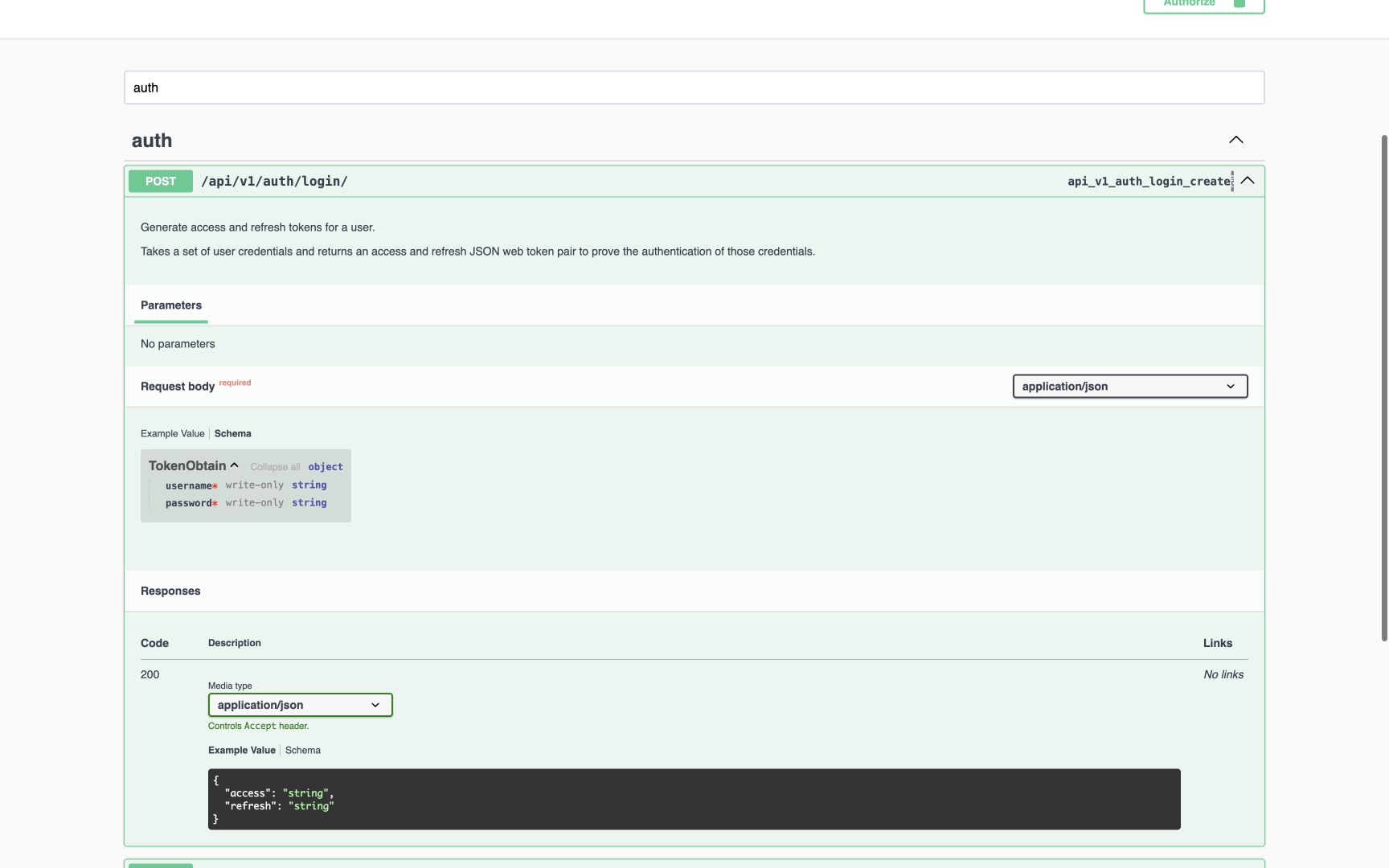
Fresh 1728×1080 Chrome capture of the installed read-only API reference rendered from committed MANSOQ release 39b72767. This local reference does not establish production product deployment or endpoint execution. The login Request Schema displays required write-only username and password. Its visible response is a generated access/refresh example containing the literal string placeholder, not real tokens.
Image SHA-256 73b2d5e552c1a24ca87102be1d7673bc934c268cef977c0dae41ea3417869f3a
- Login operation: POST /api/v1/auth/login/ is the actual documented operation.
- Request Schema: Inspect request properties here.
- Username: Required write-only username; do not substitute an undocumented email field.
- Password: Required write-only password. No credential is entered into this screenshot.
- Generated example: Literal string values are placeholders, not actual JWTs or evidence of a successful login.
 1234
1234Inspect both normal token and MFA alternatives
Capture details
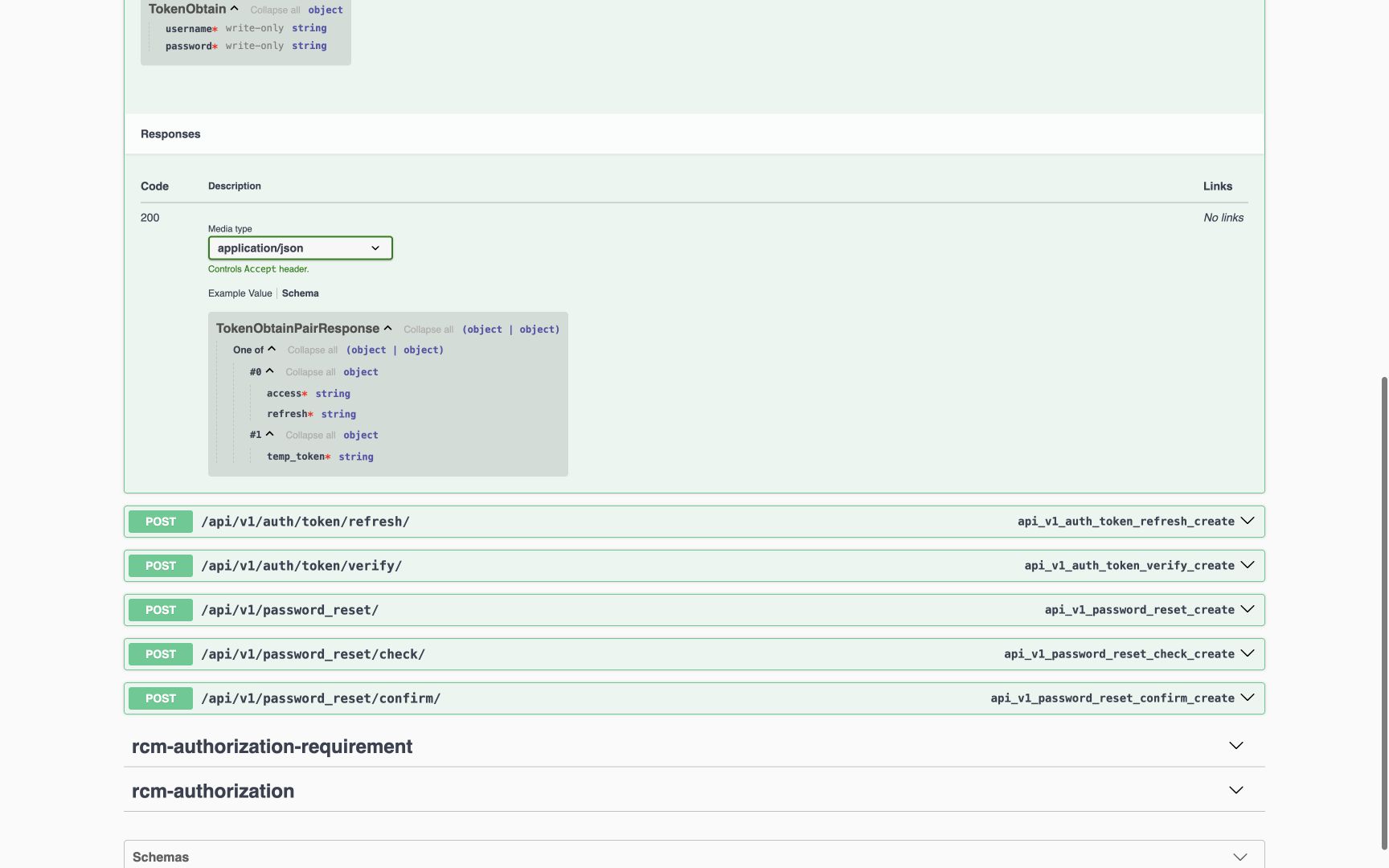
Fresh 1728×1080 Chrome capture of the installed read-only API reference rendered from committed MANSOQ release 39b72767. This local reference does not establish production product deployment or endpoint execution. The response schema is expanded: oneOf alternative #0 requires access and refresh strings; alternative #1 requires a temp_token string. No real token or sign-in response is shown.
Image SHA-256 2b3ca00ce9242ac4b76dac6ad5492cb4a7d9185d18867e27d2af52b3b8e4f04b
- Open the union: Expand One of then its two alternatives.
- Normal token pair: The ordinary alternative requires access and refresh.
- Temporary MFA token: The MFA alternative requires temp_token. It is a distinct response shape.
- Schema view: These are types/required markers, not live token values.
5 of 6 content blocks have reviewed image alignment. Missing overview or prerequisite images remain open.
Before you begin
- Use API documentation for the exact deployed source version. These fresh images show committed release 39b72767 in a local read-only reference; production deployment is separate.
 1234567
Recorded release 39b72767 · 2026-10-19 · 1728 × 921 Read the privacy-minimized documentation source receipt
Capture details
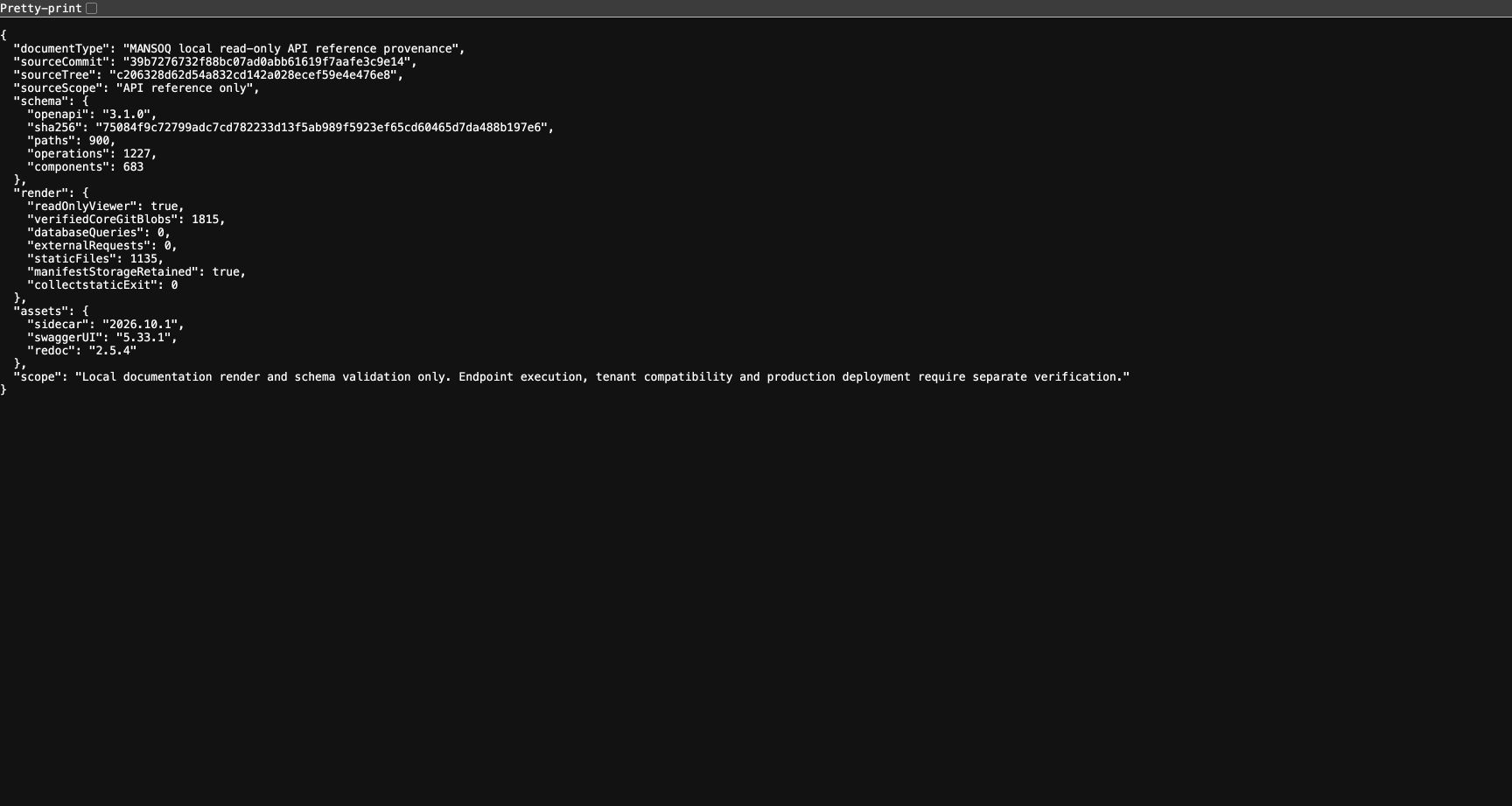
Fresh genuine 1728×921 native Chrome frame of the privacy-minimized local documentation receipt for exact release 39b72767. No pixels were edited. The original full private receipt and earlier frame are preserved separately.
Image SHA-256
fb12b6ce9985f9712ed8ada1822363dec2d43ebc521a8407615d978ec4fe786d- Exact source release: Compare the full sourceCommit with the documentation release you intend to use.
- Exact source tree: The Git source tree identifies the retained committed source.
- Schema fingerprint: Compare the complete schema SHA256 with the downloaded contract artifact.
- Read-only reference: The actual metadata records a read-only documentation viewer.
- Verified core export: This receipt records 1,815 core blobs checked against the commit.
- Zero database queries: The documented export rendered without querying application data.
- Bounded local scope: This receipt does not establish endpoint execution, tenant compatibility or production deployment.
 1234
1234Recorded release 39b72767 · 2026-10-19 · 1728 × 1080 Find the local read-only API reference
Capture details
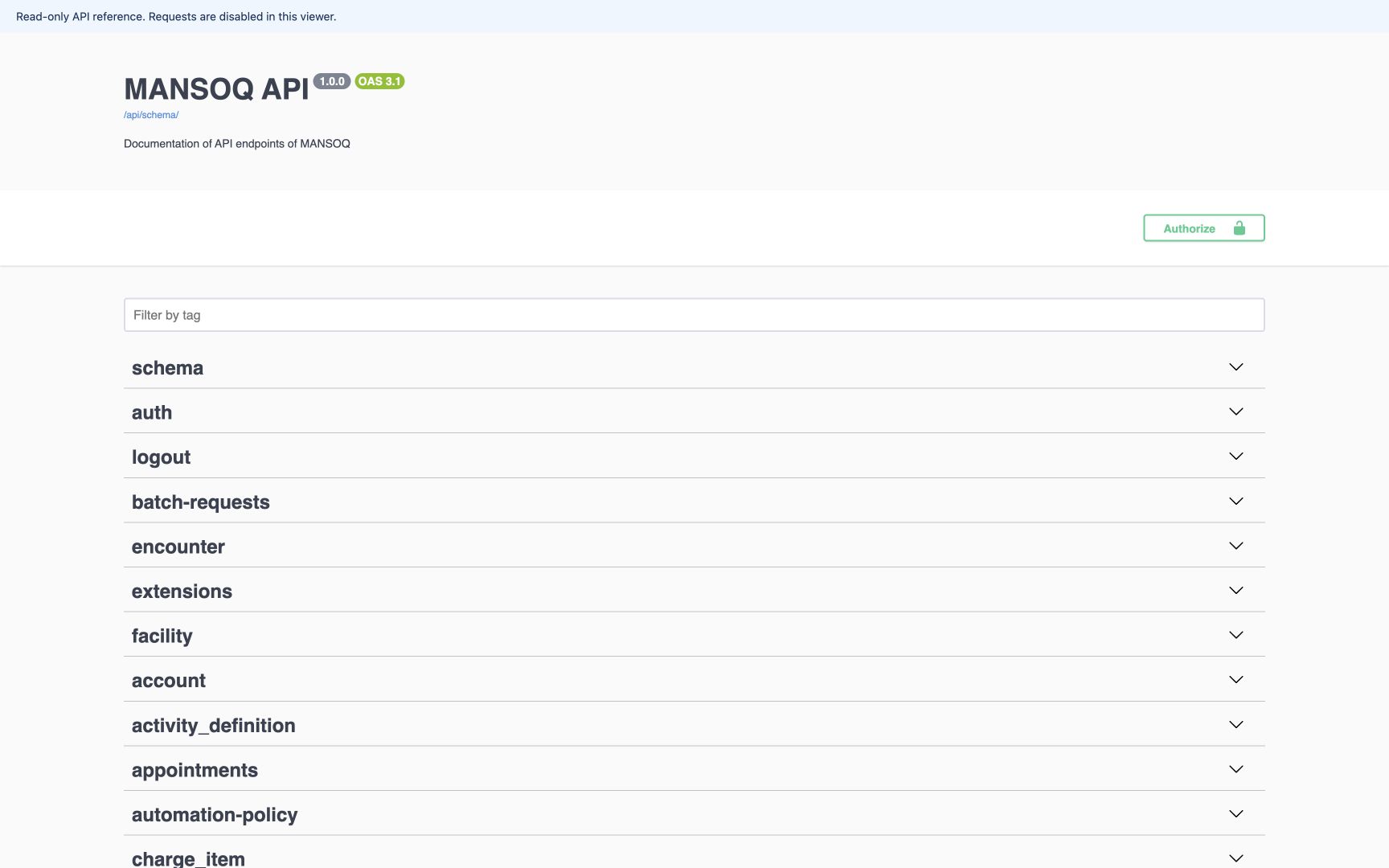
Fresh 1728×1080 Chrome capture of the installed read-only API reference rendered from committed MANSOQ release 39b72767. This local reference does not establish production product deployment or endpoint execution. The rendered viewer shows read-only banner, MANSOQ API label 1.0.0, OAS 3.1, schema link, tag filter and Authorize button. No credentials were entered; endpoint submission is disabled.
Image SHA-256
252087c750d5f3bde5575c84c42266b2d55b7d3b365822be287880a687dde252- Read-only viewer: Requests are disabled in this documentation viewer.
- Schema dialect 3.1: OAS 3.1 is the schema dialect; 1.0.0 is the separate API label, not a Git release.
- Download contract: The schema link opens the generated contract for the selected source version.
- Find a tag: Filter operations by tag such as files, auth or finance.
- The viewer disables endpoint submission. Use an approved client and authorized sandbox for actual calls; a schema grants no data access.
1. Use the documented input names
The actual login request requires username and password, both write-only. The screenshot contains schema names and generated string placeholders only. Tenant-specific deployment authentication may differ; check that environment configuration instead of treating this base login route as universal.
12345Read the actual login request
Capture details
Fresh 1728×1080 Chrome capture of the installed read-only API reference rendered from committed MANSOQ release 39b72767. This local reference does not establish production product deployment or endpoint execution. The login Request Schema displays required write-only username and password. Its visible response is a generated access/refresh example containing the literal string placeholder, not real tokens.
Image SHA-256 73b2d5e552c1a24ca87102be1d7673bc934c268cef977c0dae41ea3417869f3a
- Login operation: POST /api/v1/auth/login/ is the actual documented operation.
- Request Schema: Inspect request properties here.
- Username: Required write-only username; do not substitute an undocumented email field.
- Password: Required write-only password. No credential is entered into this screenshot.
- Generated example: Literal string values are placeholders, not actual JWTs or evidence of a successful login.
2. Handle the HTTP 200 response alternative deliberately
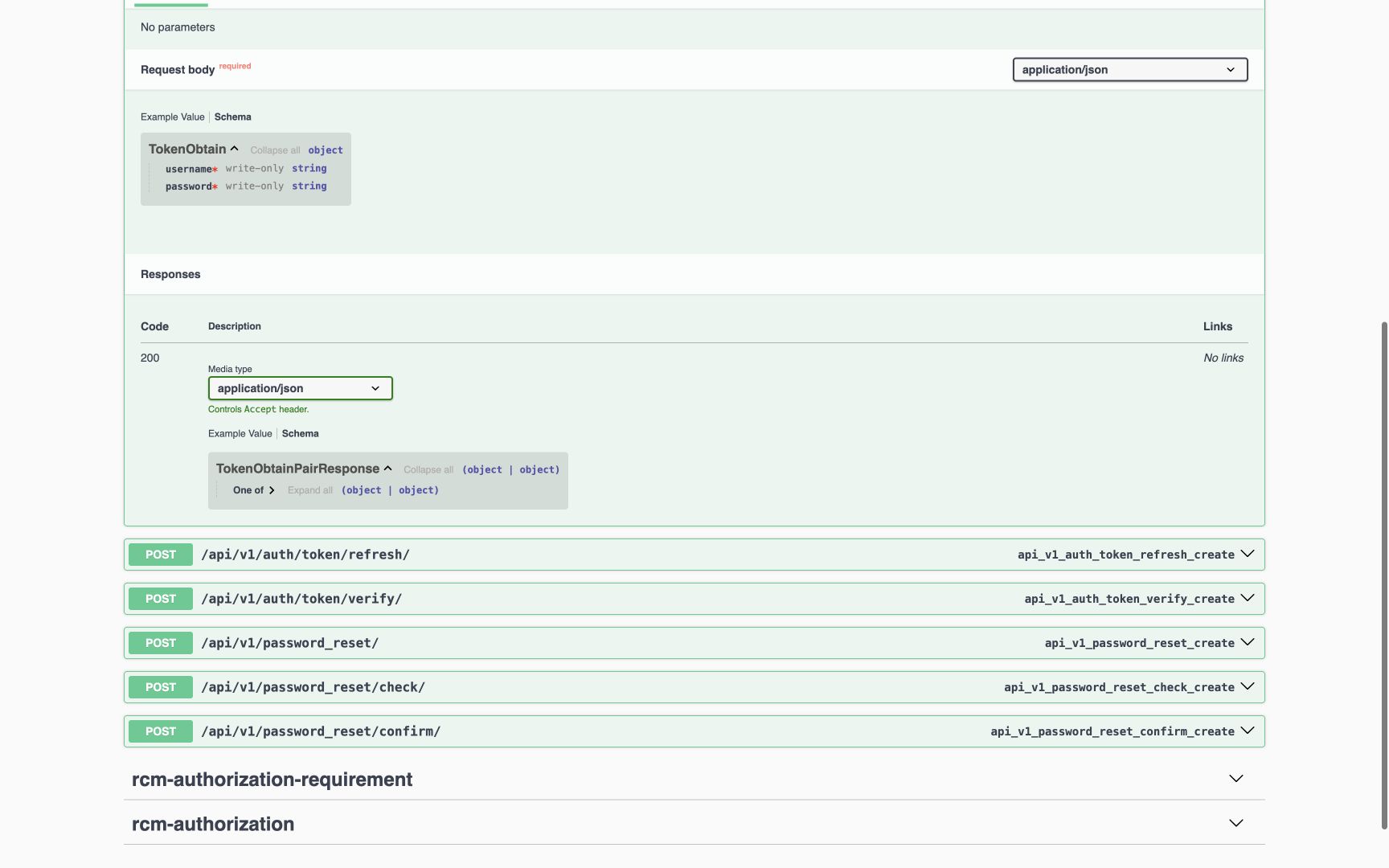
Select response Schema, expand One of, then expand alternatives #0 and #1. The first alternative requires access and refresh strings; the second requires a temp_token string for MFA continuation. Handle them as different states. A temporary MFA token is not the normal token pair. These screenshots show schema types and required markers, not actual credentials or tokens. Separate normal-response tests cover the base-auth behavior; tenant-specific authentication still requires its own verified configuration.
 123
123Recognize the token-pair versus MFA response union
Capture details
Fresh 1728×1080 Chrome capture of the installed read-only API reference rendered from committed MANSOQ release 39b72767. This local reference does not establish production product deployment or endpoint execution. Response Schema displays TokenObtainPairResponse and a collapsed One of object union. The alternatives are not expanded in this image. Typed source and separate normal-response tests establish token-pair versus temporary-MFA shapes.
Image SHA-256 61c9c42b1c69d5b1427be0020bf6618e72b1255b322876f6b617dbb2997f5d53
- Response Schema: Select Schema in the HTTP 200 response.
- Named response: The response is a union, not a promise that every login returns normal access/refresh.
- Expand One of: Expand this branch to inspect the alternatives. This image does not show the nested fields; continue to the expanded login image to inspect them.
1234Inspect both normal token and MFA alternatives
Capture details
Fresh 1728×1080 Chrome capture of the installed read-only API reference rendered from committed MANSOQ release 39b72767. This local reference does not establish production product deployment or endpoint execution. The response schema is expanded: oneOf alternative #0 requires access and refresh strings; alternative #1 requires a temp_token string. No real token or sign-in response is shown.
Image SHA-256 2b3ca00ce9242ac4b76dac6ad5492cb4a7d9185d18867e27d2af52b3b8e4f04b
- Open the union: Expand One of then its two alternatives.
- Normal token pair: The ordinary alternative requires access and refresh.
- Temporary MFA token: The MFA alternative requires temp_token. It is a distinct response shape.
- Schema view: These are types/required markers, not live token values.
3. Keep execution and credentials separate from reference browsing
Use the deployed authentication workflow and approved client for a real sign-in. Never publish actual JWTs, refresh values or passwords in a guide. The literal string in the generated example is not a usable token. These images are not evidence of end-to-end login execution; separate contract tests and local API readbacks provide that bounded proof.
12345Read the actual login request
Capture details
Fresh 1728×1080 Chrome capture of the installed read-only API reference rendered from committed MANSOQ release 39b72767. This local reference does not establish production product deployment or endpoint execution. The login Request Schema displays required write-only username and password. Its visible response is a generated access/refresh example containing the literal string placeholder, not real tokens.
Image SHA-256 73b2d5e552c1a24ca87102be1d7673bc934c268cef977c0dae41ea3417869f3a
- Login operation: POST /api/v1/auth/login/ is the actual documented operation.
- Request Schema: Inspect request properties here.
- Username: Required write-only username; do not substitute an undocumented email field.
- Password: Required write-only password. No credential is entered into this screenshot.
- Generated example: Literal string values are placeholders, not actual JWTs or evidence of a successful login.
1234Inspect both normal token and MFA alternatives
Capture details
Fresh 1728×1080 Chrome capture of the installed read-only API reference rendered from committed MANSOQ release 39b72767. This local reference does not establish production product deployment or endpoint execution. The response schema is expanded: oneOf alternative #0 requires access and refresh strings; alternative #1 requires a temp_token string. No real token or sign-in response is shown.
Image SHA-256 2b3ca00ce9242ac4b76dac6ad5492cb4a7d9185d18867e27d2af52b3b8e4f04b
- Open the union: Expand One of then its two alternatives.
- Normal token pair: The ordinary alternative requires access and refresh.
- Temporary MFA token: The MFA alternative requires temp_token. It is a distinct response shape.
- Schema view: These are types/required markers, not live token values.
Source evidence
Every citation uses this exact committed version. The private source repository requires access.
- repositories/platform/mansoq-core/config/auth_views.py:158 ·
39b7276732f88bc07ad0abb61619f7aafe3c9e14Source file checksum
2c99f3c107ea08b79cad4373c05224aa1a4f25b2d1541daac733591c9bef5e4e - repositories/platform/mansoq-core/config/authentication.py:39 ·
39b7276732f88bc07ad0abb61619f7aafe3c9e14Source file checksum
532bb63371c2a4c4e922b757188ae0056afc36db0b840136dda61e9bb9229875 - repositories/platform/mansoq-core/mansoq/emr/tests/test_installed_api_contracts.py:95 ·
39b7276732f88bc07ad0abb61619f7aafe3c9e14Source file checksum
1143a1508f8cc067bfba94718cd755d382425cc2c464d2a2122f9f970bc7dadf