 MANSOQ
 IT and integrations · VERSION 39b72767
Review, cancel and confirm a service-account token revocation
Use the account creator’s token controls, distinguish Cancel from confirmed Revoke, and interpret the saved result. The observed local example revoked one fictional credential and retained its account identity; it does not qualify tenant deployment access.
Facility Admin
 1234
1234Inspect creator-controlled service token management
Capture details
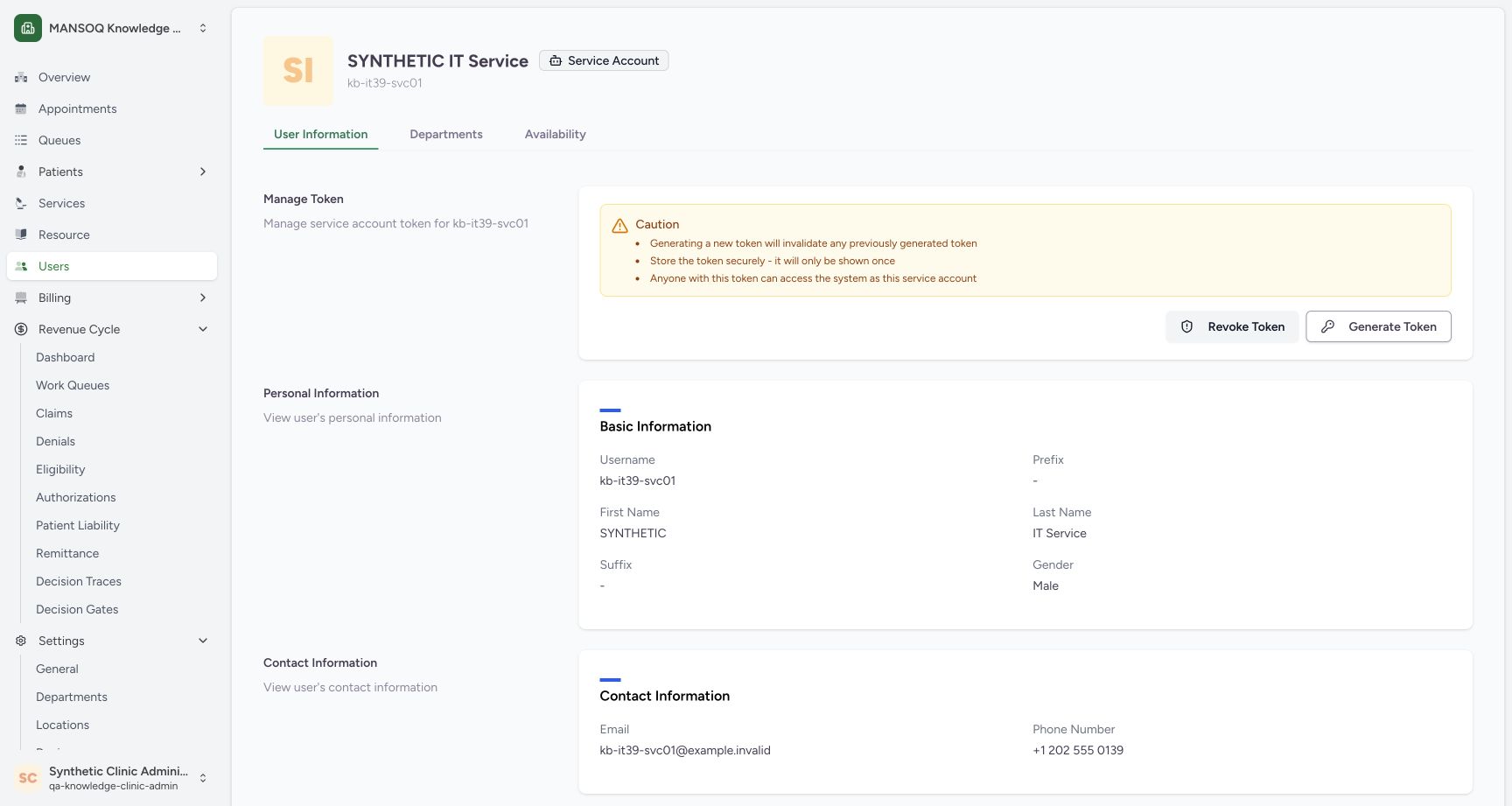
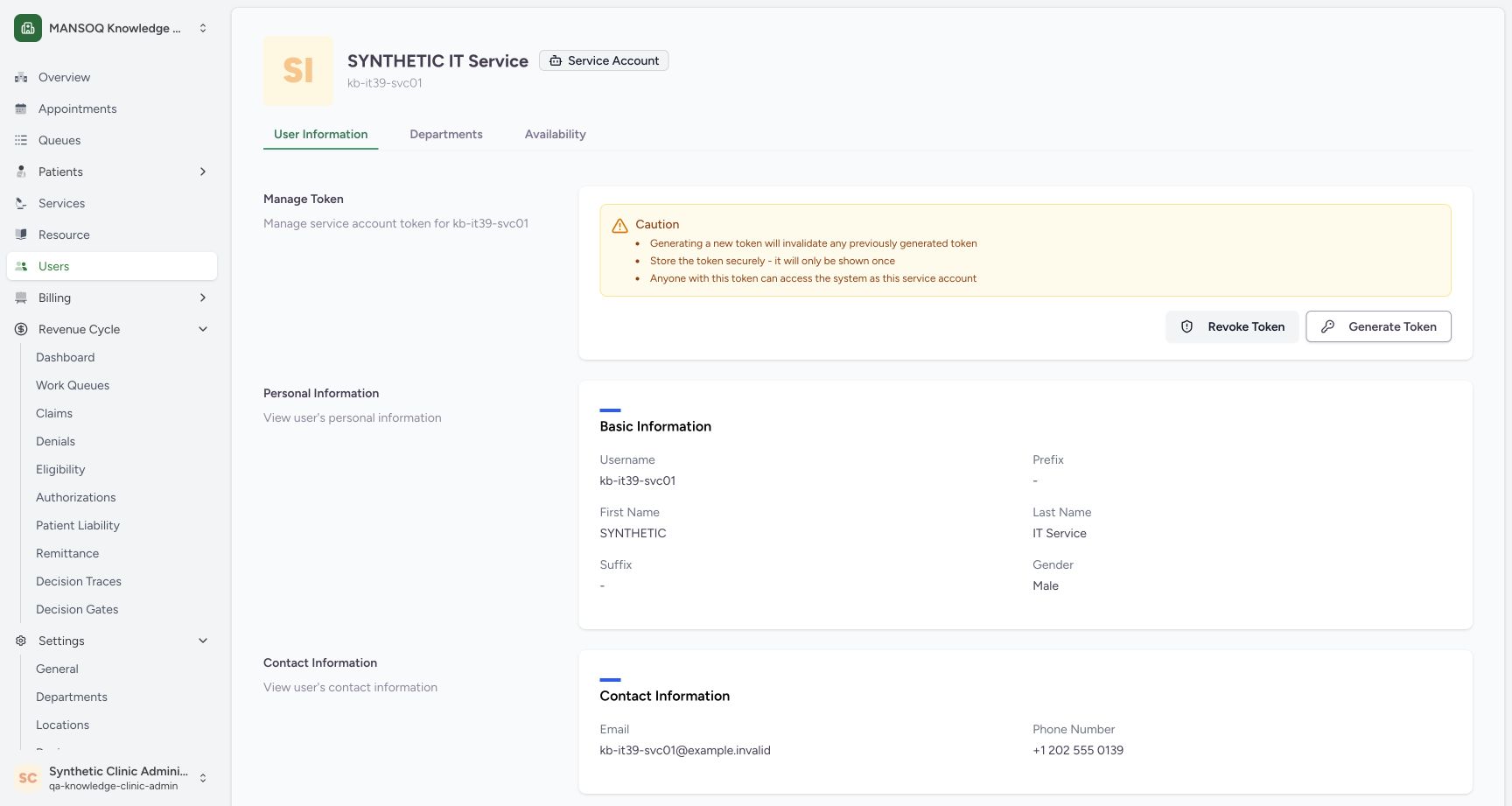
Exact committed release 39b72767; isolated nonproduction Clinic clone. The existing creator opened the normal service-account profile. The page displays cautions and Revoke/Generate controls, but no token value, presence indicator or expiry. The secret display/copy workflow is not pictured.
Image SHA-256 d5316225d6890c81d22ee71a63bab74fe4f1ef9c2e2bcf86d3842a424bdd7119
- Service-account identity: Confirm the intended account and its Service Account badge.
- Username: Match this username to the intended integration principal.
- Read token cautions: The page states that generation invalidates a prior token and a token acts as this account.
- Revoke Token: Open the revoke confirmation for this account.
 123
123Observe the successful token revocation result
Capture details
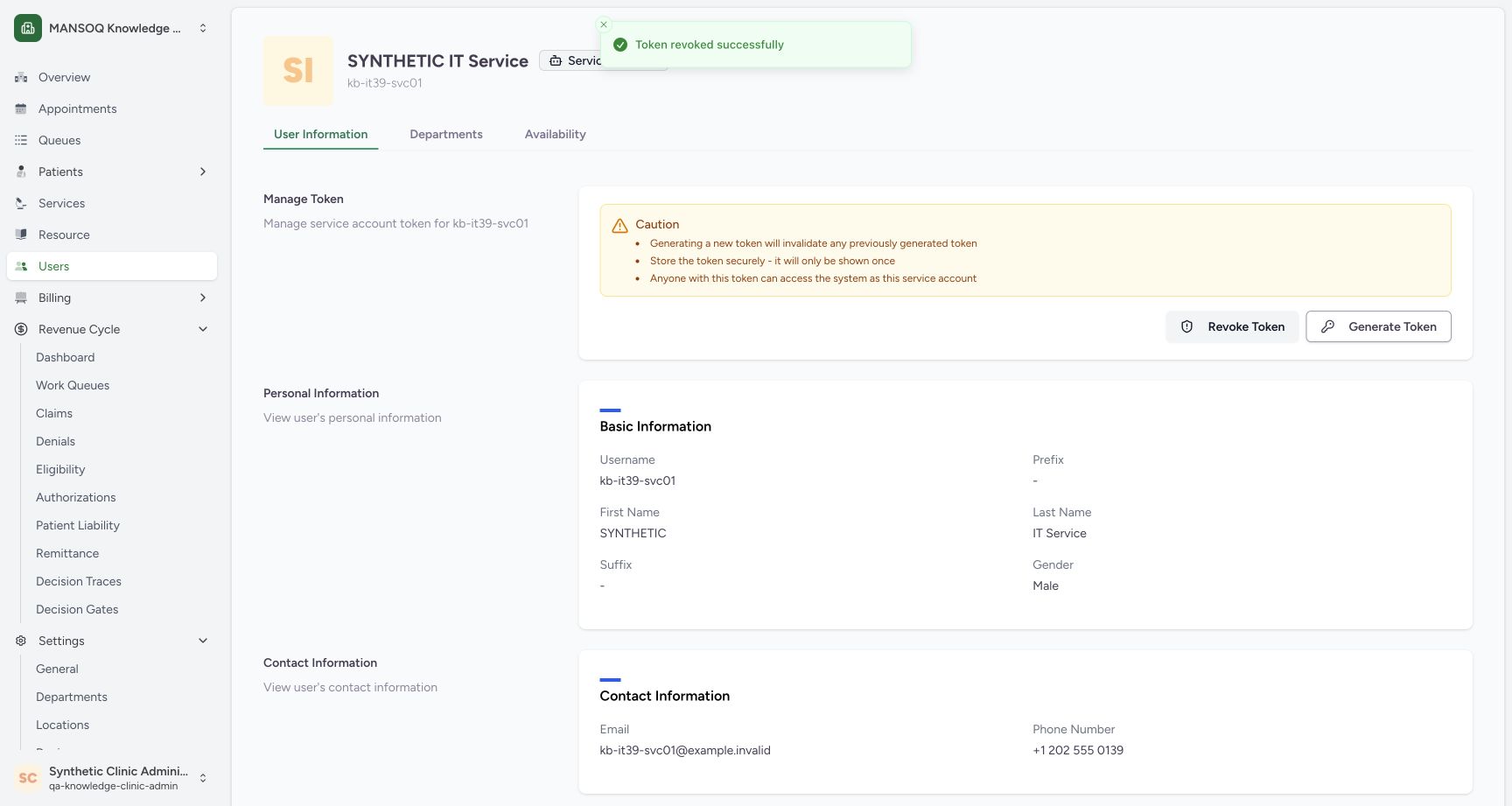
Exact committed release 39b72767; isolated nonproduction Clinic clone. Normal UI displayed Token revoked successfully. Independent normal API refused the exact prior service token with 403; the creator Bearer session still returned 200. Independent database readback confirmed zero service-token rows and unchanged existing user, role, membership and other-token digests.
Image SHA-256 91f83f21396cb5b42e684fc77d363fb1eb6502162f3ec42339184d08a3c844e9
- Revocation succeeded: The normal UI reports the completed revoke request.
- Identity remains: The service account itself was retained.
- Controls remain visible: Visible Revoke and Generate buttons are not a persisted token-presence indicator.
11 of 11 content blocks have reviewed image alignment. Missing overview or prerequisite images remain open.
Before you begin
- Use an existing authorized account that can manage this service principal. The illustrated creator is the Clinic Facility Admin. Server behavior also permits a superuser, but this package does not demonstrate that separate UI role.1234
Recorded release 39b72767 · 2026-10-18T22:37:25.422Z · 1728 × 921 Inspect creator-controlled service token management
Capture details
Exact committed release 39b72767; isolated nonproduction Clinic clone. The existing creator opened the normal service-account profile. The page displays cautions and Revoke/Generate controls, but no token value, presence indicator or expiry. The secret display/copy workflow is not pictured.
Image SHA-256
d5316225d6890c81d22ee71a63bab74fe4f1ef9c2e2bcf86d3842a424bdd7119- Service-account identity: Confirm the intended account and its Service Account badge.
- Username: Match this username to the intended integration principal.
- Read token cautions: The page states that generation invalidates a prior token and a token acts as this account.
- Revoke Token: Open the revoke confirmation for this account.
- Identify the intended account and the effect on applications using its credential before confirming. One privately issued synthetic credential was used solely as this local exercise prerequisite; its value is never displayed here.1234
Recorded release 39b72767 · 2026-10-18T22:37:25.422Z · 1728 × 921 Inspect creator-controlled service token management
Capture details
Exact committed release 39b72767; isolated nonproduction Clinic clone. The existing creator opened the normal service-account profile. The page displays cautions and Revoke/Generate controls, but no token value, presence indicator or expiry. The secret display/copy workflow is not pictured.
Image SHA-256
d5316225d6890c81d22ee71a63bab74fe4f1ef9c2e2bcf86d3842a424bdd7119- Service-account identity: Confirm the intended account and its Service Account badge.
- Username: Match this username to the intended integration principal.
- Read token cautions: The page states that generation invalidates a prior token and a token acts as this account.
- Revoke Token: Open the revoke confirmation for this account.
 1234
1234Recorded release 39b72767 · 2026-10-18T22:38:33.594Z · 1728 × 921 Review and cancel a service token revocation
Capture details
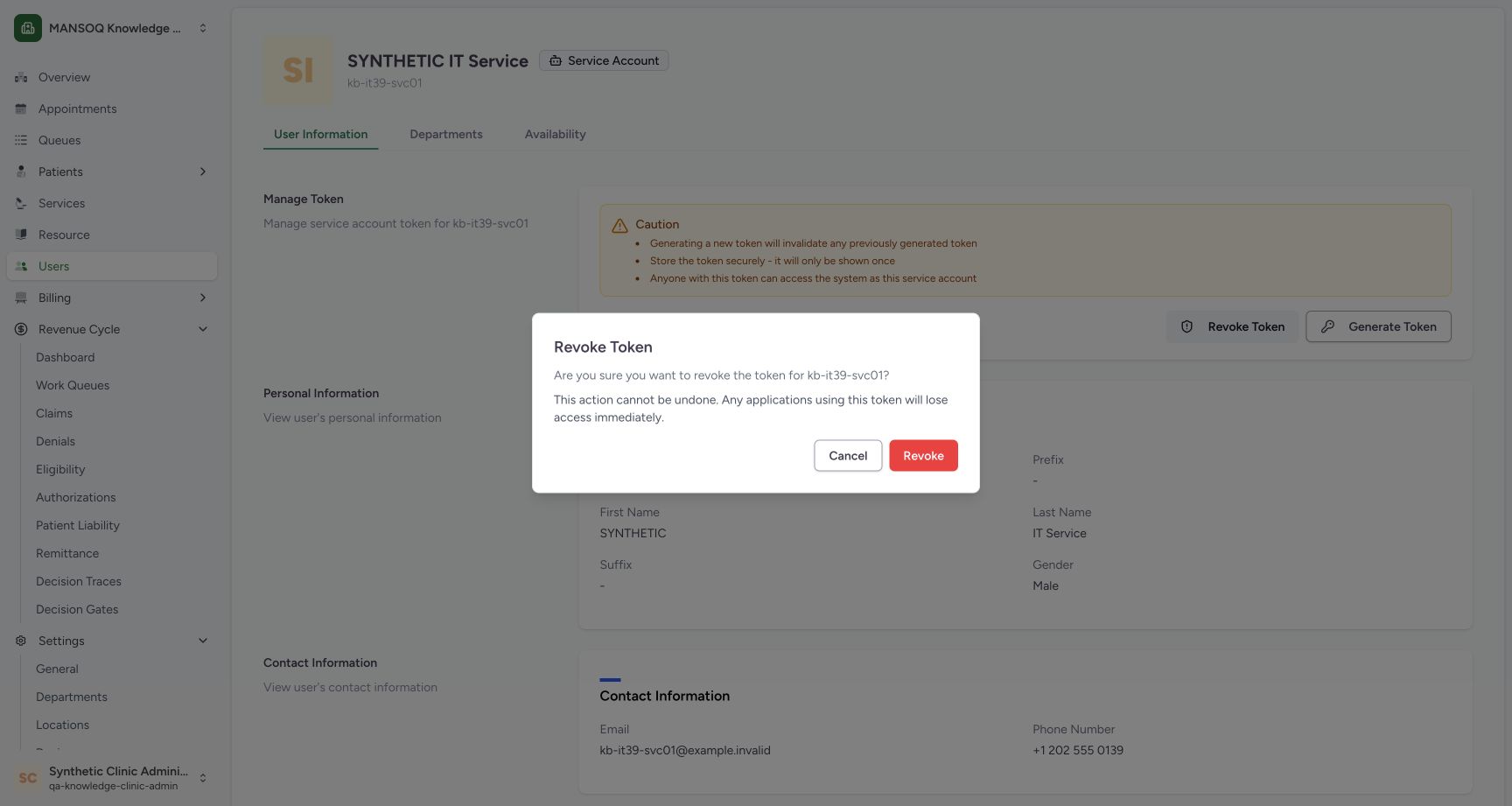
Exact committed release 39b72767; isolated nonproduction Clinic clone. Normal creator confirmation before any revoke request. Cancel was selected; independent normal API readback afterward confirmed the same credential remained usable for its own identity.
Image SHA-256
c7997d6a33d54285e70a5d50fb5939a828f60afbf2cbb17b448f1ed020814329- Check the target: Confirm the username named in the confirmation.
- Read access impact: Applications using this token will lose its access after confirmed revocation.
- Cancel: Discard this confirmation without revoking.
- Revoke: This separate control submits the revocation.
1. Confirm the intended service account
Open the account’s User Information page and check the Service Account badge and username before using Manage Token. Read the cautions. A token authenticates as this principal, and generating a new token is a separate credential-changing action, not a status check.
1234Inspect creator-controlled service token management
Capture details
Exact committed release 39b72767; isolated nonproduction Clinic clone. The existing creator opened the normal service-account profile. The page displays cautions and Revoke/Generate controls, but no token value, presence indicator or expiry. The secret display/copy workflow is not pictured.
Image SHA-256 d5316225d6890c81d22ee71a63bab74fe4f1ef9c2e2bcf86d3842a424bdd7119
- Service-account identity: Confirm the intended account and its Service Account badge.
- Username: Match this username to the intended integration principal.
- Read token cautions: The page states that generation invalidates a prior token and a token acts as this account.
- Revoke Token: Open the revoke confirmation for this account.
2. Open and read the revoke confirmation
Select Revoke Token. In the confirmation, recheck the username and read the warning that applications using the token lose its access after revocation. Opening this confirmation does not itself submit the revoke request.
1234Review and cancel a service token revocation
Capture details
Exact committed release 39b72767; isolated nonproduction Clinic clone. Normal creator confirmation before any revoke request. Cancel was selected; independent normal API readback afterward confirmed the same credential remained usable for its own identity.
Image SHA-256 c7997d6a33d54285e70a5d50fb5939a828f60afbf2cbb17b448f1ed020814329
- Check the target: Confirm the username named in the confirmation.
- Read access impact: Applications using this token will lose its access after confirmed revocation.
- Cancel: Discard this confirmation without revoking.
- Revoke: This separate control submits the revocation.
3. Cancel when the revocation should not proceed
Select Cancel to close the confirmation without revoking. This was observed before the final action in the example. A separate normal API read afterward still returned the service account’s own identity with the same credential. The screenshot identifies the Cancel control; it does not display an API console or a token value.
1234Review and cancel a service token revocation
Capture details
Exact committed release 39b72767; isolated nonproduction Clinic clone. Normal creator confirmation before any revoke request. Cancel was selected; independent normal API readback afterward confirmed the same credential remained usable for its own identity.
Image SHA-256 c7997d6a33d54285e70a5d50fb5939a828f60afbf2cbb17b448f1ed020814329
- Check the target: Confirm the username named in the confirmation.
- Read access impact: Applications using this token will lose its access after confirmed revocation.
- Cancel: Discard this confirmation without revoking.
- Revoke: This separate control submits the revocation.
4. Confirm the intended revocation once
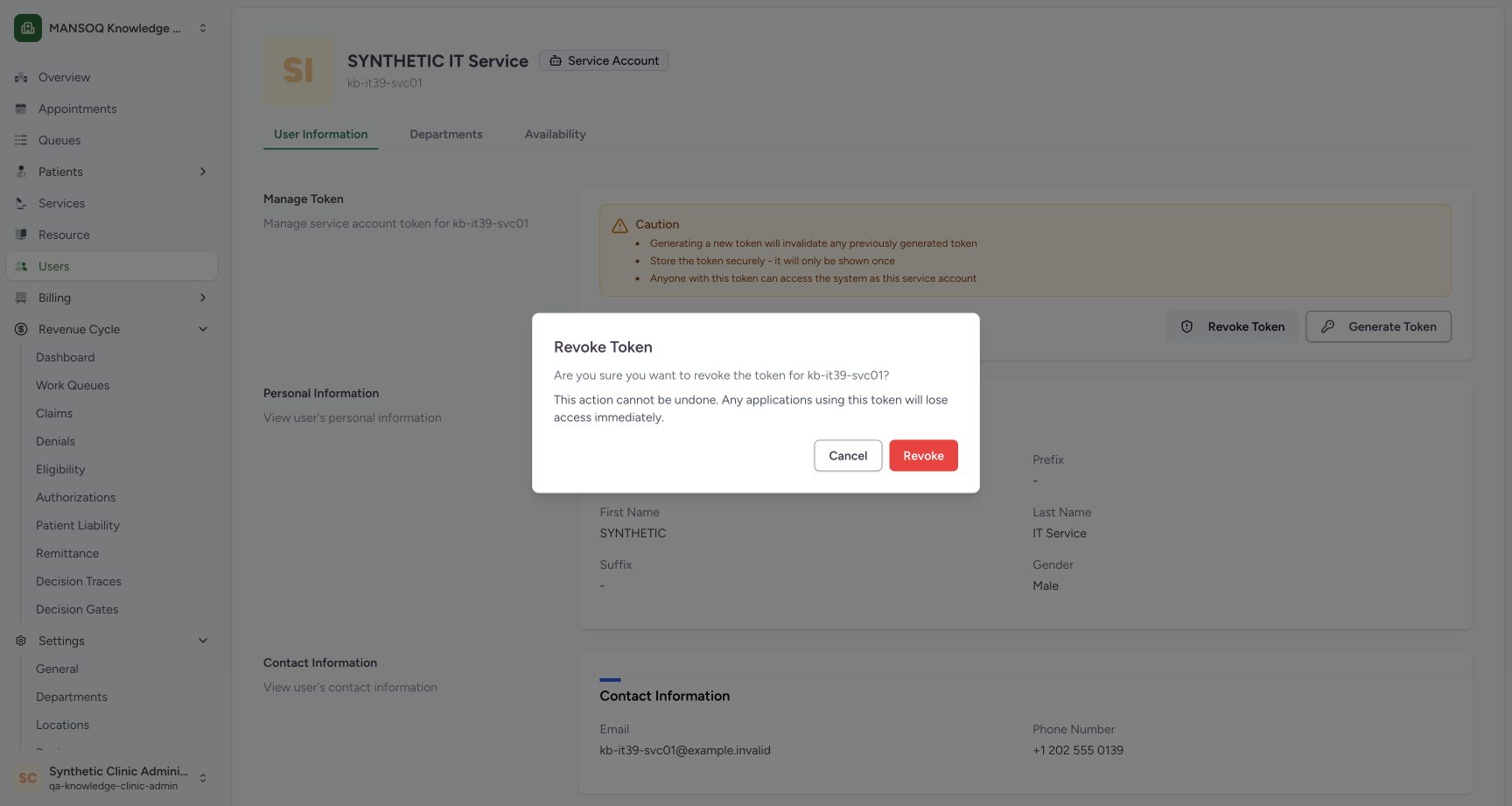
When the intended action is confirmed, reopen Revoke Token, check the target again and select the red Revoke button once. Wait for the confirmation to close and Token revoked successfully to appear. The example completed this normal UI request for its isolated training credential.
 123
123Confirm the intended synthetic credential revocation
Capture details
Exact committed release 39b72767; isolated nonproduction Clinic clone. The confirmation was reopened after Cancel and successful credential readback. The creator then selected Revoke once for this isolated synthetic account.
Image SHA-256 c7997d6a33d54285e70a5d50fb5939a828f60afbf2cbb17b448f1ed020814329
- Confirm the username: Recheck the target when reopening the confirmation.
- Revoke once: Submit this intended revocation once.
- Cancel remains separate: Cancel closes a draft; it does not submit revocation.
123Observe the successful token revocation result
Capture details
Exact committed release 39b72767; isolated nonproduction Clinic clone. Normal UI displayed Token revoked successfully. Independent normal API refused the exact prior service token with 403; the creator Bearer session still returned 200. Independent database readback confirmed zero service-token rows and unchanged existing user, role, membership and other-token digests.
Image SHA-256 91f83f21396cb5b42e684fc77d363fb1eb6502162f3ec42339184d08a3c844e9
- Revocation succeeded: The normal UI reports the completed revoke request.
- Identity remains: The service account itself was retained.
- Controls remain visible: Visible Revoke and Generate buttons are not a persisted token-presence indicator.
5. Reload without inferring token presence from the buttons
Reload the saved account profile. The identity remains and the same Generate Token and Revoke Token controls are still visible in this version. There is no saved token-status badge here. Their presence does not mean a revoked token is still valid, and Generate Token must not be used as a harmless check or blind retry.
123Observe the successful token revocation result
Capture details
Exact committed release 39b72767; isolated nonproduction Clinic clone. Normal UI displayed Token revoked successfully. Independent normal API refused the exact prior service token with 403; the creator Bearer session still returned 200. Independent database readback confirmed zero service-token rows and unchanged existing user, role, membership and other-token digests.
Image SHA-256 91f83f21396cb5b42e684fc77d363fb1eb6502162f3ec42339184d08a3c844e9
- Revocation succeeded: The normal UI reports the completed revoke request.
- Identity remains: The service account itself was retained.
- Controls remain visible: Visible Revoke and Generate buttons are not a persisted token-presence indicator.
 123
123Read the account page after reload
Capture details
Exact committed release 39b72767; isolated nonproduction Clinic clone. The normal profile was reloaded after successful revocation. Identity and both token controls remain visible; this UI has no saved token-status badge. Actual revocation is supported by independent credential and database readbacks, not these buttons.
Image SHA-256 d5316225d6890c81d22ee71a63bab74fe4f1ef9c2e2bcf86d3842a424bdd7119
- Retained username: The same service identity remains after reload.
- No token-status inference: The Revoke control remains even when no token row exists.
- Generation is a new action: Do not use Generate as a harmless status check or blind retry.
What the local verification established
Independent normal base-profile API reads confirmed that Cancel preserved self-identity access, then the confirmed UI revocation refused the exact old service credential with 403 while the existing Facility Admin Bearer session still returned 200. Independent database reads found zero tokens for this service account and unchanged existing users, roles, memberships and other tokens. The account itself remained. These checks are separate from the pictured UI toast and do not qualify clinical endpoint permissions.
123Observe the successful token revocation result
Capture details
Exact committed release 39b72767; isolated nonproduction Clinic clone. Normal UI displayed Token revoked successfully. Independent normal API refused the exact prior service token with 403; the creator Bearer session still returned 200. Independent database readback confirmed zero service-token rows and unchanged existing user, role, membership and other-token digests.
Image SHA-256 91f83f21396cb5b42e684fc77d363fb1eb6502162f3ec42339184d08a3c844e9
- Revocation succeeded: The normal UI reports the completed revoke request.
- Identity remains: The service account itself was retained.
- Controls remain visible: Visible Revoke and Generate buttons are not a persisted token-presence indicator.
123Read the account page after reload
Capture details
Exact committed release 39b72767; isolated nonproduction Clinic clone. The normal profile was reloaded after successful revocation. Identity and both token controls remain visible; this UI has no saved token-status badge. Actual revocation is supported by independent credential and database readbacks, not these buttons.
Image SHA-256 d5316225d6890c81d22ee71a63bab74fe4f1ef9c2e2bcf86d3842a424bdd7119
- Retained username: The same service identity remains after reload.
- No token-status inference: The Revoke control remains even when no token row exists.
- Generation is a new action: Do not use Generate as a harmless status check or blind retry.
 123
123Confirm no responsibility assignments were added
Capture details
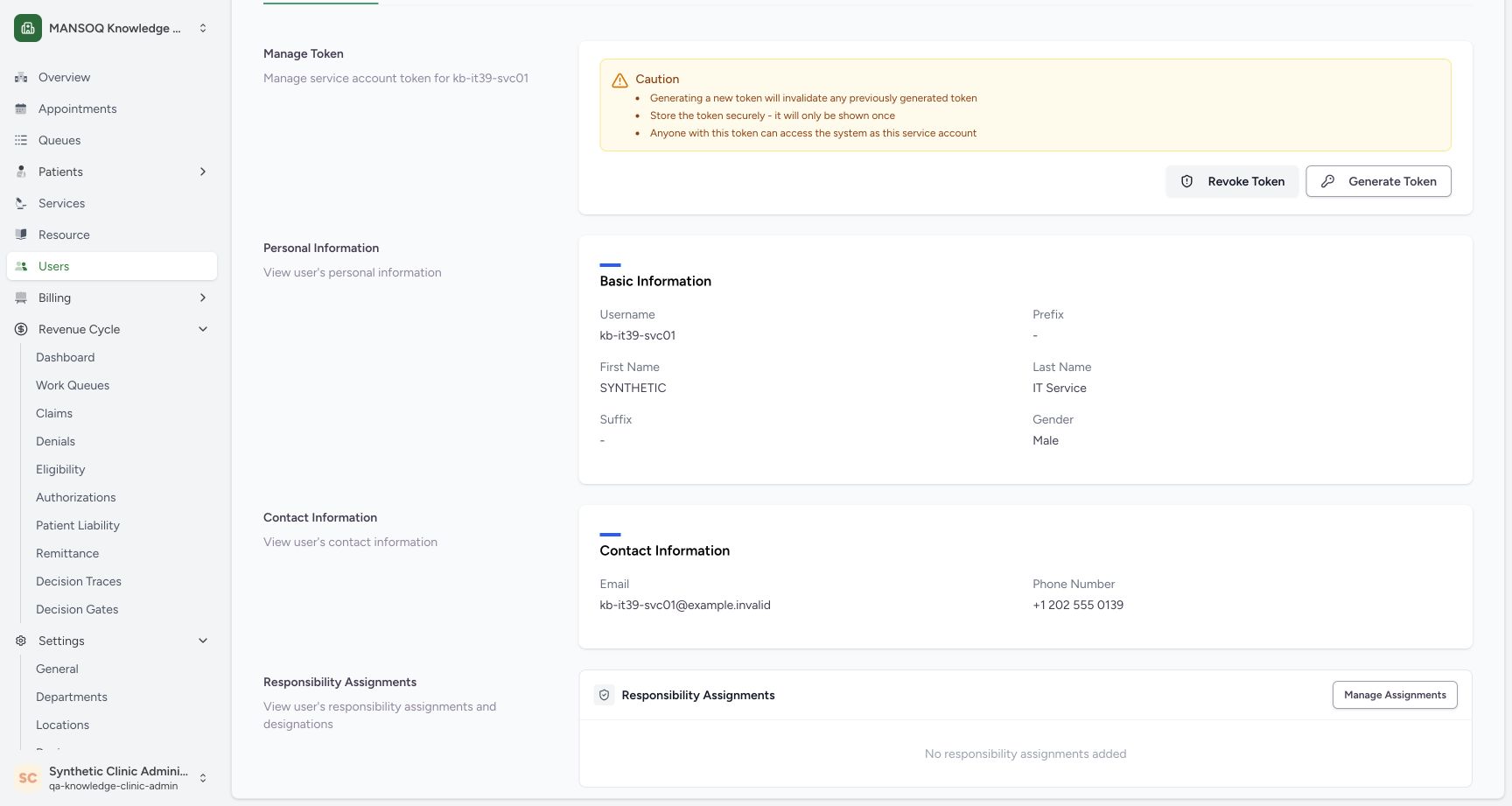
Exact committed release 39b72767; isolated nonproduction Clinic clone. The lower normal profile explicitly displays No responsibility assignments added. Independent readback confirms zero organization and facility memberships, no usable password, no superuser status and zero remaining service tokens.
Image SHA-256 398fcba543d5afbd643f2aeba1db206af0124d83a99705fe8767ae5d53e5418b
- Confirm the username: Keep the intended synthetic account in context.
- No assignments: The example did not add a responsibility or department membership.
- Separate assignment management: Manage Assignments is a different operation and was not used.
Keep deployment authentication profiles distinct
This exercise used the base API’s service-token authentication, which is distinct from Bearer JWT refresh and logout. The customer-tenant settings select TenantJWTAuthentication instead of the base authentication list. This local result does not establish that a legacy service key works in a tenant deployment. The unassigned identity shown here is not evidence of approved clinical or production integration access.
1234Inspect creator-controlled service token management
Capture details
Exact committed release 39b72767; isolated nonproduction Clinic clone. The existing creator opened the normal service-account profile. The page displays cautions and Revoke/Generate controls, but no token value, presence indicator or expiry. The secret display/copy workflow is not pictured.
Image SHA-256 d5316225d6890c81d22ee71a63bab74fe4f1ef9c2e2bcf86d3842a424bdd7119
- Service-account identity: Confirm the intended account and its Service Account badge.
- Username: Match this username to the intended integration principal.
- Read token cautions: The page states that generation invalidates a prior token and a token acts as this account.
- Revoke Token: Open the revoke confirmation for this account.
123Confirm no responsibility assignments were added
Capture details
Exact committed release 39b72767; isolated nonproduction Clinic clone. The lower normal profile explicitly displays No responsibility assignments added. Independent readback confirms zero organization and facility memberships, no usable password, no superuser status and zero remaining service tokens.
Image SHA-256 398fcba543d5afbd643f2aeba1db206af0124d83a99705fe8767ae5d53e5418b
- Confirm the username: Keep the intended synthetic account in context.
- No assignments: The example did not add a responsibility or department membership.
- Separate assignment management: Manage Assignments is a different operation and was not used.
Troubleshooting
The token buttons look unchanged after successful revocation
This version leaves both management buttons visible after the token row is removed. The example’s normal credential readback and independent saved-record check established revocation; the buttons alone did not. Check the exact intended credential through the approved integration verification process before retrying. Do not generate a replacement token merely to make the screen look different.
123Observe the successful token revocation result
Capture details
Exact committed release 39b72767; isolated nonproduction Clinic clone. Normal UI displayed Token revoked successfully. Independent normal API refused the exact prior service token with 403; the creator Bearer session still returned 200. Independent database readback confirmed zero service-token rows and unchanged existing user, role, membership and other-token digests.
Image SHA-256 91f83f21396cb5b42e684fc77d363fb1eb6502162f3ec42339184d08a3c844e9
- Revocation succeeded: The normal UI reports the completed revoke request.
- Identity remains: The service account itself was retained.
- Controls remain visible: Visible Revoke and Generate buttons are not a persisted token-presence indicator.
123Read the account page after reload
Capture details
Exact committed release 39b72767; isolated nonproduction Clinic clone. The normal profile was reloaded after successful revocation. Identity and both token controls remain visible; this UI has no saved token-status badge. Actual revocation is supported by independent credential and database readbacks, not these buttons.
Image SHA-256 d5316225d6890c81d22ee71a63bab74fe4f1ef9c2e2bcf86d3842a424bdd7119
- Retained username: The same service identity remains after reload.
- No token-status inference: The Revoke control remains even when no token row exists.
- Generation is a new action: Do not use Generate as a harmless status check or blind retry.
Source evidence
Every citation uses this exact committed version. The private source repository requires access.
- repositories/platform/mansoq-core/mansoq/emr/api/viewsets/user.py:232 ·
39b7276732f88bc07ad0abb61619f7aafe3c9e14Source file checksum
655c3f5b20a24d5b45d3b91c4f595f796cd152e326a9923db407d4accf78555d - repositories/platform/mansoq-core/config/settings/base.py:386 ·
39b7276732f88bc07ad0abb61619f7aafe3c9e14Source file checksum
34f8931a2bae5a35f45bf6247695ee6bac09ccada3be766773861b4245817d6f - repositories/platform/mansoq-core/config/authentication.py:15 ·
39b7276732f88bc07ad0abb61619f7aafe3c9e14Source file checksum
532bb63371c2a4c4e922b757188ae0056afc36db0b840136dda61e9bb9229875 - repositories/platform/mansoq-core/config/tenant_settings.py:29 ·
39b7276732f88bc07ad0abb61619f7aafe3c9e14Source file checksum
37fe1d3d129b37d03b3d11a2991206a66a79be3b8d469ce5ab6a9c4329add338 - repositories/platform/mansoq-web/src/components/Users/ServiceTokenSection.tsx:41 ·
39b7276732f88bc07ad0abb61619f7aafe3c9e14Source file checksum
8cd8ace566413265874a14bf77bbe899d82eeaa5c27288f75937e564f854f78b - repositories/platform/mansoq-web/src/components/Users/UserSummary.tsx:100 ·
39b7276732f88bc07ad0abb61619f7aafe3c9e14Source file checksum
38cd8205a36ac8d714979904cd91b92d72a564df7f80586dd2e5eacbe9b08d85 - repositories/platform/mansoq-web/src/types/user/userApi.ts:64 ·
39b7276732f88bc07ad0abb61619f7aafe3c9e14Source file checksum
467f0c5ecd52d3ef876ae76df505acc71e2179a7271e57279813452aa90cc9fc