 MANSOQ
 Facility administration · VERSION 39b72767
Create a Draft decimal definition with a numeric interpretation
Configure a synthetic zero-based interval, range highlighting and fallback, then locate and verify the saved Draft definition.
Facility Admin
 123456
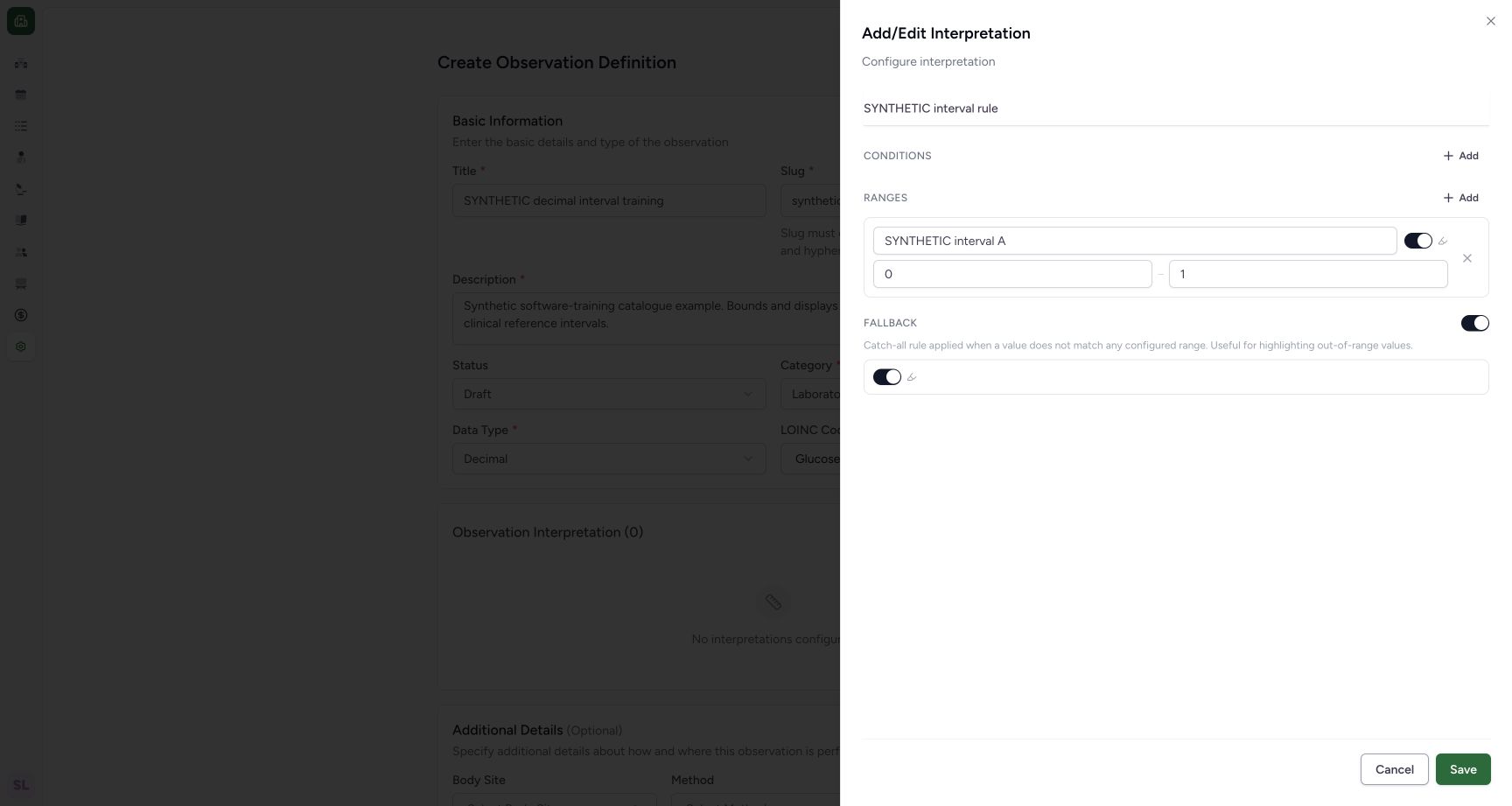
Review zero, numeric bounds and highlight settings
Capture details
Actual 1728 × 921 Chrome pixels; pinned source 39b72767. Laboratory Draft decimal interpretation creation
Image SHA-256 9d44566437e87e0a99efd26dc829383195f3b85b1317b20d1f4e0e3803ffa749
- Zero minimum: The lower bound visibly retains 0.
- Maximum 1: Review the upper demonstration bound.
- Range highlight: This switch controls highlighting for the range.
- Fallback enabled: Enable the supported fallback setting, without inventing a text field.
- Fallback highlight: The enabled fallback exposes its own highlight switch.
- Save local interpretation: Save the reviewed interval into the still-unsaved definition form.
 12
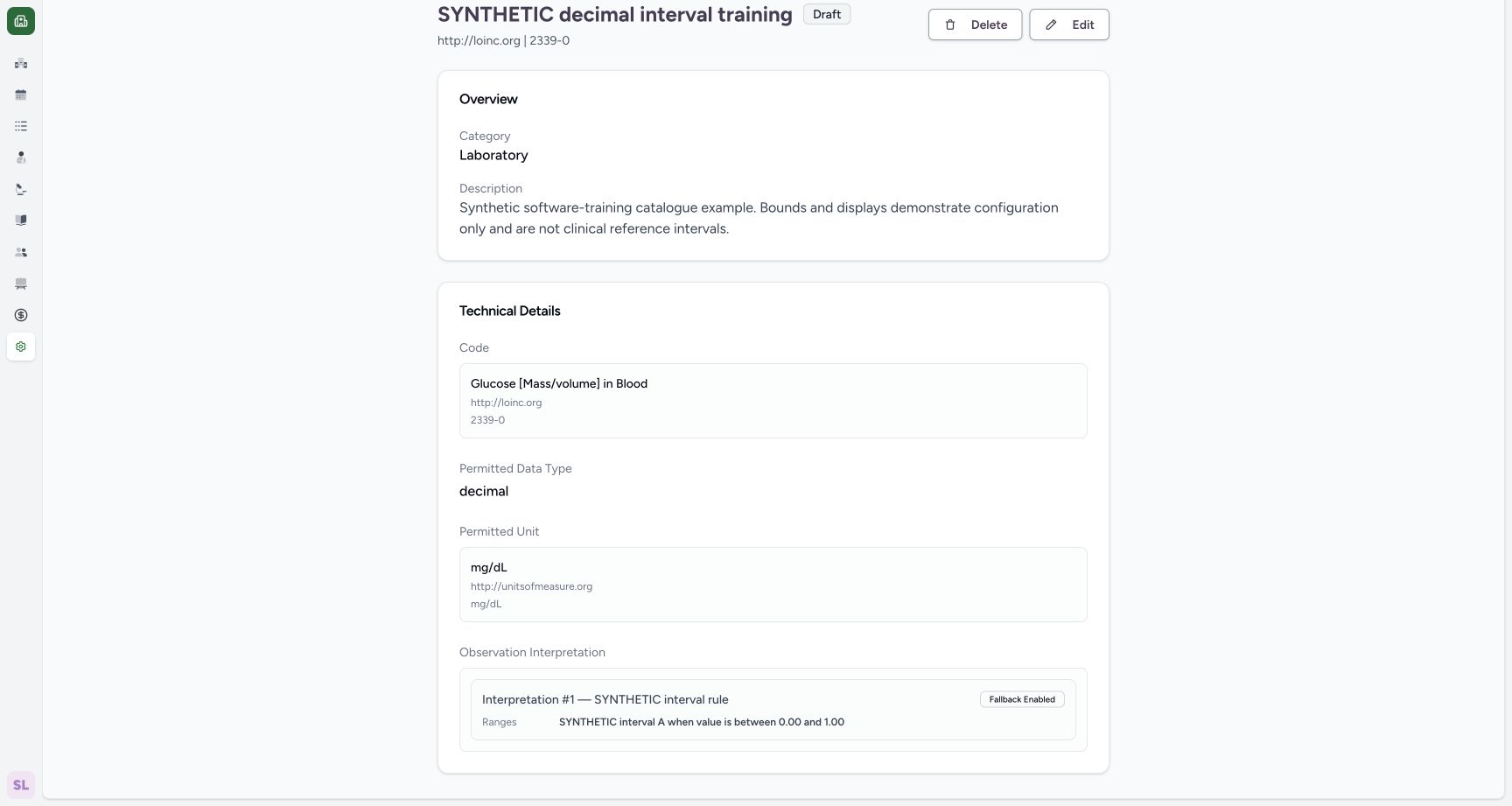
12Verify the saved zero-based rule and fallback
Capture details
Actual 1728 × 921 Chrome pixels; pinned source 39b72767. Laboratory Draft decimal interpretation creation
Image SHA-256 4b27d622d299f27b0abfbbf1844720bc489b8823c5e17b4c66c50cac83439118
- Saved bounds: The actual saved summary retains zero and the upper bound.
- Fallback Enabled: The saved rule reports the enabled fallback setting.
18 of 18 content blocks have reviewed image alignment. Missing overview or prerequisite images remain open.
Before you begin
- Use your existing authorized Laboratory Facility Admin account and open the intended Laboratory catalogue. This lesson was observed with one normal, non-superuser Facility Admin whose existing catalogue rights were verified.
 12
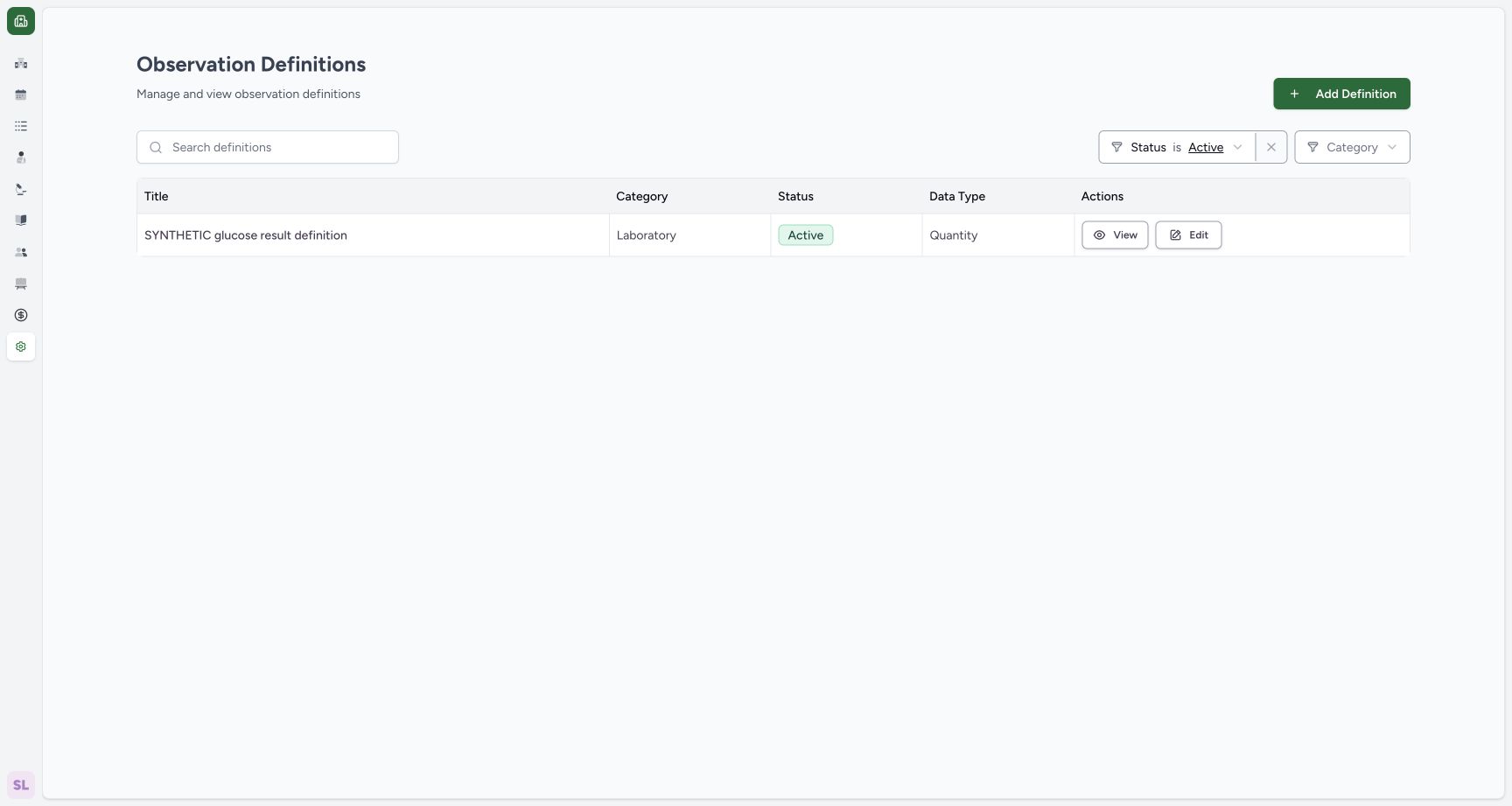
12Recorded release 39b72767 · 2026-10-18 · 1728 × 921 Start a separate synthetic numeric definition
Capture details
Actual 1728 × 921 Chrome pixels; pinned source 39b72767. Laboratory Draft decimal interpretation creation
Image SHA-256
5f073df30ba1d9da76bd18992c54fc4d9b7ca3004cef338789acce22fa9bd61d- Add Definition: Start a separate synthetic catalogue record.
- Status filter: Active is the current list filter.
 1234
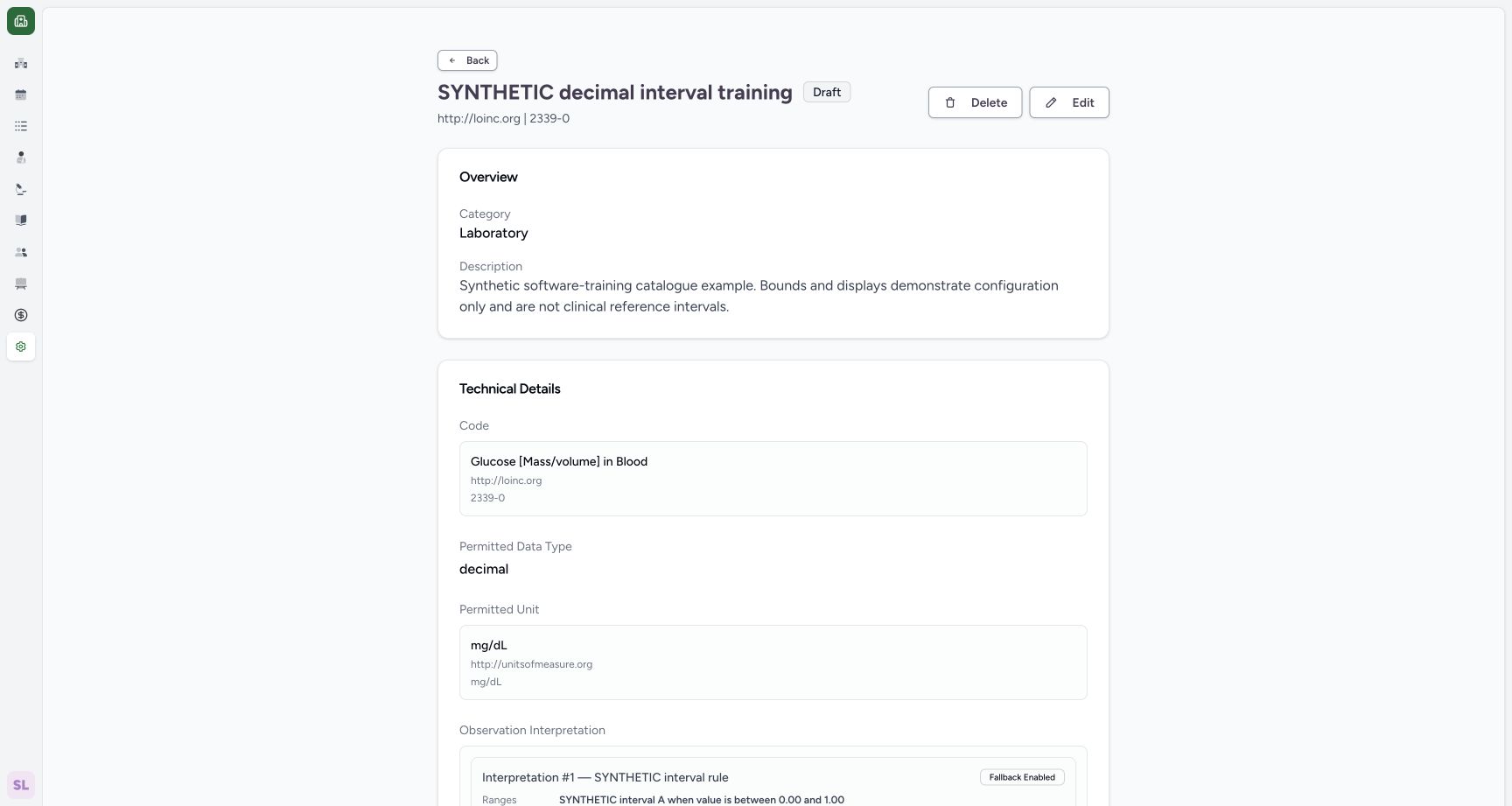
1234Recorded release 39b72767 · 2026-10-18 · 1728 × 921 Verify the saved Draft identity, type and unit
Capture details
Actual 1728 × 921 Chrome pixels; pinned source 39b72767. Laboratory Draft decimal interpretation creation
Image SHA-256
757f5ff990716270e808d7f0131ac1e39a29fcb0ca94ec549c12f663f5d4b6d9- Saved Draft: Confirm the saved lifecycle state.
- Saved code: Review the actual selected coding.
- Saved Decimal type: Confirm the stored representation.
- Saved UCUM unit: Confirm mg/dL in the saved detail.
- Use the clearly marked synthetic software example. Its 0–1 bounds demonstrate configuration and are not clinical reference intervals. The screens create reusable catalogue metadata rather than a patient result.
 1234
1234Recorded release 39b72767 · 2026-10-18 · 1728 × 921 Review the local rule before creating the definition
Capture details
Actual 1728 × 921 Chrome pixels; pinned source 39b72767. Laboratory Draft decimal interpretation creation
Image SHA-256
71b18da34131a8022ac3ffba77986908de73879507f7313fef67c7adf225f255- Draft status: Confirm the intended initial state.
- Decimal type: Confirm the saved representation choice.
- Rule summary: Review the visible zero-based range before the final Create.
- Edit interpretation: Reopen this local rule if it needs correction.
12Recorded release 39b72767 · 2026-10-18 · 1728 × 921 Verify the saved zero-based rule and fallback
Capture details
Actual 1728 × 921 Chrome pixels; pinned source 39b72767. Laboratory Draft decimal interpretation creation
Image SHA-256
4b27d622d299f27b0abfbbf1844720bc489b8823c5e17b4c66c50cac83439118- Saved bounds: The actual saved summary retains zero and the upper bound.
- Fallback Enabled: The saved rule reports the enabled fallback setting.
1. Start a separate definition
Open Observation Definitions in the intended Laboratory and select Add Definition. The illustrated Active list already contains the earlier Quantity example; this lesson creates a separate Decimal definition.
12Start a separate synthetic numeric definition
Capture details
Actual 1728 × 921 Chrome pixels; pinned source 39b72767. Laboratory Draft decimal interpretation creation
Image SHA-256 5f073df30ba1d9da76bd18992c54fc4d9b7ca3004cef338789acce22fa9bd61d
- Add Definition: Start a separate synthetic catalogue record.
- Status filter: Active is the current list filter.
2. Enter the identity and replace the generated slug
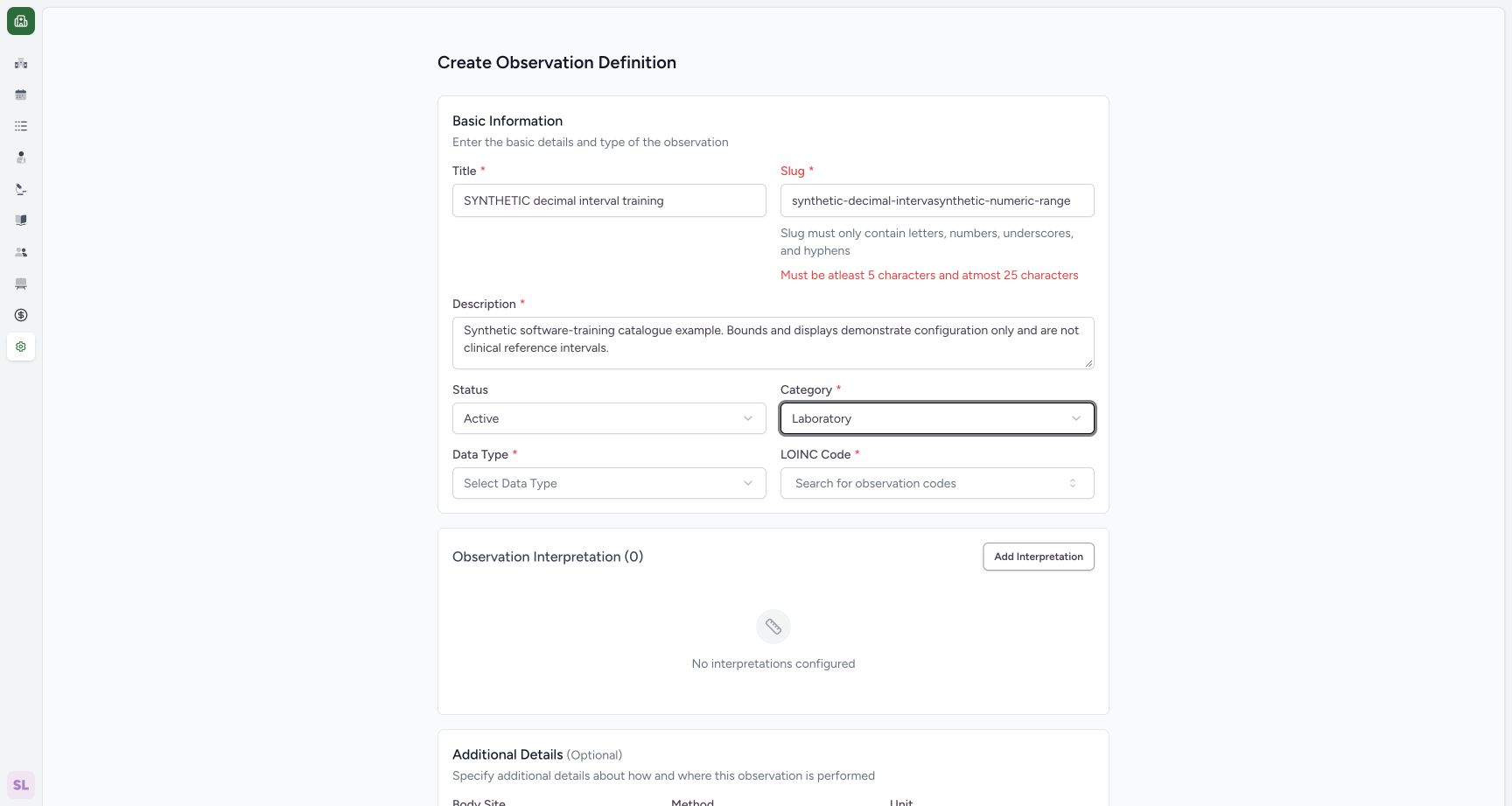
Enter SYNTHETIC decimal interval training and the illustrated synthetic-only Description. Choose Laboratory for Category. Replace the entire generated Slug with synthetic-numeric-range; appending to it can exceed the visible 5–25 character limit. The next screen shows the corrected slug.
 12
12Replace an automatically generated slug within its length limit
Capture details
Actual 1728 × 921 Chrome pixels; pinned source 39b72767. Laboratory Draft decimal interpretation creation
Image SHA-256 886cd140f20f877839b89904bbe1f312c8ce534fb6c958cd7276fbd569d4455c
- Slug: Select the complete generated value before entering its replacement.
- Length validation: The visible feedback requires 5–25 characters.
 12
12Choose Decimal from the actual data-type menu
Capture details
Actual 1728 × 921 Chrome pixels; pinned source 39b72767. Laboratory Draft decimal interpretation creation
Image SHA-256 761e3086627f428d688b7ffb0a28438b06fab3881bc670e36a221532709170ac
- Decimal: Choose the numeric representation for this synthetic example.
- Data Type: Open the supported choices from this field.
3. Choose Decimal
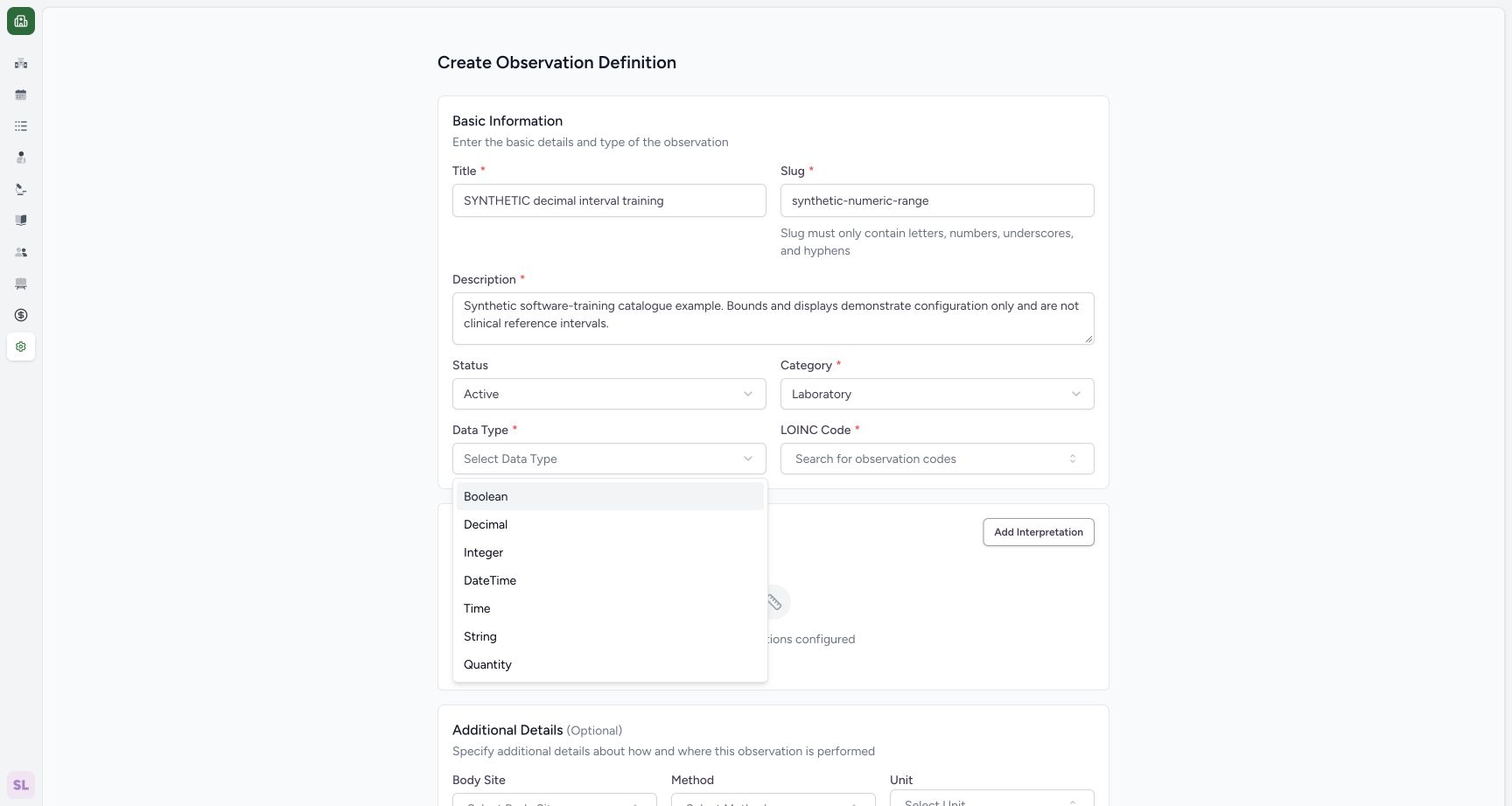
Open Data Type and select Decimal from the actual menu. This lesson saves Decimal; the other menu choices are separate workflows.
12Choose Decimal from the actual data-type menu
Capture details
Actual 1728 × 921 Chrome pixels; pinned source 39b72767. Laboratory Draft decimal interpretation creation
Image SHA-256 761e3086627f428d688b7ffb0a28438b06fab3881bc670e36a221532709170ac
- Decimal: Choose the numeric representation for this synthetic example.
- Data Type: Open the supported choices from this field.
4. Select the installed LOINC code
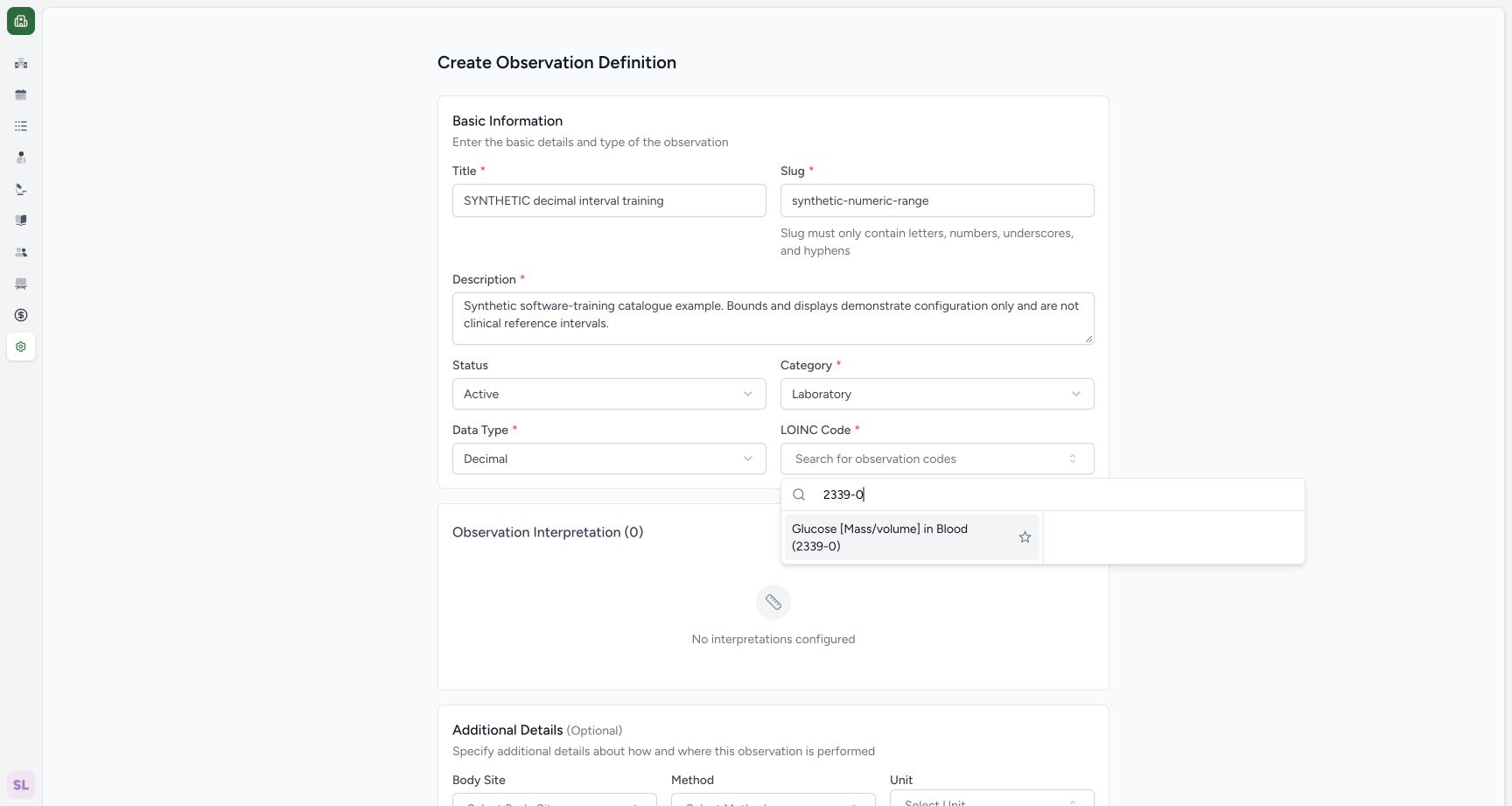
Open LOINC Code, search 2339-0 and select the returned Glucose [Mass/volume] in Blood (2339-0) result.
 12
12Select the returned observation code
Capture details
Actual 1728 × 921 Chrome pixels; pinned source 39b72767. Laboratory Draft decimal interpretation creation
Image SHA-256 51c3f99f92224fce0fcb526ec0153e760643cf72e1753a89365cca9fab3fefef
- Returned LOINC result: Select the actual returned display and code.
- Code search: Search 2339-0 in the normal lookup.
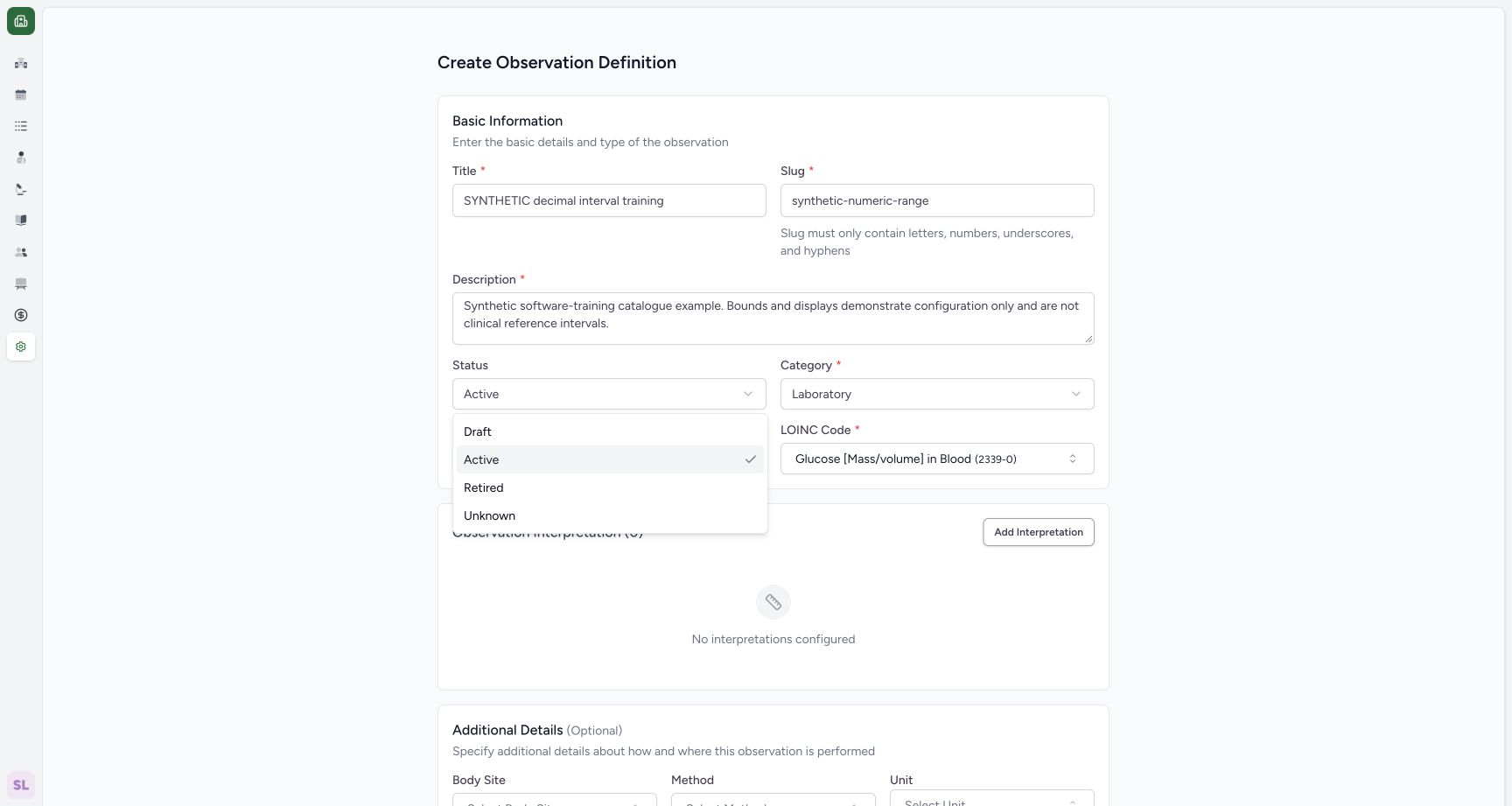
5. Choose Draft and open an interpretation
Open Status and select Draft. Use Add Interpretation to open the numeric configuration sheet shown next.
 123
123Choose Draft for the synthetic definition
Capture details
Actual 1728 × 921 Chrome pixels; pinned source 39b72767. Laboratory Draft decimal interpretation creation
Image SHA-256 2319cd9b59fde7cf2faeb5afd4141a68f6b3743d4eee1ec743a9f38fbe7eb74b
- Draft: Choose the initial status for this training definition.
- Status: Review the actual available lifecycle choices.
- Add Interpretation: After selecting Draft, open the numeric interpretation sheet from this button.
 1234
1234Configure a synthetic numeric interpretation
Capture details
Actual 1728 × 921 Chrome pixels; pinned source 39b72767. Laboratory Draft decimal interpretation creation
Image SHA-256 96b79e0debb7b732d071d9588932fd07faa4b43a7113dc56b026ca4b6873ee0b
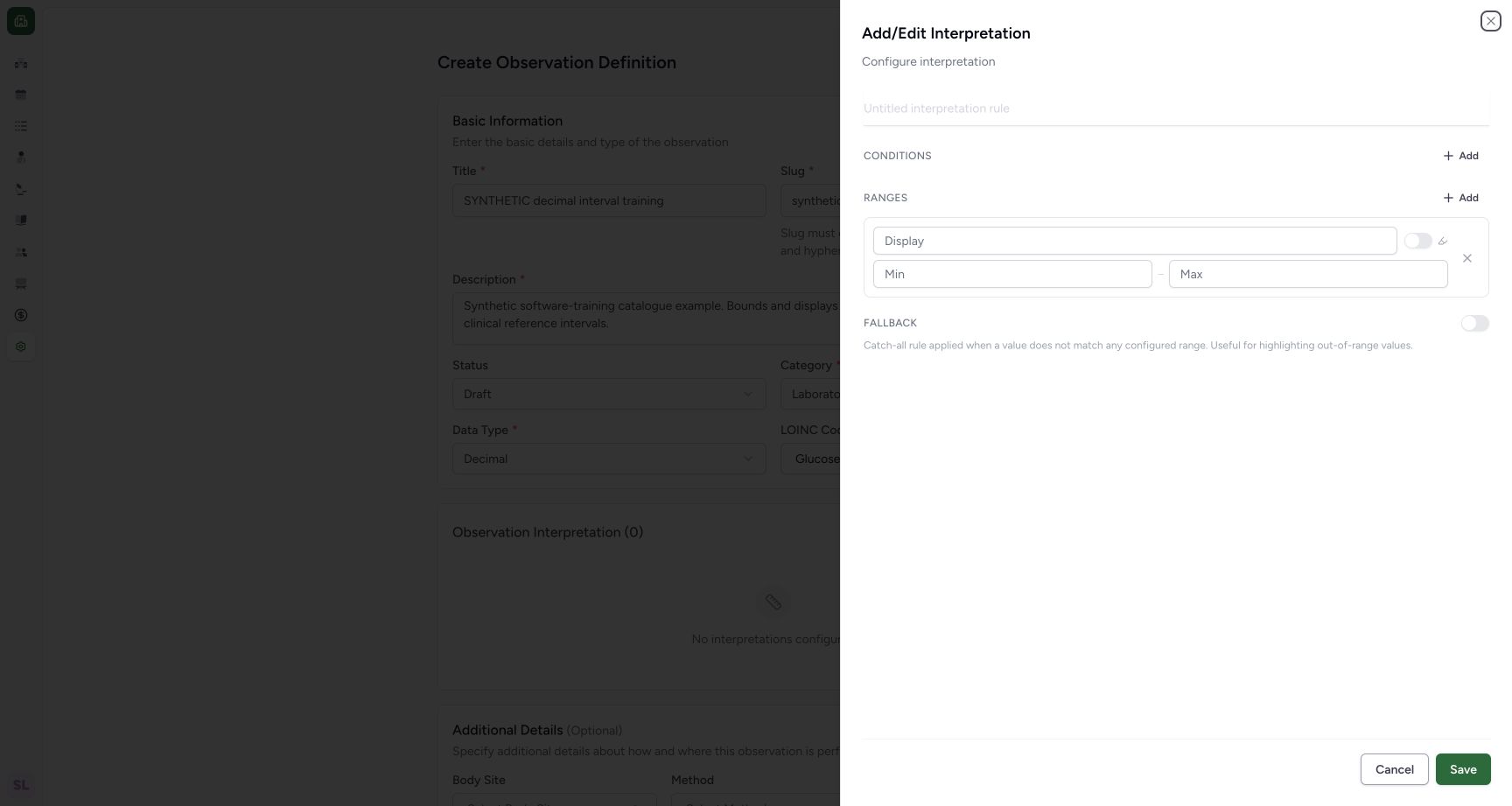
- Rule title: Name this synthetic configuration rule.
- Minimum: Enter the lower software-example bound.
- Maximum: Enter the upper software-example bound.
- Save interpretation: Save this local configuration after reviewing it.
6. Enter the synthetic interval and highlight settings
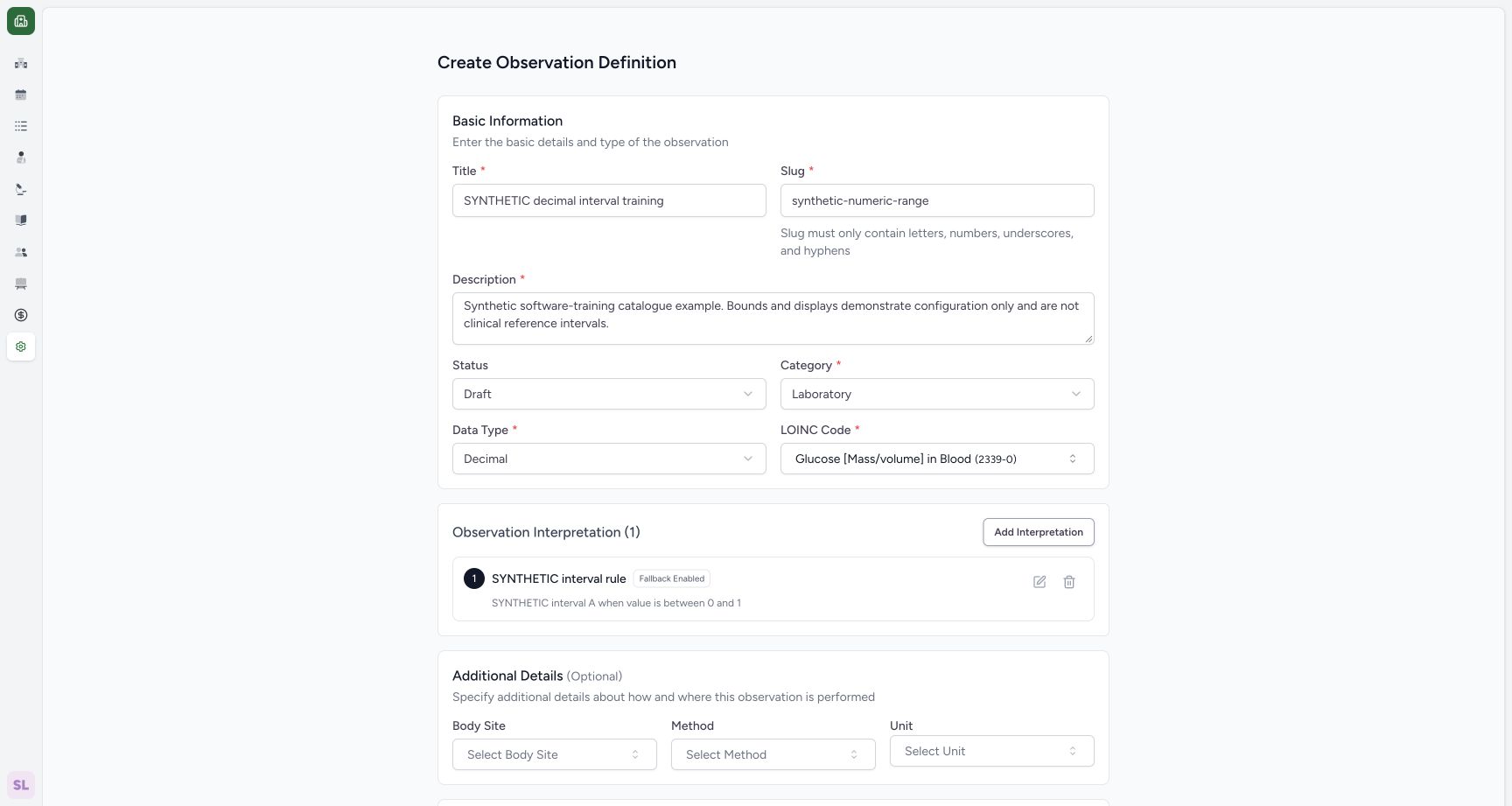
Name the rule SYNTHETIC interval rule. Enter SYNTHETIC interval A as the range Display, 0 as Min and 1 as Max. Enable the range highlight switch. Enable Fallback and keep its separate highlight switch on. This screen provides no fallback display-text field. Leave Conditions empty.
1234Configure a synthetic numeric interpretation
Capture details
Actual 1728 × 921 Chrome pixels; pinned source 39b72767. Laboratory Draft decimal interpretation creation
Image SHA-256 96b79e0debb7b732d071d9588932fd07faa4b43a7113dc56b026ca4b6873ee0b
- Rule title: Name this synthetic configuration rule.
- Minimum: Enter the lower software-example bound.
- Maximum: Enter the upper software-example bound.
- Save interpretation: Save this local configuration after reviewing it.
123456Review zero, numeric bounds and highlight settings
Capture details
Actual 1728 × 921 Chrome pixels; pinned source 39b72767. Laboratory Draft decimal interpretation creation
Image SHA-256 9d44566437e87e0a99efd26dc829383195f3b85b1317b20d1f4e0e3803ffa749
- Zero minimum: The lower bound visibly retains 0.
- Maximum 1: Review the upper demonstration bound.
- Range highlight: This switch controls highlighting for the range.
- Fallback enabled: Enable the supported fallback setting, without inventing a text field.
- Fallback highlight: The enabled fallback exposes its own highlight switch.
- Save local interpretation: Save the reviewed interval into the still-unsaved definition form.
7. Save the local interpretation
Use Save inside the interpretation sheet. Review Observation Interpretation (1), the synthetic rule title, the 0 to 1 summary and Fallback Enabled on the still-unsaved definition form.
123456Review zero, numeric bounds and highlight settings
Capture details
Actual 1728 × 921 Chrome pixels; pinned source 39b72767. Laboratory Draft decimal interpretation creation
Image SHA-256 9d44566437e87e0a99efd26dc829383195f3b85b1317b20d1f4e0e3803ffa749
- Zero minimum: The lower bound visibly retains 0.
- Maximum 1: Review the upper demonstration bound.
- Range highlight: This switch controls highlighting for the range.
- Fallback enabled: Enable the supported fallback setting, without inventing a text field.
- Fallback highlight: The enabled fallback exposes its own highlight switch.
- Save local interpretation: Save the reviewed interval into the still-unsaved definition form.
1234Review the local rule before creating the definition
Capture details
Actual 1728 × 921 Chrome pixels; pinned source 39b72767. Laboratory Draft decimal interpretation creation
Image SHA-256 71b18da34131a8022ac3ffba77986908de73879507f7313fef67c7adf225f255
- Draft status: Confirm the intended initial state.
- Decimal type: Confirm the saved representation choice.
- Rule summary: Review the visible zero-based range before the final Create.
- Edit interpretation: Reopen this local rule if it needs correction.
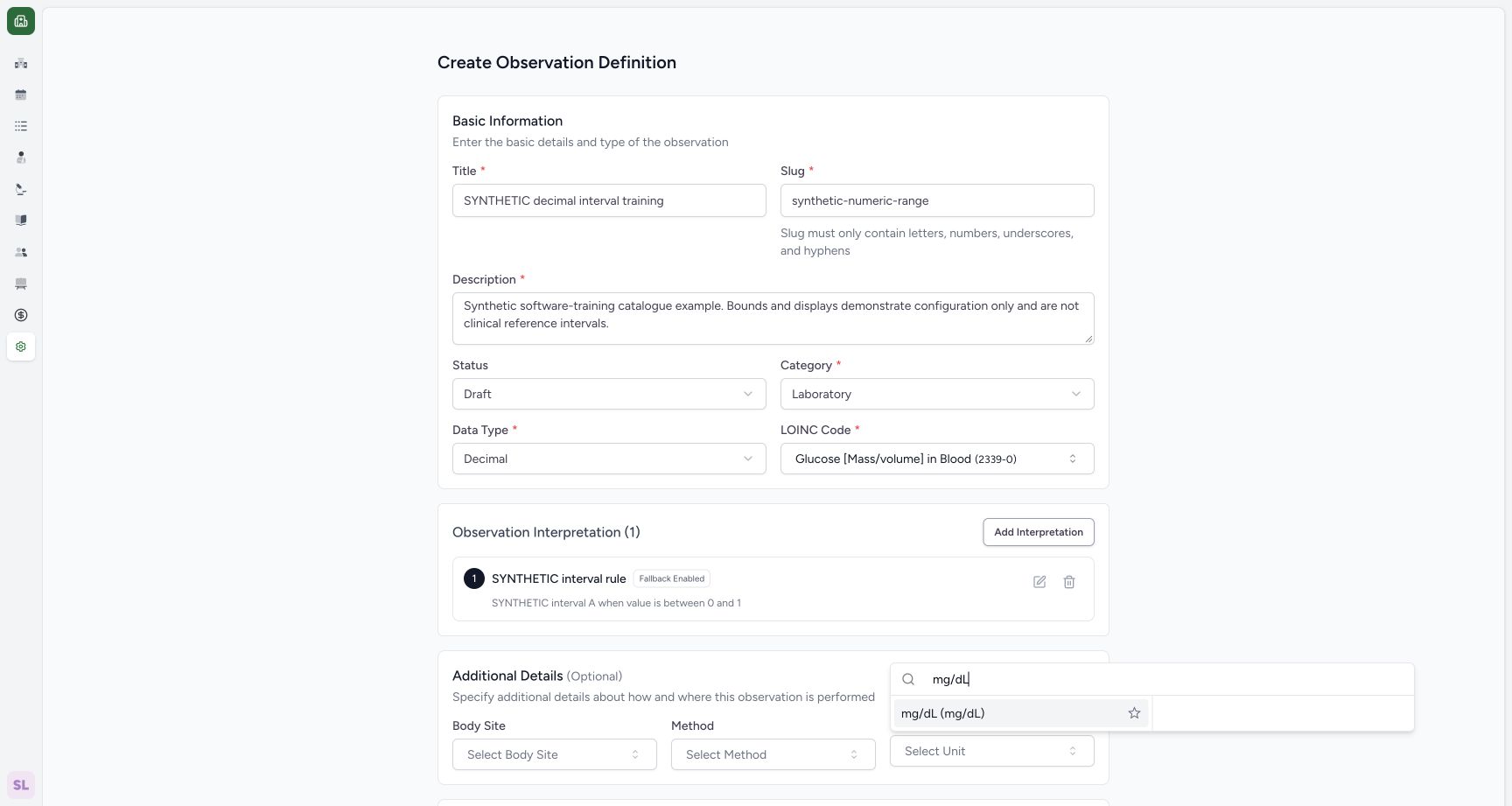
8. Select the permitted unit
Under Additional Details, open Unit, search mg/dL and select the returned mg/dL (mg/dL) option.
 12
12Select the returned UCUM unit
Capture details
Actual 1728 × 921 Chrome pixels; pinned source 39b72767. Laboratory Draft decimal interpretation creation
Image SHA-256 88f3d8956c442072faeb98ff9a78686bb5b8d22c49097ac77de0a89118fb3577
- mg/dL result: Choose the actual returned UCUM coding.
- Unit search: Search the unit in the normal selector.
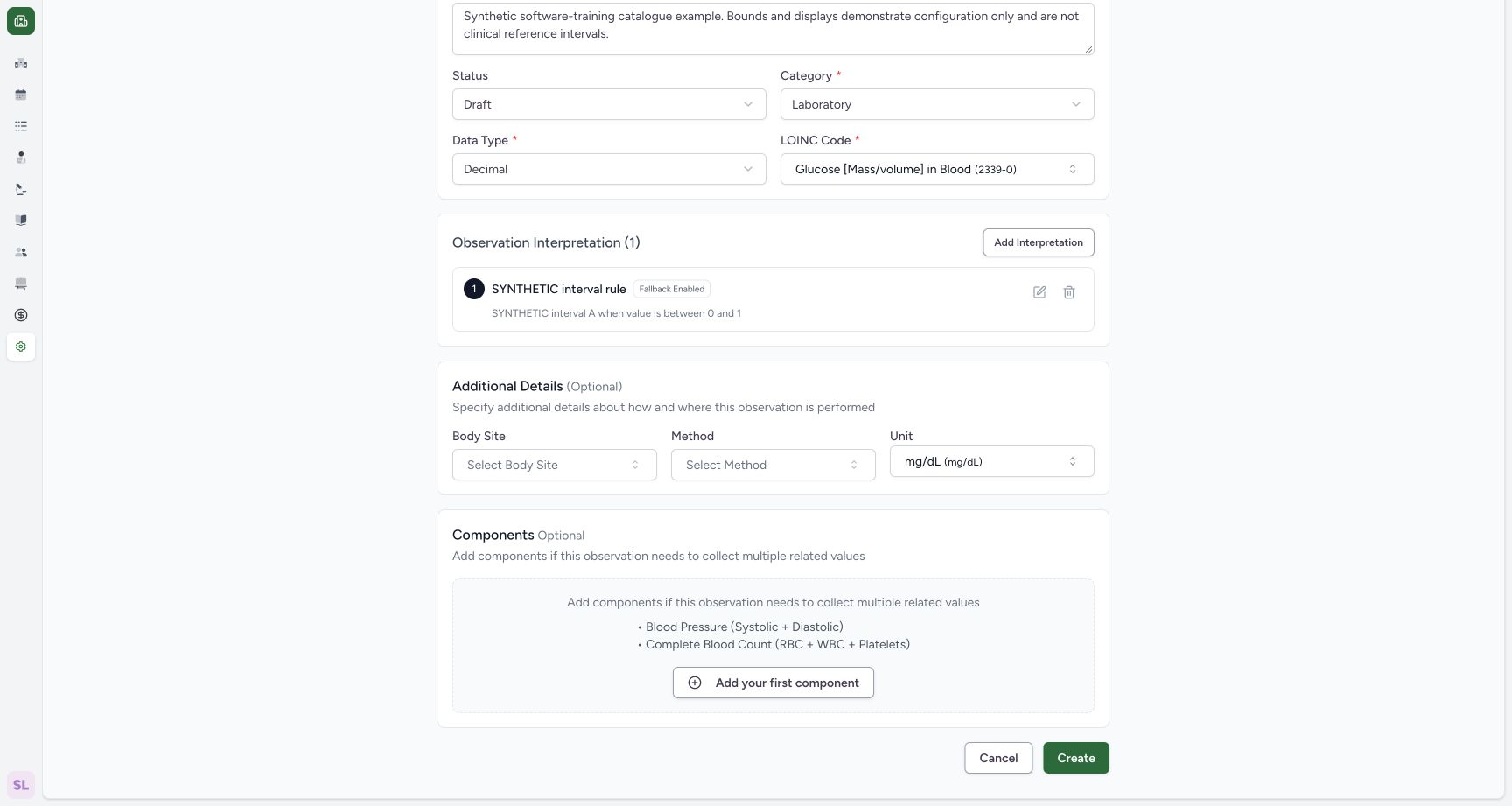
9. Review and create the definition
Confirm Draft, Decimal, selected LOINC 2339-0, the synthetic interval and mg/dL. Body Site, Method and Components remain unconfigured. Use Create once to save this separate catalogue record.
1234Review the local rule before creating the definition
Capture details
Actual 1728 × 921 Chrome pixels; pinned source 39b72767. Laboratory Draft decimal interpretation creation
Image SHA-256 71b18da34131a8022ac3ffba77986908de73879507f7313fef67c7adf225f255
- Draft status: Confirm the intended initial state.
- Decimal type: Confirm the saved representation choice.
- Rule summary: Review the visible zero-based range before the final Create.
- Edit interpretation: Reopen this local rule if it needs correction.
 123
123Create the reviewed synthetic Draft definition
Capture details
Actual 1728 × 921 Chrome pixels; pinned source 39b72767. Laboratory Draft decimal interpretation creation
Image SHA-256 a77fb9956c0ccff656c2714badb513315834f86b56f7472a8b5c57158b038766
- Selected unit: Confirm the actual mg/dL coding.
- Local rule summary: The synthetic interval retains 0 and 1.
- Create: Save the definition after this review.
10. Change the list filter to find the Draft
Create returns to a list filtered to Active, which excludes this saved Draft. Open the status filter and select Draft. Confirm the SYNTHETIC decimal interval training row, Draft status and Decimal type, then use View.
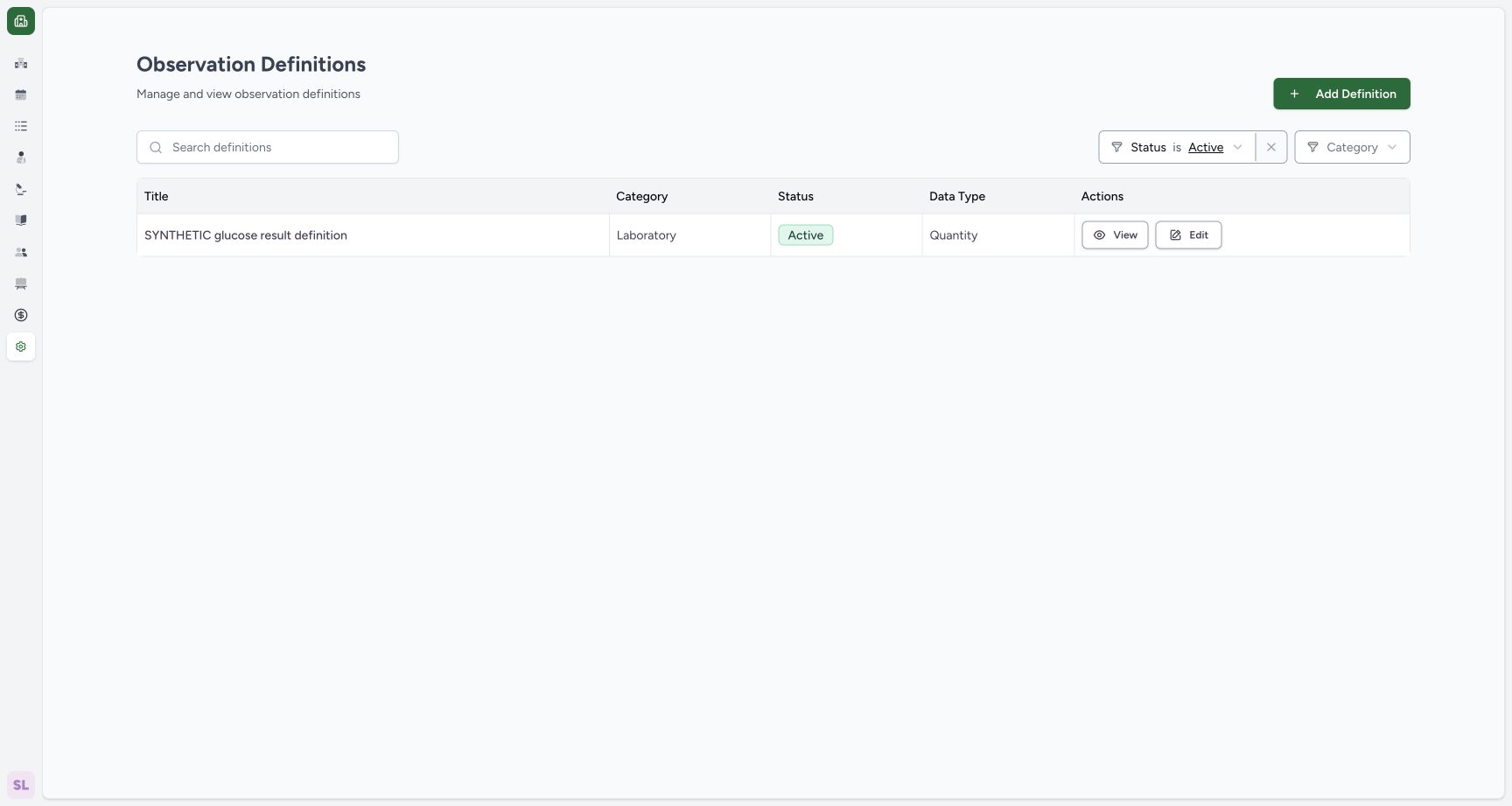 12
12A Draft creation is excluded by the Active filter
Capture details
Actual 1728 × 921 Chrome pixels; pinned source 39b72767. Laboratory Draft decimal interpretation creation
Image SHA-256 5f073df30ba1d9da76bd18992c54fc4d9b7ca3004cef338789acce22fa9bd61d
- Active filter: A saved Draft is outside this status filter.
- Existing Active record: This is the retained earlier Quantity definition, not the new Draft.
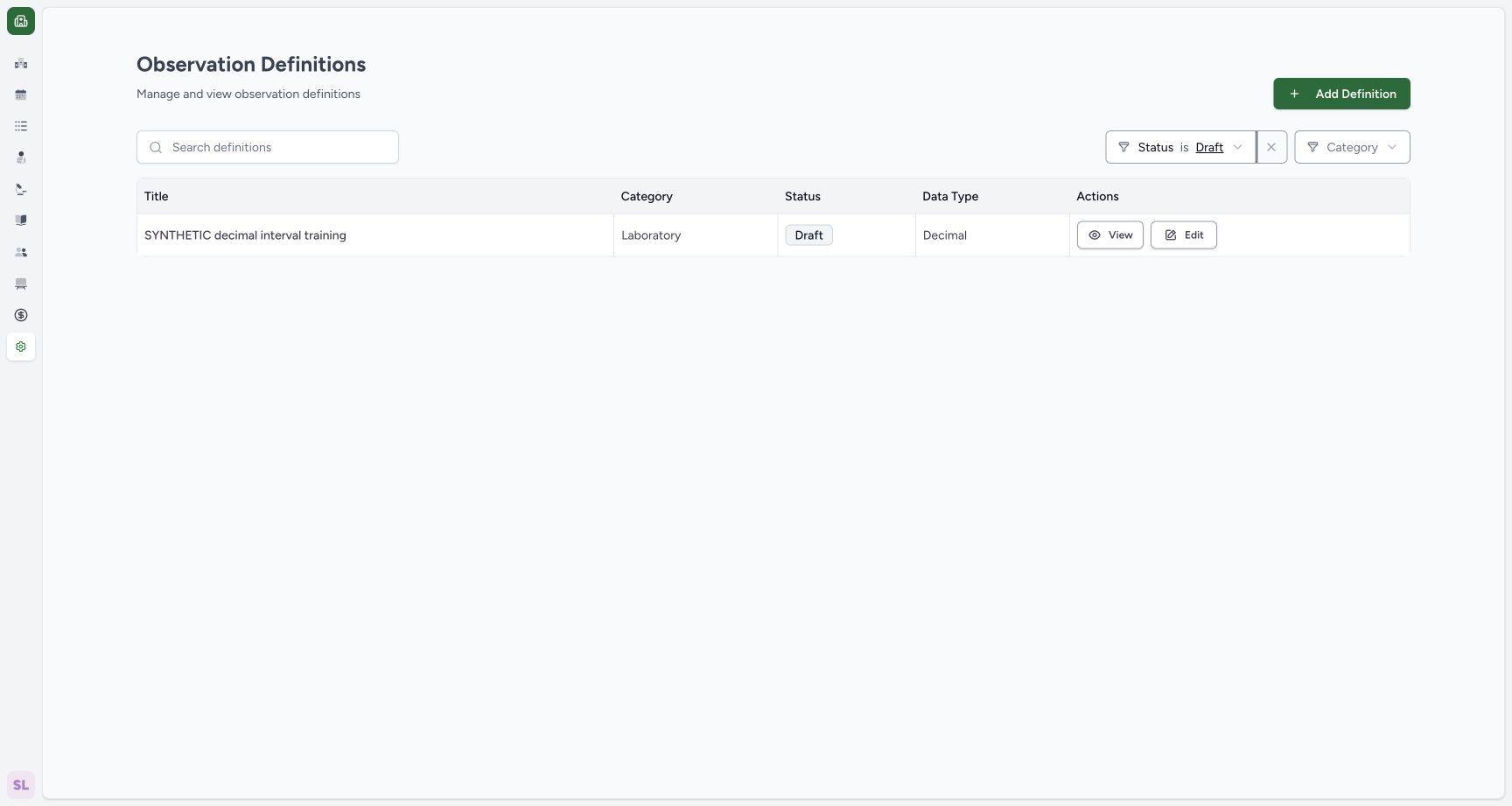 123
123Find the saved definition in Draft results
Capture details
Actual 1728 × 921 Chrome pixels; pinned source 39b72767. Laboratory Draft decimal interpretation creation
Image SHA-256 7f75b4dd4236fed3aa1cb3fffee373c11289ccf85126ffb8eec37dd5010fbcc4
- Draft filter: Use the saved status when locating this definition.
- Saved synthetic definition: The intended Draft/Decimal row is now visible.
- View: Open the saved definition for review.
11. Verify the saved identity, type and unit
On the saved detail, confirm the synthetic title, Draft, Laboratory, LOINC 2339-0, permitted data type decimal, and UCUM mg/dL.
1234Verify the saved Draft identity, type and unit
Capture details
Actual 1728 × 921 Chrome pixels; pinned source 39b72767. Laboratory Draft decimal interpretation creation
Image SHA-256 757f5ff990716270e808d7f0131ac1e39a29fcb0ca94ec549c12f663f5d4b6d9
- Saved Draft: Confirm the saved lifecycle state.
- Saved code: Review the actual selected coding.
- Saved Decimal type: Confirm the stored representation.
- Saved UCUM unit: Confirm mg/dL in the saved detail.
12. Verify the saved zero boundary and fallback
Scroll to Observation Interpretation. Confirm SYNTHETIC interval rule, SYNTHETIC interval A, the saved 0.00 to 1.00 bounds and Fallback Enabled. An independent normal detail read confirms the same UUID, one interval, both highlight settings and no components.
12Verify the saved zero-based rule and fallback
Capture details
Actual 1728 × 921 Chrome pixels; pinned source 39b72767. Laboratory Draft decimal interpretation creation
Image SHA-256 4b27d622d299f27b0abfbbf1844720bc489b8823c5e17b4c66c50cac83439118
- Saved bounds: The actual saved summary retains zero and the upper bound.
- Fallback Enabled: The saved rule reports the enabled fallback setting.
Local interpretation and saved definition
Save in the interpretation sheet updates the definition form. Create on the definition form stores the reusable Draft catalogue record. The final detail shows the persisted interval and fallback.
123456Review zero, numeric bounds and highlight settings
Capture details
Actual 1728 × 921 Chrome pixels; pinned source 39b72767. Laboratory Draft decimal interpretation creation
Image SHA-256 9d44566437e87e0a99efd26dc829383195f3b85b1317b20d1f4e0e3803ffa749
- Zero minimum: The lower bound visibly retains 0.
- Maximum 1: Review the upper demonstration bound.
- Range highlight: This switch controls highlighting for the range.
- Fallback enabled: Enable the supported fallback setting, without inventing a text field.
- Fallback highlight: The enabled fallback exposes its own highlight switch.
- Save local interpretation: Save the reviewed interval into the still-unsaved definition form.
123Create the reviewed synthetic Draft definition
Capture details
Actual 1728 × 921 Chrome pixels; pinned source 39b72767. Laboratory Draft decimal interpretation creation
Image SHA-256 a77fb9956c0ccff656c2714badb513315834f86b56f7472a8b5c57158b038766
- Selected unit: Confirm the actual mg/dL coding.
- Local rule summary: The synthetic interval retains 0 and 1.
- Create: Save the definition after this review.
12Verify the saved zero-based rule and fallback
Capture details
Actual 1728 × 921 Chrome pixels; pinned source 39b72767. Laboratory Draft decimal interpretation creation
Image SHA-256 4b27d622d299f27b0abfbbf1844720bc489b8823c5e17b4c66c50cac83439118
- Saved bounds: The actual saved summary retains zero and the upper bound.
- Fallback Enabled: The saved rule reports the enabled fallback setting.
Observed role and version
These genuine 1728 × 921 desktop screenshots use one existing Laboratory Facility Admin on committed training source 39b72767. The illustrated outcome is one Draft Decimal definition with a single unconditional numeric interval.
1234Review the local rule before creating the definition
Capture details
Actual 1728 × 921 Chrome pixels; pinned source 39b72767. Laboratory Draft decimal interpretation creation
Image SHA-256 71b18da34131a8022ac3ffba77986908de73879507f7313fef67c7adf225f255
- Draft status: Confirm the intended initial state.
- Decimal type: Confirm the saved representation choice.
- Rule summary: Review the visible zero-based range before the final Create.
- Edit interpretation: Reopen this local rule if it needs correction.
1234Verify the saved Draft identity, type and unit
Capture details
Actual 1728 × 921 Chrome pixels; pinned source 39b72767. Laboratory Draft decimal interpretation creation
Image SHA-256 757f5ff990716270e808d7f0131ac1e39a29fcb0ca94ec549c12f663f5d4b6d9
- Saved Draft: Confirm the saved lifecycle state.
- Saved code: Review the actual selected coding.
- Saved Decimal type: Confirm the stored representation.
- Saved UCUM unit: Confirm mg/dL in the saved detail.
12Verify the saved zero-based rule and fallback
Capture details
Actual 1728 × 921 Chrome pixels; pinned source 39b72767. Laboratory Draft decimal interpretation creation
Image SHA-256 4b27d622d299f27b0abfbbf1844720bc489b8823c5e17b4c66c50cac83439118
- Saved bounds: The actual saved summary retains zero and the upper bound.
- Fallback Enabled: The saved rule reports the enabled fallback setting.
Troubleshooting
The new Draft is missing from the Active list
Check the status filter. The illustrated Create returns to Active, while the saved record is Draft. Selecting Draft shows the intended synthetic title and Decimal type; use View to confirm the saved detail.
12A Draft creation is excluded by the Active filter
Capture details
Actual 1728 × 921 Chrome pixels; pinned source 39b72767. Laboratory Draft decimal interpretation creation
Image SHA-256 5f073df30ba1d9da76bd18992c54fc4d9b7ca3004cef338789acce22fa9bd61d
- Active filter: A saved Draft is outside this status filter.
- Existing Active record: This is the retained earlier Quantity definition, not the new Draft.
123Find the saved definition in Draft results
Capture details
Actual 1728 × 921 Chrome pixels; pinned source 39b72767. Laboratory Draft decimal interpretation creation
Image SHA-256 7f75b4dd4236fed3aa1cb3fffee373c11289ccf85126ffb8eec37dd5010fbcc4
- Draft filter: Use the saved status when locating this definition.
- Saved synthetic definition: The intended Draft/Decimal row is now visible.
- View: Open the saved definition for review.
1234Verify the saved Draft identity, type and unit
Capture details
Actual 1728 × 921 Chrome pixels; pinned source 39b72767. Laboratory Draft decimal interpretation creation
Image SHA-256 757f5ff990716270e808d7f0131ac1e39a29fcb0ca94ec549c12f663f5d4b6d9
- Saved Draft: Confirm the saved lifecycle state.
- Saved code: Review the actual selected coding.
- Saved Decimal type: Confirm the stored representation.
- Saved UCUM unit: Confirm mg/dL in the saved detail.
Source evidence
Every citation uses this exact committed version. The private source repository requires access.
- repositories/platform/mansoq-web/src/pages/Facility/settings/observationDefinition/ObservationDefinitionForm.tsx:141 ·
39b7276732f88bc07ad0abb61619f7aafe3c9e14Source file checksum
f637414724a0c9d45cb2a093ff6fa4f3fb2829b43259c13e141adea971ffc7d3 - repositories/platform/mansoq-web/src/pages/Facility/settings/observationDefinition/ObservationDefinitionForm.tsx:296 ·
39b7276732f88bc07ad0abb61619f7aafe3c9e14Source file checksum
f637414724a0c9d45cb2a093ff6fa4f3fb2829b43259c13e141adea971ffc7d3 - repositories/platform/mansoq-web/src/pages/Facility/settings/observationDefinition/ObservationDefinitionForm.tsx:622 ·
39b7276732f88bc07ad0abb61619f7aafe3c9e14Source file checksum
f637414724a0c9d45cb2a093ff6fa4f3fb2829b43259c13e141adea971ffc7d3 - repositories/platform/mansoq-web/src/pages/Facility/settings/observationDefinition/components/ObservationInterpretation.tsx:187 ·
39b7276732f88bc07ad0abb61619f7aafe3c9e14Source file checksum
a29c39d4db7c07220c041e08b699058b36fcead6e30e4f8baf58e9994288b1e2 - repositories/platform/mansoq-web/src/pages/Facility/settings/observationDefinition/components/ObservationInterpretation.tsx:275 ·
39b7276732f88bc07ad0abb61619f7aafe3c9e14Source file checksum
a29c39d4db7c07220c041e08b699058b36fcead6e30e4f8baf58e9994288b1e2 - repositories/platform/mansoq-web/src/pages/Facility/settings/observationDefinition/components/InterpretationField.tsx:77 ·
39b7276732f88bc07ad0abb61619f7aafe3c9e14Source file checksum
e8eeadd51c85e4d83abc70c573e73510798e29e362c0711cd411a7d70d2796ee - repositories/platform/mansoq-web/src/pages/Facility/settings/observationDefinition/ObservationDefinitionList.tsx:97 ·
39b7276732f88bc07ad0abb61619f7aafe3c9e14Source file checksum
567876c6b9ee36239fa15c956c2cfa251b000dcba4f9c6c23d915a77f691297e - repositories/platform/mansoq-web/src/pages/Facility/settings/observationDefinition/ObservationDefinitionView.tsx:201 ·
39b7276732f88bc07ad0abb61619f7aafe3c9e14Source file checksum
c4d0b3b59c270af6067985e4ee80c40b647041a8b7420c27ad85a3d0deb8d056 - repositories/platform/mansoq-core/mansoq/emr/resources/observation_definition/spec.py:60 ·
39b7276732f88bc07ad0abb61619f7aafe3c9e14Source file checksum
3898a7b211c0285d470081b91eebe630d232199f24f946455e5db9ae57bf307d - repositories/platform/mansoq-core/mansoq/emr/resources/observation_definition/spec.py:84 ·
39b7276732f88bc07ad0abb61619f7aafe3c9e14Source file checksum
3898a7b211c0285d470081b91eebe630d232199f24f946455e5db9ae57bf307d - repositories/platform/mansoq-core/mansoq/security/permissions/observation_definition.py:16 ·
39b7276732f88bc07ad0abb61619f7aafe3c9e14Source file checksum
1f8939f90968a057fd5dcf887f565d5136357511919986ddf8695c0ae0a0a196 - repositories/platform/mansoq-core/mansoq/security/authorization/observation_definition.py:9 ·
39b7276732f88bc07ad0abb61619f7aafe3c9e14Source file checksum
a3dc423fc19f246f64ccc0a75bd0e4a873af5ea4ecb3d63c6ceaa4ee9a7d4e69