 MANSOQ
 Facility administration · VERSION 39b72767
Create and verify a laboratory observation definition
Complete required catalogue fields, select an installed LOINC code, choose Quantity and verify the saved definition.
Facility Admin
 1234
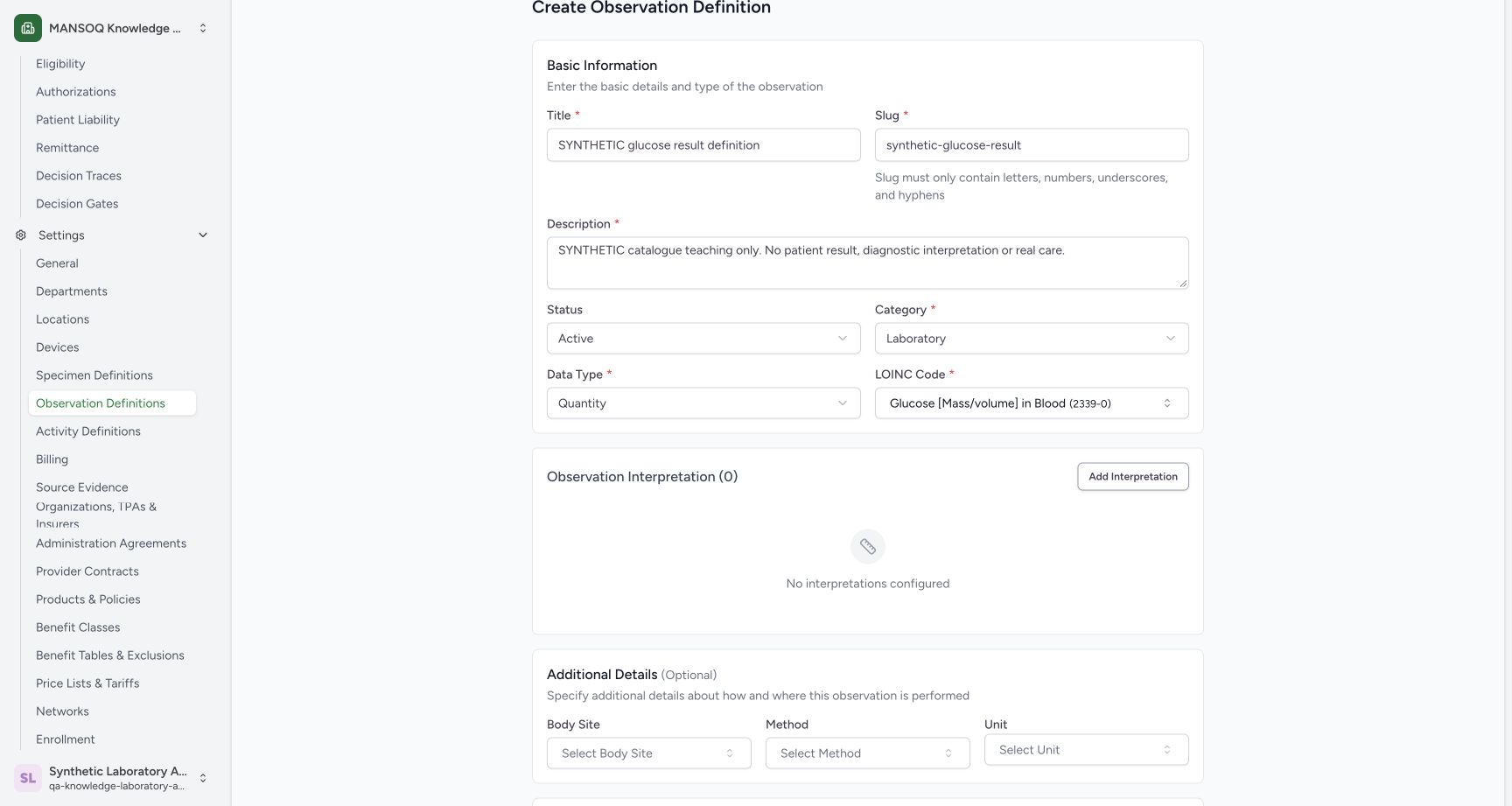
1234Review the selected synthetic observation identity
Capture details
Actual 1728 × 921 Chrome pixels; pinned source 39b72767. Create and verify a laboratory observation definition
Image SHA-256 f9beacadad16039a9f9d49a173b1310ac852c94e1cc3e0590a372235bf9e480e
- Synthetic title: Confirm the reusable definition identity.
- LOINC retained: The actual selected code is2339-0.
- No interpretations: No diagnostic ranges or interpretation rules are configured.
- No unit yet: A separate saved update will teach unit configuration.
 123
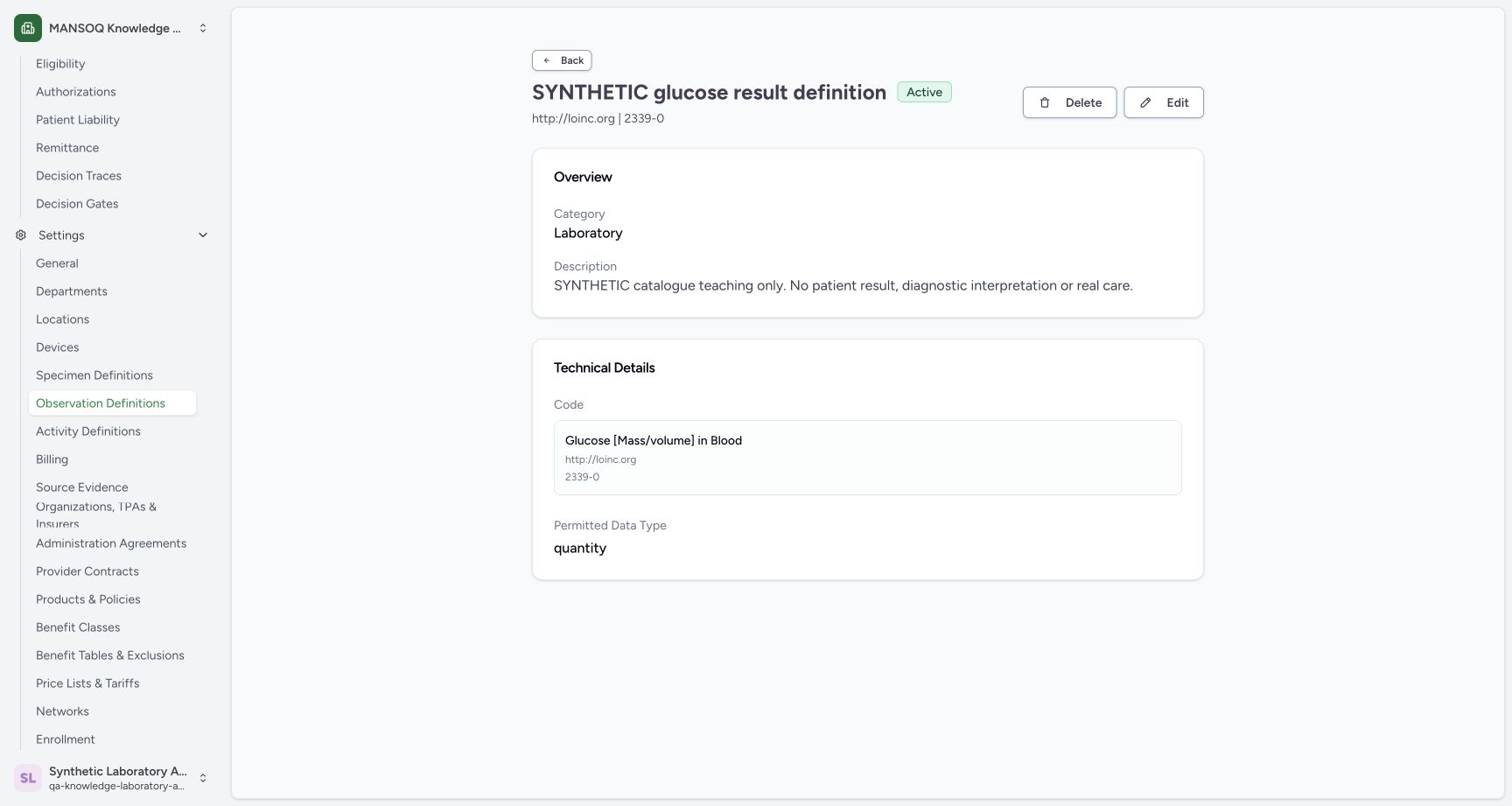
123Verify the persisted observation definition detail
Capture details
Actual 1728 × 921 Chrome pixels; pinned source 39b72767. Create and verify a laboratory observation definition
Image SHA-256 9a8a881657156af107e0f1b97fd3aa44b900bcbea87f5450aff10684dc1f7b0f
- Active: Confirm the persisted status.
- LOINC identity: Confirm system http://loinc.org and code2339-0.
- Quantity: Confirm the stored permitted data type.
14 of 14 content blocks have reviewed image alignment. Missing overview or prerequisite images remain open.
Before you begin
- Use your existing authorized Facility Admin account and select the intended Laboratory. The observed synthetic account already has catalogue read/write rights; no role or membership is changed.
 123
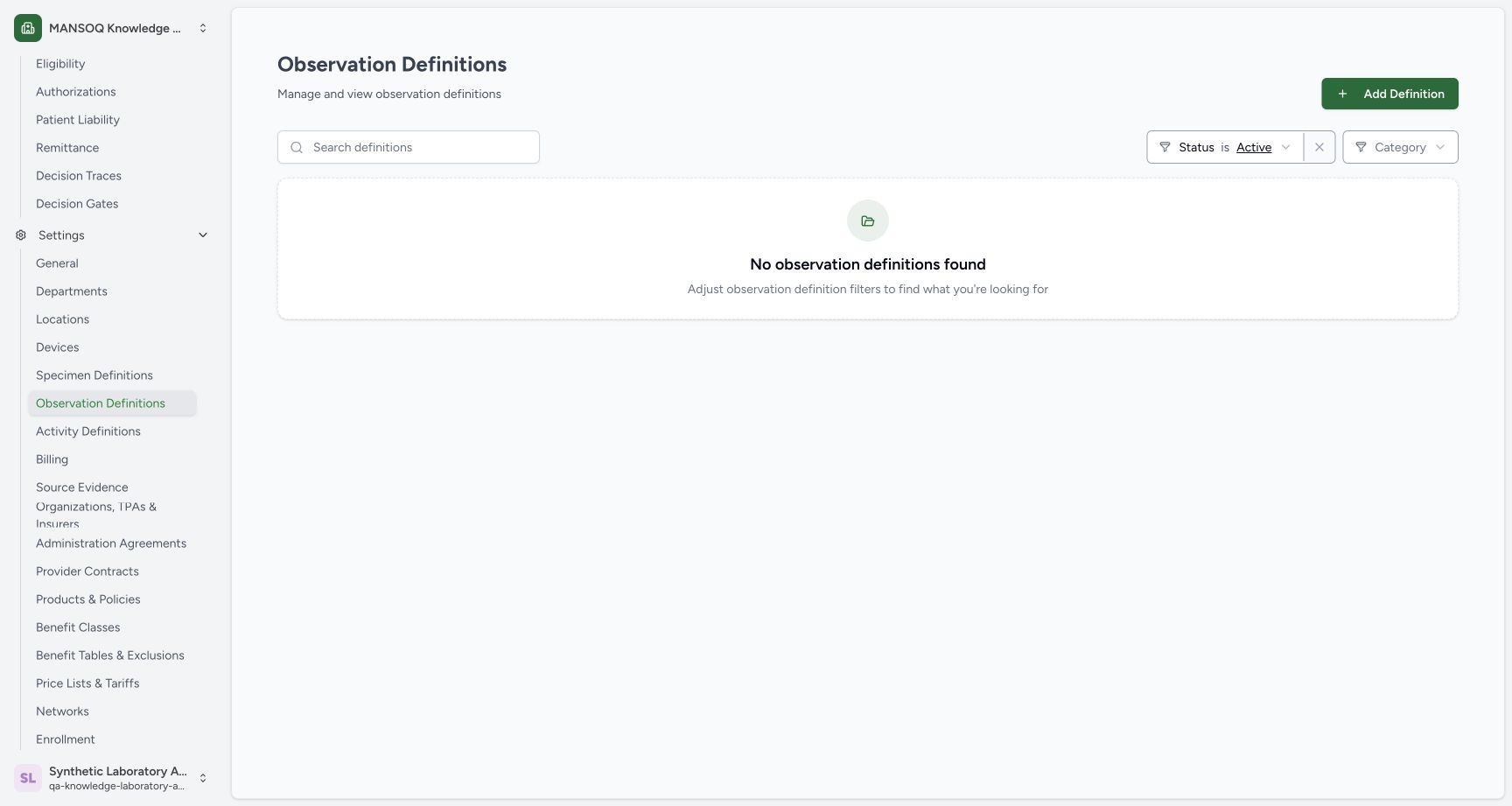
123Recorded release 39b72767 · 2026-10-18 · 1728 × 921 Open Observation Definitions in the synthetic Laboratory
Capture details
Actual 1728 × 921 Chrome pixels; pinned source 39b72767. Create and verify a laboratory observation definition
Image SHA-256
4724e766984540731c8d6259b14cdfda1a6561c34cd6d57b62309b343c5c6f66- Observation Definitions: Open the reusable observation catalogue from Settings.
- Add Definition: Start a new facility-scoped definition.
- Active filter: Confirm the default status before searching.
123Recorded release 39b72767 · 2026-10-18 · 1728 × 921 Verify the persisted observation definition detail
Capture details
Actual 1728 × 921 Chrome pixels; pinned source 39b72767. Create and verify a laboratory observation definition
Image SHA-256
9a8a881657156af107e0f1b97fd3aa44b900bcbea87f5450aff10684dc1f7b0f- Active: Confirm the persisted status.
- LOINC identity: Confirm system http://loinc.org and code2339-0.
- Quantity: Confirm the stored permitted data type.
- This example stores reusable synthetic catalogue metadata. It does not create a patient observation, laboratory order, sample collection, bill or external transaction.
 123
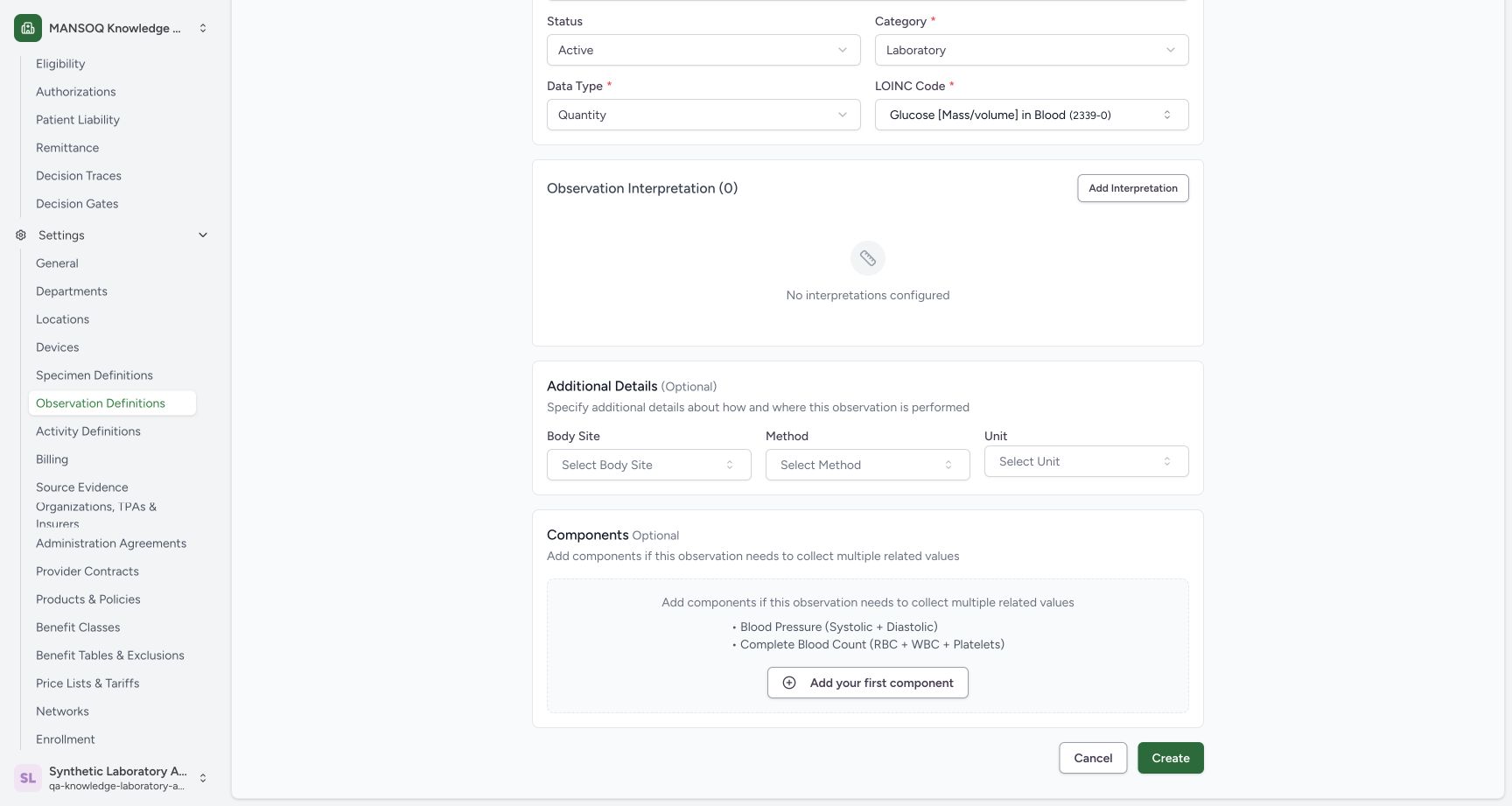
123Recorded release 39b72767 · 2026-10-18 · 1728 × 921 Review optional fields and create the base definition
Capture details
Actual 1728 × 921 Chrome pixels; pinned source 39b72767. Create and verify a laboratory observation definition
Image SHA-256
b7717d391ac68d30d3aecac0efd00cfc95c7efaf318f7edf7a514ca2d0ecae26- Create: Save the reviewed base definition once.
- No components: No component is added in this base example.
- Unit unconfigured: Keep this empty for the separate unit-update lesson.
123Recorded release 39b72767 · 2026-10-18 · 1728 × 921 Verify the persisted observation definition detail
Capture details
Actual 1728 × 921 Chrome pixels; pinned source 39b72767. Create and verify a laboratory observation definition
Image SHA-256
9a8a881657156af107e0f1b97fd3aa44b900bcbea87f5450aff10684dc1f7b0f- Active: Confirm the persisted status.
- LOINC identity: Confirm system http://loinc.org and code2339-0.
- Quantity: Confirm the stored permitted data type.
1. Open the intended observation catalogue
Open Settings → Observation Definitions in the intended Laboratory. Confirm the Active filter and the empty result, then use Add Definition.
123Open Observation Definitions in the synthetic Laboratory
Capture details
Actual 1728 × 921 Chrome pixels; pinned source 39b72767. Create and verify a laboratory observation definition
Image SHA-256 4724e766984540731c8d6259b14cdfda1a6561c34cd6d57b62309b343c5c6f66
- Observation Definitions: Open the reusable observation catalogue from Settings.
- Add Definition: Start a new facility-scoped definition.
- Active filter: Confirm the default status before searching.
2. Identify required fields
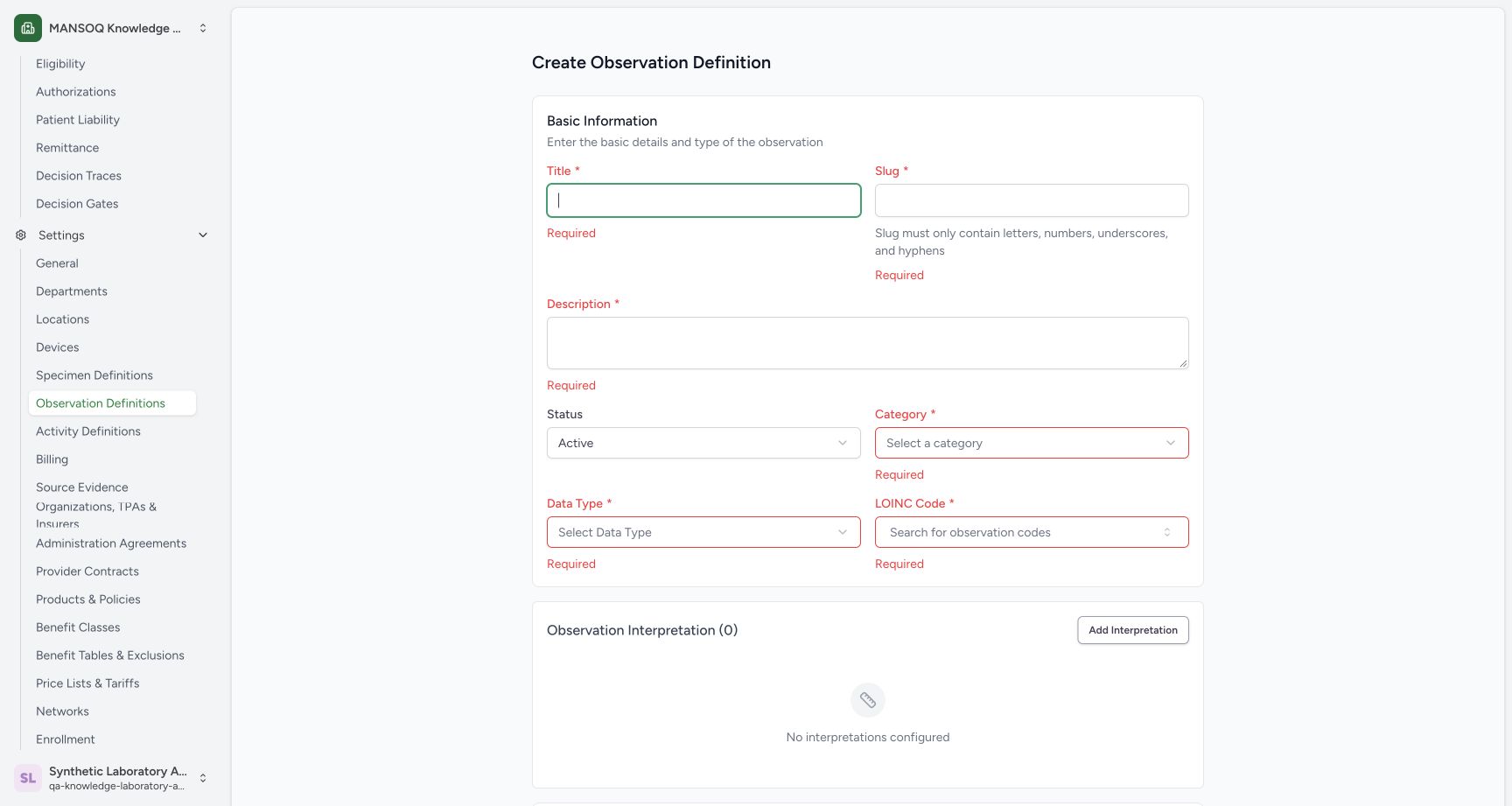
A blank Create displays required feedback for Title, Slug, Description, Category, Data Type and LOINC Code. Active is already selected. Nothing has been saved at this point.
 1234
1234Required observation catalogue fields
Capture details
Actual 1728 × 921 Chrome pixels; pinned source 39b72767. Create and verify a laboratory observation definition
Image SHA-256 c9587a52c8e18fc7e39254a9673d14907bbf270c0a9acdaf1976d13b9abf461f
- Title and slug: Enter a synthetic identity and controlled unique short slug.
- Category required: Choose the intended classification.
- Data Type required: Choose the value type this definition will use.
- LOINC required: Select an actual installed lookup result.
3. Enter the synthetic identity and choose Quantity
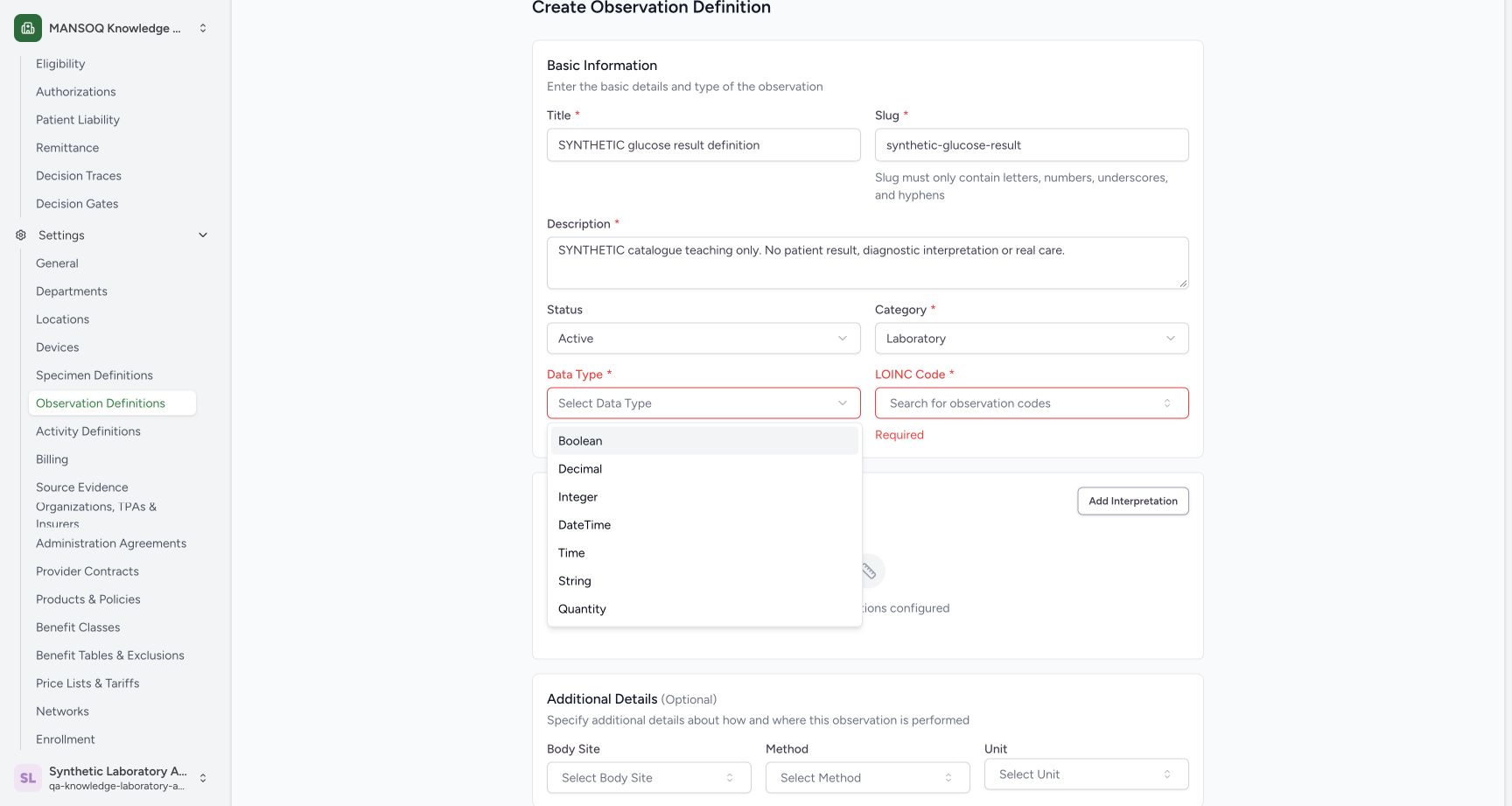
Enter SYNTHETIC glucose result definition, the short slug synthetic-glucose-result and the illustrated synthetic-only Description. Choose Laboratory for Category. Open Data Type and choose Quantity from the actual menu.
 123
123Choose Quantity for this synthetic Laboratory definition
Capture details
Actual 1728 × 921 Chrome pixels; pinned source 39b72767. Create and verify a laboratory observation definition
Image SHA-256 02f825d7e69dfead04be710929ad8db3399d0952e5b3e36ddca56c0a34acd262
- Quantity: Choose the value type for this example.
- Laboratory: The classification is already selected.
- Controlled slug: Keep the unique synthetic short slug.
4. Select the installed observation code
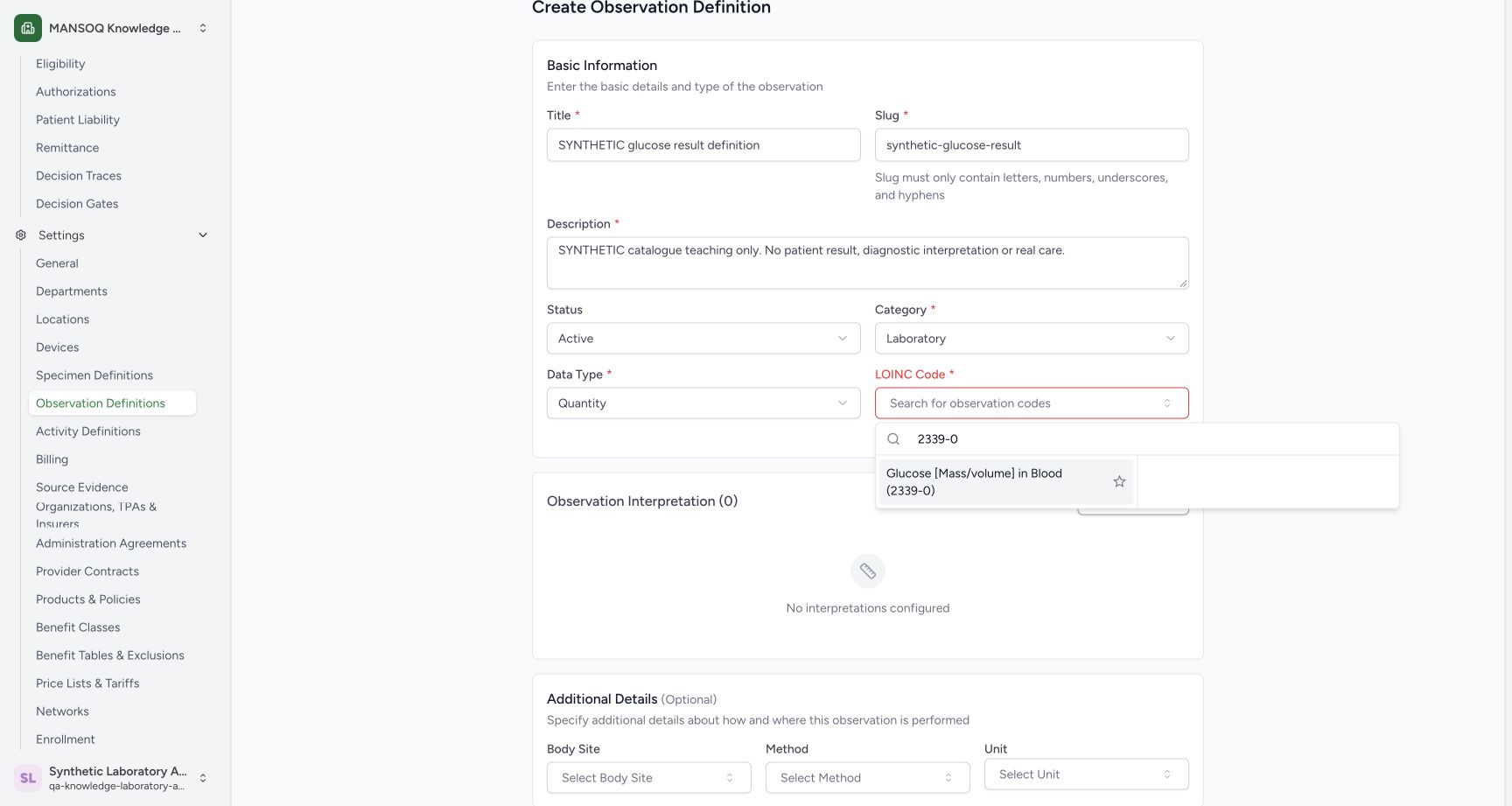
Open LOINC Code, search 2339-0 and select the actually returned Glucose [Mass/volume] in Blood (2339-0) option. The displayed code and system will be verified after saving.
 123
123Select the actually returned LOINC code
Capture details
Actual 1728 × 921 Chrome pixels; pinned source 39b72767. Create and verify a laboratory observation definition
Image SHA-256 63d8e6cec20a719614d6d185c6be457ae568052ed7dc6a0532b18934a7ed919a
- Search 2339-0: Search the installed terminology by code.
- Returned LOINC choice: Select this actual lookup result.
- Quantity: The value type remains Quantity.
5. Review the base definition
Confirm the synthetic identity, Active, Laboratory, Quantity and selected 2339-0 code. Observation Interpretation (0) is empty, and Body Site, Method and Unit are unconfigured in this base example.
1234Review the selected synthetic observation identity
Capture details
Actual 1728 × 921 Chrome pixels; pinned source 39b72767. Create and verify a laboratory observation definition
Image SHA-256 f9beacadad16039a9f9d49a173b1310ac852c94e1cc3e0590a372235bf9e480e
- Synthetic title: Confirm the reusable definition identity.
- LOINC retained: The actual selected code is2339-0.
- No interpretations: No diagnostic ranges or interpretation rules are configured.
- No unit yet: A separate saved update will teach unit configuration.
6. Review optional fields and create once
Scroll through the empty interpretation and optional fields. Leave Components empty in this base lesson. Use Create once to store the reusable definition.
123Review optional fields and create the base definition
Capture details
Actual 1728 × 921 Chrome pixels; pinned source 39b72767. Create and verify a laboratory observation definition
Image SHA-256 b7717d391ac68d30d3aecac0efd00cfc95c7efaf318f7edf7a514ca2d0ecae26
- Create: Save the reviewed base definition once.
- No components: No component is added in this base example.
- Unit unconfigured: Keep this empty for the separate unit-update lesson.
7. Find the saved Active definition
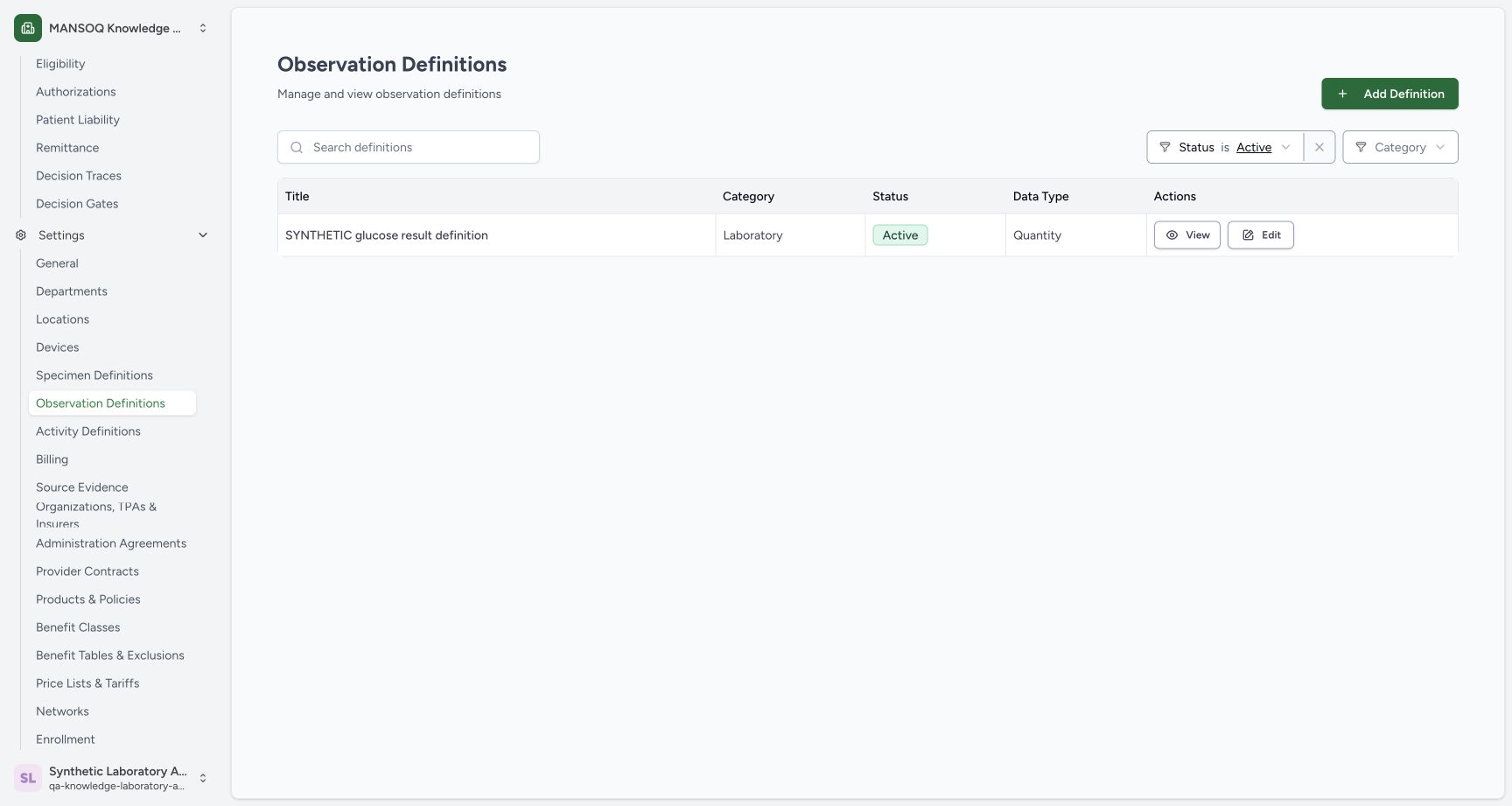
After the ordinary list request finishes, confirm the synthetic title, Laboratory, Active and Quantity row. Use View to open the saved record.
 123
123Verify the saved Active Quantity definition
Capture details
Actual 1728 × 921 Chrome pixels; pinned source 39b72767. Create and verify a laboratory observation definition
Image SHA-256 0eb420eb30ac869fbd29c4de26d591fc1198ae5f9a55faa77a97a12c8497bded
- Saved definition: Confirm the synthetic title.
- Active: The stored status agrees with readback.
- View: Open the persisted definition detail.
8. Verify the persisted identity and data type
Confirm Active, Laboratory, the synthetic Description, http://loinc.org, 2339-0 and permitted data type quantity. Independent normal detail/list reads confirm the same saved record with no unit, ranges or components. Delete is not used.
123Verify the persisted observation definition detail
Capture details
Actual 1728 × 921 Chrome pixels; pinned source 39b72767. Create and verify a laboratory observation definition
Image SHA-256 9a8a881657156af107e0f1b97fd3aa44b900bcbea87f5450aff10684dc1f7b0f
- Active: Confirm the persisted status.
- LOINC identity: Confirm system http://loinc.org and code2339-0.
- Quantity: Confirm the stored permitted data type.
Definitions and patient results
An Observation Definition describes reusable metadata such as its classification, value type, coding and permitted unit. Creating or changing this definition does not record a patient result or configure a medical interpretation unless a separate interpretation is deliberately added.
1234Review the selected synthetic observation identity
Capture details
Actual 1728 × 921 Chrome pixels; pinned source 39b72767. Create and verify a laboratory observation definition
Image SHA-256 f9beacadad16039a9f9d49a173b1310ac852c94e1cc3e0590a372235bf9e480e
- Synthetic title: Confirm the reusable definition identity.
- LOINC retained: The actual selected code is2339-0.
- No interpretations: No diagnostic ranges or interpretation rules are configured.
- No unit yet: A separate saved update will teach unit configuration.
123Review optional fields and create the base definition
Capture details
Actual 1728 × 921 Chrome pixels; pinned source 39b72767. Create and verify a laboratory observation definition
Image SHA-256 b7717d391ac68d30d3aecac0efd00cfc95c7efaf318f7edf7a514ca2d0ecae26
- Create: Save the reviewed base definition once.
- No components: No component is added in this base example.
- Unit unconfigured: Keep this empty for the separate unit-update lesson.
123Verify the persisted observation definition detail
Capture details
Actual 1728 × 921 Chrome pixels; pinned source 39b72767. Create and verify a laboratory observation definition
Image SHA-256 9a8a881657156af107e0f1b97fd3aa44b900bcbea87f5450aff10684dc1f7b0f
- Active: Confirm the persisted status.
- LOINC identity: Confirm system http://loinc.org and code2339-0.
- Quantity: Confirm the stored permitted data type.
Observed role and version
These actual desktop screenshots use one existing Laboratory Facility Admin on the committed 39b72767 training version. Other roles, facilities, data types, categories and optional branches require their own verification.
123Open Observation Definitions in the synthetic Laboratory
Capture details
Actual 1728 × 921 Chrome pixels; pinned source 39b72767. Create and verify a laboratory observation definition
Image SHA-256 4724e766984540731c8d6259b14cdfda1a6561c34cd6d57b62309b343c5c6f66
- Observation Definitions: Open the reusable observation catalogue from Settings.
- Add Definition: Start a new facility-scoped definition.
- Active filter: Confirm the default status before searching.
123Verify the persisted observation definition detail
Capture details
Actual 1728 × 921 Chrome pixels; pinned source 39b72767. Create and verify a laboratory observation definition
Image SHA-256 9a8a881657156af107e0f1b97fd3aa44b900bcbea87f5450aff10684dc1f7b0f
- Active: Confirm the persisted status.
- LOINC identity: Confirm system http://loinc.org and code2339-0.
- Quantity: Confirm the stored permitted data type.
Troubleshooting
The saved row is not visible immediately
Allow the normal list request to finish before judging the result. The illustrated saved row is the settled Active result, verified independently against the stored record.
123Verify the saved Active Quantity definition
Capture details
Actual 1728 × 921 Chrome pixels; pinned source 39b72767. Create and verify a laboratory observation definition
Image SHA-256 0eb420eb30ac869fbd29c4de26d591fc1198ae5f9a55faa77a97a12c8497bded
- Saved definition: Confirm the synthetic title.
- Active: The stored status agrees with readback.
- View: Open the persisted definition detail.
Source evidence
Every citation uses this exact committed version. The private source repository requires access.
- repositories/platform/mansoq-web/src/pages/Facility/settings/observationDefinition/ObservationDefinitionForm.tsx:141 ·
39b7276732f88bc07ad0abb61619f7aafe3c9e14Source file checksum
f637414724a0c9d45cb2a093ff6fa4f3fb2829b43259c13e141adea971ffc7d3 - repositories/platform/mansoq-web/src/pages/Facility/settings/observationDefinition/ObservationDefinitionForm.tsx:296 ·
39b7276732f88bc07ad0abb61619f7aafe3c9e14Source file checksum
f637414724a0c9d45cb2a093ff6fa4f3fb2829b43259c13e141adea971ffc7d3 - repositories/platform/mansoq-web/src/pages/Facility/settings/observationDefinition/ObservationDefinitionForm.tsx:310 ·
39b7276732f88bc07ad0abb61619f7aafe3c9e14Source file checksum
f637414724a0c9d45cb2a093ff6fa4f3fb2829b43259c13e141adea971ffc7d3 - repositories/platform/mansoq-web/src/pages/Facility/settings/observationDefinition/ObservationDefinitionForm.tsx:562 ·
39b7276732f88bc07ad0abb61619f7aafe3c9e14Source file checksum
f637414724a0c9d45cb2a093ff6fa4f3fb2829b43259c13e141adea971ffc7d3 - repositories/platform/mansoq-web/src/pages/Facility/settings/observationDefinition/ObservationDefinitionForm.tsx:594 ·
39b7276732f88bc07ad0abb61619f7aafe3c9e14Source file checksum
f637414724a0c9d45cb2a093ff6fa4f3fb2829b43259c13e141adea971ffc7d3 - repositories/platform/mansoq-web/src/pages/Facility/settings/observationDefinition/ObservationDefinitionForm.tsx:719 ·
39b7276732f88bc07ad0abb61619f7aafe3c9e14Source file checksum
f637414724a0c9d45cb2a093ff6fa4f3fb2829b43259c13e141adea971ffc7d3 - repositories/platform/mansoq-web/src/pages/Facility/settings/observationDefinition/ObservationDefinitionList.tsx:97 ·
39b7276732f88bc07ad0abb61619f7aafe3c9e14Source file checksum
567876c6b9ee36239fa15c956c2cfa251b000dcba4f9c6c23d915a77f691297e - repositories/platform/mansoq-web/src/pages/Facility/settings/observationDefinition/ObservationDefinitionView.tsx:201 ·
39b7276732f88bc07ad0abb61619f7aafe3c9e14Source file checksum
c4d0b3b59c270af6067985e4ee80c40b647041a8b7420c27ad85a3d0deb8d056 - repositories/platform/mansoq-web/src/types/emr/observationDefinition/observationDefinition.ts:6 ·
39b7276732f88bc07ad0abb61619f7aafe3c9e14Source file checksum
410ab320a92fa0297f8cab554412e9f064b1c3e7da92e811cd1c6049dba15d08 - repositories/platform/mansoq-web/src/types/emr/observationDefinition/observationDefinitionApi.ts:10 ·
39b7276732f88bc07ad0abb61619f7aafe3c9e14Source file checksum
9fd238ca281a27a49e8d303a1861a6dd0d2784256f7df833fe883e279e143422 - repositories/platform/mansoq-core/mansoq/emr/api/viewsets/observation_definition.py:94 ·
39b7276732f88bc07ad0abb61619f7aafe3c9e14Source file checksum
266ba9db30988a6c5bd0c2b01e7f609e6fa8f0754641ef079f3e8d1843a20935 - repositories/platform/mansoq-core/mansoq/emr/resources/observation_definition/spec.py:158 ·
39b7276732f88bc07ad0abb61619f7aafe3c9e14Source file checksum
3898a7b211c0285d470081b91eebe630d232199f24f946455e5db9ae57bf307d - repositories/platform/mansoq-core/mansoq/emr/resources/observation/valueset.py:5 ·
39b7276732f88bc07ad0abb61619f7aafe3c9e14Source file checksum
ded28b5aa6c2fb9d0134e09714e494fc3e432e33ecb40cc759f78e564b2f9698 - repositories/platform/mansoq-core/mansoq/security/permissions/observation_definition.py:16 ·
39b7276732f88bc07ad0abb61619f7aafe3c9e14Source file checksum
1f8939f90968a057fd5dcf887f565d5136357511919986ddf8695c0ae0a0a196 - repositories/platform/mansoq-core/mansoq/security/authorization/observation_definition.py:9 ·
39b7276732f88bc07ad0abb61619f7aafe3c9e14Source file checksum
a3dc423fc19f246f64ccc0a75bd0e4a873af5ea4ecb3d63c6ceaa4ee9a7d4e69