 MANSOQ
 Facility administration · VERSION 39b72767
Link specimen and observation definitions to a laboratory activity
Create a separate synthetic activity, select existing specimen and observation requirements, then verify the saved associations.
Facility Admin
 123
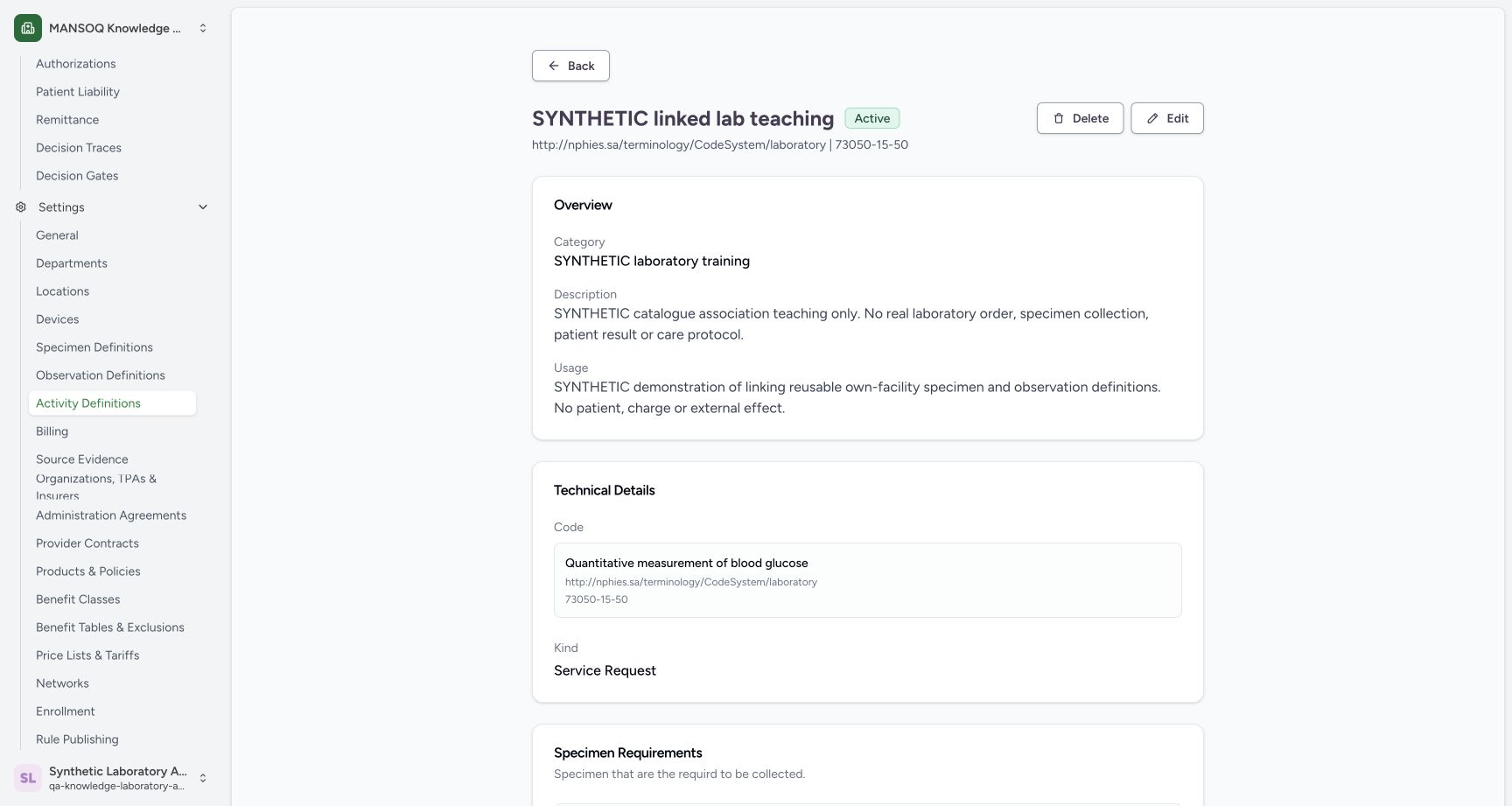
123Verify the saved linked activity identity
Capture details
Actual 1728 × 921 Chrome pixels; pinned source 39b72767. Link specimen and observation definitions to a laboratory activity
Image SHA-256 dcc3e1542f335d537b4184a6eafd6106e21910cd8ee3ad2f9e8c816d111be9f3
- Saved Active: Confirm the separately saved activity status.
- Laboratory code: Confirm unchanged selected coding.
- Synthetic purpose: The Usage identifies reusable catalogue demonstration only.
 123
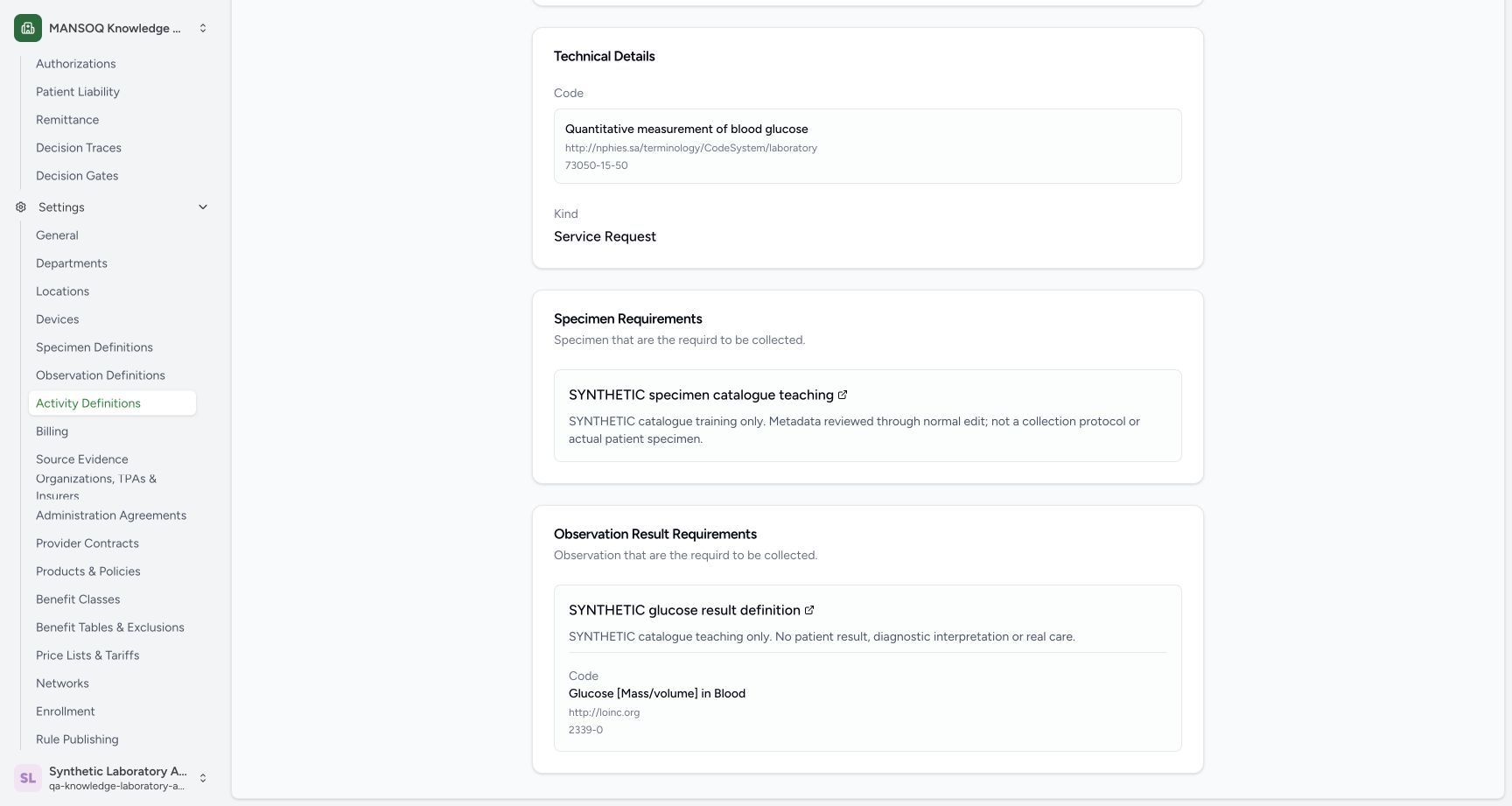
123Verify the persisted specimen and observation associations
Capture details
Actual 1728 × 921 Chrome pixels; pinned source 39b72767. Link specimen and observation definitions to a laboratory activity
Image SHA-256 c627748563032cc467afe43c4c016507b1a81f359df01971475fffdf5fcd760d
- Saved specimen requirement: The persisted link points to the intended synthetic specimen definition.
- Saved observation requirement: The persisted link points to the intended observation definition.
- LOINC code: The saved linked observation retains2339-0.
19 of 19 content blocks have reviewed image alignment. Missing overview or prerequisite images remain open.
Before you begin
- Use your existing authorized Facility Admin account and select the intended Laboratory. The observed synthetic account already has catalogue read/write rights; no role or membership is changed.
 123
123Recorded release 39b72767 · 2026-10-18 · 1728 × 921 Start a separate Active activity in the synthetic category
Capture details
Actual 1728 × 921 Chrome pixels; pinned source 39b72767. Link specimen and observation definitions to a laboratory activity
Image SHA-256
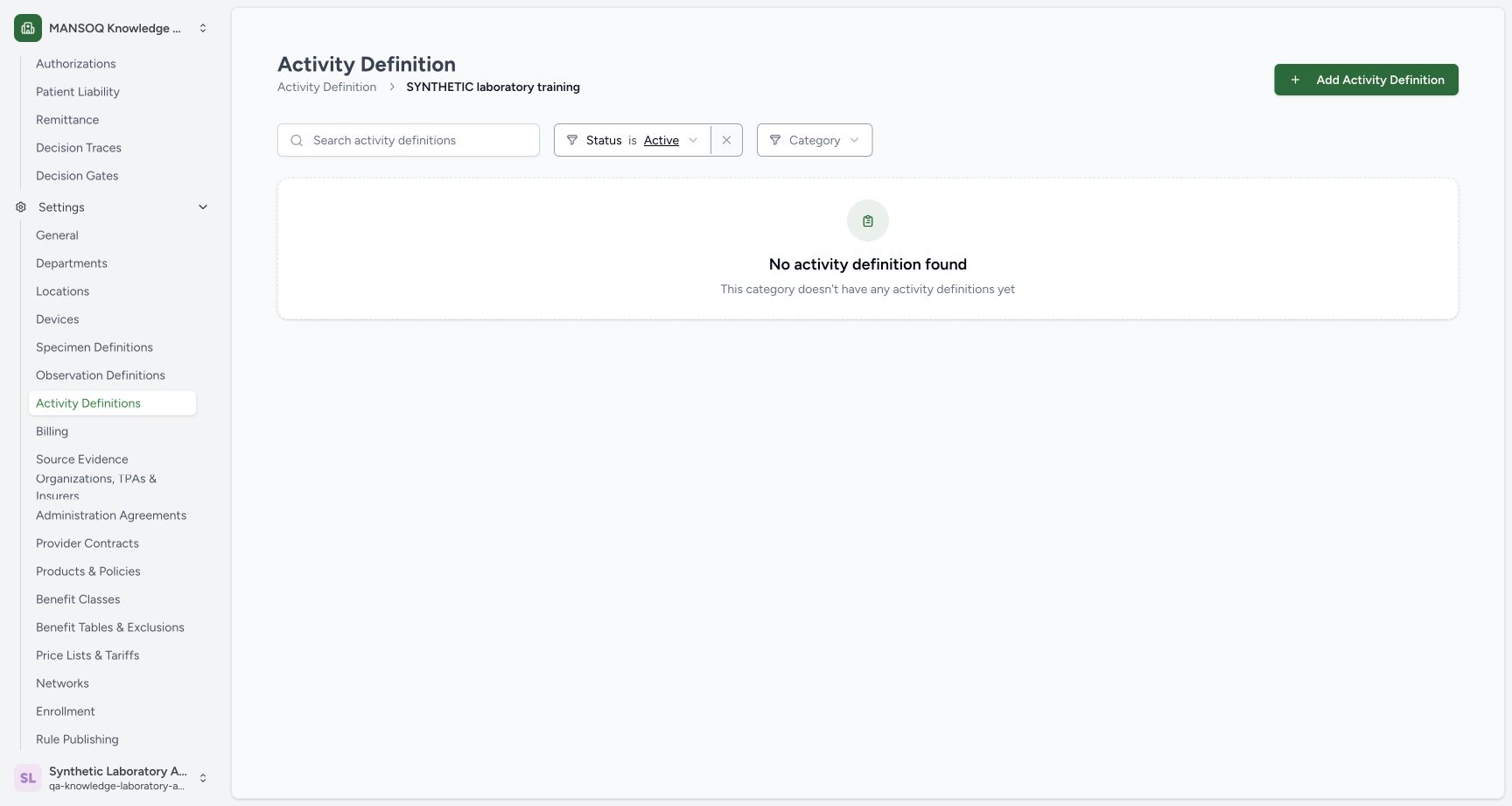
90bb19ae4d652508e5c2759fa018e856a132f3e6e28174002cfb4554f09c1690- Add Activity Definition: Create a separate synthetic activity rather than reactivating the retired example.
- Synthetic category: Confirm the intended existing resource category.
- Active filter: Retired records do not appear in this view.
123Recorded release 39b72767 · 2026-10-18 · 1728 × 921 Verify the saved linked activity identity
Capture details
Actual 1728 × 921 Chrome pixels; pinned source 39b72767. Link specimen and observation definitions to a laboratory activity
Image SHA-256
dcc3e1542f335d537b4184a6eafd6106e21910cd8ee3ad2f9e8c816d111be9f3- Saved Active: Confirm the separately saved activity status.
- Laboratory code: Confirm unchanged selected coding.
- Synthetic purpose: The Usage identifies reusable catalogue demonstration only.
- This example stores reusable synthetic catalogue metadata. It does not create a patient observation, laboratory order, sample collection, bill or external transaction.
 1234
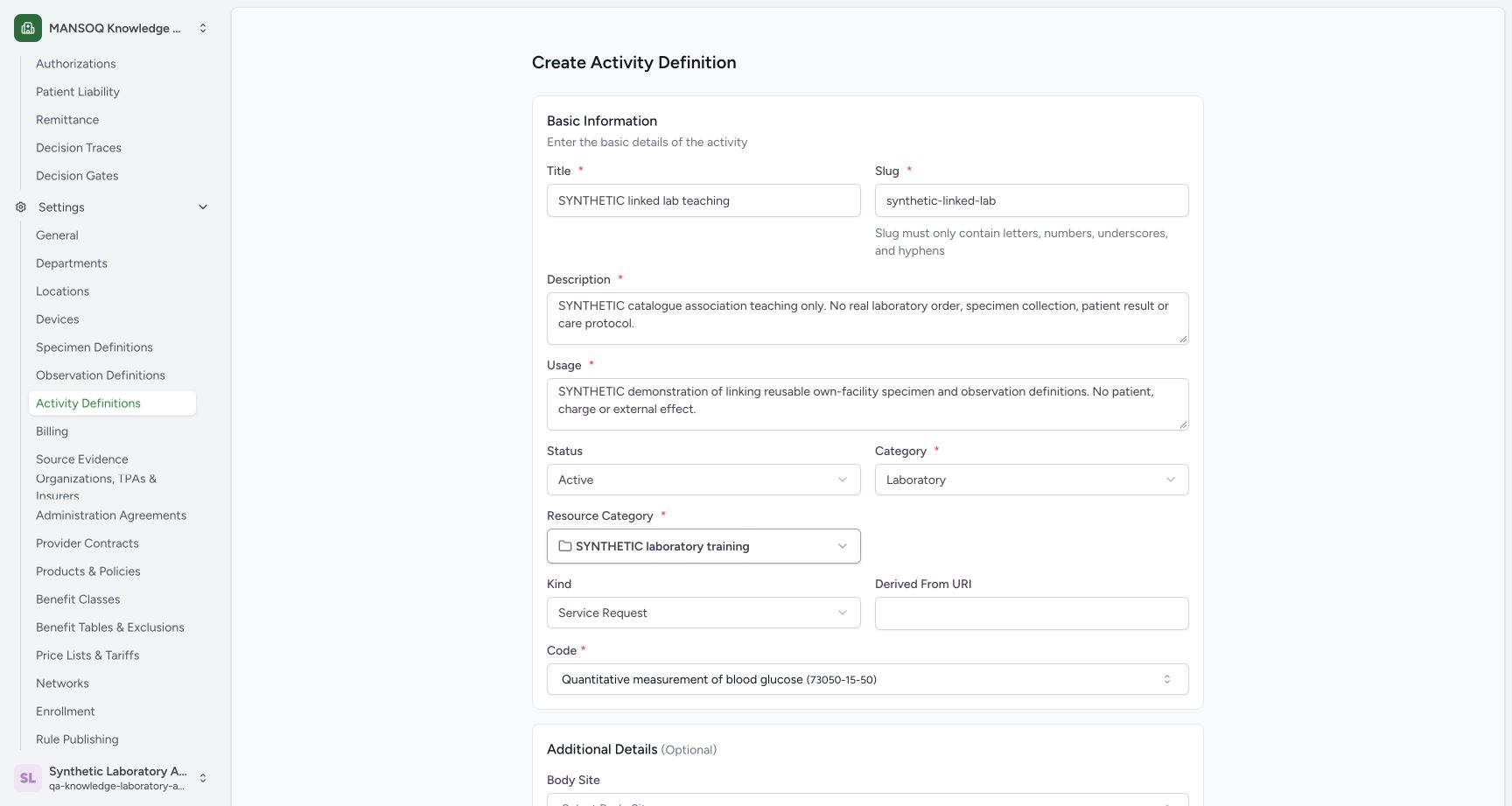
1234Recorded release 39b72767 · 2026-10-18 · 1728 × 921 Review the separate synthetic activity identity
Capture details
Actual 1728 × 921 Chrome pixels; pinned source 39b72767. Link specimen and observation definitions to a laboratory activity
Image SHA-256
25d2b4a4b508fd24848473c797fe3b24ae90666d9231a23a059e4422976a3c46- New synthetic title: Confirm a separate activity identity.
- Unique slug: Use synthetic-linked-lab.
- Resource category: Keep the existing synthetic folder.
- Installed code: Keep the selected laboratory coding.
123Recorded release 39b72767 · 2026-10-18 · 1728 × 921 Verify the persisted specimen and observation associations
Capture details
Actual 1728 × 921 Chrome pixels; pinned source 39b72767. Link specimen and observation definitions to a laboratory activity
Image SHA-256
c627748563032cc467afe43c4c016507b1a81f359df01971475fffdf5fcd760d- Saved specimen requirement: The persisted link points to the intended synthetic specimen definition.
- Saved observation requirement: The persisted link points to the intended observation definition.
- LOINC code: The saved linked observation retains2339-0.
- The existing synthetic specimen is Active in this Laboratory. Create and verify the intended synthetic observation definition and permitted unit first.
 123
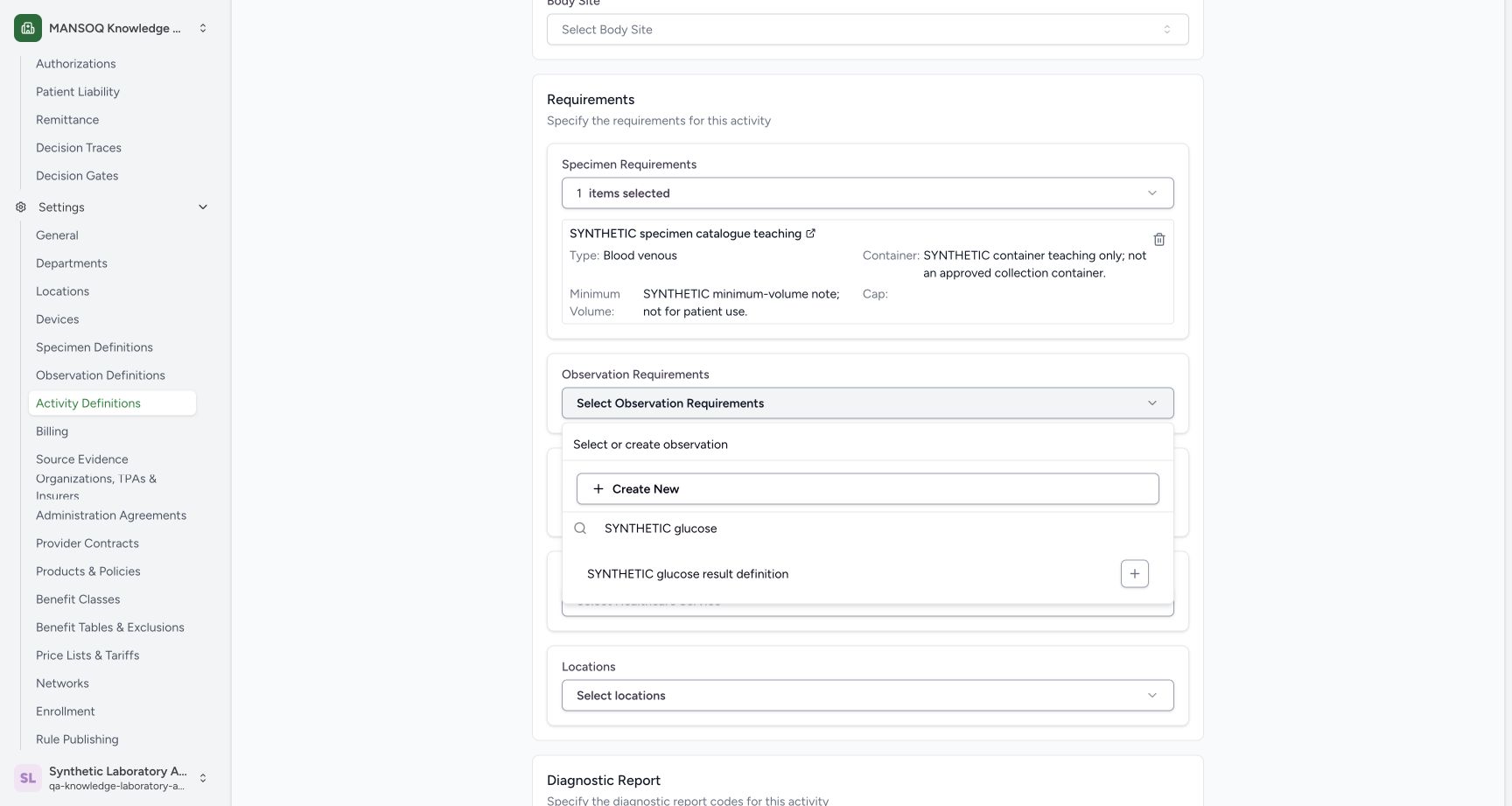
123Recorded release 39b72767 · 2026-10-18 · 1728 × 921 Select the saved observation while retaining the specimen
Capture details
Actual 1728 × 921 Chrome pixels; pinned source 39b72767. Link specimen and observation definitions to a laboratory activity
Image SHA-256
9be20d42c2a12c0df7cfe18152b72f5730d4227ec6fe75dbdc087cdd27c2bcf6- Specimen retained: Confirm the selected existing specimen and synthetic notes.
- Observation Requirements: Open this separate association selector.
- Saved observation: Select the actual newly saved definition.
 123
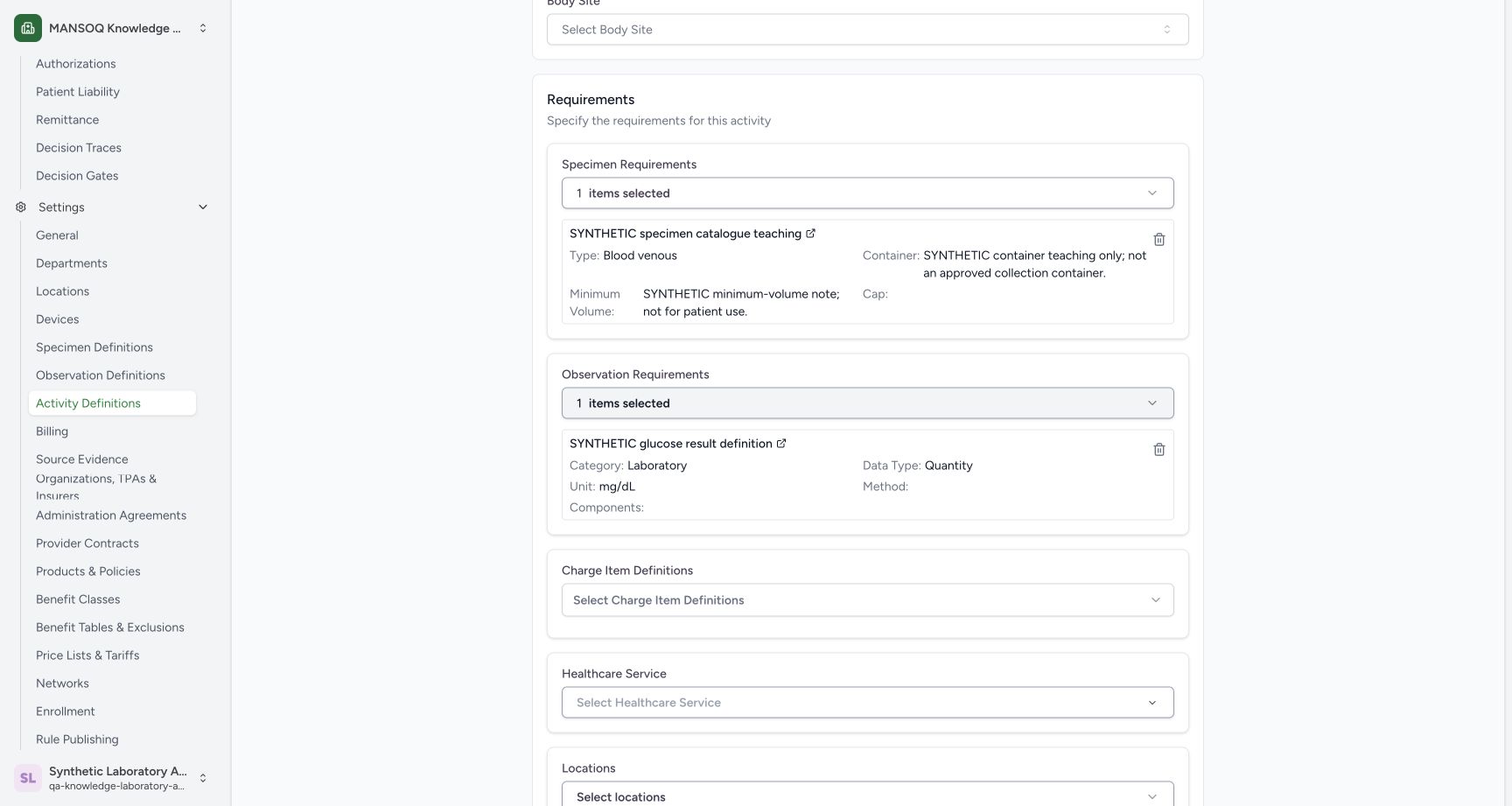
123Recorded release 39b72767 · 2026-10-18 · 1728 × 921 Review one specimen and one observation requirement
Capture details
Actual 1728 × 921 Chrome pixels; pinned source 39b72767. Link specimen and observation definitions to a laboratory activity
Image SHA-256
181efb632c2ff83d8a44bf98c8eeb9267af17c4eebbcc878d3bfb62a7863fb72- Selected specimen: Confirm the exact synthetic specimen title and retained notes.
- Selected observation: Confirm Laboratory, Quantity and mg/dL details.
- No charge link: Charges remain outside this catalogue association example.
- Use a separate new activity for this association example. The earlier retired maintenance activity remains Retired.1234
Recorded release 39b72767 · 2026-10-18 · 1728 × 921 Review the separate synthetic activity identity
Capture details
Actual 1728 × 921 Chrome pixels; pinned source 39b72767. Link specimen and observation definitions to a laboratory activity
Image SHA-256
25d2b4a4b508fd24848473c797fe3b24ae90666d9231a23a059e4422976a3c46- New synthetic title: Confirm a separate activity identity.
- Unique slug: Use synthetic-linked-lab.
- Resource category: Keep the existing synthetic folder.
- Installed code: Keep the selected laboratory coding.
 123
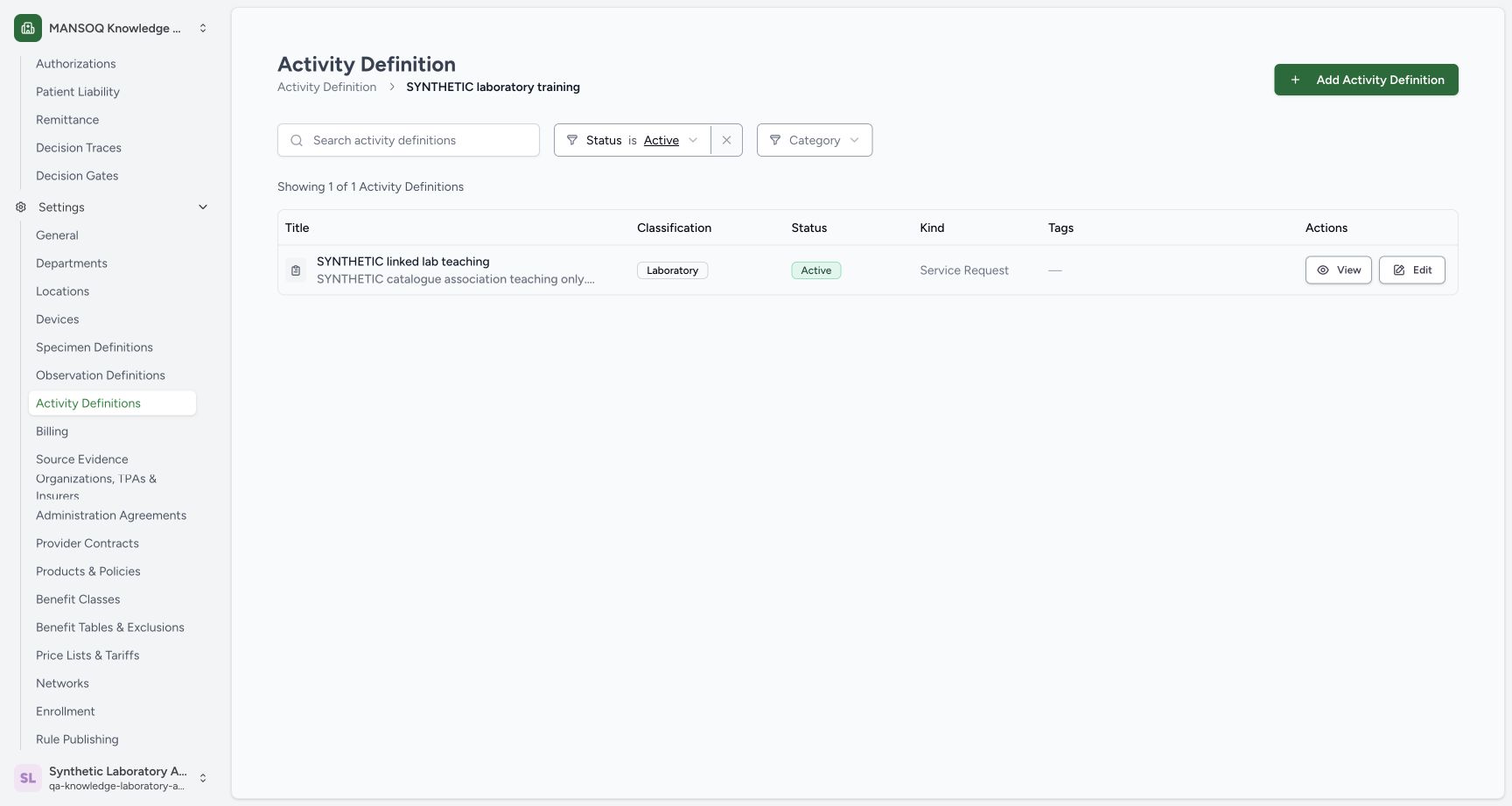
123Recorded release 39b72767 · 2026-10-18 · 1728 × 921 Find the separately saved Active linked activity
Capture details
Actual 1728 × 921 Chrome pixels; pinned source 39b72767. Link specimen and observation definitions to a laboratory activity
Image SHA-256
60563ee8ebc07cbb45a015a8582c150008af0c09199a72fd0f64def3d8903993- Saved new activity: Confirm the separate synthetic title.
- Active: Confirm the stored status.
- View: Open persisted associations.
1. Start a separate activity in the intended category
Open the existing SYNTHETIC laboratory training activity category. Confirm the Active view and use Add Activity Definition. The earlier retired example stays separate.
123Start a separate Active activity in the synthetic category
Capture details
Actual 1728 × 921 Chrome pixels; pinned source 39b72767. Link specimen and observation definitions to a laboratory activity
Image SHA-256 90bb19ae4d652508e5c2759fa018e856a132f3e6e28174002cfb4554f09c1690
- Add Activity Definition: Create a separate synthetic activity rather than reactivating the retired example.
- Synthetic category: Confirm the intended existing resource category.
- Active filter: Retired records do not appear in this view.
2. Select the installed laboratory activity code
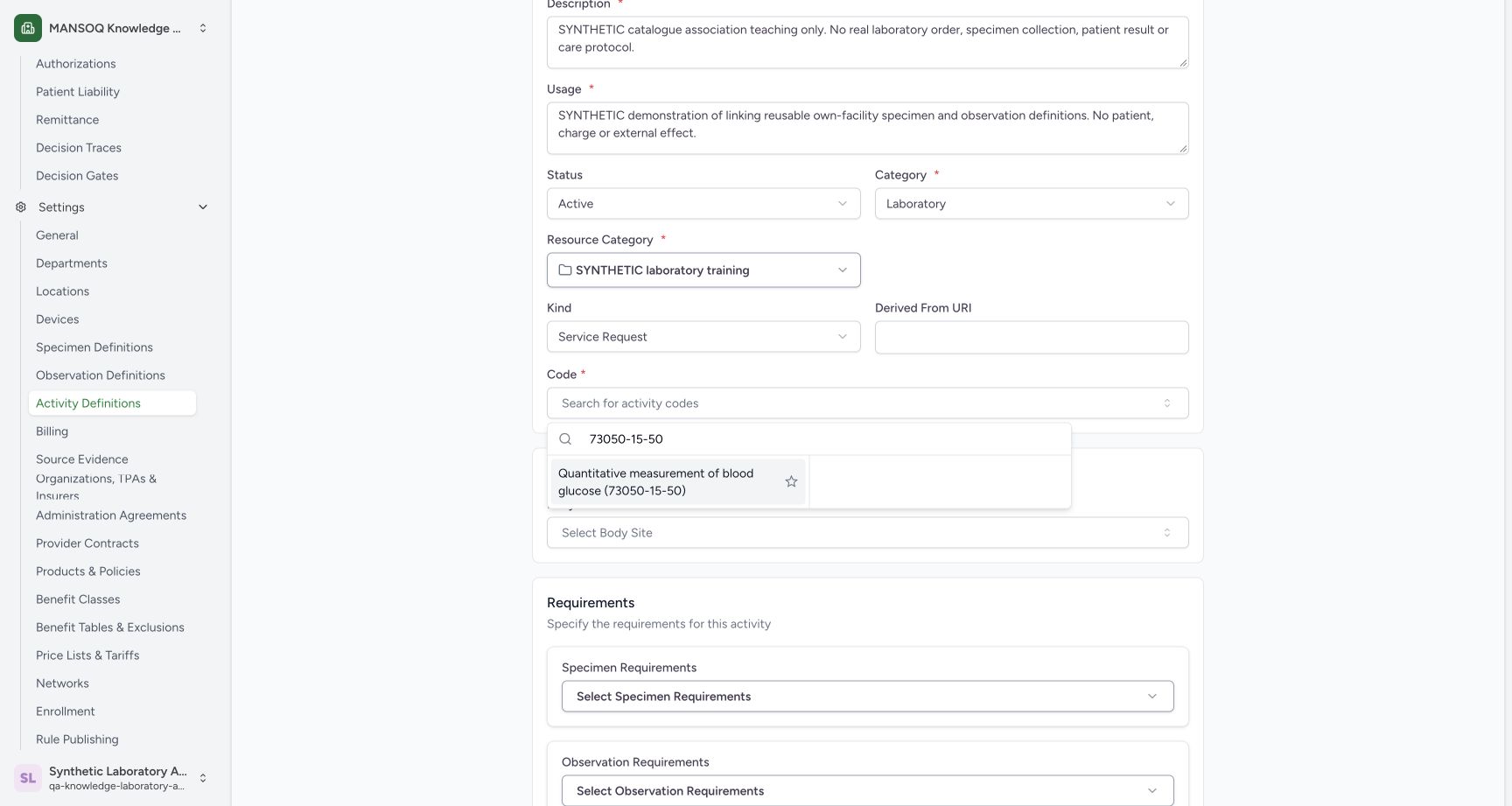
Open Code, search 73050-15-50 and select the actually returned Quantitative measurement of blood glucose (73050-15-50) option. Confirm the intended Resource Category.
 123
123Select the installed laboratory activity code
Capture details
Actual 1728 × 921 Chrome pixels; pinned source 39b72767. Link specimen and observation definitions to a laboratory activity
Image SHA-256 73be9fd749c21e0ead1a8c8bf59fc44f1626b279fdb56bb708c1c7bafd6ee1de
- Search code: Search the installed activity terminology.
- Returned laboratory code: Select the actual 73050-15-50 option.
- Resource Category: This is the existing synthetic folder, distinct from Laboratory classification.
3. Review the completed basic information
Confirm the illustrated SYNTHETIC linked lab teaching title, synthetic-linked-lab slug and synthetic-only Description and Usage. Keep Active, Laboratory, the existing synthetic Resource Category and Service Request kind. The installed code selected in the preceding lookup is now shown in this completed review.
1234Review the separate synthetic activity identity
Capture details
Actual 1728 × 921 Chrome pixels; pinned source 39b72767. Link specimen and observation definitions to a laboratory activity
Image SHA-256 25d2b4a4b508fd24848473c797fe3b24ae90666d9231a23a059e4422976a3c46
- New synthetic title: Confirm a separate activity identity.
- Unique slug: Use synthetic-linked-lab.
- Resource category: Keep the existing synthetic folder.
- Installed code: Keep the selected laboratory coding.
4. Select the existing specimen requirement
Open Specimen Requirements, search SYNTHETIC specimen, and select SYNTHETIC specimen catalogue teaching from the returned existing records. Create New is not used.
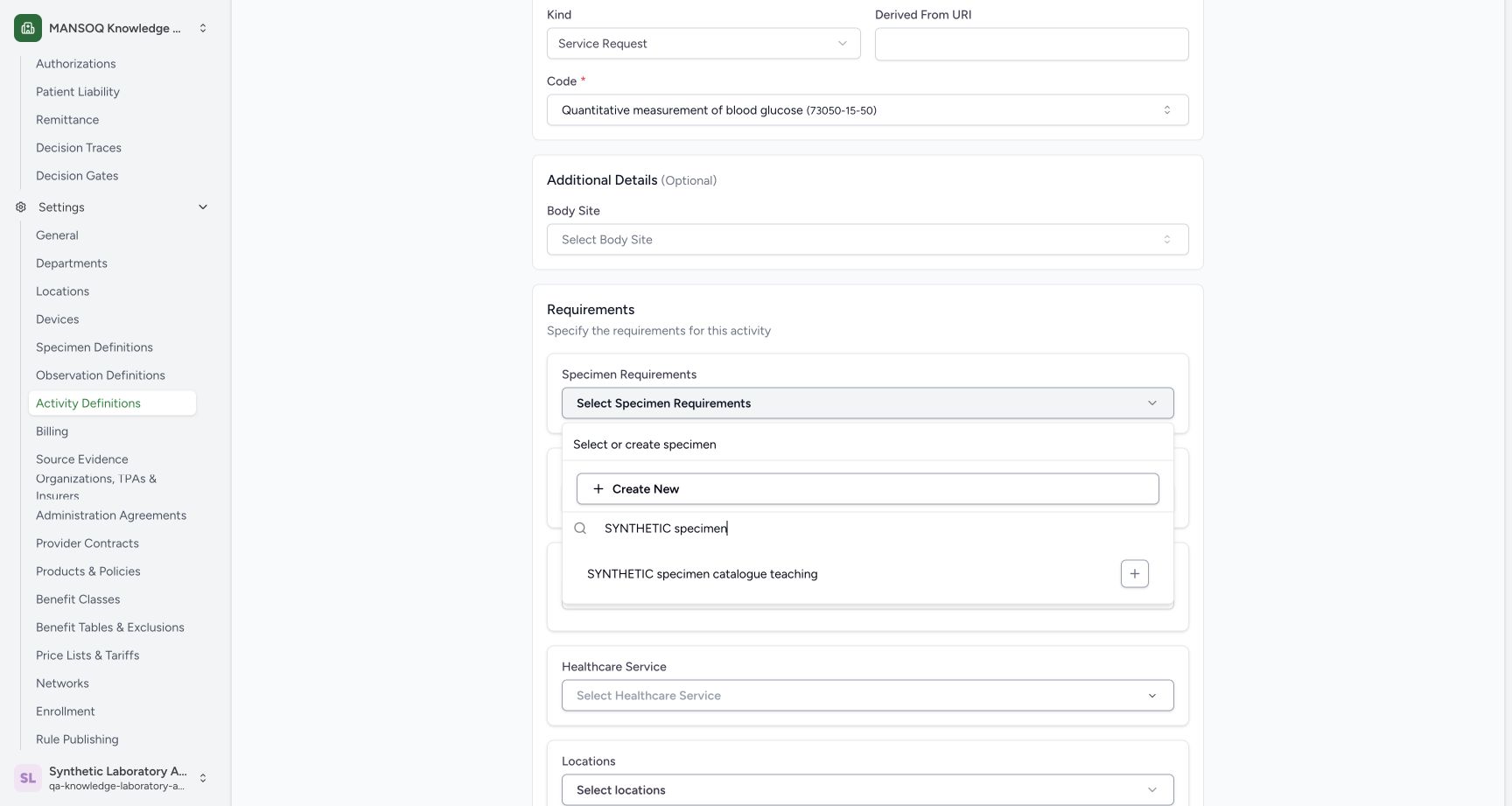 123
123Find the existing synthetic specimen requirement
Capture details
Actual 1728 × 921 Chrome pixels; pinned source 39b72767. Link specimen and observation definitions to a laboratory activity
Image SHA-256 89bbf174a56b0d12c2f7ab6915be46c1f4b7797bce7c9b542c9b5fbdfdb7b88a
- Specimen Requirements: Open this association selector.
- Search: Find SYNTHETIC specimen.
- Existing specimen: Select the saved own-facility definition.
5. Select the saved observation requirement
Confirm the selected specimen and its synthetic notes. Open Observation Requirements, search SYNTHETIC glucose and select SYNTHETIC glucose result definition from the returned existing records.
123Select the saved observation while retaining the specimen
Capture details
Actual 1728 × 921 Chrome pixels; pinned source 39b72767. Link specimen and observation definitions to a laboratory activity
Image SHA-256 9be20d42c2a12c0df7cfe18152b72f5730d4227ec6fe75dbdc087cdd27c2bcf6
- Specimen retained: Confirm the selected existing specimen and synthetic notes.
- Observation Requirements: Open this separate association selector.
- Saved observation: Select the actual newly saved definition.
6. Review both selected requirements
Confirm one specimen and one observation are selected. Review the exact synthetic titles and the observation details Laboratory, Quantity, mg/dL. Leave Charge Item Definitions unselected.
123Review one specimen and one observation requirement
Capture details
Actual 1728 × 921 Chrome pixels; pinned source 39b72767. Link specimen and observation definitions to a laboratory activity
Image SHA-256 181efb632c2ff83d8a44bf98c8eeb9267af17c4eebbcc878d3bfb62a7863fb72
- Selected specimen: Confirm the exact synthetic specimen title and retained notes.
- Selected observation: Confirm Laboratory, Quantity and mg/dL details.
- No charge link: Charges remain outside this catalogue association example.
7. Review optional links and create once
Review the unconfigured Charge Item Definitions, Healthcare Service, Locations and Diagnostic Report Codes fields. Use Create once to save this separate linked catalogue activity.
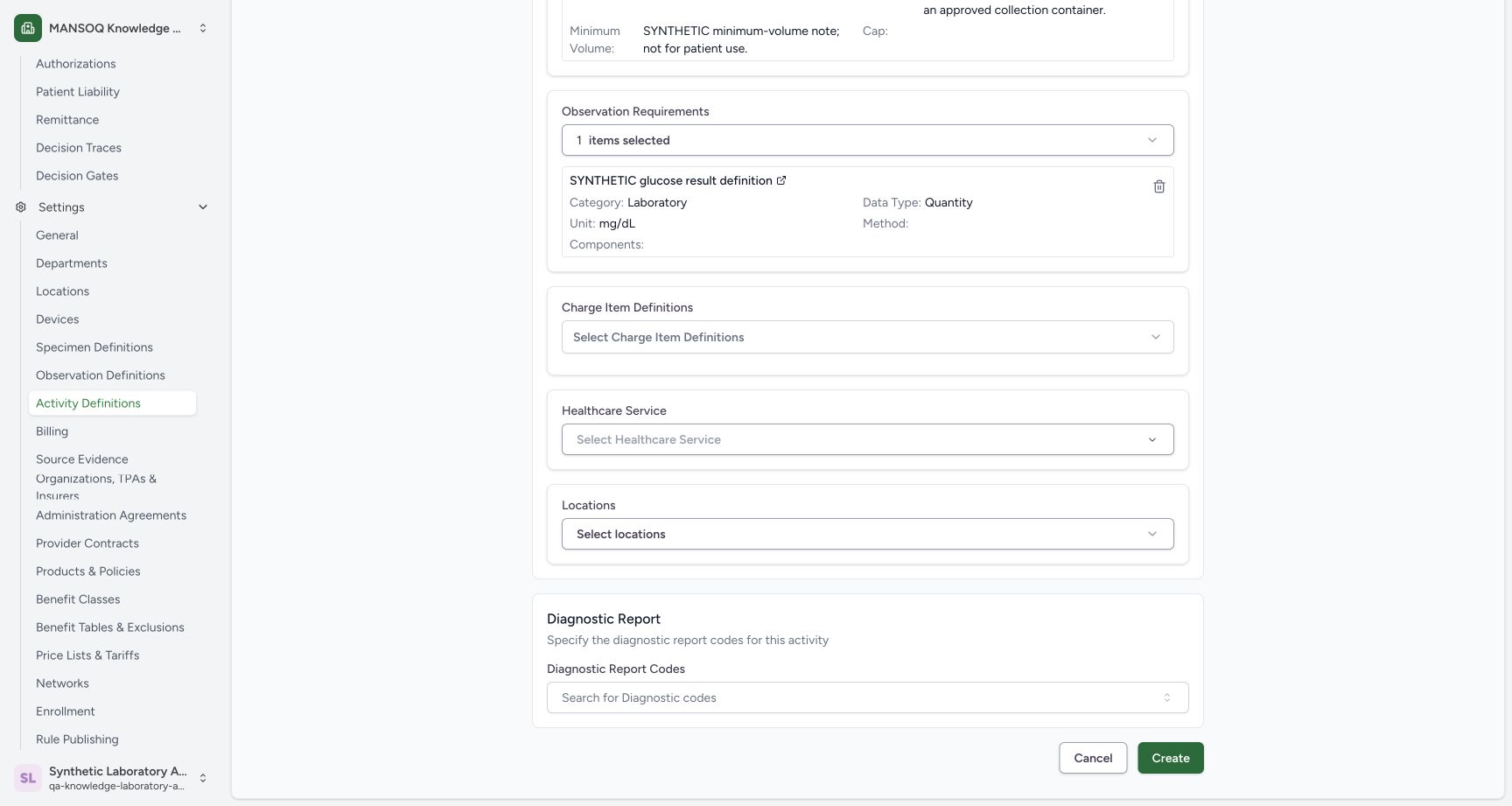 1234
1234Review unconfigured optional links and create the activity
Capture details
Actual 1728 × 921 Chrome pixels; pinned source 39b72767. Link specimen and observation definitions to a laboratory activity
Image SHA-256 26cf738545fce6e4f76c3eae9765ad7ad6d21e7363b418a526398c35d17d6652
- Create: Save the reviewed linked catalogue activity once.
- No charge link: Charge Item Definitions remain unselected.
- No location link: Locations remain unselected.
- No report code: No diagnostic-report coding association is added.
8. Find the saved new Active activity
Open the category and allow its ordinary fetch to settle. Confirm SYNTHETIC linked lab teaching, Laboratory, Active and Service Request. Use View on this new record.
123Find the separately saved Active linked activity
Capture details
Actual 1728 × 921 Chrome pixels; pinned source 39b72767. Link specimen and observation definitions to a laboratory activity
Image SHA-256 60563ee8ebc07cbb45a015a8582c150008af0c09199a72fd0f64def3d8903993
- Saved new activity: Confirm the separate synthetic title.
- Active: Confirm the stored status.
- View: Open persisted associations.
9. Verify the persisted activity identity
Confirm the separate synthetic title, Active, intended resource category, synthetic Description and Usage, code 73050-15-50 and Service Request. Independent readback verifies the saved new activity UUID.
123Verify the saved linked activity identity
Capture details
Actual 1728 × 921 Chrome pixels; pinned source 39b72767. Link specimen and observation definitions to a laboratory activity
Image SHA-256 dcc3e1542f335d537b4184a6eafd6106e21910cd8ee3ad2f9e8c816d111be9f3
- Saved Active: Confirm the separately saved activity status.
- Laboratory code: Confirm unchanged selected coding.
- Synthetic purpose: The Usage identifies reusable catalogue demonstration only.
10. Verify the persisted associations
Scroll to Specimen Requirements and Observation Result Requirements. Confirm both exact synthetic titles and the linked observation LOINC 2339-0. Independent normal GET 200 confirms the expected same-facility specimen and observation UUIDs, with other associations empty.
123Verify the persisted specimen and observation associations
Capture details
Actual 1728 × 921 Chrome pixels; pinned source 39b72767. Link specimen and observation definitions to a laboratory activity
Image SHA-256 c627748563032cc467afe43c4c016507b1a81f359df01971475fffdf5fcd760d
- Saved specimen requirement: The persisted link points to the intended synthetic specimen definition.
- Saved observation requirement: The persisted link points to the intended observation definition.
- LOINC code: The saved linked observation retains2339-0.
Reusable catalogue relationships
The selected requirements link reusable specimen and observation definitions to an Activity Definition. This catalogue setup does not create a patient service request, collect a specimen, enter a result or charge an account.
123Review one specimen and one observation requirement
Capture details
Actual 1728 × 921 Chrome pixels; pinned source 39b72767. Link specimen and observation definitions to a laboratory activity
Image SHA-256 181efb632c2ff83d8a44bf98c8eeb9267af17c4eebbcc878d3bfb62a7863fb72
- Selected specimen: Confirm the exact synthetic specimen title and retained notes.
- Selected observation: Confirm Laboratory, Quantity and mg/dL details.
- No charge link: Charges remain outside this catalogue association example.
123Verify the persisted specimen and observation associations
Capture details
Actual 1728 × 921 Chrome pixels; pinned source 39b72767. Link specimen and observation definitions to a laboratory activity
Image SHA-256 c627748563032cc467afe43c4c016507b1a81f359df01971475fffdf5fcd760d
- Saved specimen requirement: The persisted link points to the intended synthetic specimen definition.
- Saved observation requirement: The persisted link points to the intended observation definition.
- LOINC code: The saved linked observation retains2339-0.
Classification and resource category
Category classifies this activity as Laboratory. Resource Category places it inside the existing SYNTHETIC laboratory training folder. These controls serve different purposes.
1234Review the separate synthetic activity identity
Capture details
Actual 1728 × 921 Chrome pixels; pinned source 39b72767. Link specimen and observation definitions to a laboratory activity
Image SHA-256 25d2b4a4b508fd24848473c797fe3b24ae90666d9231a23a059e4422976a3c46
- New synthetic title: Confirm a separate activity identity.
- Unique slug: Use synthetic-linked-lab.
- Resource category: Keep the existing synthetic folder.
- Installed code: Keep the selected laboratory coding.
Remaining associations
Charge Item Definitions, Healthcare Service, Locations and Diagnostic Report Codes remain unconfigured in this lesson.
1234Review unconfigured optional links and create the activity
Capture details
Actual 1728 × 921 Chrome pixels; pinned source 39b72767. Link specimen and observation definitions to a laboratory activity
Image SHA-256 26cf738545fce6e4f76c3eae9765ad7ad6d21e7363b418a526398c35d17d6652
- Create: Save the reviewed linked catalogue activity once.
- No charge link: Charge Item Definitions remain unselected.
- No location link: Locations remain unselected.
- No report code: No diagnostic-report coding association is added.
Troubleshooting
The Active list initially appears empty after Create
Let the ordinary fetch finish. The illustrated settled list contains the new Active activity; the older maintenance example remains under Retired.
123Find the separately saved Active linked activity
Capture details
Actual 1728 × 921 Chrome pixels; pinned source 39b72767. Link specimen and observation definitions to a laboratory activity
Image SHA-256 60563ee8ebc07cbb45a015a8582c150008af0c09199a72fd0f64def3d8903993
- Saved new activity: Confirm the separate synthetic title.
- Active: Confirm the stored status.
- View: Open persisted associations.
Source evidence
Every citation uses this exact committed version. The private source repository requires access.
- repositories/platform/mansoq-web/src/pages/Facility/settings/activityDefinition/ActivityDefinitionForm.tsx:144 ·
39b7276732f88bc07ad0abb61619f7aafe3c9e14Source file checksum
65552c75b0d298acae6b639e9e336430cab87a3e9176bed1ad20a464dc48cd13 - repositories/platform/mansoq-web/src/pages/Facility/settings/activityDefinition/ActivityDefinitionForm.tsx:353 ·
39b7276732f88bc07ad0abb61619f7aafe3c9e14Source file checksum
65552c75b0d298acae6b639e9e336430cab87a3e9176bed1ad20a464dc48cd13 - repositories/platform/mansoq-web/src/pages/Facility/settings/activityDefinition/ActivityDefinitionForm.tsx:759 ·
39b7276732f88bc07ad0abb61619f7aafe3c9e14Source file checksum
65552c75b0d298acae6b639e9e336430cab87a3e9176bed1ad20a464dc48cd13 - repositories/platform/mansoq-web/src/pages/Facility/settings/activityDefinition/ActivityDefinitionForm.tsx:823 ·
39b7276732f88bc07ad0abb61619f7aafe3c9e14Source file checksum
65552c75b0d298acae6b639e9e336430cab87a3e9176bed1ad20a464dc48cd13 - repositories/platform/mansoq-web/src/types/emr/activityDefinition/activityDefinitionApi.ts:9 ·
39b7276732f88bc07ad0abb61619f7aafe3c9e14Source file checksum
19f9da72754ce3681bde0757b30ece92cdae5265d8d961ea49ac16fdcee3b9c6 - repositories/platform/mansoq-core/mansoq/emr/api/viewsets/activity_definition.py:96 ·
39b7276732f88bc07ad0abb61619f7aafe3c9e14Source file checksum
fefe5e8e4f800645f73f5362642a2288022d6b9dd43c9cfc2467fd874d25bd30 - repositories/platform/mansoq-core/mansoq/emr/resources/activity_definition/spec.py:120 ·
39b7276732f88bc07ad0abb61619f7aafe3c9e14Source file checksum
a400996a7db2ea0cf7feeb10995efb54ec39d90d48d96eb6a578394c3b327fa2 - repositories/platform/mansoq-core/mansoq/security/permissions/activity_definition.py:15 ·
39b7276732f88bc07ad0abb61619f7aafe3c9e14Source file checksum
f34207308ba2a6210716120a81cce86ad14e845561f96dc1e6f6acdba0a438c8 - repositories/platform/mansoq-core/mansoq/security/authorization/activity_definition.py:19 ·
39b7276732f88bc07ad0abb61619f7aafe3c9e14Source file checksum
4d14603dd30141fd3136fe4dc7d4336e141224bffaa9dd4b4fbd43bc984ce56c