 MANSOQ
 Medication administration · VERSION 39b72767
Document a Not Done medication event
Choose Not Done, review its occurrence and note, save the documentation and inspect the persisted result. This is the existing Nurse’s fictional Polyclinic inpatient example on release 39b72767; no medication was actually administered.
Nurse
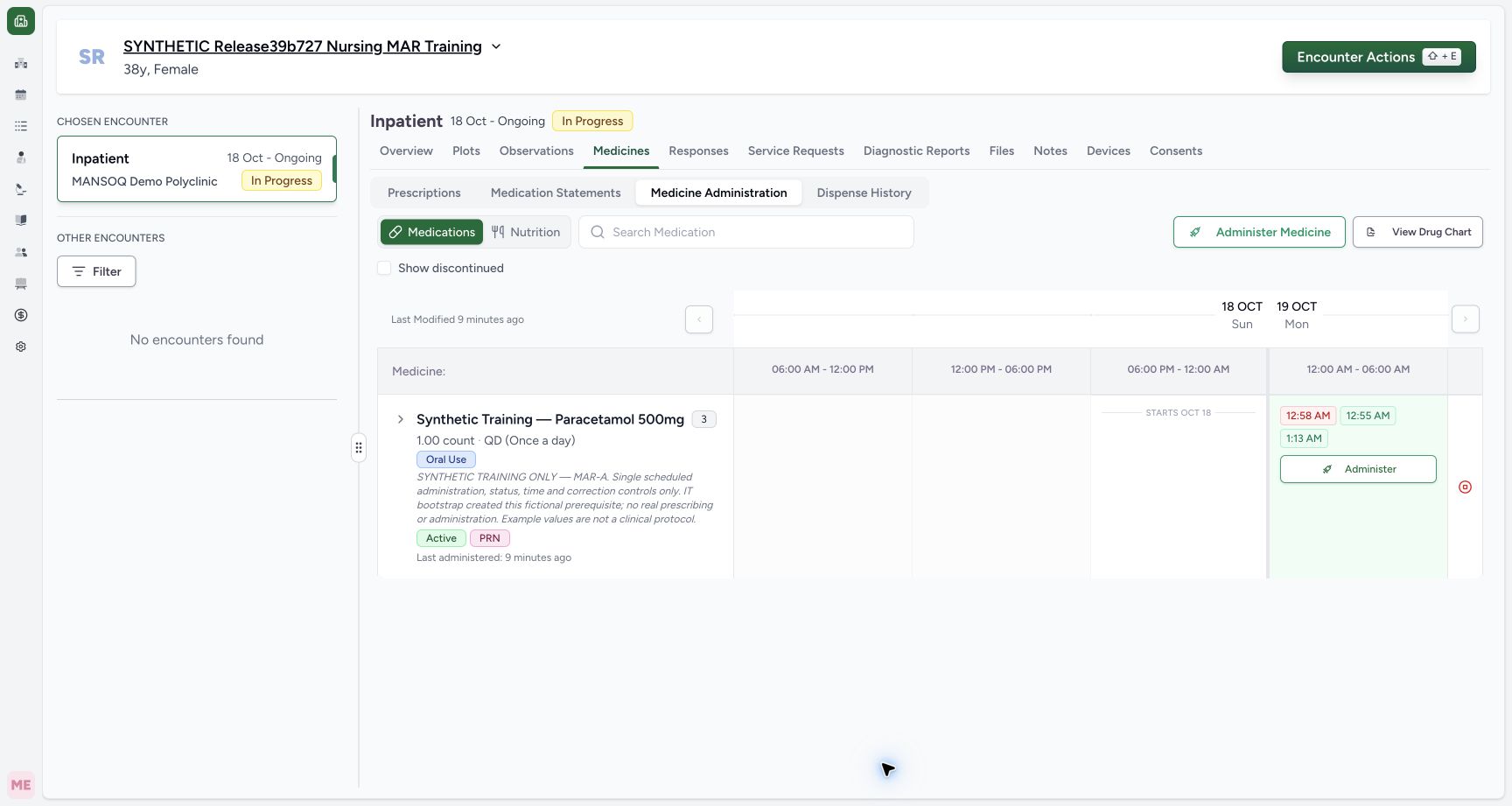 1
1Locate the saved Not Done event
Capture details
Exact committed release 39b72767 on an isolated nonproduction clone. Existing Nurse; fictional Polyclinic Inpatient software exercise only. The normal Nurse save produced a distinct 12:58 AM chip. Independent Nurse and Doctor GET200 confirm status not_done, occurrence end null, request MAR-A, and Nurse creator/updater. A chip is documentation, not proof a medication was administered.
Image SHA-256 0341dcc8266eb8ce53a67d5e9933892063ec3021155e3813cd51d403a3c6f703
- Inspect Not Done: Open this specific event to confirm its saved status and note.
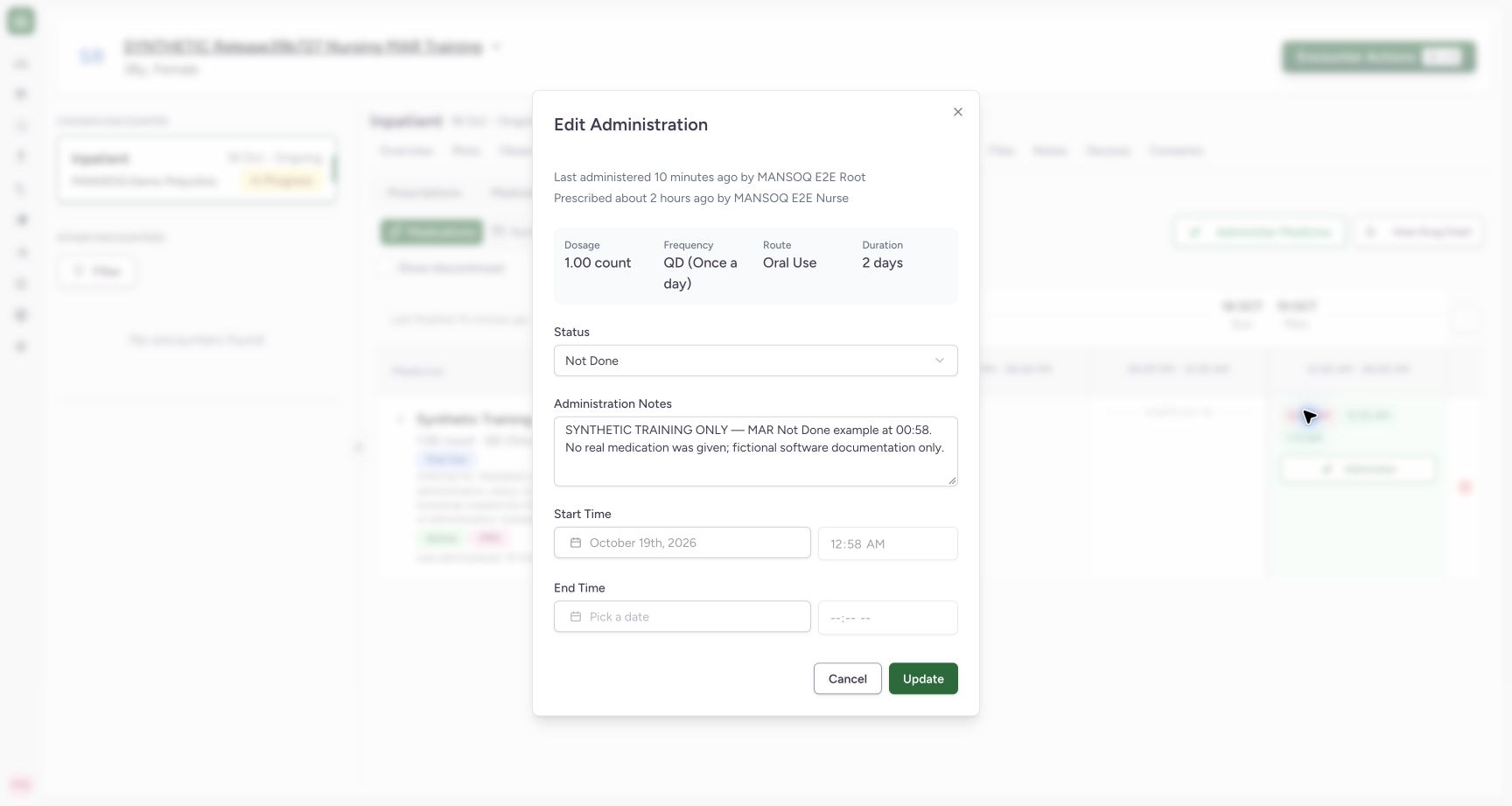 12
12Verify the saved Not Done status and empty end
Capture details
Exact committed release 39b72767 on an isolated nonproduction clone. Existing Nurse; fictional Polyclinic Inpatient software exercise only. Actual Edit Administration for saved 12:58 AM event shows Not Done, its explicit note and blank locked end. Independent normal records confirm not_done and end null. No separate coded reason, performer, verifier or witness input is present in this form; the faulty 39b author captions are not used as actor proof.
Image SHA-256 e2736d6defb2103b82f9e6d83d2f0db81074aafeb5bea993aef1b18bda3cd0ee
- Persisted Not Done: Inspect the saved event status.
- Persisted empty end: This saved Not Done record has no end occurrence.
8 of 8 content blocks have reviewed image alignment. Missing overview or prerequisite images remain open.
Before you begin
- Confirm the intended patient, active encounter and exact existing order before opening Administer. This example documents scheduled MAR-A; the medication order is a separate IT training prerequisite.1
Recorded release 39b72767 · 2026-10-18T22:22:48.489Z · 1728 × 921 Locate the saved Not Done event
Capture details
Exact committed release 39b72767 on an isolated nonproduction clone. Existing Nurse; fictional Polyclinic Inpatient software exercise only. The normal Nurse save produced a distinct 12:58 AM chip. Independent Nurse and Doctor GET200 confirm status not_done, occurrence end null, request MAR-A, and Nurse creator/updater. A chip is documentation, not proof a medication was administered.
Image SHA-256
0341dcc8266eb8ce53a67d5e9933892063ec3021155e3813cd51d403a3c6f703- Inspect Not Done: Open this specific event to confirm its saved status and note.
- Use your existing authorized account and your facility’s documentation policy. The available status options are software controls; their presence alone does not decide which clinical status is appropriate.
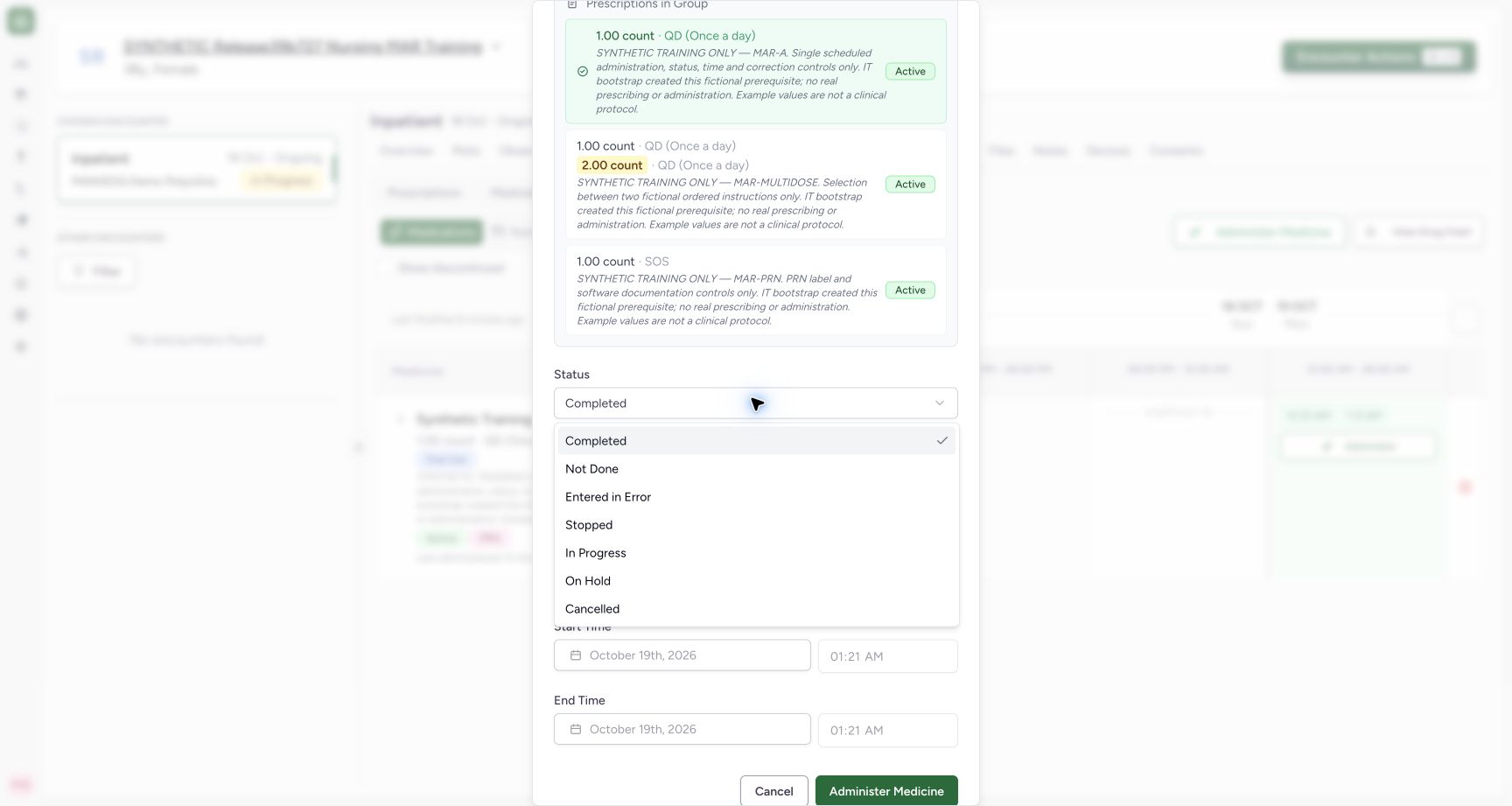 12
12Recorded release 39b72767 · 2026-10-18T22:21:36.342Z · 1728 × 921 Choose the status of this documentation event
Capture details
Exact committed release 39b72767 on an isolated nonproduction clone. Existing Nurse; fictional Polyclinic Inpatient software exercise only. Actual dropdown offers Completed, Not Done, Entered in Error, Stopped, In Progress, On Hold and Cancelled. This frame proves available controls only; it does not by itself qualify all transitions. This remains exact unchanged release 39b72767.
Image SHA-256
5df2f65c6fbf26a67a43ad81c214c0ee3c85e24d1436580f6d9bacd40d3f9415- Not Done: Choose this status when documenting a non-administration event under local policy.
- Entered in Error: This is a distinct event status; use the saved-record correction workflow when appropriate.
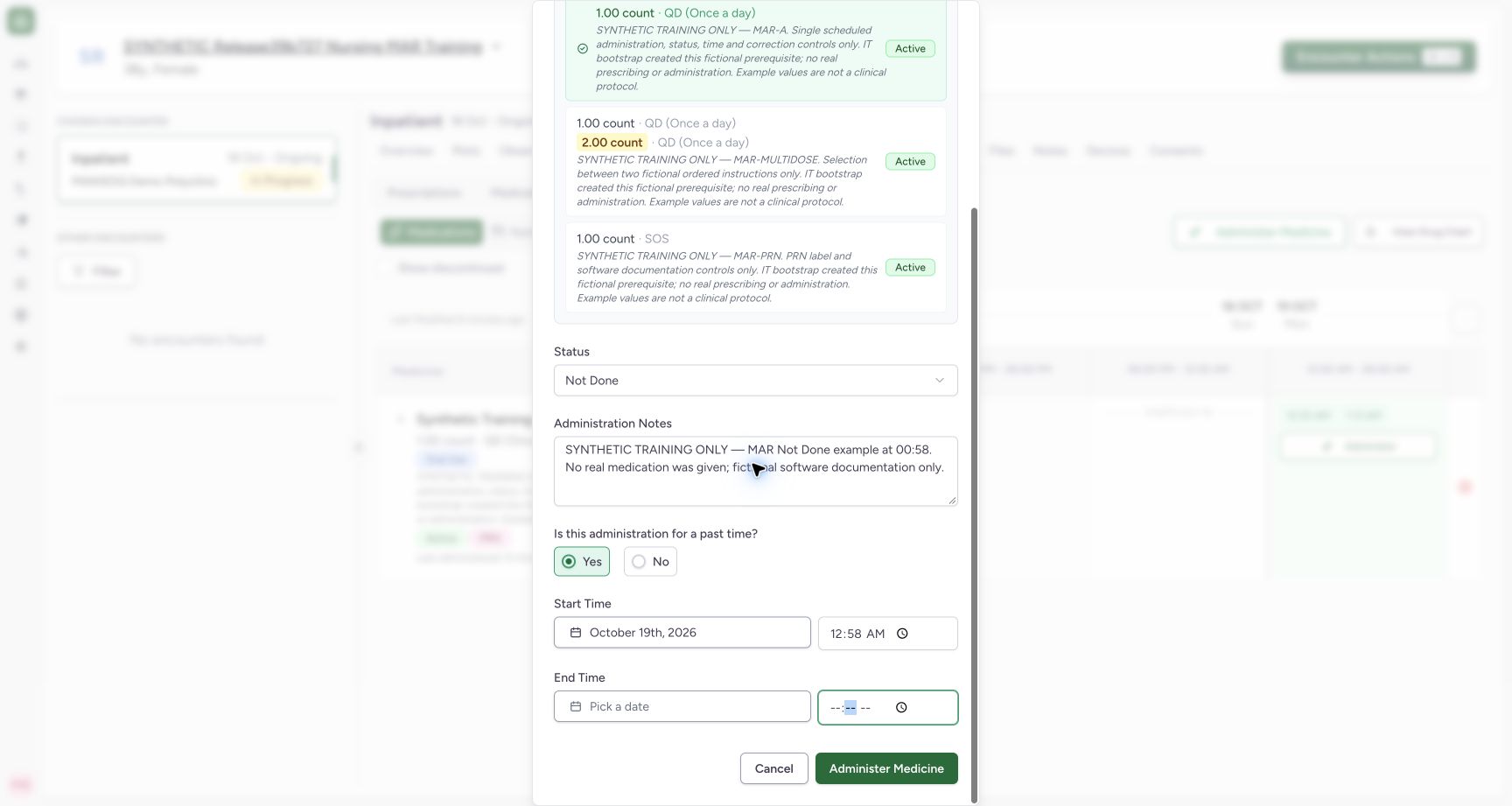 123
123Recorded release 39b72767 · 2026-10-18T22:22:03.274Z · 1728 × 921 Review a Not Done documentation event before saving
Capture details
Exact committed release 39b72767 on an isolated nonproduction clone. Existing Nurse; fictional Polyclinic Inpatient software exercise only. Fictional MAR-A Not Done draft, past start 00:58, explicit no-administration note and blank end occurrence. Status was selected after final past-time entry so end is cleared. Button text remains Administer Medicine although this saves Not Done documentation.
Image SHA-256
3b18334c86ac468580cbf3c498b3782b55ea9fc435b633d5a231ef15a7b452c1- Not Done event status: Verify this record documents non-administration, not a completed dose.
- No end occurrence: Review the blank end after selecting the final status.
- Save this documentation: The generic button label does not change the selected Not Done status.
1. Choose the event status
Open Administer for the intended order, then open Status. The available options are Completed, Not Done, Entered in Error, Stopped, In Progress, On Hold and Cancelled. Choose Not Done when the event being documented is a non-administration. This lesson qualifies the Not Done save; the menu image alone does not establish all other status workflows.
12Choose the status of this documentation event
Capture details
Exact committed release 39b72767 on an isolated nonproduction clone. Existing Nurse; fictional Polyclinic Inpatient software exercise only. Actual dropdown offers Completed, Not Done, Entered in Error, Stopped, In Progress, On Hold and Cancelled. This frame proves available controls only; it does not by itself qualify all transitions. This remains exact unchanged release 39b72767.
Image SHA-256 5df2f65c6fbf26a67a43ad81c214c0ee3c85e24d1436580f6d9bacd40d3f9415
- Not Done: Choose this status when documenting a non-administration event under local policy.
- Entered in Error: This is a distinct event status; use the saved-record correction workflow when appropriate.
2. Review the occurrence, final status and note
For a new past event, choose Yes and enter the intended start date and time, then review the final Status and End Time together. In this release, changing a new start can refill the end even after Not Done was selected; complete the occurrence first and reselect the final status if needed. The demonstrated final draft has Not Done, start 00:58, no end and a clear training note. Review the whole draft before saving.
123Review a Not Done documentation event before saving
Capture details
Exact committed release 39b72767 on an isolated nonproduction clone. Existing Nurse; fictional Polyclinic Inpatient software exercise only. Fictional MAR-A Not Done draft, past start 00:58, explicit no-administration note and blank end occurrence. Status was selected after final past-time entry so end is cleared. Button text remains Administer Medicine although this saves Not Done documentation.
Image SHA-256 3b18334c86ac468580cbf3c498b3782b55ea9fc435b633d5a231ef15a7b452c1
- Not Done event status: Verify this record documents non-administration, not a completed dose.
- No end occurrence: Review the blank end after selecting the final status.
- Save this documentation: The generic button label does not change the selected Not Done status.
3. Save the documentation once
Select Administer Medicine once after checking the Not Done status and note. The generic button wording remains the same for this status; it saves the selected documentation and does not mean that medication was given. Wait for saving to finish, then confirm the new time chip appears in the intended chart slot.
123Review a Not Done documentation event before saving
Capture details
Exact committed release 39b72767 on an isolated nonproduction clone. Existing Nurse; fictional Polyclinic Inpatient software exercise only. Fictional MAR-A Not Done draft, past start 00:58, explicit no-administration note and blank end occurrence. Status was selected after final past-time entry so end is cleared. Button text remains Administer Medicine although this saves Not Done documentation.
Image SHA-256 3b18334c86ac468580cbf3c498b3782b55ea9fc435b633d5a231ef15a7b452c1
- Not Done event status: Verify this record documents non-administration, not a completed dose.
- No end occurrence: Review the blank end after selecting the final status.
- Save this documentation: The generic button label does not change the selected Not Done status.
1Locate the saved Not Done event
Capture details
Exact committed release 39b72767 on an isolated nonproduction clone. Existing Nurse; fictional Polyclinic Inpatient software exercise only. The normal Nurse save produced a distinct 12:58 AM chip. Independent Nurse and Doctor GET200 confirm status not_done, occurrence end null, request MAR-A, and Nurse creator/updater. A chip is documentation, not proof a medication was administered.
Image SHA-256 0341dcc8266eb8ce53a67d5e9933892063ec3021155e3813cd51d403a3c6f703
- Inspect Not Done: Open this specific event to confirm its saved status and note.
4. Inspect the persisted Not Done result
Select the 12:58 AM chip to reopen the saved event. Confirm Not Done, its note, locked start 00:58 and empty locked end. Independent normal Nurse and Doctor record reads confirmed the same status, no end, correct MAR-A order and Nurse creator/updater. Use Cancel when inspection is complete.
12Verify the saved Not Done status and empty end
Capture details
Exact committed release 39b72767 on an isolated nonproduction clone. Existing Nurse; fictional Polyclinic Inpatient software exercise only. Actual Edit Administration for saved 12:58 AM event shows Not Done, its explicit note and blank locked end. Independent normal records confirm not_done and end null. No separate coded reason, performer, verifier or witness input is present in this form; the faulty 39b author captions are not used as actor proof.
Image SHA-256 e2736d6defb2103b82f9e6d83d2f0db81074aafeb5bea993aef1b18bda3cd0ee
- Persisted Not Done: Inspect the saved event status.
- Persisted empty end: This saved Not Done record has no end occurrence.
Keep non-administration documentation distinct
This form provides a status selection and free-text Administration Notes. No separate coded reason, witness, verifier or clinical-performer control was present in the observed form. Do not treat a saved Not Done record as a completed dose, dispensing transaction or medication-order discontinuation. The known reversed author captions in this release are also not a clinical audit trail.
123Review a Not Done documentation event before saving
Capture details
Exact committed release 39b72767 on an isolated nonproduction clone. Existing Nurse; fictional Polyclinic Inpatient software exercise only. Fictional MAR-A Not Done draft, past start 00:58, explicit no-administration note and blank end occurrence. Status was selected after final past-time entry so end is cleared. Button text remains Administer Medicine although this saves Not Done documentation.
Image SHA-256 3b18334c86ac468580cbf3c498b3782b55ea9fc435b633d5a231ef15a7b452c1
- Not Done event status: Verify this record documents non-administration, not a completed dose.
- No end occurrence: Review the blank end after selecting the final status.
- Save this documentation: The generic button label does not change the selected Not Done status.
12Verify the saved Not Done status and empty end
Capture details
Exact committed release 39b72767 on an isolated nonproduction clone. Existing Nurse; fictional Polyclinic Inpatient software exercise only. Actual Edit Administration for saved 12:58 AM event shows Not Done, its explicit note and blank locked end. Independent normal records confirm not_done and end null. No separate coded reason, performer, verifier or witness input is present in this form; the faulty 39b author captions are not used as actor proof.
Image SHA-256 e2736d6defb2103b82f9e6d83d2f0db81074aafeb5bea993aef1b18bda3cd0ee
- Persisted Not Done: Inspect the saved event status.
- Persisted empty end: This saved Not Done record has no end occurrence.
Source evidence
Every citation uses this exact committed version. The private source repository requires access.
- repositories/platform/mansoq-web/src/components/Medicine/MedicationAdministration/MedicineAdminForm.tsx:686 ·
39b7276732f88bc07ad0abb61619f7aafe3c9e14Source file checksum
b6002675d4d8d1612494006f390203dd134699ab5b3d44876ed169db3e681e3a - repositories/platform/mansoq-web/src/components/Medicine/MedicationAdministration/MedicineAdminDialog.tsx:84 ·
39b7276732f88bc07ad0abb61619f7aafe3c9e14Source file checksum
c6ccd39c46d4093d346e97987eebd9dd1b51ffae1c8688f5305a7eed5336d6f2 - repositories/platform/mansoq-core/mansoq/emr/api/viewsets/medication_administration.py:28 ·
39b7276732f88bc07ad0abb61619f7aafe3c9e14Source file checksum
2a9126a3aae000cf2bce7710a1ad025aa451f9a4febb189a7dff0620842e7b76 - repositories/platform/mansoq-core/mansoq/emr/resources/medication/administration/spec.py:178 ·
39b7276732f88bc07ad0abb61619f7aafe3c9e14Source file checksum
b9549599f7137f28773491f3d79ced93730be81df46083248a9049e1ba3dd626