 MANSOQ
 Medication administration · VERSION 39b72767
Select and document the exact PRN order in a medication group
Distinguish the individual PRN prescription from a mixed product group, save one fictional documentation event and verify the saved order association. This observed Nurse lesson covers the software fields; a complete PRN indication and reassessment workflow is not established.
Nurse
 12
12Verify the PRN order and SOS frequency
Capture details
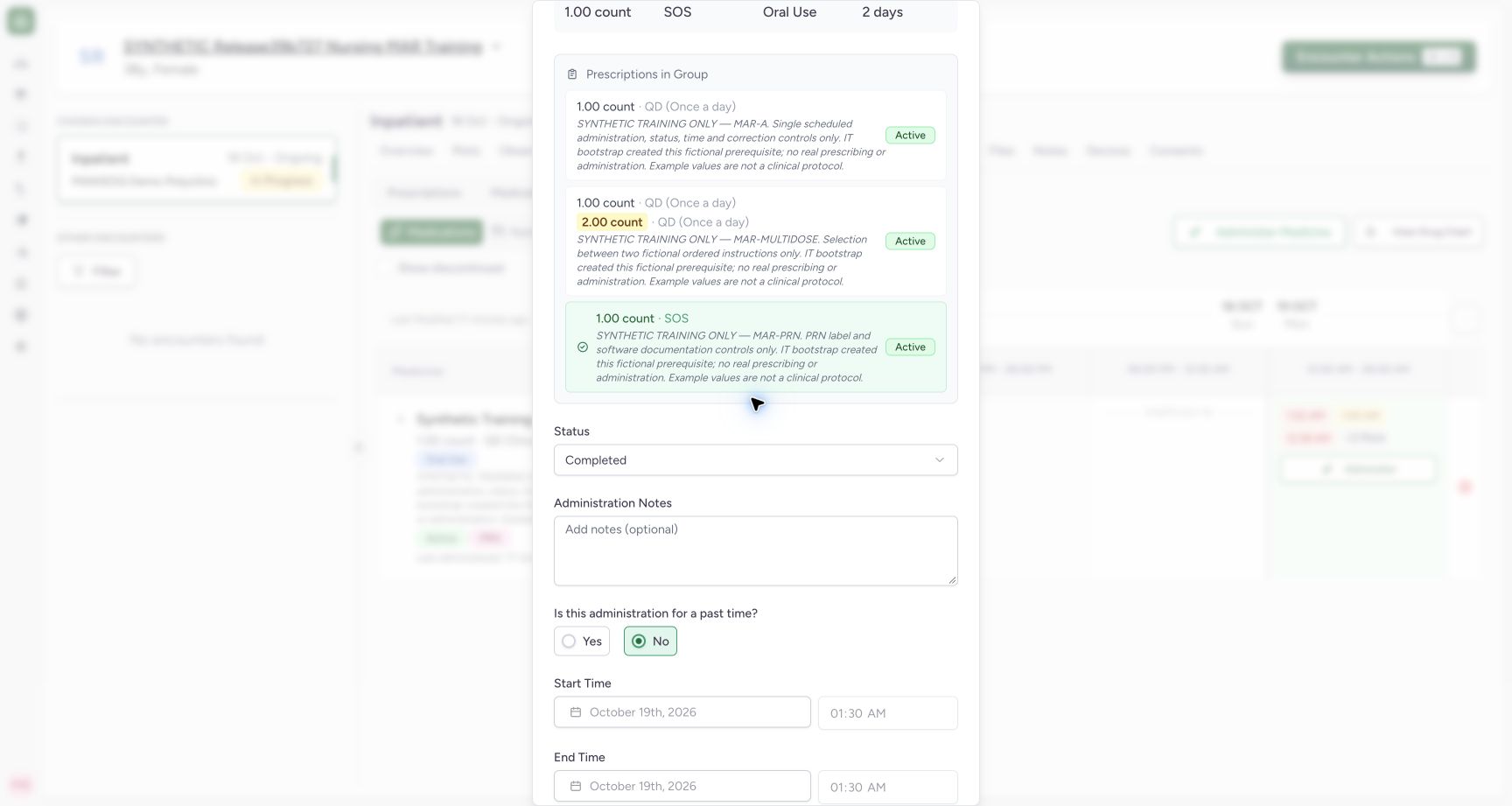
Exact committed release 39b72767 on an isolated nonproduction clone. Existing Nurse; fictional Polyclinic Inpatient software exercise only. Actual normal group selector has PRN order 3a934889… selected (disabled highlighted card), 1 count and SOS frequency. Scheduled MAR-A remains another group member. Selection of the exact request is verified independently after save; group PRN badge alone is not used as proof.
Image SHA-256 133a72a196888c187fdef1453446bb2f28395a7de9ffcd2f37b9f1801256672f
- Selected PRN prescription: The highlighted selected card is the PRN order receiving this event.
- SOS frequency: Read this selected prescription’s frequency and instructions.
 12
12Verify the saved PRN event and SOS order
Capture details
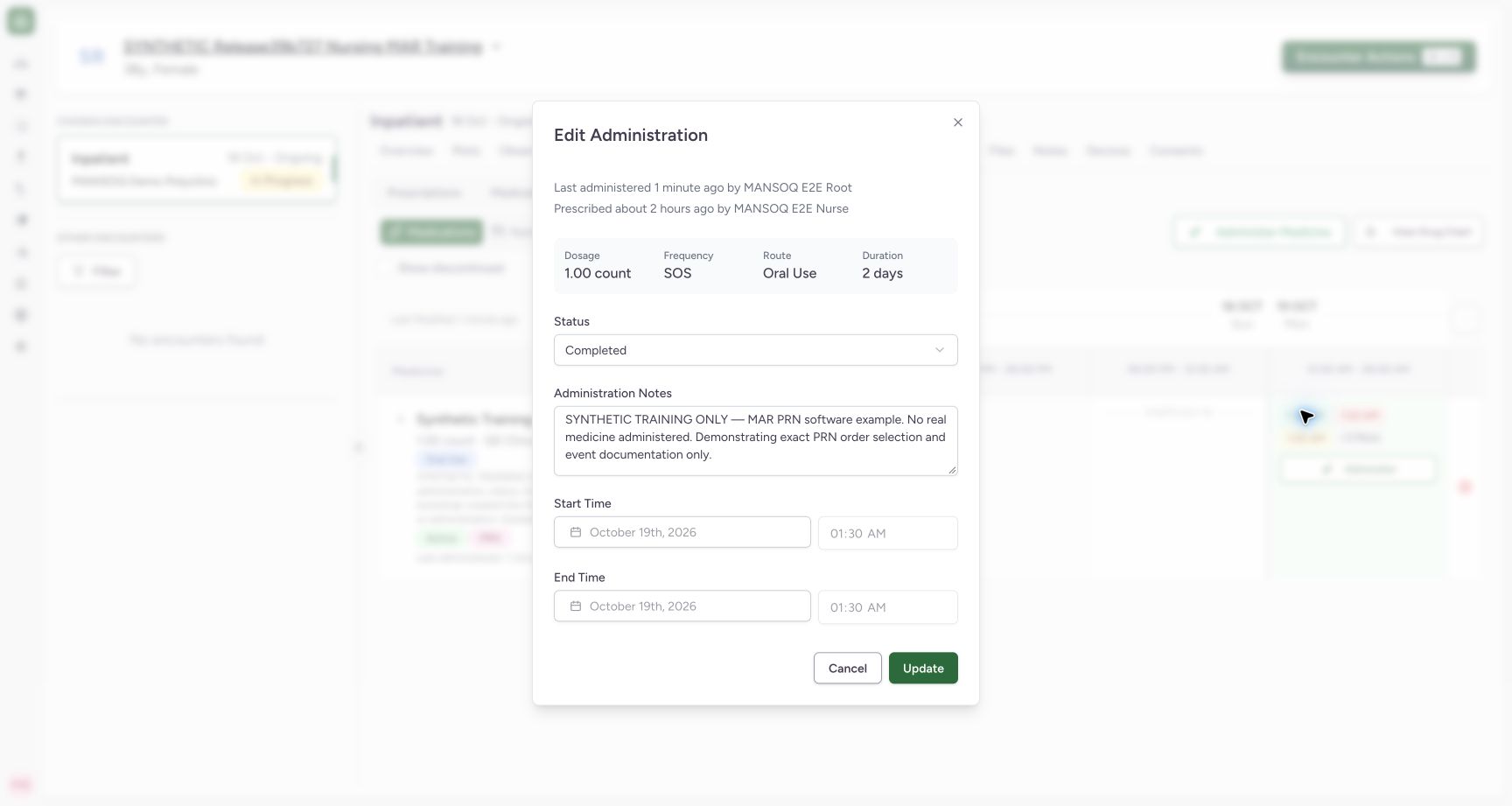
Exact committed release 39b72767 on an isolated nonproduction clone. Existing Nurse; fictional Polyclinic Inpatient software exercise only. Saved event 7cbff014… is independently associated with PRN request 3a934889…, Completed, 1 count, Oral Use, 01:30 start/end and Nurse creator/updater. Actual edit view displays SOS and its saved note. No indication or reassessment outcome is claimed.
Image SHA-256 cd1e6d665417c4635c3b66fa3101e3662c862543fb4ff243e25f134e24c916ca
- Saved PRN order frequency: This saved event belongs to the SOS order, verified by independent request ID readback.
- Persisted event note: Confirm the correct fictional PRN event context.
7 of 7 content blocks have reviewed image alignment. Missing overview or prerequisite images remain open.
Before you begin
- Confirm the intended patient, active encounter and existing medication order. This fictional product group contains scheduled, differing-dose and PRN orders; the IT prerequisite creation is separate from the Nurse event save.12
Recorded release 39b72767 · 2026-10-18T22:30:25.794Z · 1728 × 921 Verify the PRN order and SOS frequency
Capture details
Exact committed release 39b72767 on an isolated nonproduction clone. Existing Nurse; fictional Polyclinic Inpatient software exercise only. Actual normal group selector has PRN order 3a934889… selected (disabled highlighted card), 1 count and SOS frequency. Scheduled MAR-A remains another group member. Selection of the exact request is verified independently after save; group PRN badge alone is not used as proof.
Image SHA-256
133a72a196888c187fdef1453446bb2f28395a7de9ffcd2f37b9f1801256672f- Selected PRN prescription: The highlighted selected card is the PRN order receiving this event.
- SOS frequency: Read this selected prescription’s frequency and instructions.
- Use the authorized account and facility policy appropriate to the event. The example is software training only and does not determine whether a PRN medicine should be given.
 12
12Recorded release 39b72767 · 2026-10-18T22:30:38.760Z · 1728 × 921 Review the PRN event before saving
Capture details
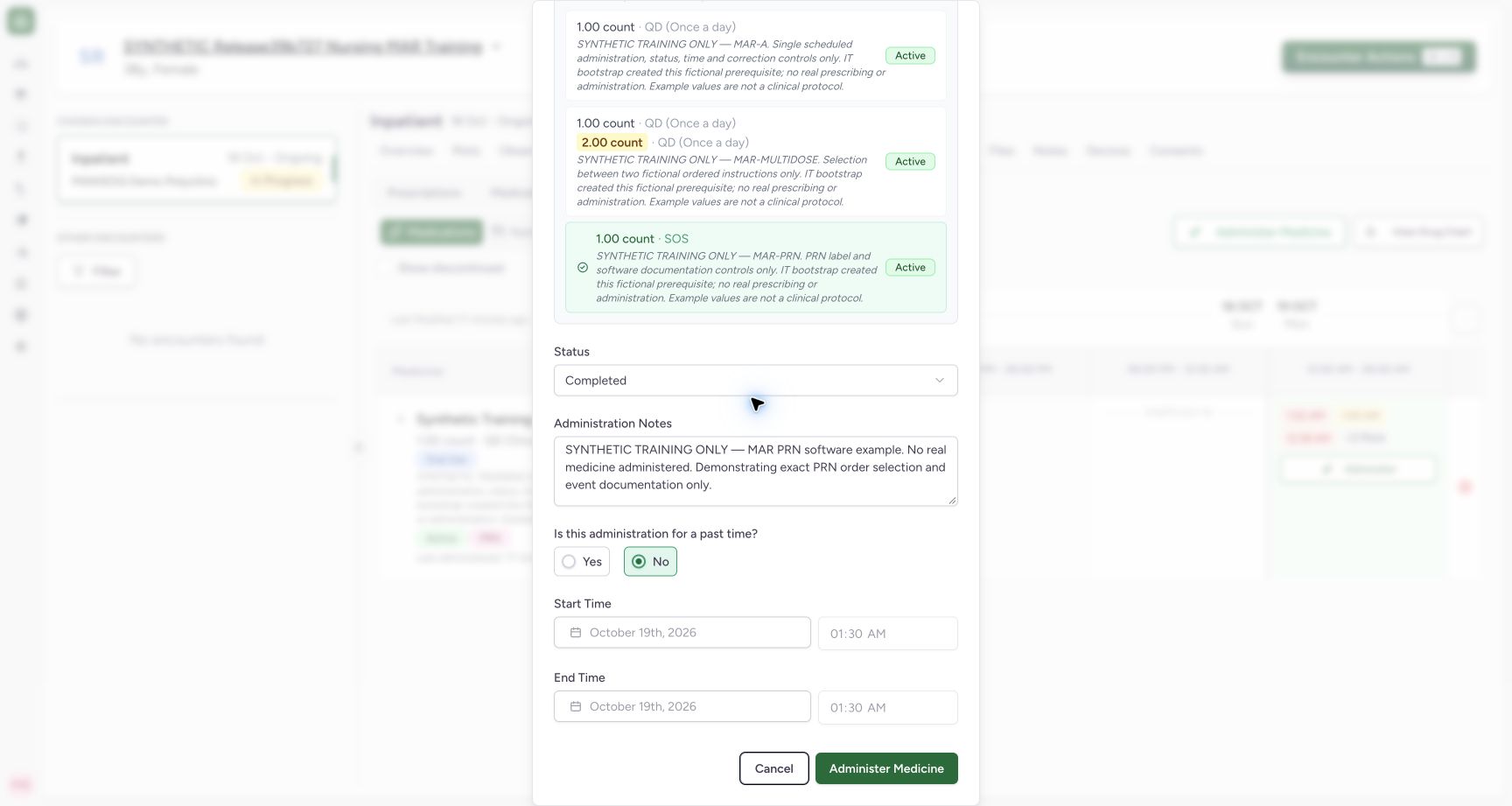
Exact committed release 39b72767 on an isolated nonproduction clone. Existing Nurse; fictional Polyclinic Inpatient software exercise only. Selected PRN order, Completed status, explicit fictional note and current-time No mode with disabled01:30 start/end. The observed full form exposes status, optional note and occurrence fields; no dedicated PRN indication or post-dose reassessment control is present.
Image SHA-256
aa2ab871465adab2c5d669cbc78694166c17c590fc8f4c38e9384deda68a711a- Optional event context: Record appropriate context under facility policy; Notes is optional in the software.
- Save the selected PRN event: Submit once after checking this exact prescription and event fields.
1. Select the individual PRN prescription
Open Administer and inspect Prescriptions in Group. Select the intended PRN prescription card; the highlighted selected card is disabled. In this example its note identifies MAR-PRN, its dosage is 1 count and its frequency is SOS. A PRN badge on the mixed product group alone does not identify which order will receive the event.
12Verify the PRN order and SOS frequency
Capture details
Exact committed release 39b72767 on an isolated nonproduction clone. Existing Nurse; fictional Polyclinic Inpatient software exercise only. Actual normal group selector has PRN order 3a934889… selected (disabled highlighted card), 1 count and SOS frequency. Scheduled MAR-A remains another group member. Selection of the exact request is verified independently after save; group PRN badge alone is not used as proof.
Image SHA-256 133a72a196888c187fdef1453446bb2f28395a7de9ffcd2f37b9f1801256672f
- Selected PRN prescription: The highlighted selected card is the PRN order receiving this event.
- SOS frequency: Read this selected prescription’s frequency and instructions.
2. Review and save the selected event
Review the selected prescription, Status and occurrence together. Administration Notes is an optional software field; record appropriate context under facility policy. The fictional example keeps Completed and current-time No, with start/end initialized at 01:30. Select Administer Medicine once and wait for the save to finish.
12Verify the PRN order and SOS frequency
Capture details
Exact committed release 39b72767 on an isolated nonproduction clone. Existing Nurse; fictional Polyclinic Inpatient software exercise only. Actual normal group selector has PRN order 3a934889… selected (disabled highlighted card), 1 count and SOS frequency. Scheduled MAR-A remains another group member. Selection of the exact request is verified independently after save; group PRN badge alone is not used as proof.
Image SHA-256 133a72a196888c187fdef1453446bb2f28395a7de9ffcd2f37b9f1801256672f
- Selected PRN prescription: The highlighted selected card is the PRN order receiving this event.
- SOS frequency: Read this selected prescription’s frequency and instructions.
12Review the PRN event before saving
Capture details
Exact committed release 39b72767 on an isolated nonproduction clone. Existing Nurse; fictional Polyclinic Inpatient software exercise only. Selected PRN order, Completed status, explicit fictional note and current-time No mode with disabled01:30 start/end. The observed full form exposes status, optional note and occurrence fields; no dedicated PRN indication or post-dose reassessment control is present.
Image SHA-256 aa2ab871465adab2c5d669cbc78694166c17c590fc8f4c38e9384deda68a711a
- Optional event context: Record appropriate context under facility policy; Notes is optional in the software.
- Save the selected PRN event: Submit once after checking this exact prescription and event fields.
3. Inspect the saved PRN association
Open the saved 1:30 AM event. Confirm its SOS frequency, dosage, saved note, status and occurrence. Independent normal Nurse and Doctor reads confirmed that this event belongs to the PRN request, with 1 count and Nurse creator/updater. A collapsed group header may still show another scheduled order’s summary, so inspect the event itself rather than inferring its association from that summary.
12Verify the saved PRN event and SOS order
Capture details
Exact committed release 39b72767 on an isolated nonproduction clone. Existing Nurse; fictional Polyclinic Inpatient software exercise only. Saved event 7cbff014… is independently associated with PRN request 3a934889…, Completed, 1 count, Oral Use, 01:30 start/end and Nurse creator/updater. Actual edit view displays SOS and its saved note. No indication or reassessment outcome is claimed.
Image SHA-256 cd1e6d665417c4635c3b66fa3101e3662c862543fb4ff243e25f134e24c916ca
- Saved PRN order frequency: This saved event belongs to the SOS order, verified by independent request ID readback.
- Persisted event note: Confirm the correct fictional PRN event context.
PRN teaching scope on this form
The observed event form provides dosage information, group selection, status, an optional note and occurrence fields. It does not provide dedicated PRN indication, clinical-performer, witness, verifier or post-dose reassessment controls. This lesson therefore qualifies order selection and event documentation only; it does not claim a complete PRN clinical safety or reassessment pathway. The known reversed author captions on this release are not actor proof.
12Verify the PRN order and SOS frequency
Capture details
Exact committed release 39b72767 on an isolated nonproduction clone. Existing Nurse; fictional Polyclinic Inpatient software exercise only. Actual normal group selector has PRN order 3a934889… selected (disabled highlighted card), 1 count and SOS frequency. Scheduled MAR-A remains another group member. Selection of the exact request is verified independently after save; group PRN badge alone is not used as proof.
Image SHA-256 133a72a196888c187fdef1453446bb2f28395a7de9ffcd2f37b9f1801256672f
- Selected PRN prescription: The highlighted selected card is the PRN order receiving this event.
- SOS frequency: Read this selected prescription’s frequency and instructions.
12Review the PRN event before saving
Capture details
Exact committed release 39b72767 on an isolated nonproduction clone. Existing Nurse; fictional Polyclinic Inpatient software exercise only. Selected PRN order, Completed status, explicit fictional note and current-time No mode with disabled01:30 start/end. The observed full form exposes status, optional note and occurrence fields; no dedicated PRN indication or post-dose reassessment control is present.
Image SHA-256 aa2ab871465adab2c5d669cbc78694166c17c590fc8f4c38e9384deda68a711a
- Optional event context: Record appropriate context under facility policy; Notes is optional in the software.
- Save the selected PRN event: Submit once after checking this exact prescription and event fields.
12Verify the saved PRN event and SOS order
Capture details
Exact committed release 39b72767 on an isolated nonproduction clone. Existing Nurse; fictional Polyclinic Inpatient software exercise only. Saved event 7cbff014… is independently associated with PRN request 3a934889…, Completed, 1 count, Oral Use, 01:30 start/end and Nurse creator/updater. Actual edit view displays SOS and its saved note. No indication or reassessment outcome is claimed.
Image SHA-256 cd1e6d665417c4635c3b66fa3101e3662c862543fb4ff243e25f134e24c916ca
- Saved PRN order frequency: This saved event belongs to the SOS order, verified by independent request ID readback.
- Persisted event note: Confirm the correct fictional PRN event context.
Source evidence
Every citation uses this exact committed version. The private source repository requires access.
- repositories/platform/mansoq-web/src/components/Medicine/MedicationAdministration/MedicineAdminForm.tsx:82 ·
39b7276732f88bc07ad0abb61619f7aafe3c9e14Source file checksum
b6002675d4d8d1612494006f390203dd134699ab5b3d44876ed169db3e681e3a - repositories/platform/mansoq-web/src/components/Medicine/MedicationAdministration/MedicineAdminDialog.tsx:84 ·
39b7276732f88bc07ad0abb61619f7aafe3c9e14Source file checksum
c6ccd39c46d4093d346e97987eebd9dd1b51ffae1c8688f5305a7eed5336d6f2